302688 - Weather Station Bearware - Free user manual and instructions
Find the device manual for free 302688 Bearware in PDF.


User questions about 302688 Bearware
0 question about this device. Answer the ones you know or ask your own.
Ask a new question about this device
Download the instructions for your Weather Station in PDF format for free! Find your manual 302688 - Bearware and take your electronic device back in hand. On this page are published all the documents necessary for the use of your device. 302688 by Bearware.
USER MANUAL 302688 Bearware
natural_image
Red stylized graphic of a bear and a pig (no text or symbols)BEARWARE
Weather Station With Projection
Mod.-Nr.: 302688
- Deutsch .... 3
- English....16
- Français 30
- Italiano 44
- Español....58
Inhaltsverzeichnis
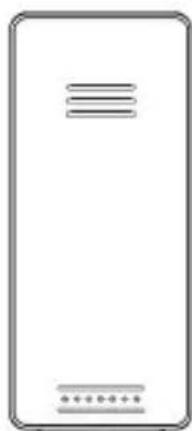
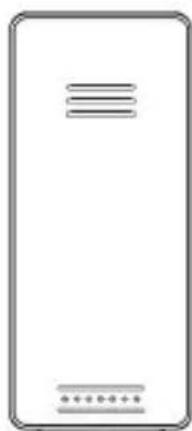
Wireless Outdoor Sensor
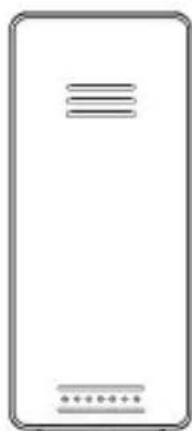
natural_image
Blank rectangular device with three horizontal lines and a dotted bottom line at the bottom (no text or symbols)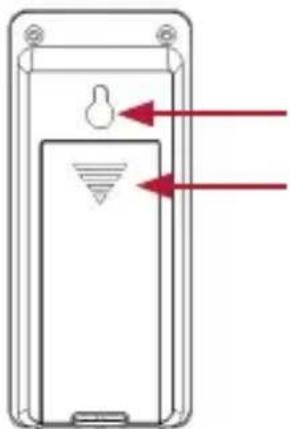
natural_image
Diagram of a mobile phone casing with red arrows pointing to internal components (no text or symbols)text_image
DAY 10 19 D 6 Mnatural_image
Three black arrows pointing in different directions on a white background (no text or symbols)text_image
Weather forecast illustrations showing sun, cloud, rain, and moon cycles with directional arrows and weather iconsWettervorhersage:
- Scope of supply .... 17
- Technical data....17
- Additional instructions for this device....18
- Product details....19
- Commissioning 21
- DCF signal 21
- Display 22
- Basic settings 24
8.1 Outdoor sensor temperature alarm 26
8.2 Alarm settings....26 - Stored data 27
- USB Charger....27
- Projection 27
- Backlight 27
- Safety instructions and disclaimer....28
- Disposal instructions .... 29
- Instructions for battery disposal....29
Thank you for choosing a BEARWARE product. Please read the following user manual carefully so that you can get the most from the product you have purchased.
1. Scope of delivery
- Weather station
- Outdoor sensor
- 5V 1.2A DC coaxial power adapter
- User manual
2. Technical data
| Power supply | Weather station: 2 x 1.5V AAA batteries, alternatively via DC coaxial power adapter 5V, 1.2A (----(o---+) Outdoor sensor: Two 1.5V AAA batteries |
| Inner temperature range | -9.9°C (14°F) to 50°C (122°F) |
| Outdoor temperature range | -40°C (-40°F) to approx. 70°C (158°F) |
| Frequency 433,92 MHz | |
| Transmitting power -23,22 dBm | |
| Accuracy +-1°C | |
| Number of buttons 6 | |
| USB port Charging port, max. 1000mA | |
| Features | Day display in 7 different languages2 alarm times12/24 hour format + DCF signalSnooze functionMin/Max temperature valuesWireless outdoor sensorWeather forecast functionBacklightUSB charging functionWall or stand mountingTemperature display in °C and °FDimming function (3 levels) |
3. Additional information about this device
- Do not use this device if it is damaged. Do not expose the base station to moisture or direct sunlight.
- Before using the product, ensure that the available supply voltage corresponds to the operating voltage indicated on the specification plate.
- Before using the product, ensure that the cables are not damaged.
- The device must be connected to an easily accessible socket so that it can be disconnected in case of an emergency.
- This product is suitable only for use with the supplied mains adapter or 1.5V AAA batteries.
- This device is intended only for private use and not for medical purposes or for public information.
CAUTION!
Keep the batteries and the device out of the reach of children. Batteries contain harmful acids. Weak batteries should be replaced as soon as possible to prevent leakage! Never use new and old batteries or batteries of different types together. Never throw batteries into a fire and do not short-circuit them. Do not recharge the batteries or take them apart. There is a risk of explosion!
4. Product details
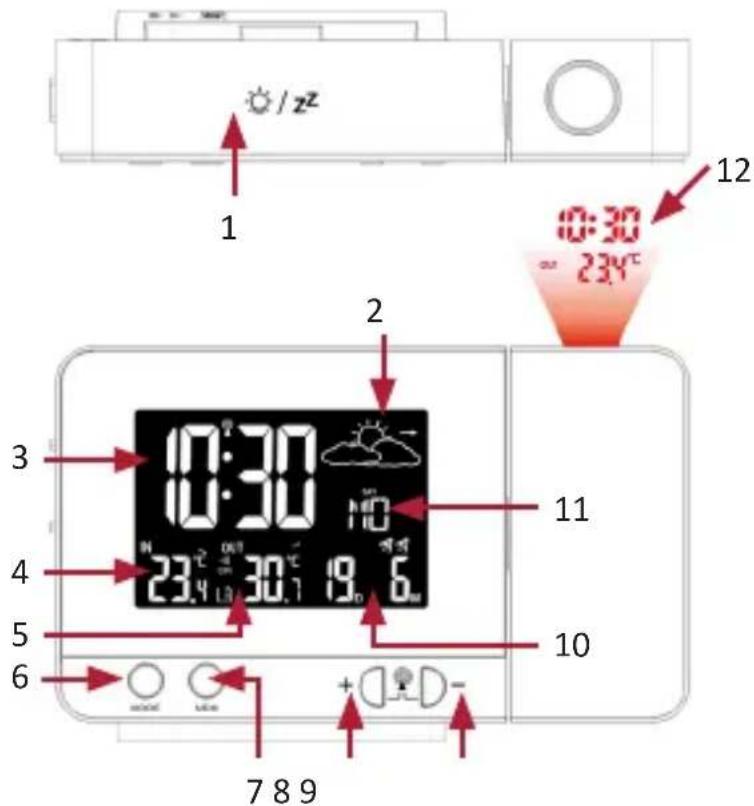
text_image
1 2 3 4 5 6 7 8 9 0:30 23.4°C 19.0 10 11 12 0:30 23.4°C 19.0 10 7 8 9| 1 "SNOOZE" button (snooze function) |
| 2 Weather forecast diagram |
| 3 Time |
| 4 Indoor temperature |
| 5 Outdoor temperature |
| 6 "MODE" button |
| 7 "MEM" button |
| 8 "+" button |
| 9 "-" button |
| 10 Calendar display (day and month) |
| 11 Weekday display |
| 12 Projector |
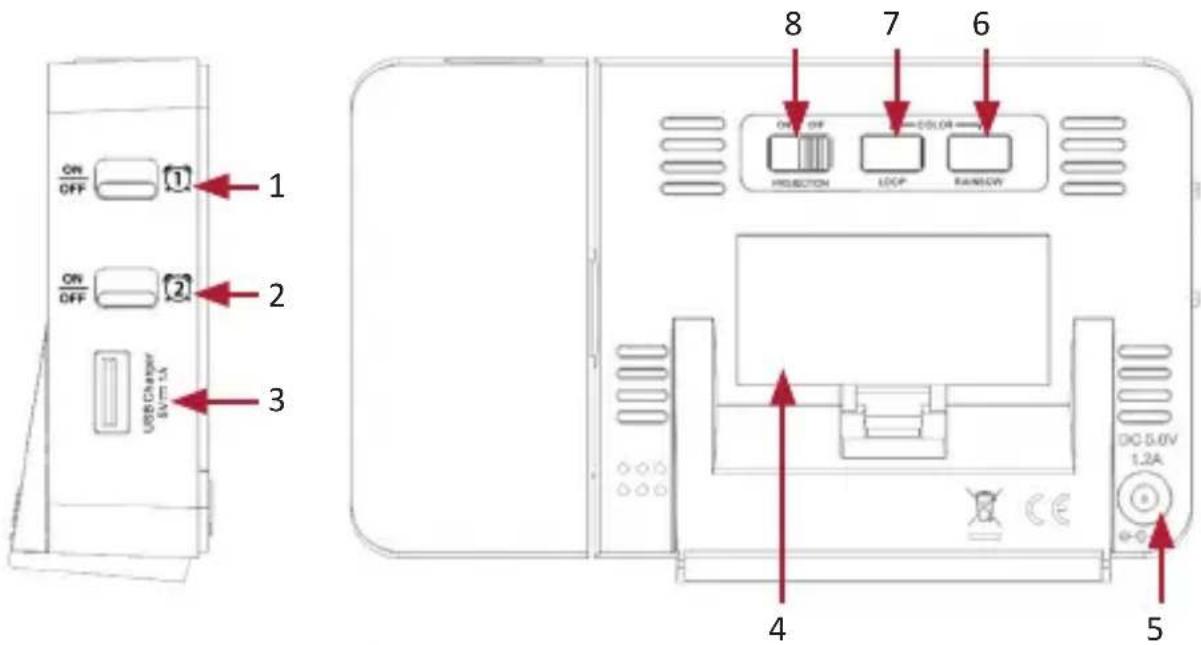
text_image
ON OFF ① ON OFF ② USB Charger EV T-1A ③ 8 7 COLOR PROJECTION LOOP RANLOW 4 5Wireless Outdoor Sensor
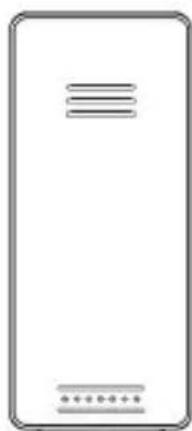
natural_image
Blank rectangular device with three horizontal lines and a dotted bottom line at the bottom (no text or symbols)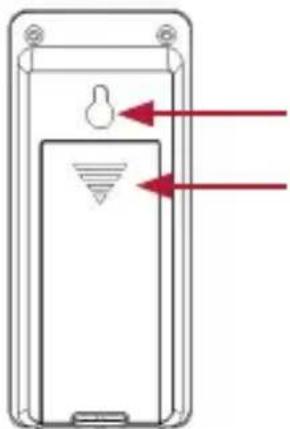
natural_image
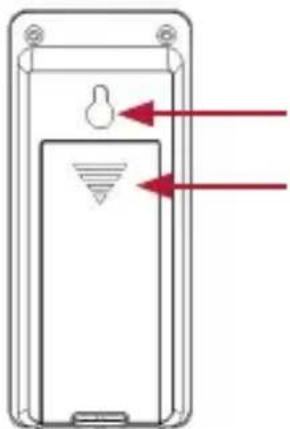
Diagram of a mobile phone casing with red arrows pointing to internal components (no text or symbols)Bracket for wall mounting
Battery compartment
| 1 Alarm 1 "On/Off" switch |
| 2 Alarm 2 "On/Off" switch |
| 3 USB charging port (max 1000mA) |
| 4 Battery compartment |
| 5 DC coaxial socket |
| 6 "RAINBOW" button |
| 7 "LOOP" button |
| 8 Switch projection On/Off |
5. Commissioning
Take the product out of the package and remove all the packaging material. Open the battery compartment of the outdoor sensor and insert two 1.5V AAA batteries. Then open the battery compartment on the back of the main unit and insert two 1.5V AAA batteries. Alternatively, you can use the supplied 5V/1.2A coaxial power adapter for operation. For this purpose, plug the mains adapter into a properly installed socket and then connect it to the coaxial connector of the main unit.

Note: If you want to use the device with batteries, then the backlight is not permanently switched on. The backlight of the display is permanently switched on only when operated with the enclosed power adapter.
Then the weather station starts to connect with the outdoor sensor. Make sure that both devices are within each other's range. The connection symbol "flashes in the "Outdoor temperature display" of the main unit. If the main unit cannot establish a connection with the outdoor sensor within 3 minutes, then it stops searching. The connection icon stops flashing and the temperature display shows "--." °C" on the display.
In most cases, the connection cannot be established due to specific factors such as reinforced walls or a too great distance between the sensor and the main unit. In this case, position the sensor and the main unit closer to each other. To restart scanning, press and hold the "+" button on the front of the main unit for 3 seconds until the connection symbol on the display starts flashing. The weather station will now automatically scan for the outdoor sensor again. To receive the DCF signal manually, press the "+" and "-" buttons simultaneously for about 3 seconds. The "💡" icon starts flashing in the time display. This means that the DCF signal has started to receive the time.
6. DCF signal
The DCF signal is a time signal, which is sent out by one of the most accurate clocks in the world. It is located near Frankfurt am Main. Under ideal conditions, your weather station can receive this signal from a distance of up to 1500 km.
If the weather station has detected the signal, then it displays Central European Time, the date, and the day of the week. The DCF symbol "💡" is then shown on the display.
If the attempt to receive a signal fails, then the weather station stops scanning. The DCF symbol disappears from the display.
You can re-activate the scanning by pressing the "+" and "-" buttons simultaneously for about 3 seconds until the DCF symbol is shown once again on the display. You can cancel the manual scanning by pressing the "-" button for about 2 seconds during scanning.
Alternatively, you have the option of manually setting the time. Further information on this topic can be found in the "Basic settings" section.
7. Display
Time display:
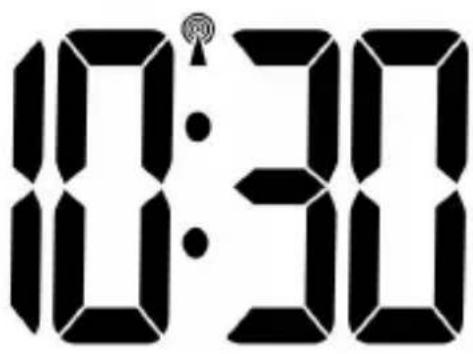
text_image
10:30The time can be displayed in a 12-hour or 24-hour format.
Date and day:
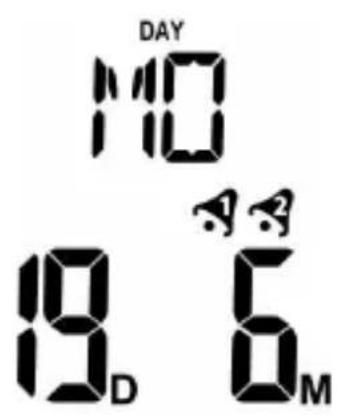
text_image
DAY 10 19 D 6 MThe weather station has a date and day display. The date is displayed in the lower section and the day in the upper section. The pre-configured language is German. If you want to change the language, please refer to the section "Basic settings" for more information.
DCF symbol:
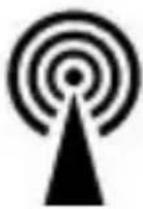
The radio tower symbol indicates that the DCF signal has been successfully received. The weather station synchronises the time every night. The symbol begins flashing during synchronisation. If the time has been successfully received, then the symbol glows continuously until the next synchronisation.
Trend display:

natural_image
Three black arrows pointing in different directions, no text or symbols presentThe trend display changes every hour. If can either be increasing, constant or decreasing, provided the air pressure in the measurement period changes by at least 2 hPa (=0.06 inHg).
Weather forecast:
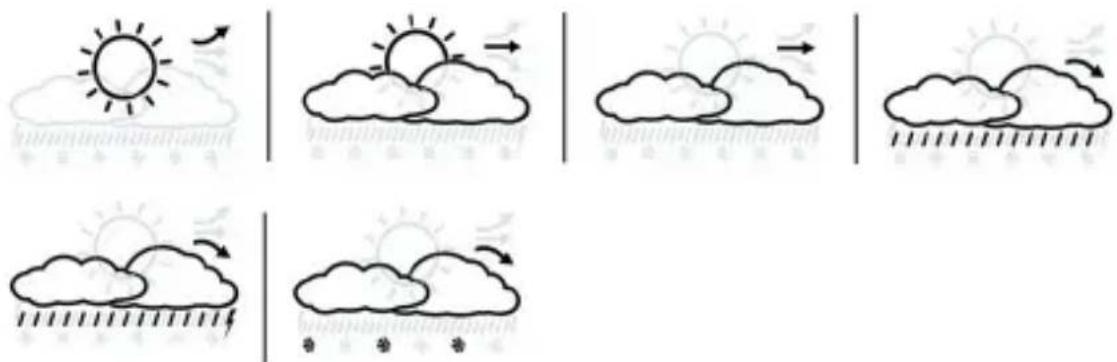
text_image
Weather forecast illustrations showing sun, cloud, rain, and moon cycles with directional arrows and weather iconsThe weather station calculates a weather forecast for about 12 hours, which is based on the air pressure trend. As expected, this forecast cannot be compared with satellites or high-performance computers. The forecast shows only an approximation of the current trend.
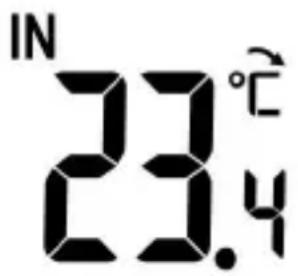
Indoor temperature display:
text_image
IN 23.4°CThe indoor temperature is measured by the base station and is shown with an accuracy of one tenth of a degree. The configured temperature unit is displayed to the right of the measured value. The temperature unit can be changed between °C and °F. This has to be configured in the basic settings.
The measured value should not be below the minimum value (-9.9°C / 14°F) or above the maximum value (50°C / 122°F).
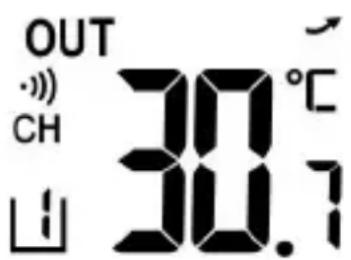
Outdoor temperature display:
text_image
OUT CH 30.1°C 山The outdoor temperature is measured by the outdoor sensor and shown with an accuracy of one tenth of a degree. The configured temperature unit is displayed to the right of the measured value. The temperature unit can be changed between °C and °F. This has to be configured in the basic settings.
The measured value should not be below the minimum value (-40°C / -40°F) or above the maximum value (70°C / 158°F).
8. Basic settings:
Note: Firmly touching the top of the housing will switch on the backlight. After the "SNOOZE/SLEEP" button is released, it switches off again after 5 seconds. Please note that the base station does not respond to 2 buttons at the same time. It is therefore advisable to press only one button.
Press and hold the "MODE" button for about 3 seconds to configure the basic settings. With the "+" and "-" buttons you can change the values accordingly.
By briefly pressing the "MODE" button in the time settings, you can confirm the entry and proceed to the next option. In this way, you can change and customise the following settings in the sequence mentioned below:
- Year
- Month
Day
• Day/month sequence - Language setting - To set the day on the display. The following codes can be configured and selected using the "UP" and "DOWN" buttons: GE (German), DA (Danish), SP (Spanish), DU (Dutch), FR (French), IT (Italian), EN (English)
- Time zone - Note: If you set the time zone, for example, to +01 and the weather station is actuated using the DCF-signal, then the clock displays one hour later than the DCF-signal.
• 12/24-hours display
• Hour - Minute
• °C / °F - Weather forecast - The weather station calculates a weather forecast based on changes in the air pressure. Since data regarding changes in air pressure is not available when the device is switched on for the first time, the weather forecast at this time is incidental. The weather station will be able to calculate a forecast only after a couple of days. To do this, select a forecast using the "UP" and "DOWN" buttons. It is best to select a forecast from the current weather report.
8.1 Outdoor sensor temperature alarm
When the outdoor temperature is low, or in the range of -1^ to 3^ , the frost alarm is activated and a snowflake symbol is shown on the display. If the temperature is out of measurement range, the display shows "LL.L" if the temperature is too low and "HH.H" if the temperature is too high.
8.2 Alarm setting
The weather station can store up to 2 alarm settings, which can be turned on and off separately at the side using a flip switch. By pressing the "MODE" button you can view the configured alarm times. The alarm times are shown at the place where the date is displayed normally.
Setting the alarm
Press and hold the "MEM" button for about 3 seconds to access the alarm settings. The alarm time is now displayed instead of the date. You can make the desired settings using the "+" and "-" buttons. Then press the "MEM" button again to save the alarm setting. You can configure these settings using Alarm 1 (A1) and Alarm 2 (A2). Confirm your entry using the "MEM" button.
Turning the alarm on and off
After setting the alarm successfully, you can turn it on or off using the flip switch located on the side.
Muting the alarm
When the alarm is activated at the configured time, the backlight also turns on automatically. The alarm is active for 2 minutes before it turns off automatically. If the alarm does not turn off within these 2 minutes, then it repeats automatically after 24 hours.
Press the "SNOOZE/LIGHT" button to cancel the alarm. If a snooze symbol is shown on the display, this means that the snooze function is activated and the alarm will go off again in 5 minutes.
Place the flip switch on the side of the device to the "OFF" position to turn off the alarm.
9. Stored data
Maximum and minimum temperatures
Press the "MEM" button to view the indoor and outdoor temperatures. The respective maximum readings are now shown on the display. Press the "MEM" button again to view the minimum measured values. After 5 seconds, the current reading is displayed.

Note: The min/max temperatures are measured from the total operating time of the weather station. Press and hold the "-" key for approx. 3 seconds to delete the stored maximum/minimum values.
10. USB Charger
A USB port is located on the left outer side of the weather station. Using this USB port, for example, you can charge your mobile phone or MP3 player. Note that the USB port has only one output and no inputs.
11. Projection
The projection is permanently switched on when operating with the power adapter. If you use only batteries, the projection switches on for 15 seconds when you press the "SNOOZE/LIGHT" button. The effective projection distance is 1-3 metres.
Press and hold the „-“ button about 3 seconds to rotate the projection 180°.
The projection shows the current time and the indoor/outdoor temperature alternately.
12. Backlight
If you operate the device with batteries, you can switch on the backlight for 15 seconds by pressing the "SNOOZE/LIGHT" button. Once the power adapter is connected to the weather station, the backlight is switched on permanently.
You can dim the backlight by pressing the "-" button (3 levels).
2 more buttons are provided at the back of the weather station to adjust the backlight.
Press the "LOOP" button to change the backlight colour automatically. Press the button again to disable the function again.
To select a preset colour as the display background colour, press the "RAINBOW" button at the back of the weather station until the desired colour is shown on the display.

Caution!
13. Safety instructions and disclaimer
Never try to open the device to carry out repairs or modifications. Avoid contact with the mains voltage. Do not short-circuit the product. The device is not waterproof, therefore please use it only in dry surroundings. Protect it from high humidity, water and snow. Do not expose the appliance to high temperatures.
Do not expose the appliance to sudden changes in temperature or strong vibrations, as this could damage the electronic components. Check the appliance for any damage before using it. The device should not be used if it has been subject to impact or has been damaged in any other manner. Please comply with the local regulations and restrictions. Do not use the device for purposes other than those described in the user manual. This product is not a toy. Keep it out of the reach of children or mentally disabled persons.
Any repair or modifications to the device, which are not carried out by the original supplier, will void any warranty and guarantee claims. The appliance should be used only by persons who have read and understood this user manual. The specifications of the appliance may be changed without special prior notice.

14. Disposal instructions
In line with the European WEEE directive, electrical and electronic devices should not be disposed of along with domestic waste. Their components must be sent separately for recycling or disposal, as improper disposal of toxic and dangerous components may permanently damage the environment. According to the electrical and electronic equipment act (ElektroG), you are obliged (as a consumer) to return (free of charge) all electrical and electronic devices to the manufacturer, the point of sale, or public collection points at the end of their service life. The relevant local laws regulate the details in this regard. The symbol on the product, in the user manual or/and the packaging refers to these regulations.
With this manner of sorting, recycling and disposal of used devices, you make an important contribution towards protecting our environment.

15. Instructions for battery disposal
In conjunction with the sale of batteries along with the supply of devices that include batteries, the supplier is obliged to point out the following to the customer: The customer is legally obliged to return used batteries. He can return used batteries which the supplier offers or has offered as new batteries in his assortment free of charge to the supplier's dispatch warehouse (shipping address). The symbols shown on the batteries mean the following: Pb = battery contains more than 0.004 percent lead by weight, Cd = battery contains more than 0.002 percent cadmium by weight, Hg = battery contains more than 0.0005 percent mercury by weight.

The symbol of the crossed-out dustbin means that the battery must not be disposed of in household waste.

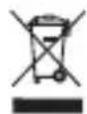
WEEE directive 2012/19/EU WEEE Register no.: DE 67896761
The company WD Plus GmbH hereby certifies that the device 302688 complies with the fundamental requirements and all other relevant stipulations of the guideline 2014/53/EU. A complete conformity statement can be obtained from: WD Plus GmbH, Wohlenbergstraße 16, 30179 Hannover, http://downloads.ganzeinfach.de/search/model/302688
Table des matières
Wireless Outdoor Sensor
natural_image
Blank rectangular device with three horizontal lines and a dotted bottom line at the bottom (no text or symbols)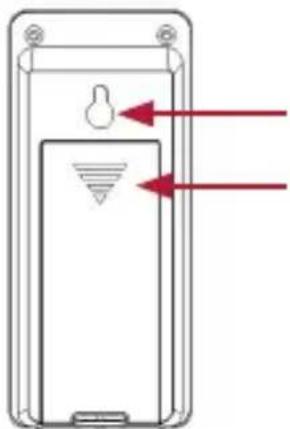
natural_image
Diagram of a mobile phone casing with red arrows pointing to internal components (no text or symbols)natural_image
Three black arrows pointing in different directions on a white background (no text or symbols)text_image
Weather forecast illustrations showing sun, cloud, rain, and moon cycles with directional arrows and weather iconsWireless Outdoor Sensor
natural_image
Blank rectangular device with three horizontal lines and a dotted bottom line at the bottom (no text or symbols)