301674 - Controller CSL - Free user manual and instructions
Find the device manual for free 301674 CSL in PDF.


| Product Type | Wireless Gamepad / Controller |
| Brand | CSL |
| Model | 301674 |
| Compatibility | PlayStation 3, Microsoft Windows XP/Vista/7/8/8.1/10 |
| Connection Type | Wireless 2.4 GHz via USB receiver |
| Power Supply | Internal rechargeable battery 380 mAh, charging via mini-USB cable |
| Number of Buttons | 14 buttons including 2 analog sticks, D-pad, HOME button |
| Main Features | Dual vibration, Turbo mode, energy-saving mode, analog/digital switch |
| Package Contents | Controller, USB receiver, mini-USB cable, driver CD, instruction manual |
| Driver Installation | Required on PC via included CD |
| Maintenance and Cleaning | Clean with soft dry cloth; do not use harsh chemicals |
| Safety | Do not open, do not expose to moisture or extreme temperatures, keep out of reach of children |
| Batteries and Recycling | Internal battery; do not dispose with household waste; comply with WEEE directive |
| Warranty | Any unauthorized repair voids the warranty |
Frequently Asked Questions - 301674 CSL
User questions about 301674 CSL
0 question about this device. Answer the ones you know or ask your own.
Ask a new question about this device
Download the instructions for your Controller in PDF format for free! Find your manual 301674 - CSL and take your electronic device back in hand. On this page are published all the documents necessary for the use of your device. 301674 by CSL.
USER MANUAL 301674 CSL
natural_image
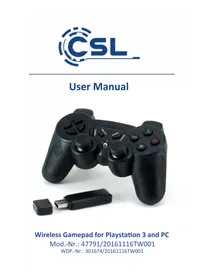
Black game controller with control buttons and a USB flash, no visible text or symbols on the device itself.Wireless Gamepad for Playstation 3 and PC
WRL GAMEPAD FOR PS3-PC
15.08.
Thank you for having chosen this CSL product and for placing your trust in our company. Please read this manual carefully before installation to ensure your long-term enjoyment of this product. For future reference, please keep this manual.
1 Scope of delivery
- Gamepad
• 2.4 GHz radio receiver - Mini USB charging cable
- Driver CD
- User manual
2 Technical specifications
| Connection 2.4 GHz USB receiver | |
| Power supply internal battery 380mAh, rechargeable via USB | |
| Buttons • 14 buttons• 2 analogue sticks• control pad• HOME button | |
| Features • Dual vibration function• Turbo mode• automatic energy-saving mode | |
| Compatibility PS3, | Microsoft Windows XP / Vista / 7 / 8 / 8.1 / 10 |
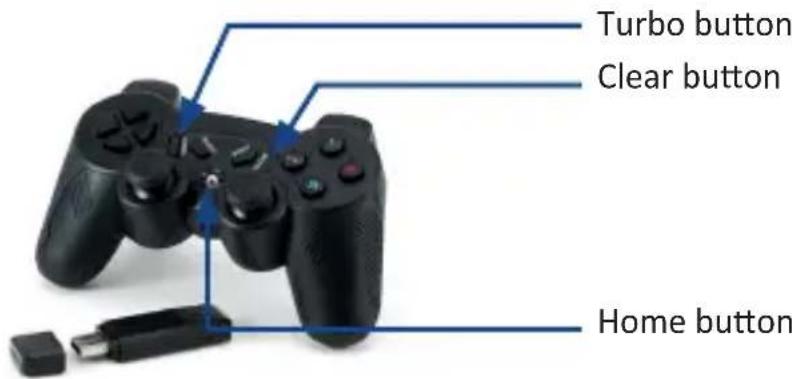
3 Product details
4 Key assignment
HOME button:
PC: Switch between analogue and digital mode for buttons and control pad. The LED display glows red in analogue mode.
PS3: It is used for the connection of wireless gamepads and has the function of the PS button – if connected to a PS3.
Turbo button:
Press the Turbo button and any other button to provide those with a pulse. You can provide as many buttons as you wish with the “Turbo” mode. Repeat the process to remove this effect from the chosen button.
At an activated Turbo mode no long but a lot of signals in quick succession are being created.
Clear button:
The "Clear" button causes the removal of the Turbo effect from all buttons at once.
5 Charging process
Please fully charge the gamepad before the first usage. Therefore connect the included charging cable to the gamepad.
A suitable power source can be for example a Playstation 3, a computer or an USB charging adapter. As soon as the gamepad is charging it is shown on the LED display.
Note: The included connection cable is exclusively suitable for charging. It does not replace the function of the USB receiver.
6 Dual vibration function
The gamepad has two strong vibration motors. Due to the effect of vibration, is the control represented very realistically.
Note: Please bear in mind that the vibration only works if the game or programme is supporting this function and if the corresponding function has been activated in the gaming options.
You can test the dual vibration function on your computer. Therefore call up the gamepad's settings in the "system control" under "devices and printer" (Windows Vista / 7 / 8) respectively under "game controller" (Windows XP).
7 Configuration
Some PC-Games require a custom configuration of the gamepad. Please check the configuration in the Windows options for the controller, then the settings in the game (some have an external configuration file) or use an additional emulation-software for a custom configuration.
8 Driver installation (PC only)
To be able to use the complete range of functions the installation of the drivers is necessary.
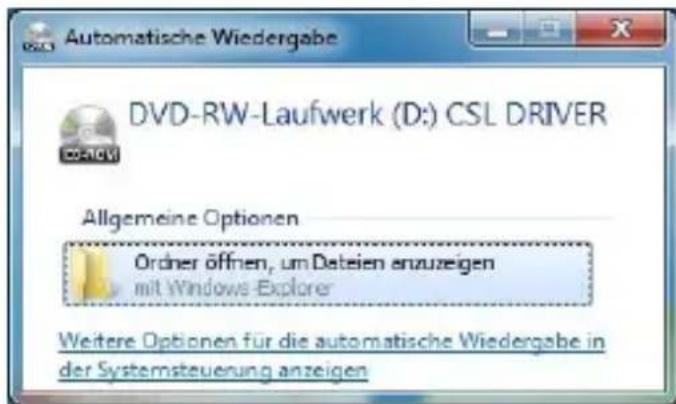
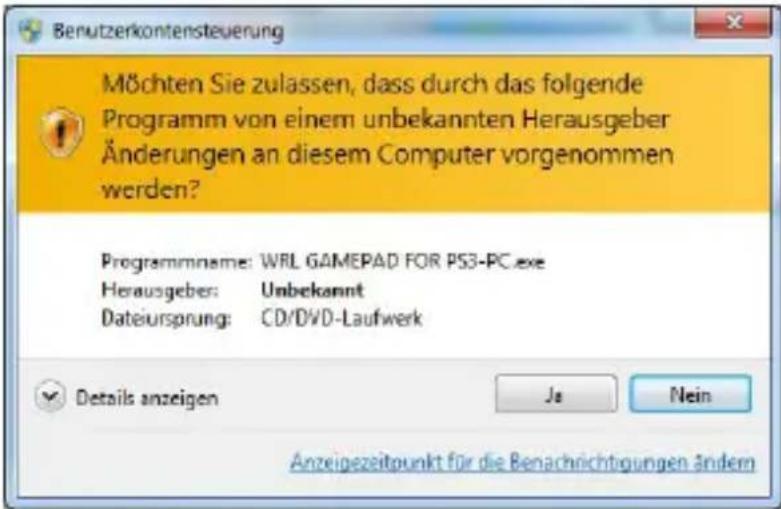
Insert the driver CD into the open drive and close it again. The automatic playback opens. Clicking once on “Open folder to view files” the CD contents is displayed.
Start "WRL GAMEPAD FOR PS3-PC.exe".

WRL GAMEPAD FOR PS3-PC
15.08..
You will be asked to confirm this by clicking "Yes".
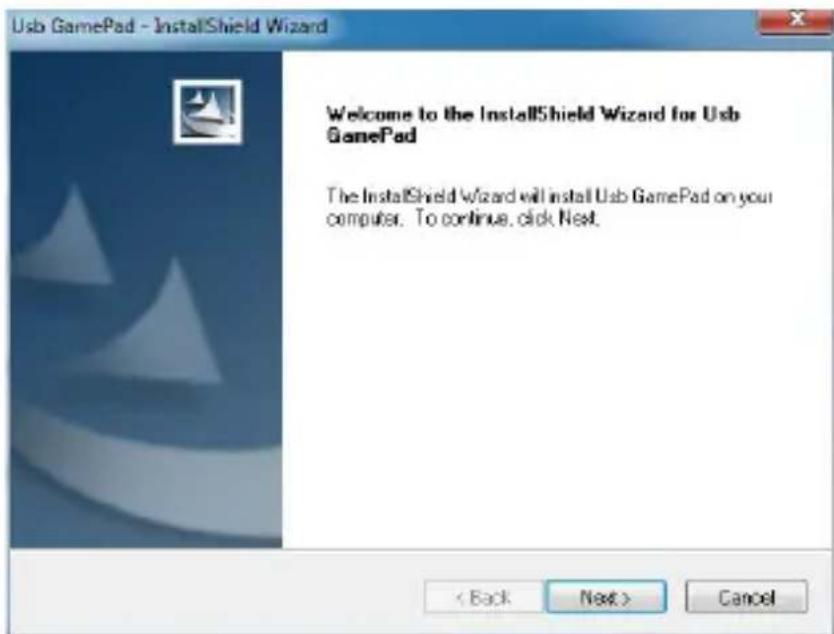
The installation wizard opens. Please click the "Next" button to start the installation.
To complete the installation click the "Finish" button.
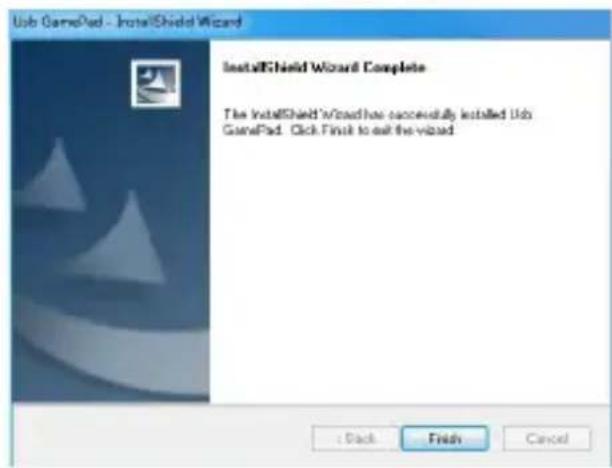
The driver has been completely installed.
9 Connection of the gamepad
Connect the USB receiver to a free USB port of your Playstation 3 or of your computer. The red LED on receiver starts to flash.
Keep the "HOME" button on the gamepad pressed for approx. 3 seconds. The LEDs on the gamepad starts to blink. The connection is now established.
The LED display turns off as soon as the connection to the receiver has been established successfully.
10 Safety instructions and liability disclaimer
Never try to open the device to carry out repairs or conversions. Avoid contact with mains voltages. Do not short-circuit the product. The device is not certified for use in the open air; only use it in dry conditions. Protect it from high humidity, water and snow. Keep it away from high temperatures. Do not subject the device to sudden changes in temperature or heavy vibration as this might damage electronic components. Examine the device for damage before using it. The unit
should not be used if it has received an impact or has been damaged in any other way. Please observe national regulations and restrictions. Do not use the device for purposes other than those described in the instructions. This product is not a toy. Keep it out of the reach of children or mentally impaired persons. Any repair or alteration to the device not carried out by the original supplier, will invalidate the warranty or guarantee. The product may only be used by persons who have read and understood these instructions. The device specifications may change without any separate prior notice to this effect.
11 Disposal instructions
Electrical and electronic devices may only be disposed of in accordance with the European WEEE Directive and not with household rubbish. Components must be disposed of or recycled separately as dangerous, toxic elements can inflict sustained damage on the environment if they are disposed of incorrectly. As a consumer, you are bound by the Electrical and Electronic Devices Act (ElektroG) to return electrical and electronic goods free of charge at the end of their useful life to the manufacturer, the place of purchase or to specially set up, public collection points. The details in each case are governed by national law. The symbol on the product, the operating instructions and/or the packaging refers to these regulations. By separating materials in this way, recycling and disposing of old devices, you are making an important contribution towards protecting our environment.
12 Instructions on the disposal of batteries
With regard to the sale of batteries or the supply of devices containing batteries, the supplier is obliged to draw the customer's attention to the following: As the end user, the customer has a statutory obligation to return used batteries. He can return old batteries stocked or previously stocked by the supplier in the form of new batteries to the supplier's despatch warehouse (despatch address) free of charge. The symbols shown on the batteries have the following meanings: Pb = battery contains more than 0.004 percent by mass of lead, Cd = battery contains more than 0.002 percent by mass of cadmium, Hg = battery contains more than 0.0005 percent by mass of quicksilver.

The symbol of the rubbish bin with a cross through it indicates that the battery may not be put in household waste.

WEEE guideline: 2012/19/EU
WEEE register number: DE 94495668
CSL Computer GmbH & Co. KG, herewith declares that this product 47791/20161116TW001 conforms to the principle requirements and other relevant stipulations of Directive 1999/5/EG. The complete Declaration of Conformity can be obtained from: CSL Computer GmbH & Co KG, Sokelantstraße 35, 30165 Hanover
WRL GAMEPAD FOR PS3-PC
15.08.
WRL GAMEPAD FOR PS3-PC
15.08.
WRL GAMEPAD FOR PS3-PC
15.08.