MultiBrush li-ion - Multitools GLORIA - Free user manual and instructions
Find the device manual for free MultiBrush li-ion GLORIA in PDF.


User questions about MultiBrush li-ion GLORIA
0 question about this device. Answer the ones you know or ask your own.
Ask a new question about this device
Download the instructions for your Multitools in PDF format for free! Find your manual MultiBrush li-ion - GLORIA and take your electronic device back in hand. On this page are published all the documents necessary for the use of your device. MultiBrush li-ion by GLORIA.
USER MANUAL MultiBrush li-ion GLORIA
natural_image
Icon of an open book inside a black circle (no text or symbols)MULTIBRUSH
li-on
natural_image
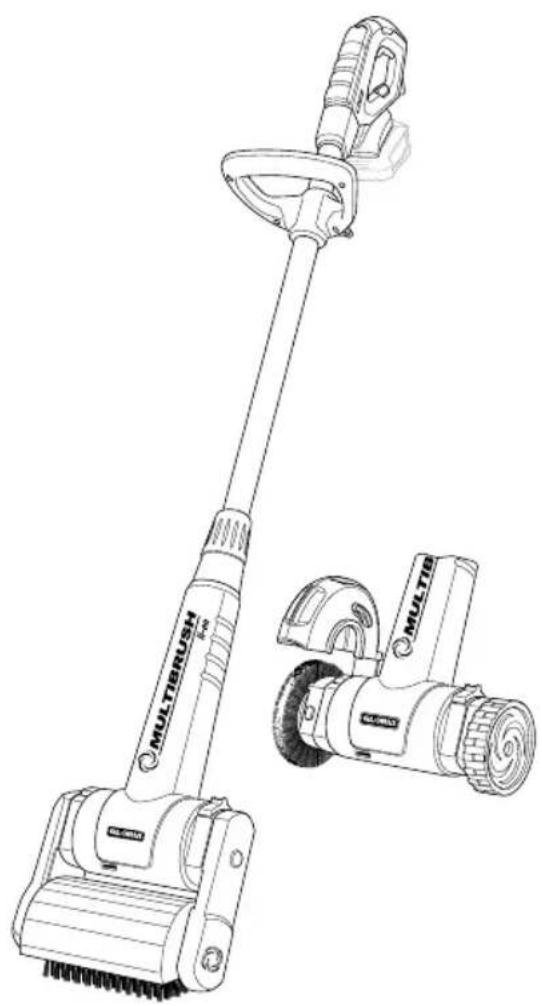
Line drawing of a MultiLBush tool with attached mechanical device (no text or symbols)CE
①
DE Betriebsanleitung .....6-21
Originalbetriebsanleitung
GB User manual ..... 22 - 36
Translation of the German user manual
FR Mode d'emploi ..... 37 - 52
Traduction des instructions d'emploi
NL Gebruiksaanwijzing .... 53 - 68
Vertaling van de gebruiksaanwijzing
IT Instruzioni per l'uso ....69 - 84
Traduzione delle istruzioni per l'uso
originali
DK Betjenningsvejledning . .85 - 99
Oversættelse af den originale
betjenningsvejledning
text_image
MULTIBRUSH 1-20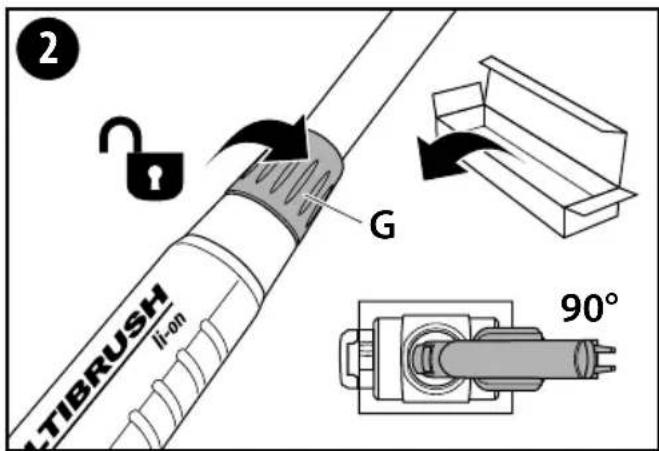
text_image
2 TIBRUSH li-on G 90°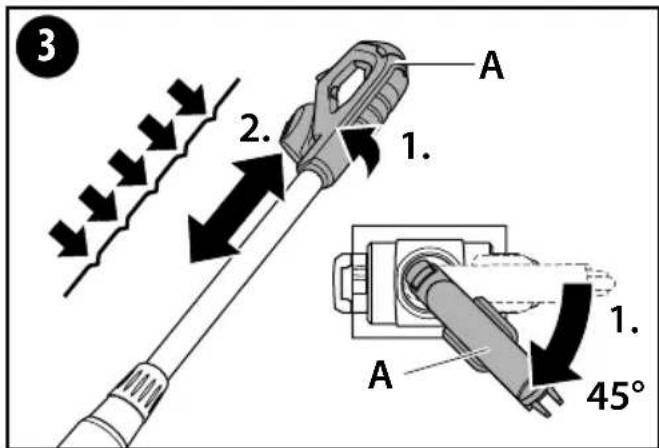
text_image
3 2. 1. A 1. 45° A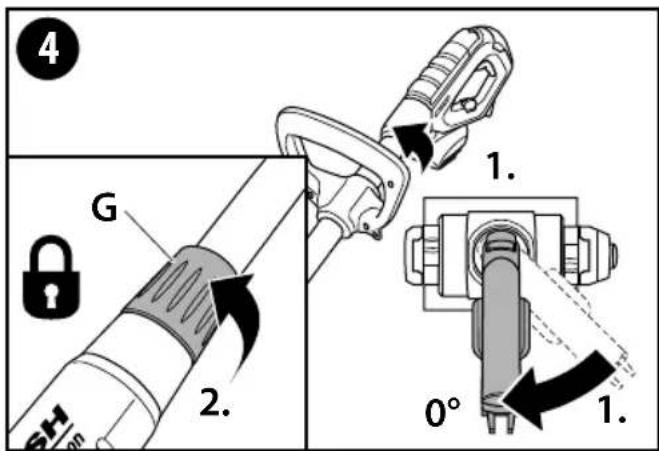
text_image
4 G 2. 1. 0° 1.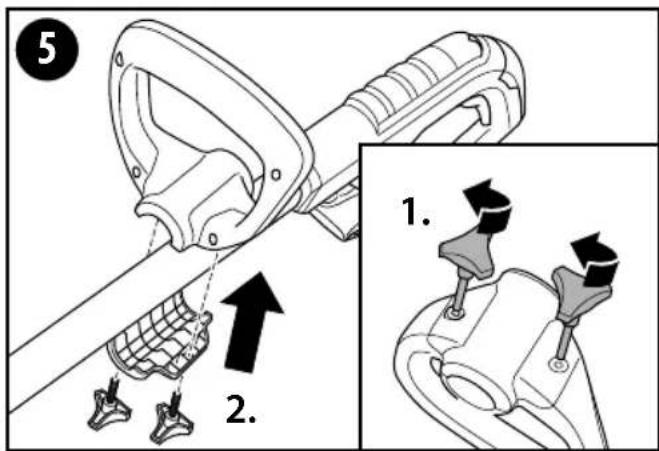
text_image
5 2. 1.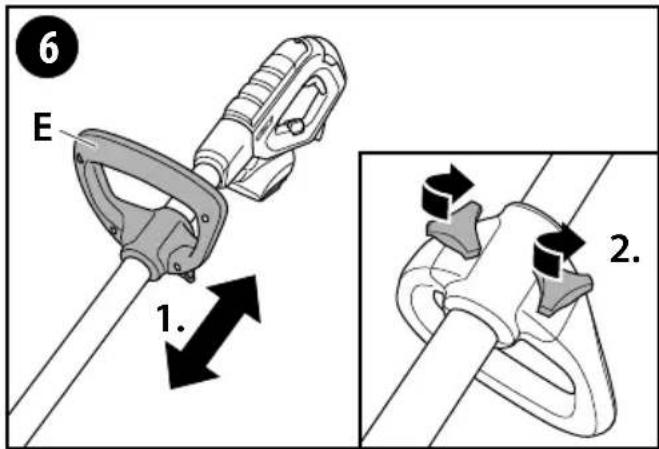
text_image
6 E 1. 2.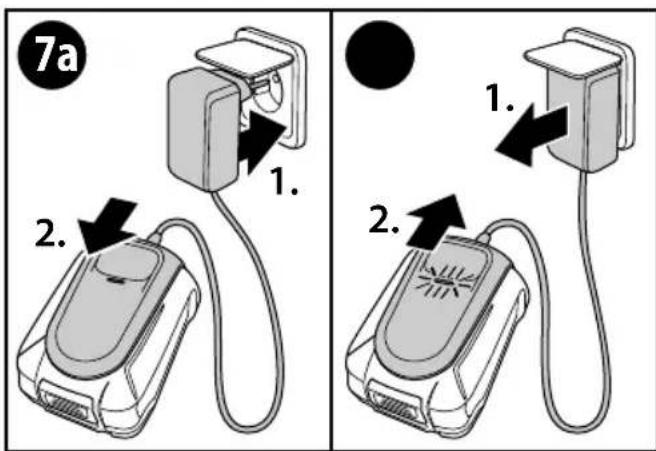
text_image
7a 1. 2. 1. 2.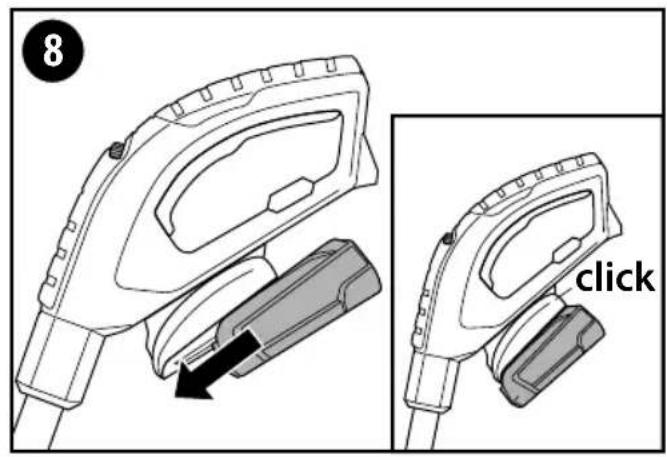
text_image
8 click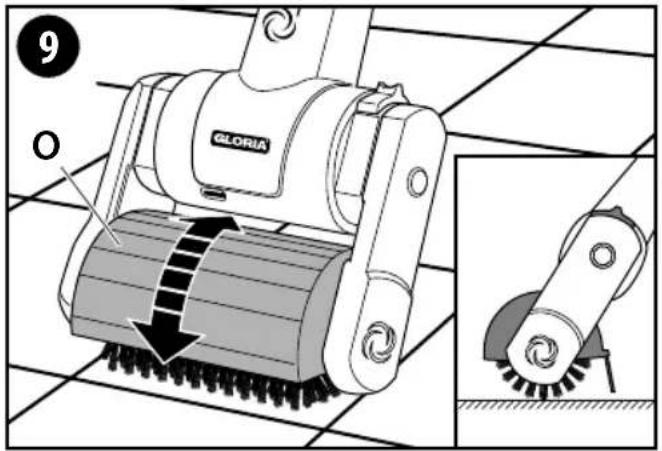
text_image
9 GLORIA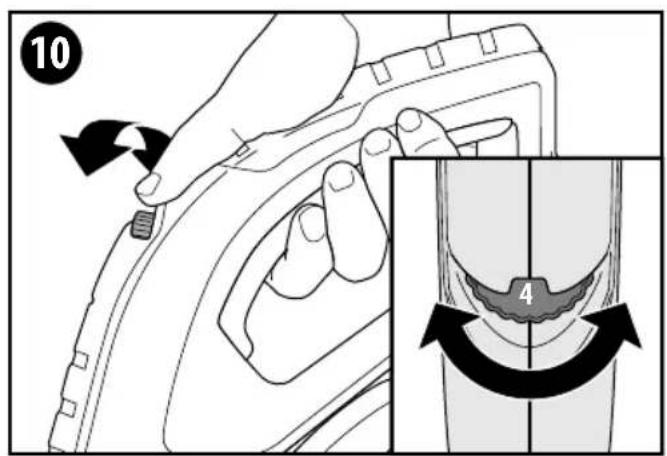
text_image
10 4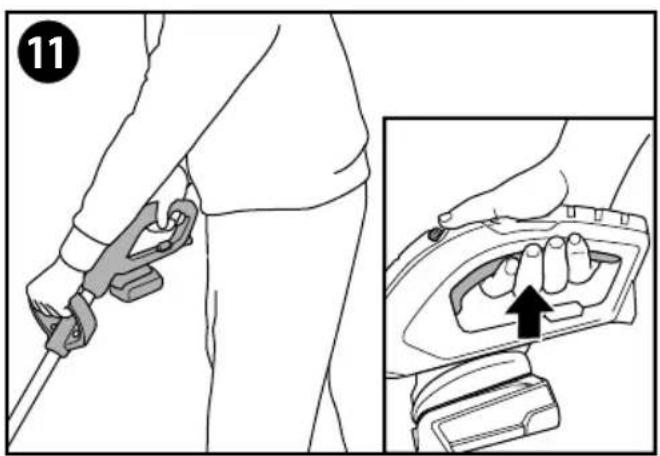
text_image
11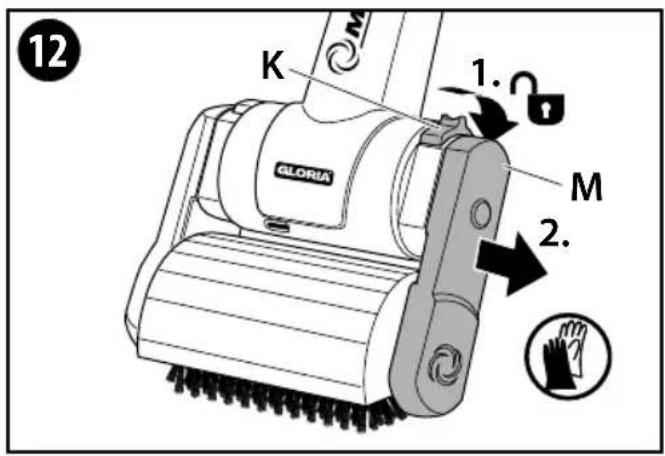
text_image
12 K GLORIA 1. M 2.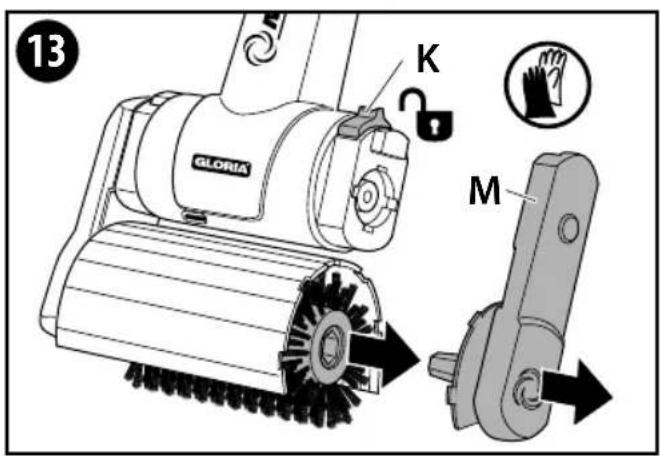
text_image
13 K GLORIA M
text_image
14 P O 2. 1. K GLORIA MUS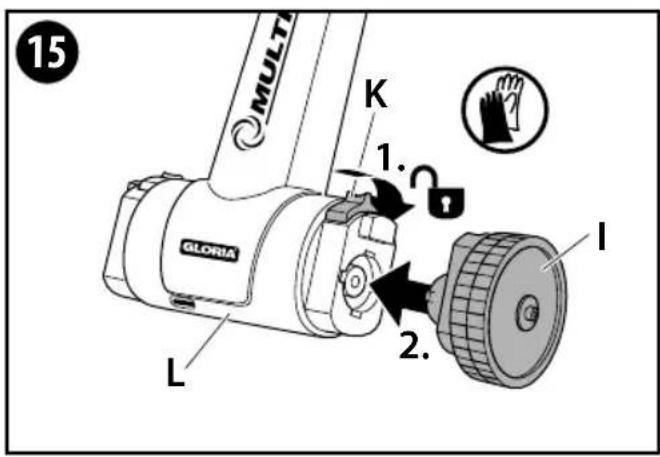
text_image
15 MULTI K 1. GLORIA L 2. I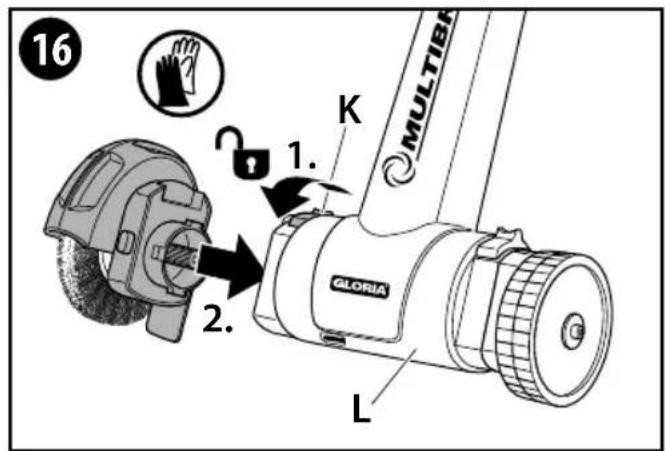
text_image
16 MULTIBR K 1. 2. GLORIA L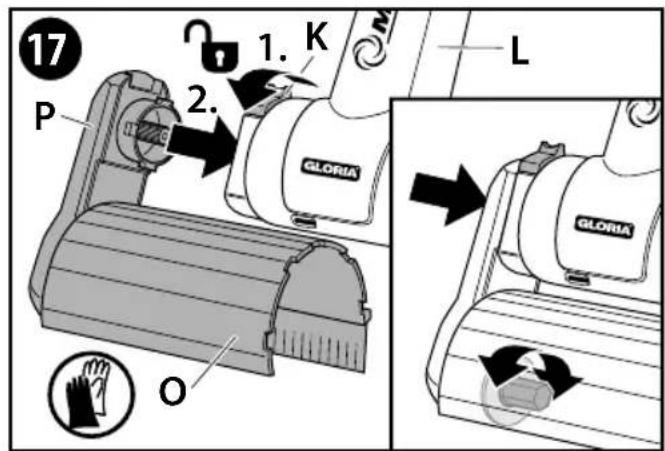
text_image
17 P 2. 1. K GLORIA L O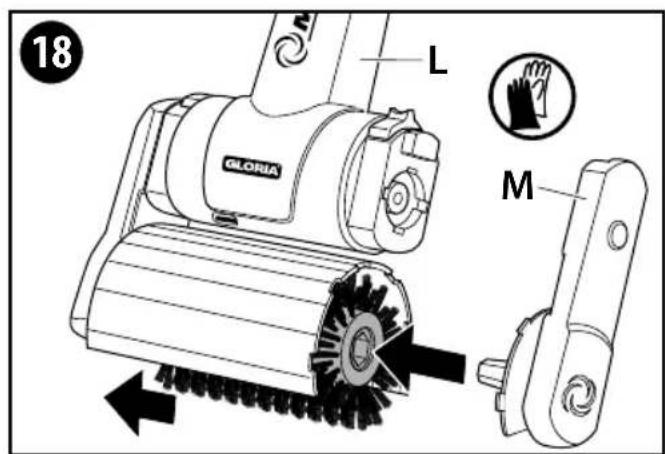
text_image
18 L GLORIA M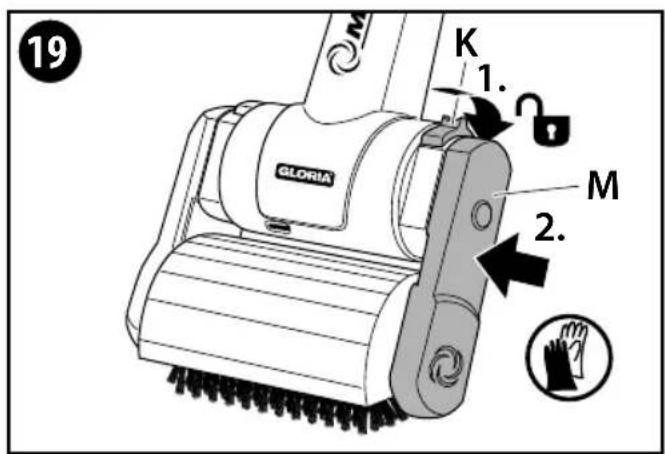
text_image
19 K 1. GLORIA M 2.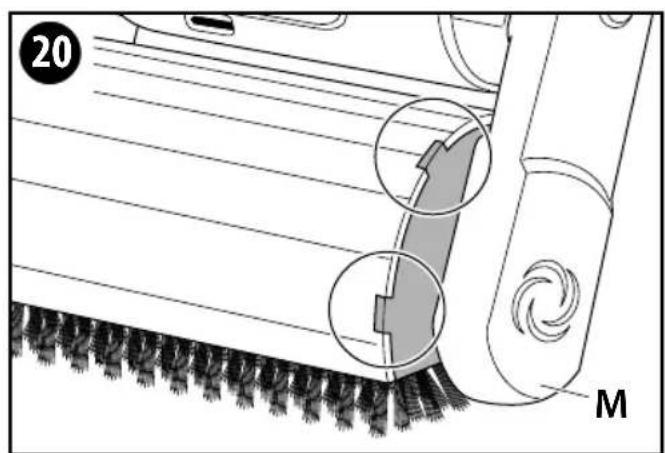
text_image
20 M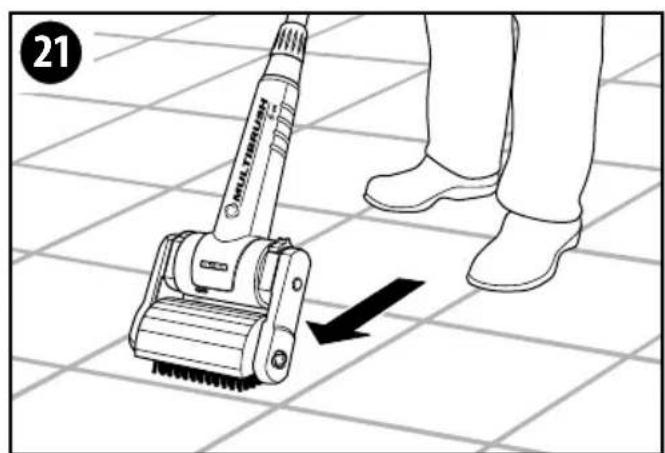
text_image
21 FULL THERMALO THERMALO ↓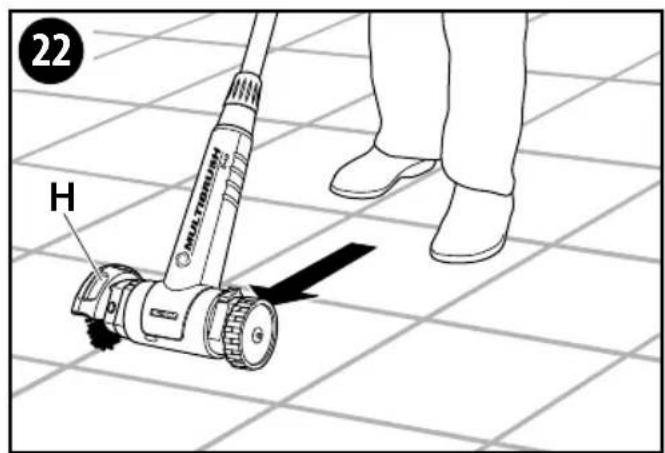
text_image
22 H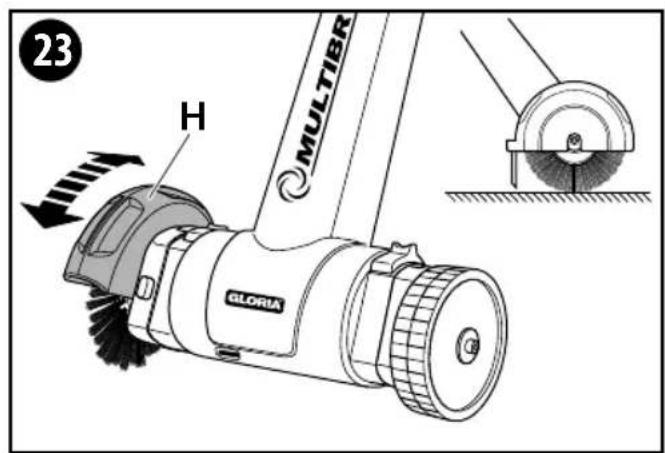
text_image
23 H MULTIBR GLORIAINHALTSVERZEICHNIS
text_image
S A B C D E F G R H Q I J K L P O N M4 Technische Daten
MultiBrush li-on
Set – Artikelnummer(n): 0000297.0000
1 General information about this user manual 22
1.1 Symbols on the device and in the user manual....22
1.2 Warning notices 23
1.3 Intended use....23
1.4 Reasonably foreseeable misuse....24
1.5 Residual hazards 24
1.6 Limitation of liability 24
2 For your safety 24
2.1 Basic safety instructions....24
2.2 Safety instructions for handling charger and battery 25
2.3 Safety instructions for operating the device....26
3 Before using the device 27
3.1 Delivery status 27
3.2 Elements of the device 28
4 Technical data....28
5 Assembly 29
6 Prior to initial commissioning 29
6.1 Charging procedure....29
7 Commissioning....30
7.1 Operation....30
7.2 User information....33
7.3 Replacing the joint brush....33
8 Decommissioning and storage 34
8.1 Decommissioning....34
8.2 Storage....34
9 Maintenance & cleaning 34
9.1 Cleaning 35
9.2 Wear of the brushes....35
10 Disposal and legislation....35
10.1 Environmental protection and disposal of the device 35
10.2 Battery disposal....36
10.3 Battery transport 36
10.4 Disposing of the packaging 36
11 Accessories / Spare parts....36
12 Warranty & Guarantee .... 36
General information about this user manual
This user manual is an integral part of the GLORIA device and must be continually available on or near the device.
This user manual contains important instructions and information required for ensuring the safe use of the device!
This user manual must be read in full by any person assigned with operating / using / maintaining the unit.
This user manual must be kept safe and passed on to any new owner!
All warning notices are there to protect your personal safety!
1.1 Symbols on the device and in the user manual

Do not touch! Risk of burns caused by hot surfaces!

Protect against rain and moisture!

Entanglement hazard!

Charger for indoor use only!

Read the user manual!

Wear safety goggles! Wear ear protection!

Wear protective gloves!

Wear safety shoes!

Do not reach underneath!

Keep your distance! Danger from flying parts!
Do not tilt!
Do NOT dispose of old electrical and electronic equipment as normal domestic waste.

Environmentally appropriate disposal!

Recyclable packaging materials!

Recyclable / GRS recycling centre for batteries

Battery disposal information

- Never exceed battery heat of +45 °C
- Do not expose battery to direct sunlight
- Do not expose battery to fire
- Do not dispose of batteries in regular household waste

1.2 Warning notices

DANGER
This level of warning notice indicates a life-threatening situation. Follow the instructions accompanying this warning notice in order to avoid serious injury or death.

WARNING
This level of warning notice indicates a potentially hazardous situation. Follow the instructions accompanying this warning notice in order to avoid serious injury or death.

CAUTION
This level of warning notice indicates a potentially hazardous situation which, if not avoided, may result in serious injury. Follow the instructions accompanying this warning notice in order to avoid serious injury.
ATTENTION
This level of warning notice indicates a potentially hazardous situation which, if not avoided, may result in material damage. Follow the instructions accompanying this warning notice in order to avoid material damage.

NOTE!
A note indicates additional information or illustrations that help you operate and facilitate the understanding of the device.
1.3 Intended use
This GLORIA device is intended for private use in the outdoor yard area and on hard surfaces.
Compliance with the accompanying instructions is a prerequisite for the proper use of the device. The user manual also contains the operating, maintenance and servicing conditions.
The device is solely intended as a handheld cleaning and maintenance device for cleaning joints and surfaces on and between surfaces outdoors e.g. stone slabs, tiles, paving stones and wood surfaces.
CAUTION
DANGER CAUSED BY IMPROPER USE!
This device can be dangerous if not used for its intended purpose. You should therefore observe the following safety instructions:
■ Use the device for its intended purpose only.
■ Note all instructions and information in the user manual.
1.4 Reasonably foreseeable misuse
The device is not suitable for horizontal use (house walls), overhead work (ceilings), for unsuitable floor or joint materials or for other application areas as those described. The device must not be used in wet weather conditions, rain and in/under water. The manufacturer does not accept liability for any damage or injury resulting from unauthorised modifications to the device or its improper use.
1.5 Residual hazards
This device complies with the accepted rules of technology and the relevant safety requirements! However, use of the device may present:
■ Danger to life and limb of the operator or other persons.
■ Damage to the device.
■ Damage to the other items of property.
1.6 Limitation of liability
We expressly point out that according to product liability law we do not accept li ability for damage caused by our device, insofar as this has been caused by noncompliance with the operating instructions, improper use, improper repair or replacement of parts with non-genuine parts, or if repairs have not been carried out by the customer service team or an authorised expert. This also applies to accessories.
2 For your safety
This chapter contains important warning and safety instructions which must be observed when handling and using the device.
2.1 Basic safety instructions
Observe the following basic safety instructions to ensure the safe hand ling and use of the device:



- Repairs to devices for the home and garden must only to be carried out by the service centres. Spare parts should be ordered from your dealer. If the parts are not in stock, the dealer will procure them as soon as possible.
- This device complies with the accepted rules of technology and the relevant safety requirements!
- This device may be used by child ren from 16 years and above and by persons with diminished physical, sensorial or mental capacities or lack of experience and know ledge if supervised or if they have been instructed with respect to safe use of the device and understand the risks that result from using it. Children must not play with the device. Cleaning and user maintenance must not be performed by children without supervision.
- This device must not be used if the operator is tired, ill or under the influence of alcohol or other drugs or medicines.
-
Do not leave the device unatten ded while it is in operation.
■ Protect the device against long exposure to the sun and frost. -
In order to prevent damage and hazards resulting from improper use, you must observe the user manual and store it in a safe place!
- Wear suitable work clothing such as sturdy shoes, safety goggles, long trousers and, if necessary, gloves during cleaning. Do not work barefoot or in light sandals.
- If the device is passed on to other persons, they must also be given the user manual!
- Only use GLORIA original spares and accessories for the device. Never use worn, modified or defective replacement parts / accessories!
2.2 Safety instructions for handling charger and battery


DANGER
DANGER OF ELECTRIC SHOCK!
Contact with energised cables/wires or components may result in serious injury or death! You should therefore observe the following safety instructions:
- Mains voltage must be in compliance with voltage specification (V\~) on type plate of charger!
- Compatible with BOSCH 18 V Home and Garden Batteries. Possible capacities: 2.5Ah (Bosch PBA 18V 2.5Ah) / 4.0Ah (Bosch PBA 18V 4.0Ah). The battery voltage must match the battery charging voltage of the battery charger. Do not try to charge up any batteries that are not of a rechargeable type. In such a case, there is a risk of fire and explosion.
■ Children and persons with reduced physical, mental or sensory capabilities or who are lacking the requisite knowledge and experience are not allowed to use the charger or its battery. - If the power cord of the charging station is damaged, it must only be replaced by a repair shop designated by the manufacturer in order to prevent a hazard! Please contact the manufacturer or the customer service department.
- Only connect the charging station to alternating current.

DANGER
RISK OF INJURY FROM ELECTRIC SHOCK, AS WELL AS RISK OF FIRE AND EXPLOSION! To avoid life-threatening situations:
■ ensure that charger, charging plug and mains plug are in proper working condition before use.
■ the contacts must never be touched.
- do not cover the ventilation slots of the charger. Otherwise, the charger can overheat and will not function properly.
■ protect charger as well as battery against heat and humidity exposure.
■ do not immerse charger or battery in fluid.
■ operate mower only with corresponding original Li-Ion batteries.
■ use charger only to charge original Li-Ion batteries.
- keep charger as well as battery sealed.
■ never operate charger on a flammable surface.
■ never perform charging near easily inflammable substances.
- protect battery against heat, permanent sunlight and fire exposure. Store battery only at a temperature range between 0 °C to max. +45 °C. Never place battery on a radiator.
■ the supply terminals are not be short-circuited.
■ should the device be operated using a residual-current-operated protective device (RCD) with a trigger current of max. 30 mA. Ask your electrician!

CAUTION
RISK OF INJURY! Insert battery only when mower is switched off. Connecting battery to an activated mower can result in accidents.

CAUTION
RISK OF INJURY FROM CAUSTIC LIQUIDS OR VAPOURS! Never expose battery to extreme conditions, such as heat and impact. There is a risk of injury from discharged electrolyte solution or caustic vapours! If battery acid gets in contact with skin or eyes,
rinse the affected area thoroughly with water and consult a doctor. Ensure adequate fresh air and consult a doctor if you experience irritation of respiratory tracts, skin or eyes.
2.3 Safety instructions for operating the device

ATTENTION

Improper use of the device poses a risk of damage to property! You should therefore observe the following safety instructions:
■ Do not use the device with wet hands.
- Do not immerse the device in water or spray or clean it with water. The device must be protec ted against moisture.
■ NEVER operate the device at temperatures below 0^ C.
OVERLOAD PROTECTION!
- Your MultiBrush li-on has protection against overloading. The unit switches off automatically if you stress it excessively (too much pressure on the brush). In this case you should release the On / Off safety switch (D) to reset the overload protection. Switching on again with the On / Off safety switch (D) allows you to continue working immediately with the MultiBrush li-on. Reduce the force applied to the brush by not pressing so hard.
TEMPERATURE PROTECTION
- Your MultiBrush li-on has protection against excessively high temperatures of the rechargeable battery. The battery cells can overheat if you use the unit constantly over a longer period of time or if it is exposed to high ambient temperatures. Discharge is no longer possible above 70 °C. In such a case, the device switches itself off automatically (all 4 displays flash, see also section 7.1.1). Allow the rechargeable battery (C) to cool down again before switching on again.
LOW VOLTAGE CUTOFF DEVICE!
- Your MultiBrush li-on has a low voltage cutoff device for the rechargeable battery. This functions switches the unit off immediately if the voltage falls below a specified value (all 4 displays flash, see also section 7.1.1). In such a case you should recharge the battery (C) or else put a fully charged battery into the unit.

RISK OF BURNS CAUSED BY HOT PARTS!

Parts of the device can become hot during use and may cause burns. It is therefore important to observe the following safety instructions:
■ Wear protective gloves during assembly and cleaning work!
Observe the following safety precautions to prevent injuries and material damage due to misuse and unsafe handling of the product. Misuse can result in INJURIES.

RISK OF INJURY DURING OPERATION!
■ Use the device as intended! Work only within the specified performancerange.
■ Before each use, make sure that the device is in perfect condition; operation is prohibited if:
- the safety devices (start switch, protective covers) and/or brushes are damaged or worn.
- the device shows visible signs of damage.
-the device may have been dropped before.
-foreign objects have wrapped around the drive shaft.
Never disable any safety devices.
- Check area to be cleaned beforehand to avoid damage to device / objects or injuries to living beings. Stones, pieces of wood, wires or the like, as well as other foreign objects must be removed. Objects that are caught by
the brushing equipment can be flung out uncontrollably. Keep bystanders away from the danger zone. In order to prevent injuries, pay attention to safety in the work area.
- Never use the device on house walls or similar, always work vertically so that the brushes are pointed at the ground.
- Ensure that the ventilation slots are free of dirt.

CAUTION
RISK OF INJURY FROM ROTATING BRUSHING TOOL!
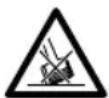
■ Never start the device in a tilted position!
■ Never put your hands or feet near to the rotating brushing equipment! Ensure that sufficient distance is kept between hands, feet and brushing equipment. Brushing tools continue to turn.
- Never lift or carry the device with running motor! Switch motor off and remove battery when moving device to and from work area, or tilting device.


■ Never remove the supplied safety guards.

CAUTION
RISK OF INJURY FROM FLYING PARTS!
- Do not start or operate the device if bystanders are in the danger zone.
- Start or operate the device as described in the operating instructions.
■ The safety start switch must never be fixed or short-circuited.
■ Only clean during daylight or with adequate artificial lighting.
■ Never use the device during rain.
■ Never clean if others, in particular children or animals, are in the area!
■ During cleaning, pay attention to safe and solid position.
■ Guide device only at walking pace.

CAUTION
RISK OF INJURY FROM UNINTENTION- AL SWITCH ON!
Accidental activation can cause injuries.
To prevent this, remove battery when:
– leaving device unsupervised.
- maintaining, checking or cleaning device.
– device shows signs of malfunction.
3 Before using the device
This chapter contains information about the delivery status.
3.1 Delivery status
The device is shipped as standard as follows:
■ Device pre-assembled with telescopic tube
■ 18.0 V battery (Bosch PBA 18V 4.0 Ah) (NOT included in item 000297.0000)
■ Charger (AL 1810 CV) (NOT included in item 000297.0000)
■ Second handle on telescopic tube
■ Surface brush with safety guard and guiding wheel
■ Joint brush with safety guard
■ Battery with charging station
■ 1 x user manual and product inform a tion Any tools are individually packed.
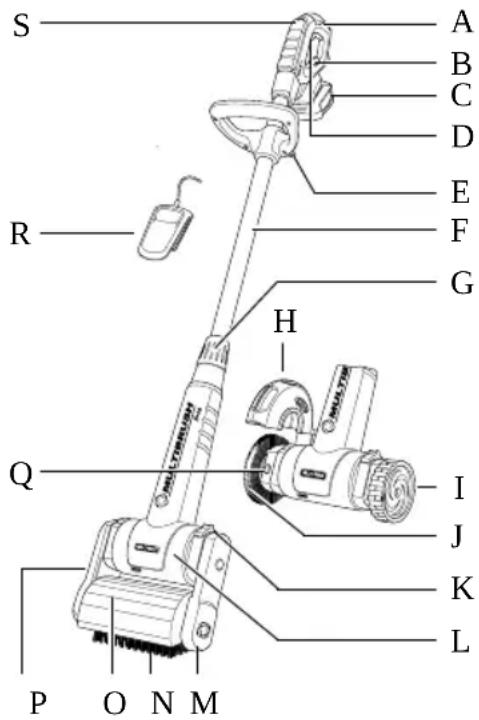
text_image
S A B C D E F G R H Q I J K L P O N M3.2 Elements of the device
A Ergonomic handle
B Charging status indicator
C Battery: 18.0 V / 4.0 Ah (NOT included in item 000297.0000)
D ON/OFF safety switch
E Additional handle
F Telescopic tube
G Screw connection telescopic tube
H Safety guard for joint brush
I Guiding wheel
J Joint brush unit
K Locking device (2 x left/right)
L Motor/gear unit
M Guide arm (removable)
N Surface brush
- Adjustable safety guard
P Drive arm (removable)
Q Lock button
R Charging station (NOT included in item 000297.0000)
S Adjustment wheel for speed control (Speed control)
4 Technical data
MultiBrush li-on
Set – Item number(s): 000297.0000
(battery and charger not included)
Battery (NOT included in item 000297.0000)
| Type: | Lithium-ion (Bosch PBA 18V 4.0 Ah) |
| Nominal voltage: | 18.0 V |
| Rating: | 4.0 Ah |
Charging station (AL 1810 CV) (NOT included in item 000297.0000)
Input: 220-240 V\~ / 50/60 Hz
Output: 14.4-18 V / DC / 1.0 A
Battery charging time (100%): 244 Min.
Per. charging temp. range: 0 - +45 °C
Protection class: II
(These following rights apply to the AL 1810 CV charger)
Dimensions & Rotational speeds
Device width: Surface brush 24.0 cm // Joint brush 28 cm
Device height (min): Surface brush 1.15 m // Joint brush 1.04 m
Device height (max): Surface brush 1.35 m // Joint brush 1.24 m
Rotational speed of joint brush: 630-1260 rpm
Rotational speed of surface brush: 450-900 rpm
Device weight with joint brush: 2.7 kg without battery / 3.4 kg with battery
Device weight with surface brush: 3.4 kg without battery / 4.1 kg with battery
Protection class: II
5 Assembly
Figures 1 - 6

NOTE!
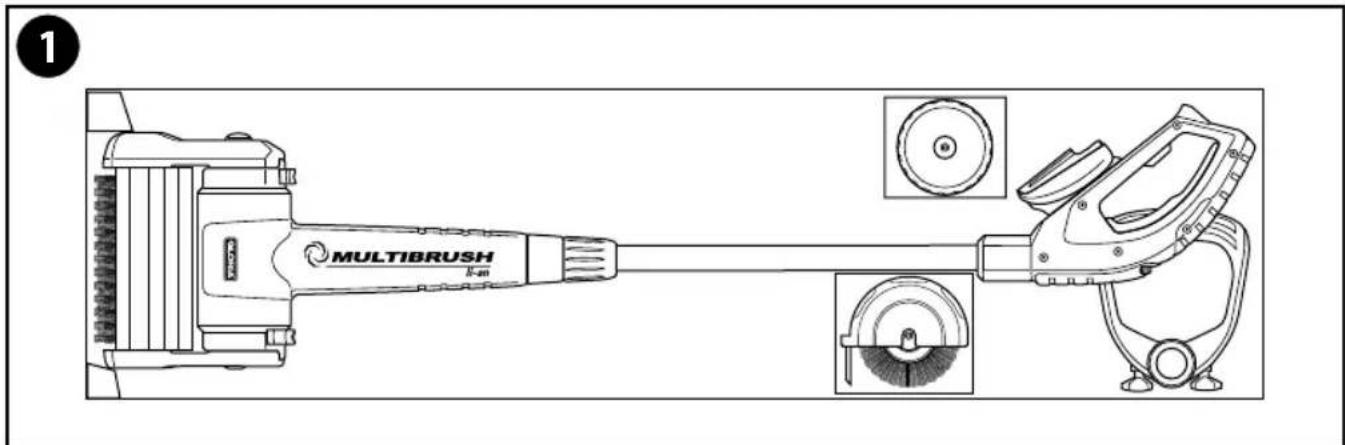
1 Your device is supplied with the surface brush pre-assembled. Loose parts supplied must be as sembled accordingly when working with the joint brush.
■ After removing from the packaging, loosen screw connection (G) 2 Next, turn handle (A) 45° as shown in figure 3 d adjust the length of the telescopic tube (F) according to your body height, as illustrated. 5 locking positions are available.
4 In the selected position, turn handle (A) a further 45^ and tighten the height of the telescopic tube (F) with the screw connection (G) by hand.
- As the device should always be guided and operated with two hands, fit the additional handle (E) as shown in the figure 5 adjust the height and screw the additional handle (E) tightly into place 6
6 Prior to initial commissioning

WARNING
BEFORE USE OBSERVE CHAPTER 2 "FOR YOUR SAFETY". You should therefore observe the following safety instructions:
- The mains voltage must be in compliance with the voltage specification (V\~) on the type plate of the charger.
Operate charger only in dry rooms.

NOTE!
■ Before initial use, fully charge battery (C). Please ensure that the charging procedure is performed at room temperature. This is the only way to ensure a long battery life.
- A significantly decreased runtime in spite of charging indicates that the battery is dead and must be replaced. Use only original Li-Ion batteries, which you can purchase from manufacturer's customer service.
- Charger and battery can heat up during charging. This is normal and not a sign of a technical defect.
■ The Lithium-Ion battery can be charged at any time, regardless of charge state. Premature interruption of charging does not cause damage to the battery. A protective circuit on the battery prevents depth discharge of battery.
- The battery is equipped with temperature monitoring that only permits charging over a temperature range between 0 °C and 45 °C. This ensures a long battery life.
- Do not press the On/Off switch again if the device has switched itself off automatically. The battery can be damaged. Note the details concerning disposal of the battery.
6.1 Charging procedure

Figures 7a - 7b
These figures refer to the 18.0 V / 4.0 Ah battery and the AL 1810 CV charger.
7a The charging process starts as soon as the plug has been plugged into the power outlet and the battery (C) has been placed in the charger (G).
Due to the intelligent charging method, the charging condition of the battery is automatically detected and the battery is charged with the optimum charging current, depending on battery temperature and voltage. This gives longer life to the battery and always leaves it fully charged when kept in the charger for storage.
Indicator statuses:

The charging process is indicated flashing of the battery charge indi-

A solid light on the battery charge indicator signals that the battery is fully charged or that the temperature of the battery is not within the permitted charging temperature range, and can therefore not be charged. The battery is charged as soon as the allowable charging temperature range is reached. When the battery is not inserted, a solid light on the battery charge indicator signals that the mains plug is inserted in the plug socket and that the charger is ready for operation.
7b Following a successful charging procedure, first remove the battery from the charger. Then disconnect the charger plug from the power outlet.
7 Commissioning

ATTENTION! DEVICE PROTECTION!
BEFORE COMMISSIONING OBSERVE CHAPTER 2 "FOR YOUR SAFETY".
- Clean the roller/joint brush (N/J) before each cleaning operation.
- The air inlet openings on the motor/gear unit (L) must not be blocked or covered.
- Check on a small, if possible hidden area, that the ground to be cleaned will not be damaged by the brushing action.
■ Never use the device too long on one spot, always guide at walking pace.
7.1 Operation
Figures 8 - 11
8 Insert the charged battery into the battery adapter as shown until this engages with a noticeable 'click'.
9 Always place the device parallel on the ground which is to be cleaned. Identify
the most comfortable but also most effective working angle for yourself and then adjust the 5 click-stop safety guard (O) so that the rubber lip is just above the ground.
■ Make sure that the surface to be cleaned is free from debris e.g. stones, screws etc., which could be flung up.

CAUTION
RISK OF INJURY FROM ROTATING BRUSHING TOOL!
■ Never start the device in a tilted position!
- Do not start or operate device if bystanders are in the danger zone.
■ Never put your hands or feet near to the rotating brushing equipment!
■ Never clean if others, in particular children or animals, are in the area!
■ Never use the device in the rain.
10 You can regulate the speed of the brush by pressing the speed control on the adjustment wheel (S).
| Speed recommendations for GLORIA brushes | |
| Position 1-2 soft brushes (wood brush) | |
| Position 3-4 harder brushes (stone brush) | |
| Position 5-6 joint brush (wire brush) |
11 Hold the device securely by the handle (A) and additional handle (E) and switch on the device by pressing and holding the ON/OFF safety switch (D) in handle (A).
■ In case of work interruptions or danger, release the ON/OFF safety switch (D) immediately.
7.1.1 Battery status indicator
The device is equipped with a battery charge indicator (J) that displays the charging status of the battery. The displays only light up when the device is switched on.
Battery power (green LEDs):

Reserve
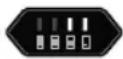
≤ 30%
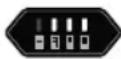
≤ 60%
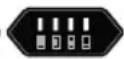
100%
Temperature protection / low voltage cutoff:
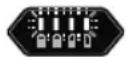
7.1.2 Battery operating time
The service life of the battery mainly depends on the load applied to the device. Any cleaning work performed by applying the brush with high pressure on the surface to be cleaned will shorten the service life of the battery. Another factor is overly frequent starting and stopping during cleaning, which can also reduce battery operating time.
Handle battery and device as described in the instructions.
7.1.3 Assembly of the brushing tools
Figures 12 - 20



CAUTION
RISK OF BURNS CAUSED BY HOT PARTS!
During assembly or conversion work the drive parts of the device or components can still be very hot and may cause burns.
It is therefore important to observe the following safety instructions:
- Wear protective gloves during assembly!
Disassembly of surface brush followed by assembly of the joint brush
- Switch off the device and remove the battery (C).
12 Open the locking device (K) of the guide arm (M), as shown in the illustration.
13 With the lock applied (K) remove the guide arm (M) and then the surface brush (N).
14 Now open the locking device (K) of the drive arm (P), as shown in the illustration and remove, with the lock applied, (K) the drive arm (P) with safety guard (O).
■ The surface brush is now successfully dismantled.
15 Put the guiding wheel (I), as shown in the illustration, on the steering side of the motor/gear unit (L). Now slide the lock (K) into open position hold this and press the guiding wheel (I) further onto the coupling shaft up to the stop. Release the spring-loaded locking device (K). The guiding wheel (I) is locked when the locking device independently returns to its original position
16 Put the pre-assembled joint brush unit, as illustrated, on the drive side of the motor/gear unit (L). Slide the lock (K) into open position hold this and press the joint brush unit further into the drive shaft up to the stop. Release the spring-loaded locking device (K), the joint brush unit is locked when the locking device independently returns to its original position.
Disassembly of joint brush followed by assembly of the surface brush
■ Dismantle the joint brush according to handling and function described above.
17 Open the locking device (K) of the drive arm (P) and, with the lock applied, (K) put the drive arm (P) with safety guard (O), onto the drive side of
the motor/gear unit (L), as illustrated. Release the spring-loaded lock (K), the drive arm is locked when the locking device independently returns to its original position 🔒
i NOTE!
17 If the drive unit (P) cannot be pushed onto the drive shaft, reach under the safety guard (O) and turn the hexagonal drive until the drive unit (P) slides onto the drive shaft easily and without force.
18 Put the surface brush (N) onto the hexagonal drive and then the guide arm (M), as illustrated, on the steering side of the motor/gear unit (L).
19 Now slide the lock (K) into open position, hold this and press the guide arm (M) further onto the coupling shaft up to the stop. Release the spring-loaded locking device (K). The guide arm (M) is locked when the locking device independently returns to its original position.
i NOTE!
20 Whilst assembling the surface brush, make sure that the side part of the safety guard on guide arm (M) is firmly connected to the safety guard and is correctly sealed.
7.1.4 Using the surface brush on rough surface structures e.g. tiles, paving slabs, exposed aggregate concrete, stoneware etc.
Figure 21
21 Place the switched-on device parallel on the surface to be treated. Hold the device at working angle and make sure that the rubber lip on the safety guard
is just above the ground. Walk at an even steady pace and push the device in front of you. Depending on the degree of soiling, apply light to medium pressure on the surface brush, adapt your pace of work to the degree of soiling.
i NOTE!
■ Always work parallel and hold the device away from your body.
- When working close to edges, the narrower side of the device should point towards the wall.
- In cases of stubborn dirt you can move the device backwards and forwards on the spot (like a scrubber), until the required result is achieved.
■ Moist cleaning is also possible in cases of heavy soiling. Use a sprayer to moist the surface to be cleaned with water or a cleaning agent, a GLORIA sprayer is ideal for this purpose. After moist cleaning rinse the surface with water.
CAUTION
RISK OF INJURY FROM RUNNING BRUSHING TOOL!
■ Never lift the device off the ground whilst switched on during work as there is danger of entanglement!
7.1.5 Using the surface brush on wood surfaces (optionally available as an accessory)
ATTENTION
Improper use of the device poses a risk of damage to property! You should therefore observe the following safety instructions:
■ Never use the hard surface brush with the black bristles for cleaning wood surfaces, as the hard bristles attack the surface of the wood, thereby damaging it.

NOTE!
■ For cleaning wood surfaces use the soft surface brush with the yellow / black bristles. This is available as a GLORIA accessory and is not in cluded in the scope of delivery.
- Assembly and operating instructions can be found in the product information "Surface brush for wood surfaces".
7.1.6 Using and replacing the joint brush
Figures 22 - 24
22 Assemble the joint brush as described in Chapter 7.1.3. Place the device parallel with guiding wheel and joint brush on the joint to be treated. Hold the device at working angle and make sure that the rubber lip on the safety guard (H) is just above the ground.

NOTE!
23 To adjust the safety guard (H), turn the 7 click-stop safety guard to the position described under point "21".
24 Align the joint brush with the centre of the joint, walk at an even steady pace and push the device in front of you. Adapt your pace of work to the degree of soiling.

NOTE!
■ Always work along the joint and hold the device away from your body.
- In cases of stubborn dirt you can move the device backwards and forwards on the spot (like a scrubber), until the required result is achieved.

CAUTION
RISK OF INJURY FROM RUNNING BRUSHING TOOL!
■ Never lift the device off the ground whilst switched on during work as there is danger of entanglement!
7.2 User information
■ Do not remove any wet weeds with the device.
■ Never clean wood decks or wood terraces with the joint brush.
■ Only clean joints that are intact. Damaged or crumbling joints or joints with cracks should not be cleaned with the device.
■ Rinse the cleaned surfaces thoroughly after cleaning.
■ Worn brushes i.e. frayed wire bristles should be replaced in good time. To prevent damaging the device, it is essential that the joint brush is replaced when the diameter is < 90 mm.
7.3 Replacing the joint brush
Figures 25 - 29
■ Switch off the device and remove the battery (C).
25 Open the locking device (K) of the joint brush unit (J), as shown in the illustration, and remove the joint brush unit.
26 Unscrew the hexagon socket screw 3-4 turns so far out of the joint brush housing, until safety guard (H) can easily be twisted and pulled off.
27 Now press lock button (Q) which blocks the drive shaft and unscrew the hexagon socket screw, which fixes the joint brush (J), from the drive shaft (1). Remove the disc from the joint brush.
ATTENTION
Improper use of the device poses a risk of damage to property! You should therefore observe the following safety instruction:
■ Never activate the lock button (Q) when the joint brush is running.
28 Pull the joint brush (J) from the flange on the shaft and exchange it for a new one.
29 Assembly is carried out in reverse order ( )
■ After maintenance or cleaning ensure that all screws, bolts, nuts and safety devices are secure and assembled.
8 Decommissioning & Storage
8.1 Decommissioning
Figure 30
■ Take the device out of operation by releasing the ON/OFF safety switch (D) in the handle.
ATTENTION
Improper use of the device poses a risk of damage to property! You should therefore observe the following safety instruction:
- To prevent battery discharge, remove battery from device when not in use for a prolonged time. For this purpose, remove battery from adapter.
CAUTION
RISK OF INJURY FROM RUNNING BRUSHING TOOL!
- Never lift the device off the ground whilst switching it off as there is danger of entanglement!
30 Do not put the device down on the brush during work breaks or after use as this will damage the bristles. Always hang the device up or lie it down as shown in the illustration.
8.2 Storage
CAUTION
You may be exposed to hazards that could injure you when handling the device. You must therefore store the device away from children.
■ Remove any dirt and debris.
■ Store the device hung up, dry and protected from frost.
8.2.1 Correct battery storage
It is essential that you also follow the "Safety instructions for handling charger and battery" in chapter "Important safety instructions".
ATTENTION
Improper use of the device poses a risk of damage to property. The battery should not be stored uncharged. Though self discharge is minimal, an empty battery can be destroyed if stored for an extended period. Thus, observe the following instructions if not in use for an extended period (e.g. during winter):
■ store battery at a charge status of approx. 40 - 60 %.
■ store battery in a dry, elevated, closed, frost-protected space at a temperature between 0 °C and +45 °C. When storage temperature is +15 °C, self-discharge and chemical ageing is at its lowest. Avoid direct sunlight.
■ if the battery is not used for more than 6 months, use the status indicator to check the charging status in the charger. Recharge the battery to approx. 40-60% capacity if required.
9 Maintenance & Cleaning

CAUTION
RISK OF BURNS CAUSED BY HOT PARTS!
During assembly or conversion work the drive parts of the device or components can still be very hot and may cause burns. It is therefore important to observe the following safety instruction:
■ Wear protective gloves during maintenance and cleaning!
9.1 Cleaning
ATTENTION
Improper use of the device poses a risk of damage to property! You should therefore observe the following safety instruction:
■ Remove the battery each time before cleaning the device.
- Do not immerse the device in water or spray or clean it with water. The device must be protected against moisture.
- Clean the outside of the device with a damp cloth or soft brush. Do not use abrasives or harsh cleaning agents.
■ Ensure that the ventilation slots are free of dirt.
- In cases of heavier soiling of the roller brush and/or joint brush units, dismantle for thorough cleaning (see Assembly/Disassembly as described in Chapter 7.1.3). Clean the brushes in water or with a strong water jet and a hard brush.
■ Only use original GLORIA spare parts.
■ Repairs must be carried out by a GLORIA service point.
9.2 Wear of the brushes

NOTE!
- If the surface brush wears down to a diameter of approx. 90 mm, it must be replaced.
- If the joint brush wears down to a diameter of approx. 90 mm, it must be replaced.
10 Disposal & Legislation


10.1 Environmental protection & disposal of the device
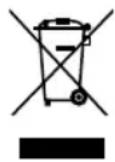
■ This symbol on the product, user manual or packaging indicates that this product must not be disposed of in regular household waste at the end of its service life.
- Do not dispose of electrical appliances through household waste! In accordance with European Directive 2012/19 / EU on old electrical and electronic appliances and its implementation in national law, electrical tools that are no longer suitable for use must be separately collected and sent for environmentally responsible recycling. Recycling alternative for the return request: Alternatively, the owner of an electric or electronic appliance is obligated to cooperate in proper recycling in the event of a property task instead of returning. Old equipment can also be handed over to a collection facility carrying out disposal as defined on the national recycling and waste management laws.
This does not apply to the accessories and auxiliaries included in old equipment, which do not contain electrical components.
■ The Lithium-Ion battery must be disposed of separately from the rest of the device.

NOTE!
■ Please check with your local government to find the appropriate disposal point.
10.2 Battery disposal


As consumer you are required by law to dispose of used batteries and charger as hazardous waste.

CAUTION
RISK OF INJURY FROM DEFECTIVE, LEAKING BATTERY!
The applied battery contains substances that can result in injuries when getting in contact with skin or when inhaled. Should your device have a drained battery, you must use rubber gloves to remove it from the device and properly dispose of it in a closed container.
- According to the European Directive 2013/56/EU, faulty batteries must be collected separately and reused or recycled in an environmentally friendly manner.
Disposal possibilities are as follows:
- by dealer
– at a GRS recycling centre
– in special waste containers provided by the communities
Obtain additional disposal information from your community or city.
10.3 Battery transport
■ The contained lithium-ion batteries are subject to the Dangerous Goods Legislation requirements. The batteries are suitable for road-transport by the user without further re-strictions.
When shipping by third parties (e.g.: by air transport or forwarding agency), special requirements on packaging and labelling must be observed. For preparation of the item being shipped, consulting an expert for hazardous material is required. Dispatch battery packs only when the housing is undamaged. Tape or mask off open contacts and pack up the battery in such a manner that it cannot move around in the packaging. Please also observe the possibility of more detailed national regulations.
10.4 Disposal of packaging
- The packaging materials have been selected according to environment ally-suitable and disposal-related aspects and are therefore recyclable. Returning the packaging to the material circulation saves raw materials and reduces the level of waste.
- Please dispose of unwanted pack aging materials according to applicable local regulations.
11 Accessories / Spare parts
- 729101.0000 Lithium-Ion battery 2.5Ah (BOSCH PBA 18V 2.5Ah)
- 729102.0000 Lithium-Ion battery 4.0Ah (BOSCH PBA 18V 4.0Ah)
- 729103.0000 Fast Charger (BOSCH AL 1830CV)
- 728835.0000 Steel brush for cleaning points
- 729068.0000 Nylon-brush for cleaning points
- 729103.0000 Stone brush SOFT
- 728834.0000 Stone brush MEDIUM (special accessories)
- 729010.0000 Stone brush PRO (Sonderzubehör)
- 728834.0000 Wooden brush UNIVERSAL (special accessories)
Further accessories can be found at www.gloriagarten.de
12 Warranty & Guarantee
GLORIA gives a 24 month guarantee as per of the terms and conditions of the warranty (www.gloriagarten.de).
This does not affect your legal rights to claims under warranty with regard to the seller.
Technical changes reserved!
SOMMAIRE
Porter protection auditive!

Porter des gants de protection!

text_image
S A B C D E F G R H Q I J K L P O N MDimensions & Vitesses
text_image
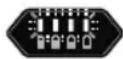
Réserve ≤ 30% ≤ 60% 100%Protection anti-surchauffe / Coupure en cas de basse tension:
text_image
S A B C D E F G R H Q I J K L P O N MOPGELET! APPARAATBESCHERMING!

WAARSCHUWING
LEES HOOFDSTUK 2 "VOOR UW VEILIGHEID" VOOR U HET APPARAAT IN GEBRUIK NEEMT.
Accuvermogen (groene ledlampjes):

text_image
Reserve ≤ 30% ≤ 60% 100%text_image
S A B C D E F G R H Q I J K L P O N M4 Dati tecnici
MultiBrush li-on
text_image
S A B C D E F G R H Q I J K L P O N M4 Tekniske data
MultiBrush li-on