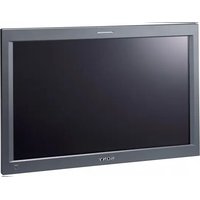
LMD-232W - Monitor SONY - Free user manual and instructions
Find the device manual for free LMD-232W SONY in PDF.


| Product Type | Professional LCD Monitor |
| Brand | Sony |
| Model | LMD-232W |
| Screen Size | 23 inches (584 mm diagonal) |
| Panel Type | Active matrix TFT a-Si |
| Native Resolution | 1280 × 768 pixels (WXGA) |
| Aspect Ratio | 15:9 |
| Viewing Angle (contrast 10:1) | 85° in all directions |
| Number of Colors | 16,770,000 |
| Pixel Efficiency | >99.99% |
| Brightness | High brightness (exact value not specified) |
| Signal Input | DVI-D (compatible VGA, WXGA) |
| Power Supply | 12/16.5 V DC via MEU-WX2 (cable supplied) |
| Power Consumption | 65 W |
| Dimensions (W × H × D) | 563 × 372 × 78 mm |
| Weight | 6.4 kg |
| Operating Temperature | 0 to 35 °C |
| Operating Humidity | 30 to 80% (without condensation) |
| Indicator Light | 3 colors (red, green, amber) |
| Mounting | Monitor stand SU-558 (optional), rack mounting via MB-524 (optional) |
| Screen Cleaning | Soft dry cloth, water for stubborn stains, no solvents |
| Safety | Do not expose to rain or moisture, unplug before cleaning |
Frequently Asked Questions - LMD-232W SONY
User questions about LMD-232W SONY
0 question about this device. Answer the ones you know or ask your own.
Ask a new question about this device
Download the instructions for your Monitor in PDF format for free! Find your manual LMD-232W - SONY and take your electronic device back in hand. On this page are published all the documents necessary for the use of your device. LMD-232W by SONY.
USER MANUAL LMD-232W SONY
Operating Instructions GB
Mode d'emploi FR
①タリーランプ
natural_image
Pure technical diagram of a rectangular frame with nested square and mounting holes, no text or symbols present①スタンド取り付け部
natural_image
Simple line drawing of a rectangular frame with internal vertical and horizontal lines, no text or symbols present.①スタンド取り付け部
68.250MHz/47.396kHz/59.995Hz
(WXGA) (LMD-172W/232W/322W)
65.000MHz/48.363kHz/60.004Hz
(XGA) (LMD-152/212)
ディスプレイ DC IN 端子
The model and serial numbers are located at the rear. Record these number in the space provided below. Refer to these numbers whenever you call upon your Sony dealer regarding this product.
Model No. ____ Serial No. ____
WARNING
To prevent fire or shock hazard, do not expose the unit to rain or moisture.
Dangerously high voltages are present inside the unit. Do not open the cabinet. Refer servicing to qualified personnel only.
WARNING (for LMD-322W only)
THIS APPARATUS MUST BE EARTHED.
In the event of a malfunction or when maintenance is necessary, consult an authorized Sony dealer.
This unit contains substances which can pollute the environment if disposed carelessly. Please contact our nearest representative office or your local environmental office in case of disposal of this unit.
For the customers in Europe
This product with the CE marking complies with the EMC Directive (89/336/EEC) and the Low Voltage Directive (73/23/EEC) issued by the Commission of the European Community.
Compliance with these directives implies conformity to the following European standards:
• EN60950-1: Product Safety
• EN55103-1: Electromagnetic Interference (Emission)
• EN55103-2: Electromagnetic Susceptibility (Immunity)
This product is intended for use in the following Electromagnetic Environment(s):
E4 (controlled EMC environment, ex. TV studio).
For the Customers in the USA
This equipment has been tested and found to comply with the limits for a Class A digital device, pursuant to Part 15 of the FCC Rules. These limits are designed to provide reasonable protection against harmful interference when the equipment is operated in a commercial environment. This equipment generates, uses, and can radiate radio frequency energy and, if not installed and used in accordance with the instruction manual, may cause harmful interference to radio communications. Operation of this equipment in a residential area is likely to cause harmful interference in which case the user will be required to correct the interference at his own expense.
You are cautioned that any changes or modifications not expressly approved in this manual could void your authority to operate this equipment.
All interface cables used to connect peripherals must be shielded in order to comply with the limits for a digital device pursuant to Subpart B of Part 15 of FCC Rules.
This device complies with Part 15 of the FCC Rules. Operation is subject to the following two conditions: (1) This device may not cause harmful interference, and (2) this device must accept any interference received, including interference that may cause undesired operation.
For the customers in Canada
This Class A digital apparatus complies with Canadian ICES-003.
This product contains mercury. Disposal of this product may be regulated if sold in the United States. For disposal or recycling information, please contact your local authorities or the Electronics Industries Alliance (http://www.eiae.org).
Attention-when the product is installed in Rack (for LMD-152/172W/212):
- Prevention against overloading of branch circuit: When this product is installed in a rack and is supplied power from an outlet on the rack, please make sure that the rack does not overload the supply circuit.
2. Providing protective earth:
When this product is installed in a rack and is supplied power from an outlet on the rack, please confirm that the outlet is provided with a suitable protective earth connection.
3. Internal air ambient temperature of the rack:
When this product is installed in a rack, please make sure that the internal air ambient temperature of the rack is within the specified limit of this product.
4. Prevention against achieving hazardous condition due to uneven mechanical loading:
When this product is installed in a rack, please make sure that the rack does not achieve hazardous condition due to uneven mechanical loading.
5. Install the equipment while taking the operating temperature of the equipment into consideration:
Please ensure the amount of air flow required for safe operation of this product. For the operating temperature of the equipment, refer to the specifications of the Operation Manual.
Table of Contents
Precautions ....4
On safety ....4
Handling the LCD screen 4
About the fluorescent tube ....4
Maintenance ....4
Providing an ample amount of space around the unit (for the LMD-322W only) ....4
Disposal of the unit ....5
Features ....5
Location and Function of Parts and Controls .....6
LMD-152/172W/232W/212 6
Front/Bottom Panel 6
Rear Panel 6
LMD-322W 6
Front/Bottom Panel 6
Rear Panel 7
Connecting the AC Power Cord ....7
Specifications ....7
Dimensions...... i
About this manual
The instructions in this manual are for the following five models:
• LMD-152
• LMD-172W
• LMD-232W
• LMD-212
• LMD-322W
Any differences in specifications are clearly indicated in the text.
Precautions
On safety
- The nameplate indicating operating voltage, power consumption, etc., is located on the rear.
- Should any solid object or liquid fall into the cabinet, unplug the unit and have it checked by qualified personnel before operating it any further.
- Unplug the unit from the wall outlet if it is not to be used for several days or more.
- To disconnect the AC power cord, pull it out by grasping the plug. Never pull the cord itself.
- The socket-outlet shall be installed near the equipment and shall be easily accessible.
Handling the LCD screen
- Bright or dark points of lights (red, blue or green) may appear on the LCD screen. This is not a malfunction. The LCD screen is made with high-precision technology with more than 99.99% of the picture elements intact. However, some picture elements may not appear intermittently.
- Do not leave the LCD screen facing the sun as it can damage the LCD screen. Take care when you place the unit by a window.
- Do not push or scratch the LCD monitor's screen. Do not place a heavy object on the LCD monitor's screen. This may cause the screen to lose uniformity.
- If the unit is used in a cold place, horizontal lines or a residual image may appear on the screen. This is not a malfunction. When the monitor becomes warm, the screen returns to normal.
- If a still picture is displayed for a long time, a residual image may appear. The residual image will eventually disappear.
- The screen and the cabinet become warm during operation. This is not a malfunction.
About the fluorescent tube
A specially designed fluorescent tube is installed as the lighting apparatus for this unit. If the LCD screen becomes dark, unstable or does not turn on, consult your Sony dealer.
Maintenance
Before cleaning
Be sure to disconnect the AC power cord from the AC outlet.
On cleaning the monitor screen
The monitor screen surface is especially treated to reduce reflection of light.
As incorrect maintenance may impair the performance of the monitor, take care with respect to the following:
- Wipe the screen gently with a soft cloth such as a cleaning cloth or glass cleaning cloth.
- Stubborn stains may be removed with a soft cloth such as a cleaning cloth or glass cleaning cloth lightly dampened with water.
- Never use solvent such as alcohol, benzene or thinner, or acid, alkaline or abrasive detergent, or chemical cleaning cloth, as they will damage the screen surface.
On cleaning the cabinet
- Clean the cabinet gently with a soft dry cloth. Stubborn stains may be removed with a cloth lightly dampened with mild detergent solution, followed by wiping with a soft dry cloth.
- Use of alcohol, benzene, thinner or insecticide may damage the finish of the cabinet or remove the indications on the cabinet. Do not use these chemicals.
- If you rub on the cabinet with a stained cloth, the cabinet may be scratched.
- If the cabinet is in contact with a rubber or vinyl resin product for a long period of time, the finish of the cabinet may deteriorate or the coating may come off.
Providing an ample amount of space around the unit (for the LMD-322W only)
Make sure there is more space around the unit than that shown in the illustrations below to prevent an internal heat build-up.
Front
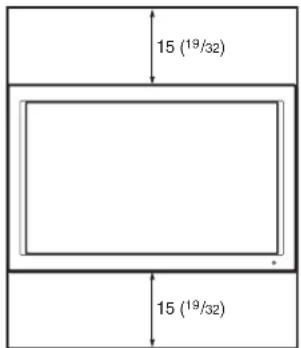
Unit: cm (inches) Unit: cm (inc
Side
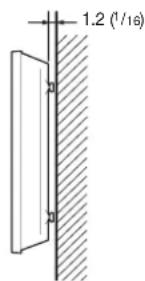
Unit: cm (inches)
Disposal of the unit
- Do not dispose of the unit with general waste. Do not dispose of the monitor with household waste.
- The fluorescent tube contains mercury. Dispose of the monitor in accordance with the regulations of on local sanitation authority.
If you have any questions about this unit, contact an authorized Sony dealer.
Notes
- The LCD Monitor has a built-in cooling fan. If “FAN ERROR (MEU)” or “FAN ERROR (LMD)” is displayed on the screen, turn the power off and consult with qualified Sony personnel.
- If a snowy picture appears when a computer signal is input, change a value of the vertical refresh rate.
- Changes in room temperature sometimes make the cabinet expand or contract, causing a noise. This does not indicate a malfunction.
- The LCD Monitor is designed for use with MEU-WX2.
- Clean the rear cover area of the LCD Monitor regularly. Dust in the rear cover area may cause a problem with the cooling system of the LCD Monitor set.
- When the monitor is turned on at a low temperature, an approximately 1-hour warming-up period may be required to obtain stable brightness of the whole screen (for the LMD-212 only).
Features
The LMD-172W is a 17-type, the LMD-232W is a 23-type and the LMD-322W is a 32-type wide-screen LCD monitor, and the LMD-152 is a 15-type and the LMD-212 is a 21-type 4:3 LCD monitor.
High brightness LCD panel
Because of the monitor's high brightness, high contrast, high speed response, and wide viewing angle technology, it can be used under various lighting conditions.
Rack mount monitors (LMD-152, LMD-172W and LMD-212 only)
The LMD-152/172W/212 can be installed in a standard 19-inch rack using each optional Mounting Bracket MB-524, MB-522A or MB-523. This is essential when space is paramount in crowded OB vehicles.
Optional monitor stand with tilt function
The LMD-152/172W/232W/212 can be installed on the optional SU-558 monitor stand, and the LMD-322W on the optional SU-559 floor stand. Thanks to the tilt and height adjustment functions of the SU-558 monitor stand, the display screen height is adjustable to position with other equipment.
Lightweight, thin design
The lightweight, thin design reduces the load for an OB vehicle and the space needed for installation.
3-color tally lamp (except for the LMD-322W)
The tally lamp lights in red, green or amber to monitor each input picture and check the on-air mode.
Warning on power connection
Use a proper power cord for your local power supply.
| The United States, Canada | Continental Europe UK, Ireland | Australia, New Zealand | |
| Plug type VM0233 COX-07/636 – | 1) | ||
| Female end VM0089 COX-02/VM0310B VM0303B | |||
| Cord type SVT H05VV-F CEE (13) 53rd (O,C) | |||
| Rated Voltage & Current | 10A/125V | 10A/250V | 10A/250V |
| Safety approval | UL/CSA | VDE | VDE |
1) Use an appropriate rating plug which is applied to local regulations.
Location and Function of Parts and Controls
LMD-152/172W/232W/212
Front/Bottom Panel
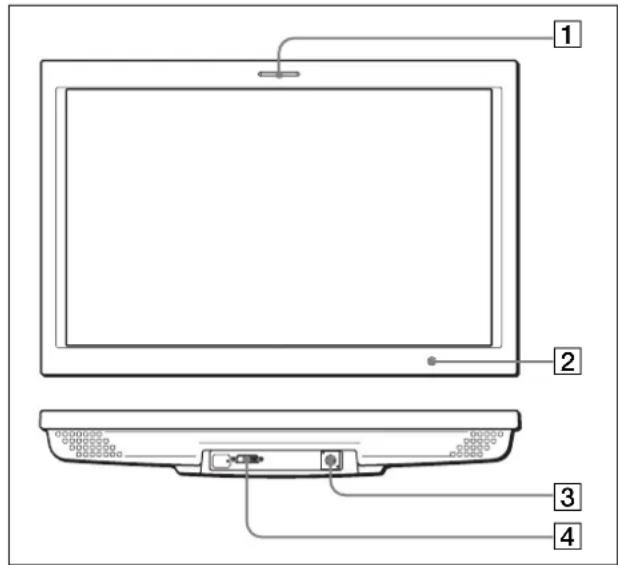
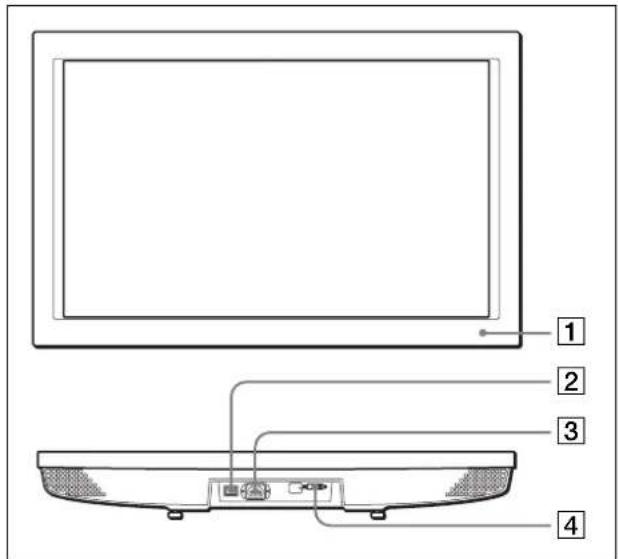
① Tally lamp
You can check the status of the monitor by the color of the tally lamp.
The tally lamp lights in red, green or amber according to the input signals.
2 POWER indicator
The indicator lights in amber in power saving mode. When the power is turned on, the indicator lights in amber for about 15 seconds and it change color in green. The picture is displayed in the screen immediately after the indicator lights in green.
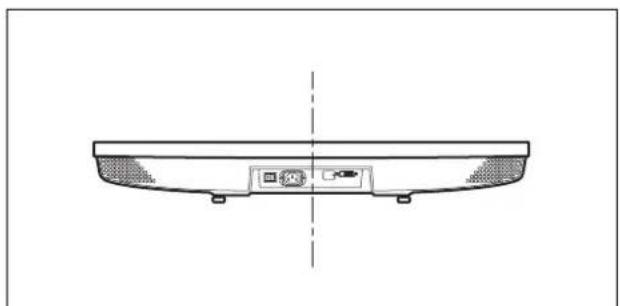
③DC IN jack
16.5 V DC or 12 V DC (LMD-152/172W only) is supplied using the supplied cable.
Note
DC power should be supplied by the MEU-WX2 Multiformat Engine Unit.
4DISPLAY SIGNAL IN connector
DVI 1.0-compatible VGA, XGA (LMD-152/212) or WXGA (LMD-172W/232W) signal can be input.
Note
Be sure to turn off the power before connecting the cable.
Rear Panel
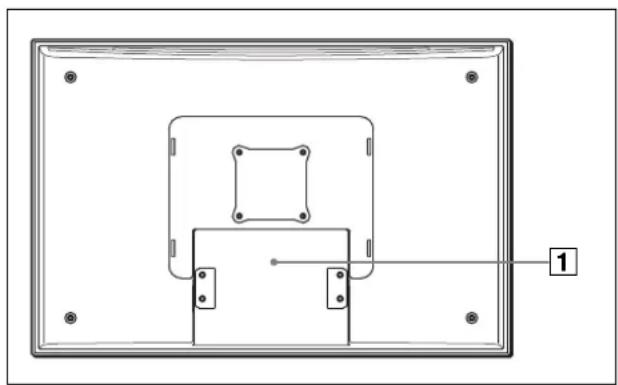
natural_image
Pure technical diagram of a rectangular frame with internal square and mounting holes, no text or symbols present1 Stand mounting position
For mounting the optional monitor stand SU-558.
LMD-322W
Front/Bottom Panel
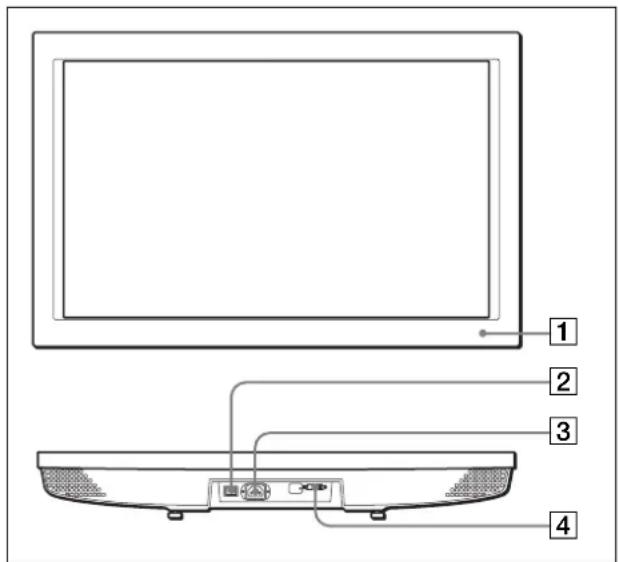
1 POWER indicator
The indicator lights in amber in power saving mode. When the power is turned on, the indicator lights in amber for about 15 seconds and it change color in green. The picture is displayed in the screen immediately after the indicator lights in green.
2 POWER switch
Press to turn on/off the main power of the display. When set to on, power is supplied to the monitor and the POWER indicator lights up.
3 AC IN socket
Connect the supplied AC power cord.
4DISPLAY SIGNAL IN connector
DVI 1.0-compatible VGA or WXGA signal can be input.
Note
Be sure to turn off the power before connecting the cable.
Rear Panel
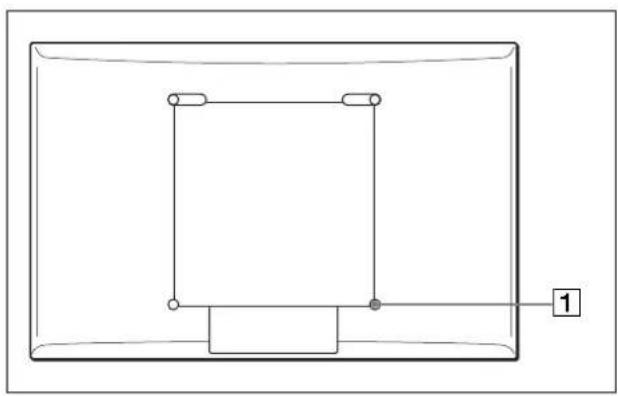
natural_image
Pure electrical circuit lines without any symbols1 Stand mounting hook
For mounting the optional floor stand SU-559.
Connecting the AC Power Cord
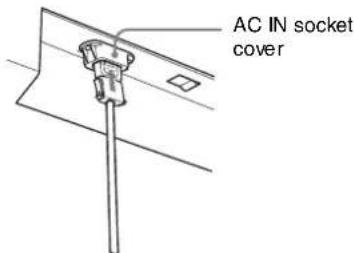
1 Plug the AC power cord into the AC IN socket at the bottom of the monitor. Then attach the AC plug holder (supplied) to the AC power cord.
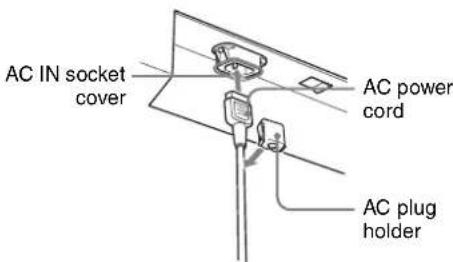
2 Slide the AC plug holder over the cord until it connects to the AC IN socket cover.
To remove the AC power cord
After squeezing the AC plug holder and freeing it, grasp the plug and pull out the AC power cord.
Specifications
Picture performance
LMD-152
LCD Panel a-Si TFT Active Matrix
Picture size 15 type
$$ 3 0 4 \times 2 2 8 \times 3 8 0 \mathrm{mm} (\mathrm{W} / \mathrm{H} / \text {Diagonal}) $$
$$ (1 2 \times 9 \times 1 5 \text { inches }) $$
Resolution 1024 × 768 dots
Pixel efficiency 99.99 %
Viewing angle 85°/85°/85°/85° (typical)
(up/down/left/right contrast 10:1)
Aspect ratio 4:3
Colors 16,770,000
LMD-172W
LCD Panel a-Si TFT Active Matrix
Picture size 17 type
$$ 3 6 4 \times 2 1 8 \times 4 2 4 \mathrm{mm} (\mathrm{W} / \mathrm{H} / \text {Diagonal}) $$
$$ (1 4 ^ {3} / 8 \times 8 ^ {5} / 8 \times 1 6 ^ {3} / 4 \text { inches }) $$
Resolution 1280 × 768 dots
Pixel efficiency 99.99 %
Viewing angle 85°/85°/85°/85° (typical)
(up/down/left/right contrast 10:1)
Aspect ratio 15:9
Colors 16,770,000
LMD-232W
LCD Panel a-Si TFT Active Matrix
Picture size 23 type
$$ 5 0 1 \times 3 0 1 \times 5 8 4 \mathrm{mm} (\mathrm{W/H/Diagonal}) $$
$$ (1 9 ^ {3} / 4 \times 1 1 ^ {7} / 8 \times 2 3 \text { inches }) $$
Resolution 1280 × 768 dots
Pixel efficiency 99.99 %
Viewing angle 85°/85°/85°/85° (typical)
(up/down/left/right contrast 10:1)
Aspect ratio 15:9
Colors 16,770,000
LMD-212
LCD Panel a-Si TFT Active Matrix
Picture size 21 type
$$ 4 3 0 \times 3 2 3 \times 5 3 8 \mathrm{mm} (\mathrm{W/H/Diagonal}) $$
$$ (1 7 \times 1 2 ^ {3} / _ {4} \times 2 1 ^ {1} / _ {4} \text { inches }) $$
Resolution 1024 × 768 dots
Pixel efficiency 99.99 %
Viewing angle 85°/85°/85°/85° (typical)
(up/down/left/right contrast 10:1)
Aspect ratio 4:3
Colors 16,770,000
LMD-322W
LCD Panel a-Si TFT Active Matrix
Picture size 32 type
687 × 412 × 802 mm (W/H/Diagonal)
$$ (2 7 ^ {1} / _ {8} \times 1 6 ^ {1} / _ {4} \times 3 1 ^ {5} / _ {8} \text { inches }) $$
Resolution 1280 × 768 dots
Pixel efficiency 99.99 %
Viewing angle 85^/85^/85^/85^ (typical)
$$ (u p / d o w n / l e f t / r i g h t c o n t r a s t 1 0: 1) $$
Aspect ratio 15:9
Colors 16,770,000
Input
DISPLAY IN DVI-D × 1
Signal format
Dot clock frequency/horizontal frequency/vertical frequency:
25.175 MHz/31.469 kHz/59.941 Hz (VGA)
68.250 MHz/47.396 kHz/59.995 Hz
(WXGA) (LMD-172W/232W/322W)
65.000 MHz/48.363 kHz/60.004 Hz
(XGA) (LMD-152/212)
DC IN XLR4 (male) × 1 (LMD-152/172W/
232W/212)
General
Power requirement
LMD-152: 12/16.5 V DC, 2.4/1.7 A
LMD-172W: 12/16.5 V DC, 4.4/3.0 A
LMD-232W: 16.5 V DC, 3.9 A
LMD-212: 16.5 V DC, 5.1 A
LMD-322W: 100-240 V AC, 50/60 Hz,
1.2 A - 0.6 A
Power consumption
LMD-152: 29 W
LMD-172W: 53 W
LMD-232W: 65 W
LMD-212: 84 W
LMD-322W: 120 W
Peak inrush current
LMD-322W:
(1) Power ON, current probe method: 76 A (240 V)
(2)Hot switching inrush current, measured in accordance with European Standard EN55103-1:73 A (230 V)
Operating conditions
Temperature: 0 to 35°C (32 to 95°F)
Recommended temperature: 20 to 30°C (68 to 86°F)
Humidity: 30 to 80 % (No condensation)
Pressure: 700 to 1,060 hPa
Transport and storage conditions
Temperature: -10 to 40^ C (14 to 104^ F)
Humidity: 0 to 80 %
Pressure: 700 to 1,060 hPa
Dimensions (w/h/d)
LMD-152: Approx. 379 × 297 × 70 mm ( 15 × 11^5/8 × 2^7/8 inches)
LMD-172W: Approx. 441 × 294 × 76 mm ( 17^3/8 × 11^5/8 × 3 inches)
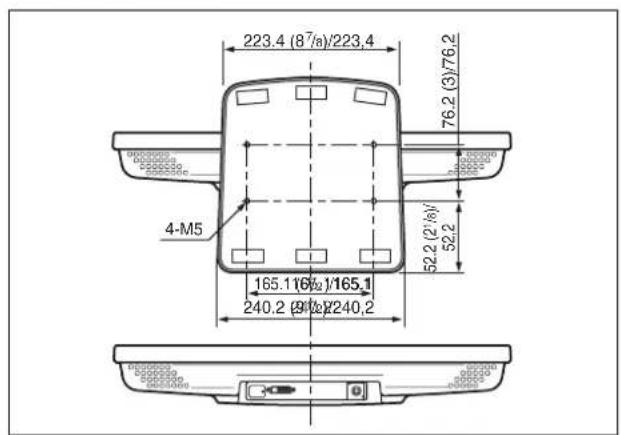
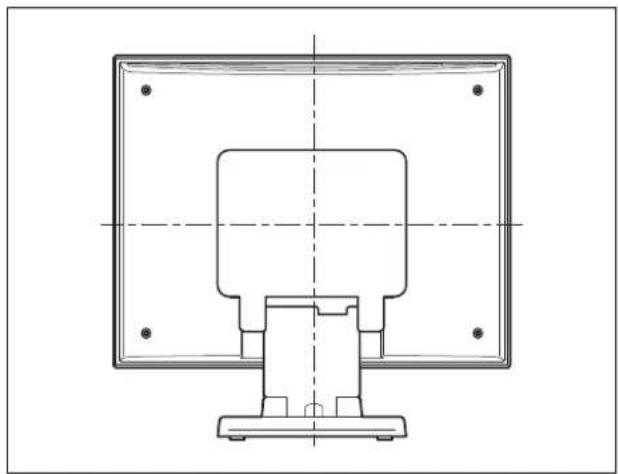
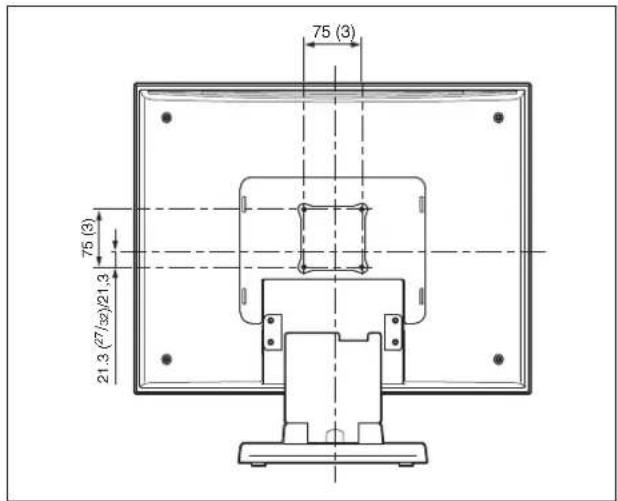
LMD-232W: Approx. 563 × 372 × 78 mm ( 22^1/4 × 14^3/4 × 3^1/8 inches)
LMD-212: Approx. 515 × 409 × 81 mm ( 20^3/8 × 16^1/8 × 3^1/_4 inches)
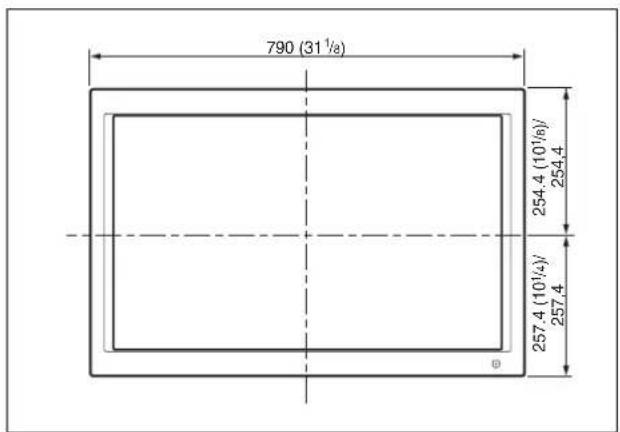
LMD-322W: Approx. 790 × 512 × 94 mm ( 31^1/8 × 20^1/4 × 3^3/_4 inches)
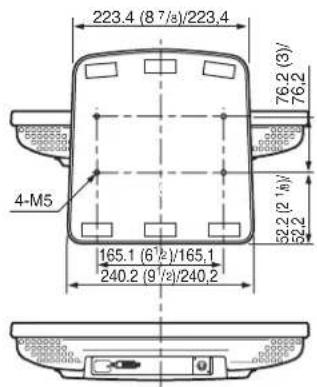
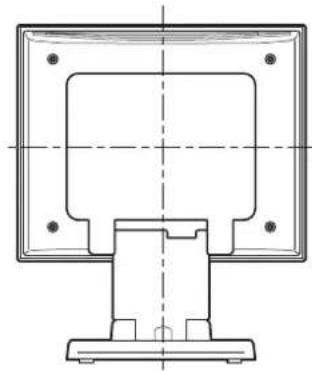
For details, see "Dimensions" on pages i - v.
Mass LMD-152: Approx. 4.0 kg (8 lb 13 oz)
LMD-172W: Approx. 4.8 kg (10 lb 9 oz)
LMD-232W: Approx. 6.4 kg (14 lb 2 oz)
LMD-212: Approx. 6.7 kg (14 lb 12 oz)
LMD-322W: Approx. 17.6 kg (38 lb 13 oz)
Supplied accessories
Display Exclusive Cord (1)
(LMD-152/172W/232W/212: SONY, 1-827-952-XX)
(LMD-322W: SONY, 1-829-699-XX)
AC Power Cord (1) (LMD-322W only)
AC Plug Holder (1) (LMD-322W only)
Warranty Card (1)
Operating Instructions (1)
Optional accessories
Monitor Stand SU-558 (LMD-152/172W/232W/212 only)
Floor Stand SU-559 (for LMD-322W only)
Mounting Bracket MB-522A (for LMD-172W only)
Mounting Bracket MB-523 (for LMD-212 only)
Mounting Bracket MB-524 (for LMD-152 only)
Display IF Cable SMF-600 (10 m)
Design and specifications are subject to change without notice.
Warning for the LMD-322W
Be sure to use an appropriate AC power cord that corresponds to the rated voltage specified in the list on page 5.
Avertissement
Tube fluorescent ....4
Entretien ....4
natural_image
Technical diagram of a rectangular frame with internal components and mounting holes, labeled with number 1 (no text or symbols beyond label)natural_image
Pure electrical circuit lines without any symbolsDISPLAY IN DVI-D × 1
Format du signal
25,175 MHz/31,469 kHz/59,941 Hz
(VGA)
68,250 MHz/47,396 kHz/59,995 Hz
(WXGA) (LMD-172W/232W/
322W)
65,000 MHz/48,363 kHz/60,004 Hz
(XGA) (LMD-152/212)
DC IN XLR4 (mâle) × 1 (LMD-152/172W/
232W/212)
LMD-172W : 12/16,5 V CC, 4,4/3,0 A
LMD-232W : 16,5 V CC, 3,9 A
LMD-212:16,5 V CC, 5,1 A
LMD-322W : 100-240 V CA,
1 Kontroll-LED
natural_image
Technical diagram of a rectangular frame with nested square and mounting holes, labeled with number 1 (no text or symbols beyond label)1 Monitorständer
natural_image
Pure electrical circuit lines without any symbols1 Montagehaken
DISPLAY IN DVI-D × 1
Signalformat
25,175 MHz/31,469 kHz/59,941 Hz
(VGA)
68,250 MHz/47,396 kHz/59,995 Hz
(WXGA) (LMD-172W/232W/
322W)
65,000 MHz/48,363 kHz/60,004 Hz
(XGA) (LMD-152/212)
DC IN XLR4 (Stecker) × 1 (LMD-152/172W/
232W/212)
Allgemein
Betriebsspannung
LMD-152: 12/16,5 V DC, 2,4/1,7 A
LMD-172W: 12/16,5 V DC, 4,4/3,0 A
LMD-232W: 16,5 V DC, 3,9 A
LMD-212: 16,5 V DC, 5,1 A
LMD-322W: 100-240 V AC,
4 Conector DISPLAY SIGNAL IN
natural_image
Technical diagram of a rectangular frame with nested square and mounting holes, labeled with number 1 (no text or symbols beyond label)4 Conector DISPLAY SIGNAL IN
natural_image
Pure electrical circuit lines without any symbolsDISPLAY IN DVI-D × 1
Formato de señal
25,175 MHz/31,469 kHz/59,941 Hz (VGA)
68,250 MHz/47,396 kHz/59,995 Hz
(WXGA) (LMD-172W/232W/322W)
65,000 MHz/48,363 kHz/60,004 Hz (XGA) (LMD-152/212)
DC IN XLR4 (macho) × 1 (LMD-152/172W/
232W/212)
General
LMD-172W: 12/16,5 V CC, 4,4/3,0 A
LMD-232W: 16,5 V CC, 3,9 A
LMD-212: 16,5 V CC, 5,1 A
LMD-322W: 100-240 V CA, 50/60 Hz, 1,2 A - 0,6 A
Consumo de energía
LMD-152: 29 W
LMD-172W: 53 W
LMD-232W: 65 W
LMD-212: 84 W
LMD-322W: 120 W
Peso LMD-152: Aprox. 4,0 kg
(8 libras 13 onzas)
LMD-172W: Aprox. 4,8 kg
(10 libras 9 onzas)
LMD-232W: Aprox. 6,4 kg
(14 libras 2 onzas)
LMD-212: Aprox. 6,7 kg
(14 libras 12 onzas)
LMD-322W: Aprox. 17,6 kg
(38 libras 13 onzas)
1 Spia di controllo
natural_image
Technical diagram of a rectangular frame with internal square and mounting holes, labeled with number 1 (no text or symbols beyond label)natural_image
Pure electrical circuit lines without any symbolsnatural_image
Simple line drawing of a mechanical component with a lever and base plate (no text or symbols)DISPLAY IN DVI-D × 1
Formato segnale
Frequenza dot-clock/frequenza
25,175 MHz/31,469 kHz/59,941 Hz
(VGA)
68,250 MHz/47,396 kHz/59,995 Hz
(WXGA) (LMD-172W/232W/
322W)
65,000 MHz/48,363 kHz/60,004 Hz
(XGA) (LMD-152/212)
DC IN XLR4 (maschio) × 1 (LMD-152/
172W/232W/212)
Dati generali
LMD-172W: 12/16,5 V c.c., 4,4/3,0 A
LMD-232W: 16,5 V c.c., 3,9 A
LMD-212: 16,5 V c.c., 5,1 A
LMD-322W: 100-240 V c.a.,
Massa LMD-152: Circa 4,0 kg
LMD-172W: Circa 4,8 kg
LMD-232W: Circa 6,4 kg
LMD-212: Circa 6,7 kg
LMD-322W: Circa 17,6 kg
Supporto Monitor SU-558 (solo LMD-152/172W/232W/212)
Supporto Verticale SU-559 (solo LMD-322W)
①讯号灯
natural_image
Technical diagram of a rectangular frame with internal components and mounting holes, labeled with number 1 (no text or symbols beyond label)1 支架安装位置
安装可选监视器支架 SU-558。
LMD-322W
前面板 / 底面板
1 POWER 指示灯
natural_image
Pure geometric diagram of a rectangular frame with internal vertical lines and a labeled point '1' (no text or symbols beyond the label)1 支架安装钩
安装可选监视器支架 SU-559。
连接 AC 电源线
DISPLAY IN DVI-D × 1
信号格式
25.175 MHz/31.469 kHz/59.941 Hz
(VGA)
68.250 MHz/47.396 kHz/59.995 Hz
(WXGA) (LMD-172W/232W/
322W)
65.000 MHz/48.363 kHz/60.004 Hz
(XGA) (LMD-152/212)
DC IN XLR4 (针型) × 1 (LMD-152/172W/232W/212)
一般参数
电源要求 LMD-152: 12/16.5 V DC, 2.4/1.7 A
LMD-172W: 12/16.5 V DC, 4.4/3.0 A
LMD-232W: 16.5 V DC, 3.9 A
LMD-212: 16.5 V DC, 5.1 A
LMD-322W: 100-240 V AC,
50/60 Hz, 1.2 A - 0.6 A
能耗 LMD-152: 29 W
LMD-172W: 53 W
LMD-232W: 65 W
LMD-212: 84 W
LMD-322W: 120 W
峰值起动电流 LMD-322W:
(1)打开电源,电流探针方法:
76 A (240 V)
(2)热切换起动电流,按照欧洲标准
EN55103-1 测量 : 73 A (230 V)
工作条件 温度 :0 到 35 ℃
建议温度 :20 到 3℃
•LMD-152
•LMD-172W
•LMD-232W
•LMD-212
•LMD-322W
1指示燈
您可從指示燈色彩來檢查顯示器的狀態。
natural_image
Technical diagram of a rectangular frame with internal components and mounting holes, labeled '1' at the bottom (no text or symbols within the diagram itself)1 底座安装位置
natural_image
Pure geometric diagram of a rectangular frame with internal vertical lines and a labeled point '1' (no text or symbols beyond the label)1底座安裝鉤
若要安裝選購的地板底座 SU-559。
連接 AC 電源線
DISPLAY IN DVI-D × 1
訊號格式
25.175 MHz/31.469 kHz/59.941 Hz
(VGA)
68.250 MHz/47.396 kHz/59.995 Hz
(WXGA) (LMD-172W/232W/
322W)
65.000 MHz/48.363 kHz/60.004 Hz
(XGA) (LMD-152/212)
LMD-172W: 12/16.5 V DC,
4.4/3.0 A
LMD-232W: 16.5 V DC, 3.9 A
LMD-212: 16.5 V DC, 5.1 A
LMD-322W: 100-240 V AC,
50/60 Hz, 1.2 A - 0.6 A
耗電率 LMD-152: 29 W
LMD-172W: 53 W
LMD-232W: 65 W
LMD-212: 84 W
LMD-322W: 120 W
峰值電流 LMD-322W:
(1)啟動電源,電流測試方式:
76 A (240 V)
(2) 熱交換峰值電流,依歐洲標準
EN55103-1 测量:73 A (230 V)
1탈리 랭프
natural_image
Pure technical diagram of a rectangular frame with internal square and mounting holes, no text or symbols present1 스탠드 설치 위치
natural_image
Pure geometric diagram of a rectangular frame with internal vertical lines and a labeled point '1' (no text or symbols beyond the label)1스텐드 설치 후크
DISPLAY IN DVI-D × 1
신호 형식
도트 클릭 주파수/수평 주파수/
수직 주파수:
25.175MHz/31.469kHz/59.941Hz
(VGA)
68.250MHz/47.396kHz/59.995Hz
(WXGA)
(LMD-172W/232W/322W)
65.000MHz/48.363kHz/60.004Hz
(XGA) (LMD-152/212)
DC IN XLR4(수 키넥터) × 1(LMD-152/172W/232W/212)
일반
LMD-322W: 약 790×512×94mm
底面 /Bottom/Dessous/Unterseite/Parte inferior/Base/ 底部/底部圖/바닥면
背面(飾りカバー付き)/Back (with an ornamental cover)/Arrière (avec couvercle de garnissage)/Rückseite (mit Zusatzabdeckung)/Parte posterior (con cubierta decorativa)/Retro (con copertura ornamentale)/启部(带装饰盖)背面圖(含裝置外殼) 후면 (장식 커버 포함)
natural_image
Technical line drawing of a mechanical component with mounting base and central housing (no text or symbols)背面(飾りカバー無し)/Back (without an ornamental cover)/Arrière (sans couvercle de garnissage)/Rückseite (ohne Zusatzabdeckung)/Parte posterior (sin cubierta decorativa)/Retro (senza copertura ornamentale)/后部(不带裝飾蓋) 背面圖(不含裝置外殻)/후면 (장식 커버 미포함)
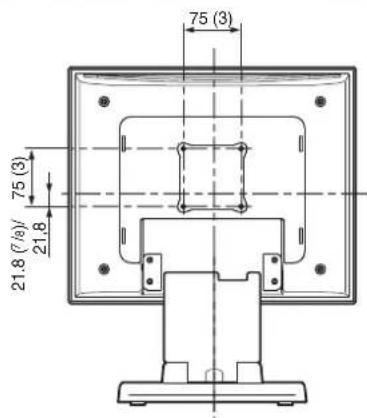
单位: mm/Unit: mm (inches)/Unité: mm (pouces)/ Einheit: mm/Unidad: mm (pulgadas)/Unità: mm/单位: 毫米 單位: 公毫 단위: mm
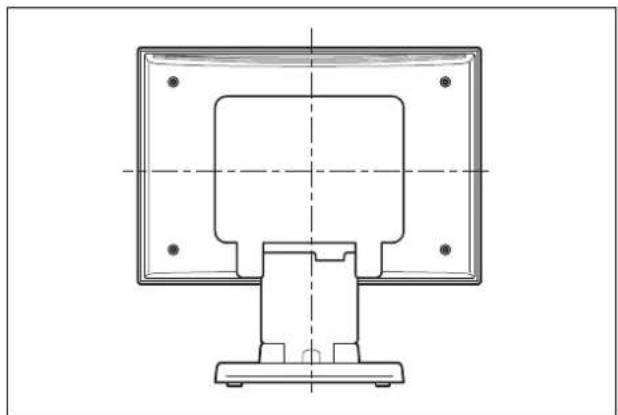
LMD-172W
背面(飾りカバー付き)/Back (with an ornamental cover)/Arrière (avec couvercle de garnissage)/Rückseite (mit Zusatzabdeckung)/Parte posterior (con cubierta decorativa)/Retro (con copertura ornamentale)/启部(帯装饰盖)背面圖(含裝置外殼) 후면 (장식 커버 포함)
natural_image
Technical line drawing of a computer monitor with mounting base and control panel (no text or symbols)背面(飾りカバー無し)/Back (without an ornamental cover)/Arrière (sans couvercle de garnissage)/Rückseite (ohne Zusatzabdeckung)/Parte posterior (sin cubierta decorativa)/Retro (senza copertura ornamentale)/后部(不帯装饰蓋)
natural_image
Technical line drawing of a computer monitor with front panel and base mount (no text or symbols)背面(飾りカバー無し)/Back (without an ornamental cover)/Arrière (sans couvercle de garnissage)/Rückseite (ohne Zusatzabdeckung)/Parte posterior (sin cubierta decorativa)/Retro (senza copertura ornamentale)/后部(不带装饰盖) 背面圖(不含裝置外殻)/후면 (장식 커버 미포함)
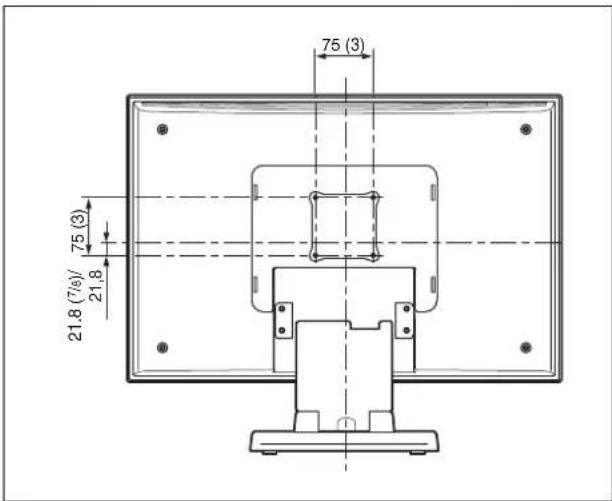
单位: mm/Unit: mm (inches)/Unité: mm (pouces)/ Einheit: mm/Unidad: mm (pulgadas)/Unità: mm/单位: 毫米 單位: 公毫 단위: mm
LMD-212
正面 /Front/Avant/Vorderseite/Parte frontal/Anteriore/
前面/正面圖/정면
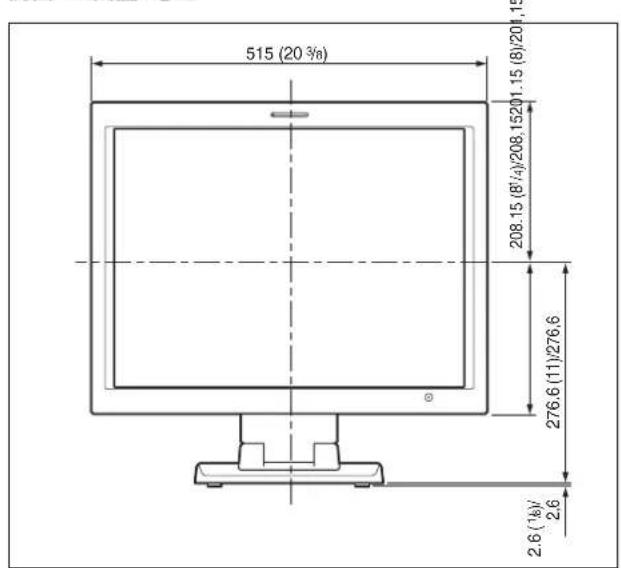
底面 /Bottom/Dessous/Unterseite/Parte inferior/Base/
底部/底部圖/바닥면
背面(飾りカバー付き)/Back (with an ornamental cover)/Arrière (avec couvercle de garnissage)/Rückseite (mit Zusatzabdeckung)/Parte posterior (con cubierta decorativa)/Retro (con copertura ornamentale)/启部(带装饰盖)背面圖(含裝置外殼) 후면 (장식 커버 포함)
natural_image
Technical line drawing of a mechanical component with mounting base and central housing (no text or symbols)背面(飾りカバー無し)/Back (without an ornamental cover)/Arrière (sans couvercle de garnissage)/Rückseite (ohne Zusatzabdeckung)/Parte posterior (sin cubierta decorativa)/Retro (senza copertura ornamentale)/后部(不带装饰盖) 背面圖(不含裝置外殻)/후면 (장식 커버 미포함)
单位: mm/Unit: mm (inches)/Unité: mm (pouces)/ Einheit: mm/Unidad: mm (pulgadas)/Unità: mm/单位:毫米 單位:公毫 단위: mm
LMD-322W
正面 /Front/Avant/Vorderseite/Parte frontal/Anteriore/ 前面/正面圖/정면
底面 /Bottom/Dessous/Unterseite/Parte inferior/Base/ 底部/底部圖/바닥면
natural_image
Top-down schematic of a vehicle rear panel with control buttons and ventilation grilles (no text or labels)
- ①タリーランプ
- ①スタンド取り付け部
- WARNING
- WARNING (for LMD-322W only)
- For the customers in Europe
- For the Customers in the USA
- For the customers in Canada
- Attention-when the product is installed in Rack (for LMD-152/172W/212):
- Providing protective earth:
- Internal air ambient temperature of the rack:
- Prevention against achieving hazardous condition due to uneven mechanical loading:
- Install the equipment while taking the operating temperature of the equipment into consideration:
- Table of Contents
- Precautions ....4
- Features ....5
- Location and Function of Parts and Controls .....6
- Specifications ....7
- Dimensions...... i
- About this manual
- Precautions
- On safety
- Handling the LCD screen
- About the fluorescent tube
- Maintenance
- Before cleaning
- On cleaning the monitor screen
- On cleaning the cabinet
- Providing an ample amount of space around the unit (for the LMD-322W only)
- Side
- Disposal of the unit
- Notes
- Features
- High brightness LCD panel
- Rack mount monitors (LMD-152, LMD-172W and LMD-212 only)
- Optional monitor stand with tilt function
- Lightweight, thin design
- 3-color tally lamp (except for the LMD-322W)
- Location and Function of Parts and Controls
- ① Tally lamp
- POWER indicator
- ③DC IN jack
- Note
- 4DISPLAY SIGNAL IN connector
- Stand mounting position
- LMD-322W
- POWER indicator
- POWER switch
- AC IN socket
- Stand mounting hook
- Connecting the AC Power Cord
- To remove the AC power cord
- Specifications
- Picture performance
- LMD-152
- LMD-172W
- LMD-232W
- LMD-212
- Input
- General
- Warning for the LMD-322W
- Avertissement
- Kontroll-LED
- Monitorständer
- Allgemein
- Conector DISPLAY SIGNAL IN
- Dati generali
- 支架安装钩
- 连接 AC 电源线
- 一般参数
- 1底座安裝鉤
- 連接 AC 電源線
- 1탈리 랭프
- 스탠드 설치 위치
- 1스텐드 설치 후크
- 일반
Brand : SONY
Model : LMD-232W
Category : Monitor