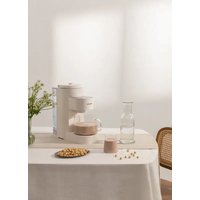
Vegan Milk Maker - Plant milk machine Create - Free user manual and instructions
Find the device manual for free Vegan Milk Maker Create in PDF.


| Product type | Plant milk maker |
| Brand | Create |
| Model | Vegan Milk Maker |
| Maximum capacity | 1500 ml (adjustable: 400, 600, 900, 1200, 1500 ml) |
| Automatic programs | Nuts, Cereals, Milkshake, Almond milk, Oat milk, Soy milk |
| Delayed timer | 6h, 8h, 10h |
| Automatic cleaning function | Yes |
| Hot drying function (sterilization) | Yes |
| Removable water tank | Yes |
| Mixing container with lockable lid | Yes |
| Removable drip tray | Yes |
| Steam valve | Yes |
| Blades | Included |
| Measuring cup included | Yes |
| Voltage | 220-240 V |
| Safety | Water level detection, temperature sensor, motor overload protection (audible alarms) |
| Maintenance | Manual cleaning of removable parts; automatic system cleaning |
| Maximum operating altitude | 1500 m |
| Included accessories | Measuring cup |
Frequently Asked Questions - Vegan Milk Maker Create
User questions about Vegan Milk Maker Create
0 question about this device. Answer the ones you know or ask your own.
Ask a new question about this device
Download the instructions for your Plant milk machine in PDF format for free! Find your manual Vegan Milk Maker - Create and take your electronic device back in hand. On this page are published all the documents necessary for the use of your device. Vegan Milk Maker by Create.
USER MANUAL Vegan Milk Maker Create
natural_image
Line drawing of a cylindrical device with a central shaft and top lid, no text or symbols presentMULTIFUNCTION PLANT-BASED MILK MAKER MÁQUINA MULTIFUNCIÓN PARA PREPARAR BEBIDAS SALUDABLES
CREATE CREATE CREATE ATE CREATE CREATE CRE CREATE CREATE CREATE ATE CREATE CREATE CRE CREATE CREATE CREATE ATE CREATE CREATE CRE CREATE CREATE CREATE CREATE CREATE CREATE CREATE CREATE CREATE CREATE CREATE CREATE CREATE CREATE CREATE CREATE CREATE CREATE CREATE CREATE CREATE CREATE CREATE CREATE CREATE CREATE CREATE CREATE CREATE CREATE CREATE CREATE CREATE CREATE CREATE CREATE CREATE CREATE CREATE CREATE CREATE CREATE CREATE CREATE CREATE CREATE CREATE CREATE CREATE CREATE CREATE CREATE CREATE CREATE CREATE CREATE CREATE CREATE CREATE CREATE CREATE CREATE CRE
CREATE CREATE CREATE ATE CREATE CREATE CRE CREATE CREATE CREATE ATE CREATE CREATE CRE CREATE CREATE CREATE ATE CREATE CREATE CRE CREATE CREATE CREATE ATE CREATE CREATE CRE CREATE CREATE CREATE ATE CREATE CREATE CRE CREATE CREATE CREATE ATE CREATE CREATE CRE CREATE CREATE CREATE ATE CREATE CREATE CRE CREATE CREATE CREATE ATE CREATE CREATE CRE CREATE CREATE CREATE ATE CREATE CREATE CRE CREATE CREATE CREATE ATE CREATE CREATE CRE CREATE CREATE CREATE ATE CREATE CREATE CRE CREATE CREATE CRE CREATE CREATE CRE ATE CREATE CREATE CRE CREATE CREATE CREATE ATE CREATE CREATE CRE CREATE CREATE CREATE ATE CREATE CREATE CRE CREATE CREATE CREATE ATE CREATE CREATE CRE
INDEX
ENGLISH
Security instructions 6
Parts list 6
Operation method 7
Control panel 7
Programmes description 7
Before using 7
Functions and recipes 8
Operating instructions 8
Troubleshooting 9
Alarm prompts 10
Maintenance 11
Mixing chamber cleaning 11
Spare parts cleaning 11
PORTUGUÊS
Thank you for choosing our appliance. Before using the appliance, and to ensure the best use, carefully read these instructions.
The safety precautions enclosed herein reduce the risk of death, injury and electrical shock when correctly adhered to. Keep the manual in a safe place for future reference, along with the completed warranty card, purchase receipt and package. If applicable, pass these instructions on to the next owner of the appliance. Always follow basic safety precautions and accident-prevention measures when using an electrical appliance. We assume no liability for customer failing to comply with these requirements.
SECURITY INSTRUCTIONS
When using any electrical appliance, basic safety precautions should always be observed.
- Do not touch the blade.
- Make sure the mixing chamber cover is well fixed (clockwise direction).
- To ensure quality, every machine will be inspected before leaving the factory. Therefore, a small amount of water may remain in the mixing chamber cover and the compartment, which is normal.
- This appliance can be used by children aged 8 years and above and persons with reduced physical, sensory or mental capabilities, or lack of experience or knowledge, provided they are supervised by a person responsible for their safety or have been trained in its use. the device safely.
• Children must not play with this appliance. They should also not perform cleaning and maintenance tasks unless they are over 8 years old and supervised. Close supervision of children is necessary when using any appliance.
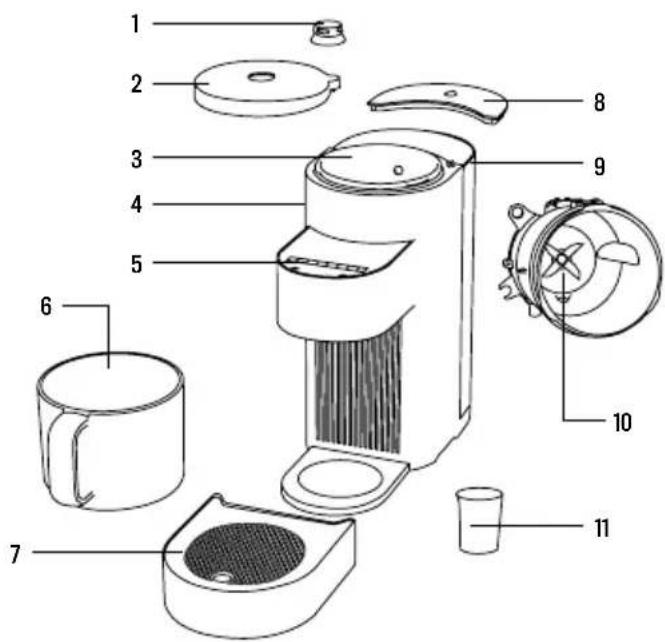
PARTS LIST
- Steam valve
- Mixing chamber lid
- Mixing chamber
- Main unit
- Display panel
- Beverage container
- Drip tray
- Water tank cover
- Water tank
- Blade
- Measuring cup
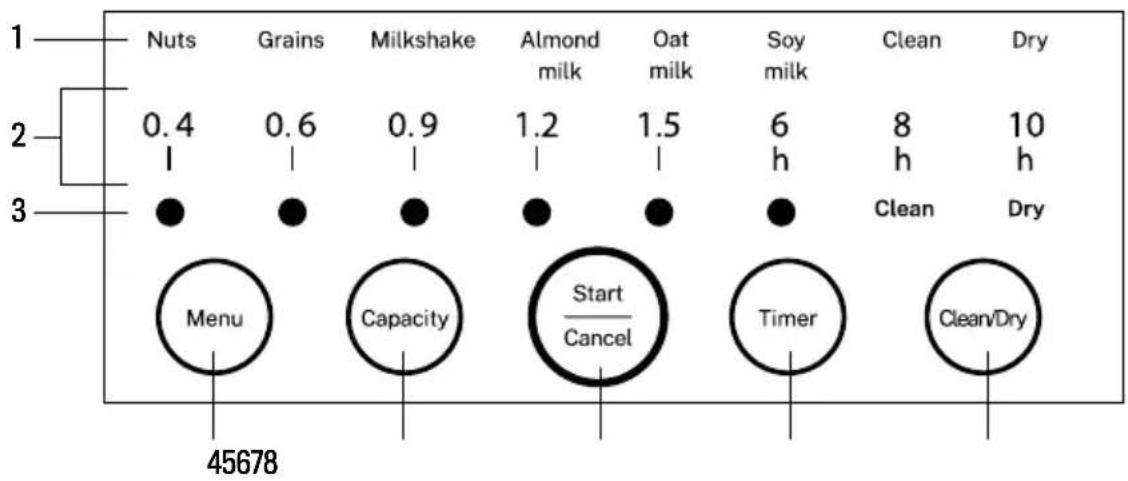
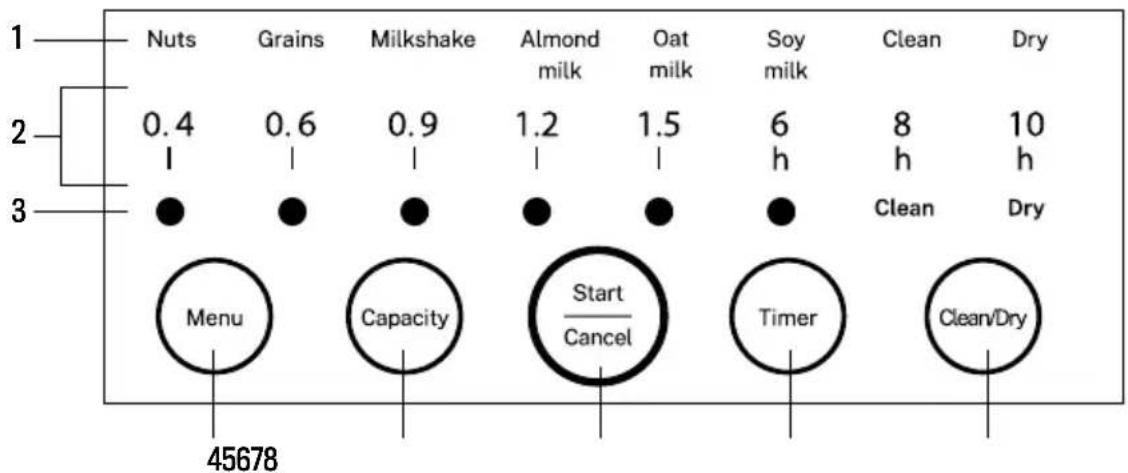
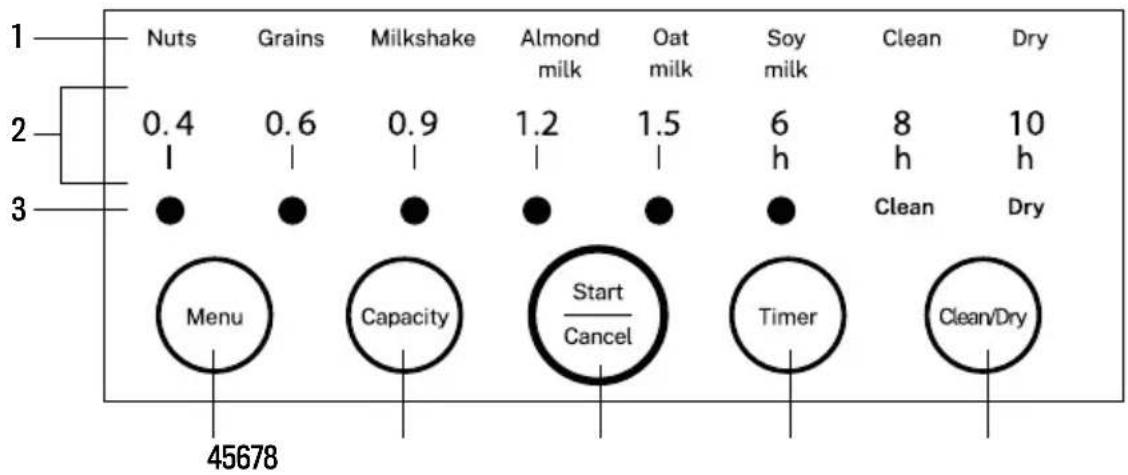
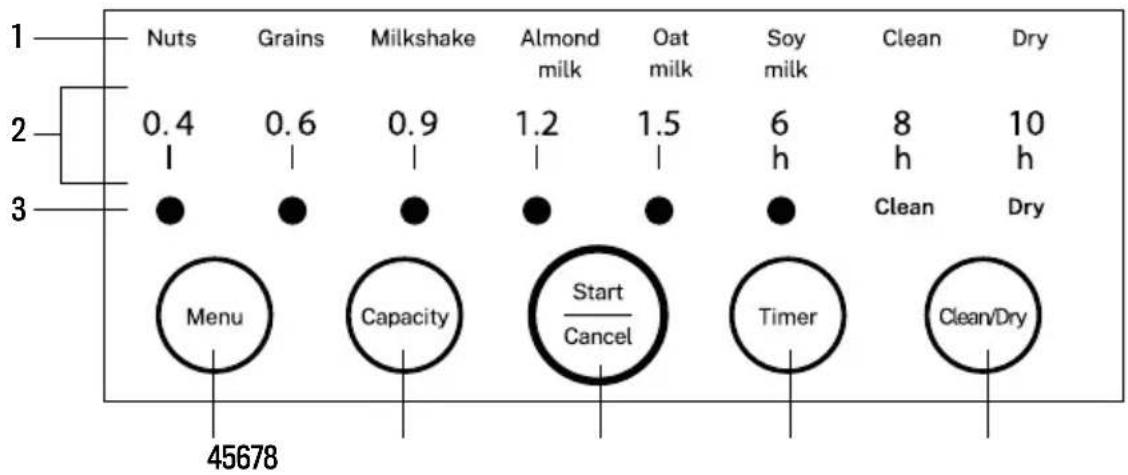
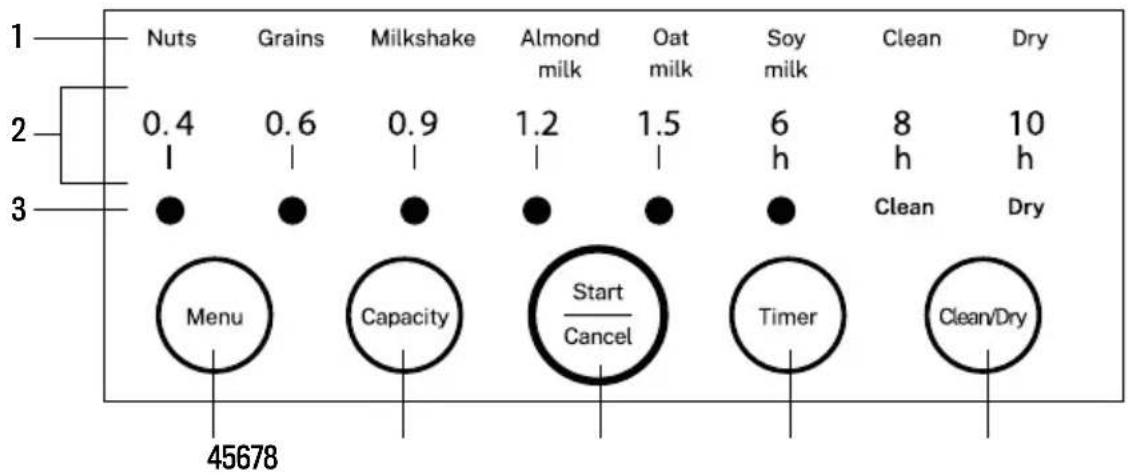
CONTROL PANEL
other
| Item | Nuts | Grains | Milkshake | Almond milk | Oat milk | Soy milk | Clean | Dry | |---|---|---|---|---|---|---|---|---| | 1 | 0.4 | 0.6 | 0.9 | 1.2 | 1.5 | 6 h | 8 h | 10 h | | 2 | 1 | 1 | 1 | 1 | 1 | 1 | 1 | 1 | | 3 | ● | ● | ● | ● | ● | ● | Clean | Dry | | Start Cancel / Timer / Clean/Dry | Menu (45678) | Capacity (45678) | Capacity (45678) | Capacity (45678) | Capacity (45678) | Capacity (45678) | Capacity (45678) | Capacity (45678) | | 1 - Nuts | 0.4 | 0.6 | 0.9 | 1.2 | 1.5 | 6 h | 8 h | 10 h | | 2 - Grains | 1 | 1 | 1 | 1 | 1 | 1 | 1 | 1 | | 3 - Milkshake | 0.4 | 0.6 | 0.9 | 1.2 | 1.5 | 6 h | 8 h | 10 h | | ... | ... | ... | ... | ... | ... | ... | ... | ... | | ... (Total) | 45678 | 45678 | 45678 | 45678 | 45678 | 45678 | 45678 | 45678 | The total is a sum of all values shown in the table above.-
Program display
-
Time and Capacity showing in blue light
-
Program showing in orange light
-
Menu button
-
Capacity button
-
Start/Cancel
-
Timer button
-
Clean/Hot dry or water draining button
PROGRAMMES DESCRIPTION
- Nuts: For nuts and seeds.
- Grains: For cereals and pseudocereals (quinoa, amaranth, buckwheat, etc.)
- Milkshake: For vegetable milk with ara leche vegetal dates, other dried or ripe fruit.
- Almond milk: Quick access to make almond milk.
- Oat milk: Quick access to make oat milk.
- Soy milk: Quick access to make soy milk.
BEFORE USING
Please consult the specific recipes for this product to learn about the ingredient proportions and proper usage of each cooking programme.
- This product is designed and limited to use in conditions below 1500 meters above the sea level.
- Clean the appliance before using.
- If there is volume deviation of liquid between what was planned and the fact, press Menu and Capacity together for 3 seconds to calibrate the water pump. During the calibration, the light of 0.6 ~L will always be on, and then the light will flash after calibration. (Please put the drink container in place and ensure the appliance is on a flat table during calibration).
NOTE: Please press Clean/Dry for 3 seconds to have it deep cleaned and detect altitude.
FUNCTIONS AND RECIPES
Please consult the specific recipes for this product to learn about the ingredient proportions and proper usage of each cooking programme.
- Please use the measuring cup equipped with this product to measure the ingredients.
- Please add the ingredients according to the recipe quantity.
- Please add water to the water level scale line (the recipe has a clear water volume according to the recipe requirements).
- Please process large pieces of food into the size of peanuts.
- 1 cup in the amount of ingredients means 1 flat cup.
OPERATING INSTRUCTIONS
- Adding ingredients and water
Open the mixing chamber and add ingredients (please follow the instruction manual to see the ingredient portions). Then open and fill the water tank. Be sure that the water level is above the line that indicates the appropriate amount volume for the intended use, and tighten the grinding chamber cover in place. Close the water tank cover. Place the beverage container and water tank in their designated position.
- Menu selection
Press the Menu button to select the desired function. The selection will flash, and each successive press of the button will cycle the selected option from left to right.
- Capacity selection
Press the Capacity button to select the desired capacity. Each press of the LED display will cycle the selection between 400ml, 600ml, 900ml, 1200ml and 1500ml. (The milkshake function requires the user to add liquid ingredients to the grinding chamber according to the recipe, and the capacity is only displayed as 600ml). Max. capacity of almond milk and oat milk function is 1200ml.
Default capacity: 600ml
- Timer selection
Press the Timer button to select the desired time. It will show 6h, 8h and 10h in total.
Default time is 8h, means the drink will be finished after 8h.
- Start operation
Press the Start/Cancel button to start the operation. Within 30 seconds, you can press the button again to cancel the current menu selection and reselect.
- Clean/hot dry
Be sure to remove the beverage container before cleaning. After the beverage is completed, the system automatically starts the cleaning function. At this time, the cleaning function light flashes. Press the Start/Cancel button to enter the automatic cleaning process. After the cleaning is completed, the hot drying function light flashes, touch the "Start/Cancel" button to enter the heat drying sterilization process. (Cleaning and hot drying function can be cancelled during the whole process.)
Notes:
A. Please add the ingredients according to the instructions in order to avoid overflow, blocking of outlet, and poor crushing.
B. When using the milkshake function, do not put too much fiber material to avoid blocking.
| FAULT CAUSE SOLUTION | ||
| Indicator light will not turn on. | Power plug is not properly inserted. | Make sure the plug is completely plugged in. |
| Display panel malfunction. | Send to after sales service center for service. | |
| Indicator light is on, but the machine does not function properly. | No selected program or function. Select a program or function. | |
| The water reservoir is either empty or is not adequately filled. | Fill the water reservoir to the appropriate water level and place the reservoir in its correct position. | |
| Temperature sensor or water level electrode malfunction. | Send to after sales service center for service. | |
| The grinding chamber does not intake water. | Water pump abnormality. | Send to after sales service center for service. |
| Blockage of water reservoir filter. | Send to after sales service center for service. | |
| The motor works continuously without pause. | Water has seeped into the machine. | Send to after sales service center for service. |
| Heat is continuously applied without pause | Temperature sensor abnormality. | Send to after sales service center for service. |
| Button is unresponsive. | System is not fully reset after brief power disruption. | Disconnect from power for two minutes before powering back on. |
| Display panel button malfunction. | Send to after sales service center for service. | |
| Ingredients are not completely broken down. | Too much or too little ingredients. | Add ingredients according to the recipe in the instruction manual. |
| Machine failure. | Send to after sales service center for service. | |
| Incorrect program function selected. | Choose the program function appropriate for the intended use. | |
| Overflow. | Incorrect program function selected. | Choose the program function appropriate for the intended use. |
| Too many or too large ingredients. | Add ingredients according to the recipe in the instruction manual. | |
| Machine failure. | Send to after sales service center for service. | |
| Burnt pot. | Mixing chamber is not completely clean. | Make sure the Mixing chamber is completely clean before use. |
| Too much ingredients. | Add ingredients according to the recipe in the instruction manual. | |
| Operating duration is abnormally long. | Water temperature is too low. | Use standard temperature water. |
| Incorrect program function selected. | Choose the program function appropriate for the intended use. | |
| The beverage is not properly dispensed into the Drink container. | Drink container is not correctly positioned. | Place the drink container in its correct position |
| Dispense valve abnormality | Send to after sales service center for service. | |
| Waste water is not properly emptied into the drip tray. | Excess water basin is not correctly positioned. | Place the excess water basin in its correct position. |
| Does remove the drink container. | Remove the drink container. | |
| Dispense valve abnormality. | Send to after sales service center for service. | |
| Abnormal noises. | Standard machine operation. | Occasional noise is normal. |
| Abnormal power connectivity. | Power disconnects for under 30 seconds. | After reconnecting to power, operations will resume automatically. |
| Power disconnects for over 30 seconds. | After reconnecting to power, the machine will be reset. The remaining ingredients can be processed and removed by pressing the cleaning button. After cleaning, new ingredients may be added. | |
ALARM PROMPTS
| ERROR SOUND EXPLANATION SOLUTION | ||
| 2 beep sounds | No water in the water tank or clogged filter at the bottom of the water tank. | Add water in the water tank to the water level mark to clean the filter mesh at the bottom of the water tank. |
| 3 beep sounds | Grinding chamber cover is not installed or installed improperly. | Check whether the grinding chamber cover is not tightly closed. |
| 5 beep sounds | Too much material overloads the motor. | Reduce material and re-make after cleaning the machine. |
| 6 beep sounds | The upper water level electrode sticks or places too much material. | Clean the electrode or reduce the amount of material. |
| 7 beep sounds Abnormal voltage signal. | Check whether the voltage is lower than 160V or higher than 260V / use stabilized power supply. | |
| 8 beep sounds | Abnormal internal communication interface. | Send to after sales service center for service. |
| 10 beep sounds | Drink outlet is blocked or blocked by other articles. | Clean the drink outlet or send to after sales service center for service. |
| 12 beep sounds | Mixing chamber temperature sensor detection circuit failure. | Send to after sales service center for service. |
| 14 beep sounds Zero crossing signal loss. | Send to after sales service center for service. | |
| 15 beep sounds Overtime heating of Mixing chamber. | Send to after sales service center for service. | |
NOTES: If the issue cannot be resolved, do not disassemble the machine. Please send to after sales service center for service.
MIXING CHAMBER CLEANING
1. Menu selection
Press Clean/Dry function to choose Cleaning or Hot drying, the light will flash while the function is selected.
2. Start cleaning function
Press Start/Cancel button to start cleaning countdown. Cleaning and heating function can be cancelled during the whole process.
- After all the functions are finished normally, open the lid and dry the grinding, no need to use the hot drying function.
- The heating effect is related to the room temperature, the amount of water stains and the distribution of water stains.
- A small amount of residual water will be drained from the pulp outlet during hot drying. Please place a drip tray to prevent liquid from flowing out.
- In the standby state, long press the Capacity + Timer button to open the valve to discharge the drink. If the drink in the Mixing chamber is too viscous or there are lumps that are not crushed, please take out the lumps and use the cleaning function to solve it. It is forbidden to discharge the drink manually to avoid clogging the drink pipe.
SPARE PARTS CLEANING
- The water tank, lid of mixing chamber, drip tray and steam valve can be removed from the machine to be cleaned with water.
- When the use of too much ingredients result in an obstructed dispense valve, please remove the remaining ingredients in the grinding compartment, manually clear the dispense valve, and use the “cleaning” function to clear the system.
- After removing and cleaning machine components, it is recommended to either manually dry or let the components air dry before reassembling and the storing the device in a dry and ventilated space.
In compliance with Directives: 2012/19/EU and 2015/863/EU on the restriction of the use of dangerous substances in electric and electronic equipment as well as their waste disposal. The symbol with the crossed dustbin shown on the package indicates that the product at the end of its service life shall be collected as separate waste. Therefore, any products that have reached the end of their useful life must be given to waste disposal centres specialising in separate collection of waste electrical and electronic equipment, or given back to the retailer at the time of purchasing new similar equipment, on a one for one basis. The adequate separate collection for the subsequent start-up of the equipment sent to be recycled, treated and disposed of in an environmentally compatible way contributes to preventing possible negative effects on the environment and health and optimises the recycling and reuse of components making up the apparatus. Abusive disposal of the product by the user involves application of the administrative sanctions according to the laws.
PANEL DE CONTROL
other
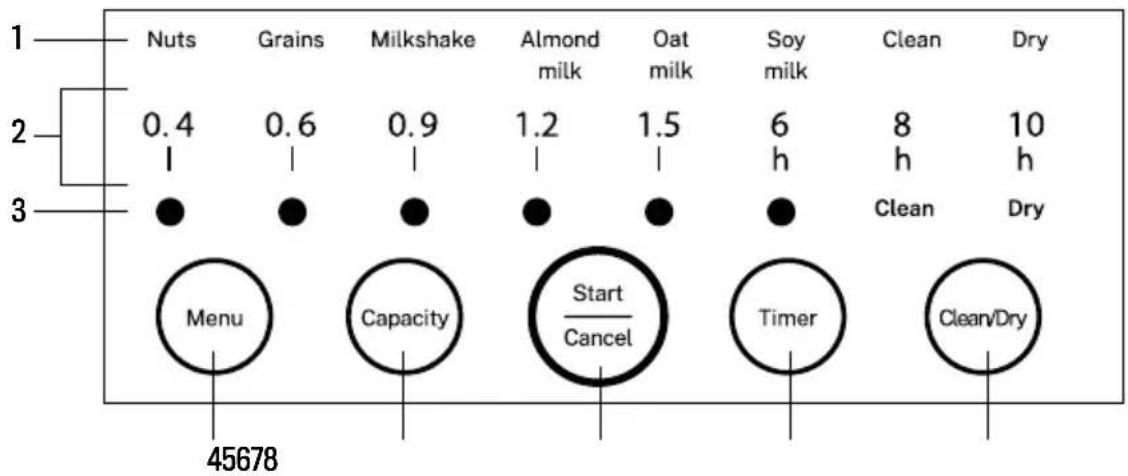
| Stage | Nuts | Grains | Milkshake | Almond milk | Oat milk | Soy milk | Clean | Dry | | :--- | :--- | :--- | :--- | :--- | :--- | :--- | :--- | :--- | | 1 | 0.4 | 0.6 | 0.9 | 1.2 | 1.5 | 6 | 8 | 10 | | 2 | 1 | 1 | 1 | 1 | 1 | h | h | h | | 3 | ● | ● | ● | ● | ● | ● | Clean | Dry | | Start / Cancel | Menu | Capacity | — | — | — | — | — | — | | Timer | — | — | — | — | — | — | — | — | | Clean/Dry | — | — | — | — | — | — | — | — | | Total Output: 45678PAINEL DE CONTROLE
PANNEAU DE COMMANDE
INDICATIONS D'ALARME
PANNELLO DI CONTROLLO
other
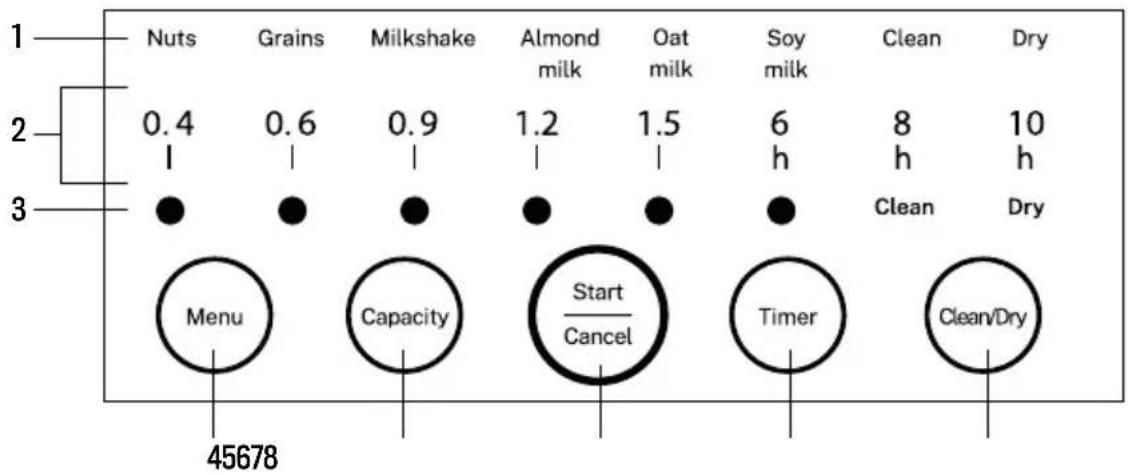
| Category | Nuts | Grains | Milkshake | Almond milk | Oat milk | Soy milk | Clean | Dry | |---|---|---|---|---|---|---|---|---| | 1 | 0.4 | 0.6 | 0.9 | 1.2 | 1.5 | 6 h | 8 h | 10 h | | 2 | 1 | 1 | 1 | 1 | 1 | 1 | 1 | 1 | | 3 | ● | ● | ● | ● | ● | ● | Clean | Dry | | Start / Cancel | Menu | Capacity | Capacity | Almond milk | Oat milk | Soy milk | Clean | Dry | | Timer | 45678 | 45678 | 45678 | 45678 | 45678 | 45678 | 45678 | 45678 | | Clean/Dry | 45678 | 45678 | 45678 | 45678 | 45678 | 45678 | 45678 | 45678 |SCHALTTAFEL
other
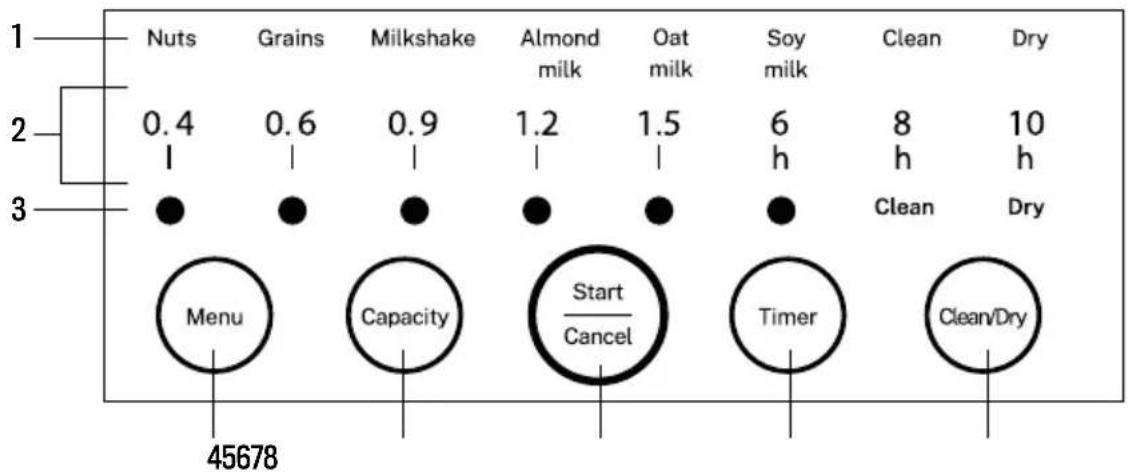
| Item | Nuts | Grains | Milkshake | Almond milk | Oat milk | Soy milk | Clean | Dry | |---|---|---|---|---|---|---|---|---| | 1 | 0.4 | 0.6 | 0.9 | 1.2 | 1.5 | 6 h | 8 h | 10 h | | 2 | 1 | 1 | 1 | 1 | 1 | 1 | 1 | 1 | | 3 | ● | ● | ● | ● | ● | ● | Clean | Dry | 45678 Menu Capacity Start/Cancel Timer Clean/DryCONTROLEPANEEL
PANEL STEROWANIA
other
| Stage | Nuts | Grains | Milkshake | Almond milk | Oat milk | Soy milk | Clean | Dry | |---|---|---|---|---|---|---|---|---| | 1 | 0.4 | 0.6 | 0.9 | 1.2 | 1.5 | 6 h | 8 h | 10 h | | 2 | 1 | 1 | 1 | 1 | 1 | 6 h | 8 h | 10 h | | 3 | ● | ● | ● | ● | ● | ● | Clean | Dry | 45678 Menu Capacity Start/Cancel Timer Clean/Dry- INDEX
- ENGLISH
- PORTUGUÊS
- SECURITY INSTRUCTIONS
- PARTS LIST
- CONTROL PANEL
- PROGRAMMES DESCRIPTION
- BEFORE USING
- FUNCTIONS AND RECIPES
- OPERATING INSTRUCTIONS
- Notes:
- MIXING CHAMBER CLEANING
- Menu selection
- Start cleaning function
- SPARE PARTS CLEANING
- PANEL DE CONTROL
- PANNEAU DE COMMANDE
- PANNELLO DI CONTROLLO
- SCHALTTAFEL
- CONTROLEPANEEL
- PANEL STEROWANIA
Brand : Create
Model : Vegan Milk Maker
Category : Plant milk machine