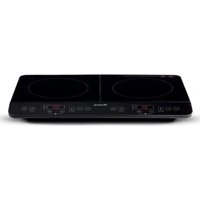
1998 - Cooker ARIETE - Free user manual and instructions
Find the device manual for free 1998 ARIETE in PDF.


| Product type | Double induction hob |
| Brand | Ariete |
| Model | 1998 |
| Left plate power | 2000 W (6 levels: 500, 800, 1200, 1500, 1800, 2000 W) |
| Right plate power | 1500 W (6 levels: 500, 800, 1000, 1200, 1300, 1500 W) |
| Temperature range | 60-240°C (10 levels) |
| Keep warm function | Default temperature 80°C, duration 2 hours |
| Timer | 1 to 240 minutes, adjustable in steps of 1 or 10 minutes |
| Surface type | Ceramic glass |
| Compatible utensils | Magnetic stainless steel, cast iron, enameled iron, flat bottom, diameter 12-25 cm |
| Power supply | 220-240 V ~ 50/60 Hz |
| Safety | Child lock, automatic shut-off after 2 hours without operation, protection against overheating, overvoltage, undervoltage |
| Error display | Codes E0 to E6 (e.g., E0: no pan, E2: internal overheating) |
| Maintenance and cleaning | Soft cloth, neutral detergent, regular cleaning of air intakes |
| Repairability | Contact the authorized service center for inspection and repair |
Frequently Asked Questions - 1998 ARIETE
User questions about 1998 ARIETE
0 question about this device. Answer the ones you know or ask your own.
Ask a new question about this device
Download the instructions for your Cooker in PDF format for free! Find your manual 1998 - ARIETE and take your electronic device back in hand. On this page are published all the documents necessary for the use of your device. 1998 by ARIETE.
USER MANUAL 1998 ARIETE
natural_image
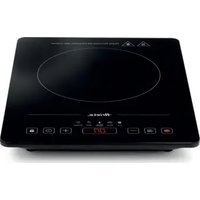
Line drawing of a two-c� heating appliance with dual ovens and digital display (no text or symbols)Dual Induction plate
When using an electrical appliance, basic safety precautions should always be followed, including the following:
- Make sure your electricity supply is the same as the one shown on the lower side of the appliance.
-
This appliance can be used by children aged from 8 years and above and persons with reduced physical, sensory or mental capabilities or lack of experience and knowledge if they have been given supervision or instruction concerning use of the appliance in a safe way and understand the hazards involved. Children shall not play with the appliance. Cleaning and user maintenance shall not be made by children unless they are older than 8 and supervised.
-
Keep the appliance and its cord out of reach of children less than 8 years.
-
If the supply cord is damaged, it must be replaced by the manufacturer, its service agent or similarly qualified persons in order to avoid a hazard.
-
The temperature of accessible surfaces may be very high when the appliance is operating.
-
WARNING: If the surface is cracked, switch off the appliance to avoid the possibility of electric shock.
-
Metallic objects such as knives, forks, spoons, and lids should not be placed on the hotplate since they can get hot.
-
Household and indoor use only.
-
When the appliance is not in use and before cleaning, unplug the appliance from the outlet firstly.
-
To protect against the risk of electrical shock, do not immerse the unit, cord or plug in water or other liquid.
-
The appliance is only intended for the purpose described in User Manual. Do not use appliance or any part of the appliance out of the intended use to avoid risk.
-
The use of attachments which are not recommended or sold by the Manufacturer of the appliance may cause a risk of injury to persons.
Caution, hot surface.
-
Do not touch hot surfaces. Use handles or knobs.
-
To protect against electrical shock do not immerse cord, plugs, or the whole unit in water or other liquid.
-
Close supervision is necessary when any appliance is used by or near children.
- Unplug from outlet when not in use and before cleaning. Allow to cool down before putting on or taking off parts.
- Do not operate any appliance with a damaged cord or plug or after the appliance malfunctions or has been damaged in any manner. Return appliance to the nearest authorized service facility for examination, repair, or adjustment.
- The use of accessory attachments not recommended by the Manufacturer of the appliance may cause injuries.
- Do not use outdoors.
- Do not let cord hang over edge of table or counter, or touch hot surfaces.
- Do not place on or near a hot gas or electric burner, or in a heated oven.
- Extreme caution must be used when moving an appliance containing hot oil or other hot liquids.
- Always attach plug to appliance first, then plug cord into the wall outlet. To disconnect, turn any control to "OFF", then remove plug from wall outlet.
- Do not use the appliance for other than intended use.
- Do not use a broken cooktop. Should the cooktop be broken, cleaning solutions and spillovers may penetrate it and create a risk of electric shock.
- Clean the cooktop with care. If a wet sponge or cloth is used to wipe spills on a hot cooking area, be careful to avoid burns. Furthermore, some cleaners may produce noxious fumes if applied to hot surfaces.
- A shorter power supply cord is supplied to reduce risks resulting from becoming entangled in or tripping over a longer cord. Longer extension cords are available and may be used if care is exercised in their use.
- If a long extension cord is used:
- The marked electrical rating of the extension cord should correspond to the electrical rating of the appliance.
- A longer cord should be arranged so that it will not drape over the surface where it can be pulled on by children or tripped over unintentionally.
- This appliances is intended to be used in household and similar applications such as:
- staff kitchen areas shop, offices and other working environments;
- farm houses;
- farm houses and by clients in hotels, motels and other residential type environments;
• bed and breakfast type environments.
31. Material required:
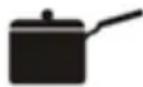
- Steel, cast iron, enamelled iron, stainless steel, flat-bottom pans/pots with bottom diameter from 12 cm to 25 cm.
- It is advisable the use of the required pot, do not try to use other types instead, especially with pressure sensors.

Stainless steel pot
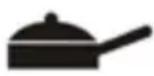
Iron
blast
pan
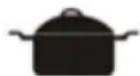
Magnetic
stainless
iron pan
Magnetic
stainless
iron pan
Iron board pan
-
Please kindly according to the below requirement if necessary to use a container that is not supplied.
-
Pan/pot must be suitable for induction cooktop.
- Pan/pot should be tried out if bought separately to see if there are abnormal phenomena.
-
Pan/pot bought separately should be flat and equipped with lid with vapour vent.
-
The appliance must not be energised with external timers or separate remote controls.
ALWAYS KEEP THESE INSTRUCTIONS
APPLIANCE DESCRIPTION (Fig. 1)
A Control panel
B Ceramic plate
C Air intake
D MAX BUTTON (max temperature/power level)
E MIN BUTTON (min temperature/power level)
F KEEP WARM button
G DECREASE / INCREASE value of temperature/power/timer
H Temperature/power/timer indicator lights
I FUNCTION BUTTON (TEMPERATURE/POWER functions)
L ON/OFF button
NOTE: The above buttons and operating instructions below concerns a plate but applies also to the other one (left plate: 2000 W, right plate: 1500 W).
OPERATING INSTRUCTIONS
- Place an cookware suitable for induction cooking on the glass plate.
- Connect the power plug to a safe and secure power source. The appliance will emit a "beep" sound, the indicator light under the ON/OFF button will start blinking and the LED display will show "Lo" to indicate that the appliance is connected to a power source.
ON/OFF button
Place a cookware at the centre of the heating zone. Press the ON/OFF button once, the LED display will show "ON" and the indicator under the ON/OFF button will stay on. Press to FUNCTION button to start operation.
To stop the operation and go to the standby mode, press the ON/OFF button after cooking.
FUNCTION BUTTON (temperature/power functions)
Power:
- Press the FUNCTION button, the indicator light of the ON/OFF button and the power one will go on. The left plate display will show "1200" indicating a default power of 1200 W, the right plate display will show "1000" indicating a default power of 1000 W.
Power can be adjusted via the DECREASE/INCREASE button: there are 6 power levels available for the left plate (500, 800, 1200, 1500, 1800, 2000 W) and 6 power levels for the right plate (500, 800, 1000, 1200, 1300, 1500 W). - To cancel this adjustment, press the FUNCTION button to enter other cooking modes or the ON/OFF button to stop operation.
- Pressing the MAX button, the appliance goes quickly to 2000 W (left plate) or 1500 W (right plate). Pressing the MIN button, the appliance goes quickly to 500 W. At the max power, the appliance does not react when the INCREASE button is pressed. At the min power, the appliance will not react by pressing the DECREASE button.
Temperature:
- Press the FUNCTION button again, the indicator light of the ON/OFF button and the temperature one will go on. The display will show "240" indicating a default temperature of 240^ C.
The temperature can be set by pressing the DECREASE/INCREASE buttons: there are 10 temperature levels available (60, 80, 100, 120, 140, 160, 180, 200, 220, 240°C). - To cancel this adjustment, press the FUNCTION button to enter other cooking modes or the ON/OFF button to stop operation.
- By pressing the MAX or MIN button, the appliance can go from 240°C to 60°C quickly. At the max temperature, the appliance does not react when the INCREASE button is pressed. At the min temperature, the appliance will not react by pressing the DECREASE button.
KEEP WARM BUTTON
Pressing the KEEP WARM button, the “Keep Warm” indicator light will go on and the display will show “80” indicating a default temperature of “80°C”.
Nots: this function cannot be set. The default time of the KEEP WARM function is 2 hours.
MAX / MIN buttons (max/min temperature/power level)
Press the MAX or MIN buttons to set the max/min power or temperature.
DECREASE / INCREASE buttons of temperature/power/timer value
Press “+” or “-” to set the power or temperature level.
Operating time setting (TIMER)
During power or temperature setting, pressing the FUNCTION button, the indicator light of the timer will go on and it will be possible to set the time.
Press the DECREASE/INCREASE buttons to set the required time. The minutes can be set by 1 minute at a time. Holding the DECREASE/INCREASE buttons, the minutes can be set by 10 minutes at a time. Time can be set from 1 minute to 240 minutes.
Safety Lock Function
Pressing the DECREASE/INCREASE buttons at the same time, the appliance will enter the lock mode and the display will show "L". No button will work (except for ON/OFF buttons and the DECREASE/INCREASE ones).
Press the buttons DECERASE/INCREASE again at the same time to unlock the appliance.
CLEANING AND MAINTENANCE
- Unplug the appliance before proceeding with cleaning. Allow the surface to cool down before proceeding with cleaning.
- Glass plate, panel and shell:
- Soft cloth for slight stain.
- For greasy dirt, wipe by using a damp cloth with mild detergent.
- While the fan is working, dust and dirt would remain on the air intake, therefore clean it via a brush or cotton stick on a regular basis.
- Do not wash the appliance with water directly to avoid damage.
- To protect the induction cooktop, make sure there is a proper contact between the plug and socket before using.
- Do not pull out the power cord directly during operation. To extend the appliance life, press the ON/OFF button first, then pull out the power cord.
- In order to make operating time longer, if the fan is still working for cooling the plate, it is advisable to allow the fan to stop before unplugging the appliance.
- Please pull out the power cord and put it away when not used for a long time.
TROUBLESHOOTING GUIDE
| SolutionCheckingProble | ||
| supply and pressing the “ON/OFF” button, the appliance does not go on. | Use after restoring power supply.Is the electri | |
| Has the fuse blown? | Check the root causes carefully. If the problem cannot be fixed, please contact Service Centre for checking and repairing. | |
| Is the plug connected firmly? | ||
| Heating being interrupted in normal use and a “Beep” is heard. | Is the cookware unsuitable or is there no cookware on the cooktop? | Replace compatible cookware for the induction cooktop. |
| Is the cookware not considerably placed at the centre of the heating zone? | Place the cookware at the centre of the defined heating zone. | |
| Is the cookware being heated but continually being removed? | Place a cookware inside the heating zone. | |
| No operation during the heating being in use. | Is the cookware empty or the temperature too high? | Please check whether the appliance is being misused. |
| Is the air intake clogged or dirt has accumulated? | Remove the stuff clogging the air intake/exhaust vent. Operate the appliance again after cooling down. | |
| Is the cooker working over 2 hours without any external instruction? | Reset cooking modes or use timer function. | |
| Presence of error codes | E0 No pans or unsuitable pans usedE1 open circuit/short circuit of the IGBT sensorE2 Internal overheatingE3 OvervoltageE4 UndervoltageE5 Top plate sensor open/ short circuitE6 Top plate overheating | When showing error signal E0, E2 and E6, please check whether the cookware is not suitable, or switch on the appliance again after it is cooled down naturally. When error signal E1, E3, and E5 is shown, please contact the Service Centre for checking and repairing. |
AVERTISSEMENTS IMPORTANTS
LIRE CES INSTRUCTIONS AVANT D'UTILISER L'APPAREIL.
KEEP WARM-TASTE (hold varm)

- Material required:
- ALWAYS KEEP THESE INSTRUCTIONS
- APPLIANCE DESCRIPTION (Fig. 1)
- OPERATING INSTRUCTIONS
- ON/OFF button
- FUNCTION BUTTON (temperature/power functions)
- Power:
- Temperature:
- KEEP WARM BUTTON
- MAX / MIN buttons (max/min temperature/power level)
- DECREASE / INCREASE buttons of temperature/power/timer value
- Operating time setting (TIMER)
- Safety Lock Function
- CLEANING AND MAINTENANCE
- AVERTISSEMENTS IMPORTANTS
- LIRE CES INSTRUCTIONS AVANT D'UTILISER L'APPAREIL.
- KEEP WARM-TASTE (hold varm)
Brand : ARIETE
Model : 1998
Category : Cooker