
CGF02 - Coffee grinder SMEG - Free user manual and instructions
Find the device manual for free CGF02 SMEG in PDF.
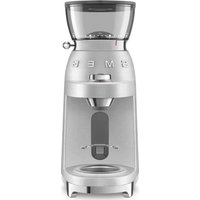


| Product type | Electric coffee grinder |
| Brand | Smeg |
| Model | CGF02 |
| Bean hopper capacity | 240 g |
| Dosing ring | ∅ 58 mm, compatible with Smeg portafilters |
| Grind settings | Superfine, Fine, Medium (3-position lever) |
| Grind programs | Single espresso, Double espresso, Manual |
| Dose customization | Yes (programming by holding the START/STOP button) |
| Automatic safety shutdown | After 90 seconds of continuous operation |
| Motor thermal protection | Yes (automatic shutdown, wait 30 min) |
| Bean block when removing hopper | Yes |
| LED lighting | Flashing in case of error (hopper incorrectly positioned) |
| Burr maintenance | Dry cleaning with included brush; do not wash with water |
| Cleaning other parts | Hopper, lid and tray can be washed with warm water and mild detergent |
| Power supply | 220-240 V, 50/60 Hz, grounded outlet 10 A min |
| Power | Not specified (estimated 150 W) |
| Dimensions (W x D x H) | Not specified (estimated 16 x 12 x 24 cm) |
| Weight | Not specified (estimated 1.5 kg) |
| Spare parts available | Upper and lower burrs, hopper, lid, portafilter not included |
| Repairability | Authorized service center for burr replacement |
| Intended use | Domestic and similar (staff kitchens, offices, hotels) |
Frequently Asked Questions - CGF02 SMEG
User questions about CGF02 SMEG
0 question about this device. Answer the ones you know or ask your own.
Ask a new question about this device
Download the instructions for your Coffee grinder in PDF format for free! Find your manual CGF02 - SMEG and take your electronic device back in hand. On this page are published all the documents necessary for the use of your device. CGF02 by SMEG.
USER MANUAL CGF02 SMEG
Essential safety-related warnings.
Since the machine is powered by electricity, the following safety warnings must be complied with:
- Do not touch the plug with wet hands.
- Make sure that the power outlet used is always freely accessible, because only in this way can it be unplugged when necessary.
- If the plug is to be removed from the socket, grasp the plug directly. Never pull the cable as damage may be caused.
- If the machine should suffer a malfunction, do not attempt to repair it.
Switch the appliance off, remove the plug from the power outlet and contact the Smeg Technical After-sales centre.
- If the plug or power supply cable are damaged, have them replaced exclusively by the Technical After-sales centre, so as to prevent all risks.
- Do not immerse the appliance in water.
- Attention: disconnect the plug before cleaning.
- Do not allow the power cable to hang over the edge of the table or any other surface, or to come into contact with hot surfaces.
- Do not use the appliance for more than 90 seconds consecutively. Allow the appliance to cool down for approx. 15 minutes before re-use.
Keep the packaging material (plastic bags, expanded polystyrene) out of the reach of children.
- Cleaning and maintenance are the user's responsibility and must not be performed by unsupervised children.
- Do not position the appliance on or in proximity of electric or gas cookers, or in a heated oven.
- Make sure that there are no foreign objects inside the coffee grinder.
- Switch the appliance off and disconnect it from the electric power supply before changing the accessories or approaching the parts that move during use.
Connect the appliance
Caution! Make sure that the mains voltage and the frequency correspond with that indicated on the data plate on the bottom of the appliance.
Only connect the appliance to a current outlet installed perfectly with minimum capacity of 10A and with efficient earth.
If the appliance power outlet and plug are incompatible, have the power outlet replaced with a suitable type by qualified staff.
• This appliance must not be used by children. - Keep the appliance and its cable out of the reach of children. • Children must not play with the machine. - The appliance can be used by persons with reduced physical and sensory conditions or lack of experience and knowledge, if supervised or instructed concerning safe use of the appliance by a person responsible for their safety and they understand the risks connected. - Disconnect the appliance from the power outlet before all assembly, disassembly and cleaning operations.

Warnings
Use compliant with destination
- The appliance is intended for household and similar use, such as:
- in the kitchen area for the staff of shops, offices and other work environments;
- in bed and breakfast and agritourism accommodation;
- by guests at hotels and motels, and in residential environments.
- Other uses, in restaurants, bars and cafés for example, are improper.
Information on power consumption in off/stand-by mode
Technical data on the appliance's power consumption in off/stand-by mode can be found at www.smeg.com under the page corresponding to the product in question.
Manufacturer's liability
The manufacturer declines all liability for injury/damage undergone by persons and objects due to:
- use of the appliance different from that envisioned;
- the user manual not being read;
- tampering even with individual parts of the appliance;
- use of non-original spare parts;
- failure to comply with safety recommendations.

Keep these instructions carefully. Whenever the appliance is transferred to other persons, it must be accompanied by these user instructions.
DISPOSAL
Electrical appliances must not be disposed of with household waste. The appliances bearing

this symbol are subject to European Directive 2012/19/EU. All discarded electric and electronic appliances must be disposed of separately from household waste, by taking them to relevant centres envisioned by the Country. By disposing of the discarded device correctly, damage to the environment and risks to human health will be avoided. For further information regarding the disposal of the discarded device, contact the Municipal Administration, the Disposal dept., or the shop where the device was purchased.
Description/assembly

APPLIANCE DESCRIPTION
(Fig. A)
1 Motor base 2 Coffee bean container (240 g) 3 Coffee bean container lid 4 Dosing ring ∅ 58mm 5 Container support plate 6 START/STOP button 7 Grinding functions selection knob 8 Grinding level adjustment lever 9 Grinder 10 Cleaning brush 11 Filter-holder support fork
IDENTIFICATION
PLATE
The identification plate states the technical data, serial number, and marking. The identification plate must never be removed.
BEFORE COMMISSIONING
(Fig. A)
- Unpack the appliance carefully and remove all packaging materials and promotional labels.
- Wash all components, except for the motor base (1) and the grinder (9), with hot water and normal washing-up liquid. Rinse all components thoroughly and dry them before use.

The grinder must never be washed and must always be kept dry. Clean the grinder with the cleaning brush provided or with a hard-bristle brush.

Before use, check that all the components are integral and do not have any cracks.
ASSEMBLY OF COMPONENTS
(Fig. B-C-D)
- Position the container (2) on the motor base (1) matching up the two reference notches " √ " " on the left side of the motor body (1). Now, rotate the container (2) clockwise until the two indications " √" match.
- Position the lid (3) on the container (2) and press it down.
- Position the plate (5) on the motor base (1) in a way to secure it.
- Position the filter-holder support fork (11) in the relative housing (11a).
DESCRIPTION OF CONTROLS (Fig. E-F)
Grinding adjustment lever (8)
The appliance has a lever (8), which allows the level of grinding to be adjusted appropriately to your use:
| SUPERFINE Superfine grinding | |
| FINE Fine grinding | |
| MEDIUM Medium grinding | |
Move the lever to make the indicator (12) correspond with the desired grinding level.

For use with EMC02 coffee machines, it is advised to adjust the coffee grinder to the "SUPERFINE" setting.

Controls/Use
Quantity of grinding selection knob (7)
The appliance has 2 pre-set functions and a manual function, which can be selected using the knob (7).
Each function corresponds to a predefined quantity of ground coffee.
| Knob icon | Quantity |
| 1 | Grinding for Single espresso |
| 2 | Grinding for Double espresso |
| M Manual Function | |
The Manual function (M) can be used at will with any level of grinding.
USE (Fig. A-E-F-G)

Make sure the upper grinder (9A) is inserted and secured in its housing.
- Insert the plug into the power outlet.
- Lift the lid (3) and introduce the coffee beans into the container (2).

If the LED located on the knob flashes, it means that the appliance is in error condition: beans container not present or not inserted correctly.

Coffee may lose flavour quickly once ground. For excellent results, use coffee powder immediately after grinding. Store the ground coffee container in a dark, cool and dry environment. Make sure the coffee powder level is lower than the container maximum level mark and that the container lid is closed well and screwed on tightly.
Grinding the coffee in to the espresso coffee filter-holder (Fig.D-F-G)
- If the dosing ring (58mm) is to be used, position it on the compatible filter holder.
- Position the filter-holder support fork (11) in the relative attachment (11a).
- Position the filter-holder under the dispensing cone.
- Select the grinding level.
- Select program 1" or program "2" according to the function desired.
- Press the START/STOP button (6) to start grinding. For all pre-set programs, grinding will end automatically.
- When grinding has been completed, remove the filter-holder.

The dosing ring (4) prevents the coffee powder from falling, thus helping to reduce dirtying and waste. Compatible with Smeg 58 mm filter-holders.

Filter-holder not supplied.


Description/Use


If the manual grinding operating time exceeds the safety time set (90 seconds), the motor stops automatically.

During the grinding phase, do not turn the knob (7) from one program to another and do not move the grain selection lever (8).

If a finer level of grinding than that currently used is to be set, it is highly recommended to remove the grinder and clean it to remove any residual beans, before proceeding with a new grinding operation. See the CLEANING AND MAINTENANCE section to remove the grinder.

A beans locking system allows the container (2) to be raised safely from the motor base (1), in a way to prevent the beans escaping.

The coffee grinder has an auto-off function (stand-by), in the event it is not used after 90 seconds.
Press the START/STOP button to re-activate the product.
GRINDING TIMES
(Fig. E-F)
The functions envision pre-set ground coffee supply settings. However, depending on personal taste, the pre-set amount of ground coffee can be increased or decreased, thus customising the different functions.
Customise the amount of grinding for espresso coffee
• Make sure that the grinding indicator (12) is positioned at an adequate grinding level for espresso coffee (SUPERFINE). - Turn the knob (7) to "1". - Press the START/STOP button (6) to start grinding and hold it down for the desired time; the ring (14) flashes during the programming phase. - On releasing the button, grinding stops, the ring stops flashing and the new setting is memorised.

Repeat the same procedure to customize the amount of grinding for a double espresso by turning the knob (7) to "2".
Restoring factory values
To reset the factory values:
- Turn the knob (7) to program "M".
- Press the START/STOP button (6) and hold it down for 5 seconds. The ring (14) flashes 5 times indicating that all factory-set values have been reset.
CLEANING AND MAINTENANCE (Fig. A-H-I)
- Make sure the coffee bean container (2) is empty and then activate manual mode (M) to remove any coffee residues from the grinder.
EN - 5

Cleaning and maintenance

Before carrying out any cleaning operation, ALWAYS disconnect the plug from the power outlet.
Never
immerse the motor base (1) in water or other liquids.
- Remove the container (2) by turning it anticlockwise.
- Remove any coffee beans present in the grinder using the cleaning brush (10) supplied.
- Lift the handle (15) and turn the upper grinder (9a) anti-clockwise to release and remove it.
- Clean the upper grinder (9a) and the lower grinder (9b) and the coffee outlet cavity using a brush with hard bristles or the supplied cleaning brush (10).
- Re-mount the upper grinder (9a) making the two notches "√" and "∧" match and rotating clockwise to fix it "√".
- The coffee bean container (2), the lid (3) and the plate (5) can be washed using warm water and neutral detergent.
- The motor base (1) can be cleaned using a damp cloth, avoiding the use of detergents or abrasive materials.
- The coffee bean container (2), the lid (3) and the plate (5) can be washed using warm water and neutral detergent.
- The motor base (1) can be cleaned using a damp cloth, avoiding the use of detergents or abrasive materials.
Cleaning and maintenance

What To Do If.....
| Problem Possible causes Solution | ||
| The appliance does not work. | Unplugged. Plug in. | |
| The coffee bean container is not inserted correctly. | Check that the coffee bean container is correctly inserted in the motor base. | |
| The motor thermal protection has activated automatically. | Wait (approx. 30 minutes) for the thermal protection to reset. | |
| The Led on the knob flashes. | The coffee bean container is not inserted correctly. | Check that the coffee bean container is correctly inserted in the motor base. See the Assembly of Components paragraph to assemble the container. |
| The appliance stops during operation. | The motor thermal protection has activated automatically. | Wait (approx. 30 minutes) for the thermal protection to reset. |


Cleaning and maintenance
Problem Possible causes Solution
| The appliance works but does not dispense ground coffee. | No coffee beans in the relative container. | Load the coffee beans. |
| Grinder blocked. Remove the grinder and check there are no objects blocking rotation. | ||
| The grinding level set is incorrect or difficult. | The top of the grinder (9a) is missing. | Insert and secure the upper grinder (9a) in its housing. |
| Grinders worn. Replace the grinders by taking the appliance to an authorised after-sales centre. | ||

Contact local technical support if the problem is not solved or in case of other types of faults.
Warnings

SAFETY
DESCRIPTION OF THE DEVICE
(Fig. A)
- ESSENTIAL SAFETY-RELATED WARNINGS
- CONNECT THE APPLIANCE
- WARNINGS
- USE COMPLIANT WITH DESTINATION
- INFORMATION ON POWER CONSUMPTION IN OFF/STAND-BY MODE
- MANUFACTURER'S LIABILITY
- DISPOSAL
- DESCRIPTION/ASSEMBLY
- APPLIANCE DESCRIPTION
- (FIG. A)
- IDENTIFICATION
- PLATE
- BEFORE COMMISSIONING
- ASSEMBLY OF COMPONENTS
- (FIG. B-C-D)
- DESCRIPTION OF CONTROLS (FIG. E-F)
- GRINDING ADJUSTMENT LEVER (8)
- CONTROLS/USE
- QUANTITY OF GRINDING SELECTION KNOB (7)
- USE (FIG. A-E-F-G)
- GRINDING THE COFFEE IN TO THE ESPRESSO COFFEE FILTER-HOLDER (FIG.D-F-G)
- DESCRIPTION/USE
- GRINDING TIMES
- (FIG. E-F)
- CUSTOMISE THE AMOUNT OF GRINDING FOR ESPRESSO COFFEE
- RESTORING FACTORY VALUES
- CLEANING AND MAINTENANCE (FIG. A-H-I)
- CLEANING AND MAINTENANCE
- SAFETY
- DESCRIPTION OF THE DEVICE
Brand : SMEG
Model : CGF02
Category : Coffee grinder