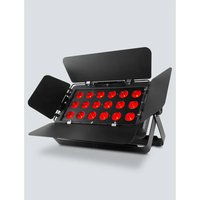
SlimBANK T18 USB - DJ Equipment Chauvet - Free user manual and instructions
Find the device manual for free SlimBANK T18 USB Chauvet in PDF.


| Brand | Chauvet |
| Model | SlimBANK T18 USB |
| Product type | RGB LED panel for DJ lighting |
| Power supply | 100-240 VAC, 50/60 Hz (universal power supply) |
| Power consumption | See label or user manual |
| Number of LEDs | 18 high-power tri-color LEDs |
| Control type | DMX (3, 5, 9, 13 channels), infrared (IRC-6), D-Fi USB wireless, standalone |
| Main functions | Static colors, automatic programs, sound activation, custom color mixing, strobe, dimming |
| Connectivity | DMX input/output, D-Fi USB port, power input/output |
| Barn doors | Removable, for directing light |
| Mounting | Adjustable mounting brackets, safety cable required for overhead mounting |
| Ventilation | Well-ventilated, minimum distance 50 cm from adjacent surfaces |
| Maximum ambient temperature | 40 °C (104 °F) |
| Protection rating | IP20 (indoor use only) |
| Fuse | Replace with fuse of same type and rating (see label) |
| Cleaning | Disconnect before cleaning, use a damp cloth |
| Maintenance | No user-serviceable parts, do not open |
| Safety | Do not expose eyes to light source, do not use on dimmer, grounding required |
| Warranty | See included warranty card |
Frequently Asked Questions - SlimBANK T18 USB Chauvet
User questions about SlimBANK T18 USB Chauvet
0 question about this device. Answer the ones you know or ask your own.
Ask a new question about this device
Download the instructions for your DJ Equipment in PDF format for free! Find your manual SlimBANK T18 USB - Chauvet and take your electronic device back in hand. On this page are published all the documents necessary for the use of your device. SlimBANK T18 USB by Chauvet.
USER MANUAL SlimBANK T18 USB Chauvet
natural_image
Line drawing of a portable electronic device with circular components and a handle, no text or symbols presentAbout This Guide
Disclaimer
Safety Notes
The SlimBANK T18 USB Quick Reference Guide (QRG) has basic product information such as mounting, menu options, and DMX values. Download the Us Manual from www.chauvetlighting.com for more details.
The information and specifications here are subject to change without notice. Chauvet reserves to right to revise or reissue this QRG.
These Safety Notes include important information about product mounting, use, and maintenance.

• ONLY connect this product to a grounded and protected circuit.
• DISCONNECT from power before cleaning or replacing the fuse.
• DO NOT look at the light source when the product is on.
• Make sure the power cord is not crimped or damaged.
- Never disconnect this product from power by pulling on the cord.
- When mounting this product overhead, ALWAYS use a safety cable.
• DO NOT allow flammable materials close to the product when it is operating.
- DO NOT touch the product's housing when it is on because it will be hot.
• DO NOT operate this product if the housing, lenses, or cables appear damaged.

- The voltage of the outlet to which you are connecting this product must be within the range stated on the decal or rear panel of the product.
- This product is for indoor use only! (IP20) To prevent risk of fire or shock, do not expose this product to rain or moisture.
- Always mount this product in a location with adequate ventilation, at least 20 in (50 cm) from adjacent surfaces.
- Be sure that no ventilation slots on the unit's housing are blocked.
• Never connect this product to a dimmer or rheostat. - Replace the fuse with the same type and rating.
• ONLY carry this product by the hanging/mounting brackets. - The maximum ambient temperature is 104 °F (40 °C). Do not operate this product at higher temperatures.
• In the event of a serious operating problem, stop using immediately.
• DO NOT open this product. It contains no user-serviceable parts. - To eliminate unnecessary wear and improve its lifespan, during periods of non-use completely disconnect the product from power via breaker or by unplugging it.
Contact
Outside the U.S., United Kingdom, Ireland, Mexico, or Benelux, contact your distributor to request support or return a product. Visit www.chauvetlighting.com for contact information.
What Is Included
- SlimBANK T18 USB
- Warranty Card
- Barn Doors
• Quick Reference Guide - Power Cord
To Begin
Unpack your SlimBANK T18 USB and make sure you have received all parts in good condition. If the box or contents appear damaged, notify the carrier immediately, no Chauvet.
Product Description
The SlimBANK T18 USB is a tri-color LED panel. Removable barn doors direct light where needed. Built-in infrared technology offers easily controllable static colors and automated programs with the optional IRC-6 remote. DMX control wirelessly with the convenient built in D-Fi USB port. Eighteen high-power, tri-color LEDs nearly eliminate multicolored shadows and the smooth and even output makes it perfect for frontlight applications.
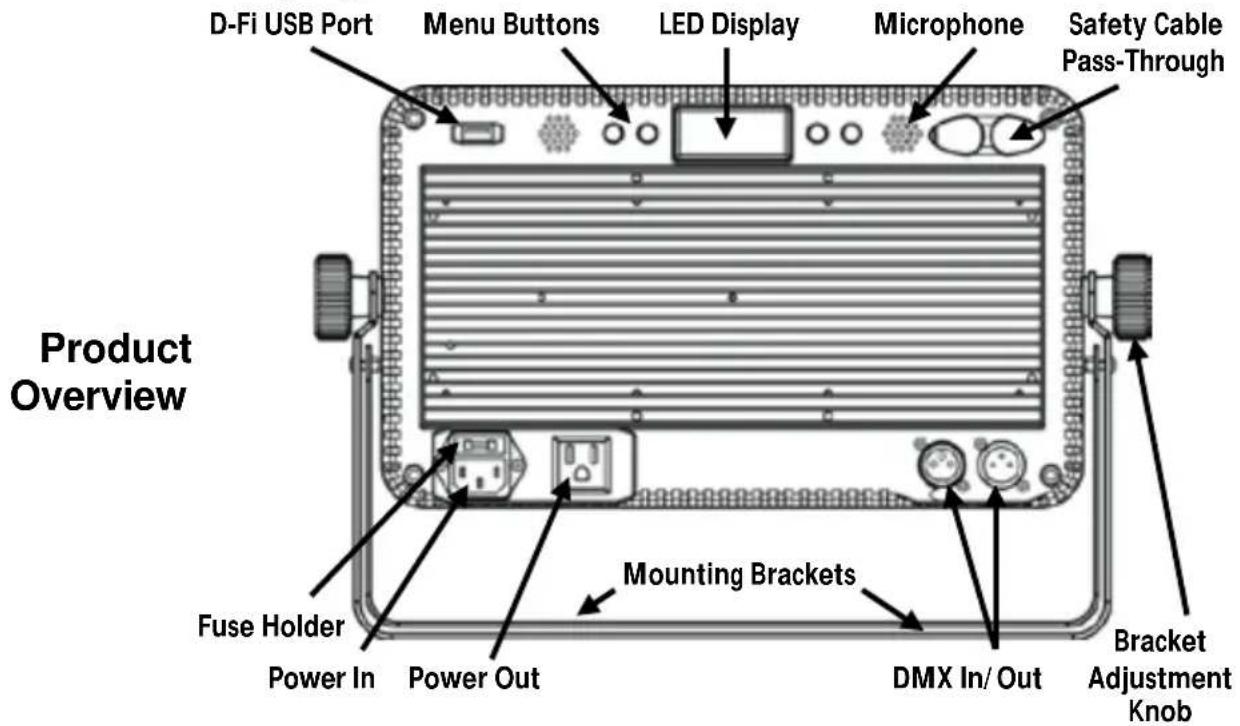
WARNING! DO NOT plug anything other than a D-Fi USB into the USB port. Doing so may cause damage to the product.
AC Power
This product has an auto-ranging power supply that can work with an input voltage range of 100 to 240 VAC, 50/60 Hz.

To eliminate wear and improve its lifespan, during periods of nonuse completely disconnect from power via breaker or by unplugging it.
Fuse Replacement
For the maximum number of SlimBANK T18 USB products that you can power link at each voltage, see the User Manual or the sticker on the product.
- Disconnect the product from power.
- Wedge the tip of a flat-head screwdriver into the slot of the fuse holder.
- Pry the safety cap out of the housing.
- Remove the blown fuse from the clip on the front of the safety cap and replace with a fuse of the exact same type and rating.
- Re-insert the fuse holder and reconnect power.
Mounting
Before mounting this product, read the Safety Notes.
Product Mounting Diagram
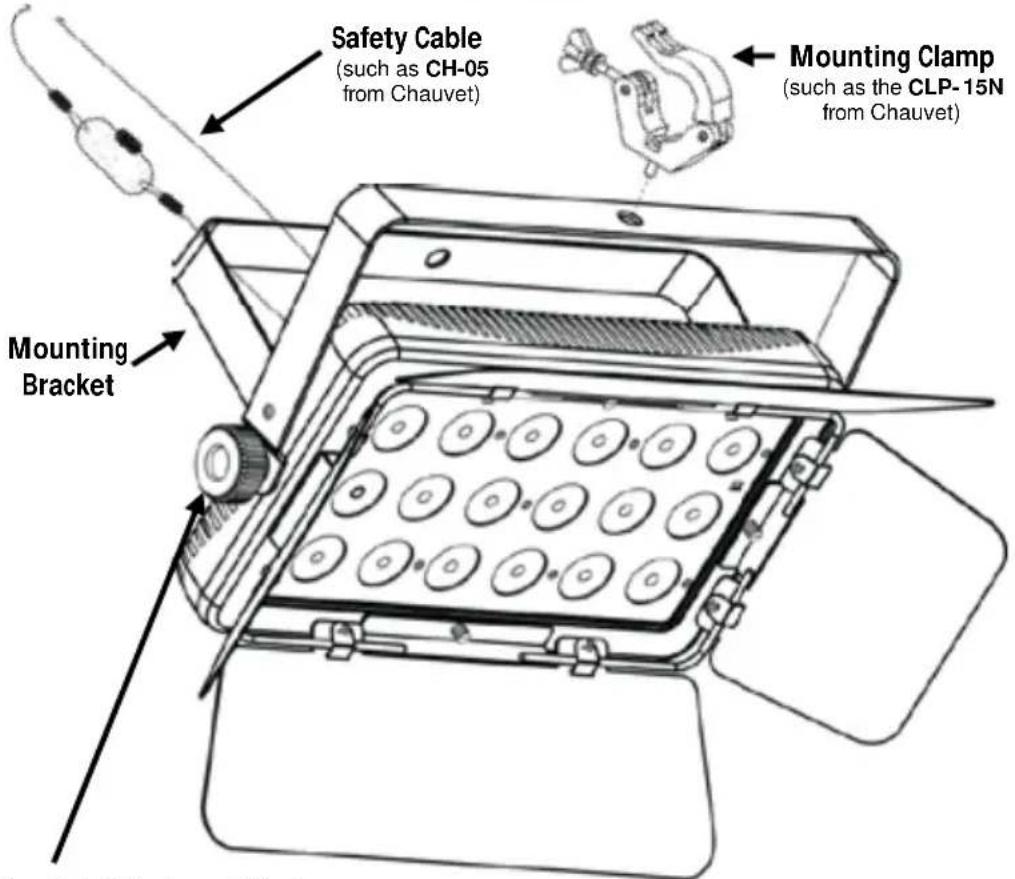
Bracket Adjustment Knob
| Control Panel Description | Button | Function |
| Exits the current menu or function | ||
| Navigates up through the menu list or increases the numeric value when in a function | ||
| Navigates down through or decreases the numeric value | ||
| Activates a menu option or a selected value |
Menu Options
| Mode | Programming Levels | Description | |
| DMX Mode | 3-CH | d 1–512 | Selects DMX personality and DMX starting address |
| 5-CH | |||
| 9-CH | |||
| 13CH | |||
| Static Colors | C-- | C1–18 | Static colors |
| Auto Programs | P-- | P 1–14 | Auto programs 1–14 |
| Program Speed | S-- | S 1–100 | Sets auto-program speed |
| Sound-Active | Snd | Sound-active mode | |
| Sensitivity | SenS | u 0–100 | Sets sound sensitivity |
| Custom Color Mixing | U-- | r000–255 | Custom static colorsCombine red, green, and blue |
| g000–255 | |||
| b000–255 | |||
| Dimmer Speed Mode | dIM | OFF | Dimmer speed settings off, fast, medium, or slow |
| dIM1 | |||
| dIM2 | |||
| dIM3 | |||
| Temperature | teMP | Displays current product temperature | |
| Infrared Mode SET | On | Turns on Infrared mode for IRC-6 remote use | |
| OFF | |||
DMX Linking
Starting Address
Master/Slave Connection
Infrared Remote Control
The SlimBANK T18 USB can work with a DMX controller when linked by DMX serial connections. Instructions for DMX operation are in the User Manual. A DMX Primer is available from www.chauvetlighting.com.
To ensure full access to all channels in each DMX mode, the highest recommended DMX address is 500.
The SlimBANK T18 USB uses the DMX data connection for its Master/Slave mode. Instructions for connecting and configuring this product for Master/Slave operation are in the User Manual.
The SlimBANK T18 USB is fully compatible with the Infrared Remote Control (IRC-6) from CHAUVET DJ For more information on the IRC-6 or to download instructions, go to www.chauvetlighting.com.
D-Fi USB Connectivity
The SlimBANK T18 USB is able to become a D-Fi wireless receiver/transmitter with the use of the D-Fi USB from CHAUVET DJ. Simply set the DIP switch D-Fi receiving/transmitting channel, plug it into the USB port then set the product's DMX Personality and DMX Address. Further instructions for connecting and configuring this product for D-Fi USB operation are in the User Manual.
WARNING! DO NOT plug anything other than a D-Fi USB into the USB port. Doing so may cause damage to the product.
Once plugged in, the D-Fi USB will take over the product. Wired DMX, manual display control/menu buttons and IRC-6 will be unavailable until you unplug the D-Fi USB. The priority levels are:
- D-Fi USB
- Wired DMX
- IRC-6 Remote Control
- Manual Digital Display/Menu Buttons
DMX Values
| 13CH Channel | Function | Value | Percent/Setting | |
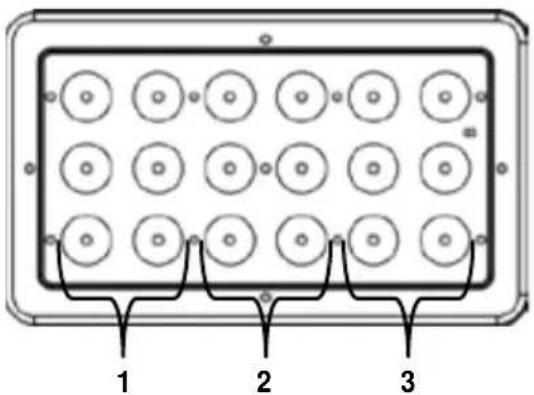
| 1 | Red 1 | 000 Ü 255 | 0-100% | Zone 1 |
| 2 | Green 1 | 000 Ü 255 | 0-100% | |
| 3 | Blue 1 | 000 Ü 255 | 0-100% | |
| 4 | Red 2 | 000 Ü 255 | 0-100% | Zone 2 |
| 5 | Green 2 | 000 Ü 255 | 0-100% | |
| 6 | Blue 2 | 000 Ü 255 | 0-100% | |
| 7 | Red 3 | 000 Ü 255 | 0-100% | Zone 3 |
| 8 | Green 3 | 000 Ü 255 | 0-100% | |
| 9 | Blue 3 | 000 Ü 255 | 0-100% | |
| 10 Auto Programs | 000 Ü 010 | No function | ||
| 011 Ü 028 | Auto program 1 | |||
| 029 Ü 045 | Auto program 2 | |||
| 046 Ü 062 | Auto program 3 | |||
| 063 Ü 079 | Auto program 4 | |||
| 080 Ü 096 | Auto program 5 | |||
| 095 Ü 113 | Auto program 6 | |||
| 114 Ü 130 | Auto program 7 | |||
| 131 Ü 147 | Auto program 8 | |||
| 148 Ü 164 | Auto program 9 | |||
| 165 Ü 181 | Auto program 10 | |||
| 182 Ü 198 | Auto program 11 | |||
| 199 Ü 215 | Auto program 12 | |||
| 216 Ü 232 | Auto program 13 | |||
| 233 Ü 250 | Auto program 14 | |||
| 251 Ü 255 | Sound-active program | |||
| 11 | Auto Speed (when Ch. 10 is 011-250) | 000 Ü 255 | Auto program speed (slow to fast) | |
| Sound Sensitivity (when Ch. 10 is 251-255) | 000 Ü 010 | Sound sensitivity off | ||
| 011 Ü 255 | Sound sensitivity (low to high) | |||
| 12 | Dimmer | 000 Ü 255 | 0-100% | |
| 13 Strobe | 000 Ü 010 | No function | ||
| 011 Ü 255 | Strobe (slow to fast) | |||
Zones for DMX Control
| 9-CH Channel | Function | Value | Percent/Setting |
| 1 | Dimmer | 000 Ü 255 | 0–100% |
| 2 | Red | 000 Ü 255 | 0–100% |
| 3 | Green | 000 Ü 255 | 0–100% |
| 4 | Blue | 000 Ü 255 | 0–100% |
| 5 Strobe | 000 Ü 010 | No function | |
| 011 Ü 255 | Strobe (slow to fast) | ||
| 6 | Color Macros and Color Temperature | 000 Ü 010 | No function |
| 011 Ü 030 | R: 100% G: 0–100% B: 0 | ||
| 031 Ü 050 | R: 100%-0 G: 100% B: 0 | ||
| 051 Ü 070 | R: 0 G: 100% B: 0–100% | ||
| 071 Ü 090 | R: 0 G: 100%-0 B: 100% | ||
| 091 Ü 110 | R: 0–100% G: 0 B: 100% | ||
| 111 Ü 130 | R: 100% G: 0 B: 100%-0 | ||
| 131 Ü 150 | R: 100% G: 0–100% B: 0–100% | ||
| 151 Ü 170 | R: 100%-0 G: 100%-0 B: 100% | ||
| 171 Ü 200 | R: 100% G: 100% B: 100% | ||
| 201 Ü 205 | Color temperature 1 | ||
| 206 Ü 210 | Color temperature 2 | ||
| 211 Ü 215 | Color temperature 3 | ||
| 216 Ü 220 | Color temperature 4 | ||
| 221 Ü 225 | Color temperature 5 | ||
| 226 Ü 230 | Color temperature 6 | ||
| 231 Ü 235 | Color temperature 7 | ||
| 236 Ü 240 | Color temperature 8 | ||
| 241 Ü 245 | Color temperature 9 | ||
| 246 Ü 250 | Color temperature 10 | ||
| 251 Ü 255 | Color temperature 11 | ||
| 7 Auto Programs | 000 Ü 010 | No function | |
| 011 Ü 028 | Auto program 1 | ||
| 029 Ü 045 | Auto program 2 | ||
| 046 Ü 062 | Auto program 3 | ||
| 063 Ü 079 | Auto program 4 | ||
| 080 Ü 096 | Auto program 5 | ||
| 097 Ü 113 | Auto program 6 | ||
| 114 Ü 130 | Auto program 7 | ||
| 131 Ü 147 | Auto program 8 | ||
| 148 Ü 164 | Auto program 9 | ||
| 165 Ü 181 | Auto program 10 | ||
| 182 Ü 198 | Auto program 11 | ||
| 199 Ü 215 | Auto program 12 | ||
| 216 Ü 232 | Auto program 13 | ||
| 233 Ü 250 | Auto program 14 | ||
| 251 Ü 255 | Sound-active program | ||
| 9-CH (cont.) | Channel | Function | Value | Percent/Setting |
| 8 | Auto Speed (when Ch. 7 is 011–250) | 000 255 | Auto program speed (slow to fast) | |
| Sound Sensitivity (when Ch. 7 is 251–255) | 000 010 | Sound sensitivity off | ||
| 011 255 | Sound sensitivity (low to high) | |||
| 9 | Dimmer Speed Mode | 000 051 | Dimmer Speed set from display | |
| 052 101 | Dimmer speed mode off | |||
| 102 152 | Dimmer speed mode 1 fast | |||
| 153 203 | Dimmer speed mode 2 medium | |||
| 204 255 | Dimmer speed mode 3 slow |
| 5-CH Channel | Function | Value | Percent/Setting |
| 1 | Dimmer | 000 Ü 255 | 0–100% |
| 2 | Red | 000 Ü 255 | 0–100% |
| 3 | Green | 000 Ü 255 | 0–100% |
| 4 | Blue | 000 Ü 255 | 0–100% |
| 5 Strobe | 000 Ü 010 | No function | |
| 011 Ü 255 | Strobe (slow to fast) | ||
| 3-CH Channel | Function | Value | Percent/Setting |
| 1 | Red | 000 Ü 255 | 0–100% |
| 2 | Green | 000 Ü 255 | 0–100% |
| 3 | Blue | 000 Ü 255 | 0–100% |
Acerca de esta guía
natural_image
Diagram of a rectangular electronic component with 16 circular holes and three labeled pins (1, 2, 3), no text or symbols present.natural_image
Diagram of a rectangular electronic component with 16 circular holes and three labeled pins (1, 2, 3), no text or symbols present.natural_image
Diagram of a rectangular electronic component with circular holes and three labeled pins (1, 2, 3), no text or symbols present.natural_image
Diagram of a rectangular electronic component with 16 circular holes and three labeled pins (1, 2, 3), no text or symbols present.natural_image
Diagram of a rectangular electronic component with circular holes and three labeled pins (1, 2, 3), no text or symbols present.Address: 5200 NW 108th Avenue
Sunrise, FL 33351
Voice: (954) 577-4455
Fax: (954) 929-5560
Toll free:(800) 762-1084
EUROPE
General Information
Brookhill Road Industrial Estate
Pinxton, Nottingham, UK
NG16 6NT
Voice: +44 (0)1773 511115
Fax: +44 (0)1773 511110
MEXICO
General Information
Address: Av. Santa Ana 30
Parque Industrial Lerma
Lerma, Mexico C.P. 52000
Voice: +52 (728) 285-5000
Outside the U.S., United Kingdom, Ireland, Mexico, or Benelux, contact the dealer of record. Follow their instructions to request support or to return a product. Visit our website for contact details.
Technical Support
Voice: (954) 577-4455 (Press 4)
Fax: (954) 756-8015
Email: tech@chauvetlighting.com
World Wide Web
www.chauvetlighting.com
Technical Support
Email: Eutech@chauvetlighting.eu
World Wide Web
www.chauvetlighting.eu
Technical Support
Email: uktech@chauvetlighting.com
World Wide Web
www.chauvetlighting.co.uk
Technical Support
Email: servicio@chauvet.com.mx
World Wide Web www.chauvet.com.mx
SlimBANK T18 USB QRG Rev. 1 ML6
© Copyright 2015 Chauvet
All rights reserved.
Printed in the P. R. C.