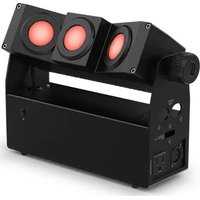
EZBeam Q3 ILS - DJ Equipment Chauvet - Free user manual and instructions
Find the device manual for free EZBeam Q3 ILS Chauvet in PDF.


| Product Type | LED Beam Effect Projector |
| Brand | Chauvet |
| Model | EZBeam Q3 ILS |
| Light Source | 3 LEDs of 3 W each |
| Beam Angle | 3° |
| Control | DMX, ILS (wireless via D-Fi USB), standalone |
| DMX Channels | 3 |
| Power Supply | Built-in rechargeable lithium-ion battery |
| Input Voltage | 100-240 VAC, 50/60 Hz |
| Power Consumption | 30 W |
| Battery Life | Up to 6 hours |
| Charging Time | Approximately 4 hours |
| Charging Temperature Range | 0 °C to 35 °C |
| Protection Rating | IP20 |
| Weight | 1.8 kg |
| Dimensions | 248 × 170 × 120 mm |
| Mounting | Pivoting hanging bracket |
| Safety Cable Required | Yes |
| Main Features | Beam effects, rotation, strobe, auto mode |
| Wireless Connection | D-Fi USB for ILS system |
| Repairability | No user-serviceable parts |
| Replacement Battery | Genuine Chauvet battery |
| Cleaning | Non-abrasive dry cloth |
| General Information | Full manual available at chauvetdj.com |
Frequently Asked Questions - EZBeam Q3 ILS Chauvet
User questions about EZBeam Q3 ILS Chauvet
0 question about this device. Answer the ones you know or ask your own.
Ask a new question about this device
Download the instructions for your DJ Equipment in PDF format for free! Find your manual EZBeam Q3 ILS - Chauvet and take your electronic device back in hand. On this page are published all the documents necessary for the use of your device. EZBeam Q3 ILS by Chauvet.
USER MANUAL EZBeam Q3 ILS Chauvet
Scan the QR code to access the product page, warranty terms, and the complete User Manual
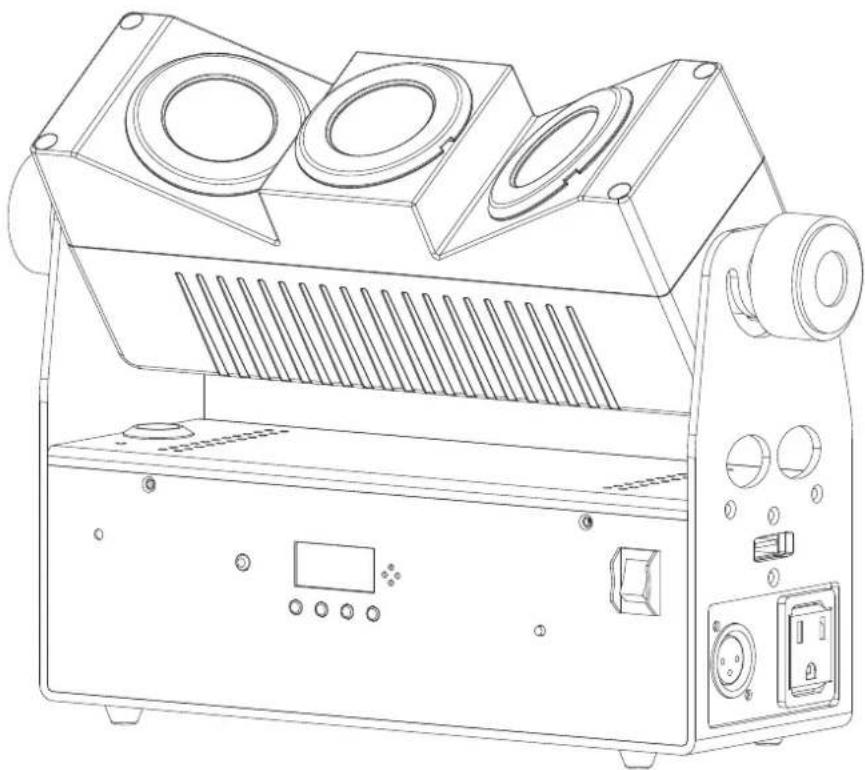
natural_image
Line drawing of a portable industrial machine with ventilation grilles and control knobs (no text or symbols)Intentionally Left Blank Page
Safety Notes
These Safety Notes include important information about installation, use, and maintenance of the EZBeam Q3 ILS.
■ ALWAYS:

◆ Connect to a grounded circuit.
◆ Connect to operating voltages as specified on the product's spec sticker.
♦ Disconnect from power before replacing the fuse.
♦ Disconnect from its power source during periods of inactivity.
◆ Use a safety cable when suspending overhead.
- Heed all restrictions and warnings on the spec sticker.
◆ Mount in a location with at least 20 in (50 cm) of ventilation.
♦ Replace the fuse with the same type and rating.
◆ Use a clamp with a captive bolt when a single hanging bracket is used.
In the event of a serious operating problem, stop using immediately.
■ DO NOT:
◆ Open this product or attempt any repairs. It contains no user-serviceable parts.
◆ Look at the light source when the product is on.
◆ Use if the power cord is crimped or damaged.
♦ Disconnect by pulling on the power cord.
- Allow flammable materials close to the product when it is operating.
♦ Touch the housing when it is on.
◆ Block any ventilation holes/slots in the housing.
◆ Connect to a dimmer or rheostat.
♦ Carry the product by its power cord.
♦ Operate in temperatures higher than 104°F (40°C).
♦ Expose to environments that exceed the Ingress Protection (IP) rating.
♦ Expose to rain or moisture.
Use outdoors.
Leave outdoors for extended periods of time.
♦ Set this product on a flammable surface.
♦ Expose to corrosive environmental conditions such as temperature, humidity, salinity, pressure, radiation, or shock.
What is Included
◆ EZBeam Q3 ILS
Power cable
◆ Quick Reference Guide
Control Panel Description
| Button Function | |
| Exits from the current menu or function | |
| Navigates upwards through the menu list and increases the numeric value when in a function | |
| Navigates downwards through the menu list and decreases the numeric value when in a function | |
| Enables the currently displayed menu or sets the currently selected value into the selected function | |
ILS Connection
The EZBeam Q3 ILS uses the DMX data connection and the D-Fi USB for wireless connection to the Integrated Lighting System (ILS) ecosystem (patent pending). For more information about configuring the EZBeam Q3 ILS into ILS mode, please refer to the User Manual available at www.chauvetdj.com.
Battery Charge Notes
Rechargeable lithium-ion batteries are potentially hazardous and can present a serious FIRE HAZARD, SERIOUS INJURY and/or PROPERTY DAMAGE if damaged, defective, or improperly used.
■ ALWAYS:
◆ Charge using a manufacturer-provided charger while the product is powered off.
◆ Charge the battery in temperatures between 32°-95°F (0°-35°C).
Allow a depleted battery to charge for a few minutes before turning on the product. If the battery is completely discharged, the device cannot be turned on immediately when the charger is connected.
♦ Keep at least 3 ft (1 m) distance to any heat source and away from flammable materials.
- Keep the lid of any charging case open while charging.
◆ Keep batteries away from children.
◆ Store batteries between 40-60% charge.
◆ Follow local regulations when disposing of batteries.
◆ Replace with an authentic Chauvet battery.

■ DO NOT:
◆ Continue charging if the battery becomes hot, smokes, swells, or gives off an odor during charging.
Leave the product unattended while charging.
◆ Deplete the battery below 10%.
◆ Charge the battery in a closed container.
◆ Charge for more than 24 hours.
Notas de seguridad
Intentionally Left Blank Page
Contact Us
General Information Technical Support
Chauvet World Headquarters
Address: 3360 Davie Rd. Voice: (844) 393-7575
Davie, FL 33314 Fax: (954) 756-8015
Voice: (954) 577-4455 Email: chauvetcs@chauvetlighting.com
Fax: (954) 929-5560
Toll Free: (800) 762-1084 Website: www.chauvetdj.com
Chauvet U.K.
Address: Pod 1 EVO Park Email: UKtech@chauvetlighting.eu
Little Oak Drive, Sherwood Park
Nottinghamshire, NG15 0EB Website: www.chauvetdj.eu
UK
Voice: +44 (0) 1773 511115
Fax: +44 (0) 1773 511110
Chauvet Benelux
Address: Stokstraat 18 Email: BNLtech@chauvetlighting.eu
9770 Kruishoutem
Belgium Website: www.chauvetdj.eu
Voice: +32 9 388 93 97
Chauvet France
Address: 3, Rue Ampère
91380 Chilly-Mazarin
France Website: www.chauvetdj.eu
Voice: +33 1 78 85 33 59
Chauvet Germany
(Entrance by Calle 2)
ial Lerma Website: www.chauvetdj.mx
Visit the applicable website above to verify our contact information and instructions to request support. Outside the U.S., U.K., Ireland, Mexico, France, Germany, or Benelux, contact the dealer of record.
EZBeam Q3 ILS QRG ML6 Rev. 2
© Copyright 2023 Chauvet
All rights reserved
UK CA
CE
RoHS