SUPREME SOAKER - Audio Amplifier Palmer - Free user manual and instructions
Find the device manual for free SUPREME SOAKER Palmer in PDF.


User questions about SUPREME SOAKER Palmer
0 question about this device. Answer the ones you know or ask your own.
Ask a new question about this device
Download the instructions for your Audio Amplifier in PDF format for free! Find your manual SUPREME SOAKER - Palmer and take your electronic device back in hand. On this page are published all the documents necessary for the use of your device. SUPREME SOAKER by Palmer.
USER MANUAL SUPREME SOAKER Palmer
natural_image
Pure electrical circuit lines without any symbols





TABLE OF CONTENTS
EN USER MANUAL 3
INFORMATION ON THIS USER MANUAL 3
INTENDED USE 3
EXPLANATIONS OF TERMS AND SYMBOLS 3
SAFETY INSTRUCTIONS 4
NOTES FOR PORTABLE INDOOR DEVICES 6
PACKAGING CONTENT 7
INTRODUCTION 8
CONNECTIONS, OPERATING AND DISPLAY ELEMENTS 10
NOTES 15
CARE, MAINTENANCE AND REPAIR 16
WIRING EXAMPLES 17
SIGNAL FLOW DIAGRAM 21
TECHNICAL SPECIFICATIONS 22
DISPOSAL 24
MANUFACTURER'S DECLARATIONS 24
INFORMATION ON THIS USER MANUAL
Carefully read the safety instructions and the entire manual before operating the device.
▶Observe the warnings on the device and in the user manual.
▶Always keep the user manual within reach.
If you sell or pass on the device, it is important that you also include this user manual, as it is an integral part of the product.
INTENDED USE
This product is a device for event technology, as well as studio, TV and broadcast!
This product has been developed for professional use in the field of event technology, studio, TV and broadcast. It is not suitable for household use!
Furthermore, this product is only intended for qualified users with specialist knowledge of event technology, as well as studio, TV and broadcast!
Use of the product outside the specified technical data and operating conditions is considered improper use!
▶ Liability for damage and third-party damage to persons and property due to inappropriate use is excluded!
▶The product is not suitable for:
▶ Use by persons (including children) with limited physical, sensory or mental abilities or lack of experience and knowledge.
Children (children must be instructed not to play with the device).
EXPLANATIONS OF TERMS AND SYMBOLS
- DANGER: The word DANGER, possibly in combination with a symbol, indicates immediately dangerous situations or conditions for life and limb.
- WARNING: The word WARNING, possibly in combination with a symbol, indicates potentially dangerous situations or conditions for life and limb.
- CAUTION: The word CAUTION, possibly in combination with a symbol, is used to indicate situations or conditions that may lead to injury.
- ATTENTION: The word ATTENTION, possibly in combination with a symbol, refers to situations or conditions that can lead to damage to property and/or the environment.

This symbol identifies hazards that can cause electric shock.

This symbol identifies hazardous areas or hazardous situations.

This symbol indicates hazards caused by hot surfaces.

This symbol indicates dangers due to high volume levels.

This symbol denotes a device that does not contain any user-serviceable parts.

This symbol indicates additional information on the operation of the product.

This symbol indicates a device that may only be used in dry rooms.
SAFETY INSTRUCTIONS

DANGER:
- Do not open the device and do not make any modifications.
- If your device no longer functions properly, if liquids or objects get inside it or if it has been damaged in any other way, switch it off immediately and disconnect it from the mains. The device may be repaired only by authorised repair technicians.
- For devices of protection class 1 the protective conductor must be connected correctly. Never disconnect the protective conductor. Devices of protection class 2 do not have a protective earth conductor.
- Ensure that live cables are not kinked or otherwise mechanically damaged.
- Never bypass the device fuse.

WARNING:
- The device must not be used if it shows obvious signs of damage.
- The device may only be installed in a voltage-free state.
- If the mains cable or power supply unit of the device is damaged, the device must not be put into operation.
- Permanently connected power cables may only be replaced by a qualified person.

ATTENTION:
- Do not switch on the device if it has been exposed to extreme temperature fluctuations (for example, following transport). Moisture and condensation can damage the device. Switch on the device only when it has reached ambient temperature.
-
Ensure that the voltage and frequency of the mains supply match the values specified on the device. If the device has a voltage selector switch, do not turn the device on until it has been set correctly. Use only suitable power cables.
-
To disconnect the device completely from the power supply, unplug the power cable or the power adapter from the socket. It is not sufficient to press the on/off switch on the device. In addition, a connected amplifier must also be disconnected from the device!
- Make sure that the fuse used corresponds to the type printed on the device.
- Ensure that suitable measures have been taken against overvoltage (e.g. lightning strikes).
- Observe the specified maximum output current on devices with a Power Out connection. Ensure that the total current consumption of all connected devices does not exceed the specified value.
- Replace plug-in power cables with original cables only.

DANGER:
- Choking hazard! Plastic bags and small parts must be kept out of reach of persons (including children) with reduced physical, sensory or mental capabilities.
- Risk of falling! Make sure that the device is securely installed and cannot fall down. Only use suitable stands or mounts (particularly for fixed installations). Ensure that accessories are properly installed and secured. Ensure that all applicable safety regulations are observed.

WARNING:
- Use the device in the prescribed manner only.
- Operate the device using only accessories of the type recommended and supplied by the manufacturer.
- Observe safety regulations applicable in your country during installation.
- After connecting the device, ensure that all cables are routed so as to avoid damage or accidents, such as from tripping.
- Be sure to observe the specified minimum distance to normally flammable materials! Unless explicitly stated, the minimum distance is 0.3 m.

CAUTION:
- Moving components such as mounting brackets pose a jamming hazard.
- The housing surface of the device can become very hot during regular operation. Ensure that accidental touching of the housing is not possible. Always allow the device to cool sufficiently before removal, maintenance work and charging etc.


ATTENTION:
- Do not install or use the device in the vicinity of radiators, accumulators, stoves, or other heat sources. Ensure that the device is always installed in such a way that it is sufficiently cooled and cannot overheat.
- Do not place any ignition sources, such as burning candles, near the device.
- Ventilation openings must not be covered and fans must not be blocked.
- For transport, use the original packaging or packaging provided by the manufacturer.
- Avoid any impacts to or shaking of the device.
-
Observe the IP rating and the ambient conditions such as temperature and humidity according to the specifications.
-
Devices can always be further improved. In the event of any discrepancies between the operating instructions and the device labelling with regard to operating conditions, performance or other device characteristics, the information on the device always takes precedence.
- The device is not suitable for tropical climate zones or for operation over 2,000 m above sea level.
- Unless explicitly stated, the device is not suitable for operation under marine conditions.

PLEASE NOTE:
For conversion or retrofit sets or accessories provided by the manufacturer, it is essential to observe the included instructions.

CAUTION, HIGH VOLUME AUDIO PRODUCTS!
This device is designed for professional use. The commercial operation of this device is subject to the applicable national regulations and guidelines for accident prevention.
Hearing damage due to high volume and continuous exposure: Use of this product may generate high sound pressure levels (SPL) that may cause hearing damage. Avoid exposure to high volumes.

CAUTION: Connecting signal cables and switching operations (e.g. switching phantom power on and off) can lead to considerable noise. Make sure that input channels (mixing console, audio interface, effects device, etc.) are muted during wiring and switching operations. Otherwise, noise levels may cause damage.

WARNING: The power rating of a connected amplifier must not exceed 150 W RMS!

CAUTION: Always connect speaker cables BEFORE switching on the amplifier and Supreme Soaker and only disconnect the cables AFTER switching off!

WARNING: To completely de-energise the Supreme Soaker, unplug the mains adapter from the socket AND disconnect any connected amplifier from the device.

CAUTION: Make sure that the ventilation openings in the housing of the device are not covered during operation and that air can circulate freely, especially when rack-mounted!

NOTE: Strong magnetic fields can cause humming. Therefore, do not position the Supreme Soaker in the vicinity of strong magnetic fields (e.g. mains transformer).

NOTES FOR PORTABLE INDOOR DEVICES:
- Temporary operation! Event equipment is generally only designed for temporary operation.
- Continuous operation or permanent installation can impair the functioning of the device and cause premature ageing.
PACKAGING CONTENT
Remove the product from the packaging and remove all packaging material.
Please check the completeness and integrity of the delivery and notify your distribution partner immediately after purchase if the delivery is not complete or if it is damaged.
The packaging content includes:
▶1 x Supreme Soaker
▶ 1 x external power supply unit
▶User manual
THIS IS YOUR NEW ANALOGUE DYNAMIC TUBE AMP HUB!
Thank you for choosing the Palmer Supreme Soaker, your all-in-one solution for pure analogue sound!
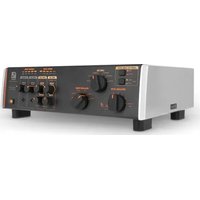
With the Supreme Soaker, you can maximise the potential of your tube amp in a way that has never been possible before – until now. The Supreme Soaker is a reactive power reducer and load box with a finely tuned analogue loudspeaker simulator. It allows you to permanently dial in the sweet spot of your amp – at any volume – and will quickly become your favourite device in any musical situation, from playing and recording at home to rehearsing with a band to playing live – without sacrificing the least bit of your good tone!
With others – or all at the same time – the Supreme Soaker is the perfect tool to ensure that your signal always remains pure and analogue.
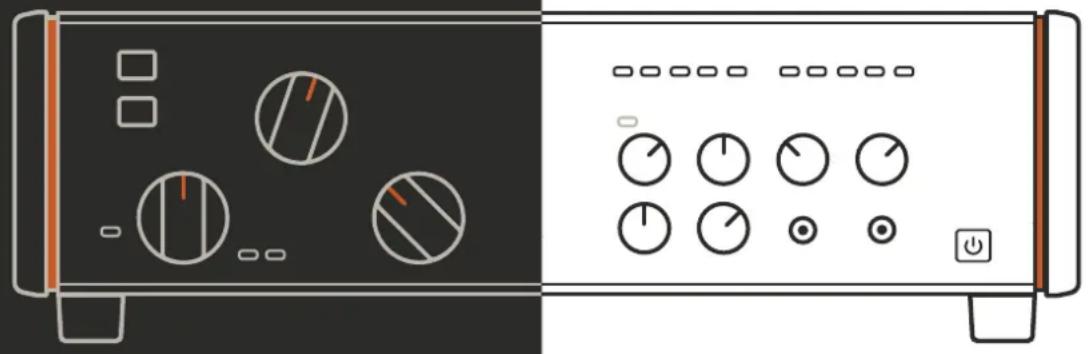
natural_image
Front and back view of a computer control panel with dials, buttons, and power button (no text or symbols)These are just some of the most important advantages of the Supreme Soaker:
▶ Reactive power reducer and load box: You can dial in the sweet spot of your amp at any volume, from zero (yes, you can use headphones or record quietly) to room volume to the highest you dare to go. The choice is yours, and of course without a speaker cabinet!
Fine-tuned analogue speaker simulator: Change the sound of your amplifier at will to get the ultimate sound - you'll never need a microphone for a speaker again!
▶ Speaker output with unique tone control: Change the sound palette of your speaker cabinet to create new, distinctive soundscapes.
Microphone/line input (can be mixed with the speaker simulator): Combine your favourite miked speaker with the Supreme Soaker's speaker simulator for an analogue sound experience that's in a class of its own.
▶ Headphone output on the front: perfect for silent practice when inspiration strikes.
Stereo FX Loop: Do you love your pedals? Us too! That's why the Supreme Soaker has a stereo FX loop.
Aux input on the front: Want to jam to backing tracks or even play to a click? The Supreme Soaker makes it very easy.
▶ Balanced stereo XLR line outputs: When it comes to recording, the whole world is open to you.
▶ Compatible with 8- and 16-ohm setups: Works perfectly with 99% of all tube amplifiers.
Designed for amplifiers up to 150 watts RMS: perfect for taming even the large, arena-filling tube amplifiers of yesteryear! With the Supreme Soaker, you finally have a reason again to dust off your full stack!
Amplifier protection circuit with permanent amplifier load: Never again worry about plugging in your amplifier without speakers connected!
A purely analogue experience for which you don't need an app! Perhaps most importantly, the Supreme Soaker is simple, direct and pristine: your analogue sound is preserved at all times, and all the controls you need are right on the device so you can focus on what's most important:
Making music!
And that's just the beginning. As you get to know your Supreme Soaker better, you will discover many ways in which it can become an indispensable tool for your creative musical work.
Thanks to its unparalleled sound, versatile connectivity and ease of use, the Supreme Soaker will become the central component of your rig from now on – trust us, your family, your neighbours and your audience will thank you for it!
For us – the Palmer team – this is the culmination of a long-term goal, the realisation of a decades-long dream in terms of sound. We have been the industry leader in analogue sound solutions for musicians and sound engineers for over 40 years and with the Supreme Soaker, you have direct access to our decades of experience and expertise as designers, engineers and most importantly as fellow musicians.
Have fun with your Supreme Soaker!
CONNECTIONS, OPERATING AND DISPLAY ELEMENTS
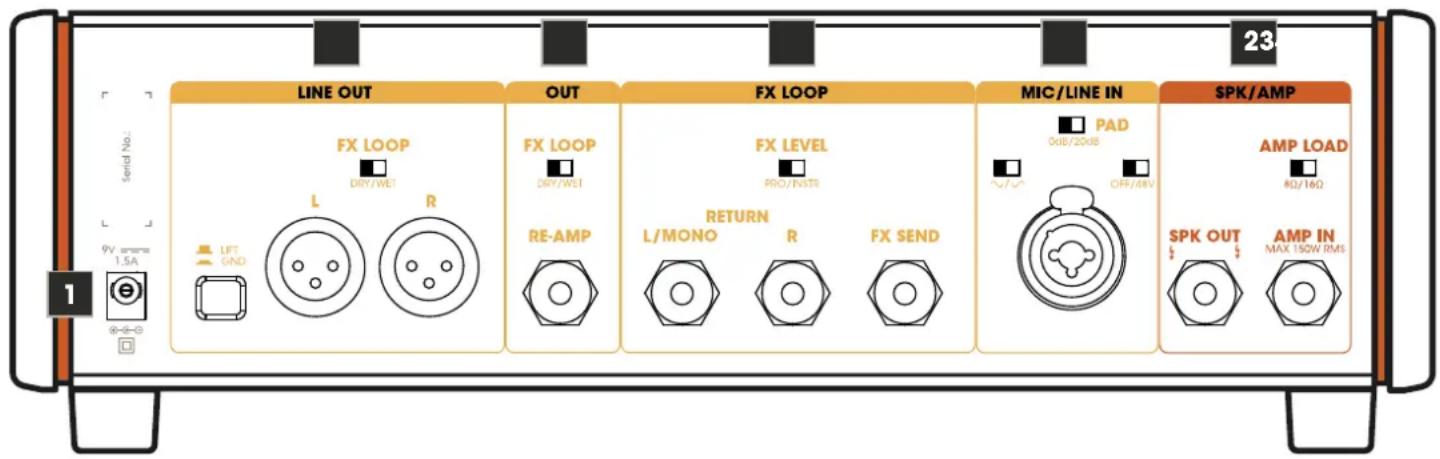
The connections and the controls and display elements are colour-coded for easier orientation:
Orange: Signal path of the amplified signal from the amp to the speaker
Yellow: Signal path that leads to the LINE OUT and RE-AMP OUT
Grey: Signal path that leads to the headphone output (PHONES)
text_image
1 9V am=1.5A +/-+ LINE OUT FX LOOP L DRY/WEI R OUT FX LOOP DRY/WEI RE-AMP L/MONO RETURN R FX LOOP PRO/INTR FX LOOP OUT/2018 OUT/A OFF/INV FX LOOP SPK/AMP SPK OUT MAX 150W RMS 23 SPK/AMP AMP LOAD RD/16Ω1. POWER INPUT
Low-voltage socket for supplying power to the device. To prevent damage to the device, please use only the original power supply (included) or one of the Palmer power supplies PWT06IEC and PWT12IEC.
2. SPK/AMP
AMP IN
Amplifier input with a 6.3 mm jack socket. Use a high-quality speaker cable (min. 2 x 1.5 mm ^4 ) to connect the speaker output of a guitar amplifier to the amplifier input AMP IN.
Caution when using guitar amplifiers with an output power of over 100 watts:
Make sure that the ventilation openings of the housing are not covered and that the device receives sufficient air circulation. Monitor the heat development of the device regularly and keep a close eye on the "Burning Bus" LED (see section 13, Overheating warning!). If this LED lights up, stop playing and allow the device to cool down.
AMP LOAD
Adjust the impedance required for your amplifier using the AMP LOAD switch before switching on the amplifier (8Ω/16Ω).
SPK OUT
6.3 mm jack socket for connecting a guitar speaker. As the Supreme Soaker has internal load resistors, a guitar cabinet does not necessarily have to be connected to the SPK OUT speaker output. When using a guitar speaker, the impedance of the speaker should correspond to the impedance required for the amplifier. Use a high-quality speaker cable (min. 2 x 1.5 mm ^4 ) to connect the SPK OUT speaker output to the input of a guitar cabinet.
3. MIC/LINE IN
Combo socket XLR / jack
Audio input for a microphone (also suitable for a line playback source).
XLR input: Connect a suitable microphone using a microphone cable and pick up a guitar speaker. Set the volume ratio between the amp and microphone signals on the front panel (LINE OUT, BLEND, AMP <-> MIC).
TRS jack input (-20 dB): Connect the line output of the amplifier using a line cable. Set the volume ratio between the amp and line signals on the front panel (LINE OUT, BLEND, AMP <-> MIC).
PAD (Passive Attenuation Device)
The PAD circuit can be used to adjust the level range of the input stage to the level of the input signal. Distortion of the audio signal can thus be effectively avoided.
0dB: No attenuation of the audio signal.
20dB: Attenuation of the audio signal by 20 dB.
Select the 0dB position if the gain of the input signal can be adjusted using the GAIN control on the front of the device so that no distortion occurs in the signal and a sufficient signal level is achieved.
Select the 20dB setting if the lowest setting of the GAIN control on the front panel is not sufficient to avoid distortion in the signal (SGN/PK indicator LED lights up red continuously or flashes red at peak levels, PK = Peak).
OFF/48V
48 V phantom power for use with a condenser microphone. Only switch on the phantom power after connecting the microphone (switch in position 48V) and switch it off again before disconnecting the microphone (switch in position OFF).
POLARITY

When mixing the amplifier and microphone signals, inverting the polarity of the microphone signal can prevent unwanted cancellations (switch in position v = standard polarity, switch in position v = inverted polarity).
4. FX LOOP
Serial loop-in path (unbalanced) for integrating an external effects unit (reverb, delay, etc.). Set the volume ratio between the direct and effect signals (dry / wet) on the effect device. NOTE: If only the send socket is used and the return sockets remain unused, the signal path is interrupted.
FX SEND
6.3 mm jack socket for sending the signal to the external effects unit (FX SEND -> effects unit INPUT). Use a high-quality line cable with TS jack plugs.
RETURN L/MONO - R
6.3 mm jack sockets for returning the effect signal (mono signal: effect unit OUTPUT -> RETURN L/MONO, stereo signal: effect unit OUTPUT L + R -> RETURN L + R). Use high-quality line cables with TS jack plugs.
FX LEVEL PRO/INSTR
Switch for adjusting the send level.
Recommendation: PRO level = for rack effects in the studio, INSTR level = for effect pedals.
Select the appropriate setting for your effect device. Make sure that the input stage of the effect device is sufficiently driven but not overdriven.
5. OUT
High-impedance output path (unbalanced) for driving a (second) guitar amplifier.
RE-AMP
6.3 mm jack socket. Use a high-quality instrument cable with TS jack plugs to connect a guitar amplifier.
FX LOOP DRY/WET
Switch in position DRY: Outgoing signal without effect (No. 4. FX LOOP).
Switch in position WET: Outgoing signal with effect (No. 4. FX LOOP).
6. LINE OUT
Balanced stereo line output with XLR sockets for the left and right channels L + R. Use the LINE OUT to connect a mixing console or audio interface, etc.
FX LOOP DRY/WET
Switch in position DRY: Outgoing signal without effect (No. 4. FX LOOP).
Switch in position WET: Outgoing signal with effect (No. 4. FX LOOP).
LIFT/GROUND
Switch for disconnecting the ground connection between the input and output (ground lift). In the non-pressed position, the ground connection is disconnected; the connection is established when the switch is pressed. The ability to prevent a humming loop using the ground lift switch depends on the grounding of the connected devices. It is therefore possible that either switch position effectively reduces or eliminates humming.
text_image
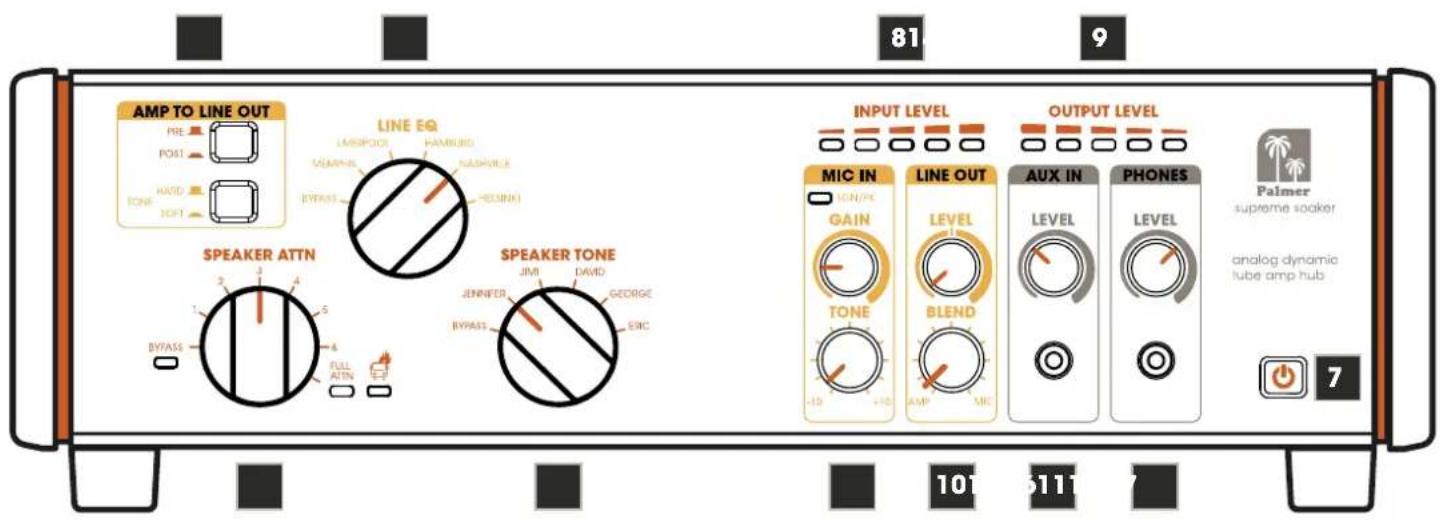
AMP TO LINE OUT PRE POST HARD TONE SHIFT LINE EQ LAMPOCK VEMPHIL HYRASS NASHPOCK RESINKI SPEAKER ATTN JMI DAVID JEENFER JENNIEER BYPASS GEORGE ERIC FULL ATTN BITASS 81 9 INPUT LEVEL OUTPUT LEVEL MIC IN GAIN TONE LINE OUT LEVEL BLEND AUX IN LEVEL PHONES PALMER supreme soaker analog dynamic tube amp hub 101 511 77. POWER
As soon as the Supreme Soaker is connected to the mains using the external power supply, the illuminated power symbol on the power button (standby) pulsates. Press the button to end standby mode and put the device into operation. To switch back to standby mode, press the power button again.

When exiting standby mode, make sure that all LEDs on the front light up briefly! If one or more LEDs do not light up during start-up, this indicates a fault. Disconnect the device from the power supply and contact your sales partner!
8. INPUT LEVEL
5-segment LED display for the signal level at the AMP IN amplifier input.
9. OUTPUT LEVEL
5-segment LED display for the signal level at the loudspeaker output SPK OUT.
10. LINE OUT
LEVEL
Volume control for the LINE OUT stereo output. TIP: When connecting a mixing console, audio interface or similar, select the centre position (0 dB) as the default setting and only increase or decrease the signal level if necessary (+/- 12 dB).
BLEND
Controls the volume ratio between the AMP and MIC signals.
11. MIC IN
GAIN
Adjusts the pre-amplification of the MIC/LINE IN audio input.
SGN/PK
The two-colour LED indicates whether a signal is present at the MIC/LINE audio input (lights up amber) and whether the input stage is operating at the distortion limit or in the distortion range (flashes red or lights up red continuously). In this case, reduce the pre-amplification using the GAIN control and, if necessary, activate the 20 dB PAD (rear of the device, see section 3 PAD).
TONE
Tone control with hi-shelf filter. Boost (turn to the right) or attenuate (turn to the left) the high frequencies. In the centre position, the audio signal is not processed.
12. SPEAKER TONE
6-way switch for setting the sound characteristics in the loudspeaker signal path (5 presets plus bypass).
13. SPEAKER ATTN (Attenuation)
8-way switch for gradual attenuation of the volume at the SPK OUT loudspeaker output.
BYPASS (with indicator LED) = no attenuation.
1 - 6 = level 1 (slight attenuation) to level 6 (strong attenuation).
FULL ATTN (with indicator LED) = maximum attenuation, SPK OUT loudspeaker output muted.

Overheating warning! If the warning symbol lights up red, the internal load resistors have overheated. Ensure that the device is sufficiently ventilated and allow it to cool down before using it again!
Tip: Reduce the amplifier volume or feed more power to the external speaker (lower ATTN attenuation level).
14. LINE EQ
6-way switch for setting the sound characteristics for the LINE OUT line output (5 presets plus bypass).
15. AMP TO LINE OUT
PRE/POST
Switch not pressed (position PRE: The audio signal for the LINE OUT line output is tapped BEFORE the SPEAKER TONE filter.
Switch pressed (position POST): The audio signal for the LINE OUT line output is tapped BEHIND the SPEAKER TONE filter.
TONE HARD/SOFT
Switch not pressed (position HARD).
Recommendation: Use this setting with a distorted guitar signal.
Switch pressed (position SOFT).
Recommendation: Use this setting with a "clean" guitar signal.
16. PHONES
Stereo headphone output with a 3.5 mm jack socket for the sum signal (LINE OUT plus AUX IN).
LEVEL
Volume control for the headphone output (turn to the left = quieter, turn to the right = louder).

CAUTION: The headphone output can produce high sound pressure levels (SPL) which can lead to hearing damage. Avoid exposure to high volumes!
17. AUX IN
Stereo line input with a 3.5 mm jack socket. The line input may be used to connect a playback device such as an MP3 player for play alongs, for example.
Note: The AUX IN line input signal is not output from the balanced LINE OUT line output.
LEVEL
Volume control for the AUX IN input channel (turn to the left = quieter, turn to the right = louder).

NOTES
- If the SPEAKER ATTN switch is set to BYPASS and no speaker is connected to the SPK OUT, a resistor is automatically switched into the amplifier path to protect an amplifier connected to the AMP IN.
- If the SPEAKER ATTN switch is set to BYPASS, no power measurement is possible in the INPUT LEVEL circuit. This means that no input signal level is displayed even though a signal is present at AMP IN.
- If the SPEAKER ATTN switch is set to FULL ATTN, no power measurement is possible in the OUTPUT LEVEL circuit, as there is no signal at the SPK OUT loudspeaker output. Consequently, the OUTPUT LEVEL level indicator shows no signal in this case.
- If the Supreme Soaker is in standby mode or disconnected from the power supply and no speaker is connected to the SPK OUT, a resistor is automatically switched into the amplifier path to protect an amplifier connected to the AMP IN.
- If no speaker is connected to SPK OUT, set SPEAKER ATTN to FULL ATTN so that the exact impedance set using the AMP LOAD switch is available.
- Never switch SPEAKER ATTN, SPEAKERTONE and AMP LOAD under load (while playing the guitar).
- LINE OUT, RE-AMP OUT and PHONES can quickly distort at high frequencies if LINE EQ and SPEAKERTONE are set to BYPASS. Make sure that there is always at least one filter for the loudspeaker simulation in the signal path. In a classic setup with an amplifier and loudspeaker, high-frequency distortion cannot occur because a guitar loudspeaker cannot reproduce high frequencies at all.
- If SPEAKER ATTN is set to FULL ATTN and a speaker is connected to the SPK OUT output, the impedance at the AMP IN amplifier input is always 32 ohms. To ensure that the exact impedance set using the AMP LOAD switch is available, disconnect the loudspeaker from the SPK OUT loudspeaker output.
- The power measurement of the OUTPUT LEVEL circuit is only correct if the AMP LOAD setting and the impedance of the connected loudspeaker match.
- If there is no signal at the LINE OUT line output, check these three settings and change them if necessary:
A. Front: SPEAKER ATTN is set to FULL ATTN and AMP TO LINE OUT is set to POST.
B. Front: BLEND of LINE OUT is fully set to MIC and no microphone is connected or 48V phantom power is switched off, but is required for the connected microphone.
C. Rear: SEND of FX LOOP is plugged in, but RETURN is not and FX LOOP of LINE OUT is set to WET (open serial FX loop).
CARE, MAINTENANCE AND REPAIR
In order to ensure the long-term, proper functioning of the device, it must be regularly cleaned and, if necessary, serviced. The maintenance requirement depends on the intensity of use and the environment in which it is used.
We recommend a visual inspection before each operation. Furthermore, we recommend carrying out all the applicable maintenance measures specified below once every 500 operating hours or, in the case of a lower intensity of use, at the latest after one year. Warranty claims may be limited should defects result from inadequate service and maintenance.

WARNING! Before carrying out any care or maintenance, the power supply – and, if possible, all device connections – must be disconnected.

PLEASE NOTE! Improper care can lead to impairment of the device or even its destruction.
- Housing surfaces must be cleaned with a clean, damp cloth. Make sure that no moisture can penetrate the device.
- Air inlets and outlets must be regularly cleaned of dust and dirt. If compressed air is used, make sure that damage to the device is prevented (e.g. fans must be blocked in this case).
- Cables and connectors must be cleaned regularly and dust and dirt must be removed.
- In general, no cleaning or disinfection agents or abrasive agents may be used, as they may damage the surface finish. Solvents in particular, such as alcohol, can impair the function of housing seals.
- Devices must generally be stored dry and protected from dust and dirt.
MAINTENANCE AND REPAIR (qualified personnel only)

DANGER! There are live components in the device. Even after disconnecting the mains connection, there may still be residual voltage in the device, for example, due to charged capacitors.

PLEASE NOTE! There are no user-serviceable assemblies in the device.

PLEASE NOTE! Maintenance and repair work may only be carried out by qualified specialist personnel authorised by the manufacturer. If in doubt, consult the manufacturer.

PLEASE NOTE! Improperly performed maintenance work may affect warranty claims.
WIRING EXAMPLES
POWER REDUCTION
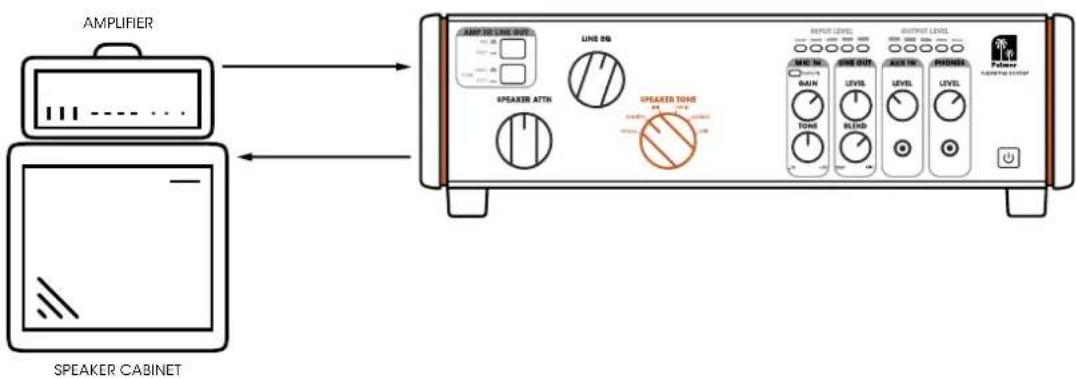
Reduce the power output from the tube amplifier to the loudspeaker to play the amplifier in the range where it sounds best without losing dynamics. For silent operation, set to FULL ATTN. The Supreme Soaker delivers a continuous load to your amplifier at every attenuation level – even without attenuation (power reduction).
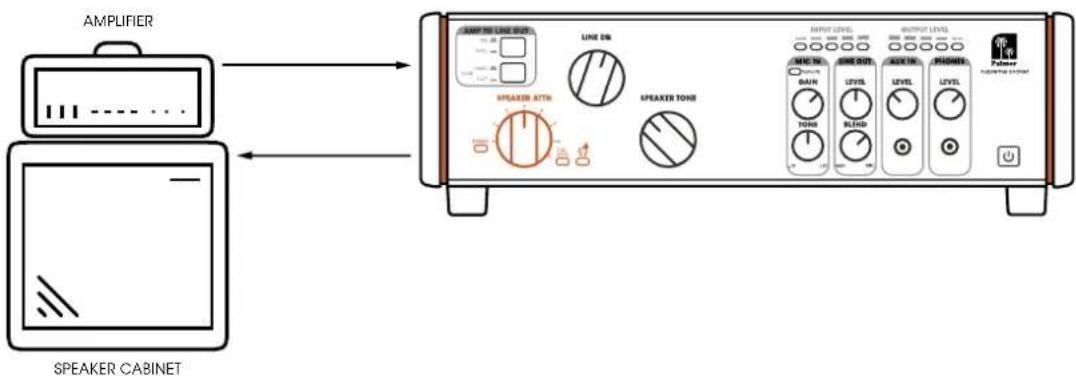
Amplifiers and speakers interact. SPEAKER TONE changes the impedance curve that your amplifier "sees" and thus gives your loudspeaker different sound variations.
text_image
AMPLIFIER SPEAKER CABINET MAP 50 LINE OUT LINE 50 SPEAKER ATTH SPEAKER TONE INPUT LEVEL OUTPUT LEVEL MAP IN DAIN LEVEL LEVEL MODEL LEVEL Polar SPEAKER TONE SPEAKER TONE SPEAKER TONE SPEAKER TONE SPEAKER TONE SPEAKER TONE SPEAKER TONEActivate an analogue LINE EQ - also known as speaker simulation - at the balanced line outputs and the headphone output.
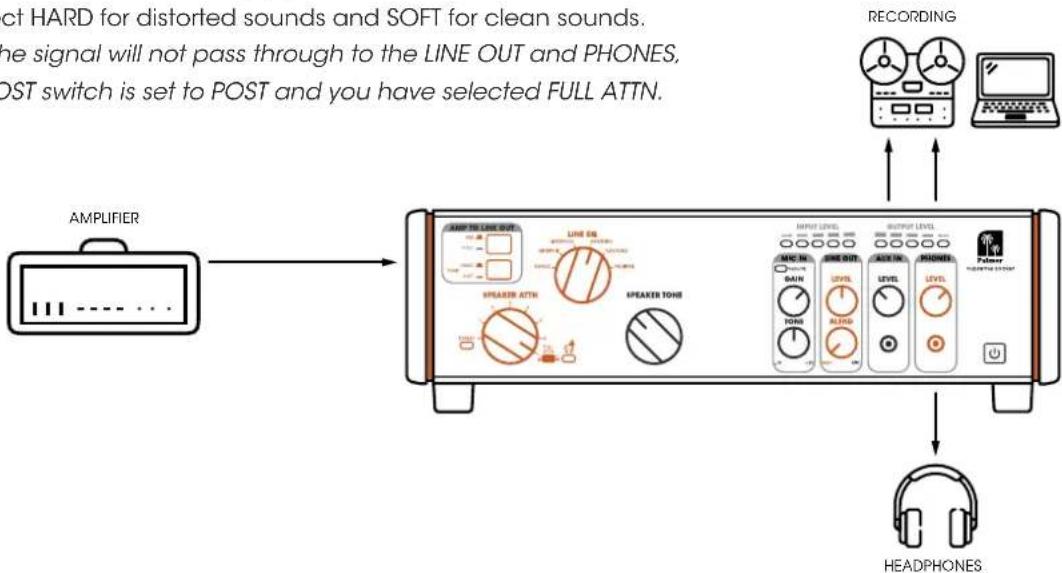
The LINE EQ works both at full power reduction and at all other reduction levels.
If you bypass it (BYPASS), you will hear the dry signal from your amplifier.
You can use the Tone button to apply a "harder" or "softer" LINE EQ
curve : Select HARD for distorted sounds and SOFT for clean sounds.
Attention: The signal will not pass through to the LINE OUT and PHONES,
if the PRE/POST switch is set to POST and you have selected FULL ATTN.
flowchart
graph LR
    A["AMPLIFIER"] --> B["Speaker ATNs"]
    B --> C["Speaker TOUs"]
    C --> D["INPUT LEVEL"]
    C --> E["OUTPUT LEVEL"]
    D --> F["ME NO."]
    D --> G["SAIN"]
    D --> H["LEVEL NO."]
    D --> I["LEVEL NO."]
    E --> J["MOUNTS"]
    E --> K["HEADphones"]
    L["RECORDING"] --> M["Laptop"]
    N["CT HARD for distorted sounds and SOFT for clean sounds."] --> O["the signal will not pass through to the LINE OUT and PHONES, OST switch is set to POST and you have selected FULL ATTN."]
    O --> P["HEADPHONES"]
MIC/LINE INPUT
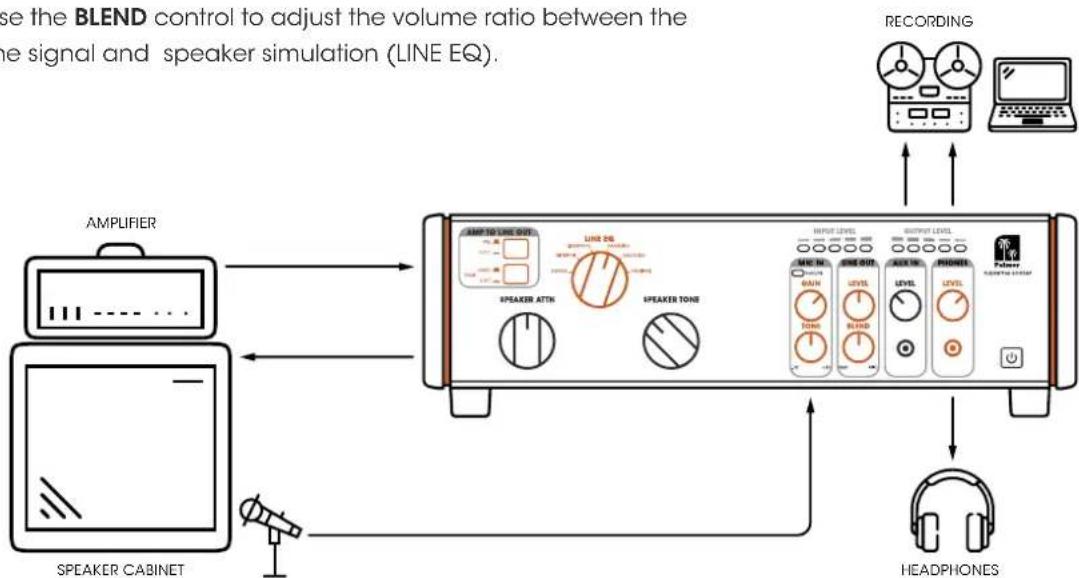
Mic your guitar speaker and feed the signal to the Supreme Soaker.
The TONE control applies a high-shelf EQ of +/- 100 dB to the microphone or line signal.
A phantom power switch for operating condenser microphones and a polarity switch are located on the rear of the device.
You can use the GAIN control to adjust the pre-amplification of the input.
You can use the BLEND control to adjust the volume ratio between the microphone signal and speaker simulation (LINE EQ).
flowchart
graph TD
    A["Speaker Cabinet"] --> B["AMPLIFIER"]
    B --> C["Line Ratio Adjustment"]
    C --> D["Speaker ATTH"]
    C --> E["Speaker Tone"]
    D --> F["LINE EQ"]
    E --> G["INPUT LEVEL"]
    E --> H["OUTPUT LEVEL"]
    F --> I["MIN NO. 0A1N 0A2N 0A3N 0A4N 0A5N 0A6N 0A7N 0A8N 0A9N 0A10N 0A11N 0A12N 0A13N 0A14N 0A15N 0A16N 0A17N 0A18N 0A19N 0A20N 0A21N 0A22N 0A23N 0A24N 0A25N 0A26N 0A27N 0A28N 0A29N 0A30N 0A31N 0A32N 0A33N 0A34N 0A35N 0A36N 0A37N 0A38N 0A39N 0A40N 0A41N 0A42N 0A43N 0A44N 0A45N 0A46N 0A47N 0A48N 0A49N 0A50N 0A51N 0A52N 0A53N 0A54N 0A55N 0A56N 0A57N 0A58N 0A59N 0A60N 0A61N 0A62N 0A63N 0A64N 0A65N 0A66N 0A67N 0A68N 0A69N 0A70N 0A71N 0A72N 0A73N 0A74N 0A75N 0A76N 0A77N 0A78N 0A79N 0A80N 0A81N 0A82N 0A83N 0A84N 0A85N 0A86N 0A87N 0A88N 0A89N 0A90N 0A91N 0A92N 0A93N 0A94N 0A95N 0A96N 0A97N 0A98N 0A99N 0B00N 1<br>    C --> J[Speaker ATTH"]
    C --> K["Speaker Tone"]
    D --> L["INPUT LEVEL"]
    D --> M["OUTPUT LEVEL"]
    F --> N["MIN NO. GAIN"]
    F --> O["RED OUT"]
    F --> P["AVG IN."]
    F --> Q["LEVEL"]
    F --> R["AVG OUT."]
    F --> S["LEVEL"]
    F --> T["AVG OUT."]
    F --> U["AVG OUT."]
    F --> V["AVG OUT."]
    F --> W["AVG OUT."]
    F --> X["AVG OUT."]
    F --> Y["AVG OUT."]
    F --> Z["AVG OUT."]
    F --> AA["AVG OUT."]
    F --> AB["AVG OUT."]
    F --> AC["AVG OUT."]
    F --> AD["AVG OUT."]
    F --> AE["AVG OUT."]
    F --> AF["AVG OUT."]
    F --> AG["AVG OUT."]
    F --> AH["AVG OUT."]
    F --> AI["AVG OUT."]
    F --> AJ["AVG OUT."]
    F --> AK["AVG OUT."]
    F --> AL["AVG OUT."]
    F --> AM["AVG OUT."]
    F --> AN["AVG OUT."]
    F --> AO["AVG OUT."]
    F --> AP["AVG OUT."]
    F --> AQ["AVG OUT."]
    F --> AR["AVG OUT."]
    F --> AS["AVG OUT."]
    F --> AT["AVG OUT."]
    F --> AU["AVG OUT."]
    F --> AV["AVG OUT."]
    F --> AW["AVG OUT."]
    F --> AX["AVG OUT."]
    F --> AY["AVG OUT."]
    F --> AZ["AVG OUT."]
    F --> BA["AVG OUT."]
    F --> BB["AVG OUT."]
    F --> BC["AVG OUT."]
    F --> BD["AVG OUT."]
    F --> BE["AVG OUT."]
    F --> BF["AVG OUT."]
    F --> BG["AVG OUT."]
    F --> BH["AVG OUT."]
    F --> BI["AVG OUT."]
    F --> BJ["AVG OUT."]
    F --> BK["AVG OUT."]
    F --> BL["AVG OUT."]
    F --> BM["AVG OUT."]
    F --> BN["AVG OUT."]
    F --> BO["AVG OUT."]
    F --> BP["AVG OUT."]
    F --> BQ["AVG OUT."]
    F --> BR["AVG OUT."]
    F --> BS["AVG OUT."]
    F --> BT["AVG OUT."]
    F --> BU["AVG OUT."]
    F --> BV["AVG OUT."]
    F --> BW["AVG OUT."]
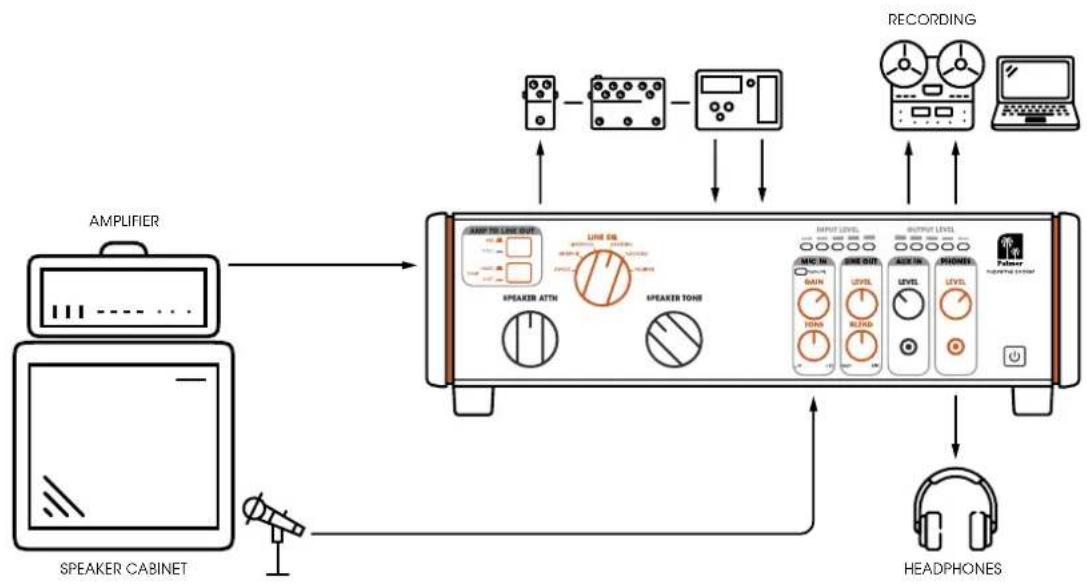
INSERT YOUR STEREO EFFECTS
Insert your favourite effect pedals into the serial FX LOOP. The effects inserted into the effects loop are looped in behind the LINE EQ (speaker simulation) and the MIC/LINE IN. You can set it to instrument or pro level (PRO/INST) using a switch on the back.
flowchart
graph TD
    A["AMPLIFIER"] --> B["Speaker Cabinet"]
    B --> C["Speaker ATTH"]
    C --> D["Speaker Tone"]
    D --> E["INPUT LEVEL"]
    E --> F["MIC IN"]
    E --> G["LINE OUT"]
    E --> H["LEAV"]
    E --> I["PROFEET"]
    E --> J["PWM/SPRING SYSTEM"]
    E --> K["RECORDING"]
    K --> L["Headphones"]
JAMMING TO YOUR MUSIC
Play your music (backing track, click track, monitor mix) via the AUX IN and jam along with your favourite amplifier sound.
Note: The input signal of the aux track is not forwarded to the line output (LINE OUT), but only to the headphone output (PHONES).
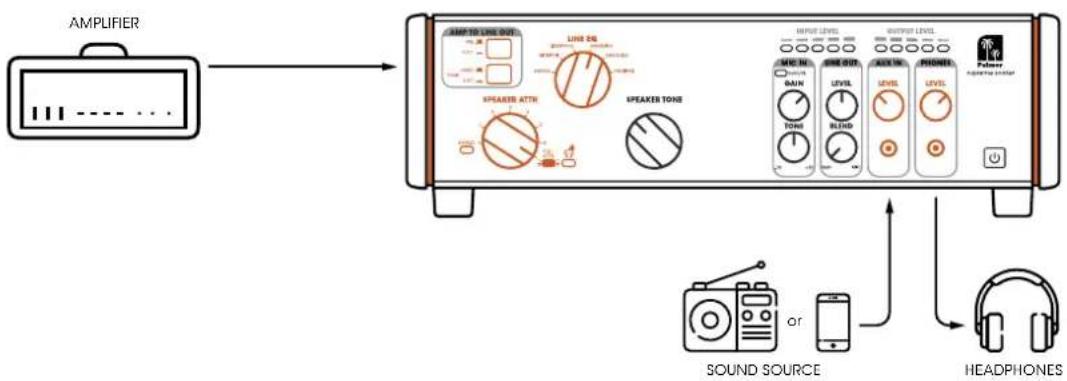
flowchart
graph LR
    A["AMPLIFIER"] --> B["Speaker Attire"]
    B --> C["Speaker Tone"]
    C --> D["Sound Source"]
    D --> E["or"]
    E --> F["Headphones"]
    style A fill:#f9f,stroke:#333
    style B fill:#ccf,stroke:#333
    style C fill:#cfc,stroke:#333
    style D fill:#fcc,stroke:#333
    style E fill:#cff,stroke:#333
    style F fill:#ffc,stroke:#333
ADD THE SPEAKER TONE TO THE LINE OR HEADPHONE OUTPUT
For even more sound variations, you can activate the POST button and try out different combinations with your LINE EQ and SPEAKER TONE settings.
Note 1: All of this happens before the FX loop.
Note 2: When the POST button is activated and FULL ATTN is activated,
no signal is output from the LINE OUT or PHONES.
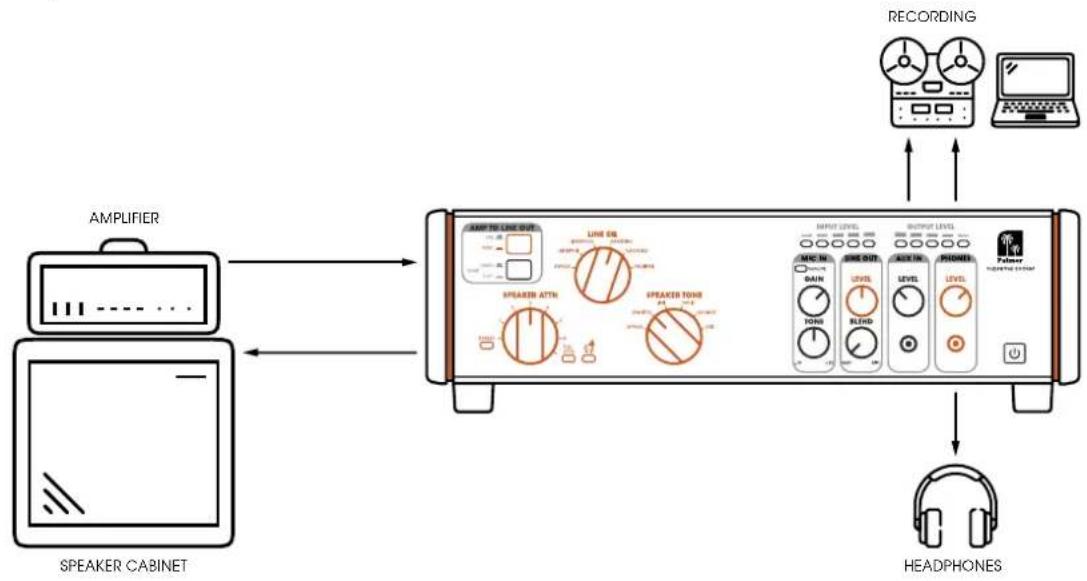
flowchart
graph LR
    A["AMPLIFIER"] --> B["SPEAKER CABINET"]
    B --> C["Speaker Cabinet"]
    C --> D["Speaker ATTH"]
    D --> E["Speaker TONG"]
    E --> F["INPUT LEVEL"]
    F --> G["OUTPUT LEVEL"]
    G --> H["RECORDING"]
    H --> I["Scanned Device"]
    I --> J["HEADPHONES"]
ZERO-LATENCY RECORDING / MONITORING SET-UP
The perfect recording setup for your amplifier with zero latency.
Feed the sound from your Supreme Soaker into the recording system and from the recording system back into the AUX IN of your Supreme Soaker. Make sure that you mute the activated track (your guitar track) to hear the sound from your Supreme Soaker.
This allows you to monitor your guitar sound with zero latency along with the backing tracks from your recording system.
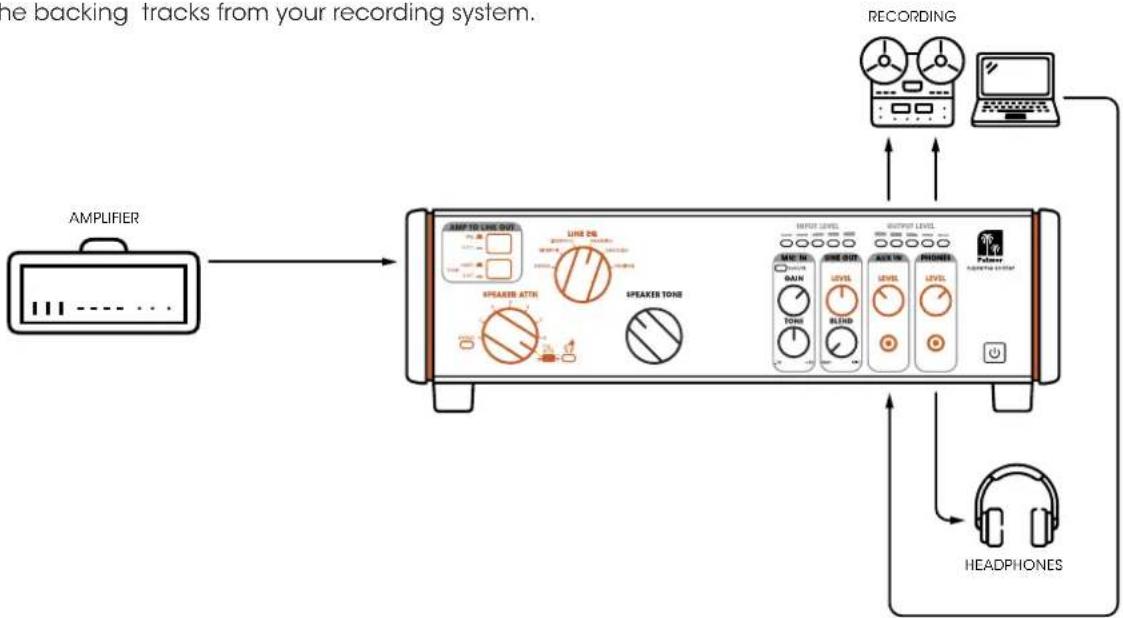
flowchart
graph LR
    A["AMPLIFIER"] --> B["Line 26"]
    B --> C["Speaker ATIN"]
    C --> D["SPEAKER TONE"]
    D --> E["RECORDERING"]
    E --> F["Pulsor"]
    F --> G["HEADPHONES"]
    G --> H["Output Level"]
    H --> I["LEVEL"]
    I --> J["LEVEL"]
    J --> K["LEVEL"]
    K --> L["LEVEL"]
    L --> M["LEVEL"]
    M --> N["LEVEL"]
    N --> O["LEVEL"]
    O --> P["LEVEL"]
    P --> Q["LEVEL"]
    Q --> R["LEVEL"]
    R --> S["LEVEL"]
    S --> T["LEVEL"]
    T --> U["LEVEL"]
    U --> V["LEVEL"]
    V --> W["LEVEL"]
    W --> X["LEVEL"]
    X --> Y["LEVEL"]
    Y --> Z["LEVEL"]
    Z --> AA["LEVEL"]
    AA --> AB["LEVEL"]
    AB --> AC["LEVEL"]
    AC --> AD["LEVEL"]
    AD --> AE["LEVEL"]
    AE --> AF["LEVEL"]
    AF --> AG["LEVEL"]
    AG --> AH["LEVEL"]
    AH --> AI["LEVEL"]
    AI --> AJ["LEVEL"]
    AJ --> AK["LEVEL"]
    AK --> AL["LEVEL"]
    AL --> AM["LEVEL"]
    AM --> AN["LEVEL"]
    AN --> AO["LEVEL"]
    AO --> AP["LEVEL"]
    AP --> AQ["LEVEL"]
    AQ --> AR["LEVEL"]
    AR --> AS["LEVEL"]
    AS --> AT["LEVEL"]
    AT --> AU["LEVEL"]
    AU --> AV["LEVEL"]
    AV --> AW["LEVEL"]
    AW --> AX["LEVEL"]
    AX --> AY["LEVEL"]
    AY --> AZ["LEVEL"]
    AZ --> BA["LEVEL"]
    BA --> BB["LEVEL"]
    BB --> BC["LEVEL"]
    BC --> BD["LEVEL"]
    BD --> BE["LEVEL"]
    BE --> BF["LEVEL"]
    BF --> BG["LEVEL"]
    BG --> BH["LEVEL"]
    BH --> BI["LEVEL"]
    BI --> BJ["LEVEL"]
    BJ --> BK["LEVEL"]
    BK --> BL["LEVEL"]
    BL --> BM["LEVEL"]
    BM --> BN["LEVEL"]
    BN --> BO["LEVEL"]
    BO --> BP["LEVEL"]
    BP --> BQ["LEVEL"]
    BQ --> BR["LEVEL"]
    BR --> BS["LEVEL"]
    BS --> BT["LEVEL"]
    BT --> BU["LEVEL"]
    BU --> BV["LEVEL"]
    BV --> BW["LEVEL"]
SIGNAL FLOW DIAGRAM
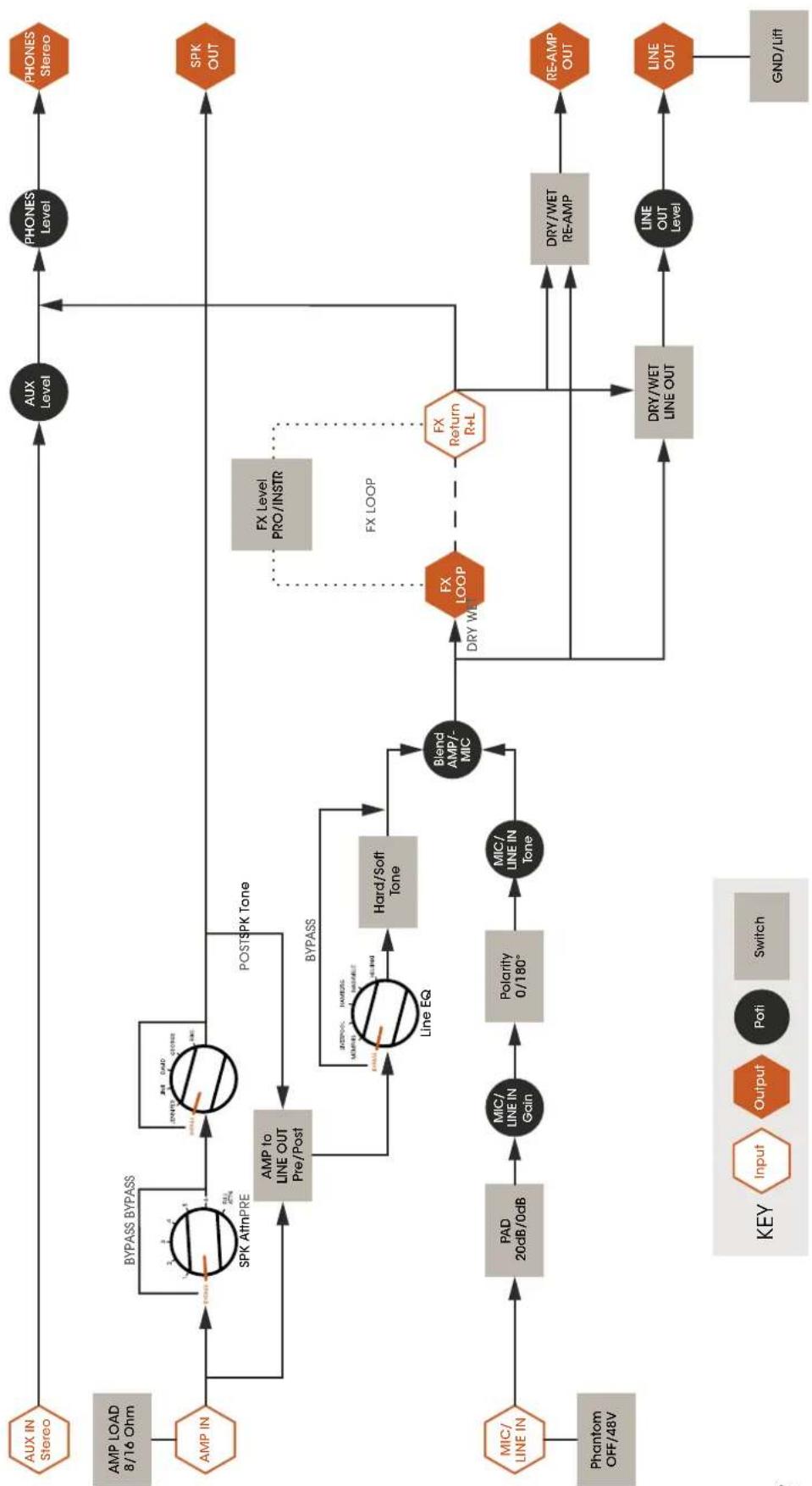
flowchart
graph TD
    A["AUX Level"] --> B["AMP IN"]
    B --> C["AMP LOAD 8/16 Ohm"]
    C --> D["AUX IN Stereo"]
    D --> E["PHONES Level"]
    E --> F["SPK OUT"]
    F --> G["FX Return R+L"]
    G --> H["DRY/WET LINE OUT"]
    H --> I["GND/Lift"]
    I --> J["LINE OUT"]
    J --> K["RE-AMP OUT"]
    K --> L["DRY/WET RE-AMP"]
    L --> M["R+L"]
    M --> N["FX LOOP"]
    N --> O["FX Level PRO/INSTR"]
    O --> P["AMP to LINE OUT Pre/Post"]
    P --> Q["BYPASS"]
    Q --> R["Hard/Soft Tone"]
    R --> S["Line EQ"]
    S --> T["MIC/ LINE IN Tone"]
    T --> U["Polarity 0/180°"]
    U --> V["MC/ LINE IN Gain"]
    V --> W["PAD 20dB/0dB"]
    W --> X["MIC/ LINE IN Phantom OFF/48V"]
    X --> Y["Switch"]
    Y --> Z["Output"]
    Z --> AA["Input"]
    AA --> AB["KEY"]
    subgraph FX Loop
        AC["FX Return R+L"] -.-> AD["FX LOOP"]
        AD -.-> AE["FX LOOP"]
        AE --> AF["DRY WET"]
        AF --> AG["DRY WET LINE OUT"]
    end
TECHNICAL SPECIFICATIONS
GENERAL
| Product type Power reducer, attenuator, load box, DI box, speaker simulator, microphone preamplifier, headphone amplifier, re-amping device | |
| Signal processing Analogue | |
| Controls, front 7-stage power reduction, Line EQ (5 voicings), Speaker Tone (5 voicings), MIC gain, MIC Tone, Line Out Level, Line Out Blend, Aux In Level, Phone Level, Pre/Post Switch (Amp to Line Out), Hard/Soft Tone Selector | |
| Controls, rear FX Level (Pro/Instrument), FX Loop Line Out, FX Loop Re-Amp, GND/Lift, MIC/LINE Input PAD, phantom power, polarity, amplifier load impedance switch | |
| No. of inputs 5 | |
| Input type balanced, unbalanced | |
| Input connectors 3.5 mm jack, 6.3 mm jack, XLR | |
| No. of outputs 6 | |
| Output type balanced, unbalanced | |
| Output connectors 3.5 mm jack, 6.3 mm jack, XLR | |
| Ground/lift switch yes | |
| Transformer-isolated outputs yes | |
| Internal load impedance | 16 Ohm, 8 Ohm |
| Min. load when switched off | 16 Ohm |
| Max. input power | 150 W |
| Power reducer | 7-stage |
| Voicing filter | 5-stage speaker tone and 5-stage line EQ |
| Display | Output level, bypass, power reducer, input level, MIC signal/clip, overheating, full power reduction |
| Power supply | +9 V DC socket - 1.5 A |
| Polarity of the power supply | Centre-negative |
| Power connection 2 x 5.5 mm | |
| Maximum power consumption | 13.5 W |
| Power consumption in standby mode | 0.3 W |
| Dimensions (W x H x D) | 334 x 108 x 274 mm |
| Weight | 6.6 kg |
| Ambient temperature (in operation) | -20°C - 25°C |
| Relative air humidity | <80 % (non-condensing) |
| Accessories (included) | Power supply |
TECHNICAL SPECIFICATIONS
| AUDIO | |
| Inputs | |
| AUX IN max. input level (< 1% THD, 1kHz) +9 dBV | |
| AMP IN max. input power 150 W peak, 100 W RMS | |
| Outputs | |
| LINE OUT max. output level (<1% THD) +18 dBu | |
| RE-AMP max. output level (<1% THD) +1.5 dBV | |
| PHONES OUT max. output level (<1% THD, 1kHz) | 1.4 V RMS |
| PHONES OUT Minimum impedance 33 Ohm | |
| MIC/LINE input | |
| MIC / LINE IN lower cut-off frequency (-3dB) 90 Hz | |
| MIC IN max. gain 58 dB | |
| MIC / LINE IN amplification range 0 - 25 dB | |
| MIC IN (XLR) max. input level (< 1% THD, 1kHz) +1 dBu | |
| LINE IN (TRS) max. input level (< 1% THD, 1kHz) 22 dBu | |
| MIC IN to LINE OUT THD+N (1kHz, +4dBu) < 0.006 % | |
| MIC IN to LINE OUT THD+N (20Hz-20kHz, +4dBu) | < 0.04 % |
| MIC IN to LINE OUT ON (max. gain, unweighted) | -114 dBu |
| MIC IN to LINE OUT SNR (all bypass) | 105 dB |
| MIC/LINE IN PAD attenuation | 20 dB |
| MIC IN (XLR) Input impedance (balanced) | 1.500 Ohm |
| LINE IN (TRS) Input impedance (balanced) | 24,000 Ohm |
DISPOSAL

Packaging:
- Packaging can be fed into the reusable material cycle using the usual disposal methods.
- Please separate the packaging in accordance with the disposal laws and recycling regulations in your country.

Device:
- This device is subject to the European Directive on Waste Electrical and Electronic Equipment, as amended. WEEE Directive Waste Electrical and Electronic Equipment. Electronic devices do not belong in household waste. The device must be disposed of via an approved disposal company or a municipal disposal facility. Please observe the applicable regulations in your country!
- Observe all disposal laws applicable in your country.
- As a private customer, you can obtain information on environmentally-friendly disposal options from the vendor of the product or the appropriate regional authorities.
MANUFACTURER'S DECLARATIONS
Manufacturer's warranty & limitation of liability
Adam Hall GmbH, Adam-Hall-Str. 1, D-61267 Neu Anspach / E-Mail Info@adamhall.com / +49 (0)6081 / 9419-0.
Our current warranty conditions and limitation of liability can be found at:
https://cdn-shop.adamhall.com/media/pdf/Manufacturers-Declarations-PALMER_DE_EN_ES_FR.pdf
If you require service, please contact your sales partner.
CE conformity
Adam Hall GmbH hereby confirm that this product meets the following guidelines (where applicable):
Low-Voltage Directive (2014/35/EU)
EMC Directive (2014/30/EU)
RoHS (2011/65/EU)
RED (2014/53/EU)
CE conformity declaration
Declarations of conformity for products subject to the LVD, EMC, RoHS Directive can be requested from info@adamhall.com.
Declarations of conformity for products subject to RED can be downloaded from
www.adamhall.com/compliance/.
supreme soaker
analog dynamic
tube amp hub
natural_image
Illustration of a computer control panel with dials and buttons (no text or symbols)PAD (Passive Attenuation Device)
13. SPEAKER ATTN (Attenuation)
flowchart
graph TD
    A["AMPLIFIER"] --> B["Speaker Cabinet"]
    B --> C["Speaker ATTH"]
    C --> D["LINE OUT"]
    D --> E["MAP IN"]
    E --> F["INPUT LEVEL"]
    F --> G["MUX OUT"]
    G --> H["AUX IN"]
    H --> I["PHONE"]
    I --> J["REDACT"]
    J --> K["REDACT"]
    K --> L["REDACT"]
    L --> M["REDACT"]
    M --> N["REDACT"]
    N --> O["REDACT"]
    O --> P["REDACT"]
    P --> Q["REDACT"]
    Q --> R["REDACT"]
    R --> S["REDACT"]
    S --> T["REDACT"]
    T --> U["REDACT"]
    U --> V["REDACT"]
    V --> W["REDACT"]
    W --> X["REDACT"]
    X --> Y["REDACT"]
    Y --> Z["REDACT"]
    Z --> AA["REDACT"]
    AA --> AB["REDACT"]
    AB --> AC["REDACT"]
    AC --> AD["REDACT"]
    AD --> AE["REDACT"]
    AE --> AF["REDACT"]
    AF --> AG["REDACT"]
    AG --> AH["REDACT"]
    AH --> AI["REDACT"]
    AI --> AJ["REDACT"]
    AJ --> AK["REDACT"]
    AK --> AL["REDACT"]
    AL --> AM["REDACT"]
    AM --> AN["REDACT"]
    AN --> AO["REDACT"]
    AO --> AP["REDACT"]
    AP --> AQ["REDACT"]
    AQ --> AR["REDACT"]
    AR --> AS["REDACT"]
    AS --> AT["REDACT"]
    AT --> AU["REDACT"]
    AU --> AV["REDACT"]
    AV --> AW["REDACT"]
    AW --> AX["REDACT"]
    AX --> AY["REDACT"]
    AY --> AZ["REDACT"]
    AZ --> BA["REDACT"]
    BA --> BB["REDACT"]
    BB --> BC["REDACT"]
    BC --> BD["REDACT"]
    BD --> BE["REDACT"]
    BE --> BF["REDACT"]
    BF --> BG["REDACT"]
    BG --> BH["REDACT"]
    BH --> BI["REDACT"]
    BI --> BJ["REDACT"]
    BJ --> BK["REDACT"]
    BK --> BL["REDACT"]
    BL --> BM["REDACT"]
    BM --> BN["REDACT"]
    BN --> BO["REDACT"]
    BO --> BP["REDACT"]
    BP --> BQ["REDACT"]
    BQ --> BR["REDACT"]
    BR --> BS["REDACT"]
    BS --> BT["REDACT"]
    BT --> BU["REDACT"]
    BU --> BV["REDACT"]
    BV --> BW["REDACT"]
    BW --> BX["REDACT"]
    BX --> BY["REDACT"]
    BY --> BZ["REDACT"]
https://cdn-shop.adamhall.com/media/pdf/Manufacturers-Declarations-PALMER_DE_EN_ES_FR.pdf
natural_image
Illustration of a computer control panel with dials and buttons (no text or symbols)flowchart
graph LR
    A["AMPLIFIER"] --> B["Speaker ATIN"]
    B --> C["SPEAKER TONE"]
    C --> D["INPUT LEVEL"]
    D --> E["OUTPUT LEVEL"]
    E --> F["REDAVATION"]
    F --> G["REDAVATION"]
    G --> H["REDAVATION"]
    H --> I["REDAVATION"]
    I --> J["REDAVATION"]
    J --> K["REDAVATION"]
    K --> L["REDAVATION"]
    L --> M["REDAVATION"]
    M --> N["REDAVATION"]
    N --> O["REDAVATION"]
    O --> P["REDAVATION"]
    P --> Q["REDAVATION"]
    Q --> R["REDAVATION"]
    R --> S["REDAVATION"]
    S --> T["REDAVATION"]
    T --> U["REDAVATION"]
    U --> V["REDAVATION"]
    V --> W["REDAVATION"]
    W --> X["REDAVATION"]
    X --> Y["REDAVATION"]
    Y --> Z["REDAVATION"]
    Z --> AA["REDAVATION"]
    AA --> AB["REDAVATION"]
    AB --> AC["REDAVATION"]
    AC --> AD["REDAVATION"]
    AD --> AE["REDAVATION"]
    AE --> AF["REDAVATION"]
    AF --> AG["REDAVATION"]
    AG --> AH["REDAVATION"]
    AH --> AI["REDAVATION"]
    AI --> AJ["REDAVATION"]
    AJ --> AK["REDAVATION"]
    AK --> AL["REDAVATION"]
    AL --> AM["REDAVATION"]
    AM --> AN["REDAVATION"]
    AN --> AO["REDAVATION"]
    AO --> AP["REDAVATION"]
    AP --> AQ["REDAVATION"]
    AQ --> AR["REDAVATION"]
    AR --> AS["REDAVATION"]
    AS --> AT["REDAVATION"]
    AT --> AU["REDAVATION"]
    AU --> AV["REDAVATION"]
    AV --> AW["REDAVATION"]
    AW --> AX["REDAVATION"]
    AX --> AY["REDAVATION"]
    AY --> AZ["REDAVATION"]
    AZ --> BA["REDAVATION"]
    BA --> BB["REDAVATION"]
    BB --> BC["REDAVATION"]
    BC --> BD["REDAVATION"]
    BD --> BE["REDAVATION"]
    BE --> BF["REDAVATION"]
    BF --> BG["REDAVATION"]
    BG --> BH["REDAVATION"]
    BH --> BI["REDAVATION"]
    BI --> BJ["REDAVATION"]
    BJ --> BK["REDAVATION"]
    BK --> BL["REDAVATION"]
    BL --> BM["REDAVATION"]
    BM --> BN["REDAVATION"]
    BN --> BO["REDAVATION"]
    BO --> BP["REDAVATION"]
    BP --> BQ["REDAVATION"]
    BQ --> BR["REDAVATION"]
    BR --> BS["REDAVATION"]
    BS --> BT["REDAVATION"]
    BT --> BU["REDAVATION"]
    BU --> BV["REDAVATION"]
    BV --> BW["REDAVATION"]
    BW --> BX["REDAVATION"]
    BX --> BY["REDAVATION"]
    BY --> BZ["REDAVATION"]
    BZ --> CA["REDAVATION"]
    CA --> CB["REDAVATION"]
    CB --> CC["REDAVATION"]
    CC --> CD["REDAVATION"]
    CD --> CE["REDAVATION"]
    CE --> CF["REDAVATION"]
    CF --> CG["REDAVATION"]
    CG --> CH["REDAVATION"]
    CH --> CI["REDAVATION"]
    CI --> CJ["REDAVATION"]
    CJ --> CK["REDAVATION"]
    CK --> CL["REDAVATION"]
    CL --> CM["REDAVATION"]
    CM --> CN["REDAVATION"]
    CN --> CO["REDAVATION"]
    CO --> CP["REDAVATION"]
    CP --> CQ["REDAVATION"]
    CQ --> CR["REDAVATION"]
    CR --> CS["REDAVATION"]
    CS --> CT["REDAVATION"]
    CT --> CU["REDAVATION"]
    CU --> CV["REDAVATION"]
    CV --> CW["REDAVATION"]
    CW --> CX["REDAVATION"]
    CX --> CY["REDAVATION"]
    CY --> CZ["REDAVATION"]
https://cdn-shop.adamhall.com/media/pdf/Manufacturers-Declarations-PALMER_DE_EN_ES_FR.pdf
natural_image
Illustration of a front panel and back panel with circular gauges and control buttons (no text or symbols)PAD (Passive Attenuation Device)
13. SPEAKER ATTN (atténuation)
https://cdn-shop.adamhall.com/media/pdf/Manufacturers-Declarations-PALMER_DE_EN_ES_FR.pdf
Directive CEM (2014/30/UE)
RoHS (2011/65/UE)
RED (2014/53/UE)