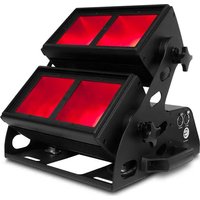
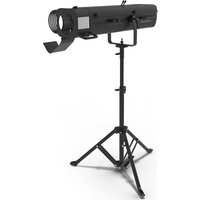
Ovation C-805FC - Light projector Chauvet - Free user manual and instructions
Find the device manual for free Ovation C-805FC Chauvet in PDF.


| Product Type | Multi-cell LED light projector |
| Brand | Chauvet |
| Model | Ovation C-805FC |
| Light Source | RGBAL LED (Red, Green, Blue, Amber, Lime) in two cells |
| Power Supply | 100-240 VAC, 50/60 Hz (universal power supply) |
| Max Power Consumption | Not specified in the manual, estimated at about 300 W |
| Number of DMX Channels | From 3 to 31 channels depending on the selected personality (1 cell or 2 cells) |
| Dimensions (approx.) | Not specified, typical for this type: about 70 x 25 x 30 cm (yoke included) |
| Weight (approx.) | Not specified, estimated at about 12 kg |
| Protection Rating | IP20 (indoor use only) |
| Max Ambient Temperature | 45 °C (113 °F) |
| Main Functions | RGBAL color mixing, Virtual Color Wheel (VCW) with over 30 preset colors, Adjustable color temperature (2800K-6500K), Strobe, 16-bit dimmer, Color macros |
| Control Modes | DMX, RDM, Master/Slave, Standalone (Auto Show, Fade) |
| Connectors | powerCON® input/output, 5-pin XLR (DMX in/out) |
| Number of units in power chain | Up to 11 at 120 V, 19 at 208 V, 21 at 230 V |
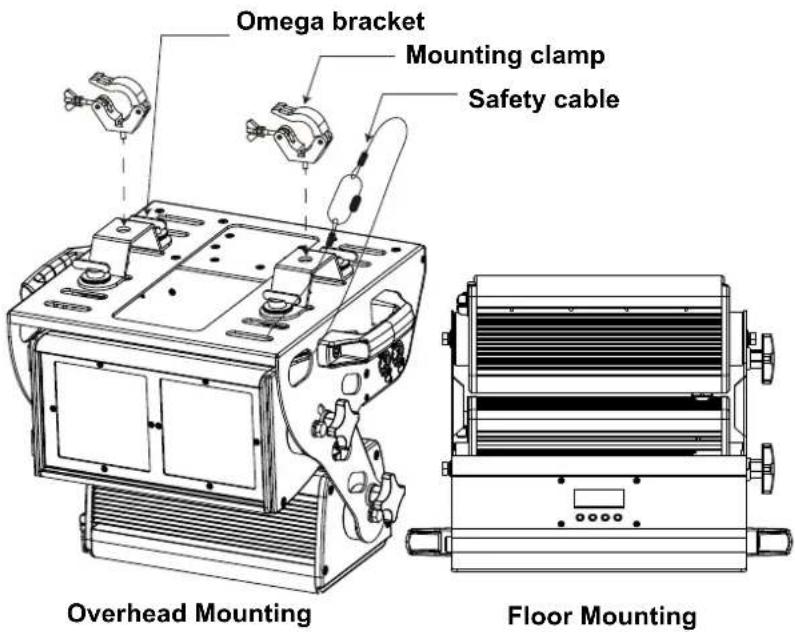
| Mounting | Omega brackets included, yoke mount, safety cable mandatory |
| Included Accessories | 2 gel frames (135x245 mm), 2 Omega brackets, power cord, reference manual |
| Additional Features | Display screen with menu, adjustable backlight, factory reset, manual white balance |
| Maintenance and Cleaning | Unplug before cleaning; use a damp lint-free cloth; clean optics regularly to prevent overheating |
| Safety | Do not open, do not look at the light source, avoid condensation, keep flammable materials away (50 cm), do not use outdoors |
| Warranty | Limited warranty (see terms on Chauvet website) |
Frequently Asked Questions - Ovation C-805FC Chauvet
User questions about Ovation C-805FC Chauvet
0 question about this device. Answer the ones you know or ask your own.
Ask a new question about this device
Download the instructions for your Light projector in PDF format for free! Find your manual Ovation C-805FC - Chauvet and take your electronic device back in hand. On this page are published all the documents necessary for the use of your device. Ovation C-805FC by Chauvet.
USER MANUAL Ovation C-805FC Chauvet
natural_image
Technical line drawing of a mechanical device with mounting flanges and control panel (no text or symbols)About This Guide
The Ovation C-805FC Quick Reference Guide (QRG) has basic product information such as connection, mounting, menu options, and DMX values. Download the User Manual from www.chauvetprofessional.com for more details.
Disclaimer
The information and specifications contained in this QRG are subject to change without notice.
LIMITED WARRANTY
FOR WARRANTY REGISTRATION AND COMPLETE TERMS AND CONDITIONS PLEASE VISIT OUR WEBSITE.
For Customers in the United States and Mexico: www.chauvetlighting.com/warranty-registration.
For Customers in the United Kingdom, Republic of Ireland, Belgium, the Netherlands, Luxembourg, France, and Germany: www.chauvetlighting.eu/warranty-registration.
Chauvet warrants that this product shall be free from defects in material and workmanship under normal use, for the period specified in, and subject to the exclusions and limitations set forth in the full limited warranty on our website. This warranty extends only to the original purchaser of the product and is not transferable. To exercise rights under this warranty, you must provide proof of purchase in the form of an original sales receipt from an authorized dealer that shows the product name and date of purchase. THERE ARE NO OTHER EXPRESS OR IMPLIED WARRANTIES. This warranty gives you specific legal rights. You may also have other rights that vary from state to state and country to country. This warranty is valid only in the United States, United Kingdom, Republic of Ireland, Belgium, the Netherlands, Luxembourg, France, Germany and Mexico. For warranty terms in other countries, please consult your local distributor.
Safety Notes
- DO NOT open this product. It contains no user-serviceable parts.
• To eliminate unnecessary wear and improve its lifespan, during periods of non-use completely disconnect the product from power via breaker or by unplugging it. - DO NOT look at the light source when the product is on.
- CAUTION: This product's housing may be hot when lights are operating. Mount this product in a location with adequate ventilation, at least 20 in (50 cm) from adjacent surfaces.
• DO NOT leave any flammable material within 50 cm of this product while operating or connected to power. - CAUTION: When transferring product from extreme temperature environments, (e.g., cold truck to warm humid ballroom) condensation may form on the internal electronics of the product. To avoid causing a failure, allow product to fully acclimate to the surrounding environment before connecting it to power.
- USE a safety cable when mounting this product overhead.
• DO NOT operate this product outdoors or in any location where dust, excessive heat, water, or humidity may affect it. (IP20)
• DO NOT operate this product if the housing, lenses, or cables appear damaged. - DO NOT connect this product to a dimmer or rheostat.
- ONLY connect this product to a grounded and protected circuit.
- ONLY use the hanging/mounting bracket or the handles to carry this product.
• In the event of a serious operating problem, stop using immediately.
• The maximum ambient temperature is 113 °F (45 °C). Do not operate this product at higher temperatures.
FCC Compliance
This device complies with Part 15 Part B of the FCC Rules. Operations is subject to the following two conditions:
- This device may not cause harmful interference, and
- This device must accept any interference received, including interference that may cause undesired operation.
Any changes or modifications not expressly approved by the party responsible for compliance could void the user's authority to operate the equipment.
Contact
Outside the US, UK, Ireland, Benelux, France, Germany, or Mexico, contact your distributor to request support or return a product. Refer to Contact Us at the end of this QRG for contact information.
What is Included
- Ovation C-805FC
• N e ^® powerCON ^® power cord
• 2 Gel Frames 5.32 x 9.65 in (135 x 245 mm)
• 2 Omega Brackets with mounting hardware
- Quick Reference Guide
AC Power
This product has an auto-ranging power supply that can work with an input voltage range of 100–240 VAC, 50/60 Hz.
Power Linking
You can link up to 11 Ovation C-805FC products at 120 V, 19 products at 208 V, or 21 products at 230 V. Never exceed this number. Power linking cords can be purchased separately.
AC Plug
| Connection | Wire (U.S.) | Wire (Europe) | Screw Color |
| AC Live Black Brown Yellow/Brass | |||
| AC Neutral White Blue Silver | |||
| AC Ground Green/Yellow Green/Yellow | Green | ||

To eliminate unnecessary wear and improve its lifespan, during periods of non-use completely disconnect the product from power via breaker or by unplugging it.
Replacing the Fuse
- Disconnect this product from power.
- Using a Phillips #2 head screwdriver, unscrew the fuse holder cap from the housing.
- Remove blown fuse and replace with a good fuse of the same type and rating.
- Screw the fuse holder cap back in place and reconnect power.
DMX Linking
The Ovation C-805FC will work with a DMX controller using a 3- or 5-pin DMX serial connection. A DMX Primer is available from www.chauvetprofessional.com.
DMX Connection
The Ovation C-805FC uses a 3- or 5-pin DMX data connection for its DMX personalities: ranging from 3CH to 31CH in 1-cell modes and 2-cell modes:
| DMX-VCW-CCT | RGB | RGBA | RGBAL | RGB EXT | RGBA EXT | RGBAL EXT | RGBAL Fine | RGBAL FULL | |
| 1-Cell | 3 | 3 | 4 | 5 | 8 | 9 | 10 | 10 | 17 |
| 2-Cell | N/A | 6 | 8 | 10 | 15 | 17 | 19 | 20 | 31 |
See the User Manual for information about connecting and configuring the product for DMX operation.
Master/Slave Connection
The Ovation C-805FC uses the DMX data connection for its Master/Slave mode. See the User Manual for information about connect and configure the product for master/slave operation.
RDM (Remote Device Management)
Remote Device Management, or RDM, is a standard for allowing DMX-enabled devices to communicate bi-directionally along existing DMX cabling. Check the DMX controller's User Manual or with the manufacturer as not all DMX controllers have this capability. The Ovation C-805FC supports RDM protocol that allows feedback to make changes to some menu map options. Download the User Manual from www.chauvetprofessional.com for more details.
Mounting
Before mounting this product, read the Safety Notes. Make sure the mounting clamps are capable of supporting the weight of the product. For our Chauvet line of mounting clamps, go to http://trusst.com/productcategory/truss-clamps/.
Product Mounting Diagram
Virtual Color Wheel
The Ovation C-805FC includes a feature called the Virtual Color Wheel (VCW). This feature is available as a standalone control mode for manual use and also as a control channel in select DMX personalities. More than 30 pre-mixed colors, custom blended by our engineers, are available to call up for easier programming. The DMX values used to mix these colors are provided below. You may adjust the overall intensity of the Ovation fixture in order to more closely replicate colors you are familiar with. A chart is available on our website www.chauvetprofessional.com to compare our pre-mixed colors with popular gel colors. This chart is for comparison purposes only and is not a representation that our pre-mixed colors match any of the gel colors listed.
Virtual Color Wheel Chart
| DMX Value | Display Readout | Red Value | Green Value | Blue Value | Amber Value | Lime Value |
| 000 ⇔ 005 | -- | 000 000 000 000 000 | ||||
| 006 ⇔ 013 | C3050 - Md Yellow | 246 195 028 176 212 | ||||
| 014 ⇔ 021 | C3040 - Lt Yellow | 251 175 043 203 203 | ||||
| 022 ⇔ 028 | C3240 - Amb Yellow | 227 185 002 235 191 | ||||
| 029 ⇔ 035 | C2340 - VLt Amber | 255 143 064 085 175 | ||||
| 036 ⇔ 043 | C2040 - Lt Amber | 255 169 063 219 070 | ||||
| 044 ⇔ 051 | C2050 - Md Amber | 255 162 006 244 136 | ||||
| 052 ⇔ 059 | C2060 - Dk Amber | 250 126 031 243 119 | ||||
| 060 ⇔ 067 | C1050 - Lt Red | 255 080 038 050 029 | ||||
| 068 ⇔ 075 | C1080 - Md Red | 215 005 033 002 002 | ||||
| 076 ⇔ 083 | C1020 - NC Pink | 255 129 105 250 222 | ||||
| 084 ⇔ 091 | C1030 - Md Pink | 255 064 104 217 238 | ||||
| 092 ⇔ 099 | C1630 - Dk Pink | 255 068 106 245 252 | ||||
| 100 ⇔ 107 | C1250 - Md Red Amber | 255 049 046 164 108 | ||||
| 108 ⇔ 115 | C1060 - Dk Red Amber | 255 015 058 167 000 | ||||
| 116 ⇔ 121 | C1650 - Magenta | 255 020 105 255 132 | ||||
| 122 ⇔ 130 | C6170 - Dk Magenta | 255 000 106 009 101 | ||||
| 131 ⇔ 138 | C6020 - Lt Lavender | 255 202 117 017 227 | ||||
| 139 ⇔ 146 | C5030 - Lt Blue | 177 255 169 219 230 | ||||
| 147 ⇔ 154 | C5020 - VLt Blue | 190 225 152 238 235 | ||||
| 155 ⇔ 162 | C5430 - Lt Blue 2 | 101 255 153 218 137 | ||||
| 163 ⇔ 170 | C5070 - Blue | 048 175 155 000 124 | ||||
| 171 ⇔ 178 | C5050 - Md Blue | 127 187 138 081 136 | ||||
| 179 ⇔ 186 | C5060 - Dk Blue | 082 217 218 154 219 | ||||
| 187 ⇔ 194 | C5690 - Indigo | 100 000 160 000 000 | ||||
| 195 ⇔ 202 | C5080 - VDk Blue | 055 150 150 000 020 | ||||
| 203 ⇔ 210 | C5081 - VDk Blue 2 | 015 100 092 035 030 | ||||
| 211 ⇔ 218 | C4370 - Yel Green | 020 123 025 049 051 | ||||
| 219 ⇔ 226 | C4070 - Green | 047 094 032 043 039 | ||||
| 227 ⇔ 234 | C4550 - Turquoise | 091 180 084 123 175 | ||||
| 235 ⇔ 242 | C4560 - Aqua | 063 147 075 094 133 | ||||
| 243 ⇔ 250 | C4570 - Blue Green | 043 170 073 043 087 | ||||
| 251 ⇔ 255 | -- | 000 000 000 000 000 |

The colors above are simulated renditions of the color output produced as compared to other similar incandescent products. Chauvet makes no guarantee of the color output accuracy.
Color Temperature Chart
| DMX Value | Display Readout | Red Value | Green Value | Blue Value | Amber Value | Lime Value |
| 000 ⇔ 005 | -- | 000 | 000 | 000 | 000 | 000 |
| 006 ⇔ 025 | 2800K | 237 | 120 | 036 | 255 | 255 |
| 026 ⇔ 050 | 3000K | 220 | 128 | 050 | 255 | 255 |
| 051 ⇔ 075 | 3200K | 176 | 128 | 057 | 255 | 255 |
| 076 ⇔ 100 | 3500K | 154 | 128 | 080 | 255 | 255 |
| 101 ⇔ 125 | 4000K | 128 | 128 | 112 | 255 | 255 |
| 126 ⇔ 150 | 4500K | 108 | 128 | 133 | 255 | 255 |
| 151 ⇔ 175 | 5000K | 097 | 128 | 152 | 255 | 255 |
| 176 ⇔ 200 | 5600K | 087 | 128 | 170 | 255 | 255 |
| 201 ⇔ 225 | 6000K | 075 | 128 | 177 | 255 | 255 |
| 226 ⇔ 250 | 6500K | 066 | 128 | 187 | 255 | 255 |
| 251 ⇔ 255 | -- | 000 | 000 | 000 | 000 | 000 |

The color temperatures above are simulated renditions of the color output produced as compared to a tungsten lamp at the specified color temperature. Chauvet makes no guarantee of the color output accuracy.
Control Panel Description
| Button Function | |
| Exits from the current menu or function | |
| Enables the currently displayed menu or sets the currently selected value into the selected function | |
| Navigates upwards through the menu list or increases the numeric value when in a function | |
| Navigates downwards through the menu list or decreases the numeric value when in a function | |
Passcode
After being prompted, enter the following passcode by pressing:
Menu Map
| Main Level Programming Levels Description | |||
| Start Address | 1-510* | Selects starting address (*highest channel restricted to personality chosen) | |
| Personality | 1-Cell | DMX-VCW-CCT 3CH | 3-channel: dimmer, virtual color wheel, color temperature |
| RGB 3CH | 3-channel: RGB | ||
| RGBA 4CH | 4-channel: RGBA | ||
| RGBAL 5CH | 5-channel: RGBAL | ||
| RGB EXT 8CH | 8-channel: 16-bit dimmer, RGB, virtual color wheel, color temperature, strobe | ||
| RGBA EXT 9CH | 9-channel: 16-bit dimmer, RGBA, virtual color wheel, color temperature, strobe | ||
| RGBAL EXT 10CH | 10-channel: 16-bit dimmer, RGBAL, virtual color wheel, color temperature, strobe | ||
| RGBAL Fine 10CH 10-channel: 16-bit RGBAL | |||
| RGBAL FULL 17CH | 17-channel: 16-bit dimmer, 16-bit RGBAL, virtual color wheel, color temperature, strobe, color macros, dimmer mode | ||
| Main Level Programming Levels Description | ||||
| Personality (cont.) | 2-Cell | RGB 6CH 6-channel: RGB (per cell) | ||
| RGBA 8CH 8-channel: RGBA (per cell) | ||||
| RGBAL 10CH 10-channel: RGBAL (per cell) | ||||
| RGB EXT 15CH | 15-channel: 16-bit dimmer, RGB (per cell), virtual color wheel (per cell), color temperature (per cell), strobe (per cell) | |||
| RGBA EXT 17CH | 17-channel: 16-bit dimmer, RGBA (per cell), virtual color wheel (per cell), color temperature (per cell), strobe (per cell) | |||
| RGBAL EXT 19CH | 19-channel: 16-bit dimmer, RGBAL (per cell), virtual color wheel (per cell), color temperature (per cell), strobe (per cell) | |||
| RGBAL Fine 20CH 20-channel: 16-bit RGBAL (per cell) | ||||
| RGBAL FULL 31CH | 31-channel: 16-bit dimmer, 16-bit RGBAL (per cell), virtual color wheel (per cell), color temperature (per cell), strobe (per cell), color macros, dimmer mode | |||
| Virtual Color Wheel | Virtual Color Wheel | C3050 - Md Yellow | Dimmer 0–100 | Virtual Color Wheel simulates the output of each gel color. Refer to the Virtual Color Wheel Chart section for specific values. |
| C3040 - Lt Yellow | ||||
| C3240 - Amb Yellow | ||||
| C2340 - VLt Amber | ||||
| C2040 - Lt Amber | ||||
| C2050 - Md Amber | ||||
| C2060 - Dk Amber | ||||
| C1050 - Lt Red | ||||
| C1080 - Md Red | ||||
| C1020 - NC Pink | ||||
| C1030 - Md Pink | ||||
| C1630 - Dk Pink | ||||
| C1250 - Md Red Amber | ||||
| C1060 - Dk Red Amber | ||||
| C1650 - Magenta | ||||
| C6170 - Dk Magenta | ||||
| C6020 - Lt Lavender | ||||
| C5030 - Lt Blue | ||||
| C5020 - VLt Blue | ||||
| C5430 - Lt Blue 2 | ||||
| C5070 - Blue | ||||
| C5050 - Md Blue | ||||
| C5060 - Dk Blue | ||||
| C5690 - Indigo | ||||
| C5080 - VDk Blue | ||||
| C5081 - VDk Blue 2 | ||||
| C4370 - Yel Green | ||||
| C4070 - Green | ||||
| C4550 - Turquoise | ||||
| C4560 - Aqua | ||||
| C4570 - Blue Green | ||||
| Virtual Color Wheel | Color Temperature | 2800K | Dimmer 0-100 | Preset white color temperatures. Emulates a tungsten lamp at the specified color temperature. Refer to the Color Temperature Chart section for specific values. |
| 3000K | ||||
| 3200K | ||||
| 3500K | ||||
| 4000K | ||||
| 4500K | ||||
| 5000K | ||||
| 5600K | ||||
| 6000K | ||||
| 6500K | ||||
| Manual Color Mixer | Red | Combine red, green, blue, amber, and lime to make a custom color (0-100%) | ||
| Green | ||||
| Blue | ||||
| Amber | ||||
| Lime | ||||
| Auto Show | Auto 1 | Speed 1-100 | Selects automatic programs and auto program speed | |
| Auto 2 | ||||
| Auto 3 | ||||
| Auto 4 | ||||
| Auto 5 | ||||
| Auto 6 | ||||
| Auto 7 | ||||
| Auto 8 | ||||
| Auto 9 | ||||
| Fade | ||||
| Master/Slave | Master Master mode | |||
| Slave Slave mode | ||||
| Dimmer Mode | Off Linear dimmer | |||
| Dimmer 1 Fast dimmer curve | ||||
| Dimmer 2 Medium dimmer curve | ||||
| Dimmer 3 Slow dimmer curve | ||||
| White Balance | Off Uses factory default white setting | |||
| Manual | Red | LED maximum value | Sets red LED maximum value | |
| Green Sets green | value | |||
| Blue Sets blue LED 125+255n value | Value | |||
| Amber Sets amber LED maximum value | Value | |||
| Lime Sets lime LED maximum value | Value | |||
| LED Frequency | 600Hz | Selects the PWM output frequency | ||
| 1200Hz | ||||
| 2000Hz | ||||
| 2400Hz | ||||
| 6000Hz | ||||
| 18KHz | ||||
| 25KHz | ||||
| Display | Normal Normal display orientation | |||
| Inverse Inverted display | ||||
| Main Level | Programming Levels Description | |||
| Back Light | 10S | Turns off display backlight after 10 seconds of inactivity | ||
| 30S | Turns off display backlight after 30 seconds of inactivity | |||
| 2Min | Turns off display backlight after 2 minutes of inactivity | |||
| On Display backlight always on | ||||
| Information | Fixture Hours ____ | Shows total product hours | ||
| Version V__.-V__ | Shows installed software version | |||
| Device ID ____ | Shows product device | ID | ||
| UID ____ | Shows product UID | |||
| Factory Setting | No | Reset to factory defaults | ||
| Yes | ||||
2-Cell DMX Values
Ovation C-805FC Cells for DMX Control
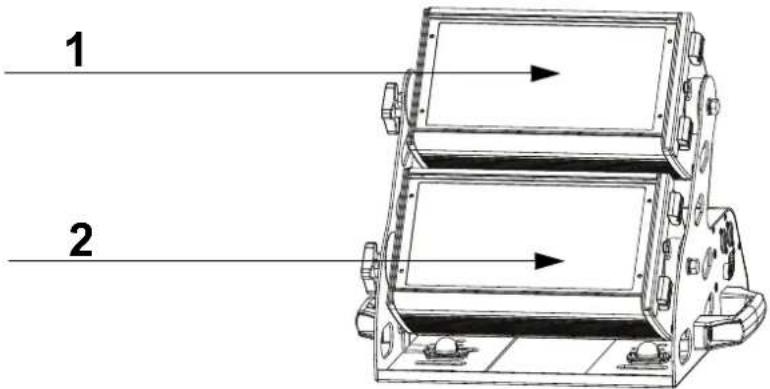
RGBAL FULL 31CH
| Channel Function Value Percent/Setting | ||||
| 1 Dimmer 000 ⇔ 255 0–100% | ||||
| 2 Dimmer fine 000 ⇔ 255 0–100% | ||||
| 3 | R e d | 1 | 000 ⇔ 255 0–100% | |
| 4 Red fine 1 000 ⇔ 255 0–100% | ||||
| 5 | G r e e | n | 1 000 ⇔ 255 0–100% | |
| 6 | G r e e | n | f i n e 1 000 ⇔ 255 0–100% | |
| 7 | Blue 1 | 000 ⇔ 255 | 0–100% | |
| 8 | Blue fine 1 | 000 ⇔ 255 | 0–100% | |
| 9 | Amber 1 | 000 ⇔ 255 | 0–100% | |
| 10 | Amber fine 1 | 000 ⇔ 255 | 0–100% | |
| 11 | Lime 1 | 000 ⇔ 255 | 0–100% | |
| 12 | Lime fine 1 | 000 ⇔ 255 | 0–100% | |
| 13 | Virtual Color Wheel 1 | 000 ⇔ 255 | Refer to theVirtual Color Wheel Chartsection for specific values | |
| 14 | Color Temperature 1 | 000 ⇔ 255 | Refer to theColor Temperature Chartsection for specific values | |
| 15 | Strobe 1 | 000 ⇔ 010 | No function | |
| 011 ⇔ 255 | Strobe, slow to fast | |||
| 16 | Red 2 | 000 ⇔ 255 | 0–100% | |
| 17 | Red fine 2 | 000 ⇔ 255 | 0–100% | |
| 18 | Green 2 | 000 ⇔ 255 | 0–100% | |
| 19 | Green fine 2 | 000 ⇔ 255 | 0–100% | |
| 20 | Blue 2 | 000 ⇔ 255 | 0–100% | |
| 21 | Blue fine 2 | 000 ⇔ 255 | 0–100% | |
| 22 | Amber 2 | 000 ⇔ 255 | 0–100% | |
| 23 | Amber fine 2 | 000 ⇔ 255 | 0–100% | |
| 24 | Lime 2 | 000 ⇔ 255 | 0–100% | |
| 25 | Lime fine 2 | 000 ⇔ 255 | 0–100% | |
| 26 | Virtual Color Wheel 2 | 000 ⇔ 255 | Refer to theVirtual Color Wheel Chartsection for specific values | |
| 27 | Color Temperature 2 | 000 ⇔ 255 | Refer to theColor Temperature Chartsection for specific values | |
| 28 | Strobe 2 | 000 ⇔ 010 | No function | |
| 011 ⇔ 255 | Strobe, slow to fast | |||
| 29 | Strobe all | 000 ⇔ 010 | No function | |
| 011 ⇔ 255 | Strobe, slow to fast | |||
| 30 | Color macros | 000 ⇔ 015 | No function | |
| 016 ⇔ 255 | Color macros | |||
| 31 | Dimmer speed | 000 ⇔ 051 | Preset dimmer speed from display menu | |
| 052 ⇔ 101 | Dimmer speed mode off | |||
| 102 ⇔ 152 | Dimmer speed mode 1 (fastest) | |||
| 153 ⇔ 203 | Dimmer speed mode 2 | |||
| 204 ⇔ 255 | Dimmer speed mode 3 (slowest) | |||
RGBAL Fine 20CH
| Channel Function Value Percent/Setting | ||||
| 1 | R e d | 1 | 000 ⇔ 255 0–100% | |
| 2 Red fine 1 000 ⇔ 255 0–100% | ||||
| 3 | G r e e | n | 1 000 ⇔ 255 0–100% | |
| 4 Green fine 1 000 ⇔ 255 0–100% | ||||
| 5 | B l u e | 1 | 000 ⇔ 255 0–100% | |
| 6 | B l u e | f | i n e 1 000 ⇔ 255 0–100% | |
| 7 | A m b e | r | 1 000 ⇔ 255 0–100% | |
| 8 Amber fine 1 000 ⇔ 255 0–100% | ||||
| 9 | Lime 1 | 000 ⇔ 255 | 0–100% | |
| 10 | Lime fine 1 | 000 ⇔ 255 | 0–100% | |
| 11 | Red 2 | 000 ⇔ 255 | 0–100% | |
| 12 | Red fine 2 | 000 ⇔ 255 | 0–100% | |
| 13 | Green 2 | 000 ⇔ 255 | 0–100% | |
| 14 | Green fine 2 | 000 ⇔ 255 | 0–100% | |
| 15 | Blue 2 | 000 ⇔ 255 | 0–100% | |
| 16 | Blue fine 2 | 000 ⇔ 255 | 0–100% | |
| 17 | Amber 2 | 000 ⇔ 255 | 0–100% | |
| 18 | Amber fine 2 | 000 ⇔ 255 | 0–100% | |
| 19 | Lime 2 | 000 ⇔ 255 | 0–100% | |
| 20 | Lime fine 2 | 000 ⇔ 255 | 0–100% | |
RGBAL EXT 19CH
| Channel | Function Value Percent/Setting | |||
| 1 | Dimmer | 000 ⇔ 255 0–100% | ||
| 2 Dimmer fine 000 ⇔ 255 0–100% | ||||
| 3 | R e d | 1 000 ⇔ 255 0–100% | ||
| 4 | G r e e | n 1 000 ⇔ 255 0–100% | ||
| 5 | B l u e | 1 000 ⇔ 255 0–100% | ||
| 6 | A m b e | r 1 000 ⇔ 255 0–100% | ||
| 7 | Lime 1 | 000 ⇔ 255 0–100% | ||
| 8 | Virtual Color Wheel 1 | 000 ⇔ 255 Refer to theVirtual Color Wheel Chartsection for specific values | ||
| 9 | Color Temperature 1 | 000 ⇔ 255 Refer to theColor Temperature Chartsection for specific values | ||
| 10 | Strobe 1 | 000 ⇔ 010 No function011 ⇔ 255 Strobe, slow to fast | ||
| 11 | Red 2 | 000 ⇔ 255 0–100% | ||
| 12 | Green 2 | 000 ⇔ 255 0–100% | ||
| 13 | Blue 2 | 000 ⇔ 255 0–100% | ||
| 14 | Amber 2 | 000 ⇔ 255 0–100% | ||
| 15 | Lime 2 | 000 ⇔ 255 0–100% | ||
| 16 | Virtual Color Wheel 2 | 000 ⇔ 255 Refer to theVirtual Color Wheel Chartsection for specific values | ||
| 17 | Color Temperature 2 | 000 ⇔ 255 Refer to theColor Temperature Chartsection for specific values | ||
| 18 | Strobe 2 | 000 ⇔ 010 No function011 ⇔ 255 Strobe, slow to fast | ||
| 19 | Strobe all | 000 ⇔ 010 No function011 ⇔ 255 Strobe, slow to fast | ||
RGBA EXT 17CH
| Channel Function Value Percent/Setting | ||||
| 1 Dimmer 000 ⇔ 255 0–100% | ||||
| 2 Dimmer fine 000 ⇔ 255 0–100% | ||||
| 3 | R e d | 1 | 000 ⇔ 255 0–100% | |
| 4 | G r e e | n | 1 000 ⇔ 255 0–100% | |
| 5 | B l u e | 1 | 000 ⇔ 255 0–100% | |
| 6 | A m b e | r | 1 000 ⇔ 255 0–100% | |
| 7 | Virtual Color Wheel 1 | 000 ⇔ 255 | Refer to theVirtual Color Wheel Chartsection for specific values | |
| 8 | Color Temperature 1 | 000 ⇔ 255 | Refer to theColor Temperature Chartsection for specific values | |
| 9 | S t r o | 000 ⇔ 010011 ⇔ 255e | No functionStrobe, slow to fast | |
| 10 | Red 2 | 000 ⇔ 255 | 0–100% | |
| 11 | Green 2 | 000 ⇔ 255 | 0–100% | |
| 12 | Blue 2 | 000 ⇔ 255 | 0–100% | |
| 13 | Amber 2 | 000 ⇔ 255 | 0–100% | |
| 14 | Virtual Color Wheel 2 | 000 ⇔ 255 | Refer to theVirtual Color Wheel Chartsection for specific values | |
| 15 | Color Temperature 2 | 000 ⇔ 255 | Refer to theColor Temperature Chartsection for specific values | |
| 16 | Strobe 2 | 000 ⇔ 010011 ⇔ 255 | No functionStrobe, slow to fast | |
| 17 | Strobe all | 000 ⇔ 010011 ⇔ 255 | No functionStrobe, slow to fast | |
RGB EXT 15CH
| Channel Function Value Percent/Setting | ||||
| 1 Dimmer 000 ⇔ 255 0–100% | ||||
| 2 Dimmer fine 000 ⇔ 255 0–100% | ||||
| 3 | Red 1 | 000 ⇔ 255 | 0–100% | |
| 4 | G r e e | n | 1 000 ⇔ 255 0–100% | |
| 5 | B l u e | 1 | 000 ⇔ 255 0–100% | |
| 6 | Virtual Color Wheel 1 | 000 ⇔ 255 | Refer to theVirtual Color Wheel Chartsection for specific values | |
| 7 | Color Temperature 1 | 000 ⇔ 255 | Refer to theColor Temperature Chartsection for specific values | |
| 8 | S t r o | 000 ⇔ 010b011 ⇔ 255e | No functionStrobe, slow to fast | |
| 9 | Red 2 | 000 ⇔ 255 | 0–100% | |
| 10 | Green 2 | 000 ⇔ 255 | 0–100% | |
| 11 | Blue 2 | 000 ⇔ 255 | 0–100% | |
| 12 | Virtual Color Wheel 2 | 000 ⇔ 255 | Refer to theVirtual Color Wheel Chartsection for specific values | |
| 13 | Color Temperature 2 | 000 ⇔ 255 | Refer to theColor Temperature Chartsection for specific values | |
| 14 | Strobe 2 | 000 ⇔ 010011 ⇔ 255 | No functionStrobe, slow to fast | |
| 15 | Strobe all | 000 ⇔ 010011 ⇔ 255 | No functionStrobe, slow to fast | |
RGBAL 10CH
| Channel Function Value Percent/Setting | |||||||
| 1 | Red 1 | 000 ⇔ 255 | 0–100% | ||||
| 2 | G | r | e | e | n | 1 | 000 ⇔ 255 0–100% |
| 3 | B | l | u | e | 1 | 000 ⇔ 255 0–100% | |
| 4 | A | m | b | e | r | 1 | 000 ⇔ 255 0–100% |
| 5 | Lime 1 | 000 ⇔ 255 | 0–100% | ||||
| 6 | Red 2 | 000 ⇔ 255 | 0–100% | ||||
| 7 | G | r | e | e | n | 2 | 000 ⇔ 255 0–100% |
| 8 | B | l | u | e | 2 | 000 ⇔ 255 0–100% | |
| 9 | A | m | b | e | r | 2 | 000 ⇔ 255 0–100% |
| 10 | Lime 2 | 000 ⇔ 255 | 0–100% | ||||
RGBA 8CH
| Channel Function Value Percent/Setting | ||||||
| 1 | R | e | d | 1 | 000 ⇔ 255 0–100% | |
| 2 | G | r | e | e | n | 1 000 ⇔ 255 0–100% |
| 3 | B | l | u | e | 1 | 000 ⇔ 255 0–100% |
| 4 | A | m | b | e | r | 1 000 ⇔ 255 0–100% |
| 5 | R | e | d | 2 | 000 ⇔ 255 0–100% | |
| 6 | G | r | e | e | n | 2 000 ⇔ 255 0–100% |
| 7 | B | l | u | e | 2 | 000 ⇔ 255 0–100% |
| 8 | A | m | b | e | r | 2 000 ⇔ 255 0–100% |
RGB 6CH
| Channel Function Value Percent/Setting | ||||||
| 1 | R | e | d | 1 | 000 ⇔ 255 0–100% | |
| 2 | G | r | e | e | n | 1 000 ⇔ 255 0–100% |
| 3 | B | l | u | e | 1 | 000 ⇔ 255 0–100% |
| 4 | R | e | d | 2 | 000 ⇔ 255 0–100% | |
| 5 | G | r | e | e | n | 2 000 ⇔ 255 0–100% |
| 6 | B | l | u | e | 2 | 000 ⇔ 255 0–100% |
1-Cell DMX Values
RGBAL FULL 17CH
| Channel Function Value Percent/Setting | ||||
| 1 Dimmer 000 ⇔ 255 0–100% | ||||
| 2 Dimmer fine 000 ⇔ 255 0–100% | ||||
| 3 | R e d | 000 ⇔ 255 0–100% | ||
| 4 Red fine 000 ⇔ 255 0–100% | ||||
| 5 | G r e e | n | 000 ⇔ 255 0–100% | |
| 6 | G r e e | n | f i n e 000 ⇔ 255 0–100% | |
| 7 | Blue | 000 ⇔ 255 | 0–100% | |
| 8 | Blue fine | 000 ⇔ 255 | 0–100% | |
| 9 | Amber | 000 ⇔ 255 | 0–100% | |
| 10 | Amber fine | 000 ⇔ 255 | 0–100% | |
| 11 | Lime | 000 ⇔ 255 | 0–100% | |
| 12 | Lime fine | 000 ⇔ 255 | 0–100% | |
| 13 | Virtual Color Wheel 1 | 000 ⇔ 255 | Refer to theVirtual Color Wheel Chartsection for specific values | |
| 14 | Color Temperature 1 | 000 ⇔ 255 | Refer to theColor Temperature Chartsection for specific values | |
| 15 | Strobe | 000 ⇔ 010 | No function | |
| 011 ⇔ 255 | Strobe, slow to fast | |||
| 16 | Color macros | 000 ⇔ 015 | No function | |
| 016 ⇔ 255 | Color macros | |||
| 17 | Dimmer speed | 000 ⇔ 051 | Preset dimmer speed from display menu | |
| 052 ⇔ 101 | Dimmer speed mode off | |||
| 102 ⇔ 152 | Dimmer speed mode 1 (fastest) | |||
| 153 ⇔ 203 | Dimmer speed mode 2 | |||
| 204 ⇔ 255 | Dimmer speed mode 3 (slowest) | |||
RGBAL Fine 10CH
| Channel Function Value Percent/Setting | |||
| 1 | Red | 000 ⇔ 255 | 0–100% |
| 2 | Red fine | 000 ⇔ 255 | 0–100% |
| 3 | Green | 000 ⇔ 255 | 0–100% |
| 4 | Green fine | 000 ⇔ 255 | 0–100% |
| 5 | Blue | 000 ⇔ 255 | 0–100% |
| 6 | Blue fine | 000 ⇔ 255 | 0–100% |
| 7 | Amber | 000 ⇔ 255 | 0–100% |
| 8 | Amber fine | 000 ⇔ 255 | 0–100% |
| 9 | Lime | 000 ⇔ 255 | 0–100% |
| 10 | Lime fine | 000 ⇔ 255 | 0–100% |
RGBAL EXT 10CH
| Channel Function Value Percent/Setting | |||
| 1 Dimmer 000 ⇔ 255 0–100% | |||
| 2 Dimmer fine 000 ⇔ 255 0–100% | |||
| 3 | Red | 000 ⇔ 255 | 0–100% |
| 4 | Green | 000 ⇔ 255 | 0–100% |
| 5 | Blue | 000 ⇔ 255 | 0–100% |
| 6 | Amber | 000 ⇔ 255 | 0–100% |
| 7 | Lime | 000 ⇔ 255 | 0–100% |
| 8 | Virtual Color Wheel | 000 ⇔ 255 | Refer to theVirtual Color Wheel Chartsection for specific values |
| 9 | Color Temperature | 000 ⇔ 255 | Refer to theColor Temperature Chartsection for specific values |
| 10 | Strobe | 000 ⇔ 010 | No function |
| 011 ⇔ 255 | Strobe, slow to fast | ||
RGBA EXT 9CH
| Channel Function Value Percent/Setting | |||||
| 1 Dimmer 000 ⇔ 255 0–100% | |||||
| 2 Dimmer fine 000 ⇔ 255 0–100% | |||||
| 3 | R | e | d | 000 ⇔ 255 0–100% | |
| 4 | G | r | e e | n | 000 ⇔ 255 0–100% |
| 5 | B | l | u e | 000 ⇔ 255 0–100% | |
| 6 | A | m | b e | r | 000 ⇔ 255 0–100% |
| 7 | Virtual Color Wheel | 000 ⇔ 255 | Refer to theVirtual Color Wheel Chartsection for specific values | ||
| 8 | Color Temperature | 000 ⇔ 255 | Refer to theColor Temperature Chartsection for specific values | ||
| 9 | S | t | r o | 000 ⇔ 010 | No function |
| 011 ⇔ 255 | Strobe, slow to fast | ||||
RGB EXT 8CH
| Channel Function Value Percent/Setting | |||||
| 1 Dimmer 000 ⇔ 255 0–100% | |||||
| 2 Dimmer fine 000 ⇔ 255 0–100% | |||||
| 3 | R | e | d | 000 ⇔ 255 0–100% | |
| 4 | G | r | e | n | 000 ⇔ 255 0–100% |
| 5 | B | l | u | e | 000 ⇔ 255 0–100% |
| 6 | Virtual Color Wheel | 000 ⇔ 255 | Refer to theVirtual Color Wheel Chartsection for specific values | ||
| 7 | Color Temperature | 000 ⇔ 255 | Refer to theColor Temperature Chartsection for specific values | ||
| 8 | S | t | r | o | 000 ⇔ 010No function011 ⇔ 255Strobe, slow to fast |
RGBAL 5CH
| Channel | Function | Value | Percent/Setting | ||||
| 1 | R | e | d | 000 ⇔ 255 0–100% | |||
| 2 | G | r | e | e | n | 000 ⇔ 255 0–100% | |
| 3 | B | l | u | e | 000 ⇔ 255 0–100% | ||
| 4 | A | m | b | e | r | 000 ⇔ 255 0–100% | |
| 5 | Lime | 000 ⇔ 255 | 0–100% | ||||
RGBA 4CH
| Channel Function Value Percent/Setting | ||||||
| 1 | R | e | d | 000 ⇔ 255 0–100% | ||
| 2 | G | r | e | e | n | 000 ⇔ 255 0–100% |
| 3 | B | l | u | e | 000 ⇔ 255 0–100% | |
| 4 | A | m | b | e | r | 000 ⇔ 255 0–100% |
RGB 3CH
| Channel | Function | Value | Percent/Setting | ||||
| 1 | R | e | d | 000 ⇔ 255 0–100% | |||
| 2 | G | r | e | e | n | 000 ⇔ 255 0–100% | |
| 3 | B | l | u | e | 000 ⇔ 255 0–100% | ||
DMX-VCW-CCT 3CH
| Channel Function Value Percent/Setting | |||
| 1 Dimmer 000 ⇔ 255 0–100% | |||
| 2 | Virtual Color Wheel | 000 ⇔ 255 | Refer to theVirtual Color Wheel Chartsection for specific values |
| 3 | Color Temperature | 000 ⇔ 255 | Refer to theColor Temperature Chartsection for specific values |
Acerca de Esta Guía
RDM (Remote Device Management)
General Information Technical Support
Chauvet World Headquarters
Address: 5200 NW 108th Ave. Voice: (844) 393-7575
Sunrise, FL 33351 Fax: (954) 756-8015
Voice: (954) 577-4455 Email: chauvetcs@chauvetlighting.com
Fax: (954) 929-5560
Toll Free: (800) 762-1084 Website: www.chauvetprofessional.com
Chauvet Europe Ltd.
Address: Unit 1C Email: UKtech@chauvetlighting.eu
Brookhill Road Industrial Estate
Pinxton, Nottingham, UK Website: www.chauvetprofessional.eu
NG16 6NT
Voice: +44 (0) 1773 511115
Fax: +44 (0) 1773 511110
Chauvet Europe BVBA
Address: Stokstraat 18 Email: BNLtech@chauvetlighting.eu
9770 Kruishoutem
Belgium Website: www.chauvetprofessional.eu
Voice: +32 9 388 93 97
Chauvet France
Address: 3, Rue Ampère
91380 Chilly-Mazarin
Email: FRtech@chauvetlighting.fr
France Website: www.chauvetprofessional.eu
Voice: +33 1 78 85 33 59
Chauvet Germany
(Entrance by Calle 2)
Email: servicio@chauvet.com.mx
Zona Industrial Lerma Website: www.chauvetprofessional.mx
Visit the applicable website above to verify our contact information and instructions to request support. Outside the US, UK, Ireland, Benelux, France, Germany, or Mexico, contact the dealer of record.

®
us
UL 1573
CSA C22.2 No. 166
E113093

RoHS
- About This Guide
- Disclaimer
- LIMITED WARRANTY
- FOR WARRANTY REGISTRATION AND COMPLETE TERMS AND CONDITIONS PLEASE VISIT OUR WEBSITE.
- Safety Notes
- FCC Compliance
- Contact
- What is Included
- AC Power
- Power Linking
- Replacing the Fuse
- DMX Linking
- DMX Connection
- Master/Slave Connection
- RDM (Remote Device Management)
- Mounting
- Product Mounting Diagram
- Virtual Color Wheel
- Passcode
- 2-Cell DMX Values
- 1-Cell DMX Values
- RGBAL FULL 17CH
- Acerca de Esta Guía
- General Information Technical Support
- Chauvet World Headquarters
- Chauvet Europe Ltd.
- Chauvet Europe BVBA
- Chauvet France
- Chauvet Germany
Brand : Chauvet
Model : Ovation C-805FC
Category : Light projector