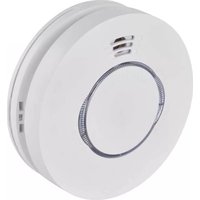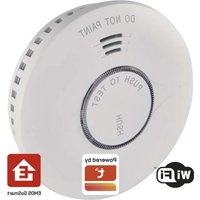
P56500S - Smoke detector Emos - Free user manual and instructions
Find the device manual for free P56500S Emos in PDF.
User questions about P56500S Emos
0 question about this device. Answer the ones you know or ask your own.
Ask a new question about this device
Download the instructions for your Smoke detector in PDF format for free! Find your manual P56500S - Emos and take your electronic device back in hand. On this page are published all the documents necessary for the use of your device. P56500S by Emos.
USER MANUAL P56500S Emos
Technical information....2
Detector Description ....3
Installation 4
Mobile App 6
Putting the Device into Operation 8
Upkeep and Maintenance ....10
This manual contains important safety information regarding the installation and operation of the detector. Read this manual carefully and store it safely for future use. Familiarise other residents of the building with the operation of the detector.
Create an evacuation plan for the event of a fire and do a drill every month. All residents of the building should be familiar with the detector's signals in order to be able to immediately react to them. The detector allows the detection of smouldering flames accompanied by thick black smoke, which can take hours before they turn into a large fire.
Attention:
If construction work causing a large amount of dust is taking place on your premises, you should dismount the detector from the mounting cover to protect it from dirt. If you cannot do so for any reason, cover the openings of the detector for the duration of work by a plastic bag or a similar covering. A covered detector will not detect smoke. Uncover it every day after work is finished.
text_image
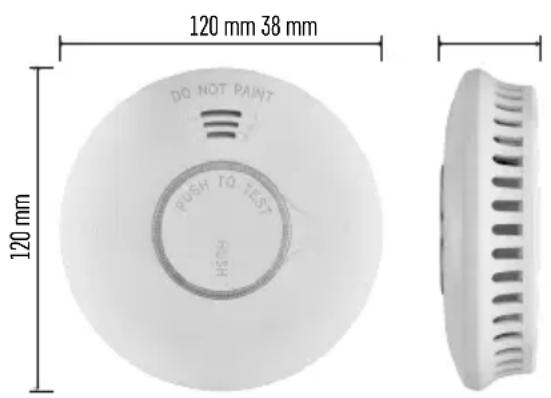
120 mm 38 mm DO NOT PAINT PUSH TO TEST HOSH 120 mmTechnical information
Sensor type: photoelectric cell
In accordance with standard EN 14604:2005
$$ + \mathrm{AC}: 2 0 0 8 $$
Device life: 10 years
Operating temperature and humidity: 0 °C to
+40 °C, 5 % to 95 % (without condensation)
Acoustic signalisation: > 85 dB at a distance of 3 m
Power supply: 2× 1.5 V AA batteries
Power consumption: < 8 μA in standby mode,
$$ < 6 0 \mathrm{mA} \text { in alarm mode } $$
Wi-Fi/Bluetooth frequency: 2.4 GHz, max. 25 mW e.i.r.p.
Smoke detection sensitivity: 0.10 to 0.16 dB/m
Dimensions: 38 × 120 mm
Weight: 124 g

text_image
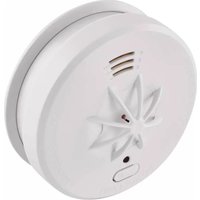
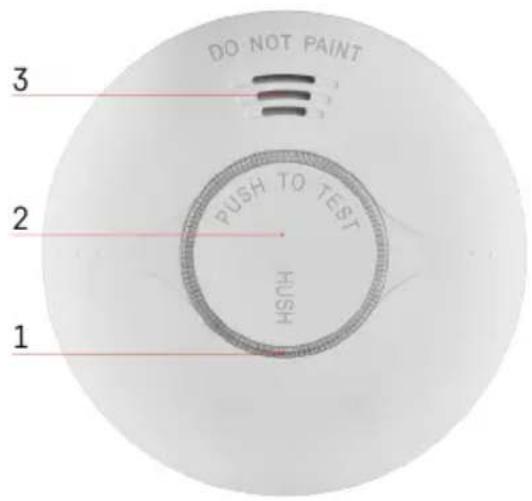
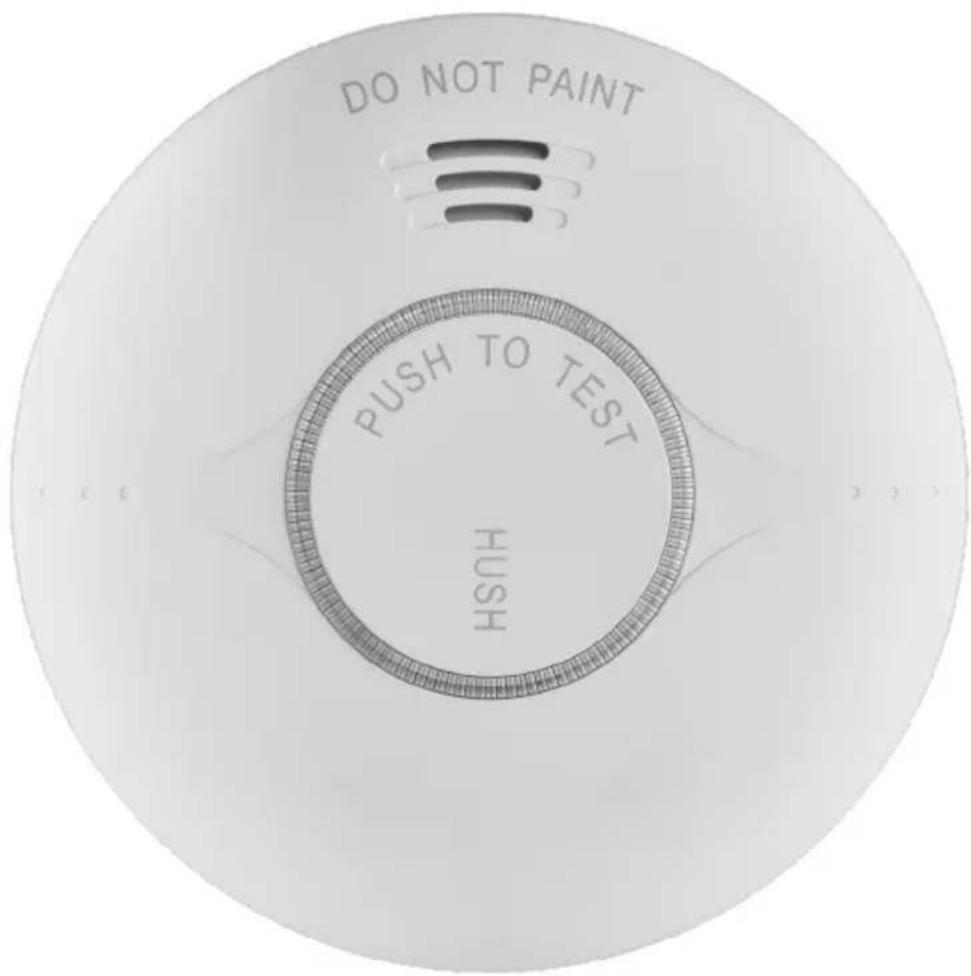
DO NOT PAINT 3 2 1 PUSH TO TEST HUSHDetector Description
1 - LED
2 - main button
3 - loud siren

Installation
Must be installed by a competent person.
The person performing the installation is responsible for installing the product in accordance with valid regulations.
When in doubt, leave the installation to a qualified professional.
The detector is not designed for use in camper vans.
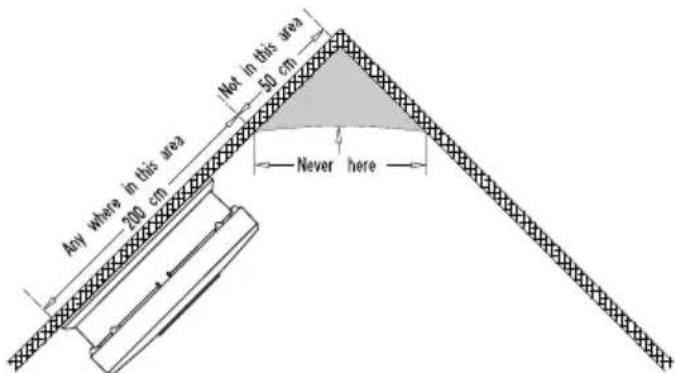
Ideally, a smoke detector should be installed in every room of the house with the exception of kitchens, bathrooms and garages.
Each floor of the house, including the stairs, should have at least one smoke detector installed.
A smoke detector should be located in a place where you can hear it even when you are sleeping, e.g. in the hall in front of the bedroom.
Install a detector on the ceiling of each bedroom and the hall in front of the bedroom.
If the hall is longer than 9 m, install a detector on both ends.
If you have a multi-storey house, install a detector in the same manner on each floor.
You will be protected even against smoke rising up the stairs from the bottom floor.
In the cellar, install a detector on the ceiling at the bottom of the stairs.
Do not install the detector in bathrooms or kitchens; the steam from water or food could cause false alarms.
In the garage, the alarm could be triggered by the exhaust from your car.
The ventilation openings of the warning device must not be covered up.
Do not spray aerosol agents in the vicinity of or onto the warning device.
Do not paint the warning device.
text_image
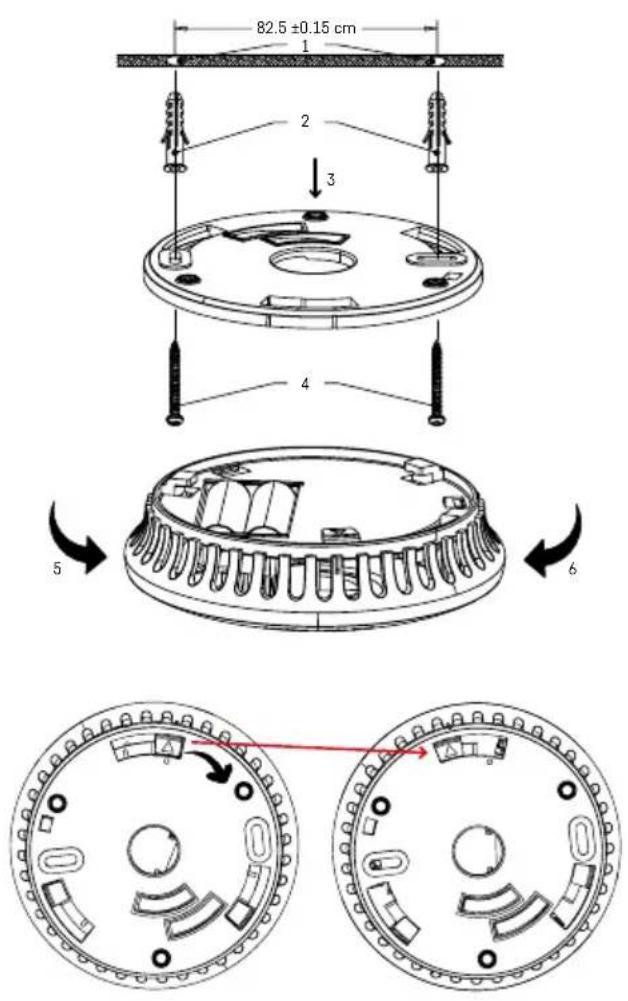
82.5 ±0.15 cm 1 2 3 4 5 61 - holes in the ceiling
2-wall plugs
3 - mounting cover
4 - screws
5 - tightening direction
6 - loosening direction
Mounting the Device on a Wall
Drill two holes (ø 5 mm) into the wall (1); the distance between the holes should be 82 mm.
Insert the attached wall plugs (2) into the holes, place the mounting cover (3) and attach it to the wall using screws (4). Put batteries into the detector and test its functionality, see Test Mode.
If the detector is operational, place the back of the detector against the mounting cover, sliding it onto the two protrusions, then turn it (5, 6).
Note:
National regulations vary in terms of the number and location of smoke detectors.
When in doubt, contact the fire brigade or other relevant authority in your country.
text_image
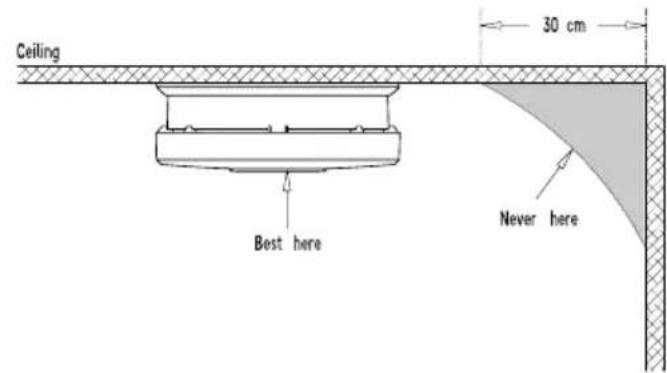
Ceiling 30 cm Best here Never hereD i a g r a m 1
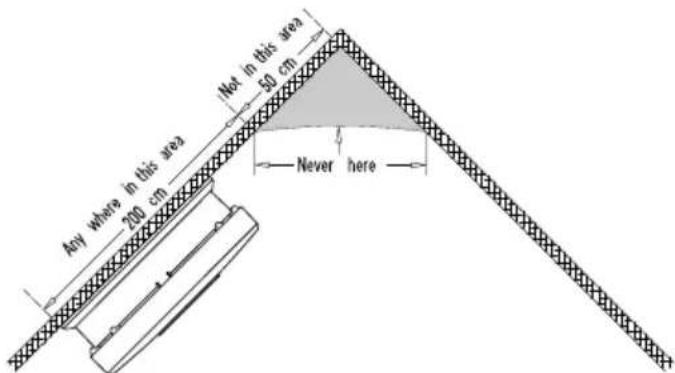
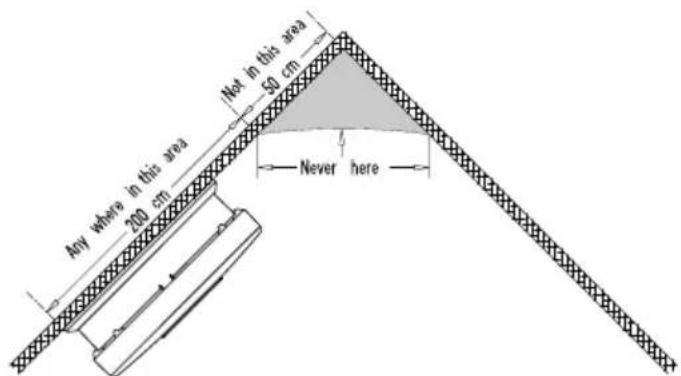
Drawing of Suitable Placement of the Detector


text_image
Not in this area 50 cm Any where in this area 200 cm Never hereDiagram2
Mobile App
The device can be controlled using a mobile application for iOS or Android. Download the EMOS GoSmart app for your device.


text_image
QR code with a red logo in the center, likely linking to a digital resource or website.
text_image
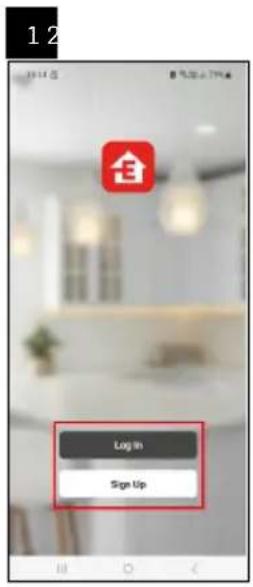
Download on the App Store GET IT ON Google PlayTap the Log In button if you've used the app before. Otherwise, tap the Sign Up button and register.
text_image
Log In Sign Up
text_image
13:15 搜索 My home No updates Add Bookie
text_image
Add Device Outbound Lighting Imaging the Two bits Organized Energy Computer Device and Product Language Systematic Small Power Aggregated Small Power Aggregated Medium Power Aggregated Circuitry Power Circuitry Power Circuitry Power Circuitry Power Circuitry Power Circuitry Power Circuitry Power Circuitry Power Circuitry Power Circuitry Power Circuitry Power Circuitry Power Circuitry Power Circuitry Power Circuitry Power Circuitry Power Circuitry Power Circuittry Power Circuitry Power Circuitry Power Circuitry Power Circuitry Power Circuitry Power Circuitry Power Circuitry Power Circuitry Power Circuitry Power Circuitry Power Circuitry Power Circuitry Power Circuitry Power Circuitry Power Circuitry Power Circuitry Power Dialing port
text_image
12:48 8% 50% EZ Mode Reset the device Insert batteries in the back of the device. Next
text_image
5 6 12:32 8 15.00 - 47% E2 Mode Reset the device Wait a few seconds and the device should start tinking rapidly. This means that the device is ready to pair. NOTE: If the device would not start to blink rapidly after 10 seconds, press the 'yush loset' button 4 lines is under 5 seconds to insert the device. Confirm the indicator is blinking quickly. Back Next
text_image
Select 2.4 GHz Wi-Fi Network and enter password. If your Wi-Fi is 100% phone or 8 other 2.4GHz Common user setting manual + 100% - 50% + 2.4GHz Next
text_image
Adding device... Remove network cable 01:57
text_image
Add Device Smoke Detector CrewPairing the Detector with the App
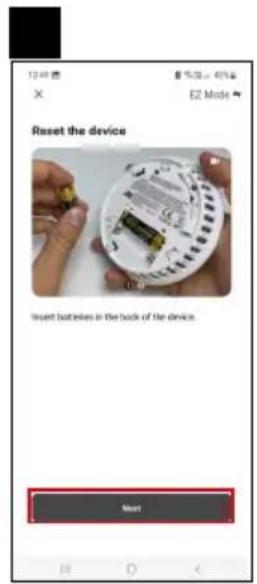
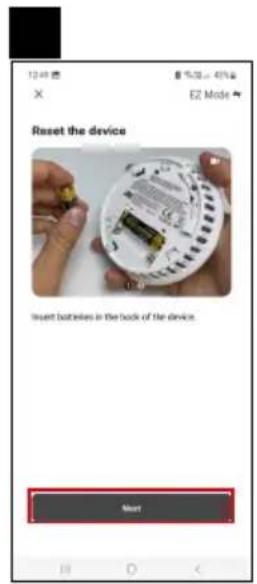
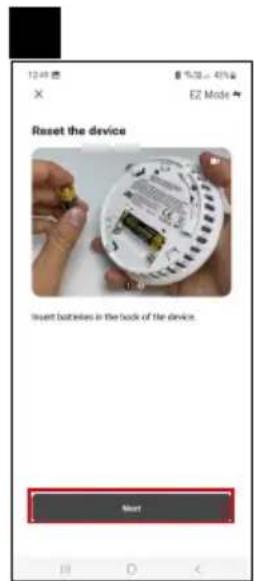
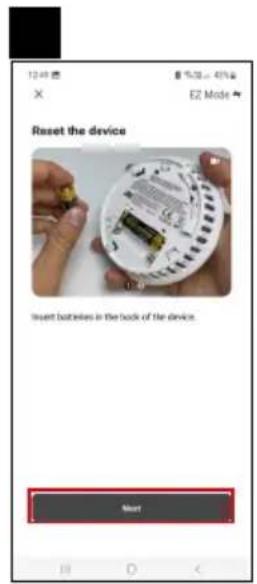
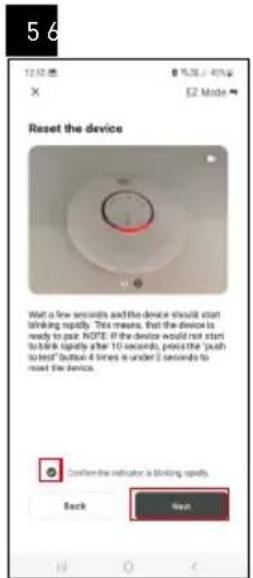
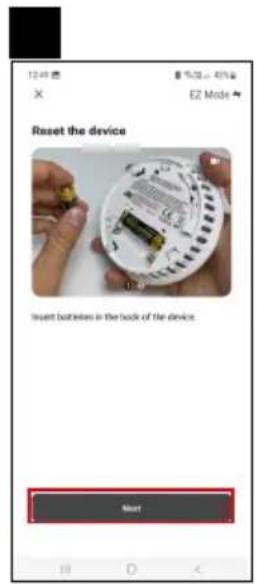
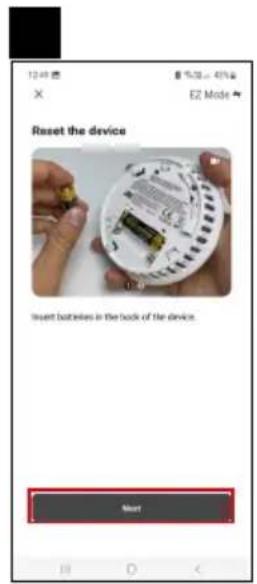
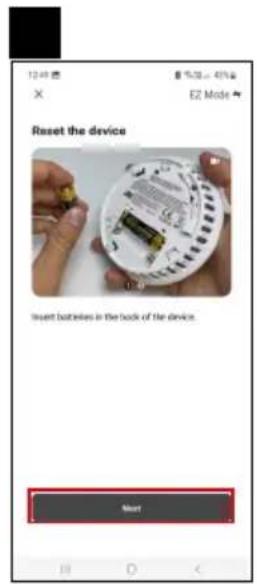
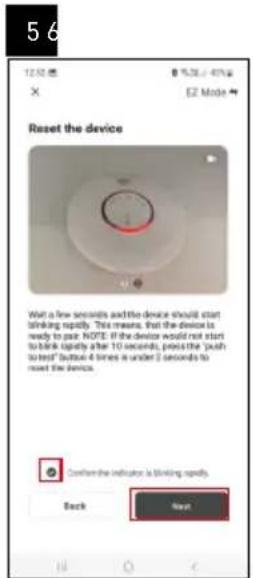
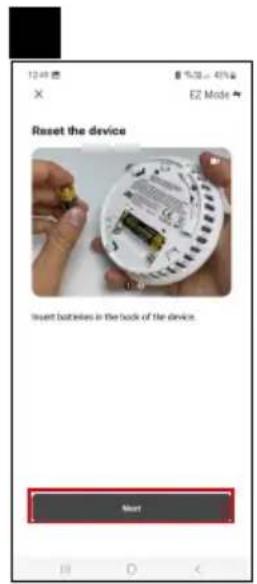
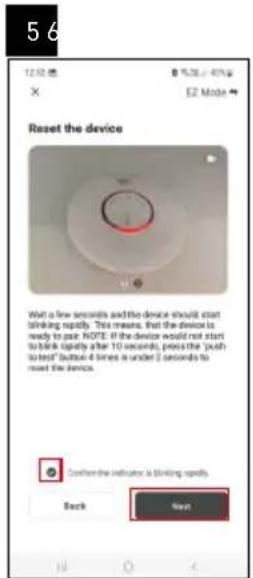
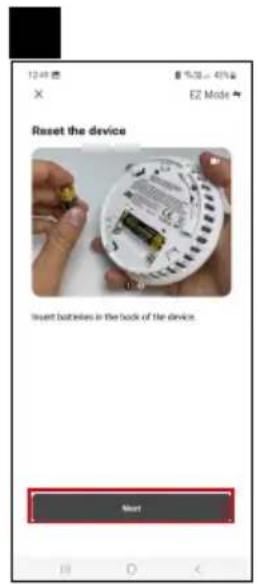
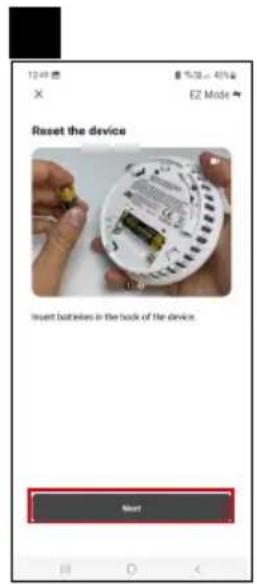
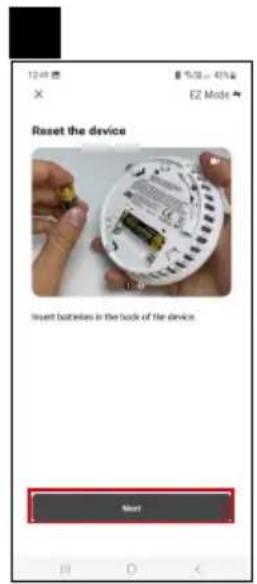
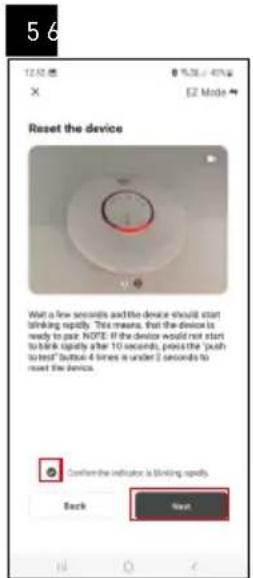
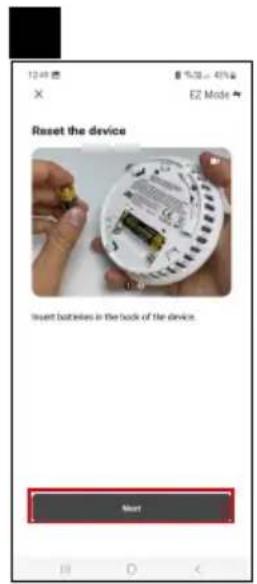
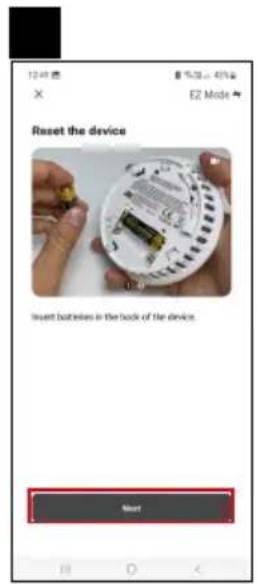
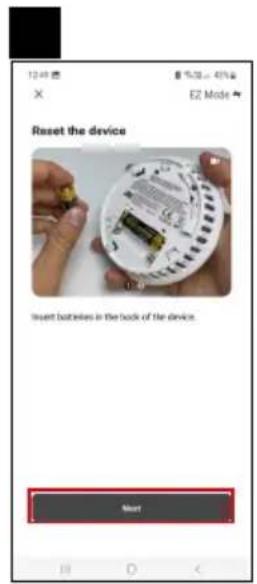
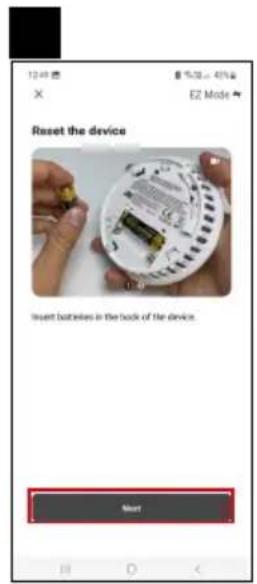
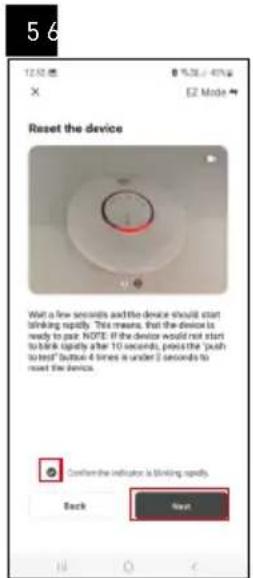
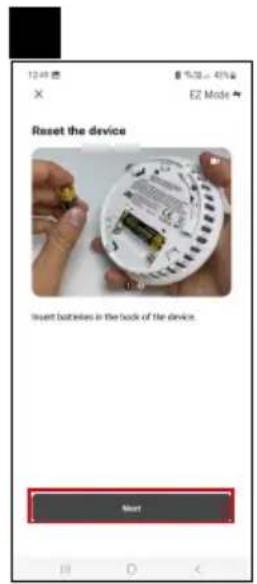
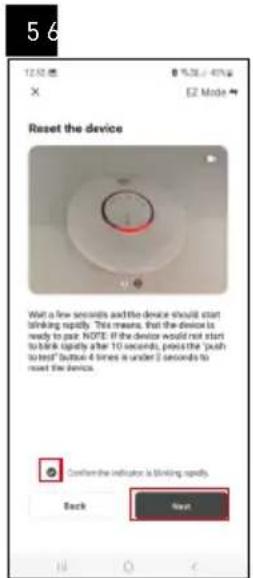
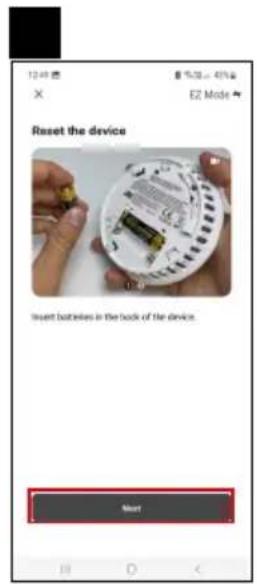
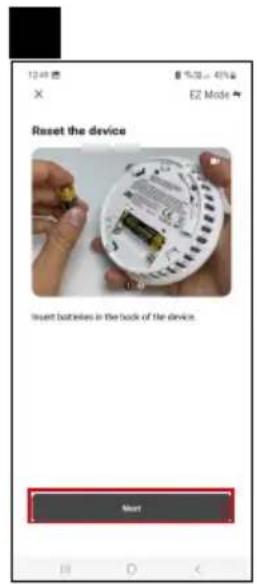
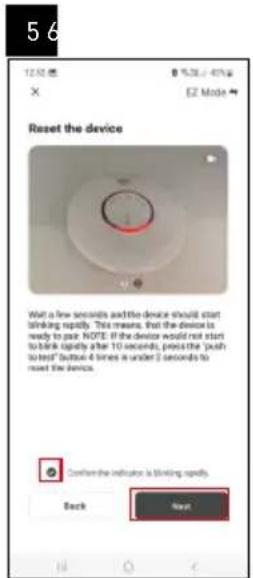
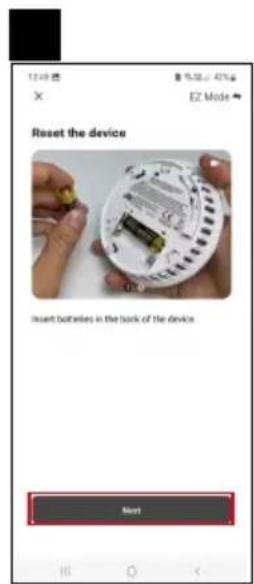
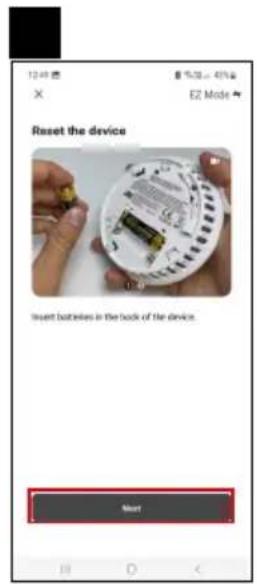
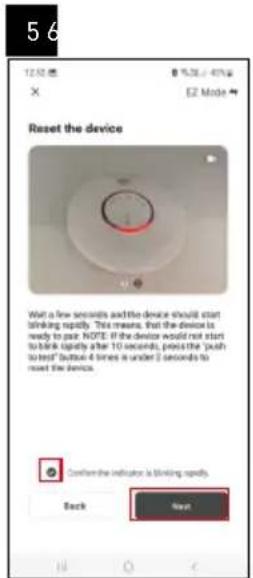
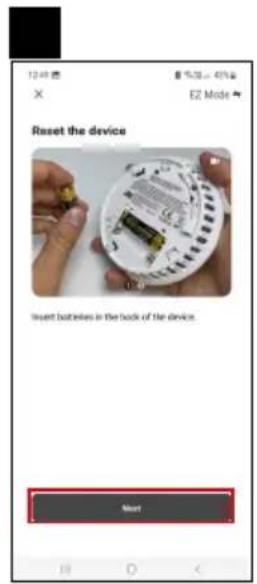
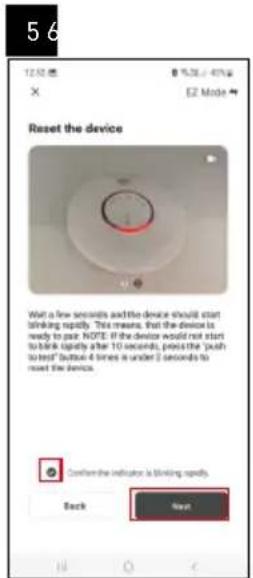
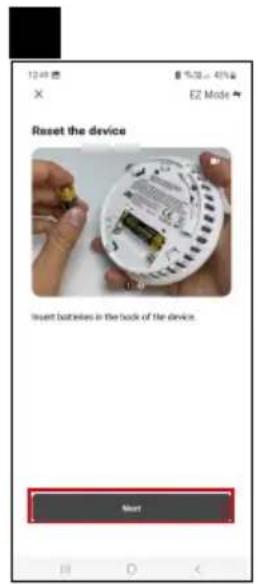
Insert batteries into the detector; pairing mode will activate automatically within 10 seconds and will last for 4 minutes.
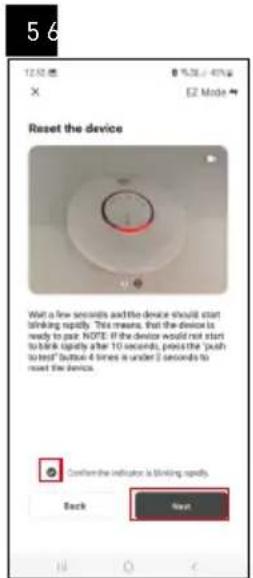
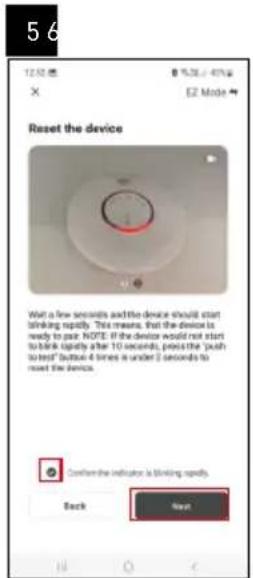
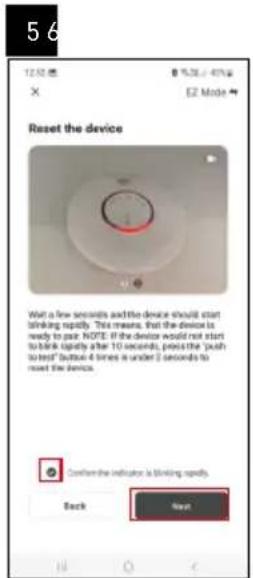
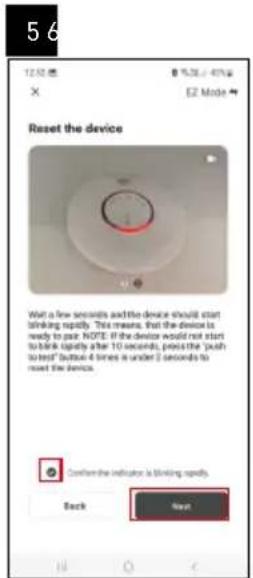
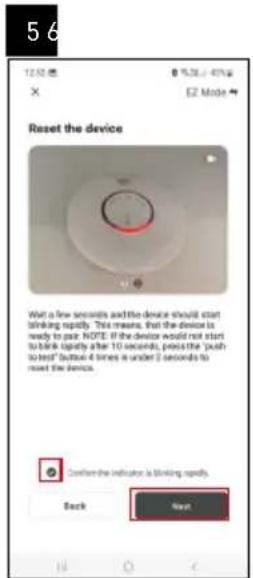
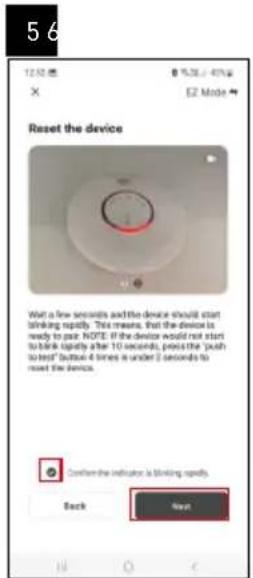
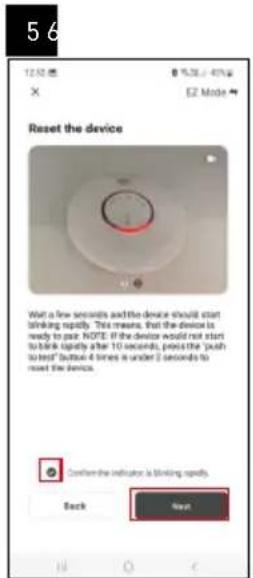
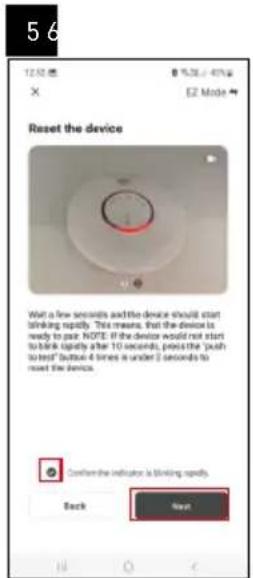
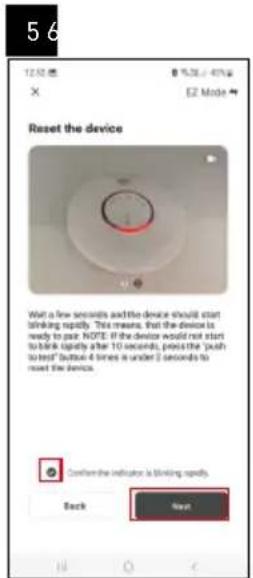
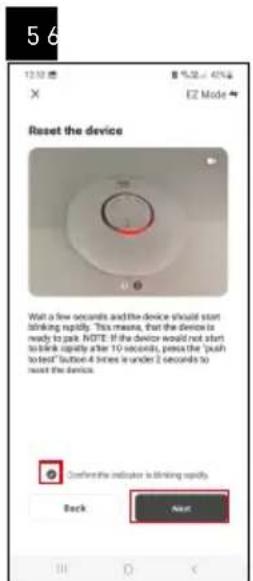
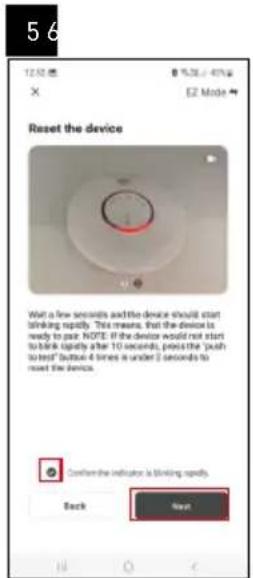
The red LED on the front of the detector will start flashing.
Activate Bluetooth and GPS on your mobile device.
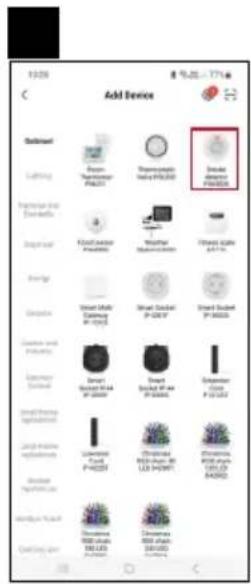
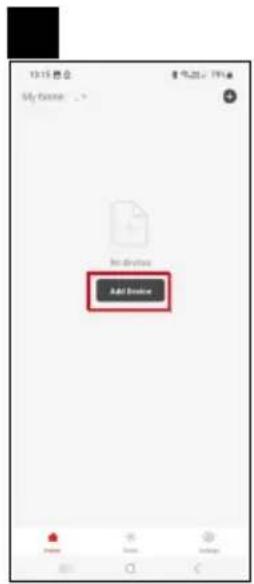
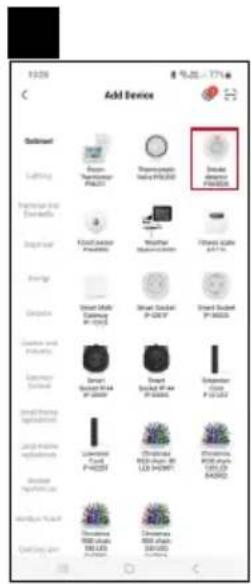
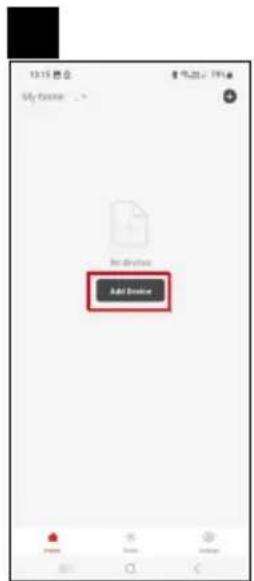
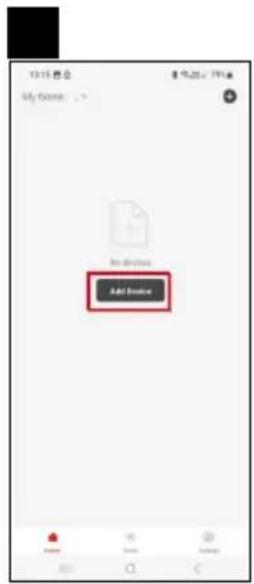
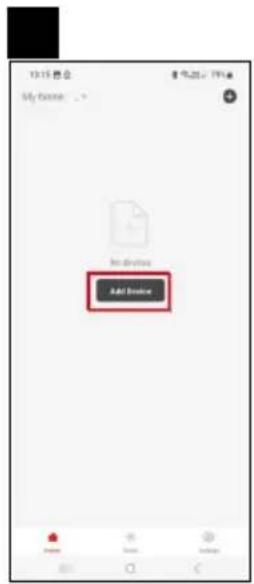
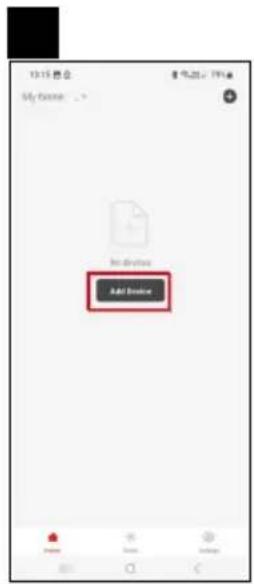
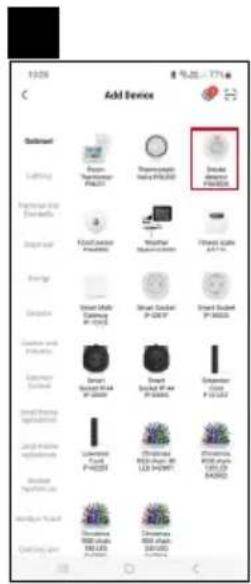
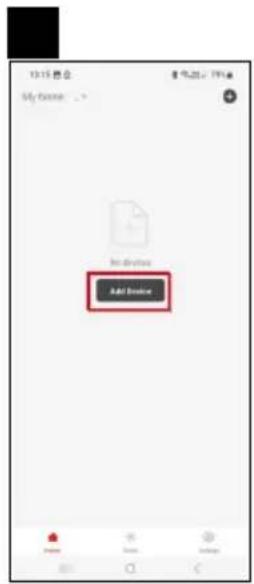
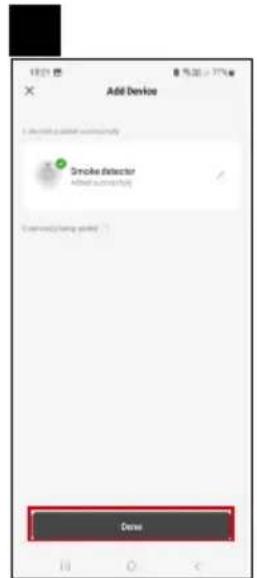
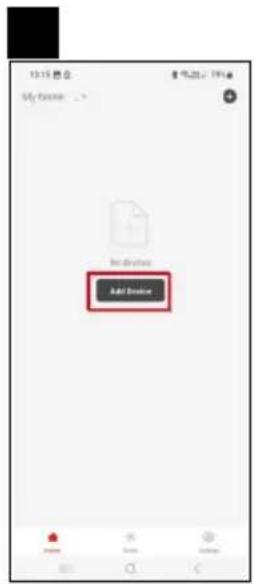
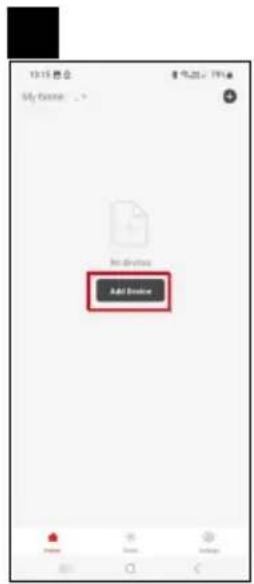
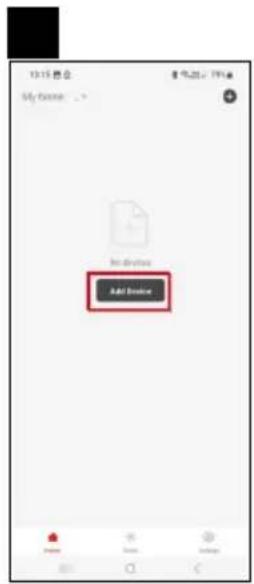
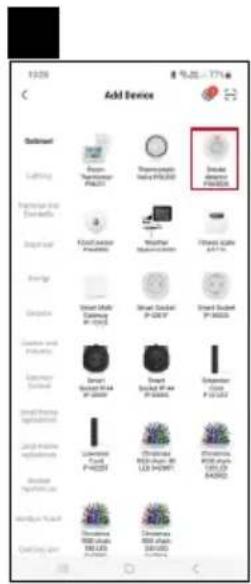
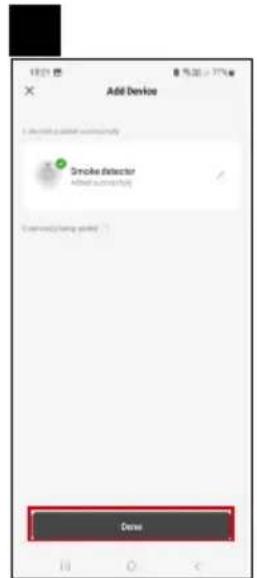
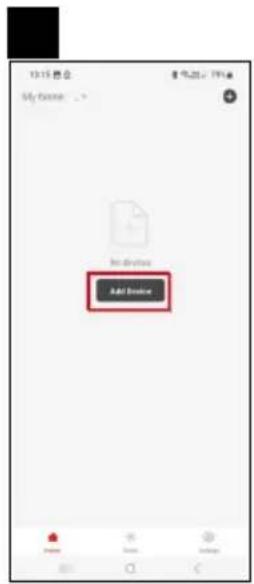
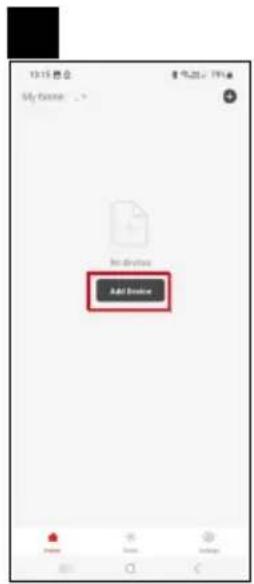
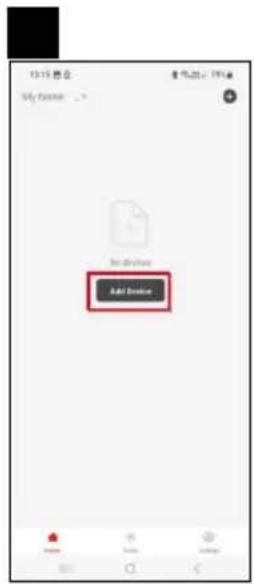
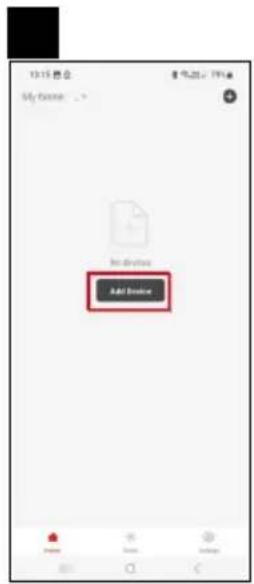
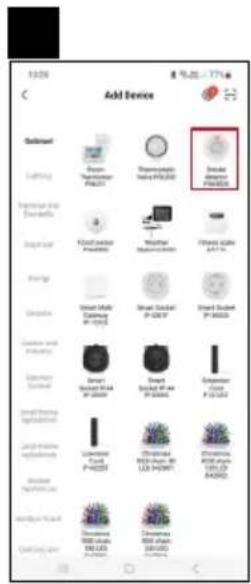
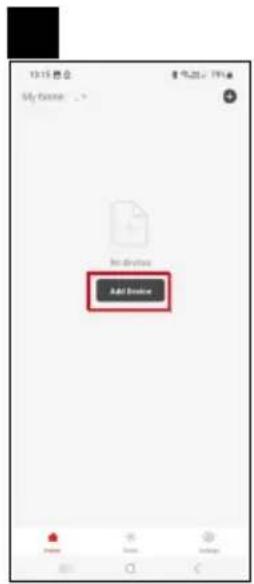
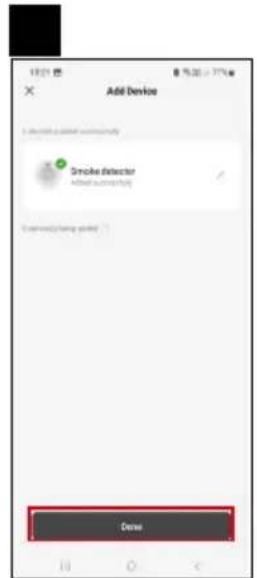
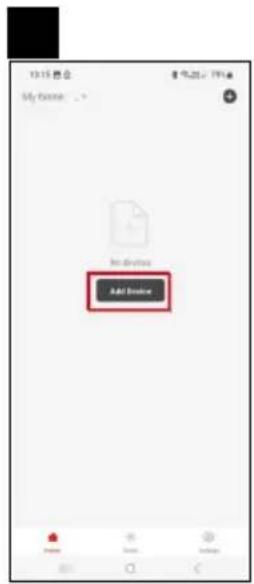
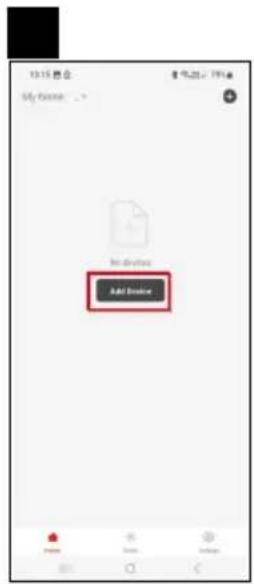
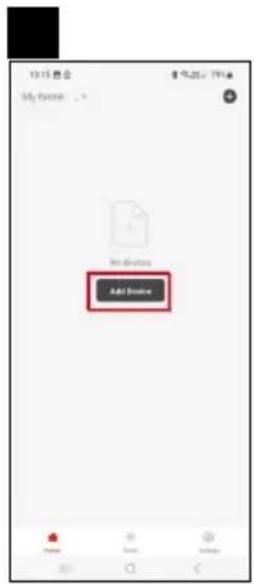
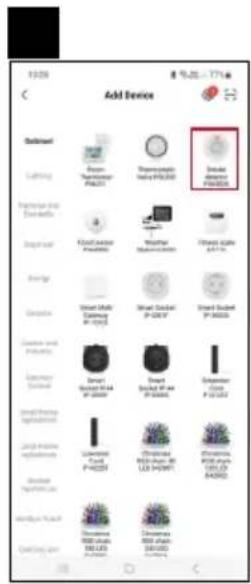
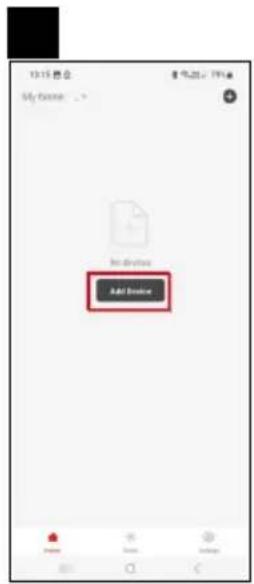
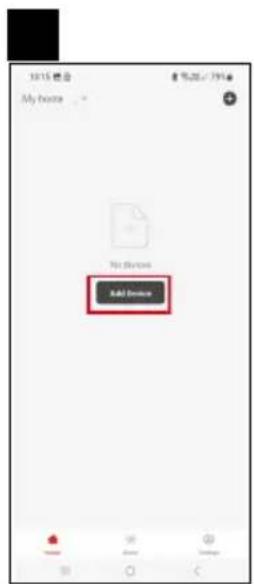
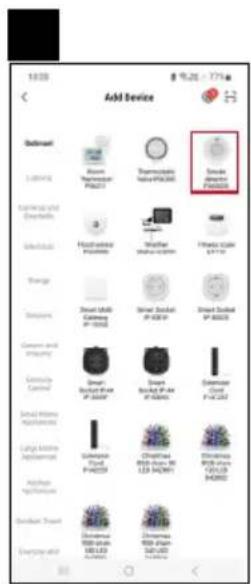
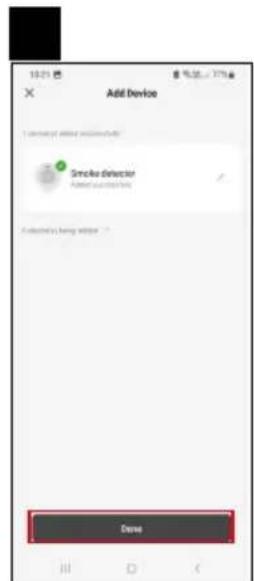
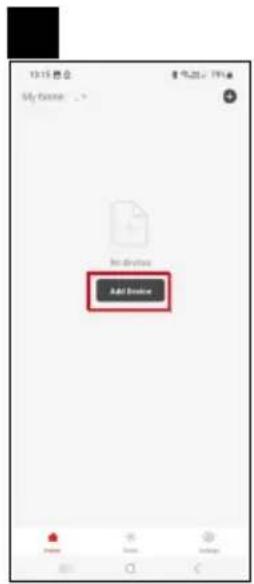
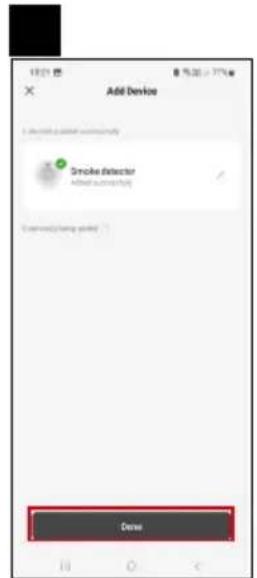
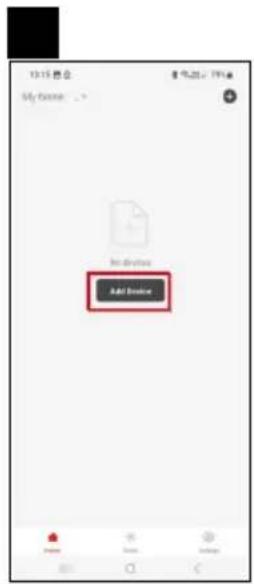
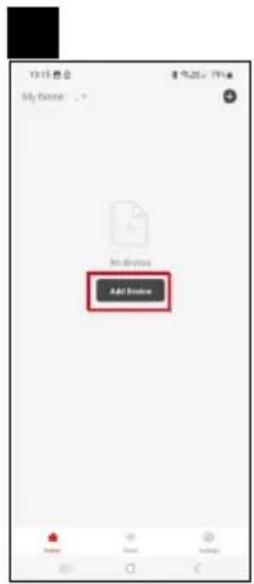
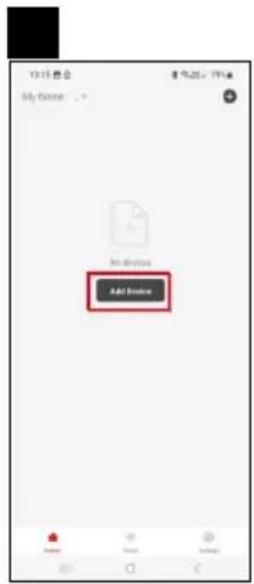
Tap Add Device in the app.
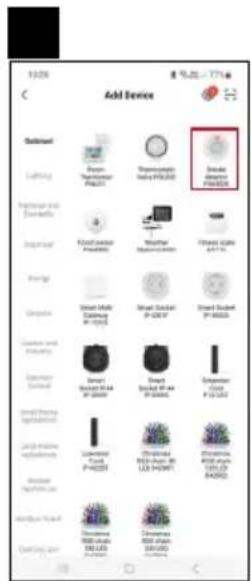
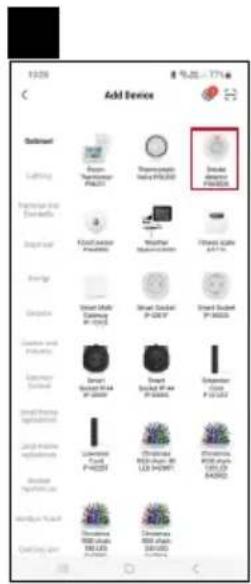
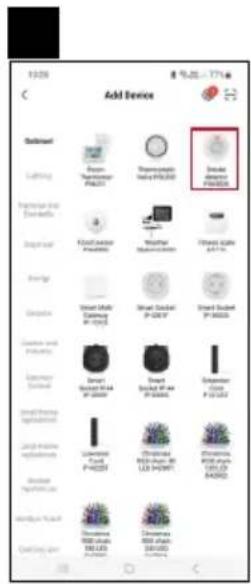
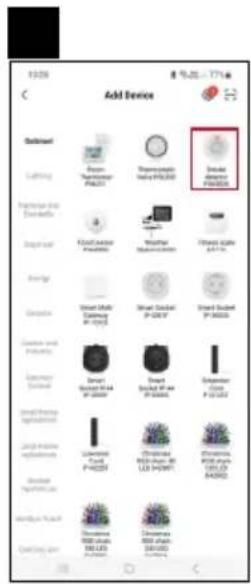
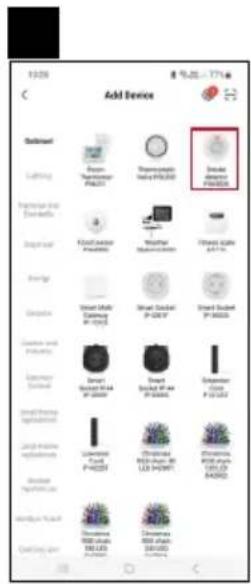
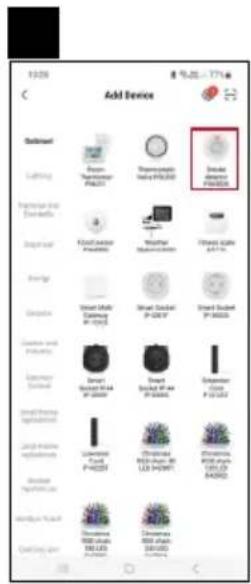
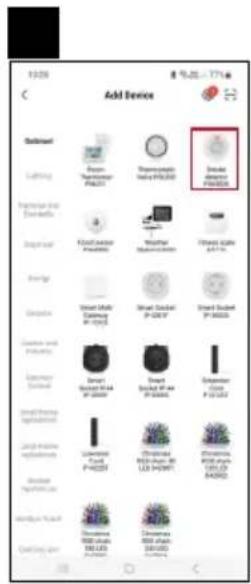
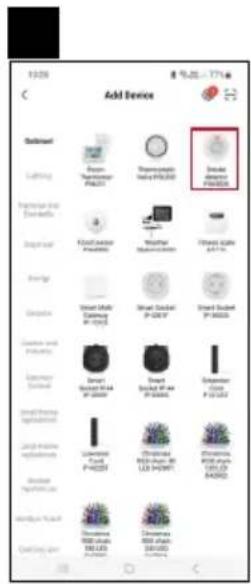
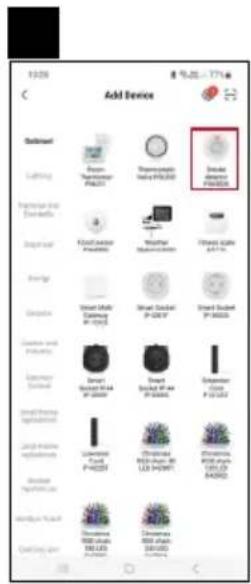
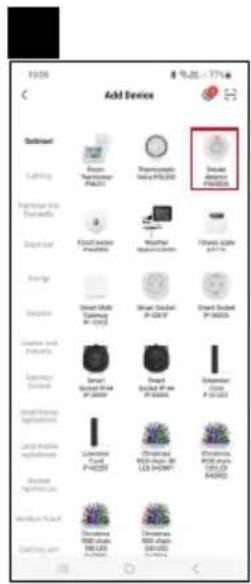
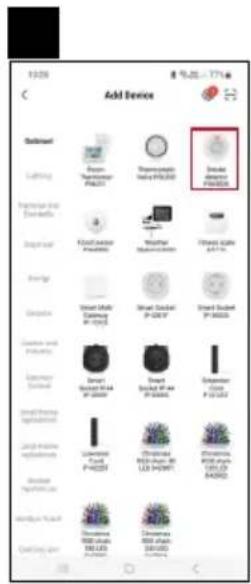
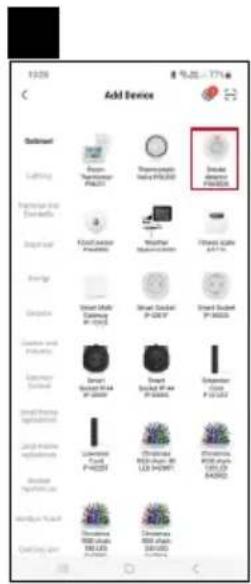
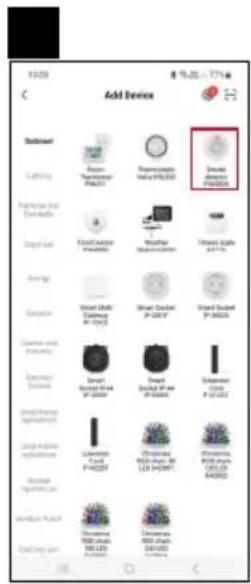
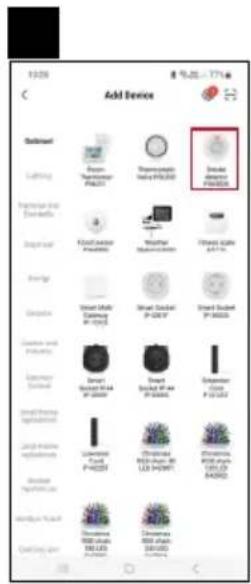
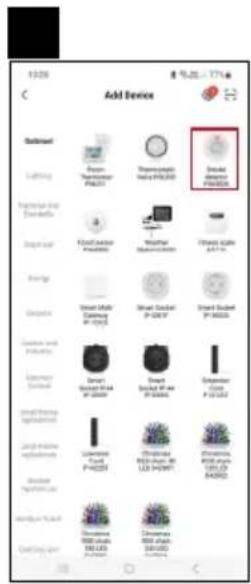
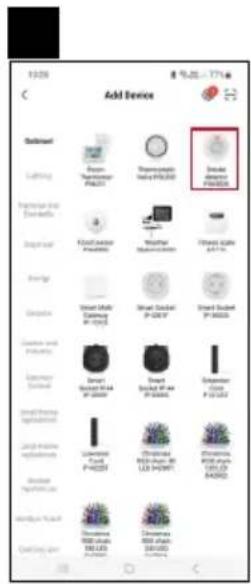
Tap the GoSmart list on the left and tap the P56500S icon.
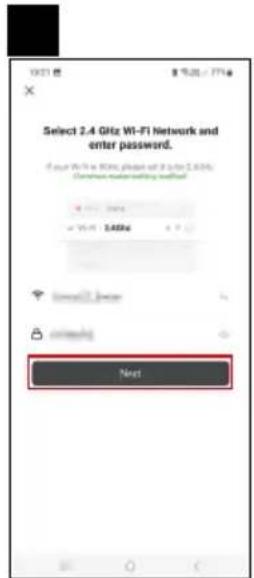
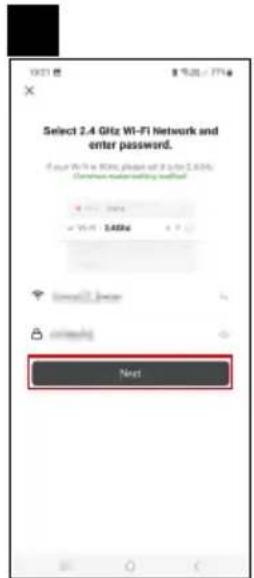
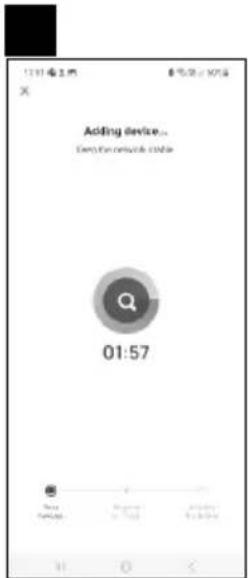
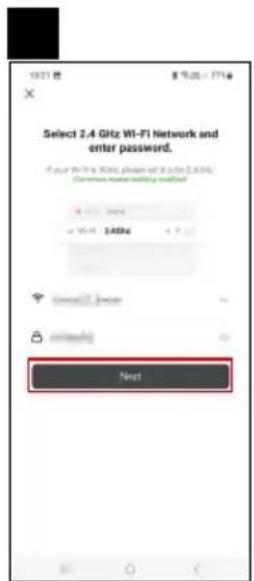
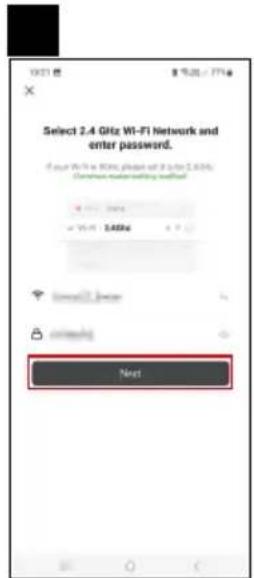
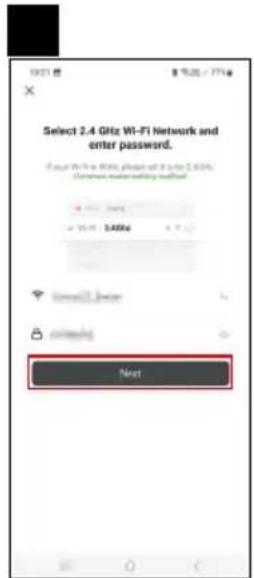
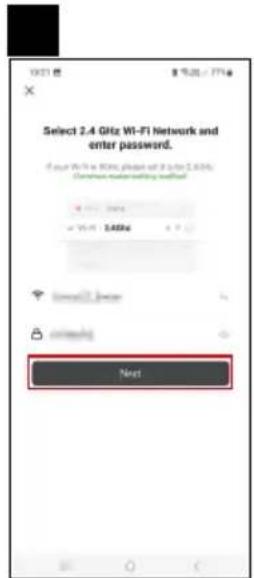
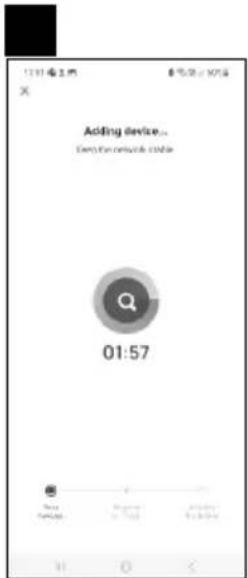
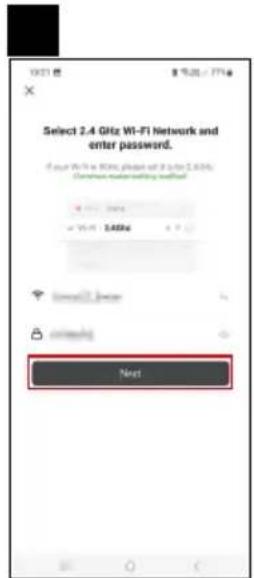
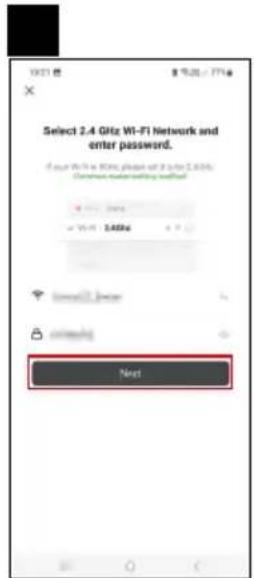
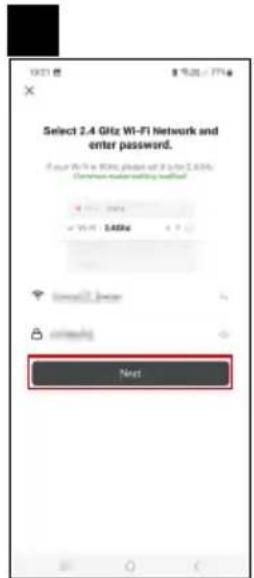
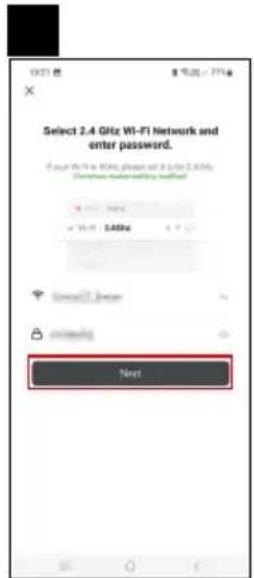
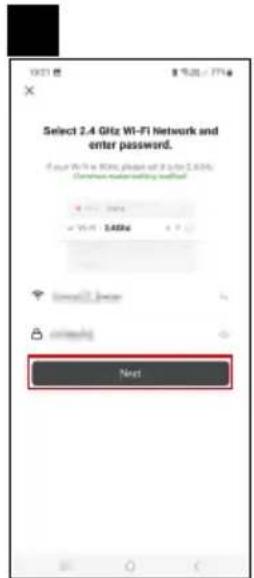
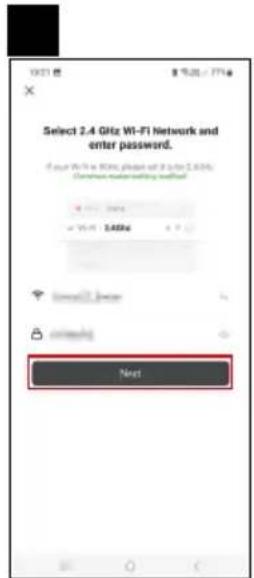
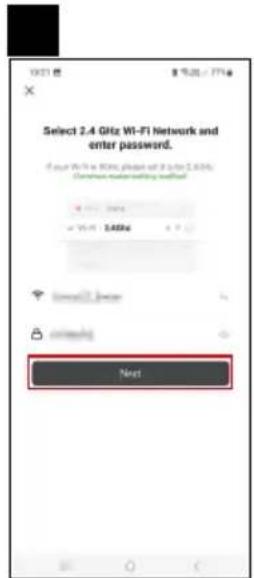
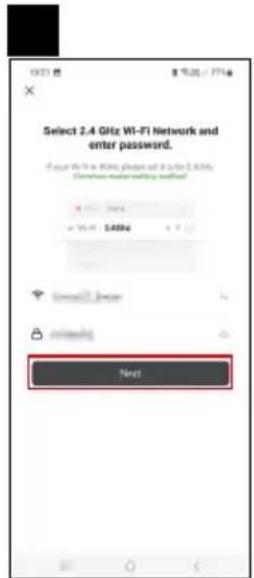
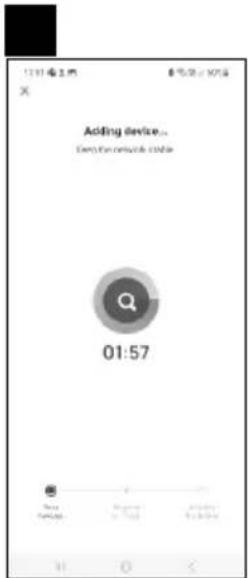
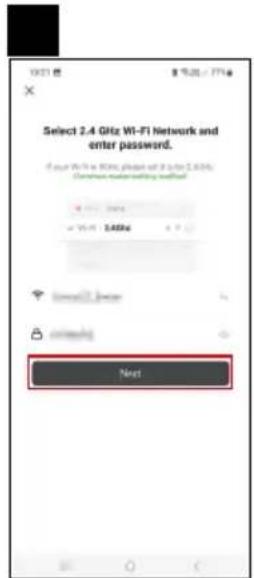
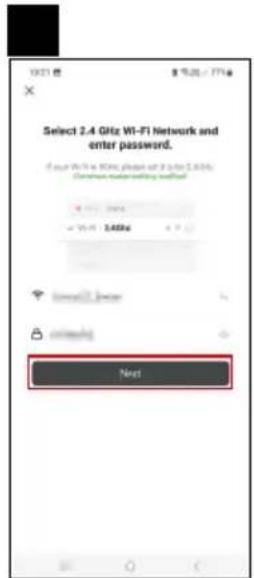
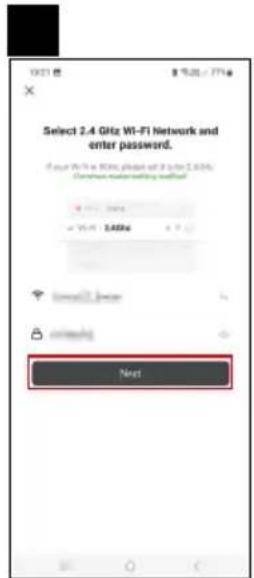
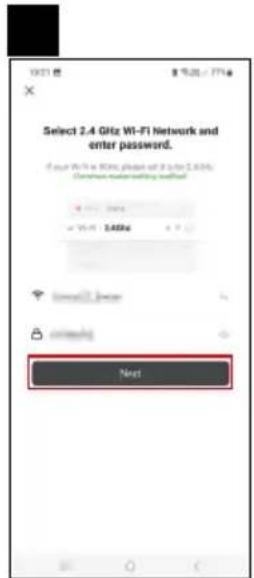
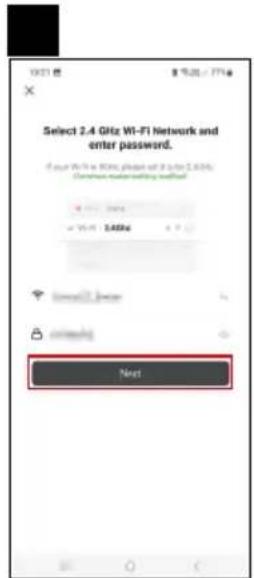
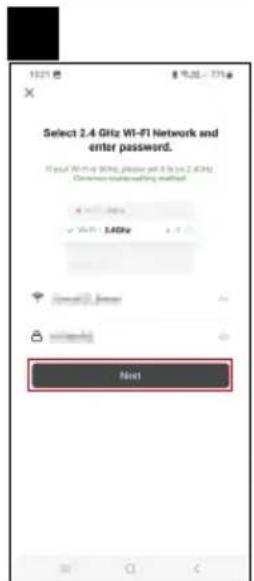
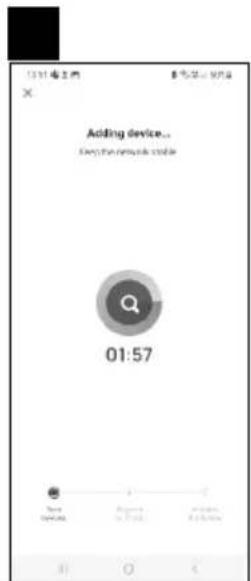
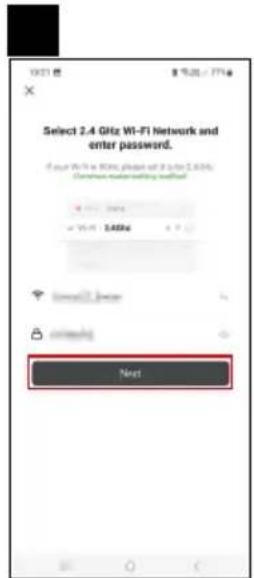
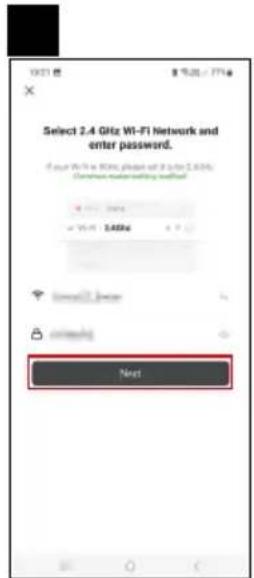
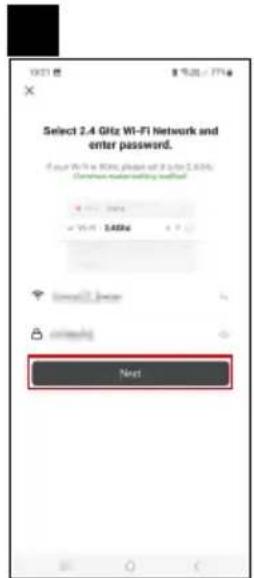
Follow the instructions in the app and enter the name and password for your 2.4 GHz Wi-Fi network.
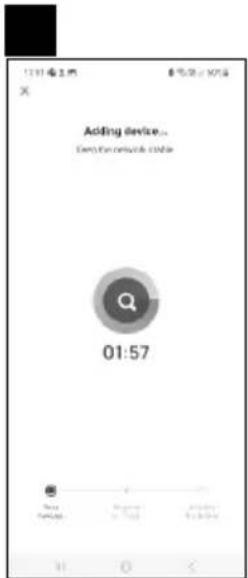
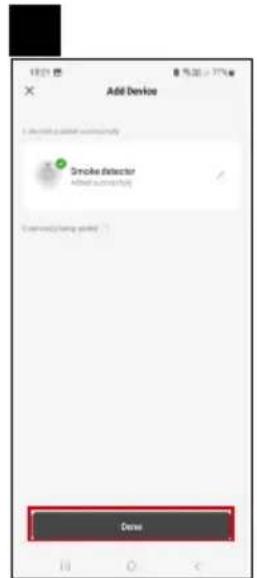
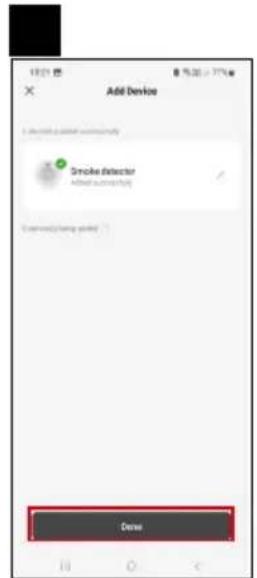
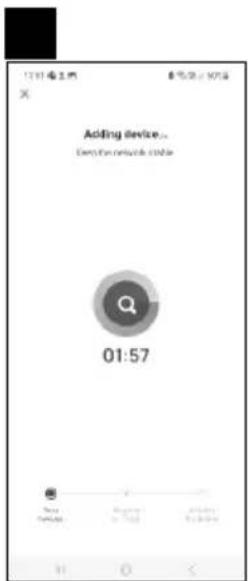
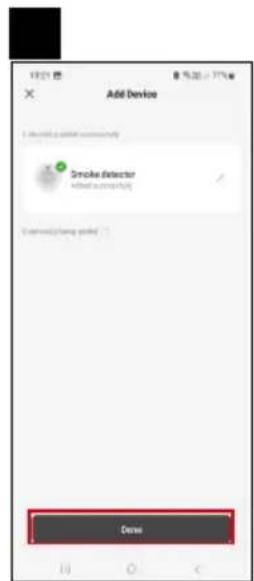
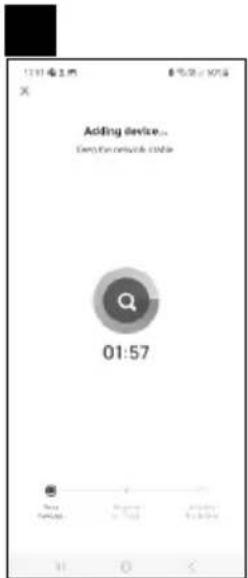
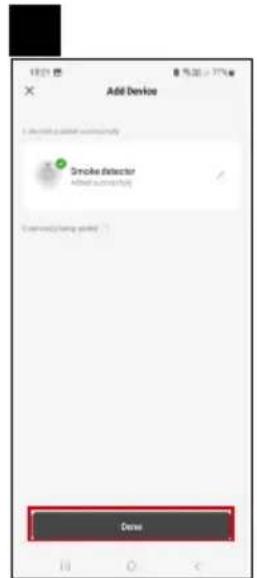
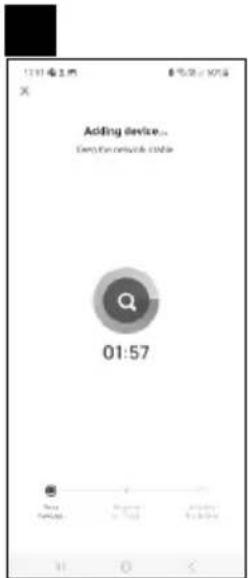
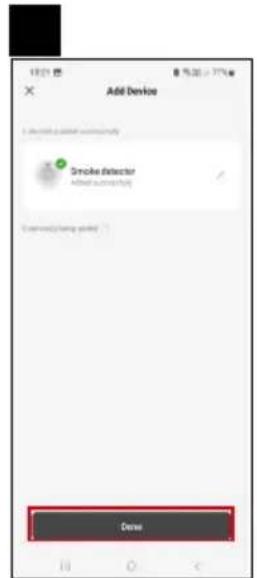
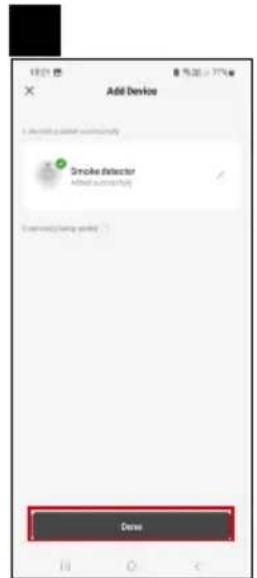
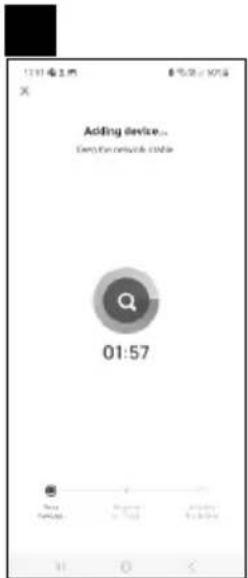
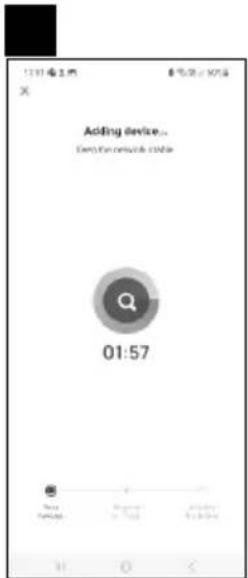
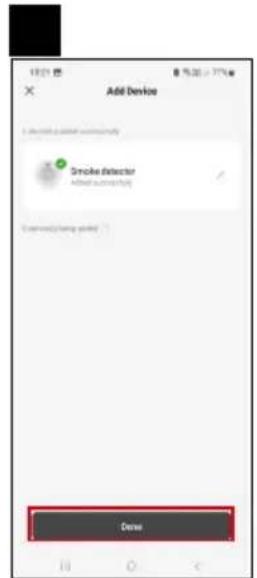
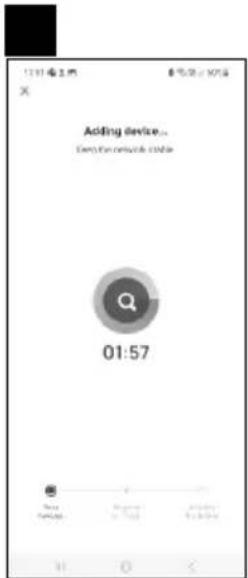
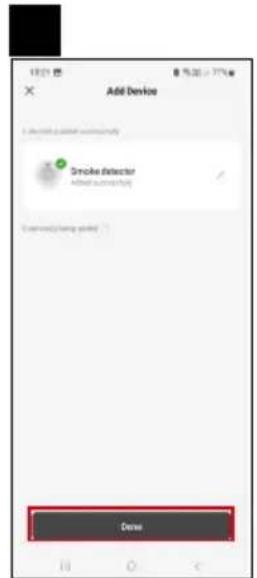
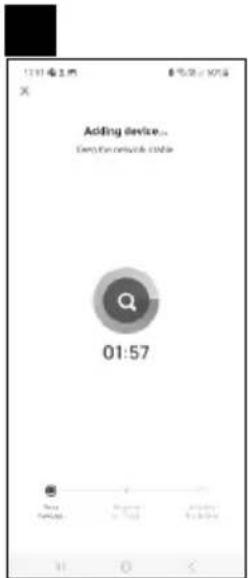
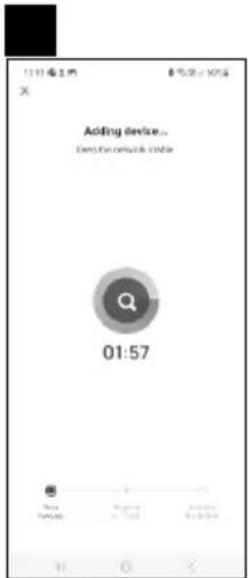
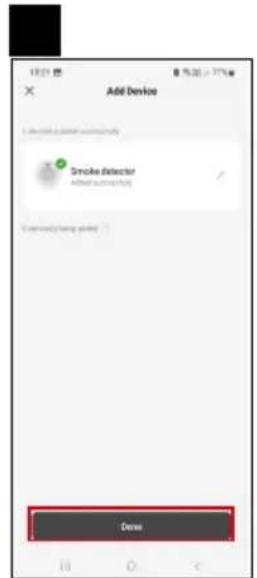
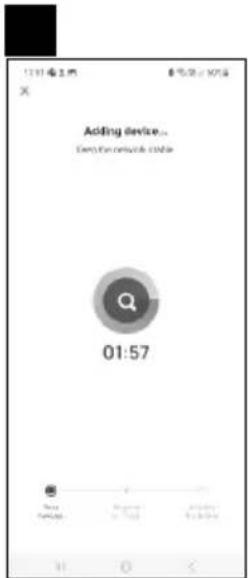
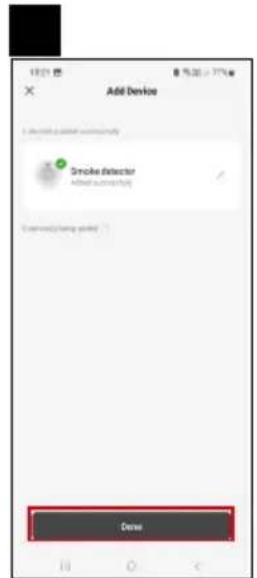
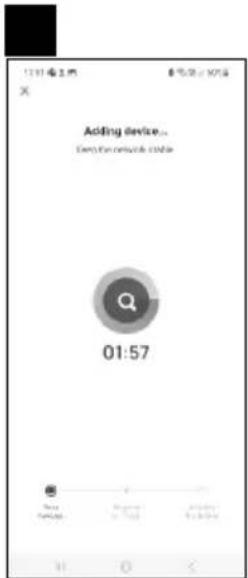
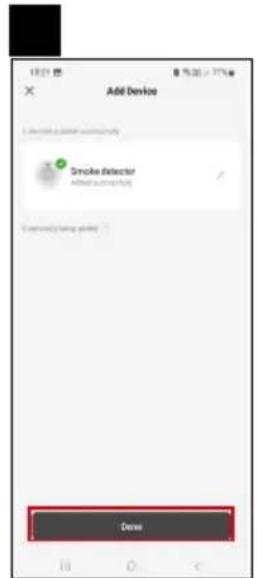
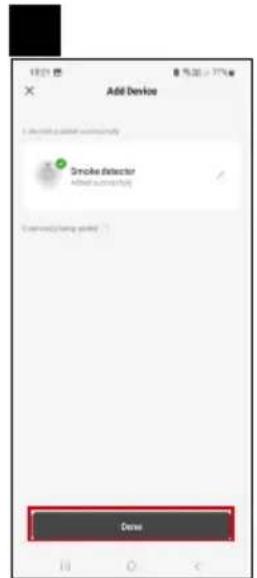
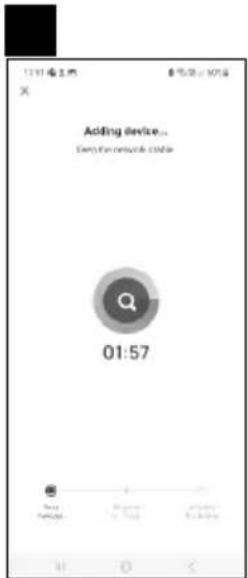
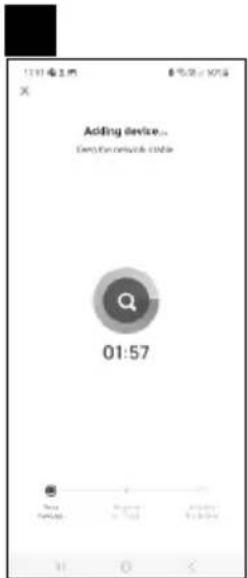
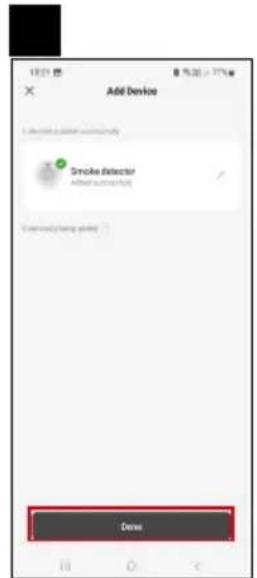
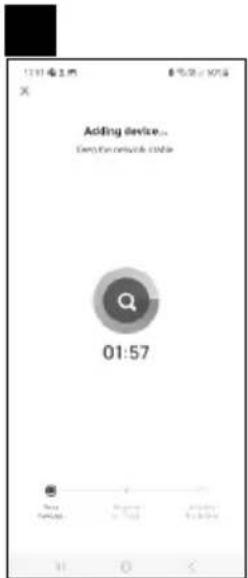
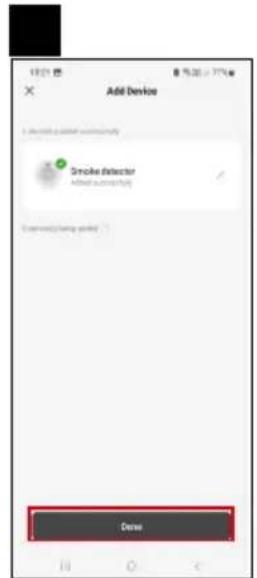
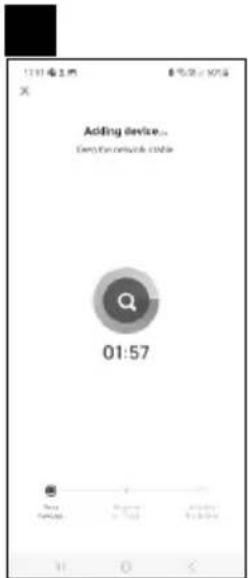
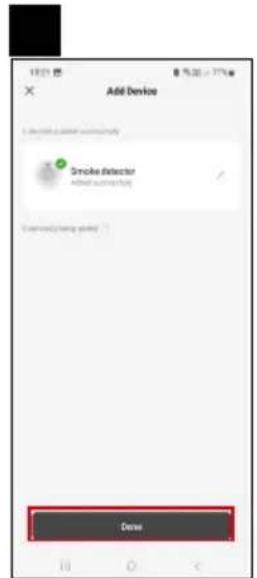
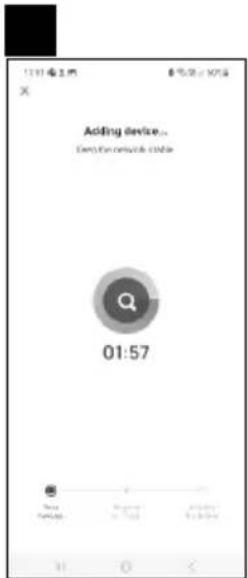
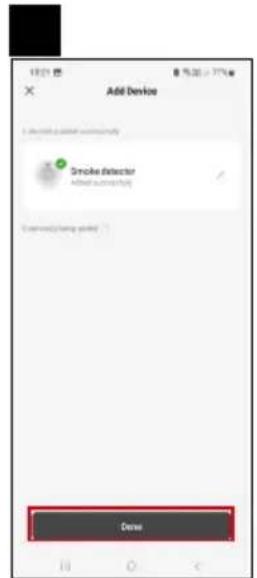
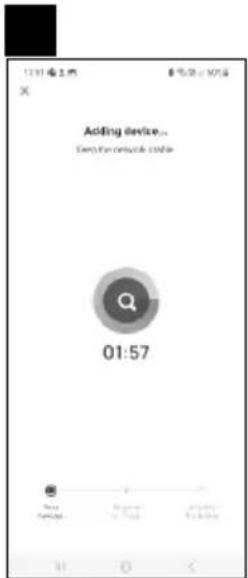
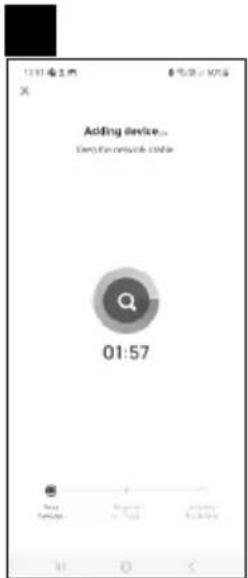
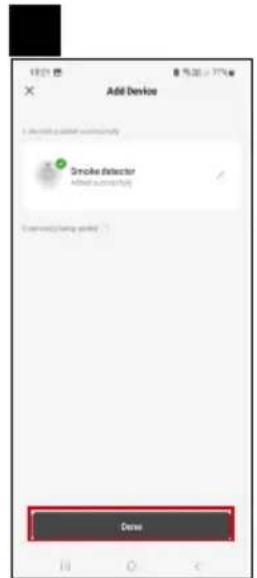
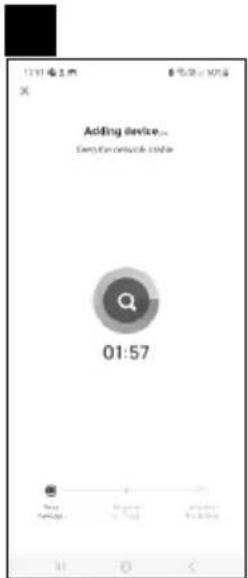
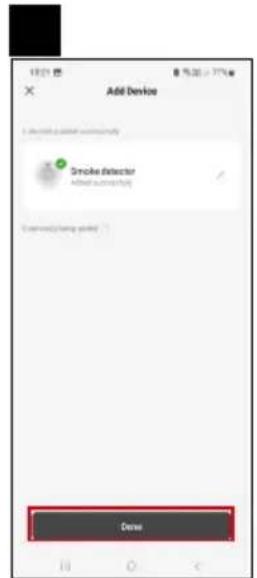
The detector will pair with the app within 2 minutes; the red LED will stop flashing.
Note:
If the detector fails to pair, repeat the process.
5 GHz Wi-Fi networks are not supported.
If the detector is already paired with the app, pairing mode will not activate automatically after removing/ replacing the batteries. You'll have to activate it manually, see Manual Activation.
Manual Activation/Deactivation of Pairing Mode
Press the main button 4× within 2 seconds; pairing mode will activate for 4 minutes.
A beep will sound and the red LED will start flashing.
To deactivate pairing mode, press the main button 1×; the LED will stop flashing.
text_image
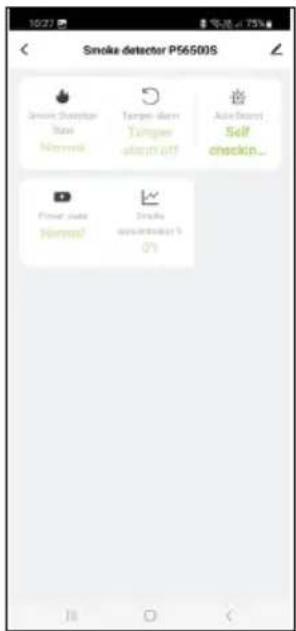
Smoke detector P56500S Smart Detector Base Normal Temped Temperature stop-off Audio Check Self checkin... Power State Normal Stroke onset/stop-up 0%Description of the App's Main Menu
- Detector status (normal or alarm mode)
- the app displays a warning message in the event of alarm activation
- Removal warning
- the app displays a warning message in the event the detector is removed from the mounting cover
- Auto test notification
- the app displays a warning message when a test of functioning of the detector is performed
- Battery state of charge
- the app displays a warning message when the battery voltage drops < 2.6 V
- Smoke concentration in %
- the app displays a warning message indicating smoke concentration 0% / 25% / 50% / 75% / 100% / 125% / 150% / 175% / 200% / 225% / 250% / 255% Alarm mode activates at concentrations of >100%

Putting the Device into Operation
Insert batteries (2× 1.5 V AA) into the battery compartment on the back.
Use 1.5 V alkaline batteries only.
Never use 1.2 V rechargeable batteries; the device will not function due to the lower voltage.
Make sure to insert the batteries properly and with the correct polarity!
If the batteries are not inserted or are inserted incorrectly, the mounting cover will not fit onto the detector!
Once the batteries are inserted, the red LED on the front of the detector will start flashing within 10 seconds,
indicating automatic activation of pairing mode; finish pairing the device with the mobile app.
After pairing, perform a function test using the main button.
Long-press the main button; 3× short beeps must sound at a 1.5 s interval while the button is held.
That means the detector is working correctly.
If the detector is operational you will see 1× LED flash every 48 seconds.
If you hear no sound after pressing the test button, there is likely a malfunction and you must contact the service centre, or the battery is flat.
TEST MODE
You can test the functioning of the detector whenever needed or during every battery replacement.
Long-press the main button for ca. 5 seconds; the detector will beep 3× in a row (then a 1.5 second pause will follow) and a red LED will flash.
If the detector makes no sound, check that the battery is operational and the detector is installed correctly.
Use test mode 1× a week to make sure the alarm is operational.
Note:
The acoustic and optical alarm during testing is only used as indication that the detector is operational.
It does not mean that the presence of smoke has been detected.
FAULT STATE
If the detector is in fault state, it is not functional.
Fault state is indicated by 1× beep every 48 seconds.
Immediately replace the battery and check that the detector is undamaged; clean the openings of the detector using, for instance, a vacuum cleaner. Do a function test.
If the fault state persists even after the battery has been replaced, contact the service centre.
FLAT BATTERIES
If the batteries in the alarm are flat, it is indicated by a simultaneous beep and flash of red LED every 48 s at least 30 days before the batteries run out. Immediately replace the batteries. Use alkaline batteries only; do not use rechargeable batteries.
Do a function test.
It is recommended to replace batteries 1× a year as a precaution.
END OF LIFE OF THE DETECTOR
The detector has a service life of 10 years since production.
After expiration, the detector must no longer be used and must be replaced with a new device.
The replacement date for the detector is listed on the label on the back, next to "Replace device".
If you are using multiple detectors, remember to check their replacement dates!
ALARM WARNING
If smoke is detected, the detector will start emitting an acoustic + optical signal.
The detector will begin continuously and simultaneously beeping (3× beeps – pause) and flashing its red LED.
The alarm will be active until the air clears.
If an alarm triggers, immediately evacuate the building and make sure all other people have left as well.
Do not stop to call in help or gather your belongings.
Contact the corresponding emergency service.
Wait until the air clears.
Do not remove the battery to stop the alarm mode – this will deactivate the alarm!
MANUAL SILENCING OF ALARM
The acoustic signal of the alarm can be temporarily silenced.
Press the main button; the acoustic signal will be silenced for 8 minutes.
The silencing will be indicated by 1 flash of the red LED every 8 seconds.
Only use the silence function in the event of false alarms caused, for instance, by steam, vapour from cooking or burnt food. Wait until the air clears.
Do not remove the batteries to stop the alarm mode – this will deactivate the detector!
Overview of Possible Fault States of the Detector
| State Solution | |
| Test mode not functioning | 1. Check that the battery is connected correctly.2. Clean the detector.3. If the fault persists, return the device. |
| Alarm indication by a simultaneous 1× beep/1× flash of the red LED every 48 seconds | The batteries are flat; replace them. |
| The alarm beeps every 48 seconds (the detector is in a fault state). | 1. Clean the detector.2. Return the device or replace it with a new one. |
| The device randomly emits a different alert sound than usual. | 1. Clean the detector and perform a function test.2. Relocate the detector.3. Return the device or replace it with a new one. |

Upkeep and Maintenance
The product is designed to serve reliably for many years if used properly. Here are some tips for proper operation:
- Read the manual carefully before using this product.
- The product must be replaced with a new one after 10 years; see replacement date on the back.
- Regularly clean the product – at least 1× a month. Carefully clean any dirt and dust from ventilation openings of the product with a vacuum cleaner.
- Do not paint the product.
- Do not expose the product to direct sunlight, extreme cold or humidity, and sudden changes in temperature. This would reduce detection accuracy.
- Do not place the product in locations prone to vibrations and shocks – these may cause damage.
- Do not subject the product to excessive force, impacts, dust, high temperatures or humidity – doing so may cause malfunction, shorten battery life, damage the batteries or deform the plastic parts.
- Do not expose the product to rain or high humidity, dropping or splashing water.
- Do not place any open flame sources on the product, e.g. a lit candle, etc.
- Do not put the product in places with inadequate air flow.
- Do not insert any objects in the product's vents, do not cover up the product.
- Do not tamper with the internal electric circuits of the product – doing so may damage the product and will automatically void the warranty. The product should only be repaired by a qualified professional.
- To clean the product, use a slightly moistened soft cloth. Do not use solvents or cleaning agents – they could erode the plastic parts and cause corrosion of the electric circuits.
- Do not immerse the product in water or other liquids.
- In the event of damage or defect of the product, do not make any repairs by yourself. Bring it for repair to the shop where you bought it.
- This device is not intended for use by persons (including children) whose physical, sensory or mental disability or lack of experience and expertise prevents safe use, unless they are supervised or instructed in the use of the appliance by a person responsible for their safety. Children must always be supervised to ensure they do not play with the device.
Service centre:
EMOS spol. s r.o.
Lipnická 2844
Přerov
750 02
Plant:
Zhejiang Jiaboer Electronic Technology Co., Ltd No. 72, Dayantou, Tingshan Village, Dayuan Town, Fuyang District, Hangzhou City, Zhejiang Province, China
A declaration of conformity has been issued for this product.
You can find the manual at: http://www.emos.eu/download.
Hereby, EMOS spol. s r. o. declares that the radio equipment type TSS380C-HW is in compliance with Directive 2014/53/EU. The full text of the EU declaration of conformity is available at the following internet address: http://www.emos.eu/download.

text_image
DO NOT PAINT PUSH TO TEST HUSH
Obsah
text_image
Ceiling 30 cm Best here Never hereD i a g r a m 1
text_image
Not in this area 50 cm Any where in this area 200 cm Never hereDiagram2
Mobilní aplikace
text_image
QR code with a red logo in the center, likely linking to a digital resource or website.
text_image
Download on the App Store GET IT ON Google Playtext_image
Log In Sign Up
text_image
13:15 搜索 My home No updates Add Bookie
text_image
Add Device Outbound Lighting Imaging the Two bits Organized Energy Computer Device and Product Language Systematic Small Power Aggregated Small Power Aggregated Medium Power Aggregated Circuitry Power Circuitry Power Circuitry Power Circuitry Power Circuitry Power Circuitry Power Circuitry Power Circuitry Power Circuitry Power Circuitry Power Circuitry Power Circuitry Power Circuitry Power Circuitry Power Circuitry Power Circuitry Power Circuitry Power Circuittry Power Circuitry Power Circuitry Power Circuitry Power Circuitry Power Circuitry Power Circuitry Power Circuitry Power Circuitry Power Circuitry Power Circuitry Power Circuitry Power Circuitry Power Circuitry Power Circuitry Power Circuitry Power Circuitry Power Dialing point
text_image
12:48 8% 50% EZ Mode Reset the device Insert batteries in the back of the device. Next
text_image
5 6 12:32 8 15.00 - 47% E2 Mode Reset the device Wait a few seconds and the device should start tinking rapidly. This means that the device is ready to pair. NOTE: If the device would not start to blink rapidly after 10 seconds, press the 'yush loset' button 4 lines is under 5 seconds to insert the device. Confirm the indicator is blinking quickly. Back Next
text_image
Select 2.4 GHz Wi-Fi Network and enter password. If your Wi-Fi is 100% phone or 8 other 2.4GHz Common user setting manual + 100% - 50% + 2.4GHz Next
text_image
Adding device... Remove network cable 01:57
text_image
Add Device Smoke Detector Crewtext_image
Smoke detector P56500S Smoke Detector Stand Normal Target alarm Target Alarm off Auto Direct Self checkin... Player state Normal Radio Isonan 10%0 %/25 %/50 %/75 %/100 %/125 %/150 %/175 %/200 %/225 %/250 %/255 %
MANUÁLNÍ ZTLUMENÍ ALARMU
Zhejiang Jiaboer Electronic Technology Co., Ltd No. 72, Dayantou, Tingshan Village, Dayuan Town, Fuyang District, Hangzhou City, Zhejiang Province, China
text_image
Ceiling 30 cm Best here Never hereD i a g r a m 1
text_image
Not in this area 50 cm Any where in this area 200 cm Never hereDiagram2
Mobilná aplikácia
text_image
QR code with a red logo in the center, likely linking to a digital resource or website.
text_image
Download on the App Store GET IT ON Google Playtext_image
Log In Sign Up
text_image
13.15 搜索 My Store Add Book No DeviBox Add Book
text_image
Add Devices Outbound Lighting Imported by Device Download Energy Environment Outdoor Environment Environment Smart Smart Smart Smart Smart Smart Smart Smart Smart Smart Smart Smart Smart Smart Smart Smart Smart Smart Smart Smart Smart Smart Smart Smart Smart Smart Smart Smart Smart Smart Smart Smart Smart Smart Smart Smart Smart Smart Smart Smart Smart Smart Smart Smart Smart Smart Smart Smart Smart Smart Sweaker Sweaker Sweaker Sweaker Sweaker Sweaker Sweaker Sweaker Sweaker Sweaker Sweaker Sweaker
text_image
12时 8 5分 - 40% X EZ Mode Reset the device Insert batteries in the lock of the device. Next
text_image
5 6 12:32 8 15.00 - 47% E2 Mode Reset the device Wait a few seconds and the device should start tinking rapidly. This means that the device is ready to pair. NOTE: If the device would not start to blink rapidly after 10 seconds, press the 'yush loset' button 4 lines is under 5 seconds to insert the device. Confirm the indicator is blinking quickly. Back Next
text_image
Select 2.4 GHz Wi-Fi Network and enter password. If your Wi-Fi is 100% please add 2 orders 2.63% Christmas, weather setting must add + 100% free + Wi-Fi 2.45bps Next
text_image
Adding device... Delete network cable 01:57
text_image
Add Device I should be added successfully Smoke Detector Aided auto-picking Commonly being added Crewstext_image
Smoke detector P56500S Smoke Detector Stand Normal Target alarm Target Alarm off Auto Direct Self checkin... Player state Normal Radio Isonan 10%0 %/25 %/50 %/75 %/100 %/125 %/150 %/175 %/200 %/225 %/250 %/255 %
UPOZORNENIE NA ALARM
MANUÁLNE STLMENIE ALARMU
Zhejiang Jiaboer Electronic Technology Co., Ltd No. 72, Dayantou, Tingshan Village, Dayuan Town, Fuyang District, Hangzhou City, Zhejiang Province, China
text_image
Ceiling 30 cm Best here Never hereDiagram1

text_image
Not in this area 50 cm Any where in this area 200 cm Never hereDiagram2
text_image
QR code with a red logo in the center, likely linking to a digital resource or website.
text_image
Download on the App Store GET IT ON Google Playtext_image
Log In Sign Up
text_image
13:15 搜索 My home No updates Add Bookie
text_image
Add Device Outbound Lighting Imaging the Two bits Organized Energy Computer Device and Product Lighting Systematic Small Power Aggregated Large Power Aggregated Circuit Power Circuit Circuit Circuit Circuit Circuit Circuit Circuit Circuit Circuit Circuit Circuit Circuit Circuit Circuit Circuit Circuit Circuit Circuit Circuit Circuit Circuit Circuit Circuit Circuit Circuit Circuit Circuit Circuit Circuit Circuit Circuit Circuit Circuit Circuit
text_image
12:48 8% 50% EZ Mode Reset the device Insert batteries in the back of the device. Next
text_image
5 6 12:32 8 15.30 - 47% E2 Mode Reset the device Wait a few seconds and the device should start tinking rapidly. This means that the device is ready to pair. NOTE: If the device would not start to blink rapidly after 10 seconds, press the 'yush loset' button 4 lines is under 5 seconds to insert the device. Confirm the indicator is blinking quickly. Back Next
text_image
Select 2.4 GHz Wi-Fi Network and enter password. If your Wi-Fi is 100% phone or 8 other 2.4GHz Common user setting manual + 100% - 50% + 2.4GHz Next
text_image
Adding device... Remove network cable 01:57
text_image
Add Device Smoke Detector Crewtext_image
Smoke detector P56500S Smoke Disinjahr State Normal Tampa alarm Tampa alarm off AutoDirect Self checkin... Power state Normal. Stroke adjustment 1% 0%KONIEC OKRESU ŻYWOTNOŚCI DETEKTORA
Zhejiang Jiaboer Electronic Technology Co., Ltd No. 72, Dayantou, Tingshan Village, Dayuan Town, Fuyang District, Hangzhou City, Zhejiang Province, Chiny

text_image
Ceiling 30 cm Best here Never here Diagram1text_image
Not in this area 50 cm Any where in this area 200 cm Never here Diagram 2
Mobil alkalmazás
text_image
QR code with a red logo in the center, likely linking to a digital resource or website.
text_image
Download on the App Store GET IT ON Google Playtext_image
Log In Sign Up
text_image
13:15 搜索 My home No updates Add Bookie
text_image
Add Device Outbound Lighting Imaging the Two bits Organized Energy Computer Device and Product Language Systematic Small Power Aggregated Small Power Aggregated Medium Power Aggregated Circuitry Power Circuitry Power Circuitry Power Circuitry Power Circuitry Power Circuitry Power Circuitry Power Circuitry Power Circuitry Power Circuitry Power Circuitry Power Circuitry Power Circuitry Power Circuitry Power Circuitry Power Circuitry Power Circuitry Power Circuittry Power Circuitry Power Circuitry Power Circuitry Power Circuitry Power Circuitry Power Circuitry Power Circuitry Power Circuitry Power Circuitry Power Circuitry Power Circuitry Power Circuitry Power Circuitry Power Circuitry Power Circuitry Power Circuitry Power Dialing port
text_image
12:48 8% 50% EZ Mode Reset the device Insert batteries in the back of the device. Next
text_image
5 6 12:32 8 15.30 - 47% E2 Mode Reset the device Wait a few seconds and the device should start tinking rapidly. This means, that the device is ready to pair. NOTE: If the device would not start to blink rapidly after 10 seconds, press the 'yush loset' button 4 lines is under 5 seconds to insert the device. Confirm the indicator is blinking quickly. Back Next
text_image
Select 2.4 GHz Wi-Fi Network and enter password. If your Wi-Fi is 100% phone or 8 other 2.4GHz Common user setting manual + 100% - 50% + 2.4GHz Next
text_image
Adding device... Remove network cable 01:57
text_image
Add Device Smoke Detector Crewtext_image
Smoke detector P56500S Smoke Disinjahr State Normal Tampa alarm Tampa alarm off AutoDirect Self checkin... Power state Normal. Stroke adjustment 1% 0%Zhejiang Jiaboer Electronic Technology Co., Ltd No. 72, Dayantou, Tingshan Village, Dayuan Town, Fuyang District, Hangzhou City, Zhejiang Province, China
text_image
Ceiling 30 cm Best here Never hereDiagram1
text_image
Not in this area 50 cm Any where in this area 200 cm Never hereDiagram2
Mobilna aplikacija
text_image
QR code with a red logo in the center, likely linking to a digital resource or website.
text_image
Download on the App Store GET IT ON Google Playtext_image
Log In Sign Up
text_image
13:15 搜索 My home No updates Add Bookie
text_image
Add Device Outbound Lighting Imaging the Two bits Organized Energy Computer Device and Product Language Systematic Small Power Aggregated Small Power Aggregated Medium Power Aggregated Circuitry Power Circuitry Power Circuitry Power Circuitry Power Circuitry Power Circuitry Power Circuitry Power Circuitry Power Circuitry Power Circuitry Power Circuitry Power Circuitry Power Circuitry Power Circuitry Power Circuitry Power Circuitry Power Circuitry Power Circuittry Power Circuitry Power Circuitry Power Circuitry Power Circuitry Power Circuitry Power Circuitry Power Circuitry Power Circuitry Power Circuitry Power Circuitry Power Circuitry Power Circuitry Power Circuitry Power Circuitry Power Circuitry Power Circuitry Power Dialing port
text_image
12:48 8% 50% EZ Mode Reset the device Insert batteries in the back of the device. Next
text_image
5 6 12:32 8 15.00 - 47% E2 Mode Reset the device Wait a few seconds and the device should start tinking rapidly. This means that the device is ready to pair. NOTE: If the device would not start to blink rapidly after 10 seconds, press the 'yush loset' button 4 lines is under 5 seconds to insert the device. Confirm the indicator is blinking quickly. Back Next
text_image
Select 2.4 GHz Wi-Fi Network and enter password. If your Wi-Fi is 100% phone or 8 other 2.4GHz Common user setting manual Next
text_image
Adding device... Remove network cable 01:57
text_image
Add Device Smoke Detector Crewtext_image
Smoke detector P56500S Smoke Detector Stand Normal Target alarm Target Alarm off Auto Direct Self checkin... Player state Normal Radio Isonan 10%Opis osnovnega menija aplikacije
0 %/25 %/50 %/75 %/100 %/125 %/150 %/175 %/200 %/225 %/250 %/255 %
Zhejiang Jiaboer Electronic Technology Co., Ltd No. 72, Dayantou, Tingshan Village, Dayuan Town, Fuyang District, Hangzhou City, Zhejiang Province, China
Za izdelek je bila izdana izjava o skladnosti.
text_image
Ceiling 30 cm Best here Never here Diagram1Crtež prikladnog postavljanja detektora
Ceiling - Strop

text_image
Not in this area 50 cm Any where in this area 200 cm Never here Diagram 2
Mobilna aplikacija
text_image
QR code with a red logo in the center, likely linking to a digital resource or website.
text_image
Download on the App Store GET IT ON Google Playtext_image
Log In Sign Up
text_image
13:15 搜索 My home No updates Add Book
text_image
Add Device Outbound Lighting Imaging the Two bits Organized Energy Computer Device and Product Language Systematic Small Power Aggregated Small Power Aggregated Medium Power Aggregated Circuitry Power Circuitry Power Circuitry Power Circuitry Power Circuitry Power Circuitry Power Circuitry Power Circuitry Power Circuitry Power Circuitry Power Circuitry Power Circuitry Power Circuitry Power Circuitry Power Circuitry Power Circuitry Power Circuitry Power Circuittry Power Circuitry Power Circuitry Power Circuitry Power Circuitry Power Circuitry Power Circuitry Power Circuitry Power Circuitry Power Circuitry Power Circuitry Power Circuitry Power Circuitry Power Circuitry Power Circuitry Power Circuitry Power Circuitry Power Dialing port
text_image
12:48 8 15% - 40% E2 Mode Reset the device Insert batteries in the back of the device. Next
text_image
5 6 12:32 8 15.00 - 47% E2 Mode Reset the device Wait a few seconds and the device should start tinking rapidly. This means, that the device is ready to pair. NOTE: If the device would not start to blink rapidly after 10 seconds, press the 'yush loset' button 4 lines is under 5 seconds to insert the device. Confirm the indicator is blinking quickly. Back Next
text_image
Select 2.4 GHz Wi-Fi Network and enter password. If your Wi-Fi is 100% phone or 8 other 2.4GHz Common user setting password Next
text_image
Adding device... Remove network cable 01:57
text_image
Add Device Smoke Detector CrewUparivanje detektora s aplikacijom
text_image
Smoke detector P56500S Smoke Disinplan Stand Normal Target alarm Target alarm off Auto Depot Self checkin... Regular state Normal Scholar ######## 1% 0%Zhejiang Jiaboer Electronic Technology Co., Ltd No. 72, Dayantou, Tingshan Village, Dayuan Town, Fuyang District, Hangzhou City, Zhejiang Province, China
text_image
Ceiling 30 cm Best here Never here Diagram 1text_image
Not in this area 50 cm Any where in this area 200 cm Never here Diagram 2Mobile App
text_image
QR code with a red logo in the center, likely linking to a digital resource or website.
text_image
Download on the App Store GET IT ON Google Playtext_image
Log In Sign Up
text_image
13:15 搜索 My home No updates Add Book
text_image
Add Device Outbound Lighting Imaging the Two bits Organized Energy Computer Device and Product Language Systematic Small Power Aggregated Small Power Aggregated Medium Power Aggregated Circuitry Power Circuitry Power Circuitry Power Circuitry Power Circuitry Power Circuitry Power Circuitry Power Circuitry Power Circuitry Power Circuitry Power Circuitry Power Circuitry Power Circuitry Power Circuitry Power Circuitry Power Circuitry Power Circuitry Power Circuittry Power Circuitry Power Circuitry Power Circuitry Power Circuitry Power Circuitry Power Circuitry Power Circuitry Power Circuitry Power Circuitry Power Circuitry Power Circuitry Power Circuitry Power Circuitry Power Circuitry Power Circuitry Power Circuitry Power Dialing port
text_image
12:48 8 15% - 40% E2 Mode Reset the device Insert batteries in the back of the device. Next
text_image
5 6 12:32 8 15.00 - 47% E2 Mode Reset the device Wait a few seconds and the device should start tinking rapidly. This means, that the device is ready to pair. NOTE: If the device would not start to blink rapidly after 10 seconds, press the 'yush loset' button 4 lines is under 5 seconds to insert the device. Confirm the indicator is blinking quickly. Back Next
text_image
Select 2.4 GHz Wi-Fi Network and enter password. If your Wi-Fi is 100% phone or 8 other 2.4GHz Common user setting password Next
text_image
Adding device... Remove network cable 01:57
text_image
Add Device Smoke Detector Crewtext_image
Smoke detector P56500S Smoke Detector Light Flipped Tempor Alarm Tempor alarm off Auto Detect Self checkin... Power zone Nozzle Smoke comforters on USZhejiang Jiaboer Electronic Technology Co., Ltd No. 72, Dayantou, Tingshan Village, Dayuan Town, Fuyang District, Hangzhou City, Zhejiang Province, China
text_image
Ceiling 30 cm Best here Never here Diagram1text_image
Not in this area 50 cm Any where in this area 200 cm Never here Diagram 2Мобільна програма
text_image
QR code with a red logo in the center, likely linking to a digital resource or website.
text_image
Download on the App Store GET IT ON Google Playtext_image
Log In Sign Up
text_image
13:15 搜索 My home No updates Add Book
text_image
Add Device Outbound Lighting Imaging the Two bits Organized Energy Computer Device and Product Language Systematic Small Power Aggregated Small Power Aggregated Medium Power Aggregated Circuitry Power Circuitry Power Circuitry Power Circuitry Power Circuitry Power Circuitry Power Circuitry Power Circuitry Power Circuitry Power Circuitry Power Circuitry Power Circuitry Power Circuitry Power Circuitry Power Circuitry Power Circuitry Power Circuitry Power Circuittry Power Circuitry Power Circuitry Power Circuitry Power Circuitry Power Circuitry Power Circuitry Power Circuitry Power Circuitry Power Circuitry Power Circuitry Power Circuitry Power Circuitry Power Circuitry Power Circuitry Power Circuitry Power Circuitry Power Dialing port
text_image
12:48 8 15% - 40% E2 Mode Reset the device Insert batteries in the back of the device. Next
text_image
5 6 12:32 8 15.00 - 47% E2 Mode Reset the device Wait a few seconds and the device should start tinking rapidly. This means, that the device is ready to pair. NOTE: If the device would not start to blink rapidly after 10 seconds, press the 'yush loset' button 4 lines is under 5 seconds to insert the device. Confirm the indicator is blinking quickly. Back Next
text_image
Select 2.4 GHz Wi-Fi Network and enter password. If your Wi-Fi is 100% phone or 8 other 2.4GHz Common user setting password Next
text_image
Adding device... Remove network cable 01:57
text_image
Add Device Smoke Detector Crewtext_image
Smoke detector P56500S Smoke Disinjahr State Normal Tampa alarm Tampa alarm off Auto Direct Self checkin... Power state Normal. Stroke adjustment 1% 0%Zhejiang Jiaboer Electronic Technology Co., Ltd No. 72, Dayantou, Tingshan Village, Dayuan Town, Fuyang District, Hangzhou City, Zhejiang Province, China
text_image
Ceiling 30 cm Best here Never here Diagram1text_image
Not in this area 50 cm Any where in this area 200 cm Never here Diagram 2Aplicație mobilă
text_image
QR code with a red logo in the center, likely linking to a digital resource or website.
text_image
Download on the App Store GET IT ON Google Playtext_image
Log In Sign Up
text_image
13:15 搜索 My home No updates Add Book
text_image
Add Device Outbound Lighting Imaging the Two bits Organized Energy Computer Device and Product Language Systematic Small Power Aggregated Small Power Aggregated Medium Power Aggregated Circuitry Power Circuitry Power Circuitry Power Circuitry Power Circuitry Power Circuitry Power Circuitry Power Circuitry Power Circuitry Power Circuitry Power Circuitry Power Circuitry Power Circuitry Power Circuitry Power Circuitry Power Circuitry Power Circuitry Power Circuittry Power Circuitry Power Circuitry Power Circuitry Power Circuitry Power Circuitry Power Circuitry Power Circuitry Power Circuitry Power Circuitry Power Circuitry Power Circuitry Power Circuitry Power Circuitry Power Circuitry Power Circuitry Power Circuitry Power Dialing point
text_image
12:48 8% 50% EZ Mode Reset the device Insert batteries in the back of the device. Next
text_image
5 6 12:32 8 15.00 - 47% E2 Mode Reset the device Wait a few seconds and the device should start tinking rapidly. This means, that the device is ready to pair. NOTE: If the device would not start to blink rapidly after 10 seconds, press the 'yush loset' button 4 lines is under 5 seconds to insert the device. Confirm the indicator is blinking quickly. Back Next
text_image
Select 2.4 GHz Wi-Fi Network and enter password. If your Wi-Fi is 100% phone or 8 other 2.4GHz Common user setting password Next
text_image
Adding device... Remove network cable 01:57
text_image
Add Device Smoke Detector Crewtext_image
Smoke detector P56500S Smoke Direction Normal Target alarm Target alarm off? Auto-Board1 Self checkin... Regular state Normal Average 0%Zhejiang Jiaboer Electronic Technology Co., Ltd No. 72, Dayantou, Tingshan Village, Dayuan Town, Fuyang District, Hangzhou City, Zhejiang Province, China
text_image
Ceiling 30 cm Best here Never here Diagram 1text_image
Not in this area 50 cm Any where in this area 200 cm Never here Diagram 2Mobilioji programèlè
text_image
QR code with a red logo in the center, likely linking to a digital resource or website.
text_image
Download on the App Store GET IT ON Google Playtext_image
Log In Sign Up
text_image
13:15 搜索 My home No updates Add Book
text_image
Add Device Outbound Lighting Imaging the Two bits Organized Energy Computer Device and Product Language Systematic Small Power Aggregated Small Power Aggregated Medium Power Aggregated Circuitry Power Circuitry Power Circuitry Power Circuitry Power Circuitry Power Circuitry Power Circuitry Power Circuitry Power Circuitry Power Circuitry Power Circuitry Power Circuitry Power Circuitry Power Circuitry Power Circuitry Power Circuitry Power Circuitry Power Circuittry Power Circuitry Power Circuitry Power Circuitry Power Circuitry Power Circuitry Power Circuitry Power Circuitry Power Circuitry Power Circuitry Power Circuitry Power Circuitry Power Circuitry Power Circuitry Power Circuitry Power Circuitry Power Circuitry Power Dialing port
text_image
12:48 8% 50% EZ Mode Reset the device Insert batteries in the back of the device. Next
text_image
5 6 12:32 8 15.00 - 47% E2 Mode Reset the device Wait a few seconds and the device should start tinking rapidly. This means, that the device is ready to pair. NOTE: If the device would not start to blink rapidly after 10 seconds, press the 'yush loset' button 4 lines is under 5 seconds to insert the device. Confirm the indicator is blinking quickly. Back Next
text_image
Select 2.4 GHz Wi-Fi Network and enter password. If your Wi-Fi is 100% phone or 8 other 2.4GHz Common user setting password Next
text_image
Adding device... Remove network cable 01:57
text_image
Add Device Smoke Detector Crewtext_image
Smoke detector P56500S Smoke Direction Normal Target alarm Target alarm off? Auto-Board1 Self checkin... Regular state Normal Average 0%Zhejiang Jiaboer Electronic Technology Co., Ltd No. 72, Dayantou, Tingshan Village, Dayuan Town, Fuyang District, Hangzhou City, Zhejiang Province, Kinija
text_image
Ceiling 30 cm Best here Never hereDiagram1
text_image
Not in this area 50 cm Any where in this area 200 cm Never hereD i a g r a m 2
Mobilā lietotne
text_image
QR code with a red logo in the center, likely linking to a digital resource or website.
text_image
Download on the App Store GET IT ON Google Playtext_image
Log In Sign Up
text_image
13:15 搜索 My home No updates Add Book
text_image
Add Device Outbound Lighting Imaging the Two bits Organized Energy Computer Device and Product Language Systematic Small Power Aggregated Small Power Aggregated Medium Power Aggregated Circuitry Power Circuitry Power Circuitry Power Circuitry Power Circuitry Power Circuitry Power Circuitry Power Circuitry Power Circuitry Power Circuitry Power Circuitry Power Circuitry Power Circuitry Power Circuitry Power Circuitry Power Circuitry Power Circuitry Power Circuittry Power Circuitry Power Circuitry Power Circuitry Power Circuitry Power Circuitry Power Circuitry Power Circuitry Power Circuitry Power Circuitry Power Circuitry Power Circuitry Power Circuitry Power Circuitry Power Circuitry Power Circuitry Power Circuitry Power Dialing port
text_image
12:48 8% 50% EZ Mode Reset the device Insert batteries in the back of the device. Next
text_image
5 6 12:32 8 15.00 - 47% E2 Mode Reset the device Wait a few seconds and the device should start tinking rapidly. This means, that the device is ready to pair. NOTE: If the device would not start to blink rapidly after 10 seconds, press the 'yush loset' button 4 lines is under 5 seconds to insert the device. Confirm the indicator is blinking quickly. Back Next
text_image
Select 2.4 GHz Wi-Fi Network and enter password. If your Wi-Fi is 100% phone or 8 other 2.4GHz Common user setting password Next
text_image
Adding device... Remove network cable 01:57
text_image
Add Device Smoke Detector Crewtext_image
Smoke detector P56500S Smoke Detector State Normal Tanger alarm Tanger alarm off Auto-Detect Self checkin... Power State Normal Stroke sensitivity's 0%Zhejiang Jiaboer Electronic Technology Co., Ltd No. 72, Dayantou, Tingshan Village, Dayuan Town, Fuyang District, Hangzhou City, Zhejiang Province, Kīna
text_image
Ceiling 30 cm Best here Never hereD i a g r a m 1
Not in this area – Sobimatu ala
Anywhere in this area – Sobiv ala


text_image
Not in this area 50 cm Any where in this area 200 cm Never hereDiagram2
Mobiilirakendus
text_image
QR code with a red logo in the center, likely linking to a digital resource or website.
text_image
Download on the App Store GET IT ON Google Playtext_image
Log In Sign Up
text_image
13:15 搜索 My home No updates Add Book
text_image
Add Device Outbound Lighting Imaging the Two bits Organized Energy Computer Device and Product Language Systematic Small Power Aggregated Small Power Aggregated Medium Power Aggregated Circuitry Power Circuitry Power Circuitry Power Circuitry Power Circuitry Power Circuitry Power Circuitry Power Circuitry Power Circuitry Power Circuitry Power Circuitry Power Circuitry Power Circuitry Power Circuitry Power Circuitry Power Circuitry Power Circuitry Power Circuittry Power Circuitry Power Circuitry Power Circuitry Power Circuitry Power Circuitry Power Circuitry Power Circuitry Power Circuitry Power Circuitry Power Circuitry Power Circuitry Power Circuitry Power Circuitry Power Circuitry Power Circuitry Power Circuitry Power Dialing port
text_image
12:48 8% 50% EZ Mode Reset the device Insert batteries in the back of the device. Next
text_image
5 6 12:32 8 15.00 - 47% E2 Mode Reset the device Wait a few seconds and the device should start tinking rapidly. This means that the device is ready to pair. NOTE: If the device would not start to blink rapidly after 10 seconds, press the 'yush loset' button 4 lines is under 5 seconds to insert the device. Confirm the indicator is blinking quickly. Back Next
text_image
Select 2.4 GHz Wi-Fi Network and enter password. If your Wi-Fi is 100% phone or 8 other 2.4GHz Common user setting manual Next
text_image
Adding device... Remove network cable 01:57
text_image
Add Device Smoke Detector CrewAnduri paaristamine rakendusega
text_image
Smoke detector P56500S Drunk Detricker Normal Target alarm Target alarm off Auto-Direct Self checkin... Regular state Normal Startle severbindlich % 0%0 %/25 %/50 %/75 %/100 %/125 %/150 %/175 %/200 %/225 %/250 %/255 %
Zhejiang Jiaboer Electronic Technology Co., Ltd No. 72, Dayantou, Tingshan Village, Dayuan Town, Fuyang District, Hangzhou City, Zhejiang Province, China
text_image
Ceiling 30 cm Best here Never hereDiagram1
text_image
Not in this area 50 cm Any where in this area 200 cm Never hereDiagram2
Мобилно приложение
text_image
QR code with a red logo in the center, likely linking to a digital resource or website.
text_image
Download on the App Store GET IT ON Google Playtext_image
Log In Sign Up
text_image
13:15 搜索 My home No updates Add Book
text_image
Add Device Outbound Lighting Imaging the Two bits Organized Energy Computer Device and Product Lighting Systematic Small Product Lighting Systematic Small Product Lighting Systematic Lighting Systematic Lighting Systematic Lighting Systematic Lighting Systematic Lighting Systematic Lighting Systematic Lighting Systematic Lighting Systematic Lighting Systematic Lighting Systematic Lighting Systematic Lighting Systematic Lighting Systematic Lighting Systematic Lighting Systematic Lighting Systematic Lighting
text_image
12:48 8% 50% EZ Mode Reset the device Insert batteries in the back of the device. Next
text_image
5 6 12:32 8 15.00 - 47% E2 Mode Reset the device Wait a few seconds and the device should start tinking rapidly. This means that the device is ready to pair. NOTE: If the device would not start to blink rapidly after 10 seconds, press the 'yush loset' button 4 lines is under 5 seconds to insert the device. Confirm the indicator is blinking quickly. Back Next
text_image
Select 2.4 GHz Wi-Fi Network and enter password. If your Wi-Fi is 100% phone or 8 other 2.4GHz Common user setting password + 100% - 50% + 2.4GHz Next
text_image
Adding device... Remove network cable 01:57
text_image
Add Device Smoke Detector Crewtext_image
Smoke detector P56500S Smoke Detection State Normal Tampes alarm Tampes alarm ptf Auto-Direct Self check-in... Power state Normal Smoke acoustication 5 0%0 %/25 %/50 %/75 %/100 %/125 %/150 %/175 %/200 %/225 %/250 %/255 %
Zhejiang Jiaboer Electronic Technology Co., Ltd No. 72, Dayantou, Tingshan Village, Dayuan Town, Fuyang District, Hangzhou City, Zhejiang Province, Китай
Application mobile 6
Mise en service 8
text_image
Ceiling 30 cm Best here Never here Diagram 1text_image
Not in this area 50 cm Any where in this area 200 cm Never here Diagram 2Application mobile
text_image
QR code with a red logo in the center, likely linking to a digital resource or website.
text_image
Download on the App Store GET IT ON Google Playtext_image
Log In Sign Up
text_image
13:15 搜索 My home No updates Add Book
text_image
Add Device Outbound Lighting Imaging the Two bits Organized Energy Computer Device and Product Lighting Systematic Small Product Lighting Systematic Small Product Lighting Systematic Lighting Systematic Lighting Systematic Lighting Systematic Lighting Systematic Lighting Systematic Lighting Systematic Lighting Systematic Lighting Systematic Lighting Systematic Lighting Systematic Lighting Systematic Lighting Systematic Lighting Systematic Lighting Systematic Lighting Systematic Lighting Systematic Lighting
text_image
12:48 8% 50% EZ Mode Reset the device Insert batteries in the back of the device. Next
text_image
5 6 12:32 8 15.30 - 47% E2 Mode Reset the device Wait a few seconds and the device should start tinking rapidly. This means that the device is ready to pair. NOTE: If the device would not start to blink rapidly after 10 seconds, press the 'yush loset' button 4 lines is under 5 seconds to insert the device. Confirm the indicator is blinking quickly. Back Next
text_image
Select 2.4 GHz Wi-Fi Network and enter password. If your Wi-Fi is 100% phone or 8 other 2.4GHz Common user setting manual Next
text_image
Adding device... Remove network cable 01:57
text_image
Add Device Smoke Detector Crewtext_image
Smoke detector P56500S Smoke Detches Wide Normal Tanger Alarm Tanger alarm off Auto Detect Self checkin... Power switch Normal Tanger adjustable on 0%0 %/25 %/50 %/75 %/100 %/125 %/150 %/175 %/200 %/225 %/250 %/255 %
Zhejiang Jiaboer Electronic Technology Co., Ltd No. 72, Dayantou, Tingshan Village, Dayuan Town, Fuyang District, Hangzhou City, Zhejiang Province, Chine
text_image
Ceiling 30 cm Best here Never here Diagram1text_image
Not in this area 50 cm Any where in this area 200 cm Never here Diagram 2Applicazione mobile
text_image
QR code with a red logo in the center, likely linking to a digital resource or website.
text_image
Download on the App Store GET IT ON Google Playtext_image
Log In Sign Up
text_image
13:15 搜索 My home No updates Add Book
text_image
Add Device Outbound Lighting Imaging the Two bits Organized Energy Computer Device and Product Lighting Systematic Small Product Lighting Systematic Small Product Lighting Systematic Lighting Systematic Lighting Systematic Lighting Systematic Lighting Systematic Lighting Systematic Lighting Systematic Lighting Systematic Lighting Systematic Lighting Systematic Lighting Systematic Lighting Systematic Lighting Systematic Lighting Systematic Lighting Systematic Lighting Systematic Lighting Systematic Lighting
text_image
12:48 8% 50% EZ Mode Reset the device Insert batteries in the back of the device. Next
text_image
5 6 12:32 8 15.00 - 47% E2 Mode Reset the device Wait a few seconds and the device should start tinking rapidly. This means that the device is ready to pair. NOTE: If the device would not start to blink rapidly after 10 seconds, press the 'yush loset' button 4 lines is under 5 seconds to insert the device. Confirm the indicator is blinking quickly. Back Next
text_image
Select 2.4 GHz Wi-Fi Network and enter password. If your Wi-Fi is 100% phone or 8 other 2.4GHz Common user setting manual Next
text_image
Adding device... Remove network cable 01:57
text_image
Add Device Smoke Detector Crewtext_image
Smoke detector P56500S Smoke Detector Light Flipped Tempor Alarm Tempor alarm off Auto Detect Self checkin... Power zone Nozzle Smoke comforters on US0 %/25 %/50 %/75 %/100 %/125 %/150 %/175 %/200 %/225 %/250 %/255 %
Zhejiang Jiaboer Electronic Technology Co., Ltd No. 72, Dayantou, Tingshan Village, Dayuan Town, Fuyang District, Hangzhou City, Zhejiang Province, China
text_image
Ceiling 30 cm Best here Never hereDiagram1
text_image
Not in this area 50 cm Any where in this area 200 cm Never hereDiagram2
Mobiele applicatie
text_image
QR code with a red logo in the center, likely linking to a digital resource or website.
text_image
Download on the App Store GET IT ON Google Playtext_image
Log In Sign Up
text_image
13:15 搜索 My home No updates Add Book
text_image
Add Device Outbound Lighting Imaging the Two bits Organized Energy Computer Device and Product Lighting Systematic Small Product Lighting Systematic Small Product Lighting Systematic Lighting Systematic Lighting Systematic Lighting Systematic Lighting Systematic Lighting Systematic Lighting Systematic Lighting Systematic Lighting Systematic Lighting Systematic Lighting Systematic Lighting Systematic Lighting Systematic Lighting Systematic Lighting Systematic Lighting Systematic Lighting Systematic Lighting
text_image
12:48 8% 50% EZ Mode Reset the device Insert batteries in the back of the device. Next
text_image
5 6 12:32 8 15.00 - 47% E2 Mode Reset the device Wait a few seconds and the device should start tinking rapidly. This means that the device is ready to pair. NOTE: If the device would not start to blink rapidly after 10 seconds, press the 'yush loset' button 4 lines is under 5 seconds to insert the device. Confirm the indicator is blinking quickly. Back Next
text_image
Select 2.4 GHz Wi-Fi Network and enter password. If your Wi-Fi is 100% phone or 8 other 2.4GHz Common user setting password + 100% - 50% + 2.4GHz Next
text_image
Adding device... Remove network cable 01:57
text_image
Add Device Smoke Detector Crewtext_image
Smoke detector P56500S Smoke Detector State Normal Tanger alarm Tanger alarm off Auto-Detect Self checkin... Power State Normal Stroke sensitivity's 0%0 %/25 %/50 %/75 %/100 %/125 %/150 %/175 %/200 %/225 %/250 %/255 %
Zhejiang Jiaboer Electronic Technology Co., Ltd No. 72, Dayantou, Tingshan Village, Dayuan Town, Fuyang District, Hangzhou City, Zhejiang Province, China
text_image
Ceiling 30 cm Best here Never here Diagram1text_image
Not in this area 50 cm Any where in this area 200 cm Never here Diagram 2Aplicación móvil
text_image
QR code with a red logo in the center, likely linking to a digital resource or website.
text_image
Download on the App Store GET IT ON Google Playtext_image
Log In Sign Up
text_image
13:15 搜索 My home No updates Add Book
text_image
Add Device Outbound Lighting Imaging the Two bits Organized Energy Computer Device and Product Lighting Systematic Small Power Aggregated Large Power Aggregated Circuit Power Circuit Circuit Circuit Circuit Circuit Circuit Circuit Circuit Circuit Circuit Circuit Circuit Circuit Circuit Circuit Circuit Circuit Circuit Circuit Circuit Circuit Circuit Circuit Circuit Circuit Circuit Circuit Circuit Circuit Circuit Circuit Circuit Circuit Circuit
text_image
12:48 8% 50% EZ Mode Reset the device Insert batteries in the back of the device. Next
text_image
5 6 12:32 8 15.00 - 47% E2 Mode Reset the device Wait a few seconds and the device should start tinking rapidly. This means that the device is ready to pair. NOTE: If the device would not start to blink rapidly after 10 seconds, press the 'yush loset' button 4 lines is under 5 seconds to insert the device. Confirm the indicator is blinking quickly. Back Next
text_image
Select 2.4 GHz Wi-Fi Network and enter password. If your Wi-Fi is 100% phone or 8 other 2.4GHz Common user setting password + 100% - 50% + 2.4GHz Next
text_image
Adding device... Remove network cable 01:57
text_image
Add Device Smoke Detector Crewtext_image
Smoke detector P56500S Smoke Disinjahr State Normal Tampa alarm Tampa alarm off AutoDirect Self checkin... Power state Normal. Stroke adjustment 1% 0%Zhejiang Jiaboer Electronic Technology Co., Ltd No. 72, Dayantou, Tingshan Village, Dayuan Town, Fuyang District, Hangzhou City, Zhejiang Province, Hiina
text_image
Ceiling 30 cm Best here Never here Diagram1text_image
Not in this area 50 cm Any where in this area 200 cm Never here Diagram 2Aplicação móvel
text_image
QR code with a red logo in the center, likely linking to a digital resource or website.
text_image
Download on the App Store GET IT ON Google Playtext_image
Log In Sign Up
text_image
13:15 搜索 My home No updates Add Bookie
text_image
Add Device Outbound Lighting Imaging the Two bits Organized Energy Computer Device and Product Lighting Systematic Small Power Aggregated Large Power Aggregated Circuit Power Circuit Circuit Circuit Circuit Circuit Circuit Circuit Circuit Circuit Circuit Circuit Circuit Circuit Circuit Circuit Circuit Circuit Circuit Circuit Circuit Circuit Circuit Circuit Circuit Circuit Circuit Circuit Circuit Circuit Circuit Circuit Circuit Circuit Circuit
text_image
12:48 8% 50% EZ Mode Reset the device Insert batteries in the back of the device. Next
text_image
5 6 12:32 8 15.00 - 47% E2 Mode Reset the device Wait a few seconds and the device should start tinking rapidly. This means that the device is ready to pair. NOTE: If the device would not start to blink rapidly after 10 seconds, press the 'yush loset' button 4 lines is under 5 seconds to insert the device. Confirm the indicator is blinking quickly. Back Next
text_image
Select 2.4 GHz Wi-Fi Network and enter password. If your Wi-Fi is 100% phone or 8 other 2.4GHz Common user setting manual Next
text_image
Adding device... Remove network cable 01:57
text_image
Add Device Smoke Detector Crewtext_image
Smoke detector P56500S Smoke Detector State Normal Tanger alarm Tanger alarm off Auto-Detect Self checkin... Power State Normal Stroke sensitivity's 0%0 %/25 %/50 %/75 %/100 %/125 %/150 %/175 %/200 %/225 %/250 %/255 %
Zhejiang Jiaboer Electronic Technology Co., Ltd No. 72, Dayantou, Tingshan Village, Dayuan Town, Fuyang District, Hangzhou City, Zhejiang Province, China
text_image
Ceiling 30 cm Best here Never hereDiagram1
text_image
Hot in this area 50 cm Any where in this area 200 cm Never hereDiagram2
text_image
QR code with a red logo in the center, likely linking to a digital resource or website.
text_image
Download on the App Store GET IT ON Google Playtext_image
Log In Sign Up
text_image
10:15 模台 My home No change Add Device
text_image
Add Device Balance! Lightning Extrapolated Clearlight Weather Weather Mode Temperature Temperature Temperature Temperature Temperature Temperature Temperature Temperature Temperature Temperature Temperature Temperature Temperature Temperature Temperature Temperature Temperature Temperature Temperature Temperature Temperature Temperature Temperature Temperature Temperature Temperature Temperature Temperature Temperature Temperature Temperature Temperature Temperature Temperature Temperature Temperature Temperature Temperature Temperature Temperature Temperature Temperature Temperature Temperature Temperature Temperature Temperature Temperature Temperature Temperature TV 10000000000000000000000000000000000000000000000000000000000000000000000000000000000000000000000000000 Current and Impairment: Current and Impairment: Current Control: Current Windows Application: Large Windows Application: Medium Windows Application: Medium Windows Application: Medium Windows Application: Medium Windows Application: Medium Windows Application: Medium Windows Application: Medium Windows Application: Medium Windows Application: Medium Windows Application: Medium Windows Application: Medium Windows Application: Medium Windows Application: Medium Windows Application: Medium Windows Application: Medium Windows Application: Medium Windows Application: Medium Windows Application: Medium Windows Application: Medium Windows Application: Medium Windows Application: Medium Windows Application: Medium Windows Application: Medium Windows Application: Medium Windows Application: Medium Windows Application: Moderate: 12.5V 12.5V 12.5V 12.5V 12.5V 12.5V 12.5V 12.5V 12.5V 12.5V 12.5V 12.5V 12.5V 12.5V 12.5V 12.5V 12.5V 12. Electricity: 346kW 346kW 346kW 346kW 346kW 346kW 346kW 346kW 346kW 346kW 346kW 346kW 346kW 346kW 346kW 346kW 346kW 348kW 348kW 348kW 348kW 348kW 348kW 348kW 348kW 348kW 348kW 348kW 348kW 348kW 348kW 348kW 348kW 348kW 12.5V 12.5V 12.5V 12.5V 12.5V 12.5V 12.5V 12.5V 12.5V 12.5V 12.5V 12.5V 12.5V 12.5V 12.5V 12.5V
text_image
12:48 E 5.00 / 47% EZ Mode Reset the device Insert batteries in the back of the device Next
text_image
5 6 12:30 8 15:30 - 47% EZ Mode Reset the device Wait a few seconds and the device should start blinking rapidly. This means, that the device is ready to pair. NOTE: If the device would not start to blink rapidly after 10 seconds, press the 'push to test' button-4 times is under 2 seconds to set the device. Comfort the indicator is blinking rapidly. Deck Next
text_image
Select 2.4 GHz Wi-Fi Network and enter password. Hi play Wi-Fi (80Hz, please add to 2.4GHz) Decrease user default method + new data ✓ With 3.4GHz Next
text_image
Adding device... Keep the network table 01:57
text_image
Add Device I recommend your device to use the device. Smoke Detector Patient's own device Crewstext_image
Smoke detector P56500S Smoke Delaybar State Normal Tampes alarm alert on pt? Auto Delay Self checkin... Power jute Normal Smoke anberation's 0%0 %/25 %/50 %/75 %/100 %/125 %/150 %/175 %/200 %/225 %/250 %/255 %
Zhejiang Jiaboer Electronic Technology Co., Ltd No. 72, Dayantou, Tingshan Village, Dayuan Town, Fuyang District, Hangzhou City, Zhejiang Province, Kívα
natural_image
Diagram of two circular mechanical components with internal gear-like structures and a red arrow indicating rotation (no text or symbols)text_image

Ceiling 30 cm Best here Never here Diagram1text_image
Not in this area 50 cm Any where in this area 200 cm Never here Diagram 2
Mobilapp
text_image
QR code with a red logo in the center, likely linking to a digital resource or website.
text_image
Download on the App Store GET IT ON Google Playtext_image
Log In Sign Up
text_image
13:15 搜索 My home No updates Add Book
text_image
Add Device Outdoors Lighting Imaging the Two buttons Dispersal Energy Capacitor Electric shocker P-1000 Smart shield P-2000 Smart shield P-3000 Smart shield P-4000 Smart shield P-5000 Smart shield P-6000 Smart shield P-7000 Smart shield P-8000 Smart shield P-9000 Smart shield P-1000 Smart shield P-1100 Smart shield P-1200 Smart shield P-1300 Smart shield P-1400 Smart shield P-1500 Smart shield P-1600 Smart shield P-1700 Smart shield P-1800 Smart shield P-1900 Smart shield P-2000 Smart shield P-2100 Smart shield P-2200 Smart shield P-2300 Smart shield P-2400 Smart shield P-2500 Smart shield P-2600 Smart shield P-2700 Smart shield P-2800 Smart shield P-2900 Smart shield P-3000
text_image
12:48 8% 50% EZ Mode Reset the device Insert batteries in the back of the device. Next
text_image
5 6 12:32 8 15.00 - 47% E2 Mode Reset the device Wait a few seconds and the device should start tinking rapidly. This means that the device is ready to pair. NOTE: If the device would not start to blink rapidly after 10 seconds, press the 'yush loset' button 4 lines is under 5 seconds to insert the device. Confirm the indicator is blinking quickly. Back Next
text_image
Select 2.4 GHz Wi-Fi Network and enter password. If your Wi-Fi is 100% phone or 8 other 2.4GHz Common user setting password + 100% - 50% + 2.4GHz Next
text_image
Adding device... Remove network cable 01:57
text_image
Add Device Smoke Detector Crewtext_image
Smoke detector P56500S Smoke Direction Normal Target alarm Target alarm off? Auto-Check Self checkin... Regular state Normal Average 0%Zhejiang Jiaboer Electronic Technology Co., Ltd No. 72, Dayantou, Tingshan Village, Dayuan Town, Fuyang District, Hangzhou City, Zhejiang Province, Kina
text_image
Ceiling 30 cm Best here Never hereDiagram1
text_image
Not in this area 50 cm Any where in this area 200 cm Never hereDiagram2
Mobiilisovellus
text_image
QR code with a red logo in the center, likely linking to a digital resource or website.
text_image
Download on the App Store GET IT ON Google Playtext_image
Log In Sign Up
text_image
13:15 搜索 My home No updates Add Book
text_image
Add Device Outdoors Lighting Imaging the Two buttons Dispersal Energy Capacitor Electric motor Electric motor Weather Temperature Smart LED Smart LED Smart LED Smart LED Smart LED Smart LED Smart LED Smart LED Smart LED Smart LED Smart LED Smart LED Smart LED Smart LED Smart LED Smart LED Smart LED Smart LED Smart LED Smart LED Smart LED Smart LED Smart LED Smart LED Smart LED Smart LED Smart LED Smart LED Smart LED Smart LED Smart LED Smart LED Smart LED Smart LED
text_image
12:48 8% 50% EZ Mode Reset the device Insert batteries in the back of the device. Next
text_image
5 6 12:32 8 15.00 - 47% E2 Mode Reset the device Wait a few seconds and the device should start tinking rapidly. This means that the device is ready to pair. NOTE: If the device would not start to blink rapidly after 10 seconds, press the 'yush loset' button 4 lines is under 5 seconds to insert the device. Confirm the indicator is blinking quickly. Back Next
text_image
Select 2.4 GHz Wi-Fi Network and enter password. If your Wi-Fi is 100% phone or 8 other 2.4GHz Common user setting password + 100% - 50% + 2.4GHz Next
text_image
Adding device... Remove network cable 01:57
text_image
Add Device Smoke Detector Crewtext_image
Smoke detector P56500S Drunk Detricker Normal Target alarm Target alarm off Auto-Direct Self checkin... Regular state Normal Schokc severbindlich % 0%Zhejiang Jiaboer Electronic Technology Co., Ltd No. 72, Dayantou, Tingshan Village, Dayuan Town, Fuyang District, Hangzhou City, Zhejiang Province, Kiina
text_image
Ceiling 30 cm Best here Never hereD i a g r a m 1
Best here – bedst her
Never here – aldrig her
text_image
Not in this area 50 cm Any where in this area 200 cm Never hereDiagram2
Mobilapp
text_image
QR code with a red logo in the center, likely linking to a digital resource or website.
text_image
Download on the App Store GET IT ON Google Playtext_image
Log In Sign Up
text_image
13:15 搜索 My home No updates Add Bookie
text_image
Add Device Outdoors Lighting Imaging the Two buttons Dispersal Energy Capacitor Electric shocker P-1000 Smart shield P-2000 Smart shield P-3000 Smart shield P-4000 Smart shield P-5000 Smart shield P-6000 Smart shield P-7000 Smart shield P-8000 Smart shield P-9000 Smart shield P-1000 Smart shield P-1100 Smart shield P-1200 Smart shield P-1300 Smart shield P-1400 Smart shield P-1500 Smart shield P-1600 Smart shield P-1700 Smart shield P-1800 Smart shield P-1900 Smart shield P-2000 Smart shield P-2100 Smart shield P-2200 Smart shield P-2300 Smart shield P-2400 Smart shield P-2500 Smart shield P-2600 Smart shield P-2700 Smart shield P-2800 Smart shield P-2900 Smart shield P-3000
text_image
12:48 8% 50% EZ Mode Reset the device Insert batteries in the back of the device. Next
text_image
5 6 12:32 8 15.00 - 47% E2 Mode Reset the device Wait a few seconds and the device should start tinking rapidly. This means that the device is ready to pair. NOTE: If the device would not start to blink rapidly after 10 seconds, press the 'yush loset' button 4 lines is under 5 seconds to insert the device. Confirm the indicator is blinking quickly. Back Next
text_image
Select 2.4 GHz Wi-Fi Network and enter password. If your Wi-Fi is 100% phone or 8 other 2.4GHz Common user setting password + 100% net - 50% net + 2.4GHz Next
text_image
Adding device... Remove network cable 01:57
text_image
Add Device Smoke Detector Crewtext_image
Smoke detector P56500S Smoke Detector State Norms Temp - warm Tampes stopper off Auto Mount Self checkin... Power mode Norms? Stroke systemday 5 0%MANUEL AFBRYDELSE AF ALARM
Zhejiang Jiaboer Electronic Technology Co., Ltd No. 72, Dayantou, Tingshan Village, Dayuan Town, Fuyang District, Hangzhou City, Zhejiang Province, Kina