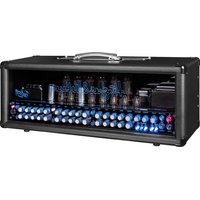
GrandMeister Deluxe 40 - Guitar amp HUGHES & KETTNER - Free user manual and instructions
Find the device manual for free GrandMeister Deluxe 40 HUGHES & KETTNER in PDF.


| Product type | Tube guitar amplifier |
| Brand | Hughes & Kettner |
| Model | GrandMeister Deluxe 40 |
| Dimensions (W x H x D) | 445 x 170 x 150 mm |
| Weight | 7.7 kg |
| Mains power | 100-240 V, 50/60 Hz (depending on version), max. consumption 200 W |
| Output power | 40 W (adjustable 20 W, 5 W, 1 W, 0 W via Power Soak) |
| Preamplifier tubes | 3 x 12AX7 |
| Output stage tubes | 4 x EL84 |
| Number of channels | 4 (Clean, Drive, Lead, Ultra) |
| Main features | Programmable Power Soak, Tube Safety Control (TSC™), Red Box AE Out (XLR), switchable series FX Loop, MIDI In/Out, IDB™ Noise Gate, Reverb, Delay, Modulation (Chorus/Flanger/Phaser/Tremolo) |
| Instrument input | 6.35 mm unbalanced jack, 1 MΩ |
| Speaker output | 6.35 mm jack, impedance 8-16 Ω |
| Maintenance and cleaning | Clean with a dry cloth; do not open the housing; entrust any repairs to a qualified specialist |
| Safety | Do not expose to humidity; use IEC127 (5×20 mm) type fuses; disconnect during thunderstorms; do not obstruct ventilation slots |
| Spare parts and repairability | Replacement tubes available from specialized dealers; tube replacement reserved for qualified personnel; TSC™ enables diagnostics and simplified pairing |
Frequently Asked Questions - GrandMeister Deluxe 40 HUGHES & KETTNER
- All on in Standby: normal.
- Off in Play: tubes OK.
- One on: under-current, replace the tube.
- Two on: Power Soak activated or fault.
- One flashing and one on: over-current, the defective tube is cut off, the amplifier continues at 20 W. Refer to table §7.3 for specifications.
User questions about GrandMeister Deluxe 40 HUGHES & KETTNER
0 question about this device. Answer the ones you know or ask your own.
Ask a new question about this device
Download the instructions for your Guitar amp in PDF format for free! Find your manual GrandMeister Deluxe 40 - HUGHES & KETTNER and take your electronic device back in hand. On this page are published all the documents necessary for the use of your device. GrandMeister Deluxe 40 by HUGHES & KETTNER.
USER MANUAL GrandMeister Deluxe 40 HUGHES & KETTNER
Hughes & Vettwer TECHNOLOGY OF TONE
GrandMaster Deluxe 40
Manual 1.1
Important Safety Instructions! Read before connecting!
This product has been built by the manufacturer in accordance with IEC 60065 and lct the factory in safe working order. To maintain this condition and ensure non-risk operation, the user must follow the advice and warning comments found in the operating instructions. The unit conforms to Protection Class 1 (protectively earthed). If this product shall be used in vehicles, ships or aircraft or at altitudes exceeding 2000m above sea level, take care of the relevant safety regulations which may exceed the IEC 60065 requirements. WARNING: To prevent the risk of fire and shock hazard, do not expose this appliance to moisture or rain. Do not open case - no user serviceable parts inside. Refer service to qualified service personnel.

This symbol, wherever it appears, alerts you to the presence of uninsulated dangerous voltage inside the enclosure - voltage that may be
sufficient to constitute a risk of shock.

This symbol, wherever it appears, alerts you to the presence of externally accessible hazardous voltage. External wiring connected to any
terminal marked with this symbol must be a "ready made cable" complying with the manufacturers recommendations, or must be a wiring installed by instructed persons only.

This symbol, wherever it appears, alerts you to important operating and maintenance instructions in the accompanying literature.
Read the manual.

This symbol, wherever it appears, tells you: Take care! Hot surface! To prevent burns you must
not touch.
- Read these instructions.
- Keep these instructions.
- Follow all warnings and instructions marked on the product and in this manual.
- Do not use this product near water. Do not place the product near water, baths, wash basins, kitchen sinks, wet areas, swimming pools or damp rooms.
- Do not place objects containing liquid on the product - vases, glasses, bottles etc.
Clean only with dry cloth. - Do not remove any covers or sections of the housing.
- The set operating voltage of the product must match the local mains supply voltage. If you are not sure of the type of power available consult your dealer or local power company.
- To reduce the risk of electrical shock, the grounding of this product must be maintained. Use only the power supply cord provided with this product, and maintain the function of the center (grounding) pin of the mains connection at any time. Do not defeat the safety purpose of the polarized or grounding-type plug.
-
Do not defeat the safety purpose of the polarized or grounding-type plug. A polarized plug has two blades with one wider than the other. A grounding type plug has two blades and a third grounding prong. The wide blade or the third prong are provided for your safety. If the provided plug does not fit into your outlet, consult an electrician for replacement of the obsolete outlet.
-
Protect the power cord from being walked on or pinched particularly at plugs, convenience receptacles, and the point where they exit from the device! Power supply cords should always be handled carefully. Periodically check cords for cuts or sign of stress, especially at the plug and the point where the cord exits the device.
- Never use a damaged power cord.
- Unplug this product during lightning storms or when unused for long periods of time.
- This product can be fully disconnected from mains only by pulling the mains plug at the unit or the wall socket. The product must be placed in such a way at any time, that disconnecting from mains is easily possible.
Fuses: Replace with IEC127 (5x20mm) type and rated fuse only! It is prohibited to use "patched fuses" or to short the fuse-holder. Replacing any kind of fuses must only be carried out by qualified service personal.
Refer all servicing to qualified service personnel. Servicing is required when the unit has been damaged in any way, such as: - When the power cord or plug is damaged or frayed.
If liquid has been spilled or objects have fallen into the product. - If the product has been exposed to rain or moisture.
- If the product does not operate normally when the operating instructions are followed.
- If the product has been dropped or the cabinet has been damaged.
- Do not connect external speakers to this product with an impedance lower than the rated impedance given on the product or in this manual. Use only cables with sufficient cross section according to the local safety regulations.
- Keep away from direct sunlight.
- Do not install near heat sources such as radiators, heat registers, stoves or other devices that produce heat.
- Do not block any ventilation openings. Install in accordance with manufacturer's instructions. This product must not be placed in a built-in installation such as a rack unless proper ventilation is provided.
- Always allow a cold device to warm up to ambient temperature, when being moved into a room. Condensation can form inside it and damage the product, when being used without warming up.
- Do not place naked flame sources, such as lighted candles on the product.
- The device must be positioned at least 20cm / 8^ away from walls with free air space inbetween, and there must be free air space of at least 50~cm / 20^a immediately above the unit within which no object(s) may be placed or positioned.
- Use only with the cart, stand, tripod, bracket or table specified by the manufacturer or sold with the product. When a cart is used, use caution when moving the cart/product combination to avoid injury from tip-over.
- Use only accessories recommended by the manufacturer, this applies for all kind of accessories, for example protective covers, transport bags, stands, wall or ceiling mounting equipment. In case of attaching any kind of accessories to the product, always follow the instructions for use, provided by the manufacturer. Never use fixing points on the product other than specified by the manufacturer.
-
This appliance is NOT suitable to be used by any person or persons (including children) with limited physical, sensorial or mental ability, or by persons with insufficient experience and/or knowledge to operate such an appliance. Children under 4 years of age must be kept away from this appliance at all times.
-
Never push objects of any kind into this product through cabinet slots as they may touch dangerous voltage points or short out parts that could result in risk of fire or electric shock.
- This product is capable of delivering sound pressure levels in excess of 90dB , which may cause permanent hearing damage! Exposure to extremely high noise levels may cause a permanent hearing loss. Wear hearing protection if continuously exposed to such high levels.
The manufacturer only guarantees the safety, reliability and efficiency of this product if:
Assembly, extension, re-adjustment, modifications or repairs are carried out by the manufacturer or by persons authorized to do so. - The electrical installation of the relevant area complies with the requirements of IEC (ANSI) specifications.
- The unit is used in accordance with the operating instructions.
- The grounding of the center pin of the mains plug is maintained to reduce the risk of shock.
Things to do before operating the amp
- Please read these instructions carefully, particularly the notes on safety, before operating the amp.
- The manufacturer disclaims any liability on responsibility whatsoever for any damage or defect to this and other devices resulting from misuse.
- Before you plug this amp into a mains power outlet, make sure its Power and Standby switches are off and that the voltage rating indicated on its rear panel matches your local mains current.
- A word of warning before you fire up your GrandMeister Deluxe 40: It's loud, and high volume levels can cause hearing damage. To avoid very loud and unwelcome surprises, make a habit of backing the Volume knob of the guitar connected to the GrandMeister Deluxe 40 all the way down before switching on the amp!
GrandMaster Deluxe 40
1 Quick Start. 3
2 The fundamentals of handling GrandMeister Deluxe 40 3
3 The channel section 6
4 The effects section. 7
5 The Master Section 8
6 Rear panel 8
7 Tube Safety Control (TSCTM) 10
8 MIDI 11
9 AES 13
10 Technical Data. 13
1 Quick Start
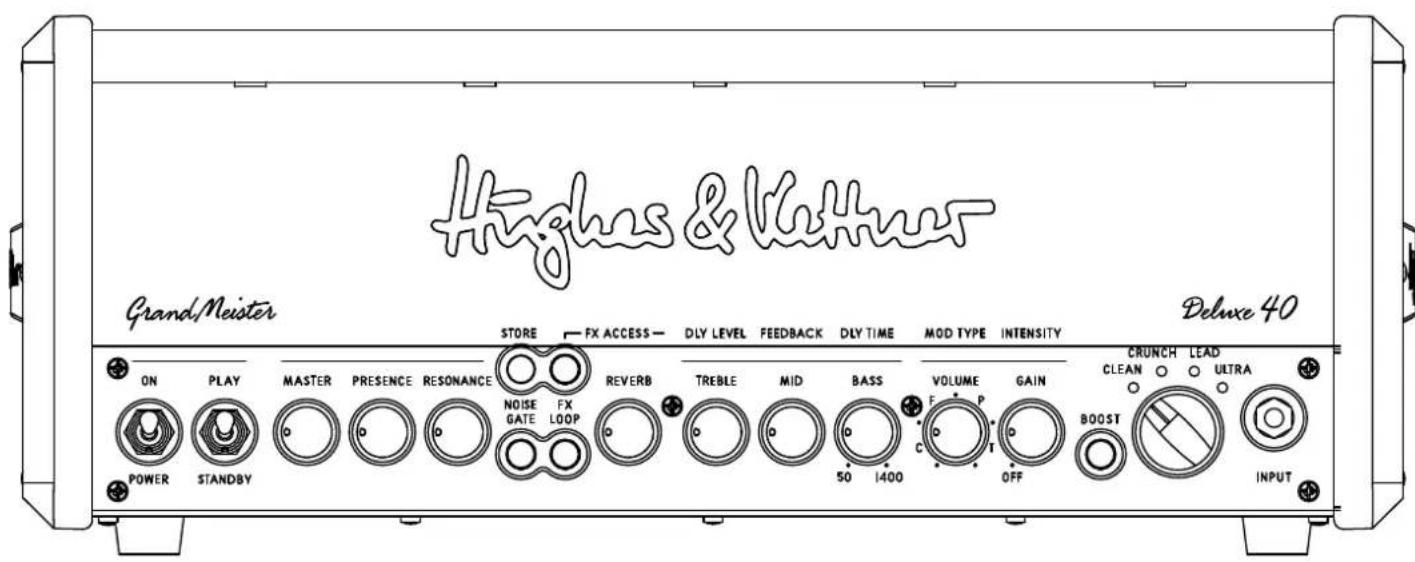
Mains In: Connect the factory-included power cord (Mains Lead) to this socket.
MIDI In: Connect the MIDI Out of your favourite MIDI controller to the MIDI In. Though this is a 7-pin interface, you can connect a standard 5-pin MIDI cable and use any standard MIDI controller. The two additional terminals (1 and 7) serve to supply phantom power to the Hughes & Kettner FSM-432 MIDI board.
The MIDI In is as important as the Input for your guitar! Only via MIDI will you have access to all 128 presets of the GrandMeister Deluxe 40.
Input: Connect your guitar to this input using a shielded cord equipped with 6.3mm (1/4^#) jack plugs.
Speaker: Connect a speaker cabinet designed for guitar amps to this jack. Using a single speaker cord, you can connect any cab with an impedance of 8 ohms to 16 ohms. We recommend the matching Hughes & Kettner TM 112 or TM 212 cabs.
Power/On Switch: Set this switch to On to get the mains power flowing. The amp lights up, and the tubes will begin to heat up.
Play/Standby Switch: Give the tubes about 30 seconds to get toasty; then you can flip the "Standby" switch to "Play". The amp is now ready to operate. When taking a longer break from playing, "Standby" switch so the tubes remain at operating temperature. This protects them and ensures they last longer.
2 The fundamentals of handling GrandMeister Deluxe 40
GrandMeister Deluxe 40 is a tube amp, and it works much like other tube amps. But its handling concept is more advanced, so time spent getting to know how it operates is time well spent. The following basic facts will help you understand the amp's operating concept:
- Although GrandMeister Deluxe 40 is an an its switching and controlling functions (except the Master knob) are programmable.
- Depending on the amp's operation mode, some knobs and switches have different functions.
- All settings can be saved and recalled via MIDI. For this purpose, you can store your sound settings into 128 memory slots, the so-called presets.
Heads up: GrandMeister Deluxe 40 features a programmable Power Soak that converts the power lubes' energy into heat. Rather than backing off the Master knob, which would compromise the tone somewhat, you can turn up the Master knob in any situation and use the Power Soak to adjust the overall volume with no adverse effects on your tone. You have two options: if you wish to program various combinations of preamp and power amp saturation, simply save the given Power Soak setting for each preset. If you want to adjust all presets' volume to the situation at hand - for example, to dial down your rehearsal room volume to living room level - you can apply the Power Soak globally at the touch of a button. For more on this, see section 6.2.
2.1 How the knobs work
GrandMeister Deluxe 40 is a four-channel tube amp. All four channels are controlled by the same set of knobs. Your choice of channel determines the knob's assignment. For example, when you have chosen the Clean channel via the chicken-head selector switch (see chapter 3), the Gain knob will determine the Clean channel's amount of gain. This means the channels are independently adjustable and no knobs need to be shared. The best thing about this is that it gives you total remote control capability so you can adjust knobs via MIDI in real time. To learn more about this, see section 2.3 in this chapter and chapter 8.
Note: The knobs look and feel like standard-issue pots with a 300-degree control range and left and right stops. But there's a difference that may take some time getting used to: the knob setting programmed in a preset is independent of the knob's physical position. In other words, when you switch from one preset to another, the knob's actual not reflect the setting programmed in the preset, and you may well hear something other than what you're seeing would suggest. The knob will respond like any other conventional pot as soon as you move it. The Store LED in the Master section tells you the knob's setting stored in the preset. It lights up when the physical position of the knob corresponds to the preset setting. You can learn more on this in section 2.4.
Heads Up: You may hear a soft background noise when twisting knobs. This sound is made by the Programmable Resistor Network (PRN™), as it switches its 256 resistors: each of these rotary controls consists of 256 individual resistors in serial array, 256 switches, and a memory with the ability to save and recall every switch's position.
2.2 Selecting presets
Presets can only be changed via MIDI. You can use any MIDI footswitch, MIDI controller, or MIDI equipped pedal board to switch presets. Both MIDI devices, amp (receiver) and the controller (sender), should use the same channel. Otherwise, MIDI commands will be ignored or The factory default is MIDI channel 1 and "Omni On" (which means the amp receives on all 16 MIDI channels) to guarantee instant operation. If GrandMeister Deluxe 40 does not react to program changes properly, see chapter 8.1, which explains how you can change the MIDI channel, or refer to the manual of your favourite MIDI controller.
2.3 Remote Control via the Hughes & Kettner FSM-432 MK III MIDI Board
Let's have a look at the Hughes & Kettner FSM-432 first. It serves to select the 128 memory slots arranged in 32 banks of four presets each. You can easily configure setups any way you wish, say by assigning the four presets of a bank to a song. GrandMeister Deluxe 40 works with all versions of the FSM-432. We recommend using the FSM-432 MK III, which ships with Stompbox mode and two controller inputs for expression pedals and a footswitch. These features let you operate the GrandMeister Deluxe 40 even more intuitively.
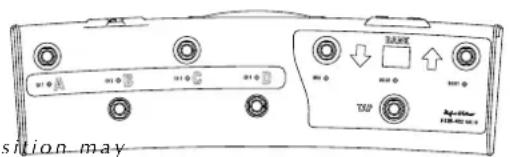

1 Preset A, B, C, D: Presets within a bank activate directly, that is, you can switch straight from A to B within the same bank. The LEDs above the A, B, C, and D buttons indicate the selected preset.
2 Bank Up/Down: To access a preset in another bank, select the target bank using the Up and Down buttons. You can continue playing with the current preset while you're navigating. The display of the FSM-432 shows the bank's number; it flashes until you select a preset in the target bank by pressing A, B, C, or D. The FSM-432 will not switch over to the new preset until you do this.
3 Tap: Tap offers you a quick, convenient way of adjusting delay time. It's particularly handy on stage: simply tap your foot on the Tap button in time with the beat to match the delay time to the tempo. See section 4.3 for more info.
4 Mode switch - Preset/Stompbox: The sliding switch above the MIDI connections on the rear side of the footswitch determines if the FSM-432 MK III is operating in Preset Mode or Stompbox Mode.
If you move the sliding switch to "Stompbox Mode", the display shows "Sb". In this mode, the FSM-432's buttons do not serve to select preset, but to switch channels directly. In addition, modulation FX, delay and boost can be independently activated and deactivated at the push of a button. So in this mode, GrandMeister Deluxe 40 operates just like any common amplifier used with external FX pedals and stomp boxes.
Heads up: Stompbox mode is designed specifically for situations where you just don't have the right preset available or when you want to create presets and wish to compare sounds with or without effects at the touch of a button. The Tap function is unavailable in Stompbox mode, and effects settings apply to all four channels. This is why Preset mode is highly recommended for live situations: it lets you switch all settings on the GrandMeister Deluxe 40 remotely, via footboard.
5 Control 1 and Control 2: You can connect either expression pedals or single footswitches to these two 6.3mm (1/4^) jack plugs, both of which you can assign additional control functions for the GrandMeister Deluxe 40 to, so all of the amp's programmable functions can be remote controlled. GrandMeister Deluxe 40 is assigned to a controller (that is: a function).
For instance, you can control the reverb of the amp's FX module using an expression pedal. You can also switch the noise gate on and off with an external footswitch or change the amount of gain while playing without having to take your hands off your guitar. The most useful functions are the remote control of the Boost (without changing presets) using a foot switch as well as controlling volume with an expression pedal. can see in the chart (chapter 8.3), assigning controller number 07 to one of the Control inputs and connecting an expression pedal to it will let you remote control the volume. The switching function of the Boost can be remote controlled by assigning controller number 64 to the other Control input and connecting a footswitch to it.
As a rule, a MIDI value of 0 corresponds to a knob's far left (counterclockwise) position and a button's "off" position. A MIDI value of 127 corresponds to a knob's far right (clockwise) position and a button's "on" position. These values have the same effect as if you were to adjust the knob or press a button on the amp. There is one exception to this rule: The Volume knob's upper limit is always determined by the value stored in the preset. Let's say you saved a sound with the Volume knob set to the 12 0'clock position. Then the maximum value of 127 achieved when you floor an expression pedal only goes up to the level determined by the knob's midway position. This ensures that you can adjust the volume of a preset in a live situation exactly as you would with a conventional volume pedal.
A word to the wise: The expression pedal's position is ignored when you change presets! Say you give the expression pedal a little heel to bring the volume down. Then when you switch presets, the volume will change to reflect the Volume knob setting that you previously stored with this preset. If you wish to control GrandMeister Deluxe 40's overall volume remotely - that is, adjust the Master knob from afar - we recommend inserting an analog, low-impedance volume pedal into the FX loop.
Heads up: In theory, you could switch GrandMeister Deluxe 40's effects on and off via controllers as the value 0 actually means "off" to a preset. However, there's a hitch: whereas switching functions such as Boost or FX Loop have a default value for "on", this option isn't available for an effect that is switched off in the preset by storing the value 0. This means it can't be switched on with a footswitch. If you want to switch effects on and off in live situations, you have to first store the preset with the effects activated. Then you can do things like switch the delay off and back on again when needed. An expression pedal gives you another option: it lets you adjust the volume of an effect regardless of the value stored in the preset, just as if you were to twist the volume knob on the delay device itself.
To learn more about this, see the FSM-432 MK III's manual.
2.4 Programming a preset
Programming a preset is as simple as it can get. Once you have found your favorite setting, exactly that setting of every single knob and switch (except the Master Volume) can be stored into a preset with the Store button. This is pretty much like playing a tube amp with 128 channels, each with its own Gain, Volume, EQ and even effects settings.
Storing settings by overwriting the currently selected preset
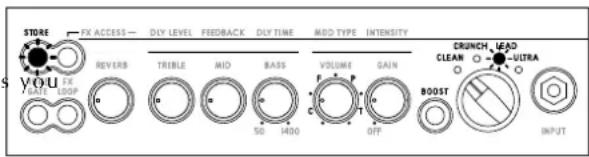
An easy way to store edited settings is to simply overwrite the most recently selected preset. To do this, press and hold the Store button for about two seconds until its light flashes briefly and then extinguishes. Release the Store button, and your settings will be stored.
Storing settings by selecting a new memory slot
If you do not wish to overwrite the current preset, you can easily select a new memory slot instead. In this case, rather than holding the Store button down for two seconds, press it briefly and then release it. Its light stays on to signify that GrandMeister Deluxe 40 is primed and ready to receive a MIDI program change to define a memory slot.
- From the FSM-432: Select a MIDI bank from 1 to 32 on the FSM-432. The FSM-432 is waiting for input via one of the four preset buttons A to D. Then engage preset button A, B, C, or D. The light on the Store button extinguishes, and the preset is stored.
- From any other MIDI device: as soon a program change is sent, the preset will be stored and can be recalled just by sending that program change again.
Reading out stored knob settings
When you select a preset, the single knobs' actual positions may not represent their stored values. But it is easy enough to read the information out: select a preset, grab the knob of your choice and twist it to the left or right until the Store button lights up. Now the knob's position matches the setting stored in the preset.
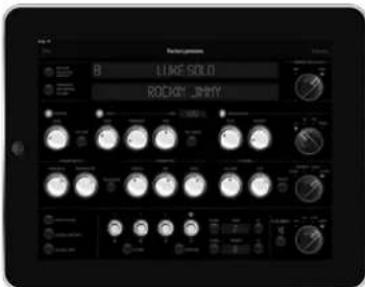
2.5 GM40Remote: The GrandMeister Remote App for iPad
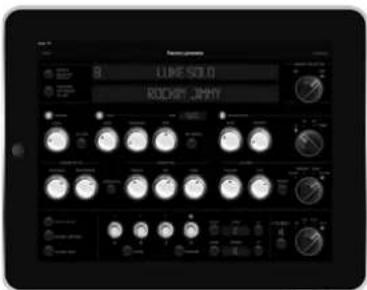
All controls and buttons on the GrandMeister Deluxe 40 are MIDI-enabled, so we programmed an app for iPad that makes the most of MIDI to extend the amp's capabilities.
This app lets you:
- Give every preset a unique name
- Visually monitor all parameters in real time
- Remotely control all parameters in real time
- Save sounds in the app
- Download and upload presets to and from the amp
- Share presets via e-mail or message
The free app is available from the Apple App Store.
Requirements:
Apple iPad with iOS8 or later
- iPad-compatible MIDI interface (USB interfaces are not supported) We recommend the Hughes & Kettner WMI-1 wireless MIDI interface. See the following section to learn more about it.
2.6 The Hughes & Kettner WMI-1 Wireless MIDI Interface for iPad
The Hughes & Kettner WMI 1 affords you wireless Wi-Fi access to all GrandMeister Deluxe 40 remote app functions. The WMI 1 generates its own network so you can use this option even in rehearsal rooms and on stages where WLAN is unavailable!
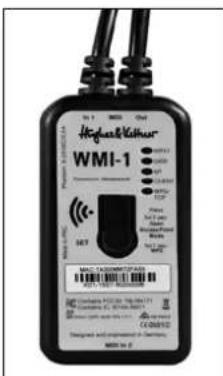
The WMI-1 provides two MIDI In ports and one MIDI Out. It goes between the Gran and the FSM-432 MK III, and is connected and powered via MIDI. To get started, simply go to your iPad's wireless settings and select WMI 1 as your network, or log in to your home network via the WPS.
Check out the WMI-1 manual (available on the Hughes & Kettner website) to learn more.
3 The channel section
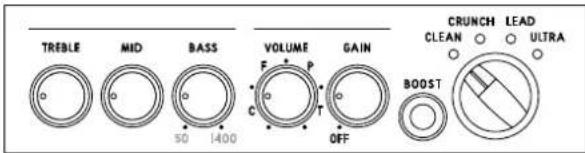
GrandMeister Deluxe 40 sports four channels, each voiced very differently and accessible via a chicken-head selector switch. The power amp feedback circuit, which has a formative hand in shaping your tone, is also reconfigured during channel switching. The programmable knobs (see 2.1) afford you full access to all sound parameters on every channel. We even painstakingly fine-tuned the knobs' control ranges and characteristics to match the selected channel's voicing.
1 Clean Channel: GrandMeister Deluxe 40's Clean channel certainly merits its name. It delivers sparkling fresh sounds and offers tons of headroom. It's worth your while to experiment with different Gain settings in combination with the switchable Boost.
2 Drive Channel: Your first stop for classic overdrive at its finest. This channel sweeps the sonic spectrum from clean to mean, and countless tones in between. Engage Boost to conjure a rude rock roar.
3 Lead Channel: This channel's masterfully musical compression sends those riffs and licks flying off your fingertips. Hit Boost for an extra helping of in-your-face solo sound.
4 Ultra Channel: Get your high-gain tone right here. The Ultra channel's top end slices, dices, but never sacrifices its thunderous low end for raging metal riffs and larger-than-life lead tone. Dropped tuning conjures a quasi-religious experience.
5 Gain: The Gain knob determines input sensitivity and therefore the preamp's saturation level. Paired with Boost, it is your most in sound-sculpting tool.
6 Boost: Boost targets specific frequency ranges in your tone and kicks them up a notch. This yields even more assertive, creamier, or punchier tone, depending on the channel.
7 Bass, Mid, Treble: The three-band voicing section's sound-shaping action is fine-tuned for each channel, and it specifically addre frequency ranges that define each channel's characteristic tone.
Heads Up: These are classic passive tone controls that influence one another. For example, if you crank the Mid knob, the Bass knob will be less effective than when you back the Mid knob down. Presence and Resonance are independent of the three-band voicing controls; that is, their action remains unaffected by the other knobs' settings.
8 Volume: Use the Volume knob to adjust preset levels and adjust their relative balance to other presets.
Heads Up: Unlike a conventional Volume control, this knob d bring the level all the way down; it merely boosts or cuts the given level. The 12 o'clock position is the best starting point for adjusting volume.
Caution: Please don't use this knob to control the amp's overall output level - that's the Master knob's job (see 5.1)!
4 The effects section
GrandMeister Deluxe 40 offers three independent effects modules, with reverb, delay and modulation effects as well as a noise gate. All of them can be used simultaneously.
Heads Up: The far left knob positions of the "Reverb", "Dly Level", and "Intensity" knobs bypass the given effect. Twisting those knobs counter clockwise to the far left takes the given effect module out of the signal path.
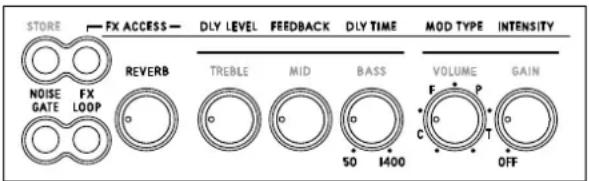
1 Reverb: GrandMeister Deluxe 40's digital reverb matches the warmth and musicality of classic spring reverbs. A genuine improvement over its analog ancestors, it automatically adjusts the reverb tail - the higher the Reverb volume setting, the longer the reverb time.
2 FX Access: You always have direct access to the Reverb control. In order to access the Delay and Modulation effects, just press the FX Access button - it will start flashing. Now you are in the FX mode, and the channel control knobs now serve as effects controls. To exit the FX mode, press FX Access again. It stops flashing and you are back to the tone control mode.
3 Delay: The Delay module's "Dly Level", "Feedback" and "Dly Time" knobs afford you total control over all parameters.
Dly Level: Adjusts the volume of repetitions, sweeping from all the way off to just as loud as the original signal.
- Feedback: Adjusts the number of repetitions from one to infinite.
- Dly Time: Adjusts the time to the next repetition from 50 milliseconds to 1.4 seconds. When you're tapping in delay time on the FSM-432's Tap button (see section 2.3), the effect adopts the new time after your second tap. The Tap LED flashes for about five seconds in sync with the beat to give you a visual indication of delay time. The Tap function only works when the Delay is active. If the Delay is off - or more accurately, bypassed - the effect will not adopt your Tap tempo.
Heads up: The FSM-432 offers a nifty Tap function that lets you control the GrandMeister Deluxe 40's delay time via MIDI. Most third-party MIDI controllers don't let you do this, and the control range is limited with the few that do. Not many vendors offer the option of setting minimum and maximum delay times, which you need to use this Tap function at least to some extent. The problem is that there is no standard MIDI message for tap, only for time. The correct value for time has to first be determined by measuring the interval between two taps. Unlike all other knobs where 0 is the minimum value and 127 the maximum value, there is no standard value for delay time because practically every effects processor
works with whatever minimum and maximum delay times the designer happened to prefer.
For example, the correct MIDI value for a delay time of 500 milliseconds (120 BPM) is calculated for the GrandMeister Deluxe 40 as follows:
$$ \frac {5 0 0 \mathrm {m s}}{(1 4 0 0 - 5 0) \mathrm {m s}} \times 1 2 8 = 4 7. 4 $$
This FSM-432 performs this calculation automatically and sends the correct value to the GrandMeister. The FSM 432 actually works with 256 steps, giving you twice the resolution of MIDI, which offers 128 steps at best. This means that the FSM 432 sends precisely the value of 47.4 rather than the rounded figure 48. In other words, the FSM-432's Tap function gives you very accurate time values.
Continuous controller #4 adjusts the actual delay time. See section 8.3 for more on this.
4 Modulation FX: This module serves up four modulation effects - Chorus, Flanger, Phaser, and Tremolo.
- Mod Type: Each effect is assigned to one quarter of this knob's control range. The first quarter addresses Chorus, the second addresses Flanger, the third addresses Phaser, and the final quarter addresses Tremolo. You can adjust the modulation effect's rate within its assigned quarter. The more you turn "Mod Type" up, the faster the rate gets.
- Intensity: This knob adjusts the volume of the modulation effects.
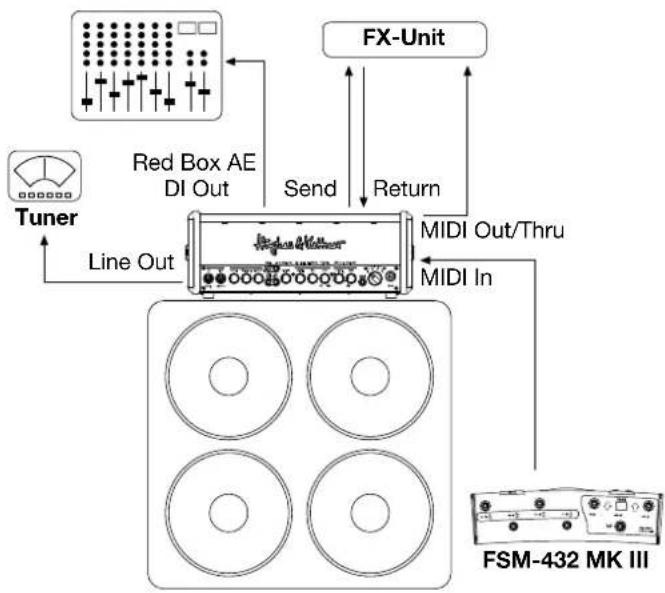
5 FX Loop: This serial loop lets you patch in external effects devices: connect the Send jack in the FX Loop section on the amp's rear panel to your effects processor's input and the Return jack to the processor's output (see chapter 6.6). The FX Loop button activates and deactivates the loop.
6 Noise Gate: The programmable Noise Gate button switches the IDB™ noise gate on and off for each preset. When activated, the noise gate kicks in to mute the amp as the signal level drops below a certain threshold. The gate remains shut until you hit the guitar strings. When you do so, it opens up again. The Noise Gate Hard/Soft knob on the amp's rear panel controls the noise gate's response, see chapter 6.5.
5 The Master Section
The Master section lets you adjust the amp's overall volume, Resonance and Presence.
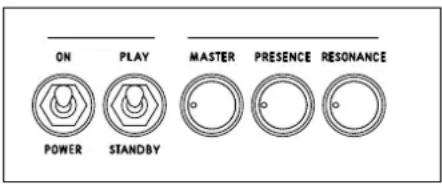
1 Master: As the name suggests, this knob puts the power amp and its volume level at your thumb and forefinger's command. Handle it carefully and you will enjoy a gratifying rather than an agonizing aural experience.
Heads Up: Unlike channel and effect controls, the Master knob is not programmable! It works like any conventional knob, and its physical position indicates the actual setting. It's always a good idea to back the Master knob off by twisting it to the far left position before powering the amp up.
2 Resonance: Set the Resonance knob to 12 o'clock, and you will hear the normal resonance created by the amp-and-cabinet combination. Twisting it counter clockwise dampens the speakers' and the cabinet's resonance for a looser, softer sound that sweetens up clean tone. Turning the knob clockwise intensifies resonance for a tighter, punchier low end that works well with distorted sounds.
3 Presence: This knob controls the amount of generated by the amp - the higher the setting, the more intense the effect.
Heads Up: Resonance and Presence can be programmed into every preset, or these controls can be used as a master control that is not changed by switching presets, like the Master Volume control. If you want Resonance and Presence as a global control, press Store and FX-Access simultaneously for three seconds until the Store LED starts flashing. Now the FX Access LED indicates if you are in Global Mode (flashing) or in Preset Mode (not flashing). You can change the mode with the FX Access button: if it does not flash (Preset Mode), press it to change to Global Mode. If it flashes (Global Mode), press it to change to Preset Mode. To store your changes press Store for three seconds until it stops flashing.
You'll find a quick-start guide on the bottom of the GrandMeister Deluxe 40:

6 Rear panel
1 Speaker: GrandMeister Deluxe 40 offers one speaker output for 8 to 16 cabinets. Connect a speaker cabinet designed for guitar amps to this jack.
Using a single speaker cord, you can connect any cabinet or combination of cabinets whose total impedance ranges between 8 Ω and 16 Ω. The formulas below serve to calculate the overall impedance (R) of two cabinets with different impedances (R1 and R2):
- For cabinets wired in series: R = R1 + R2
Example: If you connect two 8 cabinets, the overall impedance is 16 . However, very few modern cabinets are wired in series. Parallel circuits are far more common.
For cabinets wired in parallel: = (1× 2) / (1 + 2)
Here is an example with two 16 Ω cabs:
[ \mathrm{R} = (16 \times 16) / (16 + 16) ]
[ \mathrm{R} = 256 / 32 = 8\Omega ]
2 Power Soak: This feature lets you enjoy the benefits of full-blown power amp saturation at low volume, so you can play at home in your living room without alienating the neighbors. Its silent recording capability lets you capture genuine tube-driven tone via a mixing console without having to driverspeaksvAnd ifyouwant to rehearse in silence at any time of day or night, simply plug a set of headphones into the mixer. Thanks to the amp's programmability, you can easily program your own set of studio and home presets.
None of the buttons in this section lights up when the amp is in "normal" operating mode (40 watts of output power). Pushing one of the four buttons will activate the output power reducing function. When you press the 20 W button, TSC™ disables two tubes to reduce the output power by half, to 20 watts. When you press the 5 W and 1 W buttons, some of the power is converted into heat to further reduce the output to 5 watts and 1 watt respectively. In Speaker Off mode, all the power is converted into heat and the amp is muted. Re-pressing the currently selected and therefore illuminated button will deactivate the Power Soak and bring you back to 40 watts of output power.
Note that if you choose to mute the amp, you do not need to connect a speaker. Designed to enable silent recording, this option provides the full signal to the Red Box AE output. To protect the power amp, GrandMeister Deluxe 40 automatically engages this mute circuit as soon as the plug is pulled from the Speaker Out port.
Heads Up: Cutting down the power from 40 to 20 watts is done by TSC™ shutting down one pair of tubes (see section 7.1), which is why two TSC™ LEDs always light up when the amp is in 20 W, 5 W, 1 W and Speaker Off modes. In this case, TSC™ is simply indicating that two tubes are off, and not that it has detected a fault.

Heads up: Why a Global Power Soak? Many GrandMeister 36 users wanted this mode, which is why GrandMeister Deluxe 40 now comes with this feature on board. Global Power Soak mode has the following advantage when activated via the app or on the amp itself: all Power Soak settings stored in the presets are ignored and the amp works globally for all sounds and presets with your choice of setting, from 40 watts down to 1 watt. This comes in handy, for example, if you want to practice at home at a low volume regardless of the levels programmed in the presets for your live setup.
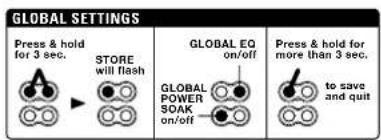
This diagram is also to be found on your amp's bottom panel.
3 Tube Safety Control (TSC™): We have devoted an entire chapter to Tube Safety Control. See section 7 to learn more about it.
4 Red Box AE Out: Since its late 80s release, the original Red Box has been the industry standard tool for capturing the sound of guitar amps without using microphones. Red Box delivers unvarying sound quality at every gig or recording session, putting an end to crosstalk with other instruments and the hassles of experimenting with microphone placement.
The Red Box AE is the latest version of the award-winning speaker simulator. The DSP-powered Ambience Emulation delivers a perfect mix of authentic 4x12 cabinet ambience effects and an ultra-direct attack of pure tube tone, capturing the signal just after the power amp stage, and right before the power soak. For GrandMeister Deluxe 40, we've added in some great new Red Box features that will make your life onstage and in the studio as easy as it can get!
Make sure the Red Box is set to the right level: line is always the best choice due to the higher output level. If the mixing console's XLR input can only handle microphone levels, set the Red Box to mic. If the mixing console or soundcard/audio interface lacks XLR inputs, you will need an XLR to 6.3mm (1/4^) jack adapter, which should be readily available in music stores. Please make sure the Red Box is set to line when it is connected to 6.3mm (1/4^) jack inputs.
You can use the Red Box Out and Speaker Out simultaneously. The Red Box doesn't just work in silent mode - it works in any of the Power Soak's modes too. If you want to use the Red Box Out and Speaker Out together in a live situation, please make sure that all your channels and presets use the same Power Soak setting to avoid unwanted changes in the Red Box Out's level!
| Controls | |
| Vintage/Modern | The "Modern" voicing gives you the bark and honk of modern speakers, while "Vintage" yields a warmer, woollier tone associated with old-school cabs. |
| Small/Large | "Small" captures the compressed sound of a small cabinet housing; "Large" gives you the greater girth and added bass of a sizable cabinet. |
| Line/Mic | Switches from line level to microphone level. |
| Off/On | Switches off the cabinet emulation. Make sure this switch is set to "On" unless you want to use external cabinet emulators! |
5 Noise Gate Hard/Soft: This knob controls the noise gate's sensitivity. The noise gate's IDB™ technology automatically adapts the standard attack and threshold parameters. Its far left position is labeled Hard; its far right position is labeled Soft. The further you twist the Noise Gate Hard/Soft knob to the right, the more sensitive the noise gate's response. Set it to 12 o'clock if you want it to open up at very soft signal levels. The further you twist the knob to the left, the harder the noise gate kicks in and cuts off signals.
Outboard noise gates sandwiched between the guitar and amp or plugged into the FX loop can only measure the signal at one point. The Intelligent Dual Breakpoint (IDB™) technology gauges the directly at the Input jack and post preamp, but pre effects. The noise gate uses these two values to calculate the optimum response. What's more, it does not cut off Reverb and Delay signals.
Heads Up: The Sensitivity knob's setting applies to all presets that incorporate the noise gate. This is convenient and intentional: if conditions on stage are different than in the rehearsal room, you can adjust the noise gate's response for all presets with one simple tweak.
Tip: 12 o'clock is the universal setting. It you wish to use the noise gate as a stylistic device when playing fast staccato riffs at high gain levels, then dial in a setting towards the Hard end of the control range.
6 Line Out, FX Send, FX Return
- Line Out: The Line Out offers you the chance to patch the preamp signal to another power amp or to a tuner.
- FX Send: Connect the FX Send to your external effects processor's input.
- FX Return: Connect the FX Return to your external effects processor's output.
Tip: If you're a stomp-box user, you may want to try the four-cord method: For devices that work best plugged into the front end of the amp, simply connect the guitar to the input of the first pedal in the chain, and the last pedal's output to the amp's Input. Now do the same for devices that work best in the FX loop: connect the pedal's output to the amp's FX Return and the amp's FX Send to the pedal's input. This lets you route chorused, phased and other modulated signals into GrandMeister Deluxe 40's preamp and time-based effects such as reverb and delay after the preamp.
If your multi FX unit features amp models, you can patch these straight to the GrandMeister Deluxe 40's power amp via the FX Return. In combination with the Power Soak and the Red Box Recording Out, this gives you a powerful recording front end that offers very interesting recamping and sound-shaping options for just about every conceivable signal.
Heads Up: You can bypass GrandMeister Deluxe 40's preamp by routing amp models into the FX Return. However, when you switch channels its power amp is re-voiced to deliver the best tone for that channel. This means every channel sounds different, even if you decide to use only the power amp! You probably want the amp model's sound and volume to remain consistent with your original programming. If so, remember which channel you used for programming and select it when you activate the amp model. However, the better option is to program preset to do this for you.
7 MIDI In: MIDI In is a 7-pin interface, but you can also connect a standard 5-pin MIDI cable. The two additional terminals serve to supply phantom power to the Hughes & Kettner FSM-432 MIDI board.
Heads Up: The FSM-432 comes with a 7-pin MIDI cable. You do not need a power source for the FSM-432 because phantom power is provided. If you wish to use a 5-pin MIDI cable however, you will need a power supply. For such cases, the FSM-432 provides an innovative mains port that accepts any AC or DC adapter rated for 9 to 15 volts.
8 MIDI Out/Thru: MIDI Out/Thru forwards signals patched into the MIDI In to other devices. You can connect any external MIDI-enabled signal processor that you wish to switch synchronously with GrandMeister Deluxe 40.
7 Tube Safety Control (TSC™)
TSC
TSC^TM adjusts the bias to improve the amp's tonal and technical stability and to extend the power tubes' lives. It does this automatically and continuously, so there is nothing for you to do but to enjoy the convenience. You can swap tubes easily, quickly, and safely: all the hard work of biasing gets done automatically, so swapping tubes is an exercise in speed and convenience. This is a big help not only in case of a defect, but also when you want to compare different brands of replacement tubes.
Caution: Replacing tubes is a job best left to qualified professionals! TSC™ merely spares the technician the biasing effort.
To use the full information TSC™ can provide you with, you will have to look at the four LEDs in the TSC™ section on the rear panel of the amp. Each LED is assigned to the power tube occupying that corresponding position. The LEDs will give you two different kinds of information: firstly, they indicate the operating status of the tubes (see section 7.1). TSC™ constantly performs an error diagnosis and will even shut down defective tubes if necessary in order to avoid a total failure of the amp. In addition, you can easily get a read-out of the individual tube's bias points, using any standard guitar pick (see section 7.2).
7.1 Automatic Status Indications
All LEDs light up and stay on
All LEDs remain on for as long as the amp is in Standby mode. When you switch from "Standby" to "Play", they will extinguish after a few seconds. If all of the LEDs remain illuminated, the most likely cause is a blown anode fuse that needs to be replaced by a technician. The anode fuse can trip if a tube is already defective when the amp is switched on, and TSC™ does not have enough time to measure the idle current and to then shut the faulty tube down.
None of the LEDs lights up
The power tubes are operating normally.
One LED lights up continuously
If only one LED lights up, then the tube assigned to this LED is not delivering enough current and has been shut down. If the LED does not extinguish after a few minutes, this tube must be replaced.
Two LEDs light up continuously
This tells you one of two things: either the two corresponding tubes are not delivering enough current and therefore have to be replaced (see the instructions for one illuminated LED, section 7.1), or the power soak is active. In the latter case, two tubes are switched off automatically, and the two illuminated LEDs are indicating this (also see section 6.2).
One LED flashes, another lights up continuously
The tube assigned to the flashing LED is generating too much current and therefore has been shut down. This tube has to be replaced. In this type of power amp, it takes a pair of tubes working together to produce the best sound. Therefore TSC^TM also switches the defective tube's counterpart off (indicated by the continuously lighting up LED), so it doesn't degrade the other pair's tone. There is no need to replace this tube, because there's nothing wrong with it.
Now this is where TSC^TM 's intelligence saves your gig: if a tube failure like this occurs in a conventional amp, its fuse usually trips and you can't operate it until you replace the tube and fuse. Thanks to TSC^TM , you can continue playing for as long as the LED remains illuminated. However, please note that shutting down one pair of tubes will halve the amp's output power from 40 to 20 watts. And don't forget to replace the defective tube after your show.
7.2 Manual Read-Out
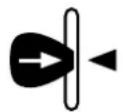
TSC^TM is able to check the power amp tubes' bias points to let you determine if tube pairs are matching. This can easily be done by inserting a guitar pick into the slot right next to the LEDs while the amp is switched on (rather than in Standby mode). All LEDs will flash several times. The
number of flashes of every single LED will give you information about the Hughes & Kettner tube rating of the assigned tube as well as about its bias. The tube ratings table below (7.3) shows the Hughes & Kettner tube ratings and how flash counts translate to a rating. For example, if the TSC™ LED flashes six times, the assigned tube has an S2 rating. The chart also tells you that the tube's bias point is set to 13 volts.
Please make sure that the difference in flash counts between the single LED is no greater than four flashes. Only if the difference is no greater than four flashes, will TSC™ ensure optimum sound. If the difference in flash counts is greater than four, we recommend installing a matched set of tubes to improve the tone. This is strictly a matter of tone - technically speaking, the amp will continue to operate safely.
Heads Up: The two inside tubes and the two outside are matched pairs. If just a single tube is swapped, ensure the replacement matches that of its counterpart. If all tubes are replaced, ensure they all share the same ratings. You can buy replacement tubes from your local dealer. The original Hughes & Kettner rating (S1-57, 0-12) is shown on a sticker on the tube itself.
7.3 Tube ratings tables
| Flashes Rating Bias [V] | ||
| 1 | S7 | 10 |
| 2 | S6 | 10.6 |
| 3 | S5 | 11.2 |
| 4 | S4 | 11.8 |
| 5 | S3 | 12.4 |
| 6 | S2 | 13 |
| 7 | S1 | 13.6 |
| 8 | 0 | 14.2 |
| 9 | 1 | 14.8 |
| 10 | 2 | 15.4 |
| 11 | 3 | 16 |
| 12 | 4 | 16.6 |
| 13 | 5 | 17.2 |
| 14 | 6 | 17.8 |
| 15 | 7 | 18.4 |
| 16 | 8 | 19 |
| 17 | 9 | 19.6 |
| 18 | 10 | 20.2 |
| 19 | 11 | 20.8 |
| 20 | 12 | 21.4 |
| 21 | * | 22 |
| 22 | * | 22.6 |
| 23 | * | 23.2 |
| 24 | * | 23.8 |
| 25 | * | 24.4 |
8MIDI
As you've learned in chapter 2.2, preset can only be changed via MIDI. Sender (controller) and receiver (amp) must use the same channel. The factory default is MIDI channel 1 and "Omni On". If the amp does not react to program changes properly, the MIDI channel has to be changed.
tube's rating
8.1 Setting MIDI channels and switching Omni On/Off
Flip the Play/Standby switch to Standby. Now press and hold Noise Gate and FX Loop simultaneously for three seconds. The Store button will light up. This assigns special programming functions to the following LEDs and buttons:
- FX-Access: lights up to indicate GrandMeister Deluxe 40 is configured to receive incoming program changes via all MIDI channels (Omni On, default). If the LED is not illuminated, the amp receives messages via the selected channel only (Omni Off). To change the Omni mode, just press the FX Access button.
- Noise Gate now serves as a +1/up button, FX Loop now serves as a -1/ down button. Use these buttons to change the MIDI channel.
- When configuring MIDI channels, the four Channel LEDs serve to indicate the MIDI channels. Consult the table below for the MIDI channel assignments. They show what in tech-speak is called binary code:
| MIDI Channel | Clean Crunch | Lead Ultra | ||
| 1 = | ○ | ○ | ○ | ○ |
| 2 = | ○ | ○ | ○ | ● |
| 3 = | ○ | ○ | ● | ○ |
| 4 = | ○ | ○ | ● | ● |
| 5 = | ○ | ● | ○ | ○ |
| 6 = | ○ | ● | ○ | ● |
| 7 = | ○ | ● | ● | ○ |
| 8 = | ○ | ● | ● | ● |
| 9 = | ● | ○ | ○ | ○ |
| 10 = | ● | ○ | ○ | ● |
| 11 = | ● | ○ | ● | ○ |
| 12 = | ● | ○ | ● | ● |
| 13 = | ● | ● | ○ | ○ |
| 14 = | ● | ● | ○ | ● |
| 15 = | ● | ● | ● | ○ |
| 16 = | ● | ● | ● | ● |
Press and hold the Store button for more than three seconds to save the settings and quit MIDI setup mode. The amp is now back in normal operating mode.
| MIDI SETTINGS | |||
| Press & hold for 3 sec. | MIDI OMNI on/off | MIDI CHANNEL | Press & hold for more than 3 sec. |
| STORE lights up | +1/up | -1/down | to save and quit |
You'll also find the diagrams shown in this chapter on your amp's bottom panel.
8.2 Global Settings
If you press the Store and FX Access buttons simultaneously for more than three seconds when the amp is in Standby mode (the Play/Standby switch is set to Standby), the Store button will start flashing. The following LEDs and buttons on the amp will then serve special programming purposes:
- FX Access: This indicates the status of Global Power Soak mode. The button lights up when Global Power Soak mode is active. To deactivate it, press the FX Access button again.
- Noise Gate: This indicates the status of Global EQ mode. The button lights up when Global EQ mode is active. To deactivate it, Noise Gate button again.
| GLOBAL SETTINGS | ||
| Press & hold for 3 sec. | STORE will flash | GLOBAL EQ on/off |
| GLOBAL POWER SOAK on/off | ||
8.3 MIDI implementation chart / controller list
In addition to controlling all switching functions via MIDI program changes, you can also change the parameters of every single editable function of the amp in real time via MIDI control changes. The following chart shows the editable functions and the corresponding controller numbers:
| Controller number | Function |
| 1 Modulation Intensity | |
| 4 Delay Time, 128 steps, 51 ms to 1360 ms | |
| 7 | V o l u m |
| 9 Mute On-Off. On status remains active until the amp channel is changed, the volume parameter is changed or the amp is re-started. | |
| 12 Mod-FX Type | |
| 20 Gain (soft) | |
| 21 Bass | |
| 22 Mid | |
| 23 Treble | |
| 24 | Resonance |
| 25 Presence | |
| 26 | Modulation Speed (always for the active modulation effect) |
| 27 Delay Feedback | |
| 28 Delay Volume | |
| 29 | Reverb Volume |
| 30 | Power Soak Switching (5 sectors) |
| 31 | Channel Switching (4 sectors) |
| 52 Mod-FX On-Off | |
| 53 Delay On-Off | |
| 54 Reverb On-Off | |
| 55 FX-Loop On-Off | |
| 56 Gain (hard) | |
| 57 Volume (hard) | |
| 63 | Noise Gate On-Off |
| 64 Boost On-Off | |
Heads up: You can adjust GrandMeister Deluxe 40's volume levels via a controller pedal (MIDI controller #7), but only up the maximum value stored in the amp. This means that a controller pedal connected to the FSM-432 does not work like a global remote control for the amp's overall volume level because its control range is always determined by the maximum value stored in each preset.
8.4 Factory Reset
A factory reset is a seldom-needed feature. Nonetheless, please read these instructions carefully to ensure you don't accidentally delete your prescts.
s the You can perform a factory reset by doing the following: Press "Store" and "FX Access" simultaneously while powering the amp up by using the Power/On switch. Both buttons will flash to indicate the successful factory reset.

Caution: Please note that this procedure is a last-resort option. It will reset all settings, including the 128 MIDI-switchable presets (chapter 2) and the basic MIDI configuration (chapter 8.1).
9 AES (EU version only)
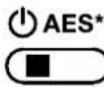
Referring to Commission Regulation (EC) No. 1275/2008, electrical electronic devices need to be equipped with an energy saving mechanism which automatically switches the device off after not being used for a certain period of time. On your GrandMeister Deluxe 40, this mechanism is called AES. It can be activated and deactivated with the mini switch right next to the speaker jack.
Factory default is AES on; the mini switch is in the left position. In this mode, the amp will automatically be switched off after a phase of silence of about 90 minutes. The phase of silence is reset, and starts again, as soon as the amp receives an input signal (e.g. by playing a note). A quite gentle signal is enough to trigger the re-start of the 90-minute phase of silence until the amp will switch off automatically. After automatically being shut down by AES, the amp can be switched back on by flipping the Power/On switch off and then on again.
Moving the mini switch to the right will deactivate AES, so it will not shut down the amp after 90 minutes of inactivity.
10 Technical Data
| GrandMeister Deluxe 40 Head | |
| Preamp tubes 3 x 12AX7 | |
| Power tubes 4 x EL84 | |
| Power output 40 watts | |
| Max. power consumption 200 watts | |
| Mains voltage tolerance range +/-10% | |
| Ambient operating temperature range 0° to +35°C | |
| Mains fuse, 100 volts 250 V / T 2 A L | |
| Mains fuse, 120 volts 250 V / T 1.6 A L | |
| Mains fuse, 220-230 volts 250 V / T 800 mA L | |
| Mains fuse, 240 volts 250 V / T 800 mA L | |
| Input jack 6.3 mm (1/4"), unbalanced, 1 MOhms | |
| Sensitivity (Clean, without Boost, all Pots in center position, Master in max. position) | -23 dBV |
| Max. Input (without Boost) | 0 dBV |
| Return jack | 6.3 mm (1/4"), unbalanced, 25 kOhms |
| Sensitivity (Clean, without Boost, all Pots in center position) | 0 dBV |
| Sensitivity (Clean, without Boost, all Pots in center position, Master in max. position) | -10 dBV |
| Max. Input | +14 dBV |
| Send jack | 6.3 mm (1/4"), unbalanced, 220 Ohms |
| Nominal Level (Clean, without Boost, all Pots in center position) | -10 dBV |
| Max. Level | +10 dBV |
| Line Out jack | 6.3 mm (1/4"), unbalanced, 220 Ohms |
| Nominal Level (Clean, without Boost, all Pots in center position) | -10 dBV |
| Max. Level | +10 dBV |
| Red Box AE Out | XLR, balanced, 1360 Ohms |
| Max. Level | +4 dBV |
| MIDI In | 7-pin, 20 V DC phantom power (150mA), 5-pin compatible |
| MIDI Out/Thru | 5-pin |
| Dimensions | 445 x 170 x 150 mm |
| Weight | 7,7 kg / 17 lbs. |
Apple, the Apple logo and iPad are trademarks of Apple Inc., registered in the U.S. and other countries. App Store is a service mark of Apple Inc.
[ R = (R1 \times R2) / (R1 + R2) ]
7 Tube Safety Control (TSC™)

| MIDI-Kanal | Clean | Crunch | Lead | Utra |
| 1 = | ○ | ○ | ○ | ○ |
| 2 = | ○ | ○ | ○ | ● |
| 3 = | ○ | ○ | ● | ○ |
| 4 = | ○ | ○ | ● | ● |
| 5 = | ○ | ● | ○ | ○ |
| 6 = | ○ | ● | ○ | ● |
| 7 = | ○ | ● | ● | ○ |
| 8 = | ○ | ● | ● | ● |
| 9 = | ● | ○ | ○ | ○ |
| 10 = | ● | ○ | ○ | ● |
| 11 = | ● | ○ | ● | ○ |
| 12 = | ● | ○ | ● | ● |
| 13 = | ● | ● | ○ | ○ |
| 14 = | ● | ● | ○ | ● |
| 15 = | ● | ● | ● | ○ |
| 16 = | ● | ● | ● | ● |
7 Tube Safety Control (TSC™)

| Canal MIDI Clean Crunch Lead Ultra | ||||
| 1 = | ○ | ○ | ○ | ○ |
| 2 = | ○ | ○ | ○ | ● |
| 3 = | ○ | ○ | ● | ○ |
| 4 = | ○ | ○ | ● | ● |
| 5 = | ○ | ● | ○ | ○ |
| 6 = | ○ | ● | ○ | ● |
| 7 = | ○ | ● | ● | ○ |
| 8 = | ○ | ● | ● | ● |
| 9 = | ● | ○ | ○ | ○ |
| 10 = | ● | ○ | ○ | ● |
| 11 = | ● | ○ | ● | ○ |
| 12 = | ● | ○ | ● | ● |
| 13 = | ● | ● | ○ | ○ |
| 14 = | ● | ● | ○ | ● |
| 15 = | ● | ● | ● | ○ |
| 16 = | ● | ● | ● | ● |
| MIDI SETTINGS | |||
| Press & hold for 3 sec. STORE lights up | MIDI OMNI on/off | MIDI CHANNEL | Press & hold for more than 3 sec. |
| +1/ up | -1/ down | to save and quit | |
2.5 GM40Remote: GrandMeister app per iPad
$$ R = (1 6 \times 1 6) / (1 6 + 1 6) $$
$$ R = 2 5 6 / 3 2 = 8 \Omega $$
7 Tube Safety Control (TSC™)
TSC
| Canale MIDI | Clean Crunch | Lead Ultra | ||
| 1 = | ○ | ○ | ○ | ○ |
| 2 = | ○ | ○ | ○ | ● |
| 3 = | ○ | ○ | ● | ○ |
| 4 = | ○ | ○ | ● | ● |
| 5 = | ○ | ● | ○ | ○ |
| 6 = | ○ | ● | ○ | ● |
| 7 = | ○ | ● | ● | ○ |
| 8 = | ○ | ● | ● | ● |
| 9 = | ● | ○ | ○ | ○ |
| 10 = | ● | ○ | ○ | ● |
| 11 = | ● | ○ | ● | ○ |
| 12 = | ● | ○ | ● | ● |
| 13 = | ● | ● | ○ | ○ |
| 14 = | ● | ● | ○ | ● |
| 15 = | ● | ● | ● | ○ |
| 16 = | ● | ● | ● | ● |
7 Tube Safety Control (TSC™)

| Canal MIDI Clean Crunch Lead Ultra | ||||
| 1 = | ○ | ○ | ○ | ○ |
| 2 = | ○ | ○ | ○ | ● |
| 3 = | ○ | ○ | ● | ○ |
| 4 = | ○ | ○ | ● | ● |
| 5 = | ○ | ● | ○ | ○ |
| 6 = | ○ | ● | ○ | ● |
| 7 = | ○ | ● | ● | ○ |
| 8 = | ○ | ● | ● | ● |
| 9 = | ● | ○ | ○ | ○ |
| 10 = | ● | ○ | ○ | ● |
| 11 = | ● | ○ | ● | ○ |
| 12 = | ● | ○ | ● | ● |
| 13 = | ● | ● | ○ | ○ |
| 14 = | ● | ● | ○ | ● |
| 15 = | ● | ● | ● | ○ |
| 16 = | ● | ● | ● | ● |
| MIDIチーナル | Clean | Crunch | Lead | Ultra |
| 1 = | ○ | ○ | ○ | ○ |
| 2 = | ○ | ○ | ○ | ● |
| 3 = | ○ | ○ | ● | ○ |
| 4 = | ○ | ○ | ● | ● |
| 5 = | ○ | ● | ○ | ○ |
| 6 = | ○ | ● | ○ | ● |
| 7 = | ○ | ● | ● | ○ |
| 8 = | ○ | ● | ● | ● |
| 9 = | ● | ○ | ○ | ○ |
| 10 = | ● | ○ | ○ | ● |
| 11 = | ● | ○ | ● | ○ |
| 12 = | ● | ○ | ● | ● |
| 13 = | ● | ● | ○ | ○ |
| 14 = | ● | ● | ○ | ● |
| 15 = | ● | ● | ● | ○ |
| 16 = | ● | ● | ● | ● |
Magdeburger Str.8, 66606 St. Wendel, Germany

3 Tube Safety Control (TSC™)
7 Tube Safety Control (TSC™):
TSC
| MIDI 通道 | Clean Crunch Lead | Ultra | ||
| 1 = | ○ | ○ | ○ | ○ |
| 2 = | ○ | ○ | ○ | ● |
| 3 = | ○ | ○ | ● | ○ |
| 4 = | ○ | ○ | ● | ● |
| 5 = | ○ | ● | ○ | ○ |
| 6 = | ○ | ● | ○ | ● |
| 7 = | ○ | ● | ● | ○ |
| 8 = | ○ | ● | ● | ● |
| 9 = | ● | ○ | ○ | ○ |
| 10 = | ● | ○ | ○ | ● |
| 11 = | ● | ○ | ● | ○ |
| 12 = | ● | ○ | ● | ● |
| 13 = | ● | ● | ○ | ○ |
| 14 = | ● | ● | ○ | ● |
| 15 = | ● | ● | ● | ○ |
| 16 = | ● | ● | ● | ● |
International Inquiries:
Fax: +49-6851-905200
hkinternational@hughes-and-kettner.com
www.hughes-and-kettner.com

facebook.com/hughesandkettner
Copyright 09/2016 by Music & Sales GmbH.
Subject to change without notice.