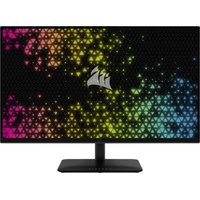
XENEON 32QHD240 - Monitor CORSAIR - Free user manual and instructions
Find the device manual for free XENEON 32QHD240 CORSAIR in PDF.


| Product Type | Gaming Monitor |
| Brand | Corsair |
| Model | XENEON 32QHD240 |
| Screen Size | 32 inches (diagonal) |
| Native Resolution | 2560 x 1440 (QHD) |
| Refresh Rate | 240 Hz |
| Response Time | 1 ms (MPRT), 5 ms (GtG) |
| Panel Technology | IPS with Quantum Dot |
| Brightness | 400 cd/m² (SDR), 600 cd/m² (HDR) |
| HDR Certification | VESA DisplayHDR 600 |
| Color Gamut | 98% DCI-P3, 100% AdobeRGB, 100% sRGB |
| Connectivity | 2x HDMI 2.0, 1x DisplayPort 1.4, 1x USB-C (Alt Mode DP), 2x USB-A 3.0, 3.5mm audio output |
| Adaptive Sync Technology | AMD FreeSync Premium, NVIDIA G-Sync compatible |
| Dimensions (with stand) | 732 x 553 x 270 mm |
| Weight (with stand) | 8.4 kg |
| Power Supply | 150 W AC adapter (100-240 V input) |
| Power Consumption (on) | 40 W |
| Power Consumption (standby) | < 0.5 W |
| VESA Compatibility | 100 x 100 mm |
| Stand Adjustments | Tilt -5°/+20°, swivel ±30°, height 68 mm |
| Maintenance and Cleaning | Use a lint-free cloth, avoid abrasive products, do not spray directly on the screen |
| Safety Precautions | Do not expose to moisture, do not block ventilation, unplug before cleaning |
| Warranty | 3 years (zero dead pixel policy) |
Frequently Asked Questions - XENEON 32QHD240 CORSAIR
User questions about XENEON 32QHD240 CORSAIR
0 question about this device. Answer the ones you know or ask your own.
Ask a new question about this device
Download the instructions for your Monitor in PDF format for free! Find your manual XENEON 32QHD240 - CORSAIR and take your electronic device back in hand. On this page are published all the documents necessary for the use of your device. XENEON 32QHD240 by CORSAIR.
USER MANUAL XENEON 32QHD240 CORSAIR
natural_image
Abstract black silhouette of a stylized sailboat or wave (no text or symbols)CORSAIR
natural_image
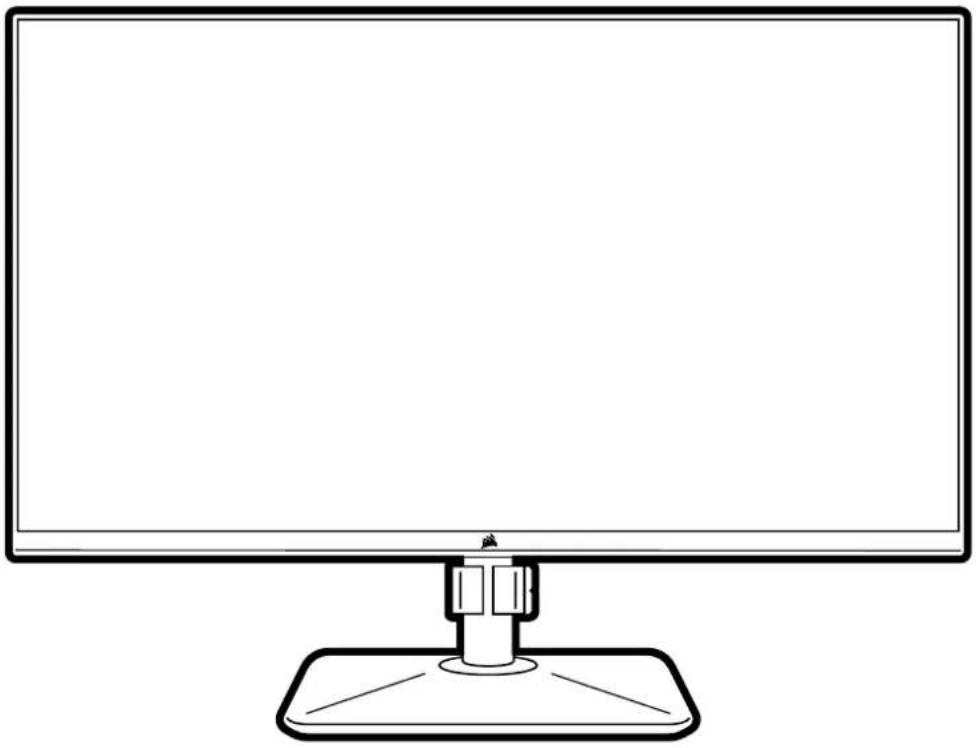
Line drawing of a flat-screen computer monitor with a stand (no text or symbols)XENEON
32QHD240 32-INCH GAMING MONITOR
EN ENGLISH
FR FRANÇAIS
DE DEUTSCH
IT ITALIANO
ES ESPAÑOL
PT PORTUGUÊS
RU РУССКИЙ
TC 繁體中文
JA 日本語
KO 한국어
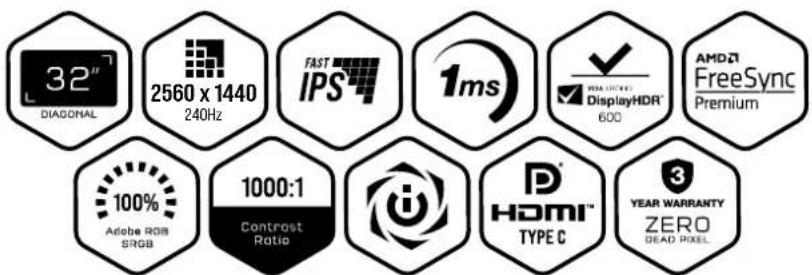
TABLE OF CONTENTS
Precautions 2
Package Contents 3
Assembly 4
Tilt, Swivel and Height Adjustment 5
Cable Management, Camera Mount (optional) & Other Mounting options 6
Connectivity 8
Operation 9
Controls 9
On-Screen Display (OSD) 9
OSD – Picture Settings 10
OSD - OSD Setting 12
OSD - System Setting 13
OSD - Audio 15
OSD - Input Select 16
OSD – Information 17
Frequently Asked Questions / Troubleshooting 18
Specifications
Technical Specifications 21
Supported Display Modes 22
Scan QR code for Quick Start Guide and Setup Videos
Product Setup, User Information, and Warranty/Dead Pixel policy can be found at https://www.corsair.com/xeneon-quickstart Landing Page
PRECAUTIONS
- Only use the accessories that are provided with the monitor or that are recommended by the manufacturer.
- Keep the plastic packaging bag for the product in a place that cannot be reached by children.
- Before connecting the monitor to the power outlet, make sure that the voltage rating of the power cable is compatible with the power specification in the country where you are located.
- The power cord plug must be connected to a properly wired and grounded power outlet.
- Do not touch the plug with wet hands, otherwise can easily cause electric shock.
- Place the monitor in a stable and well-ventilated place.
-
Do not place the monitor near any heat sources such as electric radiators or direct sunlight.
-
The holes or openings on the monitor are for ventilation. Do not cover or block the ventilation holes with any objects.
- Do not use the monitor near water, drinks, or any type of liquids. Failure to do so may result in electric shock or damage to the monitor.
- Make sure to unplug the monitor from the power outlet before cleaning.
- As the screen surface can be easily scratched, avoid touching the surface with any hard or sharp object. Use a soft lint-free cloth instead of a tissue to wipe the screen. You may use a glass cleaner to clean the equipment if required. However, never spray the cleaner directly onto the screen.
- Disconnect the power cable if the equipment is not being used for a long period of time.
- Do not attempt to disassemble or repair the monitor yourself.
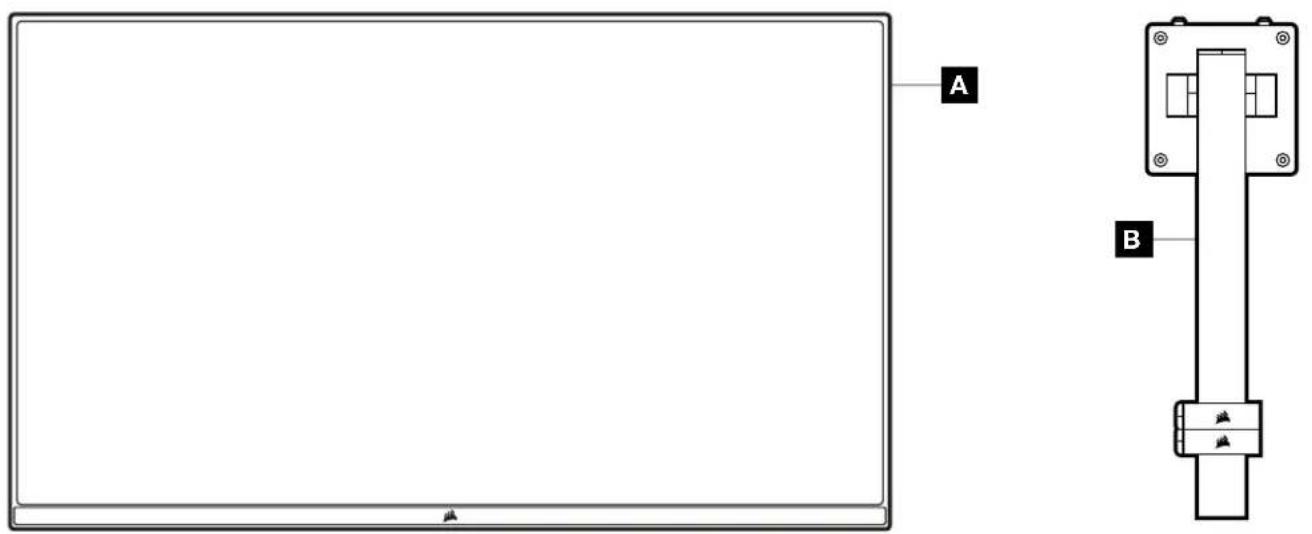
XENEON 32QHD240 DISPLAY CONTENTS
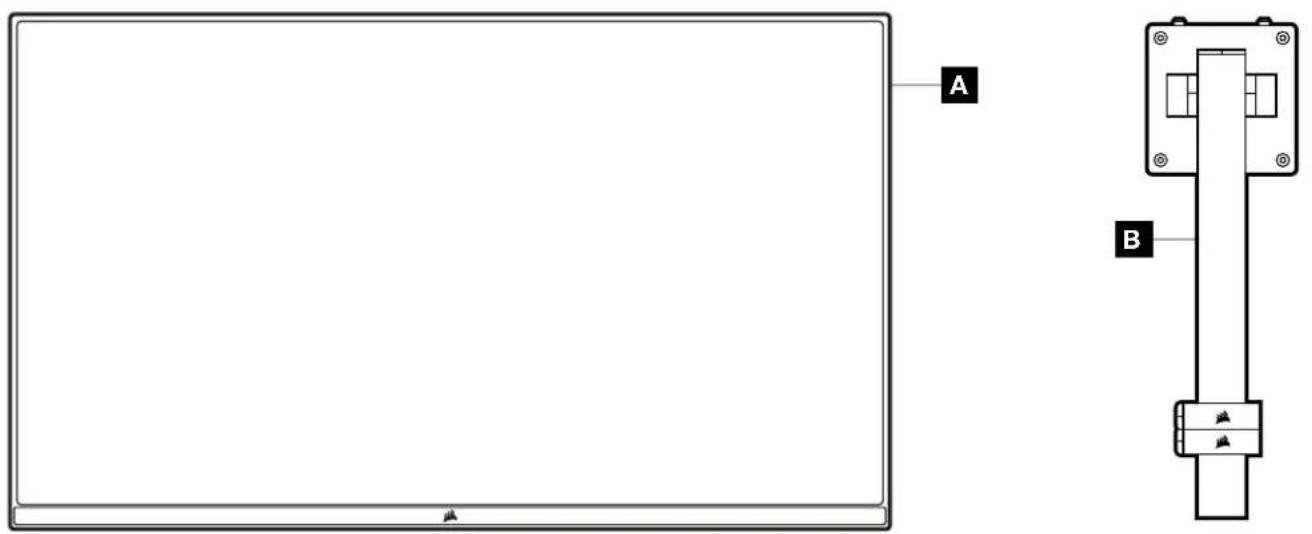
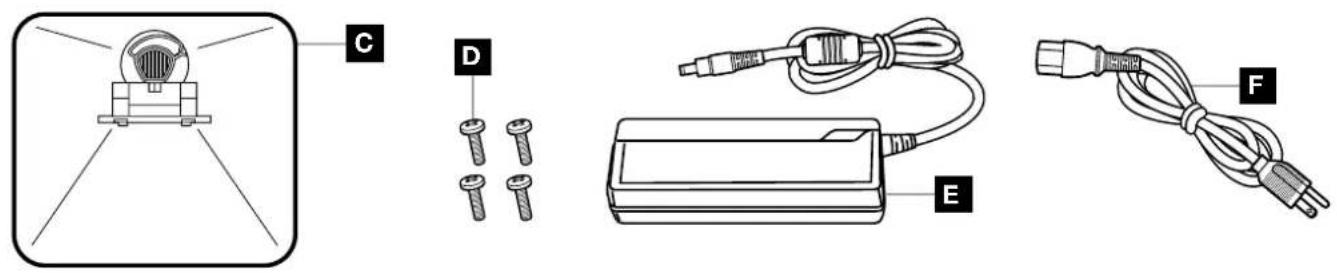

A XENEON 32QHD240 DISPLAY PANEL
B MOUNTING POST (For CM-9020002 Only)
C STAND (For CM-9020002 Only)
D MOUNTING SCREWS (x4)
E AC ADAPTER
F AC POWER CABLE
G DISPLAYPORT CABLE (1.5M)
H HDMI CABLE (1.5M)
I USB-C CABLE (1.5M)
J USB-A TO USB-C CABLE (1.8M)
ASSEMBLY (For CM-9020002 Only)
Before you begin, you will need a Phillips head screwdriver.
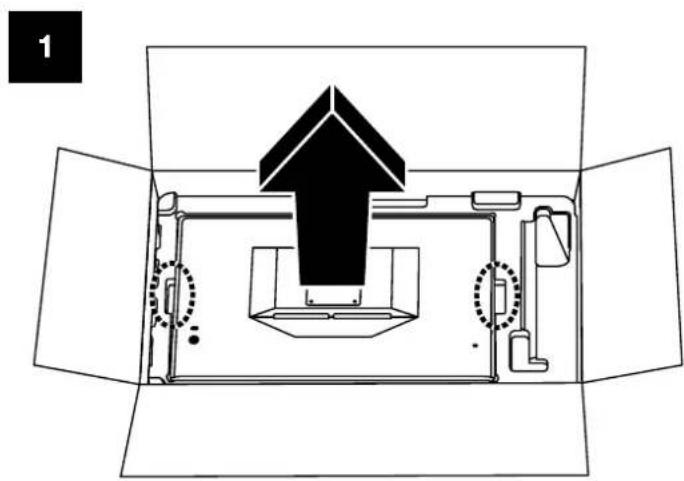
- Remove the top layer of foam that includes accessories and stand to expose the rear of the panel.
- Carefully open the foam bag covering the panel (see image 1) to expose the mounting area. Do not remove the panel from the bag.
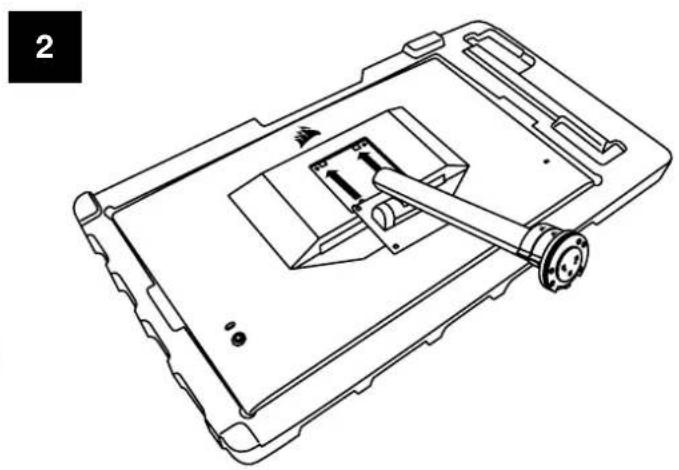
- Align the monitor post with the mounting slots on the back of the panel (see image 2). Slide the upper hooks into the mounting slots on the rear of the panel. Using a Phillips screwdriver, secure the post to the panel with the 4 screws (see image 3).
- Attach the stand base to the monitor post (see image 3) and tighten the captive thumbscrew into the bottom of the post (see image 4).
- Slowly remove the monitor from the packaging and sit upright on your desk. Do not touch the front of the panel while lifting the monitor.
natural_image
Technical line drawing of a device casing with internal components and mounting bracket (no text or symbols)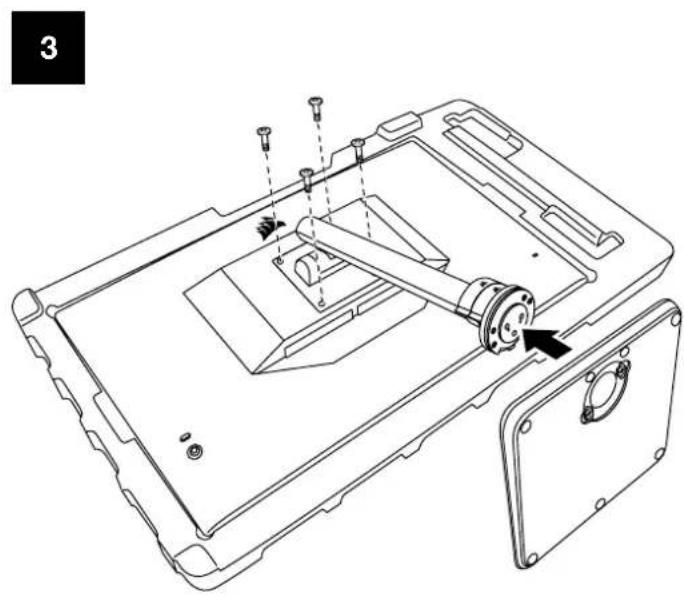
natural_image
Technical line drawing of a device casing with internal components and mounting holes (no text or symbols)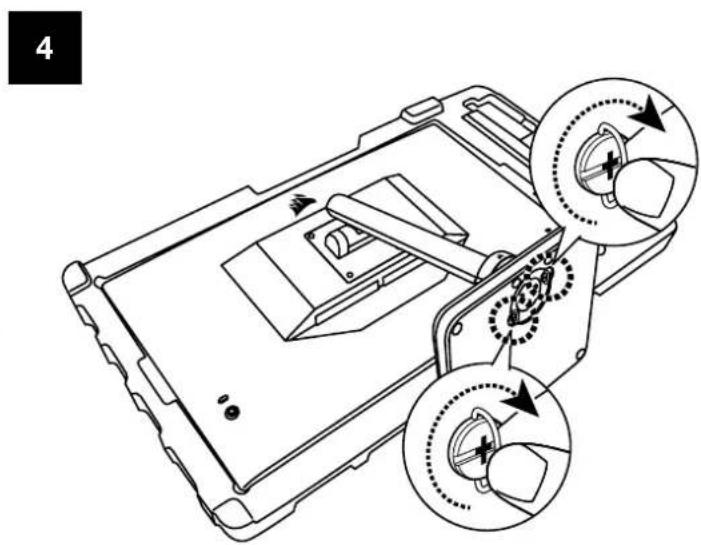
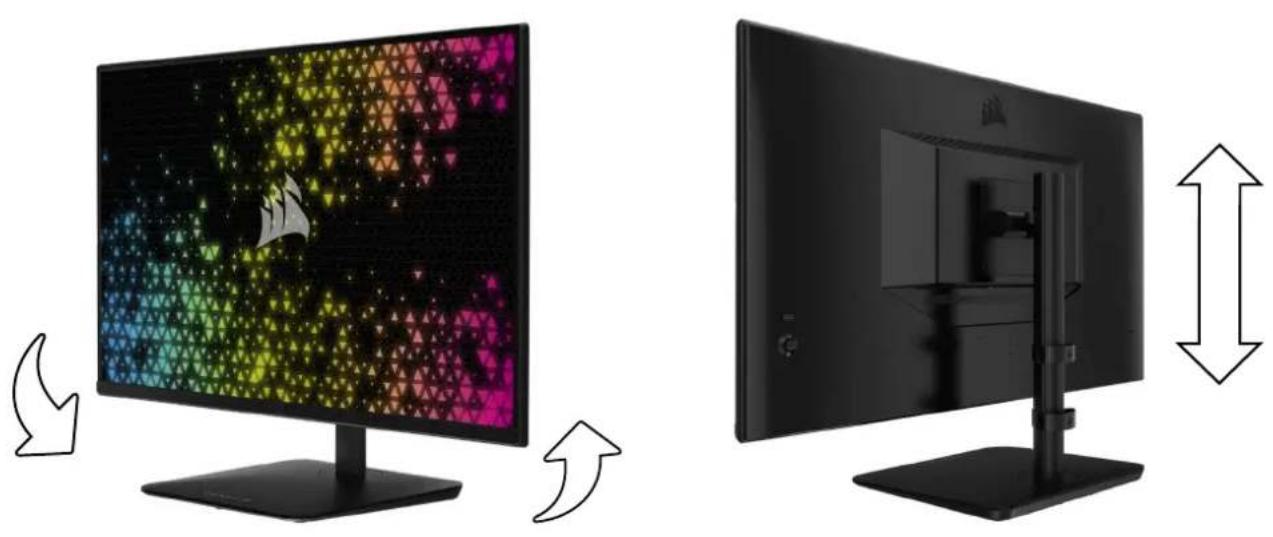
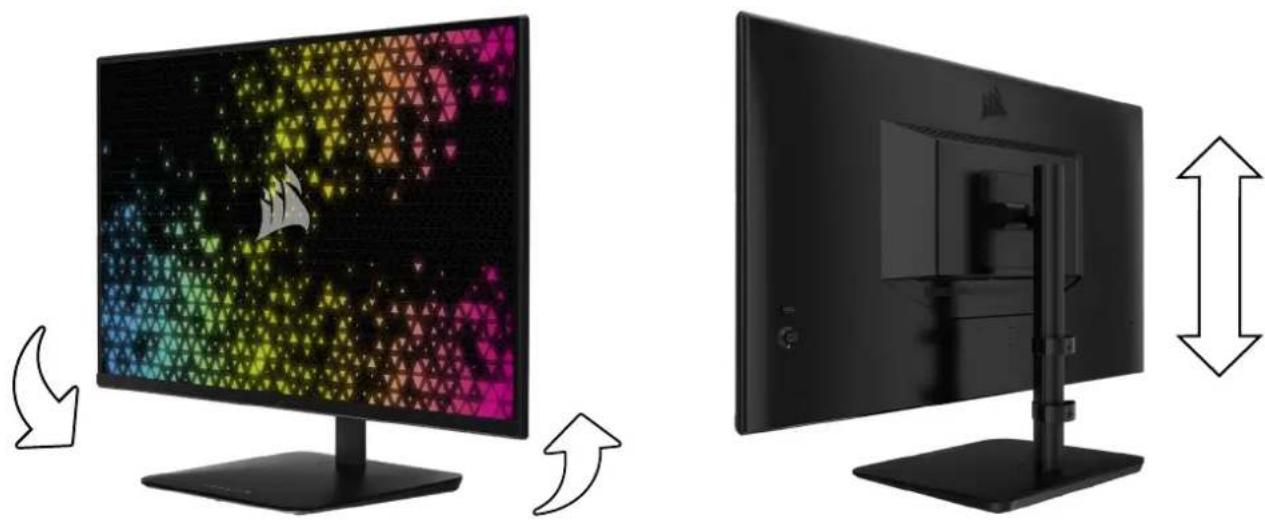
TILT, SWIVEL AND HEIGHT ADJUSTMENT (For CM-9020002 Only)
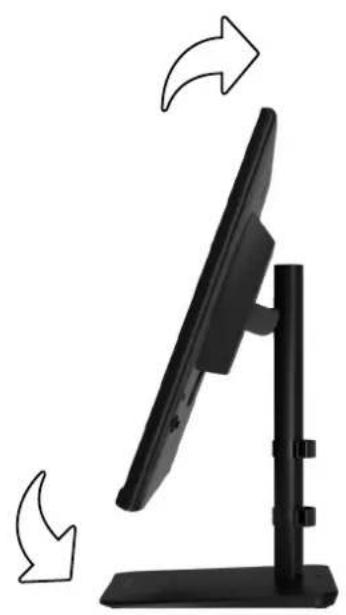
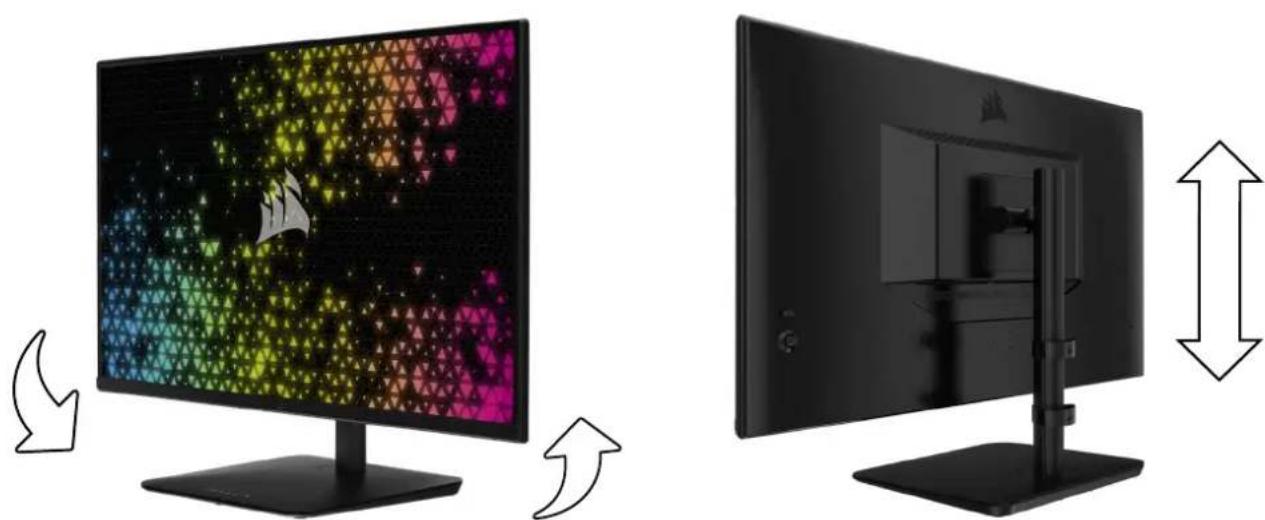
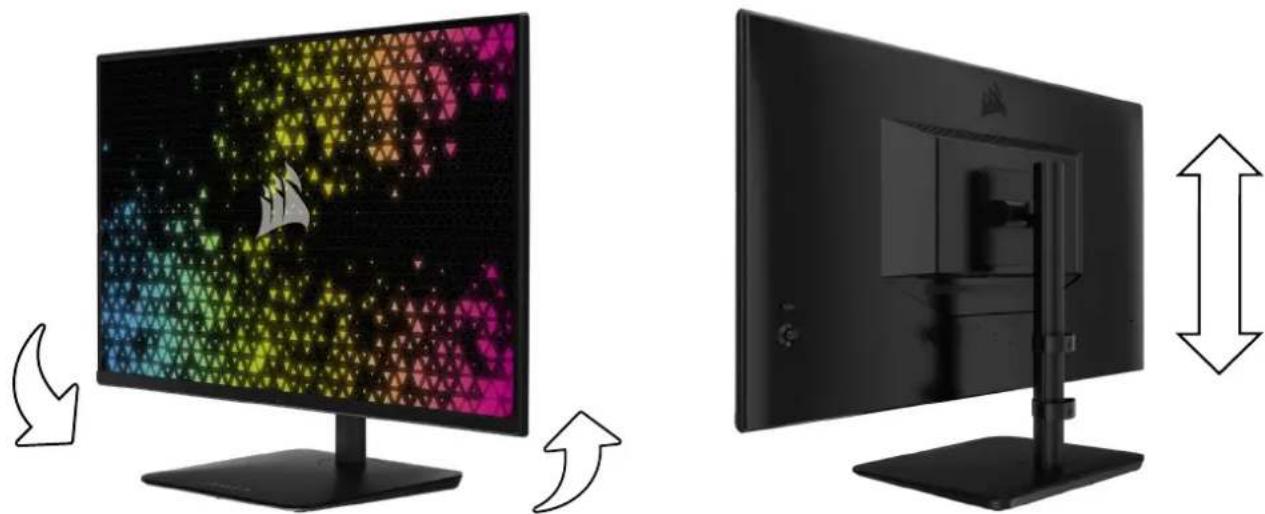
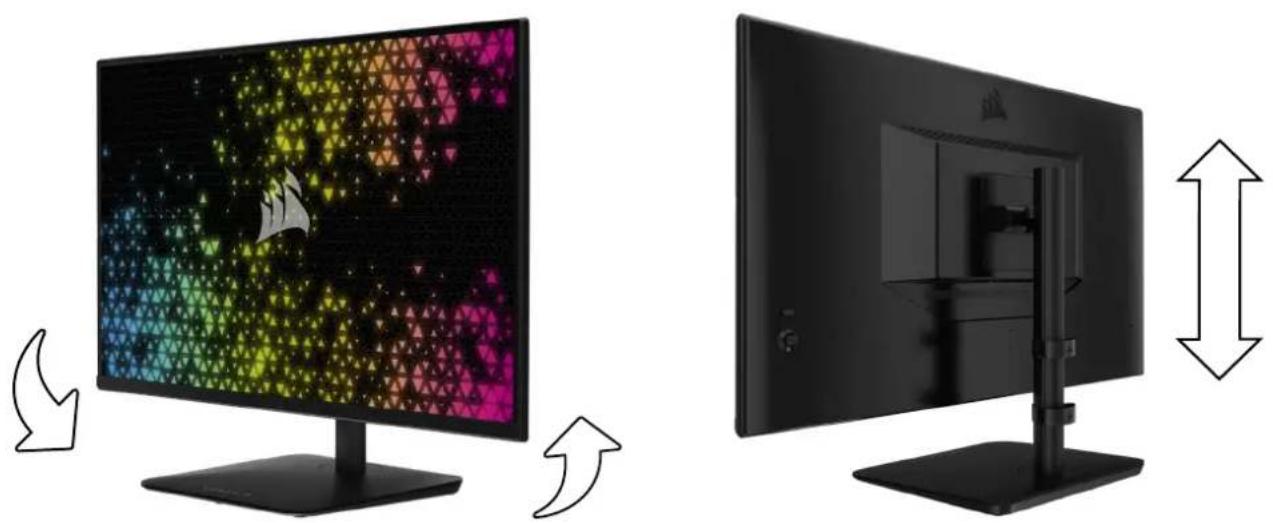
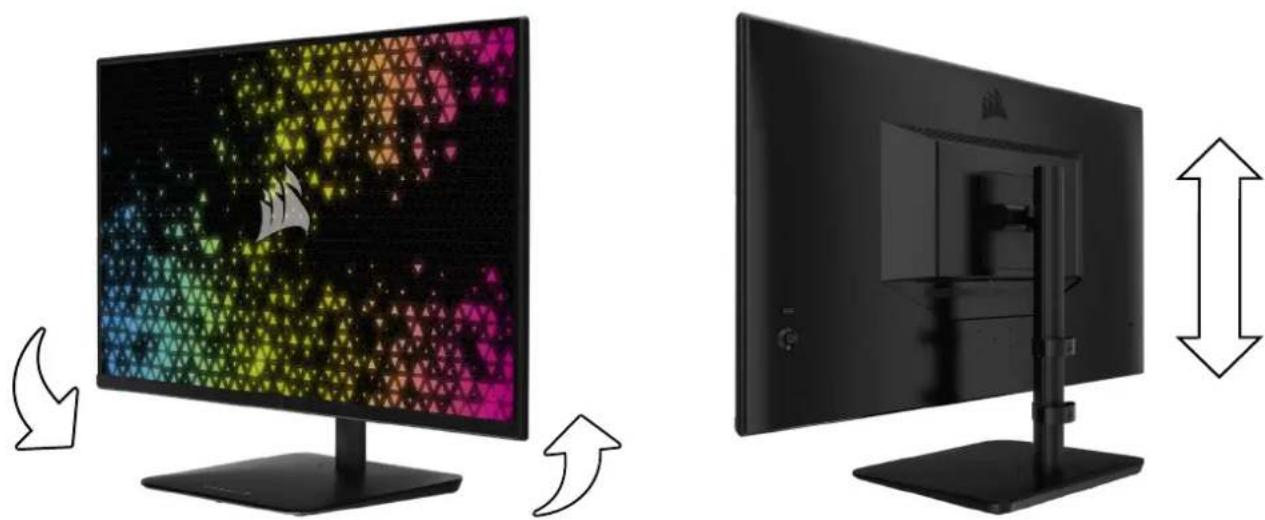
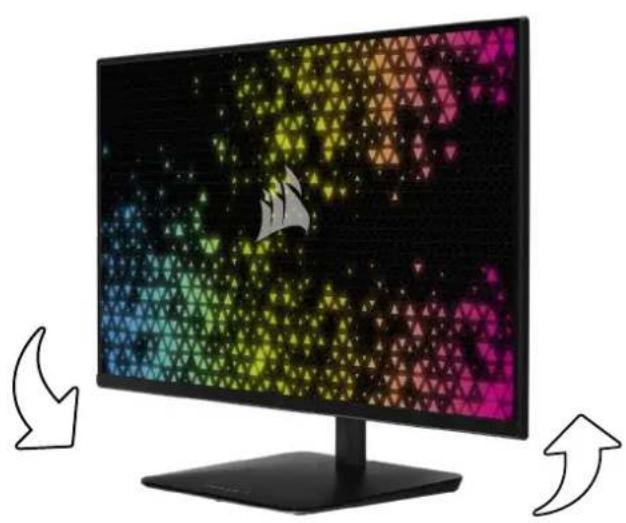
Your Xeneon display features a sturdy and stylish stand that offers tilt, swivel, and height adjustment.
- Tilt -5 / +20 degrees
- Swivel ± 30 degrees
• Height Adjust Range 68mm
TILT
natural_image
Black desktop monitor with stand and side-mounted screen, showing directional arrows indicating motion (no text or symbols)SWIVEL & HEIGHT ADJUSTMENT
natural_image
Two black-and-white monitors side by side, one displaying a colorful abstract pattern on the screen, and the other showing a vertical scale with measurement arrows (no text or symbols)RAPIDROUTE CABLE MANAGEMENT (For CM-9020002 Only)
natural_image
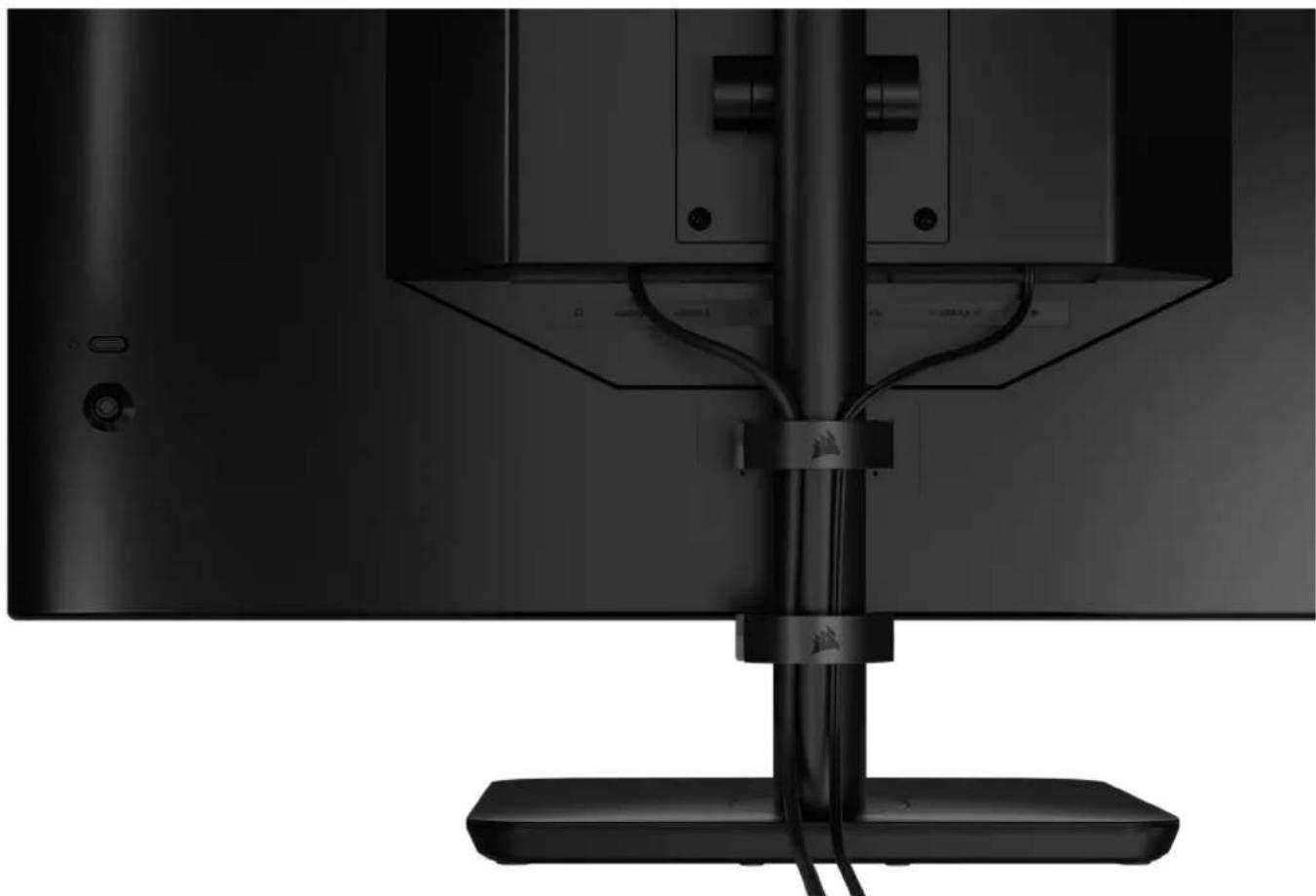
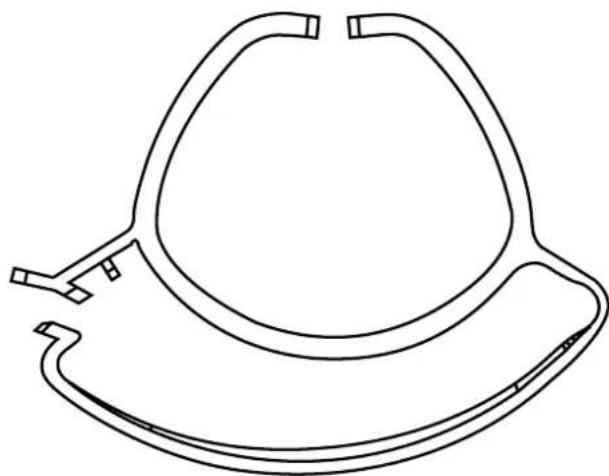
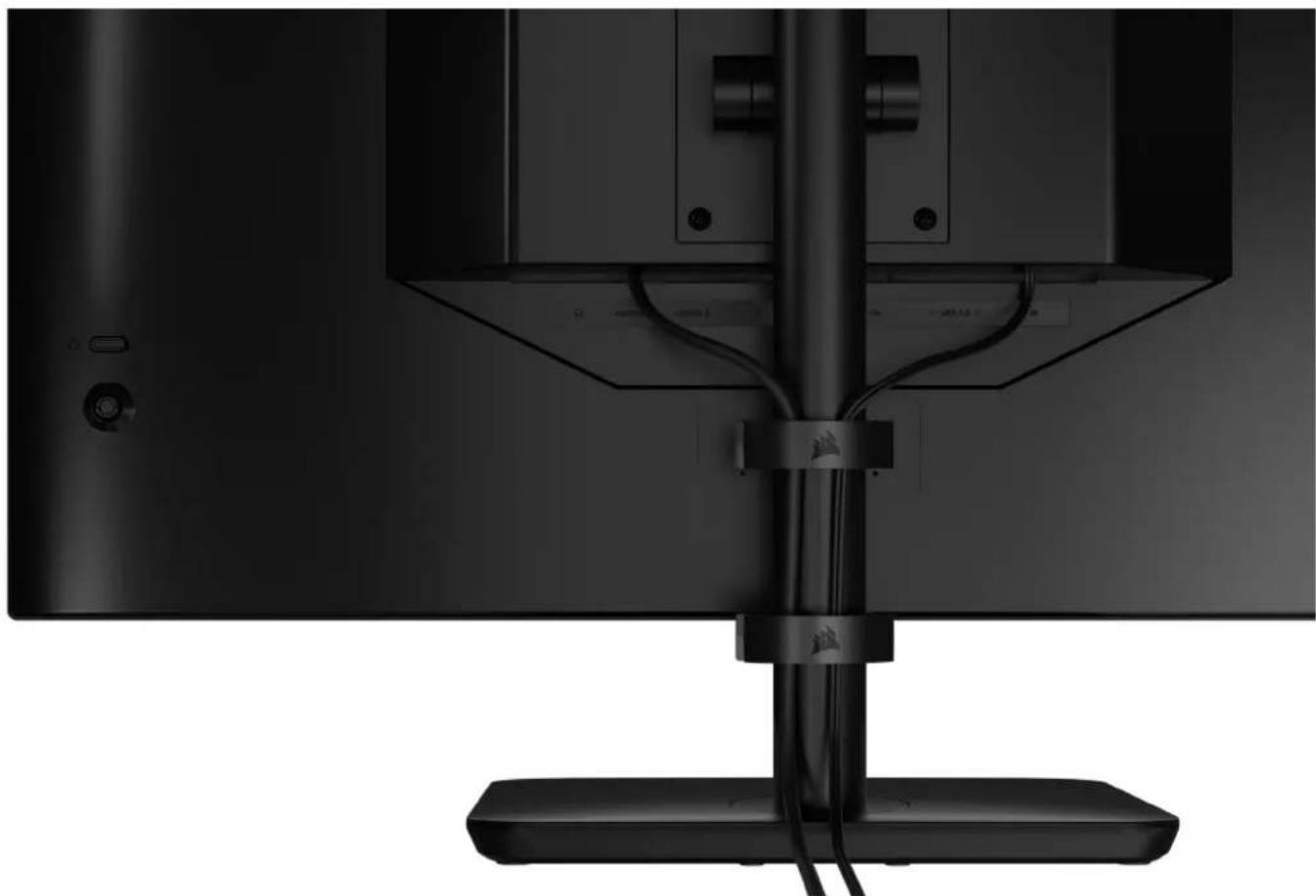
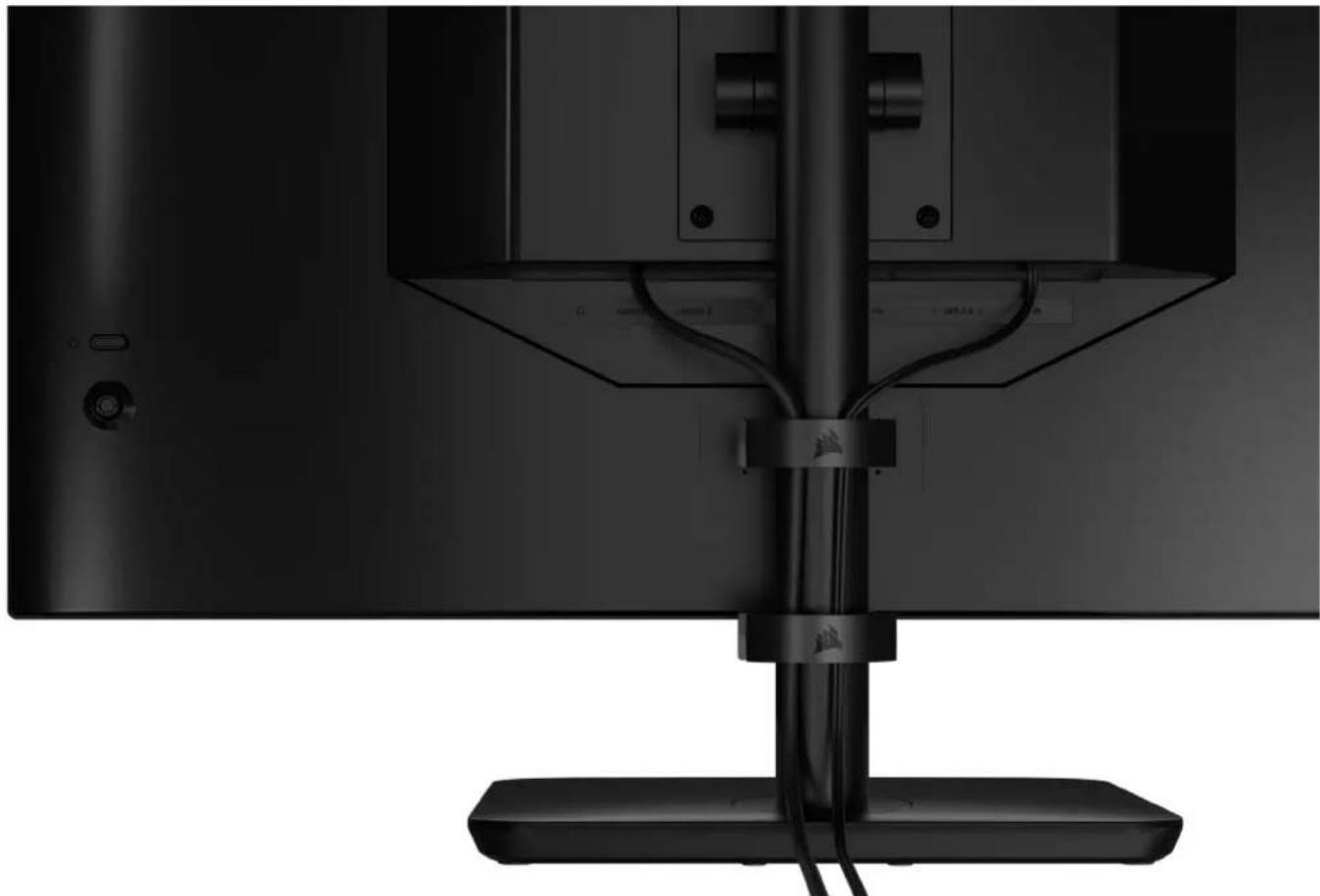
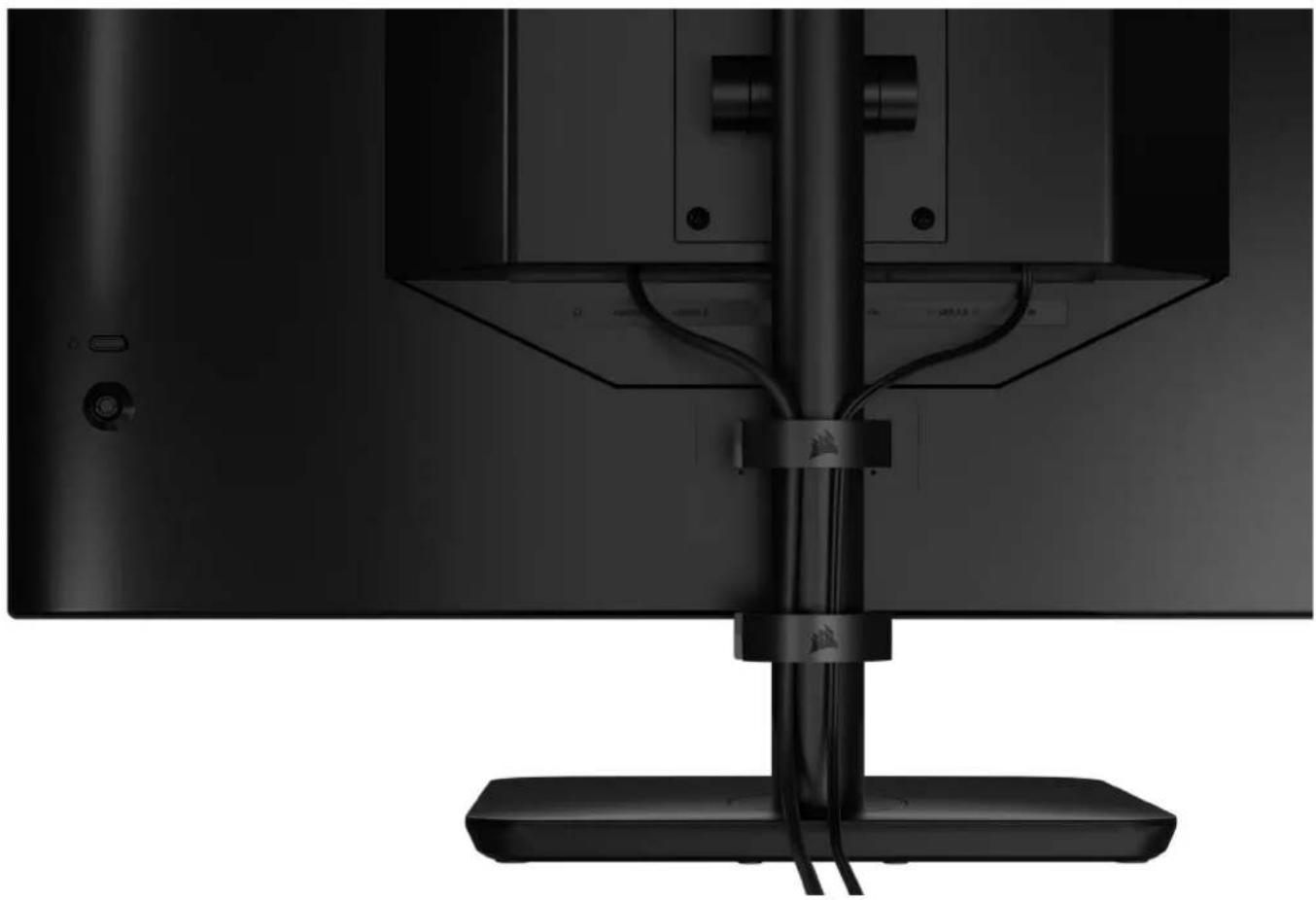
Bottom view of a black monitor with cable and stand, no visible text or symbolsYour Xeneon display has built-in RapidRoute cable management to keep your desktop tidy. There are 2 adjustable cable clips that slide up and down the monitor post to allow for customizing your cable management needs. Open each cable clip by pressing the thumb clasp to the left and pulling out on the cable clip.
natural_image
Line drawing of a mechanical component with curved and straight sections (no text or symbols)WALL MOUNT COMPATIBILITY
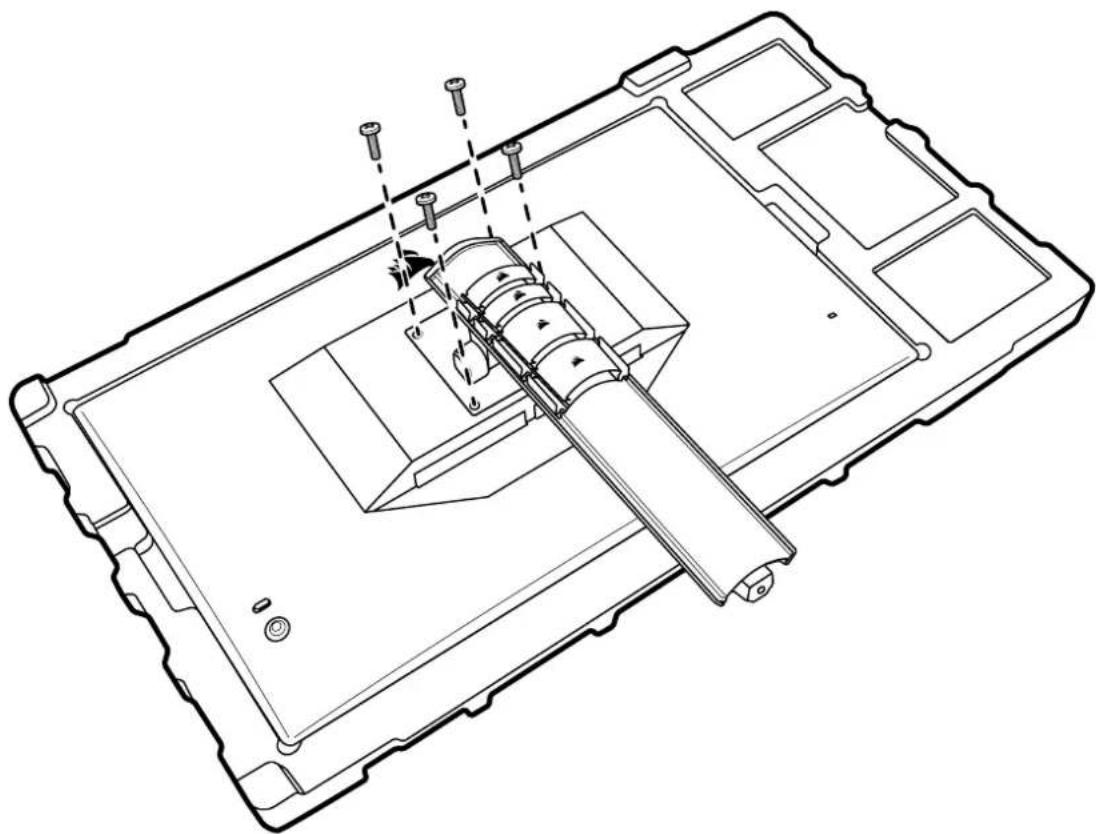
Before mounting your display with compatible wall mount (VESA 100mm x 100mm), make sure that:
- You have removed the stand from the display with a Phillips screwdriver
- The wall mount bracket that you purchased supports the weight of this display
natural_image
Technical line drawing of a mechanical assembly with no visible text or symbolsReview the instructions that came with your wall mount for more information about how to correctly mount your display.
WARNING: Your display has four VESA mounting holes on the back. You must secure a wall mount bracket to all four holes. If you do not use all four holes, your display may fall and cause property damage or personal injury.
Note: Wall-mount screws are not included. Screws: type M4, 14mm to 16mm length depending on wall mount.
CONNECTIVITY


AUDIO OUT
flowchart
graph TD
    B["B"] --> A["Bottom Node"]
    B --> B2["Bottom Node"]
HDMI-1 HDMI-2 DP TYPE-C
DP ALT
USB-IN USB 3.0
flowchart
graph TD
    F["F"] --> A["Child 1"]
    F --> B["Child 2"]
USB 3.0
DC IN
A. 3.5mm Audio Jack
Audio output from connected HDMI, DisplayPort, and USB-C Alt Mode devices.
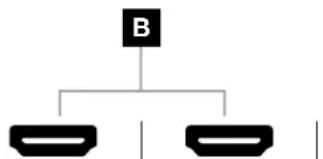
B. HDMI 2.0 Ports
Dual HDMI inputs correspond to "HDMI-1" and "HDMI-2" inputs.
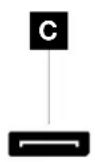
C. DisplayPort 1.4 Port
DisplayPort input corresponds to "DisplayPort" input.
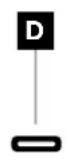
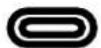
D. USB Type-C Port
Supports DisplayPort Alt Mode and upstream USB input (connects to USB 3.0 ports). Corresponds to "TYPE-C" input. This port or the USB Upstream Port must be connected to a USB-capable port on your host device to support CORSAIR iCUE functionality and downstream USB 3.0 ports.
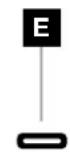
E. USB-IN Port
Upstream USB input port. This port or the USB Type-C Port must be connected to a USB-capable port on your host device to support CORSAIR iCUE functionality and downstream USB 3.0 ports.
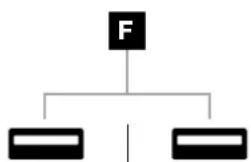
F. USB 3.0 Ports
Dual Type-A 5Gbps USB ports.
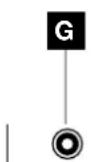
G. DC In
Connects to included AC adapter.
OPERATION
Controls


POWER ON/OFF

PRESS — Open Display Settings
UP – Open Brightness Slider
DOWN — Open Picture Mode Select
LEFT — Open Volume Slider
RIGHT — Open Input Source Select
natural_image
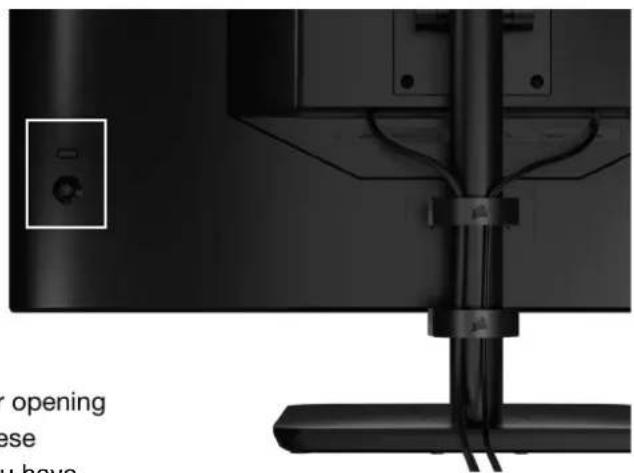
Close-up of a black TV mounted on a stand with cables, no visible text or symbolsYour monitor includes a joystick on the rear, right facing side for opening shortcuts and navigating display settings. Note that many of these settings can also be controlled in CORSAIR iCUE software if you have the USB hub connected to your computer via USB IN port.
Please install the latest version of iCUE (4.24 or later) available at
https://www.corsair.com/us/en/icue.
On-Screen Display (OSD)
By pressing the joystick inward, you can access your monitor's display settings. You can use the joystick to navigate the settings and pressing the joystick inward will confirm your selection.
OPERATION
OSD – Picture Settings
The first menu, labeled "Picture", contains the following settings for adjusting the overall picture quality.
Picture
OSD Setting
System Setting
Audio
Input Source
Information
Preset
<
HDR
Brightness
Contrast
Sharpness


Color Temperature
Gamma
Saturation
Eye Saver
Response Time
<
Fast
Refresh Overlay
<
OFF
OPERATION
OSD – Picture Settings
| SETTING OPTIONS DESCRIPTION | ||
| Picture Mode | Standard | Selects a display preset factory calibrated for general use and best power savings |
| Movie Selects a display preset optimized for watching movies | ||
| Text Selects a display preset optimized for reading text | ||
| sRGB Selects a display preset factory calibrated to the sRGB color space | ||
| Creative Selects a display preset factory calibrated for content creation tasks | ||
| Game Selects a display preset optimized for playing fast moving games | ||
| DCI-P3 Selects a display preset optimized for HDR content in DCI-P3 color space | ||
| AdobeRGB Selects a display preset optimized for HDR content in AdobeRGB color space | ||
| HDR Selects a display preset that is VESA DisplayHRD600 Certified | ||
| Brightness 0-100 Adjusts the intensity of the display backlight | ||
| Contrast 0-100 Adjusts the display's contrast | ||
| Sharpness 0-10 Adjusts the display's sharpening filter, increasing edge detail | ||
| Color Temperature | Cool Sets the display's color temperature to 9300K | |
| Normal Sets the display's color temperature to standard 6500K | ||
| Warm Sets the display's color temperature to 5000K | ||
| Custom | Allows you to manually set the display's color temperature with sliders controlling the red, blue, and green levels | |
| Gamma | 2.0, 2.2, 2.4 | Adjusts the relationship between color and brightness; default is 2.2 |
| Saturation | 0-10 Adjusts the intensity of the display's colors | |
| Eye Saver | ON or OFF Reduces blue light emissions of display when enabled | |
| Response Time | Normal, Fast, Faster, Fastest, Dynamic OD | Let you increase how fast pixels can transition between colors, which can reduce the blurring of fast-moving objects |
| Refresh Overlay | ON or OFF | Toggles an overlay in the top right corner which displays the monitor's current refresh rate, useful for tracking frames per second when Adaptive Sync is enabled |
| MPRT | ON or OFF | Toggles the "Moving Picture Response Time" setting, which can reduce blurring of moving objects when set to "On" |
| Local Dimming | ON or OFF | To turn off specific portions of the backlight for deeper black and better contrast ratio |
| Crosshair | OFF, Dot, Cross, Angle | Enable Crosshair function |
OPERATION
OSD - OSD Setting
The second menu, labeled "OSD Setting", contains the following settings for adjusting the on-screen display.
Picture
Language

English

OSD Setting
Transparency

OFF

System Setting
Time Out


Audio
Input Source
Information
| SETTING OPTIONS DESCRIPTION | ||
| Language | EnglishFrançaisDeutschItalianoEspañolPortuguêsРусский繁體中文日本语한국어 | Selects the OSD's language |
| Transparency ON or OFF Sets the OSD to be transparent or opaque | ||
| Time Out 10-60 | Adjusts how long (in seconds) the OSD stays on screen before disappearing | |
OPERATION
OSD - System Setting
The third menu, labeled "System Setting", contains the following settings for adjusting the display's internal settings.
Picture
OSD Setting
System Setting
Audio
Input Source
Information
Aspect Ratio
AMD FreeSync Premium
LED
Source Detection
Factory Reset
<
<
<
<
ON
ON
AUTO
OFF
OPERATION
OSD – System Setting
| SETTING OPTIONS DESCRIPTION | ||
| Aspect Ratio | Auto, 4:3,16:9 | Selects the display's aspect ratio. “Auto” will try to match the display's aspect ratio to the incoming video signal. Not available with Adaptive Sync enabled |
| AMD FreeSync Premium ON or OFF | Enables or disables the adaptive sync functionality when connected to a compatible GPU. Select ON to enable Adaptive Sync for AMD FreeSync via HDMINVIDIA G-Sync compatibility is available when connected via DP cable or USB Type-C Alt Mode cable to compatible GPU. For NVIDIA G-Sync functionality:Install/Open NVIDIA Control PanelSelect “Set up G-Sync”Select Enable G-Sync Compatible checkboxSelect the 32QHD240/RDD0020Select the “Enable settings for the selected display model” checkboxMay require a system reboot to access NVIDIA settings | |
| LED ON or OFF Selects front | Power LED indicator ON or OFF | |
| Source Detection | AUTO or MANUAL | Determines whether the display will automatically switch to a different input if it detects a signal, or if you will need to manually switch between inputs |
| USB-C Alt Mode (only present when the display is connected through USB-C video port) | 4-lane2-lane | Toggles the number of USB lanes to use on the USB-C port for video4-Lane Mode allows up to 2560x1440@240Hz resolution but reduces the speed of the USB Type-A ports to USB 2.02-Lane Mode allows for up to 2560x1440@120Hz but enables USB Type-A at USB 3.0 speed |
| Factory Reset ON or OFF Resets all monitor settings to their factory defaults | ||
OPERATION
OSD - Audio
The fourth menu, labeled "Audio", lets you control the display's audio.
Picture
Volume



100
OSD Setting
Audio Input

AUTO

System Setting
Audio
Input Source
Information
| SETTING OPTIONS DESCRIPTION | ||
| Volume 0-100 | Adjusts the volume of the audio output from the headphone jack | |
| Audio Input | Auto, HDMI-1, HDMI-2, DisplayPort, USB Type-C | Selects which input the display passes audio to the headphone jack from. “Auto” will use the current input |
OPERATION
OSD - Input Select
The fifth menu, labeled "Input Select", lets you switch between the display's different inputs.

Picture
HDMI1
OSD Setting
HDMI2
System Setting
DisplayPort
Audio
Type-C
Input Source
Information
| SETTING DESCRIPTION | |
| HDMI-1 Switches to the device connected to the HDMI-1 port | |
| HDMI-2 Switches to the device connected to the HDMI-2 port | |
| DisplayPort Switches to the device connected to the “DP” DisplayPort port | |
| TYPE-C Switches to the device connected to the TYPE-C port | |
OPERATION
OSD - Information
Provides current settings status for key features.
Picture
Source
DisplayPort
OSD Setting
Resolution
2560X1440
System Setting
Refresh Overlay
165Hz
Audio
AMD FreeSync Premium
ON
Input Source
HDR
ON
Information
FW Version
P08
| SETTING DESCRIPTION | |
| Source Display the current input source | |
| Resolution Display the current display resolution | |
| Refresh Overlay Display the current refresh rate | |
| AMD FreeSync Premium AMD FreeSync Premium Status | |
| HDR HDR Status | |
| FW Version Shows the current FW version | |
OPERATION
CORSAIR XENEON 32QHD240 Gaming Monitor FAQ
| QUESTION ANSWER | |
| Power LED not on | Press the power button on the back of your monitor to check if it is set to ON. |
| Check to see if the power cable is fully plugged into the monitor as well as the power adapter. | |
| Check Power LED toggle in OSD System Setting Menu is toggled on. | |
| No image on screen | Check to see if your monitor is on. |
| Check to see if the video cable is properly connected to the monitor as well as the source device. | |
| Check the quality of the video cable and ensure that it isn't damaged. Avoid low quality video cables and extensions. | |
| Check which video source input your monitor is set to (if the Auto Source feature is disabled in OSD). | |
| Connect another source device to test monitor video input. | |
| Connect the source device to another available monitor to test video output. | |
| Avoid hot-plugging the monitor. Have the monitor connected to the source prior to powering up the source device. | |
| Image too light/dark | Adjust the brightness/gamma/contrast settings via the OSD. |
| Reset the monitor to factory settings. | |
| Video signal not supported | Check the video output settings of the source device. Supported input resolutions for the CORSAIR XENEON 32QHD240 Gaming Monitor are: |
| RESOLUTION REFRESH RATE | |
| 640x480 60, 67, 72, 75Hz | |
| 800x600 56, 60, 72, 75Hz | |
| 1024x768 60, 70, 75Hz | |
| 1280x1024 60, 75Hz | |
| 1440x900 60Hz | |
| 1680x1050 60Hz | |
| 1920x1080 | |
| 2560x1440 | |
| 3840x2160 30, 60Hz (for Downscaled Console Support) |
OPERATION
CORSAIR XENEON 32QHD240 Gaming Monitor FAQ
| QUESTION ANSWER | |
| Does the CORSAIR XENEON 32QHD240 support video over USB-C? | Yes, the CORSAIR XENEON 32QHD240 supports DisplayPort over USB-C through the dedicated TYPE-C DP ALT input. Use the included 1.5m Type-C cable or a quality USB Type-C cable that supports USB 3.2 Gen 2 for best results. |
| I'm unable to use devices connected to the USB-A ports on my monitor when connected to my device that supports USB-C Alt Mode using a single USB-C cable | USB-C Alt Mode, by default will operate in "4 lane" mode which allows for full DisplayPort resolution over USB-C, however this disables the use of the USB Type-A ports. To re-enable the USB Type-A ports when connected solely via the TYPE-C DP ALT input, switch to "2 lane" mode which will limit the supported video output resolution in order to re-enable the USB Type-A ports for peripherals connected to the monitor's USB Type-A ports. Alternatively, you may connect the source device to the USB downstream port as well as the TYPE-C DP ALT port for full video resolution and USB port functionality. Ensure that you're using a quality USB Type-C cable that supports USB 3.2 Gen 2 for best results. |
| Image is stretched/squished | Check the "Aspect Ratio" setting under "System Setting". By default this is set to "Auto", however in certain instances, you may need to manually set an aspect ratio (ex: certain combinations of adapters and retro game consoles). |
| Image has color issues | Check the quality of the video cable and ensure that it isn't damaged. Avoid low quality video cables and extensions. |
| Reset the monitor to factory settings. | |
| Adjust the picture settings via OSD. | |
| Artifacts in onscreen image | Check the quality of the video cable and ensure that it isn't damaged. |
| Check your source device, a faulty graphics card or game console may require contacting the manufacturer for assistance. | |
| Monitor has a dead pixel | CORSAIR provides a "Zero Dead Pixel" policy for monitor products, if 1 or more bright pixels or 6 or more dark subpixels are found, the monitor will be exchanged during the 3-year warranty period. |
| What kind of VESA mount is compatible? | CORSAIR XENEON 32QHD240 supports a standard 100mm x 100mm mount, the monitor head must be removed from the stand. Use the mounting screws supplied with your VESA mount. |
OPERATION
CORSAIR XENEON 32QHD240 Gaming Monitor FAQ
| QUESTION ANSWER | |
| Can I mount a webcam or DSLR/mirrorless camera? | CORSAIR XENEON 32QHD240 supports standard webcams that sit on the top bezel of the display. |
| My CORSAIR XENEON monitor isn't detected by CORSAIR iCUE | Check to ensure that your PC has the latest version of CORSAIR iCUE installed. The CORSAIR XENEON 32QHD240 is supported in iCUE version 4.24 or newer. |
| Check to ensure that the cable connected to the USB-C upstream on the monitor and your PC's USB 3.0 port is properly connected. Avoid connecting the monitor through a USB hub or extension if possible. We strongly recommend using the USB-C cable provided with the CORSAIR XENEON monitor for best results. | |
| What adaptive refresh rate options are available to CORSAIR XENEON? | The CORSAIR XENEON 32QHD240 is certified for AMD FreeSync Premium and is also NVIDIA G-SYNC compatible. |
| AMD FreeSync / G-SYNC aren't enabled | Check that AMD FreeSync is enabled via OSD. |
| Check your graphics card settings and ensure that AMD FreeSync / NVIDIA G-SYNC are enabled. AMD FreeSync functions over any of the video ports. NVIDIA G-Sync compatibility only works over DP or USB Type-C Alt-Mode DP. | |
| I'm not getting the monitor's rated 240Hz refresh rate | Check your graphics card/system display settings and ensure that the 240Hz refresh rate has been enabled. See Supported Display Mode Table in Appendix for available options. |
| Check the quality of the video cable and ensure that it isn't damaged. Avoid low quality video cables and extensions. |
APPENDIX
Technical Specifications
| Product Name XENEON 32QHD240 | |
| Part Number | With Stand CM-9020002-XXWithout Stand CM-9020004-XX |
| Device RDD0020 | |
| USB Hub ID CORSAIR USB 3.0 Hub | |
| Panel Size 32" Diagonal | |
| Display Surface Non-Glare | |
| Pixels per inch 91.8 | |
| Aspect Ratio 16:9 | |
| Native Resolution 2560 x 1440 @ 240Hz | |
| Response Time (MPRT) 1ms | |
| Response Time (GtG) 5ms | |
| Display Colors 16.7M colors (8bit RGB) | |
| Panel Technology IPS with Quantum Dot Technology | |
| Flicker Free Yes | |
| Viewing Angles 178° (H) / 178° (V) | |
| Peak Brightness 400 nit (SDR) / 600 nit (HDR) | |
| Static Contrast Ratio 1000:1 | |
| HDR Certification | VESA DisplayHDR 600 |
| Color Gamut (CIE 1976) | 98% (DCI-P3), 100% (AdobeRGB), 100% (sRGB) |
| Variable Refresh Rate | AMD FreeSync Premium Certified, NVIDIA G-Sync compatible |
| HDMI Input | 2x HDMI 2.0 |
| DisplayPort Input | 1x DisplayPort 1.4 |
| USB-C Input | 1x DisplayPort 1.4 (USB-C Alt Mode), 15W Power Delivery, USB 5Gbps Data Upstream |
| USB-C Upstream Input | 1x 5Gbps USB-C |
| USB-A Output 2x 5Gbps Type-A USB (5V/0.9A *2) | |
| 3.5mm Audio | Yes, passthrough from video input |
APPENDIX
Technical Specifications
| Power Consumption (On) 40W | |
| Power Consumption (Sleep) <0.5W | |
| Power Consumption (Off) <0.3W | |
| VESA Compatibility 100mm x 100mm | |
| Dimensions 732mm x 553mm x 270mm (W x H x D) | |
| Weight 8.4kg | |
| Stand Tilt -5° / +20° | |
| Stand Swivel -30° / +30° | |
| Stand Height Adjustment Range 68mm | |
| AC Adapter 150W | |
| Note: your device uses the following power supply:Asian Power Devices Inc. / DA-150E19 | |
Supported Display Modes
| RESOLUTION REFRESH RATE HDMI DP/TYPE-C | ||||
| 640x480 VGA | 60Hz | V | V | |
| 67Hz | V | V | ||
| 72Hz | V | V | ||
| 75Hz | V | V | ||
| 800x600 SVGA | 56Hz | V | V | |
| 60Hz | V | V | ||
| 72Hz | V | V | ||
| 75Hz | V | V | ||
| 1024x768 | XGA | 60Hz | V | V |
| 70Hz | V | V | ||
| 75Hz | V | V | ||
APPENDIX
Supported Display Modes
| RESOLUTION REFRESH RATE HDMI DP/TYPE-C | ||||
| 1280x1024 SXGA | 60Hz V V | |||
| 75Hz V V | ||||
| 1440x900 WXGA+ 60Hz V V | ||||
| 1680x1050 WSXGA+ 60Hz V V | ||||
| 1920x1080 FHD | 60Hz V V | |||
| 144Hz V | ||||
| 165Hz V | ||||
| 2560x1440 QHD | 60Hz V V | |||
| 120Hz V V | ||||
| 144Hz V V | ||||
| 165Hz V | ||||
| 180Hz V | ||||
| 240Hz V | ||||
| 480P 60Hz V V | ||||
| 576P 50Hz V V | ||||
| 720P | 50Hz V V | |||
| 60Hz V V | ||||
| 120Hz V V | ||||
| 1080P | 60Hz V V | |||
| 120Hz V V | ||||
| 2160P | 30Hz V V | |||
| 60Hz V V | ||||
The adopted trademarks HDMI, HDMI High-Definition Multimedia Interface, and the HDMI logo are trademarks or registered trademarks of HDMI Licensing Administrator, Inc. in the United States and other countries.
The terms HDMI, HDMI High-Definition Multimedia Interface, and the HDMI logo are trademarks or registered trademarks of HDMI Licensing Administrator, Inc.
TABLE DES MATIÈRES

A PANNEAU D'AFFICHAGE XENEON 32QHD240
B POTEAU DE MONTAGE
(Pour CM-9020002 uniquement)
C PIED (Pour CM-9020002 uniquement)
D VIS DE MONTAGE (x4)
E ADAPTATEUR CA
F CÂBLE D'ALIMENTATION CA
G CÂBLE DISPLAYPORT (1,5M)
H CÂBLE HDMI (1,5M)
I CÂBLE USB-C (1,5M)
J CÂBLE USB-A VERS USB-C (1,8M)
ASSEMBLAGE (Pour CM-9020002 uniquement)
natural_image
Diagram of a mechanical assembly with an upward arrow and dashed circular features, no text or symbols present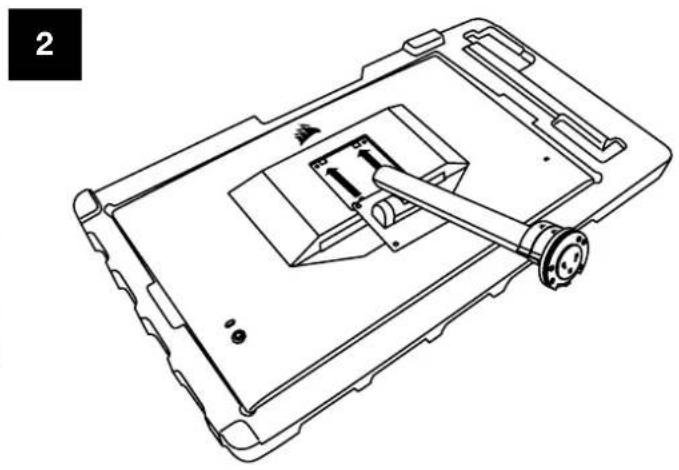
natural_image
Technical line drawing of a device casing with internal components and mounting holes (no text or symbols)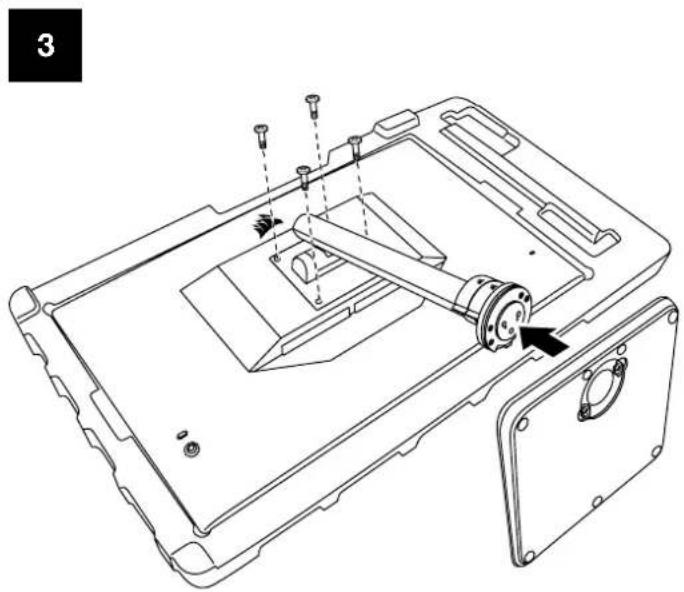
natural_image
Technical line drawing of a device casing with internal components and mounting holes (no text or symbols)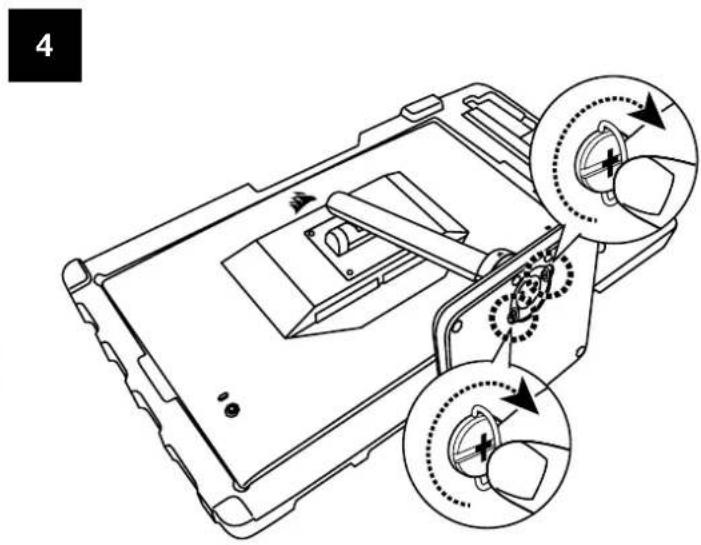
RÉGLAGE DE L'INCLINAISON, DU PIVOTEMENT ET DE LA HAUTEUR (Pour CM-9020002 uniquement)
natural_image
Black monitor stand with directional arrows indicating motion or rotation (no text or symbols)RÉGLAGE DU PIVOTEMENT ET DE LA HAUTEUR
natural_image
Two black-and-white monitors side by side, one displaying a colorful abstract pattern on the left and the other showing a vertical double-headed arrow (no text or symbols)GESTION DES CÂBLES RAPIDROUTE (Pour CM-9020002 uniquement)
natural_image
Bottom view of a black monitor with cable and stand, no visible text or symbolsnatural_image
Line drawing of a curved mechanical component with mounting brackets (no text or symbols)COMPATIBILITÉ DU SUPPORT MURAL
natural_image
Technical line drawing of a mechanical assembly with no visible text or symbols
XENEON 32QHD240 DISPLAY, INHALT
natural_image
Pure technical diagram showing a rectangular panel with labeled points A and B, and a separate mechanical bracket (no text or symbols beyond labels)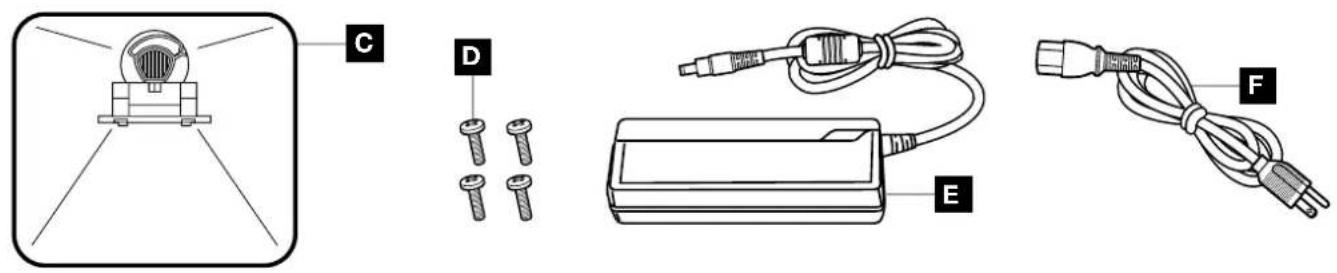

A XENEON 32QHD240 DISPLAY, PANEL
D MONTAGESCHRAUBEN (4X)
E AC-ADAPTER
F AC-STROMKABEL
G DISPLAYPORT-KABEL (1,5M)
H HDMI-KABEL (1,5M)
I USB-C-KABEL (1,5M)
J USB-A-AUF-USB-C-KABEL (1,8M)
natural_image
Diagram of a 3D printer or printer with an upward arrow indicating orientation, shown in open and closed views (no text or symbols)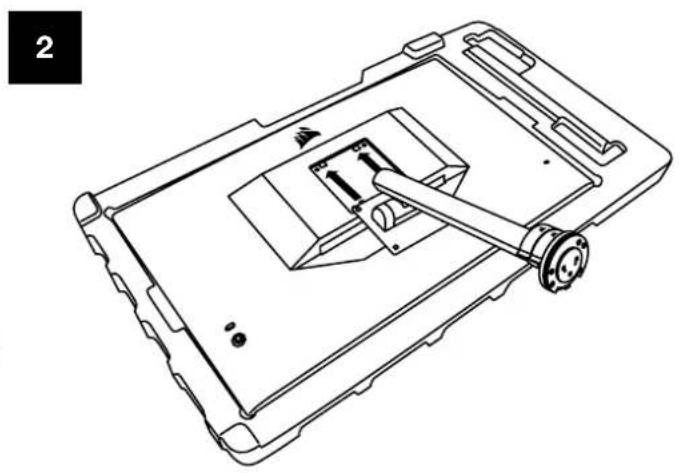
natural_image
Technical line drawing of a device casing with internal components and mounting bracket (no text or symbols)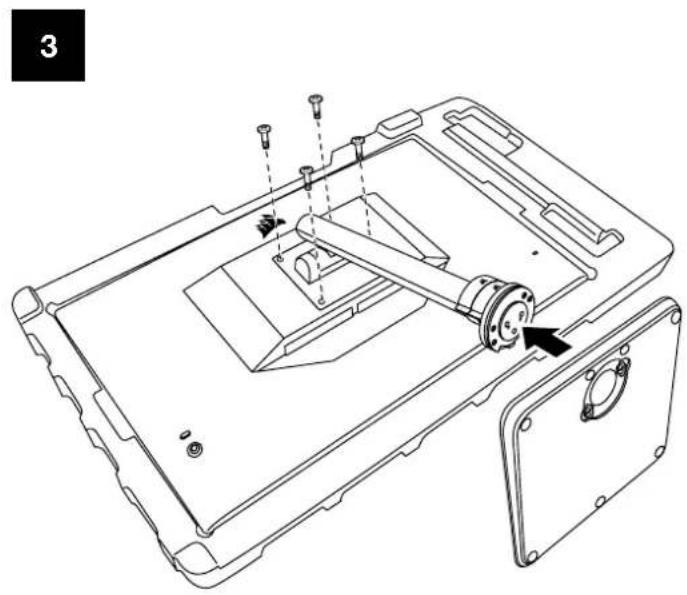
natural_image
Technical line drawing of a mechanical assembly with mounting holes and a central rotating component (no text or symbols)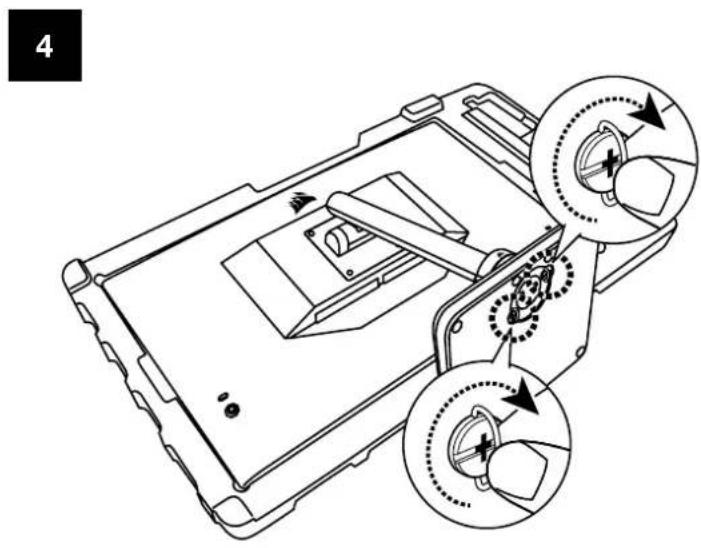
natural_image
Black monitor stand with directional arrows indicating rotation or movement (no text or symbols)natural_image
Modern monitor displaying a colorful abstract digital artwork with a white ship silhouette on its screen, accompanied by directional arrows (no text or symbols)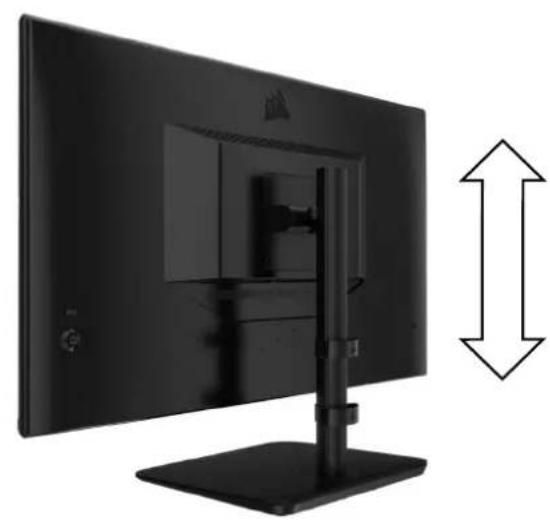
natural_image
Side view of a black desktop computer monitor with a vertical stand and bidirectional arrow indicating vertical offset (no text or symbols visible)natural_image
Bottom view of a black TV monitor with cable and stand (no visible text or symbols)natural_image
Line drawing of a mechanical component with curved and straight sections (no text or symbols)natural_image
Technical line drawing of a mechanical assembly with no visible text or symbolsnatural_image
Close-up of a black computer monitor with cable and stand (no visible text or symbols)
natural_image
Pure technical diagram showing a rectangular panel with labeled points A and B, and a separate mechanical bracket (no text or symbols beyond labels)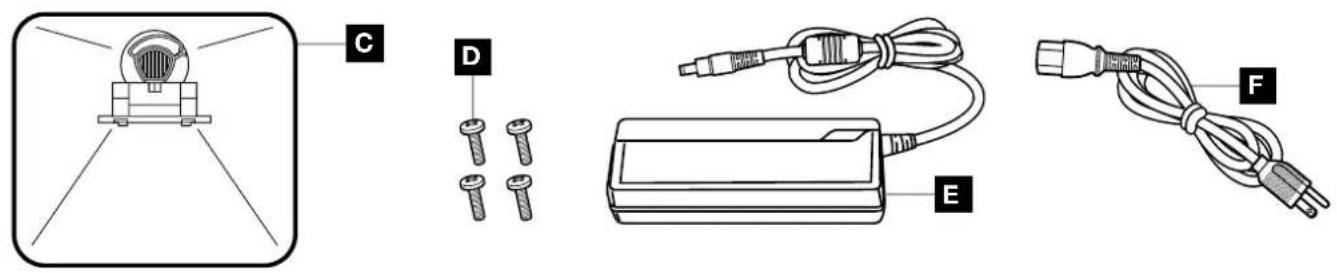

A PANNELLO SCHERMO XENEON 32QHD240 CONTENUTO
B MONTANTE (Solo per CM-9020002)
C SUPPORTO (Solo per CM-9020002)
D VITI DI MONTAGGIO (4)
E ADATTATORE AC
F CAVO DI ALIMENTAZIONE AC
G CAVO DISPLAYPORT (1,5M)
H CAVO HDMI (1,5M)
I CAVO USB-C (1,5M)
J CAVO DA USB-A A USB-C (1,8M)
ASSEMBLAGGIO (Solo per CM-9020002)
natural_image
Diagram of a mechanical assembly with an upward arrow and dashed circular components, no text or symbols present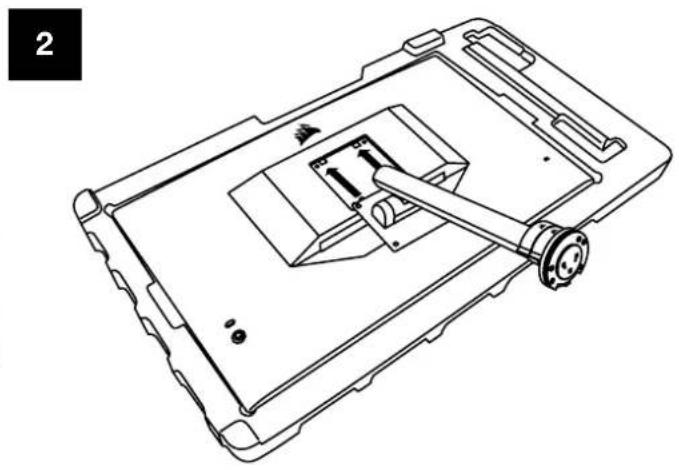
natural_image
Technical line drawing of a device casing with internal components and mounting holes (no text or symbols)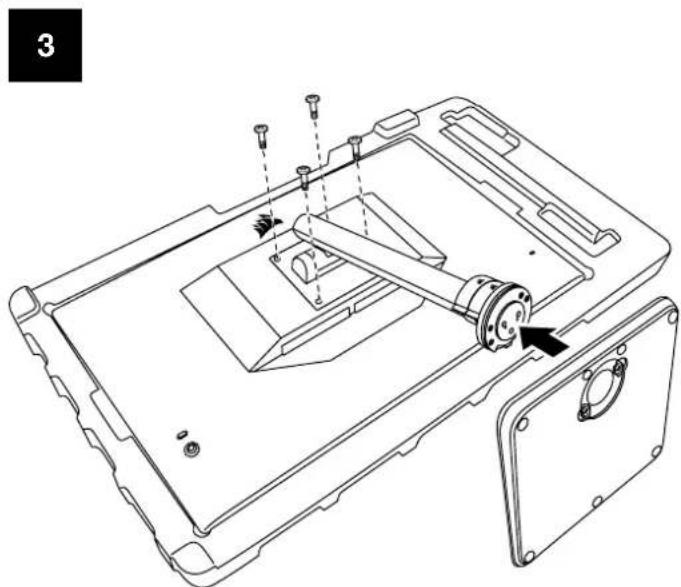
natural_image
Technical line drawing of a mechanical assembly with no visible text or symbols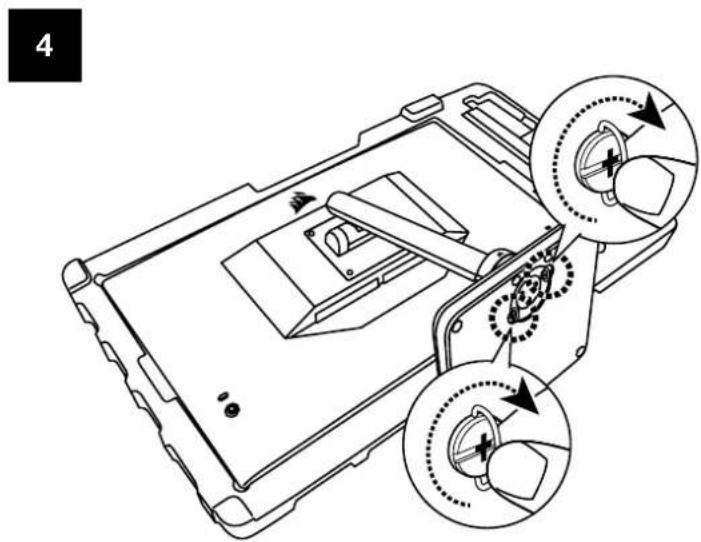
natural_image
Black monitor stand with directional arrows indicating motion or rotation (no text or symbols)natural_image
Modern monitor displaying a colorful abstract digital artwork with geometric patterns and a white sail, accompanied by directional arrows (no text or symbols on screen)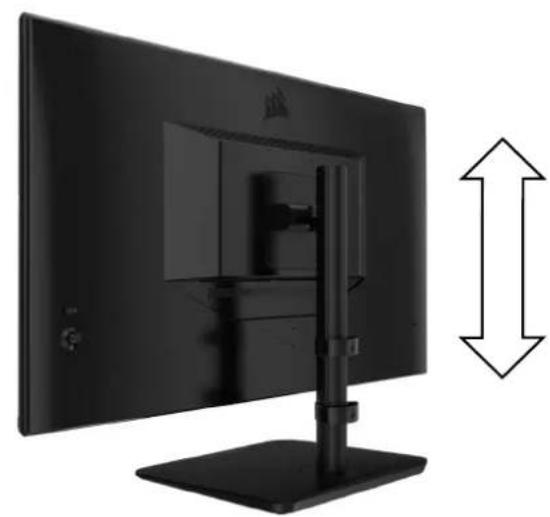
natural_image
Side view of a black desktop computer monitor with a vertical stand and bidirectional arrow indicating vertical offset (no text or symbols visible)SISTEMA DI GESTIONE DEI CAVI RAPIDROUTE (Solo per CM-9020002)
natural_image
Bottom view of a black TV monitor with cable and stand (no visible text or symbols)natural_image
Line drawing of a curved mechanical component or bracket (no text or symbols)COMPATIBILITÀ CON SUPPORTO DA PARETE
natural_image
Technical line drawing of a mechanical assembly with no visible text or symbolsnatural_image
Close-up of a black TV mounted on a stand with cables and connectors, no visible text or symbols.

natural_image
Technical line drawing of a device with a central component and mounting bracket (no text or symbols)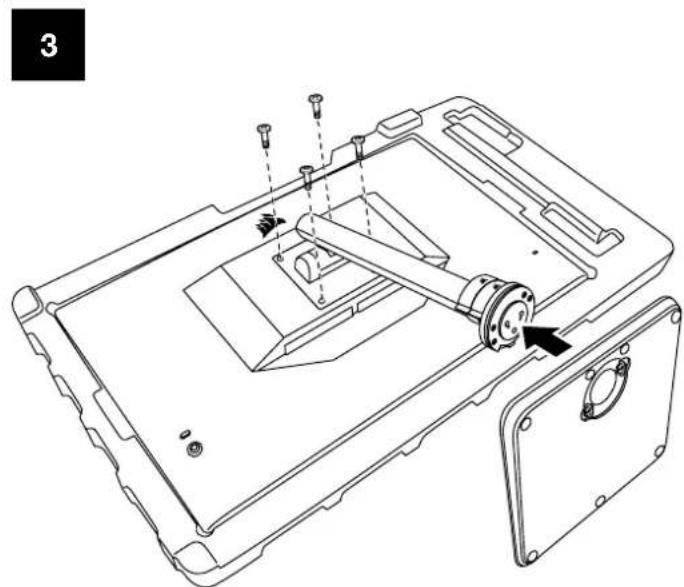
natural_image
Technical line drawing of a mechanical assembly with mounting flanges and a central component (no text or symbols)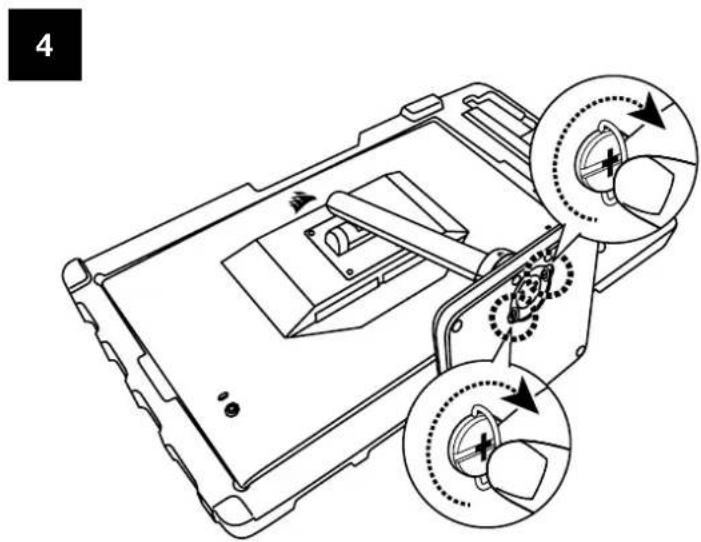
natural_image
Black monitor stand with directional arrows indicating motion or movement (no text or symbols)AJUSTE DE LA ALTURA Y EL GIRO
natural_image
Two computer monitors side by side, one displaying a colorful abstract screen with a bird logo and arrow, the other showing a black monitor with a vertical double-headed arrow (no text or symbols on screens)natural_image
Bottom view of a black monitor with cable and stand, no visible text or symbolsnatural_image
Line drawing of a curved mechanical component with two protrusions and a central circular feature (no text or symbols)natural_image
Technical line drawing of a mechanical assembly with no visible text or symbolsnatural_image
Close-up of a black TV mounted on a stand with cables and connectors (no visible text or symbols)
natural_image
Pure technical diagram showing a rectangular panel with labeled points A and B, and a separate mechanical bracket (no text or symbols beyond labels)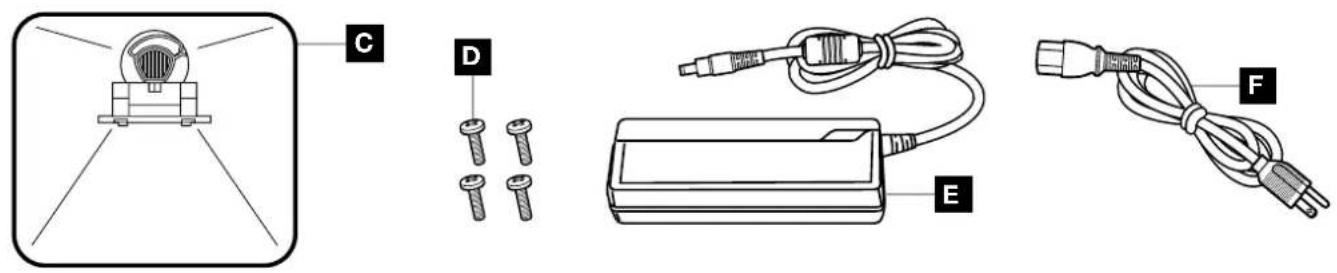

A PAINEL DE ECRÃ XENEON 32QHD240
B PILAR DE FIXAÇÃO (Apenas para CM-9020002)
C SUPORTE (Apenas para CM-9020002)
D PARAFUSOS DE MONTAGEM (X4)
E ADAPTADOR CA
F CABO DE ALIMENTAÇÃO CA
G CABO DISPLAYPORT (1,5M)
H CABO HDMI (1,5M)
I CABO USB-C (1,5M)
J CABO USB-A A USB-C (1,8M)
MONTAGEM (Apenas para CM-9020002)
natural_image
Diagram of a mechanical assembly with an upward arrow and dotted circular components, no text or symbols present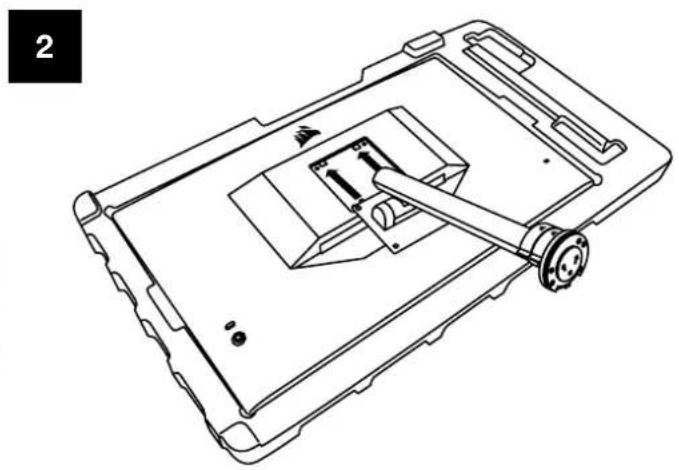
natural_image
Technical line drawing of a device casing with internal components and mounting bracket (no text or symbols)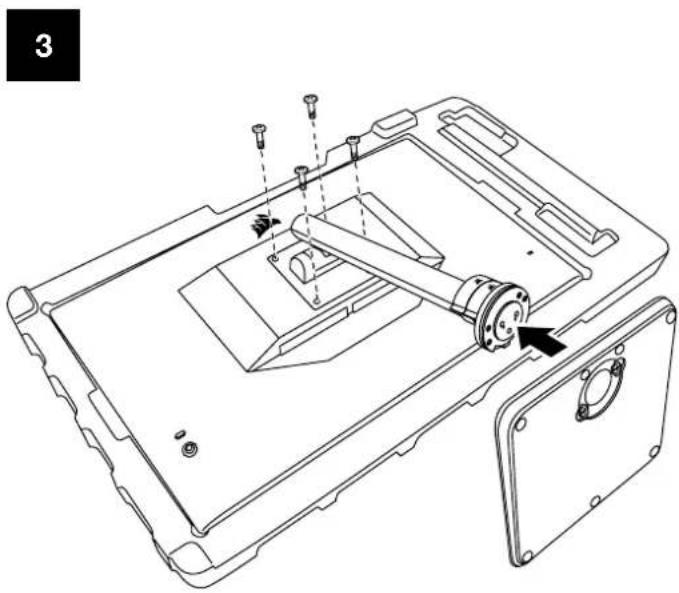
natural_image
Technical line drawing of a device casing with internal components and mounting holes (no text or symbols)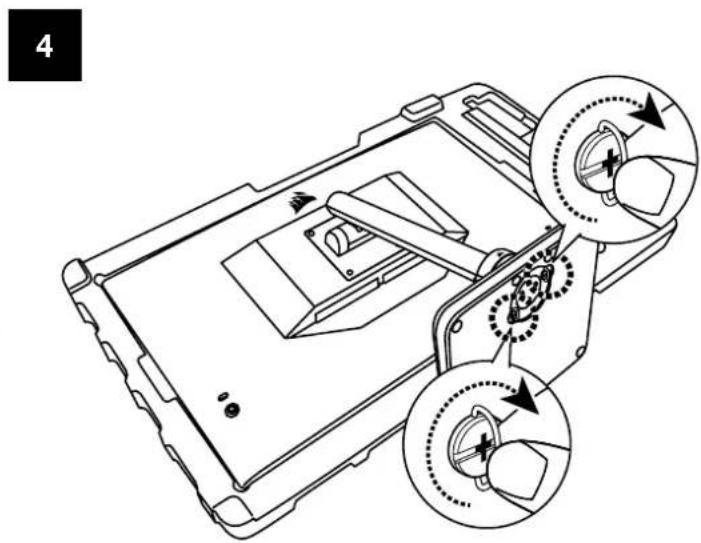
natural_image
Black monitor stand with directional arrows indicating motion or movement (no text or symbols)natural_image
Two black-and-white monitors side by side, one displaying a colorful abstract screen with a ship silhouette, the other showing a close-up of its front panel with a monitor and vertical arrow indicating size (no text or symbols on screens)GESTÃO DE CABOS RAPIDROUTE (Apenas para CM-9020002)
natural_image
Bottom view of a black TV monitor with cable and stand (no visible text or symbols)natural_image
Line drawing of a mechanical component with curved and straight sections (no text or symbols)COMPATIBILIDADE COM SUPORTE DE PAREDE
natural_image
Technical line drawing of a mechanical assembly with no visible text or symbolsnatural_image
Close-up of a computer monitor with cable and indicator lights, no visible text or symbols on the device itself.
natural_image
Technical diagram showing a rectangular panel labeled A and a vertical mechanical component labeled B, with no visible text or symbols beyond labels.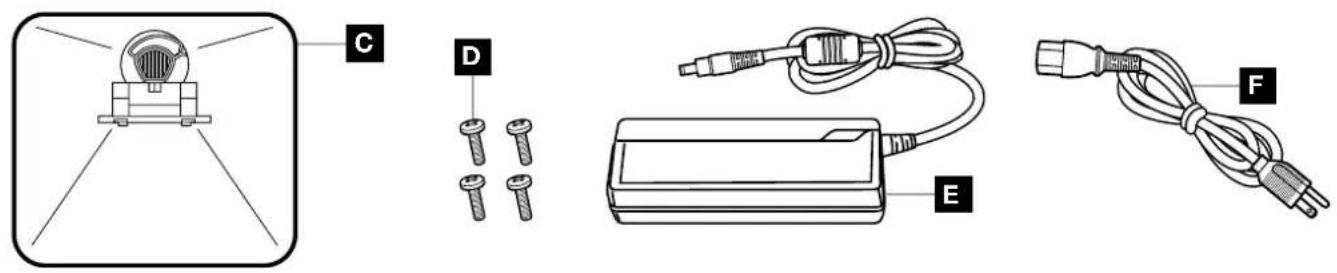

natural_image
Technical line drawing of a device casing with internal components and mounting holes (no text or symbols)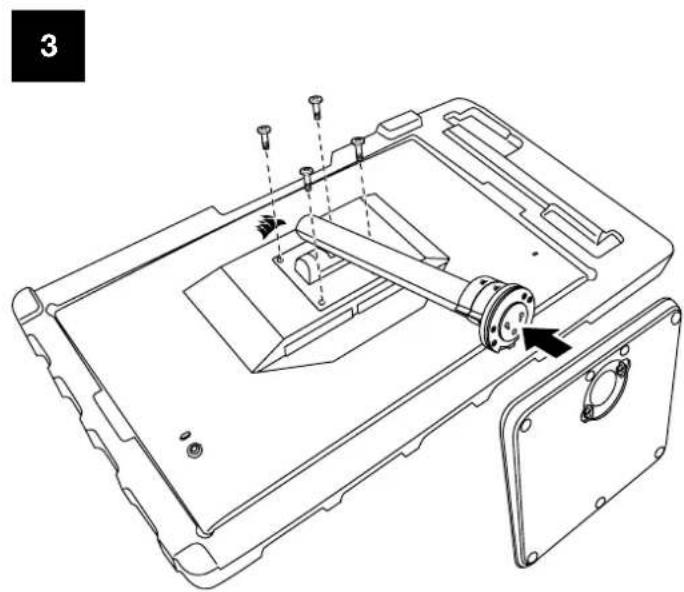
natural_image
Technical line drawing of a device casing with internal components and mounting holes (no text or symbols)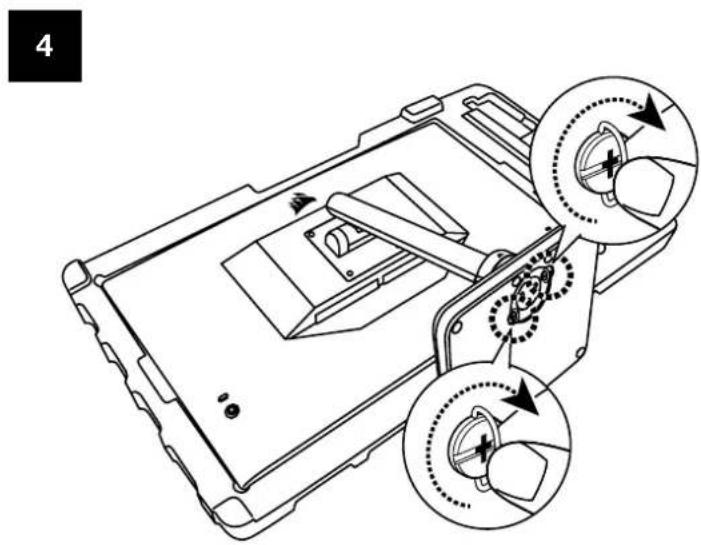
natural_image
Black desktop monitor with stand and side-mounted screen, showing directional arrows indicating motion (no text or symbols)ПОВОРОТА И ВЫСОТЫ
natural_image
Two black-and-white monitors side by side, one displaying a colorful abstract screen with a bird silhouette, the other showing a close-up of its front panel with a monitor and vertical arrow indicating width.natural_image
Bottom view of a black TV monitor with cable and stand (no visible text or symbols)natural_image
Line drawing of a curved mechanical component or bracket (no text or symbols)natural_image
Technical line drawing of a device's internal components, showing assembly and mounting (no text or symbols)

natural_image
Black desktop monitor stand with directional arrows indicating motion (no text or symbols)旋轉和高度調整
natural_image
Two black-and-white monitors side by side, one displaying a colorful abstract pattern on the left and the other showing a monitor with a vertical double-headed arrow indicating width (no text or symbols on screens)natural_image
Bottom view of a black TV monitor with cable and stand (no visible text or symbols)natural_image
Line drawing of a mechanical component with curved and straight ends (no text or symbols)壁掛架相容性
natural_image
Technical line drawing of a device's internal components, showing a cylindrical assembly with screw holes and a central shaft (no text or symbols)natural_image
Close-up of a black electronic device with cable and connector, no visible text or symbolsm = 311
-
m = 311
Color Temperature
Gamma
Saturation
Eye Saver
Response Time
<
Fast
Refresh Overlay
<
OFF
操作
OSD - 影像設定

natural_image
Technical line drawing of a device casing with internal components and mounting brackets (no text or symbols)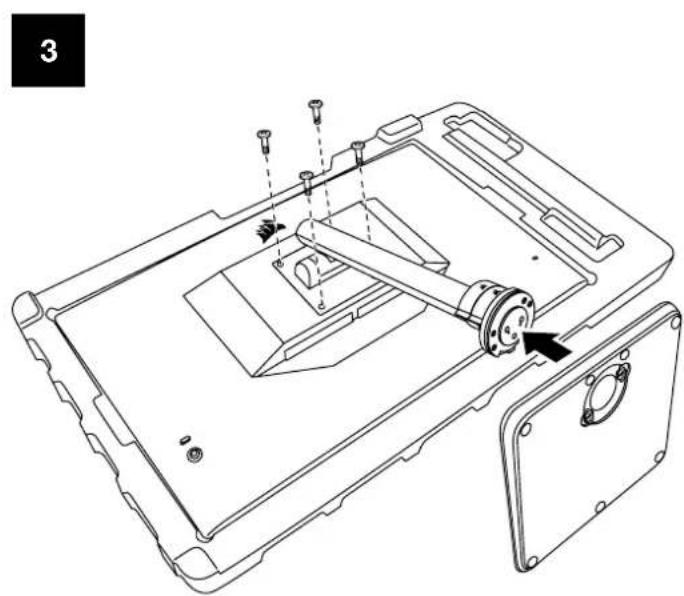
natural_image
Technical line drawing of a device casing with mounting flanges and internal components (no text or symbols)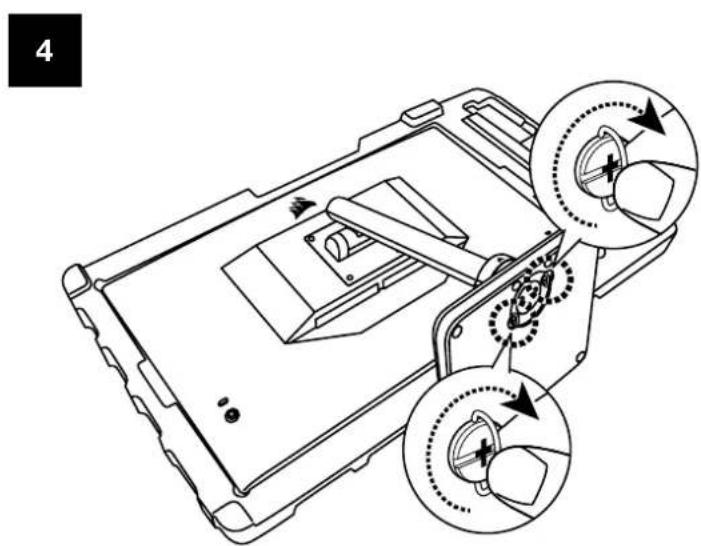
natural_image
Black monitor stand with directional arrows indicating motion or change (no text or symbols)左右回転と高さ調整
natural_image
Two black-and-white monitors side by side, one displaying a colorful abstract screen with a white ship silhouette, the other showing a close-up of its screen with a logo and height dimension arrows (no text or symbols on screens)natural_image
Top-down view of a black monitor with cable and stand (no visible text or symbols)natural_image
Line drawing of a mechanical component with curved and straight sections (no text or symbols)壁掛けマウント互換性
natural_image
Technical line drawing of a device's internal components, showing a cylindrical assembly with screw holes and a central shaft (no text or symbols)m = 311
Color Temperature
Gamma
Saturation
Eye Saver
Response Time
<
Fast
Refresh Overlay
<
OFF
動作
OSD - 画像設定
natural_image
Technical diagram showing a rectangular panel labeled A and a vertical mechanical component labeled B, with no visible text or symbols beyond labels.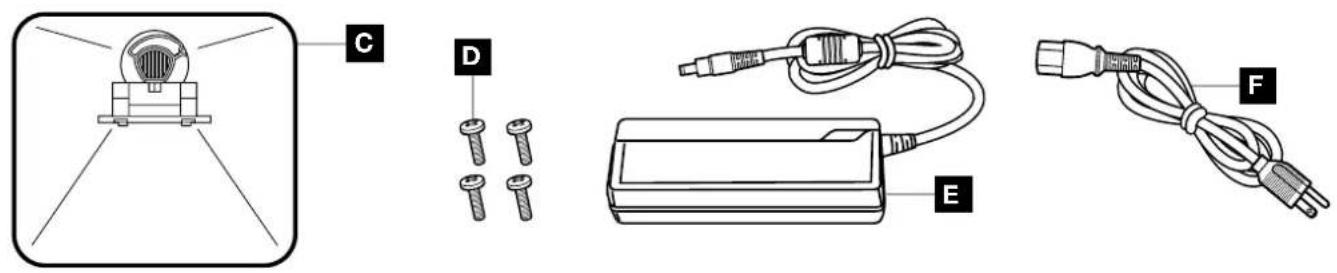

natural_image
Technical line drawing of a device with a tool inserted into a tray (no text or symbols)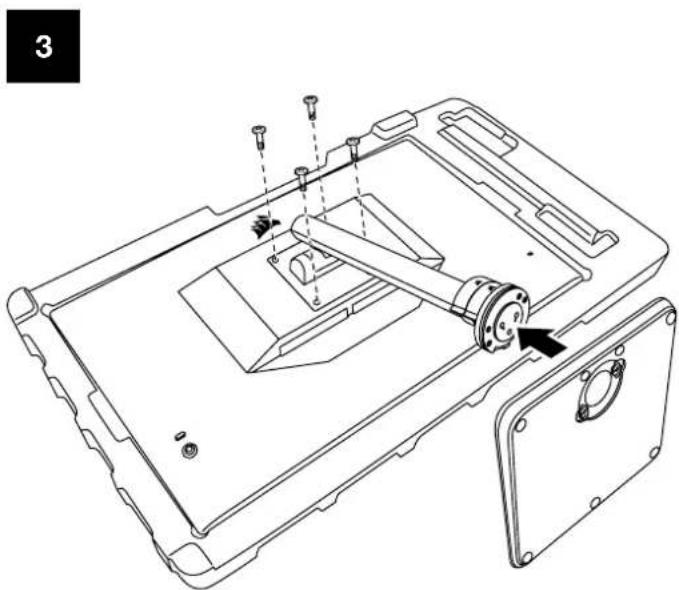
natural_image
Technical line drawing of a device casing with internal components and mounting holes (no text or symbols)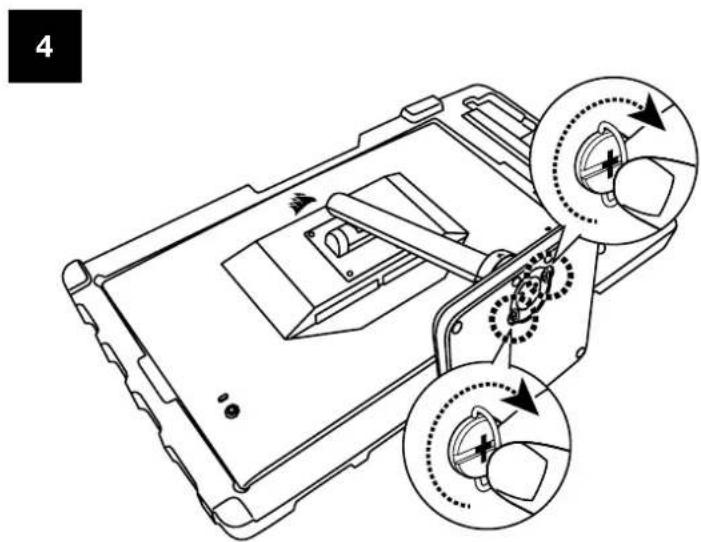
natural_image
Black desktop monitor stand with directional arrows indicating motion (no text or symbols)회전 및 높이 조절
natural_image
Modern monitor with a colorful abstract digital display and directional arrows indicating action or refresh (no text or symbols on screen)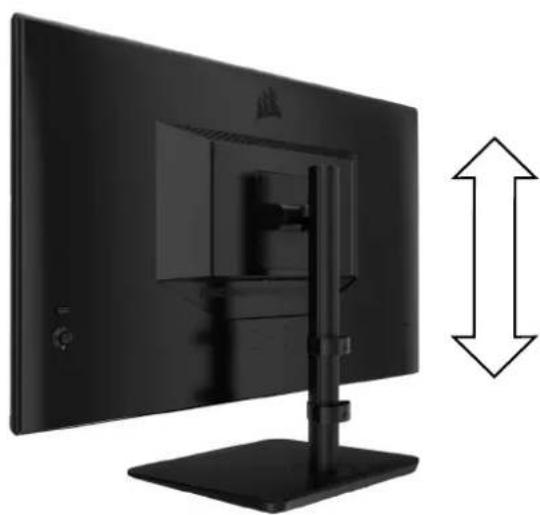
natural_image
Side view of a black desktop computer monitor with a vertical stand and bidirectional arrow indicating vertical alignment (no text or symbols visible)natural_image
Top-down view of a black monitor with cable and stand (no visible text or symbols)natural_image
Line drawing of a mechanical component with curved and straight sections (no text or symbols)벽걸이 거치대 호환성
natural_image
Technical line drawing of a device's internal components, showing a cylindrical assembly with screw holes and a central shaft (no text or symbols)natural_image
Close-up of a black monitor with cable and connectors, no visible text or symbolsOSD (On-Screen Display)
m = 311
Color Temperature
Gamma
Saturation
Eye Saver
Response Time
<
Fast
Refresh Overlay
<
OFF
작동
OSD-사진 설정
Product Name (제품명칭): GAMING MONITOR
Model No.(모델명):RDD0020

Web: corsair.com
Phone: (888) 222-4346
Warranty: corsair.com/support/warranty
Support: support.corsair.com
Blog: corsair.com/blog
Forum: forum.corsair.com
YouTube: youtube.com/corsairhowto
- XENEON
- TABLE OF CONTENTS
- Precautions 2
- Package Contents 3
- Assembly 4
- Connectivity 8
- Operation 9
- Specifications
- PRECAUTIONS
- ASSEMBLY (For CM-9020002 Only)
- TILT, SWIVEL AND HEIGHT ADJUSTMENT (For CM-9020002 Only)
- TILT
- SWIVEL & HEIGHT ADJUSTMENT
- RAPIDROUTE CABLE MANAGEMENT (For CM-9020002 Only)
- WALL MOUNT COMPATIBILITY
- CONNECTIVITY
- OPERATION
- Controls
- On-Screen Display (OSD)
- OSD – Picture Settings
- OSD - OSD Setting
- OSD - System Setting
- OSD – System Setting
- OSD - Audio
- OSD - Input Select
- OSD - Information
- CORSAIR XENEON 32QHD240 Gaming Monitor FAQ
- APPENDIX
- ASSEMBLAGE (Pour CM-9020002 uniquement)
- RÉGLAGE DE L'INCLINAISON, DU PIVOTEMENT ET DE LA HAUTEUR (Pour CM-9020002 uniquement)
- RÉGLAGE DU PIVOTEMENT ET DE LA HAUTEUR
- GESTION DES CÂBLES RAPIDROUTE (Pour CM-9020002 uniquement)
- COMPATIBILITÉ DU SUPPORT MURAL
- ASSEMBLAGGIO (Solo per CM-9020002)
- SISTEMA DI GESTIONE DEI CAVI RAPIDROUTE (Solo per CM-9020002)
- COMPATIBILITÀ CON SUPPORTO DA PARETE
- AJUSTE DE LA ALTURA Y EL GIRO
- MONTAGEM (Apenas para CM-9020002)
- GESTÃO DE CABOS RAPIDROUTE (Apenas para CM-9020002)
- COMPATIBILIDADE COM SUPORTE DE PAREDE
- ПОВОРОТА И ВЫСОТЫ
- 旋轉和高度調整
- 壁掛架相容性
- 操作
- 左右回転と高さ調整
- 壁掛けマウント互換性
- 動作
- 회전 및 높이 조절
- 벽걸이 거치대 호환성
- OSD (On-Screen Display)
- 작동
Brand : CORSAIR
Model : XENEON 32QHD240
Category : Monitor