
ORE 5-150 EC - Grinder Flex - Free user manual and instructions
Find the device manual for free ORE 5-150 EC Flex in PDF.


| Product type | Random orbit sander (grinder) |
| Brand | Flex |
| Model | ORE 5-150 EC |
| Supply voltage | 220-240 V |
| Power consumption | 400 W |
| Oscillation diameter | 5 mm |
| Idle speed | 6,000 to 10,000 min⁻¹ |
| Idle vibrations | 12,000 to 20,000 min⁻¹ |
| Sanding pad diameter | 150 mm |
| Weight (without cable) | 1.4 kg |
| Protection class | II (double insulation) |
| Power cable length | 4.0 m |
| Abrasive attachment system | Hook and loop (Velcro) |
| Speed adjustment | Continuous dial from 1 to 6 |
| Dust extraction | Integrated (micro filter box) or external |
| Sound pressure level (LpA) | 79 dB(A) |
| Sound power level (LWA) | 90 dB(A) |
| Total vibration value (ah) | 5 m/s² |
| Intended use | Dry sanding of wood, plastic, paint, filler |
| Maintenance and cleaning | Clean ventilation slots with dry compressed air; do not unscrew the housing |
| Spare parts and repairability | Manufacturer-approved service center; exploded views at www.flex-tools.com |
| Safety | Safety glasses, dust mask, hearing protection; read the manual before use |
| Standards and compliance | EN 62841, directives 2006/42/EC, 2011/65/EU, 2014/30/EU |
| General information | Manual available in 24 languages; recycling according to WEEE |
Frequently Asked Questions - ORE 5-150 EC Flex
User questions about ORE 5-150 EC Flex
0 question about this device. Answer the ones you know or ask your own.
Ask a new question about this device
Download the instructions for your Grinder in PDF format for free! Find your manual ORE 5-150 EC - Flex and take your electronic device back in hand. On this page are published all the documents necessary for the use of your device. ORE 5-150 EC by Flex.
USER MANUAL ORE 5-150 EC Flex
natural_image
Illustration of a power tool with a meshing base and power shunt (no text or symbols)natural_image
Illustration of a power tool connecting two connectors with a 'click' label (no text or symbols on the diagram itself)natural_image
Illustration of a power tool emitting a cable to a cylindrical device, with a starburst labeled "clic" (no text or symbols on the diagram itself)natural_image
Close-up of a mechanical component with numbered slots (3, 4, 5) and directional arrows indicating motion or movement (no readable text or symbols)natural_image
Close-up of a gray handheld device with a black arrow pointing to the button, no visible text or symbols.
VORSICHT!
natural_image
Hand using a power tool on a wooden surface, no text or symbols visibleManager Research & Development (R & D)
Klaus Peter WeinperEckhard F Head of Quality Department (QD)
Symbols used in this manual ..... 10
Symbols on the power tool. 10
For your safety 10
Noise and vibration....11
Technical specifications 12
Overview 13
Instructions for use 14
Maintenance and care 16
Disposal information 16
C €-Declaration of Conformity ..... 16
Exemption from liability 16
Symbols used in this manual

WARNING!
Denotes impending danger.
Non-observance of this warning may result in death or extremely severe injuries.

CAUTION!
Denotes a possibly dangerous situation.
Non-observance of this warning may result in slight injury or damage to property.

NOTE
Denotes application tips and important information.
Symbols on the power tool

Before switching on the power tool, read the operating manual!
Wear goggles!

Wear ear protection!

Wear mask!

Disposal information for the old machine (see page 16)!

For your safety

WARNING!
Before using the power tool, please read and follow:
– these operating instructions,
- the "General safety instructions" on the handling of power tools in the enclosed booklet (leaflet-no.: 315.915),
– the currently valid site rules and the regulations for the prevention of accidents.
This power tool is state of the art and has been constructed in accordance with the acknowledged safety regulations.
Nevertheless, when in use, the power tool may be a danger to life and limb of the user or a third party, or the power tool or other property may be damaged.
The power tool may be operated only if it is
- as intended,
– in perfect working order.
Faults which impair safety must be repaired immediately.
Intended use
This sander is designed
– for commercial use in industry and trade,
– for sanding wood, plastic, paint, filler and similar materials using the dry sanding process,
– for use with Velcro sanding sheet and accessories which are indicated in these instructions or which are recommended by the manufacturer.
When metal is being ground, flying sparks occur. Ensure that nobody can be endangered by flying sparks.
Safety instructions for sander

WARNING!
Read all safety instructions and other instructions. Failure to observe the safety instructions and other instructions may result in an electric shock, fire and/or serious injuries.
Keep all safety instructions and other instructions in a safe place for the future.
■ Attention Risk of fire! Avoid overheating the material to be ground and the grinder. Always empty the dust container before taking breaks from work.
Grinding dust in the dust sack, microfilter, paper sack (or in the filter sack or filter of the dust extractor) may self-ignite under unfavourable conditions, e.g. caused by flying sparks when grinding metals. It is particularly hazardous if the grinding dust is mixed with paint or polyurethane residue or other chemical substances and if the material is ground for a long time until hot.
- Do not use the electric power tool if it has a damaged power cord. Do not touch the damaged power cord and pull out the mains plug if the power cord is damaged during work. Damaged power cords increase the risk of an electric shock.
■ Use the electric power tool for dry sanding only. If water penetrates the electric power tool, there is an increased risk of electric shock.
■ Dust released from materials, such as lead paints, some types of wood, minerals and metal, may be hazardous to the operator or people in the vicinity. Inhaling or touching these dusts may result in respiratory diseases and/or allergic reactions.
- Ensure the work place is well ventilated!
- If possible, use external dust extraction.
– It is recommended to wear a respirator mask belonging to filter class P2.
■ Secure the workpiece.
A workpiece is held more securely in a clamping device or vice than by hand.
- Keep the workplace clean.
Material mixtures are especially dangerous. Light metal dust may burn or explode.
■ Do not work on materials which release hazardous substances (e.g. asbestos).
■ Never grind or cut light metals which have a magnesium content greater than 80%. Risk of fire!
■ Before using the machine, check that the grinding tools have been installed and secured correctly. Switch on the power tool at no load for 30 seconds!
■ Interrupt the test run immediately if violent vibrations occur or other damage is established. Check the machine to determine the cause.
■ Before putting down the power tool, switch it off and wait until it comes to a standstill.
■ Do not clamp the power tool in a vice.
■ Always lay the power cord to the rear away from the electric power tool.
Additional safety instructions
■ Use only extension cables permitted for outdoor use.
■ Identify the power tool with stickers only. Do not drill any holes into the housing.
■ The mains voltage and the voltage specifications on the rating plate must correspond.
Noise and vibration
The noise and vibration values have been determined in accordance with EN 62841. The A evaluated noise level of the power tool is typically:
| Sound pressure L_pA [dB(A)] | Sound power L_WA [dB(A)] | |
| ORE 3–150 EC | 79 90 | |
| ORE 5–150 EC | 79 90 | |
| Uncertainty K = 3 dB | ||
Total vibration value:
| Emission value a_h [m/s ^2 ] | |
| ORE 3–150 EC | 5 |
| ORE 5–150 EC | 5 |
| Uncertainty K = 1.5 m/s ^2 |

WARNING!
The indicated measurements refer to new power tools. Daily use causes the noise and vibration values to change.
NOTE
The vibration emission level given in this information sheet has been measured in accordance with a standardised test given in EN 62841 and may be used to compare one tool with another. It may be used for a preliminary assessment of exposure. The declared vibration emission level represents the main applications of the tool. However if the tool is used for different applications, with different accessories or poorly maintained, the vibration emission may differ. This may significantly increase the exposure level over the total working period.
However if the tool is used for different applications, with different accessories or poorly maintained, the vibration emission may differ. This may significantly decrease the exposure level over the total working period. Identify additional safety measures to protect the operator from the effects of vibration such as: maintain the tool and the accessories, keep the hands warm, organisation of work patterns.
CAUTION!
Wear ear protection at a sound pressure above 85 dB(A).
Technical specifications
| ORE 3–150 EC O | ORE 5–150 EC | ||
| Machine type Random-orbit sander | |||
| Voltage V 220-240 | |||
| Power input W 400 | |||
| Oscillating circuit diameter mm 3 5 | |||
| Idling speed | min^-1 | 6,000–10,000 6,000–10,000 | |
| No-load number of oscillations | min^-1 | 12,000–20,000 12,000–20,000 | |
| Shape of the sanding plate Round | |||
| Size of the sanding plate mm | ∅ 150 | ||
| Weight (without power cord) | kg 1.4 | ||
| Protection class | II/☐ | ||
Overview
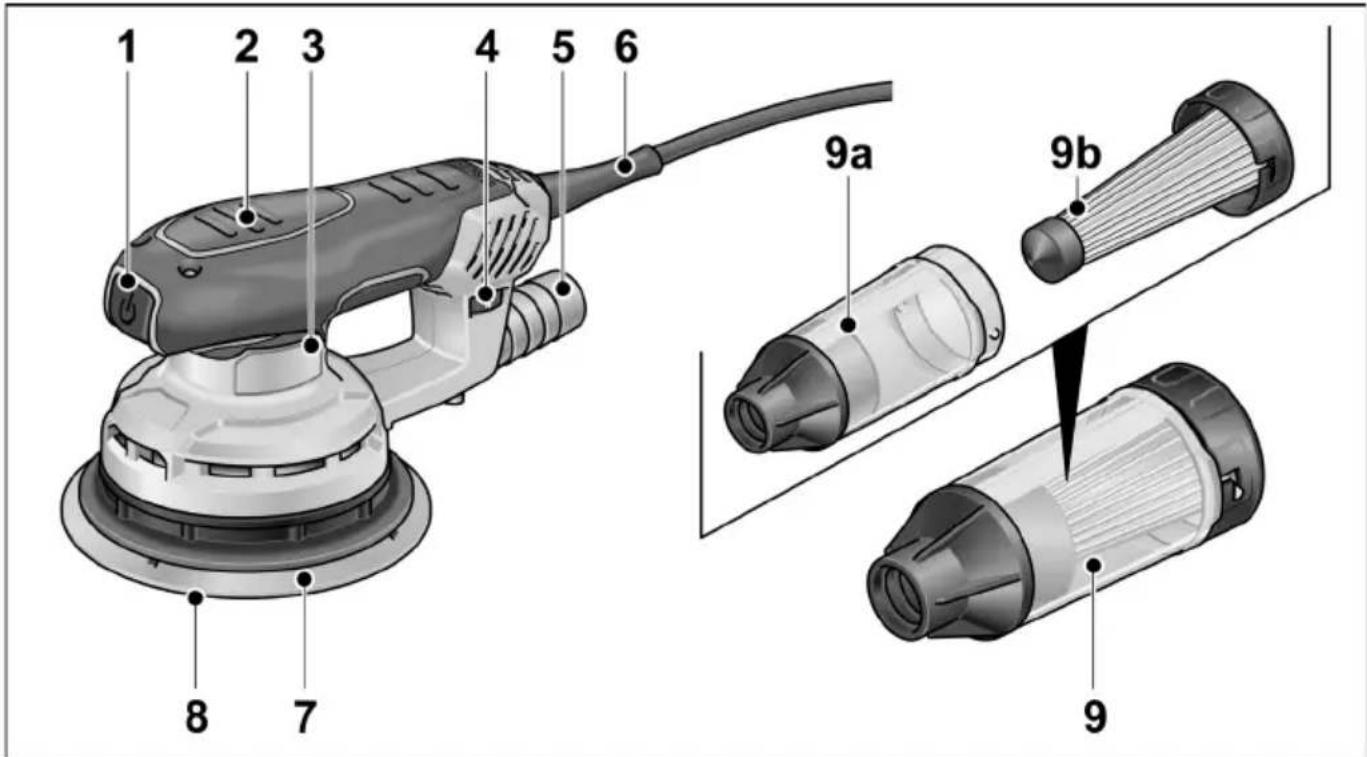
1 S w i t c h
switches the power tool on and off
2 Insulated grip surfaces
3 Rating plate
4 Adjusting wheel for controlling the number of oscillations.
5 Extraction nozzle
6 4.0 m power cord with plug
7 Sanding plate
8 Sanding sheet
9 Microfilter box
a) Housing
b) Filter insert with cover
Instructions for use

WARNING!
Before performing any work on the electric power tool, pull out the mains plug.
Before switching on the power tool
Unpack the electric power tool and check that no parts are missing or damaged.
Attaching/changing the sanding sheet
The sanding plate has Velcro fasteners and is therefore designed exclusively for use with Velcro sanding sheet.
■ Pull out the mains plug.
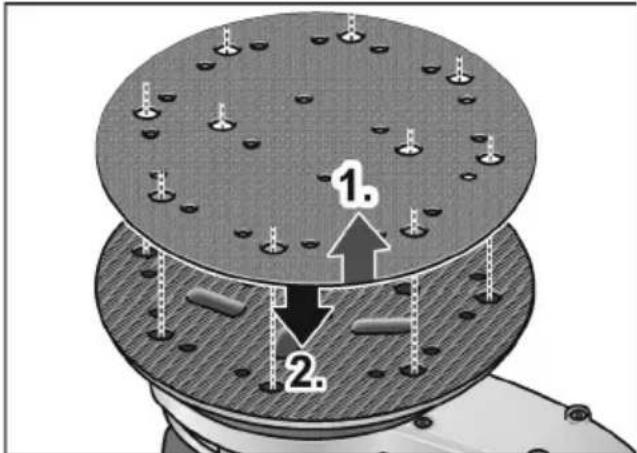
■ Remove used sanding sheet (1.).
■ Remove any coarse debris from the sanding plate.
■ Attach new sanding sheet (2). Align the holes in the sanding sheet with the holes in the sanding plate.
■ Attach the sanding sheet by gently pressing it against the Velcro fasteners on the sanding plate.
Dust extractor
Use the electric power tool only with an extractor. This will prevent high dust loads in the working air and coarse debris at the workplace.
The grinding dust is extracted directly from the point of abrasion through the extraction channels in the sanding plate.
The electric power tool can be used with the integrated extractor or with a connected extraction system.
Using an external extraction system
natural_image
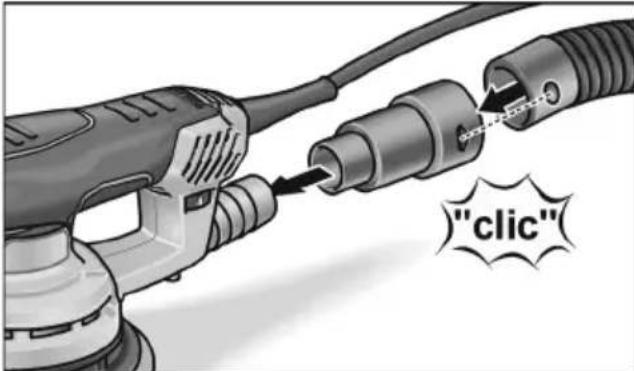
Illustration of a power tool connecting two plug connectors with a 'click' label (no text or symbols on the diagram itself)■ Push extraction adapter all the way onto the extraction nozzle.
■ Connect extraction hose to the extraction adapter.
■ Connect extraction hose to the dust extraction system.
Follow the operating instructions for the dust extraction system!
i NOTE
To prevent the power tool from sticking to the surface of the workpiece, set the suction power on the extractor to a correspondingly low level.
Integrated extractor with microfilter box
natural_image
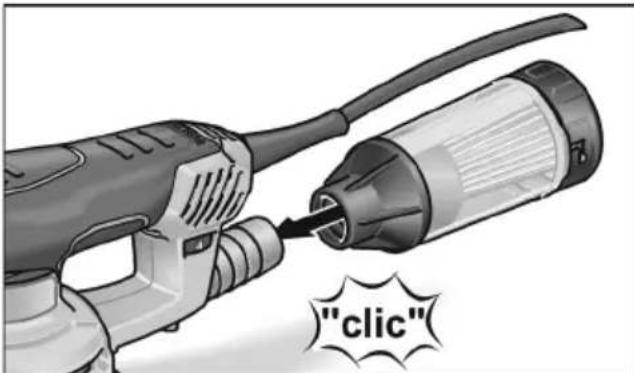
Illustration of a power tool being inserted into a cylindrical device, with a 'click' label (no text or symbols on the diagram itself)■ Push microfilter box all the way onto the extraction nozzle.
To ensure optimum dust extraction, empty the microfilter box in good time!
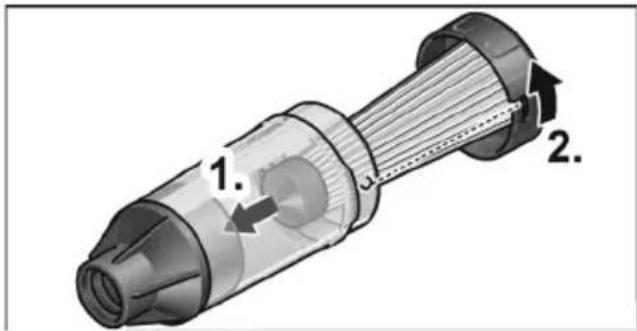
Regularly clean filter element.
■ Pull microfilter box with a twisting movement off the extraction nozzle.
■ Remove cover (bayonet lock) and pull out together with the filter element.
■ Tap filter element on a solid surface. Clean fins with a soft brush.
■ Empty housing of the microfilter box.
■ Re-attach microfilter box.
Number of oscillations control
natural_image
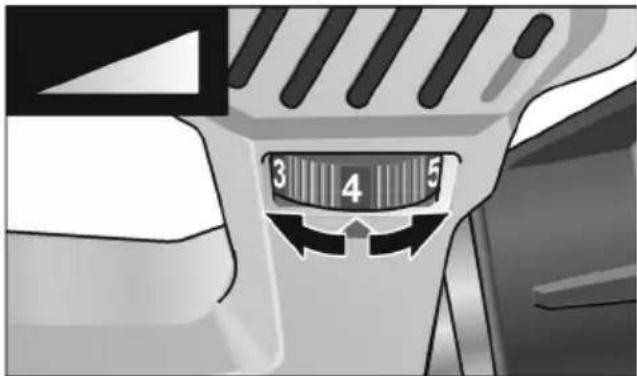
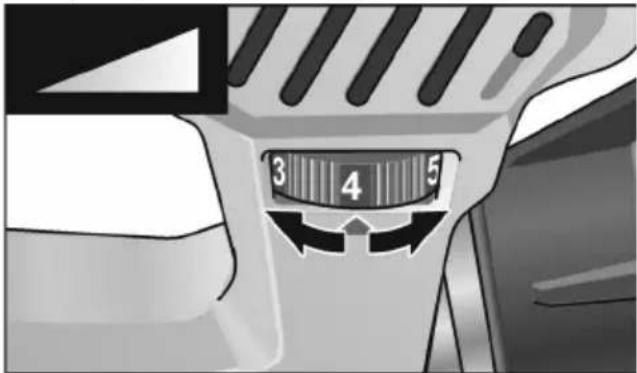
Close-up of a mechanical component with a numbered dial (3, 4, 5) and directional arrows, no readable text or symbols beyond the numbers.The thumb wheel can be used to steplessly vary the number of oscillations from 1 (low) to 6 (high) even while the power tool is running.
As a result, the grinding speed can be optimally adjusted to the particularly material and the working conditions.
Switching on and off
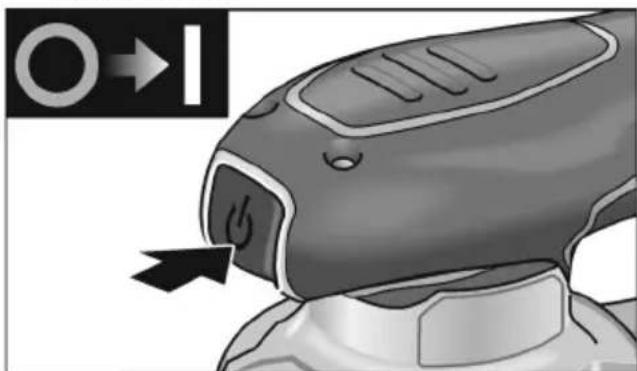
■ Switch power tool on or off by pressing on/off switch.
natural_image
Close-up of a handheld device with a power button and directional arrow indicator (no text or symbols on the device itself)
CAUTION!
Following a power failure, the switched-on power tool will start running again.
Operating instructions

WARNING!
Hold the electric power tool by the insulated grip surfaces only!

CAUTION!
When the power tool is switched off, the grinding tool continues running briefly.
natural_image
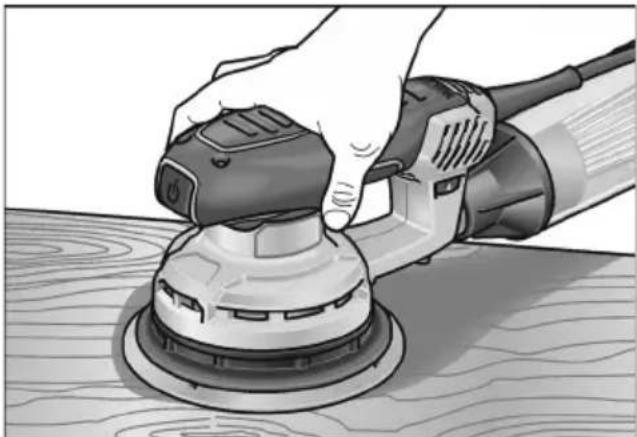
Hand using a power tool to clean or adjust a small mechanical component on a wooden surface (no text or symbols visible)■ Switch on the sander and place the whole sanding sheet on the surface to be processed.
■ Applying moderate pressure, move the sander evenly over the workpiece.
■ The sanding result is determined primarily by the selection of the correct sanding sheet, the selected number of oscillations and the contact pressure.
■ Replace sanding sheets in good time.
■ An excessive increase in the contact pressure will not increase the grinding performance, but will increase the wear on the electric power tool and the sanding tool.
For further information on the manufacturer's products go to www.flex-tools.com.
Maintenance and care

WARNING!
Before performing any work on the electric power tool, pull out the mains plug.
Cleaning
■ Regularly clean the power tool and ventilation slots.
■ Using dry compressed air, regularly blow out the housing interior and motor through the ventilation slots.
Housing

NOTE
Do not loosen the screws on the housing. Non-compliance will deem the guarantee obligations of the manufacturer null and void.
Repairs
Repairs may be carried out by an authorised customer service centre only.
Spare parts and accessories
Sanding sheets for different application areas and other accessories can be found in the manufacturer's catalogues.
Exploded drawings and spare-part lists can be found on our homepage:
www.flex-tools.com
Disposal information

WARNING!
Render redundant power tools unusable by removing the power cord.

EU countries only
Do not throw electric power tools into the household waste!
In accordance with the European Directive 2012/19/EU on Waste Electrical and Electronic Equipment and transposition into national law used electric power tools must be collected separately and recycled in an environmentally friendly manner.

NOTE
Please ask your dealer about disposal options!
CE-Declaration of Conformity
We declare under our sole responsibility that the product described under “Technical specifications” conforms to the following standards or normative documents:
EN 62841 in accordance with the regulations of the directives 2014/30/EU, 2006/42/EC, 2011/65/EU.
Responsible for technical documents: FLEX-Elektrowerkzeuge GmbH, R & D Bahnhofstrasse 15, D-71711 Steinheim/Murr
Manager Research & Development (R & D)
Exemption from liability
The manufacturer and his representative are not liable for any damage and lost profit due to interruption in business caused by the product or by an unusable product. The manufacturer and his representative are not liable for any damage which was caused by improper use of the power tool or by use of the power tool with products from other manufacturers.
Table des matières
natural_image
Illustration of a power tool connecting two plug connectors with a 'click' label (no text or symbols on the diagram itself)natural_image
Illustration of a power tool being inserted into a cylindrical device, with a 'click' button labeled (no text on the diagram itself)natural_image
Close-up of a mechanical component with numbered slots (3, 4, 5) and directional arrows indicating motion or movement (no readable text or symbols)natural_image
Close-up of a handheld device with a power button and directional arrow indicator (no readable text or symbols)PRUDENCE!
natural_image
Hand using a power tool to clean or adjust a circular component on a wooden surface (no text or symbols visible)Manager Research & Development (R & D)
Klaus Peter WeinperEckhard F Head of Quality Department (QD)
natural_image
Illustration of a power plug connecting two connectors with a 'click' button, no text or symbols presentnatural_image
Illustration of a power tool being inserted into a cylindrical device, with a starburst labeled "clic" (no text or symbols on the diagram itself)natural_image
Close-up of a mechanical component with a numbered dial (3, 4, 5) and directional arrows, no readable text or symbols beyond the numbers.natural_image
Close-up of a handheld device with a power button and arrow indicator (no readable text or symbols)
PRUDENZA!
natural_image
Hand using a power tool to clean or adjust a wooden surface (no text or symbols visible)Manager Research & Development (R & D)
Klaus Peter WeinperEckhard Rühle Head of Quality Department (QD)
natural_image
Illustration of a power tool connecting two plug connectors with a 'click' label (no text or symbols on the diagram itself)natural_image
Illustration of a power tool being inserted into a cylindrical device, with a 'click' label (no text or symbols on the diagram itself)natural_image
Close-up of a mechanical component with numbered slots (3, 4, 5) and directional arrows indicating motion or movement (no readable text or symbols)natural_image
Close-up of a robotic device with a black arrow pointing to the button, no visible text or symbolsnatural_image
Hand using a power tool on a wooden surface, no text or symbols visibleManager Research & Development (R & D)
Klaus Peter WeinperEckhard F Head of Quality Department (QD)
natural_image
Illustration of a power tool connecting plug to socket, with a speech bubble containing the word 'click' (no other text or symbols)natural_image
Illustration of a power tool emitting a cylindrical device with a label "clic" (no text or symbols on the diagram itself)natural_image
Close-up of a mechanical component with numbered slots (3, 4, 5) and directional arrows indicating motion or movement (no readable text or symbols)natural_image
Illustration of a robotic device with a power button and directional arrow (no text or symbols)ATENÇÃO!
natural_image
Hand using a power tool on a wooden surface, no text or symbols visibleManager Research & Development (R & D)
Klaus Peter WeinperEckhard Rühle Head of Quality Department (QD)
natural_image
Illustration of a power plug connecting two connectors with a 'click' label (no text or symbols on the diagram itself)natural_image
Illustration of a power tool emitting a cylindrical device with a label "clic" (no other text or symbols)natural_image
Close-up of a mechanical component with numbered slots (3, 4, 5) and directional arrows indicating motion or movement (no readable text or symbols)natural_image
Close-up of a handheld device with a power button and arrow indicator (no readable text or symbols)
VOORZICHTIG!
natural_image
Hand using a power tool to clean or adjust a wooden surface (no text or symbols visible)Manager Research & Development (R & D)
Klaus Peter WeinperEckhard F Head of Quality Department (QD)
natural_image
Illustration of a power tool connecting two connectors with a label reading 'click' (no text or symbols on the diagram itself)natural_image
Illustration of a power tool emitting a plug into a cylindrical device, with a starburst label reading "clic" (no text on the diagram itself)natural_image
Close-up of a gray electric shaver with a power button, showing mechanical components and a black arrow pointing to the handle (no text or symbols visible)! FORSIGTIG!
natural_image
Hand using a power tool to clean or adjust a wooden surface (no text or symbols visible)Manager Research & Development (R & D)
Klaus Peter WeinperEckhard F
Head of Quality
Department (QD)
natural_image
Illustration of a hairdryer connecting two cables with a 'click' label (no text or symbols on the diagram itself)■ Avsugingsadapteren skyves på avsugingsstussen inntil anslag.
■ Avsugingsslangen tilkobles til avsugingsadapteren.
■ Avsugingsslangen tilkobles til avsugingsanlegget. Ta hensyn til betjeningsveiledningen for avsugingsanlegget!
i HENVISNING
natural_image
Illustration of a power tool emitting a cylindrical device with a label "clic" (no other text or symbols)■ Mikrofilterboksen skyves på avsugingsstussen inntil anslag.
natural_image
Close-up of a mechanical component with numbered slots (3, 4, 5) and directional arrows indicating motion or movement (no readable text or symbols)natural_image
Close-up of a handheld device with a black arrow pointing to the button, no visible text or symbols
FORSIKTIG!
natural_image
Hand using a power tool to clean or adjust a wooden surface (no text or symbols visible)Manager Research & Development (R & D)
Klaus Peter WeinperEckhard F Head of Quality Department (QD)
natural_image
Illustration of a power tool connecting two connectors with a 'click' label (no text or symbols on the diagram itself)natural_image
Illustration of a power tool inserting into a cylindrical device with a label "clic" (no text or symbols on the diagram itself)natural_image
Close-up of a handheld device with a black arrow pointing to the button, no visible text or symbolsVAR FÖRSIKTIG!
natural_image
Hand using a power tool to clean or adjust a small mechanical component on a wooden surface (no text or symbols visible)natural_image
Illustration of a hair screw being inserted into a plug, with a 'click' label and starburst effect (no text or symbols on the diagram itself)natural_image
Illustration of a power tool being inserted into a cylindrical device, with a starburst label reading "clic" (no text or symbols on the diagram itself)natural_image
Close-up of a handheld device with a power button and arrow indicator (no readable text or symbols)
VARO!
natural_image
Hand using a power tool to clean or adjust a wooden surface (no text or symbols visible)Manager Research & Development (R & D)
Klaus Peter WeinperEckhard F Head of Quality Department (QD)
natural_image
Illustration of a power tool connecting plug to socket, with a speech bubble containing the word 'click' (no other text or symbols)natural_image
Illustration of a power tool being inserted into a cylindrical device, with a starburst label reading "clic" (no text or symbols on the diagram itself)natural_image
Close-up of a robotic device with a black arrow pointing to the nose area, no visible text or symbols.ΠΡΟΣΟΧΗ!
natural_image
Hand using a power tool on a wooden surface, no text or symbols visible
Manager Research & Development (R & D)
Klaus Peter WeinperEckhard F Head of Quality Department (QD)
natural_image
Illustration of a power tool connecting two connectors with a 'click' label (no text or symbols on the diagram itself)natural_image
Illustration of a power tool emitting a cylindrical device with a label "clic" (no other text or symbols)natural_image
Close-up of a handheld device with a black arrow pointing to the nose area, no visible text or symbols.
DİKKAT!
natural_image
Hand using a power tool to clean or adjust a small appliance on a wooden surface (no text or symbols visible)Manager Research & Development (R & D)
Klaus Peter WeinperEckhard F
Head of Quality
Department (QD)
natural_image
Illustration of a power plug connecting two connectors with a 'click' button, no text or symbols presentnatural_image
Illustration of a power tool emitting a cable to a cylindrical device, with a starburst labeled "clic" (no text or symbols on the diagram itself)natural_image
Close-up of a robotic device with a black arrow pointing to the nose area, no visible text or symbols.OSTROŻNIE!
natural_image
Hand using a power tool to clean or adjust a circular component on a wooden surface (no text or symbols visible)Manager Research & Development (R & D)
Klaus Peter WeinperEckhard Rühle Head of Quality Department (QD)
natural_image
Illustration of a power tool connecting two connectors with a 'click' button, no text or symbols presentnatural_image
Illustration of a power tool emitting a cable to a cylindrical device, with a starburst labeled "clic" (no text or symbols on the diagram itself)natural_image
Close-up of a handheld device with a power button and directional arrow, no visible text or symbolsnatural_image
Illustration of a hand using a power tool to clean or adjust a circular component on a wooden surface (no text or symbols visible)Manager Research & Development (R & D)
Klaus Peter WeinperEckhard F
Head of Quality
Department (QD)
natural_image
Illustration of a power tool being inserted into a cylindrical device, with a 'click' label (no text or symbols on the diagram itself)natural_image
Close-up of a mechanical component with a numbered dial (3, 4, 5) and directional arrows, no readable text or symbols beyond the numbers.natural_image
Close-up of a handheld device with a black arrow pointing to the button, no visible text or symbols.
POZOR!
natural_image
Hand using a power tool to clean or adjust a small mechanical component on a wooden surface (no text or symbols visible)Manager Research & Development (R & D)
Klaus Peter WeinperEckhard Rühle Head of Quality Department (QD)
natural_image
Illustration of a power tool connecting two connectors with a 'click' label (no text or symbols on the diagram itself)■ Nasad'te odsávací adaptér až na doraz na odsávacie hrdlo.
■ Pripojte odsávaciu hadicu na odsávací adaptér.
■ Pripojte odsávaciu hadicu na odsávacie zariadenie. Dodržiavajte návod na obsluhu odsávacieho zariadenia!
i UPOZORNENIE
natural_image
Illustration of a power tool emitting a cylindrical device with a label "clic" (no other text or symbols)■ Nasad'te mikrofiltračný box až na doraz na odsávacie hrdlo.
natural_image
Close-up of a handheld device with a black arrow pointing to the button, no visible text or symbols.
POZOR!
natural_image
Hand using a power tool to clean or adjust a wooden board (no text or symbols visible)Manager Research & Development (R & D)

Klaus Peter WeinperEckhard F
Head of Quality
Department (QD)
natural_image
Illustration of a power tool connecting two connectors with a 'click' label (no text or symbols on the diagram itself)■ Usisni adapter gurnite do graničnika na nastavak za usisavanje.
■ Priključite usisno crijevo na usisni adapter.
■ Priključite usisno crijevo na usisavač. Poštujte uputu za uporabu usisavača!
i NAPUTAK
natural_image
Illustration of a power tool being inserted into a cylindrical device, with a starburst label reading "clic" (no text or symbols on the diagram itself)■ Mikrofiltarsku kutiju gurnite do graničnika na nastavak za usisavanje.
Kako biste osigurali optimalno usisavanje prašine, pravovremeno ispraznite mikrofiltarsku kutiju! Redovito čistite uložak filtra.
■ Mikrofiltarsku kutiju skinite s nastavka za usisavanje kružim pokretima.
■ Skinite poklopac (bajunetni zatvarač) i izvucite s uloškom filtra.
■ Protresite uložak filtra na čvrstoj podlozi. Lamele očistite mekom četkom.
■ Ispraznite kućište mikrofiltarske kutije.
natural_image
Close-up of a handheld device with a black arrow pointing to the button, no visible text or symbols
OPREZ!
Nakon nestanka struje uključeni alat se ponovno pokreće.
Upute za rad

UPOZORENJE!
Električni alat držite samo za izolirane ručke!

OPREZ!
natural_image
Hand using a power tool on a wooden surface, no text or symbols visibleManager Research & Development (R & D)
Klaus Peter WeinperEckhard Rühle Head of Quality Department (QD)
Hrup in tresljaji 130
natural_image
Illustration of a power tool connecting plug connectors with a 'click' button (no text or symbols on the diagram itself)■ Nastavek za odsesavanje potisnite do prislona na nastavku za odsesavanje.
■ Sesalno cev priključite na nastavek za odsesavanje.
■ Sesalno cev priključite na sesalnik. Upoštevajte navodila za uporabo sesalnika!
i OPOMBA
natural_image
Illustration of a power tool emitting a cylindrical device with a label "clic" (no text or symbols on the diagram itself)■ Enoto mikrofiltra potisnite do prislona na nastavku za odsesavanje.
natural_image
Close-up of a handheld device with a black arrow pointing to the button, no visible text or symbols
POZOR!
natural_image
Hand using a power tool to clean or adjust a small electronic component on a wooden surface (no text or symbols visible)Manager Research & Development (R & D)
Klaus Peter WeinperEckhard F Head of Quality Department (QD)
natural_image
Illustration of a power tool connecting two plug connectors with a 'click' button, no text or symbols presentnatural_image
Illustration of a power tool inserting into a cylindrical device with a label "clic" (no text or symbols on the diagram itself)natural_image
Close-up of a mechanical component with a numbered dial (3, 4, 5) and directional arrows indicating motion or movement (no readable text or symbols beyond numeric labels)natural_image
Close-up of a handheld device with a black arrow pointing to the button, no visible text or symbolsATENTIE!
natural_image
Hand using a power tool to clean or adjust a small mechanical component on a wooden surface (no text or symbols visible)EN 62841 conform prevederilor Directivei 2014/30/UE, 2006/42/CE, 2011/65/UE.
Responsabili pentru documente tehnice: FLEX-Elektrowerkzeuge GmbH, R & D Bahnhofstrasse 15, D-71711 Steinheim/Murr
Manager Research & Development (R & D)
Klaus Peter WeinperEckhard Rühle Head of Quality Department (QD)
natural_image
Illustration of a power tool connecting two connectors with a 'click' button, no text or symbols presentnatural_image
Illustration of a power tool emitting a cylindrical device with a label "clic" (no other text or symbols)Регулиране на оборотите
natural_image
Close-up of a handheld device with a power button and arrow indicator (no text or symbols)
ВНИМАНИЕ!
natural_image
Hand using a power tool to clean or adjust a circular component on a wooden surface (no text or symbols visible)Manager Research & Development (R & D)
Klaus Peter WeinperEckhard F Head of Quality Department (QD)
29.05.2019 / FLEX-Elektrowerkzeuge GmbH Bahnhofstrasse 15, D-71711 Щайнхайм/Мур
natural_image
Illustration of a power tool connecting two connectors with a 'click' label (no text or symbols on the diagram itself)natural_image
Illustration of a power tool being inserted into a cylindrical device, with a starburst label reading "clic" (no text or symbols on the diagram itself)natural_image
Close-up of a mechanical component with numbered slots (3, 4, 5) and directional arrows indicating movement or flow (no readable text or symbols)natural_image
Illustration of a handheld device with a power button and directional arrow (no text or symbols)ВНИМАНИЕ!
natural_image
Hand using a power tool to clean or adjust a wooden surface (no text or symbols visible)natural_image
Illustration of a power tool connecting two connectors with a 'click' label (no text or symbols on the diagram itself)natural_image
Illustration of a power tool emitting a plug into a cylindrical device, with a starburst label reading "clic" (no text on the diagram itself)natural_image
Close-up of a mechanical component with numbered slots (3, 4, 5) and directional arrows indicating motion or movement (no readable text or symbols)natural_image
Close-up of a handheld device with a black arrow pointing to the button, no visible text or symbols.ETTEVAATUST!
natural_image
Illustration of a hand using a power tool to clean or adjust a wooden surface (no text or symbols visible)Manager Research & Development (R & D)
Klaus Peter WeinperEckhard F
Head of Quality
Department (QD)
natural_image
Illustration of a power plug connecting two connectors with a 'click' label (no text or symbols on the diagram itself)natural_image
Illustration of a power tool being inserted into a cylindrical device, with a 'click' button labeled (no text on the diagram itself)natural_image
Close-up of a handheld device with a power button and directional arrow indicator (no readable text or symbols)ATSARGIA!!
natural_image
Hand using a power tool to clean or adjust a circular workpiece on a wooden surface (no text or symbols visible)Manager Research & Development (R & D)
Klaus Peter WeinperEckhard Rühle Head of Quality Department (QD)
natural_image
Illustration of a hair screw being inserted into a plug, with a speech bubble containing the word 'click' (no other text or symbols)natural_image
Illustration of a power tool emitting a cylindrical device with a label "clic" (no other text or symbols)natural_image
Close-up of a handheld device with a black arrow pointing to the button, no visible text or symbols
UZMANĪBU!
natural_image
Hand using a power tool to clean or adjust a wooden surface (no text or symbols visible)Manager Research & Development (R & D)
Klaus Peter WeinperEckhard F Head of Quality Department (QD)
Eckhard Rühle Manager Research & Development (R & D)
Klaus Peter Weinper Head of Quality Department (QD)
2019/05/29
natural_image
Hand using a power tool on a wooden surface, no text or symbols visiblenatural_image
Close-up of a mechanical component with numbered slots (3, 4, 5) and directional arrows indicating movement or flow (no readable text or symbols)natural_image
Close-up of a gray handheld device with a black arrow pointing to the button, no visible text or symbols.احترس!

natural_image
Illustration of a power tool being inserted into a cylindrical device, with a starburst label reading "clic" (no text or symbols on the diagram itself)


- VORSICHT!
- Symbols used in this manual
- WARNING!
- CAUTION!
- NOTE
- Symbols on the power tool
- For your safety
- Intended use
- Safety instructions for sander
- Additional safety instructions
- Noise and vibration
- Overview
- Instructions for use
- Before switching on the power tool
- Attaching/changing the sanding sheet
- Dust extractor
- Using an external extraction system
- i NOTE
- Integrated extractor with microfilter box
- Switching on and off
- Operating instructions
- Maintenance and care
- Cleaning
- Housing
- Repairs
- Spare parts and accessories
- Disposal information
- CE-Declaration of Conformity
- Exemption from liability
- Table des matières
- PRUDENCE!
- PRUDENZA!
- ATENÇÃO!
- VOORZICHTIG!
- ! FORSIGTIG!
- i HENVISNING
- FORSIKTIG!
- VAR FÖRSIKTIG!
- VARO!
- ΠΡΟΣΟΧΗ!
- DİKKAT!
- OSTROŻNIE!
- POZOR!
- i UPOZORNENIE
- i NAPUTAK
- OPREZ!
- Upute za rad
- UPOZORENJE!
- i OPOMBA
- ATENTIE!
- ВНИМАНИЕ!
- ETTEVAATUST!
- ATSARGIA!!
- UZMANĪBU!
Brand : Flex
Model : ORE 5-150 EC
Category : Grinder