
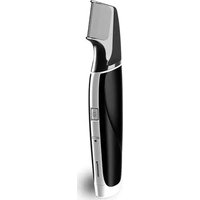
ER-GP23 - Beard trimmer PANASONIC - Free user manual and instructions
Find the device manual for free ER-GP23 PANASONIC in PDF.


| Product type | Rechargeable professional beard trimmer |
| Brand | Panasonic |
| Model | ER-GP23 |
| Main body dimensions | 3.2 cm × 14.4 cm × 3.5 cm |
| Main body weight | 110 g |
| Power supply | AC adapter (100-240 V) and rechargeable lithium-ion battery |
| Charging time | Approximately 1 hour |
| Battery life | Approximately 100 minutes of continuous use |
| Motor voltage | 3.2 V |
| Included accessories | 3 mm comb, 6 mm comb, charging stand, AC adapter, cleaning brush, lubrication oil |
| Cutting height adjustment | Interchangeable comb accessories (3 mm and 6 mm) |
| Blade type | Sharpened stainless steel blade (replacement model WER9352) |
| Maintenance and cleaning | Clean with brush after each use; lubricate before/after use with the supplied oil |
| Safety | Automatic shut-off? Not specified; precautions against humidity and overheating; do not use on irritated skin |
| Available spare parts | Blade (WER9352), lubrication oil (WES003P) |
| Repairability | User replaceable blade; battery replacement by authorized service center |
| General information | Professional use; manufactured by Panasonic Corporation, Japan; imported by Panasonic Marketing Europe |
Frequently Asked Questions - ER-GP23 PANASONIC
User questions about ER-GP23 PANASONIC
0 question about this device. Answer the ones you know or ask your own.
Ask a new question about this device
Download the instructions for your Beard trimmer in PDF format for free! Find your manual ER-GP23 - PANASONIC and take your electronic device back in hand. On this page are published all the documents necessary for the use of your device. ER-GP23 by PANASONIC.
USER MANUAL ER-GP23 PANASONIC
Operating Instructions
AC/Rechargeable Professional Hair Trimmer
Model No. ER-GP23
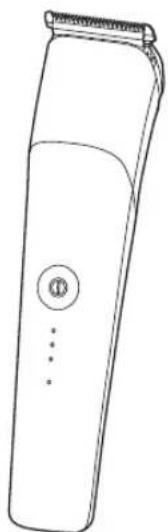
A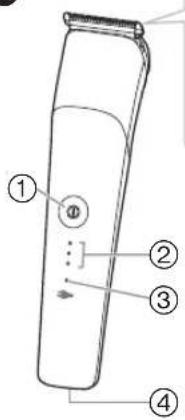
B
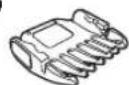
©
D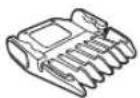
E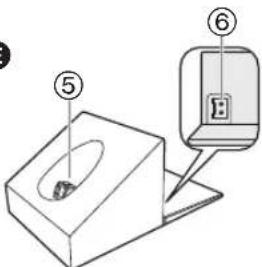
F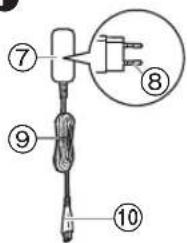
G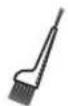
H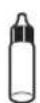
2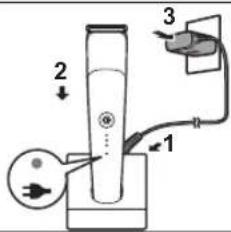
3
4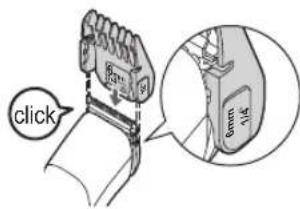
5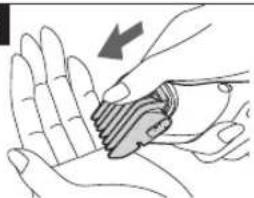
6 1
2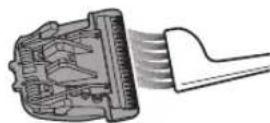
3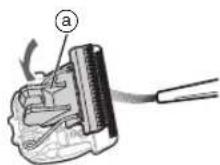
7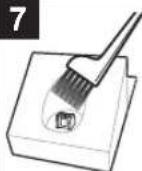
| English | 5 | Dansk | 67 | Česky 127 |
| Deutsch | 15 | Português | 77 | Slovensky 137 |
| Français | 27 | Norsk | 87 | Magyar 147 |
| Italiano | 37 | Svenska | 97 | Română 157 |
| Nederlands | 47 | Suomi | 107 | |
| Español | 57 | Polski | 117 |
Panasonic
Operating Instructions
AC/Rechargeable Professional Hair Trimmer
Model No. ER-GP23
Contents
Safety precautions.... 7 Maintenance ....11
Important information ....9 Troubleshooting ....12
Parts identification ....9 Disposal of the appliance ....13
Charging ....10 Specifications ....13
How to use ....11
Thank you for purchasing this Panasonic product.
Before operating this unit, please read these instructions completely and save them for future use.
WARNING
- This appliance can be used by children aged from 8 years and above and persons with reduced physical, sensory or mental capabilities or lack of experience and knowledge if they have been given supervision or instruction concerning use of the appliance in a safe way and understand the hazards involved. Children shall not play with the appliance. Cleaning and user maintenance shall not be made by children without supervision.
- The supply cord cannot be replaced. If the cord is damaged, the AC adaptor should be scrapped.
- Do not use anything other than the supplied AC adaptor and the charging stand for any purpose. Also, do not use any other product with the supplied AC adaptor and the charging stand. (See page 9.)
- Keep the appliance dry.
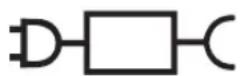
- The following symbol indicates that a specific detachable power supply unit is required for connecting the electrical appliance to the supply mains. The type reference of power supply unit is marked near the symbol.
Safety precautions
Make sure to follow these instructions.
To prevent accidents, injuries or damage to property, please follow the instructions below.
■ The following chart indicates the degree of damage caused by improper operation.

DANGER
Indicates potential hazard that will result in serious injury or death.

WARNING
Indicates potential hazard that could result in serious injury or death.

CAUTION
Indicates potential hazard that could result in minor injury or property damage.

WARNING
▶ This appliance
- This appliance has a built-in rechargeable battery. Do not throw into fire or apply heat. Do not charge, use, or leave in a high temperature environment.
- Doing so may cause overheating, ignition, or explosion.
- Do not modify or repair.
- Doing so may cause fire, electric shock, or injury. Contact an authorized service centre for repair (replacement of battery etc.).
- Never disassemble except when disposing of the appliance.
- Doing so may cause fire, electric shock, or injury.
▶ Power supply
- Do not connect or disconnect the adaptor to a household outlet with a wet hand.
- Doing so may cause electric shock or injury.
- Do not immerse the main body, AC adaptor and the charging stand in water or wash it with water.
- Do not place the main body, AC adaptor and the charging stand over or near a water filled sink or bathtub.
- Do not use when the AC adaptor is damaged or when the fitting into the household outlet is loose.
- Do not damage the cord or the power plug.
- Do not deface, modify, forcefully bend or pull the cord or the power plug. Also, do not place anything heavy on, twist or pinch the cord.
- Doing so may cause electric shock or fire due to a short circuit.
- Do not use in a way exceeding the rating of the household outlet or the wiring.
- Exceeding the rating by connecting too many plugs to one household outlet may cause fire due to overheating. • Fully insert the adaptor.
- Failure to do so may cause fire or electric shock.
- Regularly clean the power plug, the appliance plug and the charging plug to prevent dust from accumulating.
- Failure to do so may cause fire due to insulation failure caused by humidity.
▶ Preventing accidents
- Do not place within reach of children or infants. Do not let them use it.
- Putting parts or accessories in the mouth may cause an accident or injury.
WARNING
- If the lubrication oil is consumed accidentally, do not induce vomiting, drink a large amount of water, and contact a physician.
- If the lubrication oil comes into contact with eyes, immediately wash thoroughly with running water, and contact a physician.
- Failure to do so may result in physical problems.
▶ In case of an abnormality or malfunction
- Immediately stop using and remove the adaptor if there is an abnormality or malfunction.
- Failure to do so may cause fire, electric shock, or injury.
- The main body, charging stand or AC adaptor is deformed or abnormally hot.
- The main body, charging stand or AC adaptor smells of burning.
- There is an abnormal sound during use or charging of the main body.
- Immediately request inspection or repair to an authorized service centre.
CAUTION
▶ Protecting the skin
- Do not press the blade strongly against the skin.
- Do not use the appliance for any purpose other than trimming hair.
- Do not directly apply the blades on ears or rough skin (such as swellings, injuries or blemishes).
- Doing so may cause injury to skin or ears.
- Check that the blades are not damaged or deformed before use.
- Failure to do so may cause skin injury.
▶ Note the following precautions
- Do not allow metal objects or trash to adhere to the power plug, the appliance plug or the charging plug.
- Doing so may cause electric shock or fire due to a short circuit.
- Disconnect the adaptor from the household outlet when not using.
- Failure to do so may cause electric shock or fire due to electrical leakage resulting from insulation deterioration.
Handling of the removed battery when disposing
! DANGER
- The rechargeable battery is exclusively for use with this appliance. Do not use the battery with other appliances.
- Do not charge the battery after it has been removed from the appliance.
- Do not throw into fire or apply heat.
- Do not hit, disassemble, modify, or puncture with a nail.
- Do not let the positive and negative terminals of the battery get in contact with each other through metallic objects.
- Do not carry or store the battery together with metallic jewellery such as necklaces and hairpins.
- Do not use or leave the battery where it will be exposed to high temperatures, such as under direct sunlight or near other sources of heat.
- Never peel off the tube.
- Doing so may cause overheating, ignition, or explosion.
WARNING
• After removing the rechargeable battery, do not keep it within reach of children and infants.
- The battery will harm the body if accidentally swallowed. If this happens, consult a physician immediately.
WARNING
- If the battery fluid leaks out and comes in contact with the eyes, do not rub the eyes, and thoroughly rinse with clean water, such as tap water.
- Failure to do so may cause eye injury.
Consult a physician immediately.
CAUTION
- If the battery fluid leaks out and comes in contact with the skin or clothes, rinse off with clean water, such as tap water.
- Failure to do so may cause inflammation.
Important information
- This appliance is designed for professional use to trim hair. It can be operated on either an AC adaptor or rechargeable battery.
- Apply the lubrication oil to the blade before and after each use. (See page 12.) Failure to apply the lubrication oil may cause the following problems.
- The appliance has become blunt.
- Shorter operating time.
- Louder sound.
- You should not allow permanent wave lotion, hair dye or hair spray to come into contact with the main body or the blade. Doing so may result in cracking or corrosion.
- Charge the appliance correctly according to these Operating Instructions. (See page 10 "Charging".)
- This appliance contains battery that is only replaceable by skilled persons. Please contact an authorized service centre for the details of repair.
Parts identification (Fig. 1)
A Main body
① Power switch ② Battery capacity lamp ③ Charge status lamp ④ Appliance socket
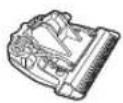
B Blade
© 3 mm comb attachment
D 6 mm comb attachment
E Charging stand (RC9-93)
⑤ Charging plug ⑥ Stand socket
F AC adaptor (RE9-82)
⑦ Adaptor ⑧ Power plug ⑨ Cord ⑩ Appliance plug
Accessories
G Cleaning brush H Lubrication oil
Charging (Fig. 2)
1 Connect the appliance plug to the stand socket. 2 Place the appliance on the charging stand. 3 Insert the adaptor into a household outlet.
- Check that the charge status lamp glows.
- Charging is completed after approx. 1 hour.
▶ Display while charging
| While charging (Low battery capacity) | While charging | After charging is completed | 5 seconds later after charging is completed |
( :Glows, :Blinks, :Turns off)
4 Disconnect the adaptor after charging is completed.
Insert the main body again after removing it from the charging stand. If the lamps glow and then turns off after 5 seconds, charging is completed.
Notes
- Recommended ambient temperature for charging is 10°C - 35°C. It may take longer to charge, or the charge status lamp will blink quickly and the battery may fail to charge properly in extremely high or low temperatures.
- 1 full charge will provide approximately 100 minutes of continuous operation. (Based on dry using at 20°C - 30°C) The operating time may differ depending on the frequency of use and the operating method.
- When charging the appliance for the first time or when it has not been in use for more than 6 months, the charging time may change or the charge status lamp may not glow for a few minutes. It will eventually glow if kept connected.
- If there is noise from the radio or other sources while using or charging the appliance, move to a different location to use the appliance.
- The battery will deteriorate if not used for over 6 months, so make sure to perform a full charge at least once every 6 months.
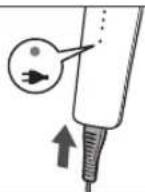
Charging without the charging stand (Fig. 3)
Plug the AC adaptor into the main body and the household outlet.
AC operation
If you connect the AC adaptor to the appliance in the same way as for charging, and turn on the power, you can use it.
- The charge status lamp glows when using the AC operation.
- If the remaining battery is too low, the blades may move slowly or stop, even with the AC operation. In this case, charge the battery for 1 minute or more.
- The battery will be discharged, even with the AC operation.
How to use
- Check that the blades are not damaged or deformed before use.
- Apply the lubrication oil to the blade before and after each use. (See page 12.)
- The appliance may not operate in an ambient temperature lower than approximately 5°C. After use, turn it off and clean it.
About setting the trimming height
1. Select the trimming heights indicated on the insides and sides of the attachments. 2. Turn on the power. About the approximate remaining charge
![graph LR A["High battery capacity"] --> B["Low battery capacity"] C["●"] --> D["○"] E["•"] --> F["○"] G["○"] --> H["○"] I["→"] --> J["→"] K["●"] --> L["○"] M["○"] --> N["○"] O["→"] --> P["→"]](/content/2026/04/669876/images/ead7ca6b072ef91fb47c308b90ad424ac2cbab152bacfac664cc5a3a2b18bcca.jpg)
(Glows, Blinks, Turns off)
Note
The lamps will turn off approximately 5 seconds after operating the switch. However, if the battery remaining is low, it will not turn off and one battery capacity lamp and the charge status lamp blinks. (When the power is turned off, the lamps turn off after 5 seconds.) Charging is required when the one battery capacity lamp and the charge status lamp blinks. You can trim 5 minutes after this is displayed. (This will differ depending on usage.)
Removing and mounting the comb attachments
Mounting (Example: 6 mm comb attachment) (Fig. 4) Slide the attachment until it clicks.
Removing (Fig. 5)
Remove the attachment by pressing with your thumb.
Maintenance
Make sure that the main body is turned off. Clean the main body, blade and the comb attachment after each use. (If not cleaned, the motion will become poor and the sharpness will worsen.) Lubricate after cleaning. Do not use thinner, benzine or other chemicals. Doing so may cause failure, cracking or discoloration of the parts. Clean the main body only with a soft cloth slightly dampened with tap water or soapy tap water.
How to clean
Main body, Blade
- Brush off any hairs from the main body and from around the blade. (Fig. 6-1)
- Brush off the hairs from the blade edge. (Fig. 6-2)
- Brush any hair trimmings out from between the stationary blade and the moving blade while pressing down the cleaning lever (a) to raise the moving blade. (Fig. 6-3)
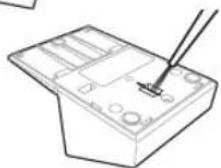
Charging stand (Fig. 7)
Use the cleaning brush to clean hair trimmings and dust in the charging plug or in the hole on the bottom surface.
Removing and mounting the blade
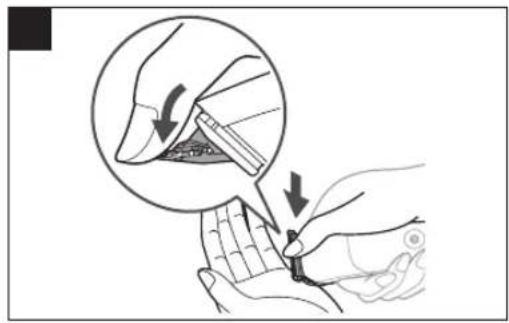
Remove (Fig. 8)
Hold the main body with the switch facing upward and push the blade with your thumb while catching the blade in your other hand.
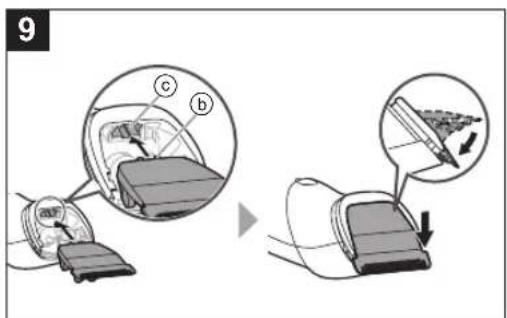
Mount (Fig. 9)
Fit the mounting hook (b) into the blade mounting (c) on the main body and push in until it clicks.
Replacement parts Replacement parts are available at your dealer or Service Centre.
| Replacement parts for ER-GP23 | Blade WER9352 | |
| Lubrication oil WE | S003P |
We recommend Panasonic lubrication oil WES003P.
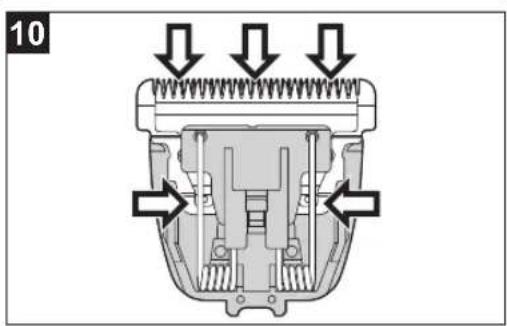
Lubrication (Fig. 10)
Apply the lubrication oil to the blade before and after each use.
1 Remove the blade. 2 Apply a drop of the lubrication oil to each indicated point. 3 Attach the blade to the main body, turn on the power and allow to run for approximately 5 seconds.
Troubleshooting
Problem Action
The appliance has become blunt.
Operating time is short.
Appliance stopped functioning.
The appliance cannot be charged.
Makes a loud sound.
Until problems are solved, please follow each procedure as follows;
- Charge the appliance. (See page 10.)
- Clean the blade and apply lubrication oil. (See pages 11 and 12.)
- Replace the blade. (See this page.)
- Have the battery replaced by an authorized service centre.
Push the main body into the charging stand or appliance plug all the way. Charge within the recommended charging temperature of 10 °C to 35 °C. ▶ Apply lubrication oil. (See this page.) ▶ Confirm that the blade is properly attached.
If the problems still cannot be solved, contact your dealer or a service centre authorized by Panasonic for repair.
Disposal of the appliance
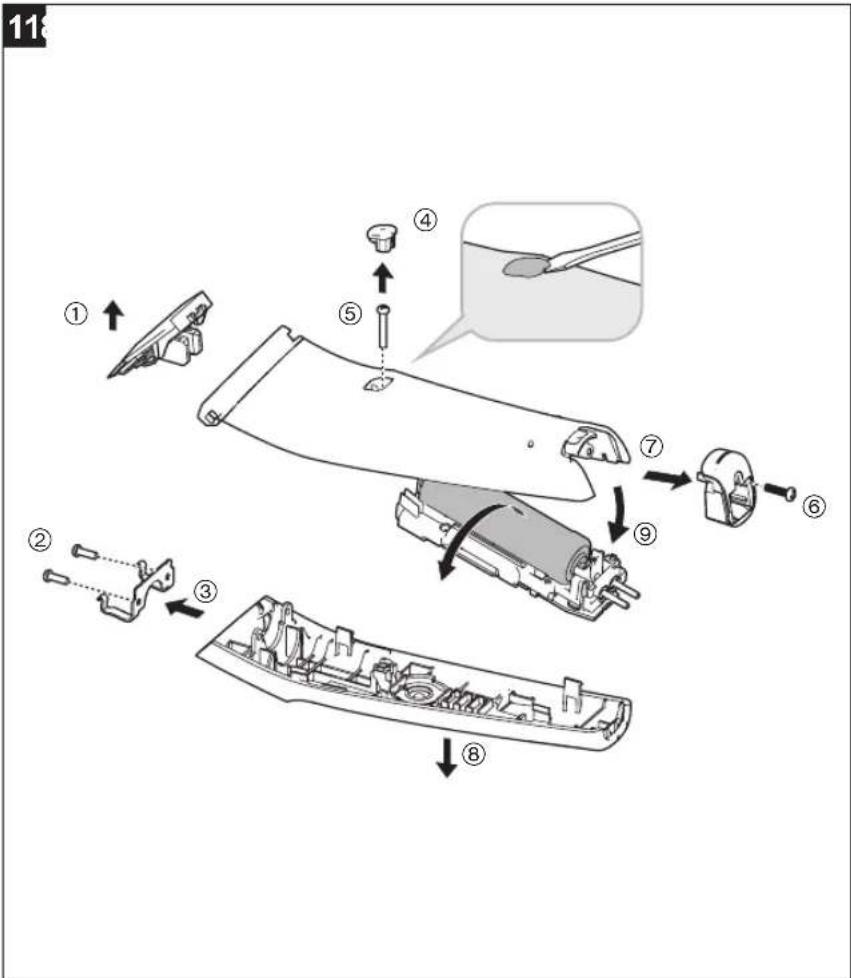
Remove the built-in rechargeable battery before disposing of the appliance.
• The battery is to be disposed of safely. - This figure must only be used when disposing the appliance, and must not be used to repair it. If you dismantle the appliance yourself, it may cause malfunction.
How to remove the battery (Fig. 11)
- Remove the appliance from the AC adaptor.
- Press the power switch to turn on the power and then keep the power on until the battery is completely discharged.
- Perform steps and lift the battery, and then remove it.
- Take care not to short circuit the positive and negative terminals of the removed battery, and insulate the terminals by applying tape to them.
For environmental protection and recycling of materials
This appliance contains a Lithium-ion battery. Please make sure that the battery is disposed of at an officially assigned location, if there is one in your country.
Specifications
| Power source | See the name plate on the AC adaptor. (Automatic voltage conversion) |
| Motor voltage | 3.2 V--- |
| Charging time Approx. 1 hour | |
For more information about the energy efficiency of the product, please visit our website, www.panasonic.com, and enter the model number in the search box.
Disposal of Old Equipment and Batteries Only for European Union and countries with recycling systems
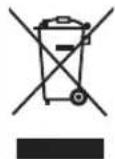
These symbols on the products, packaging, and/or accompanying documents mean that used electrical and electronic products and batteries must not be mixed with general household waste.
For proper treatment, recovery and recycling of old products and batteries, please take them to applicable collection points in accordance with your national legislation.
By disposing of them correctly, you will help to save valuable resources and prevent any potential negative effects on human health and the environment.
For more information about collection and recycling, please contact your local authority.
Penalties may be applicable for incorrect disposal of this waste, in accordance with national legislation.
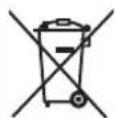
Note for the battery symbol (bottom symbol)
This symbol might be used in combination with a chemical symbol. In this case it complies with the requirement set by the Directive for the chemical involved.
Authorized Representative in EU:
Panasonic Marketing Europe GmbH
Panasonic Testing Centre
Winsbergring 15, 22525 Hamburg, Germany
Importer:
Panasonic Marketing Europe GmbH
Hagenauer Strasse 43, 65203 Wiesbaden, Germany
Manufactured by:
Panasonic Corporation
1006, Oaza Kadoma, Kadoma City, Osaka, Japan
Panasonic
Operating Instructions
▶ Charging station (Fig. 7)
Panasonic Testing Centre
1006, Oaza Kadoma, Kadoma City, Osaka, Japan
Panasonic
Operating Instructions
▶ Accident prevention
▶ Main body, blade
Panasonic Testing Centre
Panasonic Testing Centre
Winsbergring 15, 22525 Hamburg, Germany
Importer:
Panasonic Marketing Europe GmbH
Hagenauer Strasse 43, 65203 Wiesbaden, Germany
Manufactured by:
Panasonic Corporation
AC adapter (RE9-82)
⑦ Adapter ⑧ Plug ⑨ Power cord ⑩ Appliance plug
Accessories
© Cleaning brush
H Lubricating oil
Charging (Fig. 2)
Panasonic Testing Centre
Panasonic Testing Centre
AC adapter (RE9-82)
⑦ Adapter ⑧ Power plug ⑨ Cord ⑩ Appliance plug
Accessories
(:Lights up, :Blinks, :Turns off)
▶ Note
Panasonic Testing Centre
Winsbergring 15, 22525 Hamburg, Germany
Importer:
Panasonic Marketing Europe GmbH
Hagenauer Strasse 43, 65203 Wiesbaden, Germany
Manufactured by:
Panasonic Corporation
1006, Oaza Kadoma, Kadoma, Osaka, Japan
Panasonic
Panasonic Testing Centre
F AC adapter (RE9-82)
▶ Lamp lights during charging
| Reservedeler for ER-GP23 | Blad WER9352 | |
| Smøreolje WES003 | P |
• We recommend Panasonic lubricating oil WES003P.
Lubrication (Fig. 10)
Panasonic Testing Centre
Winsbergring 15, 22525 Hamburg, Germany
Importer:
Panasonic Marketing Europe GmbH
Hagenauer Strasse 43, 65203 Wiesbaden, Germany
Manufactured by:
Panasonic Corporation
1006, Oaza Kadoma, Kadoma, Osaka, Japan
Panasonic
Operating Instructions
( :Lights, :Blinks, :Goes off)
▶ Note
Panasonic Testing Centre
Winsbergring 15, 22525 Hamburg, Germany
Importer:
Panasonic Marketing Europe GmbH
Hagenauer Strasse 43, 65203 Wiesbaden, Germany
Manufacturer:
Panasonic Corporation
1006, Oaza Kadoma, Kadoma-ku, Osaka, Japan
Panasonic
Operating Instructions
▶ Mounting (Fig. 9)
Panasonic Testing Centre
Panasonic Testing Centre
Panasonic Testing Centre
Winsbergring 15, 22525 Hamburg, Germany
Importer:
Panasonic Marketing Europe GmbH
Hagenauer Strasse 43, 65203 Wiesbaden, Germany
Manufacturer:
Panasonic Corporation
1006, Oaza Kadoma, Kadoma City, Osaka, Japan
Panasonic
Operating Instructions
Panasonic Testing Centre
F connector (RE9-82)
⑦ Adapter ⑧ Power plug ⑨ Cable ⑩ Appliance plug
Accessories
G Cleaning brush
H Lubricating oil
Charging (Fig. 2)
Panasonic Testing Centre
Winsbergring 15, 22525 Hamburg, Germany
Importer:
Panasonic Marketing Europe GmbH
Hagenauer Strasse 43, 65203 Wiesbaden, Germany
Manufacturer:
Panasonic Corporation
1006, Oaza Kadoma, Kadoma City, Osaka, Japan
MEMO
Panasonic Corporation
https://www.panasonic.com
© Panasonic Corporation 2023
⑤ EN, DE, FR, IT, NL, SP, DA, PT, NB, SV, FI, PL, CS, SK, HU, RO
Printed in Japan
ER9710GP231E F0623-0

- PANASONIC
- CONTENTS
- WARNING
- SAFETY PRECAUTIONS
- DANGER
- CAUTION
- THIS APPLIANCE
- POWER SUPPLY
- PREVENTING ACCIDENTS
- HANDLING OF THE REMOVED BATTERY WHEN DISPOSING
- IMPORTANT INFORMATION
- PARTS IDENTIFICATION (FIG. 1)
- CHARGING (FIG. 2)
- NOTES
- CHARGING WITHOUT THE CHARGING STAND (FIG. 3)
- AC OPERATION
- HOW TO USE
- ABOUT SETTING THE TRIMMING HEIGHT
- NOTE
- REMOVING AND MOUNTING THE COMB ATTACHMENTS
- REMOVING (FIG. 5)
- MAINTENANCE
- HOW TO CLEAN
- MAIN BODY, BLADE
- CHARGING STAND (FIG. 7)
- REMOVING AND MOUNTING THE BLADE
- REMOVE (FIG. 8)
- MOUNT (FIG. 9)
- LUBRICATION (FIG. 10)
- TROUBLESHOOTING
- DISPOSAL OF THE APPLIANCE
- HOW TO REMOVE THE BATTERY (FIG. 11)
- FOR ENVIRONMENTAL PROTECTION AND RECYCLING OF MATERIALS
- DISPOSAL OF OLD EQUIPMENT AND BATTERIES ONLY FOR EUROPEAN UNION AND COUNTRIES WITH RECYCLING SYSTEMS
- NOTE FOR THE BATTERY SYMBOL (BOTTOM SYMBOL)
- CHARGING STATION (FIG. 7)
- ACCIDENT PREVENTION
- IMPORTER
- MANUFACTURED BY
- AC ADAPTER (RE9-82)
- ACCESSORIES
- © CLEANING BRUSH
- H LUBRICATING OIL
- MOUNTING (FIG. 9)
- MANUFACTURER
- MEMO
Brand : PANASONIC
Model : ER-GP23
Category : Beard trimmer