
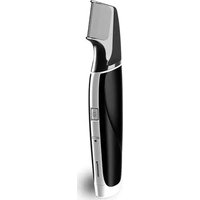
ER-PA10 - Beard trimmer PANASONIC - Free user manual and instructions
Find the device manual for free ER-PA10 PANASONIC in PDF.


Pick your language and provide your email: we'll send you a specifically translated version.
| Product Type | Beard Trimmer |
| Brand | Panasonic |
| Model | ER-PA10 |
| Cutting Width | ≈ 30 mm |
| Cutting Length Adjustment | 1–30 mm |
| Length Settings | 39 incremental settings |
| Blade Material | High-quality stainless steel |
| Blade Feature | Self-sharpening precision blades |
| Power Source | Rechargeable Ni-MH battery |
| Charging Time | 8 hours for full charge |
| Operating Time | 45 minutes of continuous use |
| Charging System | Universal voltage AC adapter |
| Washable | Yes, fully washable under running water |
| Cleaning | Rinse the head and body with water |
| Water Resistance | IPX7 rated (water-resistant body) |
| Safety Feature | Low-vibration design, rounded blade tips |
| Included Accessories | 3 comb attachments, cleaning brush, charging stand |
| Dimensions (L × W × H) | 180 × 45 × 35 mm (approx.) |
| Weight | 150 g (approx.) |
| Spare Parts and Repairability | Spare blades and combs are available for replacement |
Frequently Asked Questions - ER-PA10 PANASONIC
How do I charge the Panasonic ER-PA10 beard trimmer?
Connect the supplied AC adapter to the trimmer and plug it into a power outlet. The charging indicator will light up. Full charging takes about 8 hours, which provides about 45 minutes of cordless use.
Can I use the trimmer while it is charging?
Yes, the ER-PA10 can be used both cordless and when connected to the charging adapter. This is convenient when the battery is low.
How do I clean the beard trimmer?
After use, remove the cutting head and rinse both the blade and body under running water. Use the included cleaning brush to remove any hair residue. Let the parts air dry completely before reassembling. Do not use hot water or chemical cleaners.
Is the trimmer fully waterproof?
The ER-PA10 has a waterproof body, so it can be safely rinsed under the tap. It is not intended for use in the shower or bathtub, but the head and body are easy to clean with water.
How do I adjust the trimming length?
Attach one of the comb attachments to the blade and slide the length adjustment dial up or down to select your desired length (between 1 mm and 30 mm). The dial clicks into place at 39 increments for precise control.
When should I replace the blade?
If you notice tugging, uneven trimming, or if the blade becomes dull, it is time to replace it. Replacement blades and combs are available separately from Panasonic spare parts channels. Follow the instructions in the manual to snap off the old blade and click in a new one.
Can the trimmer be used on wet skin?
This model is designed for dry grooming; however, because it is water-resistant, you can wash the trimmer and the head after use. It is not recommended for wet shaving with foam or gel, as that may damage the motor.
What does the red LED indicator mean?
The LED indicator shows the charging status. When the device is connected to power, the LED lights up red while charging and turns off when fully charged. A blinking red light indicates low battery.
How long does the battery last?
A full 8-hour charge gives up to 45 minutes of uninterrupted trimming. This is enough for several weeks of use, depending on your routine. For best battery health, avoid leaving the trimmer on charge for more than 18 hours.
Can I use spare parts from other Panasonic models?
It is important to use only ER-PA10-specific accessories and spare parts. While some parts may appear similar, the blade cartridge and combs are specially designed for this model to ensure optimum performance and safety.
User questions about ER-PA10 PANASONIC
0 question about this device. Answer the ones you know or ask your own.
Ask a new question about this device
No questions yet. Be the first to ask one.
Download the instructions for your Beard trimmer in PDF format for free! Find your manual ER-PA10 - PANASONIC and take your electronic device back in hand. On this page are published all the documents necessary for the use of your device. ER-PA10 by PANASONIC.
USER MANUAL ER-PA10 PANASONIC

Manual assistant
Powered by Anthropic
Waiting for your message
Product information
Brand : PANASONIC
Model : ER-PA10
Category : Beard trimmer