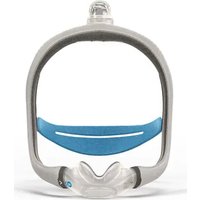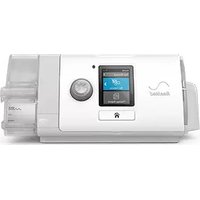
Stellar 150 - Respiratory medical device ResMed - Free user manual and instructions
Find the device manual for free Stellar 150 ResMed in PDF.


| Product type | Non-invasive and invasive medical ventilator |
| Brand | ResMed |
| Model | Stellar 150 |
| Dimensions (L x W x H) | 230 mm x 170 mm x 120 mm |
| Weight | 2.1 kg |
| Power supply | AC 100-240 V, 50-60 Hz, 65 W max. / DC 24 V, 3 A / Internal lithium-ion battery 14.4 V, 2.75 Ah, 40 Wh |
| Internal battery life | Approximately 3 hours (normal conditions) |
| Display | LCD 320 x 240 pixels |
| Pressure range | IPAP: 2-40 cm H₂O / EPAP: 2-25 cm H₂O / CPAP: 4-20 cm H₂O |
| Ventilation modes | S, ST, T, PAC, iVAPS (Stellar 150), CPAP |
| Maximum flow | > 200 L/min at 20 cm H₂O |
| Noise level | 31 dBA (according to ISO 17510-1) |
| Air filter | Antibacterial, replace every 6 months |
| Compatible humidifier | H4i (optional) |
| Pulse oximeter | XPOD compatible (optional) |
| Oxygen supplementation | Low flow entry, max 30 L/min |
| Aircraft use | Yes, compliant with RTCA/DO-160 |
| Protection rating | IP31 |
| Electrical class | Class II, type BF |
| Warranty | 2 years (device) |
| Maintenance and repairability | Daily, weekly, monthly cleaning; disinfection between patients; inspection and repair by a ResMed authorized technician |
Frequently Asked Questions - Stellar 150 ResMed
User questions about Stellar 150 ResMed
0 question about this device. Answer the ones you know or ask your own.
Ask a new question about this device
Download the instructions for your Respiratory medical device in PDF format for free! Find your manual Stellar 150 - ResMed and take your electronic device back in hand. On this page are published all the documents necessary for the use of your device. Stellar 150 by ResMed.
USER MANUAL Stellar 150 ResMed
natural_image
White RESMED medical device with digital display and coiled tubing (no visible text or symbols on device body)Contents
Introduction....1
Indications for use ....1
Contraindications ....1
Adverse effects ...... 1
Stellar at a glance....2
Patient interface ....3
Humidification....3
Internal battery....3
ResMed USB stick 4
Use on an aircraft 4
Mobile use 4
Remote Alarm....4
Setting up for noninvasive use....4
Attaching the H4i heated humidifier for noninvasive use 5
Setting up for invasive use....6
Using the Stellar device for the first time....8
Working with other optional accessories....9
Attaching the pulse oximeter....9
Adding supplemental oxygen....9
Using the FiO2 monitoring sensor....11
Attaching a bacterial/viral filter 12
Using water traps 12
Stellar basics....13
About the control panel....13
LCD screen 14
Starting therapy....14
Performing a functional test....14
Starting therapy 15
Stopping therapy 15
Turning off the power....16
Working with alarms 16
Tailoring treatment setup options....17
Using mask-fit....17
Using the menus....18
Setup menu....19
Setup menu: Clinical Settings (Mask Type)....19
Setup menu: Alarm Settings (Alarm Volume)....19
Setup menu: Options 19
Setup menu: Configuration Menu ....20
Info menu 21
Event Summary 21
Used Hours 21
Device Information....21
Reminders....21
Data management....22
Cleaning and maintenance....22
Daily 22
Weekly 23
Monthly 23
Replacing the air filter 23
Disinfection 24
Multipatient use 24
Servicing 24
Troubleshooting 25
Alarm troubleshooting 25
Other troubleshooting....28
Technical specifications 30
Symbols....32
Environmental information....32
General warnings and cautions 33
Limited warranty 34
Introduction
Read the entire manual before using the device. This User Guide is for a non-clinician user, and does not contain all the information provided in the Clinical Guide.
Indications for use
The Stellar 100/150 is intended to provide ventilation for non-dependent, spontaneously breathing adult and paediatric patients (13 kg and above) with respiratory insufficiency, or respiratory failure, with or without obstructive sleep apnoea. The device is for noninvasive use, or invasive use (with the use of the ResMed Leak Valve). Operation of the device includes both stationary, such as in hospital or home, or mobile, such as wheelchair usage.
Contraindications
The Stellar is contraindicated in patients who are unable to endure more than brief interruptions in ventilation. The Stellar is not a life support ventilator.
If you have any of the following conditions, tell your doctor before using this device:
• pneumothorax or pneumomediastinum
• pathologically low blood pressure, particularly if associated with intravascular volume depletion
• cerebrospinal fluid leak, recent cranial surgery or trauma
• severe bullous lung disease
- dehydration.
The use of the Stellar or pulse oximetry (including XPOD) is contraindicated in an MRI environment.
AutoEPAP ^1 is contraindicated for invasive use.
^1 This feature is not available in all countries.
Adverse effects
You should report unusual chest pain, severe headache or increased breathlessness to your prescribing physician.
The following side effects may arise during the course of noninvasive ventilation with the device:
- nosebleed
- bloating
- ear or sinus discomfort
- eye irritation
- skin rashes.
• drying of the nose, mouth or throat
Stellar at a glance
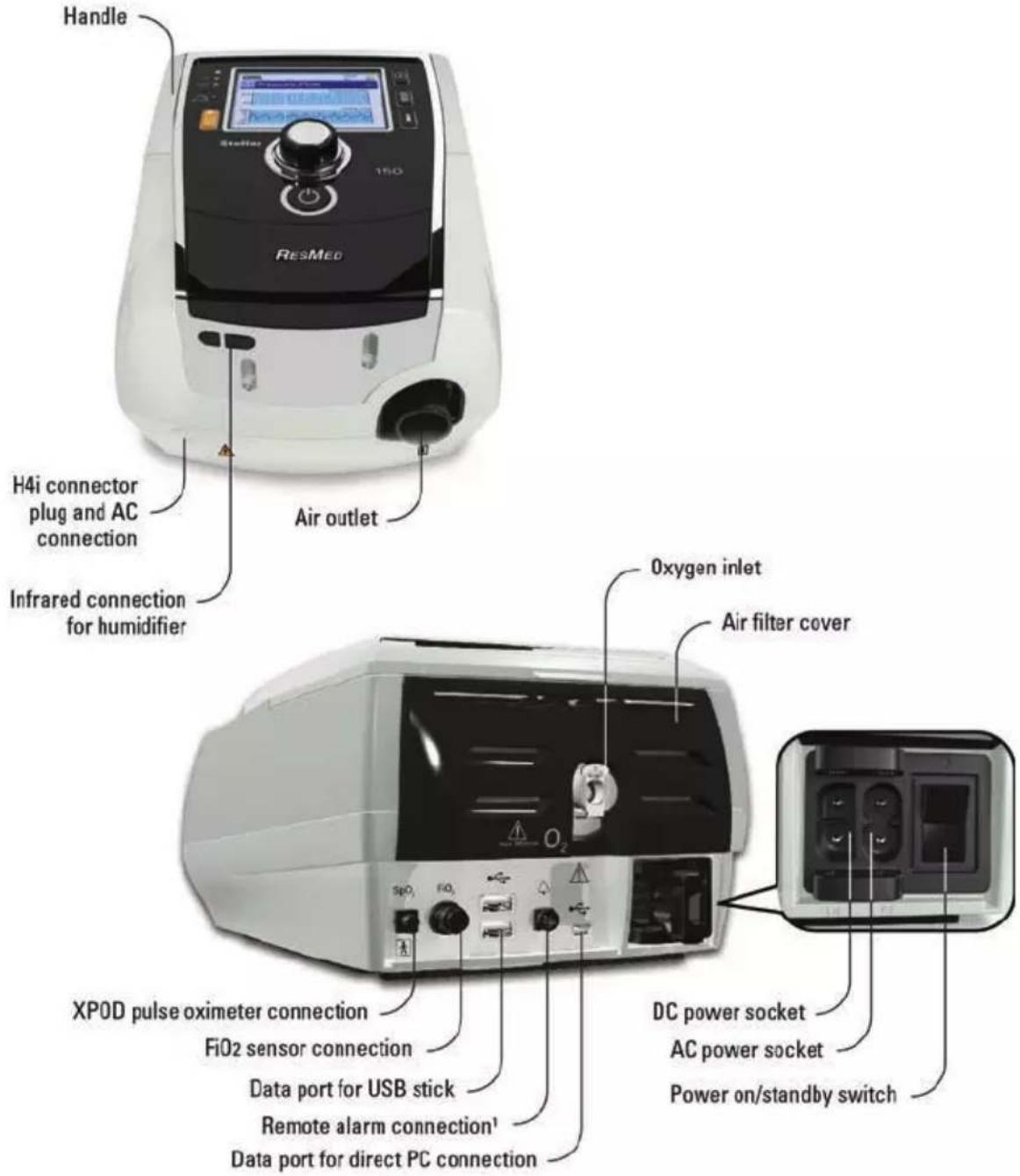
The Stellar comprises:
- Stellar device • Hypoallergenic air filter • AC power cord • Carry bag • 2 m air tubing • ResMed USB stick • Low pressure oxygen connector.
The following optional components are compatible with Stellar:
- 3 m air tubing • SlimLine™ air tubing • Clear air tubing (disposable) • H4iheated humidifier • Bacterial/viral filter • Heat moisture exchanger filter (HMEF) • ResMed XPOD oximeter • Nonin™ pulse oximetry sensors • FiO₂ monitoring kit (external cable, T-piece adapter) • FiO₂ monitoring sensor • Stellar Mobility bag • ResMed Leak Valve • Tubing wrap • Stellar DC/DC converter.
^1 Remote alarm connection is product model dependent.
WARNING
The Stellar should only be used with air tubing and accessories recommended by ResMed. Connection of other air tubing or accessories could result in injury or damage to the device.
For information on compatible accessories for this device, see the ventilation accessories on www.resmed.com/accessories.
Patient interface
Both masks and tracheostomy tubes can be used with Stellar. To set the patient interface type go to the Setup menu, select Clinical Settings, then Advanced Settings.
For information on using masks, see the mask manual. For a full list of compatible masks for this device, see the Mask/Device Compatibility List on www.resmed.com/downloads/devices. If you do not have internet access, please contact your ResMed representative.
Humidification
A humidifier is recommended especially for patients experiencing dryness of the nose, throat or mouth. For information on using a humidifier as part of:
• noninvasive ventilation, refer to Setting up for noninvasive use (see page 4).
• invasive ventilation, refer to Setting up for invasive use (see page 6).
Internal battery

CAUTION
Over time, the capacity of the internal battery will decrease. This depends on individual use and ambient conditions. As the battery degrades, the battery charge level indicator may lose accuracy. This will mean battery-related and system alarms may not activate as intended. ResMed recommends the battery be tested after two years to assess the remaining battery life. Testing and replacement of the internal battery should only be performed by an authorised service agent.
Note: The battery duration depends on the state of charge, the environmental conditions, the condition and age of battery, the device settings and the patient circuit configuration.
In case of a mains power disruption, the device will operate using the internal battery if there is no external battery connected to the device. The internal battery will operate for approximately three hours under normal conditions (refer to Technical specifications (see page 30)). The power status of the battery is displayed on top of the LCD screen. Check the battery status regularly while operating the device with the internal battery and connect the device in time to mains power or alternatively to the external battery.
Additionally the Internal battery use alarm will be displayed. Press the Alarm mute button to clear the alarm.
To recharge the internal battery, connect the device to mains power.
It can take up to four hours to fully recharge the internal battery, however, this can vary depending on environmental conditions and if the device is in use.
Maintenance
The internal battery has to be discharged and recharged every six months.
- Remove the power cord while the Stellar is turned on (stand-by or in operation) and let the device operate with the internal battery to a charge level of 50%.
- Reconnect the power cord to the mains power. The internal battery will be fully recharged.
Storing
If the device is stored for a longer period the internal battery should be at the charge level of approximately 50% to increase the durability.
Note: Check the charge level every six months, if necessary recharge the internal battery to a charge level of 50%.
Battery run time
For information on the internal battery run time, refer to the Battery/Device Compatibility List in www.resmed.com/downloads/devices.
ResMed USB stick
A ResMed USB stick may be used with the device either to help the clinician to monitor your treatment or to provide you with updated device settings. For more information, refer to Data management (see page 22).
Use on an aircraft
ResMed confirms that the Stellar can be used during all phases of air travel without further testing or approval by the airline operator. Refer to Technical specifications (see page 30).
Mobile use
The Stellar Mobility bag allows the Stellar to be used in mobile situations, eg, in a wheelchair. For setup and correct use, see the Stellar Mobility Bag User Guide. For extended mobile use, the ResMed Power Station II external power supply unit can be used as an additional power source. Limitations apply to the use of oxygen with the Stellar Mobility Bag. For more information, contact your local ResMed representative.
Remote Alarm
The Remote Alarm may be used to transfer audible and visual alarms by a direct cable connection. For more information on using the Remote Alarm, see the Remote Alarm user guide.
Setting up for noninvasive use
WARNING
- The air filter cover protects the device in the event of accidental liquid spillage onto the device. Ensure that the air filter and air filter cover are fitted at all times.
- Make sure that all the air inlets at the rear of the device and under the device and vents at the mask are unobstructed. If you put the device on the floor, make sure the area is free from dust and clear of bedding, clothes or other objects that could block the air inlets.
- Hoses or tubes must be non-conductive and antistatic.
- Do not leave long lengths of the air tubing or the cable for the finger pulse sensor around the top of your bed. It could twist around your head or neck while you are sleeping.
CAUTION
- Be careful not to place the device where it can be bumped or where someone is likely to trip over the power cord.
• Make sure the area around the device is dry and clean.
Notes:
- ResMed recommends using the AC power cord supplied with the unit. If a replacement power cord is required, contact your ResMed Service Centre.
- Place the device on a flat surface near the head of the bed.
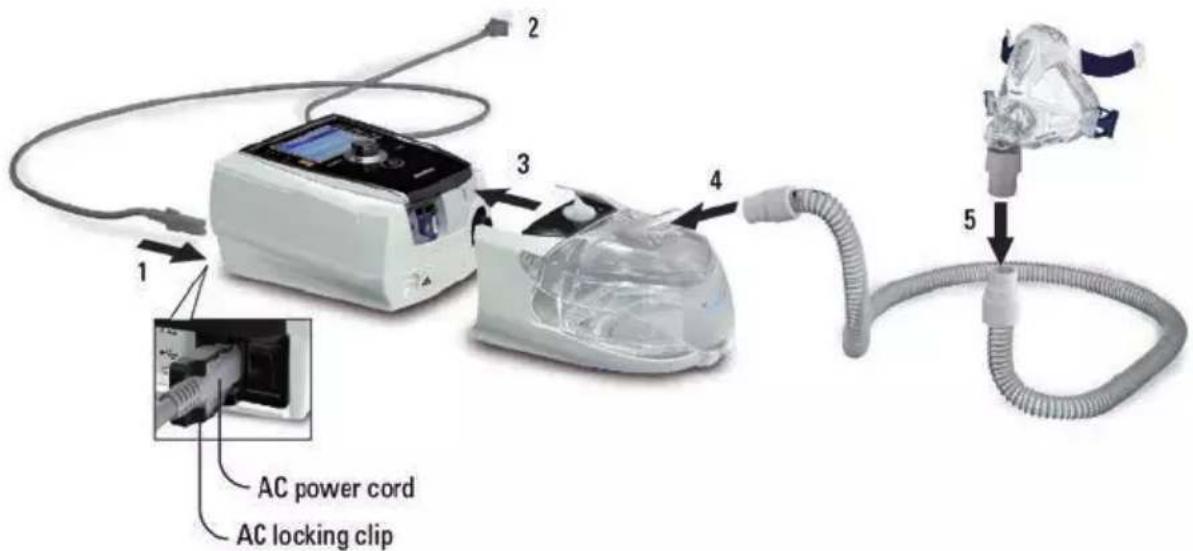
- Connect the power cord.
-
Plug the free end of the power cord into a power outlet.
-
Attach the H4i heated humidifier to the front of the Stellar.
If the H4i is not in use, and if applicable, connect the bacterial/viral filter firmly onto the air outlet of the device (refer to Attaching a bacterial/viral filter (see page 12)).
Note: Other external humidifiers can be used for noninvasive setup. ResMed recommends using a breathing system (including bacterial/viral filter, air tubings, external humidifier) with an impedance of maximum 2 cm H 2 O at 30 L/min, 5 cm H 2 O at 60 L/min and 16 cm H _2 O at 120 L/min.
-
Connect one end of the air tubing firmly onto the air outlet of the H4i.
-
Connect the mask system to the free end of the air tubing.
-
Press the power switch on the back to turn on the device.
-
Select the mask type (select Setup menu, then Clinical Settings, then Advanced Settings).
-
Perform Learn Circuit (refer to Setup menu: Options (see page 19)).
Attaching the H4i heated humidifier for noninvasive use
Use of the H4i heated humidifier may be recommended by your clinician. For information on using the H4i, see the H4i user guide.

WARNING
- Always place the H4i on a level surface below the level of the patient to prevent the mask and tubing from filling with water.
- Make sure that the water chamber is empty and thoroughly dried before transporting the humidifier.
- The H4i heated humidifier is not intended for mobile use.
- Do not overfill the water chamber, as during use this will cause water to spill into the air circuit. Check the air circuit regularly for accumulated water. If you observe water has spilled into the air circuit, clear the water and check that the water chamber is not overfilled. When using the H4i at high pressures (above 25 cm H _2 O) the use of a water trap will avoid water spillage back into the air circuit.
- For optimal accuracy and synchrony, perform a Learn Circuit with a change of the circuit configuration, in particular when adding or removing high impedance components (eg, bacterial/viral filter, external humidifier, water trap, nasal pillow type mask or air tubing). Refer to Setup menu: Options (see page 19).

CAUTION
Check the air circuit for water condensation. Use a water trap or a tubing wrap if humidification is causing water condensation within the tube.
Notes:
- A humidifier increases resistance in the air circuit and may affect triggering and cycling, and accuracy of display and delivered pressures. Therefore perform the Learn Circuit function (refer to Setup menu: Options (see page 19)). The device adjusts the airflow resistance.
- The heating feature of the H4i is disabled when the device is not mains powered.
Setting up for invasive use
The Stellar can be used invasively only with the ResMed Leak Valve, or using an uncuffed or deflated cuff tracheostomy tube with the ResMed Leak Port (24976).
AutoEPAP is contraindicated for invasive use.

WARNING
- Make sure that all the air inlets at the rear of the device and under the device and vents at the mask or at the ResMed Leak Valve are unobstructed. If you put the device on the floor, make sure the area is free from dust and clear of bedding, clothes or other objects that could block the air inlets.
- When using a Heated Moisture Exchange Filter (HMEF), replace the HMEF regularly as specified in the instructions provided with the HMEF.
- The H4i is contraindicated for invasive use. An external humidifier approved for invasive use is recommended according to EN ISO 8185 with an absolute humidity of >33 mg/L.
- For optimal accuracy and synchrony, perform a Learn Circuit when a new circuit is used or with a change of the circuit configuration, in particular when adding or removing high impedance components (eg, bacterial/viral filter, external humidifier, water trap or different type of air tubing). Do not connect patient interfaces prior to performing the Learn Circuit. Patient interfaces include any components placed after the ResMed Leak Valve (eg, HMEF, catheter mount, tracheostomy tube). Refer to Setup menu: Options (see page 19).
- Only use HMEFs that comply with the relevant safety standards, including ISO 9360-1 and ISO 9360-2.

CAUTION
When using a humidifier check the breathing system regularly for accumulated water.
Notes:
- When the Mask type is set to Trach, the Non-Vented Mask alarm will be automatically enabled to alert you when the ResMed Leak Valve has no vent holes or when the vent holes are blocked.
- When the Mask Type is set to Trach, AutoEPAP has to be turned off.
flowchart
graph TD
    A["ResMed Leak Valve"] --> B["Bacterial/viral filter"]
    B --> C["1"]
    C --> D["2"]
    D --> E["3"]
    E --> F["4"]
    F --> G["5"]
    G --> H["6"]
    H --> I["Air tubing"]
    J["AC power cord AC locking clip"] --> K["1"]
    L["External humidifier*"] --> M["2"]
    style A fill:#f9f,stroke:#333
    style B fill:#ccf,stroke:#333
    style C fill:#cfc,stroke:#333
    style D fill:#fcc,stroke:#333
    style E fill:#cff,stroke:#333
    style F fill:#ffc,stroke:#333
    style G fill:#cfc,stroke:#333
    style H fill:#fcc,stroke:#333
    style I fill:#fff,stroke:#333
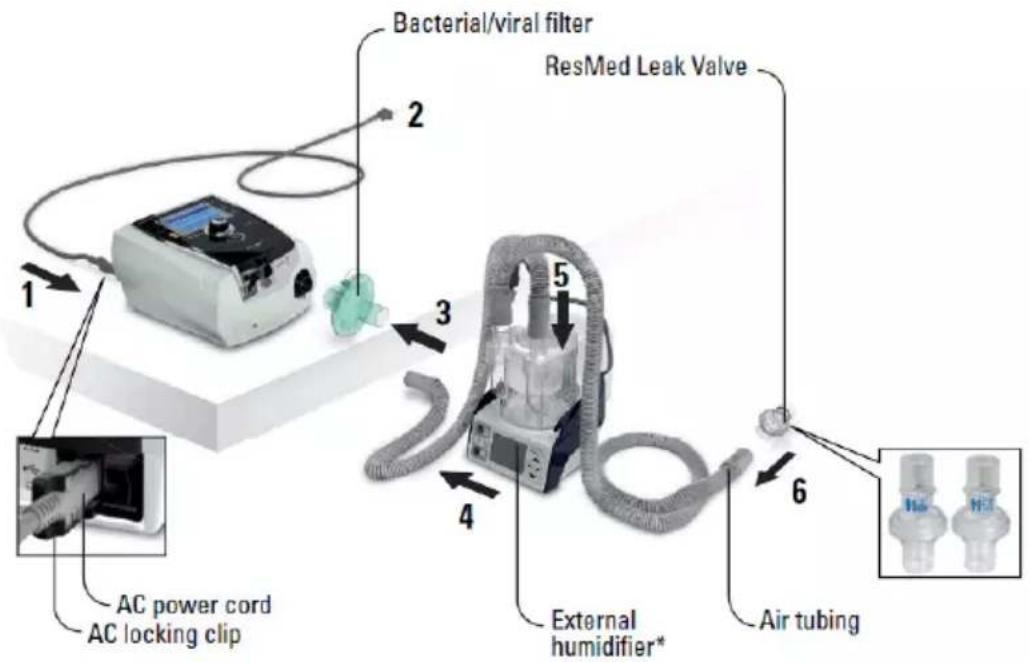
- Connect the power cord.
- Plug the free end of the power cord into a power outlet.
- Connect the bacterial/viral filter firmly onto the air outlet of the device.
- Connect the external humidifier to the other side of the bacterial/viral filter.
*If not using an external humidifier, the HMEF can be connected to the ResMed Leak Valve (at step 10).
- Connect the air tubing to the external humidifier.
- Connect the ResMed Leak Valve to the air tubing. Position the ResMed Leak Valve so that air from the vent holes does not blow directly onto the patient's chest.
WARNING
Always set up the ResMed Leak Valve in the breathing circuit with the arrows and the symbol pointing in the direction of air flow from the Stellar to the patient.
- Press the power switch on the back to turn on the device.
- Select the mask type Trach (select Setup menu, then Clinical Settings, then Advanced Settings).
- Perform a Learn Circuit (refer to Setup menu: Option (see page 19)) according to the following setup illustrations.
With an external humidifier
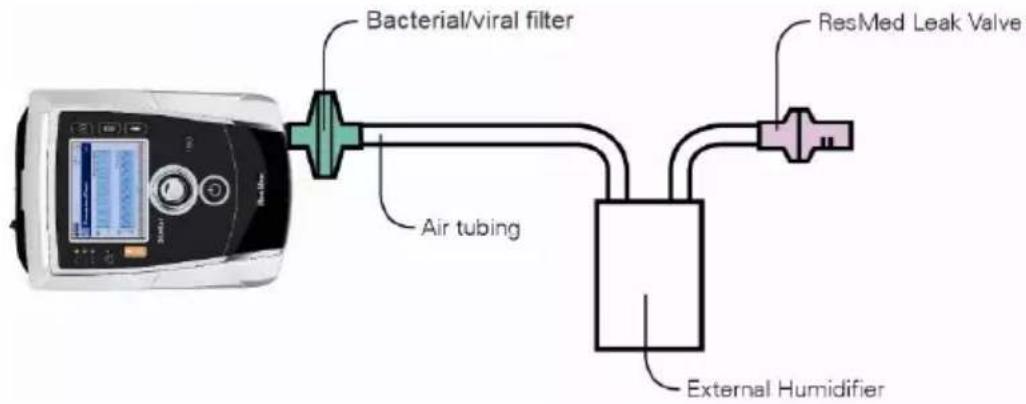
flowchart
graph LR
    A["Bacterial/Viral filter"] --> B["Air tubing"]
    B --> C["External Humidifier"]
    C --> D["ResMed Leak Valve"]
Without an external humidifier
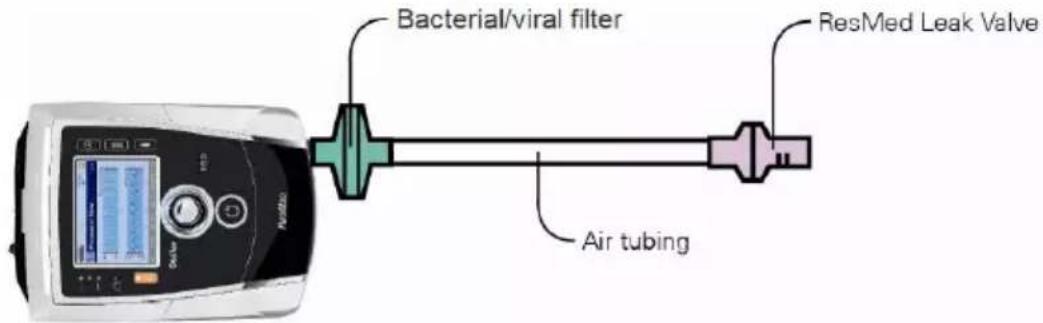
-
If an external humidifier is not being used, you can connect the HMEF to the patient side of the ResMed Leak Valve.
-
Connect the catheter mount.
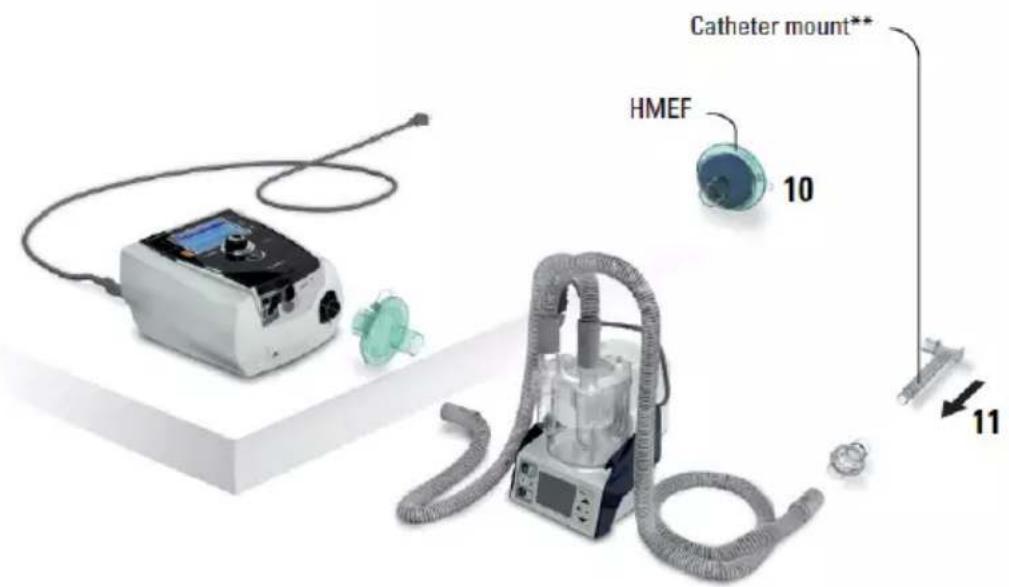
** The ResMed Leak Valve or the HMEF can be connected to standardised tracheostomy interfaces including connector pieces like catheter mounts.
The catheter mount and the external humidifier are not part of the ResMed component.
Using the Stellar device for the first time
When using the Stellar device for the first time, ensure that all components are in working condition and perform a functional test (refer to Performing a functional test (see page 14)). Alarms should also be checked by the physician when setting up a new patient (see Clinical Guide).
Working with other optional accessories Attaching the pulse oximeter
Use of a pulse oximeter may be recommended by your clinician.
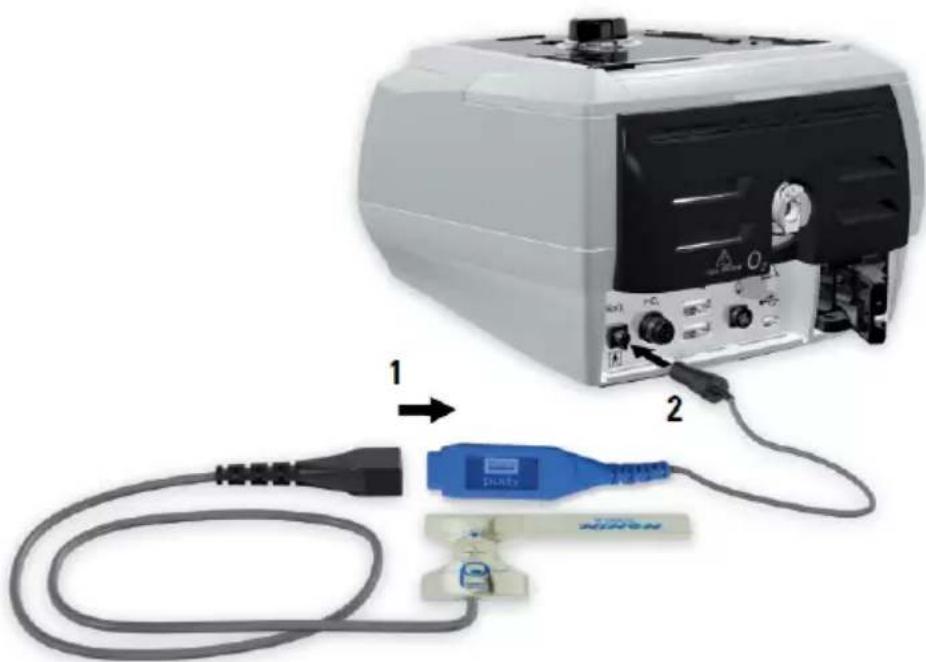
natural_image
Diagram showing a medical device connected to a cable and a connector with a blue plastic component (no text or symbols visible)Both the SpO_2 and pulse rate are logged at a sample rate of 1Hz .
The optional SpO_2 sensor is calibrated for the display of functional oxygen saturation.
The Disconnected XPOD alarm will activate if the pulse oximeter is connected during therapy and an interruption to its data transfer occurs for more than 10 seconds.
For part numbers of compatible oximeter accessories for this device, see the ventilation accessories on www.resmed.com/accessories. For information on how to use these accessories, refer to the user guide that comes with these accessories.

WARNING
- Pulse oximeter sensors must not be used with excessive pressure for prolonged periods as this can cause patient pressure injury.
- The pulse oximeter sensor and cable needs to be verified for compatibility with Stellar, otherwise, patient injury can result.
Contraindication
The pulse oximeter does not meet the defibrillation-proof requirement as per IEC 60601-1: 1990, clause 17.h.
- Connect the plug of the finger pulse sensor to the plug of the pulse oximeter.
- Connect the plug of the pulse oximeter at the rear of the device.
To view the oximetry values, from the Monitoring menu, select Monitoring.
Adding supplemental oxygen
Oxygen may be prescribed by your clinician.
Note: Up to 30 L/min can be added.

WARNING
- Oxygen flow must be turned off when the device is not operating, so that unused oxygen does not accumulate within the device and create a risk of fire.
• Use only certified, clean oxygen sources.
- ResMed strongly recommends adding oxygen into Stellar's oxygen inlet at the rear of the device. Entraining oxygen elsewhere, ie into the breathing system via a side port or at the mask, has potential to impair triggering and accuracy of therapy/monitoring and alarms (eg, High Leak alarm, Non-vented mask alarm). If used in this way, therapy and alarm operation must be verified each time oxygen flow is adjusted.
- Oxygen supports combustion. Oxygen must not be used while smoking or in the presence of an open flame. Only use oxygen supply in well-ventilated rooms.
- The breathing system and the oxygen source must be kept at a minimum distance of 2 m away from any sources of ignition (eg, electrical devices).
- Oxygen must not be used while the device is being operated within the mobility bag.
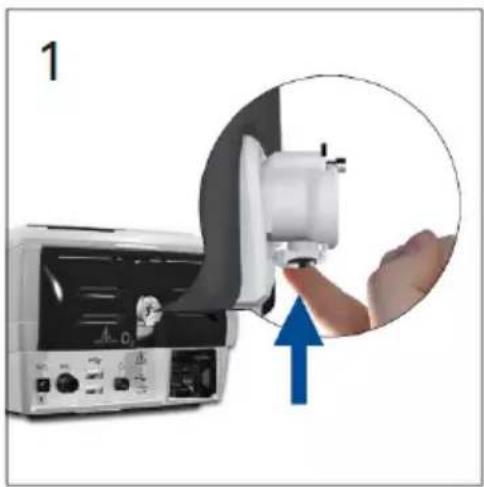
To add supplemental oxygen
- Unlock the low flow oxygen inlet on the back of the device by pushing up on the locking clip.
- Insert one end of the oxygen supply tubing into the oxygen connector port. The tubing automatically locks into place.
- Attach the other end of the oxygen supply tubing to the oxygen supply.
- Start ventilation.
- Turn on the oxygen source and adjust to the desired flow rate.
natural_image
Close-up of a medical device with a hand operating the scanner, showing a blue upward arrow (no text or symbols visible)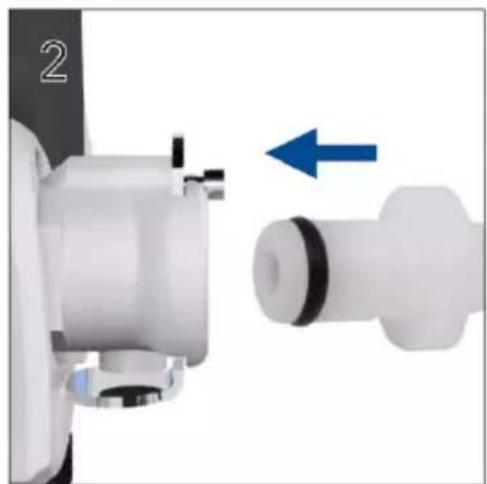
natural_image
Close-up of a mechanical component with a blue arrow indicating direction, no visible text or symbolsTo remove supplemental oxygen
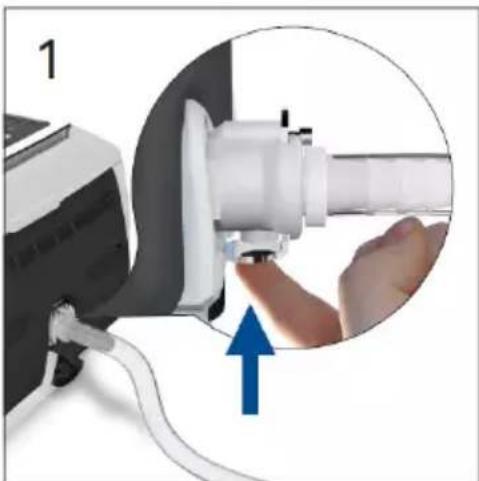
Before you remove supplemental oxygen from the device, ensure the oxygen supply has been turned off.
- Unlock the low flow oxygen inlet on the back of the device by pushing up on the locking clip.
- Remove the oxygen supply tubing from the oxygen connector port.
natural_image
Close-up of a hand operating a white cylindrical device with a blue upward arrow, no visible text or symbols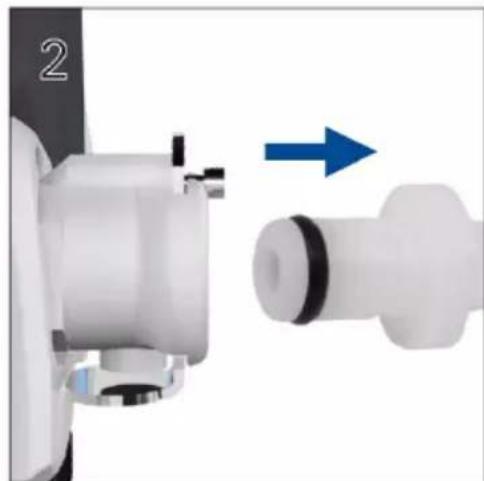
natural_image
Close-up of a mechanical component with a blue arrow indicating direction, no visible text or symbolsUsing the FiO2 monitoring sensor
Use of the FiO_2 monitoring sensor may be recommended by your clinician.
Note: It may take up to 15 minutes for the FiO_2 sensor readings to meet the specified accuracy after powering on the device.
The FiO_2 sensor performance can be adversely affected by relative humidity, condensation on the sensor or unknown gas mixtures.
FiO_2 monitoring is affected by changes in ambient and cyclical pressure. This change in monitoring is proportional to the altitude at 3000m (1000 ft), the ambient pressure decreases by 30% relative to sea level and will result in a 30% decrease in monitored FiQ
For information on maintenance and disposal of the oxygen sensor, refer to the EiMonitoring Kit Guide for Stellar.
FiO_2 sensor calibration
Note: Calibration must be done in room air without supplemental oxygen connection.

CAUTION
Do not use the FiO_2 monitoring sensor with the H4i humidifier.
Preparing to use a new sensor
- Before use, leave the FiO _2 monitoring sensor open to the air for 15 minutes.
- Attach a new FiO_2 monitoring sensor (as shown below).
- Perform the sensor calibration (refer to Setup menu: Options (see page 19)).
Note: The FiO_2 monitoring sensor must be replaced every 12 months.
Connecting a sensor
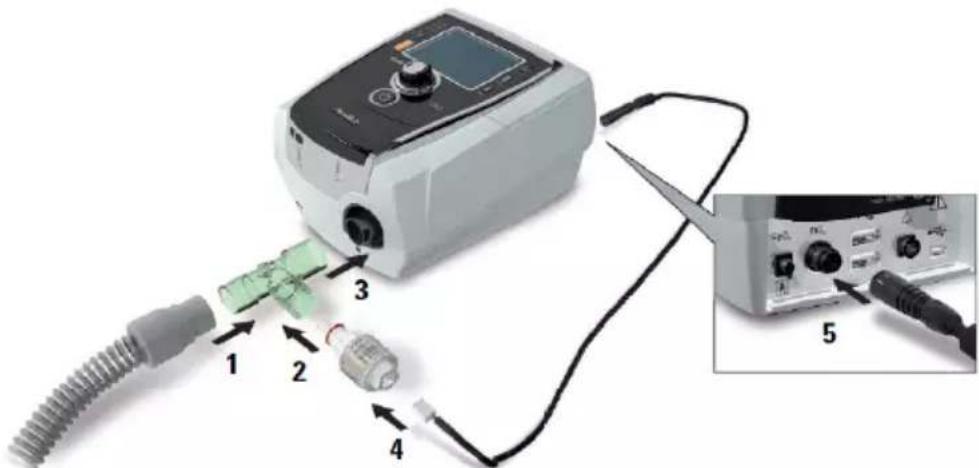
- Connect the air tubing to the T-piece adapter.
- Connect the FiO_2 monitoring sensor to the T-piece adapter.
- Connect the adapter to the air outlet of the device.
- Connect one end of the cable to the Fi②monitoring sensor.
- Connect the other end of the cable to the rear of the device.
- Start calibration (refer to Setup menu: Options (see page 19)). This should be repeated periodically at the recommendation of your clinician.
Attaching a bacterial/viral filter
The use of a bacterial/viral filter may be recommended by your clinician. One bacterial/viral filter—product code 24966—can be purchased separately from ResMed.
Regularly check the filter for entry of moisture or other contaminants. The filter must be replaced according to the manufacturer's specifications.
Note: ResMed recommends using a filter with a low impedance (less than 2 cm H_2O at 60 L/min, eg, PALL BB 50 filter).

WARNING
- Do not use the bacterial/viral filter (product code 24966) with the H4i.
- Regularly check the bacterial/viral filter for signs of moisture or other contaminants, particularly during humidification. Failure to do so could result in increased breathing system resistance.
- Only use bacterial/viral filters that comply with the relevant safety standards, including ISO 23328-1 and ISO 23328-2.
natural_image
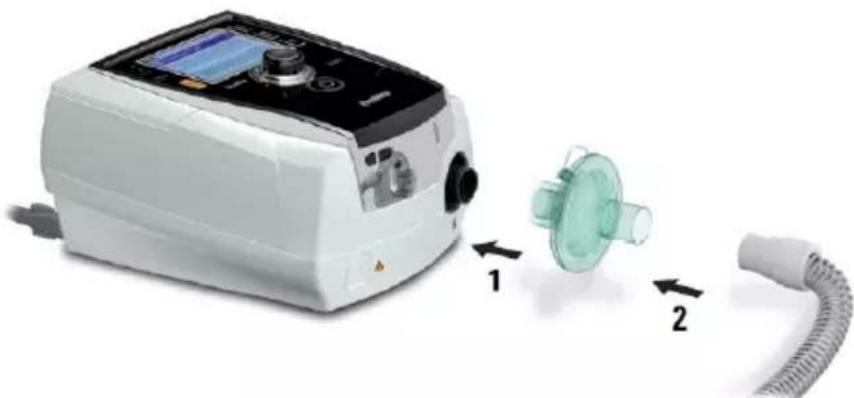
Medical device with attached tubing and a green plastic component, shown with directional arrows (no text or symbols)- Fit the bacterial/viral filter to the air outlet of the device.
- Attach the air tubing to the other side of the filter.
- Attach the mask system to the free end of the air tubing.
- Perform the Learn Circuit function (refer to Setup menu: Options (see page 19)). From the Setup menu, select Options. This enables the device to compensate for the impedance introduced by the filters.
Using water traps
When using a water trap, check the air circuit regularly for accumulated water. Follow the manufacturer's recommendations for frequency of inspection of water traps.
Stellar basics About the control panel
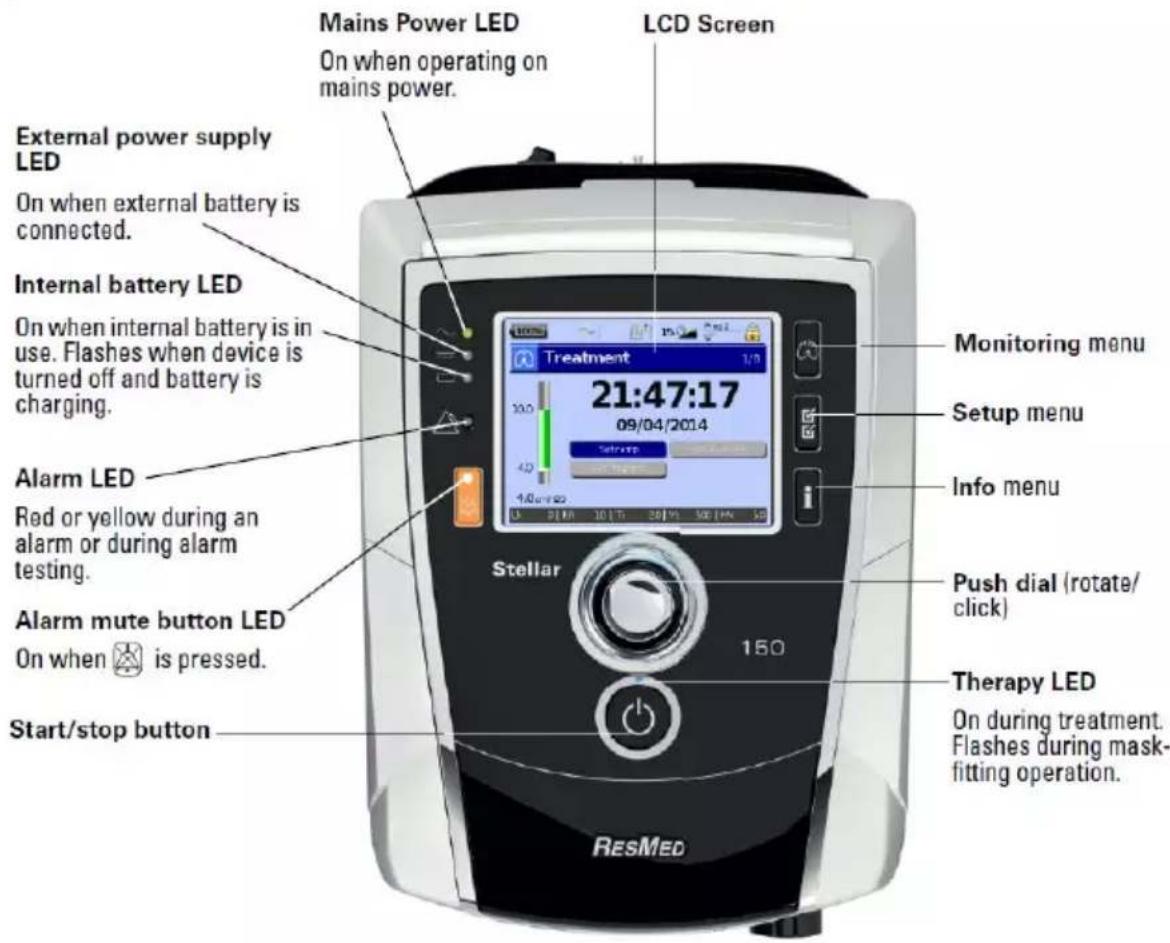
| Key | Function | |
| Start/Stop |  | • Starts or stops treatment.• Extended hold for at least three seconds starts the mask-fitting feature. |
| Alarm mute |  | • During therapy: Press once to mute an alarm. Press a second time to un-mute an alarm. If the problem is still present, the alarm will sound again after two minutes. Refer to Working with alarms (see page 16)• In stand-by mode: Extended hold for at least three seconds starts the alarm LED and alarm buzzer test. |
| Menu keys |    | Press the appropriate menu button (Monitoring, Setup, Info) to enter an scroll through the relevant menu. |
| Push dial |  | Turning the dial allows you to scroll through the menu and change settings. Pushing the dial allows you to enter into a menu or confirm your choice. |
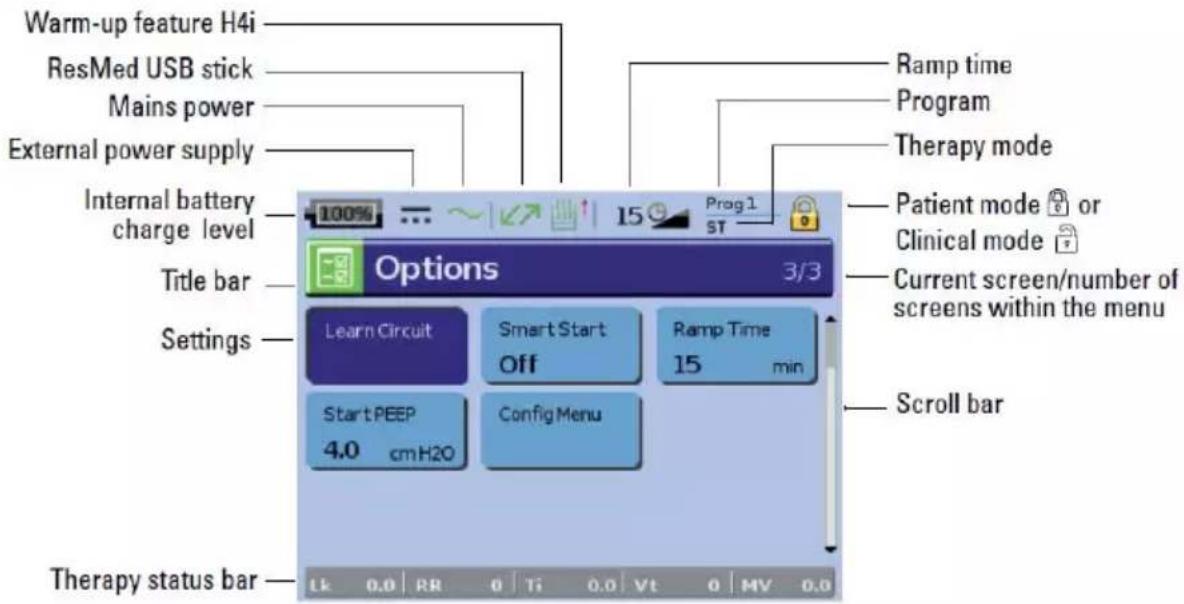
LCD screen
The LCD screen displays the menus, monitoring screens and alarm status.
Values on this LCD screen and other screens throughout the User Guide are examples only.
Starting therapy
Performing a functional test
Make sure your device is functioning properly each time before starting therapy.
If any problems occur, refer to Troubleshooting (see page 25). Please also check other provided User Instructions for troubleshooting information.
- Turn off the device by pressing the power switch ⏻ at the back of the device.
- Check condition of device and accessories.
Inspect the device and all the provided accessories. If there are any visible defects, the system should not be used.
- Check the circuit configuration.
Check the integrity of the circuit configuration (device and provided accessories) according to the setup descriptions in this Guide and that all connections are secure.
- Turn on the device and check alarms.
Press the power switch ⏻ at the back of the device once to turn on the device.
Check that the alarm sounds a test beep and the LEDs (visual indicator) for the alarm signal and the Alarm mute button flash. The device is ready for use when the Treatment screen is displayed. If the display shows the Reminder screen, follow the instructions, then press 📁 to display the Treatment screen.
- Check batteries.
Disconnect the device from the mains and external battery (if in use) so that the device is powered by the internal battery. Check that the Battery use alarm is displayed and the battery LED is on.
Note: If the charge state of the internal battery is too low, or if the battery is empty, an alarm occurs. Refer to the Alarm roubleshooting (see page 25) for further information.
Reconnect the external battery (if in use) and check that the LED for the external power supply is lit. The External DC power use alarm will be displayed and the Alarm LED will light.
Reconnect the device to the mains.
- Check the H4i heated humidifier (if in use).
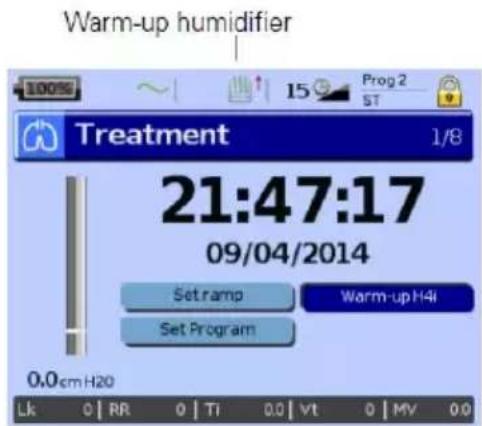
Check that the warm-up feature is displayed on the Treatment screen. Start the warm-up feature. Check that the humidifier warm-up symbol is displayed on top of the screen.
You can use the warm-up feature to pre-heat the water in the humidifier prior to starting treatment. The humidifier will be automatically detected when the device is turned on. The Treatment screen provides the option to start warming the humidifier. If the humidifier is heating, the related symbol is displayed at the top of the LCD screen.
For more information, see the H4i User Guide.
Note: The H4i in heating mode can only be used when the device is connected to mains supply.
- Check the FiO_2 monitoring sensor (if in use).
Start the FiO_2 sensor calibration. Select Setup menu, then Options (refer to Setup menu: Options (see page 19)). Follow the instructions on the display.
- Check pulse oximeter (if in use).
Attach the accessories according to the setup descriptions (refer to Attaching the pulse oximeter (see page 9)). From the Monitoring menu, go to the Monitoring screen. Check that the values for SpO_2 and Heart rate are displayed.
- Check oxygen connection (if in use).
Attach the accessories according to the setup descriptions (refer to Adding supplemental oxygen (see page 9)).
- Check the Circuit Disconnected alarm.
Start therapy with the circuit configuration setup. Disconnect the tube from the mask or the ResMed leak valve and check the alarm activation. The alarm activates when leak exceeds 105 L/min (1.75L/sec) for at least 15 seconds. Reconnect the air tubing and stop therapy. Disconnect the circuit at different connection points (eg, at the device air outlet) and test that the alarm activates.
Starting therapy
CAUTION
The Clinical mode 🔒 is only for clinicians. If the device is operating in clinical mode press the power switch 🔒 at the back to re-start the device in patient mode 🔒.
- Fit your patient interface (mask or catheter mount) as described in the user instructions.
- Lie down and arrange the air tubing so that it is free to move if you turn in your sleep or arrange the tubing so it is comfortable in your wheelchair.
- To start treatment, press 📋 or if the SmartStart/Stop function is enabled, simply breathe into your patient interface and treatment will begin.
Stopping therapy
You can stop therapy at any time, simply remove the patient interface and press 🔒 to stop airflow or if SmartStart/Stop is enabled, simply remove the patient interface, and treatment will stop automatically.
Notes:
- SmartStop may not work if Full face or Trach is selected as mask type; the High Leak alarm or the Low Min Vent alarm is enabled; Confirm Therapy Stop is enabled; or the mask-fitting feature is running.
-
When the device is stopped and operating in standby mode with an integrated humidifier connected, it will continue to blow air gently to assist cooling of the humidifier's heater plate.
-
Masks with high resistance (eg, paediatric masks) may cause the operation of the SmartStop feature to be restricted.
- When using with oxygen, turn off oxygen flow before stopping therapy.
Turning off the power
-
Stop the therapy.
-
Press the power switch ⏻ at the back of the device once and follow the instructions on the display. Note: To disconnect the device from the mains power, pull out the power cord from the power socket.
Working with alarms
WARNING
- This device is not intended to be used for vital signs monitoring. If vital signs monitoring is required, a dedicated device should be used for this purpose.
- When adjusting alarm volume, ensure that the alarm can be heard above the ambient noise levels that the patient may experience in a variety of settings, including use in noisy environments or inside mobility bags.
The device is fitted with alarms to alert you to changes that will affect your treatment.
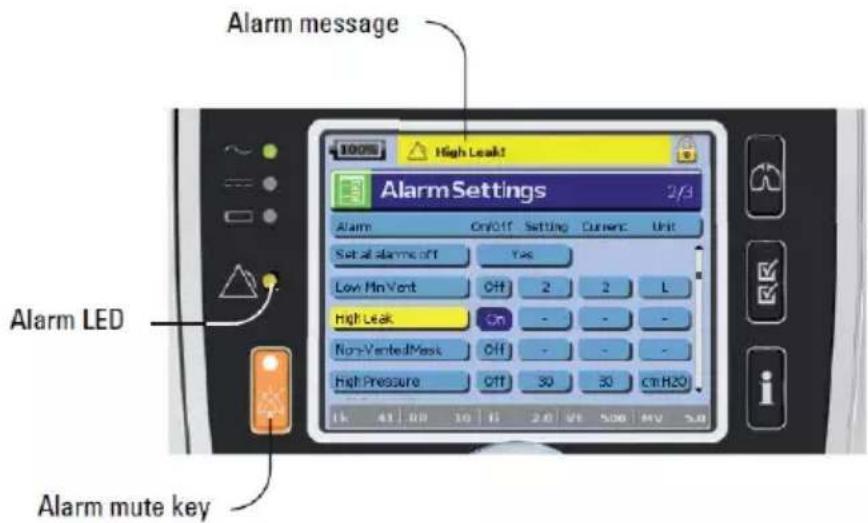
Alarm messages are displayed along the top of the screen. High priority alarms are displayed in red, medium priority alarms in yellow and low priority alarms in light blue. The Alarm LED lights red during high priority alarms and yellow during medium and low priority alarms.
The alarm volume can be set Low, Medium or High. From the Setup menu, select Alarm Settings. After the set value has been confirmed, the alarm will sound and the alarm LED lights.
Alarm settings, refer to Setup menu: Alarm Settings (Alarm Volume) (see page 19).
You can mute an alarm by pressing once. By pressing the Alarm mute key again, the alarm sounds again. When an alarm is muted, the Alarm mute key LED will light constantly. If after two minutes the problem is still present, the alarm will sound again for high or medium priority alarms except for the Internal Battery Low (30%, approximately 30 minutes remaining*) alarm. This alarm will be permanently muted with both the audible signal and alarm message cleared. However, these indicators will initiate again when the Internal Battery Empty (2 minutes remaining) alarm is activated. Any active low priority alarm will be permanently muted and the Internal Battery Use alarm will be cleared until the alarm condition is fulfilled again.
Tailoring treatment setup options
Setting Ramp
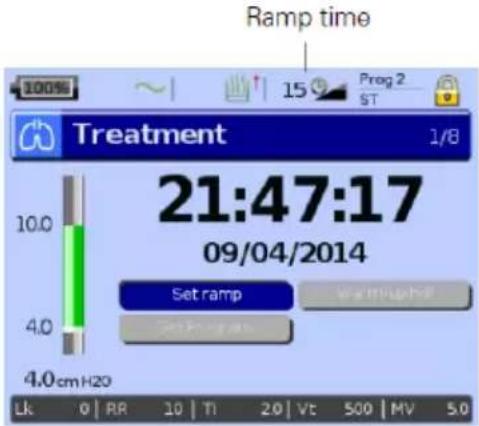
Ramp time is a feature that can be enabled by your clinician by setting a maximum ramp time. Designed to make the beginning of treatment more comfortable, ramp time is the period during which the pressure increases from a low start pressure to the treatment pressure. Refer to Setup menu: Options (see page19).
Programs
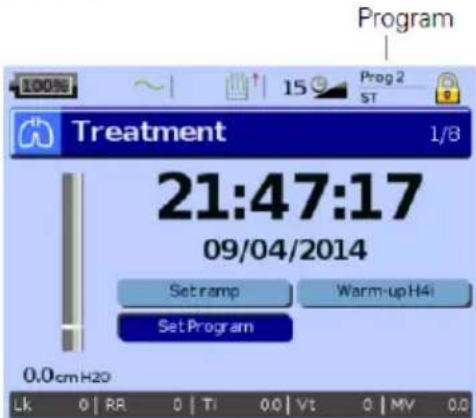
Programs can be configured by your clinician to provide you with multiple treatment options. For example, a clinician can set up programs for sleeping versus waking use or for use during exercise or physiotherapy. Programs save different patient circuit configurations (Learn Circuit result) and therapy and alarm settings.
The Stellar comes with one active program. Your clinician can configure two programs. If your clinician has selected dual, you can choose the program to use on the Treatment screen after stopping treatment. If only a single program is selected, the option does not display.
Note: Each program retains its own circuit configuration. When switching between programs, ensure you use the correct circuit (breathing system) as 'learned' for that program. If more than one program has been set up, follow the directions given by your clinician for when and how each program should be used.
Ramp Down
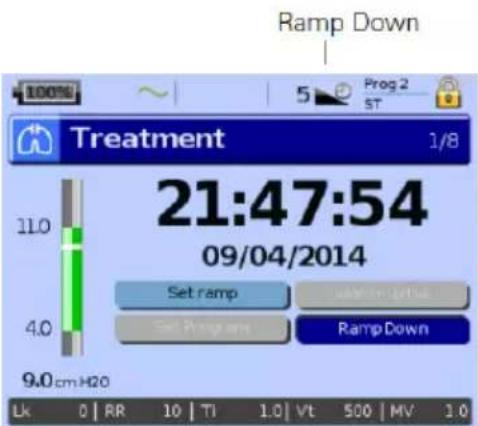
If you experience difficulties in taking off the ventilation, you can use the Ramp Down feature. This feature reduces the treatment pressure to Start EPAP/PEEP over five minutes. After five minutes the therapy stops. You can enable the Ramp Down feature when it is selected by the physician in the Options menu.
Notes:
- Therapy can be stopped at any time by pressing the therapy start/stop button, including during the Ramp Down time.
- During the Ramp Down time the low pressure alarm is not active.
• This feature is not available in all countries.
Using mask-fit
You can use mask-fit to help you fit your mask properly. This feature delivers constant treatment pressure for a three-minute period, prior to starting treatment, during which you can check and adjust your mask-fit to minimise leaks. The mask-fit pressure is the set CPAP or EPAP pressure or 10 cm H₂O, whichever is greater.
- Put the mask on according to the mask user guide.
-
Hold down ⏻ for at least three seconds until pressure delivery starts.
-
If necessary adjust the mask, mask cushion and headgear until you have a good mask fit. After three minutes treatment will begin. Mask-fit can be stopped at any time by pressing 🔒.
Notes:
- Press 📋 for at least three seconds during mask-fit to start the treatment immediately.
- The mask-fitting feature is disabled when the mask type Trach is selected.
Using the menus
The device has three menus (Monitoring, Setup, Info) accessed by the equivalent buttons on the right of the LCD screen. In each menu there are screens that display settings, device or therapy information.
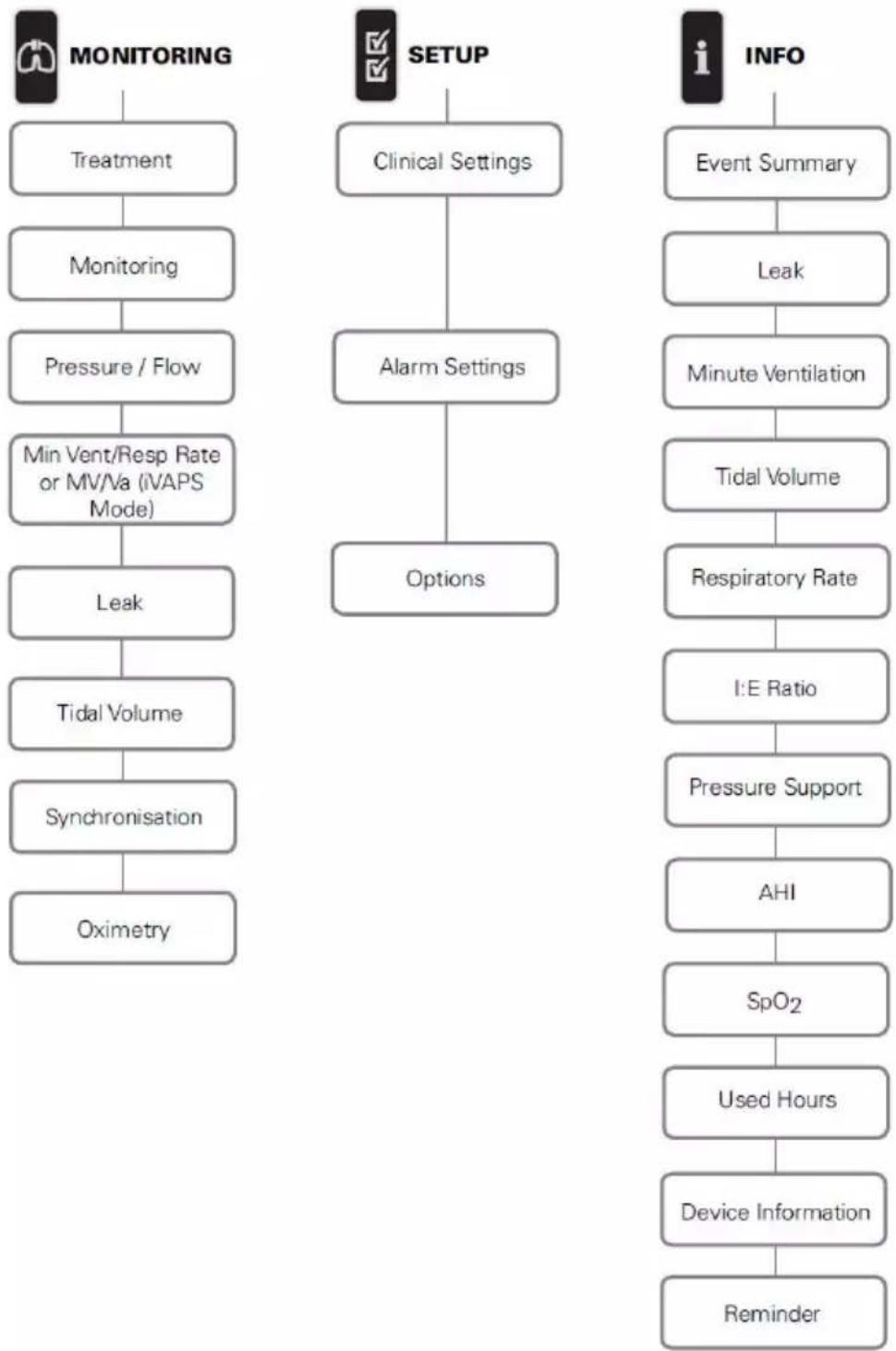
flowchart
graph TD
    A["MONITORING"] --> B["Treatment"]
    B --> C["Monitoring"]
    C --> D["Pressure / Flow"]
    D --> E["Min Vent/Resp Rate or MV/Va (IVAPS Mode)"]
    E --> F["Leak"]
    F --> G["Tidal Volume"]
    G --> H["Synchronisation"]
    H --> I["Oximetry"]

    J["SETUP"] --> K["Clinical Settings"]
    K --> L["Alarm Settings"]
    L --> M["Options"]

    N["INFO"] --> O["Event Summary"]
    O --> P["Leak"]
    P --> Q["Minute Ventilation"]
    Q --> R["Tidal Volume"]
    R --> S["Respiratory Rate"]
    S --> T["I:E Ratio"]
    T --> U["Pressure Support"]
    U --> V["AHI"]
    V --> W["SpO2"]
    W --> X["Used Hours"]
    X --> Y["Device Information"]
    Y --> Z["Reminder"]
Note: iVAPS mode is only available in Stellar 150.
Setup menu
Setup menu: Clinical Settings (Mask Type)
-
Press 📋 to display the Clinical Settings screen.
-
Use the push dial ⚙ to scroll through the menu and change the Mask Type in the Advanced Settings screen.
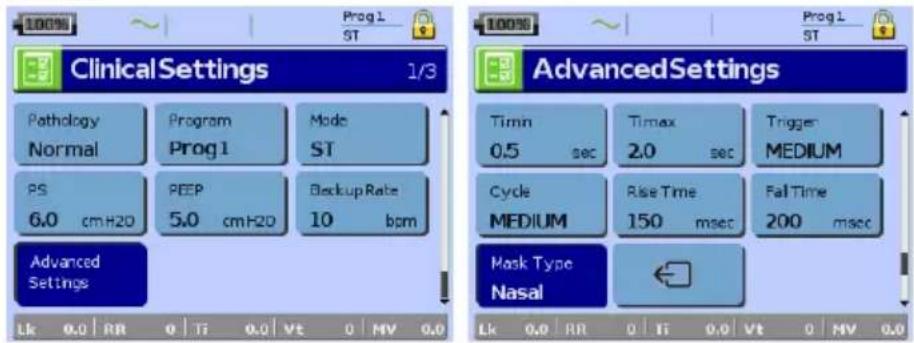
Mask type options: Nasal, Ultra, Pillow, Full Face, Trach, Pediatric.
Note: When Mask Type is set to Trach or Full Face the Non-Vented Mask alarm automatically turns on.
For a full list of compatible masks for this device, see the Mask/Device Compatibility List on www.resmed.com/downloads/devices. If you do not have internet access, please contact your ResMed representative.
Setup menu: Alarm Settings (Alarm Volume)
-
Press ☑ to display the Alarm Settings screen.
-
Use the push dial ⚙ to scroll through the menu and change the Alarm Volume to low, medium or high.

Setup menu: Options

-
Press to display the Options screen.
-
Use the push dial to scroll through the menu and change parameters (see descriptions in the table below).
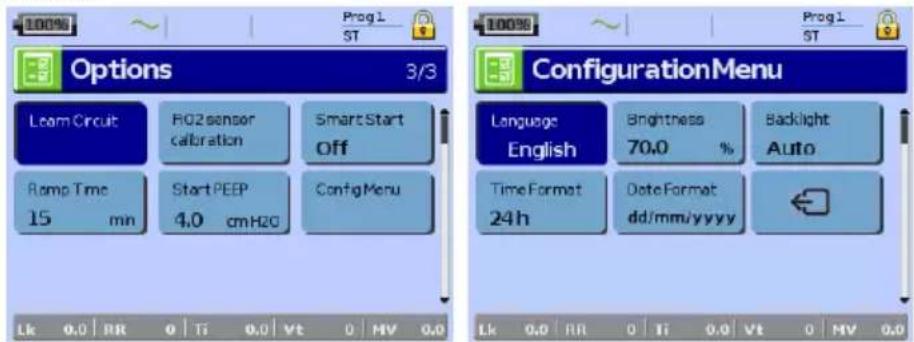
| Parameter | Description |
| Learn Circuit | The device is calibrated according to your air tubing system.1. Ensure that the therapy is turned off before performing a Leam Circuit.2. If in use, turn off the oxygen flow.3. Select the mask type.4. Set up the air circuit including accessories and patient interface.Note:When performing a Leam Circuit for invasive use, do not connect a catheter mount, tracheostomy tube or HMEF. Refer to Setting up for invasive use (see page 6).5. Leave the air circuit unobstructed and open to the air.6. Press 🔍 to start the Learn Circuit.7. Wait for the device to complete its automated tests (<30 sec).The results are displayed when complete. If the circuit configuration has been successfully learnt, 😊 displays. If unsuccessful, 😊 displays (refer to Troubleshooting (see page 25)). |
| FiO2 Sensor Calibration | The device starts the calibration of the FiO monitoring sensor to measure the oxygen concentration of the breathable air.1. Press 🔍 to start the FiO2 sensor calibration.2. Wait for the device to complete its calibration.The results are displayed when complete.Note:Turn off the oxygen flow. |
| Ramp Time | If Max Ramp Time has been set by the clinician, you may select any value up to this timeOptions:0 min-Max Ramp Time (max 45 minutes, 5 minutes increments) |
Setup menu: Configuration Menu
| Parameter | Description |
| Language | Sets the display language. Options: Depending on regional configuration |
| Brightness | Sets the LCD backlight brightness. Options: 20-100%, 10% increments |
| Backlight | Enables the LCD and keypad backlight. If the AUTO setting is selected the backlight turns dark after five minutes without any actions and turns on again if any button is pressed again or an alarm occurs. Options: On, Auto |
| Time format | Sets the time format. Options: 24 hrs, 12 hrs |
| Date format | Sets the date format. Options: dd/mm/yyyy, mm/dd/yyyy |
| To return to the Options screen press the Return button | |
Info menu Event Summary
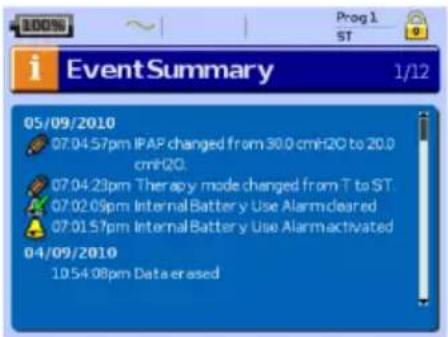
Event summary displays the summary of three types of events: changes in settings, alarms and system events (eg, connection of ResMed USB stick). There are up to 200 events of each type, displayed in chronological order, with the most recent event displayed at the top by default.
Note: When the capacity of 200 logged events is reached, the oldest log record is overwritten.
Used Hours
bar
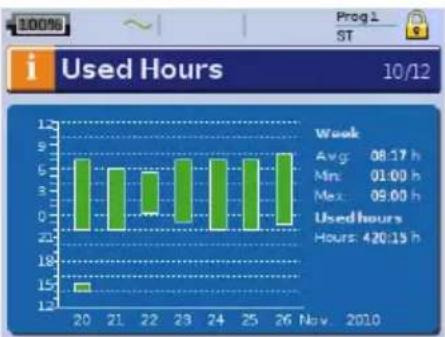
Used Hours | Week | Avg (h) | Min (h) | Max (h) | | :--- | :--- | :--- | :--- | | 20 | 6.5 | -1.5 | 1.5 | | 21 | 6.0 | -1.0 | 1.0 | | 22 | 5.5 | -0.5 | 0.5 | | 23 | 6.5 | -1.0 | 1.0 | | 24 | 6.5 | -1.0 | 1.0 | | 25 | 6.5 | -1.0 | 1.0 | | 26 | 7.0 | -1.5 | 1.5 | Week: 08:17 h Min: 01:00 h Max: 09:00 h Usedhours: 420:15 h Nov. 2010Used Hours during the last seven days of treatment are displayed in a bar graph and can be compared to the data of the last 365 days.
Device Information
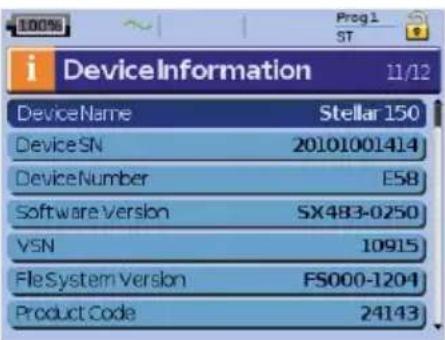
This screen shows the serial number (displayed as Device SN), device number, software version and other component versions. Data on this screen may be requested for servicing or as part of problem-solving by a technician.
Reminders
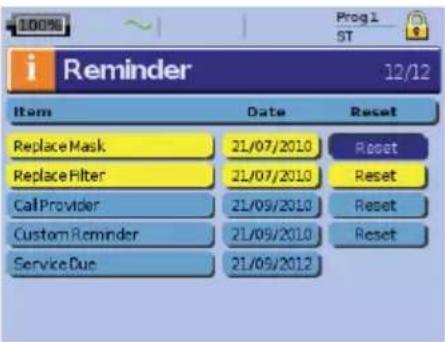
The Clinician uses the Reminders menu to alert you to specific events; for example, when to replace the mask, when to replace the filter and so on. The reminder appears in yellow as the date approaches (within 10% of the reminder period). The reminder also displays when the device is powered on. You can clear a reminder message by selecting 'Reset', which clears the current reminder date to OFF, or displays the next pre-set Reminder date.
Data management
There are two data ports at the rear of the device for connecting a USB stick. Refer to Stellar at a glance (see page 2). Therapy and device data can be stored on it or read from it to be used with ResMed software applications.
WARNING
Do not connect any device to the data ports other than specially designed devices recommended by ResMed. Connection of other devices could result in injury, or damage to the Stellar. Refer to General warnings and cautions (see page 33)).
CAUTION
Do not disconnect the ResMed USB stick while data transfer is in progress. Otherwise loss of data or incorrect data may result. The download time depends on the data volume.
Notes:
- You cannot connect two ResMed USB sticks simultaneously for data communication.
- If data transfer is not possible or failed please read the troubleshooting section.
-
Do not store files on the USB stick other than those created by the device or application. Unknown files may be lost during data transfer.
-
Plug the ResMed USB stick to one of the two USB connections on the rear side of the device.
The first dialogue for the USB data transfer is displayed automatically on the LCD. The device checks if there is enough memory capacity on the USB stick and if readable data is available.
- Select one of the available options
- Read settings
The settings will be transferred from the connected ResMed USB stick to the Stellar.
- Write settings
Settings of the device will be stored on the ResMed USB stick.
• Write settings and loggings
Settings and loggings of the device will be stored on the ResMed USB stick.
- Cancel
- Confirm the data transfer.
Cleaning and maintenance
The cleaning and maintenance described in this section should be carried out regularly. This also helps to prevent the risk of cross contamination. Refer to the mask, humidifier and other accessories user guide for detailed instructions for care and maintenance.
WARNING
- Beware of electric shock. Do not immerse the device, pulse oximeter or power cord in water.
Turn off the device, unplug the power cord from the power socket and the device before cleaning and be sure that it is dry before reconnecting. - The mask system and air tubing are subject to normal wear and tear. Inspect them regularly for damage.
CAUTION
The Stellar cannot be sterilised.
Daily
Disconnect the air tubing from the device (and humidifier, if used) and hang it in a clean, dry place until next use. If the device is visibly soiled, wipe the exterior surfaces of the device and the pulse oximeter (if used) with a damp cloth and mild detergent.
CAUTION
- Do not hang the air tubing in direct sunlight as the tubing may harden over time and eventually crack.
- Do not use bleach, chlorine, alcohol or aromatic-based solutions (including all scented oils), moisturising or antibacterial soaps to clean the air tubing or the device on a daily basis (other than the approved cleaning agents Actichlor® Plus, 70% Isopropyl (Isopropanol) alcohol, Mikrozid® AF or CaviCide®). These solutions may cause hardening and reduce the life of the product. The use of cleaners and disinfecting solutions containing alcohol or chlorine (other than the approved cleaning agents) is acceptable for periodic cleaning of the device, such as for cleaning between patients or especially for service periods, but not recommended for daily use.
Weekly
- Remove the air tubing from the device and the patient interface.
- Wash the air tubing in warm water using mild detergent.
- Rinse thoroughly, hang and allow to dry.
- Reconnect the air tubing to the air outlet and patient interface.
- If the device is visibly soiled, wipe the exterior surfaces of the device and the pulse oximeter (if used) with a damp cloth and mild detergent.
Monthly
- Wipe the exterior of the device and the pulse oximeter (if used) with a damp cloth and mild detergent.
- Visually inspect the air filter to check if it is blocked by dirt or contains holes.
Replacing the air filter
Replace the air filter every six months (or more often if necessary).
WARNING
Do not wash the air filter. The air filter is not washable or reusable.
- Remove the air filter cover from the back of the device.
- Remove and discard the old air filter.
- Insert a new air filter.
- Refit the air filter cover.
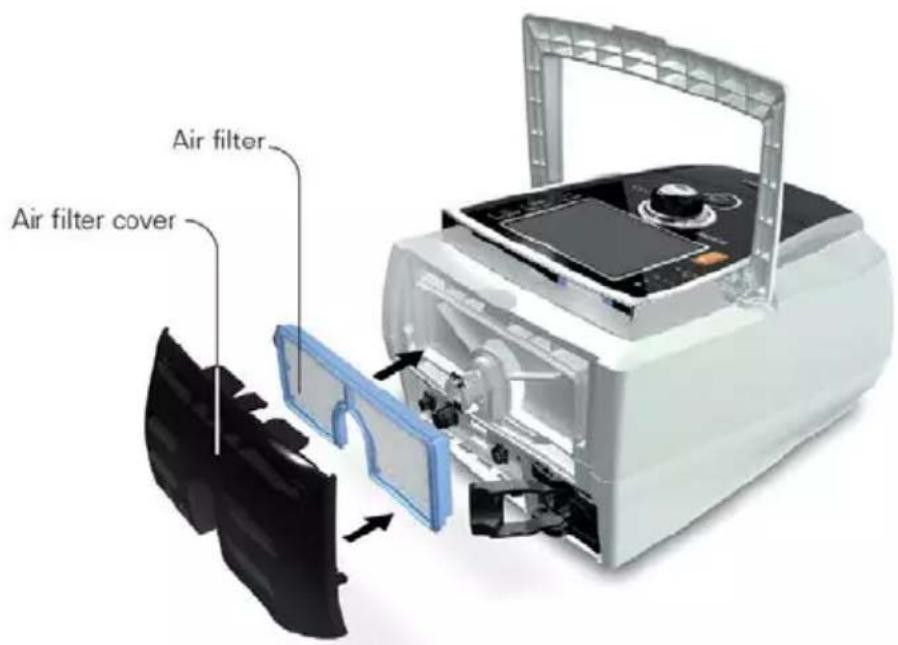
Disinfection
Disinfection of your device helps to prevent the risk of cross contamination.
Disinfect the exterior of the device, and especially the air outlet, with a damp cloth and a disinfection solution (eg, Microzid).
Multipatient use

WARNING
- A bacterial/viral filter is mandatory if the device is used on multiple patients.
- In a multipatient use environment, you must perform the following before the device is provided to a new patient:
| Mask | Reprocess; Cleaning, disinfection and sterilisation instructions are available fro the ResMed website, www.resmed.com/masks/sterilization. If you do not have Internet access, please contact your ResMed representative. |
| Air tubing | Replace the air tubing. Alternatively, consult the air tubing instructions for cleaning and disinfection information. |
| Device | Disinfect the Stellar as follows:Use an anti-bacterial cleaning/disinfectant solution such as ActichlorTM Plus (chlorine-based cleaning/disinfectant solution), 70% Isopropyl (Isopropanol) alcohol, Mikrozid® AF or CaviCide® (alcohol-based cleaning/disinfectant solutions), with a clean non-dyed disposable cloth to clean and disinfect the exterior surfaces of the device. Wipe all accessible surfaces of the device, including the air outlet (avoid liquid entering any openings in the device).The approved cleaning agents are suitable for daily use.Refer to the cleaning product manufacturer's instructions for use for information on the procedure, concentration and contact time of cleaning agents. |
| Humidifier | As instructions for humidifiers vary, see the user guide for the humidifier in use For multipatient use environment, use the H4i water chamber (disposable) in place of the H4i reusable water chamber. |
Servicing

CAUTION
Inspection and repair should only be performed by an authorised agent. Under no circumstances should you attempt to open, service or repair the device yourself.
This product should be inspected by an authorised ResMed service centre five years from the date of manufacture, except for the internal battery which ResMed recommends be tested after two years to assess the battery life. Prior to this, the device is intended to provide safe and reliable operation provided that it is operated and maintained in accordance with the instructions provided by ResMed. Applicable ResMed warranty details are provided with the device at the time of original supply. Of course, as with all electrical devices, if any irregularity becomes apparent, you should exercise caution and have the device inspected by an authorised ResMed service centre.
Troubleshooting
If there is a problem, try the following suggestions. If the problem cannot be solved, contact ResMed.
Alarm troubleshooting
The most common reason for an alarm to sound is because the system has not been properly assembled. Check that the air tubing has been properly attached to the device and patient interface (and humidifier if used).
Notes:
- The alarm log and alarm settings are maintained when the device is powered down and in the event of a power loss.
- If multiple alarms are active simultaneously, the alarm with the highest priority will be displayed first.
- If an alarm activates repeatedly, discontinue use and return the device for servicing.
Problem / possible cause Action
| LCD: Internal Battery Empty!The remaining battery charge is below 15%. The device can be powered by the internal battery for maximum 2 minutes. | Connect the device to mains power.Note: In case of a total power failure, the therapy settings will be stored and therapy will resume when the device is powered again. |
| LCD: System Failure!Component failure.The device stops delivering air pressure (system failure 6, 7, 9, 22, 38). Therapy cannot be started (system failure 21). | 1. Power-off the device.2. Power-on the device again. |
| The device internal temperature is too low for the device to start/deliver therapy (system failure 21). | 1. Ensure that ambient temperature is above 5°C.If the device has been stored below 5°C, allow sufficient time for it to acclimatise before use.2. Power-off the device.3. Power-on the device again.If the problem persists, return the device for servicing. |
| The self test of the device fails and therapy cannot be started (system failure 21). | 1. Power-off the device.2. Power-on the device again.If the problem persists, return the device for servicing. |
| Component failure (system failure 8, 25) | 1. Power-off the device.2. Power-on the device again. |
| LCD: Over Pressure!The device generates a pressure that is greater than 59 cm H2O. Treatment will be stopped. | 1. Power-off the device.2. Check that the air tubing is connected properly.3. Power-on the device again.4. Start Learn Circuit function.Note: If the alarm activates repeatedly internal components may be defective. Discontinue use and return the device for servicing. |
| LCD: Blocked Tube!Air path is blocked. | 1. Check the air path for any blockages.2. Remove the blockages.3. If the alarm is not cleared, stop treatment.4. Re-start treatment. |
| Problem / possible cause | Action |
| LCD: High Temperature [10, 11, 12, 23]!The temperature inside the device is too high. Treatment may lead to stop. | Ensure the ambient temperature is within the specified operating range. If the problem persists within the specified operating conditions please return the device for servicing.Contact your clinician. |
| LCD: High Pressure!Therapy pressure exceeds pre-set alarm level. | 1. Stop treatment.2. Re-start treatment.If the problem persists, contact your clinician. |
| LCD: Low Pressure!The air tubing is not connected properly. | 1. Check the air circuit integrity and reconnect.2. If the alarm doesn't get cleared, stop treatment.3. Re-start treatment. |
| LCD: Circuit disconnected!The air circuit is not connected properly. | 1. Check the air circuit integrity and reconnect.2. If the alarm is not cleared, stop treatment.3. Re-start treatment. |
| LCD: Low Minute Ventilation!Minute ventilation level has dropped below the alarm setting level. | Contact your clinician. |
| LCD: Low Respiratory Rate!, High Respiratory Rate!The respiratory rate level has dropped below or has exceeded the alarm setting level. | Contact your clinician. |
| LCD: High Leak!High mask leak for more than 20 seconds. | Adjust the mask to minimise leak. Refer to Using mask-fit (see page 17).Check the air circuit integrity and reconnect.If the problem persists, contact your clinician. |
| LCD: Non-Vented Mask!Connection of a non-vented mask.Mask vents may be blocked.ResMed Leak Valve is missing or vent is blocked. | Ensure the mask has vents.Ensure the mask vents are not blocked.Ensure the ResMed Leak Valve is installed and that the vent is not blocked.Ensure oxygen (if in use) has only been connected at the rear of the device.If the problem persists, contact your clinician. |
| LCD: Apnoea!The device detects an apnoea that has exceeded the pre-set alarm level. | Breathe normally to disable the alarm.If the problem persists, contact your clinician. |
| LCD: Internal Battery Low!The internal battery capacity is below 30%. | Connect the device to mains power. |
| LCD: Low SpO_2 ! SpO_2 has dropped below pre-set alarm level. | Check the attachment of the sensor.If the problem persists, contact your clinician. |
| LCD: SpO_2 finger sensor failure!The finger sensor is not connected properly or delivers faulty values. | Check if the finger sensor is attached properly to the finger and connection to the pulse oximeter. |
| LCD: Xpod oximeter disconnected!The pulse oximeter is disconnected. | Check if the pulse oximeter is connected properly to the device. |
| LCD: Low FiO_2 Level! FiO_2 has dropped below the pre-set alarm level. | Perform FiO_2 sensor calibration.If the problem persists, contact your clinician. |
| LCD: High FiO_2 Level! FiO_2 has exceeded the pre-set alarm level. | Perform FiO_2 sensor calibration.If the problem persists, contact your clinician. |
| LCD: FiO_2 sensor disconnected!The FiO_2 monitoring sensor is not connected. | Connect the FiO_2 monitoring sensor or replace it with a new one. |
| LCD: Keypad Failure!One of the keys was held down for more than 10 seconds or got stuck. | Remove any blockages from the keypad. |
| LCD: Attention High Temp [42, 43, 44, 45]!The temperature inside the device is high. | Ensure the ambient temperature conditions are within the specified operating range. |
| LCD: Internal Battery Use!The device is using the internal battery. | Check if the power cord is properly connected to the device if you want to run from mains power.Press the Alarm mute button to cancel the alarm. |
| LCD: External DC Power Use!The device is powered by an external battery. | Check if the AC power cord is properly connected to the device if you want to run from mains power.Note:The alarm will be cleared automatically after one minute. |
Other troubleshooting
| Problem / possible cause | Solution |
| No display | |
| Power failure. The device stops delivering air pressure. | Remove the mask or the catheter mount from the tracheostomy tube until power is restored.Check the power cable connection between the mains power or external battery and the device.As the internal battery ages, the available capacity decreases. When the remaining battery capacity is low, it can affect the battery charge level indication and lead to power failure without activating Low or Empty battery alarms. ResMed recommends the battery be tested after two years to assess the remaining battery life (refer to Internal battery (see page 3)). |
| Power not connected or device is not switched on. | Ensure the power cord is connected and press the switch at the back of the device once. |
| Treatment pressure seems low | |
| Ramp time is in use. | Wait for air pressure to build up. |
| Air filter is dirty. | Replace air filter. |
| Air tubing is kinked or punctured. | Straighten or replace tubing. |
| Air tubing is not connected properly. | Connect the air tubing firmly at both ends. |
| Mask and headgear not positioned correctly. | Adjust position of mask and headgear. |
| Plug(s) missing from access port(s) on mask. | Replace plug(s). |
| Pressure required for treatment may have changed. | See your clinician to adjust the pressure. |
| There is a large impedance (eg, bacterial/viral filter) in the air circuit. | Perfom the Learn Circuit function. |
| Humidifier control dial set too high, resulting in accumulation of water in the air tubing. | Turn humidifier control down and empty the water from the a tubing. |
| Treatment pressure seems high | |
| Pressure required for treatment may have changed. | Consult your clinician. |
| There is a change in the impedance in the circuit configuration. | Perform the Learn Circuit function. |
| The device does not start when you breathe into the mask | |
| SmartStart/Stop not on. | Consult your clinician. |
| Breath is not deep enough to trigger SmartStart. | Take a deep breath in and out through the mask. |
| There is excessive leak. | Adjust position of mask and headgear. |
| Plug(s) missing from port(s) on mask. | Replace plug(s). |
| Air tubing is not connected properly. | Connect firmly at both ends. |
| Air tubing is kinked or punctured. | Straighten or replace tubing. |
| There is a large impedance (eg, bacterial/viral filter) in the air circuit. | Perform the Learn Circuit function. |
| The device does not stop when you remove your mask | |
| SmartStart/Stop is disabled. | Consult your clinician. |
| Use of a full face mask or tracheostomy tube. | SmartStart is disabled if Full face mask or Trach is selected at interface. |
| Incompatible accessories (eg, humidifier or mask system) with high resistance being used. | Use only equipment as recommended and supplied by ResMed. |
| High Leak Alarm or Low Min Vent alarms are set to ON. | Consult your clinician. |
| Confirm Stop is enabled. | Consult your clinician. |
| High Leak Alarm is enabled, but alarm does not activate when the mask is removed during treatment | |
| Incompatible air delivery system being used. | Use only equipment as recommended and supplied by ResMed. |
| Pressure settings are too low for the air delivery components being used. | Perform the Learn Circuit function to adjust the therapy pressure according to your air tubing system. |
| Learn Circuit failed | |
| The circuit configuration is inappropriate as the impedance detected is too high. | Review the components included in the circuit configuration and adjust as appropriate, then rerun Learn Circuit (refer to Setup menu). |
| Too many components have been included or the impedance of accessories in use is above ResMed's recommendation, eg, type of filter, external humidifier, air tubing. | |
| The delivered airflow is not humid/heated although the H4i humidifier is in use | |
| The humidifier is not properly attached. | Correctly attach the humidifier. |
| The humidifier does not heat. | The device is currently powered by battery use or not connected to the mains. |
| The humidifier does not work. | Return the device and the humidifier for servicing. |
| The water chamber is empty. | Fill the water chamber of the humidifier. |
| USB stick is not readable or writeable | |
| The USB stick contains unreadable data, does not have enough space available, is not compatible with the device. | Consult your clinician. |
| USB stick is defective. | Replace the USB stick after consulting your clinician. |
| FiO2 sensor calibration failure | |
| FiO2 sensor is not attached properly. | For the correct attachment of the FiO2 sensor, refer to Using the FiO2 monitoring sensor. |
| FiO2 sensor is used or defective. | If the lifetime of the FiO2 sensor has exceeded one year please replace the FiO2 sensor and start calibration again. |
| LCD: is displayed in the header. | |
| Battery is not charging. | Ensure the ambient temperature conditions are within the specified operating range. If the problem persists within the specified operating conditions please return the device for servicing.Power off the device. Power on the device again. |
Technical specifications
| Operating pressure range | IPAP: 2–40 cm H2O (in S, ST, T, PAC mode)PS: 0–38 cm H2O (in S, ST, T, PAC mode)EPAP: 2–25 cm H2O (in S, ST, T, iVAPS, PAC mode)CPAP: 4–20 cm H2O (in CPAP mode only)Min PS: 0–20 cm H2O (in iVAPS mode)Max PS: 0–30 cm H2O; 8–30 cm H2O when AutoEPAP is on (in iVAPS mode)Min EPAP/Max EPAP: 2–25 cm H2O (in iVAPS mode when AutoEPAP is set to on)Intended tidal volume range: 50–2500 mLNote: iVAPS mode is only available in Stellar 150. |
| Maximum single fault pressure 60 cm H2O (in all modes) | |
| Maximum breathing resistance under single fault | 2 cm H2O at 30 L/min; 7.2 cm H2O at 60 L/min |
| Maximum flow >200 L/min at 20 cm H2O | |
| Flow accuracy | ± 5 L/min or 20% measured value, whichever is greaterTest condition: T mode, IPAP: 40 cm H2O, EPAP: 2 cm H2O, Rise Time: MIN, Fall Time: MIN,Ti: 4.0 sec, Respiratory Rate: 10 bpm, with ResMed calibration cap. |
| Therapy pressure tolerance IPAP: ± 0.5 cm H2O ± 10% of set pressure (end of inspiration)EPAP/PEEP: ± 0.5 cm H2O ± 4% of set pressureCPAP: ± 0.5 cm H2O ± 10% of set pressureTest condition: T mode, IPAP: 40 cm H2O, EPAP: 2 cm H2O, Rise Time: MIN, Fall Time: MIN,Ti: 4.0 sec, Respiratory Rate: 10 bpm, with ResMed calibration cap. | |
| Sound pressure level | 31 dBA with uncertainty of 3 dBA as measured according to ISO 17510-1 |
| Sound power level | 39 dBA with uncertainty of 3 dBA as measured according to ISO 17510-1 |
| Alarm Volume Range | High, medium and low priority alarm (measured in a 1m radius according to IEC 60601-1-8):minimum 42 dBmaximum 79 dB |
| Dimensions (L x W x H) 230 mm x 170 mm x 120 mm | |
| Weight 2.1 kg | |
| LCD screen | Dimension (L x W x H): 76.9 mm x 63.9 mm x 3.15 mmResolution: 320 x 240 pixels |
| Air outlet | 22 mm taper, compatible with ISO 5356-1 Anaesthetic & Respiratory Equipment - Conical Connectors |
| Pressure measurement Internally mounted pressure transducer | |
| Flow measurement Internally mounted flow transducer | |
| Applied parts (as per IEC 60601-1) | Patient interface (Mask, endotracheal tube or tracheostomy tube)Oximeter (optional accessory) |
| FiO2measurement | Range: 18% to 100%, Resolution: 1%, Accuracy: ± (2.5 vol.% +2.5% of actual oxygen concentration)* (as per ISO 80601-2-55)* The measured FiO2sampled at a minimum of 1Hz has a response time of 14s to 90% of the final value. The long term output drift in 100% O2is typically <5% over 1 year |
| SpO2measurement | Range: 70% to 100%, Resolution: 1%, Accuracy: ±2% in a range of 70% to 100% |
| Pulse rate measurement | Range: 40 bpm to 240 bpm, Resolution: 1 bpm, Accuracy: Refer to Nonin Xpod technical specifications at www.nonin.com. |
| Power supply | AC 100–240V, 50–60Hz, 2.2 A, max. 65 W |
| External DC power supply (isolated) 24 V, 3 A | |
| Internal battery | Lithium-Ion battery, 14.4 V, 2.75 Ah, 40 WhOperating hours: 3 h with a new battery under normal conditions (see below).Patient type: home chronic; pressure: IPAP/EPAP 15/5 cm H _2 O; mask type: Ultra Mirage; air tubing: 2 m; leak: 0; respiratory rate: 20 bpm; battery capacity: 100%Patient type: hospital acute; pressure: IPAP/EPAP 20/5 cm H _2 O; mask type: Ultra Mirage; air tubing: 2 m; leak: 0; respiratory rate: 45 bpm; battery capacity: 100% |
| Housing construction | Flame retardant engineering thermoplastic |
| Environmental conditions | Operating temperature: 0°C to 35°COperating humidity: 10%–95% non-condensingStorage and transport temperature: -20°C to 60°C (+50°C*)Storage and transport humidity: 10%–95% non-condensingAir pressure: 680hPa to 1,100hPa; Altitude: 3,000 mNote: The performance may be limited below 800 hPa.*NONIN XPOD |
| Electromagnetic compatibility | The device complies with all applicable electromagnetic disturbances requirements (EMD) according to IEC 60601-1-2:2014, for residential, commercial and light industry environments.It is recommended that mobile communication devices are kept at least 0.3 m away from the device.Information regarding the electromagnetic emissions and immunity of this ResMed device can be found in www.resmed.com/downloads/devices. |
| Potential impact of electromagnetic disturbances | The loss or degradation of the following clinical functions due to electromagnetic disturbances could result in compromised patient safety:Accuracy of ventilation controlAccuracy of monitoring of airway pressure and volumeTherapy alarmsDetection of this degradation could be observed by the following device behaviour:Erratic ventilation deliveryRapid fluctuations in monitored parametersFalse activation of therapy or technical alarms |
| Air filter | Electrostatic fibre mesh with TPE frame structure. Bacterial filtration efficiency of >99.9% for ~2.7 micron particle size. |
| Air tubing | Standard air tubing: Flexible plastics, 2 m or 3 m length (22 mm diameter)SlimLine air tubing: Flexible plastics, 1.83 m length (15 mm diameter)For more information on air tubing resistance to flow, compliance, tubing length, and inner diameter, refer to the Air tubing compliance guide in ResMed.com. |
| IEC 60601-1 classifications | Class II (Clause 3.14–double insulation). This adherence means the need for an protective earthing (ie, an earthed plug) is not necessary.Type BFContinuous operation |
Air travel requirements
Medical-Portable Electronic Devices (M-PED) that meet the Federal Aviation Administration (FAA) requirements of RTCA/DO-160 can be used during all phases of air travel without further testing or approval by the airline operator. ResMed confirms that the Stellar meets RTCA/DO-160 requirements.
This device is not suitable for use in the presence of a flammable anesthetic mixture.
Notes:
- The manufacturer reserves the right to change these specifications without notice.
- Pressure may be displayed in cm H _2 O or hPa.
Symbols

Follow instructions for use; Class II equipment; Type BF applied part; Bell (Remote
Alarm); IP31 Device is protected against solid foreign objects of 2.5 mm diameter and greater and vertically falling water drops; Caution; General warning sign (see H4i connector plug and AC connection on the device); Standby or preparatory state for a part of equipment; O₂ Connection for oxygen supply; max 30 l/min (max 30 L/min); Data port; CE labeling in accordance with EC directive 93/42/EEC, class II b; Temperature limitation for storage and transport; Handle with care; Maximum humidity; Keep dry; Manufacturer; Upside; SN Serial number; LOT Batch code; Do not re-use; Do not use if package is damaged; REF Catalogue number; Use by date; Keep away from sunlight; Latex-free; Device weight; Contains no China environmental hazardous substances. MR unsafe (do not use in the vicinity of an MRI device
Environmental information
This device must be disposed of in accordance with the laws and regulations of the country in which disposal occurs.

The crossed-out wheeled bin symbol indicates that the product bearing this symbol may not be disposed of together with general household waste, but instead requires separate disposal. This requirement for separate disposal is based on the European Directive 2012/19/EU for electrical and electronic equipment, and the European Directive 2006/66/EC for batteries. You can hand in the product at a municipal collection point, for example. This reduces the impact on natural resources and prevents contamination of the environment through the release of hazardous substances.
Batteries containing more than 0.0005 percent of mercury by mass, more than 0.002 percent of cadmium by mass or more than 0.004 percent of lead by mass are marked below the crossed- bin symbol with the chemical symbols (Hg, Cd, Pb) of the metals for which the limit is exceeded.
For further information regarding product disposal, please contact your local ResMed office or your specialist distributor, or visit our website at www.resmed.com.
Dispose of used air filters and air tubings according to the directives in your country.
General warnings and cautions
WARNING
A warning alerts you to possible injury.
- Read this entire guide before using the device.
- This device should only be used with air tubing and accessories recommended by ResMed or the prescribing clinician. Use of incorrect air tubing and accessories may affect the functioning of this device.
- The device and the accessories are to be used for the specified intended use only.
- The device must only be used with masks (and connectors ^1 ) recommended by ResMed, or by a clinician or respiratory therapist. A mask should not be used unless the device is turned on and operating properly. The vent hole or holes associated with the mask should never be blocked. Explanation: The Stellar is intended to be used with special masks (or connector ^1 ) which have vent holes to allow continuous flow of air out of the mask. When the device is turned on and functioning properly, new air from the device flushes the exhaled air out through the mask vent holes. However, when the device is not operating, insufficient fresh air will be provided through the mask, and the exhaled air may be rebreathed. Rebreathing of exhaled air for longer than several minutes can, in some circumstances, lead to suffocation. This applies to most Positive Airway Pressure devices.
- In the event of power failure ^2 or machine malfunction, remove the mask or the catheter mount from the tracheostomy tube.
- Explosion hazard—do not use in the vicinity of flammable anesthetics.
- Do not use the device if there are obvious external defects, unexplained changes in performance.
- Only use original and approved ResMed accessories and parts.
- Use only accessories from the original package. If the packaging is damaged, the respective product must not be used, and should be disposed along with the packaging.
- Before using the device and the accessories for the first time, ensure that all components are in a proper condition and that their operational safety is guaranteed. If there are any defects, the system should not be used.
- Additional equipment connected to medical electrical equipment must comply with the respective IEC or ISO standards (eg, IEC 60950 for data processing equipment). Furthermore all configurations shall comply with the requirements for medical electrical systems (IEC 60601-1-1). Anybody connecting additional equipment to medical electrical equipment configures a medical system and is therefore responsible that the system complies with the requirements for medical electrical systems. Attention is drawn to the fact that local laws take priority over the above mentioned requirements. If in doubt, consult your local representative or the technical service department.
- No modification of this equipment is allowed.
- Single-use products are not to be re-used due to degradation and contamination risks.
- The device should not be used adjacent to or stacked with other equipment. If adjacent or stacked use is necessary, the device should be observed to verify normal operation in the configuration in which it will be used.
- The use of accessories (eg, humidifiers) other than those specified for the device is not recommended. They may result in increased emissions or decreased immunity of the device.
- Portable RF communications equipment (including peripherals such as antenna cables and external antennas) should be used no closer than 30 cm to any part of the device, including cables specified by the manufacturer. Otherwise, degradation of the performance of this equipment could result.
- The device performance may be affected when used above recommended altitude or outside of recommended outside temperature range.
- User must not connect the Stellar device to the battery of a battery-powered wheelchair as this can affect the device performance and may result in patient harm.
- Under normal or single fault conditions the entire pneumatic flow path can become contaminated with body fluids or expired gases, if bacterial/viral filters are not installed on the ventilator outlet.
- The device has not been tested or certified for use in the vicinity of X-ray, CT or MRI equipment. The device must not be used in the vicinity of an MRI device. Never bring the device into an MR environment.
^1 Ports may be incorporated into the mask or in connectors that are near the mask.
^2 During partial (below rated minimum voltage) or total power failure, therapy pressures will not be delivered. When power is restored, operation can proceed with no change to settings.

CAUTION
A caution explains special measures for the safe and effective use of the device.
- When using accessories, read the manufacturer's User Manual. For consumables, important information can be provided on the packaging, refer also to Symbols (see page 32).
- At low pressures, the flow through the mask vent holes may be inadequate to clear all exhaled gas, and some rebreathing may occur.
- The device may not be exposed to excessive force.
- If the device should fall accidentally on the ground, please contact your authorised service agent and/or healthcare provider.
- Pay attention to leaks and other unusual sounds. If there is a problem, contact an authorised service agent and/or healthcare provider.
- Do not replace any parts in the breathing circuit while the device is in operation. Stop operation before changing parts.
Notes:
A note advises to special product features.
- The above are general warnings and cautions. Further specific warnings, cautions and notes appear next to the relevant instructions in this guide.
- Position the device ensuring the power cord can be easily removed from the power outlet.
- Only trained and authorised personnel are allowed to make clinical setting changes.
- For any serious incidents that occur in relation to this device, these should be reported to ResMed and the competent authority in your country.
Limited warranty
ResMed Pty Ltd (hereafter 'ResMed') warrants that your ResMed product shall be free from defects in material and workmanship from the date of purchase for the period specified below.
Product Warranty period
| Mask systems (including mask frame, cushion, headgear and tubing)—excluding single-use devices | 90 days |
| Accessories—excluding single-use devices | |
| Flex-type finger pulse sensors | |
| Humidifier water tubs | |
| Batteries for use in ResMed internal and external battery systems | 6 months |
| Clip-type finger pulse sensors | 1 year |
| CPAP and bilevel device data modules | |
| Oximeters and CPAP and bilevel device oximeter adapters | |
| Humidifiers and humidifier cleanable water tubs | |
| Titration control devices |
Product Warranty period
- CPAP, bilevel and ventilation devices (including external power supply units)
2 years - Battery accessories
• Portable diagnostic/screening devices
This warranty is only available to the initial consumer. It is not transferable.
During the warranty period, if the product fails under conditions of normal use, ResMed will repair or replace, at its option, the defective product or any of its components.
This limited warranty does not cover: a) any damage caused as a result of improper use, abuse, modification or alteration of the product; b) repairs carried out by any service organization that has not been expressly authorized by ResMed to perform such repairs; c) any damage or contamination due to cigarette, pipe, cigar or other smoke; d) any damage caused by exposure to ozone, activated oxygen or other gases; and e) any damage caused by water being spilled on or into an electronic device.
Warranty is void on product sold, or resold, outside the region of original purchase. For product purchased in a country in the European Union ("EU") or European Free Trade Association ("EFTA"), "region" means the EU and EFTA.
Warranty claims on defective product must be made by the initial consumer at the point of purchase.
This warranty replaces all other expressed or implied warranties, including any implied warranty of merchantability or fitness for a particular purpose. Some regions or states do not allow limitations on how long an implied warranty lasts, so the above limitation may not apply to you.
ResMed shall not be responsible for any incidental or consequential damages claimed to have resulted from the sale, installation or use of any ResMed product. Some regions or states do not allow the exclusion or limitation of incidental or consequential damages, so the above limitation may not apply to you.
This warranty gives you specific legal rights, and you may also have other rights which vary from region to region. For further information on your warranty rights, contact your local ResMed dealer or ResMed office.
Visit ResMed.com for the latest information on ResMed's Limited Warranty.
Inhalt
Einleitung ....1
Indikationen ....1
natural_image
Diagram showing a medical or laboratory setup with an oscilloscope connected to a cable and a blue probe, labeled with components 1 and 2 (no text or symbols on the device itself)natural_image
Close-up of a medical device with a hand operating the internal component, showing a blue arrow indicating direction (no text or symbols visible)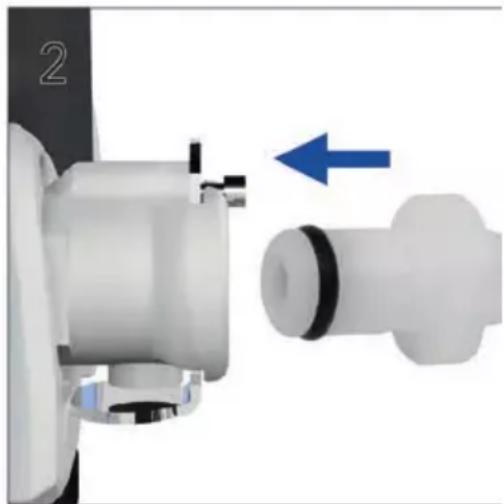
natural_image
Mechanical assembly diagram showing a shaft and housing with a blue arrow indicating direction (no text or symbols)natural_image
Close-up of a sewing machine with a hand adjusting the shaft, showing a blue upward arrow (no text or symbols visible)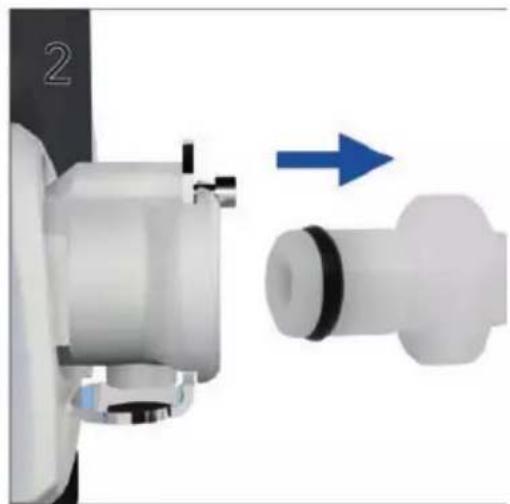
natural_image
Mechanical assembly diagram showing a shaft and housing with directional arrow (no text or symbols)natural_image
Medical device with labeled parts showing internal components (no text or symbols visible)Desinfektion
Contre-indications....1
Interface patient ....3
Humidification....3
Batterie interne ....3
Clé USB ResMed....4
natural_image
Medical device with attached cables and a digital display showing a blue probe (no visible text or symbols)natural_image
Close-up of a medical device with a hand inserting a device into it, showing a blue upward arrow (no text or symbols visible)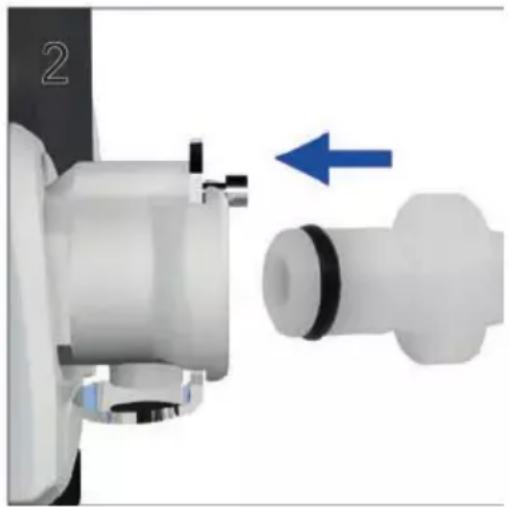
natural_image
Mechanical component diagram showing a shaft and housing with an arrow indicating direction (no text or symbols)natural_image
Close-up of a robotic device with a hand operating the shaft, showing a blue upward arrow (no text or symbols visible)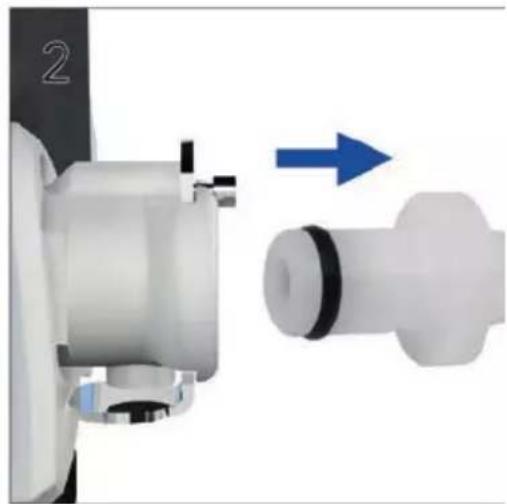
natural_image
Mechanical assembly diagram showing a shaft and housing with a blue arrow indicating direction (no text or symbols)natural_image
Medical device with labeled parts showing internal components: a monitor, a green plastic component, and a coiled tube (no text or symbols visible)bar
Observance | Month | Tps Treatment Hours | | :--- | :--- | | Nov 2010 | 15 | | Dec 2010 | 6 | | Jan 2011 | 6 | | Feb 2011 | 3 | | Mar 2011 | 7 | | Apr 2011 | 6 | | May 2011 | 6 | | Jun 2011 | 6 | | Jul 2011 | 6 | | Aug 2011 | 6 | | Sep 2011 | 6 | | Oct 2011 | 6 | | Nov 2011 | 6 | | Dec 2011 | 6 |Désinfection
natural_image
Exterior view of a medical device with labeled components, showing wiring and a close-up of a connected device (no text or symbols visible)natural_image
Close-up of a printer with a magnified inset showing a hand operating the device (no text or symbols visible)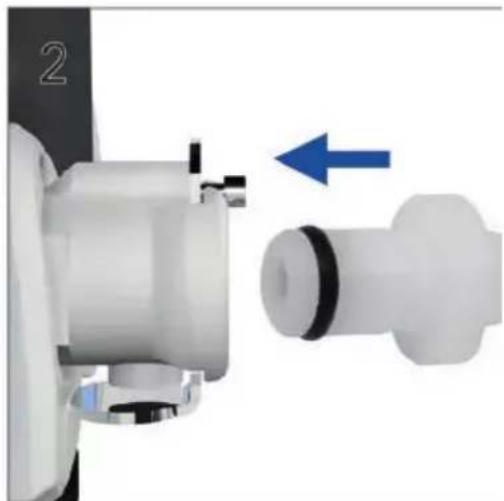
natural_image
Close-up of a mechanical component with a blue arrow indicating direction, no visible text or symbolsnatural_image
Close-up of a sewing machine being adjusted for a cable, showing hand positioning and blue arrow indicating motion (no text or symbols)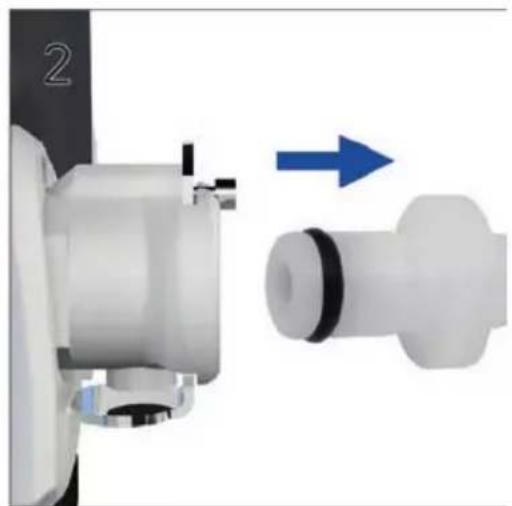
natural_image
Mechanical assembly diagram showing a shaft and housing with directional arrow (no text or symbols)natural_image
Medical device with attached tubing and a green plastic component, shown in two-step assembly (no text or symbols visible)natural_image
Medical device with attached cables and a blue medical device, no visible text or symbolsnatural_image
Close-up of a printer with a magnified inset showing a hand operating the device (no visible text or symbols)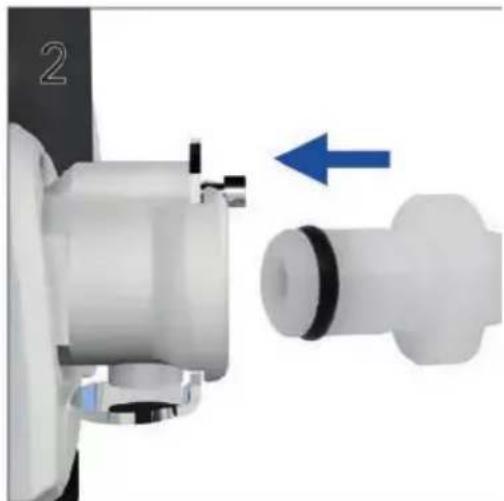
natural_image
Close-up of a mechanical component with a blue arrow indicating direction, no visible text or symbolsPara remover oxigénio suplementar
natural_image
Close-up of a sewing machine being adjusted for a hand, showing the blade and cable (no text or symbols visible)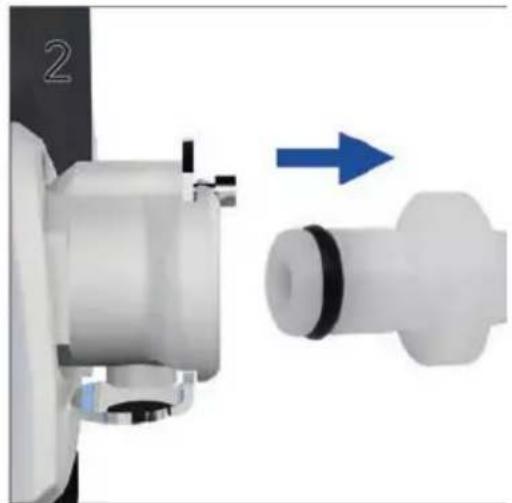
natural_image
Mechanical assembly diagram showing a shaft and housing with directional arrow (no text or symbols)natural_image
Medical device with labeled parts showing internal components (no text or symbols visible)- Verifique as baterias.
Stellar in breve....2
natural_image
Medical device with connected cables and a medical probe, no visible text or symbolsnatural_image
Close-up of a printer with a hand inserting a component, showing no visible text or symbols.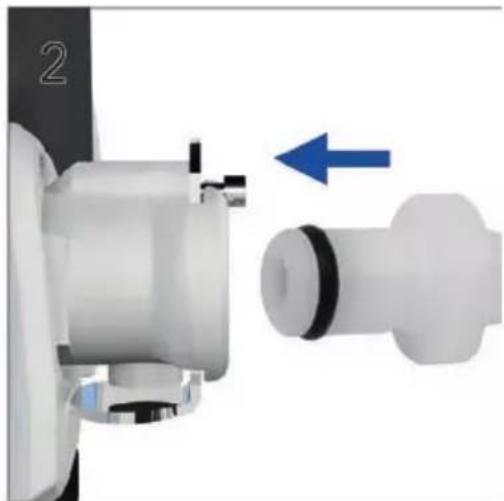
natural_image
Close-up of a mechanical component with a blue arrow indicating direction, no visible text or symbolsnatural_image
Close-up of a sewing machine being adjusted for a cable, showing hand positioning and blue arrow indicating motion (no text or symbols)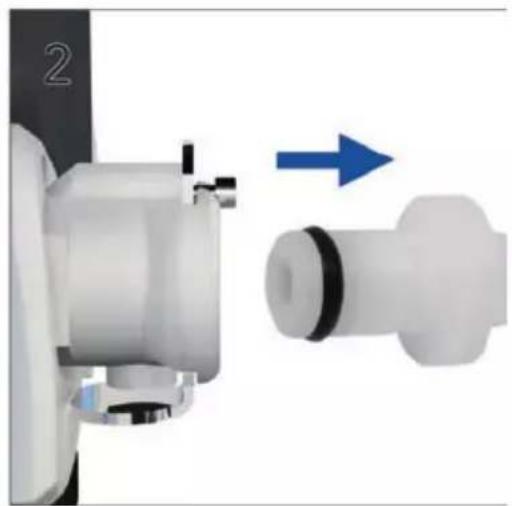
natural_image
Mechanical assembly diagram showing a shaft and housing with directional arrow (no text or symbols)natural_image
Medical device with labeled parts showing internal components (no text or symbols visible)Contra-indicaties ....1
Nadelige effecten 1
Stellar overzicht 2
Patientinterface 3
natural_image
Medical device with attached cables and a medical device labeled '1' and '2', showing no visible text or symbols beyond labels.natural_image
Close-up of a medical device with a hand operating the pump, showing a blue upward arrow (no text or symbols visible)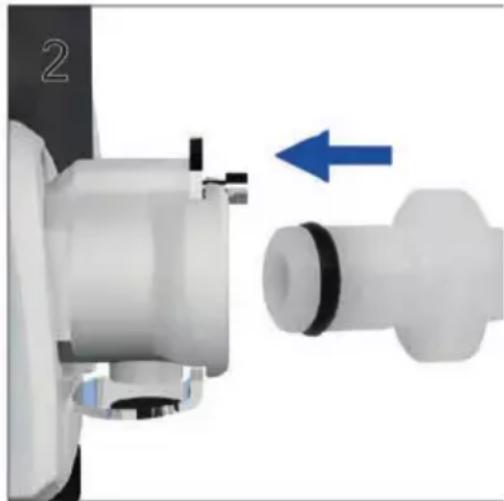
natural_image
Close-up of a mechanical component with a blue arrow indicating direction, no visible text or symbolsnatural_image
Close-up of a hand operating a white cylindrical device with a blue upward arrow, no visible text or symbols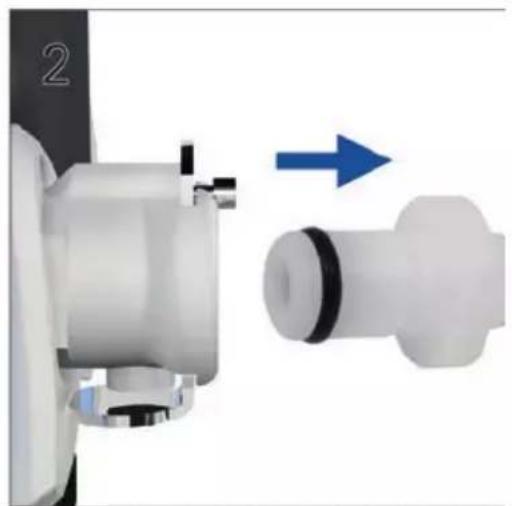
natural_image
Mechanical component diagram showing a shaft and housing with directional arrow (no text or symbols)natural_image
Medical device with labeled parts showing internal components (no text or symbols visible)Bella Vista NSW 2153 Australia
See Resmed.com for other ResMed locations worldwide. H4i, Stellar, SlimLine, and SmartStart are trademarks and/or registered trademarks of the ResMed family of companies. Nonin is a trademark of Nonin Medical, Inc. Actichlor is a trademark of Ecolab US Inc. Mikrozid is a trademark of Schülke & Mayr GmbH. Cavicide is a trademark of Metrex Research, LLC. For patent and other intellectual property information, see ResMed.com/ip © 2021 ResMed 2481015/1 2021-11