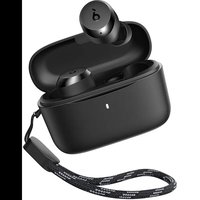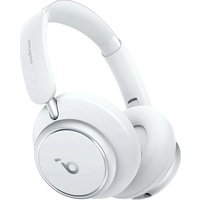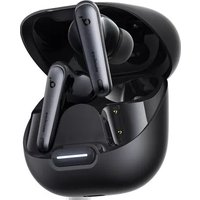
soundcore Liberty 4 NC - Earphones

Liberty 4 NC - Earphones soundcore - Free user manual and instructions

Find the device manual for free Liberty 4 NC soundcore in PDF.

📄 106 pages English EN Download 💬 AI Question
Notice soundcore Liberty 4 NC - page 3

User questions about Liberty 4 NC soundcore

0 question about this device. Answer the ones you know or ask your own.

Ask a new question about this device

The email remains private: it is only used to notify you if someone responds to your question.

No questions yet. Be the first to ask one.

Download the instructions for your Earphones in PDF format for free! Find your manual Liberty 4 NC - soundcore and take your electronic device back in hand. On this page are published all the documents necessary for the use of your device. Liberty 4 NC by soundcore.

USER MANUAL Liberty 4 NC soundcore

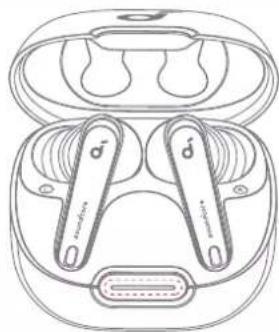
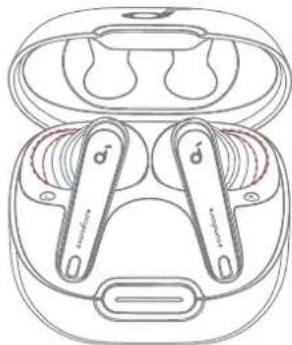
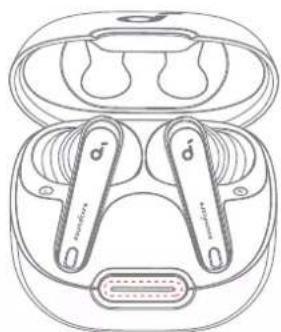
natural_image Line drawing of a pair of wireless earbuds with brand logos, no text or symbols present

soundcore Liberty 4 NC

USER MANUAL

English 01
Čeština 05
Dansk 09
Deutsch 13
ελληνικά17
Español 21
Suomi 25
Français 29
Magyar 33
Italiano 37
Nederlands 41
Norsk 45
Język polski 49
Português 53
Portugues do Brasil 57
Русский61
Slovenský Jazyk 65
Slovenski Jezik 69
Svenska73
Türkçe77
日本語81
한국어85
简体中文89
繁體中文93
97
101

soundcore Liberty 4 NC - 1

soundcore

soundcore Liberty 4 NC - 2

soundcore Liberty 4 NC - 3

text_image GET IT ON Google Play Google Play and the Google Play logo are Trademarks of Google Inc. Download on the App Store

soundcore Liberty 4 NC - 4

text_image QR code with a blue male gender symbol logo in the center

Apple and the Apple logo are trademarks of Apple Inc.

Download the soundcore app to get the most out of your earbuds with 3D surround sound, ambient sound modes, HearID sound, gaming mode, firmware updates, and more.

If your earbuds cannot connect with the soundcore app, re-install the app or update it to the latest version in your mobile app store.

1
soundcore Liberty 4 NC - 5
XSSM

soundcore Liberty 4 NC - 6

soundcore Liberty 4 NC - 7

natural_image Technical line drawing of a handheld device with a close-up inset showing internal components (no text or symbols)

soundcore Liberty 4 NC - 8

soundcore Liberty 4 NC - 9
L

2
soundcore Liberty 4 NC - 10

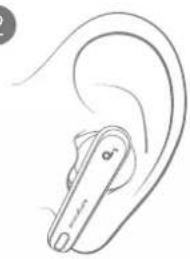
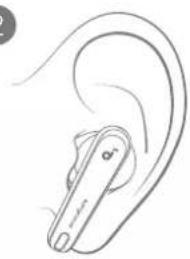
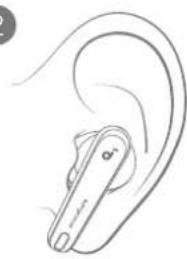
natural_image Line drawing of a ear with a handheld device (no text or symbols)

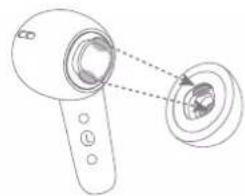
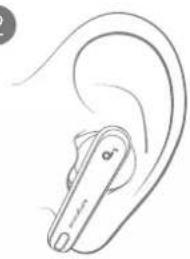
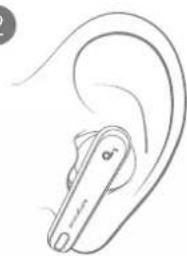
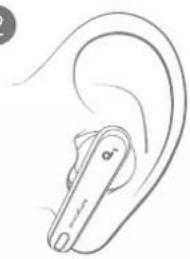
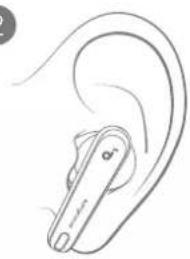
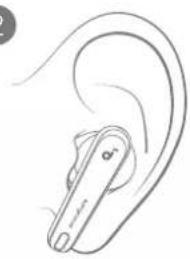
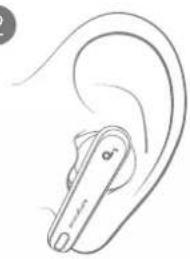
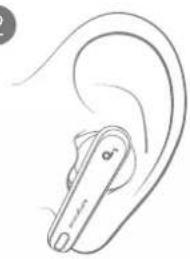
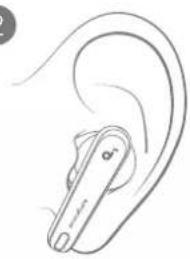
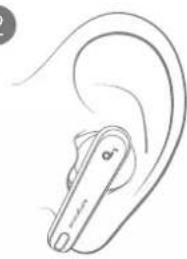
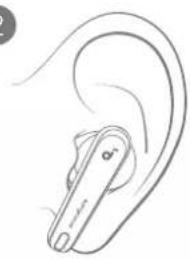
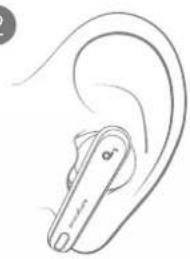
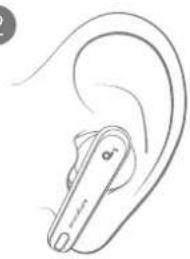
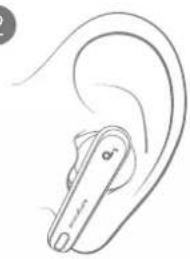
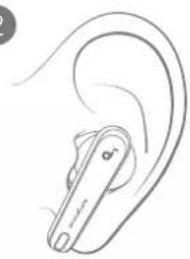
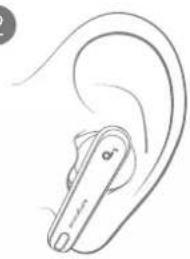
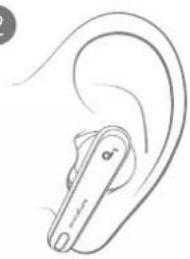
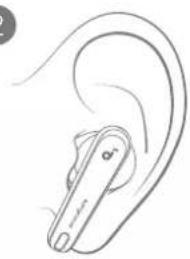
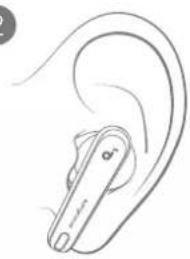
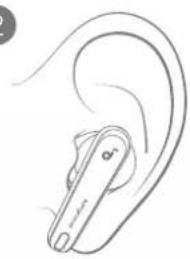
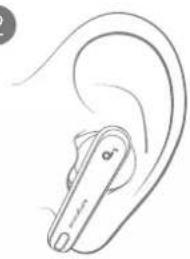
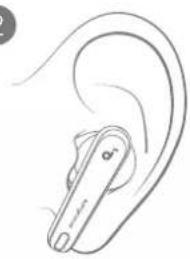
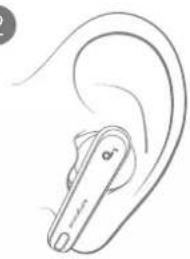
Choose the ear tips that fit your ears best and take a fit test in the soundcore app to ensure you get the best ANC performance.

soundcore Liberty 4 NC - 11

CHARGING

1
soundcore Liberty 4 NC - CHARGING - 1

soundcore Liberty 4 NC - CHARGING - 2
2

soundcore Liberty 4 NC - CHARGING - 3

text_image Diagram illustrating a dental implant device with labeled components and a warning symbol for disassembly or repair.
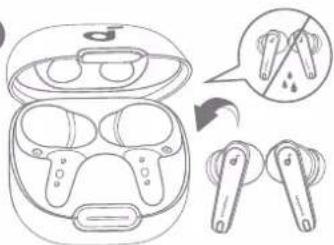
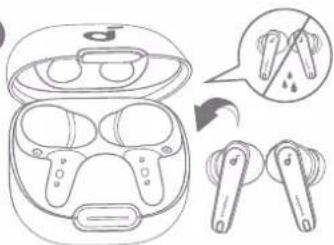
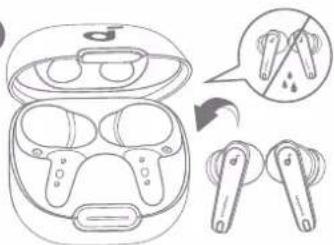
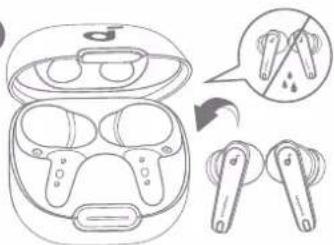
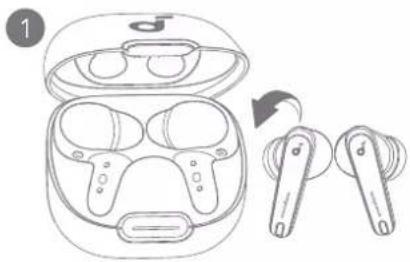
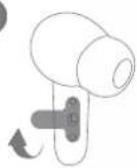
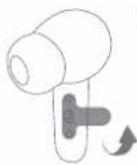
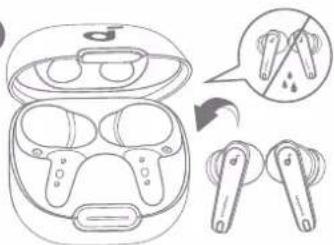
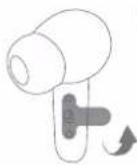
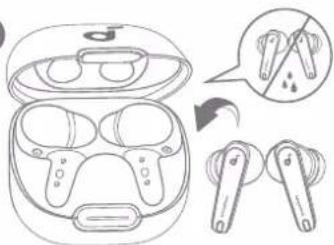
  1. Tear off the insulation sticker on the earbuds before first use.
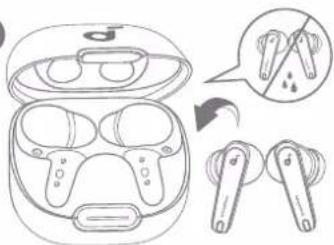
  2. Place the earbuds in the charging case and close it.
  3. Fully dry off the earbuds and the USB-C charging port before charging.

soundcore Liberty 4 NC - CHARGING - 4

POWERING ON & PAIRING

1
soundcore Liberty 4 NC - POWERING ON & PAIRING - 1

text_image 1 ON 2 ON soundcore Liberty 4 NC Short Light → <20% Long Light → 20% - 60% → 60% - 100% PAIRING CONNECTED ○ 1s1s

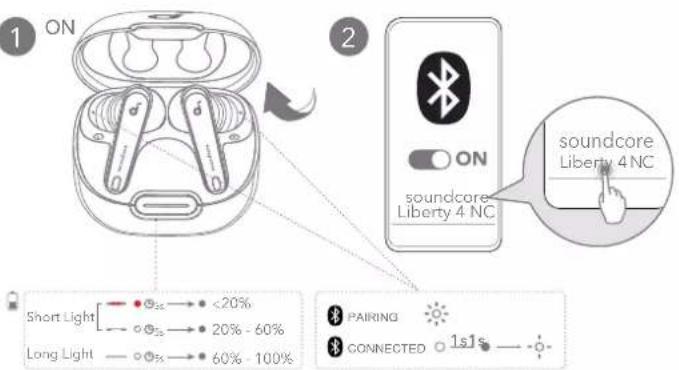
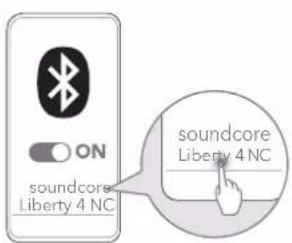
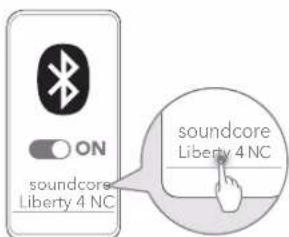
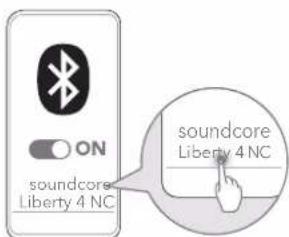
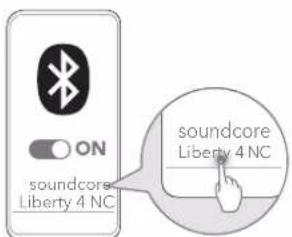
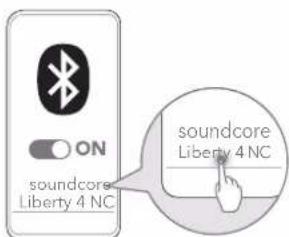
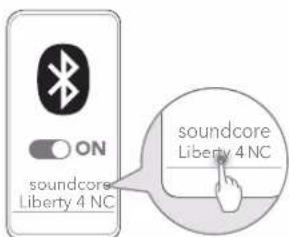
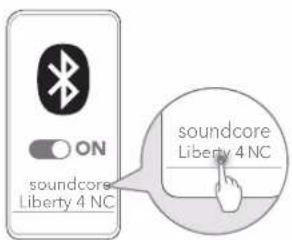
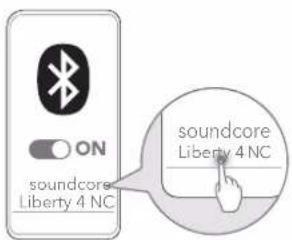
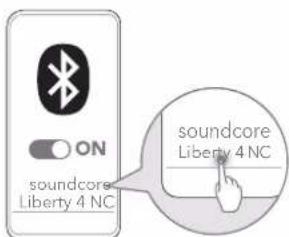
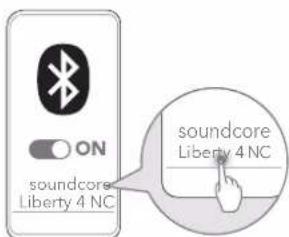
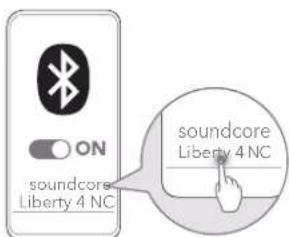
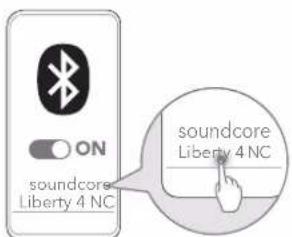
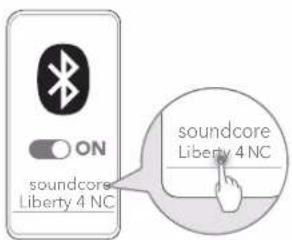
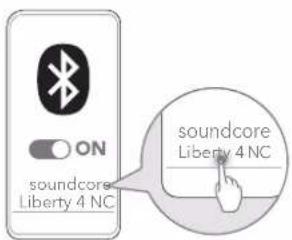
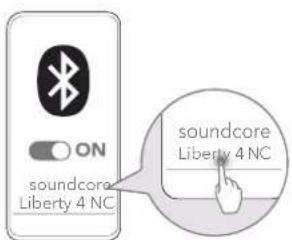
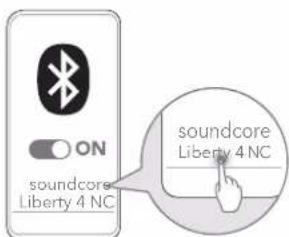
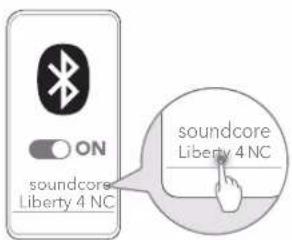
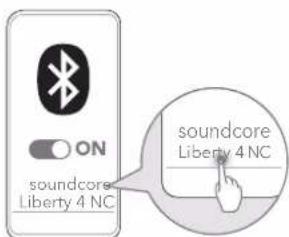
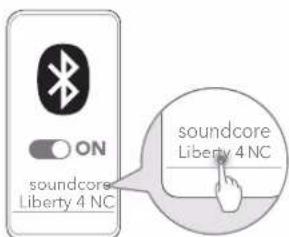
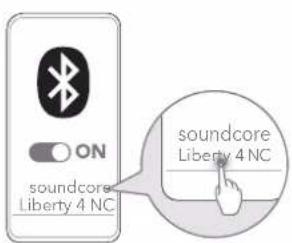
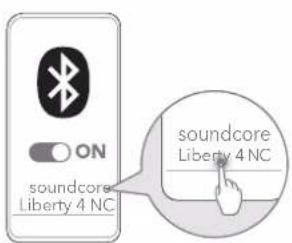
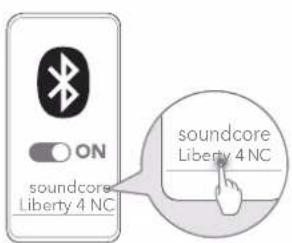
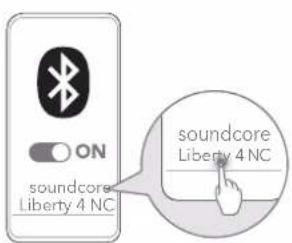
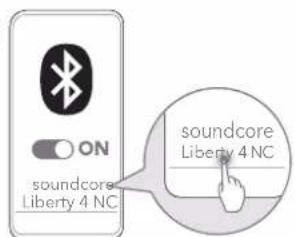
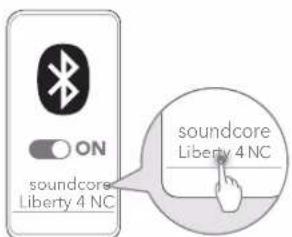
Open the charging case, the earbuds will automatically power on and enter Bluetooth pairing mode. Select "soundcore Liberty 4 NC" from your device's Bluetooth list when connecting for the first time.

3
soundcore Liberty 4 NC - POWERING ON &amp; PAIRING - 2

text_image 3 Short Light < 20% 20% - 60% 60% - 99% Long Light 5 min 100% 3hr 10 min=4 hr
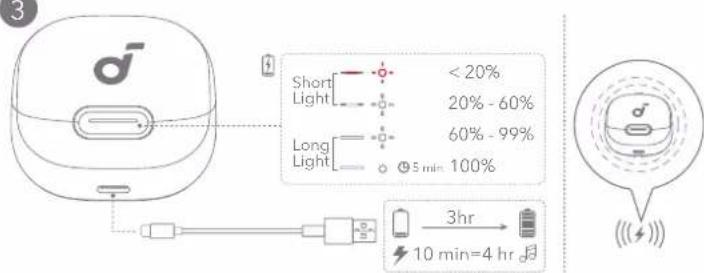
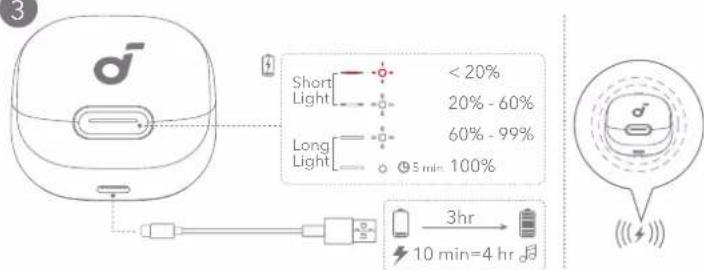
  1. Connect the charging case to the power supply by using a certified USB-C charging cable. Alternatively, position the charging case at the center of your wireless charger for wireless charging.
  2. Fully charge both the earbuds and the charging case before the first use.

soundcore Liberty 4 NC - POWERING ON &amp; PAIRING - 3

DUAL CONNECTIONS

1
soundcore Liberty 4 NC - DUAL CONNECTIONS - 1

text_image Diagram illustrating ear anatomy with labeled parts L and R, showing ear structure and hand positioning for hearing or ear functions.

2
soundcore Liberty 4 NC - DUAL CONNECTIONS - 2

text_image ON soundcore Liberty 4 NC soundcore Liberty 4 NC

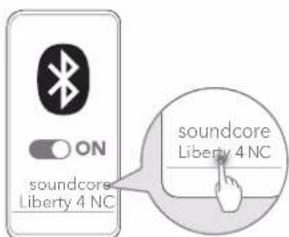
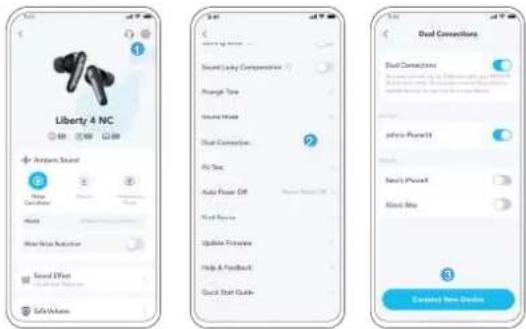
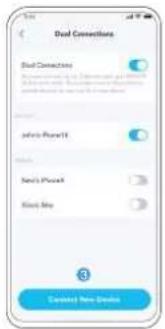
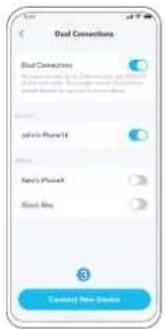
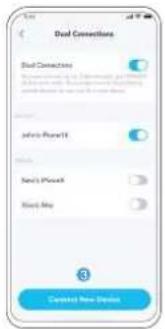
There are two ways to connect the earbuds with two Bluetooth devices at the same time.

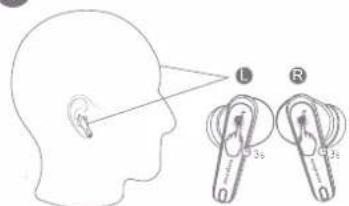
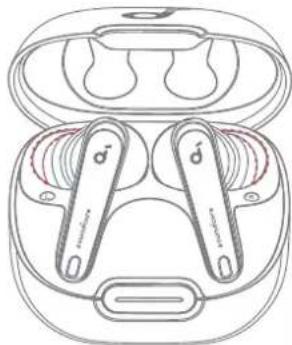
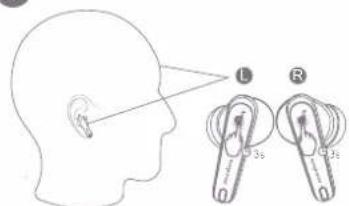
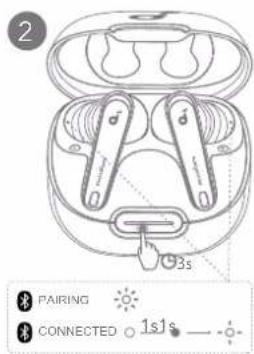
Option A: To pair with another device, wear the earbuds, then press and hold the touchpad on both earbuds for 3 seconds simultaneously.

soundcore Liberty 4 NC - DUAL CONNECTIONS - 3

text_image Liberty 4 NC Sound Connection Sound Connection Sound Connection Sound Connection Sound Connection Sound Connection Sound Connection Sound Connection Sound Connection Sound Connection Sound Connection Sound Connection Sound Connection Sound Connection Sound Connection Sound Connection Sound Connection Sound Connection Sound Connection Sound Connection Sound Connection Sound Connection Sound Connection Sound Connection Sound Connection Sound Connection Sound Connection Sound Connection Sound Connection Sound Connection Sound Connection Sound Connection Sound Connection Sound Connection

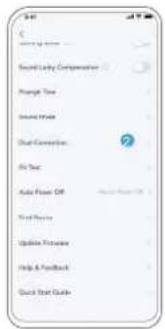
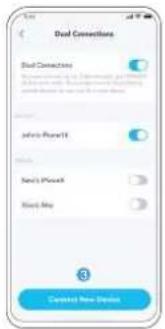
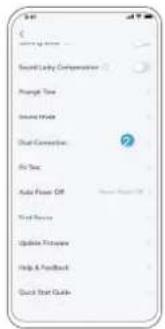
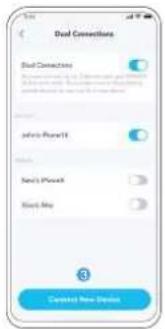
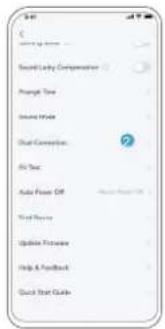
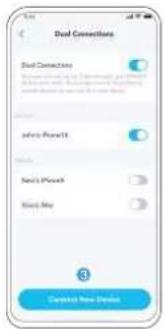
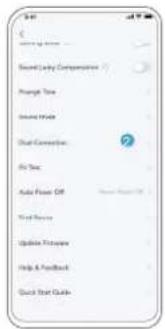
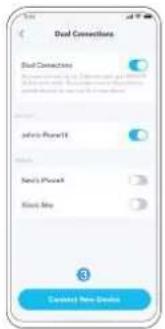
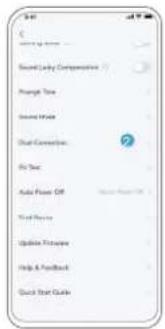
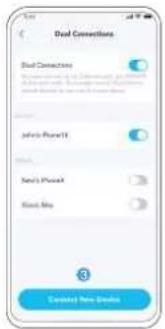
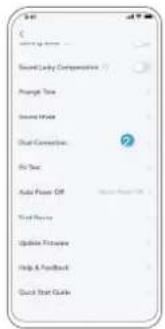
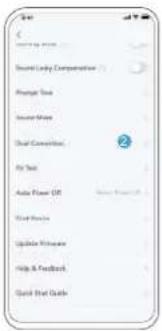
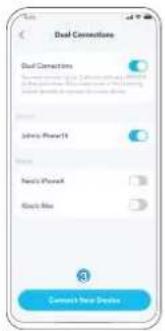
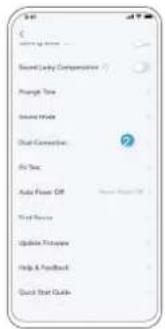
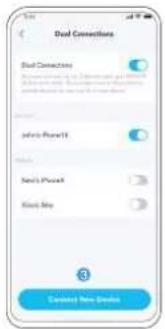
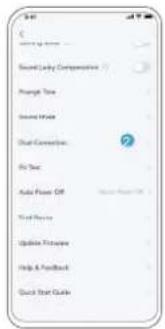
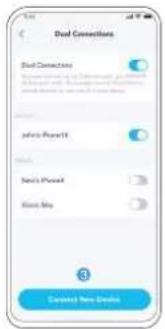
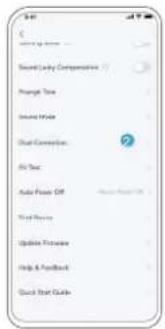
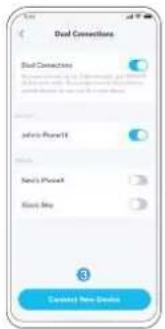
Option B: In the soundcore app, go to settings and select Dual Connections > Connect New Device.

soundcore Liberty 4 NC - DUAL CONNECTIONS - 4

natural_image Line drawing of a pair of wireless earbuds with open case and side buttons, no text or symbols present

soundcore Liberty 4 NC - DUAL CONNECTIONS - 5

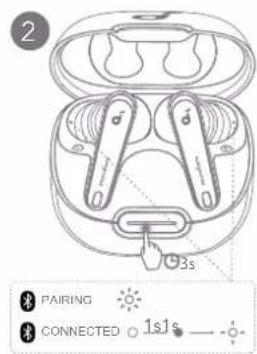
text_image 2 3s PAIRING CONNECTED 1s1s

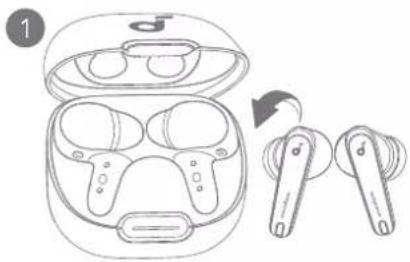
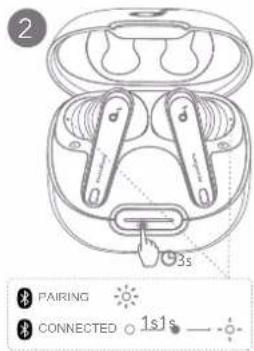
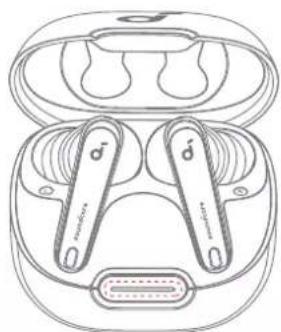
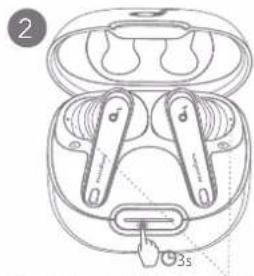
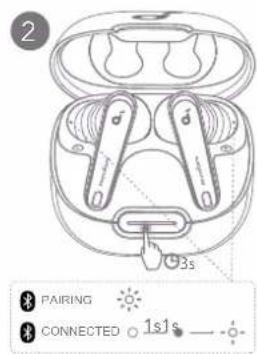
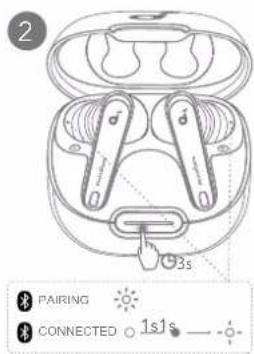
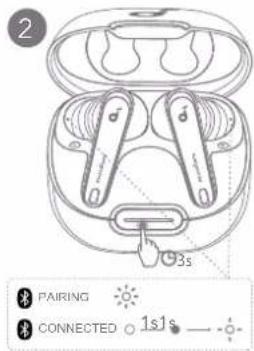
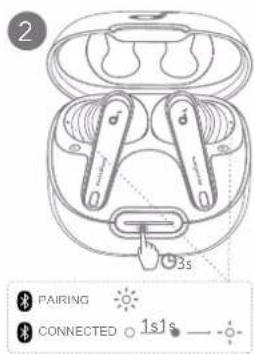
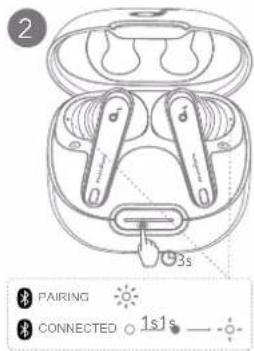
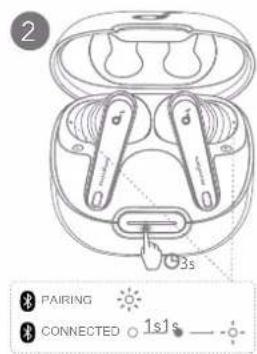
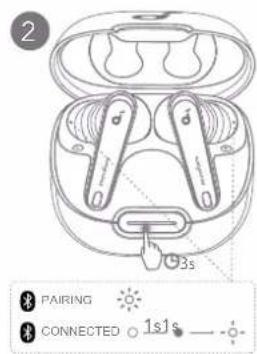
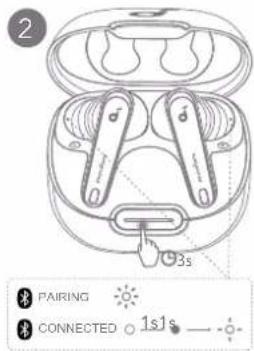
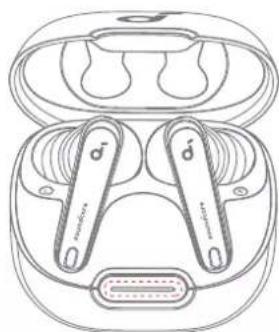
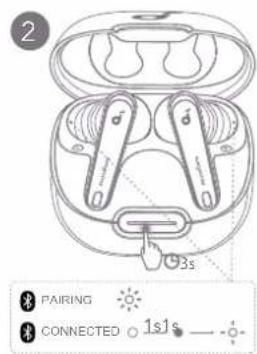
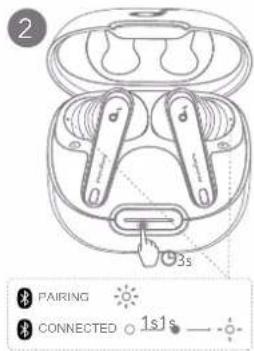
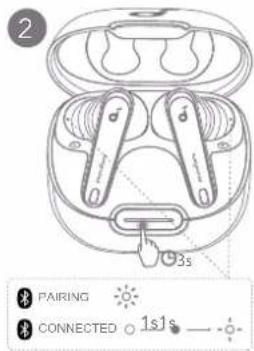
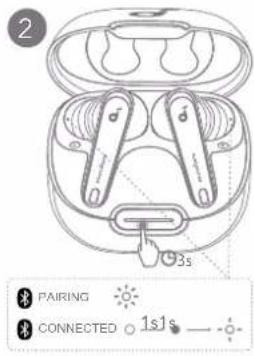
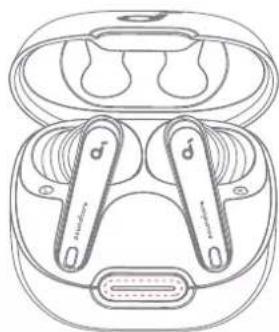
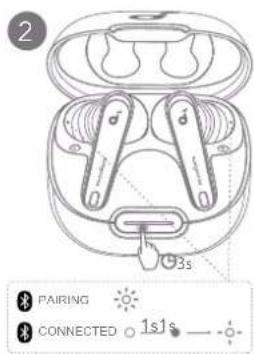
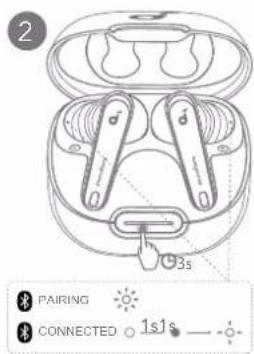
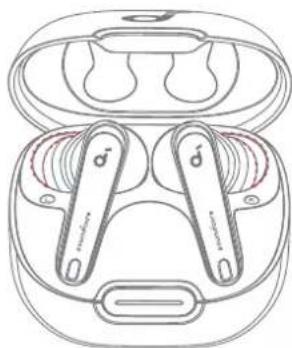
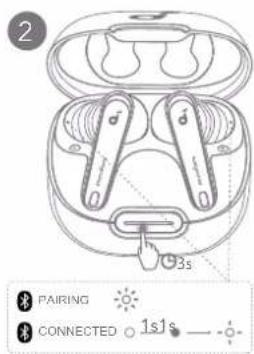
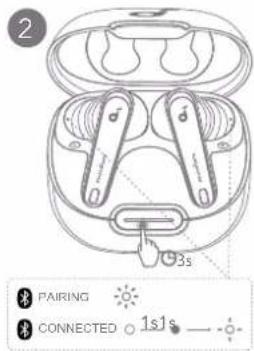
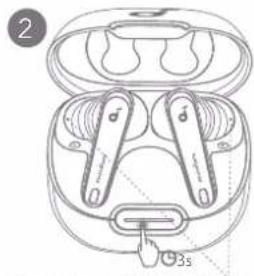
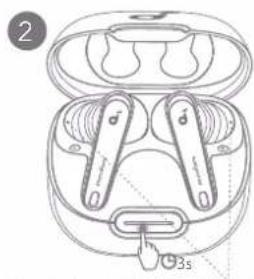
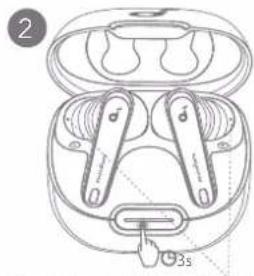
To manually enter Bluetooth pairing mode, place the earbuds in the charging case and leave the case open. Press and hold the charging case button all the way down for 3 seconds until the LED indicators flash white rapidly.

soundcore Liberty 4 NC - DUAL CONNECTIONS - 6

CONTROLS

soundcore Liberty 4 NC - CONTROLS - 1

text_image MONO ▶/▶II L/R×1 L×2 R×2 ▶/▶II ×1 ×2 L/R×2 L/R 02s ~/× ×2 ~/× 02s ANC → Transparency L/R 02s Normal → Transparency 02s

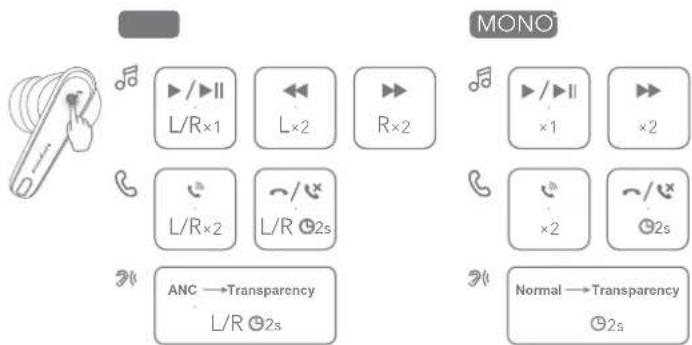
You can also customize controls in the soundcore app.

TWS mode Mono mode
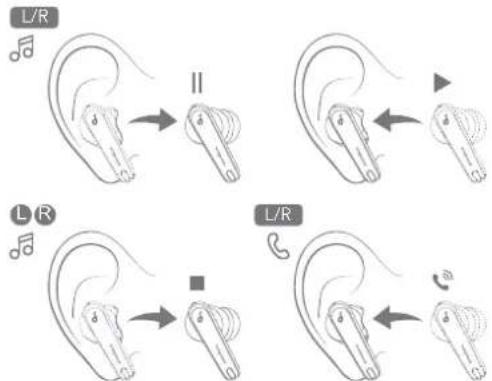
Play/Pause Tap once (L/R) Tap once
Next track Tap twice (R) Tap twice
Previous track Tap twice (L)/
Answer a call Tap twice (L/R) Tap twice
End/Reject a callTap and hold for 2 seconds (L/R)Tap and hold for 2 seconds
Switch ambient sound modes (ANC/Transparency)Tap and hold for 2 seconds (L/R)Tap and hold for 2 seconds

soundcore Liberty 4 NC - CONTROLS - 2

AMBIENT SOUND

soundcore Liberty 4 NC - AMBIENT SOUND - 1

text_image Liberty 4 NC Ambient Sound Sound Environment Noise Noise Noise Noise Noise Noise Noise Noise Noise Noise Noise Noise Noise Noise Noise Noise Noise Noise Noise Noise Noise Noise Noise Noise Noise Noise Noise Noise Noise Noise Noise Noise Noise Noise Noise Noise Noise Noise Noise Noise Noise Noise Noise Noise Noise Noise Noise Noise Noise Noise Noise

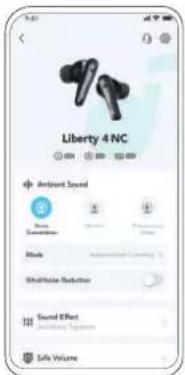
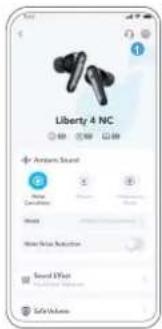
You can select noise cancellation, normal, or transparency mode in the soundcore app.

  • Adaptive ANC: Optimize noise cancellation by adapting to your ears and environment.
    • Transparency: Stay aware of your surroundings while listening to music.

LDAC

LDAC

soundcore Liberty 4 NC - LDAC - 1

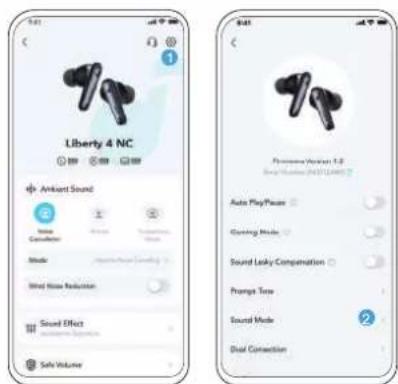
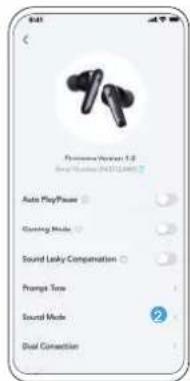
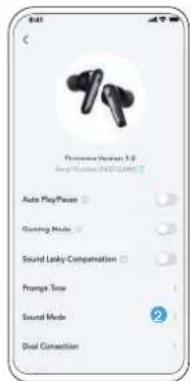
text_image Liberty 4 NC Ambient Sound Sound Comiser Sound Wind Noise Reduction Sound Effect Safe Volume Playhouse Version 1.0 Sound Mode (24511289) Auto PlayPacer Clamping Mode Sound Locky Compensation Prompts Tone Sound Mode Dual Connection
  • Use devices powered by Android 8.0 or later to experience LDAC-quality sound.
  • LDAC provides higher-quality sound, increases power consumption, and reduces playtime.
  • Enable LDAC in a low-interference environment to ensure a stable Bluetooth connection.

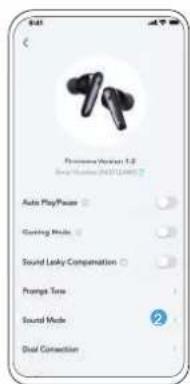
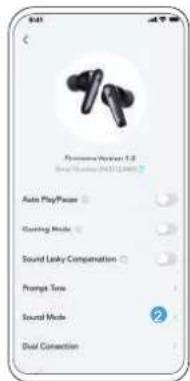
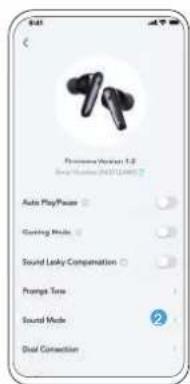
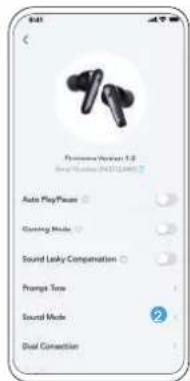
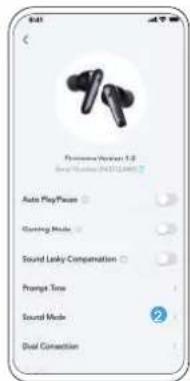
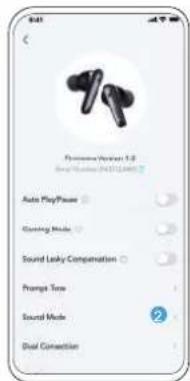
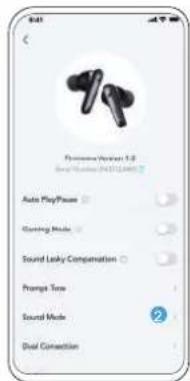
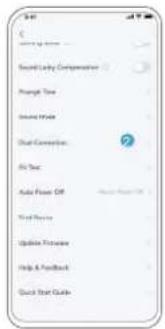
  • Go to settings in the soundcore app.

  • Click on "Sound Mode".

soundcore Liberty 4 NC - LDAC - 2

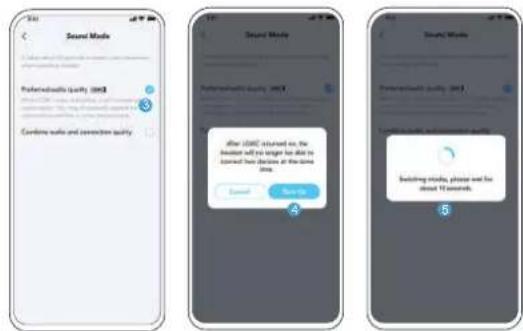
text_image Sound Mode Powerclouds Quality (100) Cardinal walk and connection quality Sound Mode Powerclouds Quality (100) After 100% returned on, the user will not change to date in located two channels at the time time. Cancel Save it Building mode, please use the about 12 seconds
  1. Select "Preferred audio quality" to switch to LDAC codec.
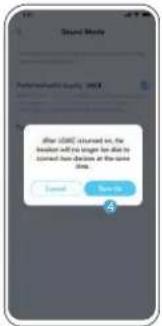
  2. You will be notified that the earbuds do not support LDAC when connected to two devices. Select "Turn on" to continue.
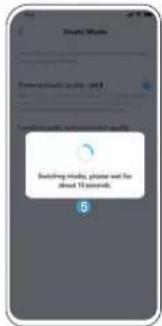
  3. It takes about 10 seconds to switch audio codecs. You may be asked to update the earbuds' firmware if available.

soundcore Liberty 4 NC - LDAC - 3

WEARING DETECTION

soundcore Liberty 4 NC - WEARING DETECTION - 1

text_image L/R II L/R L/R

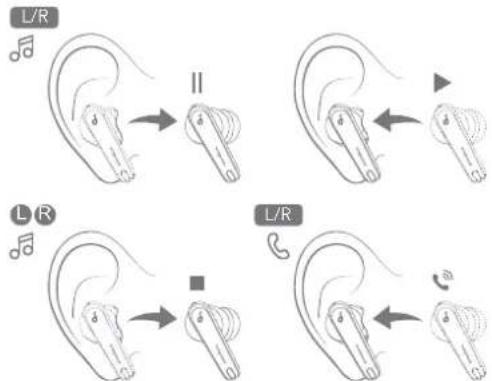
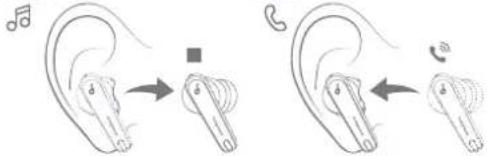
Playback will automatically pause when an earbud is removed and will resume again once you wear it. Wear either earbud to automatically answer an incoming call.

soundcore Liberty 4 NC - WEARING DETECTION - 2

POWERING OFF

soundcore Liberty 4 NC - POWERING OFF - 1

text_image Diagram showing two types of wireless earbuds with labeled parts and instructional arrows indicating steps 1 and 2.

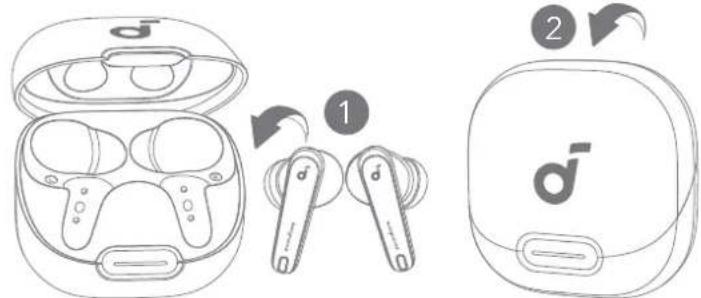
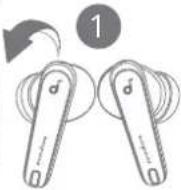
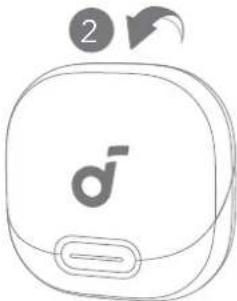
To power off, return the earbuds to the charging case and close it. The earbuds will automatically power off after 30 minutes if they are not connected. The duration can be set in the soundcore app.

soundcore Liberty 4 NC - POWERING OFF - 2

RESET

soundcore Liberty 4 NC - RESET - 1

text_image Diagram showing two types of wireless earbuds with labeled parts and instructional annotations

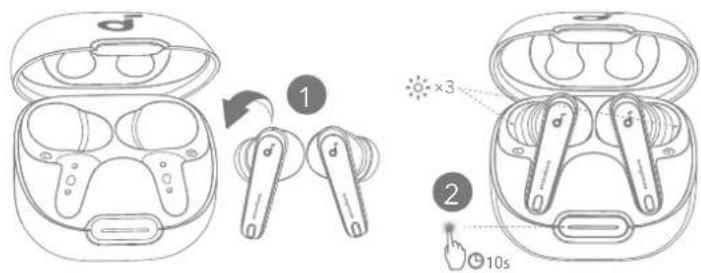
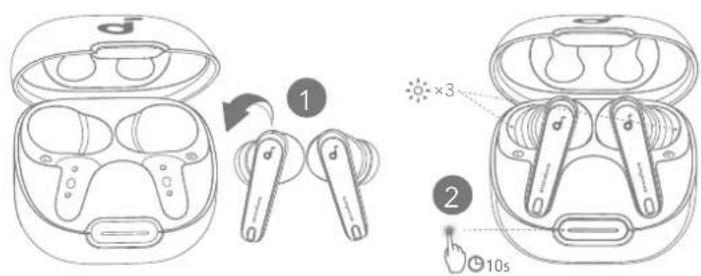
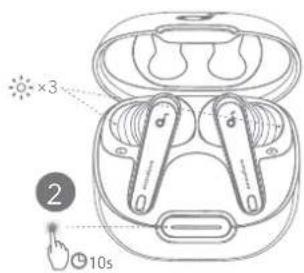
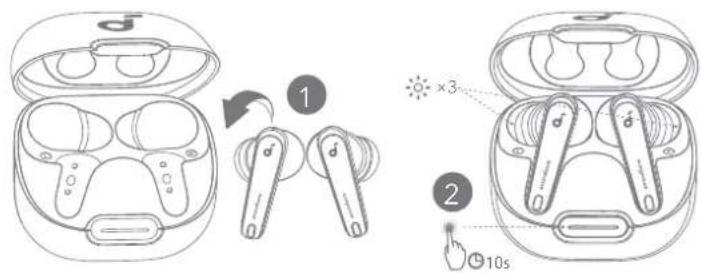
Reset if the earbuds have issues pairing with each other or with other devices. Delete the pairing history from your Bluetooth device first. Place the earbuds in the charging case and leave the case open. Press and hold the charging case button for 10 seconds until the LED indicators flash white rapidly three times.

soundcore Liberty 4 NC - RESET - 2

LED LIGHT GUIDE

soundcore Liberty 4 NC - LED LIGHT GUIDE - 1

natural_image Simple line drawing of a rounded square device with a 'd' logo and lightning bolt symbol (no text or labels)
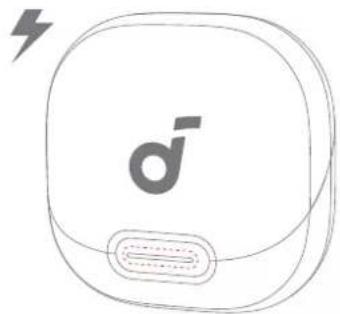
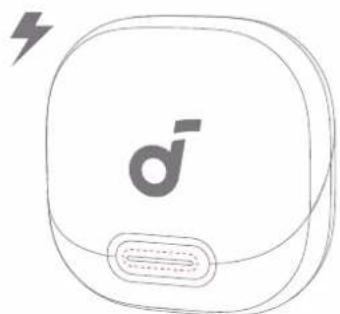
LED DescriptionBattery level during charging
Short light breathing red<20%
Short light breathing white 20% - 60%
Long light breathing white 60% - 99%
Long light steady white for 5 minutes100%

soundcore Liberty 4 NC - LED LIGHT GUIDE - 2

natural_image Line drawing of a pair of wireless earbuds with labeled buttons (no text or symbols present)
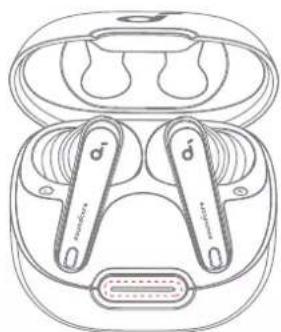
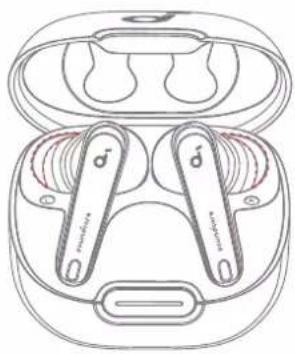
LED Description Battery level
Short light steady red for 5 seconds, and then off<20%
Short light steady white for 5 seconds, and then off20% - 60%
Long light steady white for 5 seconds, and then off60% - 100%

soundcore Liberty 4 NC - LED LIGHT GUIDE - 3

natural_image Line drawing of a pair of wireless earbuds with buttons and earplands (no text or symbols)
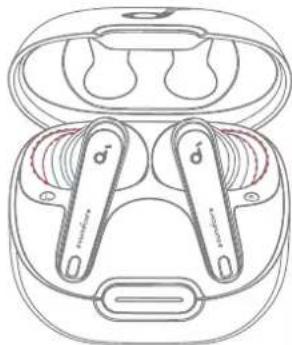
LED Description Status
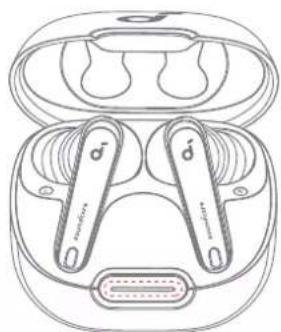
X 3 Flashing white three times Reset completed
Flashing whitePairing
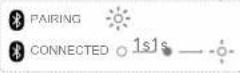
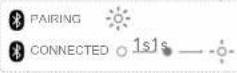
Steady white for 1 second,off for 1 second, and thenflashing white slowlyConnected

soundcore Liberty 4 NC - LED LIGHT GUIDE - 4

text_image Sound Ready Compensation Prompt Time Sound Mode Dual Connection Push Time Auto Power Off Speed On Off Find Choice Update Printmaking Help & Feedback Quick Next Guide

soundcore Liberty 4 NC - LED LIGHT GUIDE - 5

text_image Update Firmware What's New Download ②

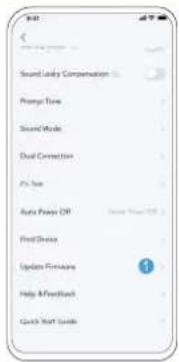
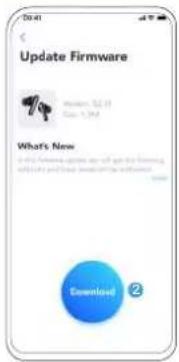
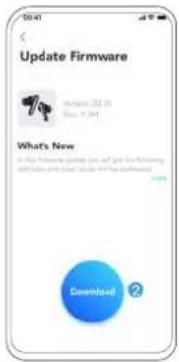
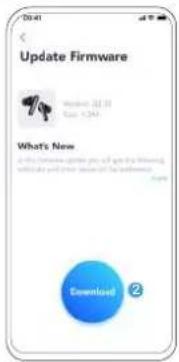
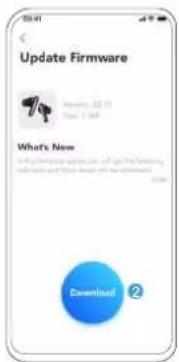
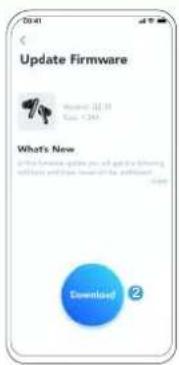
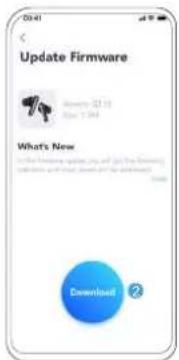
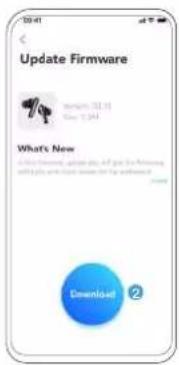
You will be informed once a new firmware version is detected when you connect the earbuds to the app. Ensure the earbuds are placed in the charging case and the case remains open until the firmware update is complete. During the update, ensure the earbuds are being charged and avoid any usage.

soundcore Liberty 4 NC - LED LIGHT GUIDE - 6

SPECS

Specifications are subject to change without notice.

Input 5V 0.8A
Rated output power 5mW
Battery capacity53mAh x 2 (earbuds);800mAh (charging case)
Charging time Up to 3 hours
Playtime(with ANC off)Up to 10 hours (50 hours in total with the charging case)
Playtime(with ANC on)Up to 8 hours (40 hours in total with the charging case)
Driver unit 11mm dynamic driver
Frequency response 20Hz - 40kHz
Impedance 10 Ω
Waterproof rating (earbuds) IPX4
Bluetooth version 5.3
Bluetooth range 10m / 33ft

soundcore Liberty 4 NC - SPECS - 1

APLIKACE

soundcore Liberty 4 NC - APLIKACE - 1

soundcore

soundcore Liberty 4 NC - APLIKACE - 2

soundcore Liberty 4 NC - APLIKACE - 3

Google Play and the Google Play logo are trademarks of Google Inc.

soundcore Liberty 4 NC - APLIKACE - 4

text_image QR code with a blue male gender symbol logo in the center

soundcore Liberty 4 NC - APLIKACE - 5

Apple and the Apple logo are trademarks of Apple Inc.

natural_image Line drawing of a handheld device with a close-up inset showing internal components (no text or symbols)

soundcore Liberty 4 NC - APLIKACE - 6

soundcore Liberty 4 NC - APLIKACE - 7
L

2
soundcore Liberty 4 NC - APLIKACE - 8

natural_image Line drawing of a human ear with a handheld device (no text or symbols)
text_image Diagram illustrating a dental implant device with labeled components and a warning symbol for disassembly or repair.
text_image 1 ON 2 ON soundcore Liberty 4 NC Short Light <20% Long Light 20% - 60% 60% - 100% PAIRING CONNECTED 1s1s
text_image Diagram illustrating ear anatomy with labeled parts L and R, showing ear structure and hand positioning for hearing or ear support.

2
soundcore Liberty 4 NC - APLIKACE - 9

text_image ON soundcore Liberty 4 NC soundcore Liberty 4 NC
text_image Liberty 4 NC + Ampere Sound Home Consultation Balance Water Risk Reduction Sound I-Vout Safe Volume

soundcore Liberty 4 NC - APLIKACE - 10

text_image Security Policy Quick Launch Configuration Promote Time Current Mode Quick Connection Hi Time Auto Power Off Wind Route Update Provider Help & Feedback Quick Start Guide

soundcore Liberty 4 NC - APLIKACE - 11

text_image Dual Connections Add Connections Add Phone10 Add PhoneX Add Menu Created New Device
natural_image Line drawing of a pair of wireless earbuds with d-brands, showing front and side views (no text or symbols)

soundcore Liberty 4 NC - APLIKACE - 12

text_image 2 PAIRING CONNECTED 1s1s
text_image MONO L/R×1×2×2 R×2×2 L/R×2 L/R 02s ANC →Transparency L/R 02s Normal →Transparency 02s
text_image Liberty 4 NC Ambient Sound Sound Environment Audio Weatherline Radiation Sound Effect Safety Volume
text_image Liberty 4 NC Amkart Sound Noise Cohortation Sound Wired Noise Reduction Sound Effect Safe Volume

soundcore Liberty 4 NC - APLIKACE - 13

text_image Playtime Version 1.0 Sound Mode: P45124867 Auto Play/Play Gaming Mode Sound Locky Compamation Prompt Tree Sound Mode Signal Connection
text_image Sound Mode Powerclouds Quality (W8) Cardinal walk and connection quality Sound Mode Powerclouds Quality (W8) After U80 returned on, the user will not change to date in located two channels at the time time. Cancel Save it Building mode, please use the about 12 seconds
text_image Diagram showing three types of wireless earbuds with labeled parts and instructional arrows indicating steps 1 and 2.
text_image L/R II L/R L/R
text_image Diagram showing two types of wireless earbuds with labeled parts and a 10s time indicator.
natural_image Simple line drawing of a rounded square device with a lightning bolt and 'dī' logo, no text or symbols present.
natural_image Line drawing of a pair of wireless earbuds with labeled buttons (no text or symbols present)
natural_image Line drawing of a pair of wireless earbuds with d-brands, enclosed in an open case (no text or symbols)
text_image Sound Locky Compensation Prompt Time Sound Weeks Dual Connection Fire Now Auto Power Off Wind Service Update Hours Help A Feedback Quick Start Guide

soundcore Liberty 4 NC - APLIKACE - 14

text_image Update Firmware What's New Download 2
text_image GET IT ON Google Play Google Play and the Google Play logo are Trademarks of Google Inc. Download on the App Store

soundcore Liberty 4 NC - APLIKACE - 15

text_image QR code with a blue male gender symbol logo in the center

Apple and the Apple logo are trademarks of Apple Inc.

text_image Diagram illustrating a dental implant device with labeled components and a warning symbol for disassembly or repair.
text_image 1 ON 2 ON soundcore Liberty 4 NC Short Light <20% Long Light 20% - 60% 60% - 100% PAIRING CONNECTED 1s1s
natural_image Technical line drawing of a handheld device with a close-up inset showing internal components (no text or symbols)

soundcore Liberty 4 NC - APLIKACE - 16

soundcore Liberty 4 NC - APLIKACE - 17
L

2
soundcore Liberty 4 NC - APLIKACE - 18

natural_image Line drawing of a ear with a handheld device (no text or symbols)
text_image Diagram illustrating ear anatomy with labeled parts L and R, showing ear structure and hand positioning for hearing or ear support.

2
soundcore Liberty 4 NC - APLIKACE - 19

text_image ON soundcore Liberty 4 NC soundcore Liberty 4 NC
text_image Liberty 4 NC Sound Connection Sound Connection Sound Connection Sound Connection Sound Connection Sound Connection Sound Connection Sound Connection Sound Connection Sound Connection Sound Connection Sound Connection Sound Connection Sound Connection Sound Connection Sound Connection Sound Connection Sound Connection Sound Connection Sound Connection Sound Connection Sound Connection Sound Connection Sound Connection Sound Connection Sound Connection Sound Connection Sound Connection Sound Connection Sound Connection Sound Connection Sound Connection Sound Connection Sound Connection
natural_image Line drawing of a pair of wireless earbuds with open case and side buttons, no text or symbols present

soundcore Liberty 4 NC - APLIKACE - 20

text_image 2 3s PAIRING CONNECTED 1s1s
text_image MONO ▶/▶II L/R×1×1 L×2 R×2 ▶/▶II ×2 L/R×2 L/R 02s ~/× ×2 ~/× 02s ANC → Transparency L/R 02s Normal → Transparency 02s
text_image Liberty 4 NC Ambient Sound Sound Volume Audio Sound Effect Safe Volume
text_image Sound Mode Powerclouds Quality (100) Cardinal walk and connection quality Sound Mode Powerclouds Quality (100) After 100% returned on, the user will not change to date in located two channels at the time time. Cancel Save it Building mode, please use the about 12 seconds
text_image L/R II L/R L/R
text_image Diagram showing three types of wireless earbuds with labeled parts and instructional arrows indicating steps 1 and 2.
text_image Diagram showing two types of wireless earbuds with labeled parts and instructional annotations
natural_image Simple line drawing of a rounded square device with a lightning bolt and 'd' mark, no text or symbols present.
LED BeskrivelseBatteriniveau under opladning
Kort pulserende rødt lys<20%
Kort pulserende hvidt lys 20% - 60%
Langt pulserende hvidt lys 60% - 99%
Konstant hvidt lys i 5 minutter 100%

soundcore Liberty 4 NC - APLIKACE - 21

natural_image Line drawing of an open earbuds with two earbuds and a connector (no text or symbols)
natural_image Line drawing of a pair of wireless earbuds with buttons and earplands (no text or symbols)
text_image Update Firmware What's New Download ②
text_image GET IT ON Google Play Google Play and the Google Play logo are Trademarks of Google Inc. Download on the App Store

soundcore Liberty 4 NC - APLIKACE - 22

text_image QR code with a blue male gender symbol logo in the center

Apple and the Apple logo are trademarks of Apple Inc.

natural_image Two identical illustrations of a pair of earbuds with control knobs, no text or symbols present

2

soundcore Liberty 4 NC - APLIKACE - 23

text_image Diagram illustrating a dental implant device with labeled components and a warning symbol for disassembly or repair.
text_image 1 ON 2 ON soundcore Liberty 4 NC Short Light <20% Long Light 20% - 60% 60% - 100% PAIRING CONNECTED 1s1s
natural_image Line drawing of a handheld device with a close-up inset showing internal components (no text or symbols)

soundcore Liberty 4 NC - APLIKACE - 24

soundcore Liberty 4 NC - APLIKACE - 25
L

2
soundcore Liberty 4 NC - APLIKACE - 26

natural_image Line drawing of a human ear with a handheld device (no text or symbols)
text_image Diagram illustrating ear anatomy with labeled parts L and R, showing ear structure and hand positioning for hearing or ear support.

2
soundcore Liberty 4 NC - APLIKACE - 27

text_image ON soundcore Liberty 4 NC soundcore Liberty 4 NC
text_image Liberty 4 NC + Ampere Sound Name Compliance Mines Main Signal Reduction Sound I-Vout Safe Volume

soundcore Liberty 4 NC - APLIKACE - 28

text_image Security Policy Second-Lobby Configuration Quick Time Short Time Quick Connection No Time Auto Power Off Fixed Rate Update Provider Help & Feedback Quick Start Guide

soundcore Liberty 4 NC - APLIKACE - 29

text_image Dual Connections Add Connections Add Phone10 Add PhoneX Add Menu Created New Device
natural_image Line drawing of a pair of wireless earbuds with d-brands, showing front and back views (no text or symbols)

soundcore Liberty 4 NC - APLIKACE - 30

text_image 2 3s
text_image MONO ▶/▶II L/R×1× L×2 R×2 ▶/▶II ×2 L/R×2 L/R 02s ~/× ×2 ~/× 02s ANC → Transparency L/R 02s Normal → Transparency 02s
text_image Liberty 4 NC Ambient Sound Sound Coverage Noise Healthline Reduction Sound Effect Safe Volume
text_image Liberty 4 NC Ambient Sound Noise Conditioner Sound Wired Noise Reduction Sound Effect Safe Volume

soundcore Liberty 4 NC - APLIKACE - 31

text_image Playtime Version 1.0 Sound Mode: 2451-2463 Auto Play/Power Gaming Mode Sound Licky Compensation Prompts Tree Sound Mode Dual Connection
text_image Sound Mode Preferredout Quality (RGB) Cardinal walk and connection quality Sound Mode Preferredout Quality (RGB) After 2000 returned on, the user will not change to date in accessed bus lines at the time time. Cancel Save it Building mode, please end for about 12 seconds
text_image Diagram showing two types of wireless earbuds with labeled parts and instructional arrows indicating step 1 and step 2.
text_image L/R II L/R L/R
text_image Diagram showing two types of wireless earbuds with labeled parts and a 10s time indicator
natural_image Simple line drawing of a rounded square device with a lightning bolt and a d-brimmed button (no text or symbols)
natural_image Line drawing of an open earbuds with two earphones and a connector (no text or symbols)
natural_image Line drawing of a pair of earbuds with labeled buttons (no text or symbols present)
text_image Sound Lock Compensation Prompt Tone Sound Mode Dual Connection Push Now Auto Power Off Find Shares Update Promotes Help & Feedback Quick Start Guide

soundcore Liberty 4 NC - APLIKACE - 32

text_image Update Firmware What's New Download 2
text_image GET IT ON Google Play Google Play and the Google Play logo are Trademarks of Google Inc. Download on the App Store

soundcore Liberty 4 NC - APLIKACE - 33

text_image QR code with a blue male gender symbol logo in the center

Apple and the Apple logo are trademarks of Apple Inc.

natural_image Two identical illustrations of a pair of earbuds with control knobs, no text or symbols present

2

soundcore Liberty 4 NC - APLIKACE - 34

text_image Diagram illustrating a dental implant device with labeled components and a warning symbol for disassembly or repair.
text_image 1 ON 2 ON soundcore Liberty 4 NC Short Light <20% Long Light 20% - 60% 60% - 100% PAIRING CONNECTED 1s1s
natural_image Technical line drawing of a handheld device with a close-up inset showing internal components (no text or symbols)

soundcore Liberty 4 NC - APLIKACE - 35

soundcore Liberty 4 NC - APLIKACE - 36
L

2
soundcore Liberty 4 NC - APLIKACE - 37

natural_image Line drawing of a human ear with a handheld device (no text or symbols)
text_image Diagram illustrating ear anatomy with labeled parts L and R, showing ear structure and hand positioning for hearing or ear support.

2
soundcore Liberty 4 NC - APLIKACE - 38

text_image ON soundcore Liberty 4 NC soundcore Liberty 4 NC
text_image Liberty 4 NC Amount Spend New Recommendation More New User Recommendation Speed Effort Safe Volume Sound Locking Compositions Message Time Sound Style Dual Connection Air Drop Audio Power Off Fixed Passive Update Refresher Help & Feedback Quick Start Guide Dual Connections Dual Connections Speed-Planets10 Speed Planets9 Quick Site 3 Cancel New Digital
natural_image Line drawing of a pair of wireless earbuds with one partially open and the other showing a rotation arrow (no text or symbols)

soundcore Liberty 4 NC - APLIKACE - 39

text_image 2 3s PAIRING CONNECTED 1s1s
text_image Sound Mode Powerclouds Quality (W8) Cardinal walk and connection quality Sound Mode Powerclouds Quality (W8) After U80 returned on, the user will not change to date in located two channels at the time time. Cancel Save it Building mode, please use the about 12 seconds
text_image Diagram showing two types of wireless earbuds with labeled parts and directional arrows indicating rotation or adjustment.
natural_image Simple line drawing of a rounded square device with a lightning bolt and a d-brimmed button (no text or symbols)
text_image L/R II L/R L/R
text_image Diagram showing two types of wireless earbuds with labeled parts and instructional annotations
natural_image Line drawing of a pair of earbuds with labeled buttons and accessories (no text or symbols)
natural_image Line drawing of a pair of wireless earbuds with buttons and earplands (no text or symbols)
text_image Update Firmware What's New Download 2
text_image GET IT ON Google Play Google Play and the Google Play logo are Trademarks of Google Inc. Download on the App Store

soundcore Liberty 4 NC - APLIKACE - 40

text_image QR code with a blue male gender symbol logo in the center

Apple and the Apple logo are trademarks of Apple Inc.

natural_image Two identical illustrations of a pair of earbuds with control knobs, no text or symbols present

2

soundcore Liberty 4 NC - APLIKACE - 41

text_image Diagram illustrating a dental implant device with labeled components and a warning symbol for disassembly or repair.
text_image 1 ON 2 ON soundcore Liberty 4 NC Short Light <20% Long Light 20% - 60% 60% - 100% PAIRING CONNECTED 1s1s
natural_image Line drawing of a handheld device with a close-up inset showing internal components (no text or symbols)

soundcore Liberty 4 NC - APLIKACE - 42

soundcore Liberty 4 NC - APLIKACE - 43
L

2
soundcore Liberty 4 NC - APLIKACE - 44

natural_image Line drawing of a human ear with a handheld device (no text or symbols)
text_image Diagram illustrating ear anatomy with labeled parts L and R, showing ear structure and hand positioning for hearing or ear support.

2
soundcore Liberty 4 NC - APLIKACE - 45

text_image ON soundcore Liberty 4 NC soundcore Liberty 4 NC
text_image Liberty 4 NC Sound Connection Sound Entry Compensation Plough Time Sound Time Dual Connection Air Time Audio Power Off Wind Power Update Pictures Help & Feedback Quick Start Guide Dual Connections Sound Connections Sound Entry Control Sound Place New Play Created New Digital
natural_image Line drawing of a pair of wireless earbuds with open case and clamped hands (no text or symbols)

soundcore Liberty 4 NC - APLIKACE - 46

text_image 2 3s PAIRING CONNECTED 1s1s
text_image MONO ▶/▶II L/R×1×2×2 R×2×2 ▶/▶II L/R×2 L/R 02s ▶/▶II ×2 Normal → Transparency 02s ANC → Transparency L/R 02s
text_image Liberty 4 NC Ambient Sound Sound Environment Rocks Well/Noise Reduction Sound Effect Safe Volume
text_image Sound Mode Powerclouds Quality (000) Cardinal walk and connection quality Sound Mode Powerclouds Quality (001) after (000) returned on, the button will not trigger the delay to launched due decision at the same time. Cancel Save it Sound Mode Powerclouds Quality (002) Backing noise, please end for about 12 seconds.
text_image Diagram showing two types of wireless earbuds with labeled parts and instructional arrows indicating steps 1 and 2.
natural_image Simple line drawing of a rounded square device with a lightning bolt and 'd' logo on the front face (no text or symbols beyond the label)
text_image L/R II L/R L/R
text_image Diagram showing two types of wireless earbuds with labeled parts and instructional annotations
natural_image Line drawing of a pair of wireless earbuds with labeled buttons (no text or symbols present)
natural_image Line drawing of a pair of earbuds with labeled buttons (no text or symbols present)
text_image Update Firmware What's New Download ②
text_image GET IT ON Google Play Google Play and the Google Play logo are Trademarks of Google Inc. Download on the App Store

soundcore Liberty 4 NC - APLIKACE - 47

text_image QR code with a blue male gender symbol logo in the center

Apple and the Apple logo are trademarks of Apple Inc.

natural_image Line drawing of a handheld device with a close-up inset showing internal components (no text or symbols)

soundcore Liberty 4 NC - APLIKACE - 48

soundcore Liberty 4 NC - APLIKACE - 49
L

2
soundcore Liberty 4 NC - APLIKACE - 50

natural_image Line drawing of a human ear with a handheld device (no text or symbols)
text_image Diagram illustrating a dental implant device with labeled components and a warning symbol for disassembly or repair.
text_image Diagram illustrating ear anatomy with labeled parts I and R, showing ear structure and finger placement for hearing or ear positioning.

2
soundcore Liberty 4 NC - APLIKACE - 51

text_image ON soundcore Liberty 4 NC soundcore Liberty 4 NC
text_image Liberty 4 NC + Ampere Sound Home Concentration Balance Water Risk Reduction Sound I-Vout Safe Volume

soundcore Liberty 4 NC - APLIKACE - 52

text_image Security Policy Quick Launch Configuration Promote Time Current Mode Quick Connection Hi Time Auto Power Off Wind Route Update Provider Help & Feedback Quick Start Guide

soundcore Liberty 4 NC - APLIKACE - 53

text_image Dual Connections Add Connections Add Phone10 Add PhoneX Add Menu Created New Device
natural_image Line drawing of a pair of wireless earbuds with d-brands, showing front and back views (no text or symbols)

soundcore Liberty 4 NC - APLIKACE - 54

text_image 2 PAIRING CONNECTED 1s1s
text_image MONO L/R×1×2×2 R×2×2 L/R×2 L/R 02s ANC →Transparency L/R 02s Normal →Transparency 02s
text_image Liberty 4 NC Ambient Sound Sound Environment Audio Weatherline Radiation Sound Effect Safety Volume
text_image Liberty 4 NC Amkart Sound Noise Cohortation Sound Wired Noise Reduction Sound Effect Safe Volume

soundcore Liberty 4 NC - APLIKACE - 55

text_image Playtime Version 1.0 Sound Mode: P45124867 Auto Play/Play Gaming Mode Sound Locky Compamation Prompt Tree Sound Mode Signal Connection
text_image Sound Mode Preferredwidth Quality (RGB) Cardinal walk and connection quality Sound Mode Preferredwidth Quality (RGB) after (RGB) returned on, the button will not trigger the due to lateral foot deviations of the same line. Cancel Save it Blending mode, please end for about 12 seconds.
text_image L/R II L/R L/R
text_image Diagram showing three types of wireless earbuds with labeled parts and instructional arrows indicating steps 1 and 2.
text_image Diagram showing two types of wireless earbuds with labeled parts and a 10s time indicator.
natural_image Line drawing of a rounded square device with a 'dī' logo and lightning bolt symbol (no text or labels)
natural_image Line drawing of a pair of wireless earbuds with bezel accessories (no text or symbols)
natural_image Line drawing of a pair of earbuds with labeled buttons (no text or symbols present)
text_image Update Firmware What's New Download ②
text_image GET IT ON Google Play Google Play and the Google Play logo are Trademarks of Google Inc. Download on the App Store

soundcore Liberty 4 NC - APLIKACE - 56

text_image QR code with a blue male gender symbol logo in the center

Apple and the Apple logo are trademarks of Apple Inc.

natural_image Line drawing of a handheld device with a close-up inset showing internal components (no text or symbols)

soundcore Liberty 4 NC - APLIKACE - 57

soundcore Liberty 4 NC - APLIKACE - 58
L

2
soundcore Liberty 4 NC - APLIKACE - 59

natural_image Line drawing of a human ear with a handheld device (no text or symbols)
text_image Diagram illustrating a dental implant device with labeled components and a warning symbol for disassembly or repair.
text_image 1 ON 2 ON soundcore Liberty 4 NC Short Light <20% Long Light 20% - 60% 60% - 100% PAIRING CONNECTED 1s1s
text_image Diagram illustrating ear anatomy with labeled parts L and R, showing ear structure and hand positioning for hearing or ear support.

2
soundcore Liberty 4 NC - APLIKACE - 60

text_image ON soundcore Liberty 4 NC soundcore Liberty 4 NC
text_image Liberty 4 NC Sound Connection Sound Entry Compensation Prompt Time Sound Time Dual Connection Air Test Auto Power Off Wind Before Update Pictures Help & Feedback Quick Start Guide Dual Connections Sound Connections Sound Entry Protection Next iPhone Next Map Created New Digital
natural_image Line drawing of a pair of wireless earbuds with open case and earbuds, showing internal components (no text or symbols)

soundcore Liberty 4 NC - APLIKACE - 61

text_image 2 3s PAIRING CONNECTED 1s1s
text_image MONO L/R×1×2×2×2 L/R×2 L/R 02s ANC →Transparency L/R 02s Normal →Transparency 02s
text_image Liberty 4 NC Ambient Sound Sound Environment Audio Weatherline Radiation Sound Effect Safety Volume
text_image Liberty 4 NC Ambient Sound Noise Concentration Mode Wind Noise Reduction Sound Effect Safe Volume Playhouse Version 1.0 Sound Mode (M2111238) Auto Play/Place GKoning Mode Sound Locky Compensation Prompt Tone Sound Mode Dual Connection
text_image Sound Mode Powerclouds Quality (000) Cardinal walk and connection quality Sound Mode Powerclouds Quality (001) after (000) returned on, the button will not trigger the delay to launched due decision at the same time. Cancel Save it Sound Mode Powerclouds Quality (002) Backing noise, please end for about 12 seconds.
text_image Diagram showing three types of wireless earbuds with labeled parts and instructional arrows indicating steps 1 and 2.
text_image L/R II L/R L/R
text_image Diagram showing two types of wireless earbuds with labeled parts and a 10s time indicator.
natural_image Simple line drawing of a rounded square device with a 'd' and lightning bolt symbol (no text or labels)
natural_image Line drawing of a pair of wireless earbuds with labeled buttons (no text or symbols present)
text_image Update Firmware What's New Download 2
text_image GET IT ON Google Play Google Play and the Google Play logo are Trademarks of Google Inc. Download on the App Store

soundcore Liberty 4 NC - APLIKACE - 62

text_image QR code with a blue male gender symbol logo in the center

Apple and the Apple logo are trademarks of Apple Inc.

natural_image Line drawing of a handheld device with a close-up inset showing internal components (no text or symbols)

soundcore Liberty 4 NC - APLIKACE - 63

soundcore Liberty 4 NC - APLIKACE - 64
L

2
soundcore Liberty 4 NC - APLIKACE - 65

natural_image Line drawing of a human ear with a handheld device (no text or symbols)
text_image Diagram illustrating a dental implant device with labeled components and a warning symbol for disassembly or repair.
text_image 1 ON 2 ON soundcore Liberty 4 NC Short Light <20% Long Light 20% - 60% 60% - 100% PAIRING CONNECTED 1s1s
text_image Diagram illustrating ear anatomy with labeled parts L and R, showing ear structure and hand positioning for hearing or ear functions.

2
soundcore Liberty 4 NC - APLIKACE - 66

text_image ON soundcore Liberty 4 NC soundcore Liberty 4 NC
text_image Security Second Safety Configuration Passage Time Second Mode Dual Connection Air Time Auto Power Off Wind Service Update Tools Help & Feedback Quick Start Guide

soundcore Liberty 4 NC - APLIKACE - 67

text_image Dual Connections Dual Connections Radio PowerX Radio PowerX Knee Map Created New Status
natural_image Illustration of a pair of wireless earbuds with charging case, showing front and back views (no text or symbols)

soundcore Liberty 4 NC - APLIKACE - 68

text_image 2 PAIRING CONNECTED 1s1s
text_image MONO ▶/▶II L/R×1×2×2 R×2×2 ▶/▶II L/R×2 L/R 02s ▶/▶II ×2 Normal → Transparency 02s ANC → Transparency L/R 02s
text_image Liberty 4 NC Amkart Sound Sound Canculation Audio Sound Effect Safe Volume

soundcore Liberty 4 NC - APLIKACE - 69

text_image Macintosh Version 1.0 Sound Lock Compensation Auto Play/Phase Gaming Mode Sound Locky Compensation Prompts Tree Sound Mode Dual Connection
text_image Sound Mode PoweredViability Quality (VIR) Command walls and connection quality Sound Mode PoweredViability Quality (VIR) Add: VIR returned on, the Device will not change to add to Isolation due to the same Line Save in Sound Mode PoweredViability Quality (VIR) Add: VIR returned on, the Device will not change to add to Isolation due to the same Line Save in
text_image Diagram showing three types of wireless earbuds with labeled parts and directional arrows indicating process steps.
natural_image Simple line drawing of a rounded square device with a 'd' logo and lightning bolt symbol (no text or labels)
text_image L/R II L/R L/R
text_image Diagram showing two types of wireless earbuds with labeled parts and a 10s time indicator for touch.
natural_image Line drawing of a pair of wireless earbuds with labeled buttons (no text or symbols present)
natural_image Line drawing of a pair of wireless earbuds with buttons and earplands (no text or symbols)
text_image Update Firmware What's New Download ②
text_image GET IT ON Google Play Google Play and the Google Play logo are Trademarks of Google Inc. Download on the App Store

soundcore Liberty 4 NC - APLIKACE - 70

text_image QR code with a blue male gender symbol logo in the center

Apple and the Apple logo are trademarks of Apple Inc.

natural_image Line drawing of a handheld device with a close-up inset showing internal components (no text or symbols)

soundcore Liberty 4 NC - APLIKACE - 71

soundcore Liberty 4 NC - APLIKACE - 72
L

2
soundcore Liberty 4 NC - APLIKACE - 73

natural_image Line drawing of a human ear with a handheld device (no text or symbols)
text_image Diagram illustrating a dental implant device with labeled components and a warning symbol for disassembly or repair.
text_image 1 ON 2 ON soundcore Liberty 4 NC Short Light <20% Long Light 20% - 60% 60% - 100% PAIRING CONNECTED 1s1s
text_image Diagram illustrating ear anatomy with labeled parts L and R, showing ear structure and hand positioning for hearing or ear functions.

2
soundcore Liberty 4 NC - APLIKACE - 74

text_image ON soundcore Liberty 4 NC soundcore Liberty 4 NC
text_image Liberty 4 NC Sound Connection Sound Connection Sound Connection Sound Connection Sound Connection Sound Connection Sound Connection Sound Connection Sound Connection Sound Connection Sound Connection Sound Connection Sound Connection Sound Connection Sound Connection Sound Connection Sound Connection Sound Connection Sound Connection Sound Connection Sound Connection Sound Connection Sound Connection Sound Connection Sound Connection Sound Connection Sound Connection Sound Connection Sound Connection Sound Connection Sound Connection Sound Connection Sound Connection Sound Connection
natural_image Line drawing of a pair of wireless earbuds with open case and side buttons, no text or symbols present

soundcore Liberty 4 NC - APLIKACE - 75

text_image 2 3s PAIRING CONNECTED 1s1s
text_image MONO L/R×1×2×2×2 L/R×2 L/R 02s ANC →Transparency L/R 02s Normal →Transparency 02s
text_image Liberty 4 NC Amkart Sound Noise Concentration Mode Wired Noise Reduction Sound Effect Safe Volume Pulsewave Volumes 1.0 Sound Mode (245/1238) Auto Play/Power Clamping Mode Sound Locky Compensation Prompt Time Sound Mode Dual Connection
text_image Sound Mode Powerclouds Quality (W8) Cardinal walk and connection quality Sound Mode Powerclouds Quality (W8) After U80 returned on, the user will not change to date in located two channels at the time time. Cancel Save it Building mode, please use the about 12 seconds
text_image Diagram showing two types of wireless earbuds with labeled parts and instructional arrows indicating steps 1 and 2.
text_image L/R II L/R L/R
text_image Diagram showing two types of wireless earbuds with labeled parts and instructional annotations
natural_image Simple line drawing of a rounded square device with a 'd' logo and lightning bolt symbol (no text or labels)
natural_image Line drawing of a pair of wireless earbuds with labeled buttons (no text or symbols present)
natural_image Line drawing of an open earbuds with two earbuds and a tray, no text or symbols present
text_image Sound Lock Compensation Prompt Time Sound Mode Dual Connection Play Now Auto Power Off Print Drive Update Printers Help & Feedback Quick Next Guide

soundcore Liberty 4 NC - APLIKACE - 76

text_image Update Firmware What's New Download 2
text_image GET IT ON Google Play Google Play and the Google Play logo are Trademarks of Google Inc. Download on the App Store

soundcore Liberty 4 NC - APLIKACE - 77

text_image QR code with a blue male gender symbol logo in the center

Apple and the Apple logo are trademarks of Apple Inc.

natural_image Technical line drawing of a handheld device with a close-up inset showing internal components (no text or symbols)

soundcore Liberty 4 NC - APLIKACE - 78

soundcore Liberty 4 NC - APLIKACE - 79
L

2
soundcore Liberty 4 NC - APLIKACE - 80

natural_image Line drawing of a human ear with a handheld device (no text or symbols)
text_image Diagram illustrating a dental implant device with labeled components and a warning symbol for disassembly or repair.
text_image 1 ON 2 ON soundcore Liberty 4 NC Short Light <20% Long Light 20% - 60% 60% - 100% PAIRING CONNECTED 1s1s
text_image Diagram illustrating ear anatomy with labeled parts L and R, showing ear structure and hand positioning for hearing or ear functions.

2
soundcore Liberty 4 NC - APLIKACE - 81

text_image ON soundcore Liberty 4 NC soundcore Liberty 4 NC
text_image Liberty 4 NC Sound Connection Sound Connection Sound Connection Sound Connection Sound Connection Sound Connection Sound Connection Sound Connection Sound Connection Sound Connection Sound Connection Sound Connection Sound Connection Sound Connection Sound Connection Sound Connection Sound Connection Sound Connection Sound Connection Sound Connection Sound Connection Sound Connection Sound Connection Sound Connection Sound Connection Sound Connection Sound Connection Sound Connection Sound Connection Sound Connection Sound Connection Sound Connection Sound Connection Sound Connection

Optie B: Ga in de soundcore-app naar instellingen en selecteer Dual Connections > Connect New Device.

soundcore Liberty 4 NC - APLIKACE - 82

natural_image Line drawing of a pair of wireless earbuds with open case and side buttons, no text or symbols present

soundcore Liberty 4 NC - APLIKACE - 83

text_image 2 3s PAIRING CONNECTED 1s1s
text_image MONO ▶/▶II L/R×1×1 L×2 R×2 ▶/▶II ×2 L/R×2 L/R 02s ~/× ×2 ~/× 02s ANC → Transparency L/R 02s Normal → Transparency 02s

U kunt de bediening in de soundcore-app aanpassen.

text_image Liberty 4 NC Amkart Sound Sound Convection Mode Wind Noise Reduction Sound Effect Safe Volume Play Sound Auto Play/Pease Clamping Mode Sound Locky Compensation Prompt Tone Sound Mode Dual Convection
text_image Sound Mode Preferredwidth Quality (RGB) Cardinal walk and connection quality Sound Mode Preferredwidth Quality (RGB) After 2000 returned on, the Receptor will not undergo bit off to isolation two channels at the time time. Cancel Save it Building mode, please use the about 12 seconds
text_image Diagram showing two types of wireless earbuds with labeled parts and instructional arrows indicating steps 1 and 2.
text_image L/R II L/R L/R
text_image Diagram showing two types of wireless earbuds with labeled parts and a 10s time indicator for touch.

STATUSANDUIDING INDICATIELED

soundcore Liberty 4 NC - STATUSANDUIDING INDICATIELED - 1

natural_image Simple line drawing of a rounded square device with a lightning bolt and 'd' logo, no text or symbols present.
natural_image Line drawing of a pair of wireless earbuds with exposed case and connector (no text or symbols)

STATUSANDUIDING INDICATIELED

soundcore Liberty 4 NC - STATUSANDUIDING INDICATIELED - 1

natural_image Line drawing of a smart earbuds with labeled dials, no text or symbols present
text_image Smart Lock Compensation Prompt Tone Smart Weeks Dual Connection Pfs Tone Auto Power Off Power Switch Update Provider Help & Feedback Quick Start Guide

soundcore Liberty 4 NC - STATUSANDUIDING INDICATIELED - 2

text_image Update Firmware What's New Download 2
text_image GET IT ON Google Play Google Play and the Google Play logo are Trademarks of Google Inc. Download on the App Store

soundcore Liberty 4 NC - STATUSANDUIDING INDICATIELED - 3

text_image QR code with a blue male gender symbol logo in the center

Apple and the Apple logo are trademarks of Apple Inc.

natural_image Technical line drawing of a handheld device with a close-up inset showing internal components (no text or symbols)

soundcore Liberty 4 NC - STATUSANDUIDING INDICATIELED - 4

soundcore Liberty 4 NC - STATUSANDUIDING INDICATIELED - 5
L

2
soundcore Liberty 4 NC - STATUSANDUIDING INDICATIELED - 6

natural_image Line drawing of a ear with a handheld device (no text or symbols)
text_image Diagram illustrating a dental implant device with labeled components and a warning symbol for disassembly or repair.
text_image 1 ON 2 ON soundcore Liberty 4 NC Short Light → <20% Long Light → 20% - 60% → 60% - 100% PAIRING CONNECTED ○ 1s1s
text_image Diagram illustrating ear anatomy with labeled parts L and R, showing ear structure and hand positioning for hearing or ear support.

2
soundcore Liberty 4 NC - STATUSANDUIDING INDICATIELED - 7

text_image ON soundcore Liberty 4 NC soundcore Liberty 4 NC
text_image Liberty 4 NC + Ambient Sound Home Comfort Meats Home Motion Reduction Sound Effects Safe Volume

soundcore Liberty 4 NC - STATUSANDUIDING INDICATIELED - 8

text_image Security Second Safety Configuration Please Note Second Make Dual Connection Hi Time Auto Power Off Fixed Rate Update Tools Help & Feedback Quick Start Guide

soundcore Liberty 4 NC - STATUSANDUIDING INDICATIELED - 9

text_image Dual Connections Dual Connections Radio PowerX Radio PowerX Knee Map Created New Status
natural_image Line drawing of a pair of wireless earbuds with d-brands, showing front and back views (no text or symbols)

soundcore Liberty 4 NC - STATUSANDUIDING INDICATIELED - 10

text_image 2 PAIRING CONNECTED 1s1s
text_image MONO ▶/▶II L/R×1×2×2×2 L/R×2 L/R 02s ANC →Transparency L/R 02s ▶/▶II ×2 ×2 Normal →Transparency 02s

Du kan tilpasse kontrollene i soundcore-appen.

text_image Liberty 4 NC Amkurt Sound Noise Conditioner Sound Wired Noise Reduction Sound Effect Safe Volume

soundcore Liberty 4 NC - STATUSANDUIDING INDICATIELED - 11

text_image Praclimina Visions 1.0 Sound Locky Compensation Auto Play Place Gaming Mode Sound Locky Compensation Prompts Tree Sound Mode Dial Connection
text_image Sound Mode Powerclouds Quality (W8) Cardinal walk and connection quality Sound Mode Powerclouds Quality (W8) After U80 returned on, the user will not change to date in located two channels at the time time. Cancel Save it Building mode, please use the about 12 seconds
text_image Diagram showing three types of wireless earbuds with labeled parts and instructional arrows indicating steps 1 and 2.
text_image L/R II L/R L/R

Avspilling vil automatisk pause när en ørepropp fjernes og vil fortsette igjen när du tar den på igjen. Bruk en ørepropp til å svare automatisk på et innkommende anrop.

soundcore Liberty 4 NC - STATUSANDUIDING INDICATIELED - 12

RESETTEN

soundcore Liberty 4 NC - RESETTEN - 1

text_image Diagram showing two types of wireless earbuds with labeled parts and a 10s time indicator.
natural_image Simple line drawing of a rounded square device with a 'd' logo and lightning bolt symbol (no text or labels)
LED BeskrivelseBatterinivå under lading
Korte røde blink<20%
Korte hvite blink 20% - 60%
Lange hvite blink 60% - 99%
Kontinuerlig hvitt lys i 5 minutter 100%

soundcore Liberty 4 NC - RESETTEN - 2

natural_image Line drawing of a pair of wireless earbuds with no text or symbols
natural_image Line drawing of a pair of wireless earbuds with buttons and earplands (no text or symbols)
text_image Update Firmware What's New Download ②
text_image GET IT ON Google Play Google Play and the Google Play logo are Trademarks of Google Inc. Download on the App Store

soundcore Liberty 4 NC - RESETTEN - 3

text_image QR code with a blue male gender symbol logo in the center

Apple and the Apple logo are trademarks of Apple Inc.

text_image Diagram illustrating a dental implant device with labeled components and a warning symbol for disassembly or repair.
text_image 1 ON 2 ON soundcore Liberty 4 NC Short Light <20% Long Light 20% - 60% 60% - 100% PAIRING CONNECTED 1s1s
natural_image Technical line drawing of a handheld device with a close-up inset showing internal components (no text or symbols)

L

2
soundcore Liberty 4 NC - RESETTEN - 4

natural_image Line drawing of a human ear with a handheld device (no text or symbols)
text_image Diagram illustrating ear anatomy with labeled parts L and R, showing ear structure and hand positioning for hearing or ear support.

2
soundcore Liberty 4 NC - RESETTEN - 5

text_image ON soundcore Liberty 4 NC soundcore Liberty 4 NC
text_image Liberty 4 NC Sound Connection Sound Entry Compensation Prompt Time Sound Time Dual Connection Air Test Auto Power Off Wind Before Update Pictures Help & Feedback Quick Start Guide Dual Connections Sound Connections Sound Entry Protection Next iPhone Next Map Created New Digital
natural_image Line drawing of a pair of wireless earbuds with open case and earbuds, showing internal components (no text or symbols)

soundcore Liberty 4 NC - RESETTEN - 6

text_image 2 3s PAIRING CONNECTED 1s1s
text_image MONO ▶/▶II L/R×1×2×2 R×2×2 ▶/▶II L/R×2 L/R 02s ▶/▶II ×2 Normal → Transparency 02s ANC → Transparency L/R 02s
text_image Liberty 4 NC Ambient Sound Sound Environment Audio Weatherline Radiation Sound Effect Safety Volume
text_image Liberty 4 NC Ambient Sound Noise Concentration Mode Wind Noise Reduction Sound Effect Safe Volume Playhouse Version 1.0 Sound Mode (M2111238) Auto Play/Place GKoning Mode Sound Locky Compensation Prompt Tone Sound Mode Dual Connection
text_image Sound Mode Preferredwidth Quality (RGB) Cardinal walk and connection quality Sound Mode Preferredwidth Quality (RGB) After 2000 returned on, the Receptor will no longer be able to isolation two decades at the time time. Cancel Save it Building mode, please use the about 12 seconds
text_image Diagram showing two types of wireless earbuds with labeled parts and instructional arrows indicating step 1 and step 2.
text_image L/R II L/R L/R
text_image Diagram showing two types of wireless earbuds with labeled parts and a 10s time indicator for touch.
natural_image Simple line drawing of a rounded square device with a lightning bolt and a d-brimmed button (no text or symbols)
natural_image Line drawing of an open earbuds with two earphones and a connector (no text or symbols)
natural_image Line drawing of a pair of earbuds with labeled buttons, no text or symbols present
text_image Update Firmware What's New Download 2
text_image GET IT ON Google Play Google Play and the Google Play logo are Trademarks of Google Inc. Download on the App Store

soundcore Liberty 4 NC - RESETTEN - 7

text_image QR code with a blue male gender symbol logo in the center

Apple and the Apple logo are trademarks of Apple Inc.

natural_image Line drawing of a handheld device with a close-up inset showing internal components (no text or symbols)

soundcore Liberty 4 NC - RESETTEN - 8

soundcore Liberty 4 NC - RESETTEN - 9
L

2
soundcore Liberty 4 NC - RESETTEN - 10

natural_image Line drawing of a human ear with a handheld device (no text or symbols)
text_image Diagram illustrating a dental implant device with labeled components and a warning symbol for disassembly or repair.
text_image 1 ON 2 ON soundcore Liberty 4 NC Short Light <20% Long Light 20% - 60% 60% - 100% PAIRING CONNECTED 1s1s
text_image Diagram illustrating ear anatomy with labeled parts L and R, showing ear structure and hand positioning for hearing or ear support.

2
soundcore Liberty 4 NC - RESETTEN - 11

text_image ON soundcore Liberty 4 NC soundcore Liberty 4 NC
text_image Liberty 4 NC + Ampere Sound Sound Safe Volume

soundcore Liberty 4 NC - RESETTEN - 12

text_image Second Lndcy Configuration Quick Time Second Time Quick Connection First Time Auto Power Off Quick Start Guide Quick Start Guide

soundcore Liberty 4 NC - RESETTEN - 13

text_image Dual Connections Dual Connections Radio-PhoneX New's PhoneX Next Map Created New Status
natural_image Line drawing of a pair of wireless earbuds with d-brands, showing front and side views (no text or symbols)

soundcore Liberty 4 NC - RESETTEN - 14

text_image 2 PAIRING CONNECTED 1s1s
text_image MONO L/R×1×2×2×2 L/R×2 L/R 02s ANC →Transparency L/R 02s Normal →Transparency 02s
text_image Liberty 4 NC Ambient Sound Sound Coverage Noise Multiscale Reduction Sound Effect Sensitivity & Exposure Safe Volume
text_image Liberty 4 NC Ambient Sound Sound Canculation Audio Sound Effect Safe Volume

soundcore Liberty 4 NC - RESETTEN - 15

text_image Macintosh Version 1.0 Sound Locks (R4512483) Auto Play Place Gaming Mode Sound Locky Compensation Prompt Time Sound Mode Dual Connection
text_image Sound Mode Powerclouds Quality (000) Cardinal walk and connection quality Sound Mode Powerclouds Quality (001) after (000) returned on, the button will not trigger the delay to laated sound decision at the same time. Cancel Save it Sound Mode Powerclouds Quality (002) Backing noise, please end for about 12 seconds.
text_image Diagram showing two types of wireless earbuds with labeled parts and instructional arrows indicating steps 1 and 2.
text_image L/R II L/R L/R
text_image Diagram showing two types of wireless earbuds with labeled parts and instructional annotations
natural_image Simple line drawing of a rounded square device with a lightning bolt and 'd' mark on the front face (no text or symbols beyond basic markings)
natural_image Line drawing of a pair of wireless earbuds with labeled buttons (no text or symbols present)
natural_image Line drawing of a pair of wireless earbuds with buttons and earphones (no text or symbols)
text_image Update Firmware What's New Download ②
text_image GET IT ON Google Play Google Play and the Google Play logo are Trademarks of Google Inc. Download on the App Store

soundcore Liberty 4 NC - RESETTEN - 16

text_image QR code with a blue male gender symbol logo in the center

Apple and the Apple logo are trademarks of Apple Inc.

natural_image Line drawing of a handheld device with a close-up inset showing internal components (no text or symbols)

soundcore Liberty 4 NC - RESETTEN - 17

soundcore Liberty 4 NC - RESETTEN - 18
L

2
soundcore Liberty 4 NC - RESETTEN - 19

natural_image Line drawing of a human ear with a handheld device (no text or symbols)
text_image Diagram illustrating a dental implant device with labeled components and a warning symbol for disassembly or repair.
text_image 1 ON 2 ON soundcore Liberty 4 NC Short Light <20% Long Light 20% - 60% 60% - 100% PAIRING CONNECTED 1s1s
text_image Diagram illustrating ear anatomy with labeled parts L and R, showing ear structure and hand positioning for hearing or ear support.

2
soundcore Liberty 4 NC - RESETTEN - 20

text_image ON soundcore Liberty 4 NC soundcore Liberty 4 NC
text_image Liberty 4 NC + Ampere Sound Sound Safe Volume

soundcore Liberty 4 NC - RESETTEN - 21

text_image Second Lndcy Configuration Quick Time Second Time Quick Connection First Time Auto Power Off Quick Start Guide Quick Start Guide

soundcore Liberty 4 NC - RESETTEN - 22

text_image Dual Connections Add Connections Add Phone10 Add PhoneX Add Menu Created New Status
natural_image Line drawing of a pair of wireless earbuds with charging case and earbuds, showing internal components and a rotation arrow (no text or symbols)

soundcore Liberty 4 NC - RESETTEN - 23

text_image 2 PAIRING CONNECTED 1s1s
text_image MONO ▶/▶II L/R×1×2×2 R×2×2 ▶/▶II L/R×2 L/R 02s ▶/▶II ×2 Normal → Transparency 02s ANC → Transparency L/R 02s
text_image Liberty 4 NC Ambient Sound Sound Coverage Noise Multiscale Reduction Sound Effect Sensitivity & Exposure Safe Volume
text_image Liberty 4 NC Ambient Sound Sound Canculation Audio Sound Effect Safe Volume

soundcore Liberty 4 NC - RESETTEN - 24

text_image Macintosh Version 1.0 Sound Mode: 2432.12.2007 Auto Play Place Gaming Mode Sound Licky Compensation Prompt Time Sound Mode Dual Connection
text_image Sound Mode Powerclouds Quality (100) Cardinal walk and connection quality Sound Mode Powerclouds Quality (100) After 100% returned on, the user will not change to date in located two channels at the time time. Cancel Save it Building mode, please use the about 12 seconds
text_image Diagram showing three types of wireless earbuds with labeled parts and instructional arrows indicating steps 1 and 2.
text_image L/R II L/R L/R
text_image Diagram showing two types of wireless earbuds with labeled parts and a 10s time indicator.
natural_image Simple line drawing of a rounded square device with a lightning bolt and 'dī' logo, no text or symbols present.
natural_image Line drawing of an open earbuds with two earbuds and a connector (no text or symbols)
natural_image Line drawing of a pair of wireless earbuds with buttons and earphones (no text or symbols)
text_image Update Firmware What's New Download ②

Google Play and the Google Play logo are trademarks of Google Inc.

soundcore Liberty 4 NC - RESETTEN - 25

soundcore Liberty 4 NC - RESETTEN - 26

text_image QR code with a blue male gender symbol logo in the center

Apple and the Apple logo are trademarks of Apple Inc.

text_image Diagram illustrating a dental implant device with labeled components and a warning symbol for disassembly or repair.
text_image 1 ON 2 ON soundcore Liberty 4 NC Short Light <20% Long Light 20% - 60% 60% - 100% PAIRING CONNECTED 1s1s
natural_image Line drawing of a handheld device with a close-up inset showing internal components (no text or symbols)

soundcore Liberty 4 NC - RESETTEN - 27

soundcore Liberty 4 NC - RESETTEN - 28
L

2
soundcore Liberty 4 NC - RESETTEN - 29

natural_image Line drawing of a human ear with a handheld device (no text or symbols)
text_image L R 3s 5s

2
soundcore Liberty 4 NC - RESETTEN - 30

text_image ON soundcore Liberty 4 NC soundcore Liberty 4 NC
text_image Liberty 4 NC + Ambient Sound Sound Frequency Noise Sound Effect Sound Effects Self-Volume

soundcore Liberty 4 NC - RESETTEN - 31

text_image Store Save in space Store Ready Comparison Manage Tool User Store Dual Connection For Task Auto Player Off Show Features Update Messages Help & Feedback Quick Chat Guide

soundcore Liberty 4 NC - RESETTEN - 32

text_image Dual Connections Dual Connections John's Power1 Next's Power4 Back Now Connect Next Device
natural_image Line drawing of a pair of wireless earbuds with dials, shown in open and closed views (no text or symbols)

soundcore Liberty 4 NC - RESETTEN - 33

text_image 2 3s PAIRING CONNECTED 1s1s
text_image Liberty 4 NC Ambient Sound Sound Concentration Noise Weatherline Reduction Sound Effect Sounding Regulation Safe Volume
text_image Playtime Version 1.0 Sound Locky Compensation Auto Play/Phase Ginning Mode Sound Locky Compensation Prompt Tree Sound Mode Dual Connection
text_image Sound Mode Poisierwoodia Quality (0003) Combining audio and connection quality

soundcore Liberty 4 NC - RESETTEN - 34

text_image Sound Mask Performance Display 2013 after USB returned on, the button will not change to date by <|vision_start|> user has decision at the same time. Cancel Save Now

soundcore Liberty 4 NC - RESETTEN - 35

text_image Booking mind, please wait for about 10 seconds
natural_image Line drawing of a VR headset with multiple controllers and a display case (no text or symbols)

soundcore Liberty 4 NC - RESETTEN - 36

soundcore Liberty 4 NC - RESETTEN - 37

text_image 2 dī
text_image L/R L/R L/R
text_image Diagram showing a pair of wireless earbuds with labeled d-brands and a numbered step indicator

soundcore Liberty 4 NC - RESETTEN - 38

text_image ×3 2 10s
natural_image Simple line drawing of a rounded square device with a lightning bolt and a d-brimmed button (no text or symbols)

soundcore Liberty 4 NC - RESETTEN - 39

natural_image Line drawing of a pair of wireless earbuds with bezel slots, no text or symbols present
natural_image Line drawing of a pair of wireless earbuds with labeled buttons (no text or symbols present)
text_image Update Firmware What's New Download ②

soundcore Liberty 4 NC - RESETTEN - 40

СПЕЦИФИКАЦИИ

text_image GET IT ON Google Play Google Play and the Google Play logo are Trademarks of Google Inc. Download on the App Store

soundcore Liberty 4 NC - СПЕЦИФИКАЦИИ - 1

text_image QR code with a blue male gender symbol logo in the center

Apple and the Apple logo are trademarks of Apple Inc.

natural_image Technical line drawing of a handheld device with a close-up inset showing internal components (no text or symbols)

soundcore Liberty 4 NC - СПЕЦИФИКАЦИИ - 2

soundcore Liberty 4 NC - СПЕЦИФИКАЦИИ - 3
L

2
soundcore Liberty 4 NC - СПЕЦИФИКАЦИИ - 4

natural_image Line drawing of a human ear with a handheld device (no text or symbols)
text_image Diagram illustrating a dental implant device with labeled components and a warning symbol for disassembly or repair.
text_image 1 ON 2 ON soundcore Liberty 4 NC Short Light <20% 20% - 60% 60% - 100% Long Light PAIRING CONNECTED 1s1s

Otvorte nabíjacie puzdro. Slúchadlá sa automaticky zapnú a prejdú do režimu párovania Bluetooth. Pri prvom pripojení vyberte v zozname zariadení Bluetooth položku „soundcore Liberty 4 NC“.

soundcore Liberty 4 NC - СПЕЦИФИКАЦИИ - 5

PRIPOJENIA K DVOM ZARIADENIAM

1
soundcore Liberty 4 NC - PRIPOJENIA K DVOM ZARIADENIAM - 1

text_image Diagram illustrating ear anatomy with labeled parts L and R, showing ear structure and hand positioning for hearing or ear support.

2
soundcore Liberty 4 NC - PRIPOJENIA K DVOM ZARIADENIAM - 2

text_image ON soundcore Liberty 4 NC soundcore Liberty 4 NC
natural_image Line drawing of a pair of wireless earbuds with exposed case and accessories, showing shipment steps (no text or symbols)

soundcore Liberty 4 NC - PRIPOJENIA K DVOM ZARIADENIAM - 3

text_image 2 3s PAIRING CONNECTED 1s1s
text_image MONO ▶/▶II L/R×1×2×2 R×2×2 ▶/▶II L/R×2 L/R 02s ▶/▶II ×2 Normal → Transparency 02s ANC → Transparency L/R 02s
text_image Liberty 4 NC Ambient Sound Sound Communication Noise Weatherline Radiation Sound Effect Weatherline Radiation Safe Volume
text_image Sound Mode Powerclouds Quality (000) Cardinal walk and connection quality Sound Mode Powerclouds Quality (001) after (000) returned on, the button will not trigger the delay to launched due decision at the same time. Cancel Save it Sound Mode Powerclouds Quality (002) Backing noise, please end for about 12 seconds.
text_image Diagram showing three types of wireless earbuds with labeled parts and directional arrows indicating rotation or adjustment.
text_image L/R II L/R L/R
text_image Diagram showing two types of wireless earbuds with labeled parts and a 10s time indicator.
natural_image Simple line drawing of a rounded square device with a 'd' and lightning bolt symbol (no text or labels)
natural_image Line drawing of a pair of wireless earbuds with labeled buttons (no text or symbols present)
LED Opis Stavbatérie
Krátké červené svetlo svieti nepretržite 5 sekúnd a potom zhasne<20%
Krátké biele svetlo svieti nepretržite 5 sekúnd a potom zhasne20%-60%
Krátké biele svetlo svieti nepretržite 5 sekúnd a potom zhasne60%-100%

soundcore Liberty 4 NC - PRIPOJENIA K DVOM ZARIADENIAM - 4

natural_image Line drawing of a pair of earbuds with labeled buttons (no text or symbols present)
LED Opis Stav
bliknutie nabieloObnovenie dokončené
Utripa belo Párovanie
Rozsvieti sa nabielo na 1 sekundu, na 1 sekundu zhasne a potom pomaly bliká nabieloPripojené

soundcore Liberty 4 NC - PRIPOJENIA K DVOM ZARIADENIAM - 5

ŠPECIFIKÁCIE

text_image Update Firmware What's New Download ②
text_image GET IT ON Google Play Google Play and the Google Play logo are Trademarks of Google Inc. Download on the App Store

soundcore Liberty 4 NC - ŠPECIFIKÁCIE - 1

text_image QR code with a blue male gender symbol logo in the center

Apple and the Apple logo are trademarks of Apple Inc.

natural_image Line drawing of a handheld device with a close-up inset showing internal components (no text or symbols)

soundcore Liberty 4 NC - ŠPECIFIKÁCIE - 2

soundcore Liberty 4 NC - ŠPECIFIKÁCIE - 3
L

2
soundcore Liberty 4 NC - ŠPECIFIKÁCIE - 4

natural_image Line drawing of a human ear with a handheld device (no text or symbols)

Izberite ušesne konice, ki najbolje ustrezajo vašim ušesom, in opravite test prileganja v aplikaciji soundcore, da zagotovite najboljšo učinkovitost ANC.

soundcore Liberty 4 NC - ŠPECIFIKÁCIE - 5

POLNJENJE

1
soundcore Liberty 4 NC - POLNJENJE - 1

soundcore Liberty 4 NC - POLNJENJE - 2
2

soundcore Liberty 4 NC - POLNJENJE - 3

text_image Diagram illustrating a dental implant device with labeled components and a warning symbol for disassembly or repair.
text_image 1 ON 2 ON soundcore Liberty 4 NC Short Light <20% Long Light 20% - 60% 60% - 100% PAIRING CONNECTED 1s1s
text_image Diagram illustrating ear anatomy with labeled parts L and R, showing ear structure and hand positioning for hearing or ear support.

2
soundcore Liberty 4 NC - POLNJENJE - 4

text_image ON soundcore Liberty 4 NC soundcore Liberty 4 NC

Obstajata dva načina, kako povezati slušalke z dvema napravama Bluetooth hkrati.

text_image Liberty 4 NC Sound Connection Sound Connection Sound Connection Sound Connection Sound Connection Sound Connection Sound Connection Sound Connection Sound Connection Sound Connection Sound Connection Sound Connection Sound Connection Sound Connection Sound Connection Sound Connection Sound Connection Sound Connection Sound Connection Sound Connection Sound Connection Sound Connection Sound Connection Sound Connection Sound Connection Sound Connection Sound Connection Sound Connection Sound Connection Sound Connection Sound Connection Sound Connection Sound Connection Sound Connection
natural_image Line drawing of a pair of wireless earbuds with open case and side buttons, no text or symbols present
soundcore Liberty 4 NC - POLNJENJE - 5

text_image 2 3s PAIRING CONNECTED 1s1s
text_image MONO ▶/▶II L/R×1×2×2 R×2×2 ▶/▶II L/R×2 L/R 02s ▶/▶II ×2 Normal → Transparency 02s ANC → Transparency L/R 02s
text_image Sound Mode Preferredout Quality (RGB) Cardinal walk and connection quality Sound Mode Preferredout Quality (RGB) after (RGB) returned on, the button will not trigger the due to launched sound conditions at the same time. Cancel Save it Blending mode, please end for about 12 seconds.
text_image Diagram showing three types of wireless earbuds with labeled parts and instructional arrows indicating steps 1 and 2.
text_image L/R II L/R L/R
text_image Diagram showing two types of wireless earbuds with labeled parts and a 10s time indicator for touch.
natural_image Simple line drawing of a rounded square device with a lightning bolt and 'd' mark, no text or symbols present.
LED OpisRaven napolnjenosti baterije med polnjenjem
Kratko utripa rdeče<20%
Kratko utripa belo 20% - 60%
Dolgo utripa belo 60% - 99%
Dolgo neprekinjeno sveti belo 5 minut100%

soundcore Liberty 4 NC - POLNJENJE - 6

natural_image Line drawing of a pair of wireless earbuds with exposed internal components (no text or symbols)
LED OpisRaven napoln- jenosti baterije
5s Kratko neprekinjeno sveti rdeče 5 sekund, nato ugasne.<20%
5s Kratko neprekinjeno sveti belo 5 sekund, nato ugasne.20% - 60%
5s Dolgo neprekinjeno sveti belo 5 sekund, nato ugasne.60% - 100%

soundcore Liberty 4 NC - POLNJENJE - 7

natural_image Line drawing of a pair of wireless earbuds with exposed internal components (no text or symbols)
LED Opis Stanje
X 3 Trikrat utripne beloPonastavitev je končana
Blikajúca bielaVzpostavljanje povezave
Neprekinjeno sveti belo1 sekundo, se izklopi za1 sekundo in nato počasi utripa beloPovezano

soundcore Liberty 4 NC - POLNJENJE - 8

SPECIFIKACIJE

text_image Sound/Lucky Compensation Prompt Time Sound/Whole Dual Connection Play Now Auto Power Off Field Devices Update Frames Help & Feedback Quick Next Guide

soundcore Liberty 4 NC - SPECIFIKACIJE - 1

text_image Update Firmware What's New Download ?
text_image GET IT ON Google Play Google Play and the Google Play logo are Trademarks of Google Inc. Download on the App Store

soundcore Liberty 4 NC - SPECIFIKACIJE - 2

text_image QR code with a blue male gender symbol logo in the center

Apple and the Apple logo are trademarks of Apple Inc.

natural_image Technical line drawing of a handheld device with a close-up inset showing internal components (no text or symbols)

soundcore Liberty 4 NC - SPECIFIKACIJE - 3

soundcore Liberty 4 NC - SPECIFIKACIJE - 4
L

2
soundcore Liberty 4 NC - SPECIFIKACIJE - 5

natural_image Line drawing of a human ear with a handheld device (no text or symbols)
text_image Diagram illustrating a dental implant device with labeled components and a warning symbol for disassembly or repair.
text_image 1 ON 2 ON soundcore Liberty 4 NC Short Light → <20% Long Light → 20% - 60% → 60% - 100% PAIRING CONNECTED ○ 1s1s
text_image Diagram illustrating ear anatomy with labeled parts L and R, showing ear structure and hand positioning for hearing or ear support.

2
soundcore Liberty 4 NC - SPECIFIKACIJE - 6

text_image ON soundcore Liberty 4 NC soundcore Liberty 4 NC
text_image Liberty 4 NC Sound Connection Sound Connection Sound Connection Sound Connection Sound Connection Sound Connection Sound Connection Sound Connection Sound Connection Sound Connection Sound Connection Sound Connection Sound Connection Sound Connection Sound Connection Sound Connection Sound Connection Sound Connection Sound Connection Sound Connection Sound Connection Sound Connection Sound Connection Sound Connection Sound Connection Sound Connection Sound Connection Sound Connection Sound Connection Sound Connection Sound Connection Sound Connection Sound Connection Sound Connection
natural_image Line drawing of a pair of wireless earbuds with open case and side buttons, no text or symbols present

soundcore Liberty 4 NC - SPECIFIKACIJE - 7

text_image 2 3s PAIRING CONNECTED 1s1s
text_image MONO ▶/▶II L/R×1×2×2 R×2×2 ▶/▶II L/R×2 L/R 02s ▶/▶II ×2 Normal → Transparency 02s ANC →Transparency L/R 02s
text_image Liberty 4 NC Amkart Sound Noise Correction Mode Imped Noise Reduction Sound Effect Safe Volume Playhouse Version 1.0 Sound Mode (M2111238) Auto Play/Flower Cleaning Mode Sound Locky Compensation Prompt Tone Sound Mode Dual Connection
text_image Sound Mode Powerclouds Quality (W8) Cardinal walk and connection quality Sound Mode Powerclouds Quality (W8) After U80 returned on, the user will not change to date in located two channels at the time time. Cancel Save it Building mode, please use the about 12 seconds
text_image Diagram showing two types of wireless earbuds with labeled parts and instructional arrows indicating steps 1 and 2.
natural_image Simple line drawing of a rounded square device with a 'd' logo and lightning bolt symbol (no text or labels)
Lysdiod BeskrivningBatterinivå under laddning
Snabbt pulserande rött sken<20%
Snabbt pulserande vitt sken 20% - 60%
Långsamt pulserande vitt sken 60% - 99%
Fast vitt sken under 5 minuter 100%

soundcore Liberty 4 NC - SPECIFIKACIJE - 8

ANVÄNDNINGSDETEKTERING

soundcore Liberty 4 NC - ANVÄNDNINGSDETEKTERING - 1

text_image L/R II L/R L/R
text_image Diagram showing two types of wireless earbuds with labeled parts and a 10s time indicator for touch.
natural_image Line drawing of a pair of wireless earbuds with labeled buttons (no text or symbols present)
natural_image Line drawing of a pair of wireless earbuds with exposed internal components (no text or symbols)
text_image Sound Locally Compensation Prompt Time Sound Mode Dual Connection Pre-Tax Auto Power Off Proof Service Updates Functions Help & Feedback Quick Start Guide

soundcore Liberty 4 NC - ANVÄNDNINGSDETEKTERING - 2

text_image Update Firmware What's New Download 2
text_image GET IT ON Google Play Google Play and the Google Play logo are Trademarks of Google Inc. Download on the App Store

soundcore Liberty 4 NC - ANVÄNDNINGSDETEKTERING - 3

text_image QR code with a blue male gender symbol logo in the center

Apple and the Apple logo are trademarks of Apple Inc.

text_image Diagram illustrating a dental implant device with labeled components and a warning symbol for disassembly or repair.
text_image 1 ON 2 ON soundcore Liberty 4 NC Short Light <20% Long Light 20% - 60% 60% - 100% PAIRING CONNECTED 1s1s
natural_image Line drawing of a handheld device with a close-up inset showing internal components (no text or symbols)

2
soundcore Liberty 4 NC - ANVÄNDNINGSDETEKTERING - 4

natural_image Line drawing of a human ear with a handheld device (no text or symbols)
text_image Diagram illustrating ear anatomy with labeled parts L and R, showing ear structure and hand positioning for hearing or ear functions.

2
soundcore Liberty 4 NC - ANVÄNDNINGSDETEKTERING - 5

text_image ON soundcore Liberty 4 NC soundcore Liberty 4 NC
text_image Liberty 4 NC + Amount Sound Name Consultant Mines Main Mutual Reduction Sound I-Past Safe Volume

soundcore Liberty 4 NC - ANVÄNDNINGSDETEKTERING - 6

text_image Security Second Safety Configuration Passage Time Second Mode Dual Connection Air Time Auto Power Off Wind Service Update Tools Help & Feedback Quick Start Guide

soundcore Liberty 4 NC - ANVÄNDNINGSDETEKTERING - 7

text_image Dual Connections Dual Connections Radio PowerX Radio PowerX Knee Map Created New Status
natural_image Line drawing of a pair of wireless earbuds with dials, shown in open and closed views (no text or symbols)

soundcore Liberty 4 NC - ANVÄNDNINGSDETEKTERING - 8

text_image 2 PAIRING CONNECTED 1s1s
text_image MONO ▶/▶II L/R×1×2×2×2 ▶/▶II ×2 ▶ L/R×2 L/R 02s ▶/× ×2 ~/× 02s ANC → Transparency L/R 02s Normal → Transparency 02s
text_image Liberty 4 NC Ambient Sound Sound Coverage Help Healthline Reduction Sound Effect Sounding Effects Safe Volume
text_image Liberty 4 NC Amkart Sound Sound Canculation Audio Sound Effect Safe Volume

soundcore Liberty 4 NC - ANVÄNDNINGSDETEKTERING - 9

text_image Playtime Version 1.0 Sound Locky Compensation Auto Play/Phase Ginning Mode Sound Locky Compensation Prompt Tree Sound Mode Dual Connection
text_image Sound Mode Preferredwidth Quality (RGB) Cardinal walk and connection quality Sound Mode Preferredwidth Quality (RGB) After 2000 returned on, the Receptor will no longer be able to isolation two decades at the time time. Cancel Save it Building mode, please use the about 12 seconds
text_image Diagram showing two types of wireless earbuds with labeled parts and instructional arrows indicating step 1 and step 2.
natural_image Simple line drawing of a rounded square device with a lightning bolt and 'dī' logo, no text or symbols present.
text_image L/R II L/R L/R
text_image Diagram showing two types of wireless earbuds with labeled parts and a 10s time indicator for touch.
natural_image Line drawing of an open earbuds with two earbuds and a connector (no text or symbols)
natural_image Line drawing of a pair of earbuds with labeled buttons (no text or symbols present)
text_image Update Firmware What's New Download 2
text_image GET IT ON Google Play Google Play and the Google Play logo are Trademarks of Google Inc. Download on the App Store

soundcore Liberty 4 NC - ANVÄNDNINGSDETEKTERING - 10

text_image QR code with a blue male gender symbol logo in the center

Apple and the Apple logo are trademarks of Apple Inc.

natural_image Line drawing of a handheld device with a close-up inset showing internal components (no text or symbols)

2
soundcore Liberty 4 NC - ANVÄNDNINGSDETEKTERING - 11

natural_image Line drawing of a human ear with a handheld device (no text or symbols)
text_image Diagram illustrating a dental implant device with labeled components and a warning symbol for disassembly or repair.
text_image 1 ON 2 ON soundcore Liberty 4 NC Short Light <20% Long Light 20% - 60% 60% - 100% PAIRING CONNECTED 1s1s
text_image Diagram illustrating ear anatomy with labeled parts L and R, showing ear structure and hand positioning for hearing or ear support.

2
soundcore Liberty 4 NC - ANVÄNDNINGSDETEKTERING - 12

text_image ON soundcore Liberty 4 NC soundcore Liberty 4 NC

PARIS CONDUCTED: 1s/2s

L/R×1×1L×2R×2×2
L/R<2L/R ≧×2Σ
AUCaccuracyFinalLong-term
L/R25

TWS モード モノラルモード

text_image Sound Mode Powerclouds Quality (100) Cardinal walk and connection quality Sound Mode Powerclouds Quality (100) After 100% returned on, the user will not change to date in located two channels at the time time. Cancel Save it Building mode, please use the about 12 seconds
text_image Diagram showing three types of wireless earbuds with labeled parts and instructional arrows indicating step 1 and step 2.
text_image L/R II L/R L/R
text_image Diagram showing two types of wireless earbuds with labeled parts and a 10s time indicator.
natural_image Simple line drawing of a rounded square device with a lightning bolt and 'd' mark, no text or symbols present.
natural_image Line drawing of an open earbuds with two earbuds and a connector (no text or symbols)
natural_image Line drawing of a pair of wireless earbuds with buttons and earplands (no text or symbols)
text_image Update Firmware What's New Download ②
text_image GET IT ON Google Play Google Play and the Google Play logo are Trademarks of Google Inc. Download on the App Store

soundcore Liberty 4 NC - ANVÄNDNINGSDETEKTERING - 13

text_image QR code with a blue male gender symbol logo in the center

Apple and the Apple logo are trademarks of Apple Inc.

natural_image Line drawing of a handheld device with a close-up inset showing internal components (no text or symbols)

2
soundcore Liberty 4 NC - ANVÄNDNINGSDETEKTERING - 14

natural_image Line drawing of a human ear with a handheld device (no text or symbols)
text_image Diagram illustrating a dental implant device with labeled components and a warning symbol for disassembly or repair.
text_image 1 ON 2 ON soundcore Liberty 4 NC Short Light <20% Long Light 20% - 60% 60% - 100% PAIRING CONNECTED 1s1s
text_image Diagram illustrating ear anatomy with labeled parts L and R, showing ear structure and hand positioning for hearing or ear support.

2
soundcore Liberty 4 NC - ANVÄNDNINGSDETEKTERING - 15

text_image ON soundcore Liberty 4 NC soundcore Liberty 4 NC
text_image Liberty 4 NC + Amount Sound Name Consolidated Mood Water Metal Reduction Sound I-Past Safe Volume

soundcore Liberty 4 NC - ANVÄNDNINGSDETEKTERING - 16

text_image Second Lndcy Configuration Quick Time Second Time Quick Connection First Time Auto Power Off Quick Start Guide Update Provider Help & Feedback Quick Start Guide

soundcore Liberty 4 NC - ANVÄNDNINGSDETEKTERING - 17

text_image Dual Connections Add Connections Add Phone10 Add PhoneX Add Menu Created New Status
natural_image Line drawing of a pair of wireless earbuds with d-brands, showing front and side views (no text or symbols)

soundcore Liberty 4 NC - ANVÄNDNINGSDETEKTERING - 18

text_image 2 3s

soundcore Liberty 4 NC - ANVÄNDNINGSDETEKTERING - 19

text_image MONO ▶/▶II L/R×1×2×2×2 L/R×2 L/R 02s ANC →Transparency L/R 02s ▶/▶II ×2 Normal →Transparency 02s
text_image Liberty 4 NC Amkurt Sound Noise Condition Sound Wired Noise Reduction Sound Effect Safe Volume

soundcore Liberty 4 NC - ANVÄNDNINGSDETEKTERING - 20

text_image Macintosh Version 1.0 Auto Play/Phase Gaming Mode Sound Lucky Compensation Prompts Tree Sound Mode Dual Connection
text_image Sound Mode Powerclouds Quality (100) Cardinal walk and connection quality Sound Mode Powerclouds Quality (100) After 100% returned on, the user will not change to date in located two channels at the time time. Cancel Save it Building mode, please use the about 12 seconds
text_image L/R II L/R L/R
text_image Diagram showing three types of wireless earbuds with labeled parts and instructional arrows indicating steps 1 and 2.
text_image Diagram showing two types of wireless earbuds with labeled parts and a 10s time indicator
natural_image Simple line drawing of a rounded square device with a 'd' logo and lightning bolt symbol (no text or labels)
natural_image Line drawing of a pair of wireless earbuds with labeled buttons (no text or symbols present)

JIMIN JIMIN JIMINJIMIN

111

□□□□□

10.10.10.10

0000 0000 0000

[1] [2]

10.11.11.12.13.14.15.16.17.18.19.20.21.22.23.24.25.26.27.28.29.30.31.32.33.34.35.36.37.38.39.40.41.42.43.44.45.46.47.48.49.50.51.52.53.54.55.56.57.58.59.60.61.62.63.64.65.66.67.68.69.70.71.72.73.74.75.76.77.78.79.80.81.82.83.84.85.86.87.88.89.90.91.92.93.94.95.96.97.98.99.100

□□□□□□ □□□□□□□□

附件1-23

soundcore Liberty 4 NC - ANVÄNDNINGSDETEKTERING - 21

应用

soundcore Liberty 4 NC - 应用 - 1

soundcore

soundcore Liberty 4 NC - 应用 - 2

soundcore Liberty 4 NC - 应用 - 3

text_image GET IT ON Google Play Google Play and the Google Play logo are Trademarks of Google Inc. Download on the App Store

soundcore Liberty 4 NC - 应用 - 4

text_image QR code with a blue male gender symbol logo in the center

Apple and the Apple logo are trademarks of Apple Inc.

natural_image Line drawing of a handheld device with a close-up inset showing internal components (no text or symbols)

soundcore Liberty 4 NC - 应用 - 5

soundcore Liberty 4 NC - 应用 - 6
L

2
soundcore Liberty 4 NC - 应用 - 7

natural_image Line drawing of a human ear with a handheld device (no text or symbols)
text_image Diagram illustrating a dental implant device with labeled components and a warning symbol for disassembly or repair.
text_image 1 ON 2 ON soundcore Liberty 4 NC Short Light <20% Long Light 20% - 60% 60% - 100% PAIRING CONNECTED 1s1s
text_image Diagram illustrating ear anatomy with labeled parts L and R, showing ear structure and hand positioning for hearing or ear functions.

2
soundcore Liberty 4 NC - 应用 - 8

text_image ON soundcore Liberty 4 NC soundcore Liberty 4 NC
text_image 1 2 PAIRING CONNECTED 1s1s
text_image MONO ▶/▶II L/R×1×1 L×2 R×2 ▶/▶II ×2 L/R×2 L/R 02s ×2 ~/× 02s ANC → Transparency L/R 02s Normal → Transparency 02s
text_image Liberty 4 NC Ambient Sound Sound Environment Noise Weatherline Reduction Sound Effect Safety Volume
text_image Sound Mode Powerband Quality (RGB) Cardinal walls and connection quality Sound Mode Powerband Quality (RGB) After (RGB) returned on, the user will not trigger the disc in located sound device at the same time. Cancel Save to Building mode, please add to about 12 seconds.
text_image L/R II L/R L/R
text_image Diagram showing three types of wireless earbuds with labeled parts and instructional arrows indicating steps 1 and 2.
text_image Diagram showing two types of wireless earbuds with labeled parts and time-lapse instructions
natural_image Simple line drawing of a rounded square device with a 'd' and lightning bolt symbol (no text or labels)
natural_image Line drawing of a pair of wireless earbuds with labeled buttons (no text or symbols present)
natural_image Line drawing of a pair of wireless earbuds with exposed dials, enclosed in an open case (no text or symbols)
text_image Update Firmware What's New Download ②
text_image GET IT ON Google Play Google Play and the Google Play logo are Trademarks of Google Inc. Download on the App Store

soundcore Liberty 4 NC - 应用 - 9

text_image QR code with a blue male gender symbol logo in the center

Apple and the Apple logo are trademarks of Apple Inc.

natural_image Technical line drawing of a handheld device with a close-up inset showing internal components (no text or symbols)

L

2
soundcore Liberty 4 NC - 应用 - 10

natural_image Line drawing of a human ear with a handheld device (no text or symbols)
text_image Diagram illustrating a dental implant device with labeled components and a warning symbol for disassembly or repair.
text_image 1 ON 2 ON soundcore Liberty 4 NC Short Light <20% Long Light 20% - 60% 60% - 100% PAIRING CONNECTED 1s1s
text_image Diagram illustrating ear anatomy with labeled parts L and R, showing ear structure and hand positioning for hearing or ear support.

2
soundcore Liberty 4 NC - 应用 - 11

text_image ON soundcore Liberty 4 NC soundcore Liberty 4 NC
text_image Liberty 4 NC Sound Connection Sound Connection Sound Connection Sound Connection Sound Connection Sound Connection Sound Connection Sound Connection Sound Connection Sound Connection Sound Connection Sound Connection Sound Connection Sound Connection Sound Connection Sound Connection Sound Connection Sound Connection Sound Connection Sound Connection Sound Connection Sound Connection Sound Connection Sound Connection Sound Connection Sound Connection Sound Connection Sound Connection Sound Connection Sound Connection Sound Connection Sound Connection Sound Connection Sound Connection
natural_image Line drawing of a pair of wireless earbuds with open case and side buttons, no text or symbols present

soundcore Liberty 4 NC - 应用 - 12

text_image 2 3s
text_image MONO ▶/▶II L/R×1×1 L×2 R×2 ▶/▶II ×2 L/R×2 L/R 02s ~/× ×2 ~/× 02s ANC → Transparency L/R 02s Normal → Transparency 02s
text_image Liberty 4 NC Ambient Sound Noise Concentration Mode Wired Noise Reduction Sound Effect Safe Volume Playhouse Version 1.0 Sound Mode (2451/2452) Auto PlayPacer Clamping Mode Sound Locky Compensation Prompts Tone Sound Mode Dual Connection
text_image Sound Mode Powerclouds Quality (000) Cardinal walk and connection quality Sound Mode Powerclouds Quality (001) after (000) returned on, the button will not trigger the delay to launched due decision at the same time. Cancel Save it Sound Mode Powerclouds Quality (002) Backing noise, please end for about 12 seconds.
text_image L/R II L/R L/R
text_image Diagram showing three types of wireless earbuds with labeled parts and instructional arrows indicating steps 1 and 2.
text_image Diagram showing two types of wireless earbuds with labeled parts and a 10s time indicator.
natural_image Simple line drawing of a rounded square device with a lightning bolt and 'd' logo on the front face (no text or symbols beyond the label)
natural_image Line drawing of a pair of wireless earbuds with labeled buttons (no text or symbols present)
LED說明電池電量
—●5s→●短紅燈恆亮5秒後熄滅<20%
←○5s→●短白燈恆亮5秒後熄滅20%-60%
—○5s→●長白燈恆亮5秒後熄滅60%-100%

soundcore Liberty 4 NC - 应用 - 13

natural_image Line drawing of a pair of wireless earbuds with exposed dials, enclosed in an open case (no text or symbols)
text_image Update Firmware What's New Download ②
text_image GET IT ON Google Play Google Play and the Google Play logo are Instruments of Google Inc. Download on the App Store

soundcore Liberty 4 NC - 应用 - 14

text_image QR code with a blue male gender symbol logo in the center

Apple and the Apple logo are trademarks of Apple Inc.

natural_image Line drawing of a handheld device with a close-up inset showing internal components (no text or symbols)

2
soundcore Liberty 4 NC - 应用 - 15

natural_image Line drawing of a human ear with a handheld device (no text or symbols)

قَمْعُ الْمِلْ لِرَابِتَ خَرَجَّ أَوْ لِبْضِفًا لِكَشِبْ كَيْنِ ذَا يَسْرَانِت يَتِيلًا نَذَالِ تَاعَامِسِ رَتُخَا نَم دَحْلَا قَزِيْمِ عَادًا لِضْفًا يَلَعٍ لِوْصُحْلَا نَم دَكَأَتْلِلْ soundcore طَشْلَا عَاض وَضْلًا

soundcore Liberty 4 NC - 应用 - 16

أَنْجُمْ

1
soundcore Liberty 4 NC - 应用 - 17

soundcore Liberty 4 NC - 应用 - 18
2

soundcore Liberty 4 NC - 应用 - 19

text_image Diagram illustrating a dental implant device with labeled components and a warning symbol for disassembly or repair.

3
soundcore Liberty 4 NC - 应用 - 20

text_image 3 Short Light < 20% 20% - 60% 60% - 99% Long Light 5 min 100% 3hr 10 min=4 hr
text_image 1 ON 2 ON soundcore Liberty 4 NC Short Light [●]→ <20% ○●→ 20% - 60% Long Light —○●→ 60% - 100% PAIRING CONNECTED ○ 1s1s
text_image Diagram illustrating ear anatomy with labeled parts L and R, showing ear structure and hand positioning for hearing or ear functions.

2
soundcore Liberty 4 NC - 应用 - 21

text_image ON soundcore Liberty 4 NC soundcore Liberty 4 NC
text_image Liberty 4 NC + Amount Sound Home Consultation Noise Water Noise Reduction Sound I-View Safe Volume

soundcore Liberty 4 NC - 应用 - 22

text_image Second Lndby Configuration Quick Time Second Mode Quick Connection Hi Time Auto Power Off Wind Route Update Provider Help & Feedback Quick Start Guide

soundcore Liberty 4 NC - 应用 - 23

text_image Dual Connections Add Connections Add Phone10 Add Phone1 Add Menu Created New Status
natural_image Illustration of a pair of wireless earbuds with charging case and earbuds, showing internal components and rotation arrow (no text or symbols)

soundcore Liberty 4 NC - 应用 - 24

text_image 2 3s

soundcore Liberty 4 NC - 应用 - 25

text_image Liberty 4 NC Ambient Sound Sound Concentration Noise Weatherline Reduction Sound Effect Safe Volume
text_image Playtime Version 1.0 Auto Play/Phase Gouting Mode Sound Locky Compensation Prompt Time Sound Mode Dual Connection
text_image Sound Mode Powershift Quality (UBE) Cardinal walls and connection quality Sound Mode Powershift Quality (UBE) after UBE returned on, the speaker will not trigger before learning how decisions at the same time. Cancel Save it Building mode, please set for about 12 seconds.
text_image Diagram illustrating ear ear stimulation with musical note and finger placement, showing motion of sound and vibration.

LR
soundcore Liberty 4 NC - 应用 - 26

text_image Diagram illustrating ear ear stimulation and vibration process with musical note and speaker icons
text_image Diagram showing three types of wireless earbuds with labeled parts and instructional arrows indicating steps 1 and 2.

soundcore Liberty 4 NC - 应用 - 27

text_image Diagram showing two types of wireless earbuds with labeled parts and a 10s time indicator.

إSQL مابع مابع مابع مابع مابع مابع مابع مابع مابع مابع مابع مابع مابع مابع مابع مابع مابع مابع مابع مابع مابع مابع مابع مابع مابع مابع مابع مابع مابع مابع مابع مابع مابع مابع. soundcore 30 دقيمة إذام تكن مت Puzzle. يُمْنَّ ضبِط المدة استخدام ب tíقية Bluetooth.

natural_image Simple line drawing of a rounded square device with a lightning bolt and 'd' logo on the front face (no text or symbols beyond basic design)

soundcore Liberty 4 NC - 应用 - 28

natural_image Line drawing of a pair of wireless earbuds with labeled buttons (no text or symbols present)
natural_image Line drawing of a pair of earbuds with labeled buttons, no text or symbols present
text_image Update Firmware What's New Download ②

soundcore Liberty 4 NC - 应用 - 29
Google Play and the Google Play logo are trademarks of Google Inc.

soundcore Liberty 4 NC - 应用 - 30

soundcore Liberty 4 NC - 应用 - 31

text_image QR code with a blue male gender symbol logo in the center

Apple and the Apple logo are trademarks of Apple Inc.

natural_image Technical line drawing of a handheld device with a close-up inset showing internal components (no text or symbols)

2
soundcore Liberty 4 NC - 应用 - 32

natural_image Line drawing of a human ear with a handheld device (no text or symbols)

OCR - 10.0000

soundcore Liberty 4 NC - 应用 - 33

הַרְכָה

1
soundcore Liberty 4 NC - הַרְכָה - 1

soundcore Liberty 4 NC - הַרְכָה - 2
2

soundcore Liberty 4 NC - הַרְכָה - 3

text_image Diagram illustrating a dental implant device with labeled components and a warning symbol for disassembly or repair.
text_image 1 ON 2 ON soundcore Liberty 4 NC Short Light [●]→ <20% ○●→ 20% - 60% Long Light —○●→ 60% - 100% PAIRING CONNECTED ○ 1s1s

soundcore Liberty 4" " soundcore Liberty 4", " Bluetooth-5".

1
soundcore Liberty 4 NC - הַרְכָה - 4

text_image Diagram illustrating ear anatomy with labeled parts I and R, showing ear structure and finger placement for hearing or ear positioning.

2
soundcore Liberty 4 NC - הַרְכָה - 5

text_image ON soundcore Liberty 4 NC soundcore Liberty 4 NC

. Bluetooth 3

soundcore Liberty 4 NC - הַרְכָה - 6

text_image Liberty 4 NC + Ampere Sound Home Consultation Balance Water Risk Reduction Sound I-Vout Safe Volume

soundcore Liberty 4 NC - הַרְכָה - 7

text_image Security Policy Quick Launch Configuration Promote Time Current Mode Quick Connection Hi Time Auto Power Off Wind Route Update Provider Help & Feedback Quick Start Guide

soundcore Liberty 4 NC - הַרְכָה - 8

text_image Dual Connections Add Connections Add Phone10 Add PhoneX Add Menu Created New Device
natural_image Line drawing of a wireless earbuds with open case and two earbuds (no text or symbols)

soundcore Liberty 4 NC - הַרְכָה - 9

text_image 2 3s PAIRING CONNECTED 1s1s
text_image MONOT ▶/▶II ▶ ×2 ~/× 02s Normal → Transparency 02s
text_image Playtime Version 1.0 Sound Mode: 2450 (12:45) Auto Play/Place Gaming Mode Sound Locky Compensation Prompt Tree Sound Mode Dual Connection
text_image Sound Mode Powershift Quality (PSR) Cardinal walls and connection quality Sound Mode Powershift Quality (PSR) After PSR returned on, the sound will not change to be also to added back direction at the same clock. Cancel Save it Building noise, please set for about 12 seconds.

(הכלההוּרָהוּרָהוּרָהוּרָהוּרָהוּרָהוּרָהוּרָהוּרָהוּרָהוּרָהוּרָהוּרָהוּרָהוּרָה) "Preferred audio quality"

.LDAC 76 codec-7 71

text_image L/R II L/R L/R
text_image Diagram showing three types of wireless earbuds with labeled parts and instructional arrows indicating steps 1 and 2.
text_image Diagram showing two types of wireless earbuds with labeled parts and a 10s indicator for size reference.
natural_image Simple line drawing of a rounded square device with a lightning bolt and 'd' logo on the front face (no text or symbols beyond the label)

soundcore Liberty 4 NC - הַרְכָה - 10

natural_image Line drawing of a pair of wireless earbuds with labeled buttons (no text or symbols beyond basic labels)
הכלההכלההכלההכלההכלההכלההכלההכלההכלההכלההכלההכלההכלההכלההכלההכלההכלההכלההכלההכלההכלההכלההכלההכלההכלההכלההכלההכלההכלההכלההכלההכלההכלההכלה
< 20%הכלההכלההכלההכלההכלההכלההכלההכלההכלההכלההכלההכלההכלההכלההכלההכלההכלההכלההכלההכלההכלההכלההכלההכלההכלההכלההכלההכלההכלההכלההכלההכלההכchia
20% - 60%הכchiaהכchiaהכchiaהכchiaהכchiaהכchiaהכchiaהכchiaהכchiaהכchiaהכchiaהכchiaהכchiaהכchiaהכchiaהכchiaהכchiaהכchiaהכchiaהכchiaהכchiaהכchiaהכchiaהכchiaהכchiaהכchiaהכchiaהכchiaהכchiaהכchiaהכchiaהכchiaהכchiaהכchia
60% - 99%הכchiaהכchiaהכchiaהכchiaהכchiaהכchiaהכchiaהכchiaהכchiaהכchiaהכchiaהכchiaהכchiaהכchiaהכchiaהכchiaהכchiaהכchiaהכchiaהכchiaהכchiaהכchiaהכchiaהכchiaהכchiaהכchiaהכchiaהכchiaהכchiaהכchiaהכchiaהכchiaה
100%הכchiaהכchiaהכchiaהכchiaהכchiaהכchiaהכchiaהכchiaהכchiaהכchiaהכchiaהכchiaהכchiaהכchiaהכchiaהכchiaהכchiaהכchiaהכchiaהכchiaהכchiaהכchiaהכchiaהכchiaהכchiaהכchiaהכchiaהכchiaהכchiaהכchiaהכchiaהכchia
natural_image Line drawing of a pair of earbuds with labeled buttons, no text or symbols present

OHON OHONOHON
OHON OHONOHON OHON OHON OHON OHON OHON OHON OHON OHON OHON OHON OHON OHON OHON OHON OHON OHON OHON OHON OHON OHON OHON OHON OHON OHON OHON OHON OHON OHON OHON OHON OHON OHON OHON OHON OHON OHON OHON OHON OHON OHON OHON OHON OHON OHON OHON OHON OHON OHON OHON OHONOHON OHON OHON OHON OHON OHON OHON OHON OHON OHON OHON OHON OHON OHON OHON OHON OHON OHON OHON OHON OHON OHON OHON OHON OHON OHON OHON OHON OHON OHON OHON OHON OHON OHON OHON OHON OHON OHON OHON OHON OHON OHON OHON OHON OHON OHON OHON OHON OHON OH ON OHON OHON OHON OHON OHON OHON OHON OHON OHON OHON OHON OHON OHON OHON OHON OHON OHON OHON OHON OHON OHON OHON OHON OHON OHON OHON OHON OHON OHON OHON OHON OHON OHON OHON OHON OHON OHON OHON OHON OHON OHON OHON OHON OHON OHON OHON OHON OHON OHON OH ONOHON OHON OHON OHON OHON OHON OHON OHON OHON OHON OHON OHON OHON OHON OHON OHON OHON OHON OHON OHON OHON OHON OHON OHON OHON OHON OHON OHON OHON OHON OHON OHON OHON OHON OHON OHON OHON OHON OHON OHON OHON OHON OHON OHON OHON OHON OHON OHON OHON OHNONOHON OHON OHON OHON OHON OHON OHON OHON OHON OHON OHON OHON OHON OHON OHON OHON OHON OHON OHON OHON OHON OHON OHON OHON OHON OHON OHON OHON OHON OHON OHON OHON OHON OHON OHON OHON OHON OHON OHON OHON OHON OHON OHON OHON OHON OHON OHON OHON OHON OHCONOHON OHON OHON OHON OHON OHON OHON OHON OHON OHON OHON OHON OHON OHON OHON OHON OHON OHON OHON OHON OHON OHON OHON OHON OHON OHON OHON OHON OHON OHON OHON OHON OHON OHON OHON OHON OHON OHON OHON OHON OHON OHON OHON OHON OHON OHON OHON OHON OHON OHONEOHON OHON OHON OHON OHON OHON OHON OHON OHON OHON OHON OHON OHON OHON OHON OHON OHON OHON OHON OHON OHON OHON OHON OHON OHON OHON OHON OHON OHON OHON OHON OHON OHON OHON OHON OHON OHON OHON OHON OHON OHON OHON OHON OHON OHON OHON OHON OHON OHON OHIONOHON OHON OHON OHON OHON OHON OHON OHON OHON OHON OHON OHON OHON OHON OHON OHON OHON OHON OHON OHON OHON OHON OHON OHON OHON OHON OHON OHON OHON OHON OHON OHON OHON OHON OHON OHON OHON OHON OHON OHON OHON OHON OHON OHON OHON OHON OHON OHON OHON OHNOHON OHON OHON OHON OHON OHON OHON OHON OHON OHON OHON OHON OHON OHON OHON OHON OHON OHON OHON OHON OHON OHON OHON OHON OHON OHON OHON OHON OHON OHON OHON OHON OHON OHON OHON OHON OHON OHON OHON OHON OHON OHON OHON OHON OHON OHON OHON OHON OHON OHINOHON OHON OHON OHON OHON OHON OHON OHON OHON OHON OHON OHON OHON OHON OHON OHON OHON OHON OHON OHON OHON OHON OHON OHON OHON OHON OHON OHON OHON OHON OHON OHON OHON OHON OHON OHON OHON OHON OHON OHON OHON OHON OHON OHON OHON OHON OHON OHON OHON OHONSOHON OHON OHON OHON OHON OHON OHON OHON OHON OHON OHON OHON OHON OHON OHON OHON OHON OHON OHON OHON OHON OHON OHON OHON OHON OHON OHON OHON OHON OHON OHON OHON OHON OHON OHON OHON OHON OHON OHON OHON OHON OHON OHON OHON OHON OHON OHON OHON OHON OHOSOHON OHON OHON OHON OHON OHON OHON OHON OHON OHON OHON OHON OHON OHON OHON OHON OHON OHON OHON OHON OHON OHON OHON OHON OHON OHON OHON OHON OHON OHON OHON OHON OHON OHON OHON OHON OHON OHON OHON OHON OHON OHON OHON OHON OHON OHON OHON OHON OHON OHSONOHON OHON OHON OHON OHON OHON OHON OHON OHON OHON OHON OHON OHON OHON OHON OHON OHON OHON OHON OHON OHON OHON OHON OHON OHON OHON OHON OHON OHON OHON OHON OHON OHON OHON OHON OHON OHON OHON OHON OHON OHON OHON OHON OHON OHON OHON OHON OHON OHON OH onOH ONOH ONOH ONOH ONOH ONOH ONOH ONOH ONOH ONOH ONOH ONOH ONOH ONOH ONOH ONOH ONOH ONOH ONOH ONOH ONOH ONOH ONOH ONOH ONOH ONOH ONOH ONOH ONOH ONOH ONOH ONOH ONOH ONOH ONOH ONOH ONOH ONOH ONOH ONOH ONOH ONOH ONOH ONOH ONOH ONOH ONOH ONOH ONOH ONOH ONOH CONOH ONOH ONOH ONOH ONOH ONOH ONOH ONOH ONOH ONOH ONOH ONOH ONOH ONOH ONOH ONOH ONOH ONOH ONOH ONOH ONOH ONOH ONOH ONOH ONOH ONOH ONOH ONOH ONOH ONOH ONOH ONOH ONOH ONOH ONOH ONOH ONOH ONOH ONOH ONOH ONOH ONOH ONOH ONOH ONOH ONOH ONOH ONOH ONOH ONOH ANOH ONOH ONOH ONOH ONOH ONOH ONOH ONOH ONOH ONOH ONOH ONOH ONOH ONOH ONOH ONOH ONOH ONOH ONOH ONOH ONOH ONOH ONOH ONOH ONOH ONOH ONOH ONOH ONOH ONOH ONOH ONOH ONOH ONOH ONOH ONOH ONOH ONOH ONOH ONOH ONOH ONOH ONOH ONOH ONOH ONOH ONOH ONOH ONOH ONOH OHOH ONOH ONOH ONOH ONOH ONOH ONOH ONOH ONOH ONOH ONOH ONOH ONOH ONOH ONOH ONOH ONOH ONOH ONOH ONOH ONOH ONOH ONOH ONOH ONOH ONOH ONOH ONOH ONOH ONOH ONOH ONOH ONOH ONOH ONOH ONOH ONOH ONOH ONOH ONOH ONOH ONOH ONOH ONOH ONOH ONOH ONOH ONOH ONOH ONOH ONAH ONOH ONOH ONOH ONOH ONOH ONOH ONOH ONOH ONOH ONOH ONOH ONOH ONOH ONOH ONOH ONOH ONOH ONOH ONOH ONOH ONOH ONOH ONOH ONOH ONOH ONOH ONOH ONOH ONOH ONOH ONOH ONOH ONOH ONOH ONOH ONOH ONOH ONOH ONOH ONOH ONOH ONOH ONOH ONOH ONOH ONOH ONOH ONOH ONOH ONIH ONOH ONOH ONOH ONOH ONOH ONOH ONOH ONOH ONOH ONOH ONOH ONOH ONOH ONOH ONOH ONOH ONOH ONOH ONOH ONOH ONOH ONOH ONOH ONOH ONOH ONOH ONOH ONOH ONOH ONOH ONOH ONOH ONOH ONOH ONOH ONOH ONOH ONOH ONOH ONOH ONOH ONOH ONOH ONOH ONOH ONOH ONOH ONOH ONOH ON OHON OHON OHON OHON OHON OHON OHON OHON OHON OHON OHON OHON OHON OHON OHON OHON OHON OHON OHON OHON OHON OHON OHON OHON OHON OHON OHON OHON OHON OHON OHON OHON OHON OHON OHON OHON OHON OHON OHON OHON OHON OHON OHON OHON OHON OHON OHON OHON OHONOH ONOH ONOH ONOH ONOH ONOH ONOH ONOH ONOH ONOH ONOH ONOH ONOH ONOH ONOH ONOH ONOH ONOH ONOH ONOH ONOH ONOH ONOH ONOH ONOH ONOH ONOH ONOH ONOH ONOH ONOH ONOH ONOH ONOH ONOH ONOH ONOH ONOH ONOH ONOH ONOH ONOH ONOH ONOH ONOH ONOH ONOH ONOH ONOH ONOH OFOH ONOH ONOH ONOH ONOH ONOH ONOH ONOH ONOH ONOH ONOH ONOH ONOH ONOH ONOH ONOH ONOH ONOH ONOH ONOH ONOH ONOH ONOH ONOH ONOH ONOH ONOH ONOH ONOH ONOH ONOH ONOH ONOH ONOH ONOH ONOH ONOH ONOH ONOH ONOH ONOH ONOH ONOH ONOH ONOH ONOH ONOH ONOH ONOH ONOH OROHOH ONOH ONOH ONOH ONOH ONOH ONOH ONOH ONOH ONOH ONOH ONOH ONOH ONOH ONOH ONOH ONOH ONOH ONOH ONOH ONOH ONOH ONOH ONOH ONOH ONOH ONOH ONOH ONOH ONOH ONOH ONOH ONOH ONOH ONOH ONOH ONOH ONOH ONOH ONOH ONOH ONOH ONOH ONOH ONOH ONOH ONOH ONOH ONOH ONAH ONAH ONAH ONAH ONAH ONAH ONAH ONAH ONAH ONAH ONAH ONAH ONAH ONAH ONAH ONAH ONAH ONAH ONAH ONAH ONAH ONAH ONAH ONAH ONAH ONAH ONAH ONAH ONAH ONAH ONAH ONAH ONAH ONAH ONAH ONAH ONAH ONAH ONAH ONAH ONAH ONAH ONAH ONAH ONAH ONAH ONAH ONAH ONAH ONAH ON AH ONAH ONAH ONAH ONAH ONAH ONAH ONAH ONAH ONAH ONAH ONAH ONAH ONAH ONAH ONAH ONAH ONAH ONAH ONAH ONAH ONAH ONAH ONAH ONAH ONAH ONAH ONAH ONAH ONAH ONAH ONAH ONAH ONAH ONAH ONAH ONAH ONAH ONAH ONAH ONAH ONAH ONAH ONAH ONAH ONAH ONAH ONAH ONAH ONAH ONAHOH ONAH ONAH ONAH ONAH ONAH ONAH ONAH ONAH ONAH ONAH ONAH ONAH ONAH ONAH ONAH ONAH ONAH ONAH ONAH ONAH ONAH ONAH ONAH ONAH ONAH ONAH ONAH ONAH ONAH ONAH ONAH ONAH ONAH ONAH ONAH ONAH ONAH ONAH ONAH ONAH ONAH ONAH ONAH ONAH ONAH ONAH ONAH ONAH ONAH ON AHOH ONAH ONAH ONAH ONAH ONAH ONAH ONAH ONAH ONAH ONAH ONAH ONAH ONAH ONAH ONAH ONAH ONAH ONAH ONAH ONAH ONAH ONAH ONAH ONAH ONAH ONAH ONAH ONAH ONAH ONAH ONAH ONAH ONAH ONAH ONAH ONAH ONAH ONAH ONAH ONAH ONAH ONAH ONAH ONAH ONAH ONAH ONAH ONAH ONAHO HON AHO HON AHO HON AHO HON AHO HON AHO HON AHO HON AHO HON AHO HON AHO HON AHO HON AHO HON AHO HON AHO HON AHO HON AHO HON AHO HON AHO HON AHO HON AHO HON AHO HON AHO HON AHO HON AHO HON AHO HON AHO HON HON AHO HON AHO HON AHO HON AHO HON AHO HON AHO HON AHO HON AHO HON AHO HON AHO HON AHO HON AHO HON AHO HON AHO HON AHO HON AHO HON AHO HON AHO HON AHO HON AHO HON AHO HON AHO HON AHO HON AHO HON AFO HON AFO HON AFO HON AFO HON AFO HON AFO HON AFO HON AFO HON AFO HON AFO HON AFO HON AFO HON AFO HON AFO HON AFO HON AFO HON AFO HON AFO HON AFO HON AFO HON AFO HON AFO HON AFO HON AFO HON AFO HON APO HON APO HON APO HON APO HON APO HON APO HON APO HON APO HON APO HON APO HON APO HON APO HON APO HON APO HON APO HON APO HON APO HON APO HON APO HON APO HON APO HON APO HON APO HON APO HON APO HON AFO HON APO HON APO HON APO HON APO HON APO HON APO HON APO HON APO HON APO HON APO HON APO HON APO HON APO HON APO HON APO HON APO HON APO HON APO HON APO HON APO HON APO HON APO HON APO HON AFO HON AFO HON AFO HON AFO HON AFO HON AFO HON AFO HON AFO HON AFO HON AFO HON AFO HON AFO HON AFO HON AFO HON AFO HON AFO HON AFO HON AFO HON AFO HON AFO HON AFO HON AFO HON AFO HON AFO HON ASO HON AFO HON AFO HON AFO HON AFO HON AFO HON AFO HON AFO HON AFO HON AFO HON AFO HON AFO HON AFO HON AFO HON AFO HON AFO HON AFO HON AFO HON AFO HON AFO HON AFO HON AFO HON AFO HON AFO HON AFO HON ABO HON AFO HON AFO HON AFO HON AFO HON AFO HON AFO HON AFO HON AFO HON AFO HON AFO HON AFO HON AFO HON AFO HON AFO HON AFO HON AFO HON AFO HON AFO HON AFO HON AFO HON AFO HON AFO HON AFO HON AFO HON AFF HON AFO HON AFO HON AFO HON AFO HON AFO HON AFO HON AFO HON AFO HON AFO HON AFO HON AFO HON AFO HON AFO HON AFO HON AFO HON AFO HON AFO HON AFO HON AFO HON AFO HON AFO HON AFO HON AFO HON AFO HON AFP HON AFO HON AFO HON AFO HON AFO HON AFO HON AFO HON AFO HON AFO HON AFO HON AFO HON AFO HON AFO HON AFO HON AFO HON AFO HON AFO HON AFO HON AFO HON AFO HON AFO HON AFO HON AFO HON AFO HON AFO HON AAO HON AFO HON AFO HON AFO HON AFO HON AFO HON AFO HON AFO HON AFO HON AFO HON AFO HON AFO HON AFO HON AFO HON AFO HON AFO HON AFO HON AFO HON AFO HON AFO HON AFO HON AFO HON AFO HON AFO HON AFO HON AFAH ON AFO HON AFO HON AFO HON AFO HON AFO HON AFO HON AFO HON AFO HON AFO HON AFO HON AFO HON AFO HON AFO HON AFO HON AFO HON AFO HON AFO HON AFO HON AFO HON AFO HON AFO HON AFO HON AFO HON AFO HOF HOSA NO HO HO HO HO HO HO HO HO HO HO HO HO HO HO HO HO HO HO HO HO HO HO HO HO HO HO HO HO HO HO HO HO HO HO HO HO HO HO HO HO HO HO HO HO HO HO HO HO HO HO HO HO HO HO HO HO HO HO HO HO HO HO HO HO HO HO HO HO HO HO HO HO HO HO HO HO HO HO HO HO HO HO HO HO HO HO HO HO HO HO HO HO HO HO HO HO HO HO HO HO NO HO HO HO HO HO HO HO HO HO HO HO HO HO HO HO HO HO HO HO HO HO HO HO HO HO HO HO HO HO HO HO HO HO HO HO HO HO HO HO HO HO HO HO HO HO HO HO HO HO HO HO HO HO HO HO HO HO HO HO HO HO HO HO HO HO HO HO HO HO HO HO HO HO HO HO HO HO HO HO HO HO HO HO HO HO HO HO HO HO HO HO HO HO HO HO HO HO HO NO HOSA NO HO HO HO HO HO HO HO HO HO HO HO HO HO HO HO HO HO HO HO HO HO HO HO HO HO HO HO HO HO HO HO HO HO HO HO HO HO HO HO HO HO HO HO HO HO HO HO HO HO HO HO HO HO HO HO HO HO HO HO HO HO HO HO HO HO HO HO HO HO HO HO HO HO HO HO HO HO HO HO HO HO HO HO HO HO HO HO HO HO HO HO HO HO HO HO NO HO HO HO NO HO HO NO HO NO HO NO HO NO HO NO HO NO HO NO HO NO HO NO HO NO HO NO HO NO HO NO HO NO HO NO HO NO HO NO HO NO HO NO HO NO HO NO HO NO HO NO HO NO HO NO HO NO HO NO HO NO HO NO HO NO HO NO HO NO HO NO HO NO HO NO HO NO HO NO HO NO HO NO HO NO HO NO HO NO HO NO HO NO HO NO HO NO HO NO HO NO HO NO HO NO HO HO NO HO NO HO NO HO NO HO NO HO NO HO NO HO NO HO NO HO NO HO NO HO NO HO NO HO NO HO NO HO NO HO NO HO NO HO NO HO NO HO NO HO NO HO NO HO NO HO NO HO NO HO NO HO NO HO NO HO NO HO NO HO NO HO NO HO NO HO NO HO NO HO NO HO NO HO NO HO NO HO NO HO NO HO NO HO NO HO NO HO NO HO NO HO NO NO HO NO HO NO HO NO HO NO HO NO HO NO HO NO HO NO HO NO HO NO HO NO HO NO HO NO HO NO HO NO HO NO HO NO HO NO HO NO HO NO HO NO HO NO HO NO HO NO HO NO HO NO HO NO HO NO HO NO HO NO HO NO HO NO HO NO HO NO HO NO HO NO HO NO HO NO HO NO HO NO HO NO HO NO HO NO HO NO HO NO HO NO HO NO HO NO HO NO NO HO NO NO HO NO HO NO HO NO HO NO HO NO HO NO HO NO HO NO HO NO HO NO HO NO HO NO HO NO HO NO HO NO HO NO HO NO HO NO HO NO HO NO HO NO HO NO HO NO HO NO HO NO HO NO HO NO HO NO HO NO HO NO HO NO HO NO HO NO HO NO HO NO HO NO HO NO HO NO HO NO HO NO HO NO HO NO HO NO HO NO HO NO HO NO HO NO HONO HO NO HO NO HO NO HO NO HO NO HO NO HO NO HO NO HO NO HO NO HO NO HO NO HO NO HO NO HO NO HO NO HO NO HO NO HO NO HO NO HO NO HO NO HO NO HO NO HO NO HO NO HO NO HO NO HO NO HO NO HO NO HO NO HO NO HO NO HO NO HO NO HO NO HO NO HO NO HO NO HO NO HO NO HO NO HO NO HO NO HO NO HO NO HO NO HO NO HO No HO NO HO NO HO NO HO NO HO NO HO NO HO NO HO NO HO NO HO NO HO NO HO NO HO NO HO NO HO NO HO NO HO NO HO NO HO NO HO NO HO NO HO NO HO NO HO NO HO NO HO NO HO NO HO NO HO NO HO NO HO NO HO NO HO NO HO NO HO NO HO NO HO NO HO NO HO NO HO NO HO NO HO NO HO NO HO NO HO NO HO NO HO NO HO NO HO NO HONO HO NO HOSA NO HO HO HO HO HO HO HO HO HO HO HO HO HO HO HO HO HO HO HO HO HO HO HO HO HO HO HO HO HO HO HO HO HO HO HO HO HO HO HO HO HO HO HO HO HO HO HO HO HO HO HO HO HO HO HO HO HO HO HO HO HO HO HO HO HO HO HO HO HO HO HO HO HO HO HO HO HO HO HO HO HO HO HO HO HO HO HO HO HO HO HO HO HO NO HO HO NO HO NO HO NO HO NO HO NO HO NO HO NO HO NO HO NO HO NO HO NO HO NO HO NO HO NO HO NO HO NO HO NO HO NO HO NO HO NO HO NO HO NO HO NO HO NO HO NO HO NO HO NO HO NO HO NO HO NO HO NO HO NO HO NO HO NO HO NO HO NO HO NO HO NO HO NO HO NO HO NO HO NO HO NO HO NO HO NO HO NO HO NO NO HO NO HO NO NO HO NO HO NO NO HO NO NO HO NO NO HO NO NO HO NO NO HO NO NO HO NO NO HO NO NO HO NO NO HO NO NO HO NO NO HO NO NO HO NO NO HO NO NO HO NO NO HO NO NO HO NO NO NO HO NO NO NO HO NO NO NO NO NO NO NO NO NO NO NO NO NO NO NO NO NO NO NO NO NO NO NO NO NO NO NO NO NO NO NO NO NO NO NO NO NO NO NO NO NO NO NO NO NO NO NO NO NO NO NO NO NO NO NO NO NO NO NO NO NO NO NO NO NO NO NO NO NO NO NO NO NO NO NO NO NO NO NO NO NO NO NO NO NO NO NO NO NO NO NO NO NO NO NO NO NO NO NO NONO HOSA NO HO HO HO HO HO HO HO HO HO HO HO HO HO HO HO HO HO HO HO HO HO HO HO HO HO HO HO HO HO HO HO HO HO HO HO HO HO HO HO HO HO HO HO HO HO HO HO HO HO HO HO HO HO HO HO HO HO HO HO HO HO HO HO HO HO HO HO HO HO HO HO HO HO HO HO HO HO HO HO HO HO HO HO HO HO HO HO HO HO HO HO HO HO HO HO HI O O O O O O O O O O O O O O O O O O O O O O O O O O O O O O O O O O O O O O O O O O O O O O O O O O O O O O O O O O O O O O O O O O O O O O O O O O O O O O O O O O O O O O O O O O O O O O O O O O O O S O O S O S O S S S S S S S S S S S S S S S S S S S S S S S S S S S S S S S S S S S S S S S S S S S S S S S S S S S S S S S S S S S S S S S S S S S S S S S S S S S S S S S S S S S S S S S S S S S S S S S S S S S S & S S S S S S S S S S S S S S S S S S S S S S S S S S S S S S S S S S S S S S S S S S S S S S S S S S S S S S S S S S S S S S S S S S S S S S S S S S S S S S S S S S S S S S S S S S S S S S S S S S S 10000000000000000000000000000000000000000000000000000000000000000000000000000000000000000000000000000 10000000000000000000000000000000000000000000000000000000000000000000000000000000000000000000000000 1 1 1 1 1 1 1 1 1 1 1 1 1 1 1 1 1 1 1 1 1 1 1 1 1 1 1 1 1 1 1 1 1 1 1 1 1 1 1 1 1 1 1 1 1 1 1 1 1 1 2 1 1 1 1 1 1 1 1 1 1 1 1 1 1 1 1 1 1 1 1 1 1 1 1 1 1 1 1 1 1 1 1 1 1 1 1 1 1 1 1 1 1 1 1 1 1 1 1 1 3 1 1 1 1 1 1 1 1 1 1 1 1 1 1 1 1 1 1 1 1 1 1 1 1 1 1 1 1 1 1 1 1 1 1 1 1 1 1 1 1 1 1 1 1 1 1 1 1 1 4 1 1 1 1 1 1 1 1 1 1 1 1 1 1 1 1 1 1 1 1 1 1 1 1 1 1 1 1 1 1 1 1 1 1 1 1 1 1 1 1 1 1 1 1 1 1 1 1 1 5 1 1 1 1 1 1 1 1 1 1 1 1 1 1 1 1 1 1 1 1 1 1 1 1 1 1 1 1 1 1 1 1 1 1 1 1 1 1 1 1 1 1 1 1 1 1 1 1 1 6 1 1 1 1 1 1 1 1 1 1 1 1 1 1 1 1 1 1 1 1 1 1 1 1 1 1 1 1 1 1 1 1 1 1 1 1 1 1 1 1 1 1 1 1 1 1 1 1 1 7 1 1 1 1 1 1 1 1 1 1 1 1 1 1 1 1 1 1 1 1 1 1 1 1 1 1 1 1 1 1 1 1 1 1 1 1 1 1 1 1 1 1 1 1 1 1 1 1 1 8 1 1 1 1 1 1 1 1 1 1 1 1 1 1 1 1 1 1 1 1 1 1 1 1 1 1 1 1 1 1 1 1 1 1 1 1 1 1 1 1 1 1 1 1 1 1 1 1 1 9 1 1 1 1 1 1 1 1 1 1 1 1 1 1 1 1 1 1 1 1 1 1 1 1 1 1 1 1 1 1 1 1 1 1 1 1 1 1 1 1 1 1 1 1 1 1 1 1 1 0 1 0 0 0 0 0 0 0 0 0 0 0 0 0 0 0 0 0 0 0 0 0 0 0 0 0 0 0 0 0 0 0 0 0 0 0 0 0 0 0 0 0 0 0 0 0 0 0 0 0 0 5 0 0 0 0 0 0 0 0 0 0 0 0 0 0 0 0 0 0 0 0 0 0 0 0 0 0 0 0 0 0 0 0 0 0 0 0 0 0 0 0 0 0 0 0 0 0 0 0 0 4 4 4 4 4 4 4 4 4 4 4 4 4 4 4 4 4 4 4 4 4 4 4 4 4 4 4 4 4 4 4 4 4 4 4 4 4 4 4 4 4 4 4 4 4 4 4 4 4 4 5 5 5 5 5 5 5 5 5 5 5 5 5 5 5 5 5 5 5 5 5 5 5 5 5 5 5 5 5 5 5 5 5 5 5 5 5 5 5 5 5 5 5 5 5 5 5 5 5 5 6 6 6 6 6 6 6 6 6 6 6 6 6 6 6 6 6 6 6 6 6 6 6 6 6 6 6 6 6 6 6 6 6 6 6 6 6 6 6 6 6 6 6 6 6 6 6 6 6 6 5 6 6 6 6 6 6 6 6 6 6 6 6 6 6 6 6 6 6 6 6 6 6 6 6 6 6 6 6 6 6 6 6 6 6 6 6 6 6 6 6 6 6 6 6 6 6 6 6 5 7 7 7 7 7 7 7 7 7 7 7 7 7 7 7 7 7 7 7 7 7 7 7 7 7 7 7 7 7 7 7 7 7 7 7 7 7 7 7 7 7 7 7 7 7 7 7 7 7 7 8 8 8 8 8 8 8 8 8 8 8 8 8 8 8 8 8 8 8 8 8 8 8 8 8 8 8 8 8 8 8 8 8 8 8 8 8 8 8 8 8 8 8 8 8 8 8 8 8 8 9 9 9 9 9 9 9 9 9 9 9 9 9 9 9 9 9 9 9 9 9 9 9 9 9 9 9 9 9 9 9 9 9 9 9 9 9 9 9 9 9 9 9 9 9 9S N O O O O O O O O O O O O O O O O O O O O O O O O O O O O O O O O O O O O O O O O O O O O O O O O O O O O O O O O O O O O O O O O O O O O O O O O O O O O O O O O O O O O O O O O O O O O O O O O O O O N O O O O O O O O O O O O O O O O O O O O O O O O O O O O O O O O O O O O O O O O O O O O O O O O O O O O O O O O O O O O O O O O O O O O O O O O O O O O O O O O O O O O O O O O O O O O O O O O O O N N O O O O O O O O O O O O O O O O O O O O O O O O O O O O O O O O O O O O O O O O O O O O O O O O O O O O O O O O O O O O O O O O O O O O O O O O O O O O O O O O O O O O O O O O O O O O O O O O O O I O O O O O O O O O O O O O O O O O O O O O O O O O O O O O O O O O O O O O O O O O O O O O O O O O O O O O O O O O O O O O O O O

soundcore Liberty 4 NC - הַרְכָה - 11

תָרַע

text_image Update Firmware What's New Download ②
Manual assistant
Powered by Anthropic
Waiting for your message
Product information

Brand : soundcore

Model : Liberty 4 NC

Category : Earphones