Spirit Dot 2 - Earphones soundcore - Free user manual and instructions
Find the device manual for free Spirit Dot 2 soundcore in PDF.


User questions about Spirit Dot 2 soundcore
0 question about this device. Answer the ones you know or ask your own.
Ask a new question about this device
Download the instructions for your Earphones in PDF format for free! Find your manual Spirit Dot 2 - soundcore and take your electronic device back in hand. On this page are published all the documents necessary for the use of your device. Spirit Dot 2 by soundcore.
USER MANUAL Spirit Dot 2 soundcore
natural_image
Line drawing of a wireless earbuds with cloud-like shapes above (no text or symbols)Soundcore Spirit Dot 2
USER MANUAL
English 01
Čeština 07
Dansk 13
Deutsch 19
ελληνικά 25
Español 31
Suomi 37
Français 43
Magyar 49
Italiano 55
Nederlands 61
Norsk 67
Język polski 73
Português 79
Русский 85
Slovenský Jazyk 91
Slovenski Jezik 97
Svenska 103
Türkçe 109
日本語 115
한국어 121
简体中文 127
繁體中文 133
Portugues do Brasil 139
لعرّية 145
151
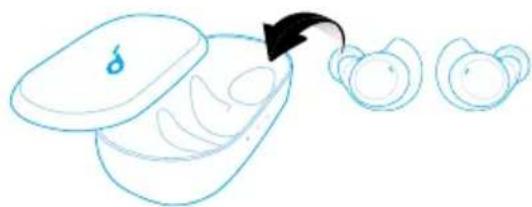
Charging

- Slide to open or close the charging case to activate the LED battery indicator.
- Fully charge both the earbuds and the charging case before the first use.
• To prevent damage, use the provided USB-C cable. - Fully dry off the earbuds and the USB port before charging.
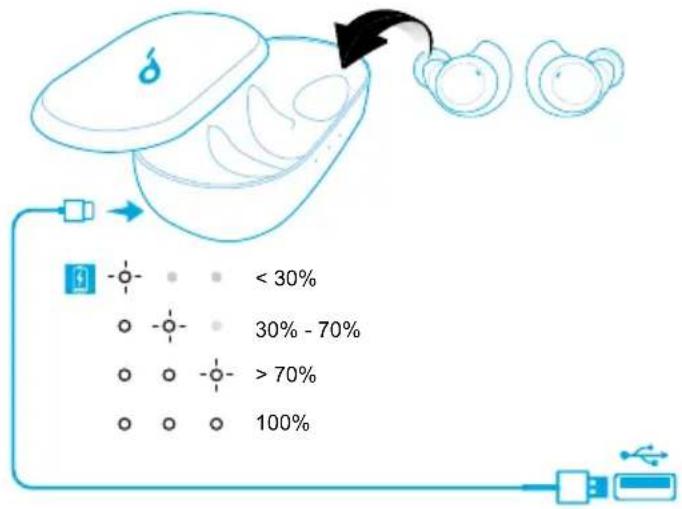
LED indicators (Earbuds)
| Flashing red once every 1 minute Low battery | |
| ○ | Steady white Being charged |
| Light off Fully charged |
Powering On/Off
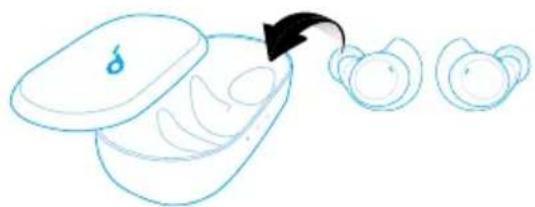
The earbuds will automatically power on when taken out of the charging case and power off when placed back into the charging case.
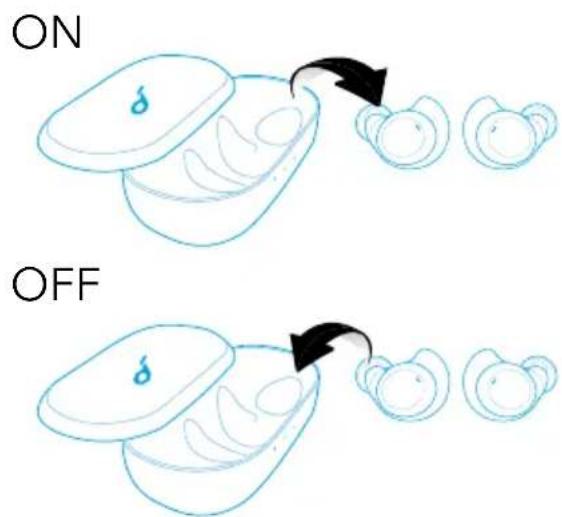

- To manually power on, press and hold the multi-function button on both earbuds for 2 seconds until the LED indicators turn white for 1 second.
- To manually power off, press and hold the multi-function button on both earbuds for 8 seconds until the LED indicators turn red for 1 second.
Pairing
True Wireless Stereo Connection
The right earbud will automatically connect with the left earbud when taken out of the charging case.
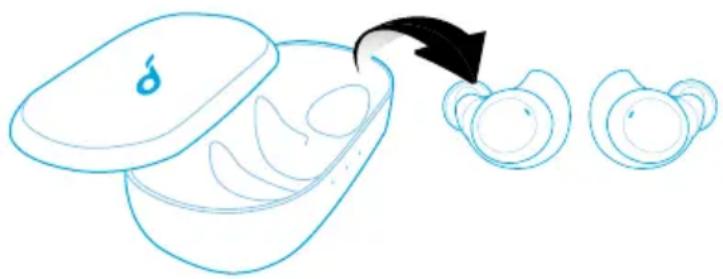
natural_image
Simple line drawing of a device with a lid and three separate views of a container, showing an arrow pointing to the next view (no text or symbols)LED indicators (Earbuds)
| Flashing white TWS connecting | ||
| Rapidly flashing white (Primary earbud)Slowly flashing white (Secondary earbud) | TWS connected |

- The right earbud is the primary earbud by default. In TWS mode, place either one of the earbuds into the charging case, the other one will switch to be the primary earbud.
- When powered on and connected, if either one of the earbuds is out of battery and powered off, you can keep using the other one.
Bluetooth Pairing with your Device
- Take earbuds out of the charging case or manually power on the earbuds, wait for 1 to 3 seconds until the LED indicator on one of the earbuds flashes white, then earbuds enter the Bluetooth pairing mode successfully.
- Turn on Bluetooth on your device and click "Soundcore Spirit Dot 2". The LED indicators on both earbuds will turn white for 1 second when Bluetooth connected.
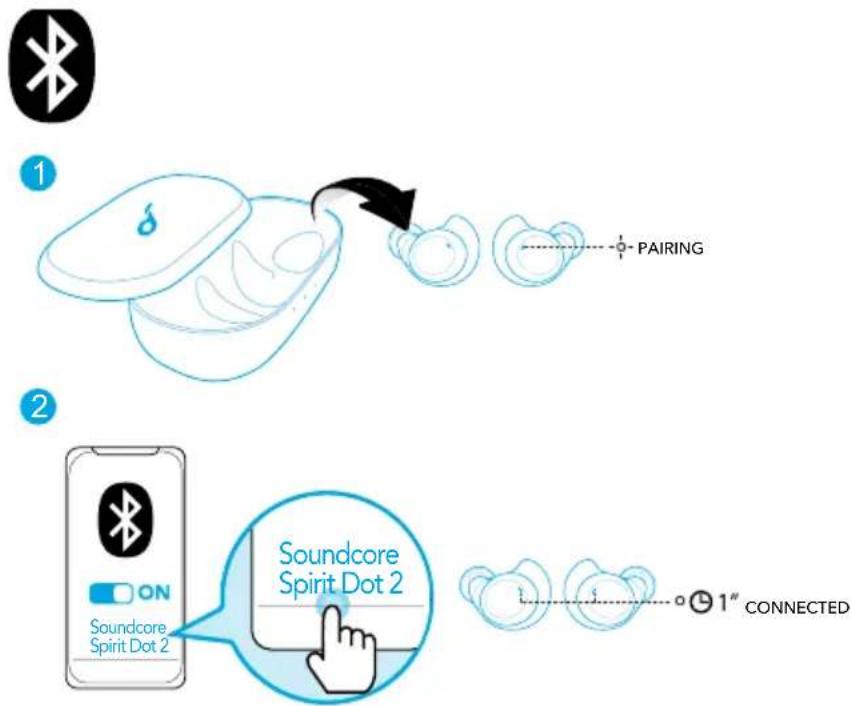
flowchart
graph TD
    A["1: Earpiece"] --> B["2: Pairing"]
    B --> C["3: Soundcore Dot 2"]
    C --> D["4: Connected 1st"]
LED indicators (Earbuds)
| -○- | Flashing white Bluetooth pairing | |
| ○ | Steady white for 1 second Bluetooth | connected |

- To pair with another Bluetooth device, turn off Bluetooth on the currently connected device first.
- When earbuds are out of the charging case and powered off, to manually enter Bluetooth pairing mode, press and hold the multi-function button on both earbuds for 5 seconds.
• Each time you power on your Soundcore earphones, it will automatically connect to your last successfully connected device if available within the Bluetooth range.
Wearing
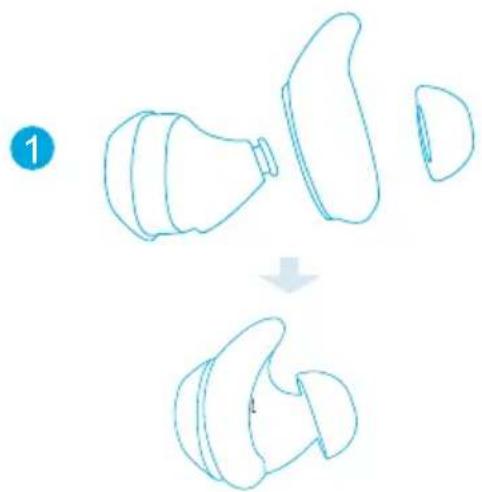
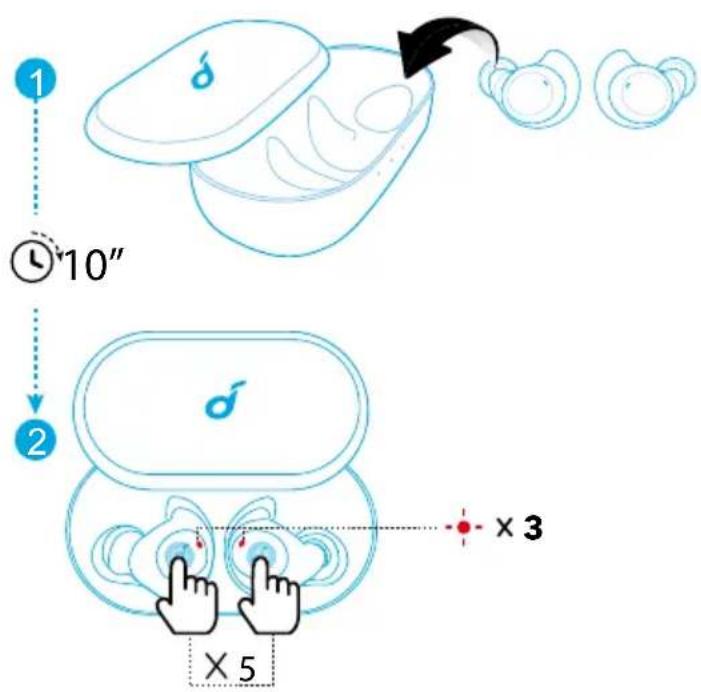
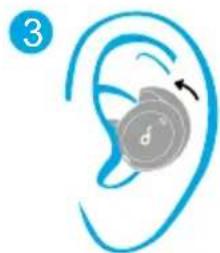
- Choose the EarTips and EarWings that fit your ears best.
- Insert the earbuds into the inner canal of your ears.
- Turn and find the most comfortable position.
natural_image
Diagram showing a mechanical component being processed into two views, with no visible text or symbols.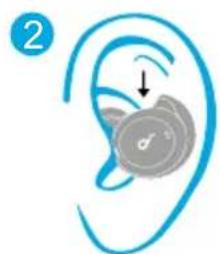
natural_image
Illustration of a human ear with a circular device inside, showing a finger pointing to the ear area (no text or symbols)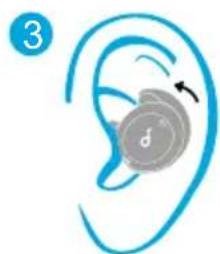
natural_image
Illustration of a human ear with a spiral device and arrow indicating rotation (no text or symbols)Controls
 | |
| Play / Pause Press twice (R) | |
| Next track | Press twice (L) |
| Volume up / down Control volume via the connected device | |
 | |
| Answer / End a call | Press twice (L or R) |
| Put the current call on hold and answer an incoming call | |
| Reject a call | Press and hold for 2 seconds (L or R) |
| Transfer a call between earphones and mobile phone | |
| Switch between held call and active call | |
| Activate Siri or other voice assistant software Press and hold for 2 seconds (L or R) | |
| Mono mode | |
| Play / Pause | Press twice (L or R) |
| Answer / End a call | |
| Reject a call | Press and hold for 2 seconds (L or R) |
| Activate Siri or other voice assistant software | |
Reset
You might need to reset the earbuds if any issues with earbuds such as connectivity problems or function issues.
- Place the earbuds into the charging case and make sure they are being charged for at least 10 seconds.
- Keep the charging case open and continuously press the button on both earbuds 5 times until the LED indicators flash red 3 times.
→ All the memory data will be cleared.

Specifications are subject to change without notice.
| Input 5 V 500 mA | --- |
| Rated output power | 5 mW @ 1% THD |
| Battery capacity | 55 mA x 2 (earbuds); 340 mA (charging case) |
| Charging time 1.5 hours | |
| Playtime(varies by volume level and content) | 5.5 hours (Totally 16 hours with the charging case) |
| Driver size 8 mm x 2 | |
| Frequency response 20 Hz - 20 kHz | |
| Impedance 16 Ω | |
| Bluetooth version V 5.0 | |
| Bluetooth range 10 m / 33 ft |
Nabíjení

natural_image
Illustration of a medical device with a blue lid and arrow indicating transformation (no text or symbols)flowchart
graph TD
    A["1: Earpiece"] --> B["2: Pairing"]
    B --> C["3: Soundcore Dot 2 Connected"]
    C --> D["4: Connection to Soundcore Spirit Dot 2"]
natural_image
Diagram showing a device being processed into two views, with no text or symbols present.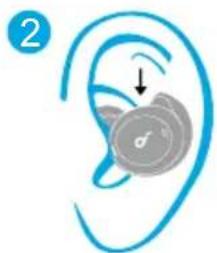
natural_image
Illustration of a human ear with a medical device inside, showing no text or symbols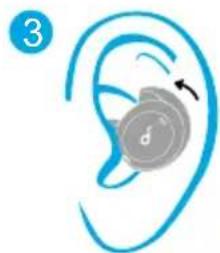
natural_image
Illustration of a human ear with a circular device and arrow indicating rotation (no text or symbols)Ovládání
LED-funktioner (∅retelefoner)
natural_image
Illustration of a medical device with a blue lid and arrow indicating transformation (no text or symbols)LED-funktioner (∅retelefoner)
flowchart
graph TD
    A["1: Earpiece"] --> B["2: Pairing"]
    B --> C["3: Soundcore Dot 2 Connected"]
    C --> D["4: Connection to Soundcore Spirit Dot 2"]
LED-funktioner (∅retelefoner)
natural_image
Diagram showing a device being processed into two views, with no text or symbols present.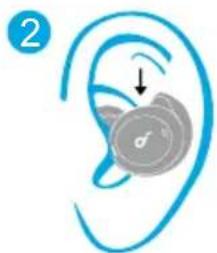
natural_image
Illustration of a human ear with a circular device and an arrow indicating motion (no text or symbols)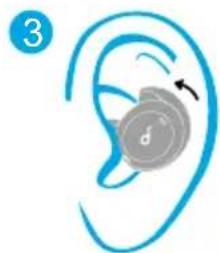
natural_image
Illustration of a human ear with a circular device and arrow indicating rotation (no text or symbols)Kontroller

natural_image
Illustration of a hand holding an earbell with a blue lid, transforming into three separate ear-shaped objects (no text or symbols)flowchart
graph TD
    A["1: Earpiece"] --> B["2: Pairing"]
    B --> C["3: Soundcore Dot 2 Connected"]
    C --> D["4: Connection to Soundcore Spirit Dot 2"]
natural_image
Diagram showing a device being processed into two views, with no text or symbols present.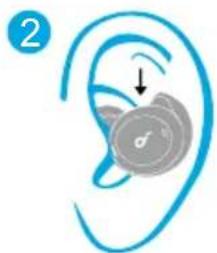
natural_image
Illustration of a human ear with a circular device and an arrow indicating motion (no text or symbols)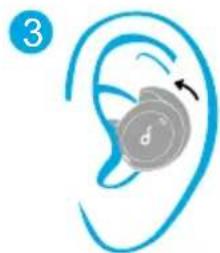
natural_image
Illustration of a human ear with a damped device and arrow indicating rotation (no text or symbols)Steuerung
Technische Daten
natural_image
Simple line drawing of a device with a droplet inside and three separate circular objects on the right, connected by an arrow (no text or symbols)flowchart
graph TD
    A["1: Earpiece"] --> B["2: Pairing"]
    B --> C["3: Soundcore Dot 2 Connected"]
    C --> D["4: Connection to Soundcore Spirit Dot 2"]
natural_image
Diagram showing a device being processed into a multi-stage assembly (no text or symbols)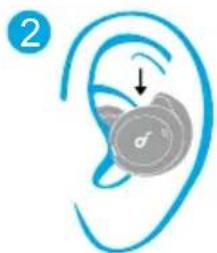
natural_image
Illustration of a human ear with a circular device and an arrow indicating motion (no text or symbols)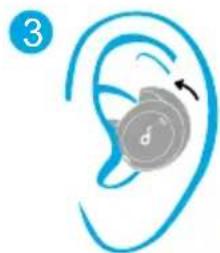
natural_image
Illustration of a human ear with a circular device and arrow indicating rotation (no text or symbols)Κουμπιά ρύθμισης
natural_image
Illustration of a hand holding a small container with a droplet symbol, transforming into three separate circular objects (no text or labels)flowchart
graph TD
    A["1: Earpiece"] --> B["2: Pairing"]
    B --> C["3: Soundcore Dot 2 Connected"]
    C --> D["4: Connection to Soundcore Spirit Dot 2"]
natural_image
Diagram showing a device being processed into two views, with no text or symbols present.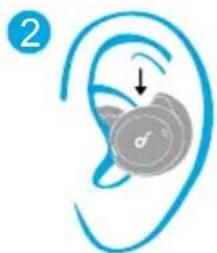
natural_image
Illustration of a human ear with a medical device inside, showing no text or symbols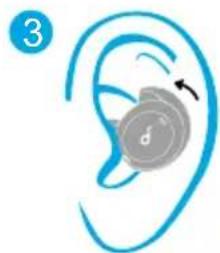
natural_image
Illustration of a human ear with a circular device and arrow indicating rotation (no text or symbols)Controles

natural_image
Illustration of a hand holding an earbell with a blue lid, transforming into three separate ear-shaped objects (no text or symbols)flowchart
graph TD
    A["1: Earpiece"] --> B["2: Pairing"]
    B --> C["3: Soundcore Dot 2 Connected"]
    C --> D["4: Connection to Soundcore Spirit Dot 2"]
natural_image
Diagram showing a device being processed into two views, with no text or symbols present.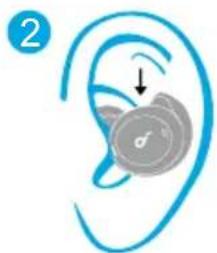
natural_image
Illustration of a human ear with a medical device inside, showing no text or symbols
natural_image
Illustration of a human ear with a circular device and arrow indicating rotation (no text or symbols)Säätimet

natural_image
Illustration of a hand holding a small container with a droplet symbol, transforming into three separate circular objects (no text or labels)flowchart
graph TD
    A["1: Earpiece"] --> B["2: Pairing"]
    B --> C["3: Soundcore Dot 2 Connected"]
    C --> D["4: Connection to Soundcore Spirit Dot 2"]
natural_image
Diagram showing a device being processed into two views, with no text or symbols present.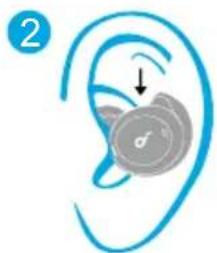
natural_image
Illustration of a human ear with a circular device and an arrow indicating motion (no text or symbols)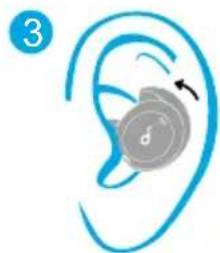
natural_image
Illustration of a human ear with a circular device and arrow indicating rotation (no text or symbols)Commandes
natural_image
Illustration of a medical device with a blue cap and three smaller ear-like objects, showing a transformation process (no text or symbols)flowchart
graph TD
    A["1: Earpiece"] --> B["2: Pairing"]
    B --> C["3: Soundcore Dot 2 Connected"]
    C --> D["4: Connection to Soundcore Spirit Dot 2"]
natural_image
Diagram showing a device being processed into two views, with no text or symbols present.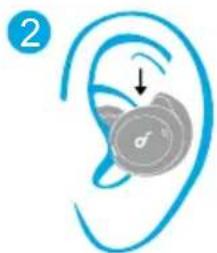
natural_image
Illustration of a human ear with a circular device and an arrow indicating motion (no text or symbols)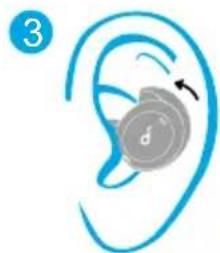
natural_image
Illustration of a human ear with a circular device and arrow indicating rotation (no text or symbols)Vezérlók

natural_image
Illustration of a hand holding an earbell with a blue lid, transforming into three separate ear-shaped objects (no text or symbols)flowchart
graph TD
    A["1: Earpiece"] --> B["2: Pairing"]
    B --> C["3: Soundcore Dot 2 Connected"]
    C --> D["4: Connection to Soundcore Spirit Dot 2"]
natural_image
Diagram showing a device being processed into two views, with no text or symbols present.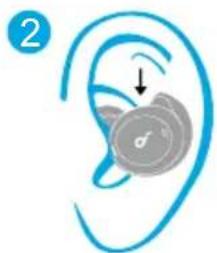
natural_image
Illustration of a human ear with a circular device and arrow indicating motion (no text or symbols)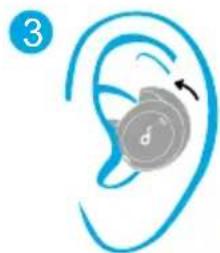
natural_image
Illustration of a human ear with a circular device and arrow indicating rotation (no text or symbols)Comandi

natural_image
Simple line drawing of a food container with a lid and three smaller food items, connected by an arrow indicating transformation (no text or symbols)flowchart
graph TD
    A["1: Earpiece"] --> B["2: Pairing"]
    B --> C["3: Soundcore Dot 2 Connected"]
    C --> D["4: Connection to Soundcore Spirit Dot 2"]
natural_image
Diagram showing a device being processed into two views, with no text or symbols present.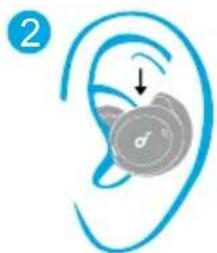
natural_image
Illustration of a human ear with a circular device and an arrow indicating motion (no text or symbols)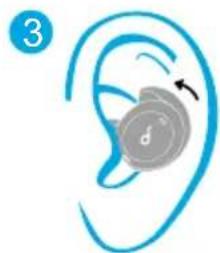
natural_image
Illustration of a human ear with a circular device and arrow indicating rotation (no text or symbols)Bedieningselementen
True Wireless Stereo-tilkobling
natural_image
Illustration of a hand holding an open ear with a blue lid, transforming into three separate ear-shaped objects (no text or symbols)flowchart
graph TD
    A["1: Earpiece"] --> B["2: Pairing"]
    B --> C["3: Soundcore Dot 2 Connected"]
    C --> D["4: Connection to Soundcore Spirit Dot 2"]
natural_image
Diagram showing a device being processed into two views, with no text or symbols present.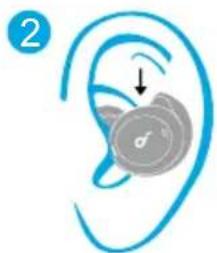
natural_image
Illustration of a human ear with a medical device inside, showing no text or symbols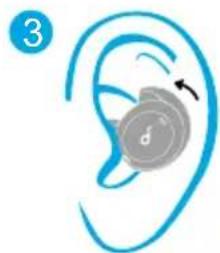
natural_image
Illustration of a human ear with a circular device and arrow indicating rotation (no text or symbols)Kontroller

natural_image
Illustration of a hand holding an open ear with a blue lid, transforming into three separate ear-shaped objects (no text or symbols)flowchart
graph TD
    A["1: Earpiece"] --> B["2: Pairing"]
    B --> C["3: Soundcore Dot 2 Connected"]
    C --> D["4: Connection to Soundcore Spirit Dot 2"]
natural_image
Diagram showing a device being processed into two views, with no text or symbols present.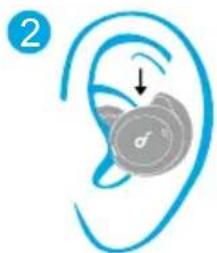
natural_image
Illustration of a human ear with a medical device inside, showing no text or symbols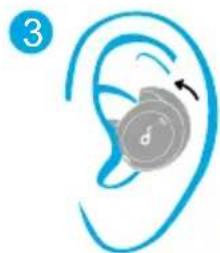
natural_image
Illustration of a human ear with a circular device and arrow indicating rotation (no text or symbols)Sterowanie

Comportamento do indicador LED (Auriculares)
natural_image
Illustration of a hand holding an open ear with a blue lid, transforming into three separate ear-shaped objects (no text or symbols)Comportamento do indicador LED (Auriculares)
flowchart
graph TD
    A["1: Earpiece"] --> B["2: Pairing"]
    B --> C["3: Soundcore Dot 2 Connected"]
    C --> D["4: Connection to Soundcore Spirit Dot 2"]
Comportamento do indicador LED (Auriculares)
| -○- | Branco intermitente Emparelhamento por Bluetooth |
| ○ | Branco fixo durante 1 segundo Bluetooth ligado |

natural_image
Diagram showing a device being processed into two views, with no text or symbols present.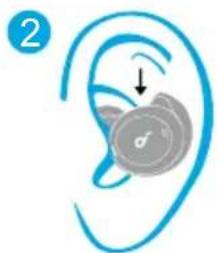
natural_image
Illustration of a human ear with a circular device and an arrow indicating motion (no text or symbols)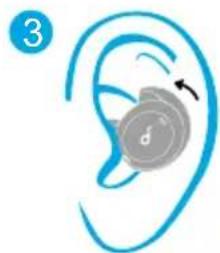
natural_image
Illustration of a human ear with a circular device and arrow indicating rotation (no text or symbols)Controlos

natural_image
Simple line drawing of a food container with a drop and a curved arrow indicating transformation (no text or symbols)flowchart
graph TD
    A["1: Earpiece"] --> B["2: Pairing"]
    B --> C["3: Soundcore Dot 2 Connected"]
    C --> D["4: Connection to Soundcore Spirit Dot 2"]
natural_image
Diagram showing a device being processed into two views, with no text or symbols present.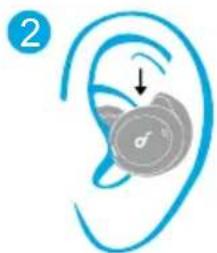
natural_image
Illustration of a human ear with a medical device inside, showing no text or symbols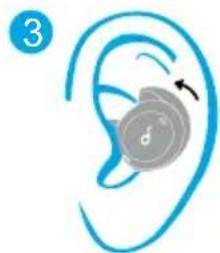
natural_image
Illustration of a human ear with a circular device and arrow indicating rotation (no text or symbols)Элементы управления

natural_image
Illustration of a medical device with a blue cap and three smaller ear cutouts, showing a black arrow indicating transformation (no text or symbols)natural_image
Diagram showing a device being processed into two views, with no text or symbols present.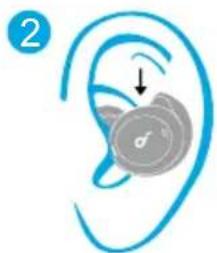
natural_image
Illustration of a human ear with a medical device inside, showing no text or symbols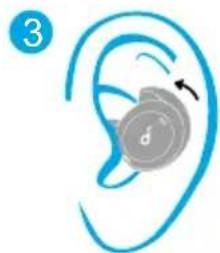
natural_image
Illustration of a human ear with a circular device and arrow indicating rotation (no text or symbols)Ovládacie prvky
Technické údaje
Lučke LED (slušalki)
natural_image
Illustration of a medical device with a blue cap and three smaller ear cutouts, showing a black arrow indicating transformation (no text or symbols)Lučke LED (slušalki)
flowchart
graph TD
    A["1: Earpiece"] --> B["2: Pairing"]
    B --> C["3: Soundcore Dot 2 Connected"]
    C --> D["4: Connection to Soundcore Spirit Dot 2"]
Lučke LED (slušalki)
natural_image
Diagram showing a device being processed into two views, with no text or symbols present.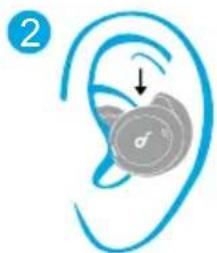
natural_image
Illustration of a human ear with a medical device inside, showing no text or symbols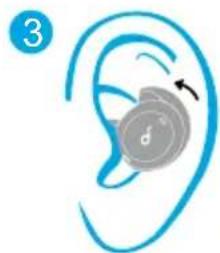
natural_image
Illustration of a human ear with a circular device and arrow indicating rotation (no text or symbols)Kontrolniki
natural_image
Simple line drawing of a container with a droplet inside, and three separate food items on the side (no text or symbols)flowchart
graph TD
    A["1: Earpiece"] --> B["2: Pairing"]
    B --> C["3: Soundcore Dot 2 Connected"]
    C --> D["4: Connection to Soundcore Spirit Dot 2"]
natural_image
Diagram showing a device being processed into two views, with no text or symbols present.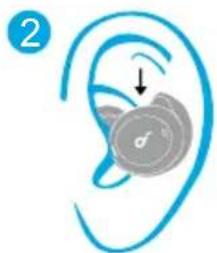
natural_image
Illustration of a human ear with a medical device inside, showing no text or symbols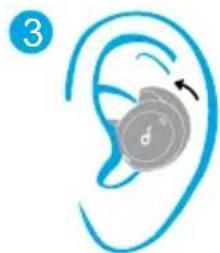
natural_image
Illustration of a human ear with a circular device and arrow indicating rotation (no text or symbols)Kontroller

< 30%
30% - 70%
> 70%
100%
natural_image
Illustration of a medical device with a blue cap and three smaller ear cutouts, showing a black arrow indicating transformation (no text or symbols)flowchart
graph TD
    A["1: Earpiece"] --> B["2: Pairing"]
    B --> C["3: Soundcore Dot 2 Connected"]
    C --> D["4: Connection to Soundcore Spirit Dot 2"]
natural_image
Diagram showing a device being processed into two views, with no text or symbols present.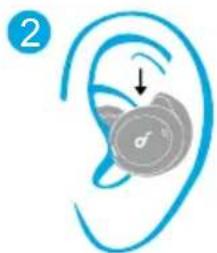
natural_image
Illustration of a human ear with a medical device inside, showing no text or symbols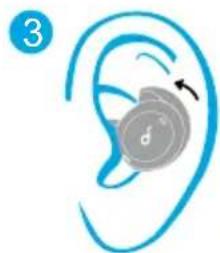
natural_image
Illustration of a human ear with a circular device and arrow indicating rotation (no text or symbols)Kontroller

LEDの動作 (イヤホン)
natural_image
Illustration of a computer case with a lid and three smaller objects, one being cut by an arrow (no text or symbols)LEDの動作 (イヤホン)
flowchart
graph TD
    A["1: Earpiece"] --> B["2: Pairing"]
    B --> C["3: Soundcore Dot 2 Connected"]
    C --> D["4: Connection to Soundcore Spirit Dot 2"]
LEDの動作 (イヤホン)
natural_image
Diagram showing a device being processed into two views, with no text or symbols present.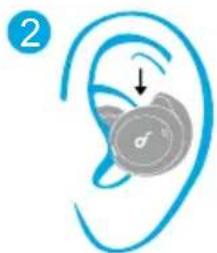
natural_image
Illustration of a human ear with a circular device and an arrow indicating motion (no text or symbols)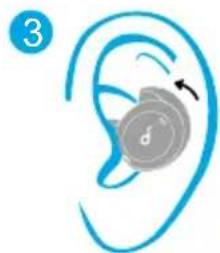
natural_image
Illustration of a human ear with a circular device and arrow indicating rotation (no text or symbols)操作方法
LED 동작 (이어버드)
natural_image
Illustration of a medical device with a blue lid and three separate views of the same object, showing a black arrow pointing to a cluster of small circular items (no text or symbols present)LED 동작 (이어버드)
flowchart
graph TD
    A["1: Earpiece"] --> B["2: Pairing"]
    B --> C["3: Soundcore Dot 2 Connected"]
    C --> D["4: Connection to Soundcore Spirit Dot 2"]
LED 동작 (이어버드)
natural_image
Diagram showing a device being processed into two views, with no text or symbols present.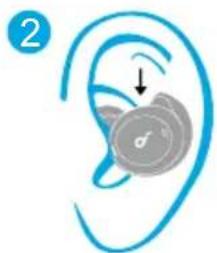
natural_image
Illustration of a human ear with a circular device and an arrow indicating motion (no text or symbols)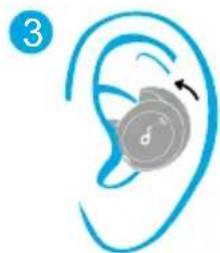
natural_image
Illustration of a human ear with a circular device and arrow indicating rotation (no text or symbols)컨트롤
LED 指示灯状态(耳机)
natural_image
Simple line drawing of a food item being processed into three separate containers (no text or symbols)LED 指示灯状态(耳机)
flowchart
graph TD
    A["1: Earpiece"] --> B["2: Pairing"]
    B --> C["3: Soundcore Dot 2 Connected"]
    C --> D["4: Connection to Soundcore Spirit Dot 2"]
LED 指示灯状态(耳机)
产品参数
规格如有变更,恕不另行通知。
LED 行為(耳機)
natural_image
Simple line drawing of a food item being cut with an arrow indicating the process (no text or symbols)LED 行為(耳機)
flowchart
graph TD
    A["1: Earpiece"] --> B["2: Pairing"]
    B --> C["3: Soundcore Dot 2 Connected"]
    C --> D["4: Connection to Soundcore Spirit Dot 2"]
LED 行為(耳機)
natural_image
Diagram showing a device being processed into two views, with no text or symbols present.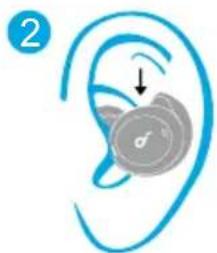
natural_image
Illustration of a human ear with a circular device and arrow indicating rotation (no text or symbols)控制項
■ 規格可能隨時變更,恕不另行通知。
natural_image
Illustration of a hand holding a small object with a droplet inside, transforming into three separate circular objects (no text or symbols)flowchart
graph TD
    A["1: Earpiece"] --> B["2: Pairing"]
    B --> C["3: Soundcore Dot 2 Connected"]
    C --> D["4: Connection to Soundcore Spirit Dot 2"]
natural_image
Diagram showing a device being processed into two views, with no text or symbols present.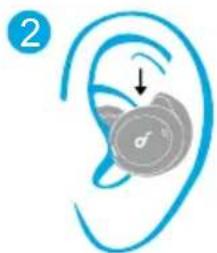
natural_image
Illustration of a human ear with a medical device inside, showing no text or symbols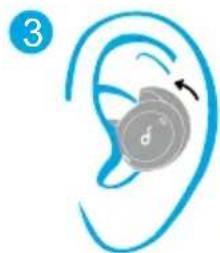
natural_image
Illustration of a human ear with a circular device and arrow indicating rotation (no text or symbols)Controles

(سماعات الأدن) LED
OFF
natural_image
Simple line drawing of a container with lid and two separate food items, no text or symbols presentnatural_image
Illustration of a hand holding a small container with liquid, transforming into three separate circular objects (no text or symbols)(سماعات الأذن) LED
natural_image
Diagram showing a device being processed into two views, with no text or symbols present.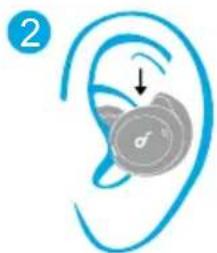
natural_image
Illustration of a human ear with a circular device and an arrow indicating motion (no text or symbols)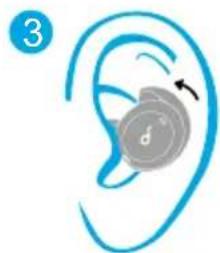
natural_image
Illustration of a human ear with a circular device and arrow indicating rotation (no text or symbols)عناصر التحكم
5 V = 500 mA
مدخل
(בַרְשׁו) בַרְשׁו
OFF
natural_image
Simple line drawing of a container with a lid and two separate food items, no text or symbols present.natural_image
Simple line drawing of a food container with a drop and a sequence of food items (no text or symbols)natural_image
Diagram showing a device being processed into two views, with no text or symbols present.
natural_image
Illustration of a human ear with a medical device inside, showing no text or symbols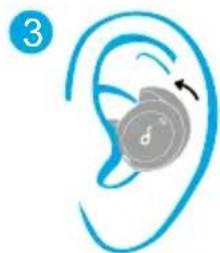
natural_image
Illustration of a human ear with a circular device and arrow indicating rotation (no text or symbols)תִרְשָׁה