soundcore Q20i - Earphones

Q20i - Earphones soundcore - Free user manual and instructions

Find the device manual for free Q20i soundcore in PDF.

📄 80 pages English EN Download 💬 AI Question
Notice soundcore Q20i - page 3

User questions about Q20i soundcore

0 question about this device. Answer the ones you know or ask your own.

Ask a new question about this device

The email remains private: it is only used to notify you if someone responds to your question.

No questions yet. Be the first to ask one.

Download the instructions for your Earphones in PDF format for free! Find your manual Q20i - soundcore and take your electronic device back in hand. On this page are published all the documents necessary for the use of your device. Q20i by soundcore.

USER MANUAL Q20i soundcore

natural_image Line drawing of a Soundcore headphones with visible earbuds and buttons, set against a light blue patterned background (no text or symbols on the device itself)

soundcore Q20i

USER MANUAL

English 01
Čeština 04
Dansk 07
Deutsch 10
ελληνικά13
Español 16
Suomi 19
Français 22
Magyar 25
Italiano 28
Nederlands 31
Norsk 34
Język polski 37
Português 40
Portugues do Brasil 43
Русский46
Slovenský Jazyk 49
Slovenski Jezik52
Svenska 55
Türkçe58
日本語61
한국어64
简体中文67
繁體中文70
73
76

soundcore Q20i - 1

SUPPORT

soundcore Q20i - SUPPORT - 1

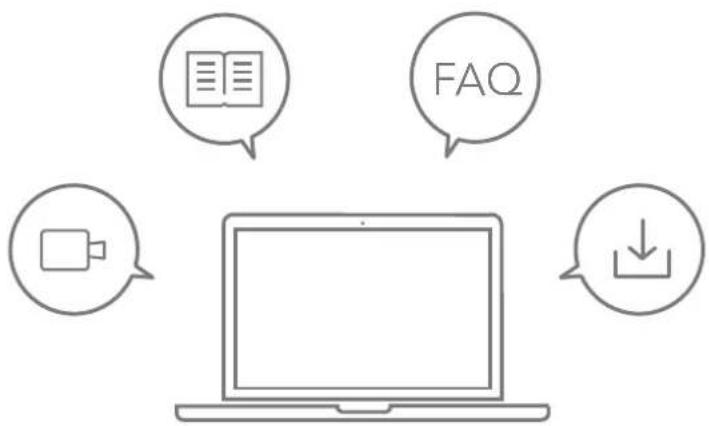
flowchart
graph TD
    A["Laptop"] --> B["FAQ"]
    A --> C["Download"]
    A --> D["Email"]

Please visit www.soundcore.com/support for more information.

soundcore Q20i - SUPPORT - 2

WEARING

soundcore Q20i - WEARING - 1

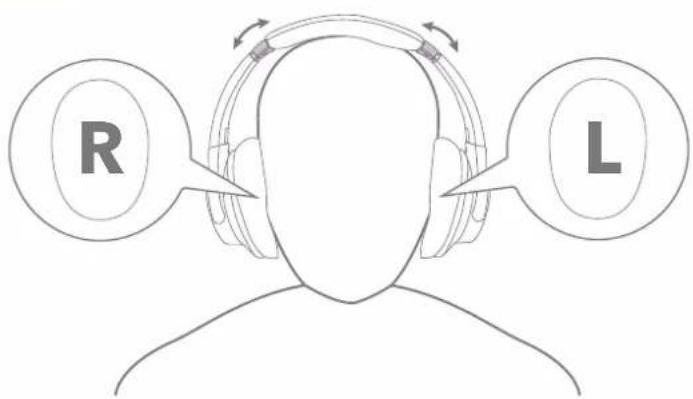
text_image R L

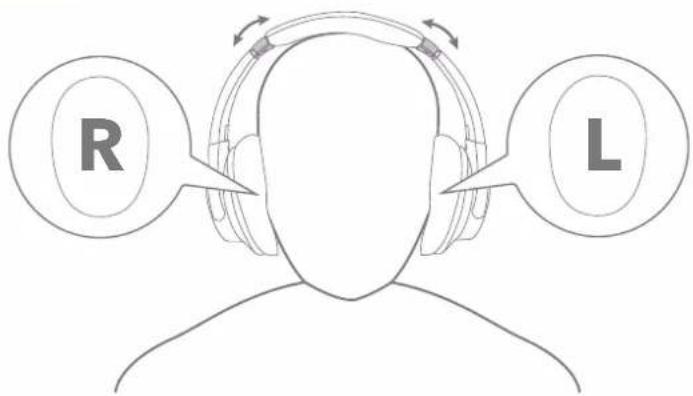
Wear the headphones with the "L" logo on your left ear and "R" logo on your right ear. Adjust the length of the headband for a comfortable fit.

soundcore Q20i - WEARING - 2

POWERING ON & PAIRING

soundcore Q20i - POWERING ON & PAIRING - 1

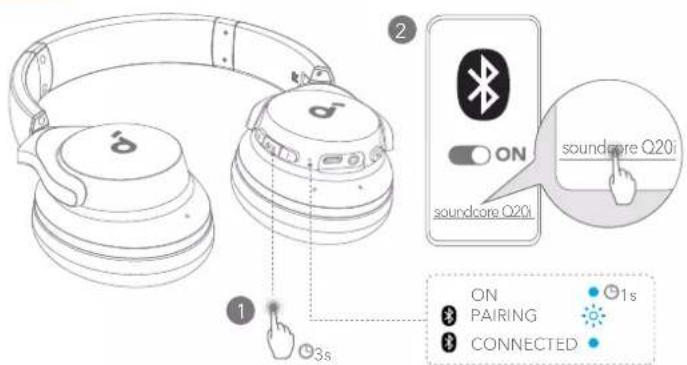
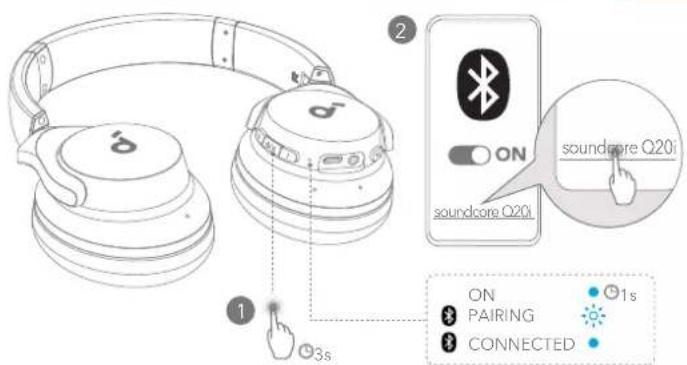
text_image ON ON soundcore Q20i soundcore Q20i ON PAIRING CONNECTED 1s 3s

Press and hold the multi-function button for 3 seconds to power on. The headphones will automatically enter Bluetooth pairing mode when connecting for the first time.

Select soundcore Q20i * on your device's Bluetooth list when connecting for the first time.

*The device name may vary depending on the region.

soundcore Q20i - POWERING ON & PAIRING - 2

APP

soundcore Q20i - APP - 1

soundcore

soundcore Q20i - APP - 2

soundcore Q20i - APP - 3

Google Play and the Google Play logo are trademarks of Google Inc.

soundcore Q20i - APP - 4

text_image QR code with a blue male gender symbol logo in the center

soundcore Q20i - APP - 5

Apple and the Apple logo are trademarks of Apple Inc.

Download the soundcore app to switch ambient sound modes, adjust EQ settings, update firmware, and explore more.

If your headphones cannot connect with the soundcore app, re-install the app or update it to the latest version in your mobile app store.

soundcore Q20i - APP - 6

CHARGING

soundcore Q20i - CHARGING - 1

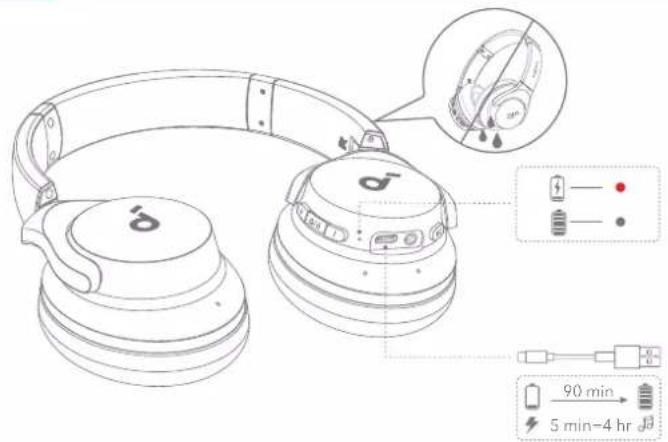
text_image Technical diagram of a pair of S26 headphones with labeled ear and charging cable specifications

Fully dry off the headphones and USB-C charging port before charging.

Do not turn on your headphones while charging.

Use a certified USB-C charging cable and charger to prevent any damage.

soundcore Q20i - CHARGING - 2

MANUAL PAIRING

soundcore Q20i - MANUAL PAIRING - 1

text_image 1 ×2 2 ON soundcore Q20i PAIRING CONNECTED

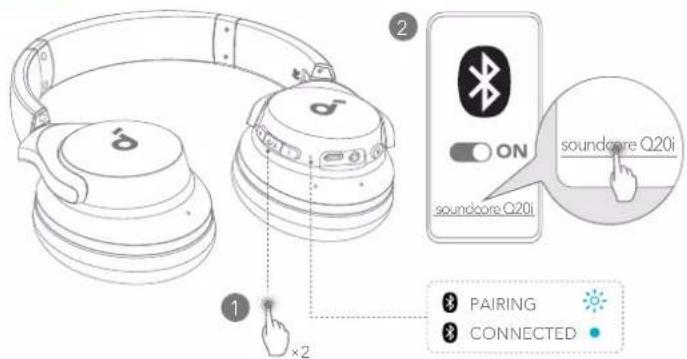
To manually enter Bluetooth pairing mode, after powering on the headphones, press the multi-function button twice to pair.

soundcore Q20i - MANUAL PAIRING - 2

DUAL CONNECTIONS

soundcore Q20i - DUAL CONNECTIONS - 1

text_image 1 ×2 2 ON soundcore Q20i soundcore Q20i PAIRING CONNECTED

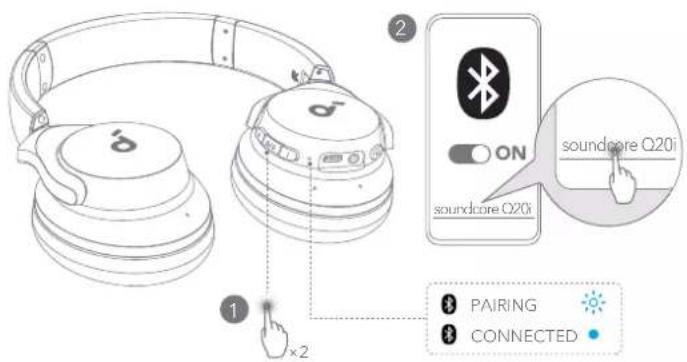
The headphones can connect with two devices at the same time.

When already connected to one device, press the multi-function button twice to pair with another device.

soundcore Q20i - DUAL CONNECTIONS - 2

BUTTON CONTROLS

soundcore Q20i - BUTTON CONTROLS - 1

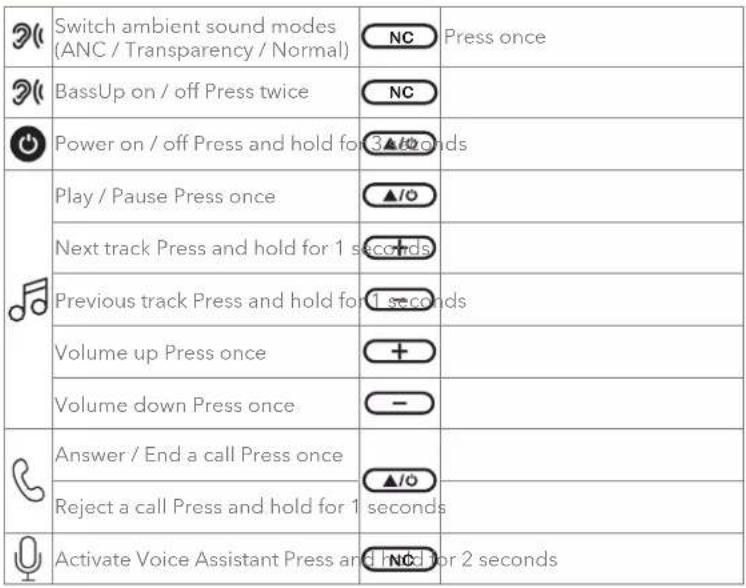
text_image δ×1 δ×1s δ×1 δ×3s ON/OFF δ×1 δ×1s δ×1 δ×1s δ×1 δ×1 δ×2 BassUp ON / OFF δ×2s Voice Assistant

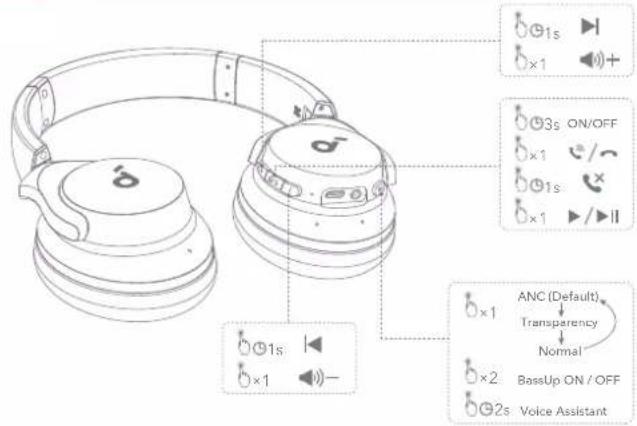
×1: Press once
×2: Press twice
2s: Press and hold for 2 seconds
1s: Press and hold for 1 second

soundcore Q20i - BUTTON CONTROLS - 2

BUTTON CONTROLS

soundcore Q20i - BUTTON CONTROLS - 1

soundcore Q20i - BUTTON CONTROLS - 2

AMBIENT SOUND

soundcore Q20i - AMBIENT SOUND - 1

text_image ANC (Default) Transparency Normal

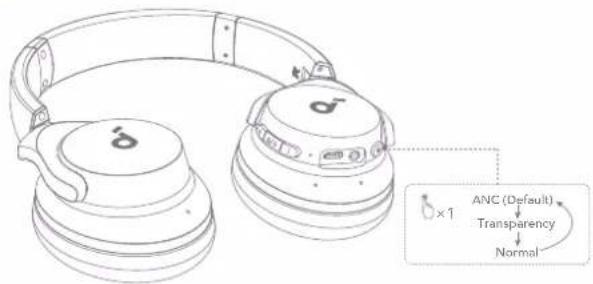
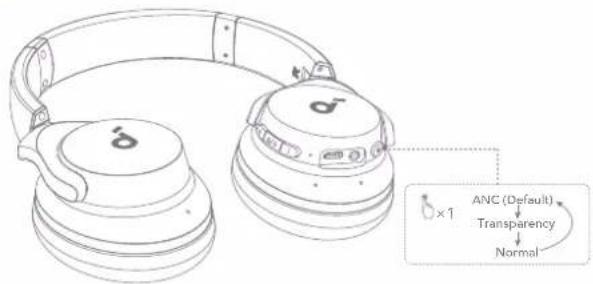
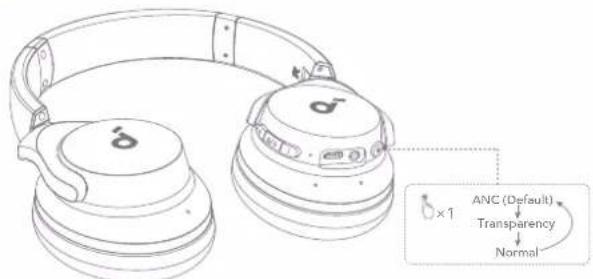
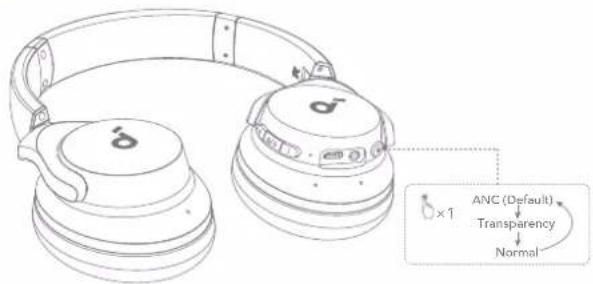
Active Noise Cancellation (ANC): Reduce unwanted background noise.

Transparency: Stay aware of your surroundings while listening to music.

soundcore Q20i - AMBIENT SOUND - 2

WIRED LISTENING

soundcore Q20i - WIRED LISTENING - 1

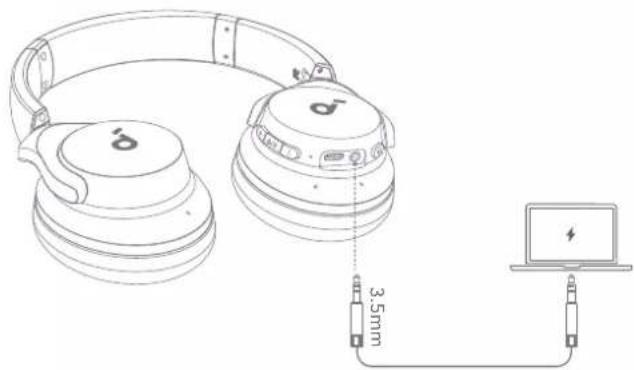
text_image Diagram showing connections between a CD/DVD headphones, a laptop, and a cable with 3.5mm cable distance labeled.

Play audio on an external device by plugging in a 3.5mm AUX cable. Wired listening will automatically turn off Bluetooth mode.

*When using an AUX cable, the ANC function will be disabled.

soundcore Q20i - WIRED LISTENING - 2

RESET

soundcore Q20i - RESET - 1

natural_image Line drawing of a pair of S&T headphones with earbuds and headband (no text or symbols)

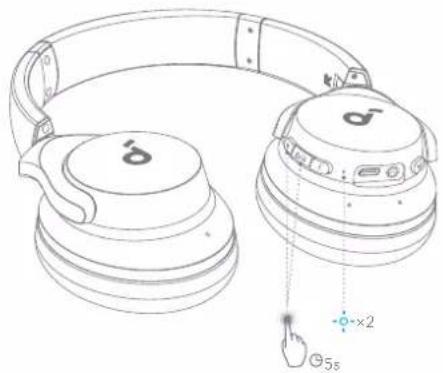
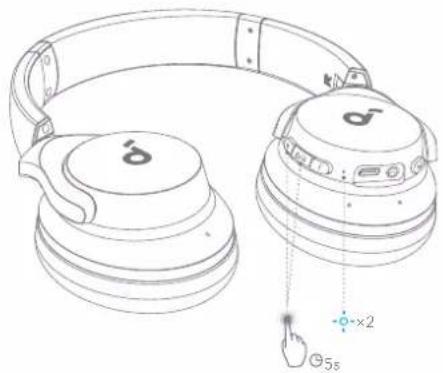
You might need to reset your headphones if you experience connectivity or function issues.

Delete the pairing history from your Bluetooth device first.

Press and hold the volume up and multi-function button simultaneously for 5 seconds until the LED flashes blue twice.

soundcore Q20i - RESET - 2

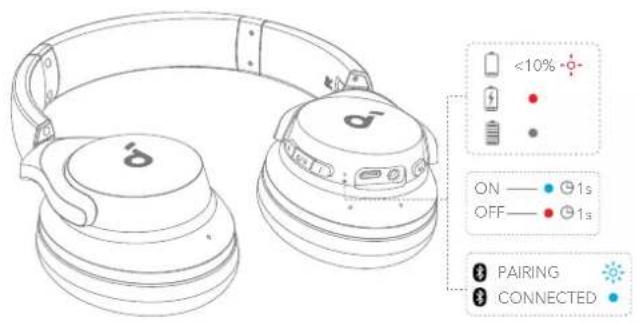
text_image <10% ON — 91s OFF — 91s PAIRING CONNECTED

Flashing red
- Steady red
Flashing blue rapidly

  • Steady blue
    • Light off

soundcore Q20i - RESET - 3

text_image Firmware Version 1.2 Dual Connection Update Firmware Help & Feedback Quick Start Guide

soundcore Q20i - RESET - 4

text_image Update Firmware What's New Download

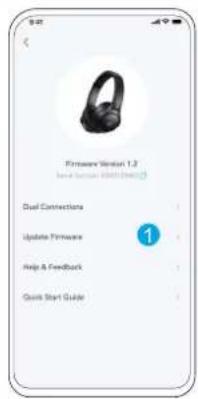
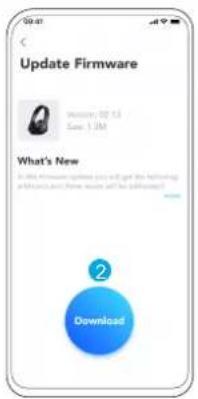
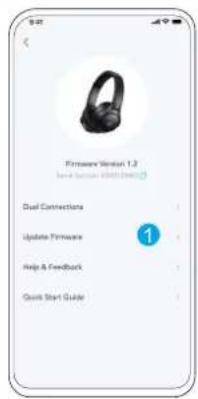
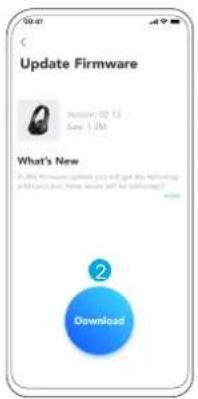
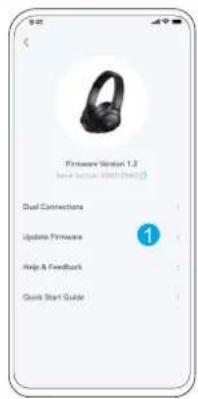
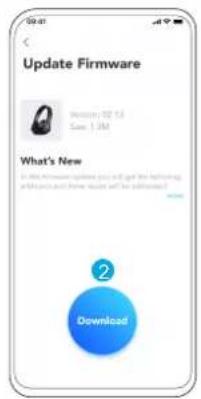
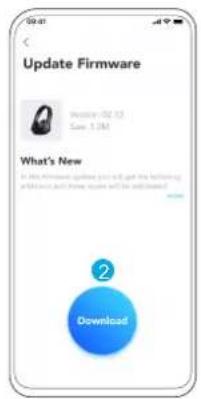
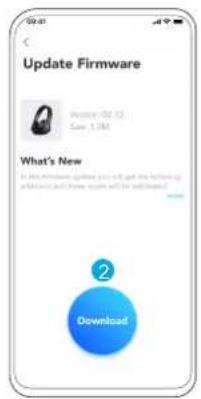
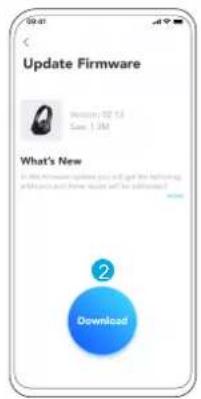
You will be informed once the new version of firmware is detected when you connect the headphones with the app. Ensure the headphones are powered on and connected to a device until the firmware update is complete. During the update, avoid any usage and ensure stable access to the internet.

soundcore Q20i - RESET - 5

SPECS

Specifications are subject to change without notice.

Input 5 V--- 0.75 A
Rated output power 2.5 mW
Battery capacity 800 mAh
Charging time 90 minutes
Playtime (with ANC off) Up to 60 hours
Playtime (with ANC on) Up to 40 hours
Driver size 40 mm
Frequency response 20 Hz - 20 kHz
Impedance 16 Ω
Bluetooth version 5.0
Bluetooth range 10 m / 32.8 ft

soundcore Q20i - SPECS - 1

PODPORA

soundcore Q20i - PODPORA - 1

flowchart
graph TD
    A["Laptop"] --> B["FAQ"]
    A --> C["Download"]
    A --> D["Email"]
text_image ON ON soundcore Q20i soundcore Q20i ON PAIRING CONNECTED 1s 3s

Google Play and the Google Play logo are trademarks of Google Inc.

soundcore Q20i - PODPORA - 2

Apple and the Apple logo are trademarks of Apple Inc.

soundcore Q20i - PODPORA - 3

text_image QR code with a blue male gender symbol logo in the center
text_image Technical diagram of a S260 headphones with labeled ear and charging cable specifications
text_image ANC (Default) Transparency Normal
text_image Diagram showing connections between a CD head, audio headphones, and a laptop connected via 3.5mm cable
natural_image Line drawing of a pair of SaaS headphones with earbuds and headband (no text or symbols)
text_image <10% ON — 91s OFF — 91s PAIRING CONNECTED
text_image Update Firmware What's New in 300 firmware updates you will get the following and provide your own software and the following? Download
flowchart
graph TD
    A["Laptop"] --> B["FAQ"]
    A --> C["Download"]
    A --> D["Email"]
text_image ON ON soundcore Q20i soundcore Q20i ON PAIRING CONNECTED 1s 3s

Google Play and the Google Play logo are trademarks of Google Inc.

soundcore Q20i - PODPORA - 4

text_image QR code with a blue male gender symbol logo in the center

soundcore Q20i - PODPORA - 5

Apple and the Apple logo are trademarks of Apple Inc.

text_image Technical diagram of a S30 headband ear with labeled components and time-lapse instructions
text_image ANC (Default) Transparency Normal
text_image Diagram showing connections between two headphones and a laptop via 3.5mm cable, with a lightning bolt icon indicating the device.
natural_image Line drawing of a pair of S&T headphones with earbuds and headband (no text or symbols)
text_image <10% ON — 1s OFF — 1s PAIRING CONNECTED
text_image Update Firmware What's New Download
flowchart
graph TD
    A["Laptop"] --> B["FAQ"]
    A --> C["Download"]
    A --> D["Email"]
text_image ON ON soundcore Q20i soundcore Q20i ON PAIRING CONNECTED 1s 3s

Google Play and the Google Play logo are trademarks of Google Inc.

soundcore Q20i - PODPORA - 6

Apple and the Apple logo are trademarks of Apple Inc.

soundcore Q20i - PODPORA - 7

text_image QR code with a blue male gender symbol logo in the center
text_image Technical diagram of a pair of S26 headphones with labeled ear and charging cable specifications
text_image ANC (Default) Transparency Normal
text_image Diagram showing connections between a coffee ear and a laptop via 3.5mm cable, with ear logo and power plug details.
natural_image Line drawing of two SaaS headphones with earbuds and headband (no text or symbols)
text_image <10% ON — 91s OFF — 91s PAIRING CONNECTED
text_image Update Firmware What's New in 2016 firmware version you will get the following: problems and how issues will be transmitted? Download
text_image 1 2 ON soundcore Q20i ON PAIRING CONNECTED 1s

Google Play and the Google Play logo are trademarks of Google Inc.

soundcore Q20i - PODPORA - 8

text_image QR code with a blue male gender symbol logo in the center

soundcore Q20i - PODPORA - 9

Apple and the Apple logo are trademarks of Apple Inc.

text_image Technical diagram of a S30 headband ear with labeled components and time-lapse instructions
text_image ANC (Default) Transparency Normal
text_image Diagram showing connections between a CD head, audio headphones, and a laptop connected via 3.5mm cable
natural_image Line drawing of a pair of SaaS headphones with earbuds and headband (no text or symbols)
text_image <10% + ON — ● 1s OFF — ● 1s ● PAIRING ● CONNECTED
text_image Update Firmware What's New in this firmware version you will get the following applications and files now will be installed? Download
flowchart
graph TD
    A["Laptop"] --> B["FAQ"]
    A --> C["Download"]
    A --> D["Email"]
text_image ON ON soundcore Q20i soundcore Q20i ON PAIRING CONNECTED 1s 3s

Google Play and the Google Play logo are trademarks of Google Inc.

soundcore Q20i - PODPORA - 10

Apple and the Apple logo are trademarks of Apple Inc.

soundcore Q20i - PODPORA - 11

text_image QR code with a blue male gender symbol logo in the center
text_image Technical diagram of a S30 headband ear with labeled components and time-lapse instructions
text_image ANC (Default) Transparency Normal ×1
text_image Diagram showing connections between a CD head, audio jack, and a laptop via 3.5mm cable
natural_image Line drawing of a pair of SaaS headphones with earbuds and headband (no text or symbols)
text_image <10% ON — 91s OFF — 91s PAIRING CONNECTED

Rojo intermitente

- Azul fijo

- Rojo fijo

- Luz apagada

text_image Update Firmware What's New Download
flowchart
graph TD
    A["Laptop"] --> B["FAQ"]
    A --> C["Download"]
    A --> D["Email"]
text_image ON ON soundcore Q20i soundcore Q20i ON PAIRING CONNECTED 1s 3s

Google Play and the Google Play logo are trademarks of Google Inc.

soundcore Q20i - PODPORA - 12

Apple and the Apple logo are trademarks of Apple Inc.

soundcore Q20i - PODPORA - 13

text_image QR code with a blue circular logo containing a white male symbol in the center.
text_image Technical diagram of a pair of S26 headphones with labeled ear and charging cable specifications
text_image ANC (Default) Transparency Normal
text_image Diagram showing connections between a CD head, audio headphones, and a laptop via 3.5mm cable
natural_image Line drawing of a pair of SaaS headphones with earbuds and headband (no text or symbols)
text_image <10% ON — 91s OFF — 91s PAIRING CONNECTED
text_image Update Firmware What's New in 300 firmware updates you will get the following and it is not to have a new or all of the new items? Download
flowchart
graph TD
    A["Laptop"] --> B["FAQ"]
    A --> C["Download"]
    A --> D["Email"]
text_image ON ON soundcore Q20i soundcore Q20i ON PAIRING CONNECTED 1s 3s

Google Play and the Google Play logo are trademarks of Google Inc.

soundcore Q20i - PODPORA - 14

Apple and the Apple logo are trademarks of Apple Inc.

soundcore Q20i - PODPORA - 15

text_image QR code with a blue male gender symbol logo in the center
text_image Technical diagram of a S30 headband ear with labeled components and time-lapse instructions
text_image ANC (Default) Transparency Normal
text_image Diagram showing connections between a CD head, audio jack, and a laptop via 3.5mm cable
natural_image Line drawing of a pair of SaaS headphones with earbuds and headband (no text or symbols)
text_image <10% ON — 1s OFF — 1s PAIRING CONNECTED

- Rouge clignotant

- Bleu fixe

- Rouge fixe

• Lumière éteinte

text_image Update Firmware What's New Download
text_image 1 2 ON soundcore Q20i ON PAIRING CONNECTED 1s

Google Play and the Google Play logo are trademarks of Google Inc.

soundcore Q20i - PODPORA - 16

text_image QR code with a blue male gender symbol logo in the center

soundcore Q20i - PODPORA - 17

Apple and the Apple logo are trademarks of Apple Inc.

text_image Technical diagram of a S30 headphones with labeled ear and charging cable specifications
text_image ANC (Default) Transparency Normal
text_image Diagram showing connections between a CD head, audio headphones, and a laptop via 3.5mm cable
natural_image Line drawing of a pair of SaaS headphones with earbuds and headband (no text or symbols)
text_image <10% ON — 1s OFF — 1s PAIRING CONNECTED
text_image Update Firmware What's New in 300 firmware updates you will get the following and it is not to have a new or all of the new items? Download
flowchart
graph TD
    A["Laptop"] --> B["FAQ"]
    A --> C["Download"]
    A --> D["Email"]
text_image ON ON soundcore Q20i soundcore Q20i ON PAIRING CONNECTED 1s 3s
text_image GET IT ON Google Play Google Play and the Google Play logo are trademarks of Google Inc. Download on the App Store Apple and the Apple logo are trademarks of Apple Inc.

soundcore Q20i - PODPORA - 18

text_image QR code with a blue male gender symbol logo in the center
text_image Technical diagram of a pair of S26 headphones with labeled ear and charging cable specifications
text_image ANC (Default) Transparency Normal
text_image Diagram showing connections of two headphones connected to a laptop via 3.5mm cable
natural_image Line drawing of a pair of SaaS headphones with earbuds and headband (no text or symbols)
text_image <10% ON — 91s OFF — 91s PAIRING CONNECTED
text_image Firmware Version 1.2 I am your computer (800/800) Dual Connections Update Firmware Help & Feedback Quick Start Guide

soundcore Q20i - PODPORA - 19

text_image Update Firmware What's New in 300 firmware updates you will get the following and it is not to have a new or all of the new items? Download
flowchart
graph TD
    A["Laptop"] --> B["FAQ"]
    A --> C["Download"]
    A --> D["Email"]
text_image ON ON soundcore Q20i soundcore Q20i ON PAIRING CONNECTED 1s 3s

Google Play and the Google Play logo are trademarks of Google Inc.

soundcore Q20i - PODPORA - 20

Apple and the Apple logo are trademarks of Apple Inc.

soundcore Q20i - PODPORA - 21

text_image QR code with a blue male gender symbol logo in the center
text_image Technical diagram of a pair of S26 headphones with labeled ear and charging cable specifications
text_image ANC (Default) Transparency Normal
text_image Diagram showing connections between two headphones and a laptop via 3.5mm cable, with a lightning bolt icon indicating the device.
natural_image Line drawing of two SaaS headphones with earbuds and headband (no text or symbols)
text_image <10% ON — 91s OFF — 91s PAIRING CONNECTED
text_image Update Firmware What's New Download
flowchart
graph TD
    A["Laptop"] --> B["FAQ"]
    A --> C["Download"]
    A --> D["Email"]
text_image 1 2 ON soundcore Q20i ON PAIRING CONNECTED 1s

Google Play and the Google Play logo are trademarks of Google Inc.

soundcore Q20i - PODPORA - 22

Apple and the Apple logo are trademarks of Apple Inc.

soundcore Q20i - PODPORA - 23

text_image QR code with a blue male gender symbol logo in the center
text_image Technical diagram of a S30 headphones with labeled ear and charging cable specifications
text_image 6×1s 6×1 6×3s ON/OFF 6×1 6×1s 6×1 6×1s 6×1 6×1 ANC (Default) Transparency Normal 6×2 BassUp ON / OFF 6×2s Voice Assistant

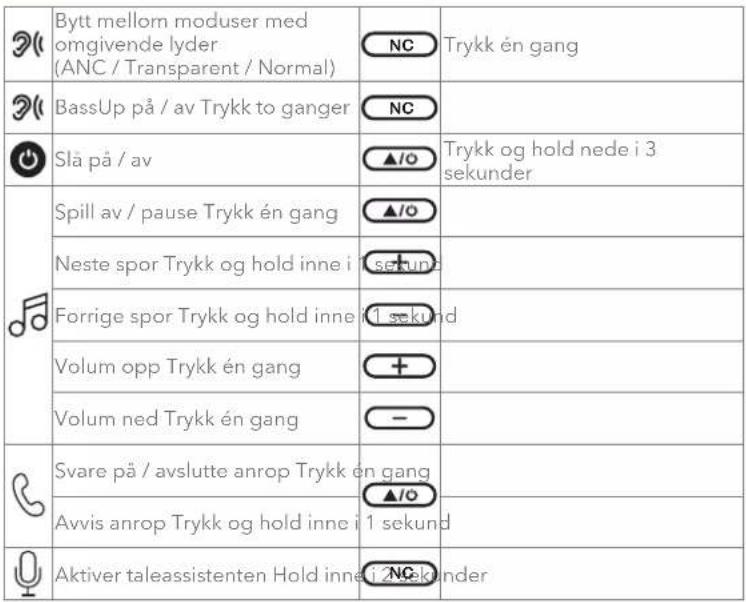
×1: Trykk én gang
×2: Trykk to ganger
2s: Hold inne i 2 sekunder
1s: Trykk og hold inne i 1 sekund

soundcore Q20i - PODPORA - 24

KNAPPEKONTROLLER

soundcore Q20i - KNAPPEKONTROLLER - 1

soundcore Q20i - KNAPPEKONTROLLER - 2

OMGIVELSESLYD

soundcore Q20i - OMGIVELSESLYD - 1

text_image ANC (Default) Transparency Normal
text_image Diagram showing connections between a CD head, audio headphones, and a laptop via 3.5mm cable

Spill lyd på en ekstern enhet ved å koble til en 3,5 mm AUX-kabel. Trådtilkoblet lytting vil automatisk slå av Bluetooth-modusen.

*Når du bruker en AUX-kabel, vil ANC-funksjonen være deaktivert.

soundcore Q20i - OMGIVELSESLYD - 2

RESETTEN

soundcore Q20i - RESETTEN - 1

natural_image Line drawing of a pair of SaaS headphones with earbuds and headband (no text or symbols)
text_image <10% ON — 1s OFF — 1s PAIRING CONNECTED

Blinker rødt

- Fast blätt

- Lyser rødt

- Lys av

text_image Update Firmware What's New Download
flowchart
graph TD
    A["Laptop"] --> B["FAQ"]
    A --> C["Download"]
    A --> D["Email"]
text_image 1 2 ON soundcore Q20i ON PAIRING CONNECTED 1s

Google Play and the Google Play logo are trademarks of Google Inc.

soundcore Q20i - RESETTEN - 2

Apple and the Apple logo are trademarks of Apple Inc.

soundcore Q20i - RESETTEN - 3

text_image QR code with a blue male gender symbol logo in the center
text_image Technical diagram of a S30 headphones with labeled ear and charging cable specifications
text_image ANC (Default) Transparency Normal
text_image Diagram showing connections between a coffee ear and a laptop via 3.5mm cable, with brand logo and cable connector.
natural_image Line drawing of a pair of S&T headphones with earbuds and headband (no text or symbols)
text_image <10% ON — 1s OFF — 1s PAIRING CONNECTED
text_image Update Firmware What's New in this firmware updates you will get the following applications and have done so far as well as? Download
flowchart
graph TD
    A["Laptop"] --> B["FAQ"]
    A --> C["Download"]
    A --> D["Email"]
text_image ON ON soundcore Q20i soundcore Q20i ON PAIRING CONNECTED 1s 3s

Google Play and the Google Play logo are trademarks of Google Inc.

soundcore Q20i - RESETTEN - 4

Apple and the Apple logo are trademarks of Apple Inc.

soundcore Q20i - RESETTEN - 5

text_image QR code with a blue male gender symbol logo in the center
text_image Technical diagram of a S30 headphones with labeled ear and charging cable specifications
text_image ANC (Default) Transparency Normal
text_image Diagram showing connections of two headphones connected to a laptop via 3.5mm cable
natural_image Line drawing of a pair of SaaS headphones with earbuds and headband (no text or symbols)
text_image Update Firmware What's New in 300 firmware updates you will get the following and it is just before you will be downloaded? Download
flowchart
graph TD
    A["Laptop"] --> B["FAQ"]
    A --> C["Download"]
    A --> D["Email"]
text_image ON ON soundcore Q20i soundcore Q20i ON PAIRING CONNECTED 1s 3s

Google Play and the Google Play logo are trademarks of Google Inc.

soundcore Q20i - RESETTEN - 6

Apple and the Apple logo are trademarks of Apple Inc.

soundcore Q20i - RESETTEN - 7

text_image QR code with a blue male gender symbol logo in the center
text_image Technical diagram of a pair of S26 headphones with labeled ear and charging cable specifications
text_image ANC (Default) Transparency Normal
text_image Diagram showing connections between a CD head, audio headphones, and a laptop connected via 3.5mm cable
natural_image Line drawing of a pair of SaaS headphones with earbuds and headband (no text or symbols)
text_image Update Firmware What's New in 300 firmware updates you will get the following and it is just before you will be downloaded? Download
flowchart
graph TD
    A["Laptop"] --> B["FAQ"]
    A --> C["Download"]
text_image ON ON soundcore Q20i soundcore Q20i ON PAIRING CONNECTED 1s 3s

Google Play and the Google Play logo are trademarks of Google Inc.

soundcore Q20i - RESETTEN - 8

text_image QR code with a blue male gender symbol logo in the center

soundcore Q20i - RESETTEN - 9

Apple and the Apple logo are trademarks of Apple Inc.

text_image Technical diagram of a S30 headband ear with labeled components and time-lapse instructions
text_image ANC (Default) Transparency Normal
text_image Diagram showing connections between a CD/DVD headphones, a 3.5mm cable, and a laptop connected via cable to the right.
natural_image Line drawing of a pair of S&T headphones with earbuds and headband (no text or symbols)
text_image <10% ON — 91s OFF — 91s PAIRING CONNECTED

soundcore Q20i - RESETTEN - 10

text_image Update Firmware What's New Download
flowchart
graph TD
    A["Laptop"] --> B["FAQ"]
    A --> C["Download"]
    A --> D["Email"]
text_image ON ON soundcore Q20i soundcore Q20i ON PAIRING CONNECTED 1s 3s

Google Play and the Google Play logo are trademarks of Google Inc.

soundcore Q20i - RESETTEN - 11

Apple and the Apple logo are trademarks of Apple Inc.

soundcore Q20i - RESETTEN - 12

text_image QR code with a blue male gender symbol logo in the center

Stiahnite si aplikáciu soundcore pre prepínanie režimov okolitého zvuku, nastavenie EQ, aktualizáciu firmvéru a objavovanie d'alších funkcií.

text_image Technical diagram of a pair of S26 headphones with labeled ear and charging cable specifications
text_image 1 ×2 2 ON soundcare Q20i PAIRING CONNECTED
text_image ANC (Default) Transparency Normal
text_image Diagram showing connections between a CD head, audio jack, and a laptop via 3.5mm cable
natural_image Line drawing of a pair of SaaS headphones with earbuds and headband (no text or symbols)
text_image Update Firmware What's New in 300 firmware updates you will get the following and it is not to have a new or all of the new items? Download
flowchart
graph TD
    A["Laptop"] --> B["FAQ"]
    A --> C["Download"]
    A --> D["Email"]
text_image ON ON soundcore Q20i soundcore Q20i ON PAIRING CONNECTED 1s 3s

Google Play and the Google Play logo are trademarks of Google Inc.

soundcore Q20i - RESETTEN - 13

Apple and the Apple logo are trademarks of Apple Inc.

soundcore Q20i - RESETTEN - 14

text_image QR code with a blue male gender symbol logo in the center
text_image Technical diagram of a pair of S26 headphones with labeled ear and charging cable specifications
text_image ANC (Default) Transparency Normal
text_image Diagram showing connections between two headphones and a laptop via 3.5mm cable, with a battery icon visible.

Na zunanji napravi predvajajte zvok, tako da priključite 3,5-mm AUX kabel. Žično poslušanje bo samodejno izklopilo način Bluetooth.

natural_image Line drawing of a pair of S&T headphones with earbuds and headband (no text or symbols)
text_image <10% ON — 91s OFF — 91s PAIRING CONNECTED
text_image Update Firmware What's New in 2016 firmware version you will get the following: problems and how issues will be transmitted? Download
flowchart
graph TD
    A["Laptop"] --> B["FAQ"]
    A --> C["Download"]
    A --> D["Email"]

Besök www.soundcore.com/support för mer information.

soundcore Q20i - RESETTEN - 15

ANVÄNDNING

soundcore Q20i - ANVÄNDNING - 1

text_image R L
text_image 1 2 ON soundcore Q20i ON PAIRING CONNECTED 1s
text_image GET IT ON Google Play Google Play and the Google Play logo are trademarks of Google Inc. Download on the App Store Apple and the Apple logo are trademarks of Apple Inc.

soundcore Q20i - ANVÄNDNING - 2

text_image QR code with a blue male gender symbol logo in the center
text_image Technical diagram of a S30 headphones with labeled ear and charging cable specifications
text_image ANC (Default) Transparency Normal
text_image Diagram showing connections between a CD head, audio jack, and a laptop via 3.5mm cable
natural_image Line drawing of a pair of SaaS headphones with earbuds and headband (no text or symbols)
text_image <10% ON — 91s OFF — 91s PAIRING CONNECTED

Blinkar rött

Lyser blätt

- Lyser rött

- Släckt

text_image Update Firmware What's New Download
flowchart
graph TD
    A["Laptop"] --> B["FAQ"]
    A --> C["Download"]
    A --> D["Email"]
text_image 1 2 ON soundcore Q20i ON PAIRING CONNECTED 1s

Google Play and the Google Play logo are trademarks of Google Inc.

soundcore Q20i - ANVÄNDNING - 3

text_image QR code with a blue male gender symbol logo in the center

soundcore Q20i - ANVÄNDNING - 4

Apple and the Apple logo are trademarks of Apple Inc.

text_image Technical diagram of a S30 headband ear with labeled components and time-lapse instructions
text_image ANC (Default) Transparency Normal
text_image Diagram showing connections between a CD/DVD headphones, a laptop, and a cable with 3.5mm cable specification
natural_image Line drawing of a pair of S&T headphones with earbuds and headband (no text or symbols)
text_image <10% ON — 91s OFF — 91s PAIRING CONNECTED

Yanıp sönen kırmızı

- Sabit mavi

text_image Update Firmware What's New in 300 firmware updates you will get the following and it is not to have a new or all of the new items? Download
flowchart
graph TD
    A["Laptop"] --> B["FAQ"]
    A --> C["Download"]
    A --> D["Email"]
text_image ON ON soundcore Q20i soundcore Q20i ON PAIRING CONNECTED 1s 3s

Google Play and the Google Play logo are trademarks of Google Inc.

soundcore Q20i - ANVÄNDNING - 5

Apple and the Apple logo are trademarks of Apple Inc.

soundcore Q20i - ANVÄNDNING - 6

text_image QR code with a blue male gender symbol logo in the center
text_image Technical diagram of a pair of S26 headphones with labeled ear and charging device details
text_image 1 ×2 2 ON soundcare Q20i PAIRING CONNECTED
text_image 6×1s 6×1 6×3s ON/OFF 6×1 6×1s 6×1 6×1s 6×1 6×1 ANC (Default) Transparency Normal 6×2 BassUp ON / OFF 6×2s Voice Assistant

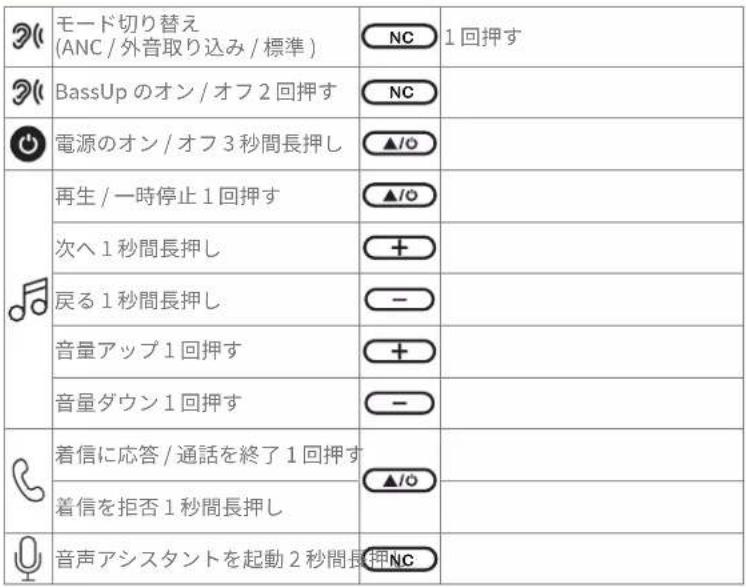
× 1:1 回押す

×2:2回押す

2s: 2 秒間長押し

1s: 1 秒間長押し

soundcore Q20i - ANVÄNDNING - 7

ボタンの操作方法

soundcore Q20i - ボタンの操作方法 - 1

soundcore Q20i - ボタンの操作方法 - 2

ノイズキャンセリング

soundcore Q20i - ノイズキャンセリング - 1

text_image ANC (Default) Transparency Normal ×1
text_image Diagram showing connections between a CD/DVD headphones, a laptop, and a cable with 3.5mm cable specification
natural_image Line drawing of a pair of SaaS headphones with earbuds and headband (no text or symbols)
text_image <10% ON — 91s OFF — 91s PAIRING CONNECTED
text_image Update Firmware What's New in 300 firmware updates you will get the following and it is not to have a new or all of the new items? Download
text_image ON ON soundcore Q20i soundcore Q20i ON PAIRING CONNECTED 1s 3s

Google Play and the Google Play logo are trademarks of Google Inc.

soundcore Q20i - ノイズキャンセリング - 2

Apple and the Apple logo are trademarks of Apple Inc.

soundcore Q20i - ノイズキャンセリング - 3

text_image QR code with a blue circular logo containing a stylized female gender symbol in the center.
text_image Technical diagram of a pair of S26 headphones with labeled ear and charging cable specifications
text_image 1 ×2 2 ON soundcare Q20i PAIRING CONNECTED
text_image ANC (Default) Transparency Normal
text_image Diagram showing connections between a coffee ear and a laptop via 3.5mm cable, with brand logo and cable connector details.
natural_image Line drawing of a pair of S&T headphones with earbuds and headband (no text or symbols)
text_image <10% ON — 91s OFF — 91s PAIRING CONNECTED

빨간색으로 점멸

파란색 유지

•빨간색 유지

• 꺼짐

파란색으로 빠르게 깜박임

soundcore Q20i - ノイズキャンセリング - 4

text_image Firmware Version 1.2 Dual Connection Update Firmware Help & Feedback Quick Start Guide

soundcore Q20i - ノイズキャンセリング - 5

text_image Update Firmware What's New Download
flowchart
graph TD
    A["Laptop"] --> B["FAQ"]
    A --> C["Download"]
    A --> D["Email"]
text_image ON ON soundcore Q20i soundcore Q20i ON PAIRING CONNECTED 1s 3s

Google Play and the Google Play logo are trademarks of Google Inc.

soundcore Q20i - ノイズキャンセリング - 6

Apple and the Apple logo are trademarks of Apple Inc.

soundcore Q20i - ノイズキャンセリング - 7

text_image QR code with a blue male gender symbol logo in the center
text_image Technical diagram of a pair of S26 headphones with labeled ear and charging cable specifications
text_image 1 ×2 2 ON soundcare Q20i PAIRING CONNECTED
text_image ANC (Default) Transparency Normal
text_image Diagram showing connections between a CD/DVD headphones, a laptop, and a cable with 3.5mm cable specification
natural_image Line drawing of a pair of S&T headphones with earbuds and headband (no text or symbols)
text_image <10% ON — 91s OFF — 91s PAIRING CONNECTED

红色闪烁
- 红色常亮
蓝灯快闪

蓝色常亮
- 熄灭

soundcore Q20i - ノイズキャンセリング - 8

text_image Firmware Version 1.2 Dual Connections Update Firmware Help & Feedback Quick Start Guide

soundcore Q20i - ノイズキャンセリング - 9

text_image Update Firmware What's New in 300 firmware updates you will get the following and it is not to have a new or all of the new items? Download
flowchart
graph TD
    A["Laptop"] --> B["FAQ"]
    A --> C["Download"]
    A --> D["Email"]
text_image ON ON soundcore Q20i soundcore Q20i ON PAIRING CONNECTED 1s 3s

Google Play and the Google Play logo are trademarks of Google Inc.

soundcore Q20i - ノイズキャンセリング - 10

Apple and the Apple logo are trademarks of Apple Inc.

soundcore Q20i - ノイズキャンセリング - 11

text_image QR code with a blue male gender symbol logo in the center
text_image Technical diagram of a pair of S26 headphones with labeled ear and charging cable specifications
text_image 1 ×2 2 ON soundcare Q20i PAIRING CONNECTED
text_image 6×1s 6×1 6×3s ON/OFF 6×1 6×1s 6×1 6×1s 6×1 6×1 ANC (Default) Transparency Normal 6×2 BassUp ON / OFF 6×2s Voice Assistant

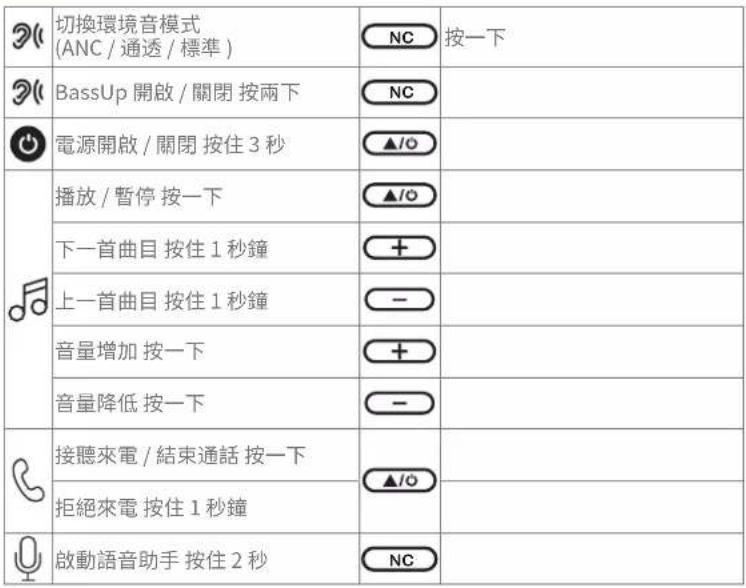
×1: 按一下

×2: 按兩下

2s: 按住約 2 秒

1s: 按住 1 秒钟

soundcore Q20i - ノイズキャンセリング - 12

按鈕控制項

soundcore Q20i - 按鈕控制項 - 1

soundcore Q20i - 按鈕控制項 - 2

環境音

soundcore Q20i - 環境音 - 1

text_image ANC (Default) Transparency Normal
text_image Diagram showing connections between a CD/DVD headphones, a laptop, and a cable with 3.5mm cable connection.
natural_image Line drawing of a pair of SaaS headphones with earbuds and headband (no text or symbols)
text_image <10% ON — 91s OFF — 91s PAIRING CONNECTED
text_image Update Firmware What's New Download
flowchart
graph TD
    A["Laptop"] --> B["FAQ"]
    A --> C["Download"]
    A --> D["Email"]

Google Play and the Google Play logo are trademarks of Google Inc.

soundcore Q20i - 環境音 - 2

text_image QR code with a blue circular logo containing a white male symbol in the center.

soundcore Q20i - 環境音 - 3

Apple and the Apple logo are trademarks of Apple Inc.

text_image Technical diagram of a S26 headphones with labeled ear and ear details, showing charging cable specifications and time intervals.
text_image 1 2 ON soundcore Q20i ON PAIRING CONNECTED 1s
text_image ANC (Default) Transparency Normal
text_image Diagram showing connections between two headphones and a laptop via 3.5mm cable, with a lightning bolt icon indicating the device.
natural_image Line drawing of two SBOO headphones with earbuds and headband (no text or symbols)
text_image <10%> ON — 91s OFF — 91s PAIRING CONNECTED

soundcore Q20i - 環境音 - 4

text_image Firmware Version 1.2 Dual Connection Dual Connections Update Firmware Help & Feedback Quick Start Guide

soundcore Q20i - 環境音 - 5

text_image Update Firmware What's New in this firmware updates you will get the following and continue to drive new items will be installed? Download

soundcore Q20i - 環境音 - 6
Google Play and the Google Play logo are trademarks of Google Inc.

soundcore Q20i - 環境音 - 7

text_image QR code with a blue male gender symbol logo in the center

soundcore Q20i - 環境音 - 8
Apple and the Apple logo are trademarks of Apple Inc.

, soundcore

text_image Technical diagram of a S30 headphones with labeled ear and charging cable specifications

.הכלה USB-Cהכלההוּרָהִיַעֹרְשׁהִיַעֹרְשׁהִיַעֹרְשׁהִיַעֹרְשׁהִיַעֹרְשׁהִיַעֹרְשׁהִיַעֹרְשׁהִיַעֹשׁהִיַעֹשׁהִיַעֹשׁהִיַעֹשׁהִיַעֹשׁהִיַעֹשׁהִיַעֹשׁהִיַעֹשׁהִיַעֹשׁ

תְרָה בַרִים

soundcore Q20i - תְרָה בַרִים - 1

'UT' TIN'Y

soundcore Q20i - 'UT' TIN'Y - 1

soundcore Q20i - 'UT' TIN'Y - 2

text_image ON ON soundcore Q20i soundcore Q20i ON PAIRING CONNECTED 1 3s
text_image ANC (Default) Transparency Normal
text_image Diagram showing connections between a CD/DVD headphones, a laptop, and a cable with 3.5mm cable specification
natural_image Line drawing of two SaaS headphones with earbuds and headband (no text or symbols)
text_image Firmware Version 1.2 Dual Connection Dual Connections Update Firmware Help & Feedback Quick Start Guide

soundcore Q20i - 'UT' TIN'Y - 3

text_image Update Firmware What's New in this firmware updates you will get the following and continue to drive new items will be installed? Download
Manual assistant
Powered by Anthropic
Waiting for your message
Product information

Brand : soundcore

Model : Q20i

Category : Earphones