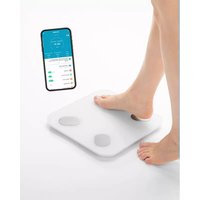
PDS-200C - Scale LANAFORM - Free user manual and instructions
Find the device manual for free PDS-200C LANAFORM in PDF.


| Product type | Connected impedance meter scale |
| Brand | Lanaform |
| Model | PDS-200C |
| Maximum weight | 180 kg (396 lb) |
| Weight graduation | 100 g (0.2 lb) |
| Percentage graduation | 0.1% |
| Calorie graduation | 1 kcal |
| Number of body measurements | 18 (weight, BMI, fat, muscle, water, bone, protein, BMR, etc.) |
| Power | Batteries (non-rechargeable) |
| Connectivity | Bluetooth 4.4+ (iOS ≥10.0, Android ≥5.0) |
| Display | LED screen |
| Platform | Tempered glass with electrodes |
| Application | Lanaform Connect (free, App Store and Google Play) |
| Measurement principle | Bioelectrical impedance analysis (B.I.A.) |
| Safety | Do not use with implants, during pregnancy, wet feet; keep batteries out of reach |
| Maintenance | Damp cloth, no solvents, do not immerse |
| Warranty | 2 years |
| Box contents | Scale, instruction manual |
Frequently Asked Questions - PDS-200C LANAFORM
User questions about PDS-200C LANAFORM
0 question about this device. Answer the ones you know or ask your own.
Ask a new question about this device
Download the instructions for your Scale in PDF format for free! Find your manual PDS-200C - LANAFORM and take your electronic device back in hand. On this page are published all the documents necessary for the use of your device. PDS-200C by LANAFORM.
USER MANUAL PDS-200C LANAFORM
EN ENGLISH SMART CONNECTED SCALE
FR FRANÇAIS BALANCE CONNECTÉE INTELLIGENTE
NL NEDERLANDS SMART-WEEGSCHAAL
DE DEUTSCH INTELLIGENTE VERNETZTE WAAGE
PL POLSKI INTELIGENTNA WAGA POŁĄCZONA
↓ Lanaform Connect

Download on the App Store

GET IT ON
Google Play

![graph LR A["3 Footprint"] --> B["68.9 kg"] B --> C["0000 kg"] C --> D["0000 kg"] D --> E["68.9 kg"] E --> F["Packet"]](/content/2026/04/663364/images/42dd135d8d1ee158ef33fa759f1223bdc3a247a847df59e6059e6654142238f0.jpg)


The photographs and other images of the product in this manual and on the packaging are as accurate as possible, but do not claim to be a perfect reproduction of the product.
Contents of the packaging
• 1 connected PDS-200C scale
• 1 instruction manual
Caution statement
⚠️ Please read all the instructions before using your product, in particular these few basic safety instructions.
The device is only intended to weigh people and record your personal health data. It cannot be used for professional purposes. The warranty will become null and void in the event of incorrect use. This appliance can be used by children aged 8 years and over and by persons with reduced physical, sensory or mental capacities, or lack of experience and knowledge, providing they are supervised or have been instructed on the safe use of the device and understand the risks involved. Children must not be allowed to play with the device. Cleaning and maintenance by the user must not be performed by children without supervision. Make sure that children and minors do not play with or use the device. Use this device only for the purposes for which it was designed and according to the instructions provided in this instructions manual. Any inappropriate use may be dangerous. The manufacturer cannot be held responsible for damage caused by inappropriate or improper use.
⚠ Warning
Read these notes carefully! Failure to follow the following instructions may result in physical injury or material damage. Keep the packaging out of the reach of children. They could suffocate. Do not use accessories that are not recommended by LANAFORM or that are not supplied with this device.
⚠ Warning
The scales should not be used by people with medical implants (for example, a pacemaker), as it could affect how they function. Do not use during pregnancy. Do not stand on the outer
edge of the scales: Tipping hazard! The batteries are extremely dangerous if swallowed. Keep the batteries and scales out of reach of young children. If a battery is swallowed, seek medical advice immediately! Keep the packaging out of the reach of children (risk of suffocating). Make sure you do not get on the scales with wet feet and do not place the feet on the weighing plate if it is wet - Risk of slipping!
Battery notes ⚠️
If the liquid of the battery cell comes into contact with the skin or eyes, rinse the area affected with water and consult a doctor.
Risk of swallowing! ⚠
Young children could swallow the batteries and choke. Please keep the batteries out of the reach of young children! Observe the plus (+) and minus (-) polarity signs. If a battery has leaked, put on protective gloves and clean the battery compartment with a dry cloth. Keep the batteries away from excessive heat.
Risk of explosion!
Do not throw batteries onto the fire. Do not attempt to recharge the batteries. If the device is not being used for a prolonged period of time, remove the batteries from the battery compartment. Use only identical or equivalent batteries. Always replace all batteries at the same time. Do not use a battery! Do not disassemble, open or break the batteries. If the device is to be stored for an extended period of time, the batteries should be removed.
Additional notes ⚠
The device is intended for personal use only and not for medical or commercial purposes. Note that technical measurement tolerances are possible because they are not calibrated scales intended for professional or medical use. If the measurement results are different (between the scales and the app), use only the values displayed on the scales. The maximum range of the scales is 180 kg max. (396 lb). The results for weight and bone mass estimation are displayed in 100 g (0.2 lb) measurements. The results of measuring
the body fat, body water and muscle proportions are displayed in 0.1% measurements. Calorie requirements are given in 1 kcal measurements. On delivery of the scales, the unit setting is in "cm" and "kg". When using, you can change the unit settings using the app. Place the scales on a flat and stable surface; a stable support is a prerequisite for a correct measurement. Protect the device from being knocked, humidity, dust, chemical products, high temperature variations and sources of heat that are too close (oven, radiator). Only the Lanaform customer services department or an authorised operator may carry out any repairs. However, before making any complaints, please check the condition of the batteries and replace them if necessary.
Storage and maintenance ⚠
The accuracy of the measurement values and the service life of the device depend on careful handling:
- Clean the device from time to time. Do not use aggressive cleaning agents
and never put the device under water.
- Make sure that no liquid enters the inside of the scales. Never submerge the scales. Never rinse them under running water.
- No objects should be placed on the plate when the scales are not being used.
- Protect the device from being knocked, humidity, dust, chemical products, high temperature variations and sources of heat that are too close (oven, radiator).
- Do not expose your scales to high temperatures or strong electromagnetic fields (such as mobile phones for example).
Presentation
Thank you for purchasing the PDS-200C diagnostic scales. These scales are the ideal companion if you want to keep an eye on your health data.
Whether your goal is to lose weight, tone up or monitor your physical condition, the PDS-200C connected scales can cater to all your needs. In addition to telling you your weight, it provides 17 body measurements, such as BMI, fat mass and muscle mass, to help you better understand your body. Discover these smart digital scales with an easy-to-use connected app.
The measuring principle
These scales work according to the B.I.A. (Bioelectrical Impedance Analysis) principle. For this purpose, an imperceptible current, which is absolutely safe and risk-free, enables you to find out body tissue levels in seconds. Electrical resistance measurements (impedance), as well as taking into account constants or individual data (age, height, sex, physical activity), are used to define the levels of body fat and other physical parameters. Muscle tissue and water have good electrical conductivity and therefore have low resistance. On the other hand, bone and adipose tissue have a low conductivity, as the bones and fat cells are very poor conductors due to their very high resistance. Note that the values determined by the diagnostic scales represent only approximations compared with actual medical physical analysis. Only a specialist equipped with medical equipment (for example, a CT scanner) is able to accurately determine body fat, body water, muscle mass and bone mass.
General advice
Weigh yourself, if possible, at the same time (preferably in the morning), after going to the toilet, before eating, and without clothes, to obtain comparable results.
Important when measuring: Body fat determination must always be made with bare feet; if necessary, it can be carried out with the soles of the feet slightly damp. Measurements taken with completely dry feet may not lead to satisfactory results, as their conductivity is too low. Note: there should be no skin contact between feet, legs, calves and thighs. Otherwise, the measurement may not be performed correctly.
Hold straight and do not move during the measurement.
Wait a few hours after unusual physical exertion. After getting up, wait about 15 minutes before taking the measurement so that water can be distributed through the body.
Note that only long-term trends count. Short-term weight fluctuations recorded within a few days of each other are only due to fluid loss in most cases; body water plays an important role in well-being. Limitations The determination of body fat and other data may present implausible deviations and results in the following cases:
• children under 10 years old,
• top-level athletes and body-builders,
- people who have a fever, are on dialysis, who have symptoms of oedema or osteoporosis,
• people on cardiovascular (heart and vascular system) medical treatment,
• people taking vasodilators or vasoconstrictors,
- people with serious anatomical differences in the legs in relation to their size (significantly short or long legs)
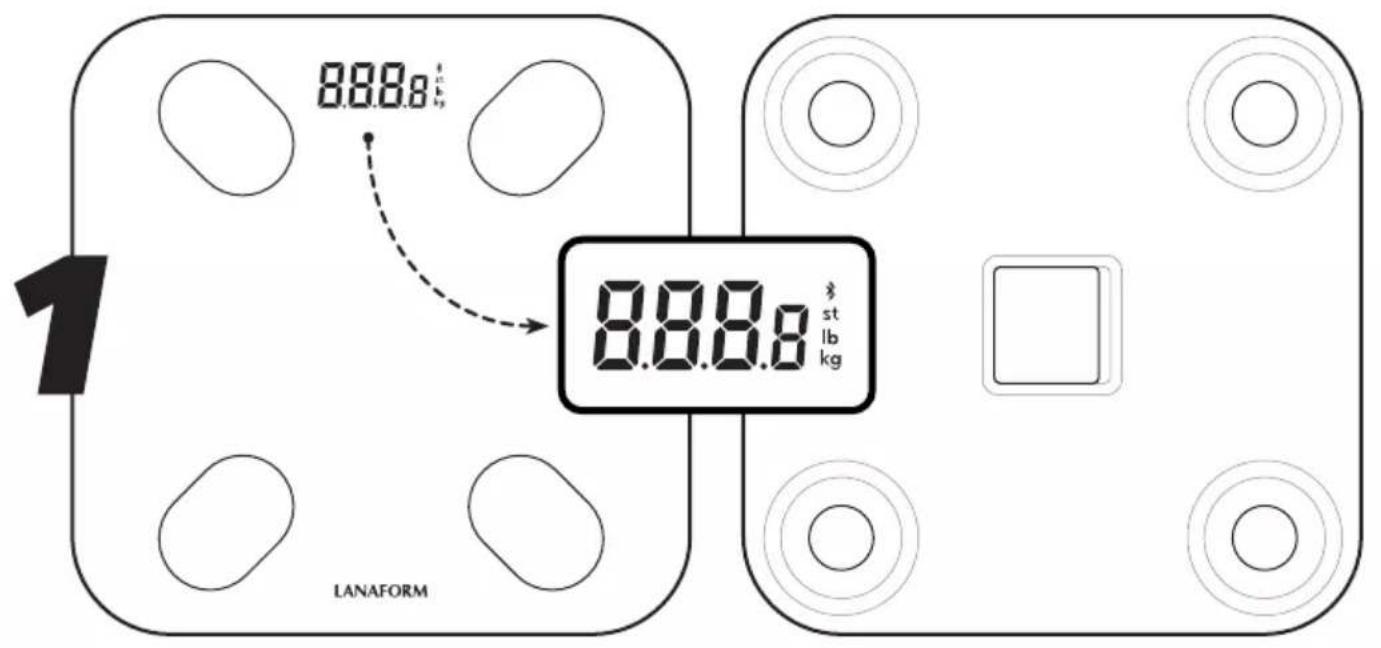
Description of the device ☑ 1
Reverse side
01 Battery compartment
02 Pressure sensors
03 Button reset/change of unit of measurement
Screen
04 Bluetooth® symbol for connection between the scales and a smartphone
05 Measured values
Using the scales ☒2
Lanaform Connect app
You can connect the PDS-200C diagnostic scales to your smartphone via Bluetooth. To do this, you only need to download the free
Lanaform Connect app from the App Store (IOS) or Google Play (Android™).
The Lanaform Connect app offers the following measurements:
• Body weight measurement,
• Body Mass Index (BMI),
• Fat levels measurement (%),
- Muscle mass measurement,
- Visceral fat index measurement,
• Body water levels measurement,
- Bone mass measurement,
- Protein levels,
• Baseline Metabolic Rate (BMR) measurement,
- Fat mass measurement,
• Body fat index measurement,
• Measurement of obesity level,
- Ideal weight measurement,
- Weight control,
• Weight without fat measurement,
• Metabolic age measurement,
• Body appearance measurement,
- Indication of the fitness score
System requirements: iOS ≥10.0, Android™ ≥5.0, Bluetooth® ≥4.4
To connect the PDS-200C scales to the Lana-form Connect application, proceed as follows:
- Make sure that the Bluetooth function is enabled on your smartphone and that the app can access its position.
- Download the free "Lanaform Connect" app from the App Store (iOS) or from Google Play (Android™).
- Launch the Lanaform Connect app and follow the instructions.
- Register by entering your user information by following the instructions on the app.
-
Once saved, click "Add" or press the + button at the top of the screen. Follow the on-screen instructions to connect the diagnostic scales to the application.
-
Then select the unit of measurement (kg, lb or st), height (cm or inches) as well as your personal data (sex, date of birth, height and desired weight).
- To add a user to your application, simply click on the user profile icon at the bottom of your home screen and then on the user management menu. You can then add one or more users of your choice.
- Other users can also use the same scales from their smartphone by downloading and using the Lanaform Connect app
Weight measurement without the app
You can weigh yourself without using the "Lanaform Connect" app, only the weight will be displayed. Stand on the scales and stay straight until the weight reading is displayed and locked on the LED screen. The associated data is not sent to your app on your mobile phone. The scales turn off automatically after 6 seconds if not in use.
Note: The scales switch on when a weight of 5 kg or more is placed on them.
Note: If you want to change the unit of measurement, simply press the "reset" button on the battery compartment to select the desired unit of measurement.
Data measurement with the Lanaform Connect app 📋
Stand on the scales with bare feet and stand still, spreading your weight, with both feet placed on the electrodes.
Note: If the measurement is performed with socks on, the result will not be correct.
The scales only display your weight. The weight measurement will then flash and then the screen will show 000o until the scales stop analysing your body measurements. When the scales
show your weight again, you can then retrieve all your body composition results from the app.
You can check your record history in the "records" menu. Note that the app contains only 100 data elements from over the past year.
Evaluation of the results
Using the intuitive "Lanaform Connect" app, you can analyse and interpret the results of each of the 18 measurements. It is also possible for you to monitor the progress of the various parameters over time, using the app.
Depending on your mobile phone, you can synchronise your data with Google Fit, Fitbit and Apple Health.
Reset function 24
If the scales and the app cannot be paired, reset the scales. To do so, hold down the "reset" button on the battery compartment for several seconds. Once the symbol appears on the screen, the procedure is complete. You can then reconnect your smartphone to the scales.
Cleaning and maintenance of the device
Clean the device from time to time. To clean, use a damp cloth with a little bit of washing up liquid if necessary.
Caution
- Do not use solvents or aggressive detergents!
• Never submerge the device! - Do not wash the device in a dishwasher!
Should you not use the connected scales for a long time, remove the batteries before storage.
What should you do if there are any problems? ☑5
| No display The batteries are | probably empty | Insert new batteries |
| The Bluetooth icon is flashing There is no Bluetooth connection | Check that your smartphone's Bluetooth function is enabled | |
| The scales display is showing the message "Lo" | The batteries are empty Insert new batteries | |
| The scales display is showing the message "Err" | The maximum weight allowed by the scales has been exceeded | Respect the maximum weight of the scales (180 kgs) |
| The scales display shows the message "Err1" | The measurement took place with shoes or socks on | Weigh yourself with bare feet |
| The percentage of body fat is less than 5% or greater than 50% | Check the results in the app | |
| Measurement failed Weigh yourself again, following the corresponding instructions | ||
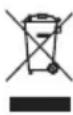
Adviceregarding the disposal of waste
All the packaging is composed of materials that pose no hazard for the environment and which can be disposed of at your local sorting centre to be used as secondary raw materials. The cardboard may be disposed of in a paper recycling bin. The packaging film must be taken to your local sorting and recycling centre.
When you have finished using the device, please dispose of it in an environmentally friendly way and in accordance with the law.
Prior to disposal, please remove the battery and dispose of it at a collection point so that it can be recycled.
Under no circumstances should spent batteries be disposed of with household waste.
Limited warranty
LANAFORM guarantees this product against any material or manufacturing defect for a period of two years from the date of purchase, except in the circumstances described below.
The LANAFORM guarantee does not cover damage caused as a result of normal wear to this product. In addition, the guarantee covering this LANAFORM product does not cover damage caused by abusive or inappropriate or incorrect use, accidents, the use of unauthorized accessories, changes made to the product or any other circumstance, of whatever sort, that is outside LANAFORM's control.
LANAFORM may not be held liable for any type of circumstantial, indirect or specific damage.
All implicit guarantees relating to the suitability of the product are limited to a period of two years from the initial date of purchase as long as a copy of the proof of purchase can be supplied.
On receipt, LANAFORM will repair or replace your appliance at its discretion and will return it to you. The guarantee is only valid through LANAFORM's Service Centre. Any attempt to maintain this product by a person other than LANAFORM's Service Centre will render this guarantee void.
FRANÇAIS
FR
LANAFORM
PDS-200C
LA090307 / LOT 001
Manufacturer & Importer
Lanaform SA
Postal Address



- CONTENTS OF THE PACKAGING
- CAUTION STATEMENT
- ⚠ WARNING
- BATTERY NOTES ⚠️
- RISK OF SWALLOWING! ⚠
- RISK OF EXPLOSION
- ADDITIONAL NOTES ⚠
- STORAGE AND MAINTENANCE ⚠
- PRESENTATION
- THE MEASURING PRINCIPLE
- GENERAL ADVICE
- DESCRIPTION OF THE DEVICE ☑ 1
- REVERSE SIDE
- SCREEN
- USING THE SCALES ☒2
- LANAFORM CONNECT APP
- WEIGHT MEASUREMENT WITHOUT THE APP
- DATA MEASUREMENT WITH THE LANAFORM CONNECT APP 📋
- EVALUATION OF THE RESULTS
- RESET FUNCTION 24
- CLEANING AND MAINTENANCE OF THE DEVICE
- CAUTION
- ADVICEREGARDING THE DISPOSAL OF WASTE
- LIMITED WARRANTY
- FRANÇAIS
- FR
- LANAFORM
- MANUFACTURER & IMPORTER
- POSTAL ADDRESS
Brand : LANAFORM
Model : PDS-200C
Category : Scale