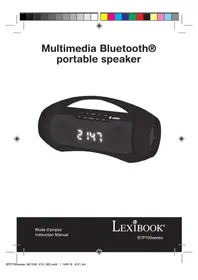
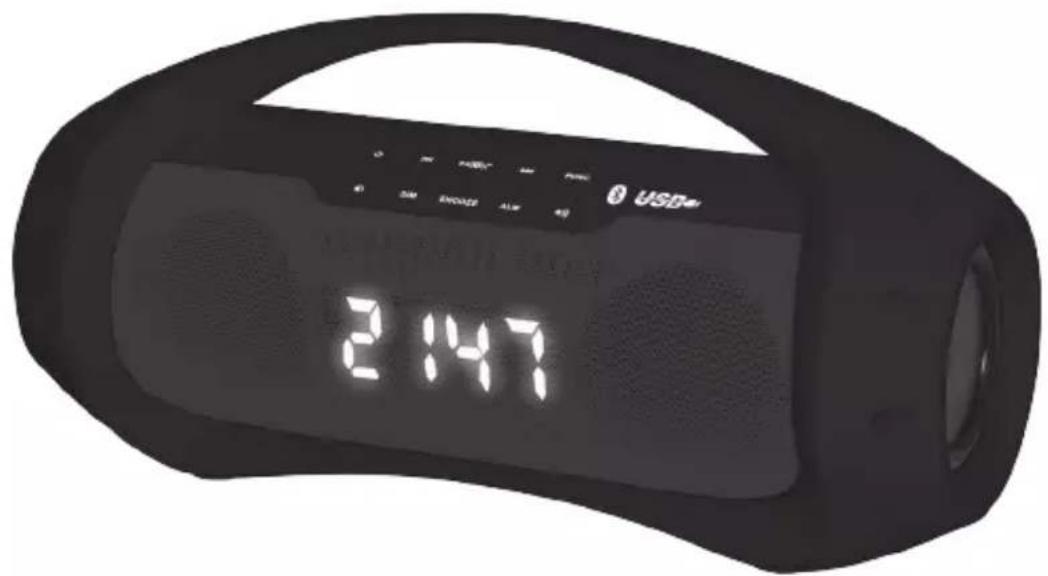
BTP100SL - Bluetooth speaker LEXIBOOK - Free user manual and instructions
Find the device manual for free BTP100SL LEXIBOOK in PDF.


| Product type | Portable Bluetooth speaker with radio alarm clock |
| Brand | Lexibook |
| Model | BTP100SL |
| Dimensions | 310 x 124 x 155 mm |
| Weight | 1.1 kg |
| Power supply | Lithium-ion battery 7.4 V 2000 mAh; DC 10 V 1.2 A mains adapter (included) |
| Speaker power | 2 x 5 W |
| Connectivity | Bluetooth 5.0 (A2DP), USB, AUX 3.5 mm input, headphone jack |
| Bluetooth range | Up to 10 meters |
| Main functions | Bluetooth, USB and AUX playback; hands-free kit; alarm clock with alarm; snooze; screen brightness adjustment |
| Display | LED screen with clock (12/24 h) and indicators (PM, alarm, charge) |
| Hands-free | Built-in microphone for phone calls |
| Battery charging | Red light when charging, green when fully charged |
| Maintenance and cleaning | Unplug before cleaning; use a soft, dry cloth |
| Safety | Do not expose to water or excessive heat; do not block ventilation; max operating temperature 40 °C |
| Spare parts and repairability | No user-serviceable parts; contact after-sales service |
| Warranty | 2 years |
| General information | Designed and developed in Europe, made in China |
Frequently Asked Questions - BTP100SL LEXIBOOK
User questions about BTP100SL LEXIBOOK
0 question about this device. Answer the ones you know or ask your own.
Ask a new question about this device
Download the instructions for your Bluetooth speaker in PDF format for free! Find your manual BTP100SL - LEXIBOOK and take your electronic device back in hand. On this page are published all the documents necessary for the use of your device. BTP100SL by LEXIBOOK.
USER MANUAL BTP100SL LEXIBOOK
natural_image
Color bar with grayscale gradient and a central crosshair symbol (no text or labels)Multimedia Bluetooth® portable speaker
EMPLACEMENT DES TOUCHES
© 2016 Bluetooth SIG, Inc.
DÉCLARATION DE CONFORMITÉ
Nous, Lexibook® S.A.
Before using the unit, be sure to read all operating instructions carefully. Please note that these are general precautions and may not pertain to your unit.
- Read this Instruction Manual before you attempt to connect or operate the appliance.
- Keep these instructions in good condition. Heed all warnings. Follow all instructions.
- Save this Instruction Manual for future reference.
- The apparatus shall not be exposed to dripping or splashing and no objects filled with liquids, such as vases, shall be placed on the product. Dry location use only.
-
No naked flame source, such as candles, should be placed on the product.
-
Children should be supervised to ensure that they do not play with the appliance.
-
Ventilation should not be impeded by covering the ventilation openings.
-
Only use accessories, which are specified by the manufacturer.
-
Use replacement parts, which are specified by the manufacturer.
-
Install the unit in accordance with the manufacturer's instructions.
-
Place the unit where there is good ventilation. Place the system on a flat, hard and stable surface. Do not expose to temperatures above 40^ C. Allow at least 10 cm clearance from the rear and the top of the unit and 5 cm from each side.
-
Press the player's buttons gently. Pressing them too hard can damage the player.
-
Dispose of used batteries in an environmental-responsible manner.
-
Always ensure that the product is unplugged from the electrical outlet before moving or cleaning. Clean it with dry cloth only.
-
Turn off the product during lightning, storms or when it will not be used for long periods of time.
-
This product has no user-serviceable parts. Do not attempt to repair this product yourself. Only qualified service personnel should perform servicing. Take the product to the electronics repair shop of your choice for inspection and repair.
-
NEVER let anyone, especially children, push anything into holes, slots or any other openings in the unit's casing as this could result in a fatal electric shock.
-
Don't mount this product on a wall or ceiling.
-
Do not place the unit near TVs, speakers and other objects that generate strong magnetic fields.
-
Do not leave the unit unattended when it is in use.
UNPACKING THE DEVICE
When unpacking, ensure that the following elements are included:
1 x Multimedia Bluetooth® portable speaker
1 x DC adaptor
WARNING : All packaging materials, such as tape, plastic sheets, wire ties and tags are not part of this product and should be discarded.
CHARGING THE DEVICE
The Multimedia Bluetooth® portable speaker works with a built-in 7.4V 2000mAh Lithium-ion battery. It can be recharged via a DC 10V, 1.2A adaptor (included). Input: 100-240V\~50/60 Hz.
ENGLISH
- To charge your device, insert one end of the adaptor into the DC jack (12) and plug the other end to a socket. Once plugged in, the battery indicator lights up in red.
- After the battery is fully charged, the indicator turns green. You can disconnect the adaptor.
WARNING:
- Risk of explosion if battery is incorrectly replaced. Please only replace it with an identical or a similar battery.
- The battery should not be exposed to high temperatures, such as sunlight, fire or anything similar.
- Significant electromagnetic interference or electrostatic discharges may cause the device to malfunction or lose data.


LOCATION OF CONTROLS
Top panel
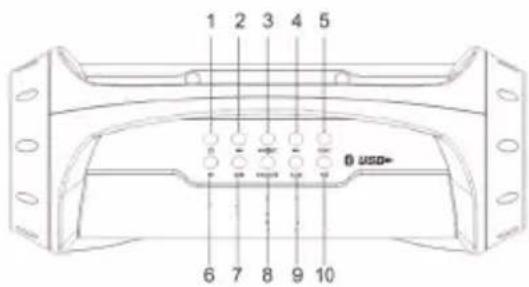
- Power button
- Previous/Fast backward button
- Play/Pause/Pair/Answer button
- Next/Fast forward button
- Function button
- Volume down button
- Dimmer button
- Snooze button
- Alarm button
- Volume up button
Back panel
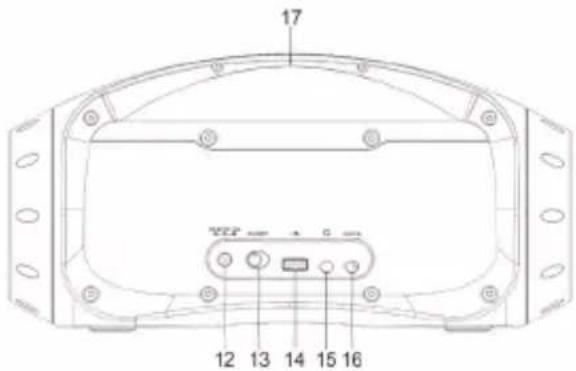
- DC in port
- ON/OFF button
- USB port
- Headphone jack
- Aux in jack
- Handle

Front panel
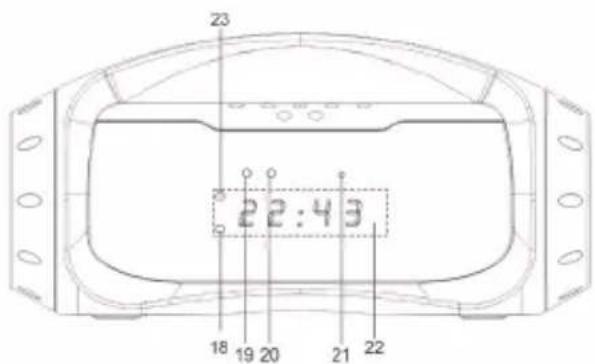
- Alarm indicator
- Charging indicator
- Bluetooth indicator
- Built-in microphone
- Display screen
- PM indicator
TURNING THE UNIT ON AND OFF
First make sure the device is connected to power via the DC adaptor or that the battery is fully charged if the adaptor is disconnected from the device.
- To turn on the unit, slide the ON/OFF button (13) located at the rear of the Bluetooth® speaker to "ON" position. The time will show on the display.
- To unable the speaker functions, press the power button (1) on the top panel.
- To switch it off, slide the ON/OFF button to "OFF" position.
WARNING : Significant electromagnetic interference or electrostatic discharges may cause the device to malfunction or lose data. If the device is not functioning correctly, switch it off and then on again, or unplug the adaptor.
SPEAKER FUNCTIONS
TIME SETTING
Before the setting ensure the time will show on the display; otherwise press the power button.
- Turn on the device, press and hold the button ▶■|⊗|↗ (3) to enable you to change the time setting.
- Press previous or next button to select the time format (12H or 24H), then press ▶ to confirm.
- The hour will flash on the display screen, press previous or next button to set the hour, then press ▶ to confirm.
- After setting the hour, the minute will flash on the display screen. Press previous or next button to set the minutes and press ▶▶▶▶▶▶ to confirm and exit the time setting mode.
Note: In the 12H system, the PM indicator (23) lights up at noon to indicate the time displayed is in the afternoon. And it turns off at midnight.
If you do not press any key during 4 seconds, the device will automatically exit the time and alarm setting mode and display the clock on the screen.
ALARM SETTING
- Press and hold the ALM button (9) to enter the alarm setting mode.
- Press previous or next button to choose the desired alarm mode: BUZZ or USb, then press ALM button to confirm the mode.
- The hour will flash, press previous or next button to set the hour then press ALM button to confirm.
- After setting the hour, the minute will flash on the display screen. Press previous or next button to set the minutes and press ALM button to confirm.
- Once the alarm is set, the alarm indicator on the left corner of the display will light up.
- When the buzzer rings, press ALM or the power button to stop. And when the music from the USB plays, press the power button to stop.
- To cancel the alarm, press and hold the ALM button, then press previous or next button to select "OFF" and confirm by pressing ALM button.
SNOOZE FUNCTION
When the alarm rings, press the SNOOZE button (8) to reset the alarm. Once the snooze function is activated the alarm indicator will flash. And the alarm will sound again after 9 minutes.
DIMMER FUNCTION
You can adjust the display brightness by pressing the DIM button (7) for high brightness or low brightness.
ADJUSTING THE VOLUME
Press the volume up (10) or volume down button (6) to increase or decrease the volume.
CAUTION : Too high volume, especially when using headphones, can damage your hearing. For this reason, please turn the volume down.
USB MODE
When turning on the Bluetooth® speaker, the clock shows up in the screen by default. To activate USB, Aux-in and Bluetooth® functions when the clock is on screen, press the power button.
- Once the device is on, first press the power button and then press the FUNC button (5) repeatedly until "USb" appears.
- Insert the USB into the USB port (14) on the back of the unit. The playback will start from track 1 once the unit detects the USB. The display will show the playing time.
- Press button ▶■■■ to pause playback, the display screen will flash. Then press again to resume.
- Press previous and next buttons during pause or playback to go back to the previous track or listen to the next track.
Press and hold previous or next button to scan the playing track at high speed until a desired point. The music will play from the chosen passage.
- To stop the USB function, press the power button.
Note: In USB mode, the device takes approximately 4 seconds to detect the USB drive in the USB port. If no USB drive is detected, "No" appears on the display. During detection time, the FUNC button is deactivated. Therefore you will need to wait until the end of the detection time to switch to another mode.
AUX-IN MODE
-
Once the device is on, first press the power button and then press the FUNC button repeatedly until "AUX" appears. 2. Insert one end of the 3.5mm audio cable (not included) into the Aux-in jack (16) and the other end to the jack of your external audio player.
-
Adjust the volume of the main unit to your desired level.
- Press PLAY on your audio player to start playback.
- To stop the Aux-in function, press the power button.
Note : To get the best control experience of the music, use the on-screen track controls of your music player for pausing, selecting next or previous track.
BLUETOOTH® SET UP
The Bluetooth® word mark and logos are registered trademarks owned by Bluetooth SIG, Inc. and any use of such marks by Lexibook® is under license. Other trademarks and trade names are those of their respective owners.
© 2016 Bluetooth SIG, Inc.
Your audio player must support the A2DP Bluetooth® profile to match this Bluetooth® speaker. Please refer to your audio player's instruction manual for accurate information about the Bluetooth® profiles it supports, and how to set up Bluetooth® pairing.
ENSOLIDH
Initial Pairing
- Once the device is on, first press the power button and then press FUNC button and select "Bt" mode, a signal tone will sound and the blue indicator of the Bluetooth® will flash to indicate that Bluetooth® mode is effective.
- Activate the Bluetooth® function on your personal device and make sure it is in discoverable mode.
- Confirm pairing or select the Bluetooth® name "BTP100" to connect your player to the speaker.
- If pairing is successful, the Bluetooth® light will stop flashing and glow steadily. You can play an audio or a video file. Adjust the sound volume level using the keys on your personal device or the volume buttons of the speaker.
- To stop the connection with the speaker, press FUNC or power button or a button on your audio player. Once the connection has been stopped, the LED indicator will flash.
Note: Some music players do not fully support Bluetooth® audio controls. Play/pause, previous and next buttons on the Bluetooth® speaker may not respond.
The music player may also turn off. To get the best control experience in the said player, use the on-screen track controls of your music player rather than those on the speaker.
Re-pairing
When the Bluetooth® mode of the Bluetooth® speaker or your device has been switched off:
- Switch on the Bluetooth® of your audio player and press FUNC button to select Bluetooth® mode.
- The speaker automatically finds the last device it was paired with.
Notes :
- The Bluetooth ^ speaker only connects to one device at a time.
- Make sure the effective distance between the Bluetooth® device and the speaker is within 10m.
- Interference may occur during playback when using the Bluetooth® function near other wireless devices. If playback through Bluetooth® is problematic, move the Bluetooth® speaker and the playback device to a different location, or use the 3.5mm AUX IN jack instead of the Bluetooth® function.
HANDS-FREE MODE
Enjoy receiving hands-free calls when your mobile phone is paired with the speaker.
- When you have an incoming call the Bluetooth® speaker will start ringing. Press the button ▶■|⊗|< to answer the phone, a signal tone will sound and the conversation will be amplified through the unit speakers.
- You can adjust the volume by pressing volume up and down buttons. Speak in the speaker via the built-in microphone (21).
- Press ▶ to end the call, a signal tone will sound to indicate the call has been terminated.
TROUBLESHOOTING GUIDE
| SYMPTOM | SOLUTION |
| The Bluetooth® device and speaker are not pairing | Ensure the Bluetooth® speaker is connected to power or charged and power switch is on. |
| Ensure the Bluetooth® function on both audio player and speaker are activated. | |
| Pairing lost | Ensure that the Bluetooth® feature on the device has not been deactivated. It may be necessary to repeat the pairing steps again. |
| Ensure the device is within 10 meters (32 feet) of the Bluetooth® speaker. | |
| Ensure there are no obstacles. | |
| Sound distortion | Make sure the sound volume is not too high. Press the volume down button to reduce the volume. |
| No sound | Ensure the volume is not too low. |
| Ensure the song is playing. | |
| Ensure the Bluetooth® device is correctly paired. |
SPECIFICATIONS
General
AC/DC Adaptor Input AC: 100-240V\~50/60 Hz,
Output: 10V 1.2A

Audio 3.5mm stereo jack
Speakers 5W x 2
Effective distance Up to 10m
Support A2DP
Dimensions 310 x 124 x 155 mm
Weight 1.1 kg
Battery Lithium battery 7.4V, 2000mAh

CONFORMITY DECLARATION
We, Lexibook® S.A.
Declare under our sole responsibility that the following product:

Kind of product: Multimedia Bluetooth® portable speaker
Type designation: BTP100series

Is in compliance with the following standards:
EN 55013:2013
EN 55020:2007+A11:2011
EN 61000-3-2:2014
EN 61000-3-3:2013
EN 301 489-1 V1.9.2
EN 301 489-17 V2.2.1
EN 300 328 V1.9.1
EN 62479:2010
EN 60065:2014
We hereby declare that the above mentioned product is in compliance with the R&TTE Directive (RED 2014/53/EU) of the European Commission.

Yiu Wai Man
Product Development Manager
30/06/2016 (Hong Kong)
C€1797

MAINTENANCE
To prevent fire or shock hazard, disconnect your unit from the power source when cleaning. The finish on your unit may be cleaned with a dust cloth and cared for as other furniture. Use a soft, clean cloth moistened with plain, lukewarm water to clean the exterior of the unit. Use caution when cleaning and wiping the plastic parts. Mild soap and a damp cloth may be used on the front panel.
WARRANTY
This product is covered by our 2-years warranty.
For any claim under the warranty or after sale service, please contact your distributor and present a valid proof of purchase. Our warranty covers any manufacturing material and workmanship defect, with the exception of any deterioration arising from the non-observance of the instruction manual or from any careless action implemented on this item (such as dismantling, exposition to heat and humidity, etc.). It is recommended to keep the packaging for any further reference.
In a bid to keep improving our services, we could implement modification on the colours and the details of the product shown on the packaging.
NOTE: Please keep this instruction manual, it contains important information.

Reference: BTP100series
Designed and developed in Europe – Made in China

© LEXIBOOK®
United Kingdom & Ireland
For after-sales service, please contact our teams: 0808 1003015
www.lexibook.com

This product is not a toy.
Environmental Protection
Unwanted electrical appliances can be recycled and should not be discarded along with regular household waste! Please actively support the conservation of resources and help protect the environment by returning this appliance to a collection centre (if available).
natural_image
Color palette bar with grayscale shades and a central crosshair symbol (no text or labels)© 2016 Bluetooth SIG, Inc.
30/06/2016 (Hong Kong)
C€1797

MANTENIMIENTO
© 2016 Bluetooth SIG, Inc.
30/06/2016 (Hong Kong)
C€1797

MANUTENZIONE
© 2016 Bluetooth SIG, Inc.
© 2016 Bluetooth SIG, Inc.
Type benaming: BTP100series

30/06/2016 (Hong Kong)
C€1797

NEDELANDS
ONDERHOUD
IM Code: BTP100seriesIM1236

- Multimedia Bluetooth® portable speaker
- EMPLACEMENT DES TOUCHES
- DÉCLARATION DE CONFORMITÉ
- UNPACKING THE DEVICE
- CHARGING THE DEVICE
- ENGLISH
- WARNING:
- LOCATION OF CONTROLS
- Top panel
- Back panel
- Front panel
- TURNING THE UNIT ON AND OFF
- SPEAKER FUNCTIONS
- TIME SETTING
- ALARM SETTING
- SNOOZE FUNCTION
- DIMMER FUNCTION
- ADJUSTING THE VOLUME
- USB MODE
- AUX-IN MODE
- BLUETOOTH® SET UP
- ENSOLIDH
- Initial Pairing
- Re-pairing
- Notes :
- HANDS-FREE MODE
- SPECIFICATIONS
- General
- CONFORMITY DECLARATION
- MAINTENANCE
- WARRANTY
- Environmental Protection
- MANTENIMIENTO
- MANUTENZIONE
- NEDELANDS
- ONDERHOUD
Brand : LEXIBOOK
Model : BTP100SL
Category : Bluetooth speaker