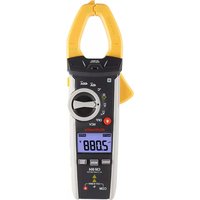
CM604 - Measuring equipment MULTIMETRIX - Free user manual and instructions
Find the device manual for free CM604 MULTIMETRIX in PDF.


| Product type | Digital clamp meter |
| Dimensions | 154 x 74 x 43 mm |
| Weight | Approximately 210 g (without batteries) |
| Power supply | 3 AAA 1.5 V batteries |
| Main functions | AC/DC voltage, AC current, resistance, capacitance, frequency, temperature, diode test, continuity, non-contact AC voltage detection, flashlight |
| Maintenance and cleaning | Clean with a slightly damp cloth; do not use chemicals, solvents, or detergents |
| Safety | Measurement category III, 600 V; double insulation; compliant with IEC/EN 61010 |
| Spare parts and repairability | AAA batteries available; any intervention must be performed by authorized personnel |
| General information | 4000-count LCD display, auto power off after 15 min, auto-ranging, jaw opening diameter approx. 30 mm |
| Warranty | 24 months (unless otherwise stated) |
Frequently Asked Questions - CM604 MULTIMETRIX
User questions about CM604 MULTIMETRIX
0 question about this device. Answer the ones you know or ask your own.
Ask a new question about this device
Download the instructions for your Measuring equipment in PDF format for free! Find your manual CM604 - MULTIMETRIX and take your electronic device back in hand. On this page are published all the documents necessary for the use of your device. CM604 by MULTIMETRIX.
USER MANUAL CM604 MULTIMETRIX
4.2. MESURE DE LA TENSION

This clamp meter measures AC/DC Voltage, AC Current, Frequency, Resistance, Diode Test. Continuity, Capacitance, Temperature.
■ The clamp meter also offers a Non-Contact AC Voltage detector and flashlight for added convenience.
■ Proper use and care of this clamp meter will provide many years of reliable service.
CONTENTS
1. SAFETY......12
1.1. Precaution of use 12
1.2. Input Limits.... 13
1.3. Definition of Symbols....13
2. DESCRIPTION....14
2.1. Clamp meter Description.... 14
2.2. Symbols Used on LCD Display ..... 14
3. BUTTON FUNCTIONS......15
3.1. MODE button....15
3.2. RANGE button....15
3.3.MAX/MIN button 15
3.4. HOLD and flashlight button 15
3.5. Auto Power Off 15
3.6. Low Battery Indication 15
4. USE....16
4.1. AC Current Measurement.....16
4.2. AC Voltage Measurement .....16
4.3. Resistance Measurement....16
4.4. Diode Test.....16
4.5. Continuity Check 17
4.6. Capacitance Measurement ..... 17
4.7. Temperature Measurement ..... 17
4.8. Non-Contact AC Voltage Detection .....18
5. SPECIFICATIONS......18
5.1. Specifications ..... 18
5.2. General Specifications ...... 20
6. MAINTENANCE....20
6.1. Maintenance and cleaning 20
6.2. Replacing the battery 21
7. WARRANTY....21
1. SAFETY
1.1. PRECAUTION OF USE
This instrument is compliant with safety standards IEC/EN 61010-032 or BS EN 61010-032 and IEC/EN 61010-2-033 or BS EN 61010-2-033, and the leads are compliant with IEC/EN 61010-031 or BS EN 61010-031, for voltages up to 600V in category III.
Failure to observe the safety instructions may result in electric shock, fire, explosion, and destruction of the instrument and of the installations.
■ The operator and/or the responsible authority must carefully read and clearly understand the various precautions to be taken in use. Sound knowledge and a keen awareness of electrical hazards are essential when using this instrument.
If you use this instrument other than as specified, the protection it provides may be compromised, thereby endangering you.
■ Do not use your instrument on networks of which the voltage or category exceeds those stated.
- Observe the environmental conditions of use.
■ Do not use the instrument if it seems to be damaged, incomplete, or poorly closed.
■ Before each use, check the condition of the insulation on the leads, housing, and accessories. Any item of which the insulation is deteriorated (even partially) must be set aside for repair or scrapping.
■ Use leads and accessories rated for voltages and categories at least equal to those of the instrument. If not, an accessory of a lower category lowers the category of the combined device + accessory to that of the accessory.
■ Do not use the instrument in an explosive or dust-laden atmosphere.
- Keep your fingers behind the physical guard.
■ Use personal protection equipment systematically.
■ All troubleshooting and metrological checks must be done by competent, accredited personnel.
1.2. INPUT LIMITS
| Function Maximum Input | |
| Voltage AC or DC 600V AC/DC | |
| Frequency, Resistance, Capacitance, Continuity, Diode Test, Temperature | 600V AC/DC |
| Current AC 400A |
1.3. DEFINITION OF SYMBOLS

WARNING, risk of DANGER! The operator must refer to these instructions whenever this danger symbol appears.

WARNING, risk of electric shock. The voltage applied to parts marked with this symbol may be hazardous.

Equipment protected by double insulation. Battery.


Information or useful tip. Fuse.


The product is declared recyclable following an analysis of the life cycle.

The CE marking indicates compliance with the European Low Voltage Directive (2014/35/EU), Electromagnetic Compatibility Directive (2014/30/EU), and Restriction of Hazardous Substances Directive (RoHS, 2011/65/EU and 2015/863/EU).

The UKCA marking certifies that the product is compliant with the requirements that apply in the United Kingdom, in particular as regards Low-Voltage Safety, Electromagnetic Compatibility, and the Restriction of Hazardous Substances.

The rubbish bin with a line through it indicates that, in the European Union, the product must undergo selective disposal in compliance with Directive WEEE 2019/19/EU. This equipment must not be treated as household waste.
Definition of measurement categories
■ Measurement category IV corresponds to measurements taken at the source of low-voltage installations.
Example: power feeders, counters and protection devices.
■ Measurement category III corresponds to measurements on building installations.
Example: distribution panel, circuit-breakers, machines or fixed industrial devices
■ Measurement category II corresponds to measurements taken on circuits directly connected to low-voltage installations.
Example: power supply to electro-domestic devices and portable tools.
2.1. CLAMP METER DESCRIPTION

1-Non-Contact Voltage Detector
2-Non-Contact Voltage Indicator
3-Clamp Trigger
4-Rotary Switch
5-LCD Display
6-HOLD and Flashlight Button
7-Backlight Button
8-RANGE Button
9-MODE Button
10-MAX/MIN Button
11-Battery Caver
12-COM terminal
13-+ terminal
14-Guard
2.2. SYMBOLS USED ON LCD DISPLAY
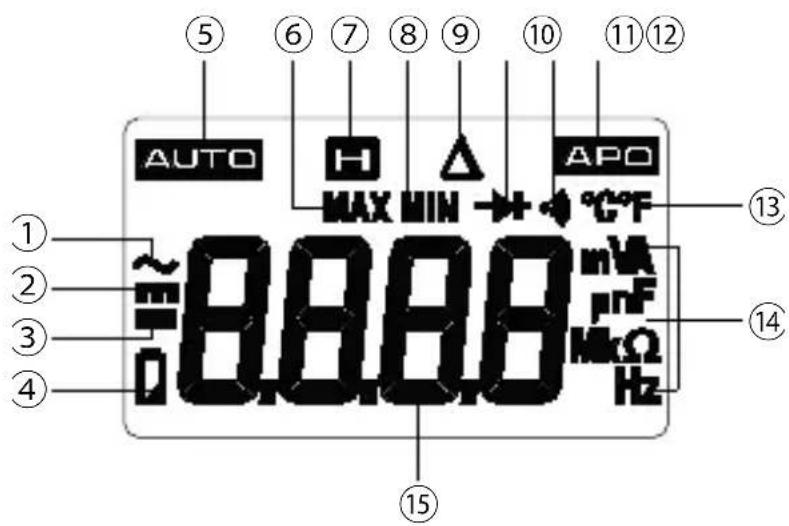
1-AC
2-DC
3-Minus Sign
4-Low Battery
5-Auto Ranging
6- Maximum
7-Display Hold
8-Minimum
9-Relative mode
10-Diode Test
11-Continuity
12-Auto Power Off
13-Degrees Celsius/Fahrenheit/
14-Units of Measure
15-Measurement display
3.1. MODE BUTTON
■ Press the MODE button to select AC/DC voltage, frequency, resistance, diode test, continuity or capacitance, temperature.
■ For voltage, current and capacitance measurement, make a long press on the MODE key to activate or deactivate the relative mode.
3.2. RANGE BUTTON
■ When the clamp meter is first turned on, it automatically goes into auto-ranging.
This automatically selects the best range for the measurements being made and is generally the best mode for most measurements.
■ For measurement situations requiring that a range be manually selected, perform the following:
■ Press the RANGE button, the AUTO display indicator will turn off.
■ Press the RANGE button to step through the available ranges until you select the range you want.
■ Press and hold the RANGE button for 2 seconds to exit the Manual Ranging mode and return to Auto Ranging.
3.3. MAX/MIN BUTTON
■ Press the MAX/MIN button to activate the MAX/MIN mode, the MAX indicator will appear on the LCD display, the clamp meter will display and hold the maximum reading and will update when a higher maximum occurs.
■ Press the MAX/MIN button again to view the lowest reading, the MIN indicator clamp meter will appear on the LCD display, the clamp meter will display and hold the minimum reading and will update when a lower minimum occurs.
■ Make a long press on the MAX/MIN button to end MAX/MIN and return to normal operation.
Note: The clamp meter does not autorange when the MAX/MIN mode is active, the display will read OL if the range is exceeded. When this occurs, exit MAX/MIN and use the RANGE button to select a high range. MAX/MIN does not work on Frequency, Duty Cycle, Diode Test, Continuity and Capacitance.
3.4. HOLD AND FLASHLIGHT BUTTON
■ Press the HOLD button to turn on or off the HOLD function.
■ Press the HOLED button for >2 second to turn on or off the flashlight function.
3.5. AUTO POWER OFF
The auto off feature will turn the clamp meter off after 15 minutes.
To disable the auto power off feature, hold down the MODE button and turn the clamp meter on.
3.6. LOW BATTERY INDICATION
The symbol will appear in the lower left corner of the display when the battery voltage becomes low. Replace the battery when this appears.
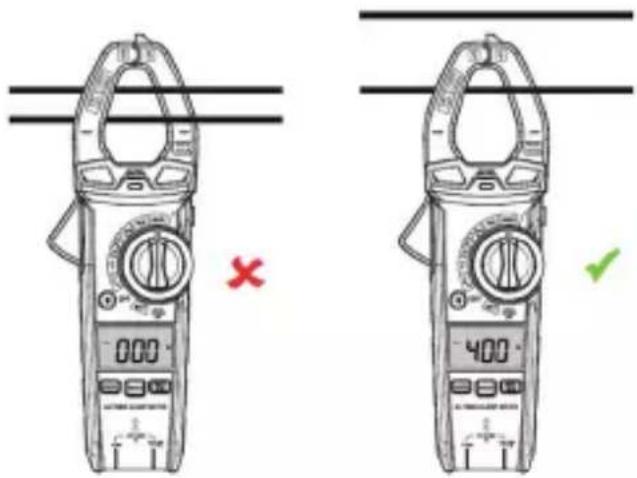
4.1. AC CURRENT MEASUREMENT
WARNING: Ensure that the test leads are disconnected from the clamp meter before making current clamp measurements.
■ Set the rotary switch on 40A or 400A.
If the range of the measured is not known, select the higher range first then move to the lower range if necessary.
■ Press the trigger to open jaw, fully enclose one conductor to be measured.
■ The clamp meter LCD will display the reading.
4.2. AC VOLTAGE MEASUREMENT
WARNING: Observe all safety precautions when working on live voltages.
■ Set the rotatory switch to the VAC or VDC position.
■ Insert the black test lead banana plug into the negative COM terminal; Insert the red test lead banana plug into the + terminal.
■ Connect the test leads to the circuit under test.
■ Read the voltage on the LCD display.
■ If the rotatory switch is on the VAC position, press the MODE button to indicate Hz.
■ Read the frequency in the display.
4.3. RESISTANCE MEASUREMENT
WARNING: Never test resistance on a live circuit.
■ Set the rotary switch to the α/α/φ position.
■ Press the MODE button until the Ω symbol appears on the LCD display.
■ Insert the black test lead banana plug into the negative COM terminal. Insert the red test lead banana plug into the + terminal.
■ Touch the test lead probes to the component under test, if the component is installed in a circuit, it is best to disconnect one side before testing to eliminate interference with other devices.
- Read the resistance in on the LCD display.
4.4. DIODE TEST
WARNING: Never test resistance on a live circuit.
■ Set the rotary switch to the Ω// position.
■ Press the MODE button until the ➤ symbol appears on the LCD display.
■ Insert the black test lead banana plug into the negative COM terminal: Insert the red test lead banana
plug into the + terminal.
■ Touch the test lead probes to the diode under test.
■ Forward voltage will indicate 0.4 to 0.7V on the LCD display; Reverse voltage will indicate OL; Shorted devices will indicate near 0 and an open device will indicate OL in both polarities.
4.5. CONTINUITY CHECK
WARNING: Never test continuity on a live circuit.
■ Set the rotary switch to the / position.
■ Press the MODE button until the ⬆ symbol appears on the LCD display.
- Insert the black test lead banana plug into the negative COM terminal; Insert the red test lead banana plug into the + terminal.
■ Touch the test lead probes to the device or wire under test.
■ A beeper will sound if the resistance is approx. 50 Ω or less and the resistance reading will be shown on the LCD display.
4.6. CAPACITANCE MEASUREMENT
WARNING: To avoid electric shock, disconnect power, remove the batteries and unplug the line cords of the unit under test. Discharge all capacitors before taking any capacitance measurements.
■ Set the rotary switch to the Ω// position.
- Press the MODE button until the nF symbol appears on the LCD display.
- Insert the black test lead banana plug into the negative COM terminal; Insert the red test lead banana plug into the + terminal.
■ Touch the test leads to the capacitor to be tested. Wait until the readings settle before ending the test.
- Read the capacitance value in the display.
4.7. TEMPERATURE MEASUREMENT
WARNING: Do not touch the temperature probe to live circuits.
■ Set the function switch to the Temp position.
■ Press the MODE button to indicate °C or °F.
■ Connect the temperature probe to the banana plug adapter, note the - and + markings on the adapter.
■ Connect the adapter to the clamp meter, making sure the - side goes into the COM terminal and the positive side goes into the + terminal.
■ Touch the tip of the temperature probe to the object being measured.
- Read the temperature on the LCD display.
4.8. NON-CONTACT AC VOLTAGE DETECTION
WARNING: Risk of Electrocution. Before use, always test the Voltage Detector on a known live circuit to verify proper operation.
■ Set the rotary switch to the NCV position.
■ Hold the detector close to the AC voltage being tested.
If no signal is detected, the LCD will show EF, NCV indicator light doesn't flashes and the buzzer is no sound.
■ According to the detected signal strength, LCD displays different horizontal lines.
■ When the signal is strongest, LCD displays four horizontal lines, when the signal is weakest, only one line.
■ Meanwhile, NCV indicator light flashes, buzzer make different sound.
Note: The sensing level varies with the distance between the sensing part and the measured AC power cord.
Note: The detector is designed with high sensitivity. Static electricity or other sources of energy may randomly trip the sensor. This is normal operation.

The absence of a voltage indication in the NCV function does not mean that there is no voltage. To confirm the absence of a voltage, use a VAT.

The presence of other voltages nearby can trigger non-contact voltage detection.
5. SPECIFICATIONS
5.1. SPECIFICATIONS
Note: Intrinsic uncertainty is stated at 18 to 28°C (65 to 83°F) and less than 75%RH.
Note: Intrinsic uncertainty is expressed as a percentage of reading (R) plus a number of digits (ct): ±(a% R + b)
| Function Range | Resolution Intrinsic uncertainty | ||
| AC Voltage50 Hz to 1 kHz | 4.000 V 1 mV | ±(1.2% + 5 ct) | |
| 40.00 V 10 mV | |||
| 400.0 V 100 mV | |||
| 600 V 1 V | |||
| All AC voltage ranges are specified from 5% of range to 100% of range.AC Voltage Bandwidth: 50 to 60 Hz (All wave); 50 Hz to 1 kHz (Sine wave). | |||
| DC Voltage | 400.0 mV 0.1 mV | ±(0.5% + 8 ct) | |
| 4.000 V 1 mV | |||
| 40.00 V 10 mV | |||
| 400.0 V 100 mV | |||
| 600 V 1 V | |||
| Function Range | Resolution Intrinsic uncertainty | ||
| Current AC50 to 60 Hz | 40.00 A 10 mA ±(2.5% + 10 pt) | ||
| 400.0 A 100 mA ±(2.8% + 8 pt) | |||
| All AC Current ranges are specified from 5% of range to 100% of range. | |||
| Resistance | 400.0 Ω 0.1 Ω | ±(1.2% + 5 ct) | |
| 4.000 kΩ 1 Ω | |||
| 40.00 kΩ 10 Ω | |||
| 400.0 kΩ 100 Ω | |||
| 4.000 MΩ 1 kΩ ±(2.5% + 8 ct) | |||
| 40.00 MΩ 10 kΩ ±(3.0% + 8 ct) | |||
| Capacitance | 4.000 nF 0.001 nF ±(3.5% + 60 ct) | |
| 40.00 nF 0.01 nF | ||
| 400.0 nF 0.1 nF | ||
| 4.000 μF 1 nF | ||
| 40.00 μF 10 nF | ||
| 400.0 μF 100 nF | ||
| 4.000 mF 1 μF |
| Frequency | 4.000 Hz | 0.001 Hz | ±(1.2% + 5 ct) |
| 40.00 Hz | 0.01 Hz | ||
| 400.0 Hz | 0.1 Hz | ||
| 4.000 kHz | 1 Hz | ||
| 10.00 kHz | 10 Hz | ||
| Sensitivity: >15V RMS | |||
| Temperature | -18 to 1000°C 1°C | ±(1.5% + 5°C) |
| 0 to 1832°F 1°F ±(1.5% + 9°F) |
5.2. GENERAL SPECIFICATIONS
| Diode Test current approximately 1 mA, open circuit voltage of 2 V typical | |
| Continuity test Audible signal if the resistance is <50 Ω | |
| Display 4000 count LCD | |
| Measurement rate 3 readings per second | |
| Input Impedance >10 MΩ AC and DC Voltage | |
| AC Voltage Bandwidth 50 Hz to 1 kHz | |
| AC Current Bandwidth 50 to 60 Hz | |
| Operating Environment 5 to 40°C (41 to 104°F) | |
| Storage Environment -10 to 50°C (14 to 122°F) | |
| Operating Humidity Max 80% up to 31°C (87°F) decreasing linearly to 50% at 40°C (104°F) | |
| Storage Humidity <80% | |
| Operating altitude 2000 meters (7000 ft) maximum | |
| Dimensions/ Massa 154x74x43mm / Approx. 210g (without batteries) | |
| Clamping capacity: Approx. 30 mm in diameter | |
| Safety | For indoor useClass 2, double insulationComplies with IEC/EN 61010-2-033 or BS EN 61010-2-033, IEC/EN 61010-032 or BS EN 61010-032 and IEC/EN 61010-031 or BS EN 61010-031 for measurement category III 600V, pollution degree 2. |
| Electromagnetic compatibility EMC | Complies with standard IEC/EN 61326-1 or BS EN 61326-1 |
6. MAINTENANCE

Except for the batteries, the instrument contains no parts that can be replaced by personnel who have not been specially trained and accredited. Any unauthorized repair or replacement of a part by an “equivalent” may gravely impair safety.
6.1. MAINTENANCE AND CLEANING
This clamp meter is designed to provide years of dependable service, if the following care instructions are performed:
- Keep the clamp meter dry, if it gets wet, wipe it off.
■ Use and store the clamp meter in normal temperatures, temperature extremes can shorten the life of the electronic parts and distort or melt plastic parts.
■ Handle the clamp meter gently and carefully, dropping it can damage the electronic parts or the case. - Keep the clamp meter clean, wipe the case occasionally with a damp cloth, do not use chemicals, cleaning solvents, or detergents.
■ Use only fresh batteries of the recommended size and type, remove old or weak batteries so they do not leak and damage the unit.
If the clamp meter is to be stored for a long period of time, the batteries should be removed.
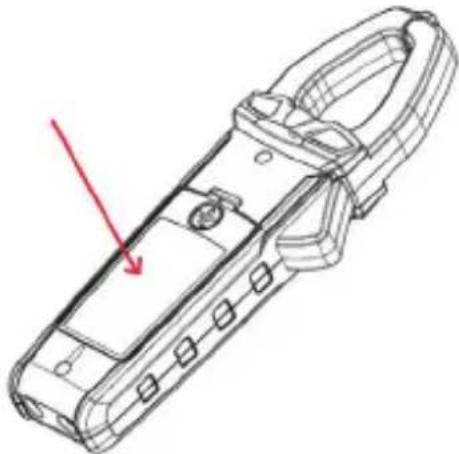
6.2. REPLACING THE BATTERY
WARNING: To avoid electric shock, disconnect the test leads from any source of voltage before removing battery cover.
WARNING: To avoid electric shock, do not operate the clamp meter until the battery cover is in place and securely fastened.
■ Rotate the locking screw 180 degrees counterclockwise to open the back cover of battery.
■ Replace old batteries with three AAA 1.5V batteries.
■ Replace and secure the cover of battery.

Spent batteries must not be treated as ordinary household waste. Take them to the appropriate recycling collection point.
7. WARRANTY
Except as otherwise stated, our warranty is valid for 24 months starting from the date on which the equipment was sold. The extract from our General Conditions of Sale is available on our website. www.group.chauvin-arnoux.com/en/general-terms-of-sale
The warranty does not apply in the following cases:
■ Inappropriate use of the equipment or use with incompatible equipment;
■ Modifications made to the equipment without the explicit permission of the manufacturer's technical staff;
■ Work done on the device by a person not approved by the manufacturer;
■ Adaptation to a particular application not anticipated in the definition of the equipment or not indicated in the user's manual;
■ Damage caused by shocks, falls, or floods.
DEUTSCH


- MESURE DE LA TENSION
- CONTENTS
- SAFETY......12
- DESCRIPTION....14
- BUTTON FUNCTIONS......15
- USE....16
- SPECIFICATIONS......18
- MAINTENANCE....20
- WARRANTY....21
- SAFETY
- PRECAUTION OF USE
- INPUT LIMITS
- DEFINITION OF SYMBOLS
- DEFINITION OF MEASUREMENT CATEGORIES
- CLAMP METER DESCRIPTION
- SYMBOLS USED ON LCD DISPLAY
- MODE BUTTON
- RANGE BUTTON
- MAX/MIN BUTTON
- HOLD AND FLASHLIGHT BUTTON
- AUTO POWER OFF
- LOW BATTERY INDICATION
- AC CURRENT MEASUREMENT
- AC VOLTAGE MEASUREMENT
- RESISTANCE MEASUREMENT
- DIODE TEST
- CONTINUITY CHECK
- CAPACITANCE MEASUREMENT
- TEMPERATURE MEASUREMENT
- NON-CONTACT AC VOLTAGE DETECTION
- SPECIFICATIONS
- GENERAL SPECIFICATIONS
- MAINTENANCE
- MAINTENANCE AND CLEANING
- REPLACING THE BATTERY
- WARRANTY
- DEUTSCH
Brand : MULTIMETRIX
Model : CM604
Category : Measuring equipment