C.A 1871 - Multimeter CHAUVIN ARNOUX - Free user manual and instructions
Find the device manual for free C.A 1871 CHAUVIN ARNOUX in PDF.


User questions about C.A 1871 CHAUVIN ARNOUX
0 question about this device. Answer the ones you know or ask your own.
Ask a new question about this device
Download the instructions for your Multimeter in PDF format for free! Find your manual C.A 1871 - CHAUVIN ARNOUX and take your electronic device back in hand. On this page are published all the documents necessary for the use of your device. C.A 1871 by CHAUVIN ARNOUX.
USER MANUAL C.A 1871 CHAUVIN ARNOUX
natural_image
Close-up of a black handheld electrical clamp with yellow and red terminal connectors (no visible text or symbols)FRANÇAIS ENGLISH DEUTSCH ITALIANO ESPANOL
Meaning of the symbol Warning! Please refer to the User's Manual before using the instrument. In this User's Manual, the instructions preceded by the above symbol, should they not be carried out as shown, can result in a physical accident or damage the instrument and the installations.
Meaning of the symbol
Laser radiation, do not look into the LASER beam.
LASER output < 0.5mW.
Class II LASER, as per IEC 60825 standard.
Thank you for purchasing this C.A. 1871 infrared temperature sensor.
To get the best service from this instrument:
■ read this user's manual carefully,
■ respect the safety precautions detailed
PRECAUTIONS FOR USE
■ Do not place the sensor on or close to objects with temperatures of >65^ / 150^
If the sensor is subjected to strong ambient temperature variations, wait 20 minutes after stabilization before resuming measurement.
■ Do not direct the LASER beam towards your eyes.
■ Comply with the environmental conditions (see § 5)
- Keep the lens perfectly clean
WARRANTY
Our guarantee is applicable for twelve months after the date on which the equipment is made available (extract from our General Conditions of Sale, available on request).
CONTENTS
- PRESENTATION 9
- OPERATION - EMISSIVITY 9
- DESCRIPTION 9
- USE 10
- SPECIFICATIONS....11
- MAINTENANCE 12
- TO ORDER 12
- APPENDIX 29
1. PRESENTATION
The C.A 1871 infrared temperature sensor is a temperature measuring tool that does not require contact and is used connected to an mV calibre multimeter with a 10MΩ input impedance.
To measure the temperature of an object, simply point the probe at the surface of the object and the sensor will give out a voltage signal proportional to the temperature measured.
2. OPERATION - EMISSIVITY
All objects whose temperature is higher than absolute zero (-273,15 K) emit infrared energy. This energy radiates in all directions at the speed of light.
When you point the probe at an object, the probe's lens senses this energy and focuses it onto an infrared detector constituted by a stack of thermocouples. This detector transmits a voltage signal proportional to the amount of energy received, which means that it is proportional to the object's temperature.
Certain objects emit infrared energy but also reflect it. Unlike matt surfaces, shiny or highly-polished surfaces tend to reflect energy. This reflection is represented by a factor called emissivity which may vary from 0.1 for a highly reflective object to 1 for a black object.
In the case of the C.A 1871 probe, the emissivity is preset at 0.95, the most frequent value, enabling approximately 90% of applications to be covered.
3. DESCRIPTION
See § 8. Attachment (at the end of this user's manual)
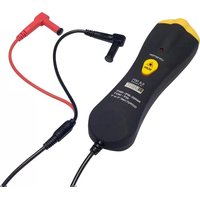
① Infrared measurement sensor
② Connecting lead with two ∅ 4mm safety plugs
③ Battery status indicator: on → low
off → status OK
④ Measurement activation pushbutton
Note: If a button is pressed and the indicators are not lit, the battery is either missing or not functioning correctly.
4. USE
4.1 Procedure
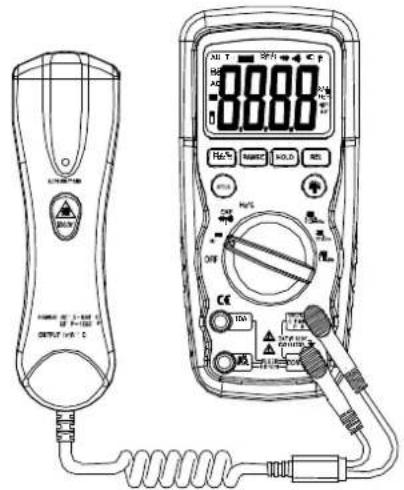
- Plug the connecting lead ④ into a digital multimeter (preferably), choose the setting which allows the temperature to be read off directly, given that the temperature sensor gives out a voltage of 1 mV/°C
- Point the sensor towards the target to be measured and press on the button ④ (see § 4.2).
As long as the button is held down, the sensor will continue to measure the temperature. - Record the temperature on the multimeter, taking into account the transformation ratio sensitivity 1mV/°C.
text_image
Technical diagram of a digital multimeter with labeled components and connected wiring, showing measurement setup and terminal connections.4.2 Precautions for measurement
If the surface to be measured is ≤ ∅ 50cm, hold the probe as close as possible to the surface (less than 50cm away) (see § 4.3)
If the surface to be measured is covered in frost or other particles, clean it so that the surface is clear before taking a measurement.
■ If the surface to be measured is highly reflective, stick matt tape or apply matt paint to the surface before measuring.
If the sensor appears to be giving incorrect indications, check the condition of the lens of the measuring orifice, since it may be obscured by condensation or particles. If so, clean it by carefully following the instructions in § 6.3 Upkeep.
4.3 Ratio between distance from target / diameter of measurement field
This ratio, also called the field of vision, indicates the diameter S of the measurement field at a given distance D from the target (see figure below).
Diameter of measurement field : D/S = 8/1

text_image
Ø25 200 Ø50 400 Ø100 800Distance from target
In the case of small measurement points; it is important to bring the probe sufficiently close to the target to avoid including other points in the measurement field.
5. SPECIFICATIONS
■Measurement range: -30 to +550°C
■ Resolution: depending on the multimeter
■ Accuracy: ±2% ±2°C of the reading
■ Spectral response: 6 to 14μm
■ Emissivity: preset at 0.95
■ Output voltage: 1mV/°C
■ Response time: 0,5sec
■ Utilisation environment
0 to +50°C < 80% RH
■ Storage environment
-20°C to +60°C, 0 to 80% RF, without battery
■Power supply:9V battery
■ Dimensions / Weight
164 x 50 x 40mm / 182g with batteries
■ Electromagnetic compatibility
NF EN 61326-1
6. MAINTENANCE
For maintenance, use only specified spare parts. The manufacturer will not be held responsible for any accident occurring following a repair done other than by its After Sales Service or approved repairers.
6.1 Upkeep
6.1.1 Changing the battery
■ Remove the cover at the back of the instrument
■ Replace the old battery with a 9V battery
6.2 Operating test
For a quick check that the temperature sensor is functioning correctly, point the lens at water with ice cubes in it, since this provides a simple reference for 0^ C ( 32^ F).
6.3 Cleaning the lens
■ Remove dust using a clean rubber dust-removing bulb
■ Carefully remove any remaining particles using a clean, soft cloth
■ Carefully clean the lens with a damp, soft cloth and leave to dry.
Do not use solvents

6.4 Cleaning the housing
Clean the unit with a cloth and a little soapy water. Clean off with a damp cloth.
Do not use solvents.

6.5 Metrological Checks
Like all measuring or testing devices, the instrument must be checked regularly.
This instrument should be checked at least once a year. For checking and calibration, contact one of our accredited metrology laboratories (information and contact details available on request), at our Chauvin Arnoux subsidiary or the branch in your country.
6.6 Repairs
For all repairs before or after expiry of warranty, please return the device to your distributor.
6. TO ORDER
C.A 1871 P01651610Z
Comes with a 9V battery and these operating instructions.
Deutsch
text_image
Technical diagram of a digital multimeter with labeled components and connection wiring, alongside a remote control device.text_image
Technical diagram of a digital multimeter with labeled components and wiring, showing front panel and side view.text_image
Technical diagram of a digital multimeter with connected device and power supply, showing front panel, dial, and terminal connections.Unit 1 Nelson Court - Flagship Square
Shaw Cross Business Park
Dewsbury, West Yorkshire - WF12 7TH
Tel:1924 460 494 - Fax:01924 455 328
MIDDLE EAST - Chauvin Amoux Middle East
P.O.BOX 60-154-1241 2020 JAL EL DIB (Beirut)
LEBANON
Tel: (01) 890 425 - Fax: (01) 890 424
CHINA - Shanghai Pu-Jiang
Enerdis Instruments Co. Ltd
3 F, 3 rd Building - N° 381 Xiang De Road
200081 SHANGHAI
Tel:+86 21 65 21 51 96 - Fax:+86 21 65 21 61 07
USA - Chauvin Arnoux Inc
d.b.a AEMC Instruments
200 Foxborough Blvd. - Foxborough - MA 02035
Tel:(508) 698-2115 - Fax:(508) 698-2118
http://www.chauvin-arnoux.com