
Mi Vacuum Cleaner G10 Plus - Broom Xiaomi - Free user manual and instructions
Find the device manual for free Mi Vacuum Cleaner G10 Plus Xiaomi in PDF.


| Product type | Cordless stick vacuum |
| Brand | Xiaomi |
| Model | Mi Vacuum Cleaner G10 Plus |
| Product dimensions (L × W × H) | 1286 × 214 × 256 mm |
| Net weight (vacuum only) | 1.7 kg |
| Net weight (with accessories) | 4.2 kg |
| Dust compartment capacity | 0.6 L |
| Rated voltage | 25.2 V |
| Rated power | 425 W |
| Battery capacity (nominal) | 3000 mAh |
| Charging time | Approximately 4 hours |
| Battery type | Rechargeable lithium-ion |
| Suction modes | Eco, Standard, Turbo |
| Washing function | Yes (with water tank and mop cloth) |
| Included accessories | High-torque brush bar, crevice nozzle, mini electric brush, extension rod, 2-in-1 brush nozzle, water tank, mop cloth |
| Display screen | Yes (battery indicator, modes, error messages) |
| Continuous mode | Yes (electronic lock button) |
| Recommended maintenance | Regular cleaning of dust compartment, filter and brushes; filter replacement every 6 to 12 months |
| Main spare parts | Filter, replacement battery, water dispenser filter, mop cloth |
| Safety | Indoor use only; do not vacuum flammable liquids or water; do not immerse electrical parts |
Frequently Asked Questions - Mi Vacuum Cleaner G10 Plus Xiaomi
User questions about Mi Vacuum Cleaner G10 Plus Xiaomi
0 question about this device. Answer the ones you know or ask your own.
Ask a new question about this device
Download the instructions for your Broom in PDF format for free! Find your manual Mi Vacuum Cleaner G10 Plus - Xiaomi and take your electronic device back in hand. On this page are published all the documents necessary for the use of your device. Mi Vacuum Cleaner G10 Plus by Xiaomi.
USER MANUAL Mi Vacuum Cleaner G10 Plus Xiaomi
This product is for household use only. Read this manual carefully before use, and retain it for future reference.
This appliance can be used by children aged from 8 years and above and persons with reduced physical, sensory or mental capabilities or lack of experience and knowledge if they have been given supervision or instruction concerning use of the appliance in a safe way and understand the hazards involved. Children shall not play with the appliance. Cleaning and user maintenance shall not be made by children without supervision.
Do not use the product at an ambient temperature above 38^ C or below 5^ C or on a floor with liquids or sticky substances.
If the charger or battery pack is damaged, it must be replaced by a special cord or assembly available from the manufacturer or its service agent.
To reduce the risk of fire, explosion, or personal injury, check to make sure the lithium-ion battery and charger are undamaged before use. Do not use the vacuum cleaner if either the battery or charger is damaged.
Only use the vacuum cleaner on dry indoor surfaces. Do not install, charge, or use this product outdoors, such as in bathrooms, or near a pool.
Do not touch the plug or any part of the vacuum cleaner with wet hands.
The high torque brush bar, mini electric brush, battery, extension rod, and the vacuum cleaner are electrically conductive and should not be immersed in water or other liquid. Make sure all parts are thoroughly dry after you carry out cleaning on them.
To prevent injury caused by moving parts, turn off the vacuum cleaner before cleaning the high torque brush bar and mini electric brush. The high torque brush bar, dust compartment, and filter must all be properly installed before using the vacuum cleaner.
Do not use the vacuum cleaner to pick up flammable or combustible liquids, such as gasoline, bleach, ammonia, or drain cleaners; nor other liquids like water.
Do not use the vacuum cleaner to pick up drywall particles, ashes like fireplace ash, or smoking or burning materials such as coal, cigarette butts or matches.
Do not use the vacuum cleaner to pick up sharp or hard objects, such as glass, nails, screws, or coins, which may damage the product.
Keep hair, loose clothing, fingers, and other parts of the body away from the vacuum cleaner's openings and moving parts. Do not point the suction opening, extension rod, or other accessories at your eyes or ears or put them in your mouth.
Do not put any object into the vacuum cleaner's openings, nor use the vacuum cleaner with any opening blocked. Keep free of dust, lint, hair, or other items which may reduce airflow.
Do not rest the vacuum cleaner against a chair, table, or other unstable surfaces, as this may cause damage to the product or personal injury. If the vacuum cleaner malfunctions because of being knocked over or damaged, please contact the authorized service department. Never attempt to disassemble the vacuum cleaner on your own.
The dust compartment cover, pre-filter, cyclone assembly, and filter must all be properly installed prior to using the vacuum cleaner.
Make sure the charger is unplugged when not used for extended periods as well as prior to performing any maintenance or repairs. Please be extra careful when using the vacuum cleaner to clean stairs.
Fire Hazard Warning: Do not apply any type of fragrance to the vacuum cleaner's filter. These types of products are known to contain flammable chemicals which may cause the vacuum cleaner to catch fire.
DO NOT expose the battery and appliance to fire as it may cause explosion.
DO NOT expose or submerge the battery and appliance in any water, salt water, or other liquids.
WARNING: Do not use any third-party battery pack and charger.
Use only with BLJ24W308080P-V charger.
Use only with V2210-7S1P-BCA/V2210-7S1P-BWA battery pack.
Please strictly follow the instructions in this user manual when using the vacuum cleaner. Users are responsible for any loss or damage that may arise from improper use of the vacuum cleaner.
Product Overview
Accessories List

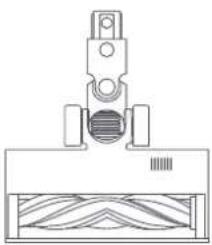
natural_image
Technical line drawing of a mechanical assembly with no visible text or symbolsHigh Torque Brush Bar
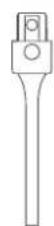
Crevice Nozzle
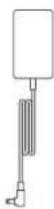
Charger
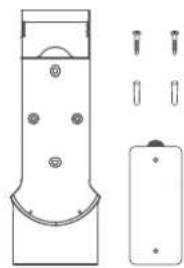
natural_image
Technical line drawing of a cylindrical device with mounting holes and a separate battery pack (no text or symbols)2-in-1 Charging & Storage Mount (includes screw × 2, wall plug × 2, and mounting template sticker)
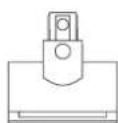
Mini Electric BrushExtension Rod
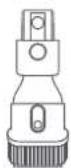
2-in-1 Brush Nozzle
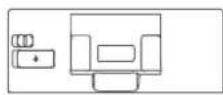
Water Tank
Mop Pad
(Pre-installed)
Note: Illustrations of product, accessories, and user interface in the user manual are for reference purposes only. Actual product and functions may vary due to product enhancements.
Component Name
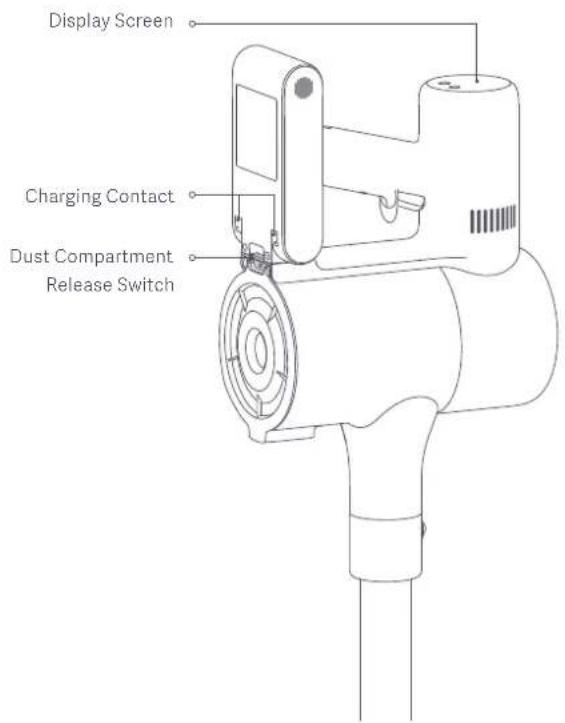
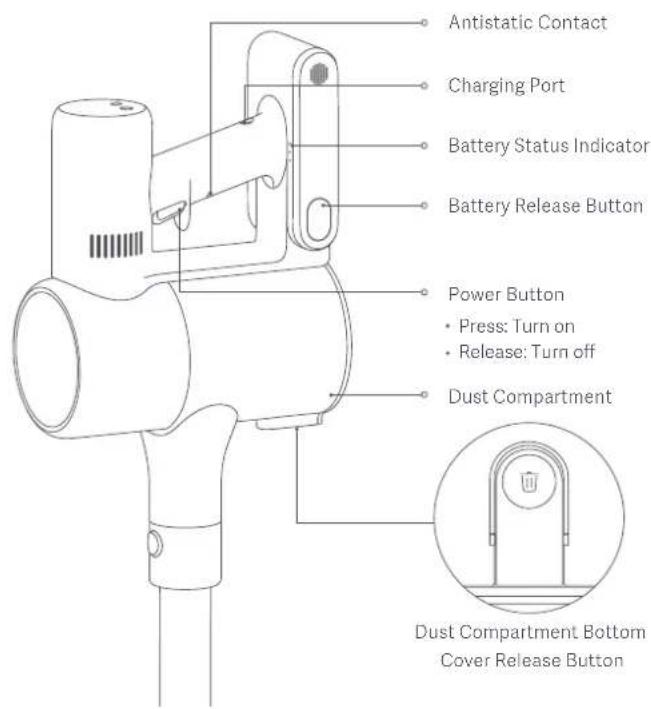
Display Screen
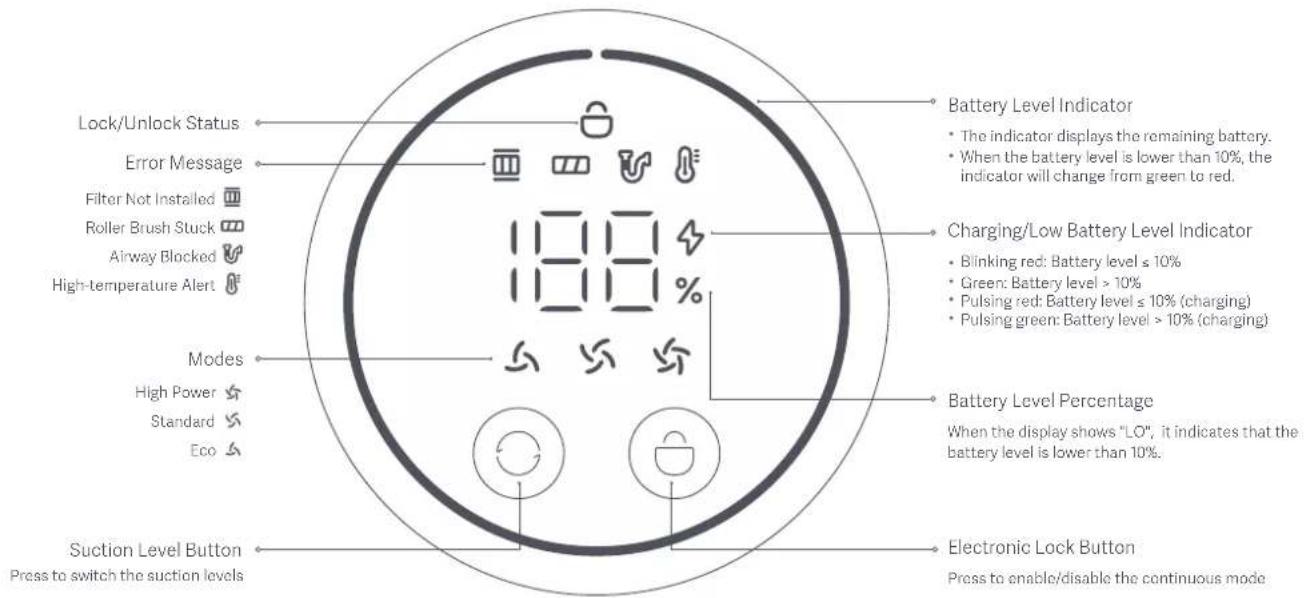
Note: If the vacuum cleaner experiences a malfunction, the display screen will show an error message. For a solution, please refer to the Troubleshooting section.
How to Install
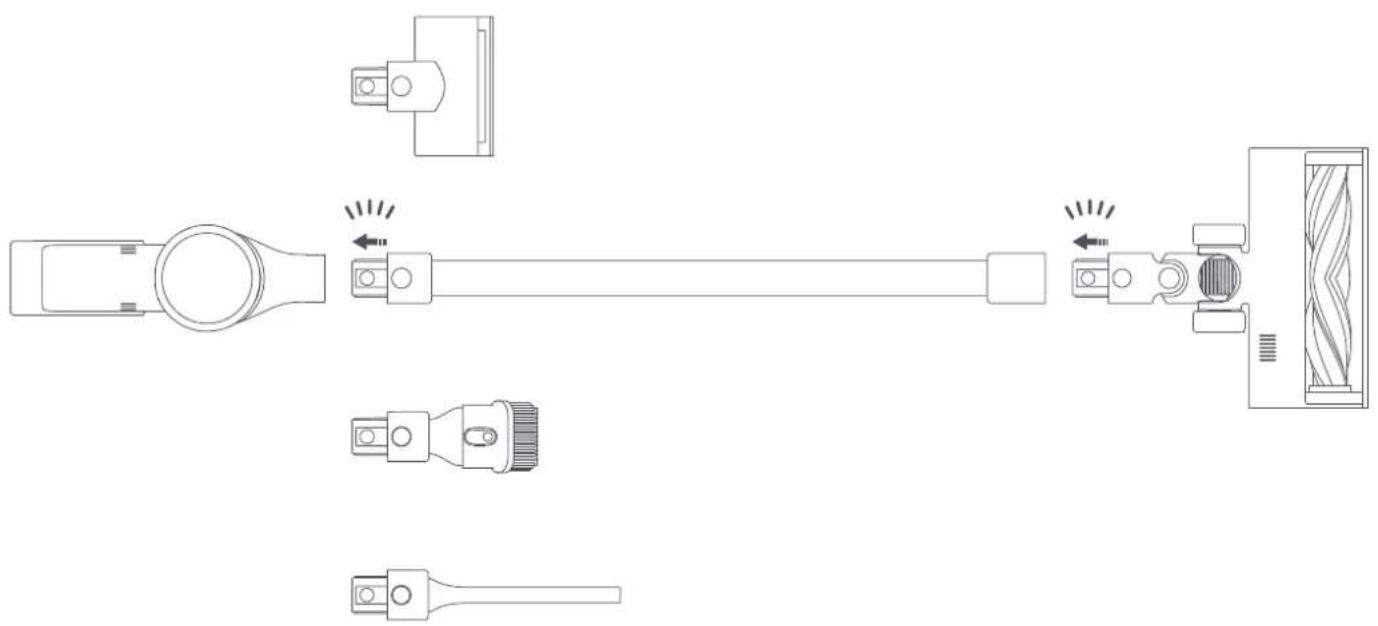
Installing the Accessories onto the Vacuum Cleaner
Insert until it clicks into place
natural_image
Technical line drawing of a mechanical assembly with exploded view and component details (no text or symbols)Note: Mini electric brush should not be used with the extension rod.
Installing the 2-in-1 Charging & Storage Mount
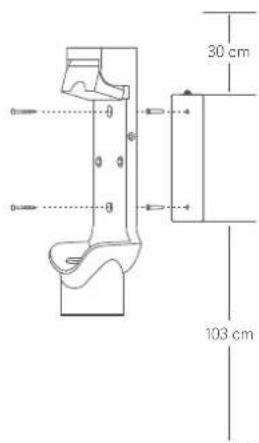
- The 2-in-1 charging & storage mount should be installed in a cool, dry place with an electrical outlet nearby. Prior to installing, ensure that there are not any wires or pipes in the space directly behind where the mount will be installed.
- The bottom of the mounting template sticker should be level and at least 1.03 m from the ground, and its top should have at least 30 cm of clearance above it.
- Use a power drill with an 8 mm drill bit to drill a hole into each hole marker on the mounting template sticker, then insert a wall plug into each hole.
- Align the mounting holes on the 2-in-1 charging & storage mount to the holes on the wall, then attach the mount to the wall using the included screws.
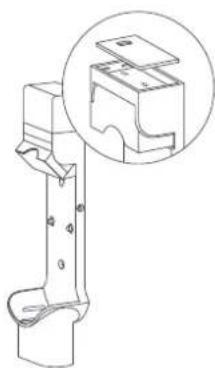
natural_image
Technical line drawing of a mechanical bracket with an inset magnified detail (no text or symbols)Extended Dock Charging Plate
Extended Dock
Located on the top of the 2-in-1 charging & storage mount and used for installing the battery pack*. It supports charging the battery pack together with the vacuum cleaner.
* The replaceable battery is not included and purchased separately.
Recommended Height: At least 1.03 meters from the ground
Charging
Battery Status Indicator
Note: means off, means on, and means blinking.
Low battery Nearly full
● ● ○ Half battery ● ● ● Fully charged
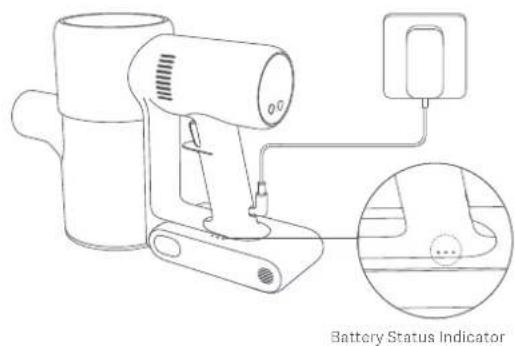
Charging the vacuum cleaner with the charger
Once the vacuum cleaner is fully charged, the indicator will turn off after 5 minutes, and the vacuum cleaner will then enter the energy-saving mode.
Display Screen
The number on the display screen represents the current battery level in a percentage during charging. When the number turns into 100, the battery is fully charged.
When the vacuum cleaner is being charged, you can press the power button to wake up the display and check the current charging percentage.
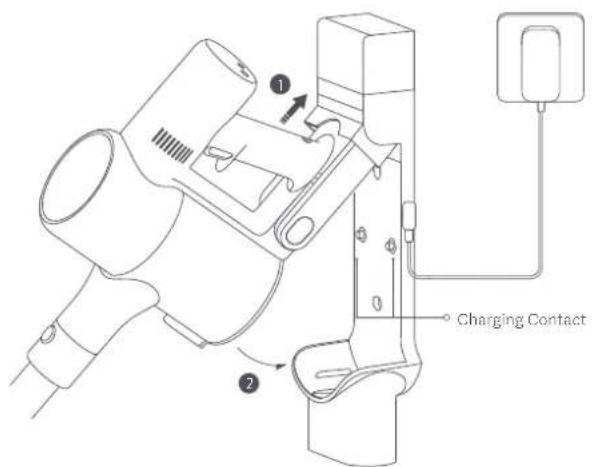
Charging the vacuum cleaner on the charging mount
Notes:
- Fully charge the vacuum cleaner before using it for the first time. This will take about 4 hours.
• The vacuum cleaner cannot be used while charging.
• Vacuuming at the highest suction level for a prolonged period will cause the battery to heat up, which may increase the charging time. Before charging the vacuum cleaner, it is better to cool it down for 30 minutes.
How to Use
Switching Suction Levels
Press the button to cycle through the vacuum cleaner's suction levels of Eco, Standard, and Turbo. The corresponding suction level indicator will be highlighted on the display.
Note: After the vacuum cleaner is turned off and turned back on again, the suction level will be the last used one.
Working Modes
The vacuum cleaner has two working modes, you can select the desired one based on your cleaning needs.
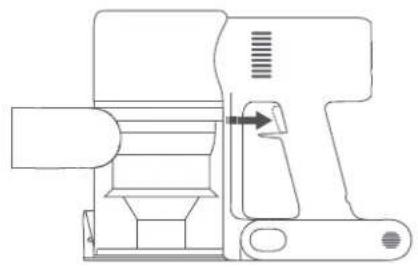
• Non-continuous Mode
Hold down the power button to start the vacuum cleaner, then release to stop it.
natural_image
Technical line drawing of a mechanical device with no visible text or symbolsNon-continuous Mode
- Continuous Mode
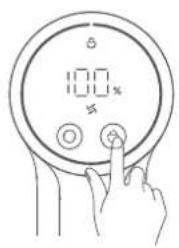
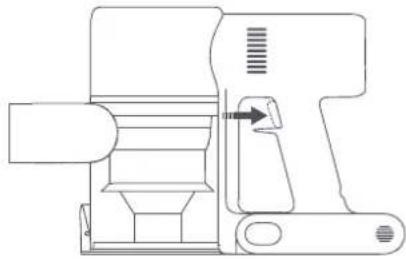
Press the button to enable Continuous Mode, then press the power button to turn the vacuum cleaner on. To exit Continuous Mode, press the button. Enabling the Continuous Mode allows the vacuum cleaner to run continuously without having to hold down the power button, which can help release your fingers.
natural_image
Technical line drawing of a mechanical device with internal components and a directional arrow (no text or symbols)Continuous Mode
Notes:
- In Continuous Mode, the vacuum cleaner will enter into standby mode when pressing the power button, and resume running if pressing the button again.
- When the vacuum cleaner keeps in standby mode for more than 10 seconds, its display screen will go off and the vacuum cleaner will then exit the Continuous Mode.
Using Different Accessories
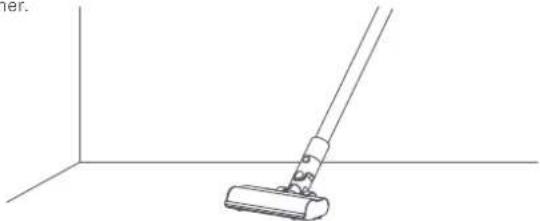
High Torque Brush Bar: For cleaning different types of flooring such as wood, marble, tile, and carpet.
Note: The high torque brush bar can be attached directly to the vacuum cleaner.
natural_image
Line drawing of a hand cleaning a wall-mounted device (no text or symbols)Crevice Nozzle: For vacuuming narrow crevices and areas around doors, windows, baseboards, corners, stairs, etc.
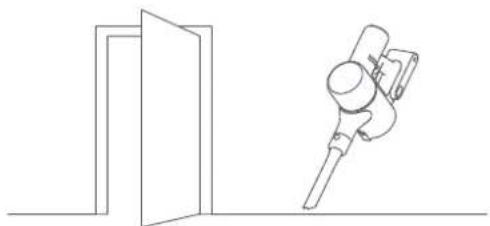
natural_image
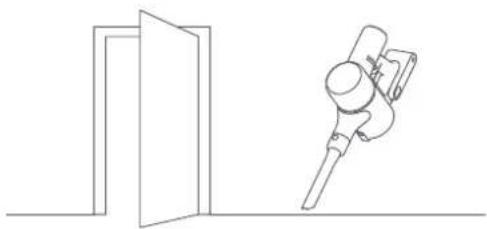
Simple line drawing of a door opening and a mechanical device (no text or symbols)Mini Electric Brush: For vacuuming dirt, pet hair, and other stubborn debris from sofas, bedding, and other fabric surfaces.
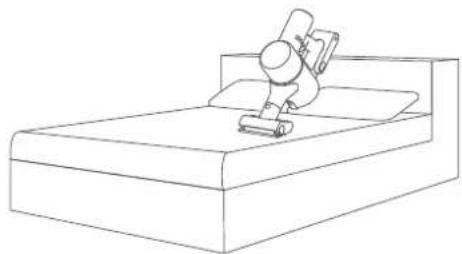
natural_image
Line drawing of a person using a vacuum cleaner on a bed (no text or symbols)2-in-1 Brush Nozzle: For vacuuming curtains, sofas, vehicle interiors, coffee tables, etc.
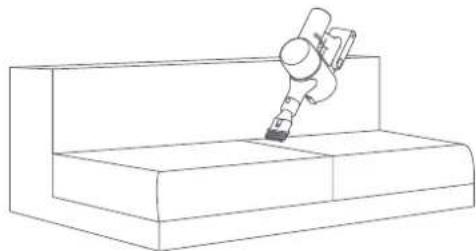
natural_image
Line drawing of a robotic arm interacting with a rectangular platform (no text or symbols)Notes:
- If any rotating part becomes stuck, the vacuum cleaner may shut off automatically. Remove any trapped foreign objects, then resume use.
* When the high-temperature protection for the battery is triggered, the vacuum cleaner will automatically stop working. Wait until the battery temperature returns to normal, then resume use.
Using the Mopping Function
Notes:
- Do not step on the water tank, as this could permanently damage it.
• Heavily soiled floors should be vacuumed prior to mopping for a better result. - Do not use the mapping function on carpet.
- Do not use any cleaning agents or disinfectants.
- Dampen the mop pad and wring out excess water, then attach it securely to the bottom of the water tank.
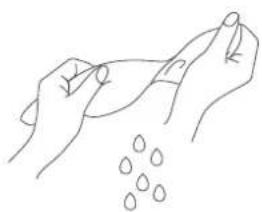
natural_image
Line drawing of two hands holding a piece of water droplets (no text or symbols)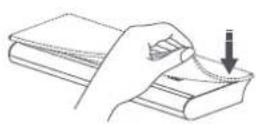
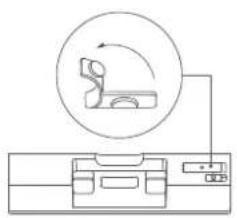
- Open the water tank plug, add an appropriate amount of clean water, then close the plug.
natural_image
Diagram of a medical or laboratory setup with a device and a circular diagram showing a person interacting with it (no text or symbols present)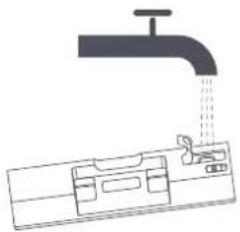
natural_image
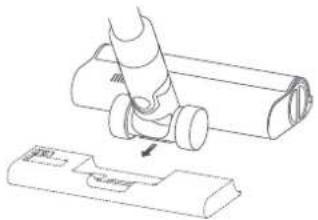
Diagram of a faucet pouring liquid into a container with a tool, no text or symbols present- Attach the high torque brush bar to the water tank by lining up the magnets on them until they snap together.
natural_image
Technical line drawing of a mechanical component being inserted into a housing (no text or symbols present)- This function is designed for vacuuming and wiping down hardwood and tile floors.
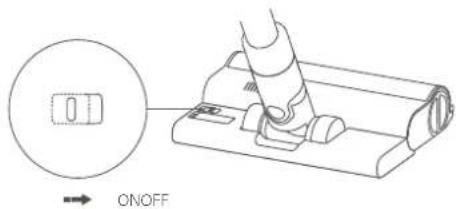
Notes:
• The ball valve in the water tank controls how much water is dispensed. The ball is a moving part and may make a rolling sound when starting and stopping. This is normal.
- When not in use, please keep the switch to the OFF position.
Care & Maintenance
Maintenance Precautions
• Always use genuine parts to keep your warranty from being voided.
- If the filter, extension rod, or high torque brush bar becomes clogged, the vacuum cleaner will stop working shortly. To restore its functionality, clean the clogged component.
- If the vacuum cleaner will not be used for an extended period, fully charge it and disconnect it from the power then store it in a cool, low-humidity environment away from direct sunlight. To avoid over-discharging the battery, recharge the vacuum cleaner at least once every three months.
Cleaning the Vacuum Cleaner
Wipe the vacuum cleaner with a soft, dry cloth.
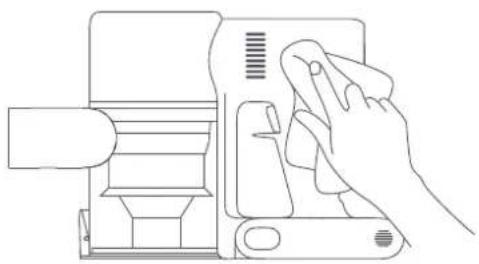
natural_image
Line drawing of a hand using a handheld device to press or install a device (no text or symbols present)Cleaning the Dust Compartment, Pre-filter, and Cyclone Assembly
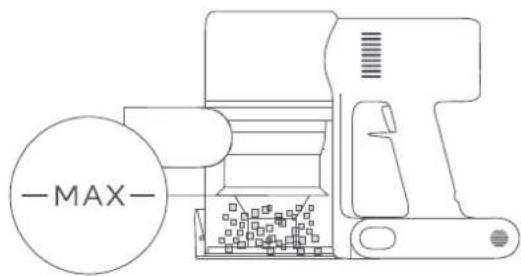
- The vacuum cleaner's cleaning ability will be reduced if the dust compartment is filled to the "MAX" mark. To regain performance, empty the dust compartment in a timely manner. Before emptying the compartment, make sure the vacuum cleaner is disconnected from the power, and do not press its power button.
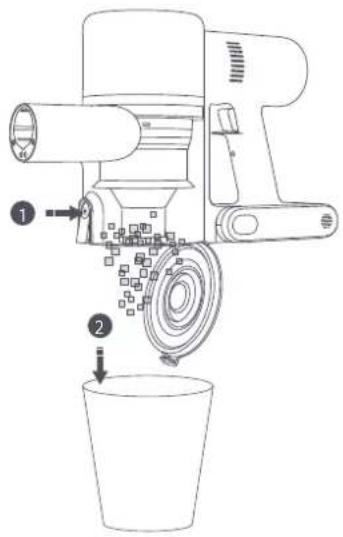
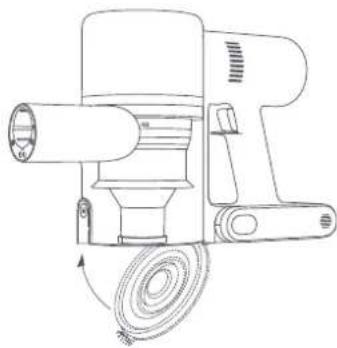
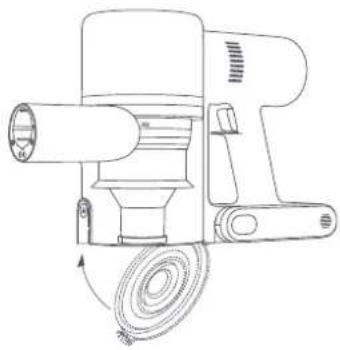
- Press the dust compartment bottom cover release button, then empty the contents.
natural_image
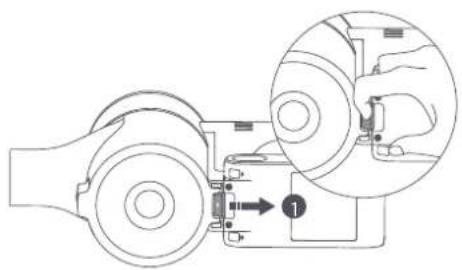
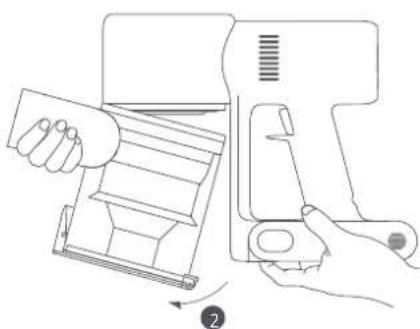
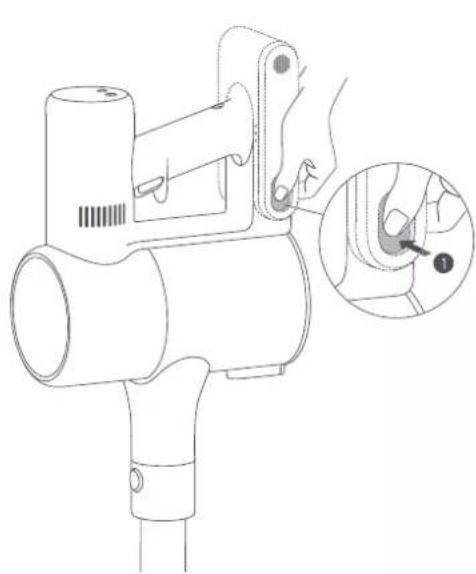
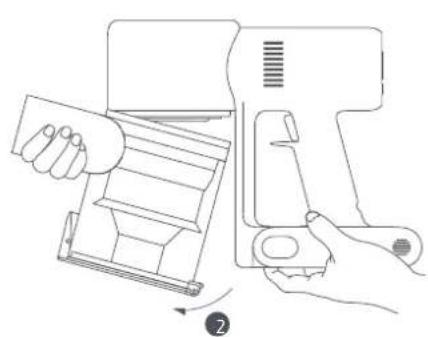
Line drawing of a mechanical device with a coiled cable and cylindrical shaft (no text or symbols)- Pull the dust compartment release switch in the direction illustrated in image ① then remove the dust compartment from the vacuum cleaner as illustrated in image ②
natural_image
Mechanical assembly diagram showing two rotating components with a numbered component and a close-up view of the mechanism (no text or symbols)Dust Compartment Release Switch
natural_image
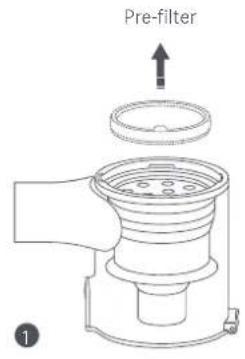
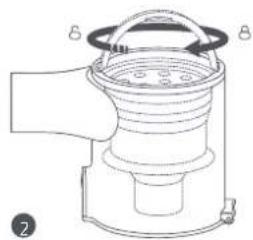
Line drawing of a hand operating a device with a handle, showing internal components and a button (no text or symbols)- Remove the pre-filter first, then lift the handle of the cyclone assembly and turn to counterclockwise until it stops, then pull to lift out the cyclone assembly.
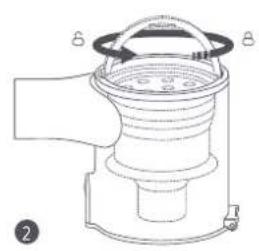
natural_image
Technical line drawing of a mechanical device with labeled parts (no text or symbols present)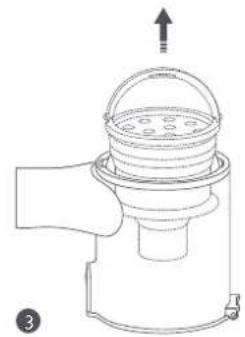
natural_image
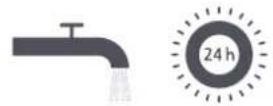
Diagram of a mechanical device with a top component and an arrow indicating upward motion (no text or symbols)- Rinse the pre-filter, cyclone assembly, and dust compartment with water until they are clean, then set each component aside to thoroughly dry for at least 24 hours.
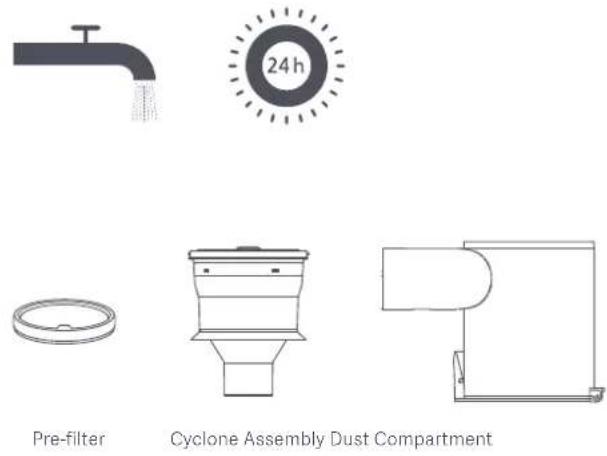
Notes:
• The dust compartment should be rinsed out at least once a month.
- The pre-filter and cyclone assembly should be cleaned once every 3 to 4 months.
- Wipe the contact points of the vacuum cleaner with a soft dry cloth if they are dirty.
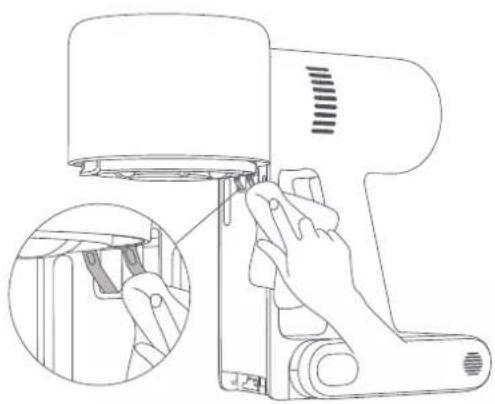
natural_image
Line drawing of a handheld device with a hand inserting a clip into it, showing internal components (no text or symbols)Notes:
- Do not use detergents, polishes, or air fresheners to clean the dust compartment.
- Do not clean the dust compartment, pre-filter, or cyclone assembly in a dishwasher or washing machine, nor attempt to dry any component in a tumble dryer, oven, microwave, or near an open fire.
Installing the Dust Compartment, Pre-filter, and Cyclone Assembly
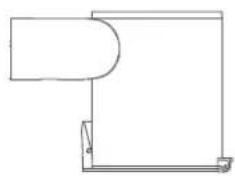
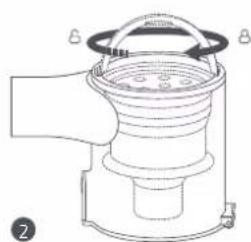
- Insert the cyclone assembly vertically into the dust compartment, and make sure that the handle of the cyclone assembly line up with the slot on the left side of the dust compartment. Turn the handle clockwise until it locks, then flip the handle down.
- Place the pre-filter with its front side facing up into the cyclone assembly.
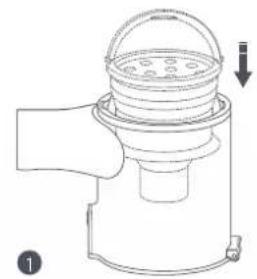
natural_image
Line drawing of a mechanical device with a lid and base, showing internal components and a downward arrow (no text or symbols)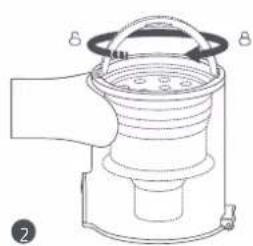
natural_image
Line drawing of a mechanical device with labeled parts (no text or symbols present)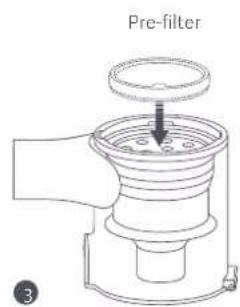
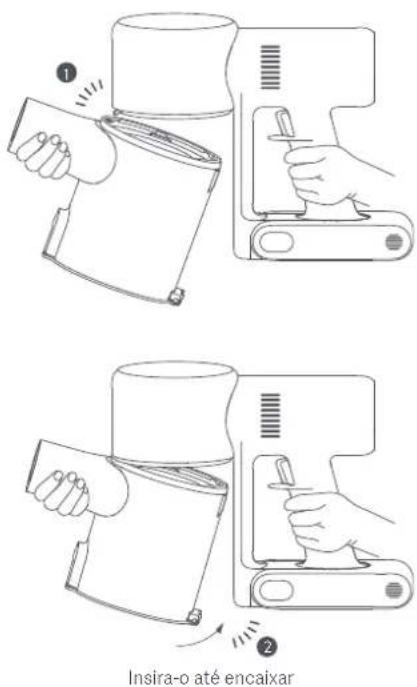
- Slightly tilt the dust compartment so its slot aligns with the clip on the vacuum cleaner. Then gently push the dust compartment until it clicks into place.
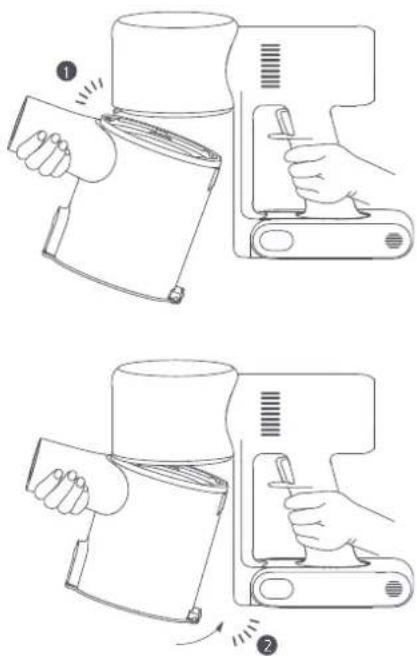
Insert until it clicks into place
Cleaning the Filter
- Remove the dust compartment as shown in the figure.
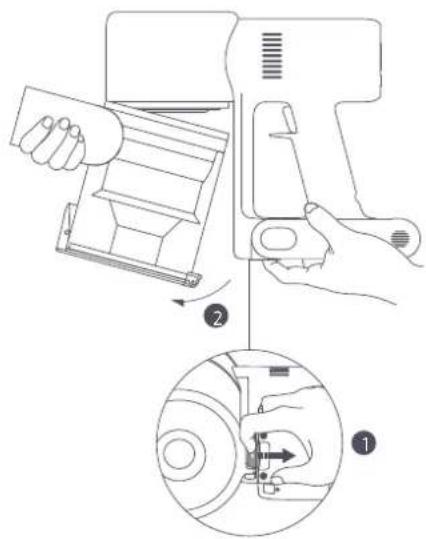
Dust Compartment Release Switch
Notes:
• It is recommended to clean the filter once every 4 to 6 months.
- It is recommended to replace the filter once every 6–12 months according to the actual using condition of the filter.
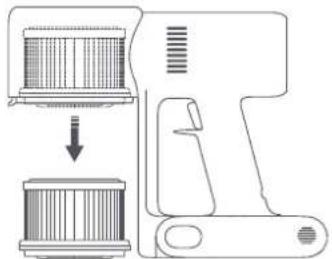
- Remove the filter from the vacuum cleaner by pulling it down in the direction shown in the figure.
natural_image
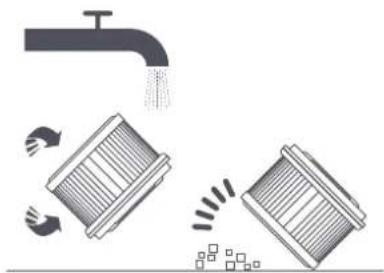
Diagram of a hand tool interacting with a cylindrical device, showing internal components and a downward arrow indicating process (no text or symbols present)- Clean the filter with clean water. Make sure you rotate the filter 360^ to thoroughly remove all dust caught in the filter. Lightly tap the filter several times to remove any excess dirt.
natural_image
Illustration of a faucet releasing water into two containers with arrows indicating flow direction (no text or symbols)Notes:
- Only use clean water to clean the filter. Do not use detergent.
-
Do not attempt to clean the filter with a brush or finger.
-
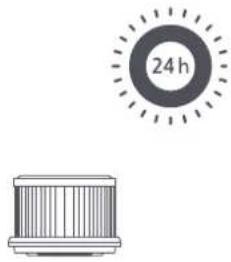
Allow the filter to thoroughly dry for at least 24 hours.
natural_image
Illustration of a cylindrical device with a circular indicator showing 24 hours, no text or symbols present.Installing the Filter
- Insert the filter into the vacuum cleaner and gently press down, as illustrated.
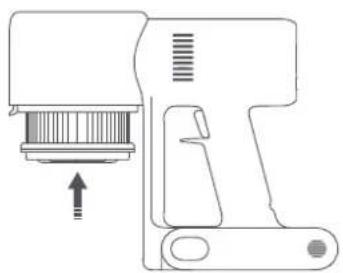
natural_image
Line drawing of a handheld device with an arrow indicating direction (no text or symbols)- Reinstall the dust compartment.
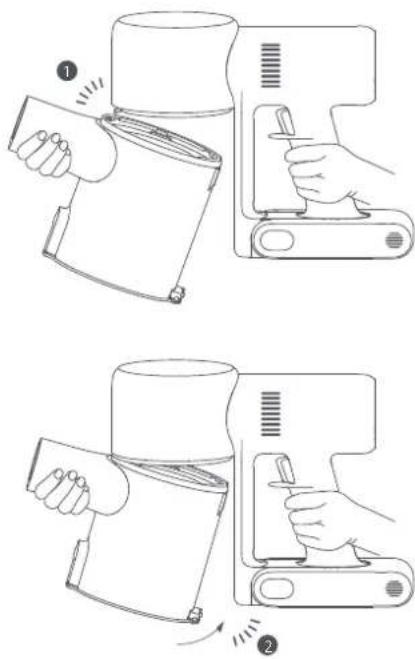
Insert until it clicks into place
Cleaning the High Torque Bush Bar
- Turn the lock counterclockwise until it stops, then remove the roller brush from the high torque brush bar.
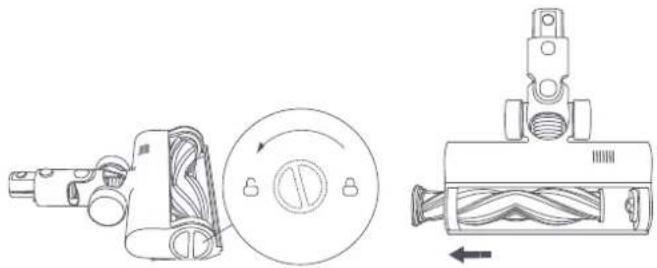
natural_image
Technical line drawing of a mechanical device with internal components and directional arrows (no text or symbols)- Use scissors to cut and pick out any hair or other debris tangled around the roller brush. Wipe away excess dust from the slot and clear plastic cover using a dry cloth or paper towel.
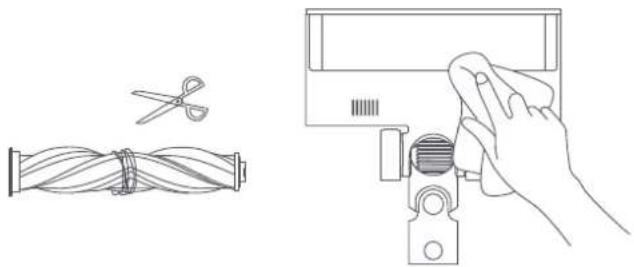
natural_image
Line drawing showing a hand holding a tool next to a coiled cable and scissors, with no text or symbols present.- After extended use, the roller brush may become dirty and should be washed. After washing, allow the roller brush to dry thoroughly by standing it upright in a well-ventilated area for at least 24 hours.
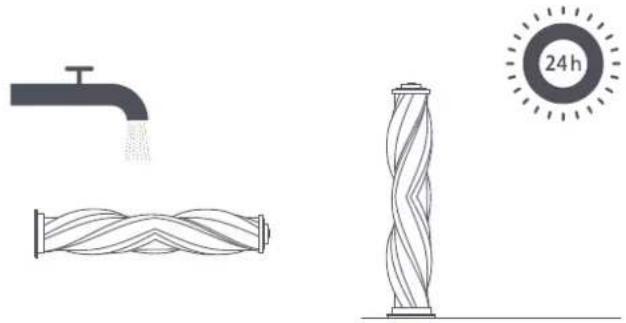
natural_image
Illustration of a faucet, coiled pipe, and a twisted cylindrical object with a 24-hour mark (no text or symbols on the objects themselves)- Make sure the roller brush is completely dry, and then align the lock on the top of the roller brush with to reinsert it. Turn the lock clockwise to install the roller brush in place.
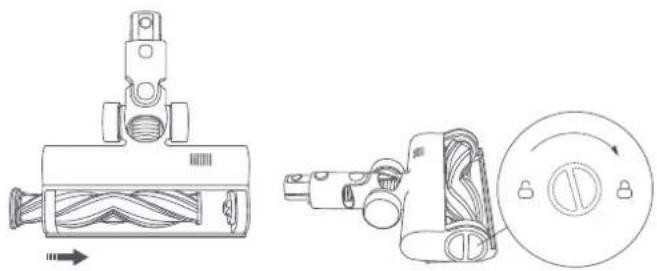
natural_image
Technical line drawing of a mechanical device with internal components and a circular component (no text or symbols)Cleaning the Mini Electric Brush
- Use a proper tool to turn the lock counterclockwise until you hear a click.
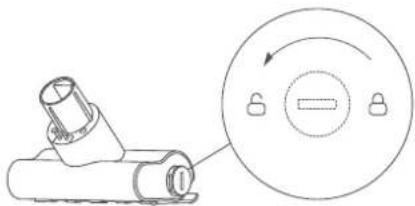
natural_image
Technical line drawing of a mechanical component with a circular inset showing a rotary knob (no text or symbols)- After unlocking the roller brush, remove it from the mini electric brush, then rinse and clean the roller brush.
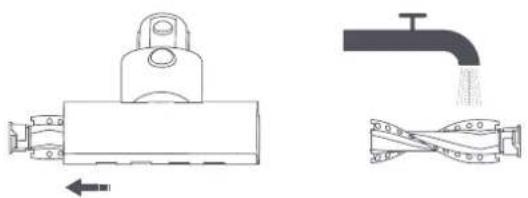
natural_image
Technical line drawings of mechanical components including a valve, pipe, and clamping device (no text or symbols)- After washing, allow the roller brush to dry thoroughly by standing it upright in a well-ventilated area for at least 24 hours.
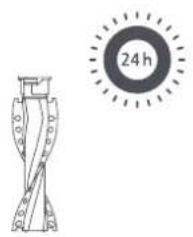
natural_image
Simple line drawing of a mechanical component and a circular target with '24 h' label (no text or symbols on the components)- Once the roller brush is dry, reinstall it by following the disassembly steps in reverse.
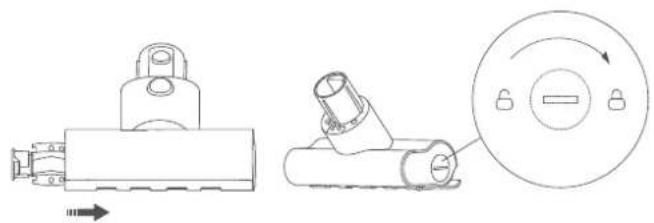
natural_image
Technical line drawing of mechanical components including a bracket and a circular dial with rotation arrow (no text or symbols)Cleaning the Water Tank and Mop Pad
- Slide the water tank down to detach it from the high torque brush bar.
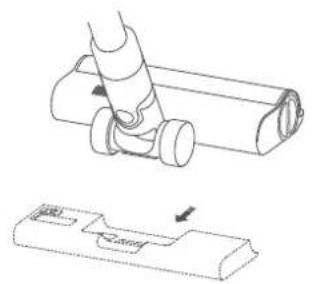
natural_image
Technical line drawing of a mechanical component with a base and adjustment arrow (no text or symbols)- Empty the water tank.
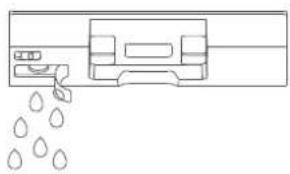
natural_image
Simple line drawing of a mechanical device with dropouts and a handle (no text or symbols)- Remove the mop pad from the water tank.
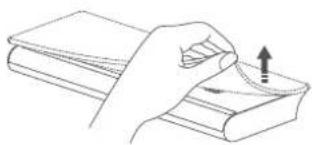
natural_image
Line drawing of a hand holding a book with an upward arrow indicating motion (no text or symbols)- Clean and dry the mop pad.

Notes:
- When the vacuum cleaner is charging or not in use, remove the water tank and drain any remaining water to prevent mildew or lingering odor.
• After mopping, remove the mop pad and clean it to avoid blocking the water outlet with dirty water. - A worn or damaged mop pad that no longer sticks to the water tank should be replaced to ensure optimal cleaning performance.
Water Dispenser Filter
The water dispenser filter should be replaced if the water tank dispenses water too slowly or becomes clogged.
To ensure optimal mopping effectiveness, it is recommended to replace water dispenser filters once every 3 to 6 months depending on water quality and frequency of use.
- Use your fingers to slide out old water dispenser filters on the left and right sides of each slot.
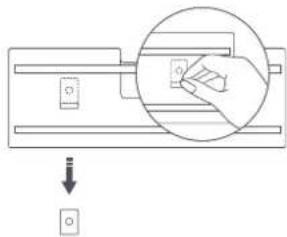
natural_image
Diagram showing a hand pressing a button on a mechanical component with a downward arrow indicating motion (no text or symbols)- Insert the new water dispenser filters and check to ensure they are installed correctly.
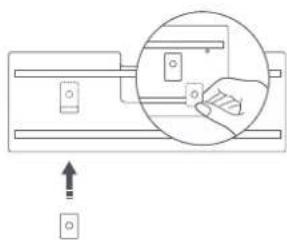
natural_image
Diagram showing a hand inserting a component into a device, with an arrow indicating direction (no text or symbols present)Battery Pack
The vacuum cleaner contains a removable rechargeable lithium-ion battery pack which has a limited number of recharge cycles. After extended use, the battery pack may no longer hold a charge. If this happens, it means the battery pack has reached the end of its life cycle and needs to be replaced.
- Press down the battery pack release button and slide the battery pack to the right, as illustrated, to remove it.
- Install the new battery pack.
natural_image
Technical line drawing of a hairdryer tool with an inset showing the insertion detail (no text or symbols)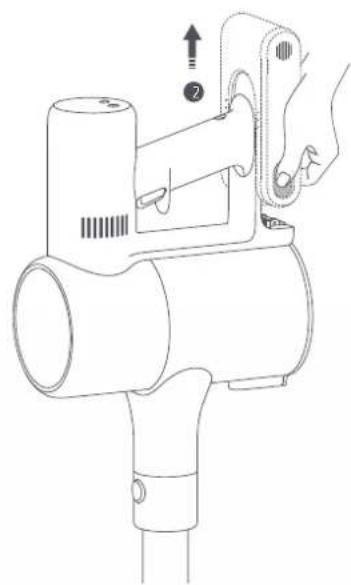
natural_image
Line drawing of a handheld hairdryer with a hand adjusting the handle (no text or symbols)Specifications
| Cordless Vacuum Cleaner | |||
| Model B207 Rated Voltage 25.2 V | --- | ||
| Charging Voltage 30.8 V Battery Capacity --- | 3000 mAh (Nominal Capacity)2800 mAh (Rated Capacity) | ||
| Rated Power 425 W Dust Compartment Capacity 0.6 L | |||
| Charging Time Approx. 4 hours Net Weight 1.7 kg | |||
| Item Dimensions 1286 × 214 × 256 mm Net Weight (with Accessories) 4.2 kg | |||
| High Torque Brush Bar | Mini Electric Brush | ||
| Model | VMH1 | Model | VTV104B |
| Rated Power | 40 W | Rated Power | 20 W |
| Rated Voltage 25.2 V | --- Rated Voltage 25.2 V | --- | |
| Charger | |||
| Manufactured by | Zhongshan Baolijin Electronic Co., Ltd. | Average Active Efficiency | 87.5% |
| Model | BLJ24W308080P-V | Efficiency at Low Load (10%) | 77.9% |
| Input | 100–240 V~ 50/60 Hz 0.8 A | No-load Power Consumption | 0.10 W |
| Output | 30.8 V--- 0.8 A | ||
| Rechargeable Lithium-ion Battery Pack | |||
| Model | V2210-7S1P-BCA/V2210-7S1P-BWA | Nominal Capacity | 3000 mAh |
| Nominal Voltage | 25.2 V--- | Rated Capacity | 2800 mAh |
| Energy | 70.56 Wh | ||
Regulatory Compliance Information
EU Declaration of Conformity

We, Dreame (Tianjin) Information Technology Co., Ltd., hereby declare that this equipment is in compliance with the applicable Directives and European Norms, and amendments. The full text of the EU declaration of conformity is available at the following internet address: http://www.mi.com/global/service/support/declaration.html
For detailed e-manual, please go to www.mi.com/global/service/userguide
WEEE Information

All products bearing this symbol are waste electrical and electronic equipment (WEEE as in directive 2012/19/EU) which should not be mixed with unsorted household waste. Instead, you should protect human health and the environment by handing over your waste equipment to a designated collection point for the recycling of waste electrical and electronic equipment, appointed by the government or local authorities. Correct disposal and recycling will help prevent potential negative consequences to the environment and human health. Please contact the installer or local authorities for more information about the location as well as terms and conditions of such collection points.
Battery Safety Precautions
- The lithium-on battery pack contains substances that are hazardous to the environment. Before disposing of the vacuum cleaner, please first remove the battery pack, then discard, or recycle it in accordance with local laws and regulations of the country or region it is used in.
• Under abusive conditions, liquid may be ejected from the battery. Avoid contact with liquid, as it may cause irritation or burns. If contact occurs, flush with water. If liquid contacts eyes, seek medical help.
Troubleshooting
| Issue Possible Cause Solution | ||
| The vacuum cleaner does not work. | It is out of battery or has low battery. Fully charge the vacuum cleaner, then resume use. | |
| It enters into overheat protection mode triggered by a blockage. | Clear any blockages and restart the vacuum cleaner when it cools down. | |
| Its suction opening or airway passage is blocked. | Clear any blockages from suction opening or airway passage. | |
| The suction power reduces. | The dust compartment is full and/or the filter is clogged. | Empty the dust compartment and clean the filter. |
| The high torque brush bar, the extension rod, or other parts are blocked. | Clear any blockages from the high torque brush bar, the extension rod, or other parts. | |
| The motor makes a strange noise. | The main suction opening or the extension rod is blocked. | Clear any blockages in the main suction opening or the extension rod. |
| The first indicator is red after turning on the vacuum cleaner. | Battery pack is damaged. | Please contact after-sales service to arrange maintenance. |
| The first indicator blinks red when charging the vacuum cleaner. | The charger is incompatible. | Only use the original charger to charge the vacuum cleaner. |
| The battery indicator does not light up while charging. | The charger is not connected to the vacuum cleaner. | Make sure the charger is plugged in correctly. |
| The battery is fully charged and went into sleep mode. | The vacuum cleaner can be used normally. | |
| If the problem still persists after ruling out the above two possibilities, please contact after-sales service for help. | ||
| The battery charges slowly. The battery temperature is too low or too high. | Wait until the battery temperature normalizes, then resume use. | |
| The water tank does not dispense water, or dispenses water slowly. | The water dispenser filter is clogged. Clean or replace the water dispenser filter. | |
| The mop pad is dirty. Clean or replace the mop pad. | ||
Error Icon
If the vacuum cleaner is not working properly, the screen display will show an error message. Please refer to the table below to find your solution based on the error message.
| Error Icon Error | Message Solution | |
 | Airway Blocked | Check if any blockages caught in the dust compartment, extension rod, and/or high torque brush bar. |
 |Brush Stuck |Brush Stuck | Refer to "Cleaning the High Torque Brush Bar" in the Care & Maintenance section for directions on how to remove hair and other debris caught in the roller brush. | |
 | High-temperature Alert | Wait until the battery temperature normalizes before resuming use. |
 or Not Installed Ensure that the filter and pre-filter are installed correctly. or Not Installed Ensure that the filter and pre-filter are installed correctly. | ||
| If one of the error codes from E0 to E4 appears on the display, please contact the after-sales service team for repair. | ||
natural_image
Technical line drawing of a mechanical assembly with no visible text or symbolsnatural_image
Technical line drawing of a cylindrical device with mounting holes and four separate components (no text or symbols)natural_image
Technical line drawing of a mechanical assembly with exploded view and component details (no text or symbols)natural_image
Technical line drawing of a mechanical component with an inset magnified view (no text or symbols)natural_image
Technical line drawing of a mechanical device with no visible text or symbolsnatural_image
Technical line drawing of a mechanical device with no visible text or symbolsModalità continua
Note:
natural_image
Line drawing of a vacuum cleaner positioned at the base of a corner (no text or symbols)natural_image
Simple line drawing of a door opening and a mechanical device (no text or symbols)natural_image
Line drawing of a bed with a lamp on top (no text or symbols)natural_image
Line drawing of a robotic arm operating on a platform (no text or symbols)Note:
natural_image
Line drawing of two hands holding a small object with droplets falling (no text or symbols)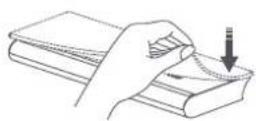
natural_image
Diagram of a medical or laboratory setup with a device and a circular diagram showing a person interacting with it (no text or symbols present)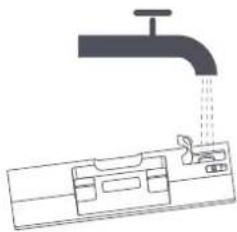
natural_image
Diagram of a faucet pouring liquid into a container with internal compartments (no text or labels)natural_image
Technical line drawing of a mechanical component being inserted into a cylindrical part (no text or symbols)Note:
natural_image
Line drawing of a hand using a handheld device to press or install a device (no text or symbols present)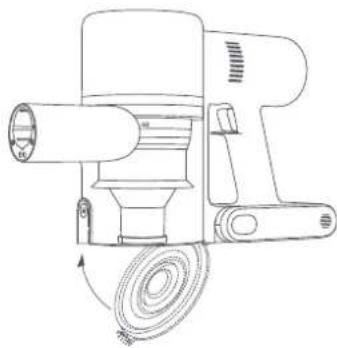
natural_image
Line drawing of a mechanical device with a coiled cable and cylindrical shaft (no text or symbols)natural_image
Mechanical assembly diagram showing two rotating components with a numbered component and a close-up inset of the mechanism (no text or symbols)natural_image
Line drawing of a hand using a handheld device to adjust or install a tray (no text or symbols present)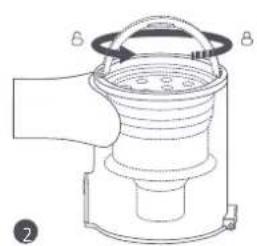
natural_image
Technical line drawing of a mechanical device with labeled components A and B (no text or symbols beyond labels)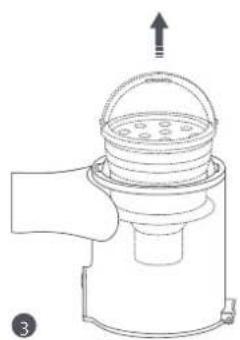
natural_image
Line drawing of a hand holding a small device with a lid and top handle, no text or symbols presentnatural_image
Line drawing of a handheld device with an inset showing a hand operating the lever (no text or symbols present)Note:
natural_image
Line drawing of a mechanical device with a lid and base, showing internal components and an arrow indicating direction (no text or symbols)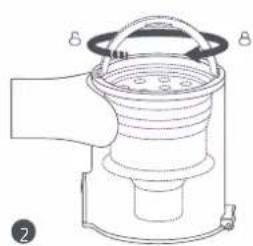
natural_image
Technical line drawing of a mechanical device with labeled parts (no text or symbols present)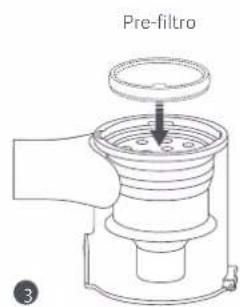
natural_image
Diagram showing a device being processed into a cylindrical component (no text or symbols present)natural_image
Illustration of a faucet spraying water onto a grid-patterned surface with directional arrows indicating flow (no text or symbols)Note:
natural_image
Illustration of a cylindrical component with a circular indicator showing '24 h' (no text or symbols on the component itself)natural_image
Line drawing of a handheld device with a button and arrow indicating motion (no text or symbols)natural_image
Technical line drawing of a mechanical device with internal components and directional arrows (no text or symbols)natural_image
Line drawing showing a hand using a tool to clean cable and wire, with scissors and a separate cable being handled (no text or symbols)natural_image
Diagram showing a faucet spraying water, a coiled pipe with coiled wire, and a twisted cylindrical structure with a 24-hour time indicator (no text or symbols on the diagram itself)natural_image
Technical line drawings of mechanical components, including a valve assembly and a circular control knob (no text or symbols)natural_image
Technical line drawing of a mechanical component with a circular dial and arrow indicator (no text or symbols)natural_image
Technical line drawings of mechanical components including a lever, pipe, and twisted connection (no text or symbols)natural_image
Simple line drawing of a mechanical component with a circular target labeled '24 h' (no text or symbols on the component itself)natural_image
Technical line drawing of mechanical components including a bracket and a circular dial with directional arrow (no text or symbols)natural_image
Technical line drawing of a mechanical assembly with no visible text or symbolsnatural_image
Simple line drawing of a mechanical device with dropouts and a handle (no text or symbols)natural_image
Line drawing of a hand holding a book with an upward arrow indicating motion (no text or symbols)natural_image
Diagram showing a hand inserting a component into a circular component, with a downward arrow indicating direction (no text or symbols)natural_image
Diagram showing a hand interacting with a device, with an arrow indicating direction (no text or symbols present)Batteria
natural_image
Technical line drawing of a handheld device with a close-up inset showing a hand interacting with the component (no text or symbols present)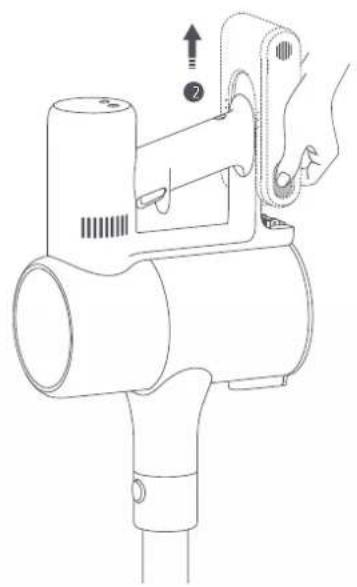
natural_image
Line drawing of a handheld hairdryer with a hand adjusting the handle (no text or symbols)Specifiche tecniche
natural_image
Technical line drawing of a mechanical clamp or bracket assembly (no text or symbols)natural_image
Technical line drawing of a cylindrical device with internal components and mounting holes (no text or symbols)Station de charge et de stockage 2-en-1 (inclut 2 vis, 2 chevilles murales, un patron d'installation autocollant)
natural_image
Technical line drawing of a mechanical assembly with exploded view and component details (no text or symbols)natural_image
Technical line drawing of a mechanical component with a magnified inset showing a detail (no text or symbols)natural_image
Technical line drawing of a mechanical device with no visible text or symbolsMode non continu
- Mode continu
natural_image
Technical line drawing of a mechanical device with no visible text or symbolsMode continu
Remarques :
natural_image
Line drawing of a vacuum cleaner positioned at the base of a 3D coordinate axis (no text or symbols)natural_image
Line drawing of a door opening and a mechanical device with a handle (no text or symbols)natural_image
Line drawing of a person using a vacuum cleaner on a bed (no text or symbols)natural_image
Line drawing of a robotic arm operating on a platform (no text or symbols)Remarques :
natural_image
Line drawing of two hands holding a piece of water droplets (no text or symbols)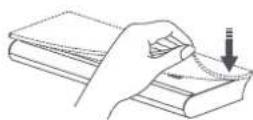
natural_image
Diagram of a mechanical device with a rotating component and control panel (no text or symbols)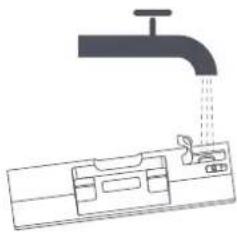
natural_image
Diagram of a faucet pouring liquid into a water-filled container (no text or symbols)natural_image
Technical line drawing of a mechanical component being inserted into a housing (no text or symbols)Remarques :
natural_image
Line drawing of a hand using a handheld device to press or install a device (no text or symbols present)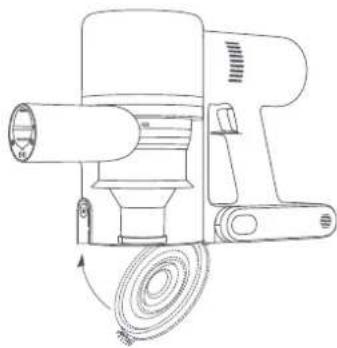
natural_image
Line drawing of a mechanical device with a coiled cable and cylindrical shaft (no text or symbols)natural_image
Diagram of a mechanical assembly with two rollers and a switch, showing a close-up view of the component (no text or symbols present)natural_image
Line drawing of a hand using a handheld device to adjust or install a device (no text or symbols present)natural_image
Line drawing of a mechanical device with a handle and circular component, no text or symbols present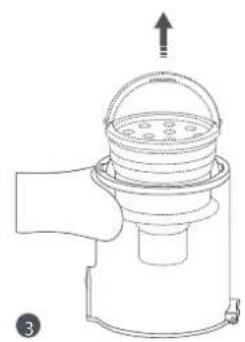
natural_image
Line drawing of a hand holding a container with a lid and upward arrow, no text or symbols presentnatural_image
Line drawing of a handheld device with a hand operating the button, showing internal components and a close-up inset (no text or symbols)Remarques :
natural_image
Line drawing of a mechanical device with a lid and base, showing internal components and a downward arrow (no text or symbols)
natural_image
Line drawing of a mechanical device with labeled parts (A and B), no text or symbols present.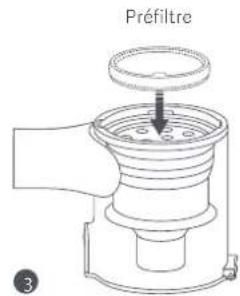
natural_image
Diagram of a mechanical device with a cylindrical component being inserted into a housing (no text or symbols present)natural_image
Illustration of a faucet and two washers with arrows indicating flow direction (no text or symbols)Remarques :
natural_image
Line drawing of a handheld device with a button and arrow indicating motion (no text or symbols)natural_image
Illustration of a faucet, coiled pipe, and a twisted cylindrical object with a 24-hour time indicator (no text or symbols on the objects themselves)natural_image
Technical line drawing of a mechanical device with exploded view and side view (no text or symbols)natural_image
Diagram of a mechanical component with a circular inset showing a rotating knob (no text or symbols)natural_image
Technical line drawings of mechanical components including a valve, pipe, and coiled spring (no text or symbols)natural_image
Simple line drawing of a mechanical component with a circular target labeled '24 h' (no text or symbols on the component itself)natural_image
Technical line drawing of a mechanical component with a circular inset showing a rotary knob (no text or symbols)natural_image
Technical line drawing of a mechanical component with an arrow indicating assembly or adjustment (no text or symbols present)natural_image
Simple line drawing of a device with liquid droplets falling (no text or symbols)natural_image
Line drawing of a hand holding a stack of books with an upward arrow indicating motion (no text or symbols)natural_image
Diagram showing a hand pressing a button on a mechanical component with a downward arrow indicating motion (no text or symbols)natural_image
Pure mechanical diagram showing a lever mechanism with a magnified inset view (no text or symbols)Batterie
natural_image
Technical line drawing of a handheld device with a close-up inset showing a hand interacting with the component (no text or symbols present)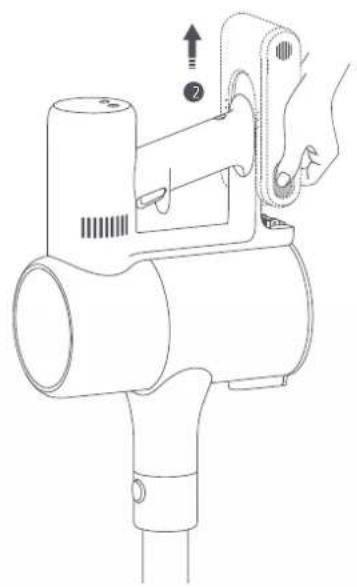
natural_image
Line drawing of a handheld hair dryer with a hand adjusting its cable (no text or symbols)Caractéristiques
http://www.mi.com/global/service/support/declaration.html
natural_image
Technical line drawing of a mechanical assembly with exploded view and component details (no text or symbols)natural_image
Technical line drawing of a mechanical component with a magnified inset showing a detail (no text or symbols)natural_image
Line drawing of a hair dryer with a close-up inset showing the connector detail (no text or symbols)natural_image
Technical line drawing of a mechanical device with no visible text or symbolsManueller Modus
• Dauermodus
natural_image
Technical line drawing of a mechanical device with no visible text or symbolsDauermodus
Hinweise:
natural_image
Simple line drawing of a door opening and a mechanical device (no text or symbols)natural_image
Line drawing of a bed with a lamp on top, no text or symbols presentnatural_image
Line drawing of a robotic arm operating on a platform (no text or symbols)Hinweise:
natural_image
Diagram of a mechanical device with a circular component and connected tubing (no text or symbols)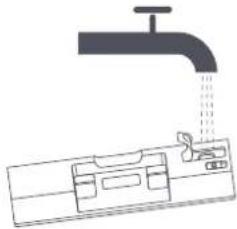
natural_image
Diagram of a faucet pouring liquid into a water tank (no text or symbols)natural_image
Technical line drawing of a mechanical component with a cylindrical part inserted, showing a cross-section view (no text or symbols)natural_image
Line drawing of a hand cleaning a device from a computer (no text or symbols)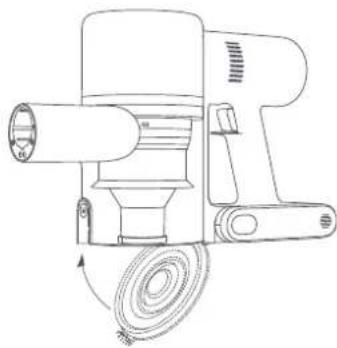
natural_image
Line drawing of a mechanical device with a coiled cable and cylindrical shaft (no text or symbols)natural_image
Mechanical assembly diagram showing two rollers connected to a housing with a close-up inset of the mechanism (no text or symbols)natural_image
Line drawing of a hand holding a device next to a device with a scroll, showing mechanical components and motion arrows (no text or symbols)natural_image
Technical line drawing of a mechanical device with labeled parts (no text or symbols present)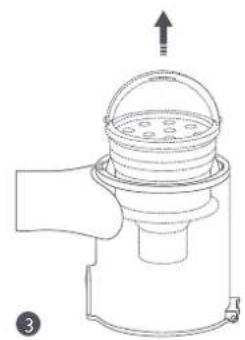
natural_image
Line drawing of a hand holding a small container with a lid and spout, no text or symbols presentnatural_image
Line drawing of a handheld device with an inset showing a hand inserting a component (no text or symbols)Hinweise:
natural_image
Line drawing of a mechanical device with a handle and central hub (no text or symbols)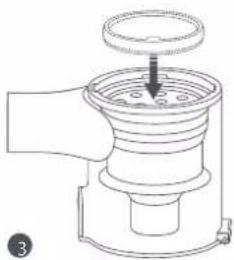
natural_image
Line drawing of a mechanical device with a central knob and handle (no text or symbols)natural_image
Diagram of a mechanical device showing a cylindrical component being processed into a fan-like housing (no text or symbols present)natural_image
Illustration of a faucet spraying water onto a grid-patterned surface with motion arrows (no text or symbols)Hinweise:
natural_image
Line drawing of a handheld device with an arrow pointing to a component (no text or symbols)natural_image
Technical line drawing of mechanical components including a cylindrical device, a circular component with a knob, and a multi-junction assembly (no text or symbols)natural_image
Line drawing showing a hand holding a tool next to a coiled cable and scissors, with no text or symbols present.natural_image
Illustration of a faucet, coiled tubing, and a twisted cylindrical structure with a 24-hour mark (no text or symbols on the diagram itself)natural_image
Technical line drawing of a mechanical device with internal components and a circular button (no text or symbols)natural_image
Technical line drawing of a mechanical component with a circular inset showing a rotary knob (no text or symbols)natural_image
Technical line drawings of mechanical components including a valve, pipe, and clamping mechanism (no text or symbols)natural_image
Simple line drawing of a mechanical component with a circular target labeled '24 h' (no text or symbols on the component itself)natural_image
Technical line drawing of mechanical components including a bracket and a circular dial with rotation arrow (no text or symbols)natural_image
Technical line drawing of a mechanical component with an arrow indicating assembly or adjustment (no text or symbols present)natural_image
Simple line drawing of a mechanical device with dropouts and a handle (no text or symbols)natural_image
Line drawing of a hand pressing down on a stack of books with an upward arrow (no text or symbols)natural_image
Diagram showing a hand pressing a circular component onto a mechanical part, with a downward arrow indicating motion (no text or symbols)natural_image
Diagram of a mechanical assembly with a magnified inset showing a hand operating a component (no text or symbols present)Akku
natural_image
Technical line drawing of a hair dryer with a close-up inset showing the internal structure (no text or symbols)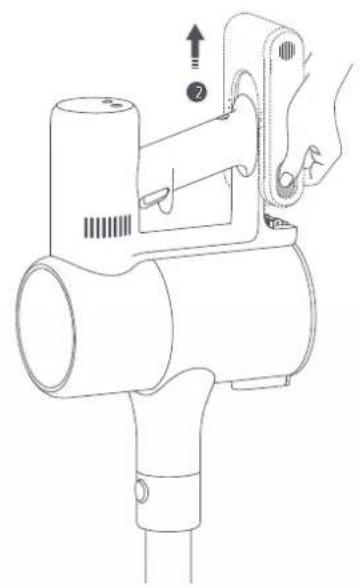
natural_image
Line drawing of a handheld hair dryer with a hand adjusting its grip (no text or symbols)Spezifikationen
natural_image
Technical line drawing of a mechanical clamp or bracket assembly (no text or symbols)natural_image
Technical line drawing of a cylindrical device with mounting holes and four separate components (no text or symbols)natural_image
Technical line drawing of a mechanical assembly with exploded view and component details (no text or symbols)natural_image
Technical line drawing of a mechanical component with an inset magnified view showing internal components (no text or symbols)natural_image
Technical line drawing of a mechanical device with no visible text or symbolsModo Discontinuo
natural_image
Technical line drawing of a mechanical device with internal components and a directional arrow (no text or symbols)Modo Continuo
Notas:
natural_image
Line drawing of a vacuum cleaner in a room with a 3D coordinate axis (no text or symbols)natural_image
Simple line drawing of a door opening and a mechanical device (no text or symbols)natural_image
Line drawing of a bed with a computer monitor on top (no text or symbols)natural_image
Line drawing of a robotic arm operating on a platform (no text or symbols)Notas:
natural_image
Line drawing of two hands holding a piece of water droplets (no text or symbols)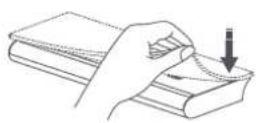
natural_image
Diagram of a medical imaging device with a circular arrow indicating rotation or movement (no text or symbols present)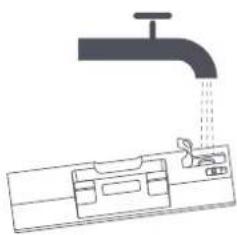
natural_image
Diagram of a faucet pouring liquid into a container with a tool, illustrating water flow (no text or symbols)natural_image
Technical line drawing of a mechanical assembly with a tool and component (no text or symbols)natural_image
Line drawing of a hand using a handheld device to press or install a device (no text or symbols present)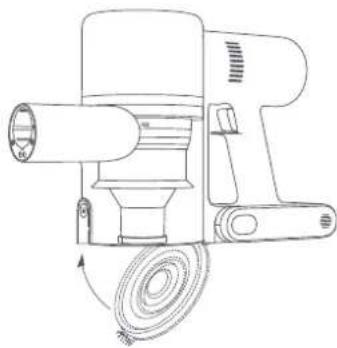
natural_image
Line drawing of a mechanical device with a coiled cable and cylindrical shaft (no text or symbols)natural_image
Mechanical assembly diagram showing two connected components with a numbered component and a close-up inset of the mechanism (no text or symbols)natural_image
Line drawing of a hand operating a device with a handle, showing internal components and a button (no text or symbols)natural_image
Technical line drawing of a mechanical device with labeled parts (no text or symbols present)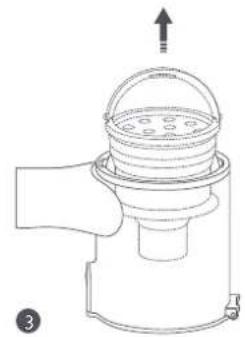
natural_image
Diagram of a mechanical device with a dome-shaped top component and an upward arrow, no text or symbols present.natural_image
Simple line drawing of a faucet and a circular timer with '24h' text (no other symbols or text)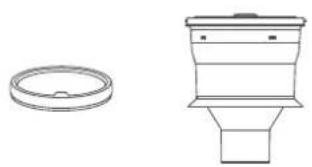
natural_image
Technical line drawings of a circular component and a vertical cylindrical device (no text or symbols)Prefiltro
natural_image
Simple line drawing of a room layout with a curved top and adjacent furniture (no text or symbols)Compartimento de polvo
Notas:
natural_image
Line drawing of a hand operating a kitchen electric oven with a magnified inset showing the interior (no text or symbols)Notas:
natural_image
Line drawing of a mechanical device with a lid and base, showing internal components and a downward arrow (no text or symbols)Prefiltro
natural_image
Line drawing of a mechanical device with a handle and circular top component (no text or symbols)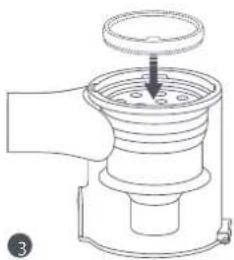
natural_image
Line drawing of a mechanical device with a central knob and handle (no text or symbols)natural_image
Diagram of a hand tool interacting with a cylindrical device, showing internal components and a downward arrow indicating process (no text or symbols present)natural_image
Illustration of a faucet spraying water onto two corrugated pipes with arrows indicating flow direction (no text or symbols)Notas:
natural_image
Line drawing of a handheld device with a button and arrow indicating motion (no text or symbols)natural_image
Technical line drawing of a mechanical assembly with exploded view and side view (no text or symbols)natural_image
Line drawing showing a hand holding a tool next to a coiled wire and scissors, with no text or symbols present.natural_image
Diagram showing a faucet spraying water, a twisted rope with coiled strands, and a twisted column with a 24-hour sun icon (no text or symbols)natural_image
Technical line drawing of a mechanical device with internal components and a circular button (no text or symbols)natural_image
Diagram of a mechanical component with a circular dial and arrow indicating rotation (no text or symbols)natural_image
Technical line drawings of mechanical components including a valve, pipe, and clamping device (no text or symbols)natural_image
Simple line drawing of a mechanical component with a circular target labeled '24 h' (no text or symbols on the component itself)natural_image
Technical line drawing of mechanical components including a bracket and a circular dial with rotation arrow (no text or symbols)natural_image
Technical line drawing of a mechanical component with a base and side view (no text or symbols)natural_image
Simple line drawing of a mechanical device with liquid droplets falling (no text or symbols)natural_image
Line drawing of a hand holding a stack of books with an upward arrow indicating motion (no text or symbols)natural_image
Diagram showing a hand pressing a button on a mechanical component with a downward arrow indicating motion (no text or symbols)natural_image
Diagram of a mechanical device with an inset showing a hand pressing a button (no text or symbols present)Pack de batería
natural_image
Line drawing of a hair dryer with a hand inserting a clip into the body (no text or symbols)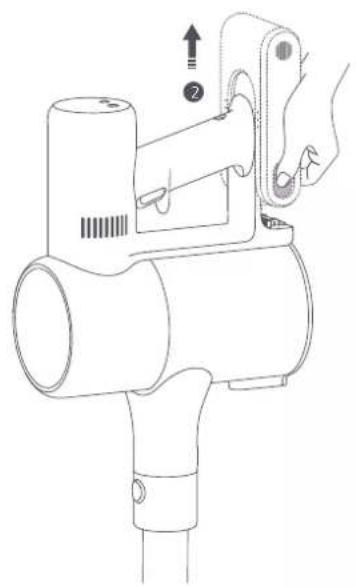
natural_image
Line drawing of a handheld hairdryer with a hand adjusting its handle (no text or symbols)Especificaciones
natural_image
Technical line drawing of a mechanical assembly with no visible text or symbolsEscova de Chão de Torque Elevado
natural_image
Technical line drawing of a cylindrical device with internal components and mounting holes (no text or symbols)natural_image
Technical line drawing of a mechanical assembly with exploded view and component details (no text or symbols)natural_image
Technical line drawing of a mechanical component with an inset magnified view (no text or symbols)Base de Carregamento Alargada
Base Alargada
natural_image
Line drawing of a hair dryer with attached cable and connector, shown in two views (no text or symbols)Indicador do estado da bateria
Carregar o aspirador com o carregador
Notas:
natural_image
Technical line drawing of a mechanical device with no visible text or symbolsModo Não Contínuo
- Modo Continuo
natural_image
Technical line drawing of a mechanical device with no visible text or symbolsModo Continuo
Notas:
natural_image
Line drawing of a vacuum cleaner in a corner with a 3D coordinate axis (no text or symbols)Bocal para Juntas: Para aspirar juntas estreitas e contornos de portas, janelas, rodapés, cantos, escadas, etc.
natural_image
Simple line drawing of a door opening and a mechanical device (no text or symbols)natural_image
Line drawing of a bed with a lamp on top, no text or symbols presentnatural_image
Line drawing of a robotic arm positioned on a platform (no text or symbols)Notas:
natural_image
Line drawing of two hands holding a piece of water droplets (no text or symbols)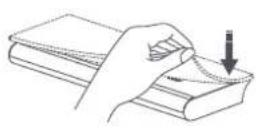
natural_image
Diagram of a medical device with a magnified view showing internal components (no text or symbols)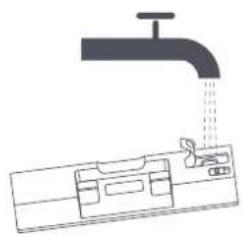
natural_image
Diagram of a faucet pouring liquid into a container with internal components (no text or labels)natural_image
Technical line drawing of a mechanical assembly with a tool inserted into a cylindrical component (no text or symbols present)natural_image
Line drawing of a hand using a handheld device to press or install a device (no text or symbols present)Limpeza do Compartimento do Pó, do Pré-Filtro e do Sistema Ciclónico
natural_image
Line drawing of a manual electric shaver with a coiled cable (no text or symbols)natural_image
Technical line drawing of a mechanical assembly with two views of a component (no text or symbols)natural_image
Line drawing of a hand using a handheld device to adjust or install a tray (no text or symbols present)natural_image
Technical line drawing of a mechanical device with labeled parts (no text or symbols present)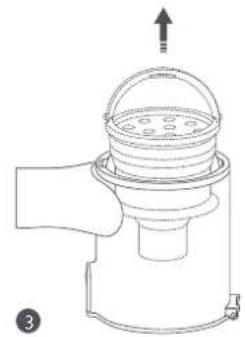
natural_image
Diagram of a mechanical device with a top component and an arrow indicating upward motion (no text or symbols)natural_image
Line drawing of a handheld device with an inset showing hand positioning and adjustment mechanism (no text or symbols)Notas:
natural_image
Line drawing of a mechanical device with a lid and base, showing internal components and a downward arrow (no text or symbols)Pré-filtro
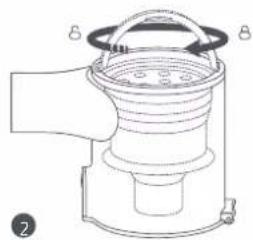
natural_image
Line drawing of a mechanical device with a handle and central hub (no text or symbols)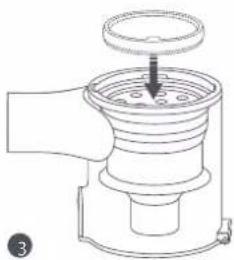
natural_image
Line drawing of a mechanical device with a central knob and handle (no text or symbols)natural_image
Diagram of a mechanical device with a cylindrical component being inserted into a housing (no text or symbols present)natural_image
Illustration of a faucet spraying water onto a coiled spring, with no text or symbols present.Notas:
natural_image
Illustration of a circular indicator light with '24 h' and a cylindrical component (no text or symbols on the diagram itself)natural_image
Line drawing of a hand-operated device with a button and handle, showing internal components and an upward arrow (no text or symbols)- Reinstale o compartimento do pó.
Limpeza da Escova de Chão de Torque Elevado
natural_image
Technical line drawing of mechanical components including a rotary switch, circular dial, and threaded fastener (no text or symbols)natural_image
Line drawing of a hand using a handheld tool to adjust cable wire, with scissors and a separate cable being held nearby (no text or symbols)natural_image
Illustration of a faucet, coiled pipe, and a twisted cylindrical structure with a 24-hour time indicator (no text or symbols on the diagram itself)natural_image
Technical line drawing of a mechanical device with internal components and a circular component (no text or symbols)natural_image
Technical line drawing of a mechanical component with a circular inset showing a rotary knob (no text or symbols)natural_image
Technical line drawings of mechanical components including a valve, pipe, and clamping device (no text or symbols)natural_image
Simple line drawing of a mechanical component with a circular target labeled '24 h' (no text or symbols on the component itself)natural_image
Technical line drawing of a mechanical component with a circular inset showing a rotary knob (no text or symbols)natural_image
Technical line drawing of a mechanical component with a base and side view (no text or symbols)natural_image
Simple line drawing of a device with liquid droplets falling out (no text or symbols)natural_image
Line drawing of a hand pressing down on a stack of books with an upward arrow (no text or symbols)- Limpe e seque o pano mopa.
Notas:
natural_image
Diagram showing a hand pressing a button on a mechanical component with a downward arrow indicating motion (no text or symbols)natural_image
Pure mechanical diagram showing a lever mechanism with a magnified inset of the lever (no text or symbols)Bateria
natural_image
Line drawing of a hairdryer with a hand inserting a clip into the handle (no text or symbols)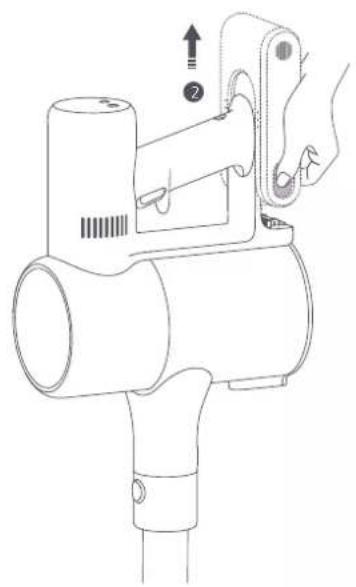
natural_image
Line drawing of a handheld hairdryer with a hand adjusting its handle (no text or symbols)Especificações
natural_image
Technical line drawing of a mechanical clamp or bracket assembly (no text or symbols)natural_image
Technical line drawing of a cylindrical device with mounting holes and a battery, showing internal components (no text or symbols)natural_image
Technical line drawing of a mechanical assembly with exploded view and exploded view (no text or symbols)natural_image
Technical line drawing of a mechanical component with an inset magnified view (no text or symbols)natural_image
Line drawing of a hair dryer with attached plug and cable, showing internal components (no text or symbols)natural_image
Technical line drawing of a mechanical device with no visible text or symbolsnatural_image
Technical line drawing of a mechanical device with no visible text or symbolsnatural_image
Line drawing of a vacuum cleaner positioned at the base of a 3D coordinate axis (no text or symbols)natural_image
Simple line drawing of a door opening and a hand holding a tool, no text or symbols presentnatural_image
Line drawing of a bed with a computer monitor on top (no text or symbols)natural_image
Line drawing of a robotic arm operating on a platform (no text or symbols)Примечание:
natural_image
Line drawing of two hands holding a small object with droplets falling (no text or symbols)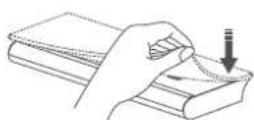
natural_image
Diagram of a medical device with a circular arrow indicating rotation or movement, no text or symbols present.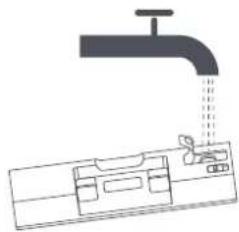
natural_image
Diagram of a faucet pouring liquid into a container with a valve (no text or labels)natural_image
Technical line drawing of a mechanical component being inserted into a housing (no text or symbols)Примечания:
natural_image
Line drawing of a hand using a handheld device to clean or install a machine (no text or symbols present)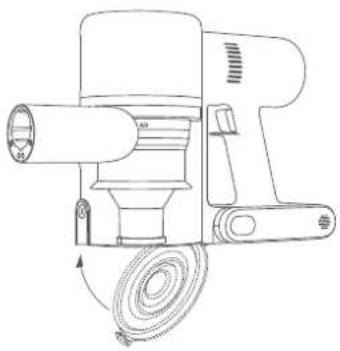
natural_image
Technical line drawing of a mechanical device with a coiled spring and cylindrical shaft (no text or symbols)natural_image
Mechanical assembly diagram showing two components with a numbered arrow indicating connection (no text or symbols present)natural_image
Line drawing of a hand operating a portable device with a scroll, showing mechanical components and a hand holding the screen (no text or symbols present)natural_image
Diagram of a mechanical device with a dome-shaped top component and a handle, showing no text or symbols.natural_image
Line drawing of a hand operating a portable air conditioner unit with a magnified inset showing the handle (no text or symbols)Примечания:
natural_image
Diagram of a mechanical device with a lid and base, showing internal components and directional arrow (no text or symbols)natural_image
Technical line drawing of a mechanical device with no visible text or symbols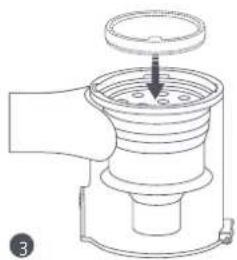
natural_image
Technical line drawing of a mechanical device with a central component and mounting bracket (no text or symbols)natural_image
Diagram of a hairdryer with a brush and roller, showing internal components (no text or symbols)natural_image
Diagram showing a faucet releasing water into two spools of material, with arrows indicating flow direction (no text or symbols)Примечания:
natural_image
Line drawing of a handheld device with internal components and an arrow indicating motion (no text or symbols)natural_image
Technical line drawing showing a coiled cable being cut with scissors and a handheld device (no text or symbols)natural_image
Diagram showing a faucet, coiled pipe, and twisted column with a 24-hour time indicator (no text or symbols on the diagram itself)natural_image
Technical line drawing of a mechanical device with exploded view and side view (no text or symbols)natural_image
Technical line drawing of a mechanical component with a circular inset showing a rotating button (no text or symbols)natural_image
Technical line drawings of mechanical components including a valve, pipe, and clamping device (no text or symbols)natural_image
Simple line drawing of a twisted rope or cable with a circular timer showing '24 h' (no text or symbols on the diagram itself)natural_image
Technical line drawing of a mechanical component with a circular inset showing a rotary knob (no text or symbols)natural_image
Technical line drawing of a mechanical assembly with a cylindrical component and a separate cross-sectional view (no text or symbols)natural_image
Simple line drawing of a car interior with water droplets falling (no text or symbols)natural_image
Line drawing of a hand holding a book with an arrow indicating upward motion (no text or symbols)natural_image
Diagram showing a hand pressing a button on a mechanical component with a downward arrow indicating motion (no text or symbols)natural_image
Diagram of a mechanical assembly with a magnified inset showing a hand interacting with a component (no text or symbols present)Аккумулятор
natural_image
Technical line drawing of a handheld device with a close-up inset showing a hand interacting with the component (no text or symbols present)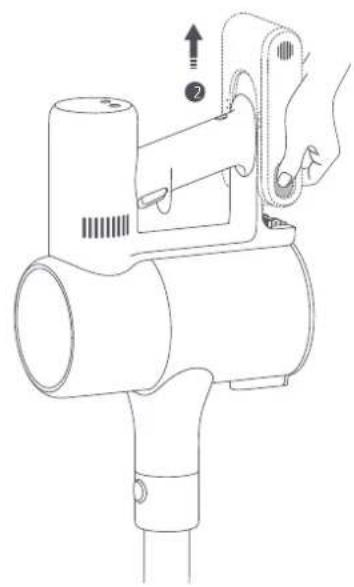
natural_image
Line drawing of a handheld hairdryer with a hand operating the lever (no text or symbols)natural_image
Technical line drawing of a mechanical assembly with no visible text or symbolsnatural_image
Technical line drawing of a cylindrical device with mounting holes and a battery, showing internal components (no text or symbols)natural_image
Technical line drawing of a mechanical assembly with exploded view and exploded view (no text or symbols)natural_image
Technical line drawing of a mechanical component with an inset close-up view (no text or symbols)natural_image
Line drawing of a hair dryer with attached electrical outlet and close-up inset showing internal components (no text or symbols)natural_image
Technical line drawing of a mechanical device with no visible text or symbolsTryb impulsowy
• Tryb ciągły
natural_image
Technical line drawing of a mechanical device with no visible text or symbolsTryb ciągly
Uwagi:
natural_image
Line drawing of a hand cleaning a wall-mounted tool, no text or symbols presentnatural_image
Simple line drawing of a door opening and a mechanical device (no text or symbols)natural_image
Line drawing of a person using a vacuum cleaner on a bed (no text or symbols)natural_image
Line drawing of a robotic arm operating on a platform (no text or symbols)Uwagi:
natural_image
Line drawing of two hands holding a small object with droplets falling (no text or symbols)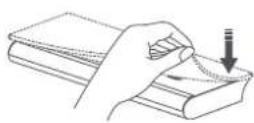
natural_image
Diagram of a medical device with a circular arrow indicating rotation around a device (no text or symbols present)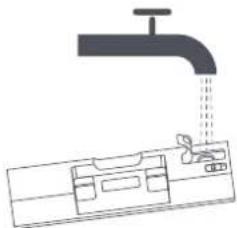
natural_image
Diagram of a faucet pouring liquid into a water tank (no text or symbols)natural_image
Technical line drawing of a mechanical assembly with a tool and component (no text or symbols)Uwagi:
natural_image
Line drawing of a hand cleaning a device from a computer (no text or symbols)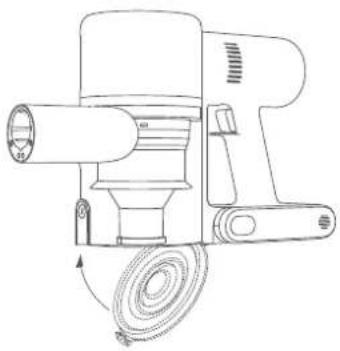
natural_image
Line drawing of a mechanical device with a coiled cable and cylindrical shaft (no text or symbols)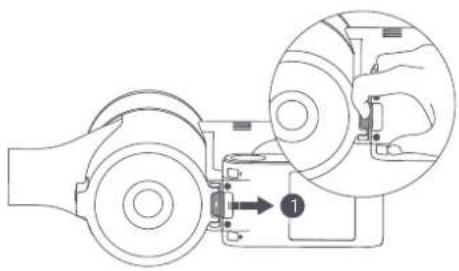
natural_image
Mechanical assembly diagram showing two components with a numbered arrow indicating direction (no text or symbols present)natural_image
Line drawing of a hand operating a device with a handle, showing internal components and a button (no text or symbols)natural_image
Technical line drawing of a mechanical device with labeled parts A and B (no text or symbols beyond labels)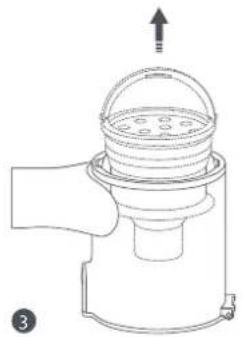
natural_image
Line drawing of a hand holding a small container with a lid and upward arrow, no text or symbols presentnatural_image
Simple line drawing of a faucet and a circular timer with '24h' indicating 24-hour mark (no text or symbols on the faucet itself)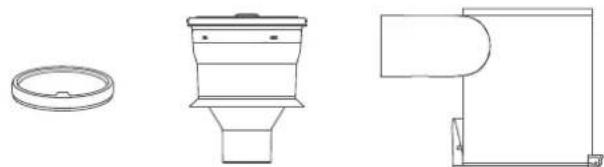
natural_image
Technical line drawings of three different bathroom fixtures (pan, toilet, and door) without any text or symbolsnatural_image
Line drawing of a handheld device with an inset showing a hand operating the lever (no text or symbols present)Uwagi:
natural_image
Technical line drawing of a mechanical device with a lid and base, showing internal components and directional arrows (no text or symbols)Filtr wstępny
natural_image
Line drawing of a mechanical device with a handle and central component (no text or symbols)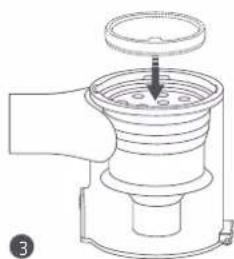
natural_image
Line drawing of a mechanical device with a handle and central component (no text or symbols)natural_image
Diagram of a hand tool interacting with a cylindrical device, showing internal components and a downward arrow (no text or symbols)natural_image
Illustration of a faucet and two filter bands with arrows indicating flow direction (no text or symbols)Uwagi:
natural_image
Line drawing of a handheld device with internal components and an arrow indicating motion (no text or symbols)natural_image
Line drawing of a hand using a power tool to clean cable wire, with scissors and a close-up of the cable (no text or symbols)natural_image
Illustration of a faucet, a twisted pipe, and a twisted cylindrical object with a 24-hour time indicator (no text or symbols on the objects themselves)natural_image
Technical line drawing of a mechanical device with internal components and a circular control knob (no text or symbols)natural_image
Diagram of a mechanical component with a circular inset showing a rotary knob (no text or symbols)natural_image
Technical line drawings of mechanical components including a valve, pipe, and clamping mechanism (no text or symbols)natural_image
Simple line drawing of a mechanical component and a circular graphic with '24 h' (no text or symbols on the diagram itself)natural_image
Technical line drawing of a mechanical component with a circular dial indicator (no text or symbols)natural_image
Technical line drawing showing a mechanical assembly with a cylindrical component and a separate cross-sectional view (no text or symbols)natural_image
Simple line drawing of a vehicle with exhaust drop and roof, no text or symbols presentnatural_image
Line drawing of a hand pressing down on a stack of books with an upward arrow (no text or symbols)natural_image
Diagram showing a hand pressing a button on a mechanical component with a downward arrow indicating motion (no text or symbols)natural_image
Diagram of a mechanical assembly with a magnified inset showing a hand interacting with a component (no text or symbols present)Akumulator
natural_image
Technical line drawing of a handheld device with a close-up inset showing a hand interacting with the component (no text or symbols present)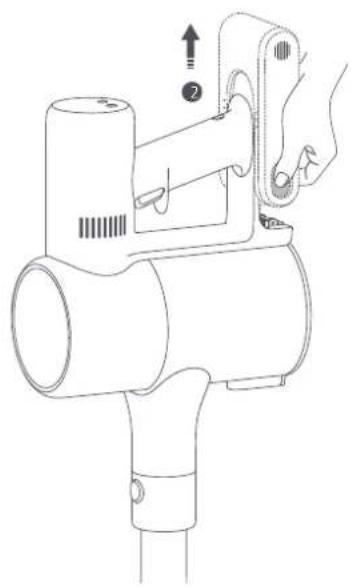
natural_image
Line drawing of a handheld hairdryer with a hand operating the lever (no text or symbols)Dane techniczne
natural_image
Technical line drawing of a mechanical assembly with no visible text or symbolsnatural_image
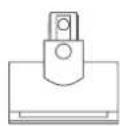
Technical line drawing of a cylindrical device with mounting holes and three separate views (no text or symbols)2'si 1 Arada Şarj & Saklama Aparati (2 x vida, 2 x dübel ve aparat şablonu etiketi dahil)
natural_image
Technical line drawing of a mechanical assembly with exploded view and exploded view (no text or symbols)natural_image
Technical line drawing of a mechanical component with an inset close-up view (no text or symbols)natural_image
Line drawing of a hair dryer with attached cable and connector, shown in two views (no text or symbols)natural_image
Technical line drawing of a mechanical device with no visible text or symbolsSürekli Olmayan Mod
- Sürekli Mod
natural_image
Technical line drawing of a mechanical device with no visible text or symbolsSürekli Mod
Notlar:
natural_image
Line drawing of a mop leaning against a wall, no text or symbols presentnatural_image
Simple line drawing of a door opening and a mechanical device (no text or symbols)natural_image
Line drawing of a person climbing a bed with a backpack (no text or symbols)natural_image
Line drawing of a robotic arm positioned on a platform (no text or symbols)Notlar:
natural_image
Illustration showing two steps of a hand holding a pen and pouring liquid, with a close-up of the pen's tip being inserted (no text or symbols present)natural_image
Diagram showing a kitchen sink with a piping bag and a faucet, alongside a close-up of the drain (no text or symbols)natural_image
Technical line drawing of a mechanical assembly with a tool and component (no text or symbols)natural_image
Line drawing of a hand pressing down on a device component (no text or symbols)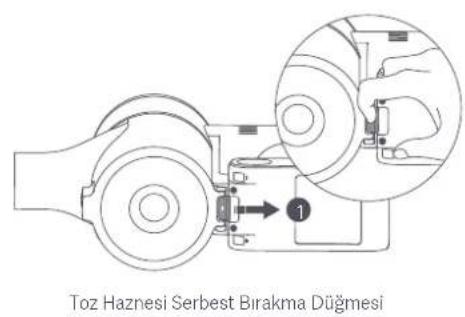
natural_image
Line drawing of a hand using a handheld device to adjust or install a tray (no text or symbols present)natural_image
Line drawing of a portable shaver with handle and spout (no text or symbols)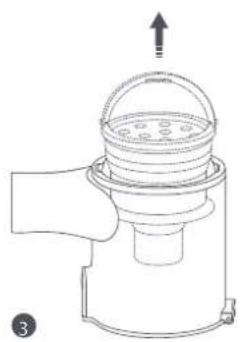
natural_image
Line drawing of a hand holding a small container with a lid and spout, no text or symbols presentnatural_image
Simple line drawing of a faucet and a circular timer with '24h' indicating 24-hour mark (no text or symbols on the faucet itself)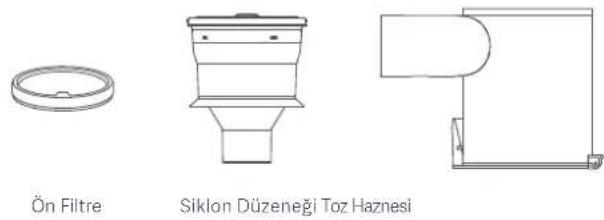
Notlar:
natural_image
Line drawing of a hand operating a portable air conditioner unit with a close-up inset showing the interior mechanism (no text or symbols)Notlar:
natural_image
Technical line drawing of a mechanical device with a lid and base, showing internal components and a downward arrow (no text or symbols)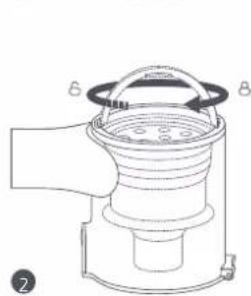
natural_image
Line drawing of a mechanical device with labeled components A and B, no text or symbols present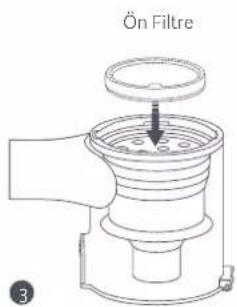
natural_image
Diagram of a mechanical device with a cylindrical component being processed into a base plate (no text or symbols)natural_image
Illustration of a faucet releasing water and two hanging cylindrical objects with motion arrows (no text or symbols)Notlar:
natural_image
Line drawing of a handheld device with internal components and an arrow indicating direction (no text or symbols)natural_image
Line drawing showing a hand adjusting a cable with scissors, alongside a wire rack and mechanical component (no text or symbols)natural_image
Illustration of a faucet, coiled pipe, and a twisted straw bulb with a 24-hour time indicator (no text or symbols on the objects)natural_image
Technical line drawings of mechanical components, including a cylindrical device with internal parts and a circular button mechanism (no text or symbols)natural_image
Technical line drawing of a mechanical component with a circular inset showing a circular component with four ports (no text or symbols)natural_image
Technical line drawings of mechanical components including a bracket, pipe, and spring-loaded component (no text or symbols)natural_image
Simple line drawing of a twisted rope or cable with a circular graphic showing '24 h' at center (no text or symbols on the diagram itself)natural_image
Technical line drawing of mechanical components including a housing and a rotary knob (no text or symbols)natural_image
Technical line drawing showing a mechanical assembly with a cylindrical component and a separate cross-sectional view (no text or symbols)natural_image
Simple line drawing of a washing machine with water droplets falling (no text or symbols)natural_image
Line drawing of a hand holding a stack of books with an upward arrow indicating motion (no text or symbols)natural_image
Diagram showing a hand inserting a component into a device, with an arrow pointing to a small terminal (no text or symbols present)natural_image
Diagram showing a hand inserting a component into a device, with an arrow indicating direction (no text or symbols present)Pil Takımı
natural_image
Technical line drawing of a handheld device with a close-up inset showing a hand holding a small component (no text or symbols present)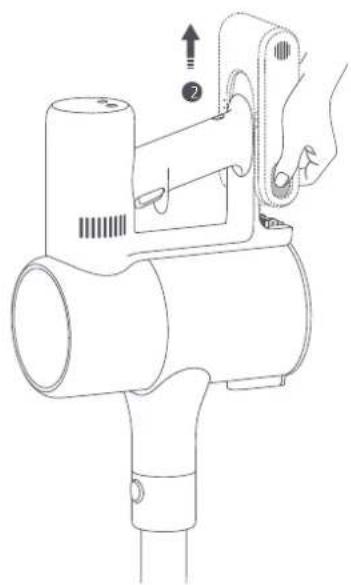
natural_image
Technical line drawing of a handheld device with a hand operating it, showing internal components and a numbered indicator (no text or symbols present)Teknik özellikler
http://www.mi.com/global/service/support/declaration.html
natural_image
Technical line drawing of a mechanical assembly with no visible text or symbolsnatural_image
Technical line drawing of a cylindrical device with mounting holes and a separate battery pack (no text or symbols)natural_image
Technical line drawing of a mechanical assembly with exploded view and exploded view (no text or symbols)natural_image
Technical line drawing of a mechanical component with an inset close-up view (no text or symbols)natural_image
Line drawing of a hair dryer with attached plug and cable, showing internal components (no text or symbols)natural_image
Technical line drawing of a mechanical device with no visible text or symbolsNiet-continue modus
- Continue modus
natural_image
Technical line drawing of a mechanical device with no visible text or symbolsContinue modus
Opmerkingen:
natural_image
Line drawing of a hand cleaning a wall corner with a broom (no text or symbols)natural_image
Simple line drawing of a door opening and a mechanical device (no text or symbols)natural_image
Line drawing of a person climbing a bed with a computer monitor (no text or symbols)natural_image
Line drawing of a robotic arm operating on a platform (no text or symbols)Opmerkingen:
natural_image
Diagram of a medical device with a circular arrow indicating rotation or movement, no text or symbols present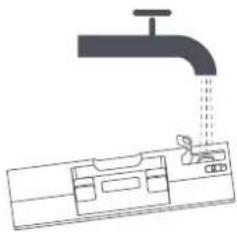
natural_image
Diagram of a faucet pouring liquid into a container with a tool inserted (no text or labels)natural_image
Technical line drawing of a mechanical assembly with a tool and component (no text or symbols)Opmerkingen:
natural_image
Line drawing of a hand inserting a device into a device (no text or symbols)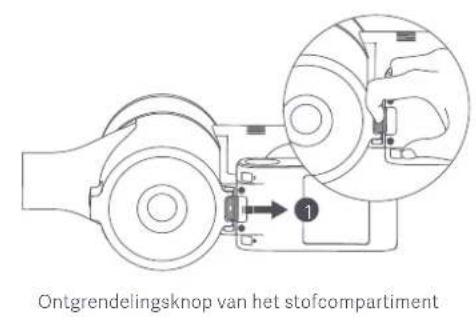
natural_image
Line drawing of a hand using a handheld device to press or install a tray (no text or symbols present)natural_image
Line drawing of a mechanical device with a handle and internal structure (no text or symbols)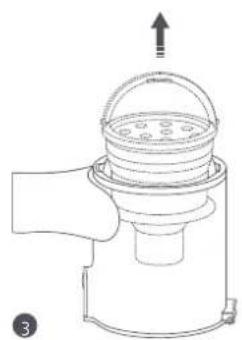
natural_image
Line drawing of a hand holding a small device with a lid and top handle, no text or symbols present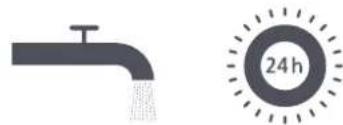
natural_image
Simple line drawing of a faucet and a circular timer with '24h' indicating 24-hour mark (no text or symbols on the faucet itself)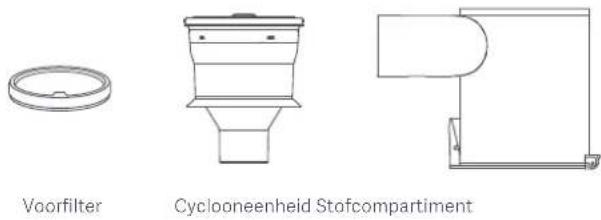
Opmerkingen:
natural_image
Line drawing of a hand operating a portable air conditioner unit with a close-up inset showing the interior mechanism (no text or symbols)Opmerkingen:
natural_image
Technical line drawing of a mechanical device with a lid and base, showing internal components and a downward arrow (no text or symbols)
natural_image
Line drawing of a mechanical device with a central fan and directional arrows (no text or symbols)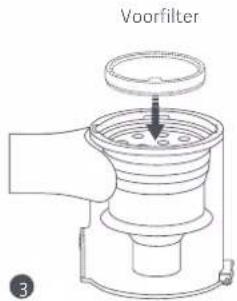
natural_image
Diagram of a handheld device with a cylindrical component being inserted into a housing (no text or symbols)natural_image
Illustration of a faucet spraying water onto a coiled spring, with no text or symbols present.Opmerkingen:
natural_image
Line drawing of a mechanical device with an arrow indicating direction (no text or symbols)natural_image
Technical line drawing of a mechanical device with internal components and directional arrows (no text or symbols)natural_image
Illustration showing a hand using a power tool to clean cable wire, with scissors and a separate cable being handled (no text or symbols present)natural_image
Illustration of a faucet, coiled pipe, and twisted column with a 24-hour sun icon (no text or symbols)natural_image
Technical line drawing of a mechanical device with internal components and a circular control knob (no text or symbols)De elektrische miniborstel reinigen
natural_image
Diagram of a mechanical component with a circular inset showing internal components (no text or symbols)natural_image
Technical line drawings of mechanical components including a valve, pipe, and coiled spring (no text or symbols)natural_image
Simple line drawing of a trophy with a 24-hour sunburst (no text or symbols on the trophy itself)natural_image
Technical line drawing of mechanical components with directional arrows, no text or symbols presentnatural_image
Technical line drawing of a mechanical assembly with no visible text or symbolsnatural_image
Line drawing of a car interior with exhaust dropouts (no text or symbols)natural_image
Line drawing of a hand holding a book with an arrow indicating motion (no text or symbols)natural_image
Diagram of a mechanical assembly with a magnified inset showing a hand interacting with a component (no text or symbols present)Batterij
natural_image
Technical line drawing of a handheld device with a close-up inset showing a hand holding a small component (no text or symbols present)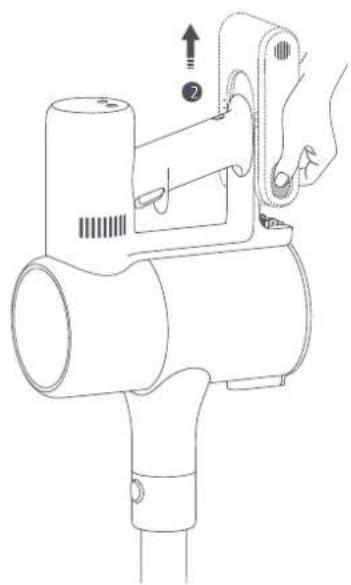
natural_image
Technical line drawing of a handheld device with a hand operating it, showing internal components and a numbered indicator (no text or symbols present)Specifications
THIS WARRANTY GIVES YOU SPECIFIC RIGHTS, AND YOU MAY HAVE OTHER RIGHTS CONVEYED BY LAWS OF YOUR COUNTRY, PROVINCE OR STATE. INDEED, IN SOME COUNTRIES, PROVINCES OR STATES, CONSUMER LAW MAY IMPOSE A MINIMUM WARRANTY PERIOD. OTHER THAN AS PERMITTED BY LAW, XIAOMI DOES NOT EXCLUDE, LIMIT OR SUSPEND OTHER RIGHTS YOU MAY HAVE. FOR A FULL UNDERSTANDING OF YOUR RIGHTS WE INVITE YOU TO CONSULT THE LAWS OF YOUR COUNTRY, PROVINCE OR STATE.
1. LIMITED PRODUCT WARRANTY
XIAOMI warrants that the Products are free from defects in materials and workmanship under normal use and use in accordance with the respective Product user manual, during the Warranty Period.
The duration and conditions related to the legal warranties are provided by respective local laws. For more information about the consumer warranty benefits, please refer to Xiaomi's official website https://www.mi.com/en/service/warranty/.
Xiaomi warrants to the original purchaser that its Xiaomi Product will be free from defects in materials and workmanship under normal use in the period mentioned above.
Xiaomi does not guarantee that the operation of the Product will be uninterrupted or error free.
Xiaomi is not liable for damages arising from non-compliance with the instructions related to the use of the Product.
2. REMEDIES
If a hardware defect is found and a valid claim is received by Xiaomi within the Warranty Period, Xiaomi will either (1) repair the product at no charge, (2) replace the product, or (3) refund the Product, excluding potential shipping costs.
3. HOW TO OBTAIN WARRANTY SERVICE
To obtain warranty service, you must deliver the Product, in its original packaging or similar packaging providing an equal degree of Product protection, to the address specified by Xiaomi. Except to the extent prohibited by applicable law, Xiaomi may require you to present proofs or proof of purchase and / or comply with registration requirements before receiving warranty service.
4. EXCLUSIONS AND LIMITATIONS
Unless otherwise stipulated by Xiaomi, this Limited Warranty applies only to the Product manufactured by or for Xiaomi and identifiable by the trademarks, trade name or "Xiaomi" or "Mi" logo.
The Limited Warranty does not apply to any (a) Damage due to acts of nature or God, for example, lightning strikes, tornadoes, flood, fire, earthquake or other external causes; (b) Negligence; (c) Commercial use; (d) Alterations or modifications to any part of the Product; (e) Damage caused by use
with non-Xiaomi products; (f) Damage caused by accident, abuse or misuse; (g) Damage caused by operating the Product outside the permitted or intended uses described by Xiaomi or with improper voltage or power supply; or (h) Damage caused by service (including upgrades and expansions) performed by anyone who is not a representative of Xiaomi.
It is your responsibility to backup any data, software, or other materials you may have stored or preserved on the product. It is likely that the data, software or other materials in the equipment will be lost or reformatted during the service process, Xiaomi is not responsible for such damage or loss. No Xiaomi reseller, agent, or employee is authorized to make any modification, extension, or addition to this Limited Warranty. If any term is held to be illegal or unenforceable, the legality or enforceability of the remaining terms shall not be affected or impaired.
Except as prohibited by laws or otherwise promised by Xiaomi, the after-sales services shall be limited to the country or region of the original purchase.
Products which were not duly imported and/or were not duly manufactured by Xiaomi and/or were not duly acquired from Xiaomi or a Xiaomi's official seller are not covered by the present warranties. As per applicable law you may benefit from warranties from the non-official retailer who sold the product. Therefore, Xiaomi invites you to contact the retailer from whom you purchased the product.
The present warranties do not apply in Hong Kong and Taiwan.
5. IMPLIED WARRANTIES
Except to the extent prohibited by applicable law, all implied warranties (including warranties of merchantability and fitness for a particular purpose) will have a limited duration up to a maximum duration of this limited warranty. Some jurisdictions do not allow limitations on the duration of an implied warranty, so the above limitation will not be applied in these cases.
6. DAMAGE LIMITATION
Except to the extent prohibited by applicable law, Xiaomi shall not be liable for any damages caused by accidents, indirect, special or consequential damages, including but not limited to loss of profits, revenue or data, damages resulting from any breach of express or implied warranty or condition, or under any other legal theory, even if Xiaomi has been informed of the possibility of such damages. Some jurisdictions do not allow the exclusion or limitation of special, indirect, or consequential damages, so the above limitation or exclusion may not apply to you.
7. XIAOMI CONTACTS
For customers, please visit the website: https://www.mi.com/en/service/warranty/
The contact person for the after-sale service may be any person in Xiaomi's authorized service network, Xiaomi's authorized distributors or the final vendor who sold the products to you. If in doubt please contact the relevant person as Xiaomi may identify.
AVVISO SULLA GARANZIA
LA PRESENTE GARANZIA RICONOSCE AL CLIENTE DIRITTI LEGALI SPECIFICI E IL CLIENTE POTREBBE AVERE ALTRI DIRITTI PREVISTI DA LEGGI DEL PROPRIO PAESE, PROVINCIA O STATO. IN ALCUNI PAESI, PROVINCE O STATI, LA LEGGE PER LA TUTELA DEI CONSUMATORI PUÒ IMPORRE UN PERIODO MINIMO DI GARANZIA. ECCETTO NEI CASI CONSENTITI DALLA LEGGE, XIAOMI NON ESCLUDE, LIMITA O REVOCA ALTRI DIRITTI CHE L'UTENTE PUÒ AVERE. PER UNA COMPRENSIONE COMPLETA DEI PROPRI DIRITTI, INVITIAMO GLI UTENTI A CONSULTARE LE LEGGI DEL PROPRIO PAESE, PROVINCIA O STATO.
1. GARANZIA LIMITATA DI PRODOTTO
5. GARANTIAS IMPLÍCITAS
Para clientes, visite o site:https://www.mi.com/en/service/warranty/