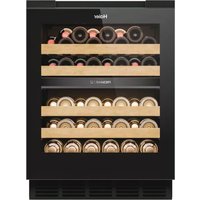
USER MANUAL HUC44GDEH1 HAIER
EN WARNING: Risk of fire/flammable material.
The symbol indicates there is a risk of fire since flammable materials are used. Take care to avoid causing a fire by ingiting flammable material.
Thank you for purchasing a Haier Product.
Please read these instructions carefully before using this appliance. The instructions contain important information which will help you get the best out of the appliance and ensure safe and proper installation, use and maintenance.
Keep this manual in a convenient place so you can always refer to it for the safe and proper use of the appliance.
If you sell the appliance, give it away, or leave it behind when you move house, make sure you also pass this manual so that the new owner can become familiar with the appliance and safety warnings.


natural_image
Symbol of a trash bin crossed with no text or labels
Legend
General information and tips
Environmental information
Disposal
Help protect the environment and human health. Put the packaging in applicable containers to recycle it. Help to recycle waste of electrical and electronic appliances. Do not dispose appliances marked with this symbol with the household waste. Return the product to your local recycling facility or contact your municipal office.

WARNING!
Risk of injury or suffocation!
Refrigerants and gases must be disposed of professionally. Ensure that the tubing of the refrigerant circuit is not damaged before being properly disposed of. Disconnect the appliance from the mains supply. Cut off the mains cable and dispose of it. Remove the trays and drawers as well as the door catch and seals, to prevent children and pets to get closed in the appliance.
Old appliances still have some residual value. An environmentally friendly method of disposal will ensure that valuable raw materials can be recovered and used again.
Cyclopentane, a flammable substance not harmful to ozone, is used as an expander for the insulation foam.
By ensuring this product is disposed of corectly, you will help prevent potential negative consequences for the environment and human health, which could otherwise be caused.
For more detailed information about recycling of this product, please contact your local council, your household waste disposal service or the shop where you purchased the product, handled by the professionals.
EN
Content
1-Safety information....4
2-Safety tips....7
3-Maintenance....11
4-Accessories....13
5-Product description....14
6-Installation....15
7-Use....21
8-Energy saving tips....26
9-Equipment....27
10-Care and cleaning....28
11-Troubleshooting....29
12-Technical data3....32
13-Customer Service....33
14-Wine bottle stacking....34
This appliance is intended to be used exclusively for the storage of wine. Before switching on the appliance for the first time read the following safety hints:

WARNING!
Before first use
▶ Make sure there is no transport damage.
Remove all packaging and keep out of children's reach and dispose them in an environmentally friendly manner.
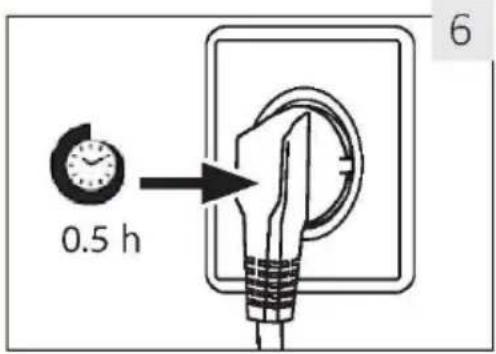
▶Wait at least 0.5 hours before installing the appliance in order to ensure the refrigerant circuit is fully efficient.
▶ Handle the appliance always with at least two persons because it is heavy.
Installation
The appliance should be placed in a well-ventilated place. Ensure that the top gap of the appliance is at least 4 mm, the left and right side gap is at least 1.5 mm, and the back gap is at least 10 mm.
▶WARNING : Keep ventilation openings, in the appliance enclosure or in the built-in structure, clear of obstruction.
▶Never place the appliance in a damp area or location where it might be splashed with water. Clean and dry water splashes and stains with a soft clean cloth.
▶ Do not install your wine cellar in any location not properly insulated or heated e.g. garage etc. Your wine cellar was not designed to operate in ambient temperature below 10°C.
▶Do not install the appliance in direct sunlight or in the near of heat sources(e.g.stoves,heaters).
▶ Install and level the appliance in an area suitable for its size and use.
▶Make sure that the electrical information on the rating plate agrees with the power supply. If it does not, contact an electrician.
The appliance is operated by a 220-240 VAC/50 Hz power supply. Abnormal voltage fluctuation may cause the appliance to fail to start, or damage to the temperature control or compressor, or there may be an abnormal noise when operating. In such case, an automatic regulator shall be mounted.
▶Do not use multi-plug adapters and extension cables.

WARNING!
▶WARNING: Do not locate multiple portable socket outlets or portable power supplies at the rear of the appliance.
▶WARNING: When positioning the appliance, ensure the supply cord is not trapped or damaged.
▶Do not step on the power cable.
▶ Use a separate earthed socket for the power supply which is easy accessible. The appliance must be earthed.
Only for UK: The appliance's power cable is fitted with 3-cord (grounding) plug that fits a standard 3-cord (grounded) socket. Never cut off or dismount the third pin (grounding). After the appliance is installed, the plug should be accessible.
▶WARNING: Do not damage the refrigerant circuit.
Daily use
This appliance can be used by children aged from 8 years and above and persons with reduced physical, sensory or mental capabilities or lack of experience and knowledge if they have been given supervision or instruction concerning use of the appliance in a safe way and understand the hazards involved.
▶ Children shall not play with the appliance.
▶Children aged from 3 to 8 years are allowed to load and unload refrigerating appliances, but not allowed to clean and install the refrigerating appliances.
▶ Keep away children under 3 years of age from the appliance unless they are constantly supervised.
▶Cleaning and user maintenance shall not be made by children with out supervision.
The appliance must be positioned so that the plug is accessible.
If coal gas or other inflammable gas is leaking into vicinity of the appliance, turn off the valve of the leaking gas, open the doors and windows and do not unplug the power cable of the appliance.
▶ Wait at least 7 minutes to reconnect the power after the power has been disconnected.
▶Do not lift the appliance by its door handles.
The keys must be kept out of the reach of children and not in the vicinity of the appliance to prevent children from being locked inside the appliance.

WARNING!
▶Notice that the appliance is set for operation at the secific ambient range between 10 and 38°C. The appliance may not work properly if it is left for a long period at a temperature above or below the indicated range.
▶ Do not place unstable articles(heavy objects, containers filled with water) on top of the appliance, to avoid personal injury caused by falling or electric shock caused by contact with water.
▶Open and close the door only with the handles. The gap between the door and the cabinet is very narrow. Do not put your hands in these areas to avoid pinching your fingers. Open or close the appliance doors only when there are no children standing within the range of door movement.
▶ Do not store or use inflammable, explosive or corrosive materials in the appliance or in the vicinity.
▶Do not store explosive substances such as aerosol cans with a flammable propellant in this appliance.
▶ Do not store medicines, bacteria or chemical agents in the appliance. This appliance is a household appliance. It is not recommended to store materials that require strict temperatures.
▶Do not set unnecessarily low temperature in the wine cabinet compartment. Minus temperatures may occur at high settings. Attention: Bottles can burst
▶ Do not touch the inside surface of the appliance compartment when in operation, especially with wet hands, as your hands may freeze onto the surface.
For proper wine cooling, do not overload the appliance.
▶ Unplug the appliance in the event of a power interruption or before cleaning. Allow at least 7 minutes before restarting the appliance, as frequent starting may damage the compressor.
▶WARNING: Do not use electrical devices inside the appliance, unless they are of the type recommended by the manufacturer. To avoid risks a damaged power cord must be replaced by the customer service(see warranty card).
▶To prolong the service life of the appliance, avoid turning it off.
▶ Never place the appliance horizontally on the ground. After tilting the appliance more than 45irc , wait for 24 hours before plugging it in.

WARNING!
Maintenance / cleaning
Make sure children are supervised if they carry out cleaning and maintenance.
▶ Disconnect the appliance from the electrical supply before undertaking any routine maintenance. Allow at least 7 minutes before restarting the appliance, as frequent starting may damage the compressor.
▶ Hold the plug, not the cable, when unplugging the appliance.
- Do not clean the appliance with hard brushes, wire brushes, detergent powder, petrol, amyl acetate, acetone and similar organic solutions, acid or alkaline solutions. Please clean with special refrigerator/freezer detergent to avoid damage. Eventually use warm water and baking soda solution - about a tablespoon of baking soda to a litre/quart of water. Rinse thoroughly with water and wipe dry. Do not use cleaning powders or other abrasive cleaners. Do not wash removable parts in a dishwasher.
▶WARNING: Do not use mechanical devices or other means to accelerate the defrosting process, other than those recommended by the manufacturer.
If the supply cord is damaged, it must be replaced by the manufacturer, its service agent or similarly qualified persons in order to avoid a hazard.
▶ Do not try to repair, disassemble or modify the appliance by yourself. In case of repair please contact our customer service.
If the illuminating lamps are damaged, it must be replaced by the manufacturer, its service agent or similarly qualified persons in order to avoid a hazard.
▶ Eliminate the dust on the back of the unit at least once in the year to avoid hazard by fire, as well as increased energy consumption.
▶ Do not spray or flush the appliance during cleaning.
▶ Do not use water spray or steam to clean the appliance.
▶Do not clean the cold glass door with hot water. Sudden temperature change may cause the glass to break.
▶ If you leave your appliance out of use for an extended period, leave it open to prevent odour and unpleasant smells building up inside.

WARNING!
The appliance contains the flammable refrigerant ISOBUTANE (R600a). Make sure the refrigerant circuit is not damaged during transportation or installation. Leaking refrigerant may cause eye injuries or ignite. If a damage has occurred, keep away open fire sources, thoroughly ventilate the room, do not plug or unplug the power cords of the appliance or any other appliance. Inform the customer service.
In case of eyes get into contact with the refrigerant, rinse it immediately under running water and call immediately the eye specialist.
WARNING: The refrigeration system is under high pressure. Do not tamper with it. Since the flammable refrigerants are used, please, install, handle and service the appliance strictly according to the instruction and contact the professional agent or our after-sales service to dispose of the appliance.
Intended use
This appliance is intended to be used in household and similar applications such as
- staff kitchen areas in shops, offices and other working environments;
- farm houses and by clients in hotels, motels and other residential type environments;
- bed and breakfast type environments;
- catering and similar non-retail applications.
▶To ensure the safe preservation of wine, please comply with this instruction for use.
The details on the most appropriate part in the compartment of the appliance where specific types of food shall be stored, considering the distribution of temperature that can be present in the different compartments of the appliance are in the other part of the manual.
Changes or modifications to the device are not allowed. Unintended use may cause hazards and loss of warranty claims.
Disposal
The symbol on the product or on its packaging indicates that this product may not be treated as household waste. Instead it shall be handed over to the applicable collection point for the recycling of electrical and electronic equipment. By ensuring this product is disposed of correctly, you will help prevent potential negative consequences for the environment and human health, which could otherwise be caused by inappropriate waste handling of this product. For more detailed information about recycling of this product, please contact your local city office, your household waste disposal service or the shop where you purchased the product.
Since the flammable insulation blowing gases are used, please contact the professional agent or our after-sale service to dispose of the appliance.
WARNING!
Risk of injury of suffocation!
Refrigerants and gases must be disposed of professionally. Ensure that the tubing of the refrigerant circuit is not damaged before being properly disposed of. Disconnect the appliance from the mains supply. Cut off the mains cable and dispose of it. Remove the trays and drawers as well as the door catch and seals to prevent children and pets to get closed in the appliance.
▶WARNING: Disconnect the appliance from the power supply before cleaning.
▶Do not clean the appliance with hard brushes, wire brushes, detergent powder, petrol, amyl acetate, acetone and similar organic solutions, acid or alkaline solutions. Please clean with special refrigerator detergent to avoid damage.
▶ Clean the appliance when only little or no wine is stored. It is only necessary to clean it when it is dirty.
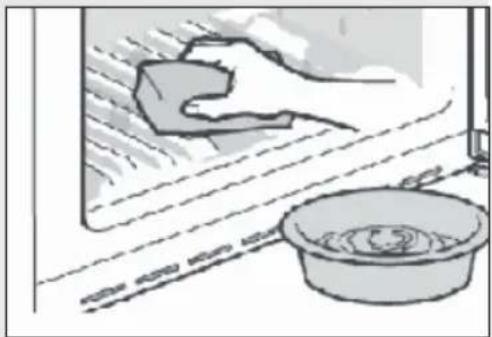
▶Clean the inside and housing of the appliance with a sponge damped in warm water and neutral detergent
▶ Rinse with clean warm water and dry with soft cloth.
▶Do not clean any of the parts of the appliance in a dishwasher.
- Allow at least 7 minutes before re-starting the appliance as frequent starting may damage the compressor.
natural_image
Illustration of a hand cleaning a window with a soap block and a basin (no text or symbols)
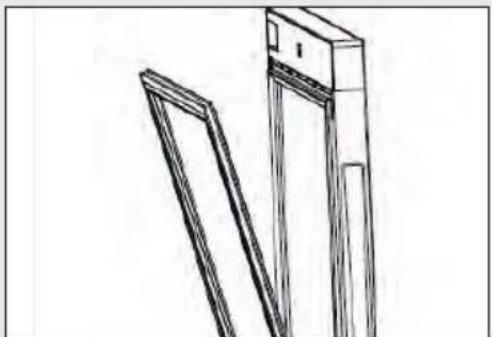
Clean the door gasket:
The door gaskets should be cleaned every 3 months to assure a proper seal. As below: Remove: Grasp the door gasket and pull
it out according to the direction of arrow to remove the whole door gasket in order.
Dip the brush with water or food grade alcohol, clean up the door gasket groove firstly by pulling back and forth the brush. Then wipe door gasket surface with a towel dipped with water or
food grade alcohol. Finally, wash the door gasket clean and wipe it dry with a clean towel.
natural_image
Line drawing of a mechanical component with two angled surfaces (no text or symbols)
Installation door gasket after cleaning:
Before installation, make sure that there is no water on the door gasket. Insert the door gasket into the groove, and press the door gasket tightly from the top to the bottom by hand until the whole door gasket is inserted into the groove.
Cleaning the shelves:
▶ All shelves can be taken out for cleaning.
▶ Take out all bottles.
▶ Lift each shelf a little and take it out.
▶ Clean the shelf with a soft towel.
▶Wait until the shelves are dry before putting them back in.
WARNING:
Wait at least 7 minutes to reconnet the power after the power has been disconnected.
Check the accessories and literature in accordance with this list: without isolation.
| Nam | Use Manual | Beech Wine Rack | T-shaped Bracket | L-shaped Bracket | Baseboard | Baseboard Connector | Screw | cover | Service Card |
| HUC44GDEH1 | 1 | 4 | 2 | 2 | 1 | 2 | 10 | 2 | 1 |
Product description
EN

Notice
Due to technical changes and different models, some of the illustrations in this manual may differ from your model.
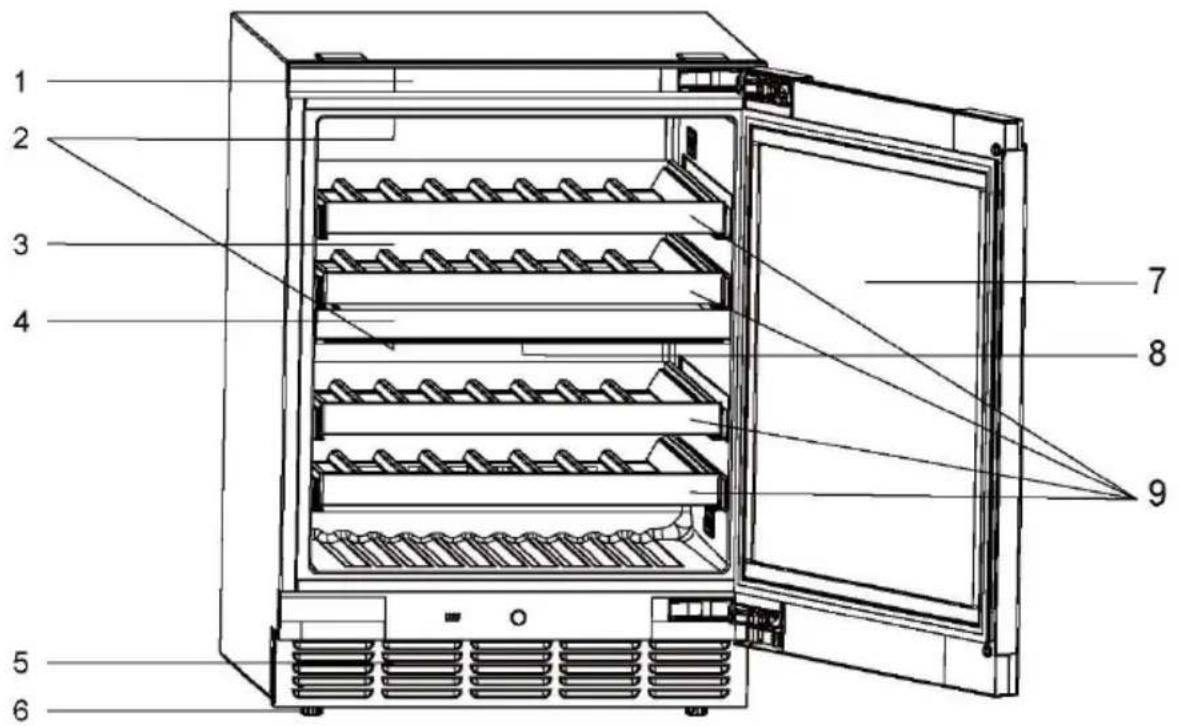
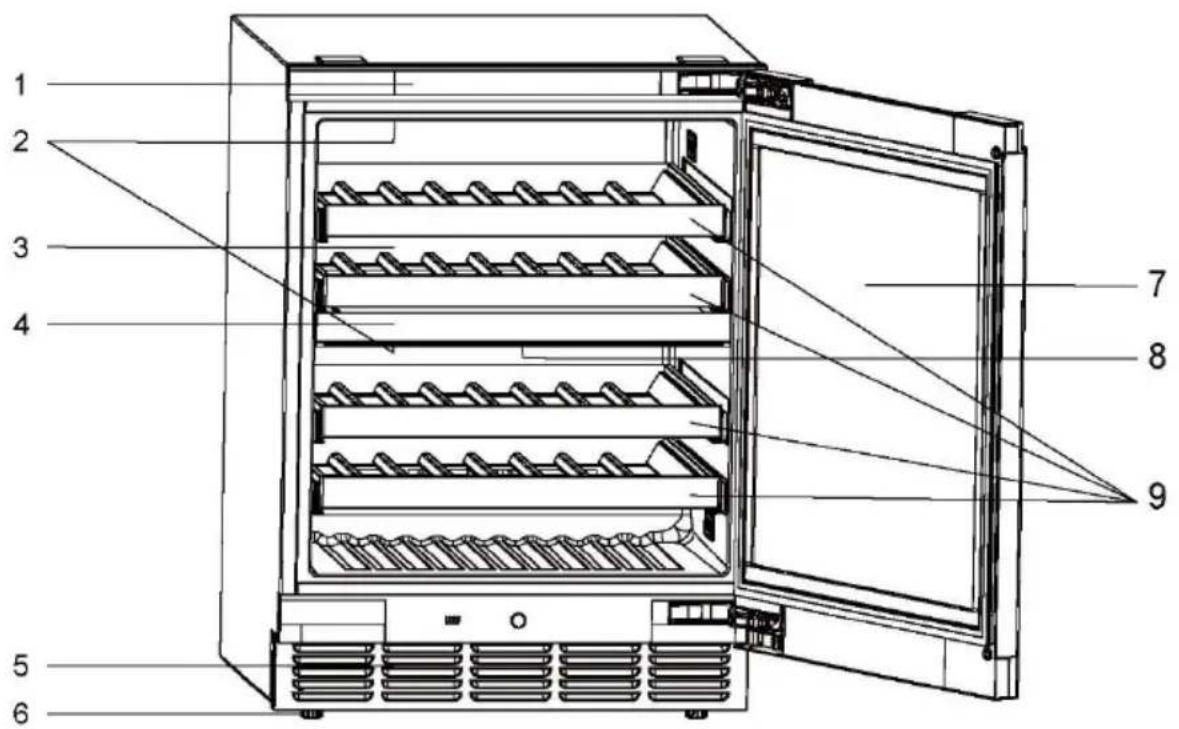
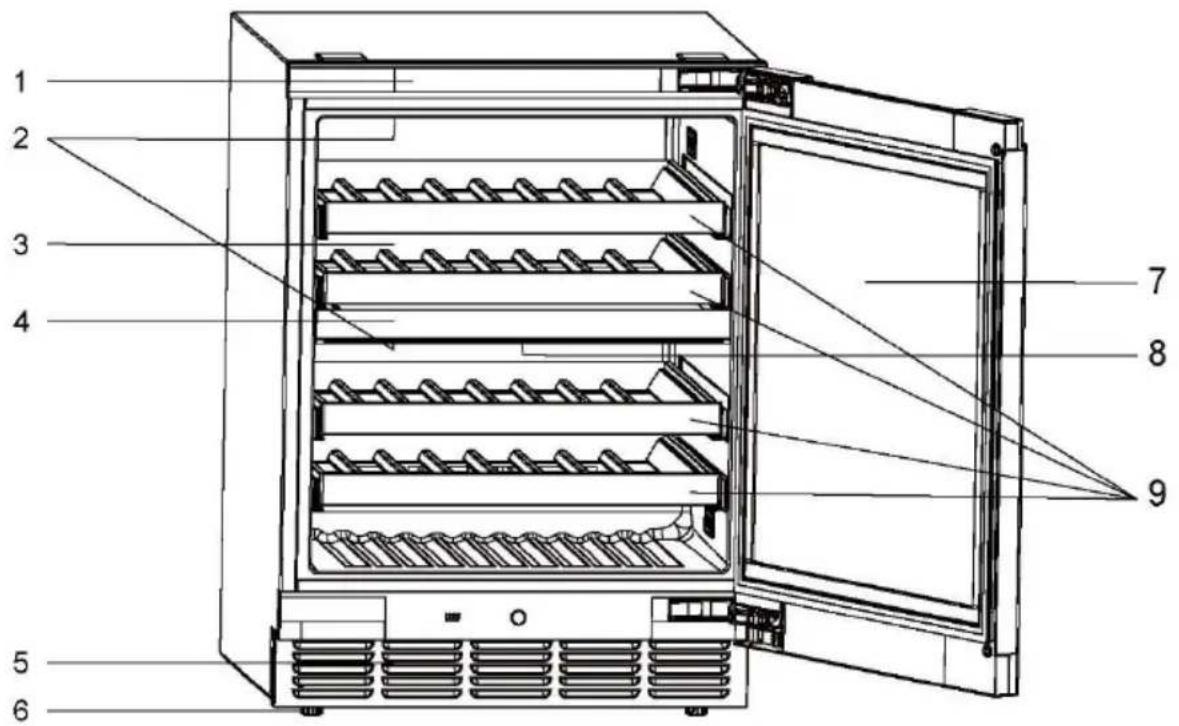
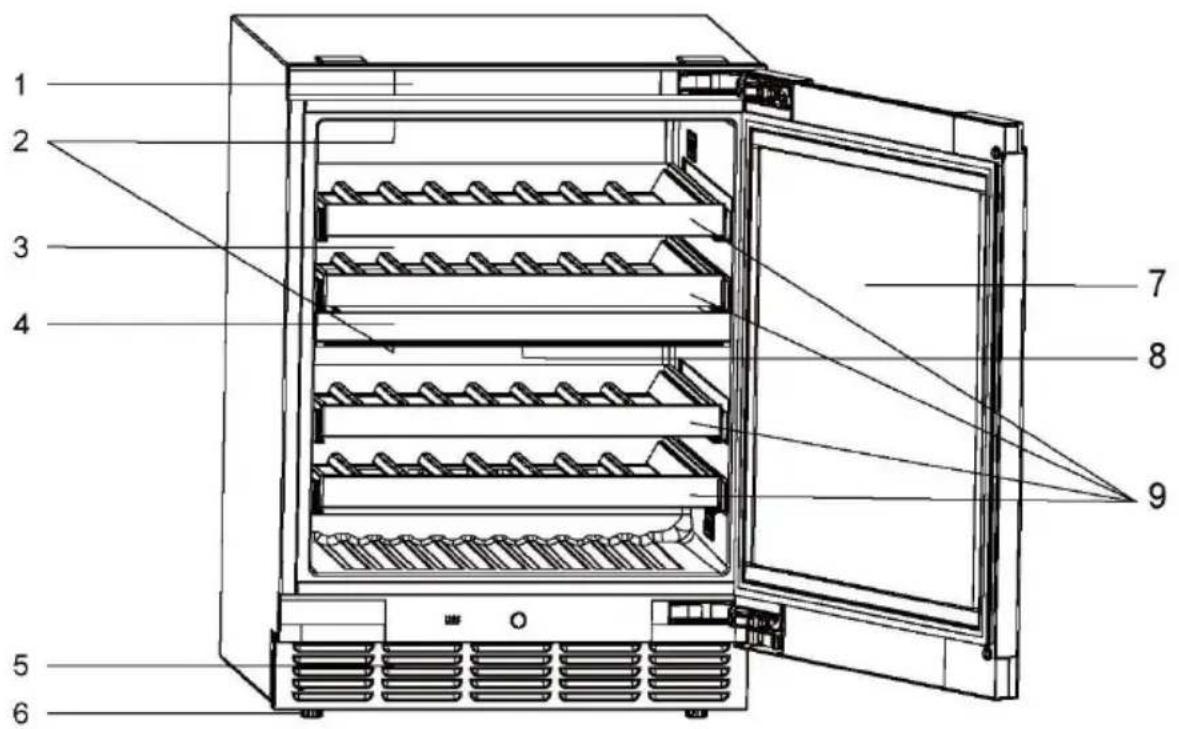
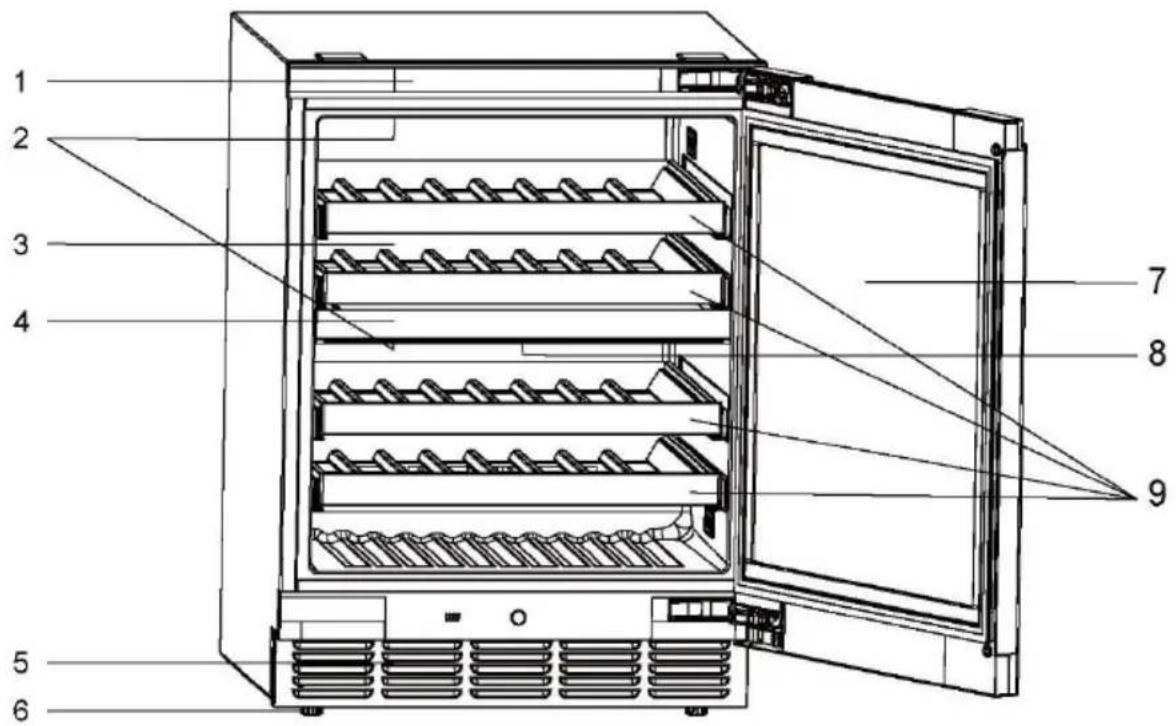
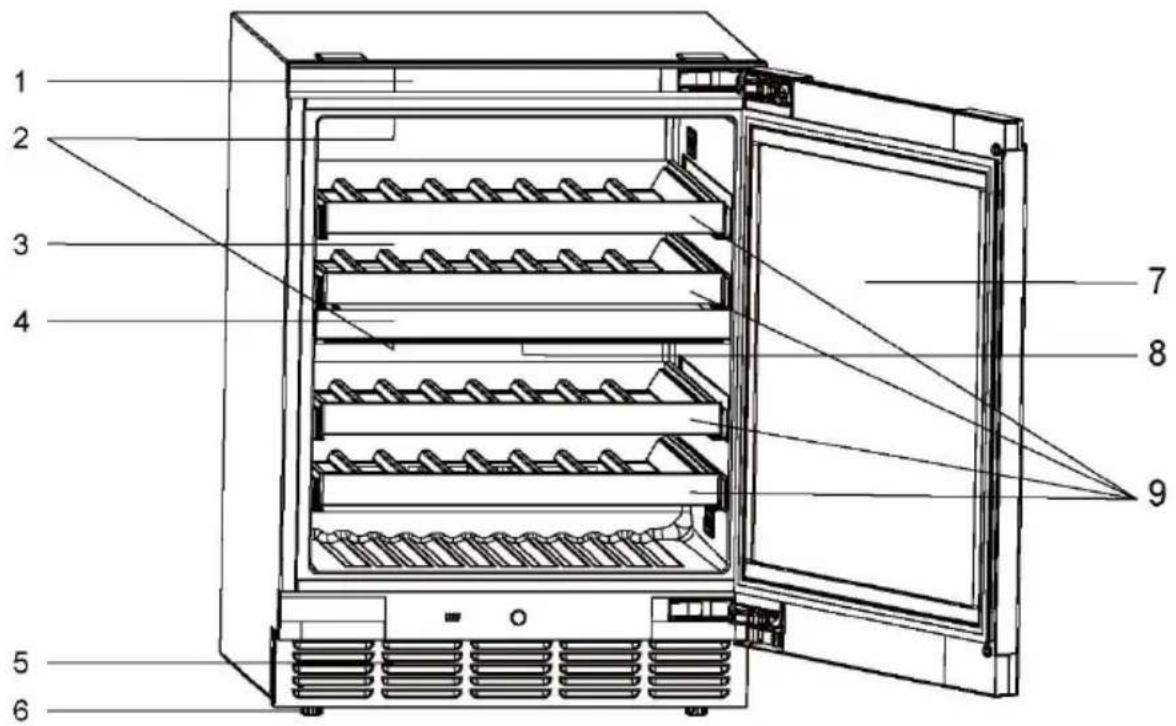
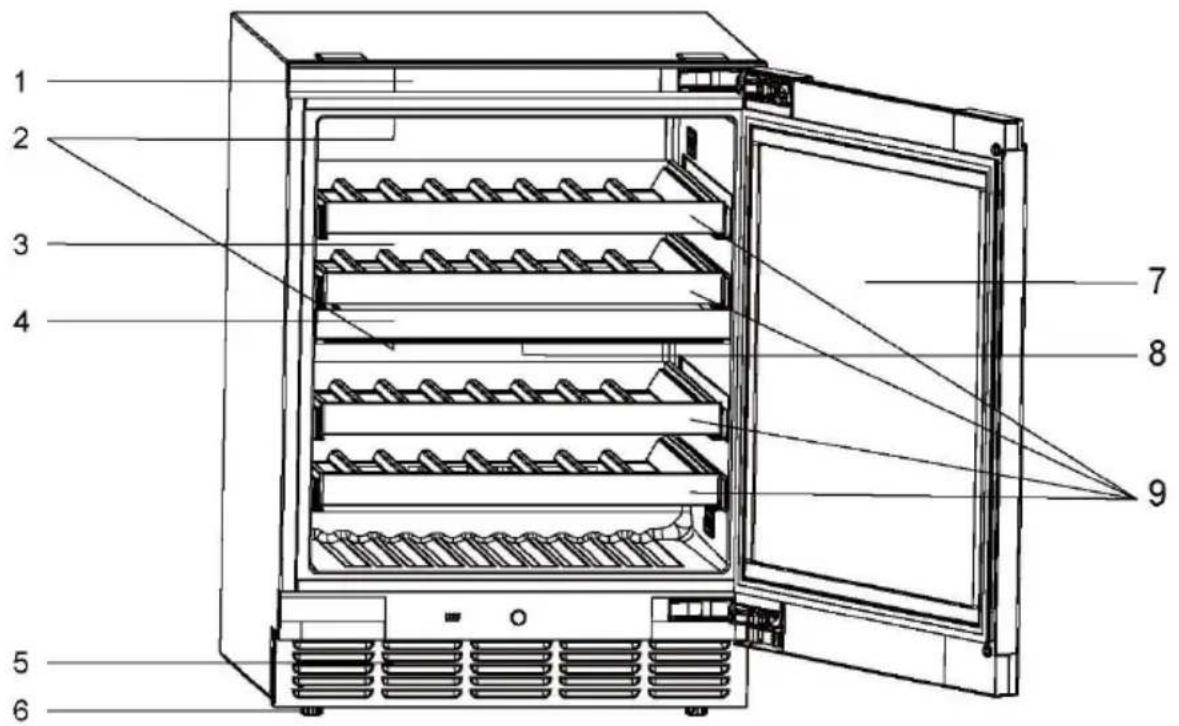
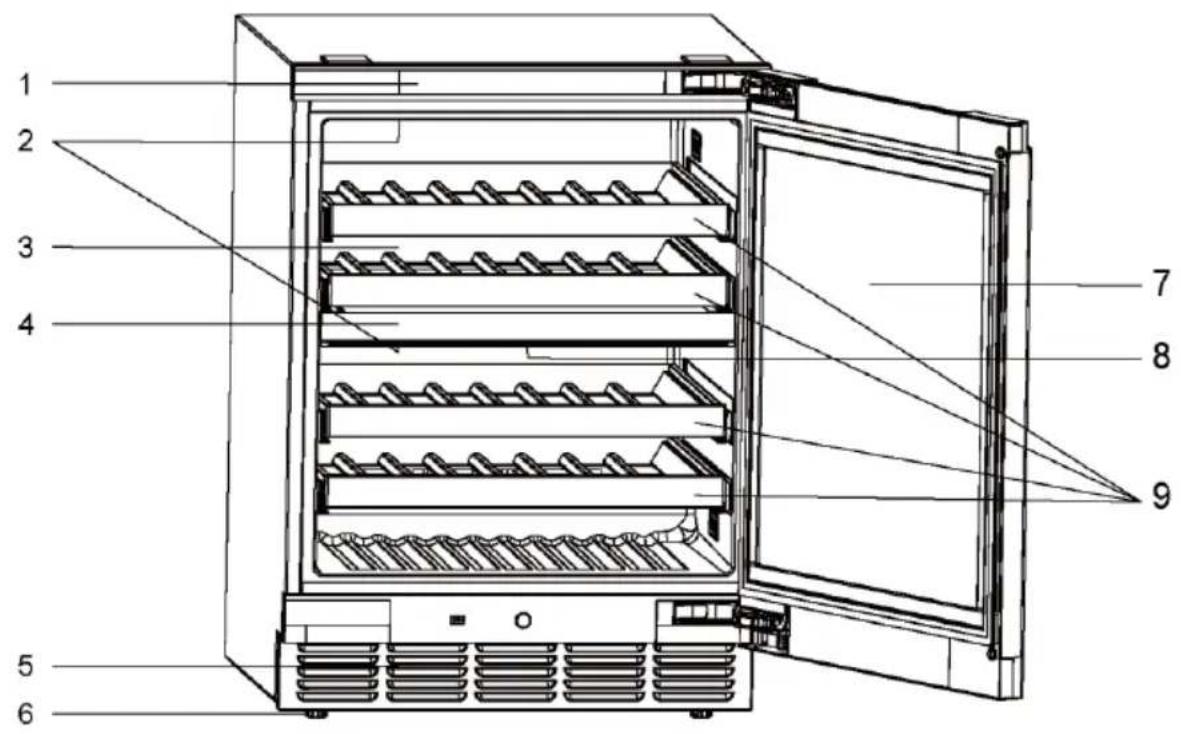
Picture of appliance

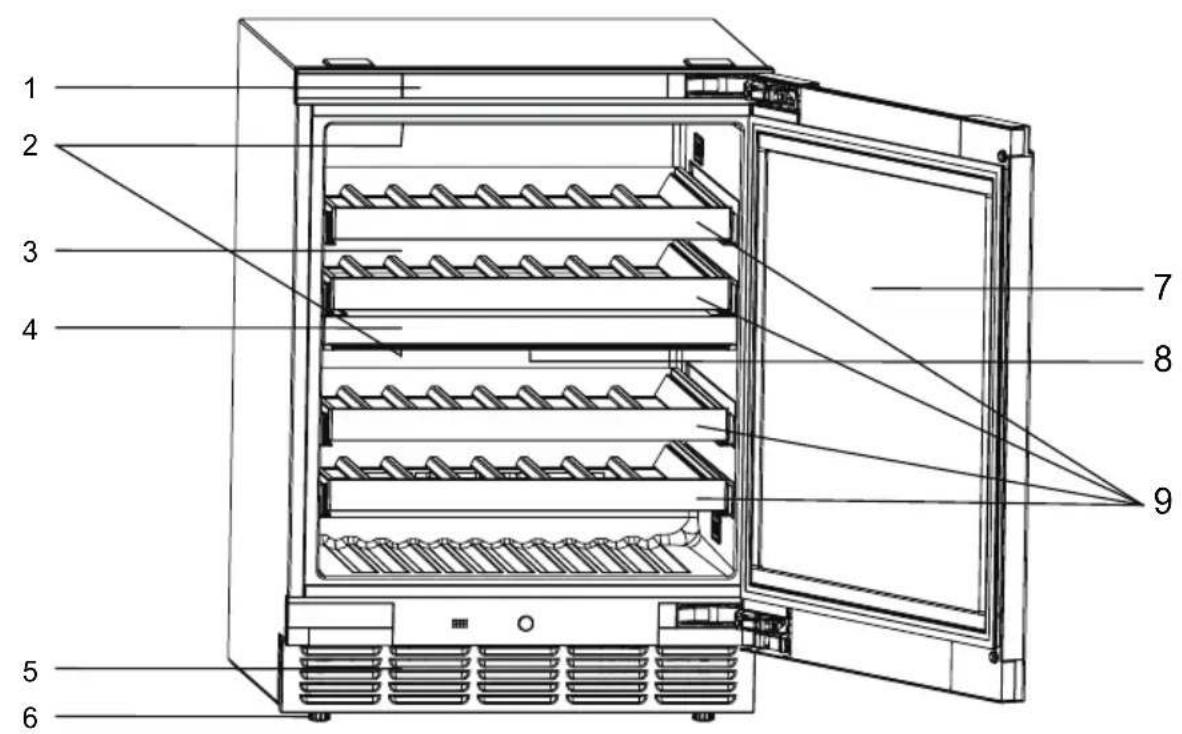
- Display
- Adjustable feet
- LED lamp 7. Door
- Back air duct baffle 8. Activated carbon filter
- Wine shelf4. Partition
- Kickboard
1. Unpacking
▶Take the appliance out of the packaging.
Remove all packaging materials including the foam base and all adhesive tape holding the accessories.
2. Environmental conditions
The room temperature should always be between 10 °C and 38 °C, since it can influence the temperature inside the appliance and its energy consumption. Do not install the appliance near other heat-emitting appliances (ovens, refrigerators) without isolation.
3. Space requirements
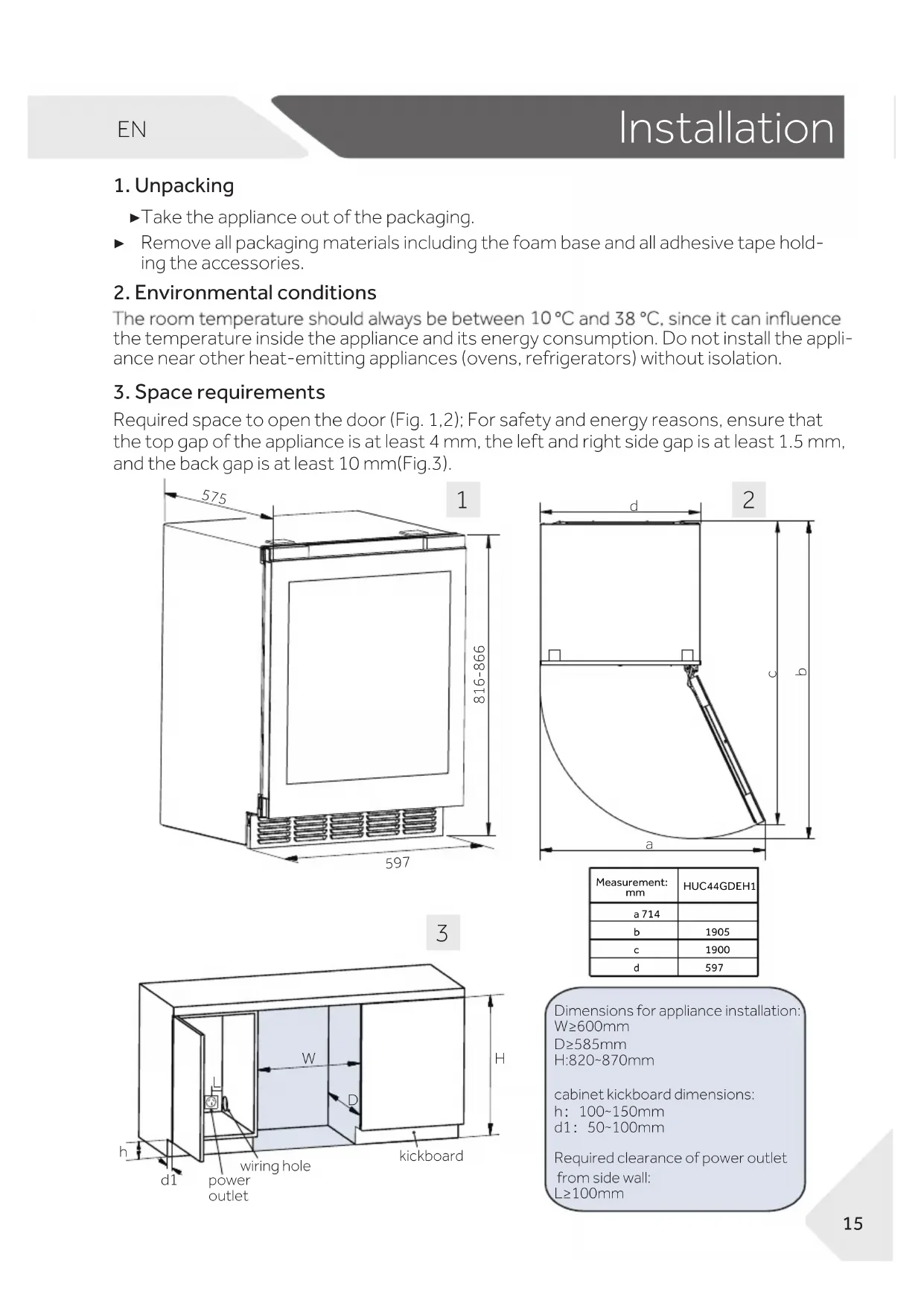
Required space to open the door (Fig. 1,2); For safety and energy reasons, ensure that the top gap of the appliance is at least 4 mm, the left and right side gap is at least 1.5 mm, and the back gap is at least 10 mm (Fig.3).
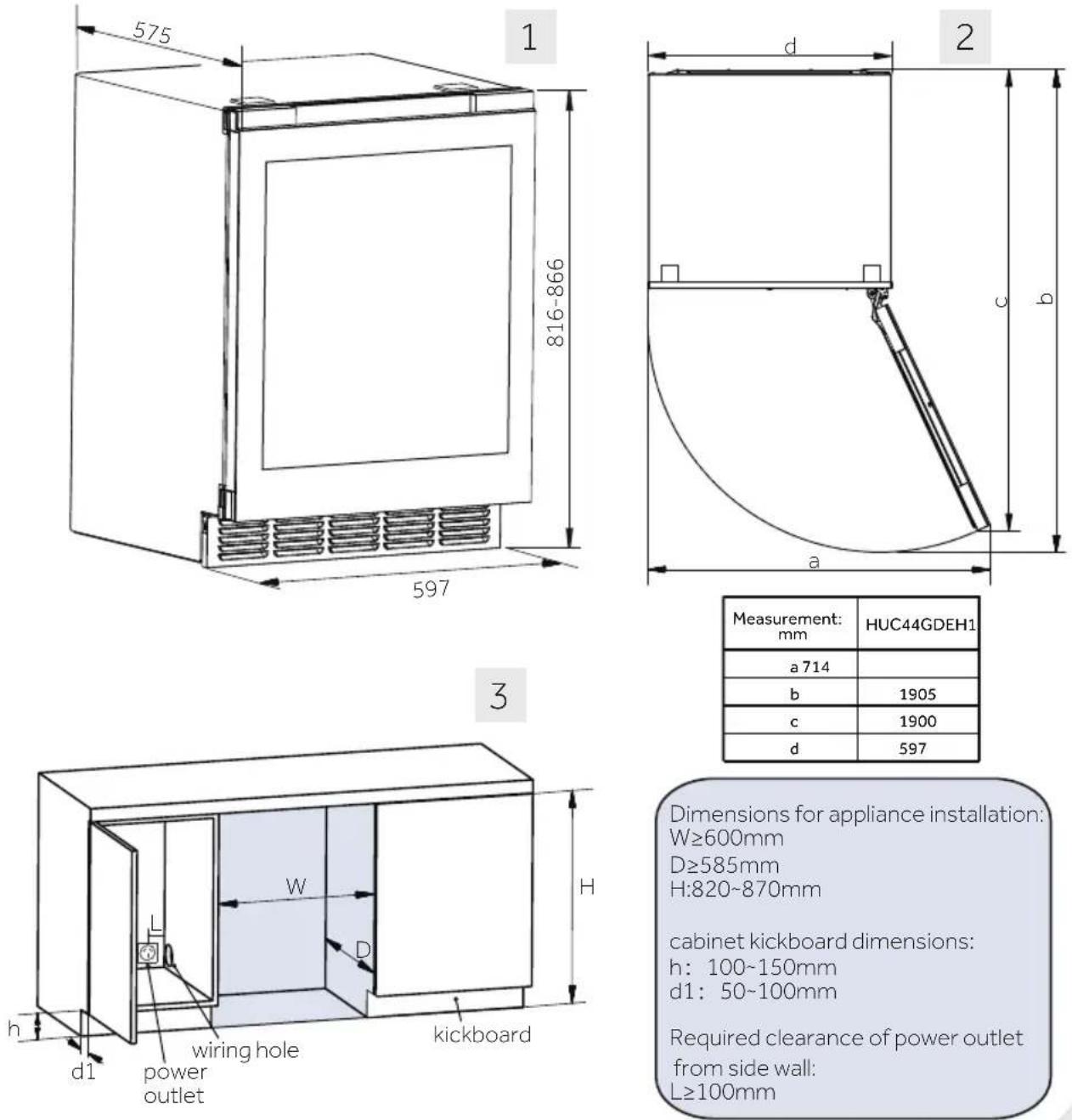
| Measurement: mm | HUC44GDEH1 |
| a 714 | |
| b | 1905 |
| c | 1900 |
| d | 597 |
Dimensions for appliance installation:
W≥600mm
D≥585mm
H:820\~870mm
cabinet kickboard dimensions:
h: 100\~150mm
d1: 50\~100mm
Required clearance of power outlet from side wall:
L≥100mm
After selecting the appropriate recess space, please follow the steps below for the embedded installation.

l-shaped bracket*2
kickboard*1

screws-A*4 screws-B*4

T-shaped bracket*2

tiny connectors*2

screws-C*2
Note: The kickboard should be placed inside the packaging top cover foam, while the other components should be placed in the accessory bag.
2) Kickboard Pre-Assembly
Take out the kickboard with 2 small connectors, and 2 screws-C. And then, use screws-C to assemble the kickboard and small connectors together.

Note: Do not tighten the screws. Leave a 10mm as gap between the small connectors and the kickboard to facilitate future installation into the machine compartment.
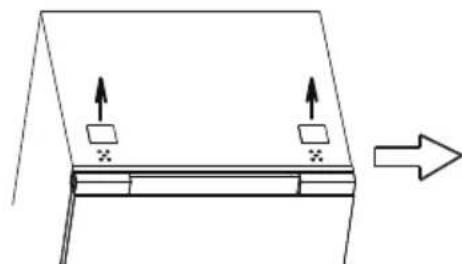
5. Installing Fixed Brackets
Each wine cellar provides two types of fixed brackets, which can be selected based on your furniture arrangement at home.
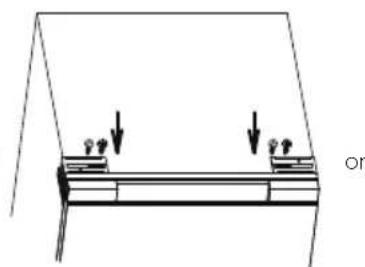
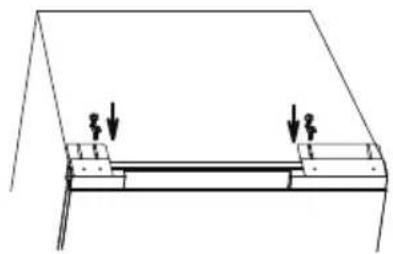
Take out the appropriate 2 brackets and 4 screws-A, and install them as shown in the diagram below:
natural_image
Simple line drawing of a roof structure with two upward arrows and a right-pointing arrow indicating direction (no text or symbols)
Use a flathead screwdriver to remove the top two small cover plates.
natural_image
Pure technical diagram showing a structural component with two downward arrows and a label 'on' (no text or symbols beyond basic lines)
Secure the T-shaped bracket using a Phillips head screwdriver.
natural_image
Simple line drawing of a structural beam with two downward arrows indicating force or displacement (no text or symbols)
Secure the I-shaped bracket using a Phillips head screwdriver
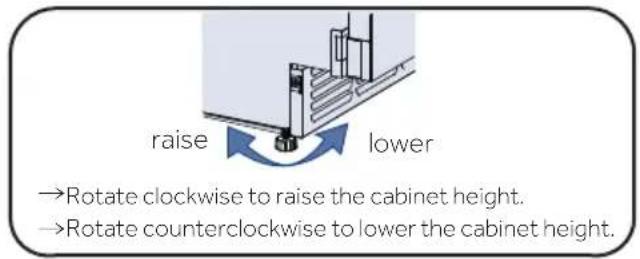
6. Adjusting the Bottom Feet
Adjust the height of the four Bottom Feet at the bottom of the cabinet so that the distance from the bottom of the door to the ground (h) matches the height of the cabinet's kickboard.
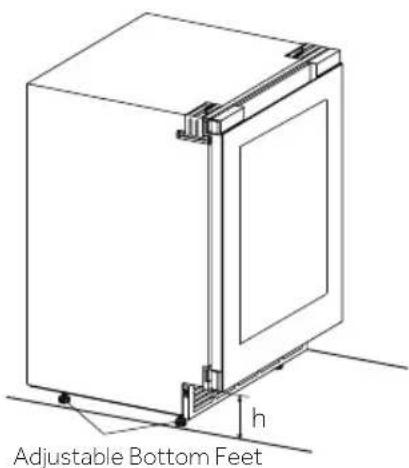
7. Installing the Kickboard
1) Adjust the kickboard bracket front-to-back distance:
▶ Loosen the 2 screws on the left bracket and the 3 screws on the right bracket.
Adjust the brackets front to back to ensure that the front edge of the brackets is at a horizontal distance from the outer surface of the door body equal to the depth of the kickboard (d) (50\~100mm) + 2mm.
▶ Tighten the screws to secure the brackets firmly.
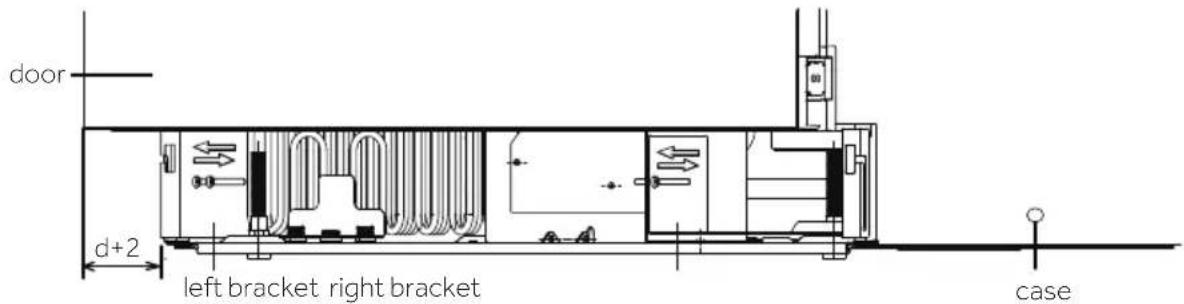
2) Install the kickboard
▶ Insert the assembled kickboard into the square holes on the inner brackets of the cabinet.
▶ Move the kickboard downward, leaving at least a 2mm gap from the ground for ease of mobility.
- Secure the kickboard by tightening the screws on both sides.
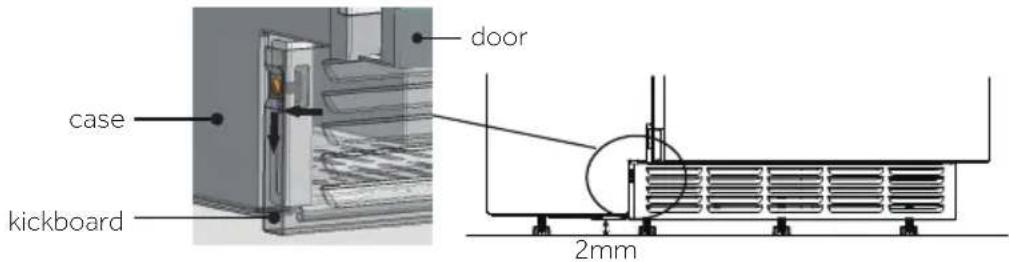
8. Securing to the Cabinet
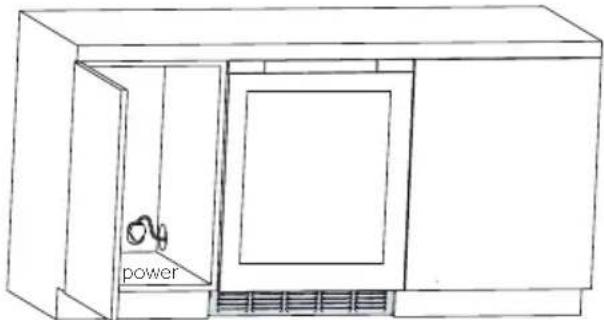
1) Push the product into the recessed space of the cabinet and plug it into the power source.
natural_image
Line drawing of a cabinet with a door, vent, and cooling unit (no text or symbols)
Note: Ensure that the power socket is placed inside the adjacent space of the recessed area.
2) Secure the brackets to the cabinet:
Take 4 screws-B, depending on the chosen brackets, follow the illustration below to securely connect and fix the product to the cabinet.
The following illustration demonstrates the connection and fixation of the left-side bracket to the cabinet. The method for the right side is the same.
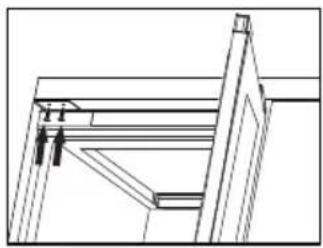
Fasten screws at the top of the upper cabinet
natural_image
Technical line drawing of a structural frame or bracket assembly (no text or symbols)
I-shaped bracket
or
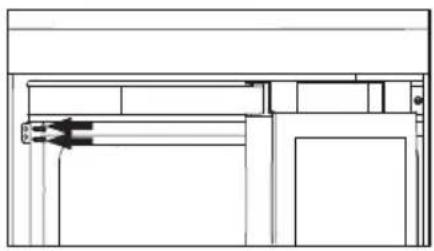
Fasten screws to the cabinet side panels
natural_image
Pure technical line drawing of a mechanical assembly without any text, numbers, or symbols
T-shaped bracket
9. Switching Door from Right to Left
This product is designed with right-side hinges. If you need to change it to left-side opening, please follow the steps below.
For hinge replacement, please contact our after-sales professionals for assistance.
1) Disassembling the Cabinet Cover Panels
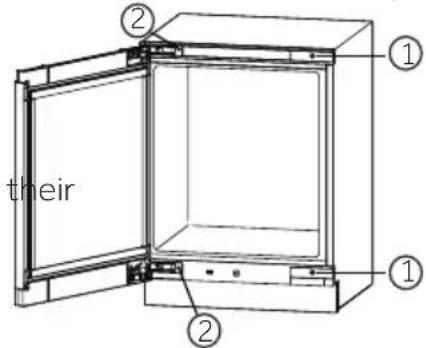
Remove the non-hinge side cover panel: Open the door and use a flathead screw-driver to pry off the panels marked with "①" at the positions shown in the diagram.
Remove the hinge side cover panel: Open the door, press one end of the cover panel with your fingers (press the curved end when removing "②"), and use screwdriver to pry the other end of the panel off at the positions shown in the diagram marked with "②".
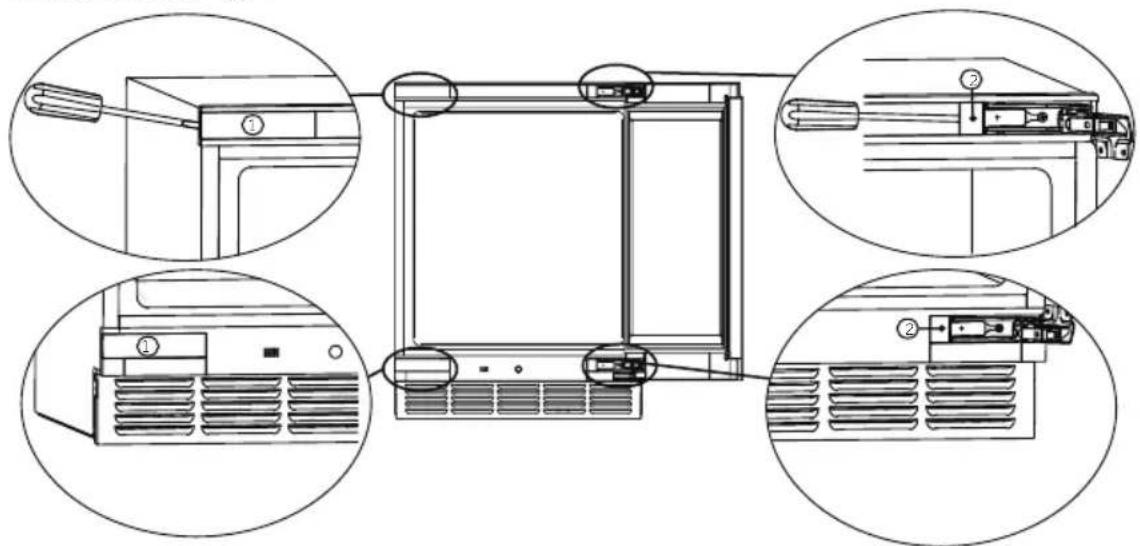
Note: After removing the cover panels, please store them safely for future use.
2) Disassembling the Door
Have one person hold the door with both hands. Have another person remove the upper and lower hinge securing screws. Then, carefully disassemble the door, including the upper and lower hinges and the cable chain wire box, by lifting it off.
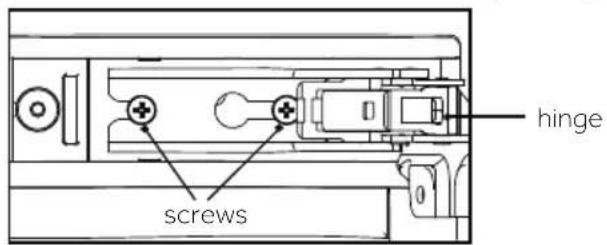
3) Disassembling the Door Panel
Place the door with the door panel facing up on a platform (avoid bumping it). Use a flathead screwdriver to carefully pry off the right-side upper and lower panels marked "③" and "④", as well as the left-side upper and lower panels marked "⑤", at the positions shown in the diagram. Be careful not to damage the door seal while removing the panels.
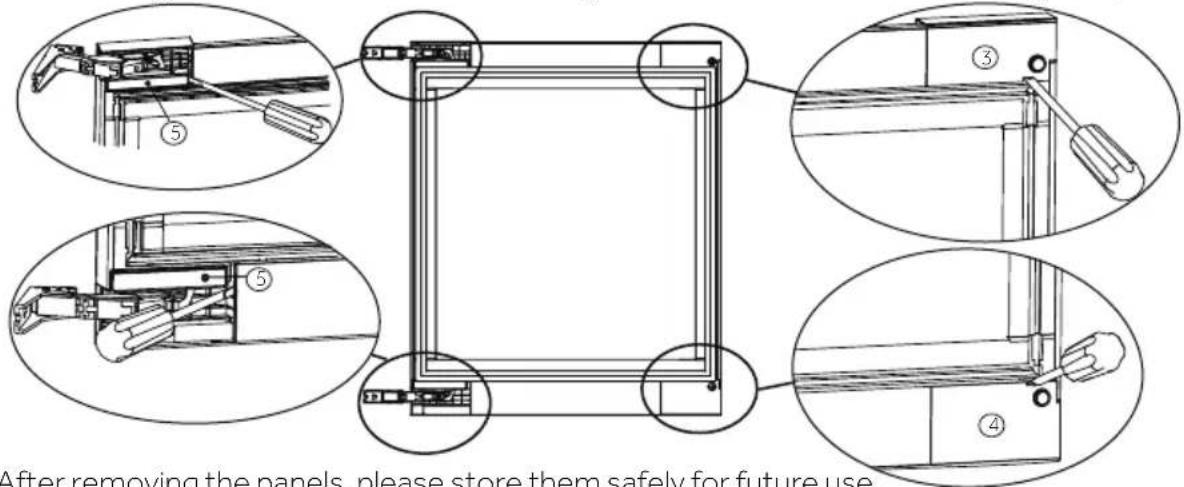
Note: After removing the panels, please store them safely for future use.
4) Swapping Upper and Lower Hinges:
▶ Use a wrench to remove the screws that secure the hinges in place. Remove both the upper and lower hinges (the method for disassembling the upper and lower hinges is the same).

natural_image
Technical line drawing showing a mechanical assembly before and after transformation (no text or symbols)
▶ Move the upper and lower hinges to the diagonal positions, as shown in the diagram below. Finally, use a wrench to securely fasten the hinge screws in place.
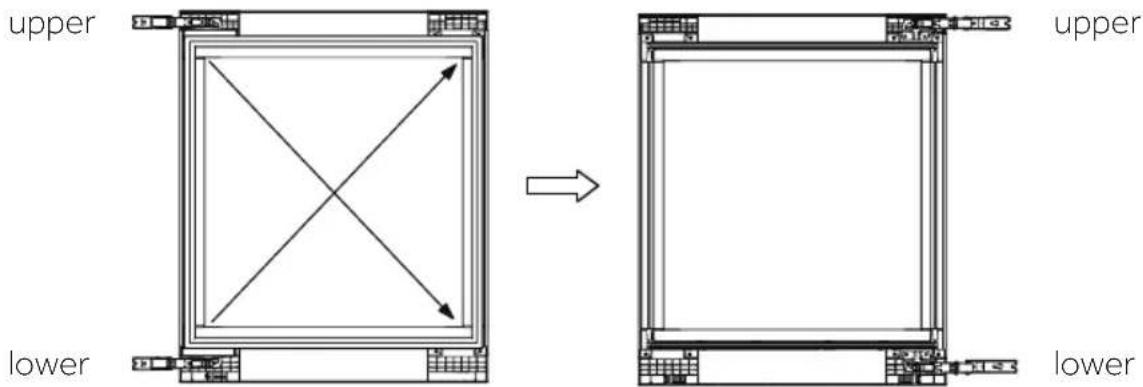
5) Installing the Door Panel:
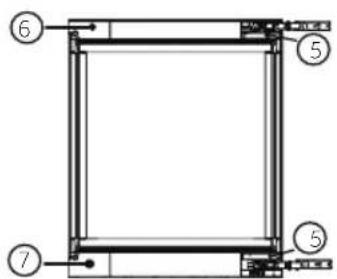
Install the upper and lower hinge cover panels "⑤," the right-side upper and lower hinge cover panels "⑥" and "⑦" (found in the accessory bag
) onto their corresponding positions on the door.
Ensure that they are properly installed and not loose.
6) Installing the Door:
Secure the upper and lower hinge screws in the left upper and left lower corners of the cabinet. Do not tighten the screws; leave a gap for hinge installation.
Align the upper and lower hinges of the door with the screws and install them in place.
Tighten all 4 screws.
7) Installing the Cabinet Cover Panels
Swap the removed panels between positions
"①" and "②", and then install them in respective positions.
10. Waiting time
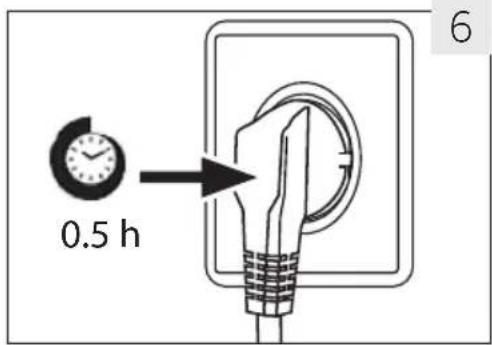
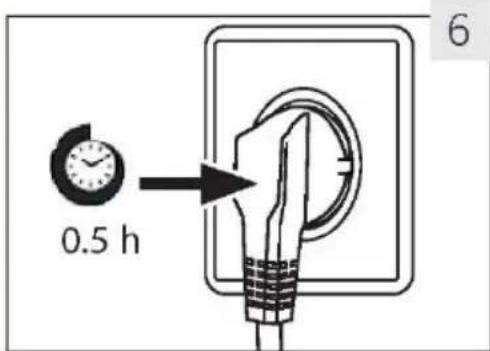
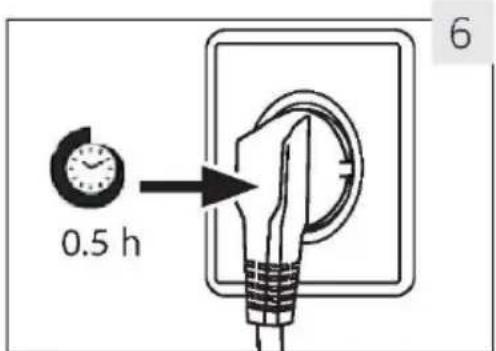
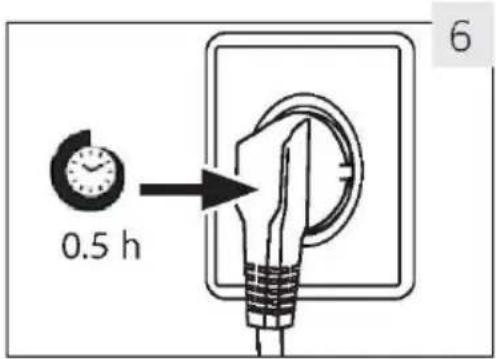
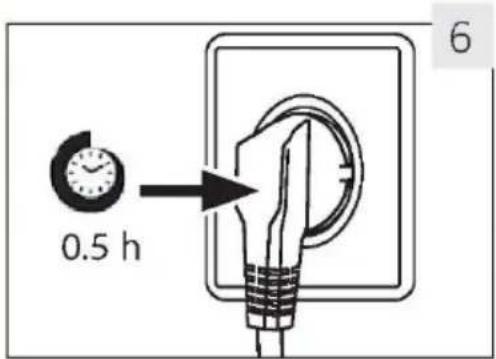
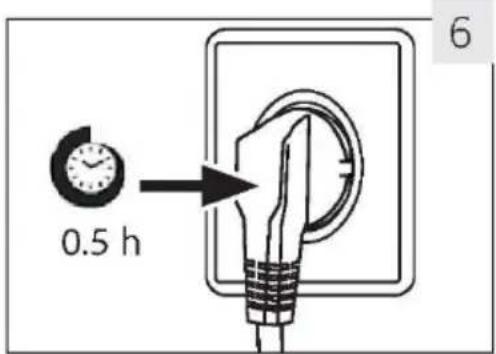
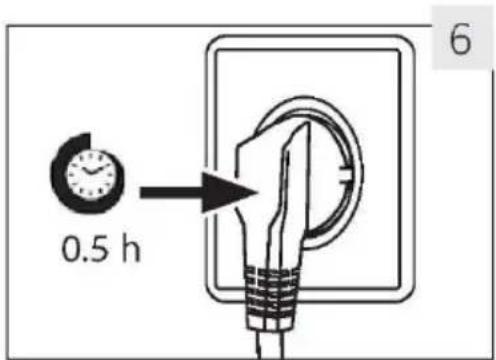
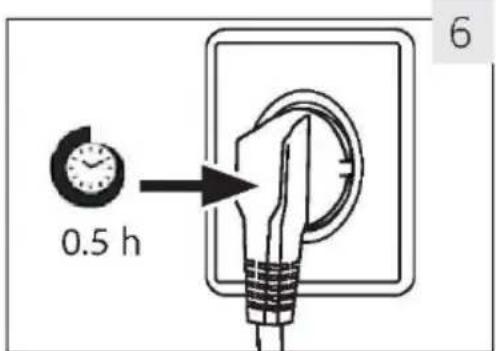
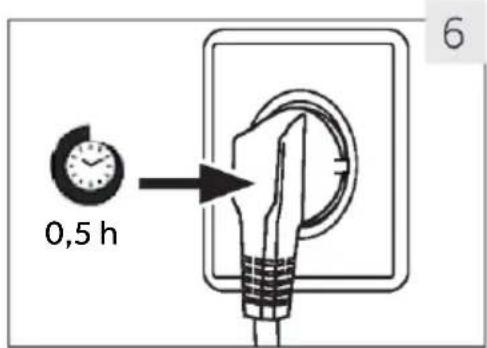
The maintenance-free lubrication oil is located in the capsule of the compressor. This oil can get through the closed pipe system during transport if the appliance is tilted. Before connecting the appliance to the power supply, wait 0.5 hours (Fig. 6) so that the oil runs back into the capsule.
11. Electrical connection
Before each connection check if:
▶ power supply, socket and fusing are appropriate to the rating plate.
the power socket is earthed and no multi-plug or extension.
▶ the power plug and socket are fit properly.
Connect the plug to a properly installed household socket.

WARNING!
To avoid risks a damaged power cord must be replaced by the customer service (see warranty card).
9. Door Reversibility
Before connecting the appliance to the power supply you should check, whether the door swing must changed from right (as delivered) to left, if this is required by the installation location and the usability

WARNING!
The appliance is heavy. You need two persons to carry out the door reversibility.
▶ Before any operation, first unplug the appliance from the mains.
▶Do not tilt the appliance more than 45irc to prevent damage of the cooling system.
1. Before first use
Remove all packaging materials. This includes the foam base and all adhesive tape holding the wine cellar accessories inside and outside. Keep them out of children's reach and dispose them in an environmentally friendly manner.
▶Clean the inside and outside of the appliance with water and a mild detergent before putting any wine in it.
▶After the appliance has been levelled and cleaned, wait for at least 2 hours before connecting it to the power supply. If your wine cellar has been tilted for any reason, wait 24 hours before plugging it in. See section INSTALLATION.
▶Once you have plugged the unit into an electrical outlet, let the unit run for at least 30 minutes to acclimatize itself before making any adjustments.
The temperature is automatically set to 12 °C. If desired, you can change the temperature manually. Please see TEMPERATURE.
2. Touch keys
The buttons on the control panel are touch keys, which respond when lightly touched with the finger.
3. Description for control panel
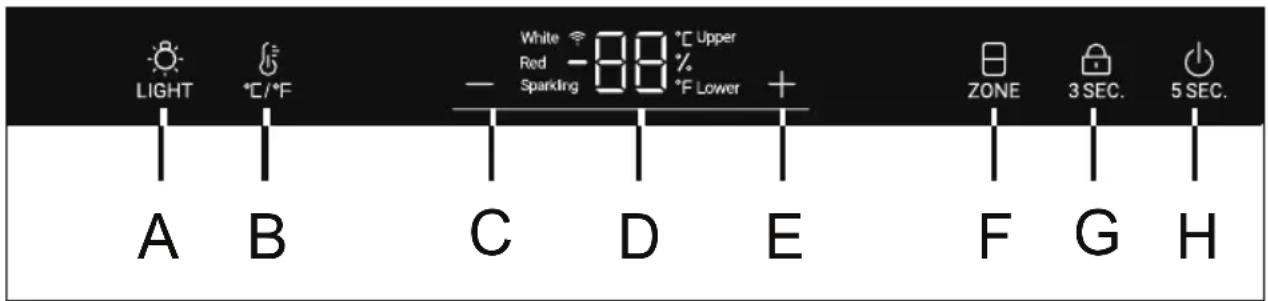
A Interior light button
B °C /°Fconversion button
C Temperature adjust button: down
D Display
E Temperature adjust button: up
F. Temperature zone selection button
G Lock button
H Power button
4. Automatically locking function
In the lock screen state, long press the lock key for 3S, the display screen displays 3, 2 and 1, the display screen is unlocked, and the lock icon is half lit; If there is no operation, the screen will be locked automatically after 30s, In the lock screen state, all the lock key icons are on, and the keys on the display screen cannot be operated (except the lighting key);
When the screen is off, touch any key and the display will light up; Long press the power key, the display screen displays 5, 4, 3, 2 and 1, and the power of the whole machine is turned off. When the power is off, long press the power key to display 5, 4, 3, 2, and 1, and then power is on.
6. Temperature setting

Notice
Presettings
▶Once you have plugged the unit into an electrical outlet, let the unit for at least 30 minutes to acclimatize itself before making any adjustments.
When the appliance is switched on after disconnection from the main power supply, it may take several hours for the correct temperatures to be reached. The exact time varies depending on the environment and the temperature setting.
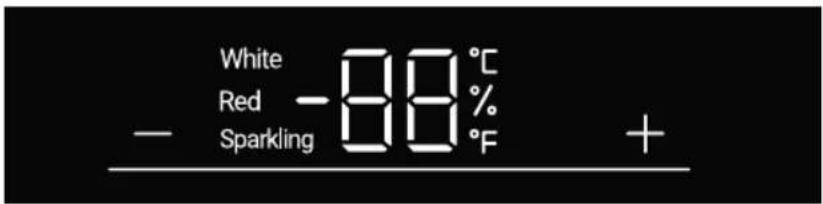
Press the + or - button, the display will start to flash. Press the + or - button to set the desired temperature. The temperature setting range: 5-20°C(41-68°F). Stop pressing the key for 3second, then the temperture is confirmed.
7. Mode or Zone function
Stop pressing the key for 3second, then the temperature is confirmed. In the unlocking state, the "ZONE" icon is fully on. If the current display is in the upper temperature zone, the upper icon will turn on and the lower icon is off. At this time, press the "ZONE" key, the lower icon will be on and the up per icon will be off.
Recommended temperature settings
The following drinking temperatures are recommended for the different types of wine.
| Red wine | +13°C to +20°C(+55°F to + 68°C) | Sparkling wineProsecco | +5°C to +8°C(+41°F to 47°F) |
| White wine | +9°C to +12°C(+48°F to +54°F) | | |
If you store wine for long periods of time, it should be stored at a temperature between +10°C and +12°C(50°F and +54°F).
8. Standby-mode
The display screen is dimmed automatically 30 seconds.
It lights up automatically when any key is touched or the door is opened.

Notice Influences on temperatures
The temperature inside the appliance is influenced by the following factors:
- Ambient temperature
- Frequency of door opening
▶ Amount of stored bottles
▶ The location of the appliance
The default setting is 12irc C
When display stops flashing, it goes back to showing the current temperature inside the wine cellar. It will take some time to reach the set temperature.
9. Lighting mode setting
Press the "LIGHT" button. When the lights in the cabinet are on, the lights will be lighted up gradually. When pressed the "LIGHT" button once again the lights will be off gradually
10. °C/°F function
Press the "按钮, switch between Fahrenheit and Celsius.
11. Wi-Fi function
Press the "LIGHT" button for 3 seconds, the "Wi-Fi" icon starts to flash quickly and automatically enters the configuration mode.
12. Power-Off Memory function
If a power outage, the cellar will automatically save the set temperature. After power recovery, it will run based on the temperature set before the power outage.
13. Low temperature compensation function
The wine cellar has a low temperature compensation function to ensure the stability of the temperature: When the compartment's temperature is lower than the set temperature, the wine cellar automatically starts the low temperature compensation function, heating the application. When the temperature in the application reaches the set temperature, the low temperature compensation function is automatically turned off.
14. Door opening alarm
If the door is kept open for over 1 min, buzzer will be beeping to give an alarm till the door is closed or any key on display panel can be operated and then the buzzer will
15. Humidity viewing mode
Press and hold the " 🔊" button for 3 seconds to enter humidity viewing mode. Use the " ☐" button to view the humidity value for another temperature zone. Press and hold the " 🔊" button for 3 seconds again or adjust the temperature to exit the humidity viewing mode.
16. Wi-Fi mode setting
CONNECTIVITY
WIRELESS PARAMETERS
| Technology | Wi-Fi | Bluetooth |
| Standard | IEE 802.11 b/g/n | Bluetooth v4.2, BR/EDR, BLE |
| Frequency Band(s) [MHz] | 2401-2483 | 2402-2480 |
| Maximum power [mW]Band(s) [MHz] | 19.5 | 19.5 |
How to activate Wi-Fi module:
Press the "LIGHT" button for 3 seconds to activate the Wi-Fi
· The Wi-Fi module is switched on the Wi-Fi icon starts to blink
- If the wine cellar is enrolled but the Wi-Fi is off the icon will blink
· If the wine cellar is enrolled and connected the Wi-Fi icon is always on
• To reset the Wi-Fi press the "LIGHT" button for 3 seconds
IN APP PAIRING PROCEDURE
Step 1
- Download the hOn app on the stores


Step 2
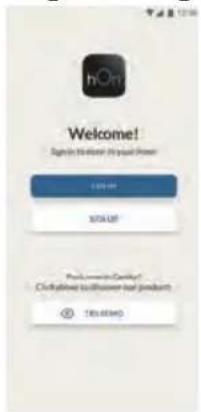
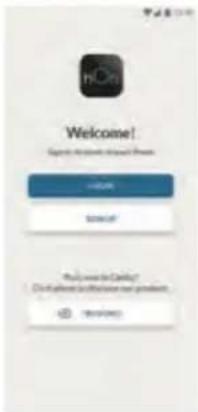
- Log in or sign up
Step 3
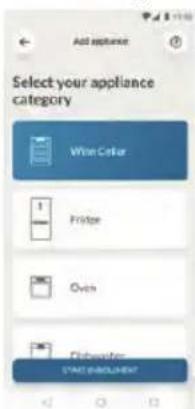
- Add a new appliance selecting the wine cellar from the list
Step 4
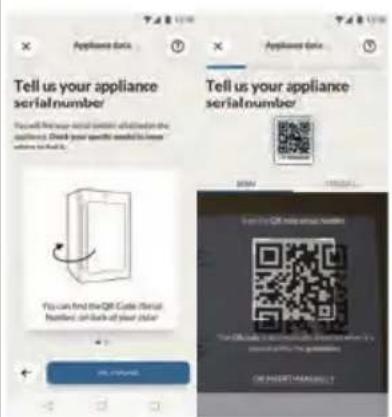
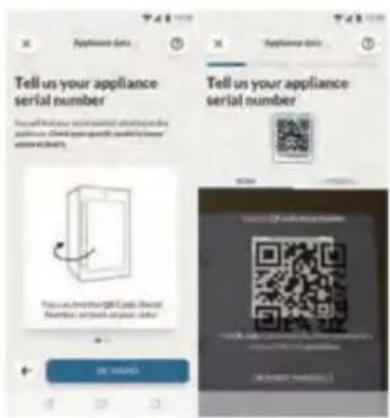
- Scan the QR or insert manually the serial number
Step 5
- Press the "LIGHT" button on the product for 3s to activate the Wi-Fi.
Step 6
- The wi-Fi icon will blink, the pairing process is in progress
- You will have 5 minutes to complete the pairing process
- When the process is completed the Wi-Fi icon will stop blinking and it will remain always on
NOTE

Energy saving tips
▶Make sure the appliance is properly ventilated (see INSTALLATION).
▶ Do not install the appliance in direct sunlight or in the near of heat sources (e.g. stoves, heaters).
- Avoid unnecessarily low temperature in the appliance. The energy consumption increases the lower the temperature in the appliance is set.
▶Open the appliance door as little and as briefly as possible.
▶ Do not exceed the designed amount of bottles to avoid obstructing the air flow.
▶Keep door seals clean so that the door always closes correctly.
The most energy-saving configuration requires drawer, food box and shelves to be positioned in the appliance on factory-fresh condition, and food to be placed without blocking the air outlet of the duct.
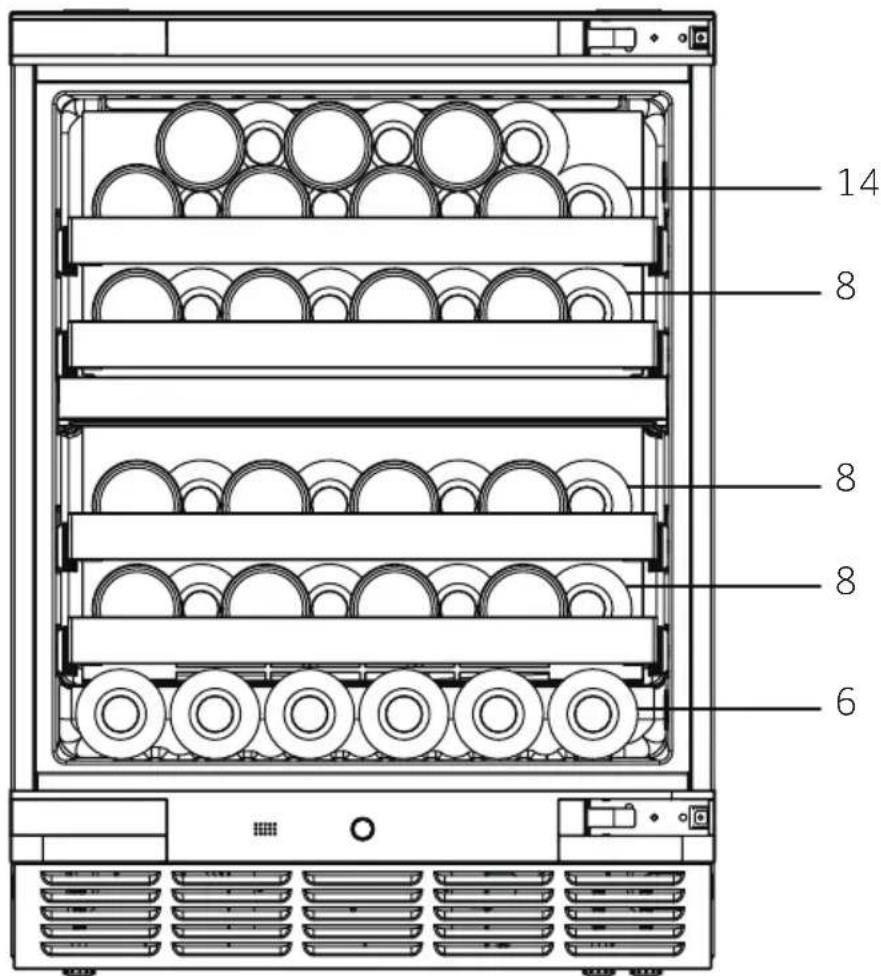
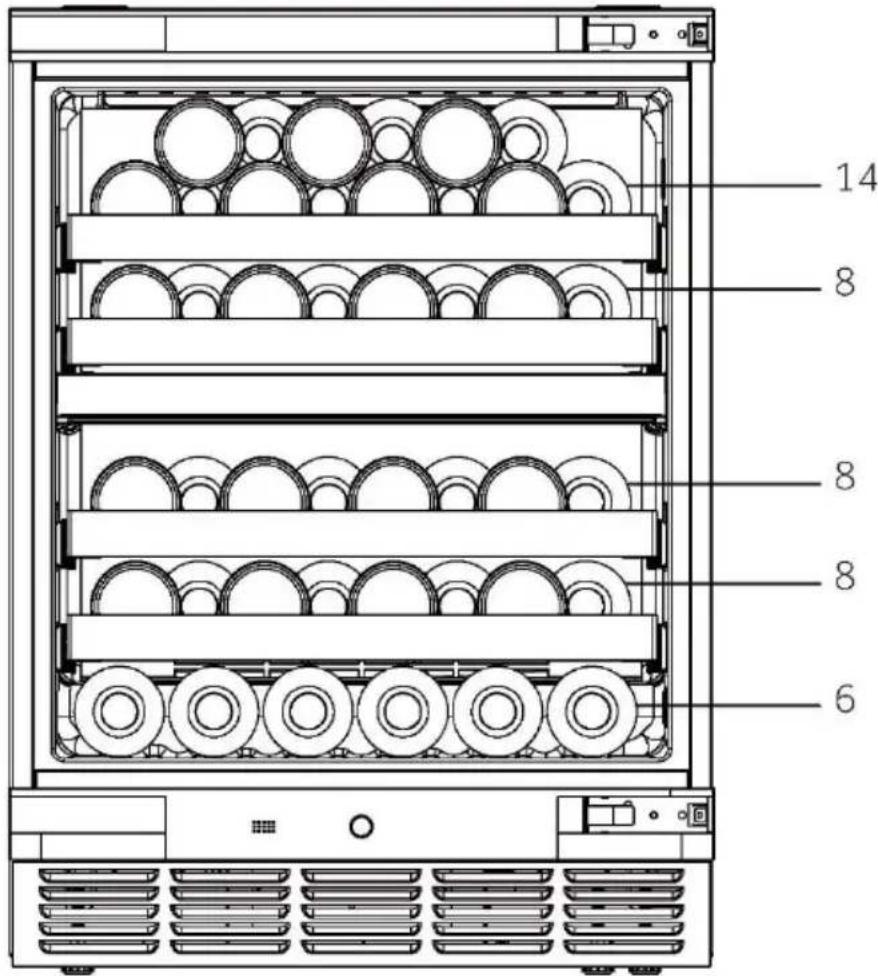
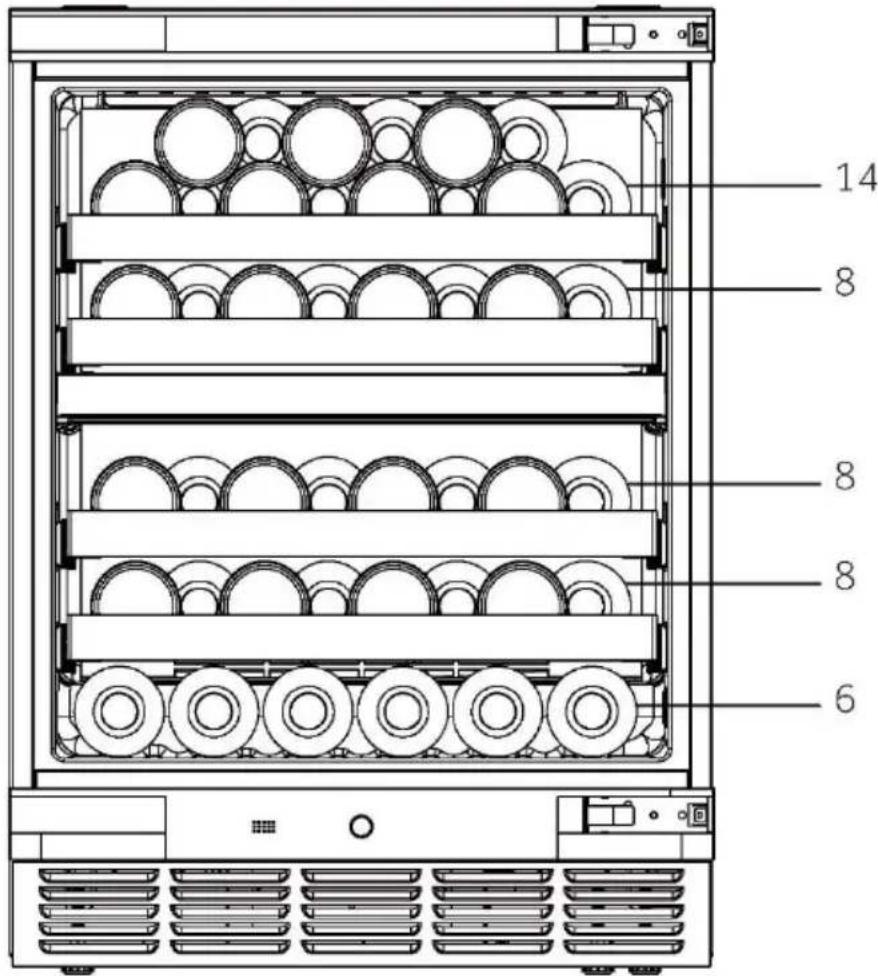
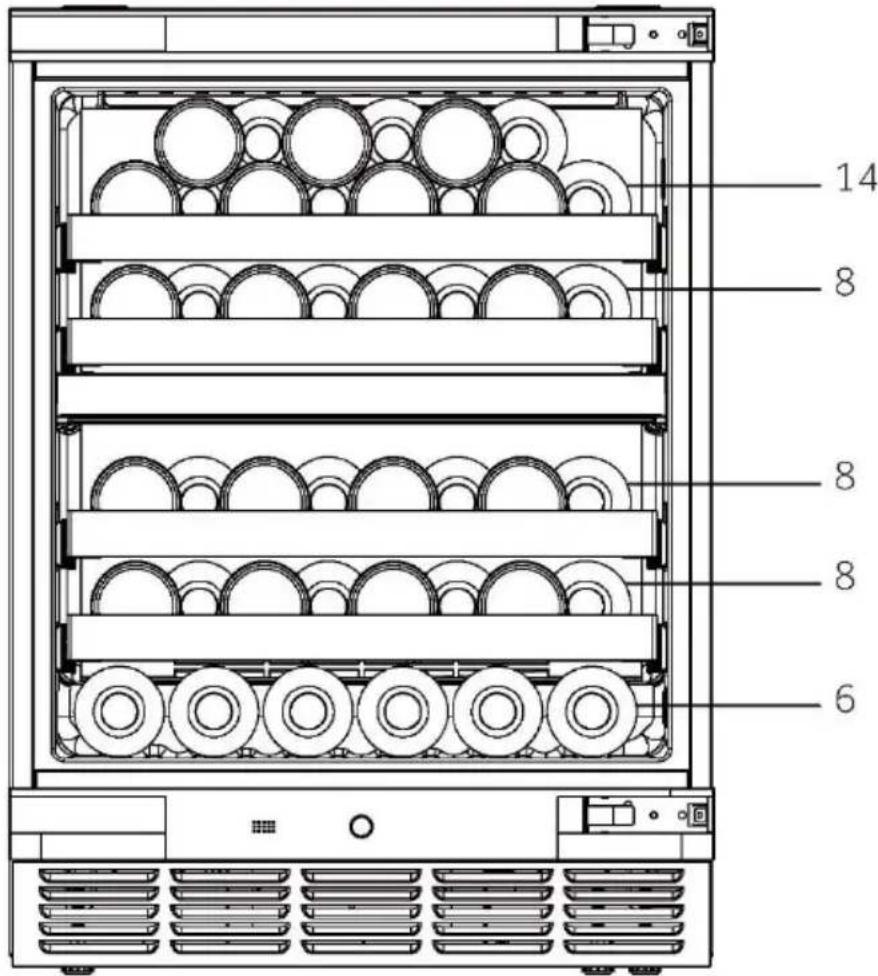
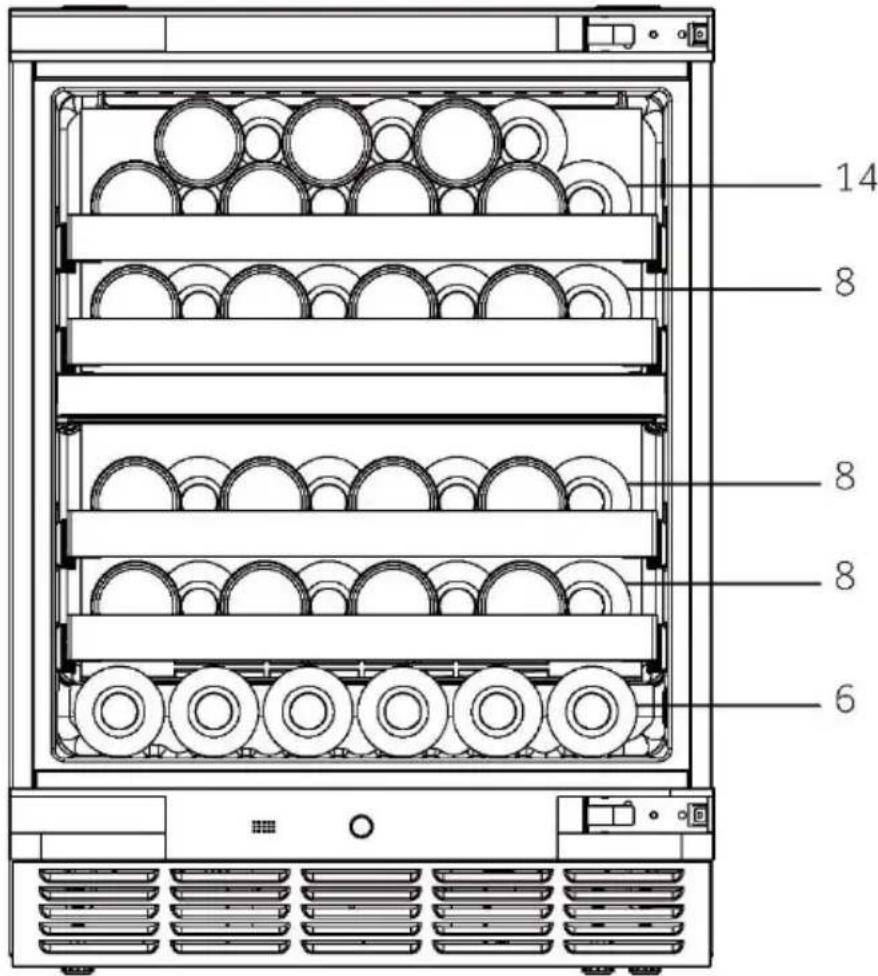
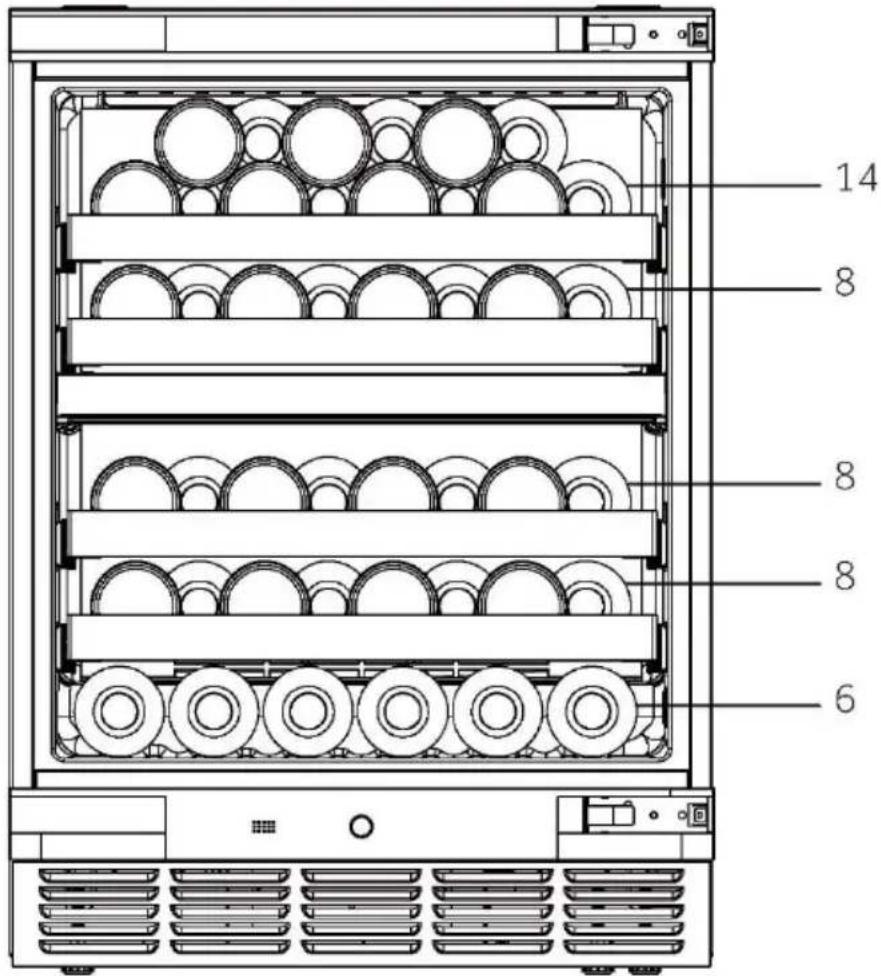
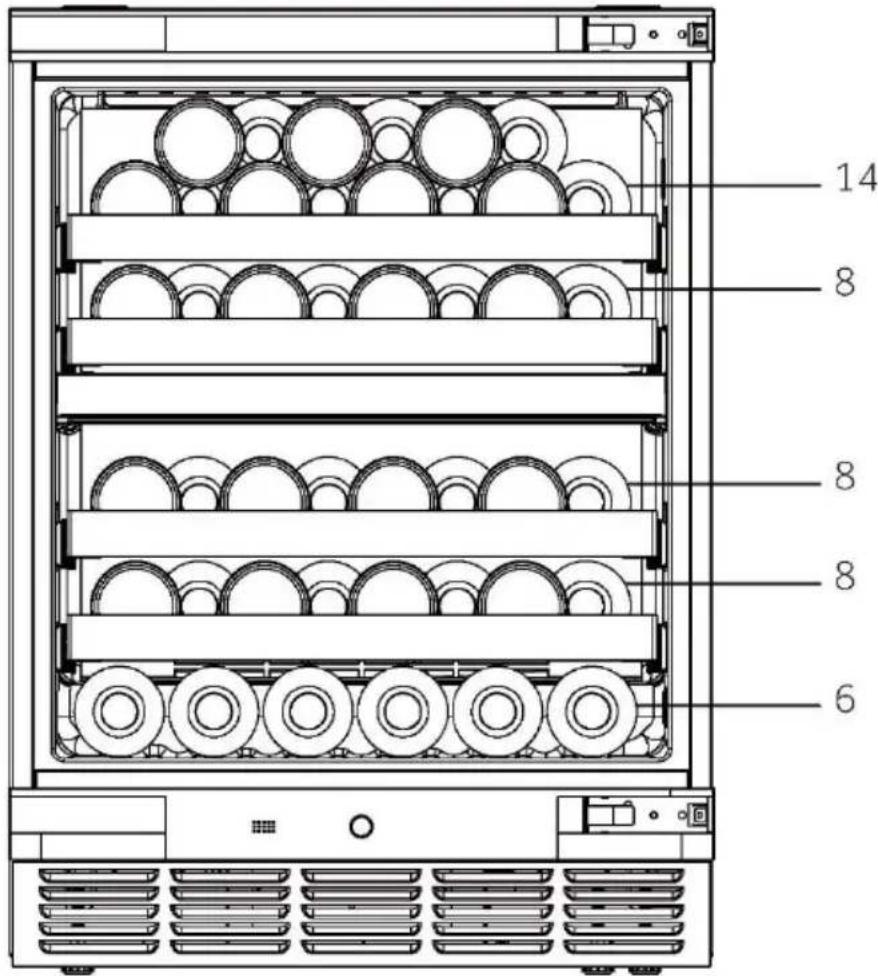
1. Shelf
- The shelves are designed for easy storage and easy removal of the wine. They can be cleaned with a soft towel.
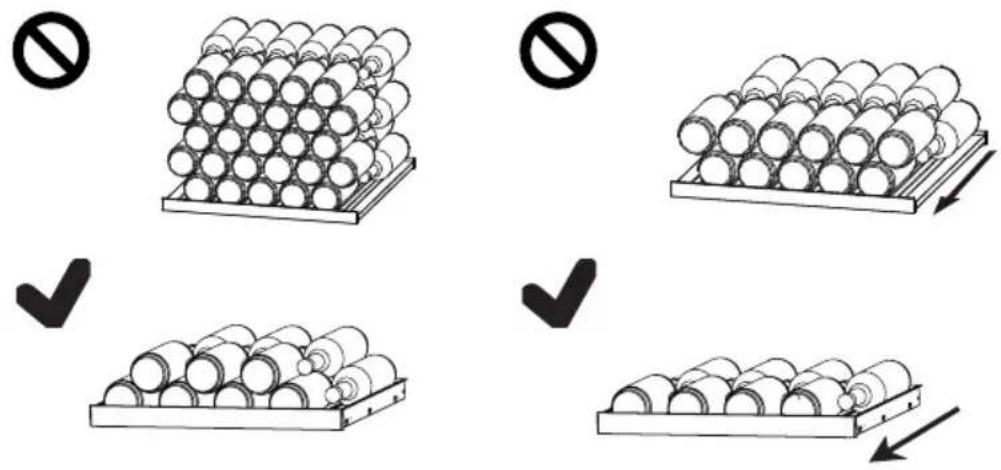
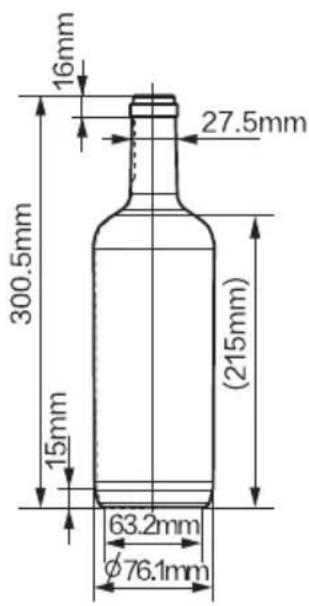
- Regualr bottles with diameter of 76mm can be stacked.
- Magnum bottles can be stacked on the first or the third shelf.
- The quantity can vary from the depicted number or bottles if they are stacked in a different way.
Advice for the layout of your wine cellar
We recommend that the number of wine bottles should not exceed two layers on each shelf, and the bearing capacity of the wine shelves should not exceed 18 kg. Before placing the bottles inside the wine cellar, confirm whether or not the wine shelves are completely stable. In addition, confirm whether or not any bottle protrudes from the shelves in order to prevent bottles hitting the glass door upon closing.
2. The light
The LED interior light comes on when the door is opened. To turn on the light while the door is closed, touch the "LIGHT" button. To turn the lights off, touch button again. To increase the energy efficiency, the lights should be turned off when the wine cellar is not being viewed.
Care and cleaning
EN
1. Defrosting
The defrosting of the wine cellar is done automatically; no manual operation is needed.
2.Replacing the LED lamp
The lamp uses LED as its light source, featuring low energy consumption and long service life. If there is any abnormality, please contact the customer service. See CUSTOMER SERVICE.

WARNING!
Do not replace the LED lamp yourself. It must only be replaced by either the manufacturer or the authorised service agent.
Parameters of LED lamp:
Voltage: 12V
Max power: 4W
3. Non-use for a longer period
Unplug the power cord.
Clean the appliance and door gaskets as described above.
Keep the door open to prevent the creation of bad odours inside.
4. Moving the appliance
- Remove all bottles and unplug the appliance.
- Secure shelves and other moveable parts in the wine cellar with adhesive tape.
- Do not tilt the wine cellar more than 45° to avoid damaging the refrigerating system.
5. Air exchange with activated carbon filter
The way in which wines continue to mature depends on the ambient conditions. The quality of the air is therefore decisive for preserving the wine. An activated carbon filter has been fitted in the lower area of the rear wall of the appliance to through put remains at an optimum quality.

Notice
We recommend that you replace the filter once a year.Fiters can be obtained from your dealer.
Changing the filter:
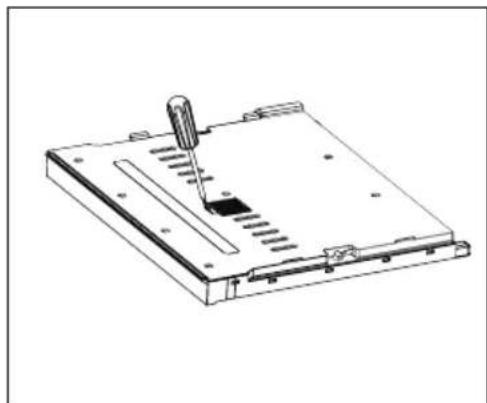
The carbon honeycomb module is located at the bottom of the partition (indicated by the arrow in the diagram). To remove it, press the latch on the carbon honeycomb module box and pull it outward.
Inserting the filter:
Align the bottom of the new module with the installation slot, press it in, and hear a "click" to complete the installation.
natural_image
Line drawing of a mechanical device with a lever and base plate (no text or symbols)
Many occurring problems could be solved by yourself without specific expertise. In case of a problem please check all shown possibilities and follow below instructions before you contact an after sales service. See CUSTOMER SERVICE.
WARNING!
Before maintenance, deactivate the appliance and disconnect the mains plug from the mains socket.
Electrical equipment should be serviced only by qualified electrical experts, because improper repairs can cause considerable consequential damages.
▶ A damaged supply should only be replaced by the manufacturer, its service agent or similarly qualified persons in order to avoid a hazard.
| Error Code | Cause Solution | |
| L2 L3 | Low temperature alarm when the temperature of the control sensor is too low; | 1.Check the ambient temperature.2.Check the Compressor connector.3.Check the resistance of the temperature control sensor. |
| H2 H3 | When the temperature of the control sensor is too high, the high temperature alarm will be displayed on the display screen; | 1.Check the connector of the control board or the display panel.2.Check the resistance and the voltage of the fan.3.Check the fan and the compressor connector. |
Troubleshooting
EN
| Problem | Possible Cause | Possible Solution |
| The compressor does not work. | Mains plug is not connected in the mains socket. | Connect the mains plug. |
| The appliance runs frequently or runs for a too long period of time. | The outdoor temperature is too high.The appliance has been off power for a period of time.A door of the appliance is not tightly closed.The door has been opened too frequently or for too long.The door gaskets are dirty, worn, cracked or mismatched.The required air circulation is not guaranteed.The temperature is set too low. | In this case, it is normal for the appliance to run longer.Normally, it takes a while for the appliance to cool down completely.Close the door and ensure the appliance is located on a level ground and there is no food or container jarring the door.Do not open the door too frequently.Clean the door gasket or replace them by the customer service.Ensure adequate ventilation.The problem will resolved itself when the desired temperature has been reached. |
| The inside of the wine cellar is dirty and/or smells.. | The inside of the wine cellar needs cleaning. | Clean the inside of the wine cellar. |
| It is not cold enough inside the appli-ance. | The temperature is set too high.Bottles have been added recently.A door of the appliance is not tightly closed.The door has been opened too frequently or for too long.The door gaskets are dirty, worn, cracked or mismatched. | Reset the temperature.Allow time for recently added bottles to reach desired temperature.Close the door.Do not open the door too frequently.Clean the doorgasket or replace them by the customer service.. |
| It is too cold inside the appliance. | The temperature is set too low. | Reset the temperature. |
| Moisture formation on the inside of the refrigerator com-partment. | The climate is too warm and too-damp.A door of the appliance is not tightly closed.The door has been opened too frequently or for too long.. | Increase the temperature.Close the door.Do not open the door/drawer too frequently. |
| Problem Possible Cause Possible Solution |
| Moisture accumulates on the wine cellar;s outside surface. | The climate is too warm and too dampThe door is not closed tightly.The cold air in the appliance and the warm air outside it condensates. | This is normal in damp climate and will change when the humidity decreases.Ensure that the door is shut tightly and that the gaskets seal properly. |
| The appliance makes abnormal sounds | The appliance is not located on level ground.The appliance touches some object around it. | Ajust the feet to level the appliance.Remove objects around the appliance. |
| A slight sound is to be heard similar water. | This is normal - | - |
| The interior lighting or cooling system does not work. | Mains plug is not connected to the mains socket.The power supply is not intact.The LED-lamp is out of order. | Connect the mains plug.Check the electrical supply to-the room.Call the local electricity company.Please call the service for changing |
| The sides of the cooler and door strip get warm | This is normal. | - |
| The door does not shut properly | The appliance is not level.The door is blocked. | Level the appliance with the leveling feet.Check for blockages like bottles or shelves. |
To contact the technical assistance, visit our website:
https://corporate.haier-europe.com/en/
Under the section "website", choose the brand of your product and your country. You will be redirected to the specific website where you can find the telephone number and form to contact the technical assistance.
Product fiche according to regulation EU No. 2019/2016
| Brand Haier | |
| Model name / identifier | HUC44GDEH1 |
| Category | Wine Cellar |
| Energy efficiency class | E |
| Annual energy consumption (kWh/annum) 1) | 80 |
| Storage volume (L) 114 | |
| Climate class:This appliance is intended to be usedat an ambient temperature between 10 °C and 38 °C. | SNN ST |
| Airborne acoustical noise emissions (db(A) re 1pW) | B(35) |
| Type of appliance | Built-in |
| This appliance is intended to be used exclusivelyfor the storage of wine. | Yes |
| Dimensions (W/D/H in mm) | 597/575/816-866 |
Explanations:
1) based on standard test results for 24 hours. The actual power consumption depends on the actual environment, the amount of bottling, the set temperature, the door opening and closing, etc.
2) The nominal power consumption is the value obtained according to the standard test when the wine cabinet does not turn on the internal light.
- extended temperate: 'this refrigerating appliance is intended to be used at ambient temperatures ranging from 10°C to 32°C';
- temperate: 'this refrigerating appliance is intended to be used at ambient temperatures ranging from 16 °C to 32 °C';
- subtropical: 'this refrigerating appliance is intended to be used at ambient temperatures ranging from 16 °C to 38 °C';
- tropical: 'this refrigerating appliance is intended to be used at ambient temperatures ranging from 16 °C to 43 °C';
Standards and directives

This product meets the requirements of all applicable EC directives with the corresponding harmonised standards, which provide for CE marking.
We recommend our Haier Customer Service and the use of original spare parts.
If you have a problem with your appliance, please first check section TROUBLESHOOTING.
If you cannot find a solution there, please contact
▶your local dealer or
▶ the Service & Support area at www.haier.com where you can find telephone numbers and FAQs and where you can activate the service claim.
To contact our Service, ensure that you have the following data available.
The information can be found on the rating plate.
Model____ Serial No.____
Also check the Warranty Card supplied with the product in case of warranty.
For general business enquiries please find our addresses in Europe below:
European Haier addresses
| Country* Postal address Country Postal address |
| Italy | Haier Europe Trading SRLVia De Cristoforis, 1221100 VereseITALY | France | Haier Europe Trading SRLVia De Cristoforis, 1221100 VereseITALY |
| SpainPortugal | Haier Iberia SLPg. Garcia Faria, 49-5108019 BarcelonaSPAIN | Belgium-FRBelgium-NLNetherlandsLuxembourg | Haier Benelux SAAnderlechtRoute de Lennik 451BELGIUM |
| GermanyAustria | Haier Deutschland GmbHHewlett-Packard-Str. 4D-61352 Bad HomburgGERMANY | PolandCzechiaHungaryGreeceRomaniaRussia | Haier Poland Sp. zo.o.Al. Jerozolimskie 181B02-222 WarszawaPOLAND |
| UnitedKingdom | Haier Appliances UK Co. Ltd.One Crown SquareChurch Street EastWoking, Surrey, GU21 6HRUK |
AVAILABILITY OF SPARE PARTS: Thermostats, temperature sensors, printed circuit boards and light sources are available for a minimum period of seven years after placing the last unit of the model on the market. Door handles, door hinges, trays and baskets for a minimum period of seven years and door gaskets for a minimum period of 10 year, after placing the last unit of the model on the market
Minimum guarantee is: 2 years for EU Countries, 3 years for Turkey, 1 year for UK, 1 year for Russia, 3 years for Sweden, 2 years for Serbia, 5 years for Norway, 1 year for Morocco, 6 months for Algeria, Tunisia no legal warranty required.
For further information about the product, please consult https://eprel.ec.europa.eu/ or scan the QR on the energy label supplied with the appliance.

natural_image
Abstract geometric composition with four gray polygonal shapes radiating from a central point, no text or symbols present.
HUC44GDEH1-EN
Haier
Benutzerhandbuch
Weinklimaschrank
HUC44GDEH1
natural_image
Illustration of a hand cleaning a window with a soap block and a basin (no text or symbols)
natural_image
Line drawing of two rectangular panels or structural elements with no visible text or symbols
natural_image
Diagram of a mechanical or structural component with two blocks and an arrow indicating direction (no text or symbols)
Verwenden Sie einen
natural_image
Technical line drawing of a cabinet or enclosure with mounting feet and height dimension labeled 'h' (no text or symbols beyond basic geometry)
Einstellbare Füße
natural_image
Technical line drawing of a server rack with four circular insets showing internal components (no text or symbols)
natural_image
Technical line drawing showing a mechanical assembly before and after transformation (no text or symbols)
6) Montage der Tür:
10. Wartezeit
Schritt 2
Schritt 3
Schritt 4
Schritt 5
- Drücken Sie die


Energiespartipps
natural_image
Technical line drawing of a mechanical device with a lever and base plate (no text or symbols)

natural_image
Abstract geometric composition with four overlapping gray shapes arranged in a cross pattern (no text or symbols)
HUC44GDEH1 - DE
Haier
natural_image
Symbol of a trash bin with crossed lines indicating no waste or discharge (no text or labels)
Légende
natural_image
Illustration of a hand cleaning a window with a soap block and a basin (no text or symbols)
natural_image
Line drawing of two rectangular electronic components with no text or symbols
natural_image
Simple line drawing of a roof structure with two hanging blocks and an upward arrow, no text or symbols present.
natural_image
Simple line drawing of a structural beam with two downward arrows indicating load or force (no text or symbols)
natural_image
Technical line drawing of a cabinet or enclosure with mounting feet and height dimension labeled 'h' (no text or symbols beyond basic geometry)
natural_image
Technical line drawing of a structural frame with supports and arrows indicating forces (no text or symbols)
natural_image
Architectural floor plan showing room layouts and structural elements (no text or labels)
natural_image
Technical line drawing showing a mechanical assembly before and after transformation (no text or symbols)
10. Temps d'attente
Étape 2
Étape 3
Étape 4
Étape 5


natural_image
Technical line drawing of a mechanical device with a handle and internal components (no text or symbols)

natural_image
Abstract geometric composition with four gray polygonal shapes arranged radially (no text or symbols)
HUC44GDEH1 - FR
Haier
Manuale dell'utente
Cantinetta
HUC44GDEH1
natural_image
Symbol of a trash bin crossed with no text or labels
Smaltimento
natural_image
Illustration of a hand cleaning a window with a soap block and a basin (no text or symbols)
natural_image
Line drawing of two rectangular panels or structures with no text or symbols
natural_image
Simple line drawing of a mechanical component with two blocks and an arrow indicating direction (no text or symbols)
natural_image
Simple line drawing of a mechanical or architectural component with two downward arrows and a base, no text or symbols present.
natural_image
Technical line drawing of a cabinet or enclosure with mounting feet and height dimension labeled 'h' (no text or symbols beyond the label)
natural_image
Technical line drawing of a structural frame or bracket assembly (no text or symbols)
natural_image
Architectural floor plan showing room layouts and structural elements (no text or labels)
Staffa a forma di T
natural_image
Technical line drawing showing a mechanical assembly before and after transformation (no text or symbols)
10. Tempo di attesa
CONNETTIVITÀ WIRELESS
| Tecnologia Wi-Fi Bluetooth | | |
| Standard IEE 802.11 b/g/n Bluetooth v4.2, BR/EDR, BLE | | |
| Bande di frequenza (MHz) 2401 2483 | 2402 2480 | - |
| Potenza massima (mW) bande (MHz) | 19.5 | 19.5 |
Passo 2
Passo 3
Passo 4
Passo 5

natural_image
Line drawing of a mechanical device with a lever and base plate (no text or symbols)

natural_image
Abstract geometric composition with four gray shapes arranged in a cross pattern (no text or symbols)
HUC44GDEH1 - IT
Haier
Manual de usuario
Bodega de vinos
HUC44GDEH1
Leyenda
natural_image
Illustration of a hand cleaning a window with a soap block and a basin (no text or symbols)
natural_image
Line drawing of two rectangular panels or structural elements, no text or symbols present
natural_image
Simple line drawing of a mechanical component with two blocks and an arrow indicating direction (no text or symbols)
natural_image
Simple line drawing of a structural beam with two downward arrows indicating load or force (no text or symbols)
natural_image
Technical line drawing of a refrigerator with height dimension labeled 'h' (no text or symbols beyond the label)
Patas inferiores ajustables
natural_image
Technical line drawing of a structural frame with supports and arrows indicating forces (no text or symbols)
natural_image
Pure architectural floor plan lines without any text, numbers, or symbols
Soporte en T
natural_image
Technical line drawing of a server rack with four circular insets showing internal components (no text or symbols)
natural_image
Technical line drawing showing a mechanical assembly before and after transformation (no text or symbols)
Paso 2
Paso 3
Paso 4
Paso 5

natural_image
Line drawing of a mechanical device with a lever and base plate (no text or symbols)

natural_image
Abstract geometric composition with four overlapping gray shapes arranged radially (no text or symbols)
HUC44GDEH1 - ES
Haier
Instrukcja obsługi
Chłodziarka do wina
HUC44GDEH1
natural_image
Illustration of a hand cleaning a window with a soap block and a basin (no text or symbols)
natural_image
Line drawing of two rectangular electronic components or devices, no text or symbols present
natural_image
Simple line drawing of a table with two boxes and an upward arrow, no text or symbols present
natural_image
Simple line drawing of a mechanical component with downward arrows indicating force or movement (no text or symbols)
natural_image
Technical line drawing of a refrigerator with height measurement annotation (no text or symbols)
Regulowane nóżki
natural_image
Technical line drawing of a structural frame or bracket assembly (no text or symbols)
natural_image
Pure technical line drawing of a mechanical assembly without any text, numbers, or symbols
natural_image
Technical line drawing showing a mechanical assembly before and after transformation (no text or symbols)
Krok 2
Krok 3
Krok 4
Krok 5

natural_image
Technical line drawing of a mechanical device with a lever and base plate (no text or symbols)

natural_image
Abstract geometric composition with four gray polygonal shapes arranged radially (no text or symbols)
HUC44GDEH1 - PL
Haier
Manual do utilizador
Garrafeira
HUC44GDEH1
natural_image
Symbol of a trash bin with crossed lines indicating no waste or discharge (no text or labels)
Eliminação
natural_image
Illustration of a hand cleaning a window with a soap block and a basin (no text or symbols)
natural_image
Line drawing of a door frame structure with two angled panels (no text or symbols)
natural_image
Simple line drawing of a mechanical component with two blocks and an arrow indicating direction (no text or symbols)
natural_image
Simple line drawing of a mechanical component with two downward arrows and a label 'ou' (no text or symbols on the diagram itself)
natural_image
Simple line drawing of a structural beam with two downward arrows indicating load or force (no text or symbols)
natural_image
Technical line drawing of a structural frame with supports and arrows indicating forces (no text or symbols)
natural_image
Pure architectural floor plan lines without any text, numbers, or symbols
natural_image
Technical line drawing of a refrigerator internal structure with four circular insets showing exterior and front views (no text or symbols)
natural_image
Technical line drawing showing a vehicle chassis before and after assembly, with no visible text or symbols.
10. Tempo de espera
Passo 2
Passo 3
Passo 4
• Digitalize o QR ou insira manualmente o número de série
Passo 5

natural_image
Technical line drawing of a mechanical device with a lever and base plate (no text or symbols)

natural_image
Abstract geometric composition with four overlapping gray shapes arranged in a cross pattern (no text or symbols)
HUC44GDEH1 - PT
Haier
natural_image
Illustration of a hand cleaning a window with a soap block and a basin (no text or symbols)
De deurpakking reinigen:
natural_image
Line drawing of two rectangular electronic components or devices, no text or symbols present
natural_image
Simple line drawing of a mechanical component with two blocks and an arrow indicating direction (no text or symbols)
natural_image
Simple line drawing of a mechanical component with two downward arrows and label 'of' (no text or symbols on the diagram itself)
natural_image
Simple line drawing of a structural beam with two downward arrows indicating load or force (no text or symbols)
natural_image
Technical line drawing of a refrigerator with mounting bracket and height dimension label (no text or symbols beyond basic geometry)
natural_image
Line drawing of a room interior with a door, cabinet, and window (no text or symbols)
natural_image
Technical line drawing of a structural frame or bracket assembly (no text or symbols)
natural_image
Architectural floor plan showing room layouts and structural elements (no text or labels)
T-vormige beugel
I-vormige beugel
natural_image
Technical line drawing of a refrigerator internal components with zoomed-in insets showing front, side, and top views (no text or symbols)
natural_image
Technical line drawing showing a mechanical assembly before and after transformation (no text or symbols)
6) De deur installeren:
10. Wachttijd
Stap 2
Stap 3
Stap 4
Stap 5
• Houd de toets

natural_image
Technical line drawing of a mechanical device with a lever and base plate (no text or symbols)

natural_image
Abstract geometric composition with four gray polygonal shapes arranged radially (no text or symbols)
HUC44GDEH1 - NL
Haier
natural_image
Illustration of a hand cleaning a window with a soap block and a basin (no text or symbols)
natural_image
Line drawing of two rectangular panels or structures with no text or symbols
natural_image
Technical line drawing of a structural frame or bracket assembly (no text or symbols)
Držák ve tvaru l
natural_image
Architectural floor plan showing room layouts and structural elements (no text or labels)
Držák ve tvaru T
natural_image
Technical line drawing showing a mechanical assembly before and after transformation (no text or symbols)
6) Instalace dveří:
10. Doba čekání
POSTUP PÁROVÁNÍ S APLIKACÍ
Krok 1
Krok 2
Krok 3
Krok 4
Krok 5

natural_image
Line drawing of a mechanical device with a lever and base plate (no text or symbols)

natural_image
Abstract geometric composition with four gray polygonal shapes arranged radially (no text or symbols)
HUC44GDEH1 - CS
Haier
Návod na použitie
Vinotéka
HUC44GDEH1
natural_image
Symbol of a trash bin crossed with no text or labels, representing waste sorting or restriction (no text present)
Vysvetlivky
natural_image
Illustration of a hand cleaning a window with a soap block and a basin (no text or symbols)
Čistenie tesnenia dverí:
natural_image
Line drawing of two mechanical components or structural elements, no text or symbols present
- Displej
- LED žiarovka
- Horná prepážka
vzduchovodu
- Rozdelenie
-
Sokel
-
Nastavitelné nožičky
- Dvere
- Filter s aktivnym uhlím
- Regál na víno
1. Vybalenie
natural_image
Simple line drawing of a mechanical or structural component with two blocks and an arrow indicating direction (no text or symbols)
natural_image
Simple line drawing of a mechanical or structural component with two downward arrows indicating force or movement (no text or symbols)
natural_image
Simple line drawing of a structural beam with two downward force arrows, no text or symbols present
natural_image
Pure mechanical assembly diagram showing structural components without any text, numbers, or symbols
Držiak v tvare I
natural_image
Pure technical line drawing of a mechanical assembly without any text, numbers, or symbols
Držiak v tvare T
9. Zmena smeru otvárania dverí
natural_image
Technical line drawing showing a mechanical assembly before and after transformation (no text or symbols)
10. Doba čakania
Stlačením tlačidla + alebo - začne blikat displej. Stlačením tlačidla + alebo - nastavte požadovanú teplotu. Rozsah nastavenia teploty: 5 – 20 °C(41 – 68 °F). Prestaňte stláčat tlačidlo na 3 sekundy, teplota sa tým potvrdí.
Ako aktivovat modul Wi-Fi:
Stlačte tlačidlo „LIGHT“ na 3 sekundy, aby ste aktivovali Wi-Fi
- Modul Wi-Fi sa zapne a začne blikat ikona Wi-Fi
- Ikona bude blikat, ak je vinotéka zaregistrované, ale Wi-Fi je vypnutá
- Ak je vinotéka zaregistrovaná a pripojená, ikona Wi-Fi ostane svietit
- Ak chcete resetovat Wi-Fi, stlačte tlačidlo „” na 3 sekundy
V REŽIME PÁROVANIA APLIKÁCIE
Krok 1
• Stiahnite si aplikáciu hOn z obchodov

Krok 2
• Prihláste sa alebo sa zaregistrujte
Krok 3
Krok 4
Krok 5
natural_image
Technical line drawing of a mechanical device with a lever and base plate (no text or symbols)
natural_image
Abstract geometric composition with four gray shapes arranged in a cross pattern (no text or symbols)
HUC44GDEH1-EN
Haier