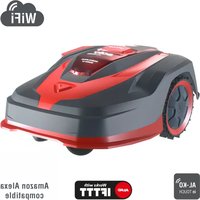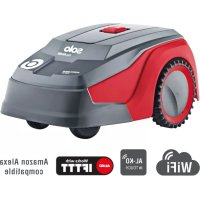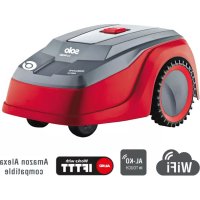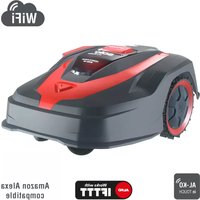
Robolinho 520 W - Robot mower SOLO - Free user manual and instructions
Find the device manual for free Robolinho 520 W SOLO in PDF.



| Product type | Robotic lawnmower |
| Brand | Solo (AL-KO) |
| Model | Robolinho 520 W |
| Dimensions (L x W x H) | Approx. 58 x 44 x 28 cm (estimate) |
| Weight | Approx. 11 kg (estimate) |
| Power supply | Rechargeable lithium-ion battery, 230 V power supply |
| Battery runtime | Variable depending on load and mowing conditions |
| Charging time | Approx. 60 minutes (estimate) |
| Maximum mowing area | Up to 1500 m² (estimated for this model) |
| Cutting height | 25 to 55 mm, manually adjustable |
| Cutting width | Approx. 20 cm (cutting disc) |
| Maximum slope | 45% (according to technical data) |
| Blade type | Pivoting cutting blades, reversible |
| Navigation system | Perimeter wire following, bump sensors, gyroscope |
| Connectivity | WiFi 2.4 GHz, AL-KO inTOUCH Smart Garden app |
| Main functions | Automatic mowing, schedule programming, edge mowing, passage mode, rain sensor, eco mode |
| Maintenance and cleaning | Weekly cleaning of the housing and cutting deck, blade replacement, contact check |
| Safety | PIN code, lift sensor, tilt sensor, emergency stop (STOP button), overheat protection |
| Spare parts and repairability | Cutting blades, broaching blades, battery, perimeter wire, charging station repairable by a professional |
| General information | Multi-language user manual, legal warranty, AL-KO after-sales service |
Frequently Asked Questions - Robolinho 520 W SOLO
User questions about Robolinho 520 W SOLO
0 question about this device. Answer the ones you know or ask your own.
Ask a new question about this device
Download the instructions for your Robot mower in PDF format for free! Find your manual Robolinho 520 W - SOLO and take your electronic device back in hand. On this page are published all the documents necessary for the use of your device. Robolinho 520 W by SOLO.
USER MANUAL Robolinho 520 W SOLO
natural_image
Line drawing of a modern robotic car with visible wheels and roof structure (no text or symbols)DE
GB
NL
FR
IT
SI
HR
RS
PL
CZ
SK
HU
DK
SE
FI
RO
RU
UA






Inhaltsverzeichnis
Deutsch 10
English....34
Nederlands 58
Français....83
Italiano....109
Slovenščina 134
Hrvatski....157
Српски....180
Polski 205
Česky 231
Slovenská 254
Magyarul....278
Dansk 303
Svensk 326
Suomi 349
Român 372
Русский 396
Україна 423
© 2023
AL-KO KOBER GROUP Kötz, Germany
This documentation or excerpts therefrom may not be reproduced or disclosed to third parties without the express permission of the AL-KO KOBER GROUP.
text_image
01 ① ② ③ ④ ⑦ ⑧ ⑤ ⑥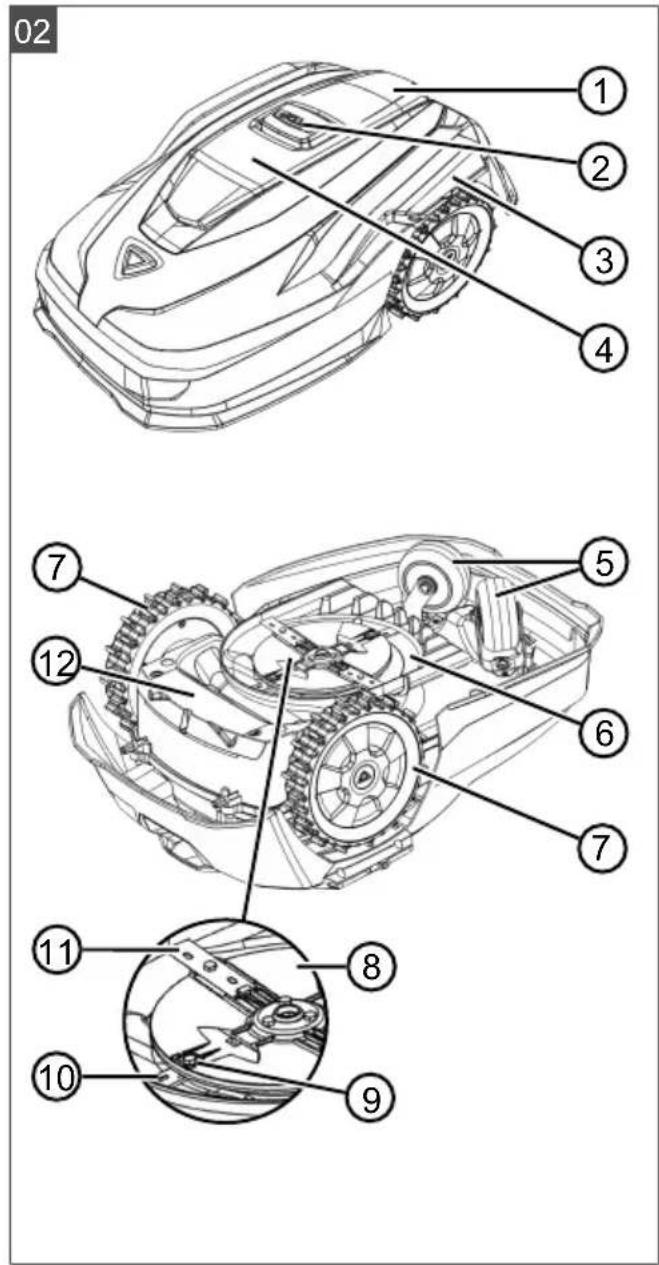
text_image
02 ① ② ③ ④ ⑦ ⑤ ⑥ ⑦ ⑪ ⑧ ⑩ ⑨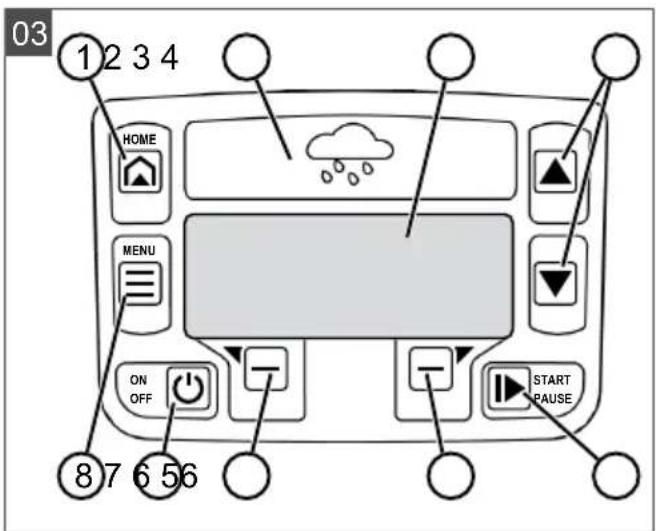
text_image
03 1 2 3 4 HOME MENU ON OFF START PAUSE 8 7 6 5 6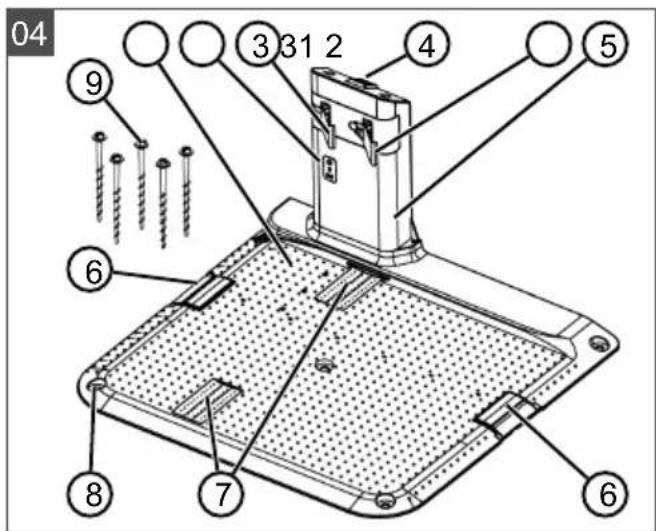
text_image
04 ⑨ ③ 31 2 ④ ⑤ ⑥ ⑦ ⑧ ⑥
text_image
05 a 1 - 2 m b ≥ 20 cm X1 f ≥ 20 cm i X2 1 X0 c < 60 cm NF d h ≥ 20 cm j X3 ≥ 20 cm 30 cm g HF e 30 cm 0 cm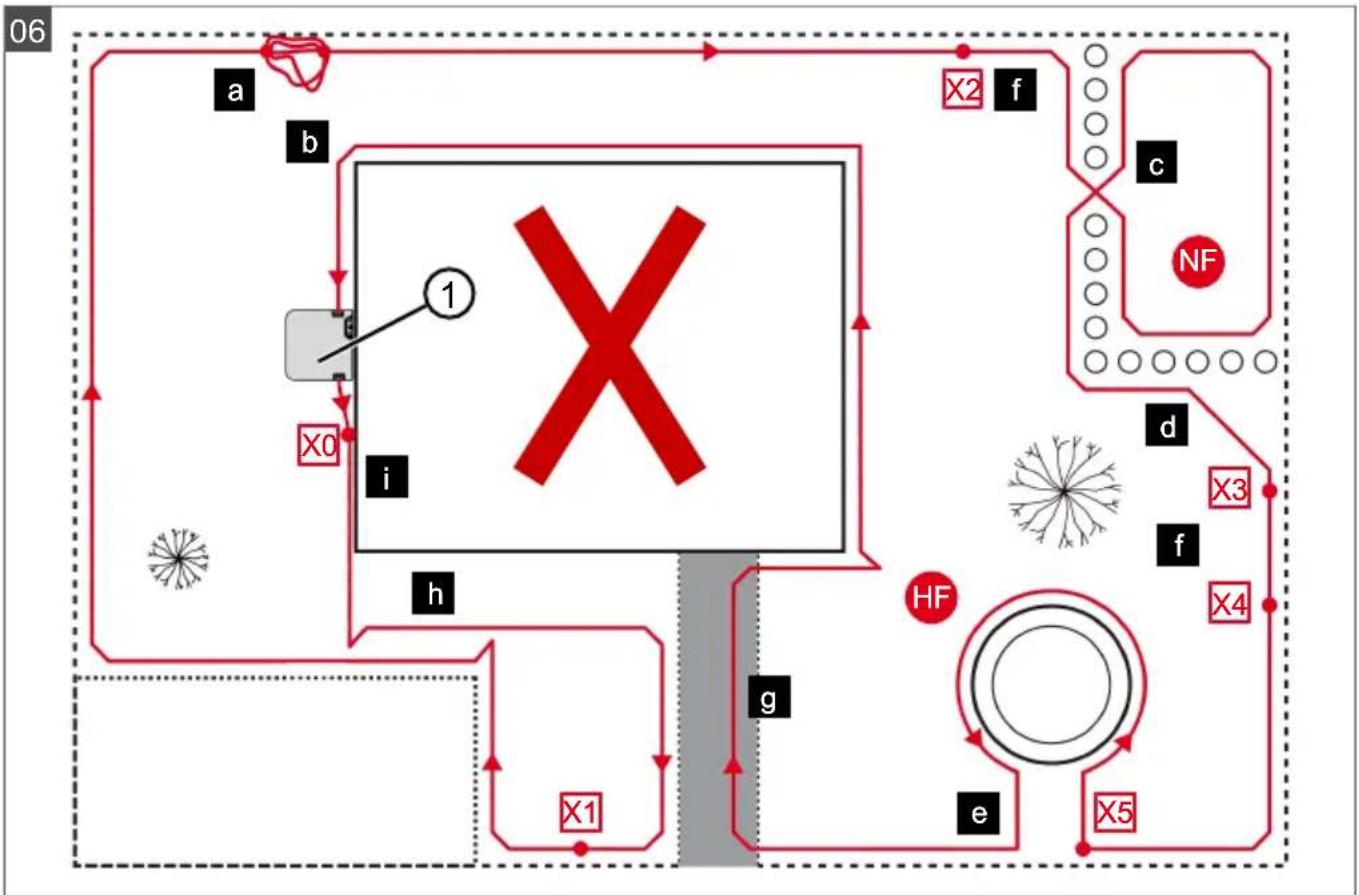
flowchart
graph TD
    A["1"] --> B["X0"]
    B --> C["i"]
    C --> D["h"]
    D --> E["g"]
    E --> F["x1"]
    F --> G["e"]
    G --> H["X5"]
    H --> I["f"]
    I --> J["X3"]
    J --> K["d"]
    K --> L["c"]
    L --> M["X2"]
    M --> N["f"]
    N --> O["X4"]
    O --> P["x5"]
    P --> Q["e"]
    Q --> R["x3"]
    R --> S["d"]
    S --> T["x2"]
    T --> U["f"]
    U --> V["x5"]
    V --> W["e"]
    W --> X["x3"]
    X --> Y["d"]
    Y --> Z["x2"]
text_image
07 ⑥ ⑦ ⑤ ④ ③ A B a b ① ②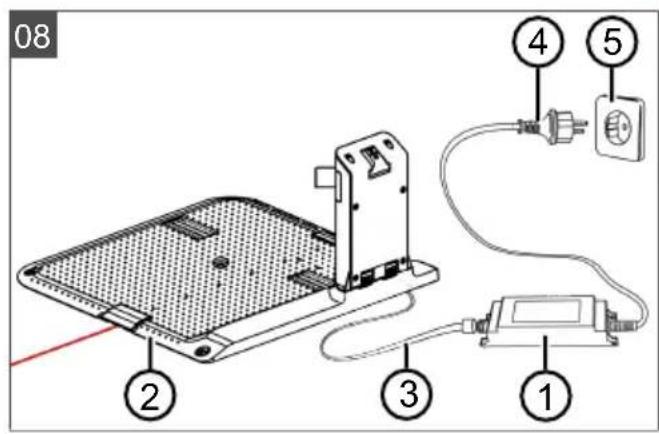
text_image
08 ① ② ③ ④ ⑤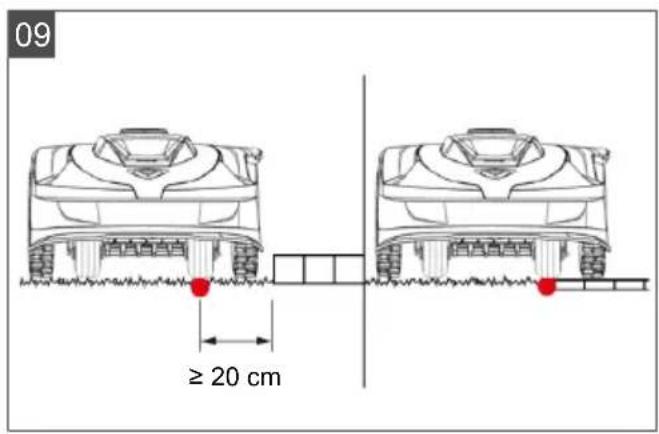
text_image
09 ≥ 20 cm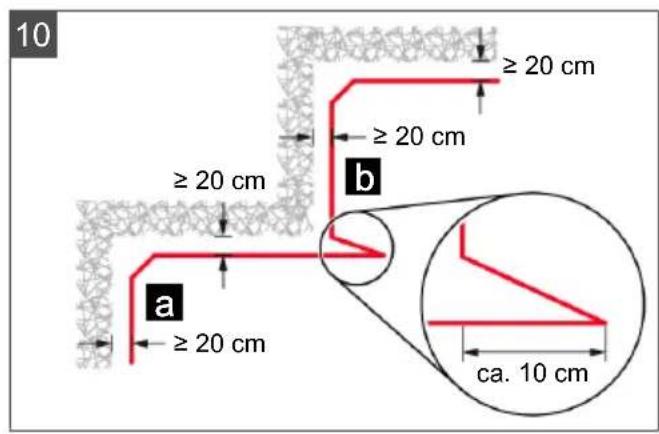
text_image
10 ≥ 20 cm ≥ 20 cm ≥ 20 cm a ≥ 20 cm b ca. 10 cm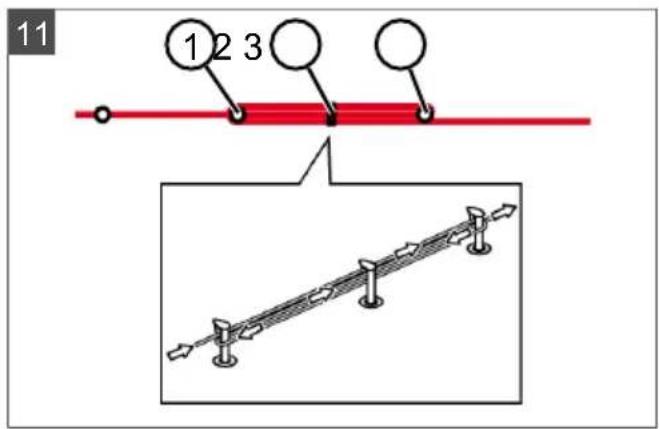
text_image
11 1 2 3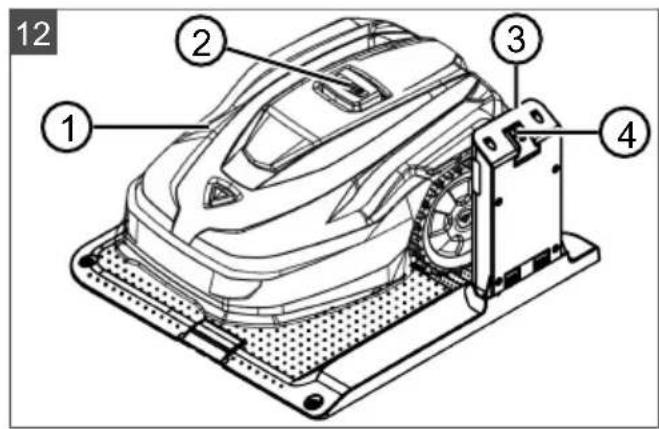
text_image
12 ① ② ③ ④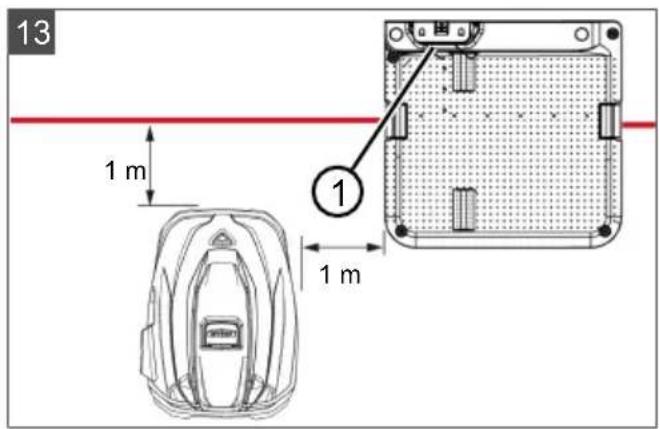
text_image
13 1 m 1 m ①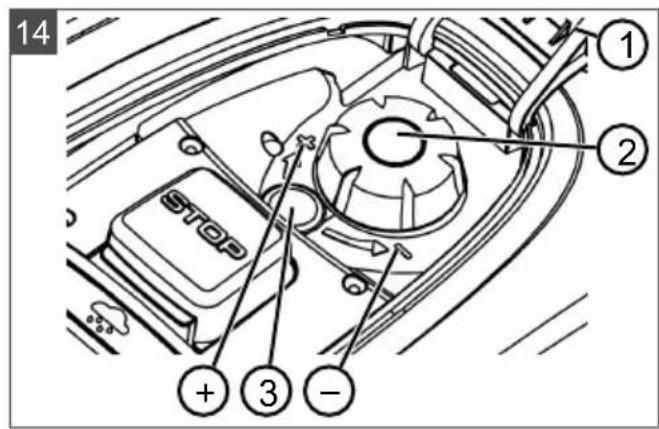
text_image
14 ① ② STOP ③ -15
text_image
X > 30 % > 35 % > 45 % ✓ 0 - 45 % 20 cm 50 cm 0 - 45 % * : see technical data*: see technical data
16
text_image
Technical diagram of a tracked robotic vehicle with numbered parts labeled ①, ②, and ③.17
text_image
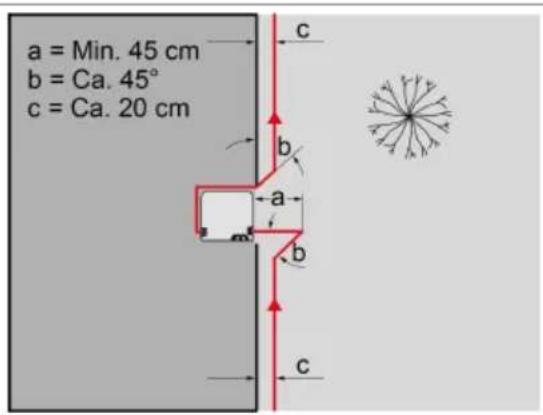
a = Min. 45 cm b = Ca. 45° c = Ca. 20 cm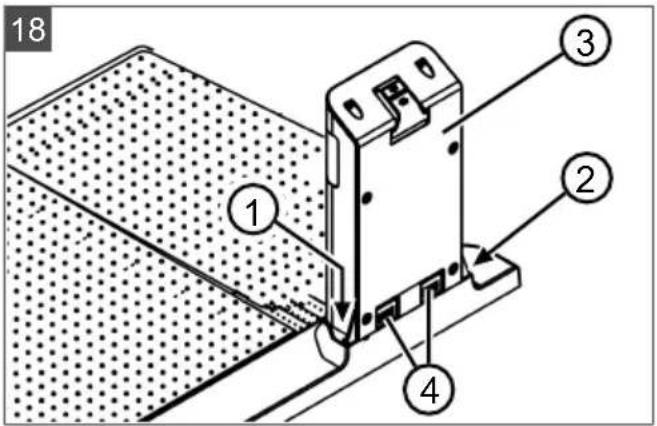
text_image
18 ① ② ③ ④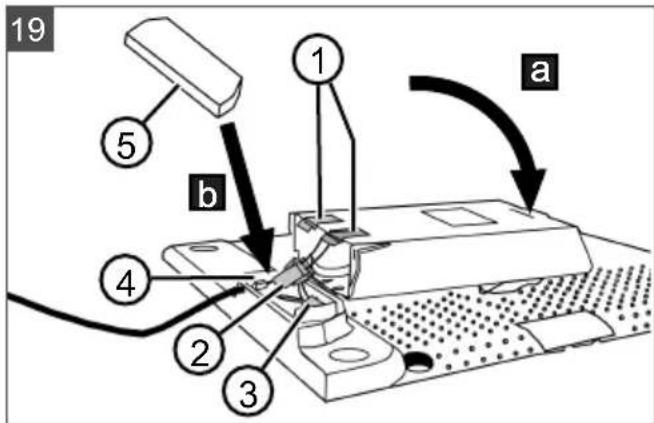
text_image
19 ① ⑤ b ④ ② ③ a| Robolinho350 W | Robolinho550 W | Robolinho1300 W | Robolinho520 W | Robolinho822 W | Robolinho1423 W | Robolinho2323 W | |
 | 123032 123033 123034 127695 127696 127697 127698 | ||||||
 | 630 x 430 x270 mm | 630 x 430 x270 mm | 630 x 430 x270 mm | 630 x 430 x270 mm | 630 x 430 x270 mm | 630 x 430 x270 mm | 630 x 430 x270 mm |
 | max. 350 m^2 | max. 550 m^2 | max. 1300 m^2 | max. 500 m^2 | max. 800 m^2 | max. 1400 m^2 | max. 2300 m^2 |
 | 30 % (17°) 45 % (24°) 45 % (24°) 35 % (19°) 45 % (24°) | ||||||
 | 30 % (17°) 45 % (24°) 45 % (24°) 30 % (17°) 45 % (24°) | ||||||
 | 0 – 55 °C | ||||||
 | 200 mm 200 mm 220 mm 200 mm 220 mm 230 mm 230 mm | ||||||
 | 25 – 55 mm | ||||||
 | IPX1 | ||||||
 | 6,4 kHz | ||||||
 | 8,55 kHz | ||||||
 | 10 m: < 70 dBμA/m | ||||||
 | max. 3400 min^-1 | Standard: 3400 min^-1 Eco-Mode: 3200 min^-1 | |||||
 | max. 60 dB(A) | ||||||

 | Robolinho350 W | Robolinho550 W | Robolinho1300 W | Robolinho520 W | Robolinho822 W | Robolinho1423 W | Robolinho2323 W |
 | 8,0 kg 8,5 kg | 8,9 kg 8,0 kg | 8,5 kg 8,9 kg | 8,9 kg | |||
 | 90 90 180 | - - - - | |||||
 | 100 m 130 m | 150 m | - - - - | ||||
 | - X - X | ||||||
 | - | X | |||||
 | - | X | |||||
 | 1 3 6 9 | ||||||
x: included, -: not included
 | Robolinho350 W | Robolinho550 W | Robolinho1300 W | Robolinho520 W | Robolinho822 W | Robolinho1423 W | Robolinho2323 W |
 | Li-Ion18 V /2,2 Ah /39,6 Wh | Li-Ion20 V /2,5 Ah /50 Wh | Li-Ion25,2 V /5 Ah /126 Wh | Li-Ion18 V /2,2 Ah /39,6 Wh | Li-Ion20 V /2,5 Ah /50 Wh | Li-Ion25,2 V /5,0 Ah /126 Wh | |
 | IN: 230 V AC /50 HzOUT:24 V DC /1,0 A / 24 W | IN: 230 V AC / 50 HzOUT: 36 V DC / 1,67 A / 60 W | IN: 230 V AC /50 HzOUT:24 V DC /1,0 A / 24 W | IN: 230 V AC / 50 HzOUT: 36 V DC / 1,67 A / 60 W | |||
 | 100 mW2400 MHz - 2483,5 MHz | ||||||
text_image
QR code image containing encoded data, no visible human-readable text
text_image
Available on the App Store GET IT ON Google PlayThe Ground Truth image displays a single, solid horizontal line. According to Rule 2 (UNDERSCORE & LINE RULES), this is a stylistic or background line, not a placeholder underscore. Therefore, the OCR result must ignore it and output nothing or only meaningful text. The provided OCR content is "____", which consists of four underscores. This is an incorrect interpretation of the line as a placeholder, violating the rule that stylistic lines must be ignored. The OCR has hallucinated placeholder underscores where none exist in the GT. Hence, the OCR result is inconsistent with the Ground Truth.


The Ground Truth image displays a single, solid horizontal line. According to Rule 2 (UNDERSCORE & LINE RULES), this is a stylistic or background line, not a placeholder underscore. Therefore, the OCR result must ignore it and output nothing or only meaningful text. The provided OCR content is "____", which consists of four underscores. This is an incorrect interpretation of the line as a placeholder, violating the rule that stylistic lines must be ignored. The OCR has hallucinated placeholder underscores where none exist in the GT. Hence, the OCR result is inconsistent with the Ground Truth.


1 About these operating instructions...... 35
1.1 Symbols on the title page 35
1.2 Legends and signal words...... 35
2 Product description 35
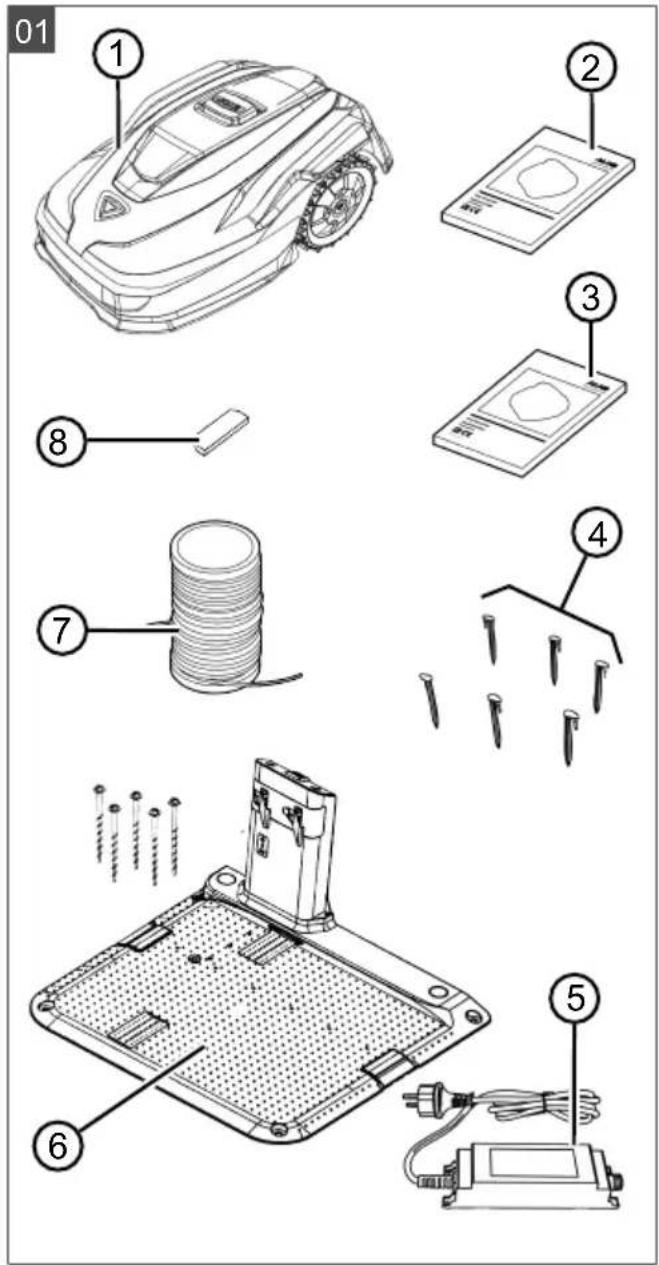
2.1 Scope of supply (01).... 35
2.2 Automatic lawn mower (02) 36
2.3 Symbols on the appliance.... 36
2.4 Control panel (03).... 36
2.5 Display.... 37
2.6 Menu structure.... 37
2.7 Base station (04).... 38
2.8 Rechargeable battery 38
2.9 Functional description.... 39
2.10 WiFi radio module and AL-KO in-TOUCH Smart Garden app 39
3 Safety.... 40
3.1 Intended use.... 40
3.2 Possible misuse.... 40
3.3 Safety and protective devices...... 40
3.3.1 PIN and PUK input 40
3.3.2 Sensors 40
3.4 Safety instructions 40
3.4.1 Operator 40
3.4.2 Personal protective equipment.... 41
3.4.3 Safety of persons and animals.... 41
3.4.4 Appliance safety...... 41
3.4.5 Electrical safety 41
4 Assembly...... 41
4.1 Unpacking the machine 41
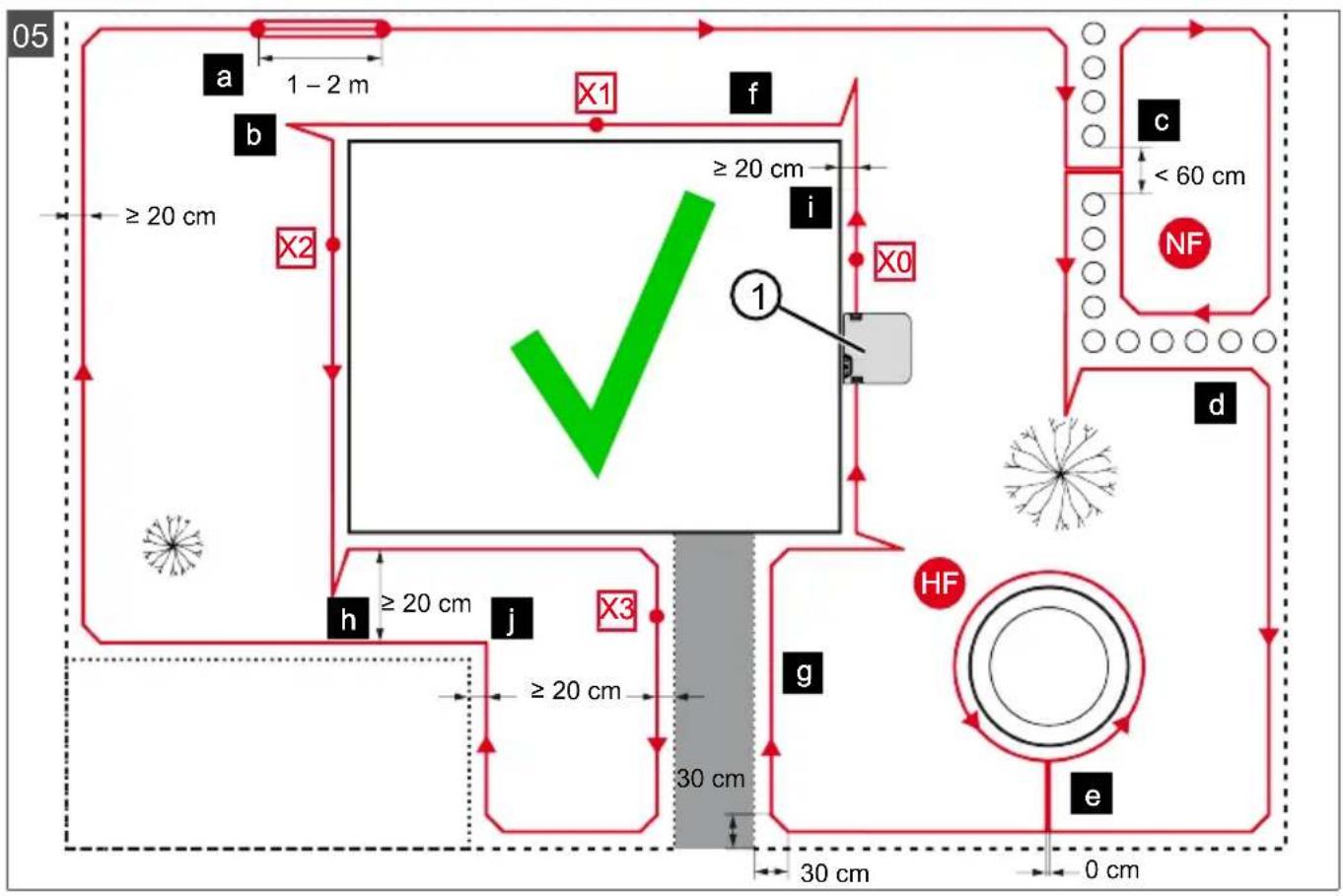
4.2 Planning the mowing areas (05)...... 41
4.3 Preparing the mowing areas...... 42
4.4 Setting up the base station (07/a, 17) 42
4.5 Installing the boundary cable...... 42
4.5.1 Connecting the boundary cable to the base station (07/b).... 42
4.5.2 Routing the boundary cable (05). 42
4.5.3 Excluding obstacles.... 43
4.5.4 Enclosing corridors (05/h)...... 43
4.5.5 Excluding downward slopes (15) . 43
4.5.6 Creating loops of cable (11)...... 43
4.5.7 Typical faults in cable routing (06).... 44
4.6 Connecting the base station to the power source (08) 44
4.7 Checking the connections on the base station (08) 44
4.8 Installing the Quick Homing kit...... 44
5 Start-up.... 44
5.1 Charging the rechargeable battery (12).... 44
5.2 Making the basic settings.... 44
5.3 Setting the cutting height (14) ..... 45
5.4 Carrying out an automatic calibration movement 45
6 Operation.... 46
6.1 Starting the appliance manually ..... 46
6.2 Cancelling mowing 46
6.3 Mowing the secondary area (05/NF).. 46
7 Settings.... 46
7.1 Calling up the setting – General...... 46
7.2 Activating/deactivating the button tones 46
7.3 Activating/deactivating Eco mode ..... 46
7.4 Setting the rain sensor 46
7.5 Setting the mowing program ..... 47
7.5.1 Setting the mowing program – General 47
7.5.2 Setting the start points ..... 47
7.5.3 Setting the mowing times...... 47
7.5.4 Passage mode.... 48
7.6 inTOUCH.... 48
7.7 Edge mowing with a manual start ..... 48
7.8 Setting the secondary area mowing... 48
7.9 Setting the display contrast 48
7.10 Setting lock.... 48
7.11 Recalibrating 48
7.12 Restoring factory settings 49
8 Displaying information.... 49
9 Maintenance and care.... 49
9.1 Cleaning.... 49
9.2 Regular checks.... 49
9.3 Replacing the cutting blades.... 50
10 Help in case of malfunction.... 50
10.1 Correcting appliance and handling faults 50
10.2 Fault codes and troubleshooting..... 52
11 Transport....55
12 Storage.... 55
12.1 Storing the automatic lawn mower..... 55
12.2 Dismantling and storing the charging pole (18, 19)....55
12.3 Winter storage of the boundary cable 55
13 Disposal 55
14 After-Sales/Service 56
15 Information on the Declaration of Confor-
mity.... 56
16 Warranty.... 56
1 ABOUT THESE OPERATING INSTRUCTIONS
The German version is the original operating instructions. All additional language versions are translations of the original operating instructions.
- Keep these operating instructions in a safe place at all times so that they can be consulted if you need any information about the appliance.
■ Only pass on the appliance to other persons together with these operating instructions.
■ Comply with the safety and warning information in these operating instructions.
1.1 Symbols on the title page
Symbol Meaning

It is essential to read through these operating instructions carefully before start-up. This is essential for safe working and trouble-free handling.
Symbol Meaning

Operating instructions
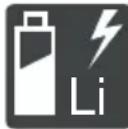
Handle Li-Ion rechargeable batteries with care! In particular, observe the notes on transport, storage and disposal in these operating instructions!
1.2 Legends and signal words
⚠️ DANGER! Denotes an imminently dangerous situation which will result in fatal or serious injury if not avoided.
WARNING! Denotes a potentially dangerous situation which can result in fatal or serious injury if not avoided.
CAUTION! Denotes a potentially dangerous situation which can result in minor or moderate injury if not avoided.
IMPORTANT! Denotes a situation which can result in material damage if not avoided.
NOTE Special instructions for ease of understanding and handling.
2 PRODUCT DESCRIPTION
This document describes a fully automatic, battery operated automatic lawn mower which moves freely on a grass surface. The cutting height can be adjusted.
2.1 Scope of supply (01)
The items listed here are included in the standard scope of supply. Check that all items are included:
No. Component
1 Robot lawn mower
2 Quick-start guide
3 Operating instructions
4 Lawn pegs *
5 Power supply unit
6 Base station incl. ground screws (5x)
7 Boundary cable *
No. Component
8 Winter cover *
* model-dependent (see technical data)
2.2 Automatic lawn mower (02)
No. Component
| 1 Control panel with display (interior) |
| 2 STOP key (stops the appliance immediately and the cutting blade within 2 s) |
| 3 Charging contacts |
| 4 Height adjustment (interior) |
| 5 Front rollers (steering) |
| 6 Mower deck |
| 7 Drive wheel |
| 8 Blade plate |
| 9 Fastening screw |
| 10 Clearer blade |
| 11 Cutting blade |
| 12 Rechargeable battery compartment |
2.3 Symbols on the appliance
Symbol Meaning
| Risk of injury and risk of material damage due to objects being discharged! | |
| Pay special attention when handling this appliance! | |
| Keep your hands and feet away from the blade system! | |
| Maintain a safety distance! | |
| Read the operating instructions before starting operation! |
Symbol Meaning
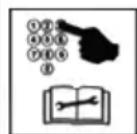
Enter the PIN in order to start the appliance.
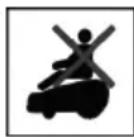
Do not ride on the appliance!
2.4 Control panel (03)
No. Component
| 1 | (home button): Cancel mowing, the appliance returns to its base station. It starts on the next day automatically again at the set mowing time. |
| 2 Rain sensor: Registers if it rains (see chapter 7.4 "Setting the rain sensor", page 46). | |
| 3 Display: Shows the current operating status of the appliance, the name of the selected menu, its menu items and the functions to be selected. (see chapter 2.5 "Display", page 37). | |
| 4 | arrow keys): Select menu items, increase and decrease numerical values, select between settings. |
| 5 | (start/pause button):Press 1x: Start and interrupt mowing manually.Press 2x: Immediately recommence mowing after pressing the Home button. |
| 6 | (function keys): Call up the function displayed directly above the button on the display. |
| 7 | (On/Off button): Switch the appliance on and off. |
| 8 | (menu button): Call up the main menu. |
2.5 Display
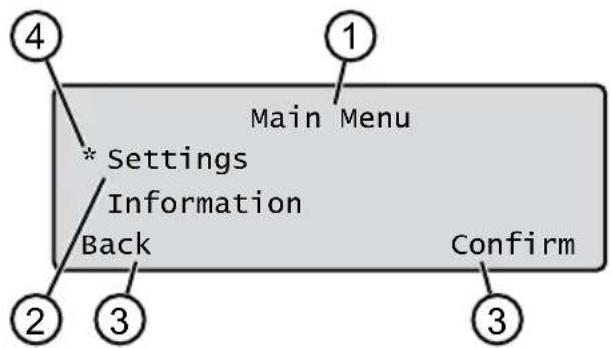
text_image
4 * Settings Main Menu Information Back Confirm 1 2 3 3No. Display
1 Name of the selected menu (here: Main Menu)
No. Display
2 Menu items in the menu: Only two menu items are ever displayed (here: Settings and Information). Further menu items can be displayed with ▲ and ▼
3 Functions for the selected menu item (here: Settings). Further functions can be called up with and.
4 Asterisk for marking the displayed menu item (here: Settings)
2.6 Menu structure
Main Menu
Programs
weekly Program see chapter 7.5 "Setting the mowing program", page 47
Entry Point see chapter 7.5.2 "Setting the start points", page 47 Program Info see chapter 8 "Displaying information", page 49
Settings
Time see chapter 5.2 "Making the basic settings", page 44
Date see chapter 5.2 "Making the basic settings", page 44
Language see chapter 5.2 "Making the basic settings", page 44
PIN-Code see chapter 5.2 "Making the basic settings", page 44
Key clicks see chapter 7.2 "Activating/deactivating the button tones", page 46
EcoMode see chapter 7.3 "Activating/deactivating Eco mode", page 46
Quick Homing Kit see chapter 4.8 "Installing the Quick Homing kit", page 44
Rain sensor see chapter 7.4 "Setting the rain sensor", page 46
After rain delay see chapter 7.4 "Setting the rain sensor", page 46
Rain sensitive see chapter 7.4 "Setting the rain sensor", page 46
inTOUCH see chapter 7.6 "inTOUCH", page 48
Margin mowing see chapter 7.7 "Edge mowing with a manual start", page 48
Sub zone active/disabled see chapter 7.8 "Setting the secondary area mowing", page 48
Display contrast see chapter 7.9 "Setting the display contrast", page 48
Safety settings see chapter 7.10 "Setting lock", page 48
Reset calibration see chapter 7.11 "Recalibrating", page 48
Factory reset see chapter 7.12 "Restoring factory settings", page 49
Information
Blades service see chapter 8 "Displaying information", page 49
Hardware see chapter 8 "Displaying information", page 49
Software see chapter 8 "Displaying information", page 49
Program Info see chapter 8 "Displaying information", page 49
Failures see chapter 8 "Displaying information", page 49
2.7 Base station (04)
No. Component
| 1 Base plate |
| 2 LED for status display |
| 3 Charging contact |
| 4 Home button |
| 5 Charging station |
| 6 Cable shaft |
| 7 Wheel recess |
| 8 Hole for ground screws (9) |
| 9 Ground screws |
* model-dependent (see technical data)
2.8 Rechargeable battery
The rechargeable battery can be changed by the user.
NOTE Fully charge the rechargeable battery before using it for the first time. The rechargeable battery can be charged in any charge status. Interrupting charging does not damage the rechargeable battery. The rechargeable battery can only be charged after the appliance has been switched on.
The rechargeable battery is partially charged on delivery. The rechargeable battery is regularly recharged during normal operation. The appliance returns to its base station for this.
The integrated electronic control unit with a monitoring function terminates the charging procedure when a 100% charge status is reached.
The charging process only functions with perfect contact of the charging contacts on the base station with the contact surfaces of the appliance.
The built-in protection circuit prevents the rechargeable battery from being charged at temperatures above 45 °C. This prevents irreparable damage to the rechargeable battery.
If the operating time of the rechargeable battery becomes shorter despite being fully charged, replace the battery.
If the battery charge level has dropped below the threshold set by the manufacturer as a result of ageing or excessively long storage, this means it can no longer be recharged. Have the battery and the monitoring electronic control unit checked by an AL-KO dealer, technician or service partner, and replace them if necessary.
The rechargeable battery status is shown on the display. Check the rechargeable battery status after about 3 months in storage. To do so, switch on the appliance and read off the rechargeable battery status. If the rechargeable battery is now only charged to approx. 30 % or less, place the appliance in the base station and switch it on so the rechargeable battery is charged. If the charging station was removed to store the base station (see chapter 12.2 "Dismantling and storing the charging pole (18, 19)", page 55), first mount it again in reverse order and connect the base station to the mains supply again.
If electrolyte has escaped into the battery compartment: Have the appliance repaired by an AL-KO service centre.
If the rechargeable battery has been removed from the appliance: If the eyes or hands have come into contact with escaped electrolyte, flush them immediately with water. Immediately consult a doctor.
2.9 Functional description
Moving on the grass surface
The appliance moves freely in a mowing area delimited by a boundary cable. The appliance is oriented by means of the sensors that detect the electromagnetic field of the boundary cable.
If the appliance encounters an obstacle, it stops and then continues in another direction. If the appliance gets into a situation where it cannot operate, this is indicated by a message on the display.
If the appliance detects moisture when the rain sensor is switched on, it automatically returns to the base station.
Mowing and charging
The mowing phases alternate constantly with the charging phases. If the charge of the rechargeable battery drops to a specific value (display: 0 %) during mowing, the appliance returns to the base station along the boundary cable.
Mowing programs are preset and can be customised on the appliance or in the app.
Each time the mowing motor is started, its direction of rotation is changed which doubles the service life of the cutting blades.
2.10 WiFi radio module and AL-KO inTOUCH Smart Garden app
The robot lawn mower is equipped with a WiFi radio module. This allows convenient control, setting and monitoring via app from a mobile device (smartphone, tablet, etc.).
i NOTE The mobile device being used requires an Internet connection in order to use the AL-KO inTOUCH Smart Garden app.
NOTE In order to ensure that the latest software version is always installed on the robot lawn mower, it must be connected to the Internet via a WiFi network. The AL-KO inTOUCH Smart Garden app notifies you when there are new software updates for the robot lawnmower. They are downloaded automatically.
AL-KO inTOUCH Smart Garden app
The AL-KO inTOUCH Smart Garden app can be downloaded for Android-based devices from the Google Play Store and for iOS-based devices from the Apple App Store:

text_image
QR code image containing encoded data, no visible human-readable text
text_image
Available on the App Store GET IT ON Google PlayScan this QR code to find out how to install the AL-KO inTOUCH Smart Garden app on your smartphone and obtain further information on your appliance. You can also use the app to connect your smart-connected appliance to the Internet.
NOTE The robot lawnmower connects to a 2.4 GHz WLAN only. 5 GHz WLAN networks are not supported.
In order to connect your WiFi-enabled robot lawnmower to the AL-KO inTOUCH Smart Garden app, the robot lawnmower and smartphone must be within range of a WiFi router with sufficient signal strength (recommendation: min. 50%).
- Start the AL-KO inTOUCH Smart Garden app.
- Create a user account once:
■ Press "Login / Register" > "Register".
■ Enter your e-mail address and password.
- Check the "Read and agreed..." checkbox.
■ Press the "Register" button.
-
Log in with the previously created user account.
-
Start the connection wizard by pressing "Add new device".
- Follow the further instructions.
NOTE If the robot lawnmower moves into an area of the garden with a poor or no WiFi signal, the settings of the AL-KO inTOUCH Smart Garden app will only be carried out when the robot lawnmower returns to an area with a good signal. If the WiFi signal from the router is too weak over the whole garden, its range can be extended with a commercially available repeater.
In the event of malfunctions, a dealer with the AL-KO inTOUCH Smart Garden app installed can help you. The robot lawnmower must be enabled for the dealer via the AL-KO inTOUCH Smart Garden app.
In addition to remote access to connected robot lawn mowers, the AL-KO inTOUCH Smart Gar-
den app offers other functions such as links to other AL-KO appliances or push notifications in the event of a fault.
3 SAFETY
3.1 Intended use
This appliance is intended solely for use in non-commercial applications. Any other use as well as unauthorised conversions or modifications are regarded as contrary to the intended use and will result in voiding of the warranty as well as loss of conformity; the manufacturer will thus decline any responsibility for damage and/or injury suffered by the user or third parties.
The application limits of the appliance are: see technical data.
3.2 Possible misuse
This machine is not suitable for use in public gardens, parks, sports stadiums, and in agriculture and forestry.
3.3 Safety and protective devices
WARNING! Risk of injury. Defective and disabled safety and protective devices can result in serious injury.
■ Have any defective safety and protective devices repaired.
■ Never disable safety and protective devices.
3.3.1 PIN and PUK input
The appliance can only be started by entering a PIN (Personal Identification Number). This prevents the appliance from being switched on by unauthorised persons. The factory setting of the PIN is 0000. The PIN can be changed, see chapter 5.2 "Making the basic settings", page 44.
If the PIN is entered incorrectly 3 times, the PUK (Personal Unlocking Key) must be entered. If this is also entered incorrectly, the user must wait 24 hours until entering it again.
- Keep the PIN and PUK so that they are inaccessible to unauthorised persons.
3.3.2 Sensors
The appliance is provided with several safety sensors. It does not restart automatically after being switched off by a safety sensor. The error message is shown on the display and must be acknowledged. The reason for the triggering of the sensor must be resolved.
Lifting sensor
If the appliance is raised by the housing during operation, the travel drive switches off and the cutting blades are stopped.
Bump sensors for obstacle detection
The appliance is equipped with sensors that ensure it changes its direction of travel if it encounters obstacles. When it encounters an obstacle, the top part of the deck is shifted slightly and the shock sensor triggered.
Tilt sensor in direction of travel/sideways
If an upward or downward slope or a laterally inclined angle that is larger than the value set for the model is reached in the direction of travel, the appliance is turned or the appliance changes its direction of travel.
Rain sensor
Depending on the model, the appliance is equipped with a rain sensor that (when activated) interrupts the mowing procedure in case of rain and ensures that the appliance returns to the base station (see technical data).
Frost sensor
The appliance is equipped with a frost sensor which, at low temperatures, displays a message on the appliance or transmits a push message to the AL-KO inTOUCH Smart Garden app (see Technical data). The temperature for the message is variable.
Electromagnetic emissions

The appliance can be operated reliably in the immediate vicinity of other robot lawn mowers (distance 0.5 m).
The signal used in the boundary cable complies with the standard defined by the European Garden Machinery Industry Federation (EGMF) with regard to electromagnetic emissions.
3.4 Safety instructions
3.4.1 Operator
■ Young people under 16 years of age, persons with limited physical, sensory or mental abilities or with a lack of experience and knowledge and persons who do not know the operating instructions must not use the device. Heed any country-specific safety regulations concerning the minimum age of the user.
- Do not operate the appliance if you are under the influence of alcohol, drugs or medication.
3.4.2 Personal protective equipment
■ Wear clothing and protective equipment in accordance with the regulations in order to avoid injury.
■ The personal protective equipment comprises:
■ Long trousers and sturdy shoes.
During maintenance and care: Protective gloves.
3.4.3 Safety of persons and animals
In areas accessible to the public, post warning signs with the following content around the mowing area:
IMPORTANT! Automatic lawn mower in operation! Do not approach the appliance! Supervise children!
■ Make sure that persons, in particular children, and animals are not in the vicinity of the appliance, do not climb onto and do not play with the appliance when it is in operation.
- Sitting on the appliance and reaching into the cutting blades is forbidden!
- Keep limbs and clothing away from the cutting unit.
3.4.4 Appliance safety
Before working, make sure that there are no objects (e.g. branches, glass or metal pieces, and items of clothing, stones, garden furniture, garden utensils or toys) in the work area of the appliance. They can damage the cutting blade of the appliance or can be damaged by the appliance.
■ Only use the appliance under the following conditions:
■ The appliance is not soiled.
The appliance shows no damage or wear.
■ All controls function properly.
The base station and power supply as well as their electrical supply cables are undamaged and function properly.
■ Always replace defective parts with original spare parts from the manufacturer.
■ Have the appliance repaired if it has been damaged.
■ The user of the appliance is responsible for accidents of the appliance involving other persons or their property.
3.4.5 Electrical safety
■ Never operate the appliance when a lawn sprinkler is operating on the mowing area at the same time.
■ Do not spray the appliance with water.
■ Do not open the appliance.
4 ASSEMBLY
4.1 Unpacking the machine
- Open the packaging carefully.
-
Carefully remove all components from the packaging and check for transport damage.
Note: Notify your AL-KO dealer or service partner immediately if any transport damage is discovered. -
Check the scope of supply, see chapter 2.1 "Scope of supply (01)", page 35.
If the appliance is going to be sent on, retain the original packaging and accompanying documents. They will also be required for return shipment.
4.2 Planning the mowing areas (05)
Location of the base station (05/1)
■ Shortest possible distance to the largest mowing area
Level surface
■ Protected against direct sunlight and harsh weather conditions
■ Connection option for power source
■ Free accessibility to the robot lawn mower
Routing the boundary cable (05)
The boundary cable must be laid in a continuous loop in a clockwise direction.
Corridors between mowing areas (05/h)
A corridor is a narrow section in the grass surface and can be used to connect two mowing areas.
Main area and secondary area(s) (05)
■ Main area (05/HF): This is the grass surface on which the base station is located and whose entire surface can be mowed automatically by the appliance.
Secondary area (05/NF): If a grass surface cannot be reached by the appliance from the main area, carry the appliance to the secondary area by hand if necessary. Secondary areas can be processed using manual operation.
The main area and secondary areas are bounded by the same continuous boundary cable, however.
Location of start points (05/X0 - 05/X3)
At the specified mowing time, the appliance moves along the boundary cable to the specified start point and begins to mow there.
The start points can be used to specify which areas of the mowing area are to be mowed several times.
4.3 Preparing the mowing areas
- Check that the grass surface is larger than the area covered by the appliance. If the grass surface is too large, an irregularly mown lawn will result. Reduce the size of the grass surface to be mowed if necessary.
- Before installation of the base station and boundary cable or start-up of the appliance: Use a lawn mower to mow the grass surface to a low cutting height.
-
Remove any obstacles on the grass surface or exclude them with the boundary cable (see chapter 4.5.3 "Excluding obstacles", page 43):
-
Flat obstacles that will be run over and could damage the cutting blade (e.g. flat stones, transitions from the grass surface to the terrace or paths, plates, kerbstones, etc.)
■ Holes and protrusions in the grass surface (e.g. molehills, burrowing holes, pine cones, fallen fruit, etc.)
■ Steep upward or downward slopes that are larger than the values specified in the technical data
■ Bodies of water (e.g. ponds, streams, swimming pools, etc.) and their demarcation to the grass surface
■ Shrubs and hedges that can become broader
4.4 Setting up the base station (07/a, 17)
- Place the base station (05/1) at right angles to the planned location of the boundary cable as described below:
■ Level (check with spirit level)
■ Straight and level entrance and exit
■ Not arched (the charging pole must not bend or tilt during subsequent tightening of the ground screws)
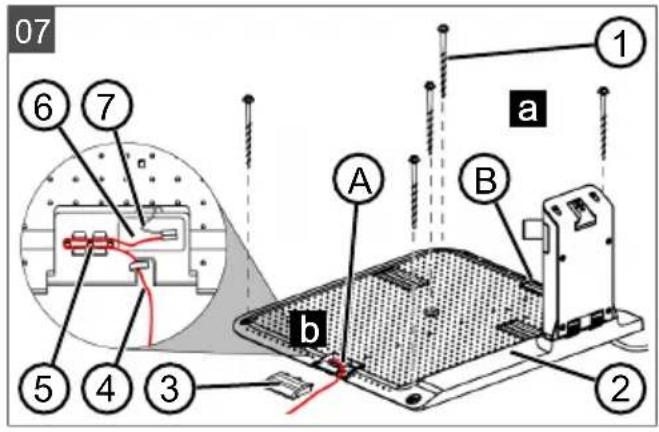
- Fix the base station (07/2) to the ground with four ground screws (07/1).
The base station can also be located outside the lawn area (17). In this case the boundary cable has to be routed as shown in the figure.
4.5 Installing the boundary cable
NOTE If the supplied boundary cable delivered with the model is too short, an extension cable can be obtained from your AL-KO dealer or service partner.
4.5.1 Connecting the boundary cable to the base station (07/b)
- Pull the boundary cable (07/4) out of the packaging.
- Remove the cover of the cable shaft (07/3) on the connection (07/A).
- Insulate the end of the boundary cable (07/6) and insert into the terminal (07/7).
- Close the terminal.
- Lead the boundary cable through the strain relief (07/5) out of the cable shaft with cable reserve.
NOTE The cable reserve allows smaller corrections to be carried out on the cable guide later.
- Place the cover on the cable shaft.
4.5.2 Routing the boundary cable (05)
The boundary cable can be laid on the lawn and as much as 10 cm under the turf. The laying under the turf can be carried out by the dealer.
Both variants can be combined with one another.
IMPORTANT! Danger of damaging the boundary cable. If the boundary cable is damaged or cut, the transmission of the control signals to the appliance is no longer possible. In this case, the boundary cable must be repaired or replaced. The boundary cables are available from AL-KO.
■ Always route the boundary cable directly on the ground. If necessary, secure with an additional lawn peg.
■ When laying the boundary cable and during operation, protect the boundary cable from damage.
- Do not dig or scarify in the vicinity of the boundary cable.
-
Attach the boundary cable at regular intervals with lawn pegs or route it underground (at a max. depth of 10 cm).
-
Route the boundary cable around obstacles: see chapter 4.5.3 "Excluding obstacles", page 43.
- Create corridors between individual mowing areas: see chapter 4.5.4 "Enclosing corridors (05/h)", page 43.
- Exclude excessive upward or downward slopes: see chapter 4.5.5 "Excluding downward slopes (15)", page 43.
- Create loops of cable: see chapter 4.5.6 "Creating loops of cable (11)", page 43.
- After completing the routing of the boundary cable, connect to the connector (07/B) of the base station: see chapter 4.5.1 "Connecting the boundary cable to the base station (07/b)", page 42.
4.5.3 Excluding obstacles
Depending on the surroundings of the working area, the boundary cable must be routed at different distances to obstacles. Use the ruler that can be removed from the packaging to determine the correct distance.
NOTE Exclusions are only necessary if they cannot be detected by the bump sensors of the appliance. Avoid too many or unnecessary exclusions. Recesses that are smaller than 6 cm must be excluded, otherwise the appliance may cause damage.
Distance from walls, fences, beds: min. 20 cm (05)
The appliance moves along the boundary cable with an offset of 20 cm to the outside. Therefore, route the boundary cable at a distance of at least 20 cm from walls, fences, beds, etc.
Distance from terrace edges and paved paths (09)
If the terrace or path edge is higher than the grass surface, a distance of at least 20 cm must be complied with. If the edge of the terrace or path is at the same height as the grass surface, the cable can be routed exactly along the edge.
Distance of obstacles from the boundary cable (05)
If the boundary cables are precisely folded up away from the obstacle or towards the obstacle, i.e. distance 0 cm, the appliance moves beyond the boundary cable. Do not cross the boundary cables (06/c), but lay them parallel (05/e).
Routing the boundary cable around corners (05, 10)
For inwards going corners (10/a): Route the boundary cable diagonally to avoid the appliance becoming caught in the corner.
For outside corners with obstacles (10/b): Route the boundary cable in a point in order to avoid a collision of the appliance with the corner.
For outside corners without obstacles(05/j): Route the boundary cable at an angle of 90°.
4.5.4 Enclosing corridors (05/h)
In the corridor the following distances must be complied with:
■ Total width: min. 60 cm
■ Distance of the boundary cable to the edge: 20 cm
■ Distance between the boundary cables: min. 20 cm
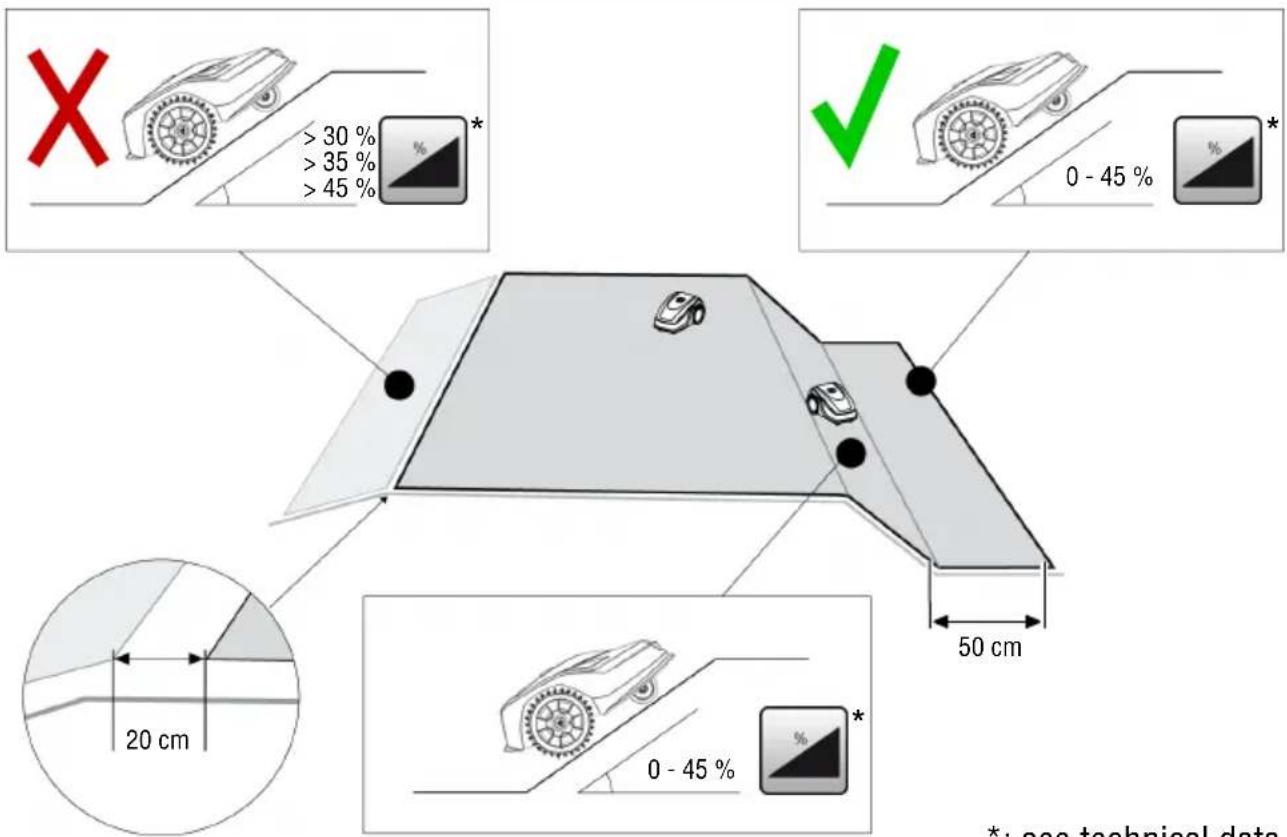
4.5.5 Excluding downward slopes (15)
Downward slopes that are greater than the values specified in the technical data must be excluded with the boundary cable (45% = 45 cm downward slopes per 1 m horizontally) (see technical data).
The boundary cable must not be laid over a gradient of more than 20%. In order to avoid problems when turning, maintain a distance of 50 cm to the 20% gradient. If the gradient at the outer edge of the working area is more than 20% at any point, lay the boundary cable on the flat ground at a distance of 20 cm from the start of the gradient.
4.5.6 Creating loops of cable (11)
Spare loops of cable should be incorporated at regular intervals in order to reposition the base station or to extend the mowing area even after the mowing area has been laid out.
Select the number of spare cable loops according to your own judgement.
i NOTE In the case of spare cable loops, do not form open loops.
- Lead the boundary cable around the current lawn peg (11/1) and then back to the previous lawn peg (11/3).
- Then lead the boundary cable to the current lawn peg again. This creates a loop. The cables must be close together.
- If necessary, attach the loop to the ground in the middle with an additional lawn peg (11/2).
4.5.7 Typical faults in cable routing (06)
- Spare cable loops of the boundary cable are not laid in an even, elongated loop (06/a).
■ The boundary cable is not routed properly around corners (06/b).
The boundary cable is crossed over or not routed clockwise (06/c).
The boundary cable is routed too imprecisely so that edge areas of the grass surface cannot be mowed (06/d).
The boundary cable is not routed lying directly next to itself when guided towards and back from the edge to an obstacle inside the lawn (06/e).
■ The start points are set too far away from the base station (06/f).
■ The boundary cable is routed beyond the edge of the grass surface (06/g).
■ When routing the boundary cable, the minimum distance for corridors of 20 cm is undercut (06/h).
The boundary cable is routed too close (i.e. at a distance of less than 20 cm) to obstacles that cannot be driven over (06/i).
4.6 Connecting the base station to the power source (08)
- Place the power supply unit (08/1) in a dry location that is protected against direct sunlight and sufficiently close to the base station (08/2).
- Screw cable (08/3) firmly onto the power supply unit.
- Plug the mains plug (08/4) of the power supply unit into a power socket (08/5) protected from rain.
NOTE We recommend connecting the power supply to the mains supply via an earth leakage circuit breaker (ELCB) with a rated leakage current < 30 mA.
4.7 Checking the connections on the base station (08)
- Check whether the LED on the front side of the charging station (13/1) is lit. If not:
■ Disconnect the mains plug.
- Check that all plug connectors of the power source and the boundary cable are positioned correctly and check for damage.
Status indications of the LEDs
LED Operating states
Yellow
■ Lights up if the power source is intact.
4.8 Installing the Quick Homing kit
Scan this QR code to find out how to install the Quick Homing kit. See also installation instructions 443565 "Quick Homing Kit – Installation".
5 START-UP
This chapter describes the activities and settings that are necessary to put the appliance into operation for the first time. For all further settings, refer to see chapter 7 "Settings", page 46.
5.1 Charging the rechargeable battery (12)
During normal operation, the battery of the appliance is regularly charged automatically.
NOTE Fully charge the rechargeable battery before using it for the first time. The rechargeable battery can be charged in any charge status. Interrupting charging does not damage the rechargeable battery. The rechargeable battery can only be charged after the appliance has been switched on.
- Place the appliance (12/1) in the base station (12/3) so the contact surfaces of the appliance touch the charging contacts of the base station.
- Switch on the appliance with ⏻
- The display on the appliance shows Battery is being recharged. If not: see chapter 10 "Help in case of malfunction", page 50.
5.2 Making the basic settings
- Open the cover flap.
- Switch on the appliance with .Ermware, code and type are displayed.
- In the menu for language selection, select the language with ▲ and accept with .
-
In the Login > Enter PIN menu, enter the preset PIN 0000. To do so, select the digit 0 with ▲ in sequence and always accept with ▼ After entering the PIN, access is enabled.
-
In the Change PIN menu:
■ Under Enter new PIN, enter a self-selected new four-digit PIN. To do so, se-

text_image
lect one digit in sequence with ▲▼ and respectively confirm with —■ Under Reenter new PIN, enter the new PIN again. If both entries are identical, PIN changed is displayed.
- In the Enter date menu, set the current date (format: DD.MM.20YY). To do so, select

text_image
one digit in sequence with ▲ and re- spectively confirm with —- In the Enter time > HH:MM menu, set the current time (format: HH:MM). To do so, se-

text_image
lect one digit in sequence with ▲ and respectively confirm with —The basic settings have been completed. The Not calibrated Press Start key status is displayed.
5.3 Setting the cutting height (14)
The cutting height can be manually adjusted continuously between 25 - 55 mm.
NOTE A cutting height of 55 mm is recommended for the calibration movement (see chapter 5.4 "Carrying out an automatic calibration movement", page 45) and for teaching-in the starting points (see chapter 7.5.2 "Setting the start points", page 47).
- Open the cover (14/1).
- Set the cutting height (the current cutting height is displayed in the window (14/3) in millimetres):
■ Increase the cutting height (i.e. lawn height): Turn the rotary knob (14/2) clockwise (14/+).
■ Decrease the cutting height (i.e. lawn height): Turn the rotary knob (14/2) anticlockwise (14/−).
- Close the cover.
5.4 Carrying out an automatic calibration movement
NOTE Before commissioning, carry out the calibration movement (see chapter 5.4 "Carrying out an automatic calibration movement", page 45) or teaching-in of the starting points (see chapter 7.5.2 "Setting the start points", page 47).
Place the appliance at the starting position (13)
- Place the appliance at the starting position inside the mowing area:
At least 1 m left and 1 m in front of the base station
■ Aligned with the front side to the boundary cable
Starting the calibration movement
- Check that there are no obstacles in the expected movement area of the appliance. The appliance must be able to move over the boundary cable with both front wheels at the same time. If necessary, remove obstacles or lay the cable temporarily inwards (min. 35 cm required).
- Start the appliance with .the following is shown on the display:
■ ! Caution ! Starting Motors
■ Calibration, Phase [1]
During the calibration movement
To determine the signal strength inside the boundary cable, the appliance first moves twice straight beyond the boundary cable and then into the base station and comes to a stop there.
■ The Calibration completed message is shown on the display.
■ The rechargeable battery is being charged.
NOTE The appliance must come to a stop when it moves into the base station. If the appliance does not touch the contacts when it moves into the base station, it moves further along the boundary cable. If the appliance moves through the base station, the calibration procedure has failed. In this case, the base station must be better aligned and the calibration procedure repeated.
After the calibration movement
The preset current mowing duration is displayed. For all further settings, refer to see chapter 7 "Settings", page 46.
Robolinho
NOTE To ensure proper operation and reduce error messages, the loop length must be measured using the "Learn entry points" function.
6 OPERATION
6.1 Starting the appliance manually
-
Switch on the appliance with For unscheduled edge mowing: see chapter 7.7 "Edge mowing with a manual start", page 48.
-
Start the appliance manually with .
6.2 Cancelling mowing
■ Press on the base station (12/4) or on the appliance.
The appliance moves automatically into the base station. It deletes the mowing plan of the current day and starts again the next day at the set time.
■ Press ▶ in the appliance. Mowing is interrupted for half an hour.
■ Press ☐ on the appliance. The appliance is switched off.
NOTE In dangerous situations, the appliance can be stopped with the STOP button (12/2).
6.3 Mowing the secondary area (05/NF)
-
Lift the appliance and place in the secondary area by hand.
-
Switch on the appliance with .
-
Call up the main menu with .☐
-
o▲* Settings
-
o▲* Sub zone mowing
-
Select the mowing time with ▲. ▼
-
Start the appliance manually with .▶ Depending on the setting: The appliance mows for the set time period and then switches off or mows until the rechargeable battery is flat.
After mowing the secondary area, place the appliance in the base station again by hand.
7 SETTINGS
7.1 Calling up the setting – General
-
Call up the main menu with .☐ Note: The asterisk * in front of the menu item indicates that it has just been selected.
-
or* Settings
-
Select the required menu item with and accept with
-
Make the settings.
Note: The menu items are described in the following sections.
- Return to the main menu with .☐
NOTE Further menu items: see chapter 5.2 "Making the basic settings", page 44.
7.2 Activating/deactivating the button tones
-
or* Key clicks
-
Activating/deactivating the button tones:
or Activate : — Activate the button tones.
or deactivate : — Deactivate the button tones.
7.3 Activating/deactivating Eco mode
In Eco mode, the appliance switches to energy-saving mode. This reduces the energy consumption and noise emissions.
NOTE With high and thick grass and for thick rolled turf, this is not recommended or may not be possible.
-
o▲* EvoMode —
-
Activating/deactivating Eco mode:
■ Activate — Activate Eco mode.
■ Deactivate — Deactivate Eco mode.
7.4 Setting the rain sensor
NOTE Mowing when the grass is dry reduces soiling. By activating the rain sensor and setting a delay time, it is possible to prevent the appliance mowing when the grass is wet.
If the rain sensor is activated, the appliance moves back into the base station when the rain begins. It remains there until the rain sensor has dried. Then it waits for the time period that is set as the delay before it continues mowing. The sensitivity of the rain sensor is adjustable.
-
on * Rain sensor
-
Activating/deactivating the rain sensor:
or Activate : — Activate the rain sensor.
or deactivate : — Deactivate the rain sensor.
- Setting the delay of the rain sensor:
or After rain delay
- xx hours xx minutes Select the required value for the delay with ▲ and ▼ accept with .
- Setting the sensitivity of the rain sensor:
or Rain sensitive
■ Select the required value for the sensitivity with ▲ and accept with .
7.5 Setting the mowing program
7.5.1 Setting the mowing program – General
-
Call up the main menu with .☐
-
or* Programs
-
Select the menu item with ▲ and ▼ accept with —
-
Carry out the settings. Note: The menu items are described in the following sections.
7.5.2 Setting the start points
Teaching-in start points
-
Place the appliance in the base station.
-
Switch on the appliance with .
-
Call up the main menu with .☐
-
or* Programs
-
or* Entry Point
-
or* Interactive teach
-
o▲* Start interactive entry point teaching —
or start. The appliance moves along the boundary cable.
or set when the appliance has reached the required start point. The start point is stored.
-
oSet▼entry point 1 if no start point has been specified during the teaching-in movement. If no start point has been specified here, the start points are automatically specified.
-
or▲Entry point x: XXm if the last start point has been reached.
Manually specifying start points (05)
The first start point (05/X0) is pre-set and is 1 m to right of the base station. Other start points can be defined after this point (see technical data).
When specifying the start points, heed the following:
- Do not set start points too far from the base station or too close to one another (06/f).
■ Only use as many start points as necessary.
-
or* Entry Point
-
Point X1 at [020m] Select one digit in sequence with ▲ and always accept with —
-
Point x2 at [075m] Select one digit in sequence with ▲ and always accept with —
-
If necessary, specify further start points.
-
Return to the main menu with .☐
7.5.3 Setting the mowing times
i NOTE There must be at least 30 min. between programming the mowing times and the mowing start. If not, the appliance starts 30 min after the last press of the button at the earliest. In the weekly Program menu item, the days of the week and time periods when the appliance should mow are set. Adapt these settings to the size of your garden if necessary. If unmown areas are still visible after approx. one week, increase the mowing periods.
- or* weekly Program
or All Days X: The appliance mows every day at the set times. If All Days [ ] is shown, the appliance only mows on the set days of the week.
or ▲ Monday X...* Sunday X: The appliance mows for the set time periods on the set day of the week. If Monday [ ] is shown, for example, the appliance does not mow on the respective day.
or change : Activate the respective day X or deactivate it [ ], and set the time periods, type of mowing and the start points.
- Make the settings for every day or the respective day:
e.g. *[M] 07:00-10:00 [?]: Normal mowing [M] from 07:00 - 10:00 am with automatically changing start point 0 - 9 [?].
e.g. *[R] 16:00-18:00 [1]: The appliance starts with edge mowing [R] at 4 pm and moves along the entire boundary cable. The area mowing then begins at start point 1 [1]. At 6 pm or as soon as the rechargeable battery is discharged, the appliance moves back to the base station.
or Change : Change the selected setting.
or Continue : Confirm the changes setting and continue to the next setting.
- or ▲ Save : Save all changed settings of the menu item.
7.5.4 Passage mode
Passage mode provides for a better mowing result in narrow passages.
-
Set the start point in the narrow passage (see section "Setting the start points").
-
Start from the set start point in passage mode (see section "Setting the mowing program").
e.g. *[P] 16:00-18:00 [3]: The appliance starts at 16:00 h (4.00 p.m.) in passage mode [P] and starts mowing at start point 3 [3]. At 18:00 h (6.00 p.m.) or as soon as the rechargeable battery is discharged, the appliance returns to the base station.
7.6 inTOUCH
An existing connection to a gateway can be disconnected. This means the appliance is ready to establish a new connection for 30 minutes.
NOTE To establish a connection later, the connection must first be disconnected again, even if the appliance was not previously connected with a gateway.
-
o▲*inVOUCH
-
Reset connection Appliance reports: Done.
-
Confirm with and return to the menu.
7.7 Edge mowing with a manual start
For a manual start, the setting can be made here that the appliance begins with edge mowing.
Carrying out the edge mowing at the programmed mowing time periods: see chapter 7.5.3 "Setting the mowing times", page 47.
- o▲* Margin mowing
- o▲* a manual start
7.8 Setting the secondary area mowing
-
or * Sub zone mowing
-
Setting the mowing time periods:
■ ▲ or ▼ inactive : — Secondary area mowing is switched off.
or active : The appliance mows until the rechargeable battery is flat.
or mowing time in min : The appliance mows the secondary area for the set time period. The following mowing time periods can be set: 30/60/90/120/until rechargeable battery flat.
7.9 Setting the display contrast
If the display is difficult to read, e.g. in sunlight, the display can be improved by changing the display contrast.
-
or * display contrast
-
Increase/decrease the display contrast with ▲ or ▼ and accept with . —
7.10 Setting lock
If the setting lock is deactivated, the PIN must only be entered when acknowledging safety-relevant faults.
-
or* Safety settings
-
Activating/deactivating the setting lock:
or Activate : — Activate the setting lock.
or deactivate : — Deactivate the setting lock.
7.11 Recalibrating
If the position or length of the boundary cable has been changed or the appliance no longer finds the boundary cable, recalibration is necessary.
- or Reset calibration
-
Reset loop calibration data?
-
Carrying out a calibration movement: see chapter 5.4 "Carrying out an automatic calibration movement", page 45.
7.12 Restoring factory settings
The factory settings of the appliance can be restored, e.g. before selling the appliance.
- o▲* Factory reset Appliance reports: Factory reset completed
8 DISPLAYING INFORMATION
The Information menu is used for displaying machine data. No settings can be made in this menu.
- Call up the main menu with .
- or* Information
- Select the menu item with ▲ and ▼ac-
cept with
Note: The menu items are described in the following sections.
- Return to the main menu with .☐
Blades service
Shows in how many operating hours a blade service is required. The counter can be reset manually. Have the blade service carried out by an AL-KO dealer, technician or service partner.
Reset the counter for blade service:
- or Confirm
Hardware
Shows information on the appliance, such as type, year of manufacture, operating hours, serial number, number of mowing operations, total mowing time, number of charging cycles, total charging time, length of the loop of the boundary cable.
Software
Shows the software version.
NOTE Keep the software of the Robolinho automatic lawn mower up to date at all times. Check the firmware version at regular intervals and update it as necessary. The Robolinho updater software can be found on the Internet at: www.al-ko.com/shop/de/robolinho-autoupdater
Program Info
Shows current settings such as the total weekly mowing time.
Failures
Shows the fault messages that last occurred with date, time and fault code.
9 MAINTENANCE AND CARE
CAUTION! Risk of injury. Sharp-edged and moving appliance parts can lead to injury.
■ Always wear protective gloves during maintenance, care and cleaning work!
9.1 Cleaning
IMPORTANT! Danger from water. Water in the automatic lawn mower and in the base station leads to damage on electrical components.
- Do not spray the automatic lawn mower and base station with water.
Clean the automatic lawn mower
CAUTION! Danger of injury due to the
cutting blade. The cutting blades are very sharp and can cause cutting injuries.
■ Wear protective gloves.
■ Make sure that parts of the body do not get into the cutting blade.
Once a week, carry out the following:
- Switch off the appliance with ⏻
- Wipe off the surface of the housing with a broom, a brush, a damp cloth or a fine sponge.
- Brush off the underside, mower deck and cutting blade with a brush.
- Check the cutting blade for damage. If necessary, replace the following: see chapter 9.3 "Replacing the cutting blades", page 50.
Cleaning the base station
- Regularly remove grass residues and leaves or other objects out of the base station.
- Wipe off the surface of the base station with a damp cloth or a fine sponge.
9.2 Regular checks
General check
- Once a week, check the whole installation for damage:
Device
Base station
■ Boundary cable
■ Power supply unit
- Replace defective parts with original spare parts from the manufacturer or have them replaced by one of the manufacturer's service centres.
Check the rollers can move freely
Once a week, carry out the following:
- Carefully remove grass residues and soiling from the areas around the rollers. using a hand brush and cloth.
- Check that the rollers run freely and that they can be steered.
Note: If the rollers do not move freely or cannot be steered, have them replaced by one of the manufacturer's service centres.
Check the contact surfaces on the robot lawn mower
- Use a cloth to remove soiling and then lightly grease with contact grease.
Check charging contacts of the base station
- Disconnect the mains plug.
- Press the charging contacts in the direction of the base station and release them. The charging contacts must spring back into the initial position.
Note: If the charging contacts do not spring back, have them replaced by one of the manufacturer's service centres.
9.3 Replacing the cutting blades

CAUTION! Danger of injury due to the
cutting blade. The cutting blades are very sharp and can cause cutting injuries.
■ Wear protective gloves.
■ Make sure that parts of the body do not get into the cutting blade.
IMPORTANT! Damage to the appliance due to incorrect repair. The blade plate can be damaged by the alignment of a bent, built-in cutting blade.
■ Do not straighten bent cutting blades.
- Replace bent cutting blades with original spare parts from the manufacturer.
Worn or bent cutting blades must be replaced.
- Switch off the appliance with
- Set down the appliance with the cutting blades facing upwards.
- Unscrew the fastening screws.
- Take the cutting blade out of the blade seat.
- Clean the blade seat with a soft brush.
Note: The cutting blades are sharpened over the entire length and can therefore also be mounted rotated by 180^ , which doubles their service life.
- Replacing the cutting blades:
If cutting blades have not been rotated since the initial mounting: Rotate the cutting blades by 180° and insert into the blade seat again with the sharpened side pointing towards the appliance, and tighten the fastening screws again by hand.
If the cutting blades have already been rotated once since the initial mounting: Insert new cutting blades into the blade seat again with the sharpened side pointing towards the appliance, and tighten the new fastening screws by hand.
Note: It is only allowed to use original spare parts of the manufacturer.
In case of stubborn dirt that cannot be removed with a brush, the blade plate must be replaced because an imbalance can lead to higher noise levels, increased wear and malfunctions.
As a rule, the clearer blades do not need to be replaced.
10 HELP IN CASE OF MALFUNCTION
10.1 Correcting appliance and handling faults
CAUTION! Risk of injury. Sharp-edged and moving appliance parts can lead to injury.
■ Always wear protective gloves during maintenance, care and cleaning work!
NOTE For malfunctions that are not listed in this table or that you cannot resolve yourself, please contact our customer service.
| Malfunction | Cause Remedy |
| Appliance does not start. |
Battery is flat. Charge the appliance in the base station.
| Malfunction | Cause Remedy | |
| The appliance gets stuck and has dug itself in. The wheels continue to turn. | ||
| Bump sensors do not trip. Contact one of the manufacturer's service centres. | ||
| The grass is too high. | Increase the cutting height, then lower in steps to the required height.Mow the grass short with a lawn mower. | |
| The appliance snags on an unevenness of the grass surface. | Eliminate the unevenness. | |
| The appliance mows at the wrong time. | ||
| The appliance has the wrong time. | Set the correct time. | |
| The mowing duration is incorrectly set. | Set the mowing times correctly. | |
| The appliance loses the time settings. | Battery is defective. Contact one of the manufacturer's service centres. | |
| Motor stops during mowing. | ||
| Motor is overloaded. Switch off the appliance, set down on level ground or shorter grass and restart. | ||
| Battery is flat. Charge the battery. | ||
| The cutting blades are blunt. Turn over or replace cutting blades if necessary. | ||
| Mowing result is uneven. | ||
| Mowing time is too short. Program longer mowing times. | ||
| Mowing area is too large. Reduce the mowing area. | ||
| Cutting height is set too low. Increase the cutting height, then lower in steps to the required height. | ||
| The cutting blades are blunt. Turn over or replace cutting blades if necessary. | ||
| Battery operating time drops significantly. | ||
| Cutting height is set too low. Increase the cutting height, then lower in steps to the required height. | ||
| Grass is too long or too wet. | Allow the grass to dry.Set the cutting height to a higher level. | |
| Appliance vibrates or the volume is too high. | ||
| Imbalance on the cutting blade or in the cutting blade drive | Clean the mower deck.Contact one of the manufacturer's service centres. | |
| Rechargeable battery cannot be charged or low battery voltage | ||
| The charging contacts of the base station are soiled.The contact surfaces on the appliance are soiled. | Clean the charging contacts and contact surfaces. | |
| Base station has no power. Connect the base station to the power source. | ||
| The appliance does not touch the charging contacts. | Place the appliance in the base station and check that the charging contacts make contact.Contact one of the manufacturer's service centres. | |
| The service life of the battery has expired. | Contact one of the manufacturer's service centres. | |
| The charging electronics are faulty. | Contact one of the manufacturer's service centres. | |
10.2 Fault codes and troubleshooting
NOTE For malfunctions that are not listed in this table or that you cannot resolve yourself, please contact our customer service.
| Error code Cause Remedy | ||
| CN001: Tilt sensor The tilt sensor has tripped:■ Max. tilt angle exceeded■ The appliance has been carried■ Slope too steep | Place the appliance on a flat surface and cancel the fault. | |
| CN002: Lift sensor The lift sensor has tripped:■ The appliance cover has been deflected upwards by lifting or by an obstacle. | Remove the obstacle. | |
| CN005: Bumper deflected | The appliance has collided with an obstacle and cannot free itself (e.g. collision close to the base station). | ■ Place the appliance on the free, de-marcated lawn surface.■ Correct the position of the boundary cable. |
| CN007: No loop signal | ■ No loop signal■ The boundary cable is defective.■ Loop signal is too weak. | ■ Check the LED on the base station.■ Check the power supply to the base station. Disconnect and reconnect the power supply unit.■ Check the boundary cable for damage. Repair the defective cable. |
| CN008: Loop signal weak | ■ Loop signal too weak■ Boundary cable buried too deep | ■ Check the LED on the base station.■ Check the power supply to the base station. Disconnect and reconnect the power supply unit.■ Raise the boundary cable to the prescribed height; attach directly to the lawn, if necessary. |
| CN010: Bad position | ■ The appliance is outside the demarcated lawn surface.■ The boundary cable has been routed in a criss-cross pattern. | ■ Place the appliance on the free, demarcated lawn surface.■ Correct the position of the boundary cable around curves and obstacles. Eliminate the criss-crossing of the cable. |
| CN011: Escaped robot | The appliance is outside the demarcated lawn surface. | Correct the position of the boundary cable around curves and obstacles. |
| CN012: Cal: no loopCN015: Cal: outside | Error during calibration:■ The appliance cannot find the boundary cable. | ■ Check the power supply to the base station. Disconnect and reconnect the power supply unit.■ Place the appliance in the prescribed calibrating position; align precisely at right angles. Appliance must be able to drive over the boundary cable. |
| CN017: Cal: signal weak | Error during calibration:■ Loop signal too weak■ No loop signal■ The boundary cable is defective. | ■ Place the appliance in the prescribed calibrating position; align precisely at right angles.■ Check the power supply to the base station. Disconnect and reconnect the power supply unit.■ Check the boundary cable for damage. |
| CN018: Cal: Collision | Error during calibration:■ The appliance has collided with an obstacle. | Remove the obstacle. |
| CN038: Battery The battery is flat: | ||
| ■ Loop of the boundary cable is too long, too many islands. | Correct the position of the boundary cable. | |
| ■ No contact with the charging contacts during chargingObstacles close to the base station | ■ Clean the charging contacts.■ Place the appliance in the base station and check that the charging contacts make contact.■ Have the charging contacts checked and replaced by one of the manufacturer's service centres.Remove the obstacles. | |
| The appliance has got stuck. | Place the appliance on the free, demarcated lawn surface. | |
| The appliance does not find the base station. | Check the boundary cable for damage.Have the boundary cable repaired by one of the manufacturer's service centres. | |
| The battery is flat. Have the battery replaced by one of the manufacturer's service centres. | ||
| The charging electronics are faulty. | Have the charging electronics checked by one of the manufacturer's service centres. | |
| CN099: Recov escape | Automatic fault rectification not possible | Manually acknowledge the error message.If the fault occurs again: Have the appliance checked by one of the manufacturer's service centres. |
| CN104: Battery over heating | Battery has overheated (more than 60°C). Discharging is not possible.Emergency switch-off by monitoring electronics | Switch off the appliance and allow the battery to cool down.Do not place the appliance on the base station. |
| CN110: Blade motor over heating | Mowing motor has overheat-ed (more than 80°C). | Switch off the appliance and allow it to cool down.If the fault occurs again: Have the appliance checked by one of the manufacturer's service centres. |
| CN119: R-Bumper deflectedCN120: L-Bumper deflected | The appliance has collided with an obstacle and cannot free itself. | Remove the obstacle. |
| CN128: Recov Impossible | The appliance has collided with an obstacle and cannot free itself. | Remove the obstacle. |
| The appliance is outside the demarcated lawn surface. | Place the appliance on the free, demarcated lawn surface.Correct the position of the boundary cable. | |
| CN129: Blocked WL Left wheel motor is blocked. Remove the blockage. | ||
| CN130: Blocked WR Right wheel motor is blocked. | Remove the blockage. | |
The description of other error codes can be found on the AL-KO homepage.
11 TRANSPORT
To transport the appliance, proceed as follows:
-
Stop the appliance with ▶the stop button.
-
Switch off the appliance with .
-
Lift the appliance with both hands on the housing:
■ Do not touch the cutting blades.
■ The cutting blades must always point away from the body.
12 STORAGE
12.1 Storing the automatic lawn mower
The appliance must be stored over winter or when it is to be taken out of service for an expected duration of longer than 30 days.
-
Fully charge the rechargeable battery (Charging the rechargeable battery (08))
-
Thoroughly clean the spreader (see chapter 9.1 "Cleaning", page 49).
-
Store the appliance:
■ upright on all wheels
■ in a dry, lockable location protected from frost
■ out of the reach of children
12.2 Dismantling and storing the charging pole (18, 19)
Dismantle and store the charging pole over the winter or when it is expected to be out of service for a period of more than 30 days.
-
Disconnect the power supply unit from the mains supply and unplug from the base station.
-
Removing the charging pole:
■ Unscrew the two screws (18/1) and (18/2) of the charging pole (18/3).
■ Press the two buttons (18/4, 19/1) at the same time to release the charging pole.
■ Tilt the charging pole (19/a).
■ Disconnect plug connectors (19/2) and (19/3).
■ Close (19/b) the opening in the base (19/4) with the winter cover (19/5), see Technical data.
- Storing the charging pole:
■ in a dry, lockable location protected from frost
■ out of the reach of children
12.3 Winter storage of the boundary cable
The boundary cable can remain in the ground and does not need to be removed.
13 DISPOSAL
Information on the German Electrical and Electronic Equipment Act

Electrical and electronic appliances do not belong in household waste, but should be collected and disposed of separately!
■ Used batteries or rechargeable batteries that are not installed permanently in the old appliance must be removed before disposal. Their disposal is regulated by the battery law.
- Owners or users of electrical and electronic appliances are obliged by law to return them after use.
■ The end user bears personal responsibility for deleting his personal data from the old appliance to be disposed of.
The symbol of the crossed-through rubbish bin means that electrical and electronic appliances may not be disposed of in the household rubbish.
Electrical and electronic appliances can be handed in at the following places at no charge:
■ Public service disposal or collection points (e.g. municipal building yards)
■ Points of sale of electrical appliances (stationary and online) if dealers are obliged to take them back or offer this voluntarily.
These statements only apply to appliances that are installed and sold in the countries of the European Union and are subject to European Directive 2012/19/EU. Different provisions may apply to the disposal of electrical and electronic appliances in countries outside the European Union.
Information on the German Battery Act (BattG)

Used batteries and rechargeable batteries do not belong in household waste, but should be collected and disposed of separately.
■ For safe removal of batteries or rechargeable batteries from the electrical appliance and for
information on their type or chemical system, follow the further information within the operating or installation instructions.
- Owners or users of batteries and rechargeable batteries are obliged by law to return them after use. Return is limited to the handover of customary household quantities.
Used batteries can contain harmful substances or heavy metals that can cause damage to the environment and human health. Reuse of the used batteries and use of the resources contained therein contributes to the protection of these two essential commodities.
The symbol of the crossed-through rubbish bin means that batteries and rechargeable batteries may not be disposed of in household rubbish.
In addition, if the symbol Hg, Cd or Pb appears under the rubbish bin, this stands for the following:
■ Hg: Battery contains more than 0.0005 % mercury
Cd: Battery contains more than 0.002 % cadmium
■ Pb: Battery contains more than 0.004 % lead
Rechargeable batteries and batteries can be handed in at the following places at no charge:
■ Public service disposal or collection points (e.g. municipal building yards)
■ Points of sale of batteries and rechargeable batteries
■ Disposal points of the common take-back system for the used batteries of appliances
■ Disposal point of the manufacturer (if not a member of the common take-back system)
15 INFORMATION ON THE DECLARATION OF CONFORMITY
We hereby declare, as the exclusively responsible party, that this product in its marketed form
These statements apply only to rechargeable batteries and batteries that are sold in the countries of the European Union and that are subject to European Directive 2006/66/EU. Different provisions can apply to the disposal of rechargeable batteries and batteries in countries outside the European Union.
Information on packaging
The packaging materials are recyclable. Please dispose of packaging in an environmentally friendly manner.
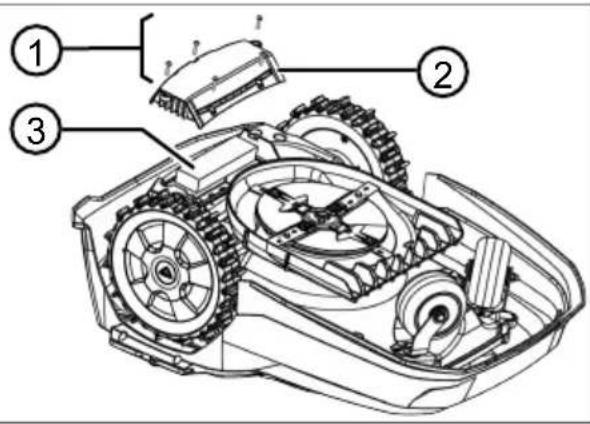
Removing the rechargeable battery before disposing of the appliance (16)
The integrated rechargeable battery must be removed before disposal of the appliance and disposed of separately in an environmentally friendly manner.
- Undo the screws (16/ 1).
- Take off the cover of the rechargeable battery compartment (16/2).
- Unplug the rechargeable battery (16/ 3) and take it out.
- Put the cover back on and fasten the screws.
14 AFTER-SALES/SERVICE
In the event of questions of warranty, repair or spare parts, please contact your nearest AL-KO Service Centre. These can be found on the Internet at:
www.alko-garden.com/service-contacts
Further information on spare parts can be found at:
www.alko-garden.com/spareparts
meets the requirements of the harmonised EU Directives, EU safety standards and the product-specific standards. The Declaration of Conformity forms part of the operating instructions and is included with the machine.
16 WARRANTY
We will remedy any material or manufacturing defects discovered in the device during the statutory period of limitation for claims for defects by repair or replacement at our discretion. The period of limitation is determined in each case by the law of the country in which the device was purchased.
Our warranty promise applies only if:
■ These operating instructions are observed
■ The device is handled correctly
■ Original spare parts have been used
The warranty becomes void in the case of:
■ Unauthorised repair attempts
■ Unauthorised technical modifications
■ Use for other than the intended purpose
The warranty does not include:
■ Paint damage attributable to normal wear
■ Wear parts that are marked with a box xxxxxx(x) on the spare parts card
The warranty period commences with the purchase by the first end user. The date on the proof of purchase is decisive. In the event of a warranty claim, please contact your dealer or the nearest authorised customer service centre with this declaration and the original proof of purchase. This declaration does not affect the purchaser's statutory claims for defects against the vendor.
VERTALING VAN DE ORIGINELE GEBRUIKERSHANDLEIDING
Inhoudsopgave
2 PRODUCTOMSCHRIJVING
text_image
QR code image containing encoded data, no visible human-readable text
text_image
Available on the App Store GET IT ON Google Play-
of * EcoMode —
-
Eco-Mode activeren/deactiveren:
- Activeren - Eco-Mode activeren. - gedeact. - Eco-Mode deactiveren.
7.4 Regensensor instellen
-
of * Regensensor
-
Regensensor activeren/deactiveren:
of Activeren : —
Regensensor activeren.
- of gedeact. : —
Regensensor deactiveren.
8 INFORMATIE WEERGEVEN
text_image
QR code image containing encoded data, no visible human-readable text
text_image
Available on the App Store GET IT ON Google Playtext_image
QR code image containing encoded data, no visible human-readable text
text_image
Available on the App Store GET IT ON Google PlaySettings in Information). S

text_image
QR code image containing encoded data, no visible human-readable text
text_image
Available on the App Store GET IT ON Google Play■ ! Caution ! Starting Motors
■ Calibration, Phase [1]
ali After rain delay
xx hours xx minutes S tipko ▲i tipko izberite želeno vrednost zakasnitve in s tipko potr-dite nastavitev.
- all * Weekly Program
ali All Days X: Naprava kosi vsak dan ob nastavljenih časih. Če se prikaže All Days [☐], naprava kosi samo ob nastavljenih dnevih v tednu.
■ ali ▼ Monday X...* Sunday X: Naprava kosi nastavljeni dan v tednu ob nastavljenih časih. Če se prikaže npr. Monday [ ], potem naprava ne kosi vsak dan.
- ali ▼change : Aktivirajte X ali dezaktivirajte [ ] posamezni dan ter nastavite čase, način košnje in začetne točke.
14 SERVISNA SLUŽBA/SERVIS
text_image
QR code image containing encoded data, no visible human-readable text
text_image
Available on the App Store GET IT ON Google Play■ ! Caution ! Starting Motors
■ Calibration, Phase [1]
-
ili* Entry Point
-
ili▲* Point x1 at [020m]
Koristeći ▲i uzustopce odaberite brojku i preuzmite koristeći —
- i: ▲* Point x2 at [075m]
Koristeći ▲i uzustopce odaberite brojku i preuzmite koristeći ▼
-
Po potrebi odredite dodatne početne točke.
-
Vratite se na glavni izbornik koristeći .≡
7.5.3 Namještanje vremena košnje
i NAPOMENA Između programiranja vreme- na košnje i početka košnje mora biti min 30 minu- ta. Ako ne, uređaj se pokreće najranije 30 min. nakon pritiska posljednje tipke.
- i i ▲* weekly Program

text_image
QR code image containing encoded data, no visible human-readable text
text_image
Available on the App Store GET IT ON Google Play■ ! Caution ! Starting Motors
■ Calibration, Phase [1]
-
w△*Entry Point
-
📌 * Point x1 at [020m]
- 📌 * Point x2 at [075m]
text_image
QR code image containing encoded data, no visible human-readable text
text_image
Available on the App Store GET IT ON Google Playtext_image
QR code image containing encoded data, no visible human-readable text
text_image
Available on the App Store GET IT ON Google Play- noo * Bud x2 u [075m]
text_image
QR code image containing encoded data, no visible human-readable text
text_image
Available on the App Store GET IT ON Google Play■ Calibration, Phase [1]
-
also * Entry Point
-
albedo * Point x1 at [020m]
- albedo * Point x2 at [075m]
- albo * Margin mowing
- albo * a manual start
text_image
QR code image containing encoded data, no visible human-readable text
text_image
Available on the App Store GET IT ON Google Playtext_image
Available on the App Store GET IT ON Google Playtext_image
QR code image containing encoded data, no visible human-readable text
text_image
Available on the App Store GET IT ON Google Play4.8 Installera Quick Homing Kit

(Start/Pause-painike):
text_image
QR code image containing encoded data, no visible human-readable text
text_image
Available on the App Store GET IT ON Google Playtext_image
QR code image containing encoded data, no visible human-readable text
text_image
Available on the App Store GET IT ON Google Play■ Calibration, Phase [1]
- sau * Weekly Program
- saw * Margin mowing
- saw * a manual start
7.8 Setarea tunderii suprafetelor secundare
-
saw * sub zone mowing
-
Setarea timpilor de tuns:
text_image
QR code image containing encoded data, no visible human-readable text
text_image
Available on the App Store GET IT ON Google Play- 📄 * Zavodskie ustanovki
text_image
QR code image containing encoded data, no visible human-readable text
text_image
Available on the App Store GET IT ON Google PlayImported by: AL-KO Gardentech UK Ltd, Murray way, Wincanton, Somerset, BA9 9RS / UK | +44 (0) 1963 828055
shop.uk@al-ko.com | www.alko-garden.uk
AL-KO Service: www.al-ko.com/service-contacts