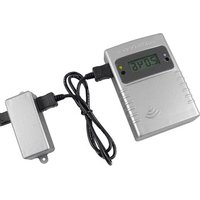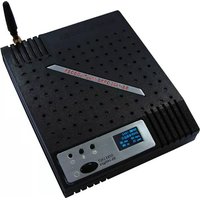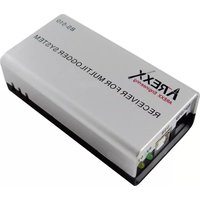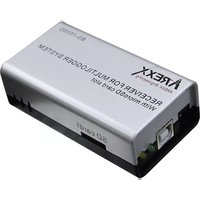
TL-ALU9 - Measuring equipment AREXX - Free user manual and instructions
Find the device manual for free TL-ALU9 AREXX in PDF.



| Type de produit | Temperature recorder with alarm (base station) |
| Brand / Model | AREXX / TL-ALU9 |
| Category | Measuring equipment |
| Power supply | Mains adapter (not specified) or USB; CR2032 battery for internal clock |
| Power consumption | Not specified |
| Display | LCD screen with backlight, text and graphic display |
| Wireless communication | 433 MHz, range 20-40 m depending on environment |
| Compatible sensors | Up to 60 AREXX Multilogger wireless temperature sensors |
| Sensor transmission interval | Approx. 45 seconds |
| Built-in buzzer | Adjustable duration (beep parameter), activation during alarm |
| Display modes | Measurement list, recent alarms, graph, general settings |
| Alarm configuration | Via PC software (Temperature Logger), rule file, up to 3 simple conditions |
| Alarm repetition | Parameter rpt (repetition after delay if not acknowledged) |
| Screen saver | Parameter scrn (turn off after inactivity, adjustable) |
| Internal clock | Set via PC (UTC offset), CR2032 battery for backup (~5 years life) |
| Firmware update | Possible via USB and PC software |
| Dimensions | Not specified (approx. 120 x 80 x 30 mm) |
| Weight | Not specified (approx. 200 g with batteries) |
| Operating conditions | Indoor, avoid humidity (sensors not waterproof) |
| Maintenance and cleaning | Check and replace sensor batteries, clean with a dry cloth |
| Spare parts | Sensors, USB receiver, CR2032 battery (available from dealer) |
| Safety | Do not expose to humidity; respect battery polarity; use in authorized 433 MHz band |
| Product type | Temperature recorder with alarm (base station) |
Frequently Asked Questions - TL-ALU9 AREXX
User questions about TL-ALU9 AREXX
0 question about this device. Answer the ones you know or ask your own.
Ask a new question about this device
Download the instructions for your Measuring equipment in PDF format for free! Find your manual TL-ALU9 - AREXX and take your electronic device back in hand. On this page are published all the documents necessary for the use of your device. TL-ALU9 by AREXX.
USER MANUAL TL-ALU9 AREXX
| Impressum©2013 AREXX EngineeringNervistraat 168013 RS ZwolleThe NetherlandsTel.: +31 (0) 38 454 2028Fax.: +31 (0) 38 452 4482E-Mail: Info@arexx.nl | This manual is protected by laws of Copyright. Any full or partial reproduction of the contents are forbidden without prior written authorization by the European importer.Product specifications and delivery contents are subject to changes. The manual is subject to changes without prior notice.You can find free updates of this manual onhttp://www.arexx.com/ |
| "TL-ALU9 and Multilogger" are registered trademarks of AREXX Engineering.All other trademarks are the property of their owners. We are not responsible for the contents of external web pages that are mentioned in this manual! | |
| Information about limited warranty and responsibilityThe warranty granted by AREXX Engineering is limited to the replacement or repair of the TL-ALU9 and its accessories within the legal warranty period if the default has arisen from production errors such as mechanical damage or missing or wrong assembly of electronic components except for all components that are connected via plugs/sockets.The warranty does not apply directly or indirectly to damages due to the use of the TL-ALU9.This excludes claims that fall under the legal prescription of product responsibility.The warranty does not apply in case of irreversible changes (such as soldering of other components, drilling of holes, etc.) of the TL-ALU9 or its accessories or if the TL-ALU9 is damaged due to the disrespect of this manual.The warranty is not applicable in case of disrespect of this manual! In addition, AREXX Engineering is not responsible for damages of all kinds resulting from the disrespect of this manual! Please adhere above all to the „Safety recommendations" in the TL-ALU9 manual.Please note the relevant license agreements on the CD-ROM!IMPORTANTPrior to using this TL-ALU9 receiver for the first time, please read this manua thoroughly up to the end. it explains the correct use and inform you about potential dangers. Moreover it contains important information that might not be obvious for all users.Important safety recommendationThis module is equipped with highly sensitive components. Electronic components are very sensitive to static electricity discharge. Only touch the module by the edges and avoid direct contact with the components on the circuit board. | |
| SymbolsThis manual provides the following symbols: | |
 | The "Attention!" Symbol is used to mark important details.Neglecting these precautions may damage or destroy themodule and/or additional components and additionally youmay risk your own health or the health of other persons! |
 | The "Information" Symbol is used to mark useful tips andtricks or background information. In this case the informationis to be considered as "useful, but not necessary". |
| Safety recommendations- Check the polarity of the power supply.- Keep all products dry, when the product gets wet remove the power directly.- Remove the power when you are not using the product for a longer period.- Before taking the module into operation, always check it and its cables for damage.- If you have reason to believe that the device can no longer be operated safely,disconnect it immediately and make sure it is not unintentionally operated.- Consult an expert if you are unsure about the function, safety or connection to the module.- Do not operate the module in unfavourable conditions.- This module is equipped with highly sensitive components. Electronic components arevery sensitive to static electricity discharge. Only touch the module by the edges and avoiddirect contact with the components on the circuit board. | |
| Normal useThis product was developed as an alarm module for the AREXX Multilogger system. It willonly work together with other AREXX Multilogger sensors and products. With the TL-ALU9wireless alarm unit you can generate an alarm when a sensor reaches the alarm setting.The TL-ALU9 can be simply programmed with a PC. The Alarm setting can be a temperatureor voltage but also the state of a switch.It may be used indoors only. The product must not get damped or wet. Also be careful withcondense when you take it from a cold to an warm room, give it time to adapt to the newconditions before you use it.Any use other than that described above can lead to damage to the product and mayinvolve additional risks such as short circuits, fire, electrical shock etc.Please read all the safety instructions of this manual. | |
1. MULTI LOGGER INFORMATION
Starting up
- Please read this manual first.
- Connect the power adapter and switch on the TL-ALU9
- Check the display if it receives sensor data
- Connect the TL-ALU9 receiver to the computer and start the logger software alarm tool to program the alarm unit.
- Consult the help function of the software if you have further questions.
Important information about the Alarm Unit
- The Alarm Unit receives the measurements from the sensors wirelessly.
- Several sensor types are available, like temperature, relative humidity, CO2 levels etc.
- Many temperature sensors can be connected to the system at the same time.
- Separate sensors for the multilogger are available at your dealer.
- We have connected 60 sensors to one single receiver without any problems.
- The Alarm unit graphically shows the sensor measurements of a longer period of time.
- ATTENTION: Most of the sensors are not waterproof!
- The range of the sensors can vary as a result of environmental influences.
Depending on the material properties of the surrounding areas, sensors located inside refrigerator systems may not be able to communicate with the receiver.
FOR THE LATEST SOFTWARE, DOCUMENTATION AND MANUALS SEE
www.arexx.com/templogger
2. INTRODUCTION TL-ALU9 ALARM UNIT
The alarm unit registers for each sensor the measurement together with the date and time stamp.
With the TL-ALU9 wireless alarm unit you can generate an alarm when a sensor reaches the alarm setting. The TL-ALU9 can be simply programmed with a PC. The Alarm setting can be a temperature or voltage but also the state of a switch.
When the alarm setting is triggered it will give for an period an Acoustical alarm and continues a light alarm until the alarm is reset.
The TL-ALU9 displays all sensor data, which have been transferred by temperature sensors. It is also possible to show the sensor data in a small graph on this display.
the AREXX multilogger sensors continuously register and report new values to the receiver at intervals of ca. 45 seconds.
Sensors and receiver use a wireless communication system, working at 433MHz. This frequency is freely available for communication at transmitting powers under 10 milliwatts.
Depending on surrounding building constructions, the allowed 10mW power level allows a transmission range of 20-40 meters.
Temperature sensors may be located inside or outside buildings, at any place where an overview of temperature curves is desired.
Unreliable signal levels may be improved substantially by slightly modifying the sensor's or the receiver's location.
3. TL-ALU9 OPERATIONS
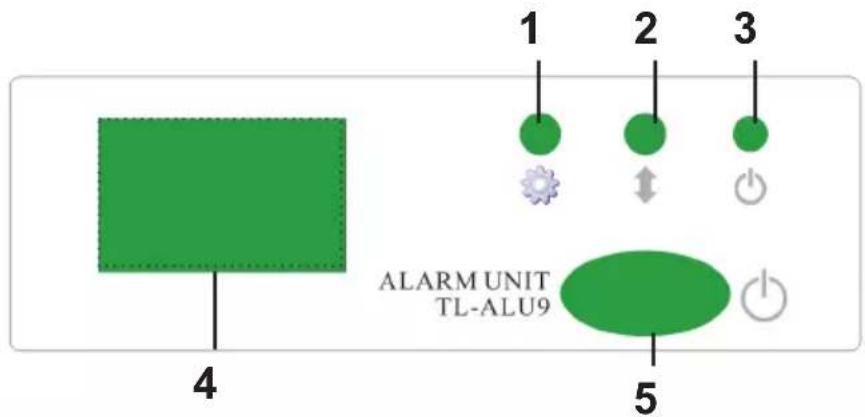
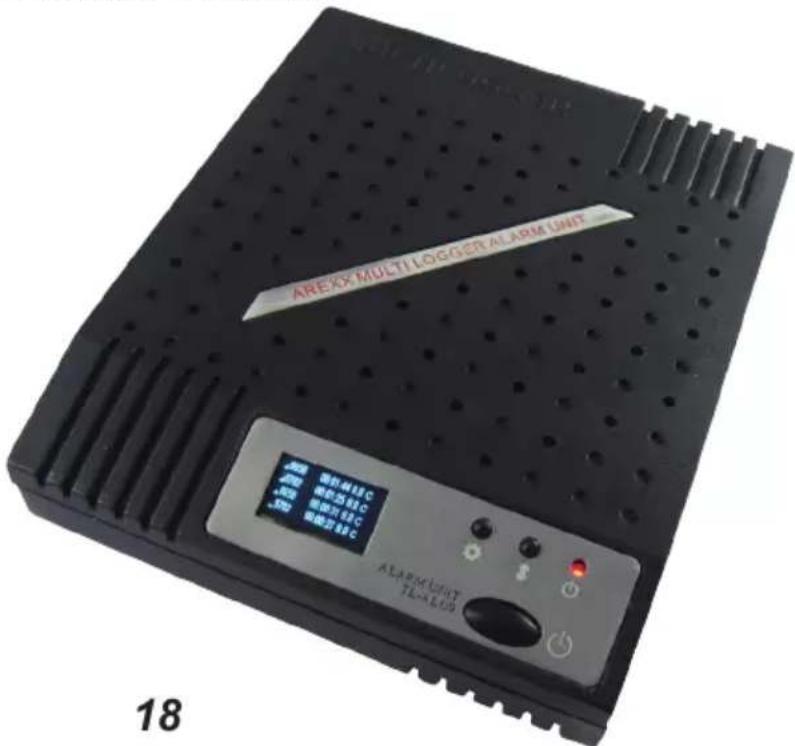
- Display mode button
- Scroll button
- Power-on indicator
- Display
- On - off switch
By pressing the display-mode button (1) different display modes can be selected:
A- List of incoming measurements
B- Recent generated alarms
C- Graphical display of recent measurements
D- General settings
The scroll button (2) is used to scroll through the data.
Mode A displays the measurement data per line:
- rssi indicator: This indicates the received signal strength of the rf data signal
- sensor id: identification number of the sensor.
- time (hh:mm:ss)
- measurement value
- measurement unit, dependent on the actual sensor.
Mode B displays the alarm report. On the first line the sensor id and time of the alarm are given, together with the measurement value and unit. The following lines are used to display the accompanying text of the rule.
Mode C displays the recent measurements in graphical form per sensor. There will be presented a graph for each sensor, accessible by the scroll button. The graph shows the upper and lower boundary, the sensor id and unit. Also a simple timescale is shown. The range of the graph is set in the general setting section.
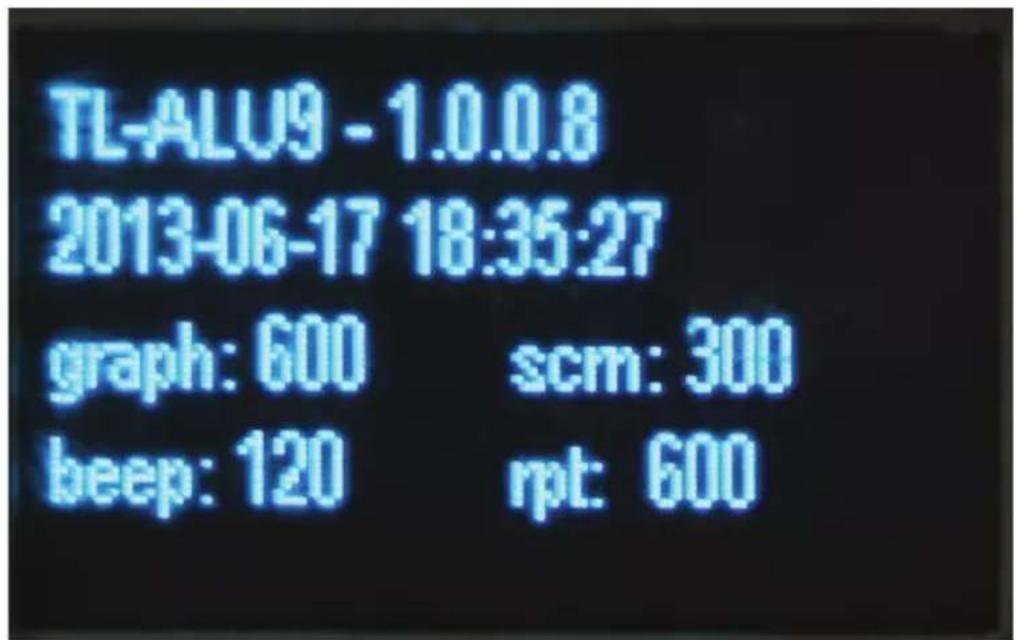
Mode D shows the model and firmware version, the actual date and time, and the actual general setting-values. The setting-values can be changed by the TL-ALU9 configuration tool.
general setting-values:
graph: the time between 2 data points in seconds. There are 24 data points shown per graph. This value defines the total time-span of the graph.
beep: duration of the buzzer in seconds. The buzzer will turn on when an alarm is set, and turn off when the user presses button (1) or (2), or when the buzzer is active for more than this duration.
scrn: display time-out in seconds. When no button Is pressed, the display will turn off after this period of time. By pressing a button, the screen will turn on again.
rpt: repeat alarm time in seconds. The alarm is repeated after this period of time when the alarm was left unconfirmed.
4. Set alarms
The alarms can be set by a pc program. In order to do so, the unit should be connected to the PC via the usb cable. The TL-ALU9 uses a so called rule-file that defines one or more rules that can trigger an alarm. The rule file has the same format as the rule file for the BS1000. Therefore there are several ways to define rules for the TL-ALU9.
The easiest way is to use the TL-ALU9 configuration tool see tools menu in the logger software.
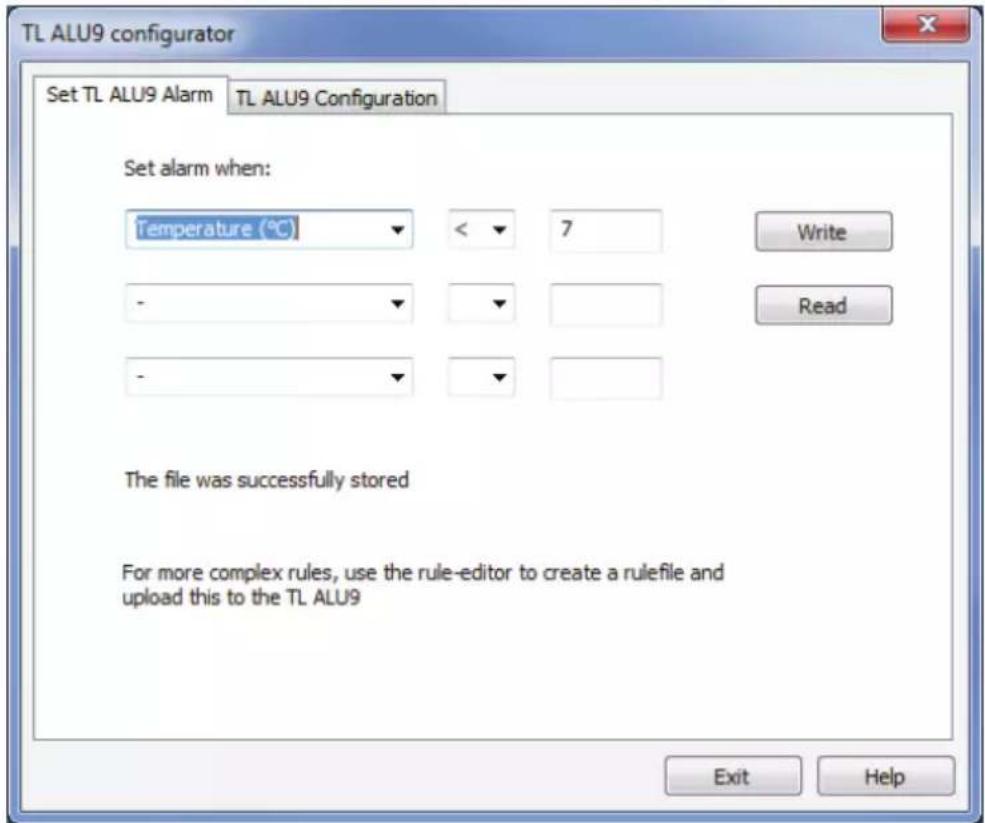
Screen 1: Alarm configuration
This tool can be found in the tools menu of the temperature logger software. The tool is also used to read an set the general settings.
SET TL ALU9 ALARM
This tab can be used to define a simple set of rules that will control the alarm generation of the TL-ALU9. On this screen up to 3 conditions can be specified. Each of the condition given will trigger an alarm when such a condition is met. When filled in, push the write button, and the rule-file will be submitted to the alarm unit. Also, the current rule-file can be read by pressing the read button.
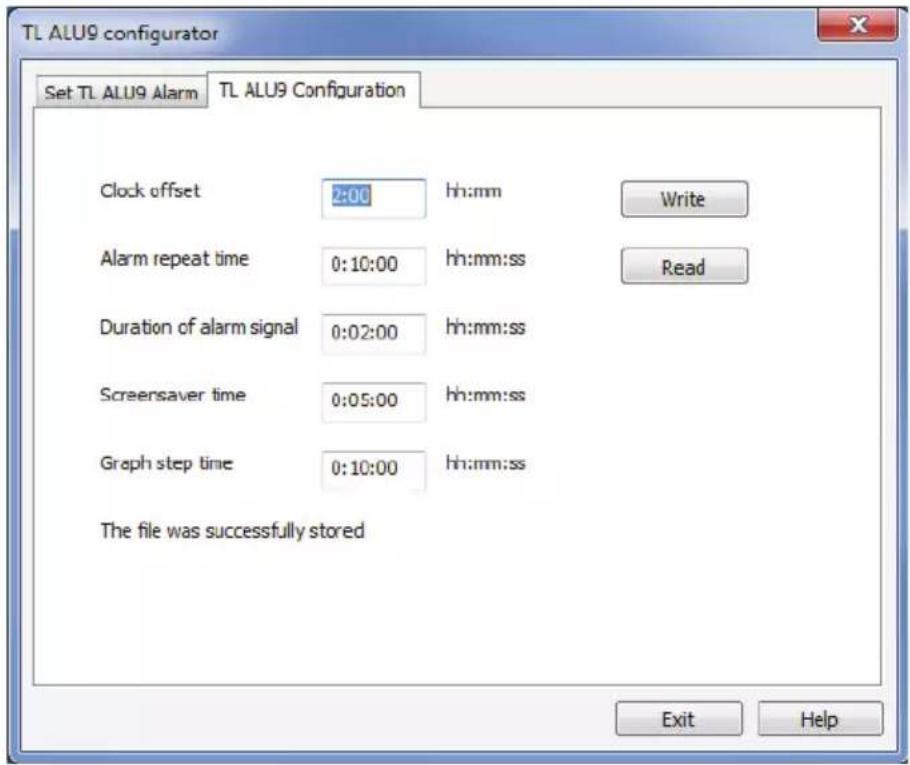
Screen2: TL ALU9 General configuration
The general settings of the unit can be inspected and changed by this screen. With the 'read' button the current settings are read, and with the 'write' button the given parameters are stored in the unit.
The following parameters can be set:
Clock offset: The internal clock is set by the pc to UTC ^1 time. To convert the displayed time to local time this offset is used.
Alarm repeat time („rpt“): repeat alarm time. The alarm is repeated after this period of time when the alarm was left unconfirmed.
Duration of alarm signal („beep“): duration of the buzzer. The buzzer will turn on when an alarm is set, and turn off when the user presses button (1) or (2), or when the buzzer is active for more than this duration.
Screensaver time (scrn): display time-out. When no button is pressed, the display will turn off after this period of time. By pressing a button the TL-ALU9, the screen will turn on again.
Graph step time („graph“): the time between 2 data points in seconds. There are 24 data points shown per graph. This value defines the total time-span of the graph.
(1) Coordinated worldtime, also UTC (Universal Time Coordinated), this is the official standard worldtime.
5. Transmission losses
Sometimes transmission losses may arise, indicated by missing temperature data in the sensor's curve display.
Data losses may be caused by:
- Problems with the TL-ALU9 alarm receiver
- Problems in the temperature sensor module
- Problems in the signal transfer between temperature sensor module and Alarm receiver
5.1. Problems inside the TL-ALU9 receiver
The receiver does not register a single data signal, even if the sensor is located at a minimum distance to the receiver.
Potential problems:
- Receiver is not in the range of the sensors
- The TL-ALU9 receiver has no power
- Unknown TL-ALU9 problem.
Suggested solutions:
- Check the Power
- Remove the Power adapter connector, wait about ten seconds and reconnect the cable again.
- Install the latest TL-ALU9 firmware.
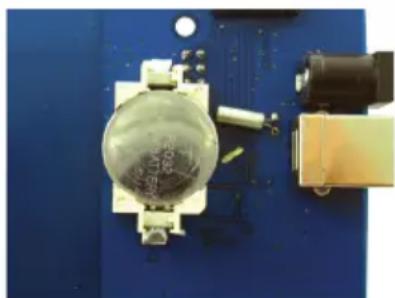
Please check the internal TL9-ALU clock battery (Type CR2032)
The lifetime of the TL9-ALU battery is about 5 years!
natural_image
Close-up of a small electronic component with a transparent dome and metallic connector, mounted on a blue circuit board (no visible text or symbols)5.2. Problems in the temperature sensor module
The receiver receives signals from sensors, but fails to register signals from one sensor in particular.
Potential problems:
- Sensor batteries are missing or are at a low charging level
- Reversed polarity of the sensor's batteries
- The sensor's location is outside of the receiver's reception range
- Damage to the sensor (by corroded battery contacts, moisture or battery leakage)
- Problems in the radio signal communication
Suggested solutions:
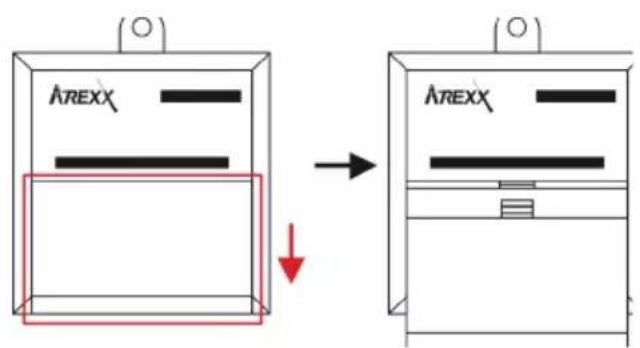
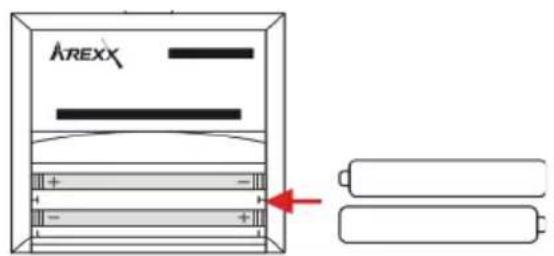
- Insert fully charged batteries in the sensor and repeat the communication test (please check the polarization of the batteries before inserting!!)
- Check the battery contacts and remove all corrosion and moisture effects.
5.3. Radio signal transfer problems
The receiver system is missing signals from one or more sensors, or only receiving a limited number of signals.
Potential problems:
- Walls or ceilings between sensor and receiver may contain metallic constructions.
- Sensors and/or receiver may is located on or by a metallic surface
- Sensors and/or receiver are situated in locations with high humidity
- Windows between sensor and receiver may contain several layers of shielding materials or may be covered by humid moisture.
- Other 433MHz systems may be working within the 20m operating range
- Interference or jamming signals from radio or TV transmitters
- Electronic or electrical equipment (eg. computer equipment or magnetrons), operating within the 2-5m operating range
- Low power level of the sensor's batteries (see 2)
Suggested solutions:
- Modify the locations of the sensor and/or the receiver
- Remove the interfering equipment
5.3.2. Communication test
A simple test will check the communication channel between sensor and receiver:
- Remove the batteries from the sensor
- Locate the sensor at ca. 1 m distance to the receiver
- Insert the batteries in the sensor
- A correctly working system will show the according sensor entry to the sensor list within 5 seconds.
Extra information and possible updates can be found on www.arexx.com (on the forum or through the Temp Logger menu).
Further questions can also be put on our forum;
www.arexx.com
(1) Coordinated worldtime, also UTC (Universal Time Coordinated), this is the official standard worldtime.
natural_image
Pure technical diagram of a machine with no text, numbers, or symbolsVérifier pile de l'horloge BS-510 (Type CR2032)