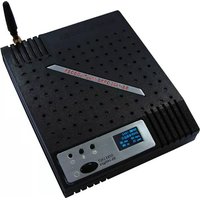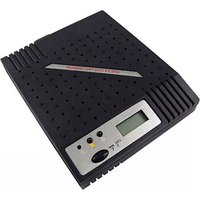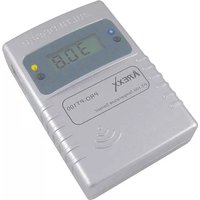
PRO-88msn - Measuring equipment AREXX - Free user manual and instructions
Find the device manual for free PRO-88msn AREXX in PDF.


| Product type | Wireless multitasking probe |
| Brand | AREXX |
| Model | PRO-88msn |
| Main functions | Analog measurement (0–2.046 V), pulse counting (max 2 Hz), contact open/close detection |
| Power supply | 2 x 1.5 V LR03 (AAA) batteries |
| Estimated battery life | Several months depending on usage |
| Transmission frequency | 433 MHz |
| Range | 20 to 40 meters depending on environment |
| Analog measurement range | 0 to 2.046 V |
| Analog resolution | 2 mV |
| Data transmission interval | Approximately 45 seconds |
| Display | 5-digit LCD with backlight |
| Operating modes | Analog measurement, pulse counting, open/close detector, counter reset |
| Mode adjustment | By long press on left button |
| Adjustable parameter | Duration threshold for door opening (0 to 59 seconds) |
| Junction box included | JB-T1 with 3-contact terminal block |
| Compatible software | Multilogger (provided on CD) |
| Connector | For external probe (specific plug) |
| Maintenance and cleaning | Clean with a dry cloth; avoid excessive moisture |
| Spare parts and repairability | Replaceable batteries; no spare parts available |
Frequently Asked Questions - PRO-88msn AREXX
User questions about PRO-88msn AREXX
0 question about this device. Answer the ones you know or ask your own.
Ask a new question about this device
Download the instructions for your Measuring equipment in PDF format for free! Find your manual PRO-88msn - AREXX and take your electronic device back in hand. On this page are published all the documents necessary for the use of your device. PRO-88msn by AREXX.
USER MANUAL PRO-88msn AREXX
natural_image
Digital temperature sensor device connected to a rectangular electronic device with cable (no visible text or symbols)© 2010 AREXX - HOLLAND - CHINA
HAVINGA SOFTWARE - HOLLAND
D INFORMATION zum MULTI-LOGGER
- General Information
- Instructions for PRO-55int and PRO66ext 18
2.1. Instructions for PRO-77ir
2.2. Instructions for PRO-PT100 -
Transmission problems
-
Communication test 24
-
Junction Box 27
natural_image
Technical line drawing of an electronic component with internal structure and battery assembly (no text or symbols)Abb. 1. Battery placement
Pin.2 S = +2.046 Volt
Pin.3 gnd = Masse
natural_image
Simple line drawing of a device connected to a rectangular component via a cable (no text or symbols)Pin.2 S = +2.046 Volt
Pin.3 gnd = Masse
$$ R 1 = 8 1 8. 2 k = = 8 2 0 k $$
$$ R 2 = 1 0 0 k $$
0..200V (U):
$$ R 1 = 9 M $$
$$ R 2 = 1 0 0 k $$
$$ R 1 = (f - 1) ^ {} (R 2 ^ {} R i) / (R 2 + R i) $$
$$ f = \text { Teilfaktor } 1 0, 1 0 0 \text { etc } $$
$$ \mathrm{Ri} = \text { Eingangs impedanze(1M) } $$
Abb. 11. Repeater Konfiguration
1. TEMP LOGGER INFORMATION
Starting up
- First please read this complete manual before you continue.
- More manuals can be found on the CD and in our Multilogger Software HELP FUNCTION.
- Install the software, please refer to the manual on the CD-ROM! Always check on www.arexx.com if you have the latest software version at hand.
- Connect the USB receiver to the computer.
- Start the program.
- Insert batteries in the sensors.
- Consult the help function of the software if you have further questions.
Important information about the Temperature Logger
- The receiver which is connected to the computer receives the signals coming from the sensors.
- The computer can also collect the sensor data from a LAN Network.
- The temperature sensors transmit their temperature data to the receiver.
- Several temperature sensors can be connected to the system at the same time.
- Separate sensors for the Temperature Logger are available at your dealer.
- We have connected 60 sensors to one single USB receiver without any problems.
- The software graphically shows the temperature measurements of a longer period of time.
- Extra: Attractive screensaver software showing all sensors.
- ATTENTION: The sensors are waterresistant but not waterproof!
- The range of the sensors can vary as a result of environmental influences.
Depending on the material properties of the surrounding areas, sensors located inside refrigerator systems may not be able to communicate with the receiver.
The Multilogger System consists of a Logger Software application, a USB- or LAN or receiver module and one or more sensors, each including a transmitter system.
A USB- or LAN cable connects the receiver to the computersystem or to the LAN network. The Logger application can synchronize the sensor data from several receivers.
For the Multilogger system many different sensors are already available. The sensors can measure temperature, humidity and CO2
The Multilogger application at the computer displays all sensor data, which have been transferred by temperature sensors to the receiver.
Temperature sensors continuously register temperature and report new values to the USB-receiver at intervals of ca. 45 seconds.
Each sensor in the sensorlist reports the date and time stamp for the most recent measurement data set. The right side window displays a continuous curve for the registered temperature for the selected sensor.
Sensors and receiver use a wireless communication system, working at 433MHz. This frequency is freely available for communication at transmitting powers under 10 milliwatts.
Depending on surrounding building constructions, the allowed 10mW power level allows a transmission range of 20-40 meters inside buildings, the open field range is much higher.
Temperature sensors may be located inside or outside buildings, at any place where a registered overview of temperature curves is desired.
Unreliable signal levels may be improved substantially by slightly modifying the sensor's position or the receiver's location.
2. INSTRUCTIONS PRO-88msn
Insert the batteries into the sensor.
The PRO-66ext start by inserting the plug of the external junction box.
If the JB-T1 plug is not properly inserted or the external probe is faulty, a 0 value will be displayed!
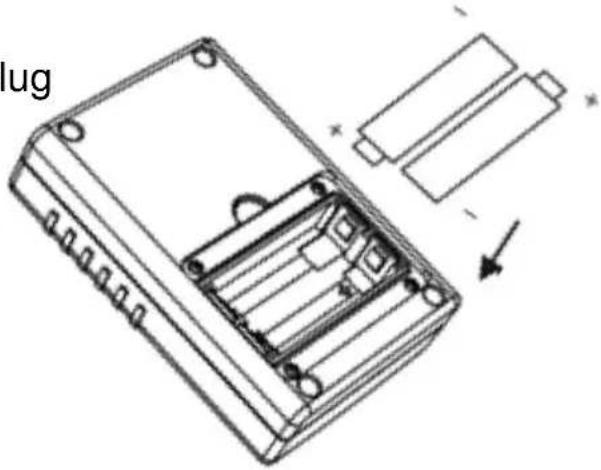
Fig. 1. Battery placement
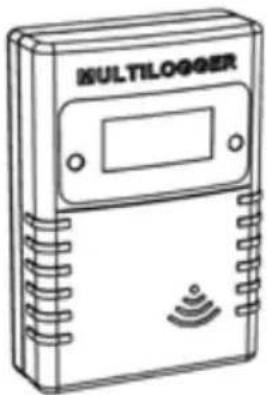
PRO-88msn
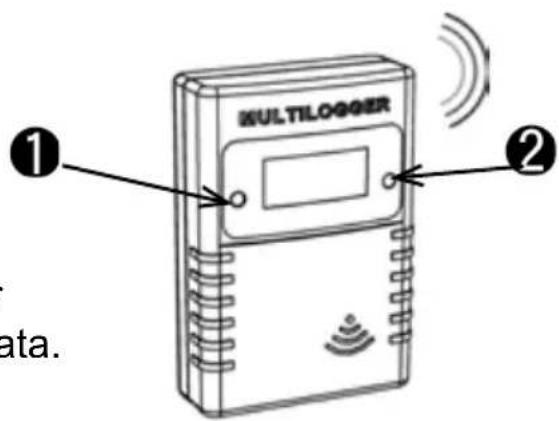
Fig. 2. Sensor switches
After inserting the batteries, the sensor immediately transmits its first sensor data.
The PRO sensor has 2 switches:
- Switch 1: Function switch with 3 functions
1a. Temperature data on Display
1b. Sensor number on Display
1c. No data on Display
- Switch 2: Switch for Display illumination
For extra information and software updates, please refer to our website www.arexx.com
For further questions about the product please visit our forum on www.arexx.com. On this forum you will find answers to many questions!
PRO-88msn multipurpose sensor
The PRO-88msn multipurpose sensor can run in three different modes:
1). Measuring analog signals, for example Voltage logging
2). Counting pulses, for example counting visitors
3). Open or Close detector, for example an door open or closed detector
X). Reset the pulse counter
The measurement data is transferred wirelessly to the multilogger receiver, that enables data storage, inspection and further processing with our Multilog- ger Software.
Analog measurement (mode 1)
In the analog measurement mode, the device measures and displays an analog signal on its external connector in the range of 0 - 2.046 V, with a resolution of 2 mV. The voltage measurement range can simply be modified with a simple resistor network.
The signal is sampled every second and the value is updated on its LCD. The measurement data is broadcast about every 45 seconds.
Open or Close detector (mode 2)
When the device mode is set to ‘open or closed detector’, the sensor will count the elapsed seconds since the (door) switch was set open. When the (door) switch is closed before the duration threshold, no alarm status is given, but the counting will remain up till a 1000 seconds. When the (door) switch is left open and a period of more than the duration threshold elapses, an alarm status is set, and the elapsed seconds counting will continue up till a 1000 seconds. The counted seconds is transmitted to the multilogger receiver and processed by the Multilogger Software;
Nnegatively signed when no alarm status is set Positively signed when an alarm status is set. The multilogger system can deduce from this data when the door (switch) was set open, and if an alarm condition was set. In that case, further action can be undertaken by the messenger system, like sending an Email or SMS message.
Pulse counting (mode 3)
In pulse count mode, the device counts incoming pulses and displays the counting on its LCD screen. The counting is broadcast about every 45 seconds. The pulse frequency is limited to 2 Hz. A higher rate will inhibit the counting. The cumulative count is stored into the sensor non-volatile memory about every 10 minutes.
When batteries are changed, the cumulative count will be set to the latest count. The counter can be reset by setting the sensor in device mode 4. In this mode, the count will reset, and the sensor will continue in pulse count mode. An example of this function is to count visitors who are passing an IR sesnor.
Pulse count reset (mode X)
A special mode to reset the Puls counter to zero
CONNECTING THE PRO-88msn
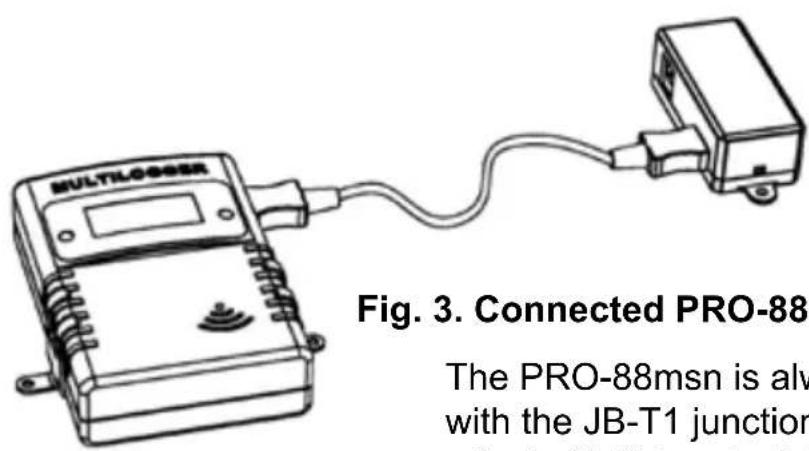
The Functions of the 3 pins are
Pin 1. + = Input
Pin. 2 S = +2.046 Volt
Pin. 3 gnd = Gnd
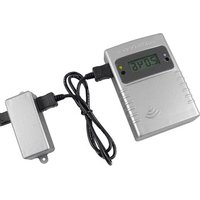
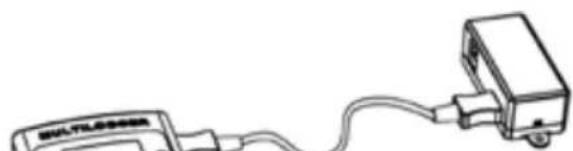
The PRO-88msn is always used in combination with the JB-T1 junction box. The Junction box has a 3 pin (1-3) terminalblock inside to which you can connect 3 wires.
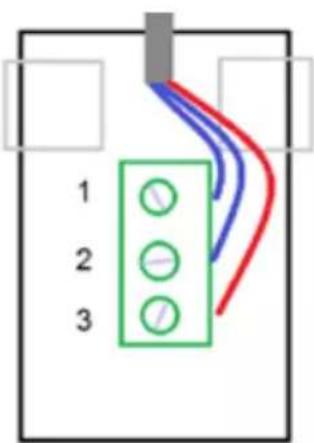
The analog signals are connected between pin. 1 and 3
The Switch open or close signal is connected between pin 1 and 2
The Pulse counter is connected between pin 1 and 3
The reference voltage of 2.046 Volt on pin 2 can be used for general purpose
Fig. 4. Terminalblock JB-T1
Changing the LCD mode
The LCD screen can show 5 different items, depening on the LCD mode.
The following LCD modes (A-E) are present:
A. Show measurement value. This value depends on the device mode:
- The analog measurement (0 ... 2.046V)
- The number of seconds since door switch open, and an alarm indication
- The cumulative pulse counter
B. Show the device mode. The leftmost digit shows 'd', the rightmost digit the actual device mode (1 ... 4)
C. Show parameter 1 (duration threshold for door open detector). The leftmost digit shows 'P', the rightmost 3 digits show the actual parameter value from 0 to 59
D. Show sensor ID. The sensor ID is shown in 5 digits, scrolled from right to left. This ID is used for identifying the sensor in the Multilogger system.
E. Show blank LCD screen. In this mode the sensor current consumption is reduced to a minimum. The radio data transmission remains active.
The LCD mode can be selected by pushing the left button shortly.
A next LCD mode will be selected each time the button is pushed shortly.
Fig. 5. Sensor and junction box
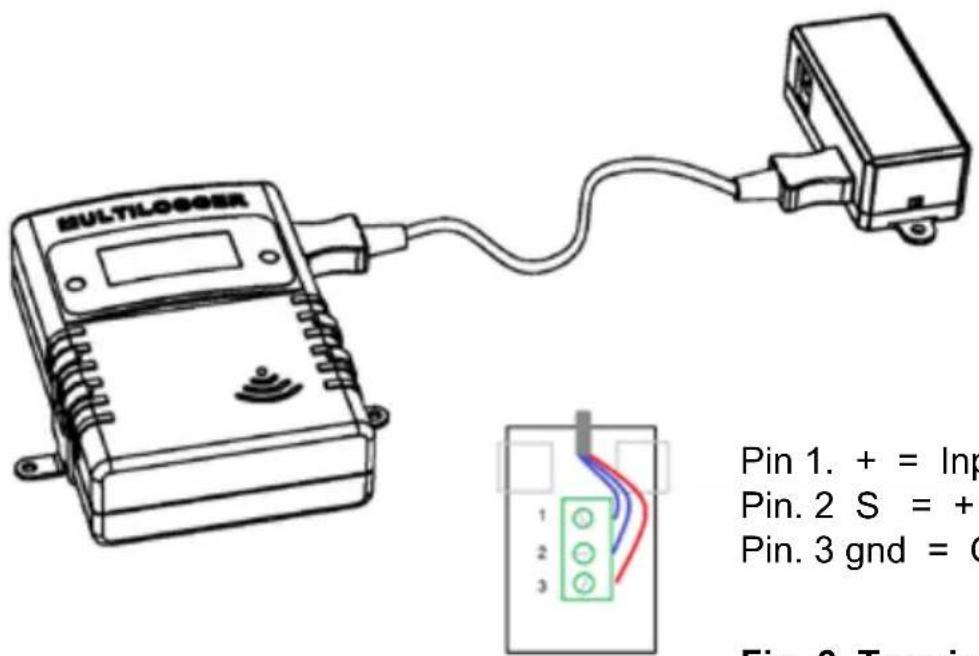
Pin 1. + = Input
Pin. 2 S = +2.046 Volt
Pin. 3 gnd = Gnd
Fig. 6. Terminalblock
Reading and Changing the device mode
The sensor can operate in one of the following three modes:
d1.analog measurement
d2.Switch (door) open detector
d3.pulse count
A special mode is the ‘pulse count reset’ mode (d4). When activated, the pulse count is reset to 0. Afterwards, the sensor will go back to the pulse count mode.
In order to set the device mode the following steps should be performed:
- Select the appropriate LCD mode: 'show device mode'
- Push the left button a long time (a few seconds) until the 'd' starts to blink
- Push shortly to increment the device mode.
- When you have selected the correct value, leave the device untouched.
It will jump to the 'show measurement LCD mode' after a few seconds. At that point the device mode is stored into the on board non-volatile memory.
natural_image
Simple line drawing of a wireless device connected to a rectangular device (no text or symbols)Fig.7. Sensor with junction box connections
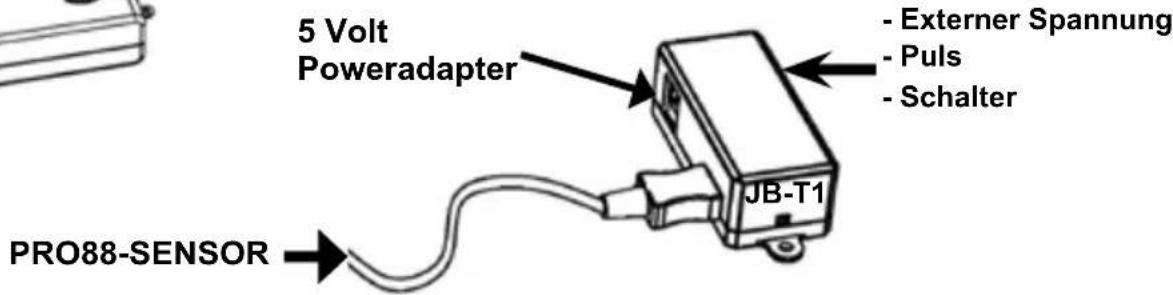
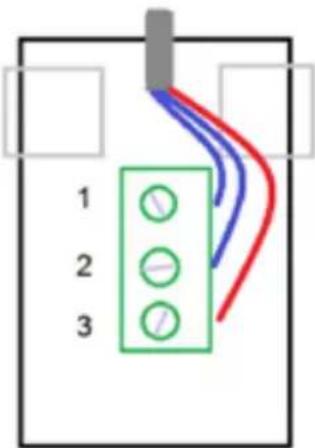
Fig.8. Terminal connections
Pin 1. + = Eingang
Pin.2 S = +2.046 Volt
Pin.3 gnd = Masse
- Select the appropriate LCD mode: 'show parameter value'
- Push the left button a long time (a few seconds) until the 'P' starts to blink
- Push shortly to increment the parameter value 1-59, push long for auto increment.
- When you have selected the correct value, leave the device untouched. It will jump to the 'show measurement LCD mode' after a few seconds. At that point the parameter data is stored into the on board non-volatile memory.
Voltagedevider for adjusting the measurement range
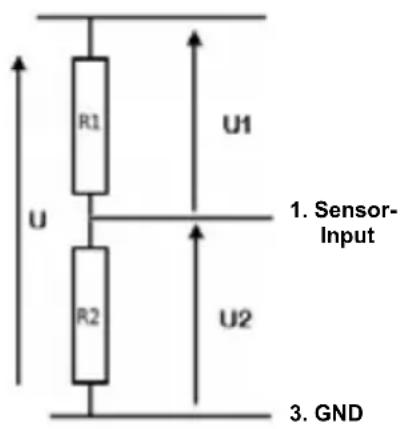
$$ R 1 = (f - 1) ^ {} (R 2 ^ {} R i) / (R 2 + R i) $$
$$ f = \text { devidefactor } 1 0, 1 0 0 \text { etc... } $$
$$ R i = \text { Input impedance } (1 M \text { Ohm }) $$
Fig. 9. Voltage devider
Example:
input impedance = 1M Ohm
0..20V (U):
$$ R 1 = 8 1 8. 2 k = = 8 2 0 k $$
$$ R 2 = 1 0 0 k $$
0..200V (U):
$$ R 1 = 9 M $$
$$ R 2 = 1 0 0 k $$
$$ R 1 = (f - 1) ^ {} (R 2 ^ {} R i) / (R 2 + R i) $$
$$ f = \text { D e v i d e f a c t o r } 1 0, 1 0 0 \text { e t c } $$
$$ \mathrm{Ri} = \text { Input impedance (1M) } $$
3. Transmission losses
Sometimes transmission losses may arise, indicated by missing temperature data in the sensor's curve display.
Data losses may be caused by:
- Problems inside the USB-receiver
- Problems in the temperature sensor module
- Problems in the signal transfer between temperature sensor module and USB-receiver
3.1. Problems inside the USB-receiver
The receiver does not register a single data signal, even if the sensor is located at a minimum distance to the receiver.
Potential problems:
- USB-cable between receiver and computer is missing or defect.
- Improper installation of the USB-module.
- Unknown software problem in the computer system.
Suggested solutions:
- Check the display window in the temperature logger display for a field in the lower left area. The field is to display the value ‘ready’ continuously. If the display intermittently displays
'RF_USB-Communication failure', the Windows operating system failed to find the USB-module.
- Remove the USB-cable, wait about ten seconds and reconnect the cable.
- Deinstall the temperature logger application software and reinstall it again.
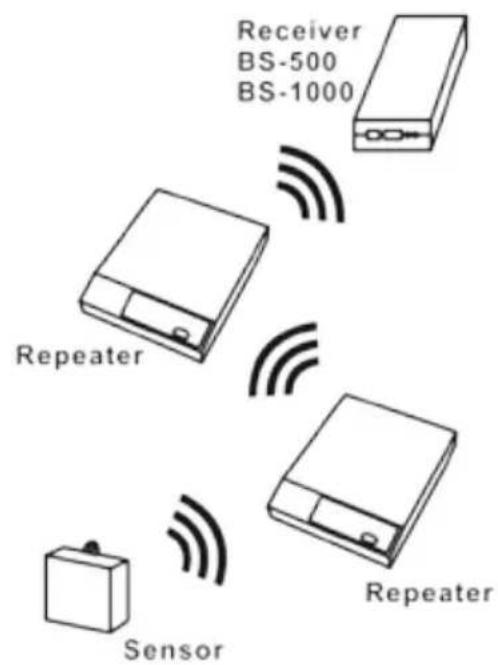
Configuration example with several repeater stations for a longer range
Fig. 11. Repeater configuration
3.2. Problems in the sensor module
The receiver receives signals from sensors, but fails to register signals from one sensor in particular.
Potential problems:
- Batteries are missing or are at a low charging level
- Reversed polarity of the sensor's batteries
- The sensor's location is outside of the receiver's reception range
- Damage to the sensor (by corroded battery contacts, moisture or battery leakage)
- Problems in the radio signal communication
Suggested solutions:
- Insert fully charged batteries in the sensor and repeat the communication test (please check the polarisation of the batteries before inserting!!)
- Check the battery contacts and remove all corrosion and moisture effects.
3.3. Radio signal transfer problems
The receiver system is missing signals from one or more sensors, or only receiving a limited number of signals.
Potential problems:
- Walls or ceilings between sensor and receiver may contain metallic constructions.
- Sensors and/or receiver may be located on a metallic surface.
- Sensor or receiver are situated in locations with high humidity.
- Windows between sensor and receiver may contain several layers of glass or shielding materials or may be covered by humid moisture.
- Other 433MHz systems may be working within the 20m operating range.
- Interference or jamming signals from radio or TV transmitters.
- Electronic or electrical equipment (eg. computer equipment or microwave ovens), operating within the 2-5m operating range.
- Low power level of the sensor's batteries (see 2)
Suggested solutions:
- Modify the locations of the sensor and/or the receiver.
- Remove the interfering equipment.
4. Communication test
A simple test will check the communication channel between sensor and receiver:
- Remove the batteries from the sensor.
- If an entry already exists: remove the sensor from the temperatur logger application (using the right mouse button).
- Locate the sensor at ca. 1 m distance to the receiver.
- Put the batteries back into the sensor.
- A correctly working system will add the according sensor entry to the sensor list within 5 seconds.
Extra information and possible updates can be found on www.arexx.com (on the forum or through the Temp Logger menu).
Further questions can also be put on our forum,
see www.arexx.com
2. INSTRUCTIONS PRO-88msn
natural_image
Line drawing of a multi-logger device with no visible text or symbols on the bodyPRO-88msn
CONNEXION DU PRO-88msn
Contact.2 S = +2.046 Volt
Contact.3 gnd = Masse
Contact.2 S = +2.046 Volt
Contact.3 gnd = Masse
Pin 1. + = Entrée
Pin.2 S = +2.046 Volt
Pin.3 gnd = Masse
$$ R 1 = 8 1 8. 2 k = = 8 2 0 k $$
$$ R 2 = 1 0 0 k $$
0..200V (U):
$$ R 1 = 9 M $$
$$ R 2 = 1 0 0 k $$
$$ R 1 = (f - 1) ^ {} (R 2 ^ {} R i) / (R 2 + R i) $$
$$ f = \text { deviationfactor } 1 0, 1 0 0 \text { etc.. } $$
$$ \mathrm{Ri} = \text { Entrée Impédance } (1 \mathrm{M}) $$
3. Test de communication
Solutions possibles:
Solutions possibles:
Solutions possibles:
1. TEMP LOGGER INFORMATIE
Opstarten
2. INSTRUCTIES PRO-88msn
natural_image
Technical line drawing of an electronic device casing with internal components and battery pack (no text or symbols)natural_image
Line drawing of a multi-logger device with a sensor icon and control panel (no text or symbols on the device itself)PRO-88msn
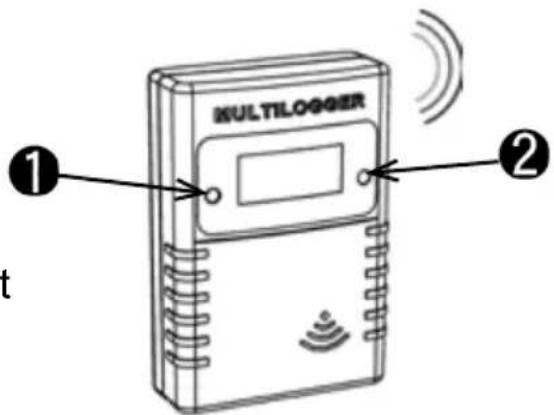
Fig. 2. Sensor knoppen
PRO-88MSN multipurpose sensor
Pin.2 S = +2.046 Volt
Pin.3 gnd = Massa
Contact.2 S = + 2.046 Volt
Contact.3 gnd = Massa