USER MANUAL WINTECTO One ABUS
natural_image
Technical line drawing of a door handle with key inserted (no text or symbols)
ABUS one™

CE
DE Montage- und Bedienungsanleitung 3 - 14
GB Fitting and operating instructions 15 - 26
FR Instructions de montage et d'utilisation 27 - 38
NL Montage- en gebruikshandleiding 39 - 50
IT Istruzioni di montaggio ed uso 51 - 62
ES Instrucciones de montaje y funcionamiento 63 - 74

natural_image
Exploded view diagram of a mechanical device showing internal components and assembly (no text or labels)

natural_image
Illustration of a toolbox, screwdriver, and ruler (no text or symbols)


natural_image
Line drawing of a 3D rectangular frame with internal diagonal lines and mounting holes (no text or symbols)
DIN R

natural_image
Line drawing of a square window frame with a handle and internal lines (no text or symbols)
DIN L
natural_image
Simple line drawing of a mechanical lever or fulcrum with a circular head and base, no text or symbols present.


natural_image
Technical line drawing of a mechanical device with red directional arrows indicating motion or assembly (no text or symbols)

natural_image
Technical line drawing of a mechanical device with no visible text or symbols
2.3b

natural_image
Technical line drawing of a mechanical device with no visible text or symbols
natural_image
Technical line drawing of a mechanical device with battery and housing components (no text or symbols)


natural_image
Technical line drawing of a mechanical device with no visible text or symbols
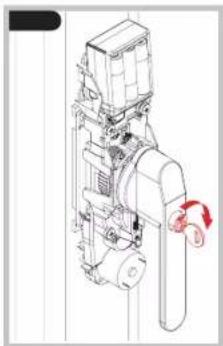
natural_image
Technical line drawing of a mechanical device with no visible text or symbols


- ABUS One App

iOS

Android
natural_image
Simple line drawing of a rectangular box with an arrow pointing to the front face and a checkmark (no text or symbols)

natural_image
Simple line drawing of a rectangular box with a side port and a black X mark (no text or symbols)
natural_image
Technical line drawing of a sewing machine with a red arrow indicating rotation (no text or symbols)

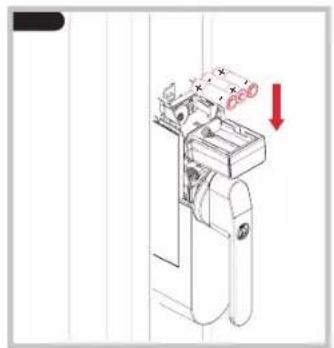
natural_image
Technical line drawing of a mechanical device with a red arrow indicating direction (no text or symbols)

natural_image
Technical line drawing of a mechanical device with a red arrow indicating rotation (no text or symbols)
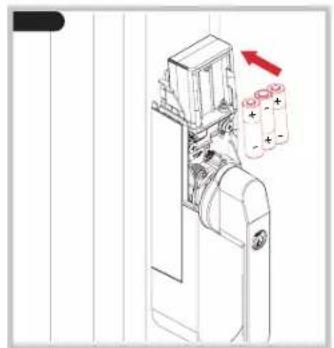
natural_image
Technical line drawing of a mechanical device with two batteries and a red arrow indicating direction (no text or symbols)
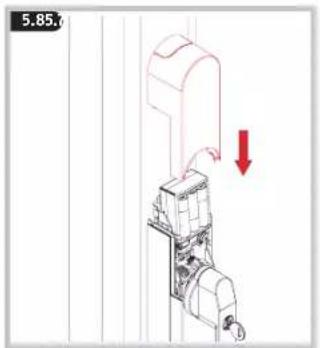
GB Thank you for choosing this ABUS product!
Please read these instructions carefully before assembly and use. Keep them and provide all users with instruction on how to use the product.
The product may only be used for its intended purpose. Any modification to the product is prohibited.
Keep packaging material away from children: Danger of suffocation!
Content: Scope of delivery 2
Assembly tools 2
- Use cases and important information 15
- Assembly 16
- ABUS One app 21
- Fitting the magnet 21
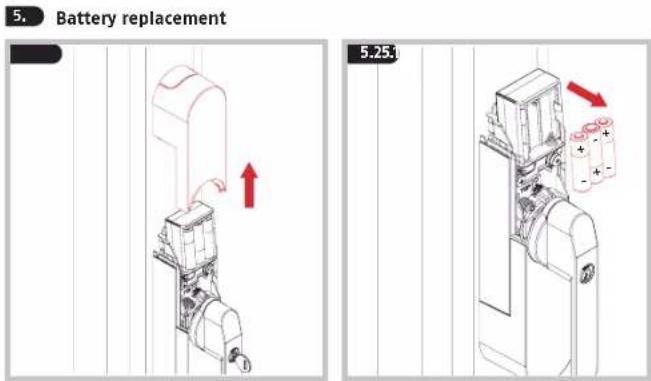
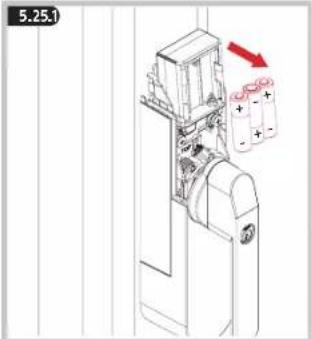
- Battery replacement 23
- FAQ 25
- Technical data 25
- Legal information 26
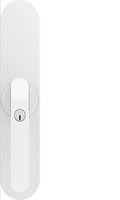
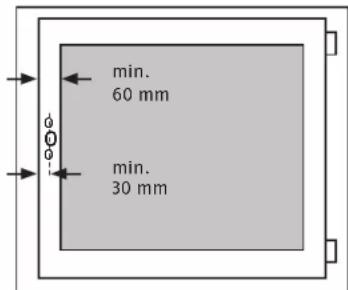
WINTECTO One is a retrofit system for motor-operated locking and unlocking of inward-opening windows and patio doors with 7 mm square and a backset of at least 30 mm. The sash frame width of the window must be at least 60 mm. Operation and set-up are performed using the ABUS One app. Communication takes place via Bluetooth. In addition to the window actuator, the system consists of further optional components. To use the window actuator as intended, you need a
Bluetooth®-enabled smartphone (Bluetooth® 4.0 LE and higher), a currently supported iOS or Android software version, and the free ABUS One app for iOS or Android.
In addition, WINTECTO One offers the functionality of an intrusion monitoring system. When the window is closed and the push button cylinder is pressed in, attempts to lever open the window will lead to acoustic triggering of the integrated alarm with approx. 110 dBA sound pressure. Motorised opening and closing of WINTECTO One is also possible when the cylinder is pressed in. Before installation, please check the adjustment of your window/patio door. Make sure that the window can be operated easily and smoothly. Windows/patio doors that cannot be operated easily and smoothly shorten the battery life. The product is intended for use in dry interior rooms only. Like all technical devices, WINTECTO One can fall due to various causes. It must be possible to operate at least one main access to the object from the outside as intended. In the event of an emergency or panic situation, a malfunction or if the batteries are flat, the window/patio door can be unlocked mechanically from the inside by hand using the window handle. Keep the key for unlocking the push button cylinder within reach. The inner housing/electronics may be opened only by ABUS specialist personnel.
Before using the actuator, pull the window in from the outside. When leaving the house or flat, check that the window is properly locked. Do not pull or push on the window/patio door or hold the window handle during operation of the motor. There is danger from moving parts.
WINTECTO One can be upgraded to a security variant. Additionally purchase the corresponding retrofit kit and a bar kit to upgrade your window to make it burglar-resistant.
Contact a specialist company if necessary.
The contents of this installation and operating manual reflect the current status at the time of printing. The printed manual may be outdated at the time of the product's entry into service due to updates and further developments. We therefore ask you to visit our website www.abtes.com INTECTO
One" into the search bar. You'll always find the current and complete version of the installation and operating instructions on the product page under the "Downloads" column.
Assembly
Icon explanation:

Caution!

Further fitting / using details


natural_image
Line drawing of a double door frame with internal diagonal lines (no text or symbols)
DIN R

natural_image
Line drawing of a window frame with label 'DIN L' on the side (no other text or symbols)
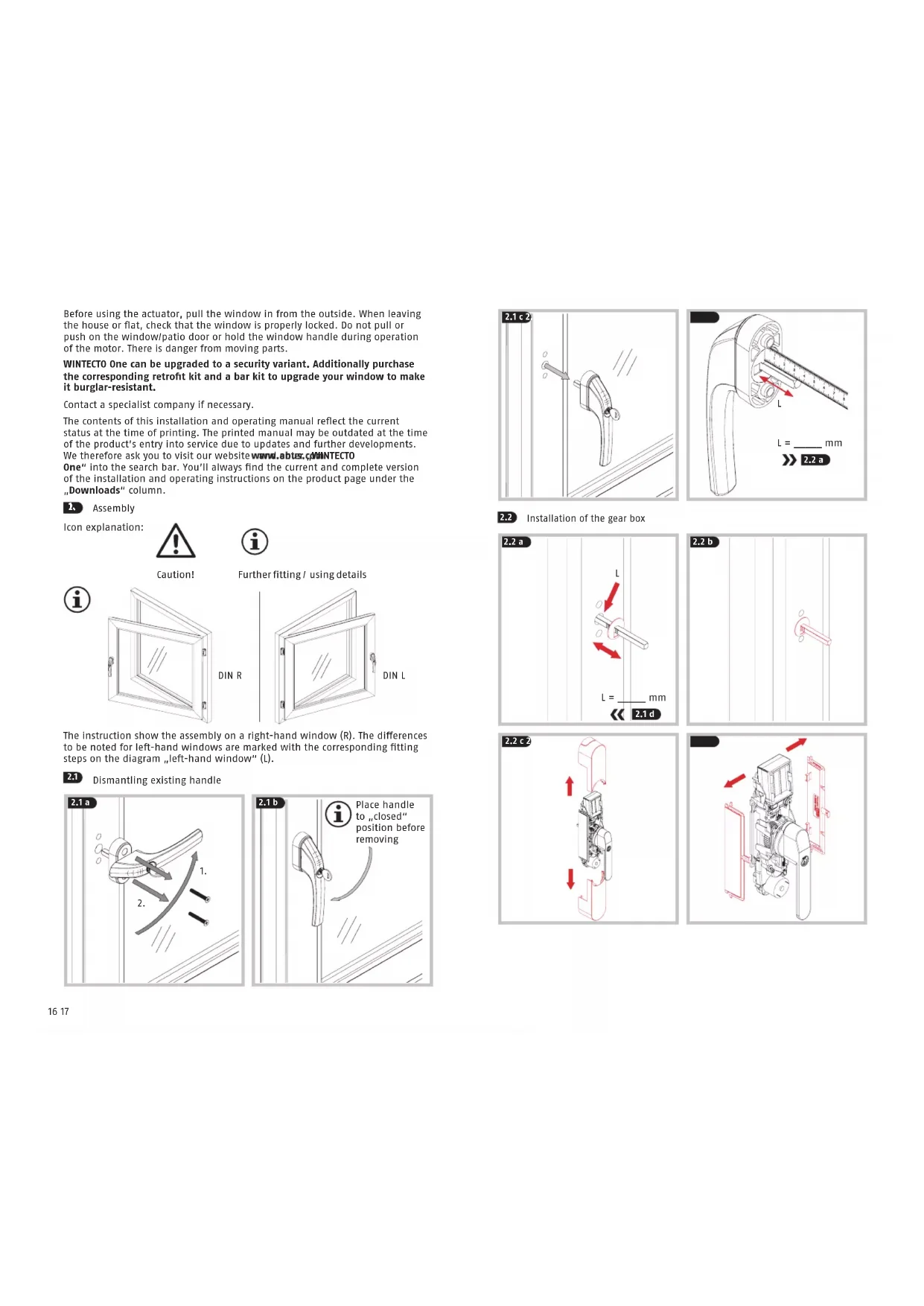
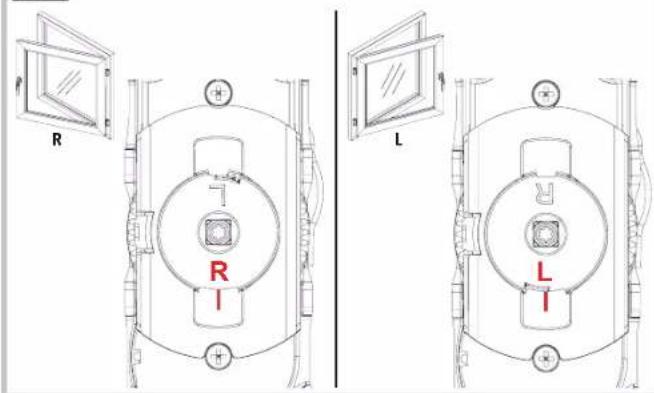
The instruction shows the assembly on a right-hand window (R). The differences to be noted for left-hand windows are marked with the corresponding fitting steps on the diagram „left-hand window“ (L).
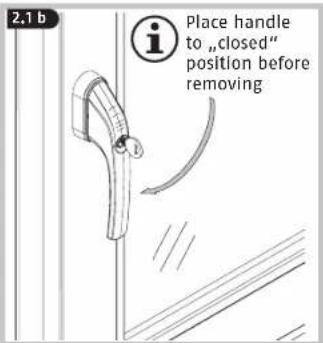
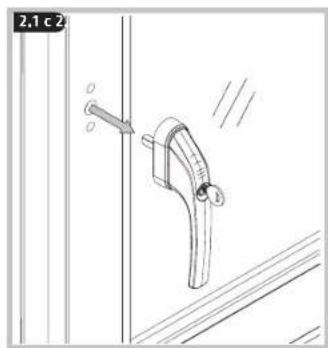
2.1 Dismantling existing handle


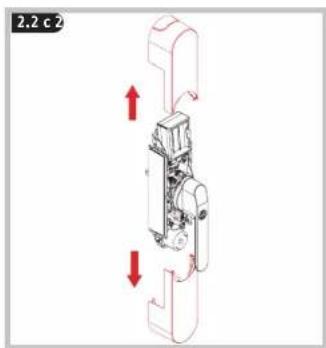
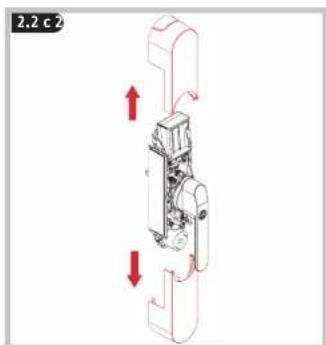
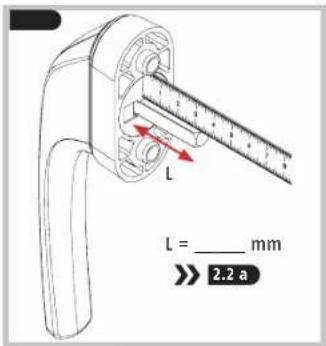
2.2 Installation of the gear box

natural_image
Simple line drawing of a mechanical component with no text or symbols

natural_image
Technical line drawing of a mechanical device with red directional arrows indicating motion or force (no text or symbols)

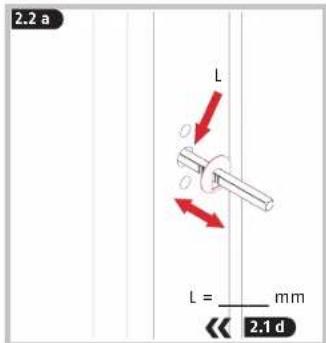
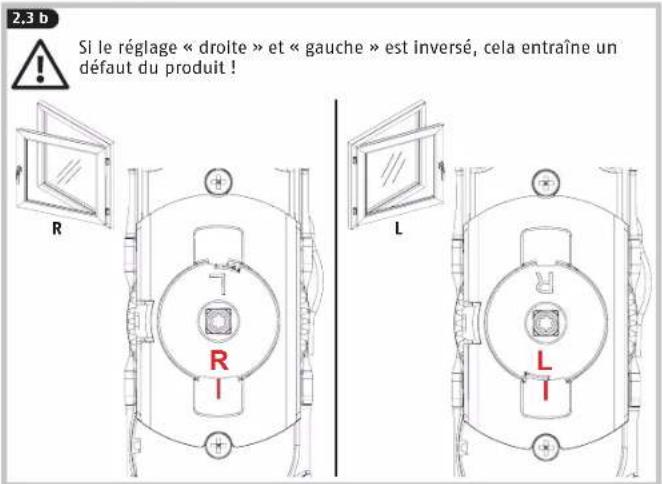
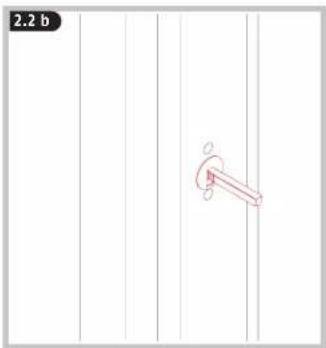
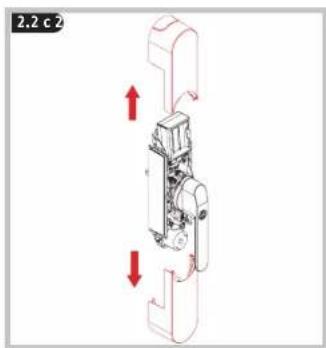
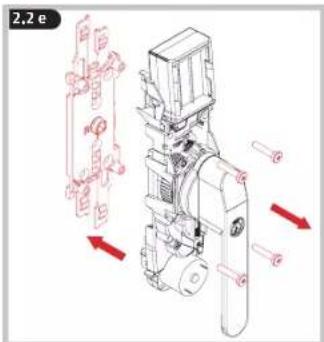
Please note the different position of DIN right and DIN left windows! Fit base plate and square shaft at 90° to one another without tension and tighten by hand only!


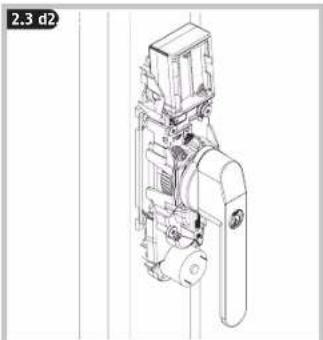
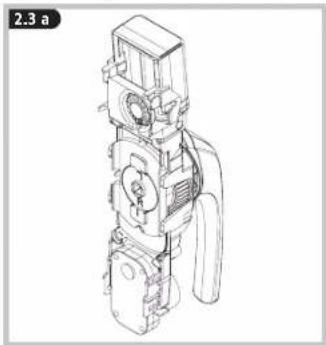
2.3 Fitting the handle unit
natural_image
Technical line drawing of a mechanical device with no visible text or symbols
2.3 b
If the „right“ and „left“ settings are reversed, this will cause a product fault!

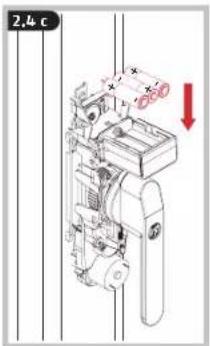
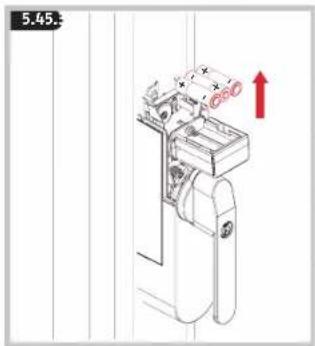
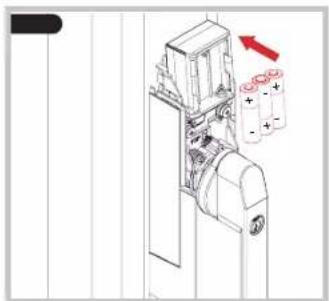
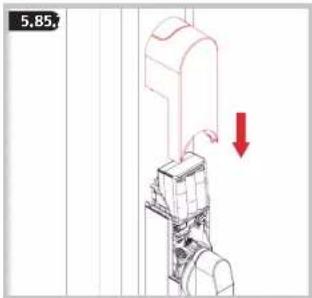
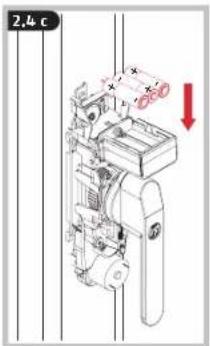
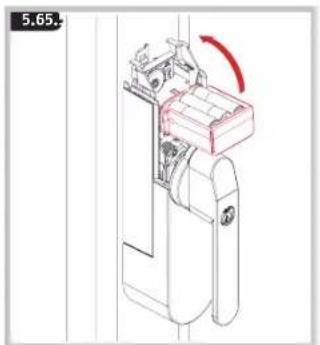
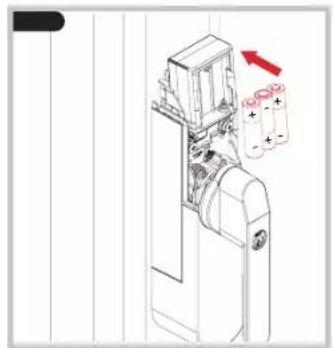
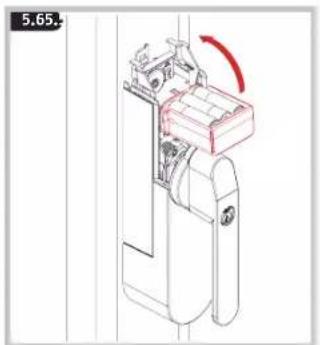
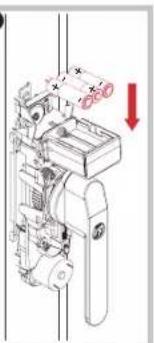
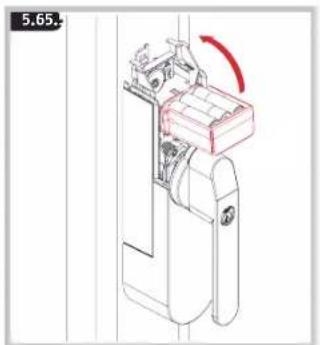
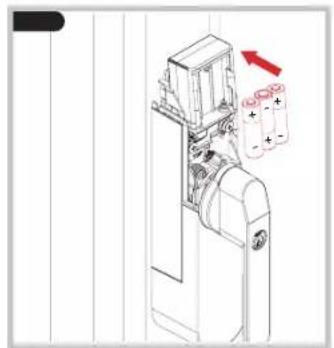
Insert batteries
ABUS One app
iOS
Android

After inserting the batteries, a beep sounds.
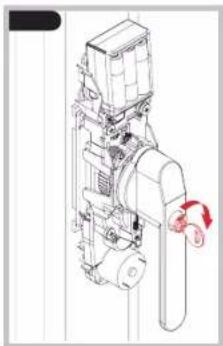
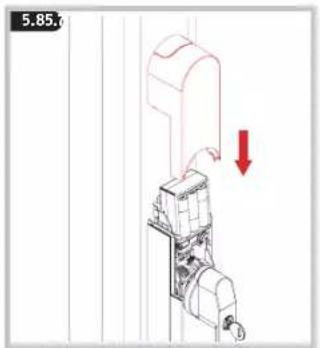
Manually check that the window handle is functioning. The handle must turn easily. If the handle can only be turned with difficulty, the window fittings, base plate or square shaft may have to be re-adjusted
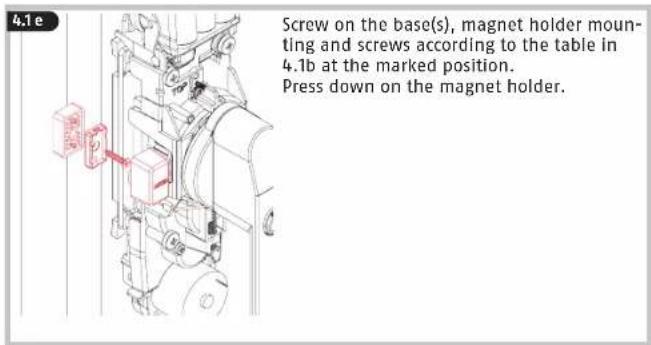
The magnet may only be mounted after programming >> 3. >> 4.
- Download the ABUS One app and enable Bluetooth® on your smartphone.
- Start the app and follow the instructions in the app.
- Pay attention to the assignment of the different Keycards to the products, and always scan the correct Keycard.
• To program the window actuator, start with the button „Add new ABUS lock“.
- It is imperative to keep the ABUS Keycard in a secure place even after completing the setup! The Keycard serves as proof of ownership for your window actuator. Do not give the Keycard to third parties.
- To guarantee proper function, we expressly recommend performing updates in the app and software/firmware updates for the components in a timely manner. The app will provide information on this. You can also perform the respective update in the component's settings.
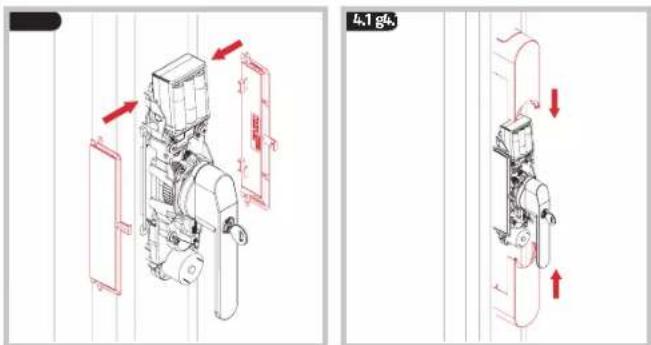
Fitting the magnet
The magnet is required to use the alarm function. WINTECTO One can also be operated without alarm function/magnet.
- The magnet may only be mounted after programming the drive >> 3.
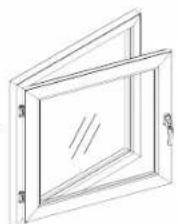
- The tilt function can be configured in the settings of the WINTECT0 One in the app.
* If this setting is chosen, the window moves when pressing the „open“ button from the tilt position to the “open” position. In doing so, the window must always be brought in manually!
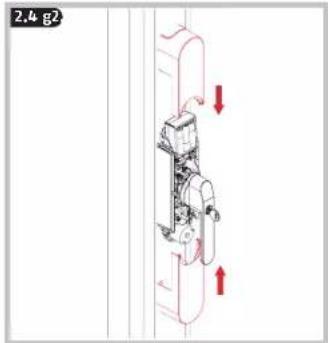
When using the tilting function, always pull the window by hand until the drive has reached its rest position before actuating the drive! In particular with older windows and patio doors, there is a risk that the casement will be lifted out of its anchoring, when it is not brought in manually.
Be careful when using magnets!
Magnets must be kept out of reach of children. Children can put magnets in their mouths and choke. This can cause serious injury. Seek immediate medical attention in this event! Risk of trapping fingers! Magnets may damage credit or debit cards with a magnetic strip. If you have a pacemaker, defibrillator or any other implanted device, please bear the following information in mind: the magnet can have an adverse effect on devices such as these, so maintain sufficient distance between the magnet and implanted device (approx. 20 cm), particularly during installation.
Insert magnets
vertically next
to one another!



natural_image
Technical line drawing of a mechanical device with a red arrow indicating rotation (no text or symbols)


natural_image
Technical line drawing of a mechanical device with a red arrow indicating direction (no text or symbols)

natural_image
Technical line drawing of a mechanical device with a red rotation arrow indicating motion (no text or symbols)

natural_image
Technical line drawing of a mechanical device with two batteries and an arrow indicating direction (no text or symbols)
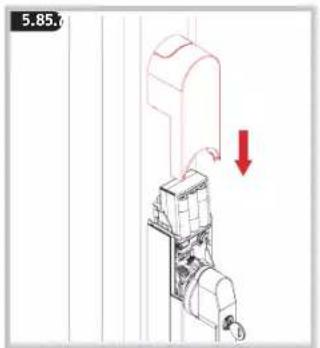
After inserting the batteries, a beep sounds.

Check WINTECT0 One for damage at least once a year. If the product shows visible damage, it must no longer be used.
Clean WINTECTO One only with a damp cloth, do not use aggressive cleaning agents.
6. FAQ
- The drive cannot be programmed, there is no acknowledgement tone => drive plate on back of housing is not set correctly (go to 2.2f)
- It is not possible to move to zero position (handle in closed position) => Adjust ease of operation of the door, fixing screws may be too tight loosen slightly, optimise mechanical fitting
- When opening the window / patio door from its tilt position, and it falls out of its anchoring
=> Deactivate tilt function or support door during motorised movement (Set the tilt function in the app)
- During the motorised movement, a warning signal sounds, the drive jams and the window handle also stops in an undefined position (overload of the drive)
=> Check ease of movement of the window / patio door and adjust as necessary
=> Increase drive torque if necessary (Set the torque in the app)
- A short beep sounds five times before motorised movement or when pressing in the pressure cylinder
=> "Low batt" message, replace all batteries with new alkaline batteries or fully charged "ready-to-use" batteries (go to Battery replacement)
- When the cylinder is pushed in, and there is no acknowledgement tone after 2 seconds
=> The window handle is not in closed position
=> Check the magnet position
The handle cannot be operated mechanically
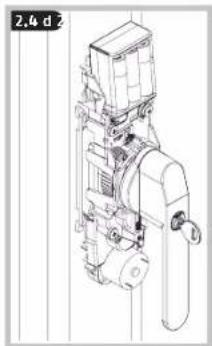
=> Cylinder pushed in, unlock with key
- Technical data
| Dimensions (incl. handle) 62 x 300 x 92 mm |
| Weight (without batteries) 1441 grams | |
| Battery type 6 * AA 1,5 V alkaline LR6 | |
| Operating temperature range 0°C to +40°C | |
| Radio frequency 2,402 GHz - 2,480 GHz | |
| Max. radiated transmission power < 10dBm eirp |
| Encryption AES-128-Bit | |
8.
Battery instructions
This product contains six batteries AA 1,5 V alkaline LR6. Keep batteries out of the reach of children. Children may put batteries in their mouths and swallow them. This can cause serious harm to their health. Seek immediate medical attention in this event! Batteries must be inserted with the correct polarity (+ and -). Empty batteries must be removed or replaced immediately. Different battery types, or new and used batteries, must not be mixed. The battery terminals must not be short-circuited. Risk of burns from contact with leaking or damaged batteries! In these cases, use suitable protective gloves and clean the battery compartment with a dry cloth. Batteries must not be dismantled, punctured, damaged, short-circuited, heated, charged or thrown into an open fire (risk of explosion!). Do not use or store the product in areas where the temperature could reach below 0°C or above +40°C. Do not expose the product to direct sunlight
Hereby, ABUS August Bremicker Söhne KG declares that the radio equipment type WINTECTO One is in compliance with Directives 2014/53/EU and 2011/65/EU. The full text of the EU declaration of conformity is available at the following internet address: docs.abus.com
Licence texts
The Bluetooth® word mark and logos are registered trademarks owned by Bluetooth SIG, Inc. and any use of such marks by ABUS August Bremicker Söhne KG is under license. Other trademarks and brand names are those of their respective owners. Apple and the Apple logo are trademarks of Apple Inc., registered in the U.S. and other countries and regions. App Store is a service mark of Apple Inc.
Google Play and the Google Play logo are trademarks of Google LLC.
Disposal
It is your responsibility to delete all stored personal data prior to disposal of the product. This product contains valuable raw materials. At the end of its service life, dispose of the product in accordance with the applicable legal requirements. Electrical appliances, rechargeable batteries and batteries must not be disposed of with household waste. Disposal must be carried out in accordance with Directive 2012/19/EU on waste electrical and electronic equipment (WEEE), or Directive 2006/66/EC on batteries and accumulators and waste batteries and accumulators. Batteries must be removed from electrical appliances and disposed of separately before disposal. Dispose of the packaging according to type. Separate the cardboard, foil and plastic elements for recycling. Please contact the local authority responsible for disposal if you have any queries. You can obtain information on collection points for your old appliances, for example, from the local municipal or city administration, the local waste disposal companies, or your specialist dealer.
Warranty
ABUS products are designed, manufactured and tested in accordance with applicable regulations with great care. The warranty exclusively covers faults that are caused by material or manufacturing defects. If a material or manufacturing defect can be proven, the product will be repaired or replaced at the discretion of the warrantor. In such cases, the warranty ends with the termination of the original warranty period. Any further claims are expressly excluded. ABUS assumes no liability for defects or damage that has been caused by external influences (e.g. transport, external forces), improper use, normal wear and tear or non-compliance with this operating and installation instructions document. If a warranty claim is asserted, the product must be returned with the original receipt with date of purchase and a brief written description of the fault.
Subject to technical alterations. No liability for mistakes and printing errors.
natural_image
Line drawing of a door frame with internal panes and mounting feet (no text or symbols)
DIN R DIN L
natural_image
Line drawing of a rectangular frame with a diagonal line through its center, no text or symbols present.
natural_image
Technical line drawing of a mechanical clamp or bracket with a handle and pivot point, no text or symbols present

2.2 Installation de la serrure


natural_image
Simple line drawing of a mechanical component with no text or symbols
natural_image
Mechanical assembly diagram showing a piston-like component with red directional arrows indicating movement (no text or symbols)

natural_image
Technical line drawing of a mechanical device with red directional arrows indicating motion or force (no text or symbols)

natural_image
Technical line drawing of a mechanical device with no visible text or symbols
natural_image
Technical line drawing of a mechanical device with battery and housing components (no text or symbols)


natural_image
Technical line drawing of a mechanical device with no visible text or symbols

natural_image
Technical line drawing of a mechanical device with no visible text or symbols


- Application ABUS One

iOS

Android
natural_image
Diagram of a mechanical device with a red upward arrow indicating motion or force, no text or symbols present

natural_image
Technical line drawing of a mechanical device with a red arrow indicating rotation (no text or symbols)

natural_image
Technical line drawing of a mechanical device with a red arrow indicating direction (no text or symbols present)

natural_image
Technical line drawing of a mechanical device with a red arrow indicating rotation (no text or symbols)
natural_image
Technical line drawing of a mechanical device with a red arrow indicating direction (no text or symbols)
natural_image
Technical line drawing of a 3D-framed window frame with no text or symbols

natural_image
Isometric line drawing of a rectangular frame with a diagonal slot, labeled DIN L (no text or symbols on the diagram itself)
natural_image
Technical line drawing of a door handle assembly with a lever and adjustment knob (no text or symbols)
natural_image
Simple line drawing of a mechanical component with no text or symbols
natural_image
Mechanical assembly diagram showing a piston-like component with red directional arrows indicating movement (no text or symbols)

natural_image
Technical line drawing of a mechanical assembly with red directional arrows indicating motion or force (no text or symbols)
natural_image
Technical line drawing of a mechanical device with no visible text or symbols

natural_image
Technical line drawing of a mechanical device with battery and housing components (no text or symbols)


natural_image
Technical line drawing of a mechanical device with no visible text or symbols
natural_image
Technical line drawing of a mechanical device with no visible text or symbols

- ABUS One-app

iOS

Android
natural_image
Simple line drawing of a rectangular box with an arrow pointing to the side and a checkmark (no text or symbols)

natural_image
Simple line drawing of a rectangular enclosure with a cutout, marked with an 'X' symbol (no text or labels)
natural_image
Technical line drawing of a sewing machine with a red arrow indicating rotation (no text or symbols)


natural_image
Technical line drawing of a mechanical device with a red arrow indicating direction (no text or symbols)
natural_image
Technical line drawing of a mechanical device with a red arrow indicating rotation (no text or symbols)
natural_image
Technical line drawing of a mechanical device with two batteries and a red arrow indicating direction (no text or symbols)


natural_image
Technical line drawing of a mechanical device with no visible text or symbols


natural_image
Technical line drawing of a mechanical device with battery and housing components (no text or symbols)


natural_image
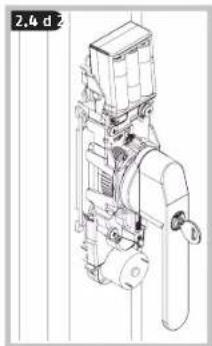
Technical line drawing of a mechanical device with no visible text or symbols
natural_image
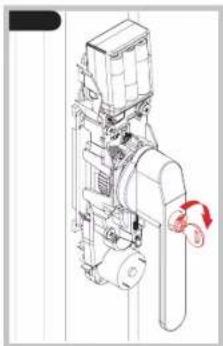
Technical line drawing of a mechanical device with no visible text or symbols


- App ABUS One

iOS

Android
natural_image
Simple line drawing of a door with an arrow and a checkmark (no text or symbols)
natural_image
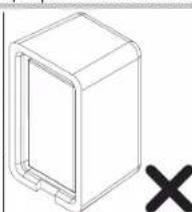
Simple line drawing of a rectangular box with a cutout and a black X mark symbol (no text or labels)
Inserire i
magneti
l'uno accanto
all'altro in
verticale!


natural_image
Technical line drawing of a mechanical device with a red arrow indicating rotation (no text or symbols)

natural_image
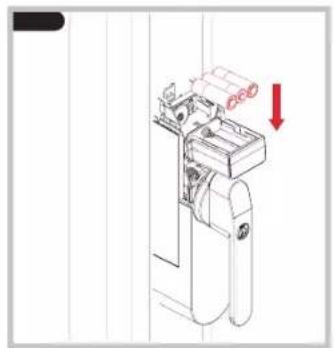
Technical line drawing of a mechanical device with a red arrow indicating direction (no text or symbols)
natural_image
Technical line drawing of a mechanical device with a red arrow indicating rotation (no text or symbols)

natural_image
Technical line drawing of a mechanical device with a red arrow indicating direction (no text or symbols)

natural_image
Line drawing of a double door with internal panes and mounting feet (no text or symbols)
DIN R

natural_image
Line drawing of a rectangular frame with a vertical window and side lock (no text or symbols)
DIN L

natural_image
Simple line drawing of a mechanical component with no text or symbols

natural_image
Mechanical assembly diagram showing a piston-like component with red directional arrows indicating movement (no text or symbols)

natural_image
Technical line drawing of a mechanical assembly with directional arrows indicating motion (no text or symbols)


natural_image
Technical line drawing of a mechanical device with no visible text or symbols

natural_image
Technical line drawing of a mechanical device with battery and housing components (no text or symbols)

2.4c
natural_image
Mechanical assembly diagram showing a motor with rotating components and a red downward arrow indicating motion (no text or symbols present)

natural_image
Technical line drawing of a mechanical device with no visible text or symbols

natural_image
Technical line drawing of a mechanical device with no visible text or symbols

- App ABUS One

iOS

Android
natural_image
Simple line drawing of a rectangular box with an arrow pointing to the side and a checkmark (no text or symbols)

natural_image
Simple line drawing of a rectangular box with a cutout and a cross symbol below (no text or labels)
natural_image
Technical line drawing of a mechanical device with a red arrow indicating rotation (no text or symbols)


natural_image
Technical line drawing of a mechanical device with a red arrow indicating direction (no text or symbols)
natural_image
Technical line drawing of a mechanical device with a red rotation arrow indicating motion (no text or symbols)
natural_image
Technical line drawing of a mechanical device with two batteries and an arrow indicating direction (no text or symbols)
ABUS August Bremicker Söhne KG | D 58292 Wetter | Germany.
Tel.: +49 (0) 23 35 63 40 | www.abus.com | info@abus.de
UK-Importer: ABUS (UK) Ltd.
Unit 30, Portishead Bus. Park
Old Mill Road, Portishead
BS20 7BX, BRISTOL, UK
Tel.: +44 117 204 70 00 | www.abus.com | info@abus-uk.com