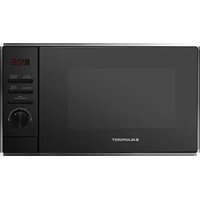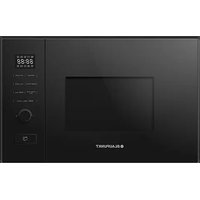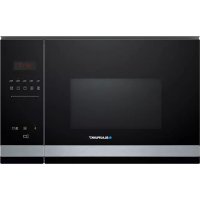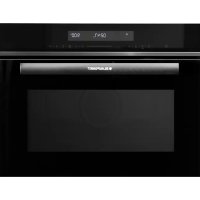
5M60M8690GB - Microwave Oven BLAUPUNKT - Free user manual and instructions
Find the device manual for free 5M60M8690GB BLAUPUNKT in PDF.



| Brand | Blaupunkt |
| Model | 5M60M8690GB |
| Product type | Built-in microwave oven |
| Rated voltage | 230 V, ~ 50 Hz |
| Microwave input power | 1 450 W |
| Microwave output power | 900 W |
| Grill power | 1 100 W |
| Convection power (forced air) | 2 300 W |
| Cooking functions | Microwave, Grill, Combi (4 modes), Convection with/without preheating, Defrost (weight and time), Quick cook, Auto menu (11 programs) |
| Available microwave power levels | 900 W, 700 W, 500 W, 300 W, 100 W |
| Convection temperature range | 130 °C – 220 °C (10 levels) |
| Included accessories | Glass turntable, turntable-roller assembly, high rack, low rack |
| Child safety | Yes, locking by holding Cancel/Pause button for 3 seconds |
| Kitchen timer | Yes, up to 24 hours |
| Clock | Yes, 24h format |
| Recommended cleaning | Soapy water, avoid abrasive products; lemon steam cleaning (300 ml water + ½ lemon, 10 min at 900 W) |
| Installation type | Built into a 60 cm wide wall cabinet, minimum mounting height 850 mm |
| Approved dish materials | Heat-resistant glass, microwave-safe ceramic, microwave-safe plastic, paper, cardboard (short cooking) |
| Prohibited materials | Metal, aluminium, aluminium foil, utensils with metal trim, wood, styrofoam, paper bags |
| Weight (approx.) | Not specified |
| Dimensions (approx.) | Not specified |
Frequently Asked Questions - 5M60M8690GB BLAUPUNKT
User questions about 5M60M8690GB BLAUPUNKT
0 question about this device. Answer the ones you know or ask your own.
Ask a new question about this device
Download the instructions for your Microwave Oven in PDF format for free! Find your manual 5M60M8690GB - BLAUPUNKT and take your electronic device back in hand. On this page are published all the documents necessary for the use of your device. 5M60M8690GB by BLAUPUNKT.
USER MANUAL 5M60M8690GB BLAUPUNKT
natural_image
Simple line drawing of a circular object with internal features and small spherical holes (no text or symbols)Glastablett
natural_image
Simple circular diagram with diagonal hatching and hanging ropes at the bottom (no text or symbols)natural_image
Circular diagram with diagonal hatching and three small symbols at corners (no text or labels)text_image
Technical diagram showing three labeled components of a mechanical assembly with concentric rings and a central shaft.natural_image
Line drawing of a microwave oven with a circular vent and fan (no text or symbols)HINWEISE:
text_image
Warning sign with steam symbol inside a triangle, indicating heat hazardnatural_image
Technical line drawing of a microwave oven with mounting base and control panel (no text or symbols)text_image
Screenshot of a media player interface with playback controls and playback buttons
Mikrowelle

natural_image
Symbol of a discarded bin with crossed lines and a solid rectangle below (no text or labels)3 Additional information
3 Specifications
4 IMPORTANT SAFETY INSTRUCTIONS
5 Risk of electric shock
7 Cleaning
8 UTENSILS
8 Risk of injury
8 Utensil test
9 Materials that you can use in the microwave
10 Materials to avoid in the microwave
11 Designation of appliance parts and accessories
12 Installing the turntable
13 INSTALLATION AND CONNECTION
14 Built-in oven: Installation
15 Important information with plug
15 Important information without plug
16 OPERATING PANEL
17 OPERATION
17 Setting the time
17 Kitchen timer
17 Microwave
18 Grill and combination function
18 Circulation with preheat
19 Circulation without preheat
19 Defrost by weight
19 Defrost by time
20 Quick cook
20 Child lock
20 Automatic menu
22 TROUBLESHOOTING
Read these instructions carefully before using your microwave and store them in a safe place.
By following the instructions you can look forward to many years of reliable operation of your appliance.
STORE THESE INSTRUCTIONS IN A SAFE PLACE.
PRECAUTIONS TO PREVENT EXPOSURE TO EXCESSIVE MICROWAVE RADIATION ENERGY
a) Never use this appliance with the door open, as you will be exposed to harmful microwave radiation. The safety interlock must not be tampered with or rendered inoperative.
b) Do not place any objects between the front of the appliance and the door and make sure that there is no dirt or cleaning residue on the sealing surfaces.
c) WARNING: If the door seals or the door are damaged, the appliance may not be used again until it has been repaired by a qualified person.
ADDITIONAL INFORMATION
If the appliance is not kept properly clean, its surface may be damaged. This can shorten the life of the appliance and create dangerous situations.
SPECIFICATIONS
| Model | 5M60M8690 |
| Rated voltage | 230 V, ~ 50 Hz |
| Microwave input power | 1,450 W |
| Microwave output power | 900 W |
| Grill | 1,100 W |
| Circulation | 2,300 W |
IMPORTANT SAFETY INFORMATION
WARNING!
Always follow these basic precautions to reduce the risk of fire, electric shock, personal injury or exposure to excessive microwave radiation energy when using your appliance:
- Read and follow these instructions: PRECAUTIONS TO AVOID EXPOSURE TO EXCESSIVE MICROWAVE RADIATION ENERGY
- This appliance can be used by children 8 years of age or older and persons with restricted physical, sensory or intellectual capabilities or a lack of experience and knowledge, if they are supervised by a responsible person or if they have received instructions on how to use the appliance safely, and understand the associated hazards. Children may not play with the appliance. Children may only clean and maintain this appliance under supervision.
- Ensure that the appliance and its power cable are out of reach of children under 8 years of age.
- If the power cable is damaged, it must be replaced by the manufacturer, the manufacturer's customer service department or a similarly qualified technician to avoid hazards.
- WARNING: Ensure that the appliance is switched off before replacing the bulb to avoid the risk of electric shock.
- WARNING: Maintenance or repair work, for which the cover for protection against microwave energy must be removed, may only be carried out by qualified persons.
- WARNING: Liquids and food products must never be heated in closed containers as there is a risk that the containers may explode.
- Do not leave the appliance unattended when heating food in plastic or cardboard containers, as there is a risk of fire.
- Only use accessories microwave-safe.
- Switch off the appliance in case smoke is generated or pull out the power plug from the socket. Keep the door of the appliance closed to extinguish any flames that may occur.
- Heating drinks in the microwave can cause delayed boiling. Be careful when removing the container.
- If you are warming up baby bottles or baby jars, stir or shake them after heating and check the temperature to avoid burning your baby.
- Eggs in shells and hard boiled eggs should never be heated in the appliance, as they may explode even after the heating process in the appliance is complete.
- Information on cleaning door seals, cooking chambers and adjacent parts.
- The appliance should be cleaned regularly and food residue should be removed.
-
Failure to maintain the appliance in a clean condition may result in wear of the appliance surfaces, which may reduce the service life of the appliance and lead to dangerous situations.
-
This appliance is designed for household use and similar applications, such as:
-
staff kitchens in shops, offices and other work environments;
- by customers in hotels, motels and other similar residential environments;
- farmhouses;
-
bed and breakfasts.
-
This microwave is designed to heat food and drinks. Drying food or clothing and heating heat pads, slippers, sponges, damp cloths or similar items can cause injury and fire.
-
Metal containers for food and beverages must not be heated in the appliance.
-
Do not use a steam cleaner to clean the appliance.
-
To prevent overheating, the appliance must not be installed behind a decorative door. (However, this does not apply to appliances with decorative doors).
-
This microwave is a built-in appliance.
-
The appliance must be operated with the cabinet door open.
-
Make sure that the turntable is not pushed out of the appliance when removing containers. (For fixed and built-in appliances used more than 900 mm above the floor that have a removable turntable. However this does not apply to appliances with a horizontal, bottom-hinged door).
-
The surface of the built-in cabinet in which the microwave is located can become very hot.
-
Do not use sharp, abrasive cleaning agents or sharp metal scrapers to clean the glass in the oven door, as these can scratch the surface, which can cause the glass to shatter.
-
WARNING: The appliance and its accessible parts become hot during use. Do not touch the heating elements. Children under 8 years of age must be monitored constantly or kept away from the appliance.
-
The appliance becomes hot during use and remains hot after use. Do not touch the heating elements inside the oven.
-
WARNING: Accessible parts of the appliance become hot during use and remain hot after use. Small children should be kept away from the appliance.
-
WARNING: When the combination mode is used, children should only use the appliance under the supervision of an adult due to the high temperatures involved.
READ THE FOLLOWING INFORMATION CAREFULLY AND STORE IT FOR FUTURE REFERENCE
TO AVOID A RISK OF INJURY, THE APPLIANCE MUST BE EARTHED.
DANGER
Touching some internal components may result in serious injury or death. Never dismantle this appliance.
WARNING
- Improper use of the earthing may result in electric shock.
- Do not insert the plug into a power outlet until the equipment is properly installed and earthed.
- This appliance must be earthed. In the event of an electrical short circuit, earthing reduces the risk of electric shock by providing a means of draining the electrical current.
- This appliance is equipped with an earthing plug. The plug must be plugged into a properly installed and earthed outlet.
- Consult a qualified electrician or service technician if you do not fully understand the earthing instructions, or if you are in doubt as to whether the equipment is properly earthed.
Before cleaning, disconnect the appliance from the power supply.
- After use, clean the cooking chamber with a damp cloth.
- Clean the accessories with soapy water.
- When soiled, the door frame and seal as well as adjacent parts must be carefully cleaned with a damp cloth.
- Do not use sharp, abrasive cleaning agents or sharp metal scrapers to clean the glass in the oven door, as these can scratch the surface, which can cause the glass to shatter.
- Cleaning tip – To make it easier to clean the walls of the cooking chamber that may come into contact with food: Place half a lemon in a bowl, add 300 ml of water and heat it for 10 minutes at full power. Wipe the oven clean with a soft, dry cloth.
UTENSILS
CAUTION
RISK OF INJURY
Maintenance or repair work, for which the cover for protection against microwave energy must be removed, may only be carried out by qualified persons.
See the instructions under “Materials that you can use in the microwave or which you should avoid in the microwave”. Certain non-metallic utensils are not suitable for use in the microwave. In case of doubt, you can test the relevant utensil as follows.
UTENSIL TEST
- Fill a microwave-safe container with 1 cup of cold water (250 ml) and the relevant utensil.
- Heat at maximum power for 1 minute.
- Carefully touch the utensil. If the empty utensil is warm, do not use it for cooking in the microwave.
- Do not exceed a cooking time of 1 minute.
MATERIALS THAT YOU CAN USE IN THE MICROWAVE
| Utensils | Comments |
| Cooking container | The base of the cooking container must be at least 5 mm (3/16 inches) above the turntable. Incorrect use can damage the turntable. |
| Crockery | Only if it is microwave-safe. Follow the manufacturer's instructions. Do not use crockery with cracks or chips. |
| Glass containers | Always remove the lid. Only use to heat food until they just start to warm. Most glass containers are not heat-resistant and may break. |
| Glasses | Only use heat-resistant glasses for the oven. Make sure that no metal fittings are present. Do not use crockery with cracks or chips. |
| Cooking bag for the oven | Follow the manufacturer's instructions. Do not seal with metal ribbons. Create slits to allow the steam to escape. |
| Paper plates and cups | Only use for brief cooking/warming. The appliance must not be left unattended during the cooking process. |
| Paper towels | To cover meals while heating and to absorb grease. Only use under supervision for brief cooking. |
| Baking paper | Use as a cover to prevent spatter or for steaming. |
| Plastic | Only if it is microwave-safe. Follow the manufacturer's instructions. Should be labelled "microwave-safe". Some plastic containers become soft when the food in them gets hot. "Cooking bags" and tightly closed plastic bags should be slit open, perforated or ventilated as per the instructions on the packaging. |
| Cling film | Only if it is microwave-safe. To cover food during cooking in order to retain moisture. Make sure that the cling film does not come into contact with the food. |
| Thermometer | Only if microwave-safe (meat and sugar thermometer). |
| Wax paper | Use as a cover to prevent spatter and store moisture. |
MATERIALS TO AVOID IN THE MICROWAVE
| Utensils | Comments |
| Aluminium bowls | Can lead to arcing.Place food in a microwave-safe bowl. |
| Food carton with metal handle | Can lead to arcing.Place food in a microwave-safe bowl. |
| Utensils made of metal or with metal fittings | Metal shields the food from the microwave radiation energy.Metal fittings can lead to arcing. |
| Metal fasteners | Can lead to arcing and fire in the oven. |
| Paper bags | Can lead to fire in the oven. |
| Foam material | Foam material can melt or contaminate the liquid on the inside when exposed to high temperatures. |
| Wood | Wood dries out when used in a microwave and can crack or tear. |
DESIGNATION OF APPLIANCE PARTS AND ACCESSORIES
(Where differences exist between the appliance and the illustrations in these instructions, the product is authoritative).
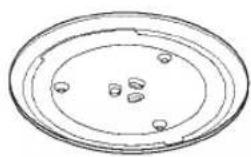
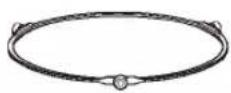
Take the appliance out of the box and remove all materials from the cooking chamber. Your appliance is equipped with the following accessories:
natural_image
Simple line drawing of concentric ovals with small circular elements inside (no text or symbols)Glass tray
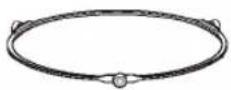
Turntable ring unit
Operating manual
natural_image
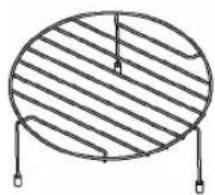
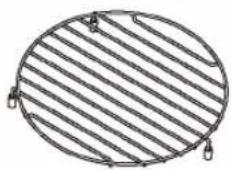
Simple line drawing of a circular object with diagonal hatching and hanging pins (no text or symbols)High grille (cannot be used with the microwave function).
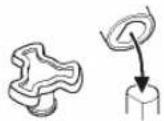
Turntable support
natural_image
Simple line drawing of a circular object with horizontal stripes and two small protrusions at the bottom (no text or symbols)Low grille (cannot be used with the microwave function).
text_image
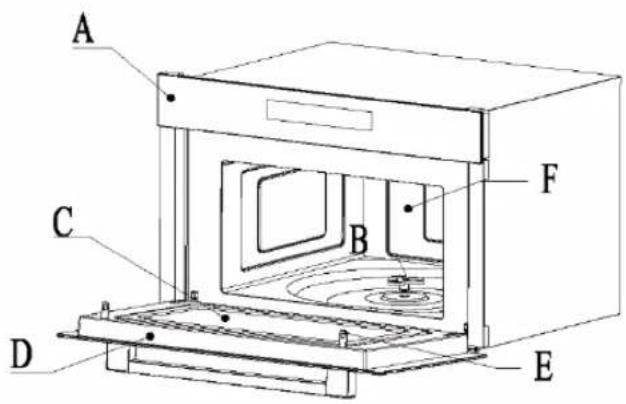
A C B F D EA) Operating panel
D) Door unit
B) Turntable support
E) Safety interlock system
C) Viewing window
F) Cooking chamber
Clean the cooking chamber and insert the turntable. For new installations, make sure that all packaging and transport ties have been removed from the turntable support. Before you use the appliance for the first time to prepare food, you must correctly insert the turntable. You need to clean the cooking chamber and the accessories.
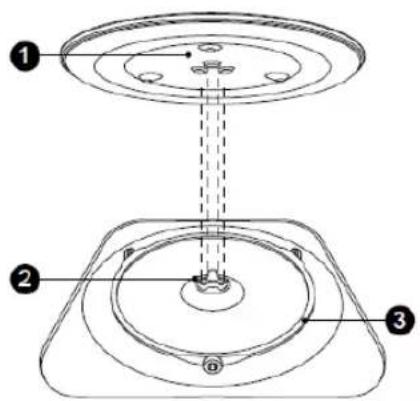
Insert the turntable as follows:
text_image
Technical diagram of a mechanical assembly with numbered components and dashed lines indicating alignment or assembly.-
Place the turntable ring unit ③ in the recess in the cooking chamber.
-
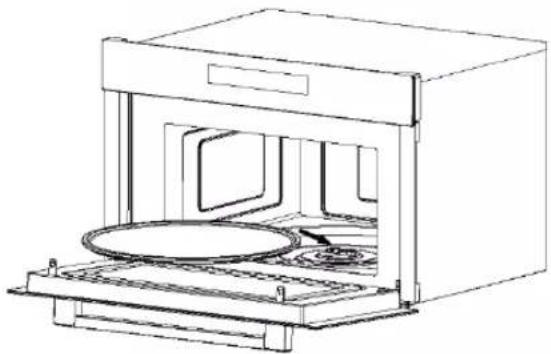
Place the glass tray ① on the turntable ring unit ③. Attach the raised, curved lines in the centre of the base of the glass tray between the three spokes of the support. Make sure that the glass tray ① latches in the turntable support ② in the centre of the cooking chamber base. The rollers on the support should fit into the bottom edge of the turntable.
natural_image
Line drawing of a microwave oven with cooling unit and fan (no text or symbols)NOTES:
- Never use the appliance without the turntable. Make sure that it has correctly latched into place. The turntable can rotate clockwise and counterclockwise.
- Never place the glass tray upside down. The glass tray should never be restricted.
- The glass tray as well as the turntable ring unit must always be used when cooking.
- Some foods and food containers are always placed on the glass tray for cooking.
- Never restrict the movement of the turntable.
- If the glass tray or turntable ring unit is cracked or breaks, contact your nearest authorised Service Centre.
INSTALLATION AND CONNECTION
- This appliance is only intended for domestic use.
- This oven is only intended for use as a built-in oven. It is not intended for use on a counter or in a cabinet.
- Please note the specific installation instructions.
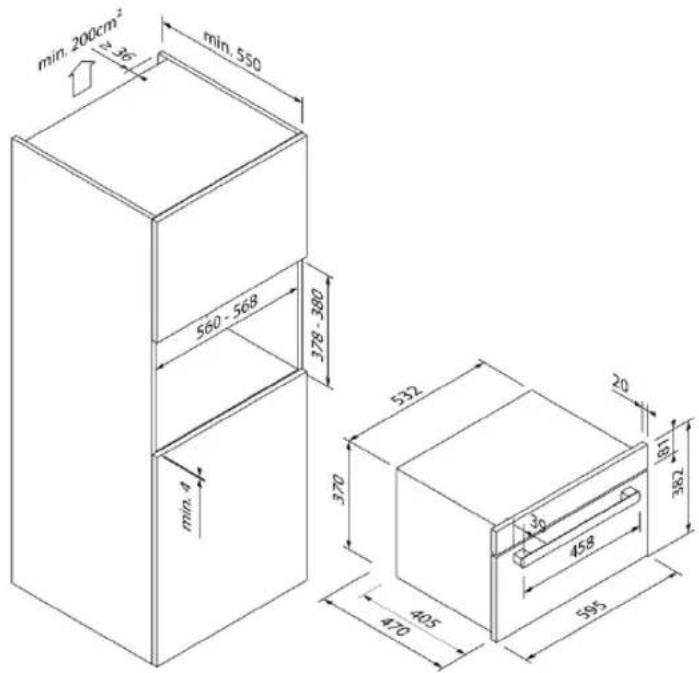
- The appliance can be installed in a tall cabinet 60 cm wide.
- This appliance is equipped with a plug and may only be connected to a properly installed earthed socket.
- The power supply must match the voltage indicated on the type plate.
- Only an authorised electrician is permitted to install the power socket and replace the connection cable. If the plug is no longer accessible after installation, a pole separator with a contact gap of at least 3 mm must be provided at the installation site.
- Adapters, socket strips and extension cables must not be used. Overloading can lead to risk of fire.
text_image
Warning symbol with steam inside a triangle, indicating heat or smoke hazardACCESSIBLE PARTS MAY BECOME HOT DURING OPERATION AND REMAIN HOT AFTERWARDS.
• The above dimensions are given in mm.
• The cabinets in which the appliance is installed must be heat-resistant up to 95 °C.
• The minimum installation height is 850 mm.
text_image
min. 200cm² 2.36 min. 550 560 - 568 378 - 380 min. 4 532 370 405 20 36 458 382 595Installation
- Do not carry or hold the appliance by the door handle. The door handle cannot support the weight of the appliance and may break off.
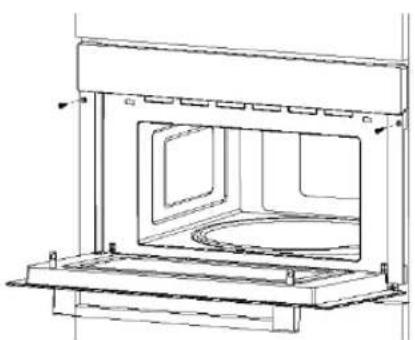
- Carefully push the appliance into the opening and make sure that it is centred.
- Open the door and fasten the appliance with the screws provided.
natural_image
Technical line drawing of a microwave oven with internal compartments and mounting base (no text or symbols)- Push the appliance all the way in and place it in the middle of the opening.
- Do not kink the connecting cable.
- Fasten the screws.
Electrical connection
- This appliance is equipped with a plug and may only be connected to a properly installed earthed socket.
- Only a qualified electrician who observes the relevant regulations may install the power plug or replace the connection cable. If the plug is no longer accessible after installation, an all-pole disconnector with a contact gap of at least 3 mm must be provided on the installation side.
- Contact protection must be ensured by the installation.
- Fuse protection: see the operating instructions for the technical data.
IMPORTANT INFORMATION WITH PLUG
- The appliance is designed for permanent installation with a three-pole mains cable and may only be connected by an authorised specialist in accordance with the wiring diagram.
- Only a qualified electrician who observes the relevant regulations may replace the connection cable.
- Do not use multiple plugs, socket strips or extensions. There is a risk of fire in the event of overload.
- If the plug is no longer accessible after installation, an all-pole disconnector with a contact gap of at least 3 mm must be provided.
Connect the wires of the power cable as per the following colour coding:
Green and yellow Earthing < (E)
Blue Neutral conductor (N)
Brown Live conductor (L)
Great Britain:
Do not connect the appliance to a 13 A plug and do not protect it with a 13 A fuse. The appliance must be protected with a 16 A fuse or higher. The appliance must be disconnected from the power supply during all installation work. Protection against accidental contact must be in place when installing the appliance.
OPERATING PANEL

text_image
User interface toolbar with menu bar, function keys, and navigation icons
Microwave

Function (grill/combination/circulation/defrost)

Clock/kitchen timer

Parameter setting
Parameter setting

Automatic menu

Cancel/pause/child lock

Start/+30 sec.
OPERATION
1. SETTING THE TIME
1) Tap twice on "Clock/kitchen timer", "00:00" is displayed and the hour digits flash.
2) Tap “—”, “+” or slide the “____” to set the hours between 0 and 23.
3) Tap "Clock/kitchen timer" to confirm, the minute digits flash.
4) Tap “—”, “+” or slide the “____” to set the minutes between 0 and 59.
5) Tap "Clock/kitchen time" to confirm the settings.
NOTE:
- The clock has a 24-hour display.
- To reset the clock, repeat the steps mentioned above.
2. KITCHEN TIMER
1) Tap once on "Clock/kitchen timer", "00:00" is displayed.
2) Tap “—”, “+” or slide the “——” to set the timer between 01:00 min. and 24:00 h.
3) Tap "Clock/kitchen time" to confirm the settings.
NOTE: No other program can be used while the kitchen timer is running.
3. MICROWAVE
1) In standby mode, press "Microwave" once and then "900 W", "01:00" is displayed.
2) Tap “—”, “+” or slide the “____” to set the cooking time.
3) Tap repeatedly on "Microwave" or tap "—"," "+" or slide the "——" to select the power; 900 W, 700 W, 500 W, 300 W, 100 W are displayed.
4) Tap "Clock/kitchen timer" to set the cooking time.
5) Tap "Start/+30 sec." to start the cooking process.
NOTES:
- At 900 W, the maximum cooking time is 30 minutes.
- At 700 W, 500 W, 300 W and 100 W, the maximum cooking time is 90 minutes.
4. GRILL AND COMBINATION FUNCTION
1) Tap once on "Function", "G-1" (grill) is displayed. Or tap "Function" three to six times to display C-1, C-2, C-3, C-4.
2) Tap “—”, “+” or slide the “——” to set the cooking time between 00:05 min. and 01:30 h.
3) Tap "Start/30 sec." to start the cooking process.
NOTES:
- A beep sounds as a reminder to turn the food during cooking. If no action is taken, the oven continues its operation.
- The cooking time can be changed during the cooking process. Tap “—”, “+” or slide the “——” to adjust the cooking time. The oven runs for the selected time.
NOTE: Instructions for the combination function
| Instruction | Display | Microwave | Grill | Circulation |
| 1 | C01 | ● | ● | |
| 2 | C02 | ● | ● | |
| 3 | C03 | ● | ● | |
| 4 | C04 | ● | ● | ● |
5. CIRCULATION WITH PREHEAT
1) Tapping twice on "Function" takes you to circulation, "160 °C" is displayed.
2) Tap “—”, “+” or slide the “____” to set the temperature. 10 temperature levels “130 °C – 220 °C” are available.
3) Tap "Start/+30 sec." to start the preheating process. A beep sounds when the preheat temperature is reached and the preheat symbol appears.
4) Open the door, place the food in the oven, then tap “—”, “+” or slide the “——” to set the cooking time.
5) Tap "Start/+30 sec." to start the cooking process.
6. CIRCULATION WITHOUT PREHEAT
1) Tapping twice on "Function" takes you to circulation, "160 °C" is displayed.
2) Tap “—”, “+” or slide the “____” to set the temperature. 10 temperature levels “130 °C – 220 °C” are available.
3) Tap "Clock/kitchen timer", "00:00" is displayed.
4) Tap “—”, “+” or slide the “——” to set the cooking time between 00:0,5 min. and 01:30 h.
5) Tap "Start/+30 sec." to start the cooking process.
7. DEFROST BY WEIGHT
1) Tap "Function" seven times, "dF1", "0.10 kg" is displayed.
2) Tap “—”, “+” or slide the “——” to set the weight of the food. This should be between 0.10 kg and 2.00 kg.
3) Tap "Start/+30 sec." to start the defrosting process.
NOTE: A beep sounds as a reminder to turn the food. If no action is taken, the oven continues its operation.
8. DEFROST BY TIME
1) Tap "Function" eight times, "dF2", "1:00" is displayed.
2) Tap “—”, “+” or slide the “——” to set the cooking time. This should be between 00:05 min. and 01:30 h.
3) Tap "Start/+30 sec." to start the defrosting process.
NOTE:
- A beep sounds as a reminder to turn the food. If no action is taken, the oven continues its operation.
- The defrost power is set at 300 W and cannot be changed.
9. QUICK COOK
1) In standby mode, tap "Start/+30 sec." to cook food for 30 seconds at 900 W.
2) Each additional tap on the same button extends the time by 30 seconds up to a maximum of 30 minutes.
NOTES:
- The quick cook power is set at 900 W and cannot be changed.
- In the microwave cooking setting, tap "Start/+30 sec." to extend the cooking time by 30 seconds. When grilling, combination cooking, circulation cooking or defrosting, the cooking time can be increased as described above. (Except when defrosting by weight and in the automatic menu).
10. CHILD LOCK
You can use this function to prevent children from accidentally turning on the oven.
Activating the child lock:
1) In standby mode, tap "Cancel/pause/child lock" and hold down the button for three seconds. A beep sounds and the lock symbol is displayed.
2) Deactivating the child lock:
3) In the locked state, tap "Cancel/pause/child lock" and hold down the button for three seconds. A beep sounds and the lock symbol disappears.
11. AUTOMATIC MENU
1) In standby mode, tap "Auto menu", "P01" is shown on the display. Tap repeatedly on "Auto menu" to select the menu you need. 11 auto menus are available.
2) Tap “—”, “+” or slide the “____” to set the weight of the food.
3) Tap "Start/+30 sec." to start the cooking process.
| Menu | Weight (g) | Display | Power button |
| P01 POTATOES | 230 g | 1 | 900 W |
| 460 g | 2 | ||
| 690 g | 3 | ||
| P02 MEAT | 150 g | 0.15 kg | 900 W |
| 300 g | 0.30 kg | ||
| 450 g | 0.45 kg | ||
| 600 g | 0.60 kg | ||
| P03 FISH | 150 g | 0.15 kg | 700 W |
| 250 g | 0.25 kg | ||
| 350 g | 0.35 kg | ||
| 450 g | 0.45 kg | ||
| 650 g | 0.65 kg | ||
| P04 VEGETABLES | 150 g | 0.15 kg | 900 W |
| 350 g | 0.35 kg | ||
| 500 g | 0.50 kg | ||
| P05 BEVERAGES | 1 cup (240 g) | 1 | 900 W |
| 2 cups | 2 | ||
| 3 cups | 3 | ||
| P06 PASTA | 50 g(with 450 g cold water) | 0.05 kg | 700 W |
| 100 g(with 800 g cold water) | 0.10 kg | ||
| 150 g(with 1,200 g cold water) | 0.15 kg | ||
| P07 POPCORN | 100 g | 0.10 kg | 900 W |
| P08 PIZZA | 200 g | 0.20 kg | Circulation 210°C |
| 300 g | 0.30 kg | ||
| 400 g | 0.40 kg | ||
| P09 CAKE | 475 g | 0.47 kg | Preheat 180 °C |
| P10 CHICKEN | 1,100 g | 1.10 kg | Circulation with preheat 220 °CCirculation 220 °C |
| P11 Biscuits with chocolate chips | 210 g | 0.21 kg | Preheat 180 °C |
NOTE: A beep sounds as a reminder to turn the food during the P10 menu.
TROUBLESHOOTING
| NORMAL | |
| The microwave interferes with the TV reception. | Interference with the radio and TV reception is possible when operating a microwave. This is similar to the interference caused by small electrical appliances such as mixers, vacuum cleaners and electric fans. This is normal. |
| Weak oven light | When cooking in the microwave at low power, the oven light can become weaker. This is normal. |
| Steam collects at the door, hot air escapes from the ventilation slots | Steam can rise from food during cooking. It usually escapes from the ventilation slots. It occasionally also collects at a cool place, like the oven door. This is normal. |
| The oven was accidentally started without food. | Operating the appliance without food is prohibited. This is very dangerous. |
| PROBLEM | POSSIBLE CAUSE | REMEDY |
| Oven cannot be started. | (1) The power cable is not inserted correctly. | Pull out the plug. Plug it in again after 10 seconds. |
| (2) The fuse is blown or the circuit breaker tripped. | Replace the fuse or reset the circuit breaker (have it repaired by the specialists at our company). | |
| (3) Problem with the power socket. | Test the outlet with other electrical devices. | |
| The oven is not heating. | (4) The door is not closed correctly. | Close the door firmly. |

natural_image
Symbol of a trash bin with crossed lines and a blank rectangular base (no text or labels)The symbol of the crossed-out wheeled bin on the product or its packaging means that the appliance is not suitable for disposal in household waste and that it requires separate disposal. You can deposit the old appliance at a suitable municipal collection point for waste electrical and electronic equipment free of charge, e.g. a recycling centre. The addresses can be provided by your city or local council.
Alternatively, you can return small waste electrical appliances with an edge length of up to 25 cm to retailers with a sales area for electrical and electronic appliances of at least 400 m2 or food retailers with a total sales area of at least 800 m2, which offer electrical and electronic appliances at least multiple times a year, free of charge. Larger old appliances can be returned to the retailer from which you purchase a new appliance of the same type, which predominantly performs the same function as the new appliance, free of charge. For the requirements for returning an old appliance in the event of the delivery of a new appliance, please contact your retailer.
Where possible, please remove all (rechargeable) batteries as well as all lamps that can be removed non-destructively, before disposing of the product.
Please note that you are independently responsible for deleting personal data on the appliance to be discarded.
TABLE DES MATIÈRES
3 MESURES DE PRÉCAUTION
3 Complément
3 Spécifications
4 CONSIGNES DE SÉCURITÉ IMPORTANTES
natural_image
Simple line drawing of concentric ovals with small circular elements inside (no text or symbols)Tablette en verre
natural_image
Simple line drawing of a circular object with diagonal hatching and hanging weights at the base (no text or symbols)natural_image
Circular diagram with diagonal striped pattern and four corner clips (no text or symbols)text_image
Technical diagram showing three labeled components of a mechanical assembly with concentric rings and a central shaft.natural_image
Line drawing of a microwave oven with a circular vent and fan (no text or symbols)REMARQUES :
text_image
Warning sign with steam symbol inside a triangle, indicating heat hazardLES PIÈCES ACCESSIBLES PEUVENT DEVENIR CHAUDES PENDANT LE FONCTIONNEMENT.
natural_image
Technical line drawing of a microwave oven with vent and door (no text or symbols)text_image
Screenshot of a software toolbar with icons for menu, function, and editing tools
Micro-ondes

natural_image
Symbol of a trash bin with crossed lines and a blank rectangular base (no text or labels)22 PROBLEEMOPLOSSING
natural_image
Simple circular diagram with diagonal hatching and hanging weights at the bottom (no text or symbols)natural_image
Circular diagram with diagonal striped pattern and four corner clips (no text or symbols)text_image
Technical diagram of a mechanical assembly with numbered components and directional arrows indicating motion or force.natural_image
Line drawing of a microwave oven with lid and tray (no text or symbols)AANWIJZINGEN:
text_image
Warning sign with steam symbol inside a triangle, indicating heat hazardnatural_image
Technical line drawing of a microwave oven with internal compartments and mounting base (no text or symbols)text_image
User interface toolbar with menu bar, navigation buttons, and playback controls
Magnetron
F
natural_image
Symbol of a waste bin with no text or labelsnatural_image
Simple line drawing of a circular object with internal oval and small dots, no text or symbols present.Piatto in vetro
natural_image
Simple line drawing of a circular object with diagonal hatching and two hanging pins at the bottom (no text or symbols)natural_image
Simple line drawing of a circular object with horizontal stripes and four corner clips (no text or symbols)text_image
Technical diagram of a mechanical assembly with numbered components and dashed lines indicating alignment or positioning.natural_image
Line drawing of a microwave oven with cooling unit and fan (no text or symbols)NOTA:
text_image
Warning symbol with steam inside a triangle, indicating heat or smoke hazardLE PARTI ACCESSIBILI POSSONO SURRISCALDARSI DURANTE E DOPO IL FUNZIONAMENTO.
natural_image
Technical line drawing of a microwave oven with vent and door (no text or symbols)text_image
User interface toolbar with menu bar, function keys, and navigation icons
Microonde
F
natural_image
Symbol of a waste bin with no text or labels, including a crossed-out box and a solid rectangle below (no readable text or symbols)natural_image
Simple line drawing of a circular object with internal features and small dots, no text or symbols present.Glasplade
Drejetallerken-ring-enhed
natural_image
Simple circular diagram with diagonal hatching and two hanging weights at the bottom (no text or symbols)natural_image
Circular diagram with diagonal striped pattern and four corner clips (no text or symbols)text_image
Technical diagram of a mechanical assembly with numbered components and directional arrows indicating motion or force.natural_image
Line drawing of a microwave oven with cooling unit and fan (no text or symbols)ANVISNINGER:
text_image
Warning symbol with steam inside a triangle, indicating hazardous materialDE TILGÆNGELIGE DELE KAN BLIVE VARME UNDER OG EFTER BRUG.
natural_image
Technical line drawing of a microwave oven with vent and door (no text or symbols)text_image
User interface toolbar with menu bar, navigation buttons, and playback controls
Mikrobølgeovn
F
Funktion (grill/kombi/varmluft/optøning)

Ur/Køkken-timer
-/+
Parameterindstilling
Parameterindstilling

Auto-menu

natural_image
Symbol of a waste bin with no text or labels, crossed by diagonal lines and a solid black rectangle below (no readable text or symbols)natural_image
Simple line drawing of a circular object with internal oval and small circular features (no text or symbols)Bandeja de cristal
natural_image
Simple circular diagram with diagonal hatching and hanging weights at the bottom (no text or symbols)natural_image
Circular diagram with diagonal hatching and three small symbols at corners (no text or labels)text_image
Technical diagram of a mechanical assembly with numbered components and dashed lines indicating motion or alignment.natural_image
Line drawing of a microwave oven with cooling unit and fan (no text or symbols)NOTAS:
text_image
Warning symbol with steam inside a triangle, indicating heat or smoke hazardLAS PARTES ACCESIBLES PUEDEN CALENTARSE DURANTE Y DESPUÉS DEL FUNCIONAMIENTO.
natural_image
Technical line drawing of a microwave oven with internal compartments and mounting base (no text or symbols)text_image
Screenshot of a media player interface with playback controls and status bar
Microondas
F
natural_image
Symbol of a recycling bin with no text or labelstext_image
BLAUPUNKT