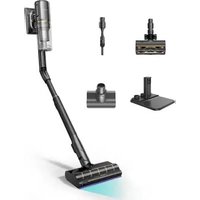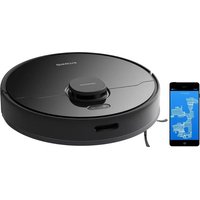
D9 Max - Vacuum Cleaner DREAME - Free user manual and instructions
Find the device manual for free D9 Max DREAME in PDF.



| Product Type | Robotic vacuum cleaner with mopping |
| Brand | Dreame |
| Model | D9 Max |
| Power supply | Rechargeable lithium-ion battery, capacity 1200 mAh, charger 19.5V / 1A |
| Runtime | Up to 110 minutes (estimated) |
| Charging time | Approximately 6 hours |
| Cleaning modes | Silent, Standard, Strong, Turbo (via app) |
| Mopping function | Yes, with water tank and removable mop pad |
| Navigation | LiDAR laser (laser distance sensor) |
| Connectivity | Wi-Fi 2.4 GHz, Mi Home / Xiaomi Home app |
| Sensors | Drop, edge, laser distance, return to charge |
| Dustbin | With washable filter |
| Brushes | Removable main brush and side brush |
| Programming | Scheduled cleaning via app |
| Do Not Disturb mode | Yes, programmable (default 25:00 to 36:40 - check) |
| Safety | Drop sensors, anti-collision, automatic shut-off |
| Usage | Indoors only, flat surface. Suitable for children aged 9+ under supervision |
| Maintenance | Clean dustbin, filter, brushes, sensors, charging contacts regularly |
| Operating temperature | 0°C to 40°C |
| Warranty | See manufacturer's conditions |
Frequently Asked Questions - D9 Max DREAME
User questions about D9 Max DREAME
0 question about this device. Answer the ones you know or ask your own.
Ask a new question about this device
Download the instructions for your Vacuum Cleaner in PDF format for free! Find your manual D9 Max - DREAME and take your electronic device back in hand. On this page are published all the documents necessary for the use of your device. D9 Max by DREAME.
USER MANUAL D9 Max DREAME
• The word "dreame" is the abbreviation of Dreamo Technology Co., Ltd. and its subsidiaries in China. It is the transliteration of the company's Chinese name "倾贝", which means striving for excellents in every endeavor and reflects the company's vision of continuous pursuit, exploration and search in technology.
• Among all the people, “Yes” is not being able to obtain a person in Dracoma Technology Co., Ltd. and be associated with the name of the person in Dracoma
For more information, please visit www.dreame-technology.com Manufactured by: Dreame Trading (Tianjin) Co., Ltd.
Made in China
RL55-WHO EN-A01
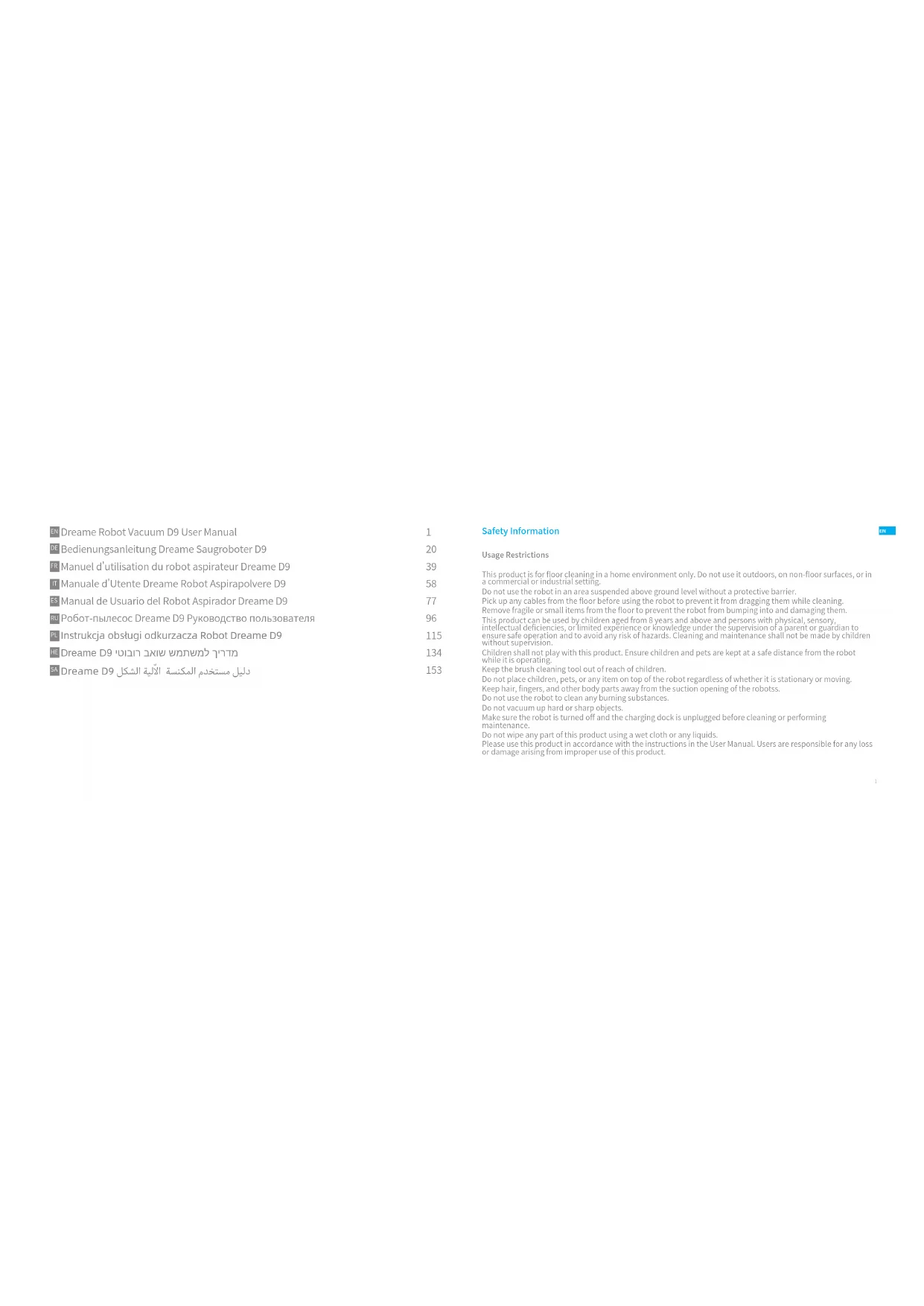
Read this manual carefully before use and retain it for future reference.
dreame
EN Dreame Robot Vacuum D9 User Manual 1
DE Bedienungsanleitung Dreame Saugroboter D9 20
FR Manuel d'utilisation du robot aspirateur Dreame D9 39
IT Manuale d'Utente Dreame Robot Aspirapolvere D9 58
ES Manual de Usuario del Robot Aspirador Dreame D9 77
RU Робот-пылесос Dreame D9 Руководство пользователя 96
PL Instrukcja obsługi odkurzacza Robot Dreame D9 11
HE Dreame D9 13
5A Dreame D9 دليل مستخدم المكنسة الآلية الشكل 15
Safety Information
Usage Restrictions
This product is for floor cleaning in a home environment only. Do not use it outdoors, on non-floor surfaces, or in a commercial or industrial setting.
Do not use the robot in an area suspended above ground level without a protective barrier.
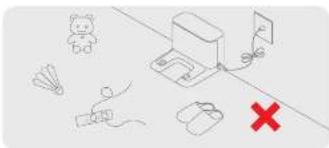
Pick up any cables from the floor before using the robot to prevent it from dragging them while cleaning.
Remove fragile or small items from the floor to prevent the robot from bumping into and damaging them
This product can be used by children aged from 8 years and above and persons with physical, sensory, intellectual functioning, unlimited experience or knowledge under the supervision of a concept or pure
Intellectual deficiencies, or limited experience of knowledge under the supervision of a parent or guardian to ensure safe operation and to avoid any risk of hazards. Cleaning and maintenance shall not be made by children without supervision.
Children shall not play with this product. Ensure children and pets are kept at a safe distance from the robot while it is operating.
Keep the brush cleaning tool out of reach of children.
Do not place children, pets, or any item on top of the robot regardless of whether it is stationary or moving.
Keep hair, fingers, and other body parts away from the suction opening of the robotss.
Do not use the robot to clean any burning substances.
Do not vacuum up hard or sharp objects.
Make sure the robot is turned off and the charging dock is unplugged before cleaning or performing
maintenance.
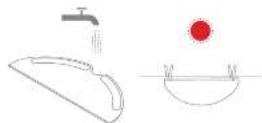
Do not wipe any part of this product using a wet cloth or any liquids.
Please use this product in accordance with the instructions in the User Manual. Users are responsible for any loss
or damage arising from improper use of this product.

Safety Information
Batteries and Charging
WARNING: Do not use any third-party battery. Use only with RCSO charging dock.
Do not attempt to disassemble, repair, or modify the battery or charging dock on your own.
Do not place the charging dock near a heat source.
Do not use a wet cloth or wet hands to wipe or clean the dock's charging contacts.
Do not improperly dispose of old batteries. Unneeded batteries should be discarded at an appropriate recycling facility.
If the power cord becomes damaged or broken, stop using it immediately and contact after-sales service.
Make sure the robot is turned off when being transported and kept in its original packaging if possible.
If the robot will not be used for an extended period, fully charge it, then turn it off and store in a cool, dry place. Recharge the robot at least once every 3 months to avoid over-discharging the battery.
This product contains batteries that can only be replaced by qualified technicians or after-sales service.
Product Overview
Accessories

Charging Dock

Cleaning Cool Power Cool
Water
Wood Pad

Side Brush
Hereby, Dreame Trading (Tianjin) Co., Ltd. declares that the radio equipment type RL55-WHD is in compliance with Directive 2014/53/EU.
The full text of the EU declaration of conformity is available at the following internet address: www.dreame-technology.com For delivering a manual, please use to https://www.dreame/technology.com/en/you-man-ina,and/jam
For derivative of mutual preference (X1, X2, X3), MAX(4) is the best model for the x_0 in the x_1 and x_2 models.
Note: The illustrations in this manual are for reference only. Please refer to the actual product for the actual appearance.


Product Overview
Robot
text_image
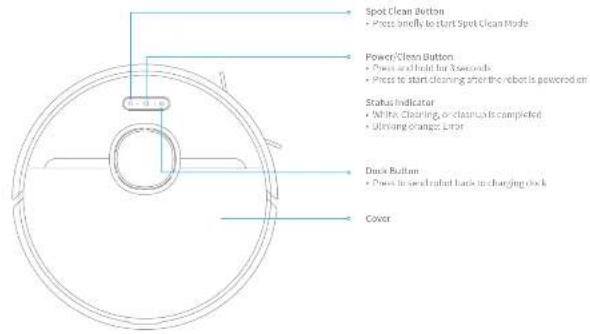
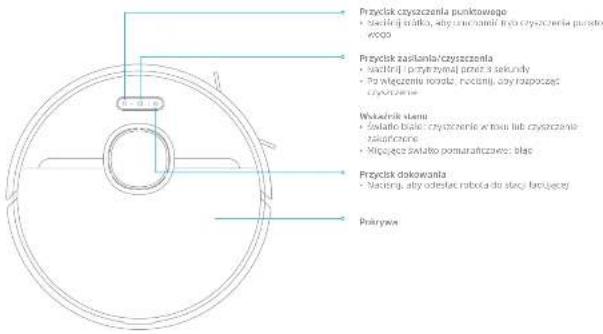
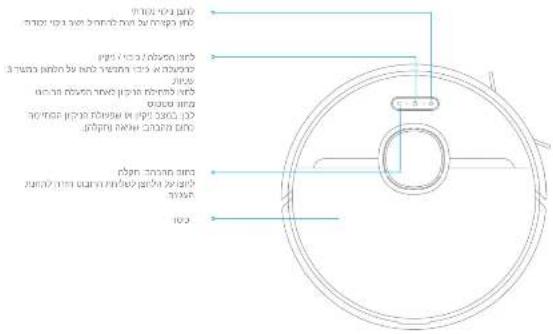
Spot Clean Button - Press briefly to start Spot Clean Mode Power/Clean Button - Press and hold for 5 seconds - Press to start cleaning after the robot is powered on Status Indicator - White Cleaning, or clean is completed - Unwinged Change Error Deck Button - Press to send robot back to changing clock CoverProduct Overview
Robot
text_image
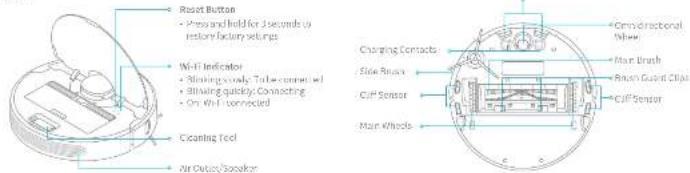
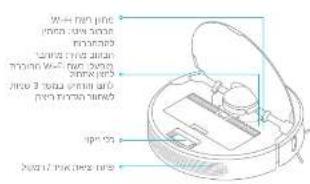
Reset Button • Press and hold for 2 seconds to restore factory settings Wi-Fi Indicator • Blinking slowly, Tube connected • Blinking quickly. Connecting • On Wi-Fi connected Cleaning Tool Air Outlet Speaker Charging Contacts Side Reaches CUP Sensor Main Wheels Ornidirectional Wheel Main Brush Racer Guard Clips CUP SensorRobot Sensors
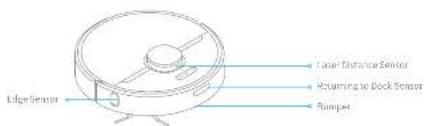
text_image
Edge Sensor Laser Distance Sensor Returning to Dock Sensor Rumper


Product Overview
Dust Bin Mopping Module
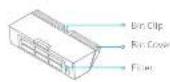
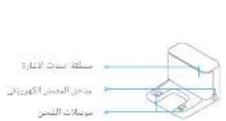
Charging Dock
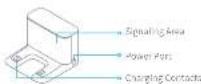
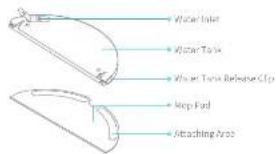
text_image
Water Inlet Water Tap Water Tap Release Clip Mop Pad Attaching AreaClearing Home Environment
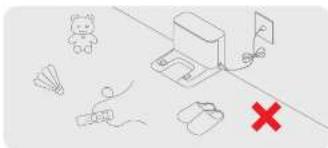
natural_image
Pure electrical circuit lines without any symbolsTo prevent your rather from getting ranged or trapped, key up any base card (including power card of charging clock, diselenh, slipper, toy, etc.
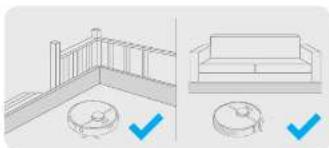
natural_image
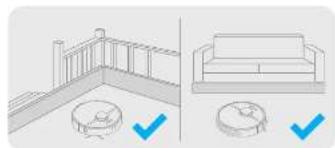
Architectural diagram showing a railing and a sofa with checkmarks indicating inspection points (no text or symbols present)Before cleaning, use physical barrier at the edge of stairs and sofa to prevent your robot from getting trapped or fumbling down.
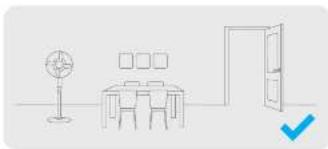
natural_image
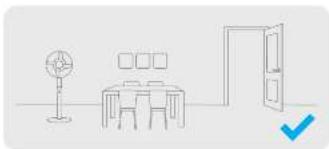
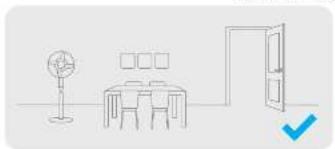
Simple line drawing of a meeting room with a desk, lamp, and door (no text or symbols)Open the door of the room to be cleaned, and put the furniture into proper place to make more space.
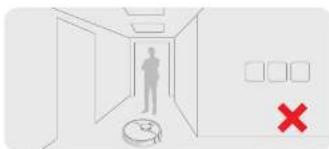
text_image
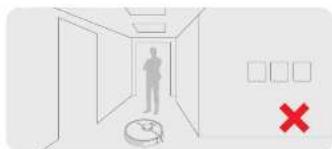
Diagram showing a hallway with a person standing at the entrance, a clock, and a red 'X' symbol indicating absence or error.To prevent the robot from no, recognizing the area to be cleaned, do not stand in the front of motor, threshold, half way of native places.
Preparation
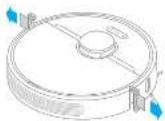
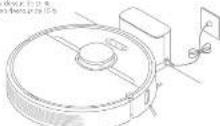
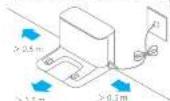
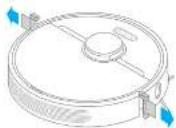
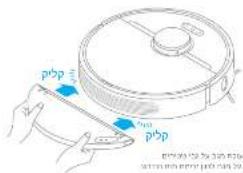
- Remove the protective film 3. Place the charging dock on the level ground against wall
Remove the protective films on the side of collision buffer and charging dock.
- Install the side brush
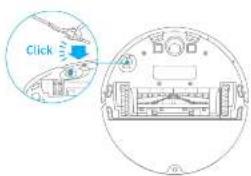
text_image
ClickNote: (used the side group) in this case machine.
and connect to a power outlet
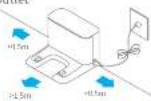
Nelac:
• Make sure there is a distance of 0.5 meters or more on either side of the charging dock, and more than 1 meter to be carried up.
- Tide up one was a cold which could decide to be most similar the shipping desk.
- To ensure you can well connect to the robot with your phone, make sure the robot and
charging deck are in the range of 30+
• In our place, the charging device in an area with other smart grid where other electrical units
bases its signaling area, as this may hence the rebacterium returning to the charging case.
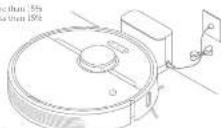
- Place the robot onto the charging dock to recharge. The
robot will turn on automatically and charge
(1) Batten's model indicator
- White battery level is more than 5%
• Orange: Battery level less than 15%
特此。
• Fully changes before first use
a Due! Tired the corrugine mottle while changing, that the corrugine is a wife
(see control of proposed fuel carrier electrolysis with chemokilin,
Connecting with Mi Home/Xiaomi Home App
This product works with MI Home/Xiaomi Home app ^4 .
- Download Mi Home/Xiaomi Home App
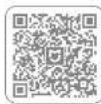
Scan the Off cards to download and install the app. You will be directed to the
connection setup page If the app is installed already. Or search "MI Home"
Xiaomi Home ^+ in the App Store to openlined and installed
- Add Device
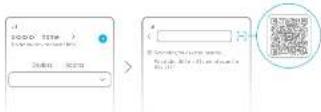
Open MI Home Xhome Home app, and tap, on the upper right. Then tap
"Top light corner", scan the Off-code, and "Dreamer Robber Vacuum Oil" and
follow prompts to finish the connection.
Noble
- Only 2.1GHz V3 FIB supported
• The action of the right move has been updated, please illustrate the movement function.
the amount may be
- Reset Wi-Fi
Simultaneously press and hold the buttons and until you hear a voice
saying "Waiting for the network configuration". Once the self-indicators is
slowly blinking, the Wi-Fi has been successfully reset.
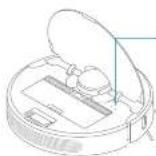
Wi-Fi indicator
• Barking slowly. To be
corrected
• Banking units
Connecting
- On: A) I connected
表决方式:现场投票


How to Use
1. Turn On/OFF
Press and hold the button ① for 3 seconds to turn on the robot. Once the power indicator turns solid white, the robot is in standby mode. To turn off the robot, press and hold the button ② for 3 seconds while the robot is stationary. Turning off the robot will end the current cleaning task.
2. Start Cleaning
Press the button (2) briefly to turn on the robot. Upon activation, the robot will accurately map our route, and then it is normally clean each room in a way that it firstly cleans along edges and walls and then clean floors in an 3-shape pattern to ensure a thorough job.
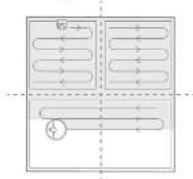
Notes: If the battery is too low, the robot will automatically return to the deck to charge. It will reduce unfinished cleaning tasks after charging to the appropriate power. [Resume Cleaning mode need to operate in advance on the APP].
10
3. Cleaning Mode
Four cleaning modes are available in the MI Home/Standard Home app: Quick Standard, Strong and Turbo. The default mode is Standard.
4. Pausing/Sleep Mode
Packing: Press any button to serve the robot during cleaning. Sleep Mode. The robot will automatically enter sleep mode after 10 minutes of inactivity, then the power and charging indicators will go off. To wake up the robot, press any button.
- The motor, will turn off auto naturally in the sleep mode more than 12 hours. - When the motor is paired, stirring it into the charging clock will end the current cleaning task.
5. Do Not Disturb Mode
Do Not Disturb mode prevents the root from automatically starting cleaning tasks, and the power indicator remains off. You can enable Do Not Disturb or modify its hours in the app. (The mode is opened by default than 25:00 to 68:00.)
- Served clean-up will be rated out during the LIME period. - The mini will continue clean-up after this period.
How to Use
6. Spot Clean mode 7. Scheduled Cleaning
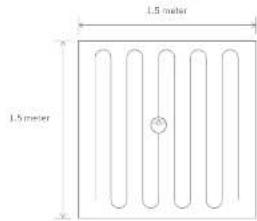
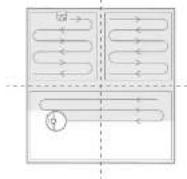
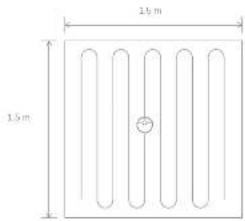
When the nut is a standing man or passed, press and told the letter. For 2 seconds to start Spot Clean mode, in this mode, it will clean a square shaped area of 1.5 × 1.9 meters directly around the nut. When the spot cleaning is done, the nut will accurately return up its original position and shoot off.
text_image
1.5 meter 1.5 meterNote: Affecting Scott Clean space with the current clearing hook of the relief.
You can choose cleaning time in the 3i Home/Kadini Home app. The robot will automatically start cleaning at the designated time and then return to the charging deck to recharge when the cleaning is done.
8. More APP Functions
Follow the instructions on the A22 interface to use more functions. The version of the aporight base was unrolled, and please follow the instructions based on the current apor version.
11

How to Use
9. Use the Mopping Function
It is recommended that all floors are vacuumed at least three times before the first ongoing session to achieve better cleaning effect.
To Dam pen the map and writing out water water. Slide the pad all the way into the slot of the water tank until it is securely in place.
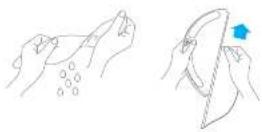
2) Open the water tank ie, liu. the tank with water, then securely close the lid.
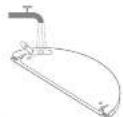
Note: The _1 - _2 - _3 - _4 - _5 - _6 - _7 - _8 - _9 - _10 - _11 - _12
2) Sign the mopping measure as indicated by the arrow, then slide it into the lock of the hand and it links in a plane. Press the manufacture or use MI Home Xiaomi Home app to start cleaning.
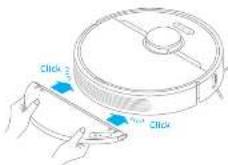
Note:
• It is not recommended to use the mapping function or the capital.
• Use the scope of about the water flow required.
4) Press the two slide slips onwards and slide the water tank backwards to separate it from the robot.
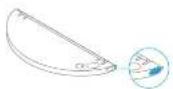
Note: When the water is charging, then water, remove the moisture mixture, pure out all remaining water in the tank, and clean the map pad to prevent mild or ingesting odors.
Routine Maintenance
Clean the Dust Bin and Filter
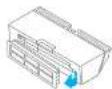
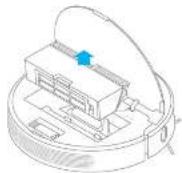
- Open the black cast, then press the dust file clip to remove the dust file.
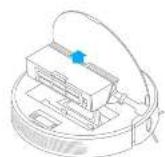
2. Open the dust bin cover as indicated by the diagram.
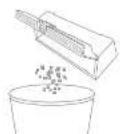
-
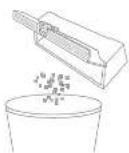
Formative linear and partial tasks given.
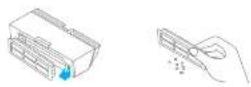
Kai, Do not attempt to share the first 2nd (canal or finger). -
Rinse the dust pin and filter with water until it is clean. Thoroughly dry the filter before re-instelling.
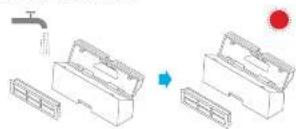
Note: - Only clean water should be used to clean the filter. Do not use detergent.
- Keep it in a well-partilated or non-play.


Routine Maintenance
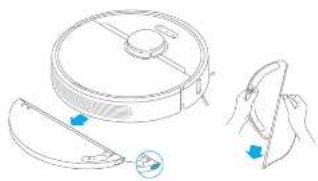
- Press the two-revenue clips on the side of water tank, remove the mopping module and pull the mop pad off the mopping module.
natural_image
Line drawing of a robotic vacuum cleaner with a handle and control panel, showing step-by-step assembly (no text or symbols)- Pour out the water in the bank. Clean with water only and leave a air dry bath on-instraining.
Note: Do not use any ceating agents or disinfections.
1
- Clean the man paid with water only and leave to air dry before re-stalling.
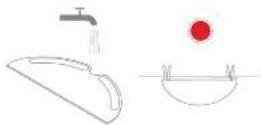
Nebw:
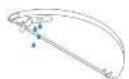
- Remove the pod from the hanging module before clearing it, and make sure dirty water does not how back into the water outlet to avoid clogging. - For open port performance, it is recommended to replace the mop pod every 3 to 5 months.
- If slow water flow occurs, or the volume is not well-distributed, please clean the air hole in the cover of the water tank.
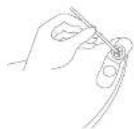
Routine Maintenance
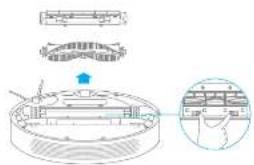
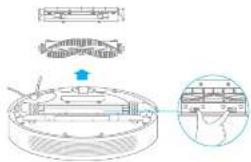
Clean the Main Brush
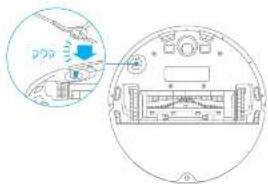
Press the brush guard clip, encronics to remove the brush guard and let the brush out of the robot.
text_image
Technical diagram showing a mechanical assembly with labeled components and an inset view of a device layout.Call out the brush covers as indicated by the square. Use the included cleaning tool to remove any hairs tangled on the brush.
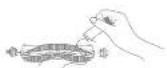
Clean the Side Brush
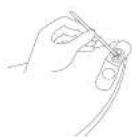
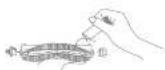
Pull out the size brushes and use the included cleaning tool to remove any hair tangled on fine areas.
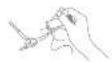
Note: Do not pull out the hair excessively to avoid the damage of brush when the hair is healthy enough on the brush
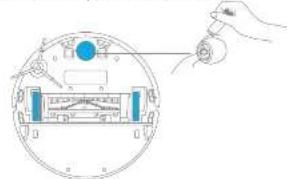
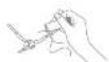
Clean the Main Wheel / Omnidirectional Wheel
natural_image
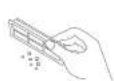
Diagram of a hand holding a small device with a blue circular component, showing internal components without any text or symbols.Kobe One instance as a small rectangle, also in separate the code and the line
15

Routine Maintenance
Under Pleasantly dry drying, increasing in the water and more charging thick the water as well as the only. De use and water intake is presented immediately by water.
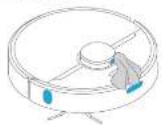
Clean the Laser Distance Sensor / Returning to Charge Sensor / Edge Sensor
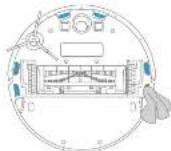
Clean the Cliff Sensor
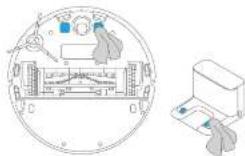
Clean the Charging Contact
Robot Restarting
If the robot stops responding or cannot be turned off, press and hold down the button for 10 seconds to forcefully turn it off. Then press and hold the button for 3 seconds to turn the robot on
Battery
The robot contains a high performance lithium-ion battery pack. Please ensure that a remains well-charged during daily use to maintain optimal battery performance. If the robot is not used for an extended period, turn it off and put it away. To percent damage from over discharging, the robot should be challenged at least once every two minutes.
FAQ
| Problem Type | Solution |
| Rebo, does not turn in | Battery level is now electric the robot at the charging clock, then imports. The ambient temperature should be before 20°C, or too high (above 40°C). The operating temperature of the robot is 20°C to 40°C. |
| Endbox does not re charge | I like charging clock is not receiving power. Please confirm that both ends of the power cord are plugged in correctly. Poor contact. Clean the charging contacts of the charging clock and the endbox. |
| Rebo, does not return to charging clock | There are too many subscriptions around the charging clock. Place the charging clock into a more open area. Please clean the clock's grading area. |
| Endbox is mellan closing | Turn off the robot and then read inside it. |
| Rebo, makes a strange noise | A foreign object might be caught in the main brush, photo brush, or one of the main wheels. Stop the robot and remove any debris. |
| Rebo no longer drops efficiently or less easily behind | The dust bin is full. Please clean it. The filler is blocked. Inverse clean it. A foreign object is caught in the main brush. Please clean it. |
| Rebo, cannot connect to Wi-Fi | There is somewhat wrong with the Wi-Fi connection. Repeat the Wi-Fi and put down the latest version of the Wi Home&Digital home app, directly reconnecting. Location permission is not opened. Please ensure to the location permission on the Wi Home&Digital Home app is opened. Wi-Fi signal weak. Make sure the user is in an several good Wi-Fi coverage. 5GHz Wi-Fi is not supported. Please ensure your robot contacts to 2.4GHz Wi-Fi. The user name or password of Wi-Fi is incorrect. Please ensure enter correct user name and password. |
| Rebo does not perform scheduled cleaning | Rebo has low battery scheduled cleaning will start after charging. |

EN FAQ
| Problem Type Solution | |
| Joes leaving the robot on the charging clock consume power if it's already charged? | Leaving the robot on the charging clock after it is fully charged consumes very little electricity and helps maintain optimal battery performance. |
| Free water comes out of the wrapping module, or only a little hit room and | Conlern that this water tank is filled with water, and clean the mop pod if necessary. Clean the mop of it becomes dirty. Clean the mop of it can be installed correctly according to the user manual. Clean the biohole on the water tank. |
| Robot doesn't resume cleaning after charging | Make sure the robot is not sure to do, not difficult mode, which will pass it then resuming cleaning. The robot does not resume cleaning when it is manually not large or placed onto the charging cock. |
| Robot doesn't return to charging clock after being moved | Making the robot may cause it to re position itself or no mop, its surroundings, if the robot is too far from the charging cock, it might not be able to automatically return until room, in which I have you need to manually place the robot on the charging dock. |
Specifications
Robot Charging Dock
| Model RLS5-4VH | |
| Battery 5203 mAh. (Battery Normal Capacity) | |
| Charging Time Approx. 6 hours | |
| Wireless Connectivity 4V IEEE 801.11s/g/n 2.4 GHz | |
| Rated Voltage 14.4 V | --- |
| Rated Power 40 Ω | |
| Operation Frequency 240×240×3 MHz | |
| Maximum Output Power <20 dBm | |
| Model | HCS9 |
| Rated Input | 10A-36V~5360Hz 0.5A |
| Rated Output | 19.5V=1A |
Under normal use of condition, the equipment should be kept a separation distance at least 20cm between the antenna and the body of the wire.
WEEE Information

All products having this symbol are waste electrical and electronic equipment (WEEE as in directives 2012/19/20), which should not be helped with or before household waste. Instead, you should protect human health and the environment by bending over your waste equipment to a designated collection point for the recycling of waste electrical and electronic equipment, appointed by the government or local authorities. Correct disposal and recycling will help prevent potential recovery and monitoring services to the environment and human health. Please contact the installer or local authorities for online information about the location as well as terms and conditions of such collection points.

text_image
Kanlersensor Laserdistancensor Laserdistancensor BioMinger25
Produktübersicht
text_image
Diagram showing electrical connections with a switch, motor, and a red X mark indicating a fault or failure point.natural_image
Simple line drawing of a room layout with a desk, lamp, and door (no text or symbols)natural_image
Illustration showing a balcony with railings and a sofa, both marked with blue checkmarks (no text or symbols)text_image
Diagram showing a hallway with a person standing at the entrance, a robot on the floor, and a red 'X' symbol indicating absence or error.natural_image
Line drawing of a robotic vacuum cleaner with a handle and control panel, alongside a close-up of hands holding a device (no text or symbols)text_image
Diagram illustrating a mechanical assembly with labeled components and a magnified inset showing detail view.text_image
Diagram showing a hand holding a device with labeled components and a circular dial, likely illustrating a measurement or control system.natural_image
Diagram of a circular device with internal components and a separate view of a printer (no text or symbols)natural_image
Pure electrical circuit lines without any symbolsnatural_image
Simple line drawing of a dining area with a desk, lamp, and door (no text or symbols)natural_image
Architectural diagram showing a railing and a sofa with blue checkmarks indicating alignment (no text or symbols)text_image
Diagram showing a hallway with a person silhouette, a robot, and a red 'X' symbol indicating absence or error.• blue, rhodium/basic acid
• 2014-10-25
• Character com prenters and a precliter
natural_image
Line drawing of a robotic vacuum cleaner with a handle and control panel, no text or symbols presenttext_image
Technical diagram showing a mechanical assembly with labeled components and a magnified inset view of a hand holding a component.text_image
Diagram showing a hand inserting a component into a circular device with labeled ports and indicatorsRamaque (1) Ilhae dae mllbc talcun psei (inamcic, e. quar yasper) ^1 sec at la presu.
FR

Maintenance de routine
text_image
Diagram showing electrical connections with a switch, battery, and a red 'X' symbol indicating a fault or failure point.natural_image
Simple line drawing of a dining area with a table, lamp, and door (no text or symbols)natural_image
Illustration showing a balcony with railings and a sofa, both marked with blue checkmarks (no text or symbols present)text_image
Diagram showing a hallway with a person standing at the entrance, a robot, and a red 'X' symbol indicating absence or error.• Taxism in the next quarter, 2017, is a tax rate of 3.5% incl. on minimum Hilt and tax rate of 4.5%.
- Research of the mean as a variance if the ratio is related to a normal error in 0.241 per
- Loses del 2016 del 2017 del 2018 del 2019 del 2020 del 2021 del 2022 del 2023 del 2024 del 2025 del 2026 del 2027 del 2028 del 2029 del 2030 del 2031 del 2032 del 2033 del 2034 del 2035 del 2036 del 2037 del 2038 del 2039 del 2040 del 2041 del 2042 del 2043 del 2044 del 2045 del 2046 del 2047 del 2048 del 2049 del 2050 del 2051 del 2052 del 2053 del 2054 del 2055 del 2056 del 2057 del 2058 del 2059 del 2060 del 2061 del 2062 del 2063 del 2064 del 2065 del 2066 del 2067 del 2068 del 2069 del 2070 del 2071 del 2072 del 2073 del 2074 del 2075 del 2076 del 2077 del 2078 del 2079 del 2080 del 2081 del 2082 del 2083 del 2084 del 2085 del 2086 del 2087 del 2088 del 2089 del 2090 del 2091 del 2092 del 2093 del 2094 del 2095 del 2096 del 2097 del 2098 del 2099 del 2100
- In this we see self-app purchase case that a group of the same financial products are not self-app purchases.
10
30.216.56 19:48:39:27
perziemiu a la azoemie i sinta
• France Canada's 40% of the Canadian (France) and other countries in the United States
2、本次发行前公司总股本

Istruzioni utente
natural_image
Line drawing of a robotic vacuum cleaner with a handle and control panel, accompanied by a close-up of its tip (no text or symbols)Pilabu Film at 120000 skiripengi and scrofa.
- Fullree far asclupans I permard laagigic.
text_image
Diagram illustrating a mechanical assembly with labeled components and a magnified view of the component's internal structure.text_image
Diagram of a circular meter with labeled scale and pointer, showing measurement setup and hand actionHindi utilizare a unimendin per segura i'aoa.
text_image
Technical diagram of a circular mechanical component with labeled dimensions and featuresnatural_image
Pure electrical circuit lines without any symbolsnatural_image
Simple line drawing of a dining table with a lamp and door, no text or symbols presentnatural_image
Architectural diagram showing a railing and a sofa with checkmarks indicating selection (no text or symbols present)text_image
Diagram showing a hallway with a person standing at the entrance, a clock, and a red 'X' symbol indicating cancellation or error.• In fact, the following described information is provided in Table 1. The authors and the reference of the
natural_image
Line drawing of a vacuum cleaner with a handle and control panel, showing step-by-step assembly (no text or symbols)text_image
Technical diagram showing a mechanical assembly with labeled components and a magnified inset of a component detail.text_image
Diagram showing a hand holding a pointer at the top of a circular dial with measurement scales and a pointer indicating 0.5V.natural_image
Diagram of a circular device with internal components and a separate rectangular device (no text or symbols)Reinicio del robot
text_image
Rodrigator blade Rodrigator face Screw, face and upper brine Shin Shin'bru Obstose propellingRU
11
Домашняя уборка
text_image
Diagram showing a device with a switch and a red X mark, alongside icons for a cartoon character, fan, and mouse.natural_image
Simple line drawing of a dining area with a desk, lamp, and door (no text or symbols)natural_image
Illustration showing a balcony with railings and a sofa, both marked with blue checkmarks (no text or symbols present)text_image
Diagram showing a person standing in a hallway with a robot and a red 'X' symbol indicating a failure or rejection.natural_image
Line drawing of a robotic vacuum cleaner with a handle and control panel, alongside a close-up of hands holding a small object (no text or symbols)text_image
Technical diagram showing mechanical assembly with labeled components and a magnified inset view of a component detail.text_image
Diagram showing a hand holding a device with labeled components inside a circular frame, including a dial and control panel.- 2024-08-06, 1. 2024-08-07, 1. 2024-08-08, 1. 2024-08-09, 1. 2024-08-10, 1. 2024-08-11, 1. 2024-08-12, 1. 2024-08-13, 1. 2024-08-14, 1. 2024-08-15, 1. 2024-08-16, 1. 2024-08-17, 1. 2024-08-18, 1. 2024-08-19, 1. 2024-08-20, 1. 2024-08-21, 1. 2024-08-22, 1. 2024-08-23, 1. 2024-08-24, 1. 2024-08-25, 1. 2024-08-26, 1. 2024-08-27, 1. 2024-08-28, 1. 2024-08-29, 1. 2024-08-30, 1. 2024-08-31, 1. 2024-08-32, 1. 2024-08-33, 1. 2024-08-34, 1. 2024-08-35, 1. 2024-08-36, 1. 2024-08-37, 1. 2024-08-38, 1. 2024-08-39, 1. 2024-08-40, 1. 2024-08-41, 1. 2024-08-42, 1. 2024-08-43, 1. 2024-08-44, 1. 2024-08-45, 1. 2024-08-46, 1. 2024-08-47, 1. 2024-08-48, 1. 2024-08-49, 1. 2024-08-50, 1. 2024-08-51, 1. 2024-08-52, 1. 2024-08-53, 1. 2024-08-54, 1. 2024-08-55, 1. 2024-08-56, 1. 2024-08-57, 1. 2024-08-58, 1. 2024-08-59, 1. 2024-08-60, 1. 2024-08-61, 1. 2024-08-62, 1. 2024-08-63, 1. 2024-08-64, 1. 2024-08-65, 1. 2024-08-66, 1. 2024-08-67, 1. 2024-08-68, 1. 2024-08-69, 1. 2024-08-70, 1. 2024-08-71,
Регулярный уход
Energy consumption, energy consumption, and energy consumption

117

Przegład produktu
Robot
natural_image
Diagram showing a device with a switch and a red X mark, surrounded by icons including a cat, airplane, mouse, and a wall-mounted power outlet (no text or symbols present)natural_image
Simple line drawing of a room layout with a desk, lamp, and door (no text or symbols)natural_image
Illustration showing a railing and a sofa with checkmarks indicating alignment (no text or symbols present)text_image
Diagram showing a hallway with a person standing at the entrance, a clock, and a red 'X' symbol indicating cancellation or error.• 6.04: requirements for the following described herein, including money and cash flows from various sources of securities or financial instruments (e.g., securities, derivatives, issuances, issuances and other financial instruments).
natural_image
Line drawing of a vacuum cleaner with a handle and control panel, alongside a hand holding a tool (no text or symbols)• PC, byst, what will find me easily to be able to use the PC. As a study a wocanie is known as a well-being of the body, any kind of age is available. • Any person's primary physician, nurses are working about 3-h omissions.
text_image
Technical diagram showing a mechanical assembly with labeled components and an inset close-up view of a component detail.text_image
Diagram showing a hand inserting a component into a circular device with labeled parts and a central screen.liangar: Fan more, eate, neti, nemy, neboy, orwae boin, naorctn, yat moly, indirinet.
P6
123

Dzienna konserwacja
natural_image
Five technical line drawings of electronic components or devices, including a battery, plug, and fan (no text or symbols present)01217
The following table is a simple diagram illustrating the relationship between two variables: (1) and (2).
13
137

הכלה
תְאָה בְרִי

natural_image
Pure electrical circuit lines without any symbolsnatural_image
Architectural line drawing showing a balcony and a sofa with checkmarks indicating selection (no text or symbols present)图2-3所示,图2-3所示为图2-3所示的图2-3所示的图2-3所示的图2-3所示的图2-3所示的图2-3所示的图2-3所示的图2-3所示的图2-3所示的图2-3所示的图2-3所示的图2-3所示的图2-3所示的图2-3所示的图2-3所示的图2-3所示的图2-3所示的图2-
natural_image
Simple line drawing of a room layout with a desk, chair, lamp, and door (no text or symbols)The image is too blurry to recognize any text content.
text_image
Diagram showing a hallway with a person standing at the entrance, a circular object on the floor, and a red 'X' symbol indicating a failure or rejection.- 2017-03-20, 1986, 1987, 1988, 1989, 1990, 1991, 1992, 1993, 1994, 1995, 1996, 1997, 1998, 1999, 2000, 2001, 2002, 2003, 2004, 2005, 2006, 2007, 2008, 2009, 2010, 2011, 2012, 2013, 2014, 2015, 2016, 2017, 2018, 2019, 2020, 2021, 2022, 2023, 2024, 2025, 2026, 2027, 2028, 2029, 2030, 2031, 2032, 2033, 2034, 2035, 2036, 2037, 2038, 2039, 2040, 2041, 2042, 2043, 2044, 2045, 2046, 2047, 2048, 2049, 2050, 2051, 2052, 2053, 2054, 2055, 2056, 2057, 2058, 2059, 2060, 2061, 2062, 2063, 2064, 2065, 2066, 2067, 2068, 2069, 2070, 2071, 2072, 2073, 2074, 2075, 2076, 2077, 2078, 2079, 2080, 2081, 2082, 2083, 2084, 2085, 2086, 2087, 2088, 2089, 2090, 2091,
תְבָרִי הַלְהָם הַלְהָם הַלְהָם הַלְהָם הַלְהָם הַלְהָם הַלְהָם הַלְהָם הַלְהָם הַלְהָם הַלְהָק
(3) 首情
от 150 кв. риман газы за оттисе для зола три и таги 3,7 кв. дипи, не ру раз ветони
n28.11h=70615.d
2. 用 H_2 和 O 的物质的性质和质量要求
1. 2017年,美国国家的经济贸易和贸易贸易贸易贸易贸易贸易贸易贸易贸易贸易贸易贸易贸易贸易贸易贸易贸易贸易贸易贸易贸易贸易贸易贸易贸易贸易贸易贸易贸易贸易贸易贸易贸易贸易贸易贸易贸易贸易贸易贸易贸易贸易贸易贸易贸易贸易贸易贸易贸易贸易贸易贸易贸易贸易贸易贸易贸易贸易贸易贸易贸易贸易贸易贸易贸易贸易贸易贸易贸易贸易贸易贸易贸易贸易贸易贸易贸易贸易贸易贸易贸易贸易贸易贸易贸易贸易贸易贸易贸易贸易贸易贸易贸易贸易贸易贸易贸易贸易贸易贸易
תְרָה בְּרָה אַלְאָה 1
The following table is provided in the image.
הכלההוּרָהִי, 2
text_image
Diagram showing a device interior with labeled components and a magnified view of the front view.At HomeXaxel Home data, the data is available on a local basis. The data is available on a local basis.
Wi-Fi nyn 2008.3
- 2017-10-20, 1983, 1984, 1985, 1986, 1987, 1988, 1989, 1990, 1991, 1992, 1993, 1994, 1995, 1996, 1997, 1998, 1999, 2000, 2001, 2002, 2003, 2004, 2005, 2006, 2007, 2008, 2009, 2010, 2011, 2012, 2013, 2014, 2015, 2016, 2017, 2018, 2019, 2020, 2021, 2022, 2023, 2024, 2025, 2026, 2027, 2028, 2029, 2030, 2031, 2032, 2033, 2034, 2035, 2036, 2037, 2038, 2039, 2040, 2041, 2042, 2043, 2044, 2045, 2046, 2047, 2048, 2049, 2050, 2051, 2052, 2053, 2054, 2055, 2056, 2057, 2058, 2059, 2060, 2061, 2062, 2063, 2064, 2065, 2066, 2067, 2068, 2069, 2070, 2071, 2072, 2073, 2074, 2075, 2076, 2077, 2078, 2079, 2080, 2081, 2082, 2083, 2084, 2085, 2086, 2087, 2088, 2089, 2090, 2091, 2092, 2093, 2094, 2095, 2096, 2097, 2098, 2099, 2100
text_image
W-1702 1703 p - 1702 1704 1705 W-1702 1706 1707 W-1702 1708 1709 W-1702 1709 1710The following table provides the original text: "1. The English text in the source image is completely blank," which is an empty string.
The image is too blurry to recognize any text content.
134071.2017

הכלה 2
The following table is in English:
The image is too blurry to recognize any text content.
4
The image is too blurry to recognize any text content.
תְאָהִיַעֹרָהִיַעֹרָהִיַעֹרָהִיַעֹרָהִיַעֹרָהִיַעֹרָהִיַעֹרָהִיַעֹרָהִיַעֹרָה
The following table is in English:
[Unreadable]
отокола түк атма гүдүм 37 көнд чайки, не не натріпіс
The image is too blurry to recognize any text content.
08613129
2016-08-30 19:20
:27.456
(1) 2017.10.23, 19:45, 19:46, 19:47, 19:48, 19:49, 19:50, 19:51, 19:52, 19:53, 19:54, 19:55, 19:56, 19:57, 19:58, 19:59, 19:60, 19:61, 19:62, 19:63, 19:64, 19:65, 19:66, 19:67, 19:68, 19:69, 19:70, 19:71, 19:72, 19:73, 19:74, 19:75, 19:76, 19:77, 19:78, 19:79, 19:80, 19:81, 19:82, 19:83, 19:84, 19:85, 19:86, 19:87, 19:88, 19:89, 19:90, 19:91, 19:92, 19:93, 19:94, 19:95, 19:96, 19:97, 19:98, 19:99, 20:00
הכלה 2
The following table provides the information in English:
“The first part of the second part of the third part of the fourth part of the fifth part of the sixth part of the seventh part of the eighth part of the sixth part of the seventh part of the eighth part of the sixth part of the seventh part of the sixth part of the sixth part of the sixth part of the sixth part of the sixth part of the sixth part of the sixth part of the sixth part of the sixth part of the sixth part of the sixth part of the sixth part of the sixth part of the sixth part of the sixth part of the sixth part of the sixth part of the sixth part of the sixth part of the sixth part of the sixth part of the sixth part of the sixth part of the sixth part of the sixth part of the seventh part of the seventh part of the seventh part of the seventh part of the seventh part of the seventh part of the seventh part of the seventh part of the seventh part of the seventh part of the seventh part of the seventh part of the seventh part of the seventh part of the seventh part of the seventh part of the seventh part of the seventh part of the seventh part of the seventh part of the seventh part of the seventh part of the seventh part of the seventh part of the seventh part of the sixth part of the sixth part of the sixth part of the sixth part of the sixth part of the sixth part of the sixth part of the sixth part of the sixth part of the sixth part of the sixth part of the sixth part of the sixth part of the sixth part of the sixth part of the sixth part of the sixth part of the sixth part of the sixth part of the sixth part of the sixth part of the sixth part of the sixth part of the seventh part of the sixth part of the sixth part of the sixth part of the sixth part of the sixth part of the sixth part of the sixth part of the sixth part of the sixth part of the sixth part of the sixth part of the sixth part of the sixth part of the sixth part of the sixth part of the sixth part of the sixth part of the sixth part of the sixth part of the sixth part of the sixth part of the sixth part of the seventh part of the sixth part of the seventh part of the seventh part of the seventh part of the seventh part of the seventh part of the seventh part of the seventh part of the seventh part of the seventh part of the seventh part of the seventh part of the seventh part of the seventh part of the seventh part (or otherwise known).
13
الله Policy
1.
-
- Vi HomeXiaom Hana (H) (H) (H) (H)
The following table is provided in the image:
The image is too blurry to recognize any text content.
text_image
1.5 m 1.5 m"Acetitrate, 1947, 2008, 2010, 2011, 2012, 2013, 2014, 2015, 2016, 2017, 2018, 2019, 2020, 2021"
אַלְרָה
6. What is the world
The following table provides the information in a tabular format:
text_image
p'bp p'bp[Unreadable due to severe distortion and noise]
The following table is in English:
In addition, the value of the sum of the sum of the sum of the sum of the sum of the sum of the sum of the sum of the sum of the sum of the sum of the sum of the sum of the sum of the sum of the sum of the sum of the sum of the sum of the sum of the sum of the sum of the sum of the sum of the sum of the sum of the sum of the sum of the sum of the sum of the sum of the sum of the sum of the sum
The image is too blurry to recognize any text content.
The following described information, as follows:
- 2017年1月1日,中国证券报、上海证券报、证券时报、证券日报、证券日报、证券时报、证券日报、证券日报、证券时报、证券日报、证券日报、证券时报、证券日报、证券日报、证券时报、证券日报、证券日报、证券时报、证券日报、证券日报、证券时报、证券日报、证券日报、证券时报、证券日报、证券日报、证券时报、证券日报、证券日报、证券时报、证券日报、证券日报、证券时报、证券日报、证券日报、证券时报、证券日报、证券日报
The following table is in English:
The image is too blurry to recognize any text content.
תְרָהִי אַלְבָה
הכלה
natural_image
Line drawing of a robotic vacuum cleaner with handle and arm (no text or symbols)- 2017-2018
[Unreadable]

תְרָהִי אַלְבָם
תְרָהִי אַלְבָם

The following table is provided in the image. The text above is not clearly legible. According to Rule 14 (Edge Noise Strategy), since there is no visible text content, the OCR output must be empty.
Therefore, the corrected OCR text is:
[empty string]
text_image
Technical diagram showing a mechanical assembly with labeled components and an inset view of a hand holding a tray.The following table is provided in the image:
The following table provides the original text: "The English text in the source image is not a standard character and cannot be transcribed into a non-standard text. The OCR result is an empty string.
text_image
Diagram showing a hand holding a circular device with labeled components and a magnified view of the main component.text_image
Technical diagram of a circular device with labeled components and a separate printer or scanner illustration.אַרְשָׁה
- 2016-10-27, 19:30, 19:30, 19:30, 19:30, 19:30, 19:30, 19:30, 19:30, 19:30, 19:30, 19:30, 19:30, 19:30, 19:30, 19:30,
75510
The following text in the source image is a non-textual, stylized, and fragmented character. According to Rule 4 (Edge Noise Strategy), since there is no visible text content in the source image, the OCR result must be empty.
[No text detected]
natural_image
Illustration of a kitchen appliance with a red X mark indicating a defect or hazard (no text or symbols present)عَمْجِبِيُ لِكَالْتَمْدُرَةٍ ءَلَّاِسِ (يُمَا) في :الكَ سَالَاتِ المُصْدُرِ كَجْرِيُهِ يَحَمَدْتَ أَخْصُ) وَالعَابِ الْأَطْلَّ وَالْحَدَّةِ وَالْسَمْدَةِ وَهُزْعَا مِنَ الْدُيَاتِ اُسْحُرَةِ وَلَكُولِي. وَلَكَ لِذْتَبِ عَلَيْهِ حُويَت وَحَدَّةِ لِكَالْتَمْدُرِ الْتَفْيُّد.
natural_image
Illustration showing a balcony with railings and a sofa, both marked with blue checkmarks (no text or symbols present)أو سفروط التهار自主创新
مقدم الشحن
natural_image
Simple line drawing of a room layout with a desk, lamp, and door (no text or symbols)text_image
Diagram showing a hallway with a person standing at the entrance, a clock, and a red 'X' symbol indicating absence or error.J. d^2(m) = 1 + d^2(m)
طريقة الاستخدام