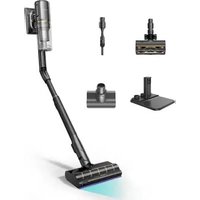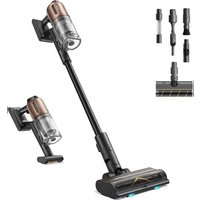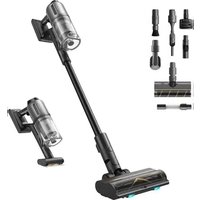
FloorX 500 - Vacuum Cleaner DREAME - Free user manual and instructions
Find the device manual for free FloorX 500 DREAME in PDF.


| Product type | Floor washer vacuum |
| Brand | Dreame |
| Model | FloorX 500 |
| Cleaner model | HL R44A |
| Charging station model | HCBAR |
| Rated power | 400 W |
| Rated voltage | 21.6 V |
| Charging voltage | 27 V |
| Charging station input | 120 V ~ 60 Hz |
| Clean water tank capacity | 780 mL |
| Dirty water tank capacity | 700 mL |
| Charging time | Approximately 4 h |
| Cleaning modes | Turbo, Intelligent, Quiet, Suction |
| Self-cleaning and drying | Yes (5 min rapid / 30 min quiet) |
| Battery type | Non-removable integrated lithium-ion |
| Runtime | Not specified (estimated ~30 min) |
| Operating/charging temperature | 4°C to 40°C |
| Roller brush maintenance | Replacement recommended every 3 to 6 months |
| Filter maintenance | Replacement recommended every 3 to 6 months |
| Usage | Household only, hard floors (wood, marble, tile) |
| Weight | Not specified (estimated ~4 kg) |
Frequently Asked Questions - FloorX 500 DREAME
User questions about FloorX 500 DREAME
0 question about this device. Answer the ones you know or ask your own.
Ask a new question about this device
Download the instructions for your Vacuum Cleaner in PDF format for free! Find your manual FloorX 500 - DREAME and take your electronic device back in hand. On this page are published all the documents necessary for the use of your device. FloorX 500 by DREAME.
USER MANUAL FloorX 500 DREAME
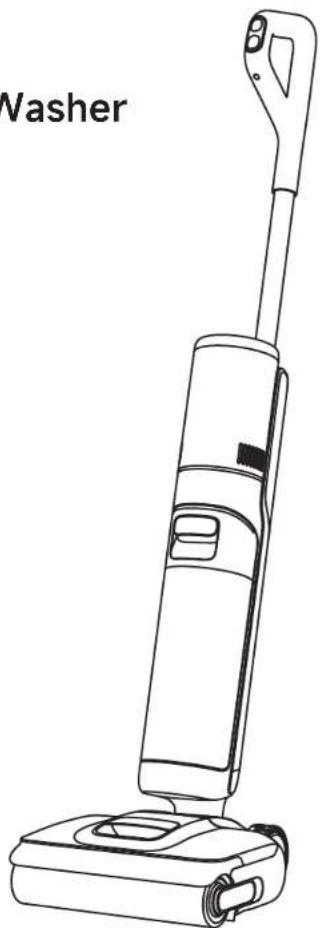
Cordless Floor Washer
Contact us for Help
US & CA: support.na@dreame.tech
MX: support.mx@dreame.tech
Manufactured by: Drame Trading (Tianjin) Co., Ltd.
Address: Room 2112-1-1, South District, Finance and Trade Center
No.6975 Yazhou Road, Dongjiang Bonded Port Area, Tianjin Pilot Free
Trade Zone, Tianjin, China
Tel: +1 (866) 977-5177
For more information, please visit https://globaldreametech.com
Made in China
NA-A02
User Manual
The illustrations in this manual are for reference only. Please refer to the actual product.
DREAME
THANK YOU
FOR PURCHASING THIS DREAMC OORDLESS FLOOR WASHER.
Scan for Quick Start
Scan the QR code to access the video tutorial and the user manual.
Register your Dreame account to receive special offers and updates.
Video Tutorial
The high-quality product is engineered for optimal performance. If you have any questions on the product, please contact us: support.na@dreame.tech support.mx@dreame.tech
Contents
Please scan the QR code for the User Manual.
ENE Safety Information
IMPORTANT SAFETY INSTRUCTIONS
When using an electrical appliance, basic precautions should always be followed, including the following:
- READ ALL INSTRUCTIONS BEFORE USING (THIS APPLIANCE). Failure to follow the warnings and instructions may result in electric shock, fire and/or serious injury.
WARNING- To reduce the risk of fire, electric shock, or injury:
- Do not use outdoors. Do not use on wet surfaces during charging.
- Do not allow to be used as a toy. Close attention is necessary when used by or near children, pets or plants.
- Use only as described in this manual. Use only manufacturer's recommended attachments.
- Do not use with damaged cord or plug. If appliance is not working as it should, has been dropped, damaged, left outdoors, or dropped into water, return it to a service center.
- Do not pull or carry by cord, use cord as a handle, close a door on cord, or pull cord around sharp edges or corners. Do not run appliance over cord. Keep cord away from heated surfaces.
- Do not unplug by pulling on cord. To unplug, grasp the plug, not the cord.
- Do not handle charging base, including charging base plug, and charging base terminals with wet hands.
- Do not put any object into openings. Do not use with any opening blocked; keep free of dust, lint, hair, and anything that may reduce air flow.
- Keep hair, loose clothing, fingers, and all parts of body away from openings and moving parts.
- Turn off all controls before unplugging.
Use extra care when cleaning on stairs. - Do not use to pick up flammable or combustible liquids, such as gasoline, or use in areas where they may be present.
- Do not pick up anything that is burning or smoking, such as cigarettes, matches, or hot ashes.
- To reduce the risk of fire, do not use a flammable or combustible liquid to clean a floor.
- Do not use without water tank and/or filter in place.
- Prevent unintentional starting. Ensure the switch is in the off-position before picking up or carrying the appliance. Carrying the appliance with your finger on the switch or energizing appliance that has the switch on invites accidents.
- Recharge only with the charging base specified by the manufacturer. A charging base that is suitable for one type of appliance may create a risk of fire when used with another one.
- Under abusive conditions, liquid may be ejected from the battery; avoid contact. If contact accidentally occurs, flush with water. If liquid contacts eyes, additionally seek medical help. Liquid ejected from the battery may cause irritation or burns.
Safety Information
- Do not use a battery pack or appliance that is damaged or modified. Damaged or modified battery packs may exhibit unpredictable behavior resulting in fire, explosion or risk of injury.
- Do not expose a battery pack or appliance to fire or excessive temperature. Exposure to fire or temperature above 130^ / 266^ may cause explosion.
- Follow all charging instructions and do not charge the battery pack or appliance outside of the temperature range specified in the instructions. Charging improperly or at temperatures outside of the specified range may damage the battery and increase the risk of fire.
- Have servicing performed by a qualified repair person using only identical replacement parts. This will ensure that the safety of the appliance is maintained.
- Do not modify or attempt to repair the appliance or the battery pack except as indicated in the instructions for use and care.
Always turn off this appliance before cleaning and maintenance.
This appliance contains batteries that are non-replaceable.
The appliance should be stored, used and charged only in the temperature range of 4^ / 39.2^ - 40^ / 104^ - Use appliances only with specifically designated battery packs. Use of any other battery packs may create a risk of injury and fire.
- When battery pack is not in use, keep it away from other metal objects, like paper clips, coins, keys, nails, screws or other small metal objects, that can make a connection from one terminal to another. Shorting the battery terminals together may cause burns or a fire.
- Risk of injury. Brush may start unexpectedly. Keep the switch in off position before cleaning or servicing.
- To reduce the risk of fire and electric shock due to internal component damage, use only dreame cleaning fluid intended for use with this appliance. See the Cleaning Fluid section of this manual.
SAVE THESE INSTRUCTIONS
Household use only.
To reduce the risk of electric shock, the appliance has a polarized plug (one-blade is wider than the other). This-plug will fit in a polarized outlet-only one-way. If the plug does not fit fully in the outlet, reverse the plug. If it still does not fit, contact a qualified electrician-to install the proper outlet. Do not change the plug in any way.
ENE Safety Information
Caution:
This device complies with Part 15 of the FCC Rules / Innovation, Science and Economic Development Canada's licence-exempt RSS(s). Operation is subject to the following two conditions: (1) this device may not cause harmful interference. (2) this device must accept any interference received, including interference that may cause undesired operation. Changes or modifications not expressly approved by the party responsible for compliance could void the user's authority to operate the equipment.
This equipment has been tested and found to comply with the limits for a Class B digital device, pursuant to part 15 of the FCC Rules. These limits are designed to provide reasonable protection against harmful interference in a residential installation. This equipment generates uses and can radiate radio frequency energy and, if not installed and used in accordance with the instructions, may cause harmful interference to radio communications. However, there is no guarantee that interference will not occur in a particular installation. If this equipment does cause harmful interference to radio or television reception, which can be determined by turning the equipment off and on, the user is encouraged to try to correct the interference by one or more of the following.
| ---- | Direct current |
| ~ | Alternating current |
Product Overview
Packing List
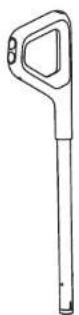
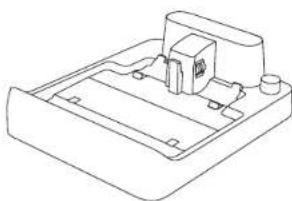
Charging BaseHandle
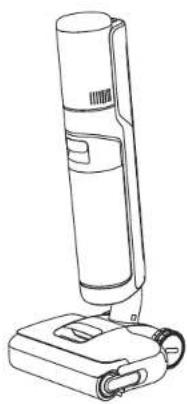
Main Body
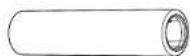
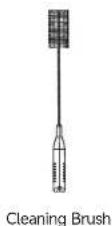

Replacement FilterSpare Rollei
ENE Product Overview
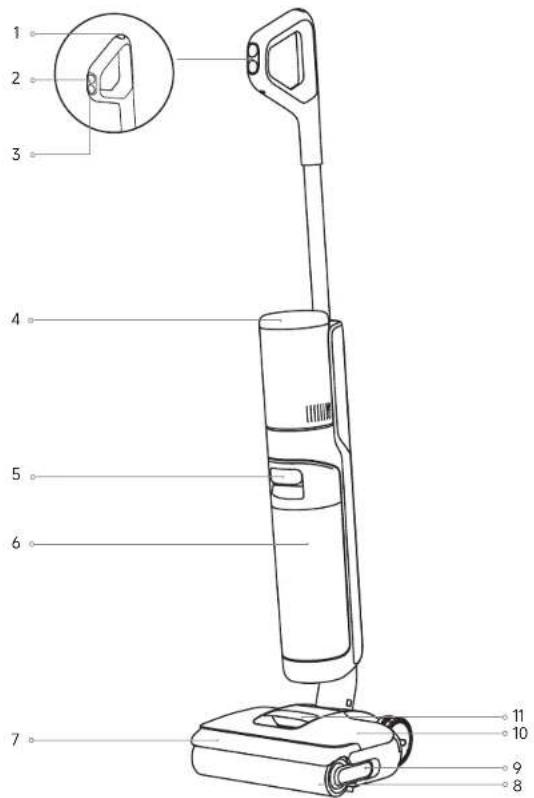
Floor Washer
1 Self-Cleaning Button
5 Used Water Tank Handle
9 Roiler Brush Handle
2 Mode Switch
6 Used Water Tank
10 Clean Water Tank
3 Power Switch
7 Roller Brush Cover
11 Clean Water Tank Handle
4 Display Screen
8 Roller Brush
Product Overview
Charging Base
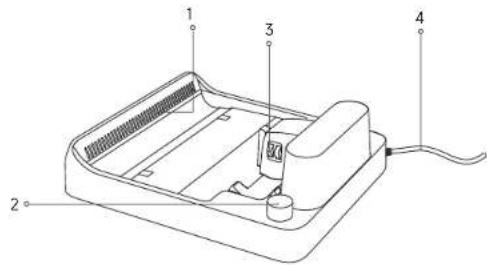
1 Air-Drying Outlet 2 Accessory Storage Slot 3 Charging Contacts 4 Power Cord
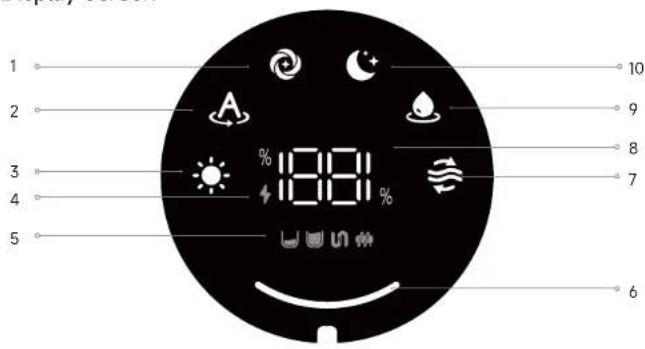
Display Screen
1 Turbo Mode
5 Error Messages
7 Self-Cleaning Mode
2 Smart Mode
6 Dust Concentration
8 Battery Indicator
3 Drying Mode
& Self-Cleaning/Drying
9 Suction Mode
4 Charging Indicator
Progress
10 Quiet Mode
Note:
- The display screen will show an error message if the appliance is not working properly. Please refer to the Error Prompts and Solutions table to find your solution.
- For reference only. The actual appearance and display screen of the product shall prevail.
ENE Installation
Install the Handle
Insert the end of the handle vertically into the slot on the top of the appliance as indicated until you hear a click.
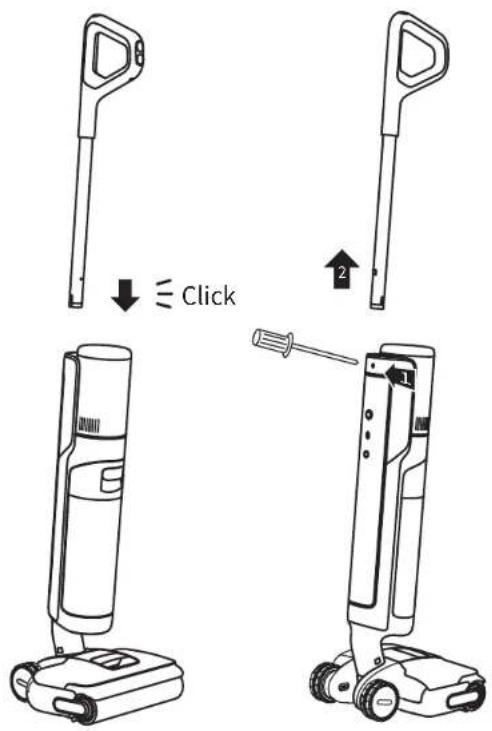
Note: To disassemble, extend a hard object into the hole of the appliance as indicated to press the contacts and pull the handle upward at the same time.
Charging
- Place the charging base against a wall on level ground and connect it to a power source. Fully charge the appliance before first use.
- Place the appliance on the charging base. When the number on the display screen reaches 100, the battery is fully charged.
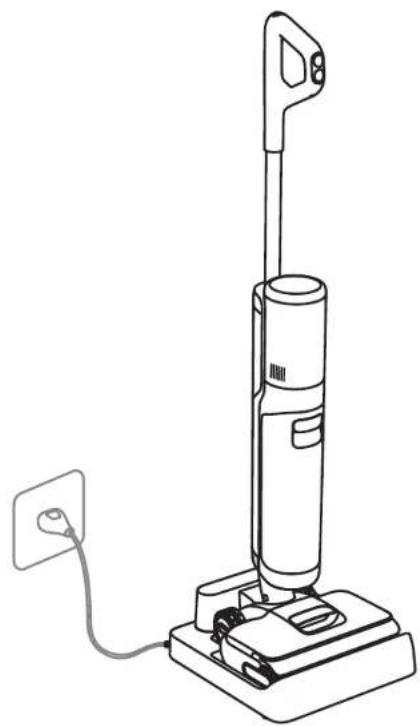
Note:
- If there is no operation within 10 minutes of being fully charged, the appliance will enter sleep mode. Please restart the appliance when you need to use it again.
To prolong its life, the battery will automatically cool down (for approximately 1 hour) before recharging after the product has been running continuously for a long time.
ENE How to Use
Switch Modes
Press switch modes based on your needs.

Turbo Mode
Maximum suction power and increased water flow for stubborn stains on hard floors.

Smart Mode
The appliance will detect the stain level and intelligently adjust the suction power and water flow accordingly.

Quiet Mode
The appliance will maintain moderate suction power at a low noise level.

Suction Mode
Sucks up a large amount of water from the floor.
Fill the Clean Water Tank
Remove the clean water tank. Open the tank cover and fill the tank with sufficient clean water. Re-install the tank and ensure it clicks into place.
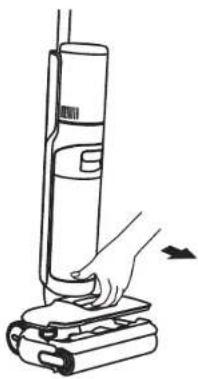
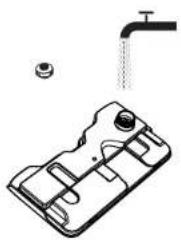
Add Cleaning Fluid
WARNING: To reduce the risk of fire and electric shock due to internal component damage, use only Dreme Trading (Tianjin) Co., Ltd. AWH10 cleaning fluid intended for use with the appliance.
- Remove the seal before use.
-
Measure the floor cleaner with the bottle cap (*approximately 10 ml/0.34 ft oz per cap).
-
Pour it into the clean water tank and gently shake to mix it evenly before use.
Note: Do not add any liquids other than the officially-approved cleaner. The cleaner can be available on the official online store, which is available on the official online store.
ENE How to Use
Start Cleaning
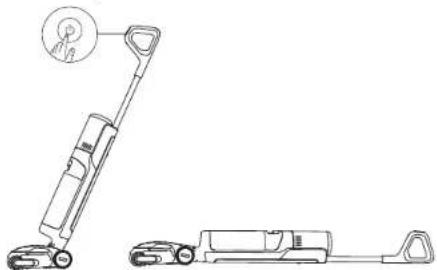
Gently step on the brush cover and recline the appliance backward. Press to start cleaning. Press to switch modes based on your needs.
Note:
- Do not vacuum any foamy liquids.
If the appliance is in the upright position while working, the current task will be suspended.
The appliance is only suitable for cleaning hard surfaces such as wood floors, marble, and tiles. - Please press the brush against the floor when using.
- Do not lift or move the appliance while in operation to prevent dirty water from flowing back into the motor.
Empty the Used Water Tank
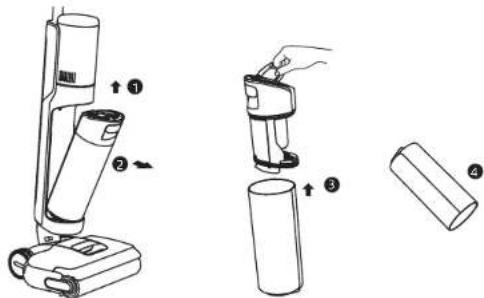
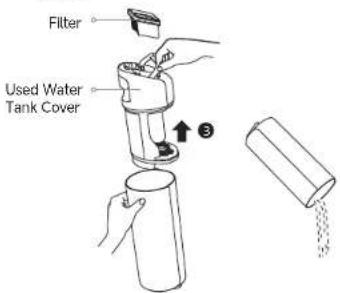
Pull the tank handle to take out the used water tank. Remove the tank cover and pour out the used water. Re-install the tank and ensure it clicks into place.
How to Use
Self-Cleaning & Drying
- After cleaning, promptly return the appliance to the base and ensure the clean water tank is sufficiently filled.
- Press on the top of the handle to start the self-cleaning & drying process. To switch between 5min Fast Drying and 30min Quiet Drying, press the button again within 3 seconds of activation.
- After self-cleaning is complete, the appliance will automatically enter drying mode; please promptly empty the used water tank. To exit drying mode, press
- Long-press for 3 seconds to activate 30min Quiet drying directly.
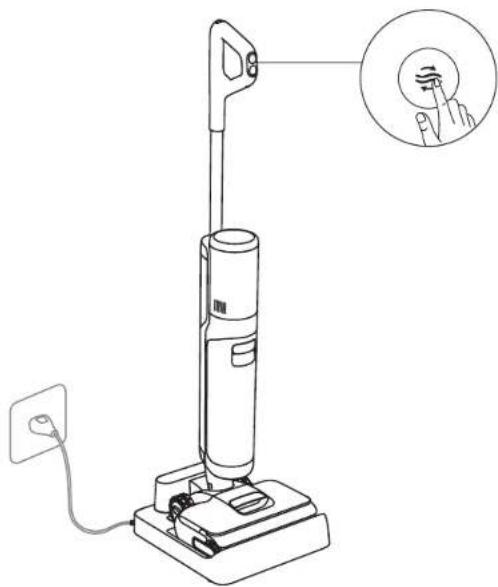
Note: Self-cleaning can be enabled only when the appliance is being charged and the battery level is more than 20%.
Care & Maintenance
Tips
- Turn off the appliance before maintenance. Be careful not to accidentally press the power button.
- Replace parts if needed. The parts must be replaced by those available from the manufacturer or its service agent.
- If the appliance is unused for an extended period, fully charge it, disconnect the power plug, and store it in a cool, dry place away from direct sunlight. Charge the appliance at least once every 3 months to prevent the battery from over-discharging.
Clean the Used Water Tank
- Pull the tank handle to remove the used water tank.
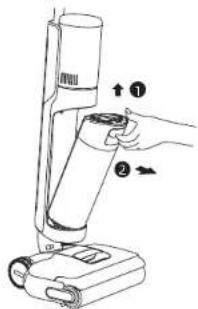
- Rinse the tank and tank cover with clean water. Use the provided cleaning brush to scrub the inner walls of the tank.
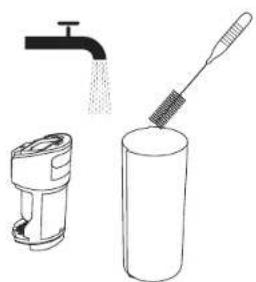
- Remove the filter from the tank cover. Lift the cover and pour out the used water.
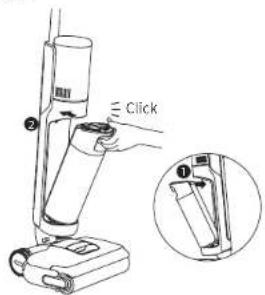
- Re-install the filter and tank cover. Then, re-install the used water tank until you hear a click.
Note:
If the filter is dirty, rinse it with clean water and dry it completely before use.
- Replacing the filter every 3 to 6 months is recommended.
Care & Maintenance
Clean the Tube and the Dirt Sensor
Remove the used water tank and gently wipe the tube and the dirt sensor with a wet cloth.
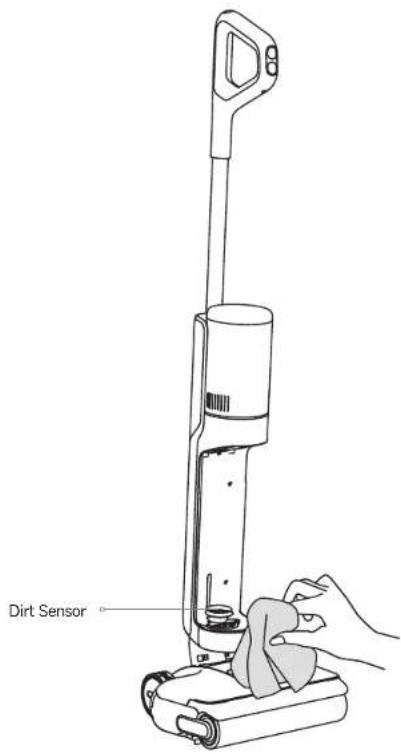
Note: Do not rinse the tube or the dirt sensor with water.
Care & Maintenance
Clean the Brush Assembly
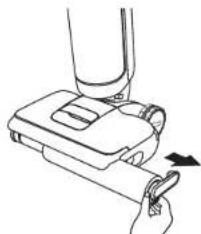
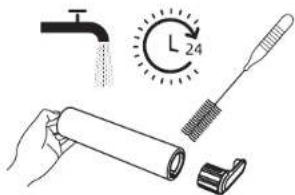
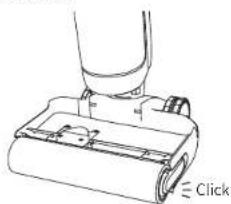
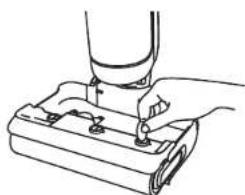
- Pull the handle to remove the roller brush. 2. Detach the handle from the roller brush. Use the provided cleaning brush to clean the roller brush, then rinse the roller brush with clean water and dry it completely.
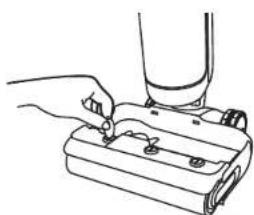
- Use a coin to turn the locking knobs on the roller brush cover to detach it.
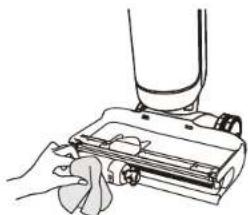
- Wipe the suction inlet with a dry cloth or wet tissue. Do not rinse it with water.
- Re-install the roller brush and handle until you hear a click.
- Re-lock the brush cover.
Note:
- Clean the brush assembly as needed.
- Replacing the roller brush every 3 to 6 months is recommended.
Troubleshooting
If an error occurs, the appliance will stop working. Please refer to the following table for troubleshooting. If the problem persists, please contact the customer service.
| Issue Possible Cause Solution | ||
| The appliance does not work. | The appliance is out of battery or its battery level is low. | Fully charge the appliance before use. |
| The appliance is in the upright position. | Recline the appliance backward. | |
| Overheat protection is activated due to blockage. | Clear the blockage and wait until the temperature returns normal. | |
| The used water tank is full. Empty the used water tank. | ||
| The parts are not installed in place. | Ensure all parts are installed in place. | |
| The appliance charges slowly. | The temperature of the battery is too low or too high. | Wait until the battery's temperature returns normal. |
| The suction power of the appliance is weak. | The filter is clogged. Cleaning the filter. | |
| The suction inlet or tube is blocked by a foreign object. | Clean the tube and the suction inlet. | |
| The motor is making a strange noise. | There is too much dirty water in the used water tank. | Empty the used water tank. |
| The suction inlet is blocked. Clear any blockage in the suction inlet. | ||
| The dust concentration indicator is solid red. | The dirt sensor needs cleaning. | The dirt sensor is in the tube. Follow the cleaning instructions. |
| The cleaning solution concentration is too high. | Dilute the cleaning solution with water at the recommended ratio. | |
| A third-party cleaning solution caused a large amount of foam. | Use only the officially-approved cleaning solution. | |
| The display screen does not light up while charging. | The charging base plug is not inserted into the electrical outlet properly. | Make sure the charging base plug is inserted in place. |
| The appliance is not properly placed on the charging base. | Make sure the appliance is properly placed on the charging base. | |
| No water is coming out of the appliance. | The clean water tank is not properly installed, or the water in it is insufficient. | Re-install or fill the clean water tank. |
| It takes 30 seconds to dampen the roller brush. | Check again after a while. | |
| The air outlet leaks water. | A collision or a sharp pull causes water to enter the motor. | Move the appliance gently back and forth while it is turned on. |
| The filter is not completely dry after being cleaned. | Dry the filter completely before use. | |
| Self-cleaning fails. | The roller brush may be jammed by large debris. | Remove the roller brush cover to check and clean the roller brush. |
| The appliance is not properly placed on the charging base. | Make sure the appliance is being charged before enabling the self-cleaning function. | |
| Self-cleaning cannot be enabled if the battery level is lower than 20%. | Self-cleaning can only be enabled while the appliance is being charged and the battery level is more than 20%. | |
| The used water tank is full. Empty the used water tank. | ||
| The clean water tank is not installed in place, or the water in it is insufficient. | Re-install or fill the clean water tank. | |
| Poor drying performance or strange noise occurs while drying. | The air outlet and air inlet of the charging base may be blocked. | Check and clear the blockage of air outlet and air inlet. |
For additional support, please contact us via support.us@dreame.tech Tel: +1 (866) 977-5177
Error Prompts and Solutions
If the appliance is not working properly, the screen display will show an error message. Please refer to the below table to find your solution.
| Error Icon | Possible Cause Solution | |
| Clean water is insufficient. | Fill the clean water tank. | |
| Used water tank is full. | Empty the used water tank. | |
| Roller brush is stuck. | Clean the roller brush. | |
| Tube is clogged. | Refer to the Care & Maintenance section to clean the tube and dirt sensor (below the used water tank). | |
| The roller brush and tube are dirty. | Place the appliance back onto the base for self-cleaning. |
| Error Code | Possible Cause Solution | |
| E1-E7 | Malfunction | Restart the appliance. If the problem persists, please contact the customer service. |
| H1-H6 | ||
| H7 | Battery overheating | Wait until the battery's temperature returns normal. |
EN Specifications
| Floor Washer | |||
| Model HHR44A Rated Power 400 W | |||
| Rated Voltage 21.6 V Charging-Voltage 27 V | --- | ||
| Clean Water Tank Capacity | 780 mL | Used Water Tank Capacity | 700 mL |
| Charging Time Approx. 4 hours | |||
| Charging Base | |||
| Model | HCBAR | Rated Power Input* | 395 W |
| Rated Input 120 V 60 Hz Rated Output 27 V 1.71 A | --- | ||
The rated input power refers to the power measured during a representative cycle for entering the drying mode.
Battery Disposal and Removal
The built-in lithium-ion battery contains substances that are hazardous to the environment. Before disposing of the battery, make sure the battery is removed by qualified technicians and discarded at an appropriate recycling facility.
--The battery must be removed from the appliance before it is scrapped.
--The appliance must be disconnected from the supply mains when removing the battery.
The battery is to be disposed of safely.
CAUTION:
Before removing the battery, disconnect the power and discharge it as much as possible.
- Unneeded batteries should be discarded at an appropriate recycling facility.
- Avoid exposing the battery to high temperatures to prevent the risk of explosion.
- Under abusive conditions, the battery may leak liquid. If contact occurs, rinse with water and seek medical assistance.
Removal Guide
1.Use tools to remove the display screen.
2. Use tools to remove the screws securing the battery pack cover, and then pry open the cover.
3. Unplug the terminals connecting the battery to the mainboard, and then remove the battery.