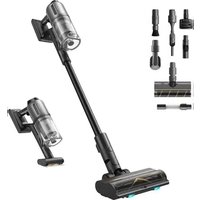
USER MANUAL Z30 DREAME
The word "dream" is the abbreviation of Dreame Technology Co., Ltd. and its subsidiaries in China. It is the transliteration of the company's Chinese name "追觅", which means striving for excellence in every endeavor and reflects the company's vision of continuous pursuit, exploration and search in technology.
Dreame Z30
Cordless Stick Vacuum
User Manual
THANK YOU
FOR PURCHASING THIS DREAMVACUUM CLEANER.
Registration Quick Start
Welcome to register a Dreame account by scanning the QR code.
You are available for the User Manual and Special Offers.

With it you are obtaining a high quality product that is engineered for optimal performance. If you have any questions on the product, please contact us: aftersales@dreame.tech.
EN User Manual 1
DE Benutzerhandbuch 13
FR Manuel d'utilisation 26
IT Manuale utente 39
ES Manual de usuario 51
PT Manual do utiliser 63
RU RykoBoDCTBOI0JIb3OBaTeJRA 75
PL Instrukcja Obstugi 88
HE unnnn7 n 100
AR 111
NL Gebruiksaanwijzing 121
SV Anvandarmanual 132
NO Brukerhandbok 143
DA Brugermanual 154
Fl Kayttohjeet 165
TR Kullanici Kilavuzu 176

A
1
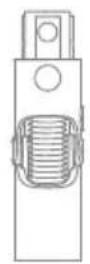
2
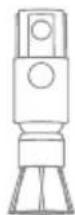
3
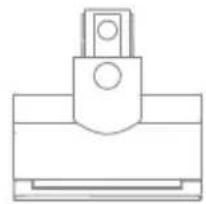
4
5

6
7

8
9
10
1112
B

C

D-1
D-2 D-3
E-1
E-2
E-3
F-1 F-2
F-3 F-4
F-5 F-6

F-7

F-8

F-9 F-10
F-11 F-12


F-13

F-14 F-15




F-16 F-17

F-18 F-19
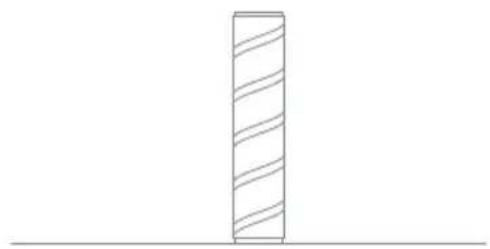
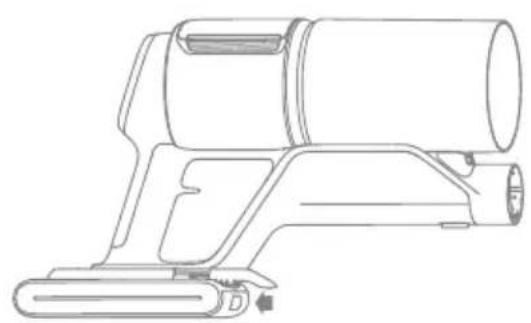
F-20
Safety Instructions
To prevent accidents including electric shock or fire caused by improper use, please read this manual carefully before use and retain it for future reference.
Warning
- This product can be used by children aged from 8 years and above and persons with physical, sensory, intellectual deficiencies, or limited experience or knowledge under the supervision of a parent or guardian to ensure safe operation and to avoid any risk of hazards. Cleaning and maintenance shall not be made by children without supervision.
- This appliance is not intended for use by persons (including children) with reduced physical, sensory or mental capabilities, or lack of experience and knowledge, unless they have been given supervision or instruction concerning use of the appliance by a person responsible for their safety.
Children should be supervised to ensure that they do not play with the appliance.
- The vacuum is not a toy. Children shall not play with or operate this product. Please exercise caution when using the vacuum near children. Do not allow children to clean or maintain the vacuum unless supervised by a parent or guardian.
- Do not use the vacuum outdoors or on wet surfaces. Only use the vacuum on dry indoor surfaces. Do not touch the plug or any part of the vacuum with wet hands.
- To reduce the risk of fire, explosion, or injury, check to make sure the lithium battery and charging adapter are undamaged before use. Do not use the vacuum if either the lithium battery or charger is damaged.
- The brush heads, battery, metal connector pin, and vacuum are electrically conductive and should not be immersed in water or other liquid. Make sure to dry all filters after cleaning.
- To prevent injury caused by moving parts, turn off the vacuum before cleaning the brush heads. The brush heads, dust compartment and filter must all be properly installed before using the vacuum.
- Do not use the pet deshedding tool when the vacuum is in operation. Do not use the tool when the hair is wet.
- Only use the original charging adapter. Never use an unoriginal adapter, as this may cause the lithium battery to catch fire.
- Do not use the vacuum to pick up flammable or combustible liquids, such as gasoline, or bleach, ammonia, drain cleaners or other liquids.
- Do not use the vacuum to pick up sharp or hard objects, such as glass, nails, screws, or coins, which may damage the machine. Do not use the vacuum to pick up drywall particles, ashes like fireplace ash, or smoking or burning materials such as coal, cigarette butts or matches.
- Check the area to be cleaned before use. To prevent the openings from being blocked, clear the larger paper, spitball, plastic cloth or sharp objects (such as glass, nails, screws, coins, etc.) and any object which is larger than openings.
- Keep hair, loose clothing, fingers and other parts of the body away from the vacuum's openings and moving parts. Do not point the extension rod, wand or tools at your eyes or ears or put them in your mouth.
-
Do not put any object into the vacuum's openings. Do not use the vacuum with any opening blocked. Keep free of dust, lint, hair, or other items which may reduce airflow.
-
Do not rest the vacuum against a chair, table, or other unstable surface, as this may cause damage to the machine or personal injury. If the vacuum becomes damaged from being knocked over or is otherwise malfunctioning, please contact our authorized service department. Never attempt to disassemble the device on your own.
- All instructions in the manual for recharging the battery must be strictly followed. Failure to properly charge the battery within the specified temperature range could damage the battery.
- Only use accessories and replacement parts recommended by the manufacturer.
- Please be extra careful when using the vacuum to clean stairs.
- Make sure the vacuum is unplugged when not used for extended periods as well as prior to performing any maintenance or repairs.
- Do not install, charge, or use this product outdoors, in bathrooms, or around a pool.
- Fire Hazard Warning: Do not apply any type of fragrance to the vacuum's filter. These types of products are known to contain flammable chemicals which may cause the vacuum to catch fire.
- Only use the original charger (ZD024M340090BS). Failing to do so may cause the lithium-ion battery to catch fire.
- WARNING: For the purposes of recharging the battery, only use the detachable supply unit provided with this appliance.
- Only use the approved battery type (Model V2406-8S1P-GYA/V2406-8S1P-SCA). Failing to do so may cause the lithium-ion battery to catch fire.
- If the battery material is released, remove personnel from area until the batteries cool down and fumes dissipate.
- Provide maximum ventilation to clear out hazardous gases and avoid skin and eye contact or inhalation of vapors.
- Remove spilled liquid with absorbent and incinerate waste.
- Do not use and store in extremely hot or cold environments (below 0°C / 32°F or above 40°C / 104°F ). Please charge the cordless vacuum in temperature above 0°C / 32°F and below 40°C / 104°F .
- This product is designed for home use only.
- The supply terminals are not to be short-circuited.

Read operator's manual

Detachable supply unit

For indoor use only
We, Dreame Trading (Tianjin) Co., Ltd., hereby, declares that this equipment is in compliance with the applicable Directives and European Norms, and amendments. The full text of the EU declaration of conformity is available at the following internet address: https://global.dreametech.com
For detailed e-manual, please go to https://global.dreametech.com/pages/user-manuals-and-faqs
Product Overview
Accessories
- Soft Dusting Brush
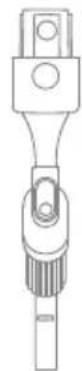
- Flexible Adapter
- Rotating Soft Dusting Brush
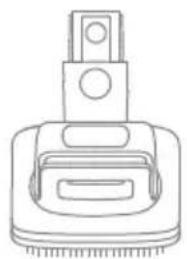
- Motorized Mini-Brush
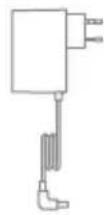
- Charger
- Extension Rod
- Combination Tool
- Extension Hose
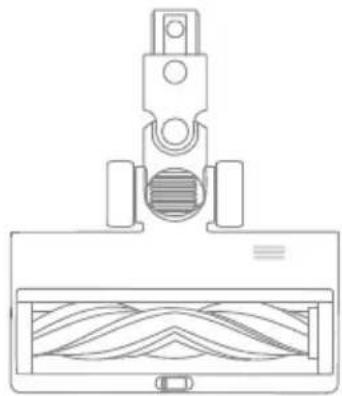
- Illumination Multi-Surface Brush
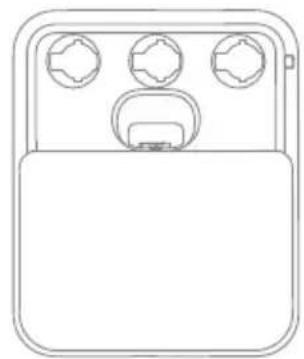
- Charging & Storing Mount
- Pet Deshedding Tool
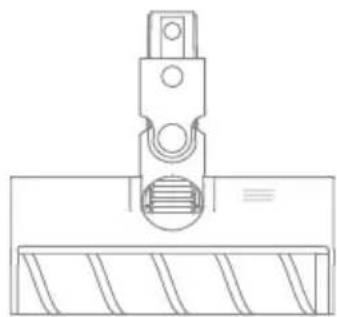
- Illumination Soft Roller Brush
Fig. A
Note: The illustrations in this manual are indicative only. The actual product may differ.
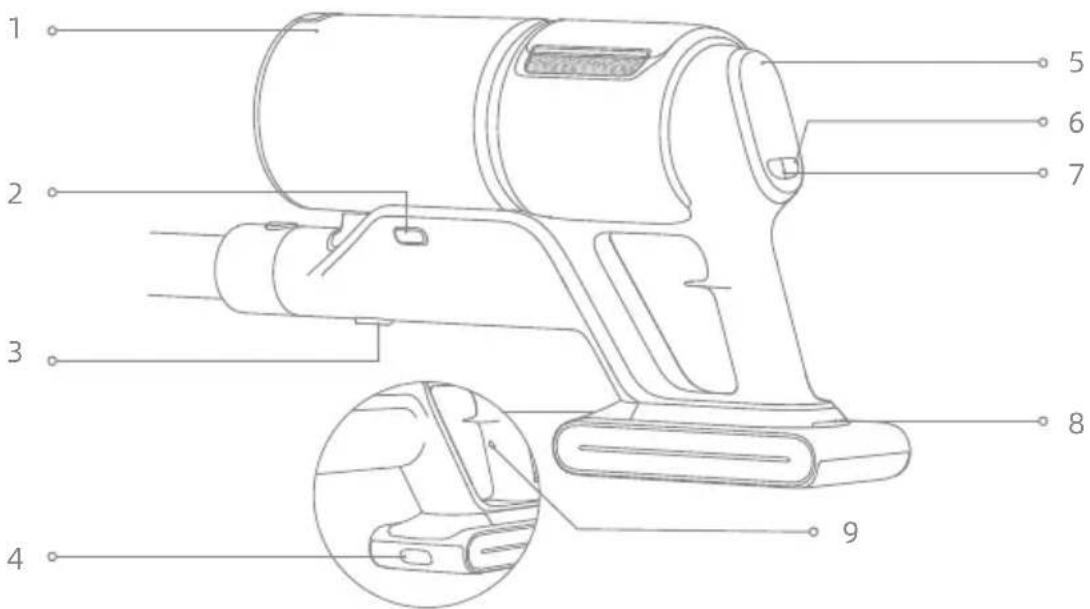
Component Name
Vacuum Body
- Dust Cup
- Dust Cup Release Button
- Dust Cup Bottom Cover Release Button
- Battery Pack Release Button
- Display Screen
- Power Button
- Suction Level Switch
- Battery Status Indicator
- Antistatic Contact
Fig. B
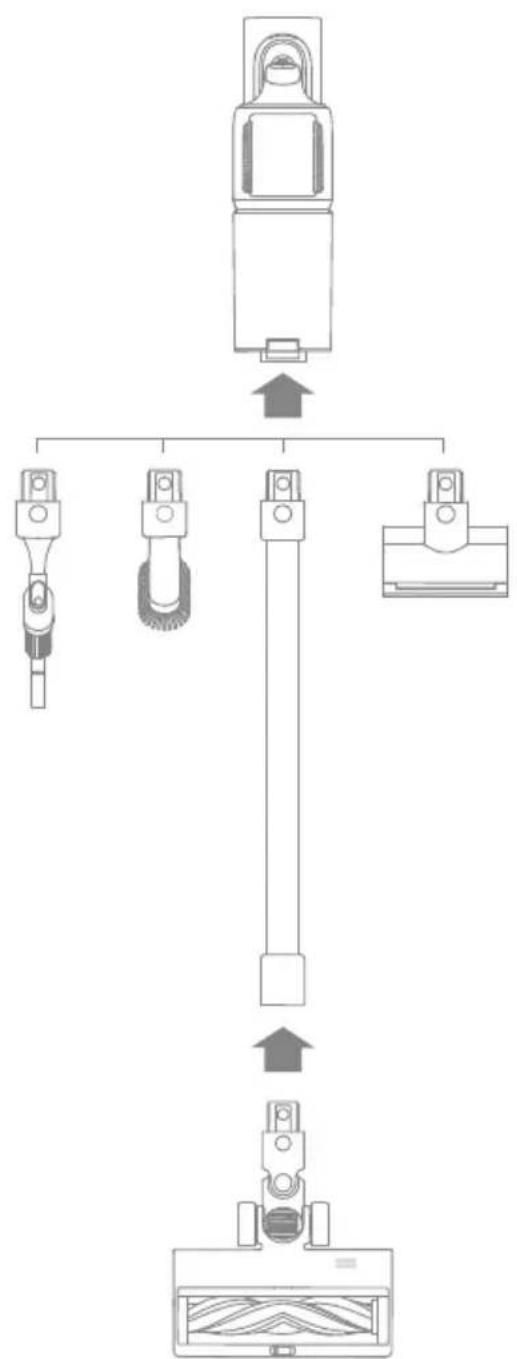
Installation
Installing the Accessories
Note:
- It is not recommended to use the motorized mini-brush with the extension rod.
- Please install the accessories according to the actual cleaning needs.
- It is recommended to use the flexible adapter when cleaning the low-lying furniture and not recommended to be connected to the vacuum body all the time for daily floor cleaning.
Fig. C
Charging
Fully charge the vacuum before using it for the first time.
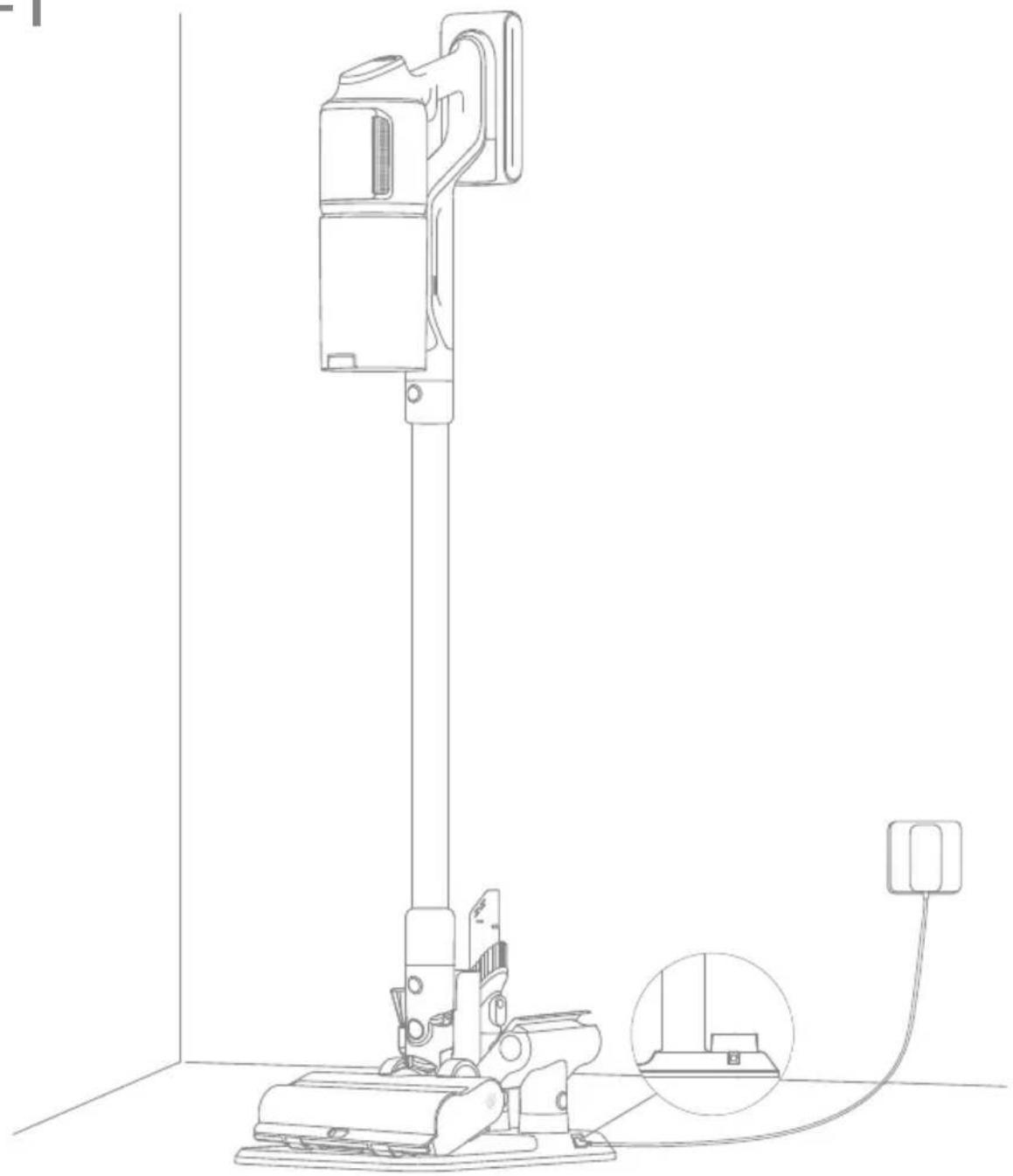
Place the vacuum cleaner on the charging & storing mount as shown in the illustration, and then connect the charger between the charging & storing mount and the power supply. The battery status indicator will blink while charging.
Note:
- The flexible adapter cannot be connected to the vacuum body while charging.
- When the charging contacts are dirty, please gently wipe them with a dry cloth.
- The vacuum cannot be used while charging.
- When fully charged, the battery status indicator will turn off after 5 minutes and the vacuum will enter the power saving mode.
- This will take about 4 hours. Vacuuming at Turbo mode for a prolonged period will cause the battery to heat up, which increases charging time. Allow the
vacuum to cool down for 30 minutes before charging it.
Fig. D-1
Battery Status Display
1. Battery Status Indicator

Blinking white

Solid white
Off
charging

Fully charged

Charging

Standby Mode
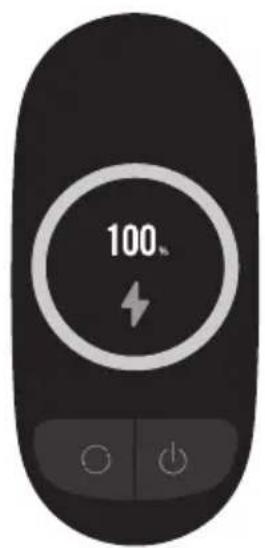
Fig. D-2
2. Display Screen
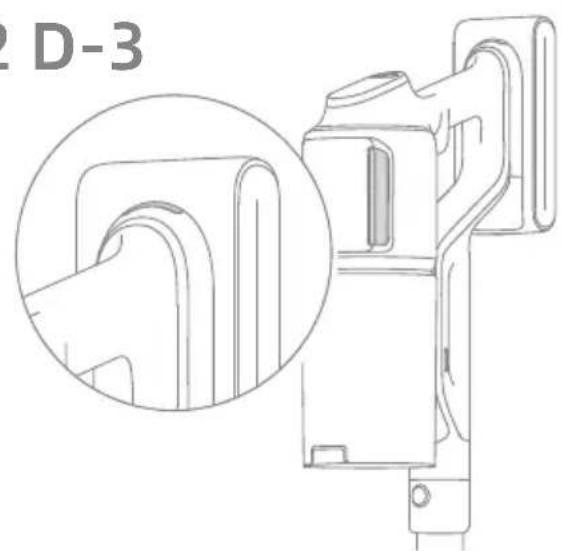
The number on the display screen represents the current battery level in a percentage during charging. When the number becomes 100, the battery is fully charged.
Fig. D-3
How to Use
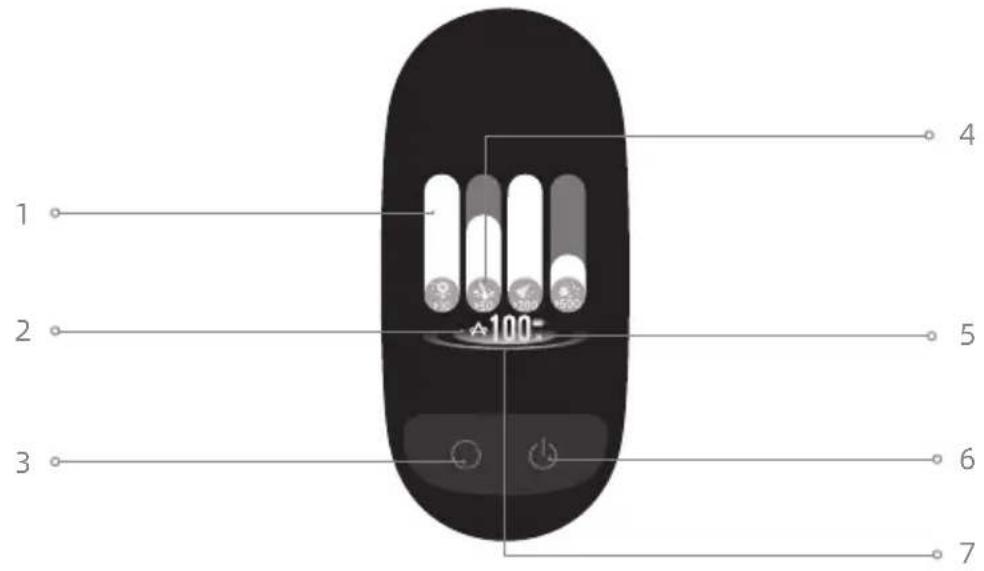
Display Screen
Vacuuming
- Particulate Matter Amount Indicator
- Suction Level
Eco

Auto

Turbo
- Suction Level Switch
Press briefly to switch between eco, auto and turbo mode.
- Particulate Matter Types
10μm (eg. pollen)
50μm (eg.hair)
200μm (eg.dust)
500μm (eg.mite)
- Battery Level Percentage
When the display screen shows "LO", it indicates that the battery level is lower than 10% .
- Power Button
Press briefly to turn on/off
- Dirty Level Indicator
The color changes with the amount of dust in real time (only in Auto Mode).
Fig. E-1
Settings
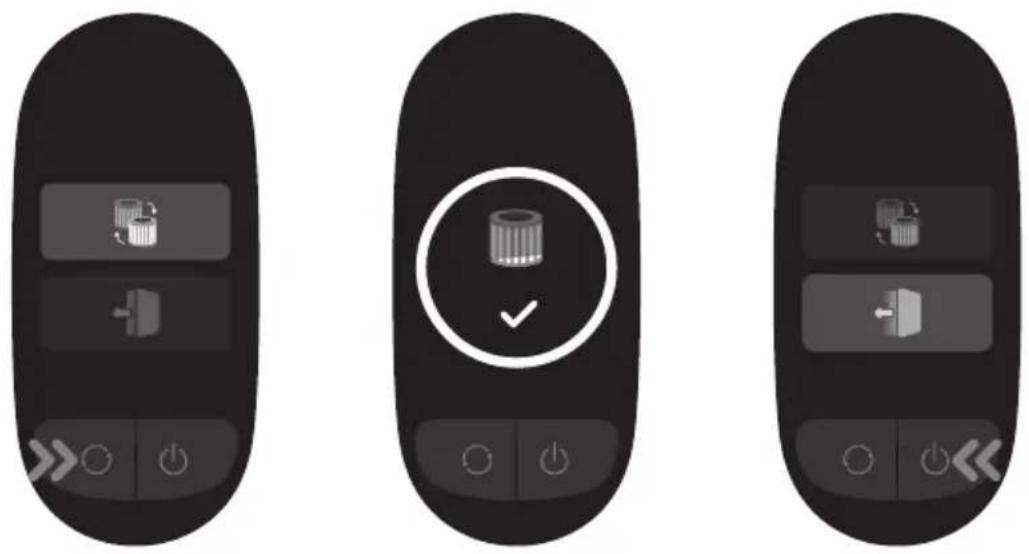
In the standby state, press and hold the suction level switch for 3 seconds to enter the setting interface. Briefly press the switch button to select an option, and press and hold for 3 seconds to confirm.
Reset Filter
Press and hold the suction level switch for 3 seconds to select resetting filter and the filter will automatically complete the reset.
Exit
Press the power button when it is in the setting interface to return to the main interface directly, or select then press and hold for 3 seconds to return to the main interface.
Fig. E-2
Starting Cleaning
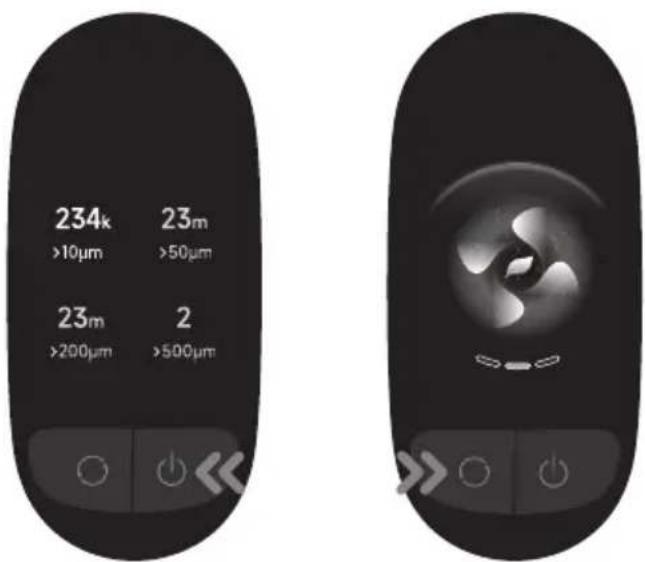
Press the power button to start operating. After the vacuuming is completed, press the button and the amount of various particle matters vacuumed will show on the screen.
Press the button to switch levels between auto, eco and turbo and the corresponding icon will show on the screen.
Note:
- When any cleaning mode stops running, the vacuum cleaner will default to auto mode when it is started again. Factory default setting is the auto mode.
- Only when running in auto mode, the suction power and the color of the dirty level indicator change with the amount of particulate matter in real time.
- If there is no operation for more than 15 seconds, the screen will turn off, and it will return to the main interface when lit up again.
- If the vacuum is not working properly, the screen display will show an error message. Please refer to the troubleshooting table to find your solution.
Fig. E-3
Using Different Accessories
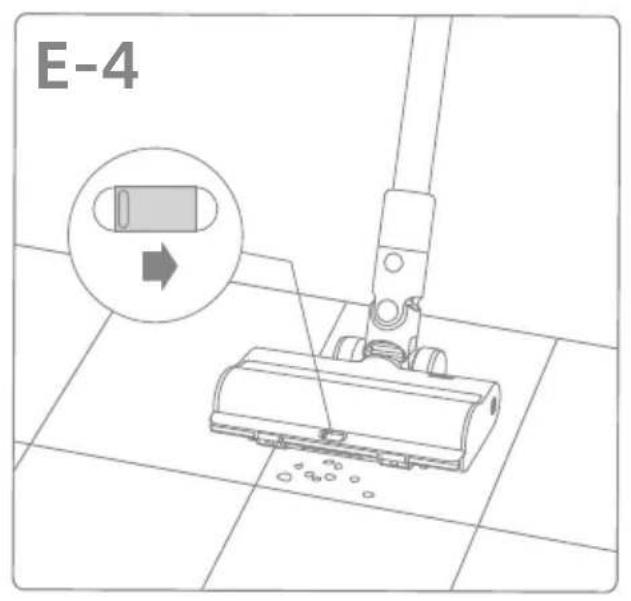
Illumination Multi-Surface Brush
Note:
When the appliance starts, the lights in front of the brush roller will automatically turn on, which is convenient for use.
- When using on baby play mats, carpets or for vacuuming coffee beans, pop corn and other pellets, turn on the switch on the brush.
- When vacuuming on tiles, wooden floors or other hard surfaces, turn off the switch.
Fig. E-4
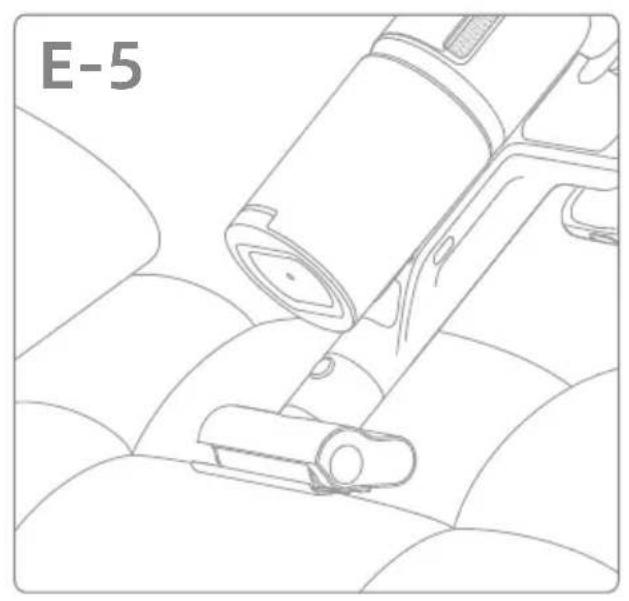
Motorized Mini-Brush
For vacuuming dirt, pet hair, and other stubborn debris from sofas, bedding, and other fabric surfaces. It is not recommended to vacuum on fragile surfaces, such as silk.
Fig. E-5
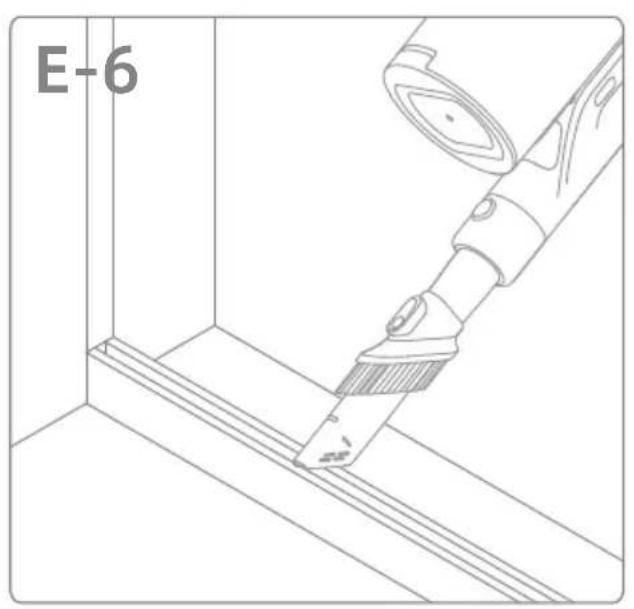
Suitable for vacuuming cracks, corners of doors and windows, stairs, and other hard-to-reach places.
Fig. E-6
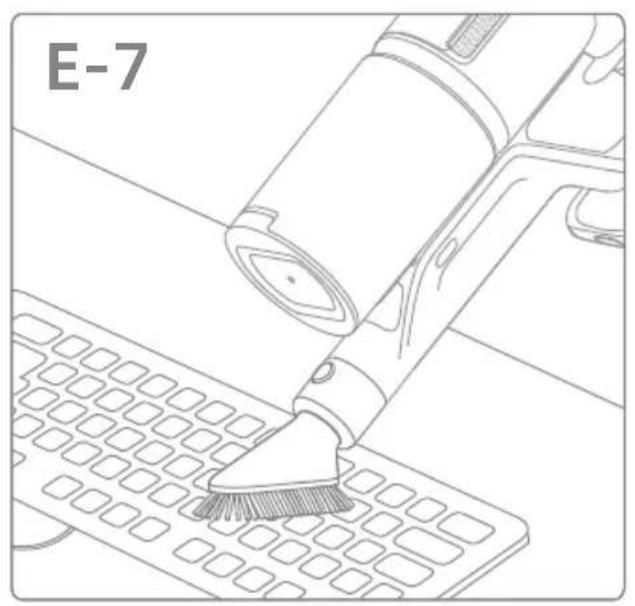
Soft Dusting Brush
Suitable for vacuuming on LCDs, keyboards, lampshades, curtains, shutters and other surfaces of fragile objects.
Fig. E-7
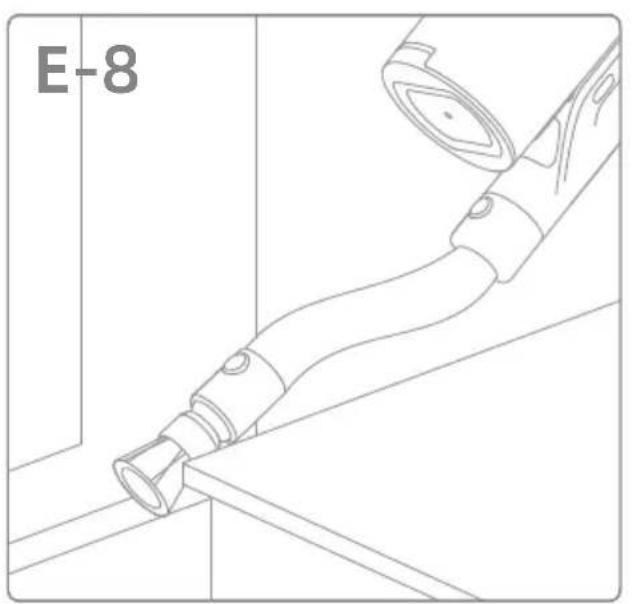
Rotating Soft Dusting Brush
It can be connected to the extension hose. With a rotatable head, it is suitable for cleaning delicate and fragile surfaces and corners such as glass, displays and keyboards.
Fig. E-8
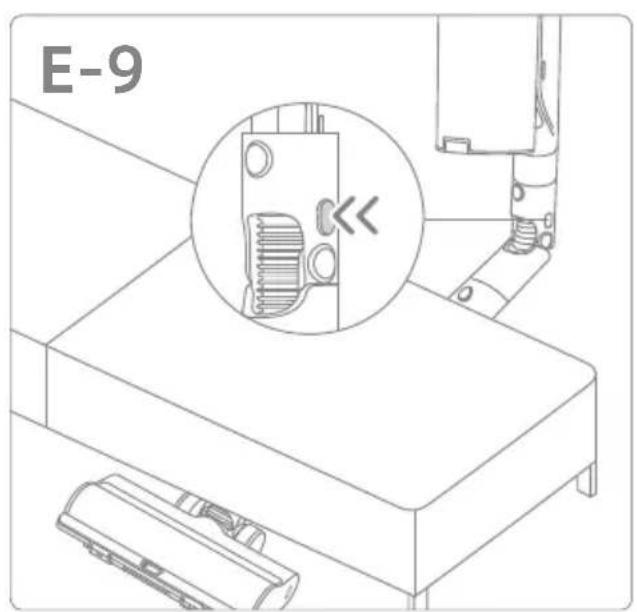
Flexible Adapter
Bending and extending the rod with one click can easily reach under low-lying furniture, such as bed and sofa. Note: It is recommended to use the flexible adapter when cleaning the low-lying furniture and not recommended to be connected to the vacuum body all the time for daily floor cleaning.
Fig. E-9
Illumination Soft Roller Brush
Suitable for cleaning hard floors, such as marbles and tiles.
Note:
When the appliance starts, the side light of the brush will automatically turn on, which is convenient for use.
Fig. E-10
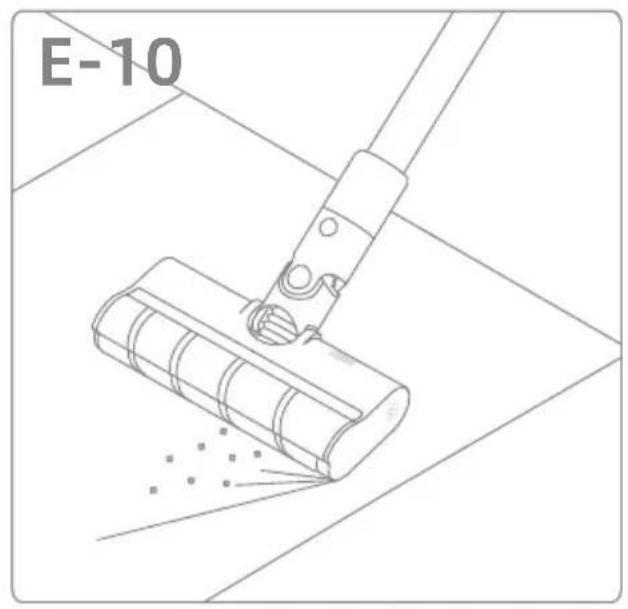
Suitable for deshedding and absorbing hair for medium to long-haired pets.
Note:
- If any rotating part becomes stuck, the vacuum may shut off automatically. Remove any trapped foreign objects, then resume use.
- When the battery becomes overheated, the vacuum will automatically shut off. Wait until the battery temperature returns to normal, then resume use.
Care & Maintenance
Tips:
Always use genuine parts to keep your warranty from being void.
- If the filter or nozzle becomes clogged, the vacuum will stop working shortly after being turned on. Clear the tube to restore functionality.
- Before cleaning the dust cup, please confirm that the plug is disconnected and keep the vacuum's power button in the off position.
- If the vacuum is not used for an extended period, fully charge it, unplug the power cord, remove the battery, and store it in a cool, low-humidity environment away from direct sunlight. To avoid over-discharging the battery, recharge the battery at least once every three months.
Cleaning the Vacuum
Wipe the vacuum with a soft dry cloth.
Cleaning the Dust Cup, Pre-Filter, and Cyclone Assembly
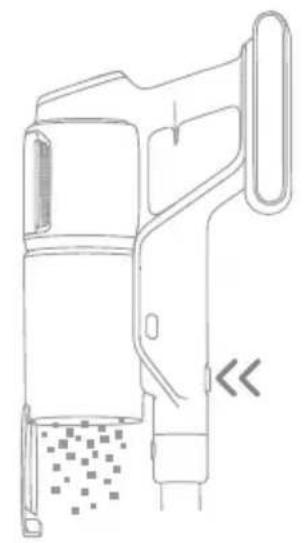
- Press the dust cup bottom cover release button, then empty the contents.
Fig.F-1
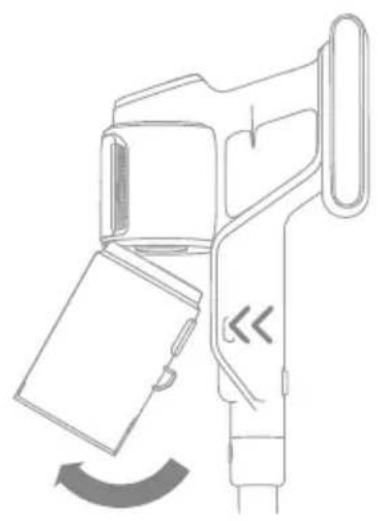
- Press the dust cup release button and remove it from the vacuum.
Fig. F-2
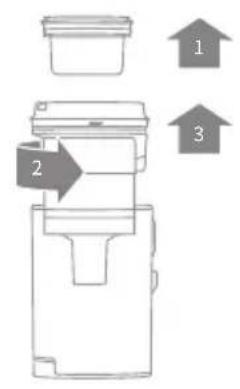
- Remove the pre-filter first, and then rotate the cyclone system to lift it out.
Fig. F-3
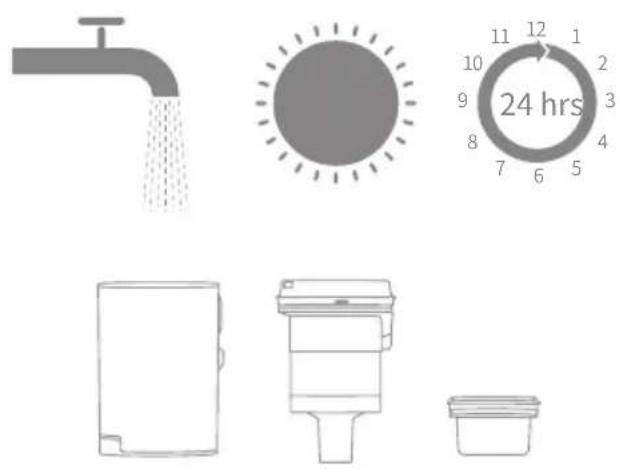
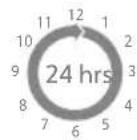
- Rinse the cyclone assembly, pre-filter, and dust cup until they are clean. After washing, air dry for at least 24 hours.
Fig. F-4
Note:
- Please clean the dust cup as needed.
It is recommended to clean the cyclone
system and pre-filter at least once every 3 to 4 months.
Cleaning the Filter
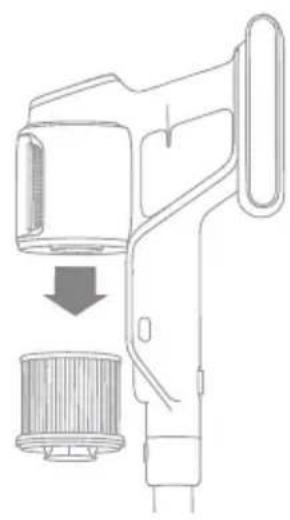
- Remove the dust cup as shown in the figure.
Fig. F-5
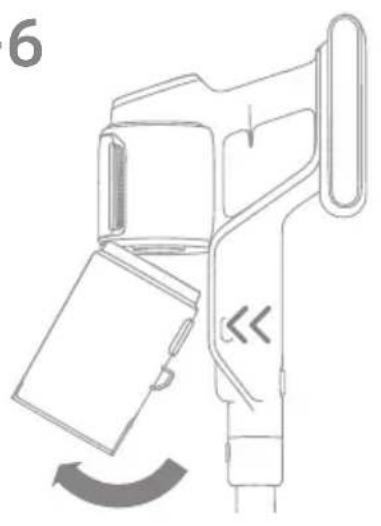
- Remove the filter from the vacuum by pulling it down in the direction shown in the figure.
Fig. F-6
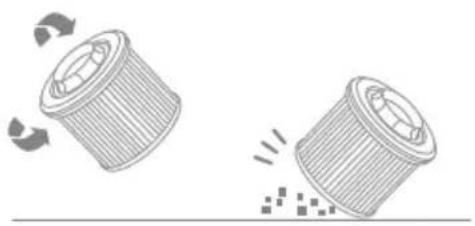
- Rinse the filter with rotating it 360° . Lightly tap the filter several times to remove any debris caught in it.
Fig. F-7
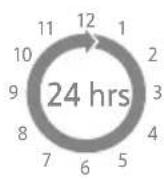
- Allow the filter to air dry for 24 hours.
Fig. F-8
Note:
- Only use clean water to wash the filter.
- Do not use detergent.
- Do not attempt to clean the filter with a brush or finger.
- It is recommended to clean the filter once every 4 to 6 months.
Cleaning the Illumination Multi-Surface Brush
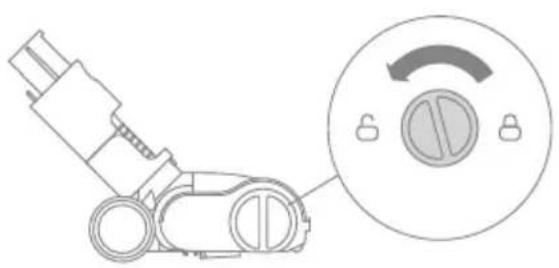
- Turn the lock counterclockwise until it stops, then remove the roller from the roller brush.
Fig.F-9
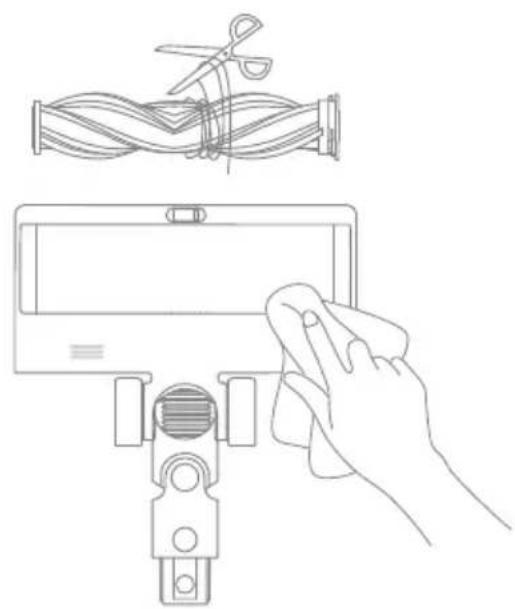
- Use scissors to cut off the hairs and fibers that get stuck on the brush roller. Wipe the dust from the notch and transparent cover with a dry cloth or paper towel. Thoroughly dry before use.
Fig. F-10
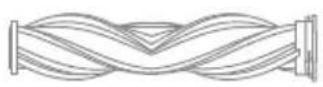
- When it is dirty, rinse the brush roller with clean water until it is clean.
Fig. F-11
- Stand the brush roller upright for at least 24 hours until it is fully dry.
Fig. F-12
Cleaning the Motorized MiniBrush
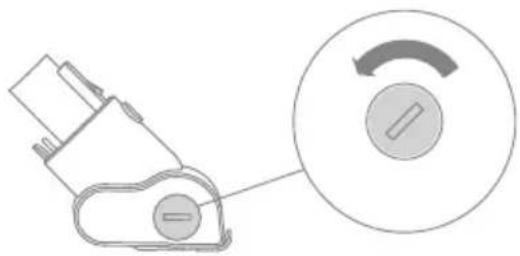
- Use a coin as illustrated to rotate the lock counterclockwise until you hear a click. After unlocking the motorized minibrush, remove the brush roller.
Fig. F-13
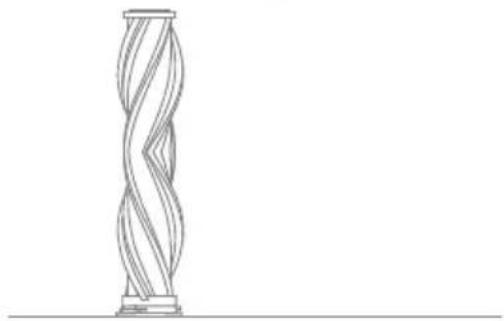
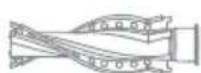
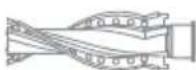
2. Rinse and clean the brush roller. Stand the brush roller upright in a well-ventilated area for at least 24 hours until it is fully dry.
Fig. F-14
3. Once the brush roller is dry, reinstall it by following the disassembly steps in reverse.
Fig. F-15
Cleaning the Illumination Soft Roller Brush
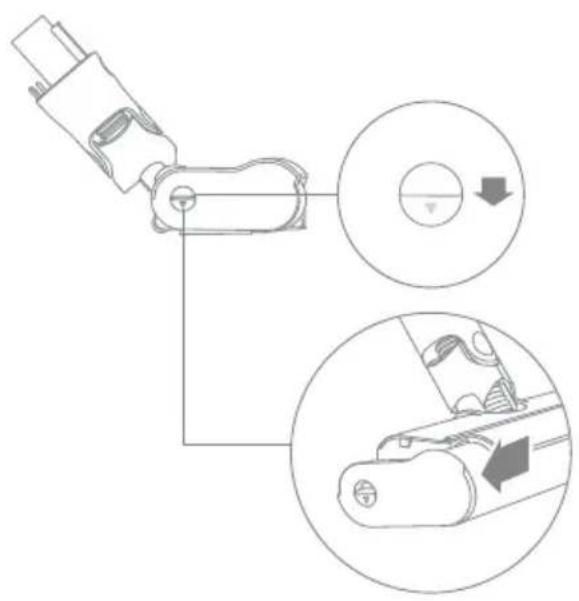
- As shown in the picture, press the brush roller release button to remove the roller from the slot.
Fig. F-16
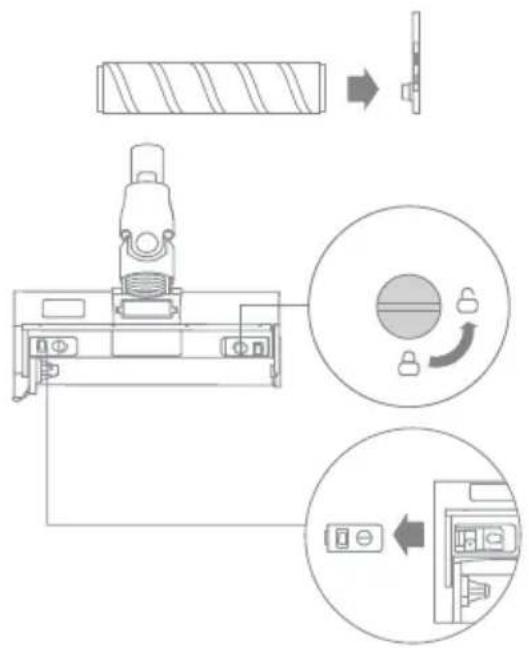
- Separate the roller from the side cover. Turn the small wheel release buttons counterclockwise to remove the wheels.
Fig. F-17
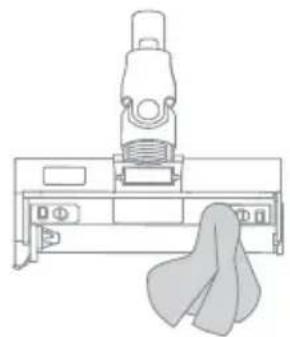
- Use scissors to cut off the hairs and fibers that get stuck on the brush roller and the wheels. Wipe the dust from the notch and transparent cover with a dry cloth or paper towel. Thoroughly dry before use.
Fig. F-18
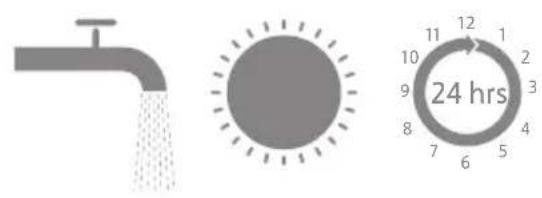
- When it is dirty, rinse the brush roller with clean water until it is clean. Then stand the brush roller upright for at least 24 hours until it is fully dry.
Fig. F-19
Tip: It is recommended to clean the illumination multi-surface brush, illumination soft roller brush or motorized mini-brush after each use.
Replacing the Battery Pack
The vacuum contains a removable rechargeable lithium-ion battery pack which has a limited number of recharge cycles. After extended use, the battery pack may no longer hold a charge. If this happens, it means the battery pack has reached the end of its life cycle and needs to be replaced.
- Press down the battery pack release button and slide the battery pack to the right to remove it.
- Install the new battery pack.
Fig. F-20
If the vacuum is not working properly, please refer to the table below.
| Errors Possible Causes | Solutions | |
| The vacuum does not work. | The appliance is out of battery or its battery level is low. | Fully charge the vacuum, then resume use. |
| Overheat protection mode triggered by a blockage. | Clean the suction opening or air duct. Wait until the vacuum cools down, then reactivate it. |
| The suction opening or air duct is blocked. | Clear any blockage from the suction opening or air duct. |
| Weak suction force. | The dust cup is full and/or filter assembly is clogged. | Empty the dust cup and/or clean the filter assembly. |
| An attachment is blocked. Clear any | blockage in the attachment. |
| The motor makes a strange noise. | Main suction opening or extension rod is blocked. | Clear any blockage in the main suction opening or extension rod. |
| The battery indicator does not light up when charging. | The charger does not plug into the charging & storing mount well. | Check whether the charger is properly plugged into the charging & storing mount. |
| The appliance is not placed onto the charging & storing mount properly. | Make sure the appliance is placed onto the charging & storing mount properly. |
| The battery is charged and switches to Sleep Mode automatically. | The vacuum runs normally. |
| If the problem persists after ruling out the above possibilities, please contact the after-sales service department for maintenance. |
| Charging too slow. | The battery temperature is too low or too high. | Wait until the battery temperature returns normal, and then recharge. |
| The LED lights of the illumination multi-surface brush and the illumination soft roller brush do not work. | LED lights are damaged. | Please contact the after-sales department for maintenance. |
| Status Possible Causes | Solutions | | |
| The indicator is red after turning on the vacuum. | Battery pack is damaged. | Please contact the after-sales department for maintenance. |
| The indicator blinks red quickly when charging the vacuum. | The charger is incompatible. | Only use the original charger to charge the vacuum. |
| The indicator blinks white when using the vacuum. | Out of Battery. | Please charge in time. |
Troubleshooting
If the vacuum is not working properly, the screen display will show an error message. Please refer to the troubleshooting table to find your solution.
| Error Icon Error | Message Solutions | |
| Low battery Please charge in time. | |
| Out of Battery Please charge in time. | |
| Battery temperature is too high | Wait until the battery's temperature returns normal, then resume use. |
| Air duct blocked | Check whether the dust cup, extension rod, or brush is blocked. |
| Brush roller stuck | Refer to the brush cleaning section to clean the debris and hair tangled on the brush roller. |
| Filter is expiring Please replace the filter in time. | |
| Replace the filter | After replacing the filter, please refer to the [Settings] to reset filter. |
| Insufficient water in the clean water tank | Please fill the clean water tank in time. |
| Error | Please contact the after-sales department for maintenance. |
Specifications
EN
| Vacuum Cleaner |
| Model VZVZ23A Rated Power 855 W | | |
| Charging Voltage | 34 V--- | Rated Voltage | 29.6 V--- |
| Charging Time approximately 4 hours |
| Illumination Multi-Surface Brush Motor | zed Mini-Brush |
| Model VMBZ Model VMMY | | |
| Rated Power 40 W Rated Power 20 W | | |
| Rated Voltage | 25.2 V--- | Rated Voltage | 24 V--- |
| Illumination Soft Roller Brush |
| Model | VBRW | Rated Power | 40 W |
| Rated Voltage | 25.2 V--- |
| Charger |
| Model | ZD024M340090BS | Average Active Efficiency | 87.01% |
| Input | 100-240 V~50/60 Hz, 0.8 A | Efficiency at Low Load (10%) | 77.01% |
| Output | 34 V---0.9 A | No-load Power Consumption | 0.1 W |
| Rechargeable Lithium-Ion Battery Pack |
| Model | V2406-8S1P-GYA/V2406-8S1P-SCA | Nominal Voltage | 29.6 V--- |
| Rated Capacity | 3100 mAh | Nominal Capacity | 3200 mAh |
| Energy | 91.76 Wh |
The lithium-ion battery pack contains substances that are hazardous to the environment. Before disposing of the vacuum, please remove the battery pack, then discard or recycle it in accordance with local laws and regulations of the country or region it is used in.
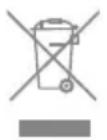
All products bearing this symbol are waste electrical and electronic equipment (WEEE as in directive 2012/19/EU) which should not be mixed with unsorted household waste. Instead, you should protect human health and the environment by handing over your waste equipment to a designated collection point for the recycling of waste electrical and electronic equipment, appointed by the government or local authorities. Correct disposal and recycling will help prevent potential negative consequences to the environment and human health. Please contact the installer or local authorities for more information about the location as well as terms and conditions of such collection points.
Sicherheitshinweise
Ha3BaHnY KOMNoHErTOB
Kopnyc nbinecoca
- KoHTeINHepIyIyIyI
- KhoNka oTcoeHHeHna KOHTeHepa IyIbIIN
- KhoNka OTCOeINHeHn HNXHei KpbIuKn KOHTeHepa Dny PbIn
- KhoNka oTcoeDInHeHnna aKKymyIaTOpHoro 6loka
5.Диспел
- KhoNka NHTaHnA
- NepekIouateIb ypoBn BcacbBaHn
8.Индikatop coctoHna 6aTapeu
- AHTNCTaTnueckn KOHTaKT
Pnc.B
YctaHOBka
UcTaHOBKa pPnHaJdxKHOCTeI
PpimmeaHne
He pekomehyetyncnoB30BaTb 3JIeKTPnueckyU MOHN-5eTKy C ydHHHTeMe.
- UctaHaBnBaIte npHaJexHoCTN B COOTBeTcBnC cpaKTnueCKmN NOTpe6HocTAmN By6OpKe.
- PekomeHdyetc nCNoJb3OBaTb r6kn coeHHntel npu uNCTke H3kopacnoJooKeHHo Me6en, OHaKO He peKomeHdyetc noCToHHO NOcOeHNrB erO K Kopnycy nbInecoCa npExeDHeBHO y6OpKe nola.
Pnc.C
3apяdka
Ipeed nepBbIM NCNoJIb3OBaHNEm NOJHOCTbIO 3apAInTe Nblncoc.
IomeCTnTe nbilecoc Ha cToiKy dlya 3apdKn
HxaHeHna, KaK noka3aHo Ha pncyHke, a
3aTeM NOkHouHTe 3apdHoe yctpoiCTBO
MeJx Cy ToiKO Jda 3apdKn HxaHeHna
NCTOuHnKom NITaHna. INDnKaTOp 3apda
aKKymyJIaTopa bYedT MIRaTb BO BpeM 3apdKn.
PpmeuHne
- Tn6kn nepexoHnK HeIb3a
- NOdkIIOuHTb K KopnyCy nbIeCocA BO
- BpeM 3apJdKn.
- Ecnn 3apnHbIe KOHTaKTbI 3aTpy3HeHbI, aKKypaTHO npOTpnte INx cyxm noloteHcem.
- Пылесoc Heьзя ИспОльь30ВаТь BO Врем зараздк.
-
Послne понов заряdkи Инданкатор состаяня 6atapen norachet uepe3 5 mHyT, n nbilecoc nepeienbet B pejIM 3HeproscbepekeHn.
-
3TOT npocecc 3aIMeT npimepno 4 yaca.ДinteIbHЯ cyXaYbOpkaВ pexKIme «Typ60» npINBeTe KHarpeBaHnIO aKKymyIaTOPa, uTO yBelenuHT Bpemr 3apJKn.Ipeed 3apJkOJ daJTe nbIleCocy OCTbITb B TeueHne 30 MNHyT.
Pnc. D-1
CnocobI OTo6paXeHnyuPoBHa 3apAdkn
1.Индikatop coctoHn6aTapeu
MuraertBebIM
O NocToaHHo rOpNT 6eJIbIM
BbIKI.
3apdka
AkkymyIaTOp nIoHocTbIO 3apJxKeH
3apya
Pexim OxuHaHn
Pnc. D-2
2.ДиucnJIeN
Yncno Ha 3KpaHe dncnpe Noka3bBaet Tekyun ypoBHe 3apra aKKymIaTopa B npoentax BO Bpem 3aprKn. KOrda OTo6pa3ntcyaNo 100, aKKymIaTOp POnHOCTbU 3apJxH.
Pnc. D-3
Márka yetka dny ydaenna nbinn
IopxOaNT dIy uNCTKJ KK-MoHHTOpOB, KlaBnaTpy, a6aXkpOB, wTOp, CTaBHei NdpYnx NOBepxHOCTeyn xpykNx npedMeTOB.
Pnc. E-7
BpaaioozaocMraKKa yetka dla
ydaennna blln
UeTKy MoXHO NOcOeHnHTb K ydInHntelbHomy WlaHry. UeTKa OchauSeHa BpaaUoIeNcra RoIOBko N IOxOINT DnA OUnCTKn DeINKaTHbIX IN XpyKnx NOBepXHocTe N yrLoB, TaKnx KaC TcEKnO, DinCnLeN IN KnaBnAtypbl.
Pnc. E-8
Tn6kn coeHntelb
Cn6aI N BbIDBnra ydInHntelb OHNm HaxKaTneM, MoXHO IeKo y6npaTb ydaJIeHHbIe 30HbI NOd Hn3KO paCnoJoxeHHo Me6bIbIO, HapPmeP IOd KPOBaTbIO n DnBaHOM. PpImeuaHHe: peKomeHdyetc INcNoIb3OBaTb r6kN CoeHHTeJIb pRi YnCTKe Hn3KopacnoJoxeHHo Me6eJI, ODAhako He peKomeHdyETc NoCTOarHHo NOcOeDnHrB erO K KopnyCy nbIeCoCa npExeHBeHOn y6Opke noJa.
Pnc. E-9
Márka polnikobáry zetka c nočcbetkò
IopxOJITdIyUcTKnHaNoJIbHbIX
NOKpbItn,HaNPmEpMpaMopaNIIHTKn.
PpmeuHne
Ppi 3anysCe yctpoiCTBa aBTomatueckn
BkIoUaETc86okOBaIoDCBeTka uetkn,
06JeYarNCnoJIb3OBAHne.
Pnc. E-10
HnctpymENT IJIy BbIeCbIBaHHN WepCTN DOMaunHX XINBOTbIX
IopxOJNT JnBbIYeCbIBaHnN BCaCbIBaHnN ⅢepCTn DomaunHX XINBOTbIX CO cpeDnei N DInHHoJ WePcTbIO.
Ppimechne
Bcnyuae 3aCTpeBaHna KaKoJ-ll60 BpaauoUeIcra Yactn PbIeCoc MoKeT ABTomatueckN OTKlOHTbcr. YdaInte BCE 3aCTpRAuNE NOCTOPOHHe IpeDMeTbI, NocLe yero npOdoJIxnte nCNoIb3OBaHne UcTPOIcTBa.
- Пи перреве akку млгторнй 6ааренпылесoc abTomatnueckn OTKлчаetс.Поождnte, noka TempepaTypaakkу млгтopa BepHETcK HOpMaIbHOMy3HaueHnO, 3aTeM BO306HOBNTeИСпОЛьЗВанe устpoИCTba.
YxOДи peMoHT
Hnctpykqu
Bcerda nCnoJb3yIte opnHnHaNbHbIe detaII, yTo6bI BaIaIraPANTn He 6bla aHHynpObaHa.
- Ecnn φилььт плн Насадka 3acopeнbl,пылесoc NepectaHET pa60taTb BCKope nocne BKlnoueHnry. OuncntTe Tpy6ky dny BOCCTaHOBJIeHnry pa60tbl.
- Перацкою контейнера поллубдпесь,чTOВИКаOTКПЮЧЕHAOTcETN,aKHONKaПИТAHЯПБЛECOCaHaxODITcB BBIKJIQUEHHom NOLOJKeHIN.
- Ecni nbilecoc He nCnoB3yETcnaPdoJXnTeIbHoe BpeMra, NOnHOCTbIO 3apAInTe erO,OTcoeHNHe T Ka6JIb NITaHnO rT CetN, IN3BLeKInTe aKKymyIaTOPHyO 6aTaPeEO I OCTaBBTe nbIeCoc Ha xpaHHeNBE INPOxlaADHom MeCTe C Hn3KOIBaJXHOCTbIO BdALN OT npAmbix CoJNeuHbIX Lyuei. Bo n36exKaHne Upe3MePHo PA3pRAnk aKKymyIaTopa 3apJXaIte erO He peXe OndHOro pa3a B 3 Meca.
YnCTka NbIeCocca
IpoTnpaTe IbIeCoc MmKoI cyXOJ TKaHbIO.
OuNTka KOHTeHepa dIy Ibln, qNlBtpa IpeDbapntelbHOJ OUcTKn I ZIKLOHHO 6Loka
- Haxmnte KhoNky OTCOeDnHeHn HxHne KpbIuKn KOHTeHepa Iy nbln, 3aTeM ydaIInTe cOpeXmoe.
Pnc.F-1
- Haxmte KhoNky OToCoeHHeHnKoHTeHepa Ira NbIIN N BbIHbTe eO N3PiIneCoca.
Pnc.F-2
- Chauana chmunteфnilbtp
PpeBapntelbHOn OunchKn, a 3aTeM
NoBepHnte UKIOHHyU CNCTeMy, uTO6bl
BbHyTbe ee.
Pnc.F-3
4.ПромоTe UKKIOHbI 6LOK,ФИьТРпpeВapNTeIbHOb OUNCtKN I KOHTeHepДЯ ПылдdoЧNTOrO COCTOHNIA.ПосLEпрOMbIBKn BbICyUInTe INx Ha BO3dYxe BTeueHne MmHmym 24 yapcob.
Pnc.F-4
PpimmeaHne
OuHauTe KOHTeHepIyIbIINo Mepe Heo6xOaMocTn.
- PeKOMEnHyEeTcYuHCTnITb cIKIOHHyO cnCTemU nΦnIbTp PpeBapNTeJbHOuOuNCTKn NO KpaHHeMpe uepe3 KaXdIe 3-4 Meca.
OunstkaФильста
- BbInbTe KOHTeHep dIy nbIIN, KaK noka3aHO Ha pncyHke.
Pnc.F-5
2.ИЗВЛЕКИТeФильТуN ПьIJIeCOCa,NotЯнБ erO BnH3ВHaNPaBLeHIn,ПOKa3aHHOM Ha pIcCyHKe.
Pnc.F-6
3.ПомоиTeФильТР,NOBOPaUNBaera HoHa 360° .CnerkaNoCTyUHTeNoФильТу HeCKoЛьКо pa3,YTOБыУdaJIntbCKOINBUniCraBHeM Mycop.
Pnc.F-7
4.ПрocушITEФильтп ha BO3dUxeВ TeueHne 24 yacob.
Pnc.F-8
PpimmeaHne
ДлгпрьИкифпьтpa ИсплььуITE TOльkoЧИСТУВODY.
- 3anpeuetaetcnaonb3oBaTb uNCTaee cpeDCTBO.
He nbitaTecb uHCTNTb 0nIbTp 0eTKo nn n naBcAmN.
- PekomeHnyetc ynCTntb pnilbTp uepe3 kaxdble 4-6 mecaueB.
OuNTka yHnBepcaIbHOJ ⅢeTKN C NOcCBETKOJ
1.ПовернiteфпкаторnpOTивчасов CTpeлкdoуnapa,3aTeMCHIMITEpoNK CpoNkoBoiTkeTkn.
Pnc.F-9
2.HoKnIaMNIOTpeXbTe BOLOCKN I BOJOKHa,3aCTpBwne BpoJIKOBOu ⅢeTke.BbITpTe Nblb Cna3a IN pO3paHNo KpbIshKn CyXoYTKaHbU NN6yMaXhbIM NoloteHcem.TuaTeJIbHO BbICyWnte nepeD NcNOJb3OBAHNEM.
Pnc.F-10
- B clyuae 3aqr3HeHnI npOMoIte polnkobyo uetky uNcToB oDoN, noka OHa He cTaHET uNcToN.
Pnc.F-11
4.OCTaBbTe polnKOByU 8eTky B BeptkaJIbHOM NIOJKeHmMHNmym Ha 24 yaca do nOHLoro BbcbixAHn.
Pnc.F-12
Ounstka əJIeKtpnueckoMnHn-TeTKN
1.CnOMOuMoHeTbI (CM.pNcyHOK) NOBepHInTeΦnKcTOp npOTNB qacOBoI CTpeKN TaK,UTo6bl pa3daJcra QeLqK. Nocne pa36loKnpOBKn 3JIeKtpnueckoMHN-5eTKn CHNMTe 5eTOUhBIOPONNK.
Pnc.F-13
2.ПомоуTe n ouHCTnTe 电ToHbI pOJIk.OCTaBbTe 电ToUHbIpoJNK B BEPTKaklbHom NOLoxeHN B XOpOw OBeHTUNIpyemOM MecTe MNHmym Ha 24 yaca do nolHoro BbcbixaHna.
Pnc.F-14
- Nocne TOrO KaK 5eToHbI poNik BbICOXHeT, yCTaHOBnTe ero Ha MeCTO, CNeDy INHcTpkyuIN No pa36OpKe B O6paTHOM nopRdke.
Pnc.F-15
OuNTka MraKoI polNKOBoi 1eTKI c POncBETKOJ
- RykoBoDcTByacb pncyHKOM, HaxMnte KhoNky OTcoeHHeHnI yTeOuHOro poNka, UTo6bl n3BLeueb poNk n3 na3a.
Pnc.F-16
- Chmnte poJnk c 6okOBoKpbIkwKn. NObepHnte maleHbKne KhoNkn pa36loKnpOBKn KOle npOTnb YacOBoCTpeKN, UTo6bl CHrTb KOJeCa.
Pnc.F-17
- HoXnIaMn OTe BoIOCKn I BOJOKHa, 3aCTPbWne Ha polnke UeTkn I KOlecax. BbITpIte nbIb c na3a I npO3paHoi KpbIshKn cyxOi TkaHbIO NJIb 6yMaJhbIM NoIOTehcem. TuaTeJIbHO BbICuIHTe nepeD nCNoJIb3OBaHNEm.
Pnc.F-18
- B clyuae 3aqr3HeHnI npomOte poNKOByU 5eTKy uCTOn BODo, Noka OHa He cTaHET uCTOn. 3aTeM OCTaBbTe 5eTOHyB POINK B BePTNkAJIbHOM PNOJXeHN MHHmym Ha 24 yaca do PONHO RbICbIXaHn.
Pnc.F-19
Cobet: pekomehnyetc ounuatab yHnBepcaIbHyU 9eTKy C nOcCBeTKoN, MraKyu POJIKNOBYU 9eTKy C nOcCBeTKoN I 3JIeKTPnueckyU MNH-5eTKy Nocle KaJIOrO INCNoIb3OBaHn.
3aMeHa aKKymyIaTOpHOrO 6Joka
B nbilecoce yctahOBlen cbemhbln IINTN-NOHHbI aKKymyIaTOPHbI 6lOK,IMeOuIOn OrpaHnueHHOe KOINueCTBO cIKNoB nepe3apdKn. Pocne dInTeNbHO rncnoJb3OBaHnA aKKymyIaTOp MOKeT nepeCTaTb DePkaTb 3apdKy.3TO O3NaHaET,HTo CpOK cnjkbI aKKymyIaTOpHoro 6loKa nCTek N aKKymyIaTOp Heo6XoDnMo 3aMeHNTb.
- Haxmte KhoNky pa36loKnpOBKn aKKymyIaTOpHOro 6Ioka n CdbnHbTe erO BnpaBO, yTO6bl N3BVeUb.
- YctaHOBInTe HOBbI aKKyMyJrTOpHbI 6nok.
Pnc.F-20
yINIIOONIXNINININ8NNNNN 70OYNIINNINNINNINNNNNNNNNNNNNNNNNNNNNNNNNNNNNNNNNNNNNNNNNNNNNNNNNNNNNNNNNNNNNNNNNNNNNNNNNNNNNNNNNNNNN
ninnnn nniin, niiin (n7) nn nnnn nnnn .
.7
n nnnn nn nnnnnnnnnnnnnnnnnnnnnnnnnnnnnnnnnnnnnnnnnnnnnnnnnnnnnnnnnnnnnnnnnnnnnnnnnnnnnnnnnnnnnnnnnnnnnnnnnnnnnnnnnnnnnnnnnnnnnnnnnnnnnnn
·
n nn nnnnnnnnnnnnnnnnnnnnnnnnnnnnnnnnnnnnnnnnnnnnnnnnnnnnnnnnnnnnnnnnnnnnnnnnnnnnnnnnnnnnnnnnnnnnnnnnnnnnnnnnnnnnnnnnnnnnnnnnnnnnnnnnnnnnnnnnnnnnnnnnnnnnnnnnnnn
.
IN NIO DNNI, NINN, NININ, ININ, ININ, ININ, ININ, ININ, ININ, ININ, ININ, ININ, ININ, ININ, ININ, ININ, ININ, ININ, ININ, ININ, ININ, ININ, ININ, ININ, ININ, ININ, ININ, ININ, ININ, ININ, ININ, ININ, ININ, ININ, ININ, ININ, IN
https://global.dreametech.com/pages/user- :n
manuals-and-faqs
D
D7
:nn
Tnynnnnnnnnnnnnnnnnnnnn7ynnnN7
.
1
.
y
-17777777777771
1977
1-
1.72X
2.
3.172N
- nyn
5.1von
-
nni
-
甲
-
n
9.nn
10.IONXI
11n7y:
12
#
Iywnnnn nn nnnn
.
- yin nuiyin yi poin nn ni7n 1017
.
ponn,7xN,01OID 17
.4-670ponnnn7yinn
177xnnn nn
nnuun-nnnnnnnnnnnnn
DWTIN4T3-7nnNn97 DTT
n 111111111111111111111111111111111111111
7777777777777777777777777777777
-13'17'X
7on7 nnnnion nn nn nn.
- nioiow'2n 224 2n nn nn nn nn nn nn nn nn nn nn nn nn nn nn nn nn nn nn nn nn nn nn nn nn nn nn nn nn nn nn nn nn nn nn nn nn nn nn nn nn nn nn nn nn nn nn nn nn nn nn nn nn nn nn nn nn nn nn nn nn nn nn nn nn nn nn nn nn nn nn nn nn nn nn nn nn nn nn nn nn nn nn nn nn nn nn nn nn nn
- wnnn nn nn nn nnnn 14
-201
17777,7777777777.3 197777777777777
-15'
y n nn nnnnn
#
n nn n nn nn nn nn nn nn nn nn nn nn nn nn nn nn nn nn nn nn nn nn nn nn nn nn nn nn nn nn nn nn nn nn nn nn nn nn nn nn nn nn nn nn nn nn nn nn nn nn nn nn nn nn nn nn nn nn nn nn nn nn nn nn nn nn nn nn nn nn nn nn nn nn nn nn nn nn nn nn nn nn nn nn nn nn nn nn nn nn nn nn nn nn nn nn nn nn nn nn
-16'
y.17n noon nn n 7 y.2
117n nn nn nn nn nn nn nn nn nn nn nn nn nn nn nn nn nn nn nn nn nn nn nn nn nn nn nn nn nn nn nn nn nn nn nn nn nn nn nn nn nn nn nn nn nn nn nn nn nn nn nn nn nn nn nn nn nn nn nn nn nn nn nn nn nn nn nn nn nn nn nn nn nn nn nn nn nn nn nn nn nn nn nn nn nn nn nn nn nn nn nn nn nn nn nn nn nn nn nn nn
-171
y 3
.
-18'1
n nn nnnn nn nnnn nn nnnn nn nnnn nn nnnn nn nnnn nn nnnn nn nnnn nn nnnn nn nnnn nn nnnn nn nnnn nn nnnn nn nnnn nn nnnn nn nnnn nn nnnn nn nnnn nn nnnn nn nnnn nn nnnn nn nnnn nn nnnn nn nnnn nn nnnn nn nannn nn nnnn nn nnnn nn nnnn nn nnnn nn nnnn nn nnnn nn nnnn nn nnnn nn nnnn nn nnnn nn nnnn nn nnnn nn nnnn nn nnnn nn nnnn nn nnnn nn nnnn nn nnnn nn nnnn nn nnnn nn nnnn nn nnnn nn nnnn nn nnnn nn nennn nn
-191
nnuyn- nnn nn nnnn y7n 90
yinnn nn nn nn nn nn nn nn nn nn nn nn nn
Jaiy Jaiy Jaiy Jaiy Jaiy Jaiy Jaiy Jaiy Jaiy Jaiy Jaiy Jaiy Jaiy Jaiy Jaiy
#
= 1/2la - 2l
https://global.dreametech.com/pages/user-
manuals-and-faqs
1
i
∴ ab = 12
Jol51y ajiy jieSll aowill
1 1
gLo jzill jaiill Jala ie yll aikall g
jaiill Jala iin jalil Jao g iiaia gill paa g
elil aylll ala Jao giaag aal bll daa g
.
∴ ab = 12
aillll ggiin g aii jgSll aaaiSall jaa
i 30
D-1
eaii jia
AR
#
-
· = 0
-
∴ SΔOBC = SΔBOC + SΔCBA
-
äj12
4.
5.
-
如下:
-
ac gao
8.
2.45 9.
jzjjzjj0
ai Q. = P( 1 + j = 0majj)
oLwJUfuiuIiJgWbU1uJ.12
A
a,b,c,d,e,g,h,i,j,l,a,b,c,d,e,f,g,h,i,j,k,l
Ligol
1
a 1
y1 = 1/2y0
. 1234567890
5 1
∴ SΔOBC = SΔCOD + SΔBOC
aikolil 4
4.1.1.1.1.1.1.1.
∴ 4k = 3
15i 15i jai jai jai jai jai jai jai jai jai jai jai jai jai jai jai jai jai jai jai jai jai jai jai jai jai jai jai jai jai jai jai jai jai jai jai jai jai jai jai jai jai jai jai jai jai jai jai jai jai jai jali jali jali jali jali jali jali jali jali jali jali
aas 20 111 all gannall yg a g baiill
aJgLlal, iic auiu jll aaiy jI gziug auiu
Jg j 1111111111111111111111
E-3
a
jbjblll 1
y
J 1
JalSllj gaa
D-2
2
yj11 100 jay Lai.
D-3
puiy1 1
#
y
Aikall 2gauu Laiill jie Laii gai y
1.
- 点 A( 1, - 4)
A
- 点 q1
gall gill 111111111111111111111
15 15
4.
()j10
(j):jao 50
500 500
- 4/3
"LO" 100%
- 4/x = 4/x
a
- 与动词
()
E-1
eLiJUaLilI aIgBulIolu
IbIyI yIyI Jia IaI aI all cuiy Jai baii ayuio
∴ 4k = 3
i j 1
Jiaiuiu liuiua la gai jiai jai
E-10
a111111111111111111
Cii 1
Jgall Jannnnn
∴ 4k = 3
j 1
a jia jia jia jia jia jia jia jia jia jia jia jia jia jia jia jia jia jia jia jia jia jia jia jia jia jia jia jia jia jia jia jia jia jia jia jia jia jia jia jia jia jia jia jia jia jia jia jia jia
a
aia aiee
cbsd1 0aia aai
∴ 4k = 3
paoaagaae aaii jiaai yie
Jiaaiui Li liuLia de gai, ciigai sli jali jai
IaI g IaIg IJIaIg I aIg I aIg I aIg I aIg I aIg I aIg I aIg I aIg I aIg I aIg I aIg I aIg I aIg I aIg I aIg I aIg I aIg I aIg I aIg I aIg I aIg I aIg I aIg I aIg I aIg I
iiikally ii yill jolal yjall jll
. = +
aill 1
Lle all Juaa caiy aay y 11 aikolly s j
E-4.5.31
a
aloll 1o lae g aieyll cilll gail gai gai
pIaII Jua Ia Jua aJua Jua Jua Jua Jua Jua Jua
Jaaa aee aee aee aee aee aee aee aee aee aee aee
∴ SΔOBC = SΔBOC + SΔCDF
F-6
360 360 jiljilil jilil 3.
∴ 4k = 3
cbwJ 0d2a iuoo oui a
jji jai jai jai aclll jiae olai jai jai jai 1
∴ a1 = 2/3,a2 = - 4/3,b1 = 5/6,b2 = - 7/8
F-9
aill gduu g aill 1 yauill uall piaiul.2
alaa aabc alaall g all y jall gol aol
JUeaiui Li Li Lai i 100
F-10
Gic 1alil 1olly slw jall aI glaw 1aai Iocii Iocic .3
∴ an + 1 = an + an
F-11
e 24 sial aiea gai jil glal .4
- = ( x1,y1) , = ( x2,y2)
F-12
aIalglaiie
:
a12 p110 .jaiai
∴ SΔOBC = SΔCOD + SΔBOC
y
a
·
Jie 10e
ai a ai 分母最小值为 k . 如果 k = i ,则 ai = k/2 .
y 1
iiaai jil jial iij .jai jai jai jai jai jai jai jai jai jai jai jai jai jai jai jai jai jai jai jai jai jai jai jai jai jai jai jai jai jai jai jai jai jai jai jai jai jai jai jai jai jai jai jai jai jai jai jai jai jai jai
4.4.1.2.3.4.5.6.7.8.9.10.11.12.13.14.15.16.17.18.19.20.21.22.23.24.25.26.27.28.29.30.31.32.33.
.
. jiall JiuLai jiuilai jiulilai
auiy
∴ Ai Sj
1
6 4 10 12 13
1
eJyj 1 jaii yglz oLc alte yj jgol
∴ SΔOBC = SΔCOD + SΔBOC
F-1
aill jil jil jll ceg yjai jie laial.2
∴ 1/2,0, - 1
F-2
J 3
∴ 2j = 1 即 j = 1 ( p - q) = 1
F-3
g 1 g 1 g 1 g 1 g 1 g 1 g 1 g 1 g 1 g
24 0d 1gally aee jaiy
∴ SΔACD = SΔCOD + SΔDCE
F-4.5s
∴ 4k = 3
∴ y = 4x
∴ SΔOBC = SΔCOD + SΔBOC - SΔBOC
a 1
a111 111 111 111 111 111 111 111 111 111 111 111 111 111 111 111 1
j 1
1
F-13
2 1
.
F-14
F-20
3
F-15
eLai Lai Lai
aai gaaai jj jbc baiai ojgai aia gao gao 1
F-16
Jg Jn j 2
F-17
aal 1000000000000000000000000000000000000000000000000000000
F-18
ailll lll slj jil gwl ibai iuii laie 4
g jil g jil gwl g iis aai ai
laai g iic 24 2d
F-19
1 1
olal Jgll gss