SDB-100 - Soundbar SAMSUNG - Free user manual and instructions
Find the device manual for free SDB-100 SAMSUNG in PDF.



| Product type | Alarm device |
| Brand | Samsung |
| Model | SAB-100 |
| Dimensions (L x W x H) | 100 mm x 96 mm x 35 mm |
| Weight | Approximately 100 g |
| Power supply | 18 V DC via the monitor (RJ45 connector) |
| Power consumption | Approximately 1 W |
| Operating temperature | -10 °C to +50 °C |
| Operating humidity | Up to 90% |
| Alarm input | Normally open (N/O) or normally closed (N/C) |
| Alarm output | Relay: 125 VAC, 0.5 A or 30 VDC, 2 A (resistive load) |
| Main functions | Sensor signal reception, alarm output, camera and monitor connection via RJ45 |
| Installation | Wall or ceiling mount, well-ventilated location |
| Maintenance and cleaning | Wipe with a dry, clean cloth. Do not use water, detergents, or chemicals |
| Safety | Do not disassemble, avoid drops, do not expose to moisture or extreme temperatures, unplug during storms |
| Spare parts and repairability | Contact Samsung after-sales service for any repairs. Do not disassemble or modify the device |
| General information | Intended for video surveillance systems (VPP), compatible with Samsung cameras SOC-220P, SOC-420P, SOC-920P |
Frequently Asked Questions - SDB-100 SAMSUNG
User questions about SDB-100 SAMSUNG
0 question about this device. Answer the ones you know or ask your own.
Ask a new question about this device
Download the instructions for your Soundbar in PDF format for free! Find your manual SDB-100 - SAMSUNG and take your electronic device back in hand. On this page are published all the documents necessary for the use of your device. SDB-100 by SAMSUNG.
USER MANUAL SDB-100 SAMSUNG
This symbol indicates high voltage is present inside. It is dangerous to make any kind of contact with any inside part of this product.

This symbol alerts you that important literature concerning operation and maintenance has been included with this product.


- Make sure that the cable is plugged in securely before using. (A loose connection may result in fire.)
- When installing the SDB-100 on a wall or ceiling, mount it safely and securely. (A falling SDB-100 may cause personal injury.)
- Do not place conductive objects (e.g., screwdrivers, coins, and metal things) or containers filled with water on top of the camera. (Serious injury may result from fire, electrical shock, or falling objects.)
- Do not install in a sooty, dusty, or humid location. (Doing so may cause fire or electrical shock.)
-
If any unusual smells or smoke come from the unit, stop using the product. In such case, immediately disconnect the power source and contact the service center. (Continued use in such a condition may cause fire or electrical shock.)
-
If this product fails to operate normally, contact the store of purchase or your nearest service center. Never disassemble or modify this product in any way. (The manufacturer is not liable for any damage resulting from unauthorized disassembly or repairs.)
-
When cleaning, do not spray water directly onto parts of the product. (Doing so may cause fire or electrical shock.) Wipe the surface with a dry cloth. Never use detergents or chemical cleaners on the product, as this may result in discoloration of surface or cause damage to the finish.
-
Do not drop objects on the product or apply strong shock to it. Keep away from a location subject to excessive vibration or magnetic interference.
- Do not install in a location subject to high temperature (over 50^ C), low temperature (below -10^ C), or high humidity. (Doing so may cause fire or electrical shock).
- Avoid a location which is exposed to direct sunlight, or near heat sources such as heaters or radiators. (Neglecting to do so may result in a risk of fire).
- If you want to relocate the already installed product, be sure to turn off the power and then move or reinstall it.
- Install in a well - ventilated location.
- Remove the power plug from the outlet when there is a lightning storm. (Neglecting to do so may cause fire or damage to the product.)

SDB-100 Introduction Function of Each Part
The SDB-100 (Samsung Doorbell Box) is a device for VPP only. If the camera used VPP is not connected with, this device is not operated. And normal operation cannot be guaranteed when used for something else.
Checking the Contents of the Package
"Make sure that the SDB-100, user's guide, screw and cable are included in the package."

SDB-100


User's Guide SCREW CABLE

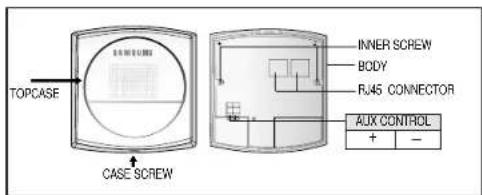
▶ AUX CONTROL
This outputs signal(DC17V, 300mA) that control external devices when the AUX CONTROL key of the monitor or remote controller is pressed.
▶ CONNECTOR
One is for the camera-end of the cable, and the other is for the monitor-end of the cable.
Precautions for Installation and Use SDB-100 Installation
√ Please check whether the installation site can sufficiently support the weight of the SDB-100 before installation.
√ Make sure that the cable is not caught on anything or its insulation sheath is not removed.
(Neglecting to do so may cause fire or damage to the product.)
√ Prevent people from approaching the installation area, where objects might fall during installation. Move valuables to a safe location before installation.
√ Install the SDB-100 in a cool location, away from direct sunlight. It is recommended that the SDB-100 is located in an area not subject to direct sunlight during use or storage.
√ The SDB-100 must be used in an area where temperature and humidity are kept within the limits specified below:
- Temperature: -10°C \~ +50°C (14°F\~122°F)
- Humidity: Below 90%
▶ Choose an installation site that can sufficiently support a minimum of five times the net weight of the equipment to be installed (approx. 500g).
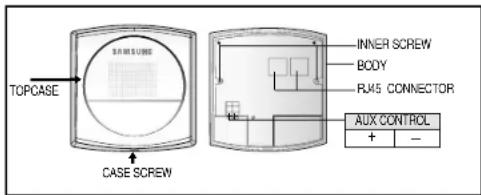
- Unscrew the CASE SCREW and then disassemble the TOPCASE.
- Connect RJ45 CONNECTOR with the Camera, and connect the other RJ45 CONNECTOR with the Monitor. System connection is refer to system connection diagram.
- If you want to use Aux Control. Connect the Aux Control +port and - port with other device that use Aux Control output (DC17V, 300mA).
- After the cable connection is completed, you must arrange the cables so that won't get damaged.
- Screw BODY of the SDB-100 and the satisfied place with the INNER SCREW (2 point).
- After, close the TOPCASE, screw TOPCASE and BODY with the CASE SCREW.
System Connection Diagram
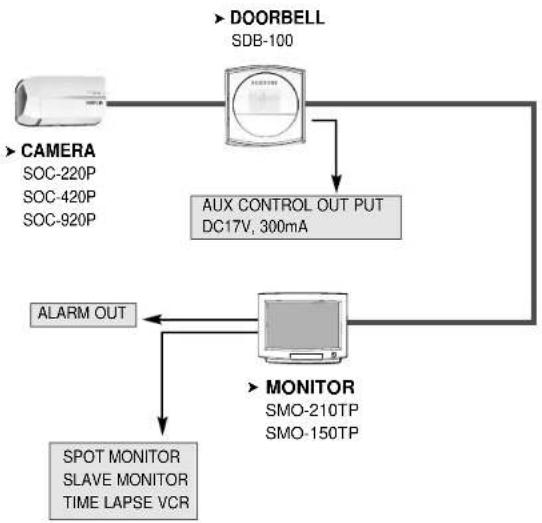
flowchart
graph TD
    A["CAMERA<br>SOC-220P<br>SOC-420P<br>SOC-920P"] --> B["DOORBELL<br>SDB-100"]
    B --> C["AUX CONTROL OUT PUT<br>DC17V, 300mA"]
    C --> D["MONITOR<br>SMO-210TP<br>SMO-150TP"]
    D --> E["SPOT MONITOR<br>SLAVE MONITOR<br>TIME LAPSE VCR"]
    E --> F["ALARM OUT"]
SDB-100 - Specifications
| Item Description | |
| Product Type DoorBell Box | |
| Power Source Voltage DC | 18V From Monitor |
| Power Consumption Approx. 1W | |
| Operating Temperature | -10°C ~ +50°C |
| Operating Humidity ~90% | |
| Physical Size 96mm(W)X35mm(H)X100mm(L) | |
| Weight | Approx. 100g |
| Aux output | DC17V, 300mA |
| Microphone | -40dB |
| Speaker | 1W |