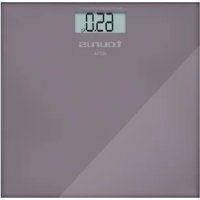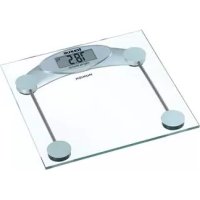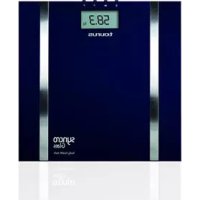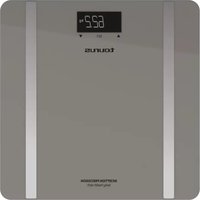
Inception Precission BS2801CD - Kitchen scale TAURUS - Free user manual and instructions
Find the device manual for free Inception Precission BS2801CD TAURUS in PDF.



User questions about Inception Precission BS2801CD TAURUS
0 question about this device. Answer the ones you know or ask your own.
Ask a new question about this device
Download the instructions for your Kitchen scale in PDF format for free! Find your manual Inception Precission BS2801CD - TAURUS and take your electronic device back in hand. On this page are published all the documents necessary for the use of your device. Inception Precission BS2801CD by TAURUS.
USER MANUAL Inception Precission BS2801CD TAURUS
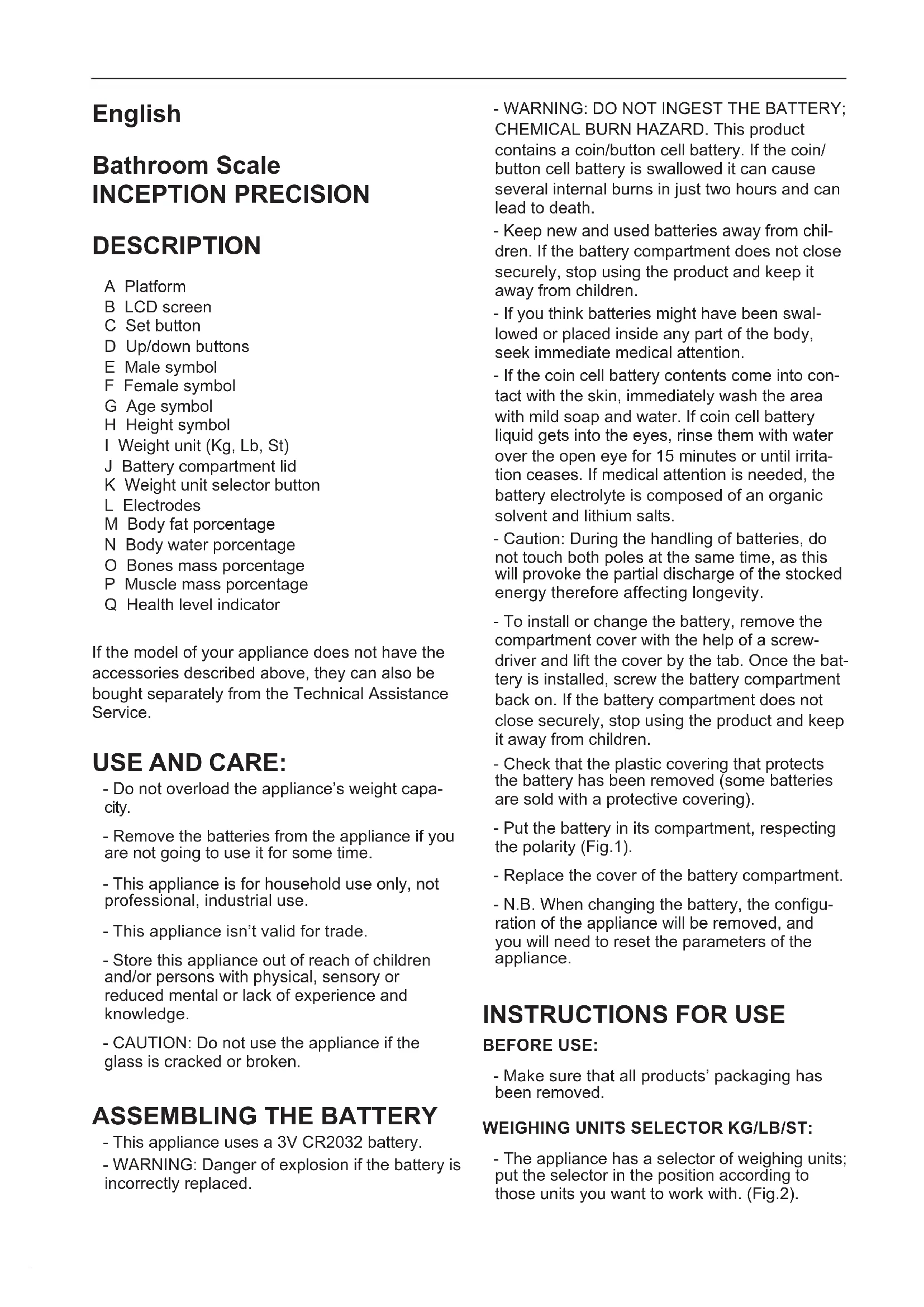
Bathroom Scale INCEPTION PRECISION
DESCRIPTION
A Platform
B LCD screen
C Set button
D Up/down buttons
E Male symbol
F Female symbol
G Age symbol
H Height symbol
I Weight unit (Kg, Lb, St)
J Battery compartment lid
K Weight unit selector button
L Electrodes
M Body fat percentage
N Body water percentage
O Bones mass percentage
P Muscle mass percentage
Q Health level indicator
If the model of your appliance does not have the accessories described above, they can also be bought separately from the Technical Assistance Service.
USE AND CARE:
- Do not overload the appliance's weight capacity.
- Remove the batteries from the appliance if you are not going to use it for some time.
- This appliance is for household use only, not professional, industrial use.
- This appliance isn't valid for trade.
- Store this appliance out of reach of children and/or persons with physical, sensory or reduced mental or lack of experience and knowledge.
- CAUTION: Do not use the appliance if the glass is cracked or broken.
ASSEMBLING THE BATTERY
- This appliance uses a 3V CR2032 battery.
-
WARNING: Danger of explosion if the battery is incorrectly replaced.
-
WARNING: DO NOT INGEST THE BATTERY; CHEMICAL BURN HAZARD. This product contains a coin/button cell battery. If the coin/ button cell battery is swallowed it can cause several internal burns in just two hours and can lead to death.
- Keep new and used batteries away from children. If the battery compartment does not close securely, stop using the product and keep it away from children.
- If you think batteries might have been swallowed or placed inside any part of the body, seek immediate medical attention.
- If the coin cell battery contents come into contact with the skin, immediately wash the area with mild soap and water. If coin cell battery liquid gets into the eyes, rinse them with water over the open eye for 15 minutes or until irritation ceases. If medical attention is needed, the battery electrolyte is composed of an organic solvent and lithium salts.
- Caution: During the handling of batteries, do not touch both poles at the same time, as this will provoke the partial discharge of the stocked energy therefore affecting longevity.
- To install or change the battery, remove the compartment cover with the help of a screwdriver and lift the cover by the tab. Once the battery is installed, screw the battery compartment back on. If the battery compartment does not close securely, stop using the product and keep it away from children.
- Check that the plastic covering that protects the battery has been removed (some batteries are sold with a protective covering).
- Put the battery in its compartment, respecting the polarity (Fig.1).
- Replace the cover of the battery compartment.
- N.B. When changing the battery, the configuration of the appliance will be removed, and you will need to reset the parameters of the appliance.
INSTRUCTIONS FOR USE
BEFORE USE:
- Make sure that all products' packaging has been removed.
WEIGHING UNITS SELECTOR KG/LB/ST:
- The appliance has a selector of weighing units; put the selector in the position according to those units you want to work with. (Fig.2).
USE:
- Turn the appliance on, by pressing lightly on the weighing platform and wait for the screen to show 0,0.
- Place yourself in the centre of the platform avoiding abrupt movements, maintaining immobile and without touching other objects, until the appliance shows your weight.
WEIGHING UNITS SELECTOR FUNCTION KG/ LB/ST:
- The appliance has a selector of weighing units, put the selector in the position according to those units you want to work with. To do so, press the "UNIT" button, the measuring unit selected will then be shown on screen one after the other. (Fig.3).
PROGRAMMING PERSONAL DATA
- Gently press the surface of the scale with your foot to switch it on.
- Press the Set button and use Up/down button to find the memory number under which you wish to save your personal data (10 memories available). Then press the Set button to confirm your choice.
- Select male or female by using up/down buttons and confirming by pressing Set button.
- Log in your age using the up/down buttons and confirming by using Set button.
- Log in your height using the up/down buttons and confirming by using Set button.
- These steps can be repeated to program the remaining 9 memories if desired.
CALCULATE PERCENTAGE BODY FAT
- This appliance has the built-in option to calculate your percentage body fat by using bioelectrical impedance techniques.
- This analysis measures the different conductivity between the muscle mass and body mass formed by fat cells using very low-intensity electrical micro current that runs through the lower members of the body.
- The percentage body weight is calculating using the procedure described above and also involves the following variables: height, age, sex and weight.
- The body fat reading can only be carried out barefoot.
SYSTEM FOR MEASURING THE PERCENTAGE OF BODY FAT,BODY WATER, MUSCLE MASS AND BONES MASS
- Gently press the surface of the scale with your foot to switch it on.
- Press the Set button and use the up/down buttons to access the memory code under which your personal data have already been saved.
- Wait a few seconds until your personal data appears on screen briefly: sex, age, height and weight unit.
- Wait for the display to show "0,0 kg" and then the scale is ready for use.
- Step onto the scale with bare feet and make sure that you are standing still with equal weight distribution. Stand on the stainless steel electrodes with both feet.
- Do not move and the measured results will be displayed sequentially (Body fat %, Body water %, Muscle mass %, Bones mass %) on the screen. The results are displayed 2 times.
- After stepping down the "Auto shutdown" system will turn it off automatically.
REFERENCE TABLES OF MEASURED VALUES:
After measuring, you can use the following tables as a reference to check if your measurement is healthy:
| % Body Fat | ||||
| Age | Low | Normal High | Very High | |
| <12 <11 11 | -20 | >24 | ||
| 12-16 <9 9 | -19 | >23 | ||
| 16-39 | <12 | 12-20 | 20-25 >25 | |
| 40-60 | <15 | 15-23 | 23-29 >29 | |
| >60 | <17 | 17-26 | 26-31 >31 | |
| <12 <13 | 13-23 | 23-27 >27 | ||
| 12-16 <15 | 15-24 | 24-29 >29 | ||
| 16-39 <19 | 19-28 | 28-33 >33 | ||
| 40-60 <23 | 23-32 | 32-37 >37 | ||
| >60 <24 | 24-35 | 35-40 >40 | ||
| Age | Body Water (%) | Muscle Mass (%) | Bones Mass (%) |
| <12 56-67 25-36 15-19 | |||
| 12-16 58-69 32-44 15-19 | |||
| 16-39 55-56 38-44 16-20 | |||
| 40-60 50-60 36-42 16-20 | |||
| >60 45-60 34-40 15-19 | |||
| <12 54-65 24-34 15-19 | |||
| 12-16 54-64 28-38 15-19 | |||
| 16-39 50-60 32-38 15-19 | |||
| 40-60 45-55 30-36 15-19 | |||
| >60 40-55 29-35 14-18 | |||
- In the event of doubt, consult your doctor or pharmacist for clarification.
STAND-BY FUNCTION:
-
In order to save energy, the appliance passes to stand-by after few seconds if the user does not use it.
-
To return to normal operation simply press lightly on the weighing platform and wait for the screen to show "0,0".
ONCE YOU HAVE FINISHED USING THE APPLIANCE:
- Remove the battery from the appliance if you are not intending to use the appliance during an extended period.
SPECIAL MESSAGES:
- The following messages can appear on the screen:
- Err: means that the appliance's capacity has been exceeded or that there is an error in the body fat percentage measurement.
- Lo: means that the battery has to be changed.
CLEANING
- Clean the equipment with a damp cloth with a few drops of washing-up liquid and then dry.
- Do not use solvents, or products with an acid or base pH such as bleach, or abrasive products, for cleaning the appliance.
- Never submerge the appliance in water or any other liquid or place it under running water.
SUPPLIES
- Only the following type of supplies must be used with the appliance. (Fig.4).
- Batterie type: 3V CR2032.
- These supplies are available in specialist shops.
SPECIFICATIONS:
| Measurement range | Increment | |
| Max. Loading capacity | 180 Kg (396 lb) | |
| % Body Fat 5-50% | 0,1% | |
| % Body Water | 15-90% | 0,1% |
| % Muscle Mass | 5-60% 0,1% | |
| % Bones Mass | 1-40% 0,1% |
François
Pese-personne INCEPTION PRECISION
DESCRIPTION
Badwaage INCEPTION PRECISION
BEZEICHNUNG
WYBOR JEDNOSTKI WAGI KG/LB/ST:
XPHESKAI SYNTHPHESH:
-Mnv UInepbaivTe Tn duvatotnta cuyioaatoC Tns oukeunc.
-ApaipoeTe Tc mTatapieC TnC OoKEUns, eav 6ev Tpoketai va tn xpoiopoioiete yia 1yaxo xpvikó diaotna.
-Autn n ouakeun exei oxediaotei movo yia oikiakn xpno, oxi yia eannyevlambdaatikn n biounxavikn xpno.
-Autn n ouokean ev ivai kataaan yia eTIOPIKc suvaaayc.
- DiatnpnoTe Tny Tnapouo aoukeun paKpi aTto Taiaia n/kaia atoua me e iomegaevc oWpaTikec, aiOthntpiaKec n diavontiKec IKAVOTNTEc n atoua me EAAIInEic EmuTEpiEcs N Vwoeic.
- INPOEIOIHOH: Mn xpoioioite Tn oukeun av to To KpuoTaAlo eivai paayioevo n oTaaouevo.
TONOGETHsH MnATAPIAe
- Autn n ouokekun xpnoiopoioi e i pntapia 3V CR2032.
- IPOEIIOIH Kivouos kpnns, av n mataia tooetn0e iomega.
- PPOEI OIOIH H MHN KATANINETE
THN MNATAPIA, KINAYNOX XHMIKON
EKAYMATQN Auto to Tpoiov Tepiauavéi
εππδη μTatapi. Tuxov katantoŋ tns
μTatapiac μTopεi va Tpokaleoi εωτepika
εykaúμata μeσa eóic duo wpckai μTOpεi
va Tpokaleoi θavato.
-ФuaosTe Tc VEc Kai XpnoiOpToInuEvc
mTatapieCs paKpa aTTOa TAIIDA.Av n OhKn TnS
mTatapiaac dev kEIVE KaA, mOuvexioeTe va
XpnoiOpToIEte To TPOIOv, KAI PhuaTe To paKpa
aTTO Ta TAIIDIA.
-AV TIOTEUETOI KATOIOG KATATIE N EIONyAYE TIG MTATAPIECS OE KATOIO ONGeio Tou Owpatoc tou, ZntnoTe aeoos Tn Bontheia viatpou.
-Av TO TEPiExoEvToTcMuTapiaeepEi
OE Etnaipn e To Depma, Pauve Tae aoeowc
Tnu TEPioxouwpatoc e Liyo vepo kai
OaTouvi. Av To Uypo Tns MauTapiac EIOAeI
Ota Maia, Pauve Ta e vepo kai OaTouvi yia
15 LeTTa n MeXp va Tepaoe i opeoiuoc. Se
TepiTTwo IatpiKng BoonEiaC, o NktpoAUTnc
TcMmuTAPiaac AITOTEiAti Ato evav opyaviko
DiaUtn Kai TPOePxetai Atto To liio. - PpOeIobToin: Kata Tn DlapKea Xepiouo Tns mTatapiac, mV ayicTe tautoxpova kai Touc duo Tlouoc Tns, yati aPpokAne iAtopoption Mepouc Tns aTIOthKeuEvnc Evpeia Tns, payma Tou EtnpeaZei amEoa Tn diapkeia Tou KukLou Zwns Tns.
- Ia va toTOnoTe n va aAaAsTe TnV atapia, aPaipeote To kALumu TaNc 0nKnc Te
tn BOntheEvoc KatoaBIOu KAI aVaonKwTe To
kALumu aTTOyAWTTIDa. MoIc totToeTnei n atapia, BiWote EaV aT N 0nKn TnC mTatapiac.
Eav n 0nKn TnC mTatapiac dev KAEIVEI KaA,
tauataTE va xpnoiPoTIOeTE TO TPOiov KAI
kpatote To pakpi aTTO PAIdia. - Eλεγξε ΘI éxει αφαipεθει TO πpOoTATEUTIKO φuλlo Tης/Tων μΠaTapiac/ωv (Uπrρxouv μΠaTapieζ Πou TTωλouVTai μΕ πpOoTATEUTIKO φuλlo)
- ToTIOθεποτε ην μΠαταρία σΤη θήκη ηις, Tnpωντας ην ΠΟλIKότητα ΠΟΥ ΑΝΟβΕΚVύεται. (Fig.1).
- Kλείσε και πάλι Κατάκι της Θήκης της/Tων μπταρίας/ων.
- Σημειωή: Katá τή δίαρκεία αντικατάσταούς τής μπαταρίας, συμθμίοείς τής συακεύς θα
diaypaopouv, kai 0a pTnei va gavapuOmuE TIC npapaetpouc tns oukeunc.
TPONO ΛEITOYPTIA
IAPATHPHSEIEI INPIN TH XPHSH:
M UpoBHeH KInpOBOu MaCCbI
N YpOBeHb BOdBi B OprHaHn3Me
O AHaJIIN3 KOCTHOI TKAHI
P AHaJIIn3MbISeUHOnMaCCbI
Q INДИКaTOP ypoBн 3ДОРOBьЯ
- Ecnn BaWAs MoJeIb He yKOMnJIeKTOBaHa HyxHOB Bam npHAnJLeXHoCTbIO, ee MOxHO npNo6peCTN OTdEJIbHO uepe3 Cnyx6y TEXHnueckO IOndepKKn.
NcPOnb3OBAHNE N YXOД
-He neperpuykaIte BecbI.
- IV3BJIeKInTe 6aTapeIKN I3 npIbopa, ecII Bbl He CO6npaTeCb IcNOJIb3OBaTb eRO B 6JInxKaJWee BpeM.
-3TOT npi6op npeHa3Hauen ToIbko IJRA DomaHiero, a He npoPeccnOHaJIbHOrO IJNnpomblJeHHoro nCNoJIb3OBaHna.
-Данньnpибор He noДхоДNTДЯ ToproBnI.
-XpaHnTe 3TOT np6op BHe DoCraeMoc DeTeu N/INN INU C ORpaHnueHHbIMN FN3nueckmN, CEHCOPHBIMN INN yMCTBeHHbIMN BO3MOXHOCTaMn,a TaKKe Tex,KTO He 3HaKOM C npabnAmn erO NCNoJIb3OBAHn;
-BHIMAHHE:He nCnoB3yIe np6op,ecn CTeKIO TpeCHyTO nn pa3bnto.
YCTAHOBKA AKKUMYJTOPA
-B 3TOM npnbope nCnoB3yETc8aTapeCR2032 3 B.
-BHIMAHHE:Пи He npaBnIbHoi 3amHe aKKymyIaTopa cyueCTByeT onaCHOt b3pbBa.
-BHIMAHHE:HE IPOIATbIBAHTE AKKUMYJARTOP;ONACHOCTb XIMUeCKOFO OXKORA.3ToT npOdyKT nMeet aKKyMylarTop Ta6neTOUHoro/KHONoCHoro Tnna. EcIn npOrIOTnB aKKyMylarTop Ta6neTOUHoro/ KHONoCHoro Tnna, Bcero 3a Dba Yaca OH MOKeT Bbl3BaTb BHyTpeHHHe OXORN IN PpNBecTNI K CMEPTN.
-XpaHNTe HOBbIe NcNoNb3OBaHHbIe 6BaTapeKn B HeIOCTyNHOM dJa DeTeMecTe. Ecnn OTCek dJa aKKMyJrTopa 3aKpbIBaEtCra HeHaJeXHo, IpKeKpATNe IcNoNb3OBaHHe npOdykTa n DepKHTe erO B HeIOCTyNHOM dJa DeTe MecTe.
- EcIn Bbl CHTaTe, YTO MOrJIN nporJNTb 6batapeiKn, INI ONI NOnaII BHyTpB KaKoJINo6 OuaTn TeJa, HEmeIeHHO oBpaTntEcB 3a MeINuHcKoN NOMOsbIO.
- EcIn coepxHMOe aKKymJIaTOPa Ta6JeTOUHO Tnna IonoHa KOxy, HeMeIeHNO IpomOHTe 3To MeCTO MmKIM MbIbHbIM paCTBOPOM C BOOn. EcIn XnIKoCTb aKKymJIaTOPa Ta6JeTOUHO Tnna IonoNA B rna3a, IpOMBaIte OTKpbITbIe rna3a BOOn B TeueHne 15 MNHT, nnn Do Tex nop, noka pa3dpaxHe He npekpaTntc. EcIn Bam Tpe6yeTcMa DNsIHckA NOMOuB, 3JIeKTPOlNT aKKymJIaTOPa COCTOIT n3 opraHnueCKOTO pactBOpNTeN IINTNeBOI cOnN.
-BHUMAHHE:BCTabJra 6aTapeKn,He npKacaiTeCb K OBeIM NOnIOcAM B OJHO I TO Xe BpeM, TaK KaK 3TO Bbl3OBet YactNHyBIn pa3prd IMeIoUeIcR B HNX 3HeprN IN IOBJIReT Ha DOJIROBEuHOCt b6aTapeEk.
-уTO6bI yCTaHOBnTb nIN 3aMeHnTb aKKymJrTOp, CHIMITE KpbIuKy OTcKa C NOMOu bIO OTBePTKn I NOdHMnTe KpbIuKy 3a BbICTyn. Nocne TOrO, KaK akymJrTOp yCTaHOBJIeH, CHOBa PpIKpyTInTe OTcEK dIgAkkymJrTOp. EcN6 BaTaepHbI OTCek 3aKpbIBaEtCn HeHaDeXHo, IpKePaTnTe IcNoJIb3OBoAHHe npOdykTA u XpaHnTe erO B HeIOCTyHOM dIg DeTe MeCTe.
- y6eIITecb, yTO pIaCTIKOBoE NOKpbITHe, 3aUHuaIOuue aKKyMnyTOp, 6bINO ydaJIeHO (HeKOTOpbIE aKKyMnyTOpbl npOdaHTcra C 3aUHTbIM NOKpbITnEM).
- BCTaBbTe aKKymyIaTOp B OTCek, co6JIHOdaI nonpaHocTb (Fig.1).
- YCTHABNTe Ha MecTo KpbIuKy 6aTapeiHorO OTEcKa.
-BHIMaHHe!Pn3aMeHe6aTapeek KOHfUrypaunyycTpoNCTBa6yJeT ydaIeHa, n
Bam Heo6xOIMO 6yJeT c6pocntb npaMeTpbl np6opa.
INHCTPYKUNIPO 3KcPJIyATAUIN
NEPEDIICNOJIb3OBAHHeM:
- Y6eIHTecB TOM, YTO Bbl NOLHOCTbIO paCnakOBaJI npIbOp.
BbIEOP EDINHUNIbI N3MEPEHNAKG/LB/ST::
-ПиборИМeetФункию ВьБоба eДИНИцbl N3МepeHЯ;пocтавытpeгУлТОВ COOTBETCTBиCToI eДИНИцeŋ N3МepeHЯ,с KOTopoR Bbl XOTNTe pa6OtaTb. (Fig.2).
ИСПОЛБОВАНЕ:
-
Bклочиприбор,сlerkaнжam Ha ochobahne пьбopaи поождпte,пoka He 3axkretca ekpan 0,0.
-
BcTaHbTe no ueHTpy ochOBaHnna npnbopa, n36eRa pe3Knx DnKxeHn u coXpaHra HeNoDnBxHocTb, a TaKke He KacacB dpyrnx npedMeTOB Do Tex nop, noka npnbop He NOKaKeT BaW Bec.
BbIBOP EINHnCbI N3MEPEHNAKG/LB/ST:
jaii iiaii aie 1y g cai bui jia gai jia gai jia gai jia gai jia gai jia
aaiiui aaiia 1g jilw gll
yIgwsu aIg 1go
.(Fig.4).Jyssu aalall gol jao yllgill 1jglaln J
.3V CR2032:
aaiabtiy jolih 3 yNgiW ayllal algh j o gill lus
a a a a a a a a a a a a a a a a a a a a a a a a a a a a a a a a
jglg jnlgl galsg jgal:alil cial, lalil 1s oolp qogb alq ypluul puee u jg aagll qannl
y
pIaal alg cIaal all aol g 1u gao gao oai y
jolal jolal jolal jolal jolal jolal jolal
a aaii i 10000000000000000000000000000000000000000000000
.0g 0g g g g g g g g g g g g g g g g g g g g g g
aallll lglg gllg jolll jjglg jgge aaiia sllly 5g gl ae aall
y
Jlalil jIJIaIgai! "jIaII IaIy" pIaI gai JIgai
waii jie jie jie jie jie
aJgUulgeuS Uauu uua 15! lo gall
aaiil ailll clls jy jia jia jia jia jia jia jia jia jia jia jia jia jia jia jia jia jia jia jia jia jia jia jia jia jia jia jia jia jia jia jia jia jia jia jia jia jia jia jia jia jia jia
:Jusg pluws
jglqyjg jg jg y
j0j1 j0 a1g b 126 alaoi j13! jglqo j0 cuiyblalj
g i g i j 11111111111111111111111
aJyolll 0aleoalw cawla xj yolll
aegbgy aagaa gai aalall g aannllg pajol jn jgale jiljgal l
jgsa gicaa cgl 151 jgao Jooos y
a|b|c
gulglg gaae yao jao aalalwgljy jgsy. aalld oelall alg
yj 100000000000000000000000000000000000000000000000000000
Jlalbl Jglto jc luey d biaolg gaii pluoi wjie gia, pko ayjll
(a)aaLgjy
.(Fig.1)
y
Espanol GARANTÍA Y ASISTENCIA TÉCNICA
English WARRANTY and Technical Assistance
This product enjoys the recognition and protection of the legal guarantee in accordance with current legislation. To enforce your rights or interests you must go to any of our official technical assistance services.
You can find the closest one by accessing the following web link: http://taurus-home.com/
You can also request related information by contacting us.
You can download this instruction manual and its updates at http://taurus-home.com/
Français GARANTIE ET ASSISTANCE TECHNIQUE
COUNTRY ADDRESS PHONE
| Algeria Zone d'Activite, N° 62, Constantine 213770777756 | ||
| Argentina Av. del Libertador 1298,(B1638BEY), Vicente López (Pcia. Buenos Aires) | 541153685223 | |
| Belgium Mariëndonkstraat 5, 5154 EG, Elshout 31620401500 | ||
| Bulgaria | 265,Okolovrasten Pat, Mladost 4, 1766, Sofia | 35929211120 / 35929211193 |
| Congo (Republic of) 98 Blvd General Charles de Gaulle, Pointe Noire 242066776656 | ||
| Cyprus 20, Bethlehem Str. / P.O.Box 20430, 2033, Strovolos | 35722711300 | |
| Czech Republic Milady Horakove 357/4, 568 02, Svitavy 420 461 540 130 | ||
| Equatorial Guinea | SN Av Patricio Lumumba y C/ Jesus B, Bata | 00240 333 082958 / 00240 333 082453 |
| Equatorial Guinea | Calle de las Naciones Unidas, PO box 762, Malabo | 240333082958 / 240333082453 |
| Espana | Avda Barcelona, S/N, 25790 Oliana (Lleida) atencioncliente@taurus.es | 902 118 050 |
| France | Za les bas musats 18, 89100, Malay-le-Grand | 03 86 83 90 90 |
| Ghana | Ederick Place, Accra-Ghana | 302682448 / 302682404 |
| Gibraltar | 11 Horse Barrack Lane, 54000, Gibraltar | 00350 200 75397 / 00350 200 41023 |
| Greece Sapfous 7-9, 10553, Athens | +30 21 0373 7000 | |
| Hong Kong | Unit H,13/F., World Tech Centre, Hong kong | (852) 2448 0116 / 9197 3519 |
| Hungary | Késmárk utca 11-13, 1158, Budapest | +36 1 370 4519 |
| India | C-175, Sector-63, Noida, Gautam Budh Nagar - 201301, Delhi | (+91) 120 4016200 |
| Ivory Coast 01 Rue Des Carrossiers-Zone 3, B.P 3747, Abidjan 01 (RCI) | 22521251820 / 225 21 353494 | |
| Luxembourg Mariëndonkstraat 5, 5154 EG, Elshout 31620401500 | ||
| Marruecos Big distribution society 4 Rue 13 Lot. Smara Oulfa, Casablanca | (+212) 522 89 40 21 | |
| Mauritania 134 Avenue Gamal Abdener Ilot D, Nouakchott 2225254469 / 2225251258 | ||
| Mexico Rosas Moreno N° 4-203 Colonia de San Rafael C.P. 06470 – Delegación Cuauhtémoc, Ciudad de México | (+52) 55 55468162 | |
| Montenegro Rastovac bb, 81400, Niksic +382 40 217 055 | ||
| Netherlands Mariëndonkstraat 5, 5154 EG, Elshout 31620401500 | ||
| Nigeria 8, Isaac; John Str,G.R.A Ikeja Lagos 23408023360099 | ||
| Paraguay Denis Roa 155 c/ Guido Spano, Asunción 21665100 | ||
| Peru Calle los Negocios 428, Surquillo, Lima (511) 421 6047 | ||
| Portugal | Avenida Rainha D. Amélia, n°12-B, 1600-677, Lisboa | +351 210966324 |
| Romania | Dudesti Pantelimon 23, 410554, Bucharest | 031.805.49.58 |
| Serbia | Rastovac bb, 81400, Niksic +382 40 217 055 | |
| Slovakia | Milady Horakove 357/4, 568 02, Svitavy | 420 461 540 130 |
| Southafrica | Unit 25 & 26, San Croy Office Park, Die Agora Road, Croydon, Kempton Park, 1619, Johannesburg | (+27) 011 392 5652 |
| Tunisia | 2, Rue de Turquie, Tunis | 21671333066 |
| Ukraine | Block 6, Ap Housing Estate Topol-2, B, 49000, Dnepropetrovsk | 380563704161 / 380563704161 |
| Uruguay | Luis Alberto de Herrera 3468, 11600, Montevideo | 598 2209 28 00 |
| Vietnam | Lot 7 Ind. Zone for, Ha Noi | 84437658111 / 84437658110 |
taurus
Avda. Barcelona, s/n
25790 Oliana
Spain