ZoomR - Binoculars Goview - Free user manual and instructions
Find the device manual for free ZoomR Goview in PDF.


| Product type | Binoculars |
| Brand | Goview |
| Model | ZoomR |
| Magnification | 10x |
| Objective diameter | 42 mm |
| Field of view | 6.0° (124 m at 1000 m) |
| Exit pupil | 4.2 mm |
| Interpupillary distance | 56-78 mm (adjustable) |
| Minimum focus | 3 m |
| Housing material | Magnesium |
| Nitrogen filling | Yes |
| Waterproofing | Protected against water splashes (IPX7) |
| Weight | 432 g |
| Dimensions (L x W x H) | 145.5 x 131.6 x 52 mm |
| Eyepieces | Twist-up eyecups for use with or without glasses |
| Diopter adjustment | Individually adjustable |
| Included accessories | Case, universal strap, optical cleaning cloth, protective caps |
| Intended use | Private observation, privacy |
| Care and cleaning | Optical cleaning cloth for lenses, soft damp cloth for casing |
| Safety | Do not look at the sun, keep out of reach of children, avoid impacts |
| Warranty | Repairs by authorized workshops only; warranty void if unauthorized opening |
| Spare parts | Available at www.go-view.com |
| Storage | In the case, dry and well-ventilated place |
Frequently Asked Questions - ZoomR Goview
User questions about ZoomR Goview
0 question about this device. Answer the ones you know or ask your own.
Ask a new question about this device
Download the instructions for your Binoculars in PDF format for free! Find your manual ZoomR - Goview and take your electronic device back in hand. On this page are published all the documents necessary for the use of your device. ZoomR by Goview.
USER MANUAL ZoomR Goview
natural_image
Person standing on a steep cliff face overlooking a vast canyon with red rock formations and sparse vegetation (no text or symbols visible)
GO VIEW
Magnify your life
go-view.com




Instruction for use / Warranty
natural_image
Illustration of two identical pair of eyeglasses with no text or symbols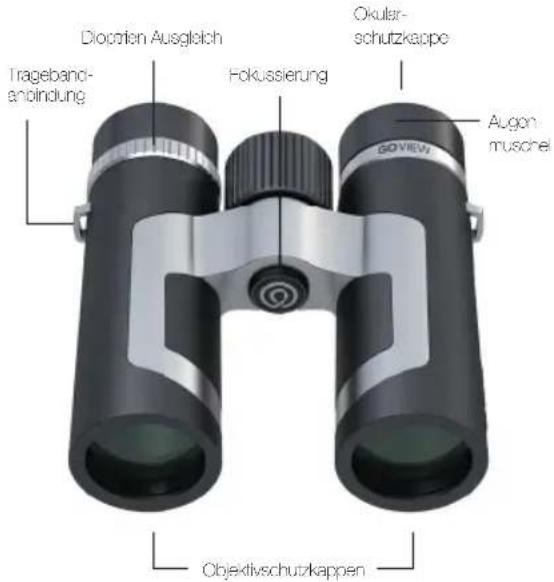
natural_image
Close-up of black binoculars with red arrows indicating light direction (no text or symbols)natural_image
Close-up of black binoculars with silver tab, no visible text or symbolsnatural_image
Illustration of two hands holding binoculars with a label reading '40x10' and 'PHILINKA FLUSER', no other text or symbols present.

natural_image
Close-up of a black and silver optical binoculars with no visible text or symbols on the device itself.natural_image
Close-up of a black and silver cylindrical device with a red circular arrow indicating rotational motion (no text or symbols)natural_image
Product lineup of black GOVEW binoculars and optical lenses (no visible text or symbols)GO VIEW
Magnify your life


Features
we are very pleased that you have chosen the GOVIEW product family from our company and would like to thank you for the trust you have placed in us. We are always eager to be at your side with all our support, so that you can enjoy unforgettable moments.
Magnify your life
Only have repairs carried out by authorised workshops or GOVIEW GmbH. Improper use and oiling of the products by non-authorised workshops will invalidate the warranty.
You can find out more about the warranty at: www.go-view.com
Information on safe use

Please read these safety instructions carefully and follow these instructions when using the product.



Please never look at the sun, bright light sources or laser-based light sources with binoculars or any other optical device. This can lead to irreparable eye injuries because the optics act like a burning glass.

Keep the binoculars out of the reach of children. Also store all attachments in such a way that nothing can get into the hands of children. Small parts in particular (risk of swallowing) and the carrying strap (risk of threading) must be storodsafely and carefully.

After use, always use the protective covers provided to prevent damage from the firing glass effect when exposed to sunlight. Avoid improper impacts to the product.

Please do not touch metallic surfaces when the product is heated by sunlight or cooled by cold.

EN

natural_image
Illustration of two identical pair of eyeglasses with lenses and side brackets (no text or symbols)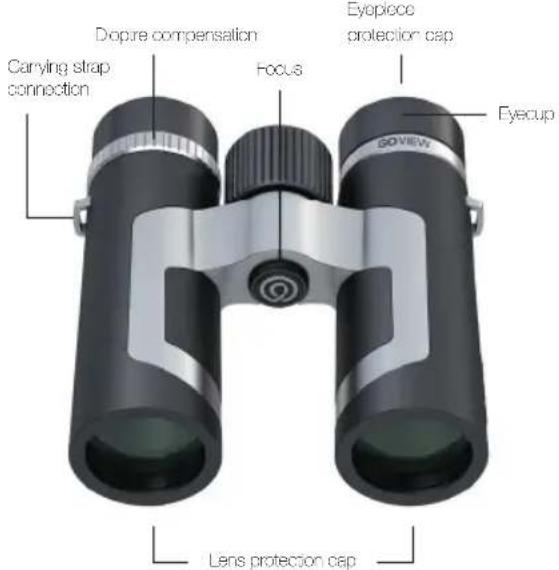

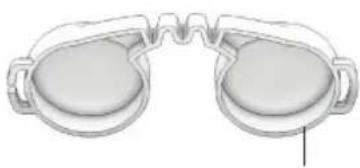
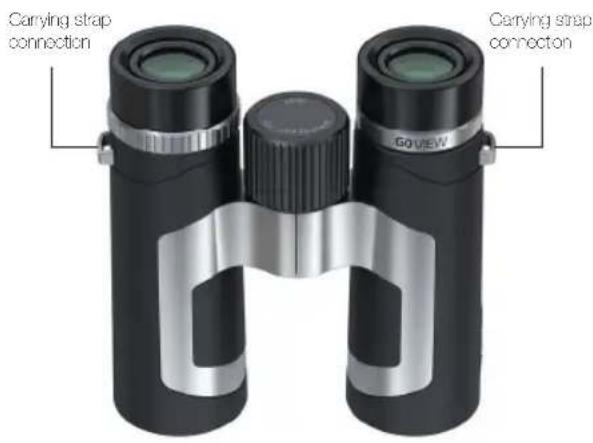
Easy installation and simple handling of the universal carrying strap

EN

Adjusting the eyecup
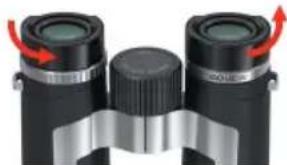
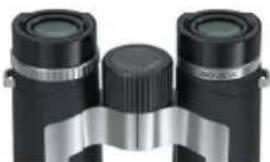
The rotating eye cup has two delent positions for different applications. The delents allow you to adjust the distance between the eye and the eyepiece lens. This allows you to ergonomically adjust the interpupillary distance individually according to your personal preferences. A distinction is made between use with or without glasses.
natural_image
Close-up of black binoculars with red arrows indicating light direction (no text or symbols)Use without glasses: When using without glasses, turn the eyecup out completely anti-clockwise.
natural_image
Close-up of black binoculars with silver bezel (no text or symbols visible)Use with glasses: If you wear glasses, turn the eyecup clockwise all the way in.


Adjusting the correct interpupillary distance
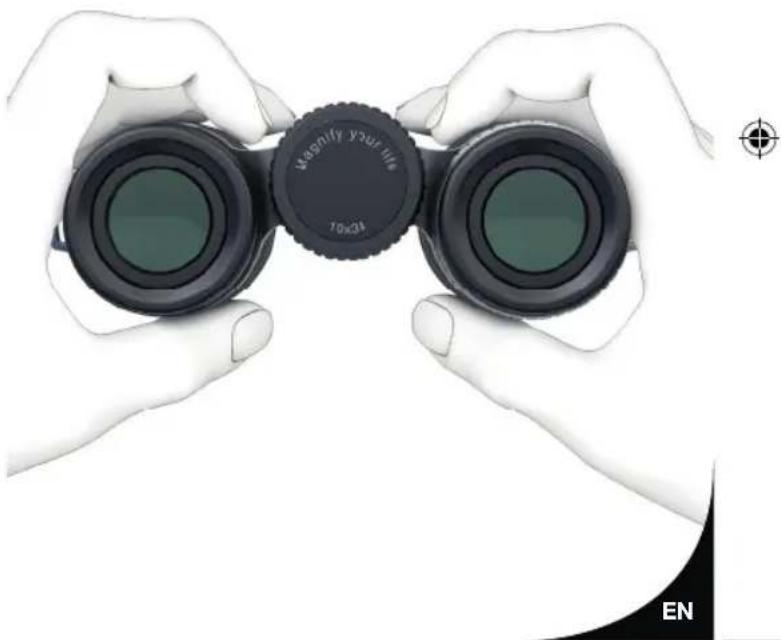
The binoculars have a mechanism to adjust different interpupillary distances. Interpupillary distance is the distance between the two pupils. The correct eye relief is achieved by bending the centre axis of the two halves of the binoculars. You have set the correct interpupillary distance when you see a circular image with both eyes open.
natural_image
Illustration of two hands holding binoculars with a camera cover, no text or symbols present

Adjusting the dioptres
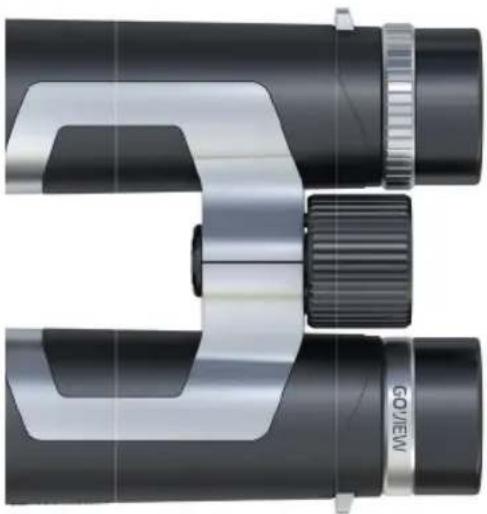
To compensate for any differences in vision between the two eyes, the oinoculars can be adjusted to suit individual needs.
natural_image
Close-up of a black and silver optical binoculars with no visible text or symbols on the device itself.It is then connected to your right eye and you look through the pinoculars at an object with your left eye. Now focus on this object.


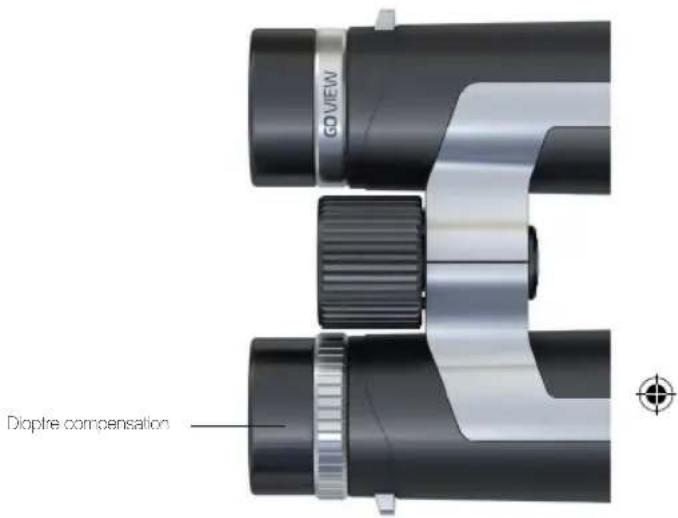
It is then corrected to your left eye and you look through the binoculars at an object with your right eye. Now focus on this object with the dropte compensation.
Your binoculars are now adjusted to your individual needs.
You can now focus on objects in the close-up range up to infinity in the following application by operating the focusing wheel.

EN

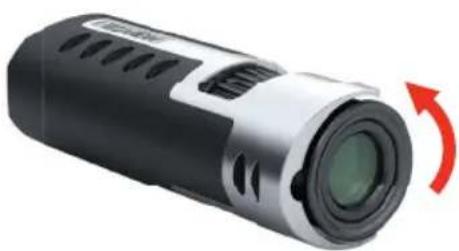
For a monocular, proceed as follows:


Dioptre compensation
Adjusting the eyecup
You can focus on objects in the close-up range up to infinity in the following application by operating the focusing wheel.
natural_image
Close-up of a black and silver cylindrical device with a red circular arrow indicating rotational motion (no text or symbols visible)The detents allow you to adjust the distance between the eye and the eyepiece lens. This allows you to ergonomically adjust the interpupillary distance individually according to your personal preferences. A distinction is made between use with or without glasses.
Dioptre compensation
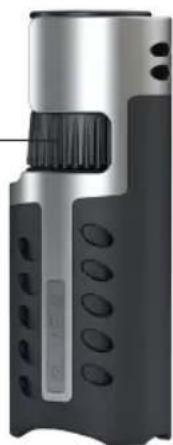
natural_image
Close-up of a handheld electronic device with black and silver casing, featuring a textured grip and circular ports (no visible text or symbols)
EN

Care, cleaning and maintenance
The optics can be cleaned using the optics cleaning cloth included in the scope of delivery.
Always keep the optical surfaces clean and remove dirt from grease (lingerprints), oils or water stains immediately to ensure lasting optical quality.
To clean the lons, lightly touch the optical surfaces and then use the lens cleaning cloth to clean the contaminants on the lens surfaces. Please note that coarse dirt particles must be removed either by blowing or with a clean hair brush. Otherwise, the optical coating may be damaged or the lenses may be scratched. You can clean all external mechanical components and the rubber armouring with a soft, clean and slightly damp cleaning cloth.
Please do not use the optics cleaning cloth to clean the outercomponents and rubber armouring.
Repairs
Do not disassemble the device! In the event of a defect, please contact your specialist dealer. They contact the Service Centre and can send the device in for repair if necessary.
220915_GOVIEW_Gebrauchsanweisung_ALL_RZ.indd 29-30


Conservation and storage
After use, store your binoculars dry in the bag provided in a well-ventilated place.
If you are using your product in a region with high humidity, please store your product in an airlight container with moisture absorbent to reduce possible fungal build-up.
Spare parts supply
For information on spare parts or accessories for your GOVIEW product, please contact: www.go-view.com
Privacy protection
The device is intended for private use. Respect the privacy of those around you.
EN
15.09.22 15:21

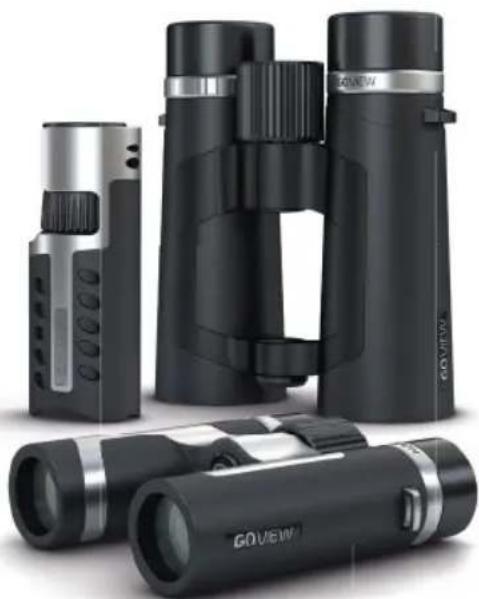
natural_image
Product lineup of black GOVEW binoculars and optical lenses (no visible text or symbols)GO VIEW
Magnify your life


Features
Optical parameters / Specifications
| Magnified Rx 10 x 5 x 10 x 8 x | ||||||
| Objective lens diameter mm 26.34" (2.42 m) | ||||||
| Exposure and objective coating F, y M, y Coated | ||||||
| Plain KN174K2 KN941 NKX4 1x0.4 DNX4 | ||||||
| Dual distance mm 26.72.58.26.55" 28 | 58.76" | |||||
| Field of view | " | 6.0" | 6.0" | 7.0" | 6.1" | 6.2" |
| Field of view | m '24' | m 100 m | 124 m 100 | m '21 m | ||
| Exit pupil | mm | 3.20 mm | 3.3 mm | 5.2 mm | 4.2 mm | 3.2 mm |
| Eye relief | mm | 10 mm | 10 mm | 17.3 mm | 16.1 mm | 12.9 mm |
| Close loose | m | 2 m ... | 3 m ... | 3 m ... | 3 m ... | 2 m ... |
Mechanical parameters /Features
| Peking city, NJ | yes yes yes yes | yes | ||||
| Nitrogen ring | yes yes yes yes | yes | ||||
| Huang | Magnesium | Glass is reinforced chellic CFP? | Magnesium | |||
| Long | nm | 117 | 126.8 | 145.5 | 142.5 | 105 |
| Width | cm | 1.7 | 124.8 | 131.6 | 132 | 35 |
| Height | mm 39'13" | ≈ 1,8.52 | - | |||
| Weight | g | 318 122 590 655 173 | ||||
Environmental parameters
| Temperature | 10°C bis-40°C | ||
| Solar-proct | yes | 15°C | |
| Accessories | |||
| Carving bag | yes | ||
| Universal carrying sasso | yes | ||
| Optical cleaning cloth | yes | ||
| Protective case (Outer & Objective) | yes | No | |
| Green-lives/Algebra | yes | ||

EN

Cher client,
natural_image
Illustration of two identical pair of eyeglasses with lenses and side brackets (no text or symbols)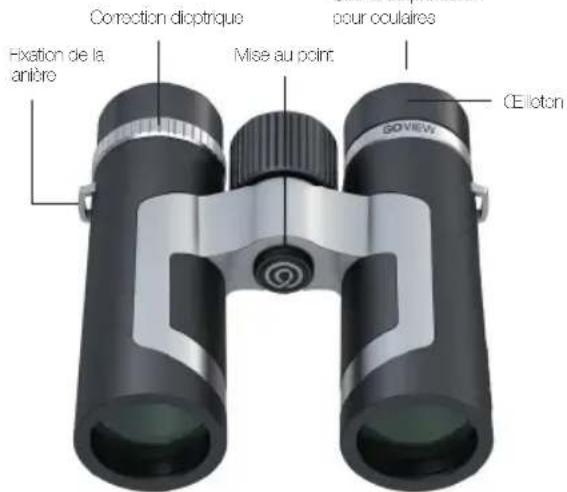
natural_image
Close-up of black binoculars with red arrows indicating light direction (no text or symbols)natural_image
Close-up of black binoculars with silver tab, no visible text or symbolsnatural_image
Illustration of two hands holding binoculars with a label reading 'BILK 2410' and 'FR', no other text or symbols present.

natural_image
Close-up of a black and silver optical binoculars with no visible text or symbols on the device itself.natural_image
Close-up of a black and silver cylindrical device with a red circular arrow indicating rotational motion (no text or symbols)natural_image
Product display of black GOVEW binoculars and optical lenses (no text or symbols visible)GO VIEW
Magnify your life


natural_image
Illustration of two identical pair of eyeglasses with lenses and side brackets (no text or symbols)
natural_image
Close-up of black binoculars with red arrows indicating light direction (no text or symbols)natural_image
Close-up of black binoculars with silver tab, no visible text or symbolsnatural_image
Illustration of two hands holding binoculars with a close-up of the lens (no text or symbols visible)

natural_image
Close-up of a black and silver optical binoculars with no visible text or symbols on the device itself.natural_image
Close-up of a black and silver cylindrical device with a red circular arrow indicating rotational motion (no text or symbols)natural_image
Product lineup of black GOVEW binoculars and optical lenses (no visible text or symbols)GO VIEW
Magnify your life


natural_image
Illustration of two identical pair of eyeglasses with lenses and side brackets (no text or symbols)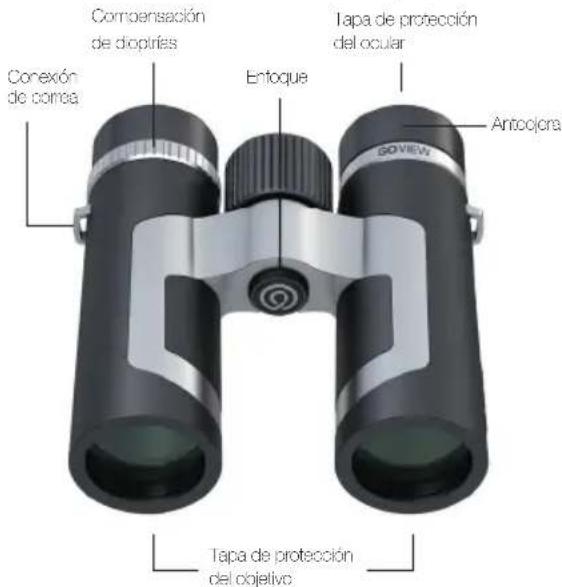
natural_image
Close-up of black binoculars with red arrows indicating light direction (no text or symbols)Uso sin galas:
natural_image
Close-up of black binoculars with silver tab, no visible text or symbolsUso con galas:
natural_image
Illustration of two hands holding binoculars with a label reading '40x24' (no other text or symbols)

Ajuste de dioptrías
natural_image
Close-up of a black and silver optical binoculars with no visible text or symbols on the device itself.natural_image
Close-up of a black and silver cylindrical device with a red curved arrow indicating rotational motion (no text or symbols visible)natural_image
Product display of black GOVew binoculars and optical lenses (no text or symbols visible)GO VIEW
Magnify your life


Características
natural_image
Illustration of two identical pair of eyeglasses with lenses and side brackets (no text or symbols)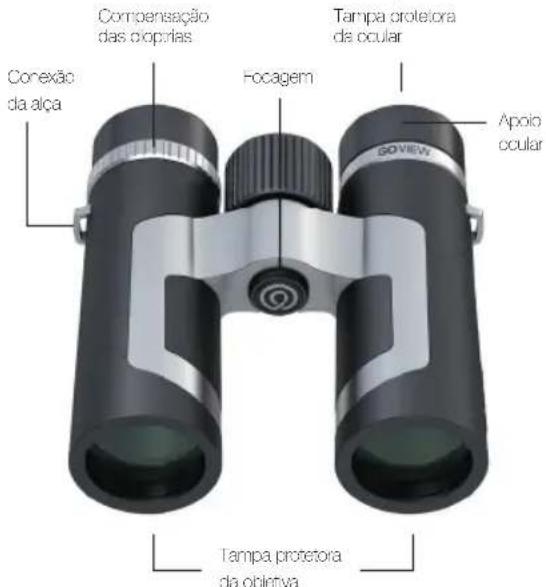
natural_image
Close-up of black binoculars with red arrows indicating light direction (no text or symbols)natural_image
Close-up of black binoculars with silver bezel (no text or symbols visible)natural_image
Illustration of two hands holding binoculars with a camera cover, no text or symbols present

Ajuste das dioptrias
natural_image
Close-up of a black and silver optical binoculars with no visible text or symbols on the device itself.natural_image
Close-up of a black and silver cylindrical device with a red curved arrow indicating rotational motion (no text or symbols visible)natural_image
Product lineup of black GOVEW binoculars and optical lenses (no visible text or symbols)GO VIEW
Magnify your life


Características
natural_image
Illustration of two identical pair of eyeglasses with lenses and side brackets (no text or symbols)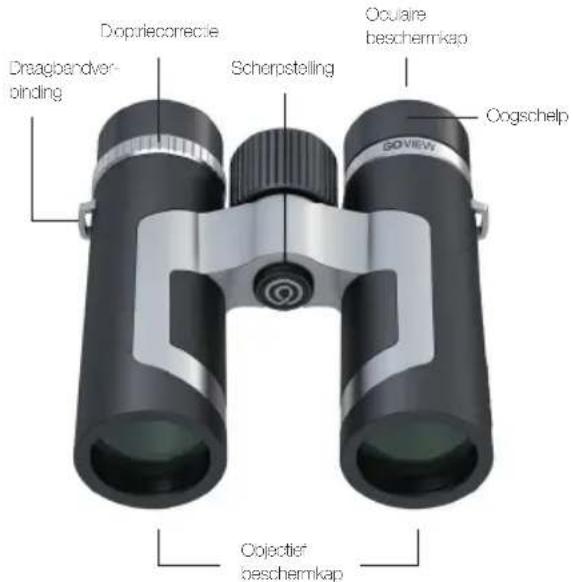


NL

natural_image
Close-up of black binoculars with red arrows indicating light direction (no text or symbols)natural_image
Close-up of black binoculars with silver tab, no visible text or symbolsnatural_image
Illustration of two hands holding binoculars with a label reading '40x24' (no text or symbols on the binos themselves)

natural_image
Close-up of a black and silver optical binoculars with no visible text or symbols on the device itself.natural_image
Close-up of a black and silver cylindrical device with a red curved arrow indicating rotational motion (no text or symbols visible)natural_image
Product lineup of black GOVEW binoculars and optical lenses (no visible text or symbols)GO VIEW
Magnify your life


Functions
Optische parameters / specificatie
| Vogding 0 x 10 x 0 x 10 x 0 x | ||||||
| Objective diameter mm 26.34/42.425 | ||||||
| Outline in objective acting Monovert g/mol | ||||||
| Plasma K1/K4/1/K4/K4/K4/K4/K4/K4/K4/K4/K4/K4/K4/K4/K4/K4/K4/K4/K4/K4/K4/K4/K4/K4/K4/K4/K4/K4/K4/K4/K4/K4/K4/K4/K4/K4/K4/K4/K4/K4/K4/K4/K4/K4/K4/K4/K4/K4/K4/K4/K4/K4/K 48 | ||||||
| Dipolarized mm 58/72.53/78.56/83.56/8 | ||||||
| Geobraved "6-8" 0.0" 7.0" 6.1" 6.2" | ||||||
| Geobraved | m | 120 m | 100 m | 121 m | 100 m | 121 m |
| Unisecp.pl | mm | 3.25 mm | 3.3 mm | 3.2 mm | 4.2 mm | 3.2 mm |
| Ocogated | mm | 16 mm | 19 mm | 17.3 mm | 16.1 mm | 12.8 mm |
| Schweden | m | 4m -- | 3m -- | 3m -- | 2m -- | 2m -- |
Mechanische parameters / specificatie
| Dredere cozschelten | ja | s | ja | s | ja | |
| Skratschlag | ja | s | ja | s | ja | |
| Drueling | Magnanim | Glaswiedrsteck, kurskabel CFK | Magnanim | |||
| Turgie | mm | 17.125 | 8145,5149,5 | 01 | ||
| Praxda | mm | 17.124 | 8132,8132 | 35 | ||
| Hooge | mm | 641,3 | 61,852 | - | ||
| Gewicht | g | 316 | 482 | 560 | 685 | 740 |
Milieuparameters
| anpassort | -10' tot +65' | ||
| Sowderbeschamd | ja | PX7 | |
Toebehoren
| Dractes | ja | ||
| Universe orsofemen | ja | ||
| Ollacher undlegende | ja | ||
| Passivekupon Objektif & Orlin | ja | geran | |
| Mobilien und soziale | ja | ||

NL

Kära kund,
natural_image
Illustration of two identical pair of eyeglasses with lenses and side brackets (no text or symbols)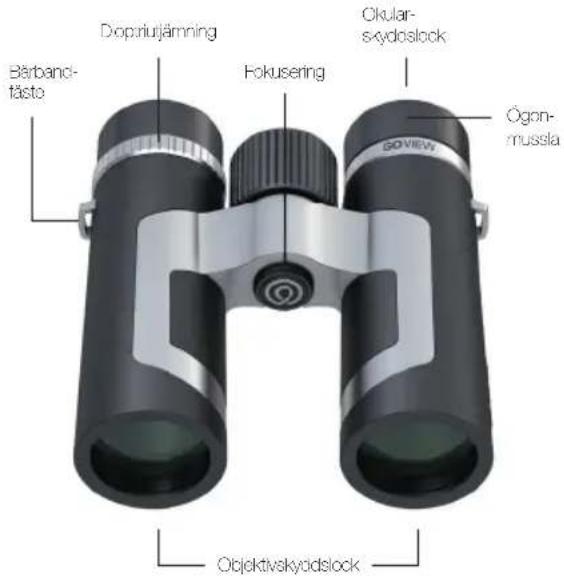
natural_image
Close-up of black binoculars with red arrows indicating light direction (no text or symbols)natural_image
Close-up of black binoculars with silver tab, no visible text or symbolsnatural_image
Illustration of two hands holding binoculars with a label 'B: 24x10' and 'SE' marker, no other text or symbols present.

natural_image
Close-up of a black and silver optical binoculars with no visible text or symbols on the device itself.natural_image
Close-up of a black and silver cylindrical device with a red circular arrow indicating rotational motion (no text or symbols visible)natural_image
Product lineup of black GOVEW binoculars and optical lenses (no visible text or symbols)GO VIEW
Magnify your life


Produktdata
Optiska parametrar / specifikationer
| Fleasing 6 x 10 x 8 x 10 x 9 x | ||||||
| Ojekodanslar mm 26.34' 42.42.25 | ||||||
| Ovran och ojeklklabgning l mavitklabgning | ||||||
| Pilma K1 PAK 1 PKA 1 PKA 7 Pd 7 1 Pd 4 | ||||||
| Pulikwärnd mm 58.72.55.78.55.73.56.73 | ||||||
| Spani 1 6,8" 6,0" 7 0,8" 1 6,8" | ||||||
| Spani 1 | m | 120 m | 10 m | 124 m | 108 m | 121 m |
| Uptångsuci | mm | 3,25 mm | 3,3 mm | 3,2 mm | 4,2 mm | 3,2 mm |
| Ögnavatino | mm | 16 mm | 18 mm | 1/3 mm | 15,1 mm | 12,9 mm |
| Nöreksung | m | 4 m -- | 3 m -- | 3 m -- | 2 m -- | 2 m -- |
Mekaniska parametrar / specifikationer
| Vicbara Spammusor | ja | a | ja | s | ja | |
| Kévőkýhírp | ja | a | ja | s | ja | |
| Kács | Magnesión | Glastbarförsztárlt és LGK | Magnesión | |||
| Lárjel | mm | 17 125,8 | 145,5 149,5 | 01 | ||
| Presti | mm | 117 | 124,5 | 131,6 | 132 | 135 |
| Höjd | mm 36 41,3 | c1,8 52 | - | |||
| Vikt | g | 318 | 482 | 690 | 568 | 170 |
Miljöparametrar
| Simpson | 10° 31'–32" | ||
| Stanleskyedad | is | FX/ | |
| Tillbehör | |||
| Baryska | is | ||
| Univerat båram | is | ||
| Travt gärjvåsk | is | ||
| Sleyckädpor (Obredy S oular) | is | 1995 | |
| Mobelsbyra | is | ||




Kaere kunde,
natural_image
Illustration of two identical pair of eyeglasses with lenses and side brackets (no text or symbols)

natural_image
Close-up of black binoculars with red arrows indicating light direction (no text or symbols)natural_image
Close-up of black binoculars with silver bezel (no text or symbols visible)natural_image
Illustration of two hands holding binoculars with a label '40x24' and 'DK' in the corner (no text on binoculars or background)

natural_image
Close-up of a black and silver optical binoculars with no visible text or symbols on the device itself.natural_image
Close-up of a black cylindrical device with a red arrow indicating rotational motion (no text or symbols visible)natural_image
Product lineup of black GOVew binoculars and optical lenses (no visible text or symbols)GO VIEW
Magnify your life


Features
Optiske parametre / specifikationer
| Forsambe 0 x 10 x 8 x 10 x 0 x | ||||||
| Ojekodamster mm 26.34 42.42.25 | ||||||
| Ovra og france ogring Mullcavics | ||||||
| Plains KTI NKA I NKA 39K4 Fos/7 19K4 | ||||||
| Poli stland num 58.72.59.78.56.78.56.76 | ||||||
| Spankl "6,8" 5,0" 7,0" 6,1" 6,8" | ||||||
| Spankl | m | 120 m | 10 m | 124 m | 108 m | 121 m |
| Udgangsø.pl | mm | 3,25 mm | 3,3 mm | 5,2 mm | 4,2 mm | 3,2 mm |
| ∅gørastne | mm | 16 m m | 18 m m | 17,3 mm | 16,1 mm | 12,8 mm |
| Nordkvalning | m | 4 m -- | 3 m -- | 3 m -- | 2 m -- | 2 m -- |
Mekaniske parametre / features
| Dajidguszykra | ji | a | ji | s | ji | |
| Nitrogen/Alening | ji | a | ji | s | ji | |
| Hus | Magnesium | Grasborfassaketneel GFK | Magnesium | |||
| Lurgus | mm | 17.125 | 145,5142,5 | 01 | ||
| Praktik | mm | 17.124 | 132,8132 | 35 | ||
| Hope | mm/s | 41,3 | -1,852 | - | ||
| Vegt | g | 346 | 482 | 500 | 609 | 740 |
Miljöparametrar
| Sümpere | -10" B+65" | ||
| Szenkvensbaskyttor | - | js | IPX |
| Tillbehör | |||
| Beretende | - | is | |
| Unreal bil bereem | - | is | |
| Olliekegengevőd | - | is | |
| Belejte sesnetter (Ojedev-co oku st) | - | is | Ingen |
| Iliency adapion | - | is | |

DK



Hyvä asiakas,
natural_image
Illustration of two identical pair of eyeglasses with lenses and side brackets (no text or symbols)
natural_image
Close-up of black binoculars with red arrows indicating light direction (no text or symbols)natural_image
Close-up of black binoculars with silver tab, no visible text or symbolsnatural_image
Illustration of two hands holding binoculars with a focus lens (no text or symbols on the devices themselves)

Dioptrian säätö
natural_image
Close-up of a black and silver optical binoculars with no visible text or symbols on the device itself.natural_image
Close-up of a black and silver cylindrical device with a red circular arrow indicating rotational motion (no text or symbols visible)
FI
15.09.22 15:26


natural_image
Product lineup of black GOVEW binoculars and optical lenses (no visible text or symbols)GO VIEW
Magnify your life


Ominaisuudet
natural_image
Illustration of two identical pair of eyeglasses with lenses and side brackets (no text or symbols)
natural_image
Close-up of two black binoculars with red arrows indicating light direction (no text or symbols)natural_image
Close-up of black binoculars with silver bezel (no text or symbols visible)Bruk med brille: Som brillebrukor dreier du zyekoppen med klokken helt inn.


natural_image
Illustration of two hands holding binoculars with a camera lens (no text or symbols on the binos themselves)

natural_image
Close-up of a black and silver optical binoculars with no visible text or symbols on the device itself.natural_image
Close-up of a black and silver cylindrical device with a red circular arrow indicating rotational motion (no text or symbols)natural_image
Product lineup of black GOVEW binoculars and optical lenses (no visible text or symbols)GO VIEW
Magnify your life


Egenskaper
natural_image
Illustration of two identical pair of eyeglasses with lenses and side brackets (no text or symbols)
natural_image
Close-up of two black binoculars with red arrows indicating light direction (no text or symbols visible)natural_image
Close-up of black and silver binoculars with no visible text or symbolsnatural_image
Illustration of two hands holding binoculars with a 'mill-recy flyboy' cover (no text or symbols on the devices themselves)

Ustawianie dioptrii
natural_image
Close-up of a black and silver optical binoculars with no visible text or symbols on the device itself.natural_image
Close-up of a black and silver cylindrical device with a red circular arrow indicating rotational motion (no text or symbols visible)natural_image
Product lineup of black GOVew binoculars and optical lenses (no visible text or symbols)GO VIEW
Magnify your life


Charakterystyka
natural_image
Illustration of two identical pair of eyeglasses with lenses and side brackets (no text or symbols)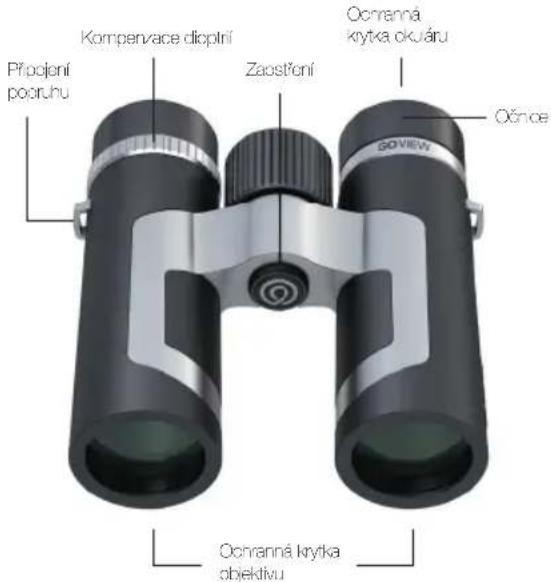
natural_image
Close-up of binoculars with red arrows indicating light direction (no text or symbols)natural_image
Close-up of black binoculars with silver bezel (no text or symbols visible)natural_image
Illustration of two hands holding binoculars with 'Vegonify your life' label (no additional text or symbols)

Nastavení dioptrií
natural_image
Close-up of a black and silver optical binoculars with no visible text or symbols on the device itself.natural_image
Close-up of a black and silver cylindrical device with a red curved arrow indicating rotational motion (no text or symbols visible)natural_image
Product photo of GOVEW binoculars and optical lenses (no text or symbols visible)GO VIEW
Magnify your life


Vlastnosti
Sports Lifestyle Nature Travel

UK CA

GOVIEW GmbH
Wildmoos 9
82266 Inning am Ammersee
www.go-view.com
