RG-CT 18/1 Li - Brush cutter EINHELL - Free user manual and instructions
Find the device manual for free RG-CT 18/1 Li EINHELL in PDF.


| Brand | Einhell |
| Model | RG-CT 18/1 Li |
| Product type | Cordless brush cutter |
| Rotation speed | 8500 rpm |
| Cutting diameter | 24 cm |
| Max. running time | Approx. 40 min |
| Protection category | III |
| Sound power level | 94 dB |
| Sound pressure level | 78 dB |
| Battery | 18 V / 1500 mAh (Li-Ion) |
| Charger | 230 V ~ 50 Hz, output 21.3 V / 1000 mA |
| Weight | 2.2 kg |
| Main functions | Grass cutting, edging (90° rotating head), adjustable handle, additional handle |
| Maintenance and cleaning | Cleaning with damp cloth, blade replacement, no internal maintenance |
| Safety | Start lock, protective cover, rotating head stop device |
| Spare parts and repairability | Replacement blade (ref. 34.057.30), battery, charger, after-sales service |
| General information | Private garden use, non-professional, 2-year warranty |
Frequently Asked Questions - RG-CT 18/1 Li EINHELL
User questions about RG-CT 18/1 Li EINHELL
0 question about this device. Answer the ones you know or ask your own.
Ask a new question about this device
Download the instructions for your Brush cutter in PDF format for free! Find your manual RG-CT 18/1 Li - EINHELL and take your electronic device back in hand. On this page are published all the documents necessary for the use of your device. RG-CT 18/1 Li by EINHELL.
USER MANUAL RG-CT 18/1 Li EINHELL
GB Original operating instructions Cordless Grass Trimmer
natural_image
Close-up of a hand using a power tool to clean or adjust a mechanical component (no text or symbols visible)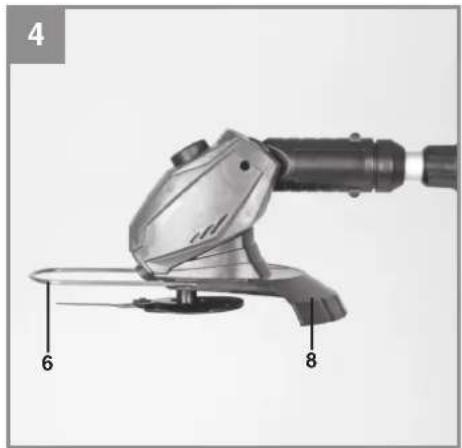
natural_image
Close-up of a mechanical power tool with labeled parts (6 and 8), no readable text or symbols beyond labels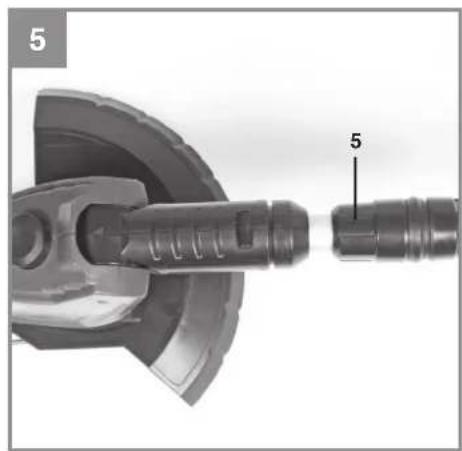
natural_image
Mechanical component diagram showing a shaft and housing assembly (no text or symbols)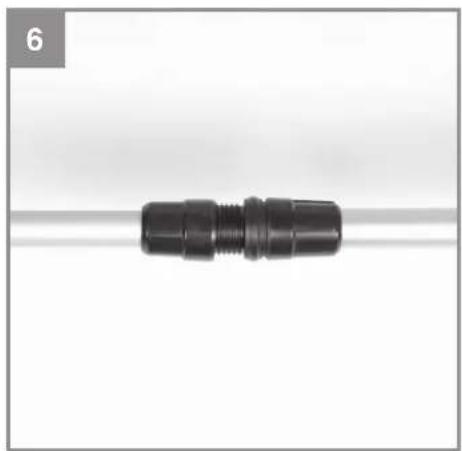
natural_image
Close-up of a black plastic connector with threaded end, resting on a white surface (no text or symbols visible)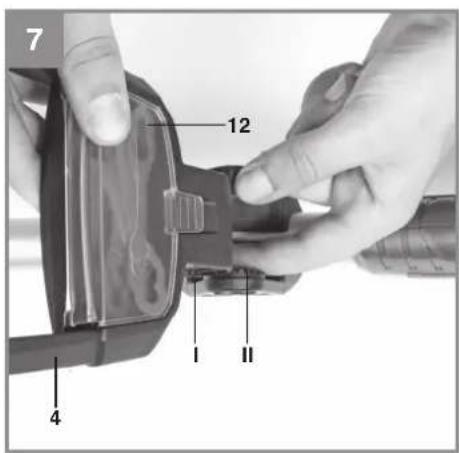
text_image
7 12 I II 4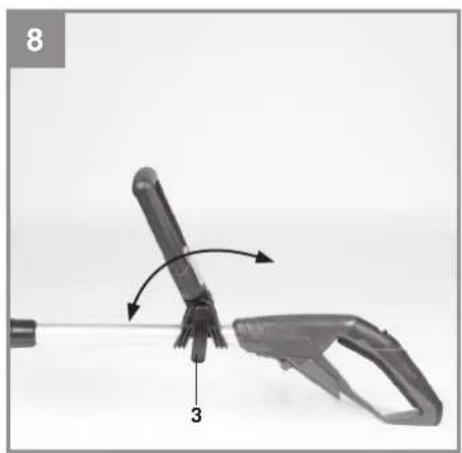
natural_image
Close-up of a mechanical tool with a handle and lever mechanism, labeled with number 3 (no text or symbols on the tool itself)-3-

natural_image
Close-up of a hand holding a handheld device with a labeled component 'K' (no text or symbols on the device itself)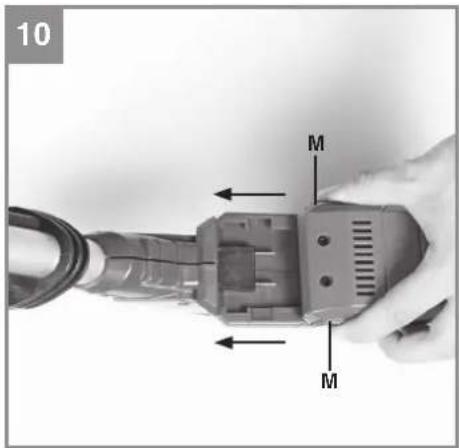
text_image
10 M M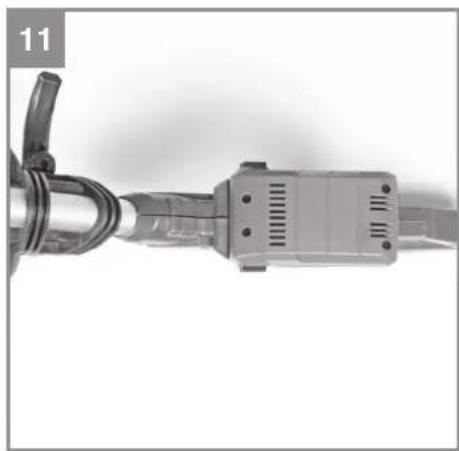
natural_image
Close-up of a mechanical connector with a curved cable and terminal block (no visible text or symbols)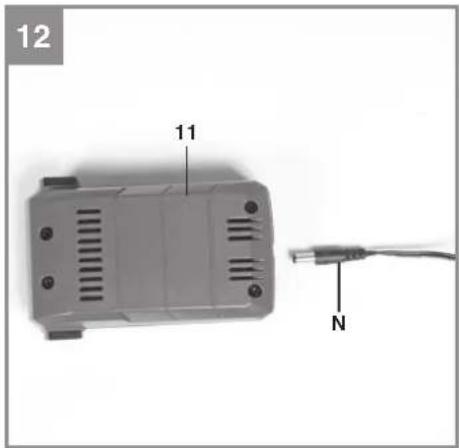
text_image
12 11 N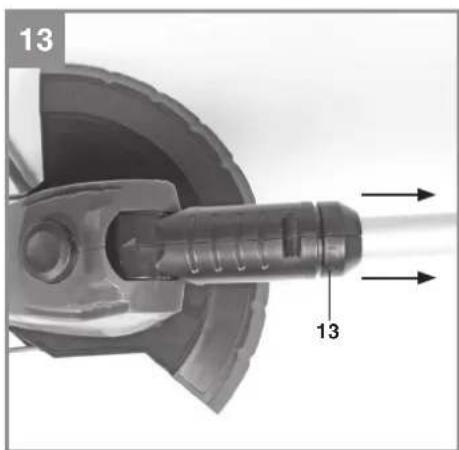
natural_image
Mechanical component diagram showing a shaft and housing assembly with directional arrows (no text or symbols)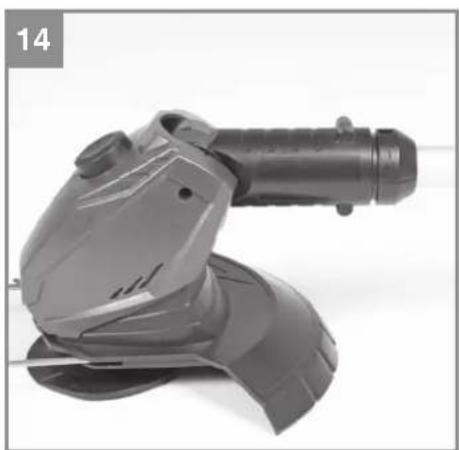
natural_image
Close-up of a black industrial power saw with handle and blade (no visible text or symbols)-4-
natural_image
Close-up of a hand using a tool to adjust or install a mechanical component, no visible text or symbols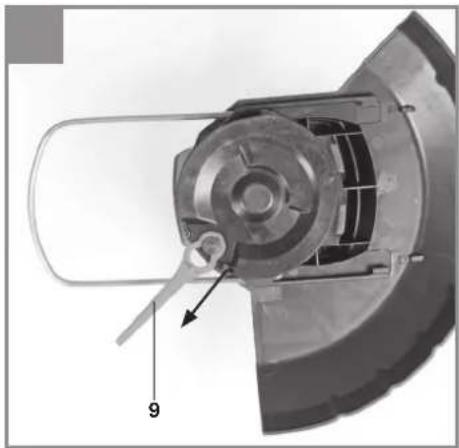
natural_image
Mechanical component diagram showing a cylindrical assembly with internal components and a labeled part (9), no readable text or symbols present.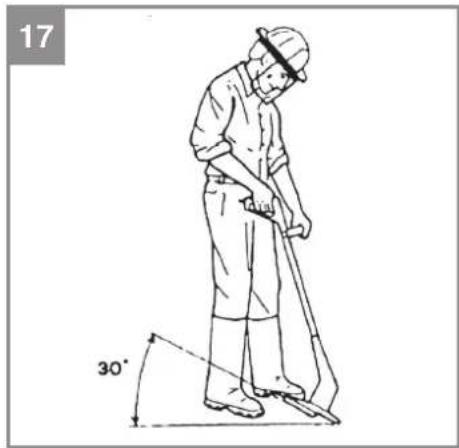
text_image
17 30°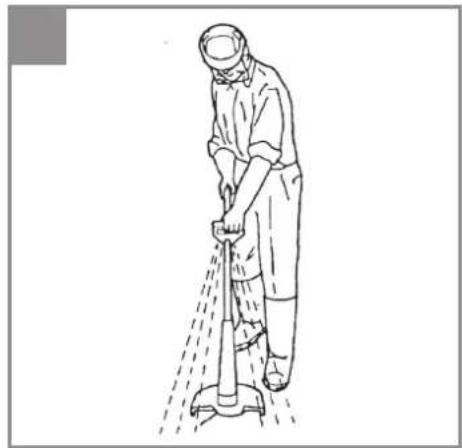
natural_image
Line drawing of a person cleaning a tiled floor with a tool (no text or symbols)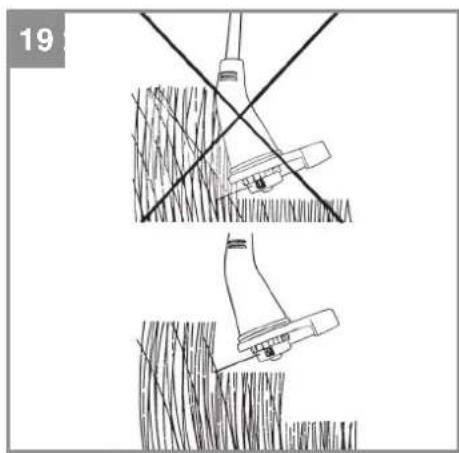
natural_image
Technical line drawing showing two mechanical assembly steps with intersecting lines and a tool, no text or symbols present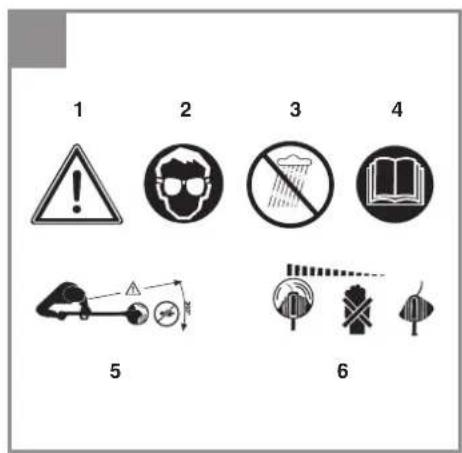
text_image
1 2 3 4 5 6-5-
D
Inhaltsverzeichnis
natural_image
Two horizontal bar designs with grayscale shades and a central crosshair symbol (no text or labels)
- Safety information.... 17
- Layout and items supplied....17
- Intended use....17
- Technical data 18
- Before putting into operation....18
- Operation 19
- Cleaning, maintenance and ordering of spare parts 19
- Disposal and recycling 20
- Faults....20
Warranty certificate....22


-15-


natural_image
Two horizontal bar designs with grayscale shades and a central crosshair symbol (no text or labels)GB

Caution - Read the operating instructions to reduce the risk of inquiry


-16-
When using equipment, a few safety precautions must be observed to avoid injuries and damage. Please read the complete original operating instructions and safety information with due care. Keep these operating instructions in a safe place so that the information is available at all times. If you give the equipment to any other person, hand over these original operating instructions and the safety information as well. We cannot accept any liability for damage or accidents which arise due to failure to follow these instructions and the safety information.
1. Safety information
For the relevant safety information please refer to the booklet included in delivery.
WARNING
Read all the safety information and instructions. Any errors made in following the safety information and instructions set out below may result in an electric shock, fire and/or serious injury. Keep all the safety information and instructions in a safe place for future use.
Explanation of the warning signs on the equipment (see Fig. 20)
1: Warning!
2: Wear eye protection!
3: Protect from moisture!
4: Read the instruction manual before starting!
5: Keep other people out of the danger area!
6: The equipment continues to rotate!
2. Layout and items supplied
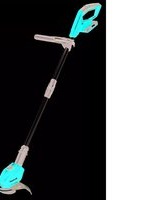
2.1 Layout (Fig. 1/2)
1 Safety lock-off
2 On/Off switch
3 Adjustment lock for turning the handle
4 Additional handle
5 Height adjustment
6 Edge guide
7 Blade head
8 Safety hood
9 Blade
10 Charging unit
11 Battery
12 Compartment for spare blades
13 Lock for rotatable motor head
2.2 Items supplied
- Open the packaging and take out the equipment with care.
- Remove the packaging material and any packaging and/or transportation braces (if available).
- Check to see if all items are supplied.
- Inspect the equipment and accessories for transport damage.
- If possible, please keep the packaging until the end of the guarantee period.
IMPORTANT
The equipment and packaging material are not toys. Do not let children play with plastic bags, foils or small parts. There is a danger of swallowing or suff ocating!
- Trimmer
- Guard hood
- Battery
- Charging unit
• Additional handle with spare blades
• Original operating instructions
• Safety information
3. Intended use
The equipment is designed for cutting lawns and small areas of grass in private and hobby gardens.
Equipment designed for use in private and hobby gardens is regarded as unsuitable for use in public facilities, parks and sports centers, along roadways, or in agriculture and forestry. The operating instructions as supplied by the manufacturer must be kept and referred to in order to ensure that the equipment is properly used and maintained.
Important. This equipment must not be used for composting purposes (shredding) as this could result in injury or damage to property.
The equipment may be used only for the tasks it is designed to handle. Any other use is deemed to be a case of misuse. The user/operator and not the manufacturer will be liable for any damage or injuries of any kind resulting from such misuse.
Please note that our equipment has not been designed for use in commercial, trade or industrial applications. Our warranty will be voided if the equipment is used in commercial, trade or industrial businesses or for equivalent purposes.
-17-
GB
4. Technical data
Speed n_0 8,500 min ^-1
Cutting circle 24 cm
Max. operating time .... approx. 40 min
Protection class ....III
L_WA sound power level 94 dB
L_pA sound pressure level 78 dB
Interchangeable battery .....18 V d. c. / 1500 mAh
Vibration 5,8 m/s ^4
K uncertainty 1.5 m/s ^2
Weight 2,2 kg
Charging unit
Mains voltage 230 V \~ 50 Hz
Output
Rated voltage 21,3 V d. c.
Rated current 1000 mA
The machine may exceed 85 dB (A). The operator will require noise protection measures if this is the case. The noise was measured in accordance with prEN ISO 10518. The value of the vibrations emitted by the handle was determined in accordance with prEN ISO 10518.
⚠️ Important.
The vibration value changes according to the area of application of the electric equipment and may exceed the specified value in exceptional circumstances.
Reduce noise generation and vibration to a minimum!
- Use only equipment that is in perfect condition.
- Maintain and clean the equipment regularly.
• Adapt your way of working to the equipment. - Do not overload the equipment.
• Have the equipment checked if necessary. - Switch off the equipment when not in use.
- Wear gloves.
5. Before putting into operation
5.1 Fitting the safety hood (Fig. 3-4)
When fi tting the safety hood (Fig. 1/Item 8) make sure that the edge guide (Fig. 1/Item 6) is in a position in which the blade head (Fig. 1/Item 7) does not obstruct the fi tting. Push the guard hood (Fig. 1/Item 8) in the direction of the arrow onto the motor housing as shown in Fig. 3. Make sure that it latches in place correctly! Make sure that the guard hood is fi tted as in Fig. 4.
5.2 Height adjustment (Fig. 5)
Undo the union nut (Fig. 5/Item 5) until the grass trimmer handle can be moved in and out freely. Now set the required working height (Fig. 6) and secure the handle in this position by tightening the union nut again.
5.3. Fitting the additional handle (Fig. 7)
Fit the additional handle to the mount provided, paying attention to the teeth (Fig. 7/Item I & II). Then secure the additional handle with the help of the screw and the adjustment lock provided. Make sure that the compartment for the spare blades faces the top of the equipment.
5.4 Adjusting the additional handle (Fig. 8)
Undo the adjustment lock (Fig. 8/Item 3) for the additional handle until it can be moved forwards and backwards without any great resistance. Set the required position and tighten the securing screw again.
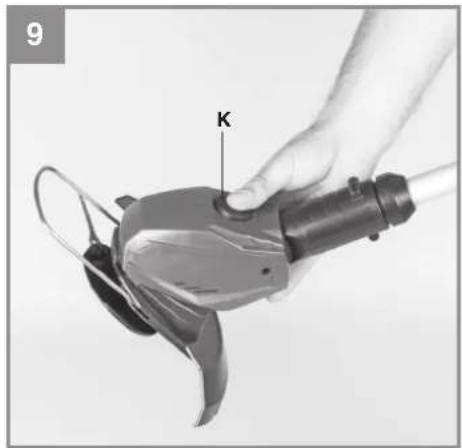
5.5 Adjusting the angle of tilt of the guide handle (Fig. 9)
Press the button for the angle of tilt adjustment (Fig. 9/Item K). Now you can set the long handle to the required tilt. Release the button and allow the handle to lock into position to fix the angle of tilt. Three different locking angles are possible.
5.6. Installing the battery (Fig. 10/11)
Press the side pushlock buttons of the battery pack as shown in Fig. 10 and push the battery pack into the mount provided. When the battery pack is positioned as in Fig. 11, make sure that the pushlock buttons latch in place! To remove the battery pack, proceed in reverse order.
5.7 Charging the battery (Fig. 12)
- Take the battery pack out of the equipment. Do this by pressing the side pushlock buttons.
- Check that your mains voltage is the same as
GB
that marked on the rating plate. Connect the power cable of the charging unit to a socket outlet and insert the connector (Fig. 12/Item N) into the charging jack of the battery pack. The red LED indicates that charging is in progress.
- The charging unit will end the charging automatically when the battery is fully charged (after approx. 2 hours). The green LED then lights up.
The battery pack can become a little warm during the charging. This is normal. If the battery pack fails to charge, check:
• whether there is voltage at the socket outlet
- whether there is good contact at the charging contacts
If the battery pack still fails to charge, send
• the charging unit
• and the battery pack
to our customer service center.
To ensure that the battery pack provides long service, you should take care to recharge it promptly. You must recharge the battery pack when you notice that the power of the cordless grass trim-mer drops. Never fully discharge the battery pack. This will cause it to develop a defect.
6. Operation
To obtain maximum performance from your grass trimmer, please follow these instructions:
- Never use the grass trimmer without the guard.
- Do not mow grass when it is wet. The best results are achieved with dry grass.
- To switch on your grass trimmer press the safety lock-off (Fig. 2 / Item 1) and then press the On/Off switch (Fig. 2 / Item 2).
- To switch off your grass trimmer, let go of the On/Off switch again (Fig. 2 / Item 2).
- Do not allow the grass trimmer near the grass until the switch is pressed, i.e. the grass trimmer is in operation.
- To cut properly, swing the machine sideways while moving forwards. Keep the grass trimmer inclined at an angle of approx. 30^ while you do so (see Figs. 17 and 18).
- If the grass is long, the grass must be cut shorter in stages, starting from the tip (see Fig. 19).
• Use the guard hood to prevent unnecessary wear.
• To avoid unnecessary wear, keep the grass trimmer away from hard objects.
Using the grass trimmer as an edge trimmer
To cut the edges of lawns and flower beds, the grass trimmer can be converted as follows: - Remove the battery pack
- Pull the lock for the rotatable motor head in the direction of the arrow as shown in Fig. 13.
- Turn the motor head through 90^ in the required direction until it latches in place.
- Now you have converted the grass trimmer to an edge trimmer for cutting the lawn vertically.
7. Cleaning, maintenance and ordering of spare parts
Before putting away or cleaning the grass trim-mer, switch off and remove the battery pack.
7.1 Cleaning
- Keep all safety devices, air vents and the motor housing free of dirt and dust as far as possible. Wipe the equipment with a clean cloth or blow it down with compressed air at low pressure.
• We recommend that you clean the equipment immediately after you use it. - Clean the equipment regularly with a damp cloth and some soft soap. Do not use cleaning agents or solvents; these may be aggressive to the plastic parts in the equipment. Ensure that no water can get into the interior of the equipment.
- Use a brush to remove deposits from the safety guard.
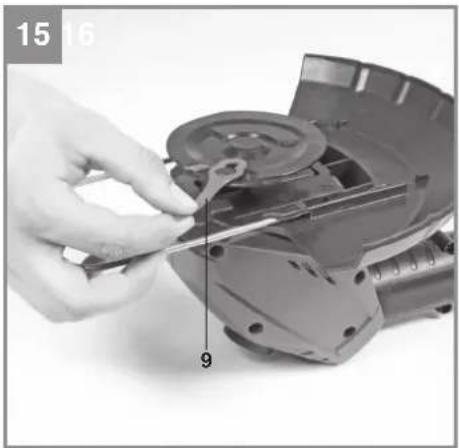
7.2 Replacing the blade (Fig. 15-16)
IMPORTANT! Be sure to remove the battery pack before replacing!
- To remove the blade, push the blade inwards and remove it through the larger opening as shown in Fig. 15.
- To fit the new blade, proceed in reverse order. Make sure the blade locks into place correctly as shown in Fig. 16.
7.3 Maintenance
There are no other parts inside the equipment which require maintenance.
GB
7.4 Ordering spare parts
Please provide the following information on all orders for spare parts:
• Model/type of the equipment
• Article number of the equipment
• ID number of the equipment
- Spare part number of the required spare part For our latest prices and information please go to www.isc-gmbh.info
Spare blade Art. No.: 34.057.30
8. Disposal and recycling
The equipment is supplied in packaging to prevent it from being damaged in transit. The raw materials in this packaging can be reused or recycled. The equipment and its accessories are made of various types of material, such as metal and plastic. Defective components must be disposed of as special waste. Ask your dealer or your local council.
9. Faults
The equipment does not work: Check that the battery is charged and whether the charging unit is working. If the equipment will not work in spite of the voltage supply being OK, please send it to the customer service address below.
-20-
GB

For EU countries only
Never place any electric power tools in your household refuse.
To comply with European Directive 2002/96/EC concerning old electric and electronic equipment and its implementation in national laws, old electric power tools have to be separated from other waste and disposed of in an environment-friendly fashion, e.g. by taking to a recycling depot.
Recycling alternative to the return request:
As an alternative to returning the equipment to the manufacturer, the owner of the electrical equipment must make sure that the equipment is properly disposed of if he no longer wants to keep the equipment. The old equipment can be returned to a suitable collection point that will dispose of the equipment in accordance with the national recycling and waste disposal regulations. This does not apply to any accessories or aids without electrical components supplied with the old equipment.
The reprinting or reproduction by any other means, in whole or in part, of documentation and papers accompanying products is permitted only with the express consent of the iSC GmbH.
Subject to technical changes


-21-
Warranty certifi cate
Dear Customer,
All of our products undergo strict quality checks to ensure that they reach you in perfect condition. In the unlikely event that your device develops a fault, please contact our service department at the address shown on this guarantee card. Of course, if you would prefer to call us then we are also happy to offer our assistance under the service number printed below. Please note the following terms under which guarantee claims can be made:
- These guarantee terms cover additional guarantee rights and do not affect your statutory warranty rights. We do not charge you for this guarantee.
- Our guarantee only covers problems caused by material or manufacturing defects, and it is restricted to the rectification of these defects or replacement of the device. Please note that our devices have not been designed for use in commercial, trade or industrial applications. Consequently, the guarantee is invalidated if the equipment is used in commercial, trade or industrial applications or for other equivalent activities. The following are also excluded from our guarantee: compensation for transport damage, damage caused by failure to comply with the installation/assembly instructions or damage caused by unprofessional installation, failure to comply with the operating instructions (e.g. connection to the wrong mains voltage or current type), misuse or inappropriate use (such as overloading of the device or use of non-approved tools or accessories), failure to comply with the maintenance and safety regulations, ingress of foreign bodies into the device (e.g. sand, stones or dust), effects of force or external influences (e.g. damage caused by the device being dropped) and normal wear resulting from proper operation of the device. This applies in particular to rechargeable batteries for which we nevertheless issue a guarantee period of 12 months. The guarantee is rendered null and void if any attempt is made to tamper with the device.
- The guarantee is valid for a period of 2 years starting from the purchase date of the device. Guarantee claims should be submitted before the end of the guarantee period within two weeks of the defect being noticed. No guarantee claims will be accepted after the end of the guarantee period. The original guarantee period remains applicable to the device even if repairs are carried out or parts are replaced. In such cases, the work performed or parts fitted will not result in an extension of the guarantee period, and no new guarantee will become active for the work performed or parts fitted. This also applies when an on-site service is used.
- In order to assert your guarantee claim, please send your defective device postage-free to the address shown below. Please enclose either the original or a copy of your sales receipt or another dated proof of purchase. Please keep your sales receipt in a safe place, as it is your proof of purchase. It would help us if you could describe the nature of the problem in as much detail as possible. If the defect is covered by our guarantee then your device will either be repaired immediately and returned to you, or we will send you a new device.
Of course, we are also happy offer a chargeable repair service for any defects which are not covered by the scope of this guarantee or for units which are no longer covered. To take advantage of this service, please send the device to our service address.
-22-
F
Sommaire
natural_image
Two horizontal bar designs with grayscale shades and a central crosshair symbol (no text or labels)F

natural_image
Two horizontal bar designs with grayscale shades and a central crosshair symbol (no text or labels)
natural_image
Two horizontal bar designs with grayscale shades and a central crosshair symbol (no text or labels)NL

natural_image
Two horizontal bar designs with grayscale shades and a central crosshair symbol (no text or labels)DK/N

Advarsel Læs betjeningsvejledningen for at reducere risikoen for personskade


-48-
natural_image
Two horizontal bar designs with grayscale shades and a central crosshair symbol (no text or labels)S

natural_image
Two horizontal bar designs with grayscale shades and a central crosshair symbol (no text or labels)FIN

GB explains the following conformity according to EU directives and norms for the following product
X 2000/14/EC_2005/88/EC
□ Annex V
X Annex VI
Notified Body: LWA = 88 dB (A); guaranteed LWA = 94 dB (A)
P = KW; L/∅ = cm
Notified Body: TÜV SÜD Industrie Service GmbH (0036)
2006/28/EC
Emission No.:
Standard references:
EN 55014-1; EN 55014-2; EN 61000-3-2; EN 61000-3-3;
EN 60335-1; EN 60335-2-91; EN 62233; EN 60335-2-29
Subject to change without notice
Archive-File/Record: NAPR002827
Documents registrar: Alexander Scheifl
Wiesenweg 22, D-94405 Landau/Isar


natural_image
Color palette bar with grayscale shades and a crosshair symbol (no text or labels)


-72-
natural_image
Color palette bar with grayscale gradient and a crosshair symbol (no text or labels)

EH 12/2011 (02)