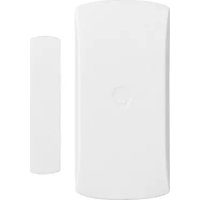
DWC102 - Alarm system Chuango - Free user manual and instructions
Find the device manual for free DWC102 Chuango in PDF.


| Product Type | Wireless door/window contact |
| Brand | Chuango |
| Model | DWC102 |
| Power Supply | LR6 1.5 V battery x 1 |
| Standby Consumption | < 56 μA |
| Alarm Consumption | < 82 mA |
| Transmission Distance | < 80 m (open area) |
| Radio Frequency | 315 MHz or 433.92 MHz (Europe: 868 MHz) |
| Housing Material | ABS plastic |
| Dimensions (transceiver) | 71 x 34 x 17.55 mm |
| Dimensions (magnetic element) | 51 x 12 x 13.5 mm |
| Operating Conditions | 0 °C to +50 °C, humidity < 90% non-condensing |
| Main Functions | Opening detection, intrusion alarm, tamper protection |
| Indicator Light | Flash once: intrusion; flash every 3 s: low battery |
| Installation | Fix with double-sided adhesive tape (use spacers on metal doors) |
| Safety | Built-in tamper contact |
| Maintenance and Cleaning | Clean with a soft, dry cloth. Do not use solvents. |
| Repairability | Accessible battery replacement (LR6) |
Frequently Asked Questions - DWC102 Chuango
User questions about DWC102 Chuango
0 question about this device. Answer the ones you know or ask your own.
Ask a new question about this device
Download the instructions for your Alarm system in PDF format for free! Find your manual DWC102 - Chuango and take your electronic device back in hand. On this page are published all the documents necessary for the use of your device. DWC102 by Chuango.
USER MANUAL DWC102 Chuango
m = 311
-
-
m = 311
m = 311
USER MANUAL

natural_image
Simple line drawing of a rounded rectangle and a vertical rectangle, no text or symbols presentDWC-102
Door/Window Contact
© Chuango A Rights Reserved.
Printed in China Ver DWC 102 UM ML V1.0
ENEN
Introduction
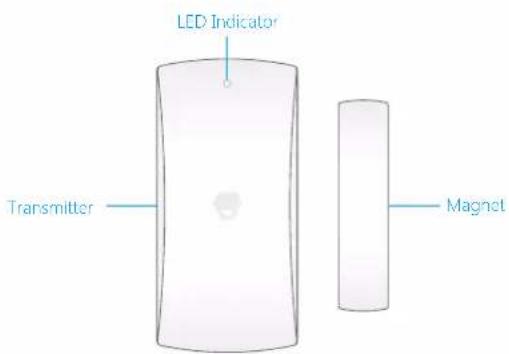
The contact contains a transmitter and a magnet, which can be mounted on a door, window, or any object that can be opened or closed. When the transmitter and magnet are separated, the contact will send a signal to the control panel and the latter will trigger an alarm. The tamper switch ensures that sabotage attempting to disassemble the contact will trigger an alarm.
Overview
text_image
LED Indicator Transmitter MagnetLED Indication
Flash once: Intruder is detected.
Flash once per 3 seconds after triggered: Low battery. Replace the battery as soon as possible.
PCB Layout
text_image
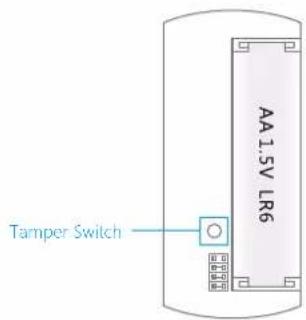
Tamper Switch AA 1.5V LR6Note: When tamper switch is pressed, system will alarm immediately.
ENEN
Installation
After confirming that the door/window contact works properly, the installation steps can be proceed as follow:
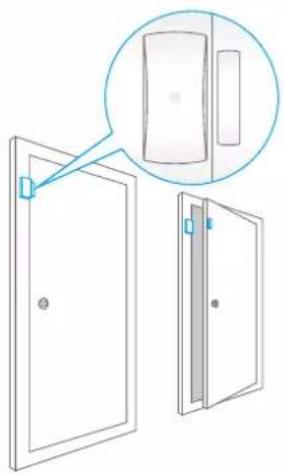
Secure the transmitter and magnet on the desired locations (like door or window which can be opened and closed) with double-sided tapes.
Note: If this product is installed on a metal door, place spacers under the transmitter and magnet. This product is not suitable for shutter doors, please purchase shutter door sensor for your use.
natural_image
Diagram showing two door compartments with one open and one closed, one partially visible through a magnified inset (no text or symbols)Connect the Door/Window Contact
Connecting the door/window contact is to build a wireless connection between the door/window contact and the control panel.
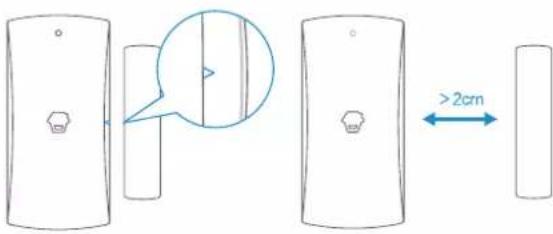
- Make sure the triangle mark is close to each other and within the range of 1cm.
- Control panel enters into the connecting state (For details, please refer to the relative user manual).
- Separate the transmitter and magnet with the space more than 2 cm, the control panel beeps once, indicating successful connection.
text_image
Diagram showing a 3D object with a magnified inset highlighting a vertical feature, and a blue double-headed arrow labeled >2cm indicating width measurement.Note: If the control panel beeps twice when the above operation is done, it means the contact has been connected before.
Specifications
Power Supply: DC 1.5V LR6 Battery x 1
Standby Current: < 56 uA
Alarm Current: < 82 mA
Transmitting Distance: < 80 m (Open area/no interference)
Radio Frequency: 315MHz or 433.92MHz (±75MHz)
Housing Material: ABS plastic
ERP(dBm).MAX: -12.06
Operation Condition:
Temperature: 0 °C \~ +50 °C
Relative Humidity: < 90% (non-condensing)
Transmitter Dimensions: 71 x 34 x 17.55 mm
Magnet Dimensions: 51 x 12 x 13.5 mm
DE
Einleitung
text_image
Diagram illustrating a 2cm measurement between two rectangular objects, with an arrow indicating the measurement direction.natural_image
Diagram showing two doors with one door open and one closed, one partially visible through a magnified inset (no text or symbols)Technische Daten
Stromversorgung: DC 1.5V LR6 Batterie x 1
Ruhestrom: < 56 uA
Alarmstrom: < 82 mA
text_image
AA 1.5V LR6 Contact anti- sabotagenatural_image
Diagram showing a door with a close-up view of the front panel (no text or symbols present)text_image
Technical diagram showing a device with a magnified view and dimension annotation '≥2cm'natural_image
Diagram showing two doors with one door open and a close-up of the interior panel (no text or symbols)NL NL
text_image
Diagram illustrating a 2cm measurement between two identical rectangular objects, with a magnified inset showing the difference between them.natural_image
Diagram of a door with an inset showing a close-up view of the door (no text or symbols present)text_image
Technical diagram showing a 2cm height measurement between two views of a rectangular object, with a magnified inset highlighting the top view.text_image
Indicator luminoso Transmissor inanPT PT
Indicador LED