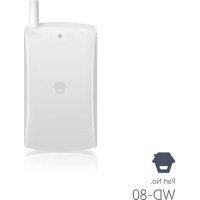
WD80 - Alarm system Chuango - Free user manual and instructions
Find the device manual for free WD80 Chuango in PDF.


| Product type | Wireless vibration detector for alarm system |
| Brand | Chuango |
| Model | WD80 |
| Power supply | 3 V DC, 2 AAA/LR03 1.5 V batteries |
| Standby current | < 29 μA |
| Alarm current | < 22.2 mA |
| Transmission distance | < 80 m (in open area) |
| Radio frequency | 433 MHz |
| Housing material | ABS plastic |
| Dimensions (W x D x H) | 54 x 14.5 x 107 mm |
| Operating conditions | Relative humidity < 80% (non-condensing) |
| Standby duration | Approximately 12 months |
| Sensitivity adjustment | 3 levels: high, medium, low |
| Operating mode | Normal zone or 24-hour zone |
| Indicator light | Flashes once upon detection; flashes every 2 seconds if battery low |
| Installation | Attach with double-sided adhesive tape on clean, solid surface |
| Connection to control panel | Wireless pairing by simulating an alarm (tap briefly) |
| Maintenance | Replace batteries when indicator flashes every 2 seconds |
| Security | Detects vibration, tampering, or movement for solid objects (safes, etc.) |
| Spare parts | Not provided by manufacturer; standard batteries available commercially |
| Repairability | Product not user-repairable; contact after-sales service |
Frequently Asked Questions - WD80 Chuango
User questions about WD80 Chuango
0 question about this device. Answer the ones you know or ask your own.
Ask a new question about this device
Download the instructions for your Alarm system in PDF format for free! Find your manual WD80 - Chuango and take your electronic device back in hand. On this page are published all the documents necessary for the use of your device. WD80 by Chuango.
USER MANUAL WD80 Chuango
m = 311 ;
m = 311
m = 311
m = 311
m = 311
m = 311
USER MANUAL
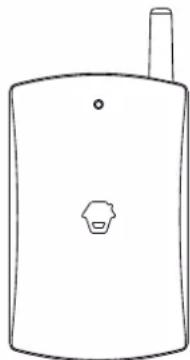
WD-80
Wireless Vibration
Detector
Chuango. All Rights Reserved
Printed in China
Var:WD-8C-UM-ML-V1.0
ENEN
Introduction
The wireless vibration detector adopts the theory of vibration, touch and motion mode. Once it detects any vibration, it will automatically send wireless signal to the control panel for alarm. It is widely used for objects with a solid or thick structure, like safe and so on. Its vibrating sensitivity can be adjusted in three levels thus it can prevent false alarm effectively. Two pieces of AAA 1.5V LR03 batteries are included in the detector, which enables 12 months standby.
Product Overview
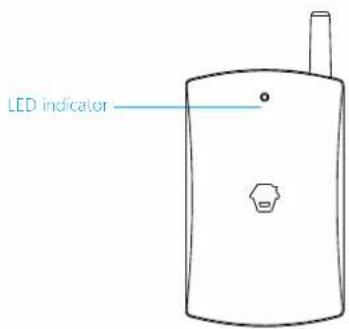
LED Indication
Flash once: Vibration detected, sending wireless signal to the control panel.
Flash once every 2 seconds: Low battery. Please replace the battery immediately.
PCB Layout
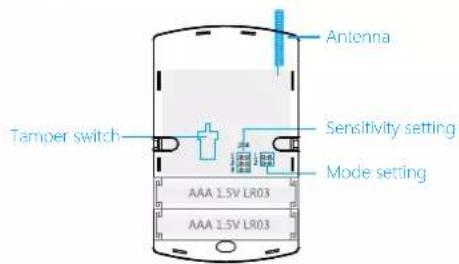
Sensitivity Setting
Take off the back case with screwdriver, and put the black jumper cap onto the jumper of required sensitivity level.
ENEN

High sensitivity (Default Setting)
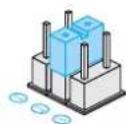
Medium Sensitivity Low sensitivity

Mode Setting

Normal Zone (Arm zone, default setting)
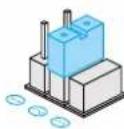
24-Hour Zone
Connecting to the Control Panel
Please connect the detector with control panel before use:
- Make sure the control panel is under pairing state (please refer to the relative user manual).
- Knock once on the surface of the detector to simulate an alarm (LED flashes once), when a beep is heard from control panel, it means the pairing is successful.
Installation
- Remove the insulating strip; the detector will enter working state.
- Clean the surface of object to be installed.
- Fix the detector on the middle of the object's surface with double-sided adhesive tape and make sure the antenna is upward.
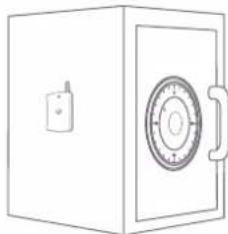
Note: Whether a vibration signal will be detected depends on not only the knocking strength on objects, but also the strength, frequency and duration of the signal
Specifications
Power Supply: DC 3 V (AAA 1.5 V LR03 x 2 PCS)
Static Current: < 29 A
Alarm Current: < 22.2 mA
Transmitting Distance: < 80m (in open area)
Radio Frequency: 433 MHz
Housing Material: ABS plastic
Operation Condition:
Temperature: 0^ +55^
Relative Humidity: < 80% (non-condensing)
Detector Dimensions (L x W x H): 54 x 14.5 x 107 mm
Einleitung
Temperature: 0^ +55^
Radiofrequency: 433 MHz
Material de la caja: Plastico ABS
Condieones de functiOnamento:
Temperatura: Entre 0^ y +55^
Radiofrequency: 433 MHz


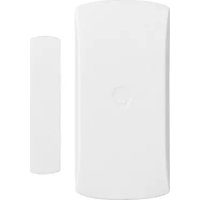
Brand : Chuango
Model : WD80
Category : Alarm system