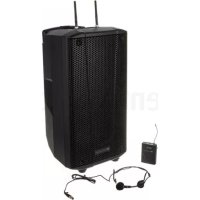
BHype Mobile BT - Speaker DB Technologies - Free user manual and instructions
Find the device manual for free BHype Mobile BT DB Technologies in PDF.



User questions about BHype Mobile BT DB Technologies
0 question about this device. Answer the ones you know or ask your own.
Ask a new question about this device
Download the instructions for your Speaker in PDF format for free! Find your manual BHype Mobile BT - DB Technologies and take your electronic device back in hand. On this page are published all the documents necessary for the use of your device. BHype Mobile BT by DB Technologies.
USER MANUAL BHype Mobile BT DB Technologies
text_image
B·HYPE Bi-amp Battery-powered Speaker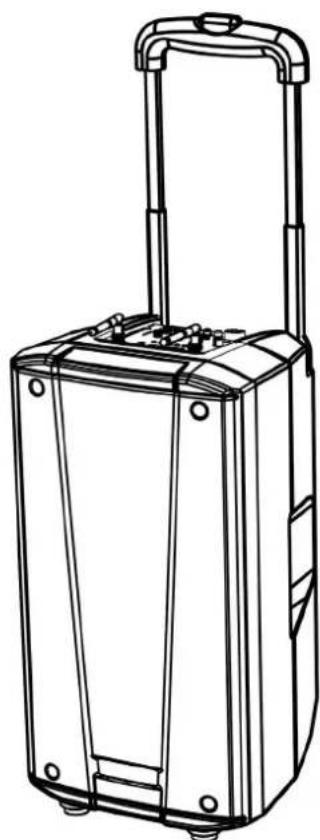
natural_image
Line drawing of a suitcase with handle and side buttons (no text or symbols)Handheld Transmitter Version / Bodypack Transmitter Version
USER MANUAL – Section 1
The warnings contained in this manual as well as the information listed in "USER MANUAL - Section 2" must be complied with.
This equipment is in conformity with RED directive 2014/53/EU in reference to the following harmonized standards:
Health EN 62479:2010
Safety EN 62368-1:2014+A11
EMC EN 301 489-1 v2.2.0, EN 301 489-9 v2.1.1, EN 301 789-17 V3.2.0,
EN 55032:2015, EN 55035:2017
Spectrum EN 301 422-1 v2.1.2, EN 300 328 v2.1.1
EMI CLASSIFICATION
According to the standards EN 55032 and EN 55035 this equipment is designed and suitable to operate in class B electromagnetic environments.
FCC AND IC CERTIFICATION
FCC ID: 2ADDV-BHYPEM (Bluetooth® transmitter)
FCC ID: 2ADDV-HTBHM (Handheld transmitter)
FCC ID: 2ADDV-BTBHM (Bodypack transmitter)
IC: 12207A-BHYPEM (Bluetooth® transmitter)
IC: 12207A-HTBHM (Handheld transmitter)
IC: 12207A-BTBHM (Bodypack transmitter)
This equipment has been designed and complies with the safety requirements for portable (<20 cm) RF exposure in accordance with FCC rule part 2.1091. Installers must ensure that this device must not be co-located or operated in conjunction with any other antenna or transmitter except in accordance with FCC multi-transmitter product procedures.
NOTICE
For USA Market:
This equipment has been tested and found to comply with the limits for a Class B digital device, pursuant to part 15 of the FCC Rules. These limits are designed to provide reasonable protection against harmful interference in a residential installation. This equipment generates, uses and can radiate radio frequency energy and, if not installed and used in accordance with the instructions, may cause harmful interference to radio communications. However, there is no guarantee that interference will not occur in a particular installation. If this equipment does cause harmful interference to radio or television reception, which can be determined by turning the equipment off and on, the user is encouraged to try to correct the interference by one or more of the following measures:
—Reorient or relocate the receiving antenna.
—Increase the separation between the equipment and receiver.
—Connect the equipment into an outlet on a circuit different from that to which the receiver is connected.
—Consult the dealer or an experienced radio/TV technician for help.
Changes or modifications not expressly approved by the party responsible for compliance could void the user's authority to operate the equipment.
The Bluetooth® word mark and logos are registered trademarks owned by Bluetooth® SIG, Inc. and any use of such marks by AEB Industriale SRL is under license. Other Trademarks and trade names are those of their respective owner.
B- HYPE MOBILE
Cod. 420120272 REV. 1.2
CONSUMER ALERT
Most users do not need a license to operate this wireless system. Nevertheless, operating this microphone system without a license is subject to certain restrictions: The system may not cause harmful interference; it must operate at a low power level (not in excess of 50 milliwatts); and it has no protection from interference received from any other device. Purchasers should also be aware that the FCC is currently evaluating use of wireless microphone systems, and these rules are subject to change. For more information, call the FCC at 1-888-CALL-FCC (TTY:
1-888-TELL-FCC) or visit the FCC's wireless microphone Web site at http://www.fcc.gov/cgb/wirelessmicrophones. For Canadian Market:
This device complies with Industry Canada's license-exempt RSSs.
Operation is subject to the following two conditions:
(1) This device may not cause interference; and
(2) This device must accept any interference, including interference that may cause undesired operation of the device.
This device operates on a no-protection no-interference basis. Should the user seek to obtain protection from other radio services operating in the same TV bands, a radio license is required.
Please consult Industry Canada's document CPC-2-1-28, Optional Licensing for Low-Power Radio Apparatus in the TV Bands, for details.
IMPORTANT SAFETY INSTRUCTIONS:
- Read these instructions
- Keep these instructions.
- Heed all warnings.
- Follow all instructions.
- Do not use this apparatus near water.
-
Clean only with dry cloth.
-
Do not block any ventilation openings. Install in accordance with the manufacturer's instructions.
-
Do not install near any heat sources such as radiators, heat registers, stoves, or other apparatus (including amplifiers) that produce heat.
-
Do not defeat the safety purpose of the polarized or grounding-type plug. A polarized plug has two blades with one wider than the other. A grounding type plug has two blades and a third grounding prong. The wide blade or the third prong are provided for your safety. If the provided plug does not fit into your outlet, consult an electrician for replacement of the obsolete outlet.
-
Protect the power cord from being walked on or pinched particularly at plugs, convenience receptacles, and the point where they exit from the apparatus.
-
Only use attachments /accessories specified by the manufacturer.

-
Use only with the cart, stand tripod, bracket, or table specified by the manufacturer, or sold with the apparatus. When a cart is used, use caution, when moving the cart/apparatus combination to avoid injury from tip-over.
-
Unplug this apparatus during lightning storms or when unused for long periods of time.
-
Refer all servicing to qualified service personnel. Servicing is required when the apparatus has been damaged in any way, such as power-supply cord or plug is damaged, liquid has been spilled or objects have fallen into the apparatus has been exposed to rain or moisture, does not operate normally, or has been dropped.
ADDITIONAL SAFETY INSTRUCTIONS:
- No naked flame sources, such as lighted candles, should be placed on the apparatus
- Do not use the apparatus in tropical climates
B-HYPE MOBILE
Cod. 420120272 REV. 1.2
CONSIGNES DE SÉCURITÉ IMPORTANTES:
INGRESSI E USCITE 21
SEZIONE RF 21
text_image
Diagram showing labeled components of a device with numbered parts and directional arrows indicating assembly or assembly.text_image
(REPLACE FUSE WITH SAME RATINGS) (REEMPLACER LE FUSIBLE AVEC LE MÈME TYPE)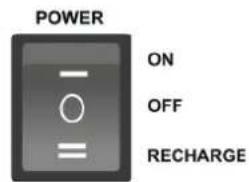
text_image
POWER ON OFF RECHARGEROTARY DI VOLUME ✪ /USB/SD:
text_image
dBTechnologies IR R-BHM ---- MHz SETMIC MUTE AF/RF
text_image
08 CHANNEL 638.125 MHz AF RF SET X Y ZCHANNEL FREQUENCY BATTERY LEVEL
AF = AUDIO VOLUME INTENSITY
RF = WIRELESS RECEPTION INTENSITY
B- HYPE MOBILE
Cod. 420120272 REV. 1.2
HT-BHM
text_image
Technical diagram showing the internal structure and assembly of an AA type audio recording device, with labeled parts A through F.ALLOGGIO CON CARICABATTERIE PER HT-BHM
text_image
Led of HT-BHM charger ON OFF RECHARGE MAINS SECTIONB-HYPE MOBILE
Cod. 420120272 REV. 1.2
BT-BHM
text_image
Technical diagram of a device with labeled parts including motor, battery, and control panel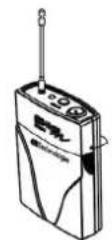
natural_image
Line drawing of a hand operating a handheld electronic device with a screwdriver (no text or symbols visible)AA TYPE
B- HYPE MOBILE
Cod. 420120272 REV. 1.2
SINCRONIZZAZIONE DEL TRASMETTITORE
text_image
dbTechnologies IR R-BHM —— MHz SET BHOTE W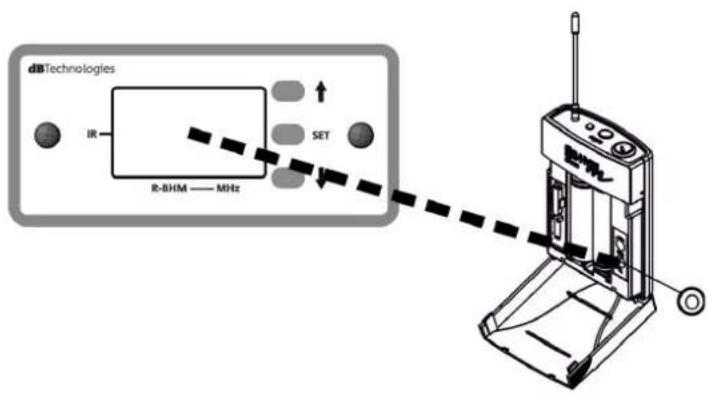
text_image
dbTechnologies IR R-BHM —— MHz SET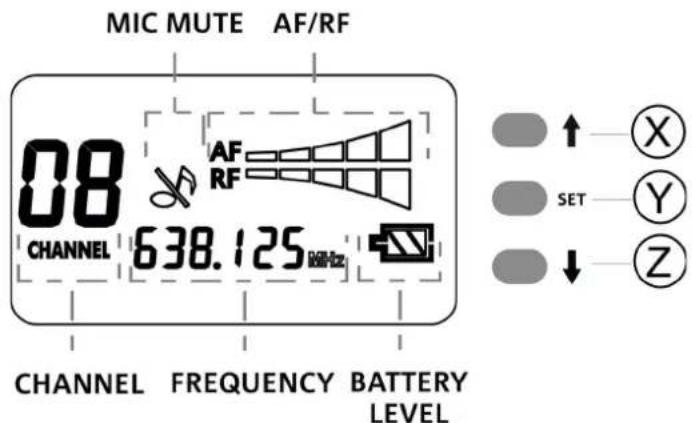
text_image
MIC MUTE AF/RF 08 AF RF CHANNEL 638.125 MHz CHANNEL FREQUENCY BATTERY LEVEL SET X Y ZTABELLA RIEPILOGATIVA DEI CANALI E DELLE FREQUENZE
bar
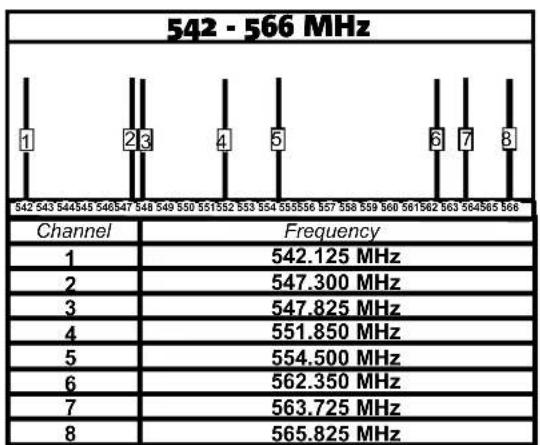
542 - 566 MHz | Channel | Frequency | |---|---| | 1 | 542.125 MHz | | 2 | 547.300 MHz | | 3 | 547.825 MHz | | 4 | 551.850 MHz | | 5 | 554.500 MHz | | 6 | 562.350 MHz | | 7 | 563.725 MHz | | 8 | 565.825 MHz |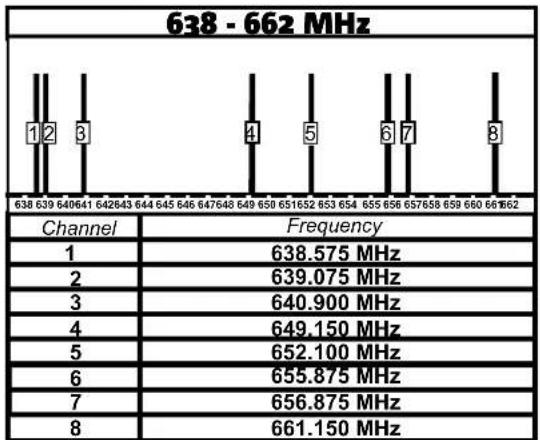
bar
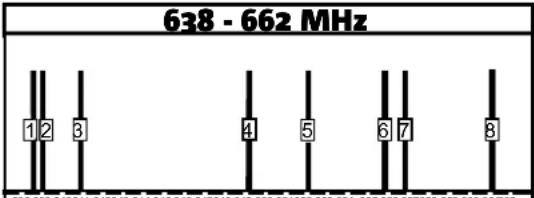
638 - 662 MHz | Channel | Frequency | |---|---| | 1 | 638.575 MHz | | 2 | 639.075 MHz | | 3 | 640.900 MHz | | 4 | 649.150 MHz | | 5 | 652.100 MHz | | 6 | 655.875 MHz | | 7 | 656.875 MHz | | 8 | 661.150 MHz |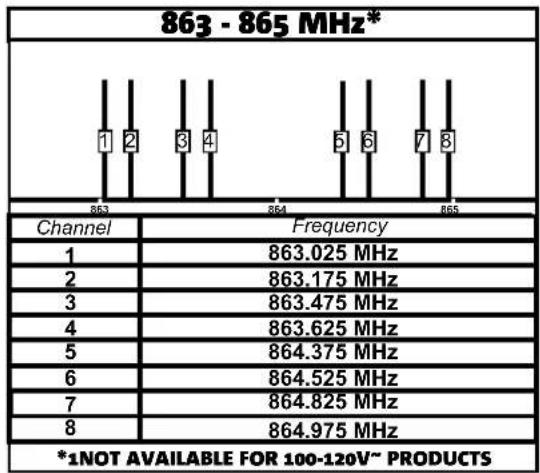
bar
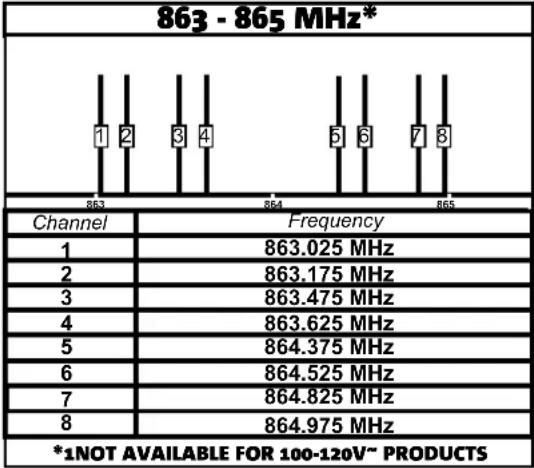
863 - 865 MHz* | Channel | Frequency | |---|---| | 1 | 863.025 MHz | | 2 | 863.175 MHz | | 3 | 863.475 MHz | | 4 | 863.625 MHz | | 5 | 864.375 MHz | | 6 | 864.525 MHz | | 7 | 864.825 MHz | | 8 | 864.975 MHz *1NOT AVAILABLE FOR 100-120V~ PRODUCTSnatural_image
Pure mechanical diagram showing a device with control panel and alignment lines (no text or symbols)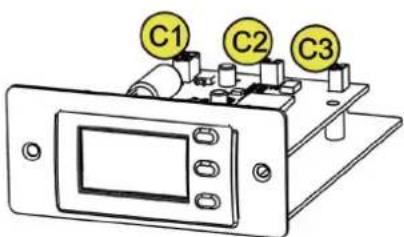
text_image
C1 C2 C33. RISOLUZIONE DEI PROBLEMI
1. GENERAL INFORMATION AND MAIN SECTIONS 24
WELCOME! 24
PACKAGE CONTENTS 24
USER REFERENCE 24
MECHANICS 25
OVERVIEW OF THE EQUIPMENT 25
POWER SUPPLY UNIT SECTION 26
SECTION FOR THE CONNECTIONS, CONTROL AND MONITORING OF THE BATTERY 26
MEDIA PLAYER INTERFACE 27
2. ANTENNAE, RECEIVER AND TRANSMITTERS 29
R-BHM 29
HT-BHM 30
HOUSING WITH BATTERY CHARGER FOR HT-BHM 30
BT-BHM 31
SYNCHRONISATION OF THE TRANSMITTER 32
SUMMARY TABLE OF CHANNELS AND FREQUENCIES.... 33
4. ACCESSORIES/SPARE PARTS 36
5. SPECIFICATIONS 37
GENERAL 37
ACOUSTICAL SPECIFICATIONS.... 37
INTERNAL BATTERY 37
AMPLIFIER 37
USER INTERFACE 38
INPUTS & OUTPUTS 38
RF SECTION 38
POWER SUPPLY SPECIFICATIONS (ABSORPTION / INSTALLATION) 38
DIMENSIONS 39
1. GENERAL INFORMATION AND MAIN SECTIONS
WELCOME!
Thanks for purchasing a dBTechnologies product! B-HYPE MOBILE is a mobile bi-amplified multimedia speaker available in 2 versions:
- a bundle with wireless handheld transmitter (handheld radio microphone)
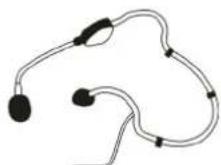
- a bundle with bodypack transmitter and headset with microphone
The wireless system is available in 3 frequency bands (also according to the Country of sale). It can work both with network connection and with batteries. It can be reconfigured at any time thanks to the different accessories available.
PACKAGE CONTENTS
natural_image
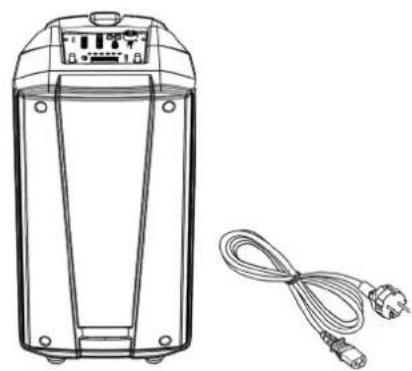
Line drawing of a portable electronic device with a coiled cable and two connectors (no text or symbols)B-HYPE MOBILE POWER SUPPLY CABLE
natural_image
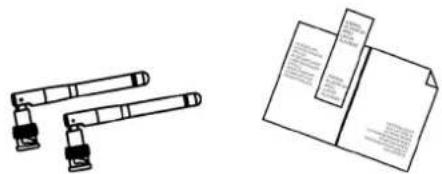
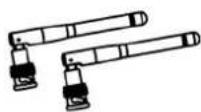
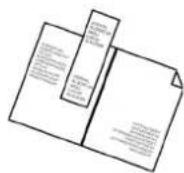
Two technical illustrations: one showing a mechanical assembly with two rods, the other showing an open document with printed materials (no text or symbols visible)text_image
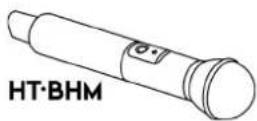
BT·BHM HM·BHMPART DEPENDING ON BUNDLE/ACCESSORIES SOLD ALSO SEPARATELY
USER REFERENCE
To make the most of your B-HYPE MOBILE, we recommend that you:
- read the quick start user manual included in the package and this user manual thoroughly and keep this manual during the whole life of the product.
• comply carefully with the rules for use and storage of the batteries (transmitters) - Register your product at http://www.dbtechnologies.com under "SUPPORT".
- keep proof of purchase and WARRANTY (User manual "section 2").
B-HYPE MOBILE
Code 420120272 REV. 1.2
MECHANICS
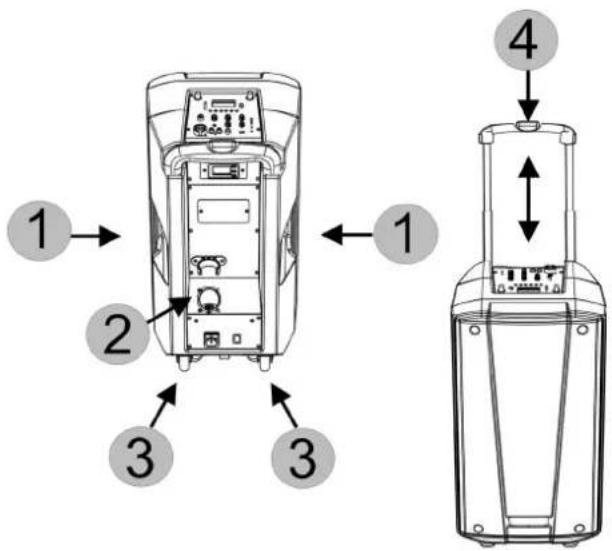
B-HYPE MOBILE is equipped with:
- side handles
- housing for the HT-BHM radio microphone
- wheels for handling
- upper handle (with central release button)
text_image
Diagram showing labeled components of a device with numbered parts and directional arrows indicating assembly or assembly.OVERVIEW OF THE EQUIPMENT
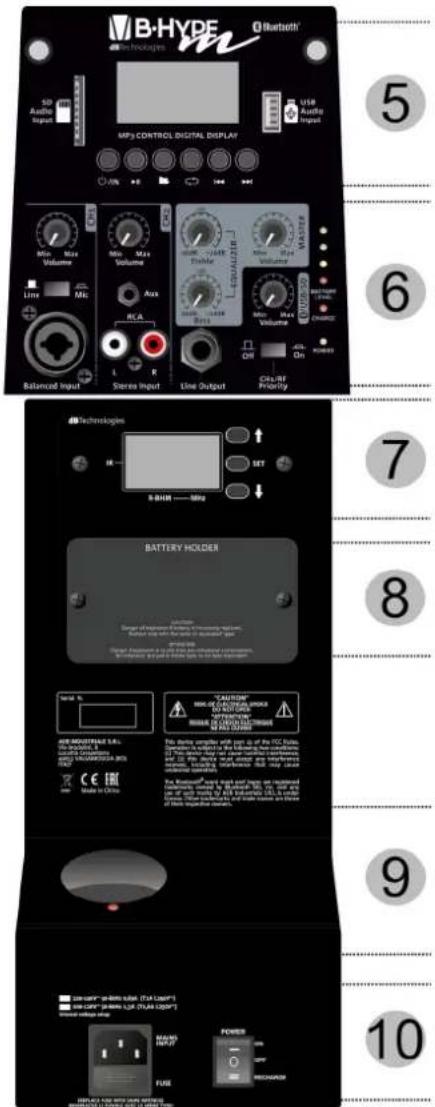
On the upper side and at the back of the speaker there are:
- media player interface
- control and connection section
- R-BHM receiver module
- lithium-ion battery compartment
- battery charger with LED for HT-BHM radio microphone
- power supply unit section
text_image
B-HYDF Bluetooth MP3 CONTROL DIGITAL DISPLAY USB Audio Input Balanced Input Stereo Input Line Output CPU/AT Priority 5 6 7 8 9 10 SND Audio Input AMP Control Digital Display Wireless Voltage Max Max Max Max Max Max Max Max Max Max Max Max Max Max Max Max Max Max Max Max Max Max Max Max Max Max Max Max Max Max Max Max Max Max Max Max Max Max Max Max Max Max Max Max Max Max Max Max Max Max BATTERY HOLDER BATTERY HOLDER BATTERY HOLDER BATTERY HOLDER BATTERY HOLDER BATTERY HOLDER BATTERY HOLDER BATTERY HOLDER BATTERY HOLDER BATTERY HOLDER BATTERY HOLDER BATTERY HOLDER BATTERY HOLDER BATTERY HOLDER BATTERY HOLDER BATTERY HOLDER BATTERY HOLDER BATTERY HOLDER BATTERY HOLDER BATTERY HOLDER BATTERY HOLDER BATTERY HOLDER BATTERY HOLDER BATTERY HOLDER BATTERY HOLDER BATTERYHOLDER
WARNING!
Avoid any direct contact with water or environments that are too humid during use.
Avoid any direct exposure to sunlight for long periods.
Ensure good aeration around the loudspeaker to facilitate heat dissipation.
Never attempt to open or access the amplifier panel or the loudspeaker acoustic components.
Follow the instructions listed in this manual.
POWER SUPPLY UNIT SECTION
This section contains:
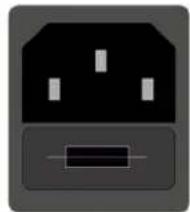
- connector for the supplied power supply cable
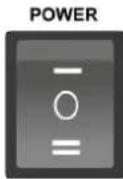
- three-state switch:
ON - full operation of all functions and operation both with network cable and with battery only in mobile mode. OFF - no operation (device completely off) RECHARGE - the system in stand-by, connected to the network, recharges the inner battery and the BT-BHM radio microphone, if any.
220-240V\~ 50-60Hz 0,65A (T1A L250V\~)
100-120V\~ 50-60Hz 1,3A (T1,6A L250V\~)
Internal voltage setup
natural_image
Simple icon of a plug with three slots and a resistor symbol (no text or labels)(REPLACE FUSE WITH SAME RATINGS) (REEMPLACER LE FUSIBLE AVEC LE MÊME TYPE)
ON
OFF
RECHARGE
SECTION FOR THE CONNECTIONS, CONTROL AND MONITORING OF THE BATTERY
This section contains inputs/outputs and volume mixer adjustments. All monitoring LEDs of the system and of the internal battery are also present. In particular, the following can be found:
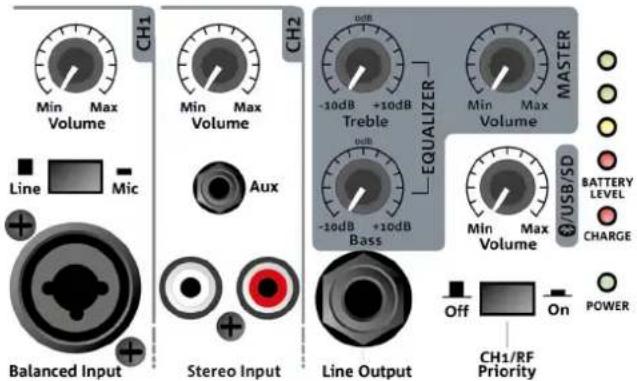
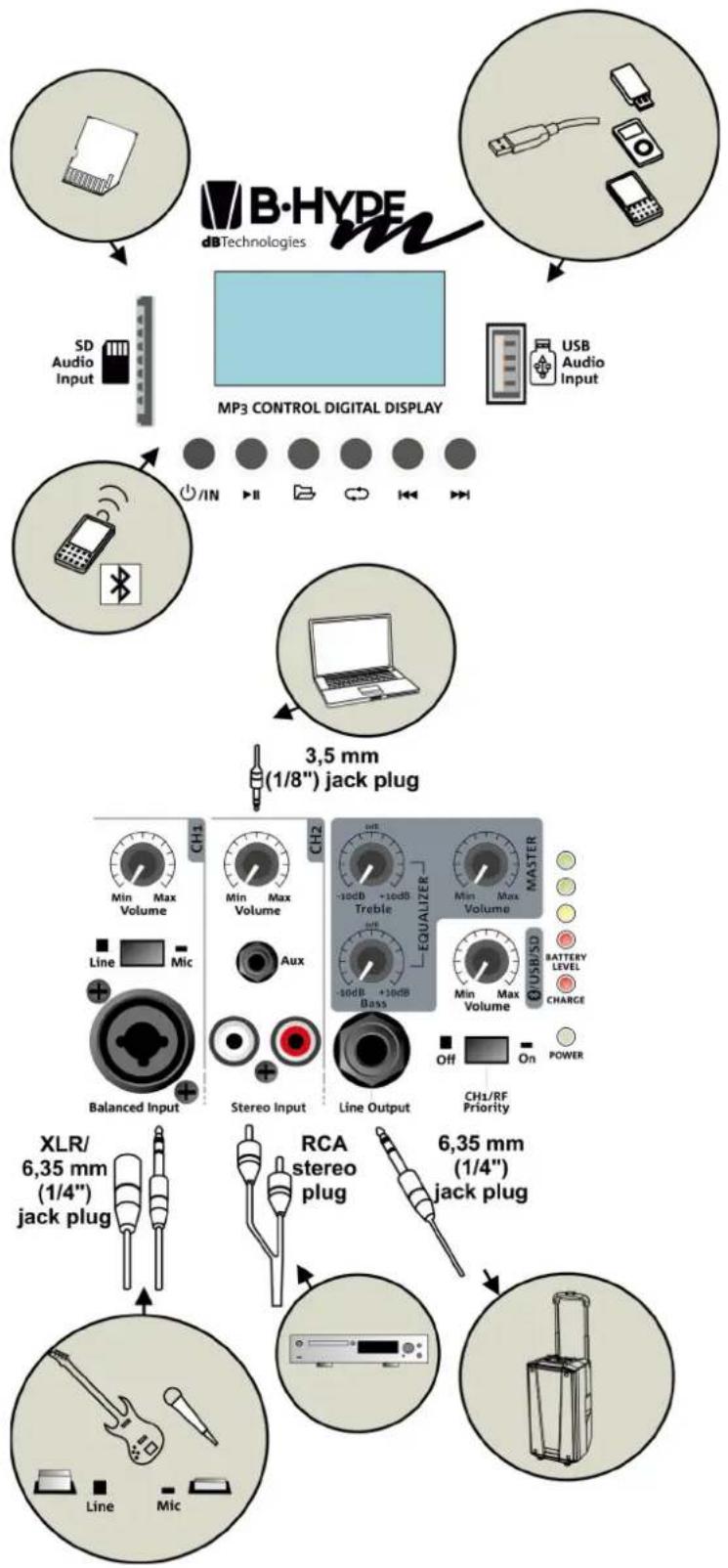
- CH1: Combo connector (XLR/TRS) with relevant input type switch and volume rotary switch. If a microphone is connected, select the position Mic.
- CH2: The connectors available are AUX (3.5 mm mini-jack) and RCA stereo with relevant volume rotary switch of the channel.
- MASTER SECTION (3 rotary switches): general volume switch, TREBLE and BASS equalization rotary switches.
- VOLUME ROTARY SWITCH /USB/SD: it controls the volume of the playable media (see section "MEDIA PLAYER INTERFACE" for further information)
- Line Output: unbalanced connector to link the B-HYPE MOBILE output to another active loudspeaker (e.g. another B-HYPE MOBILE system). For example, the Line Output of a B-HYPE MOBILE can be connected to the CH1 of a second one to obtain a distributed system.
- CH1/RF Priority. In "On" position the audio level of the 2 channels CH2 and /USB/SD is immediately reduced by the presence of a signal on CH1 or on the radio frequency microphone.
text_image
CH1 Volume Line Mic Balanced Input Stereo Input Line Output CH2 Volume Max Min Max -10dB +10dB Treble Bass Equalizer MASTER MIN Max Volume BATTERY LEVEL CHARGE USB/SD Off On POWER CH1/RF PriorityThe monitoring LEDs of the system and of the internal battery provide immediate information to the user.
The POWER LED indicates whether B-HYPE MOBILE is on (green light) or off.
The internal battery will recharge with B-HYPE MOBILE connected to the power mains (through the cable supplied) and in RECHARGE position. The recharge is carried out in a less efficient manner also during the operation in ON position. The CHARGE LED is red if the battery is flat, and green when completely charged.
When B-HYPE MOBILE is used in mobile mode (without power supply cable), in ON, the Battery level LEDs turn on depending on the battery charge status.

WARNING!
Whenever possible, charge the battery completely. Never store it completely empty or half empty. If the device is inactive for a long period, disconnect the battery, covers the terminals and store the battery in a dry place away from heat sources, and regularly recharge the battery.
B-HYPE MOBILE
Code 420120272 REV. 1.2
MEDIA PLAYER INTERFACE
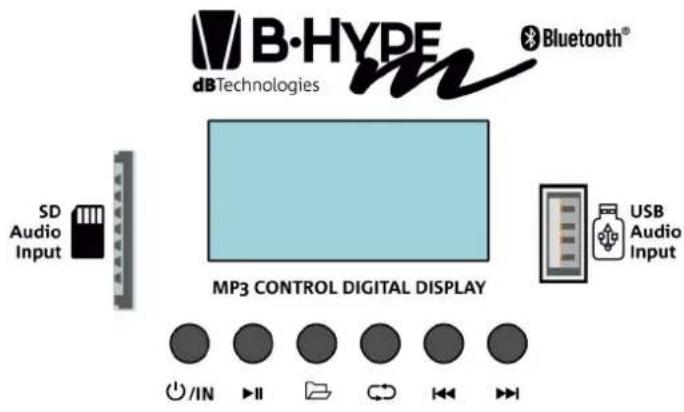
This section contains the controls and inputs to play .mp3, .wav, .wma files from:
- SD cards
- USB memory device
• Bluetooth device correctly paired
To play a file from the SD card / USB device:
-
Turn B-HYPE MOBILE on after connecting the power supply cable (switch in ON position). For further information, see paragraph "POWER SUPPLY UNIT SECTION".
-
Insert the correct device in the relevant input (see figure on the side). Note: it is possible to use only one device at a time.
-
Press the switch-on button ⏻/of the player for a few seconds. Once the display is on, push the button shortly to select the source type.
-
Press the buttons respectively to: play/pause the track, search through the folders, automatically repeat the track/access the equalization, rewind, fast forward.
-
Adjust the 2 volumes of the mixer area (see section "SECTION FOR CONNECTIONS AND CONTROL"):
- MASTER volume
• Volume /USB/SD
To play the file from a Bluetooth device:
-
Turn B-HYPE MOBILE on after connecting the power supply cable (switch in ON position). For further information, see paragraph "POWER SUPPLY UNIT SECTION".
-
Press the switch-on button Ⓗ/IN of the player for a few seconds. Once the display is on, push the button shortly to select the source type.
-
Enable the Bluetooth function on the player/device containing the audio track, checking that its visibility is enabled.
-
Once communication is established the name of the device is shown on display.
-
Adjust the 2 volumes of the mixer area (see section "SECTION FOR CONNECTIONS AND CONTROL"):
- MASTER volume
• Volume Ⓗ/USB/SD
B-HYPE MOBILE
text_image
B·HYPE dBTechnologies Bluetooth® SD Audio Input MP3 CONTROL DIGITAL DISPLAY USB Audio Input /IN II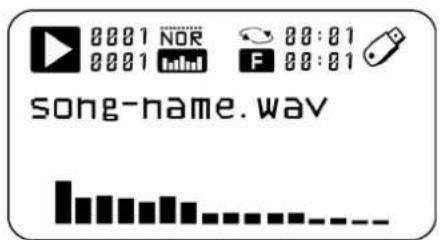
text_image
00:01 NOR 00:01 F 00:01 song-name.wav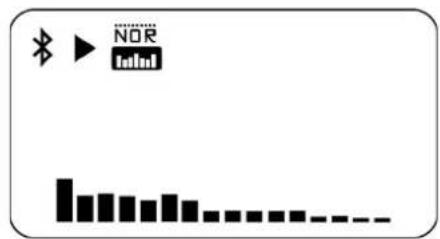
text_image
Diagram showing a music player interface with icons for Bluetooth, NOR, and playback controlsCode 420120272 REV. 1.2
The diagram below shows a summary of the input/output possibilities of B-HYPE MOBILE.
flowchart
graph TD
    A["MP3 CONTROL DIGITAL DISPLAY"] --> B["SD Audio Input"]
    A --> C["USB Audio Input"]
    A --> D["3.5 mm (1/8") jack plug"]
    D --> E["XLR/6.35 mm (1/4") jack plug"]
    D --> F["RCA stereo plug"]
    D --> G["6.35 mm (1/4") jack plug"]
    E --> H["Line Micro"]
    F --> I["Line Micro"]
    G --> J["Line Micro"]
B-HYPE MOBILE
Code 420120272 REV. 1.2
2. ANTENNAE, RECEIVER AND TRANSMITTERS
The B-HYPE MOBILE system is equipped, depending on the purchased bundle, of a handheld radio microphone or bodypack.
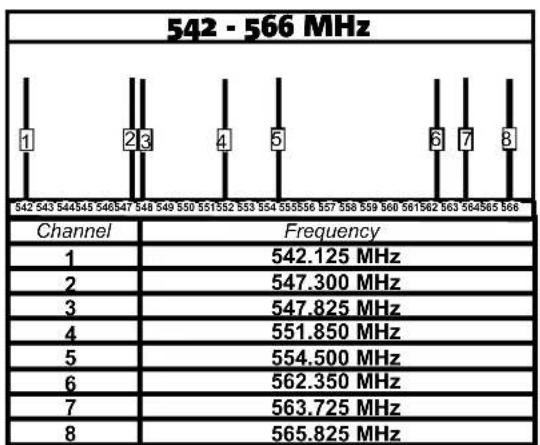
Based on the availability and on the Country of use, the system is sold in one of the following three frequency bands:
- 542-566 MHz
- 638-662 MHz
• 863-865 MHz
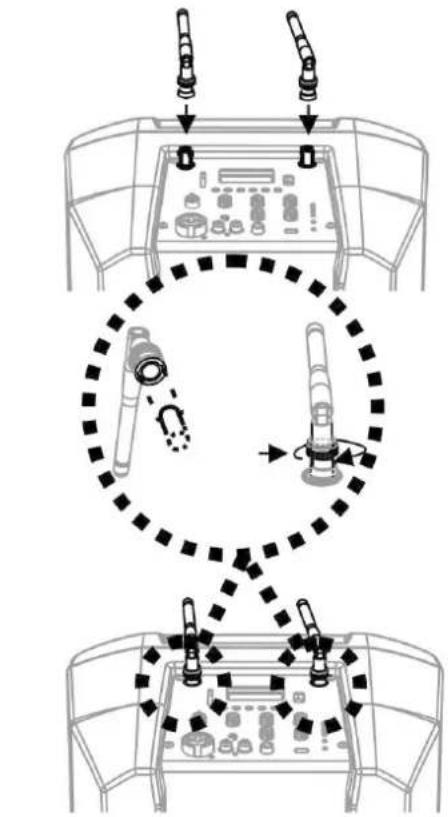
To enable the radio transmission/reception it is necessary to install the supplied antennae on the upper side of B-HYPE MOBILE, as shown in the figures on the side.
R-BHM
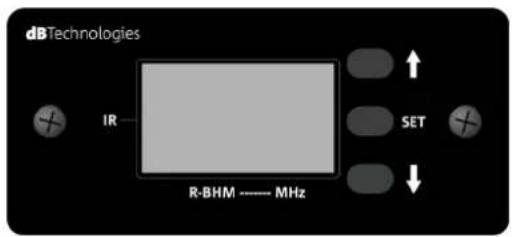
The R-BHM receiver is on the back of the system. It is equipped with a display and three buttons that allow the synchronisation with the radio microphone and provide real time information on the transmitter/receiver communication.
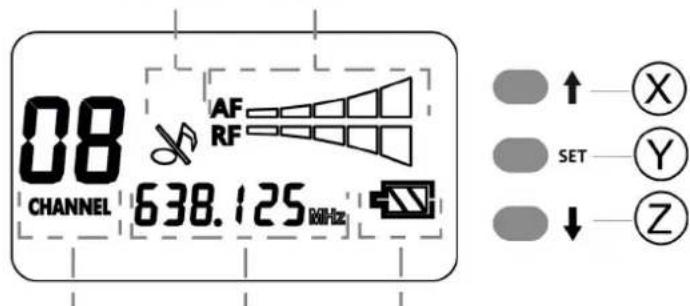
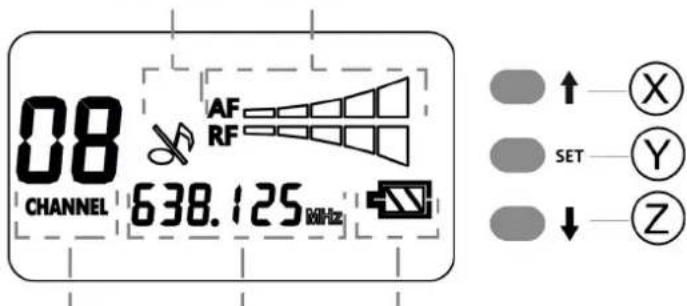
In particular, the display (see figure on the side) shows:
• CHANNEL (it shows the number of the channel being used among the ones available)
• FREQUENCY (frequency of the channel)
• BATTERY LEVEL (battery level of the transmitter)
- MIC MUTE (mute setting of the radio microphone)
• AF/RF (signal level of the radio microphone/squelch of the radio signal)
Buttons:
X (symbol ↑): increases a value / allows the synchronisation if pressed for a few seconds Y (symbol SET): allows accessing the AF and RF adjustment page in sequence to set their levels Z (symbol ↓): decreases a value
flowchart
graph TD
    A["Top View"] --> B["Top Mount"]
    B --> C["Top Mount"]
    C --> D["Bottom View"]
    D --> E["Bottom Mount"]
    style A fill:#f9f,stroke:#333
    style B fill:#ccf,stroke:#333
    style C fill:#cfc,stroke:#333
    style D fill:#fcc,stroke:#333
text_image
dBTechnologies IR R-BHM ---- MHz SET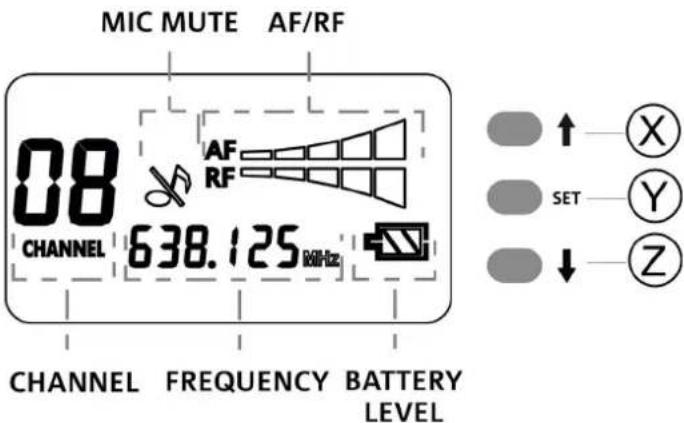
text_image
MIC MUTE AF/RF 08 AF RF CHANNEL 638.125 MHz CHANNEL FREQUENCY BATTERY LEVEL SET X Y ZAF = AUDIO VOLUME INTENSITY RF = WIRELESS RECEPTION INTENSITY
HT-BHM
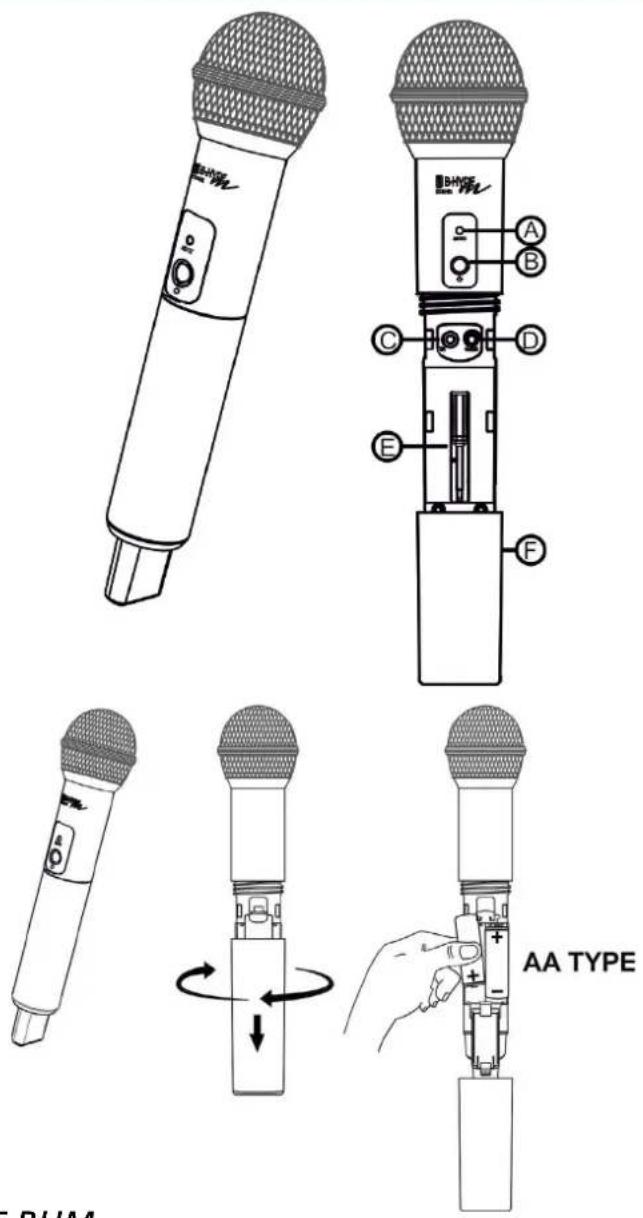
The handheld transmitter (handheld radio microphone) is equipped with:
A - Status LEDs
B - ON/OFF/MUTE BUTTON (depending on whether it is pressed for a few seconds or instantaneously, it turns on/mutes/turns off the microphone)
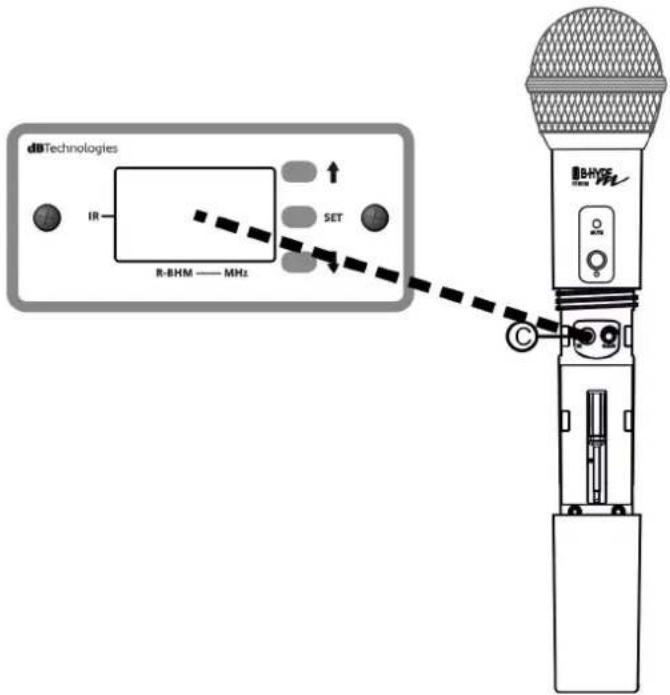
C - IR lens useful during synchronisation of the device with the R-BHM receiver
D - Rotary switch for gain adjustment
E - Micro screwdriver for gain adjustment [D]
F - Removable cover of the battery housing (placed on the back)

WARNING!
On HT-BHM, the use of RECHARGEABLE AA batteries of the Ni-MH type (not supplied) is required. The use of Lithium, Alkaline, Ni-Cd or other types of batteries is not allowed.
Batteries are inserted by unscrewing the cover [F] and inserting the batteries of the type indicated above, following the correct polarity.
If the radio microphone is not used for a long period, remove the batteries from the device and store them in a suitable place.
To use HT-BHM with B-HYPE MOBILE see the synchronisation procedure in the relevant paragraph.
text_image
Technical diagram showing the internal structure and assembly of an AA type audio recording device, with labeled parts A through F.HOUSING WITH BATTERY CHARGER FOR HT-BHM
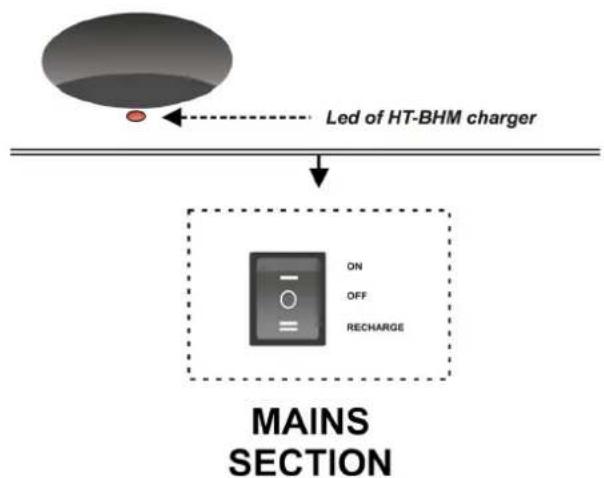
With B-HYPE MOBILE in ON or RECHARGE mode, if HT-BHM is correctly inserted in the housing on the back, an appropriate circuit will recharge the batteries (Ni-MH rechargeable batteries).
The LED of the housing can be:
• RED - the battery is charging
- GREEN - the battery has completed its recharge cycle
- FLASHING RED - the protection circuit has identified an incorrect battery type in the radio microphone. Replace them immediately with the appropriate type (Ni-MH)
text_image
Led of HT-BHM charger ON OFF RECHARGE MAINS SECTIONB-HYPE MOBILE
Code 420120272 REV. 1.2
BT-BHM
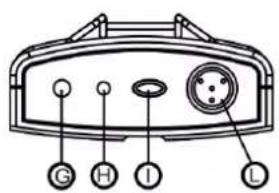
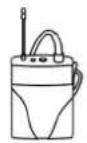
The bodypack transmitter is equipped with:
G - Antenna
H - Status LEDs
I - ON/OFF/MUTE BUTTON (depending on whether it is pressed for a few seconds or instantaneously, it turns on/mutes/turns off the microphone)
M - Micro screwdriver for gain adjustment [N]
N - Rotary switch for gain adjustment
O - IR lens useful during synchronisation of the device with the R-BHM receiver
P - Removable cover of the battery housing
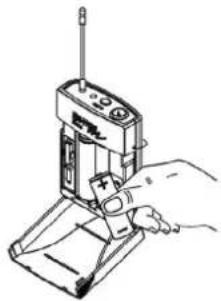
On BT-BHM it is possible to use any type of batteries. Its use is not bound to the battery charger of B-HYPE MOBILE.
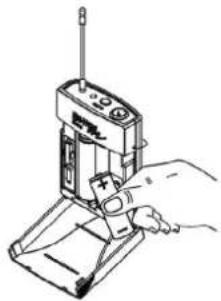
Batteries are inserted by opening the cover [P] and inserting the batteries following the correct polarity. If the radio microphone is not used for a long period, remove the batteries from the device and store them in a suitable place.
To use BT-BHM with B-HYPE MOBILE see the synchronisation procedure in the relevant paragraph.
text_image
Diagram of a device rear panel with labeled buttons and indicators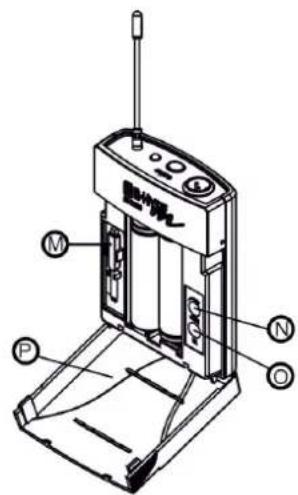
text_image
Technical diagram of a device with labeled parts including motor, battery, and control panel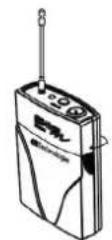
natural_image
Line drawing of a hand operating a handheld device with a screwdriver (no text or symbols)AA TYPE
SYNCHRONISATION OF THE TRANSMITTER
To play a file from the SD card / USB device:
- Turn B-HYPE MOBILE on after connecting the power supply cable (switch in ON position). Check that the MASTER volume is on a medium/low level at this stage.
- Open the battery compartments of the transmitters as shown in the previous sections.
- Shortly press the button ON/OFF/MUTE on the transmitter.
- Select a channel with the keys X (symbol) and Z (symbol) on the R-BHM receiver.
- Hold key X (symbol) pressed for a few seconds on receiver R-BHM: the CHANNEL values on the display will start flashing.
- Position the IR lens of the transmitter in front of the display of R-BHM. The correct distance is maximum of approx. 15-30 cm.
- Synchronisation will be carried out in a few seconds and the CHANNEL values on the display will stop flashing.
- Adjust the gain on the transmitter using the relevant rotary switch and the supplied micro screwdriver.
- Place the cover of the battery back on the transmitter.
text_image
dBTechnologies IR R-BHM —— MHz SET BHICE MHz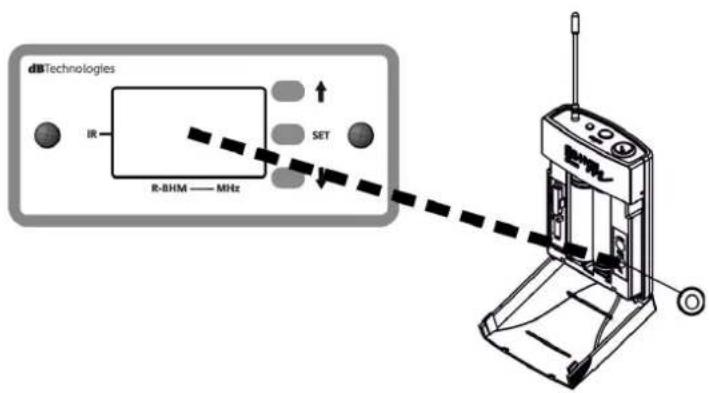
text_image
dbTechnologies IR R-BHM —— MHz SET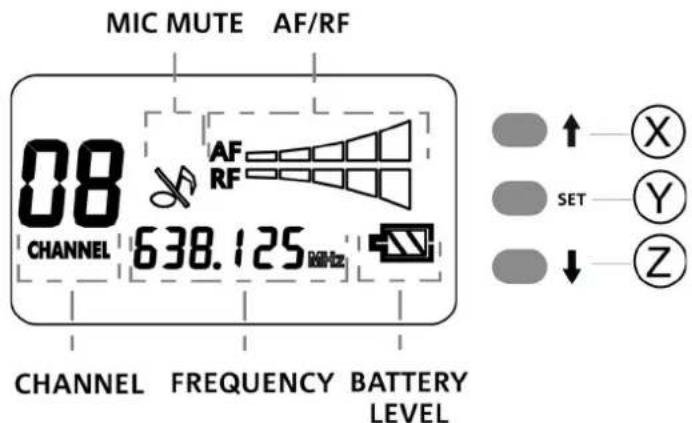
text_image
MIC MUTE AF/RF 08 AF RF CHANNEL 638.125 MHz CHANNEL FREQUENCY BATTERY LEVEL SET X Y ZB-HYPE MOBILE
Code 420120272 REV. 1.2
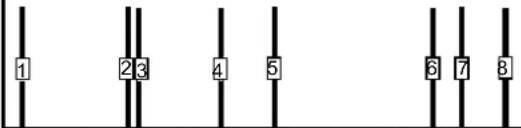
SUMMARY TABLE OF CHANNELS AND FREQUENCIES
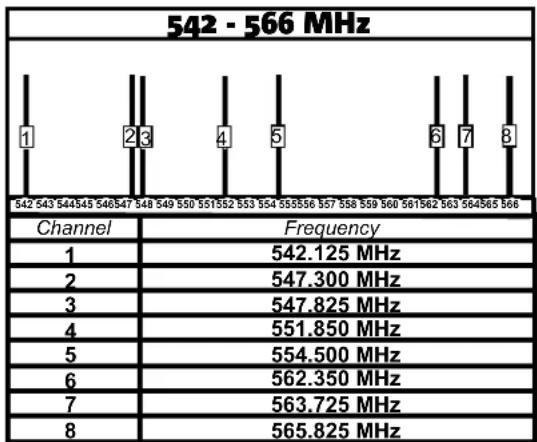
other
542 - 566 MHz | Channel | Frequency | |---|---| | 1 | 542.125 MHz | | 2 | 547.300 MHz | | 3 | 547.825 MHz | | 4 | 551.850 MHz | | 5 | 554.500 MHz | | 6 | 562.350 MHz | | 7 | 563.725 MHz | | 8 | 565.825 MHz |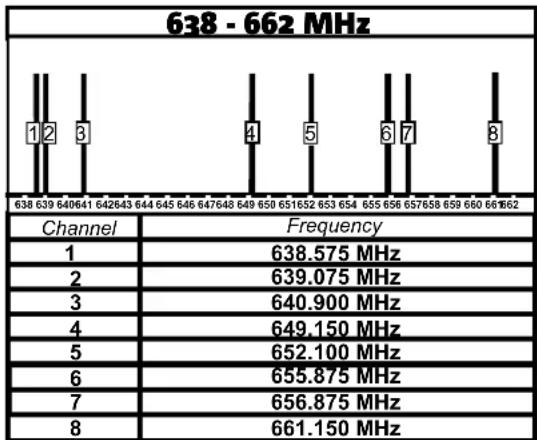
bar
638 - 662 MHz | Channel | Frequency | |---|---| | 1 | 638.575 MHz | | 2 | 639.075 MHz | | 3 | 640.900 MHz | | 4 | 649.150 MHz | | 5 | 652.100 MHz | | 6 | 655.875 MHz | | 7 | 656.875 MHz | | 8 | 661.150 MHz |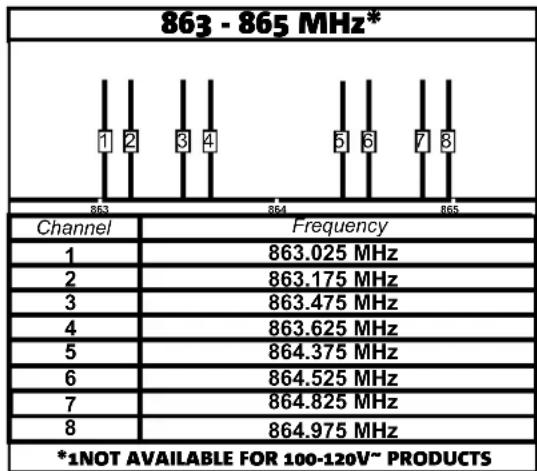
bar
863 - 865 MHz* | Channel | Frequency | |---|---| | 1 | 863.025 MHz | | 2 | 863.175 MHz | | 3 | 863.475 MHz | | 4 | 863.625 MHz | | 5 | 864.375 MHz | | 6 | 864.525 MHz | | 7 | 864.825 MHz | | 8 | 864.975 MHz *1NOT AVAILABLE FOR 100-120V~ PRODUCTSIn particular cases and when necessary, it is possible to reconfigure the transmitter-receiver frequency band.
To do this you need to purchase a new transmitter and a new receiver, both operating in the new band.
The 3 bands shown in the previous page could not be all available, depending on the Country of sale (refer to your authorised dealer).

WARNING!
The operation must be carried out with product turned off and disconnected from the power mains. It must be carried out by qualified personnel in order to prevent any electrostatic discharge (ESD) that could damage the product.
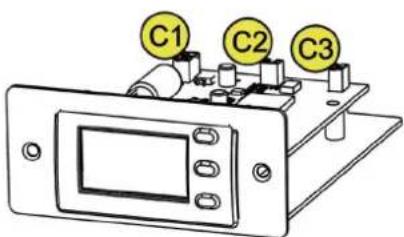
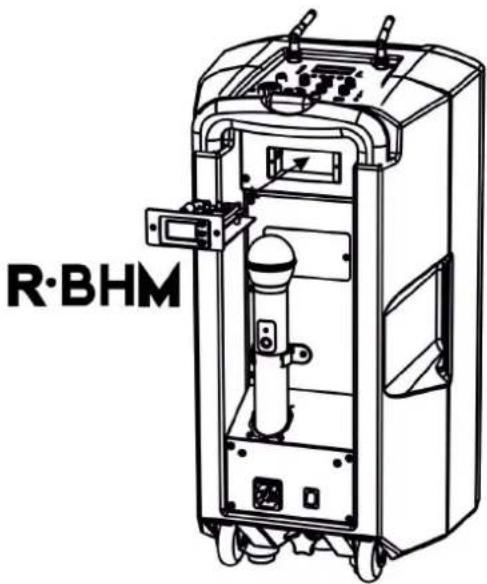
The procedure requires to replace the receiver installed on B-HYPE MOBILE and then proceed with the synchronisation with a new radio microphone that works in the new selected band.
To replace the R-BHM receiver:
- With device off, disconnect any audio and power supply wiring.
- Loosen the 2 screws of R-BHM
- Partially remove the receiver and disconnect the three mini-connectors shown:
C1 - 3-pin connector (power supply-audio)
C2 - 2-pin connector (antenna A)
C3 - 2-pin connector (antenna B)
- Bring the new R-BHM operating in the new band closer
- Connect C1, C2, C3
• Completely insert R-BHM - Tighten the 2 screws of R-BHM
For full functionality, synchronise the transmitter/receiver as shown in the relevant paragraph.
text_image
R·BHM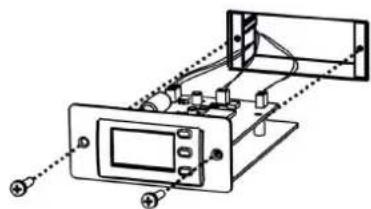
natural_image
Technical line drawing of a mechanical assembly with no visible text or symbols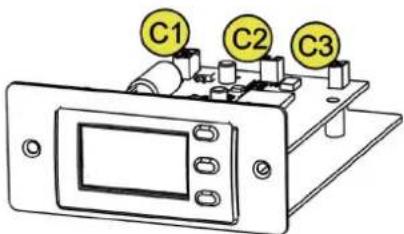
text_image
C1 C2 C3B-HYPE MOBILE
Code 420120272 REV. 1.2
3. TROUBLESHOOTING
The loudspeaker will not turn on:
- Check that power supply is present upstream of the installation.
- Ensure that the power supply cable with VDE connector is properly plugged in.
- Check that the turning on switch is set to "ON".
- If in “mobile” mode use, check that the battery is charged. If this is not the case, charge it by connecting B-HYPE MOBILE to the power mains and selecting “RECHARGE” mode.
The loudspeaker turns on but does not play an audio track:
- Check that the input connections of the audio signal, as described on page 9, are carried out correctly. If present, check the visibility and pairing of Bluetooth ^® devices.
- Check the cables for damage.
- Ensure that the mixer or audio source is on and an output signal is present.
- Check that the input levels are appropriate.
The bodypack or handheld radio microphone does not work
- Check the battery status of the radio microphone (shown on the receiver display). Replace the batteries, if necessary.
- Check the levels in the SECTION FOR CONNECTIONS AND CONTROL
- Check and act on the receiver AF/RF levels.
- Check the gain on the radio microphone.
- If necessary, carry out a new synchronisation procedure on a different channel. Refer to the relevant section.
A noise or interference on the background can be heard when using the radio microphone:
- Adjust the gain of the radio microphone
- Act on the RF squelch parameter in the receiver
- If necessary, change the transmission/reception channel (performing a new synchronisation on this channel, if necessary)
4. ACCESSORIES/SPARE PARTS
Accessories/spare parts available are:
• R-BHM Receiver module*
• BT-BHM Bodypack transmitter*
- HT-BHM Handheld transmitter (handheld radio microphone)*
• HM-BHM Black headset
• HM-BHM TAN Beige headset
* available in 3 frequency bands, according to the Country of sale:
- 542-566 MHz
• 638-662 MHz
• 863-865 MHz
Check new accessories/spare parts availability on the website www.dbtechnologies.com
B-HYPE MOBILE
Code 420120272 REV. 1.2
5. SPECIFICATIONS
GENERAL
| Type: Mobile 2-way loudspeaker with | battery and radio microphone |
ACOUSTICAL SPECIFICATIONS
| Frequency response [-10dB]: 62 - 20000 | Hz |
| Frequency response [-6dB]: 66 - 18100 | Hz |
| Max SPL: 123 dB | |
| HF voice coil: 1” | |
| HF compression driver (output): 1” | |
| LF: 10” | |
| LF Voice coil: 1.5” | |
| Crossover frequency (24 dB/oct): | 2400 Hz |
| Coverage (HxV): 90° x 45° |
INTERNAL BATTERY
| Type: Li - Ion (25.9 V - 2200 mAh) | |
| Recharge time: approx. 4 hours | |
| Duration in medium conditions of usage: | up to 4 hours |
AMPLIFIER
| Type: AMP SMPS | |
| Amplification class: Class D |
B-HYPE MOBILE
Code 420120272 REV. 1.2
| RMS amplifier power: 95 W | |
| Peak power: 190 W |
USER INTERFACE
| Absorption at 1/8th of power in medium use conditions (*): | 0.35 A (230 V) - 0.57 A (115 V) |
| Absorption at 1/3rd of power in maximum use conditions (**): | 0.65 A (230 V) - 1.3 A (115 V) |
| Absorption with speaker on in no-signal condition (idle): | 16 W |
| * NOTE FOR INSTALLER: Values refer to 1/8th of power, under average operating conditions (music programme with occasional or no clipping). For any type of configuration we recommend to consider them as minimum sizing values. | |
| ** NOTE FOR INSTALLER: Values refer to 1/3rd of power, under heavy operating conditions (music programme with frequent clipping and limiter activation). In case of professional installations and tours we recommend sizing according to these values. | |
B-HYPE MOBILE
Code 420120272 REV. 1.2
DIMENSIONS
| Material: Plastic cabinet | |
| Grille: Metal | |
| Width: 300 mm | |
| Height: 568 mm | |
| Depth: 301 mm | |
| Weight: 12,5 kg |
Product features, specifications and appearance are subject to changes without prior notice. dBTechologies reserves the right to make changes or improvements in design or manufacture without any obligation to incorporate such changes or improvements in products manufactured before their introduction.
text_image
Diagram showing labeled components of a device with numbered parts and directional arrows indicating assembly or positioning.text_image
(REPLACE FUSE WITH SAME RATINGS) (REEMPLACER LE FUSIBLE AVEC LE MÈME TYPE)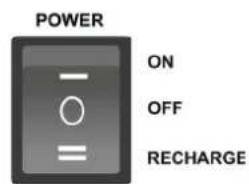
text_image
POWER ON OFF RECHARGEtext_image
Diagram showing a music player interface with icons for Bluetooth, NOR, and playback controlstext_image
dBTechnologies IR R-BHM ---- MHz SETMIC MUTE AF/RF
text_image
08 CHANNEL 638.125 MHz AF RF SET X Y ZCHANNEL FREQUENCY BATTERY LEVEL
AF = AUDIO VOLUME INTENSITY
RF = WIRELESS RECEPTION INTENSITY
B- HYPE MOBILE
text_image
A B C D E F AA TYPE HT RHMAUFNAHME MIT BATTERIELADEGERÄT FÜR HT-BHM
text_image
Led of HT-BHM charger ON OFF RECHARGE MAINS SECTIONB-HYPE MOBILE
text_image
Technical diagram of a device with labeled components, including front panel and internal device layout.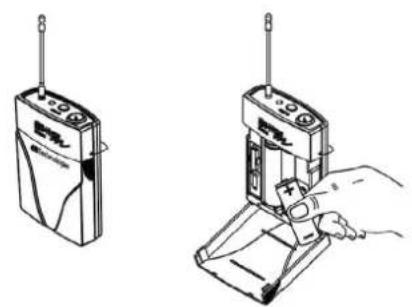
text_image
Technical illustration showing two different types of electronic devices with Chinese labels, including a radio device and a handheld device.AA TYPE
B- HYPE MOBILE
text_image
dbTechnologies IR R-BHM —— MHz SET BAYE C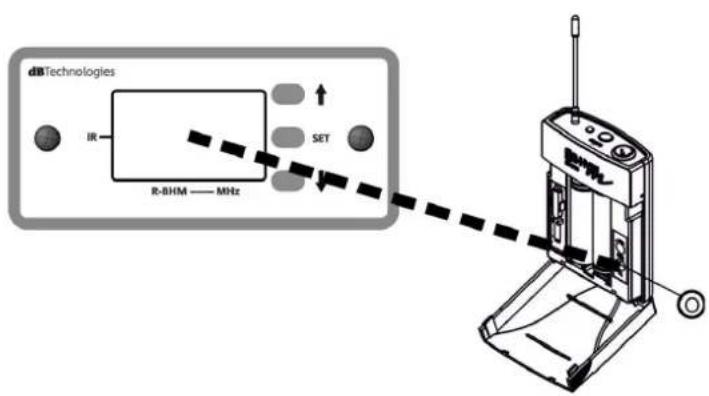
text_image
dbTechnologies IR R-BHM —— MHz SET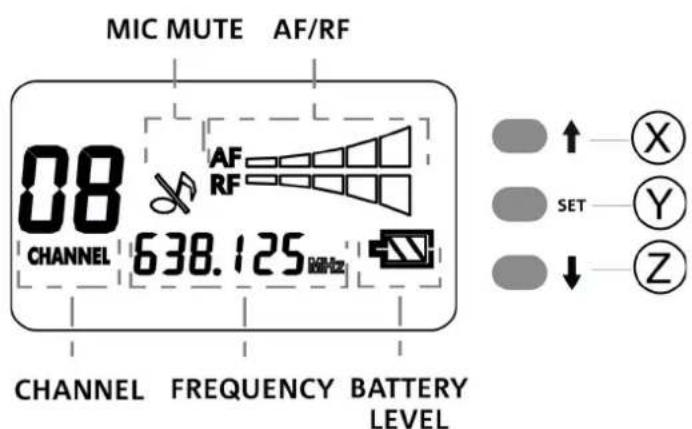
text_image
MIC MUTE AF/RF 08 AF RF CHANNEL 638.125 MHz CHANNEL FREQUENCY BATTERY LEVEL SET X Y ZZUSAMMENFASSENDE TABELLE DER KANÄLE UND FREQUENZEN
bar
542 - 566 MHz | Channel | Frequency | |---|---| | 1 | 542.125 MHz | | 2 | 547.300 MHz | | 3 | 547.825 MHz | | 4 | 551.850 MHz | | 5 | 554.500 MHz | | 6 | 562.350 MHz | | 7 | 563.725 MHz | | 8 | 565.825 MHz |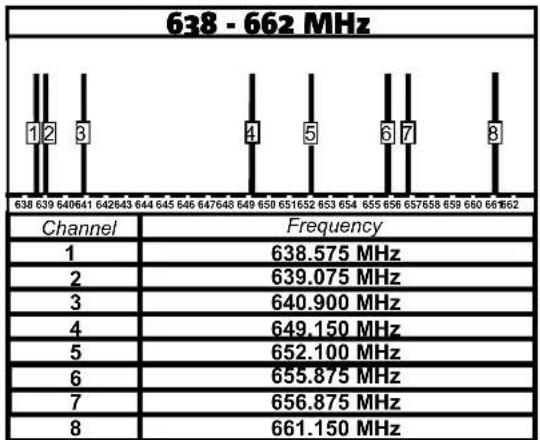
bar
638 - 662 MHz | Channel | Frequency | |---|---| | 1 | 638.575 MHz | | 2 | 639.075 MHz | | 3 | 640.900 MHz | | 4 | 649.150 MHz | | 5 | 652.100 MHz | | 6 | 655.875 MHz | | 7 | 656.875 MHz | | 8 | 661.150 MHz |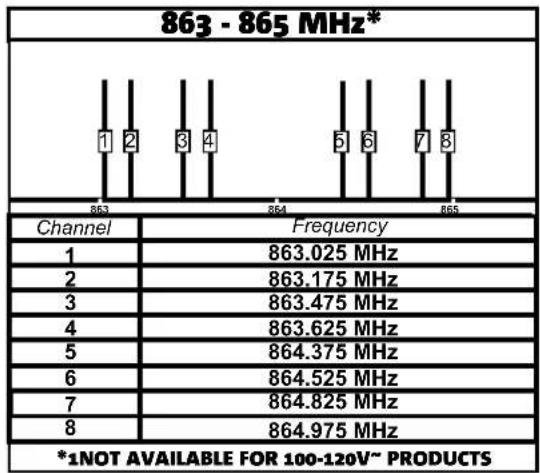
bar
863 - 865 MHz* | Channel | Frequency | |---|---| | 1 | 863.025 MHz | | 2 | 863.175 MHz | | 3 | 863.475 MHz | | 4 | 863.625 MHz | | 5 | 864.375 MHz | | 6 | 864.525 MHz | | 7 | 864.825 MHz | | 8 | 864.975 MHz *1NOT AVAILABLE FOR 100-120V~ PRODUCTSB- HYPE MOBILE
natural_image
Technical line drawing of a mechanical assembly with no visible text or symbols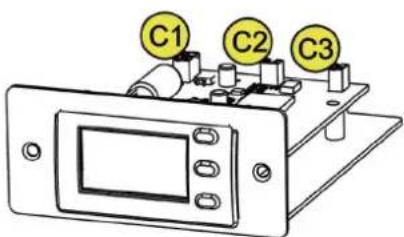
text_image
C1 C2 C33. PROBLEMABHILFE
DONNÉES ACOUSTIQUES 71
BATTERIE INTERNE 71
AMPLIFICATEUR 71
INTERFACE UTILISATEUR 72
ENTRÉES ET SORTIES.... 72
SECTION RF 72
SPÉCIFICATIONS D'ALIMENTATION (ABSORPTION / INSTALLATION) 72
DIMENSIONS 73
1. INFORMATIONS GÉNÉRALES ET SECTIONS PRINCIPALES BIENVENUS !
natural_image
Line drawing of a cylindrical device with mounting holes and a top-mounted control panel (no text or symbols)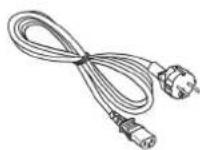
B-HYPE MOBILE CÂBLE D'
ALIMENTATION
ANTENNES DOCUMENTATION
COMPOSANTS
EN COMMUN
AUX 2 BUNDLES
BT·BHM
HM·BHM
COMPOSANTS
FOURNIS SELON
LE BUNDLE /
ACCESSOIRES VENDUS
AUSSI SÉPARÉMENT
text_image
Diagram showing labeled components of a device with numbered parts and directional arrows indicating assembly or positioning.APERÇU DES COMPOSANTS FOURNIS
text_image
B-HYDF Bluetooth MP3 CONTROL DIGITAL DISPLAY USB Audio Input Balanced Input Stereo Input Line Output CPU/AT Priority 5 6 7 8 9 10 SND Audio Input AMP Control Digital Display Wireless Voltage Max Max Max Max Max Max Max Max Max Max Max Max Max Max Max Max Max Max Max Max Max Max Max Max Max Max Max Max Max Max Max Max Max Max Max Max Max Max Max Max Max Max Max Max Max Max Max Max Max Max BATTERY HOLDER BATTERY HOLDER BATTERY HOLDER BATTERY HOLDER BATTERY HOLDER BATTERY HOLDER BATTERY HOLDER BATTERY HOLDER BATTERY HOLDER BATTERY HOLDER BATTERY HOLDER BATTERY HOLDER BATTERY HOLDER BATTERY HOLDER BATTERY HOLDER BATTERY HOLDER BATTERY HOLDER BATTERY HOLDER BATTERY HOLDER BATTERY HOLDER BATTERY HOLDER BATTERY HOLDER BATTERY HOLDER BATTERY HOLDER BATTERY HOLDER BATTERYHOLDER MLC: BATTERYHOLDER MLC: BATTERYHOLDER MLC: BATTERYHOLDER MLC: BATTERYHOLDER MLC: BATTERYHOLDER MLC: BATTERYHOLDER MLC: BATTERYHOLDER MLC: BATTERYHOLDER MLC: BATTERYHOLDER MLC: BATTERYHOLDER MLC: BATTERYHOLDER MLC: BATTERYHOLDER MLC: BATTERYHOLDER MLC: BATTERYHOLDER MLC: BATTERYHOLDER MLC: BATTERYHOLDER MLC: BATTERYHOLDER SMC: BATTERYHOLDER SMC: BATTERYHOLDER SMC: BATTERYHOLDER SMC: BATTERYHOLDER SMC: BATTERYHOLDER SMC: BATTERYHOLDER SMC: BATTERYHOLDER SMC: BATTERYHOLDER SMC: BATTERYHOLDER SMC: BATTERYHOLDER SMC: BATTERYHOLDER SMC: BATTERYHOLDER SMC: BATTERYHOLDER SMC: BATTERYHOLDER SMC: BATTERYHOLDER SMC: BATTERYHOLDER SMC: BATTERYHOLD MLC: BATTERYHOLD MLC: BATTERYHOLD MLC: BATTERYHOLD MLC: BATTERYHOLD MLC: BATTERYHOLD MLC: BATTERYHOLD MLC: BATTERYHOLD MLC: BATTERYHOLD MLC: BATTERYHOLD MLC: BATTERYHOLD MLC: BATTERYHOLD MLC: BATTERYHOLD MLC: BATTERYHOLD MLC: BATTERYHOLD MLC: WIREM MLC: WIREM MLC: WIREM MLC: WIREM MLC: WIREM MLC: WIREM MLC: WIREM MLC: WIREM MLC: WIREM MLC: WIREM MLC: WIREM MLC: WIREM MLC: WIREM MLC: WIREM MLC: WIREM MLC: WIREM MLC: WIREM MLC: FUSE: 10000000000000000000000000000000000000000000000000000000000000000000000000000000000000000000000000000SECTION D'ALIMENTATION
text_image
[REPLACE FUSE WITH SAME RATINGS] EMPLACER LE FUSIBLE AVEC LE MÈME TYPE]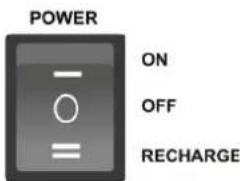
text_image
POWER ON OFF RECHARGESECTION DES CONNEXIONS, DE CONTRÔLE ET VÉRIFICATION DE LA BATTERIE
text_image
Diagram showing a music player interface with icons for Bluetooth, NOR, and playback controlsCode 420120272 RÉV. 1.2
text_image
dBTechnologies IR R-BHM ---- MHz SET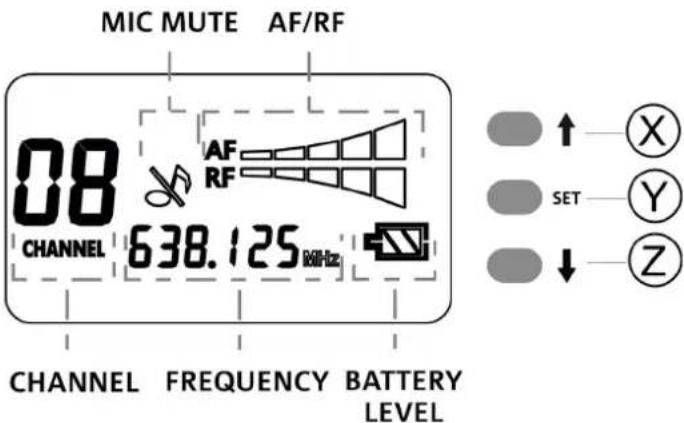
text_image
MIC MUTE AF/RF 08 AF RF CHANNEL 638.125 MHz CHANNEL FREQUENCY BATTERY LEVEL SET X Y ZAF = AUDIO VOLUME INTENSITY RF = WIRELESS RECEPTION INTENSITY
HT-BHM
text_image
Technical diagram showing the internal structure and assembly of an AA type audio recording device, with labeled parts A through F.COMPARTIMENT AVEC CHARGEUR DE BATTERIE POUR HT-BHM
text_image
Led of HT-BHM charger ON OFF RECHARGE MAINS SECTIONB- HYPE MOBILE
Code 420120272 RÉV. 1.2
BT-BHM
text_image
Technical diagram of a device with labeled components, including front panel and internal casing with ports G, H, I, L, M, N, P.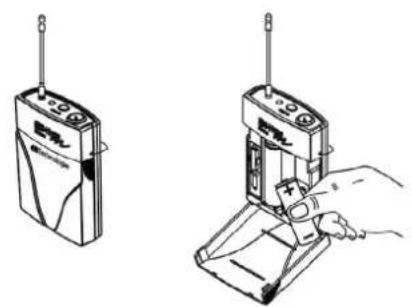
text_image
Technical line drawing showing two different types of electronic devices with Chinese labels, including a radio and a handheld device.AA TYPE
SYNCHRONISATION DE L'ÉMETTEUR
text_image
dbTechnologies IR R-BHM —— MHz SET BAYE C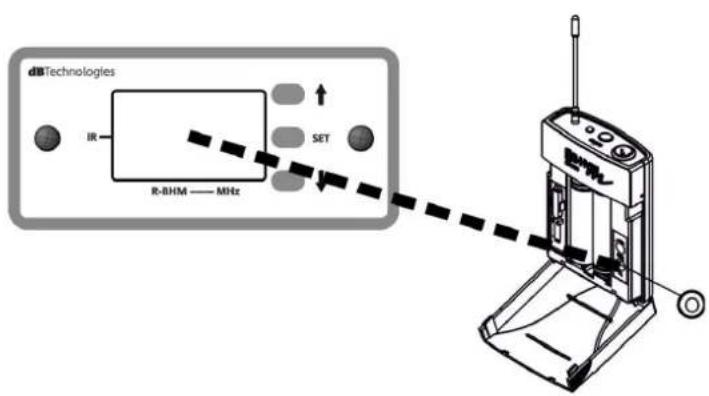
text_image
dbTechnologies IR R-BHM —— MHz SET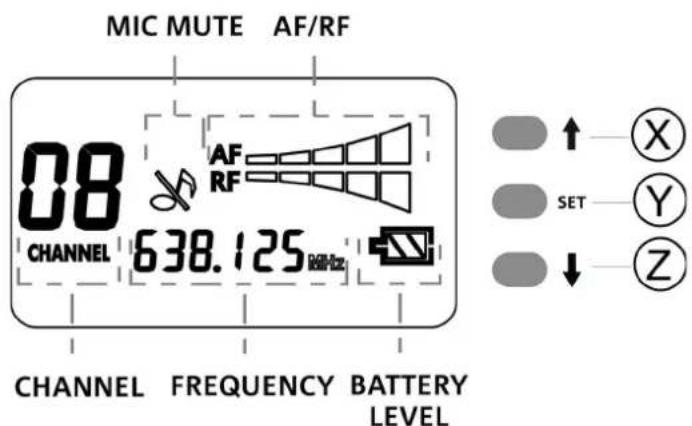
text_image
MIC MUTE AF/RF 08 AF RF CHANNEL 638.125 MHz CHANNEL FREQUENCY BATTERY LEVEL SET X Y ZB- HYPE MOBILE
Code 420120272 RÉV. 1.2
TABLEAU RÉCAPITULATIF DES CANAUX ET DES FRÉQUENCES
| 542 - 566 MHz | |
 | |
| Channel | Frequency |
| 1 | 542.125 MHz |
| 2 | 547.300 MHz |
| 3 | 547.825 MHz |
| 4 | 551.850 MHz |
| 5 | 554.500 MHz |
| 6 | 562.350 MHz |
| 7 | 563.725 MHz |
| 8 | 565.825 MHz |
text_image
638 - 662 MHz 1 2 3 4 5 6 7 8| Channel | Frequency |
| 1 | 638.575 MHz |
| 2 | 639.075 MHz |
| 3 | 640.900 MHz |
| 4 | 649.150 MHz |
| 5 | 652.100 MHz |
| 6 | 655.875 MHz |
| 7 | 656.875 MHz |
| 8 | 661.150 MHz |
 |
CHANGEMENT DE LA BANDE DES FRÉQUENCES
natural_image
Pure electrical circuit lines without any symbols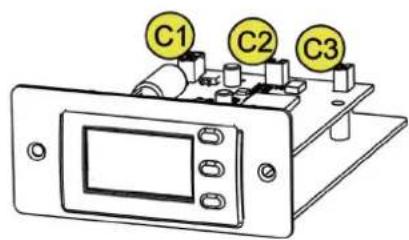
text_image
C1 C2 C3Code 420120272 RÉV. 1.2
3. DÉPANNAGE
natural_image
Medical device with earphones and tubing, labeled 'HM·BHM' below (no other text or symbols)PARTE QUE DEPENDE DEL BUNDLE / ACCESORIOS VENDIDOS POR SEPARADO
text_image
Diagram showing labeled components of a device with numbered parts and directional arrows indicating assembly or positioning.text_image
(REPLACE FUSE WITH SAME RATINGS) (REPLACER LE FUSIBLE AVEC LE MÈME TYPE)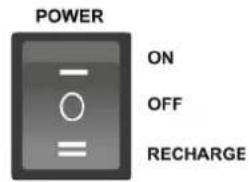
text_image
POWER ON OFF RECHARGEtext_image
dBTechnologies IR SET R-BHM —— MHz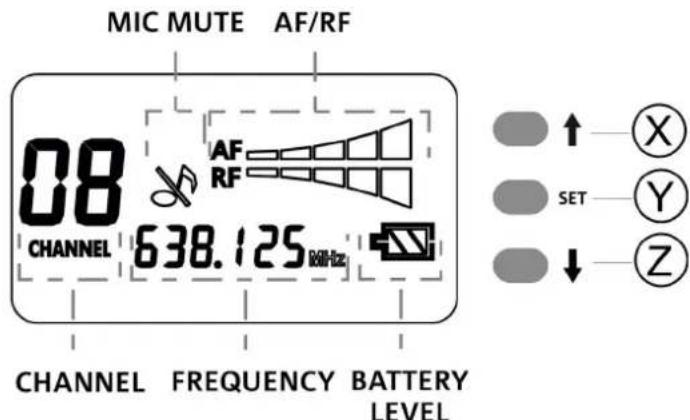
text_image
MIC MUTE AF/RF 08 AF RF CHANNEL 638.125 MHz CHANNEL FREQUENCY BATTERY LEVEL SET X Y ZAF = AUDIO VOLUME INTENSITY RF = WIRELESS RECEPTION INTENSITY
B-HYPE MOBILE
Cód. 420120272 REV. 1.2
HT-BHM
text_image
Led of HT-BHM charger ON OFF RECHARGE MAINS SECTIONB-HYPE MOBILE
Cód. 420120272 REV. 1.2
BT-BHM
text_image
Technical diagram of a device with labeled parts including front panel, internal components, and base tray.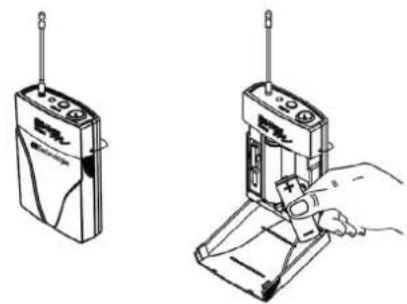
natural_image
Illustration of two different electronic devices with wires and a hand inserting a plug into a base (no text or symbols)AA TYPE
B-HYPE MOBILE
Cód. 420120272 REV. 1.2
text_image
dbTechnologies IR R-BHM —— MHz SET BHYCE WV AC C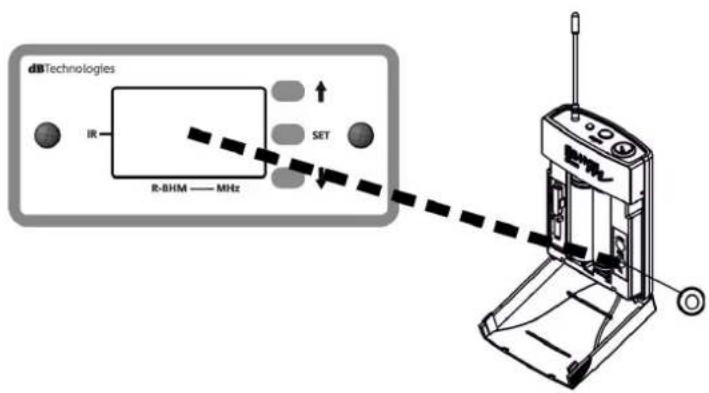
text_image
dbTechnologies IR R-BHM — MHz SET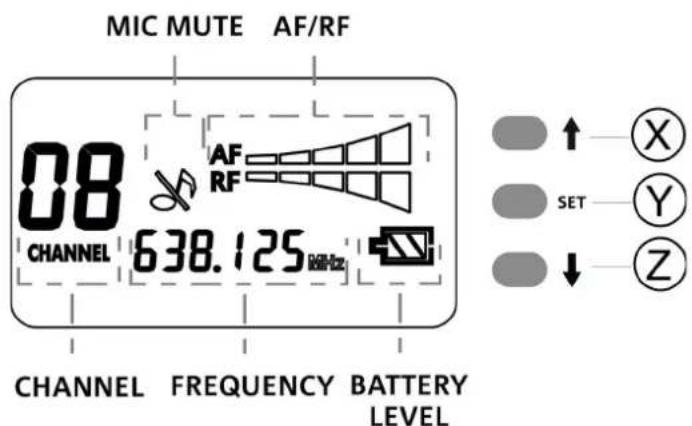
text_image
MIC MUTE AF/RF 08 AF RF CHANNEL 638.125 MHz CHANNEL FREQUENCY BATTERY LEVEL SET X Y Znatural_image
Pure mechanical diagram showing a device with control panel and alignment lines (no text or symbols)