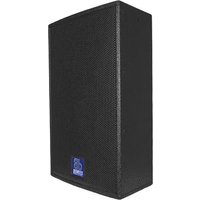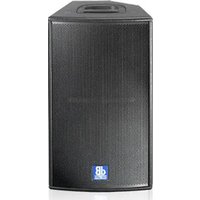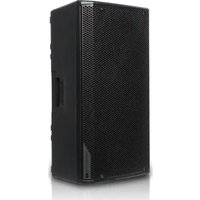
Opera Unica 12 - Speaker DB Technologies - Free user manual and instructions
Find the device manual for free Opera Unica 12 DB Technologies in PDF.


User questions about Opera Unica 12 DB Technologies
0 question about this device. Answer the ones you know or ask your own.
Ask a new question about this device
Download the instructions for your Speaker in PDF format for free! Find your manual Opera Unica 12 - DB Technologies and take your electronic device back in hand. On this page are published all the documents necessary for the use of your device. Opera Unica 12 by DB Technologies.
USER MANUAL Opera Unica 12 DB Technologies
natural_image
Line drawing of a rectangular electronic device with mounting holes and a central slot (no text or symbols)12
natural_image
Line drawing of a rectangular electronic device with mounting holes and a side panel (no text or symbols)15
USER MANUAL - Section 1
The warnings in this manual must be observed together with the "User Manual - Section 2".
According to the standards EN 55103 this equipment is designed and suitable to operate in E3 (or lower E2, E1) Electromagnetic environments.
FCC CLASS B STATEMENT ACCORDING TO TITLE 47, CHAPTER I, SUBCHAPTER A, PART 15, SUBPART B
This equipment has been tested and found to comply with the limits for a Class B digital device, pursuant to part 15 of the FCC Rules. These limits are designed to provide reasonable protection against harmful interference in a residential installation. This equipment generates, uses and can radiate radio frequency energy and, if not installed and used in accordance with the instructions, may cause harmful interference to radio communications. However, there is no guarantee that interference will not occur in a particular installation. If this equipment does cause harmful interference to radio or television reception, which can be determined by turning the equipment off and on, the user is encouraged to try to correct the interference by one or more of the following measures:
—Reorient or relocate the receiving antenna.
—Increase the separation between the equipment and receiver.
—Connect the equipment into an outlet on a circuit different from that to which the receiver is connected.
—Consult the dealer or an experienced radio/TV technician for help.
Changes or modifications not expressly approved by the party responsible for compliance could void the user's authority to operate the equipment.
WARNING
Make sure that the loudspeaker is securely installed in a stable position to avoid any injuries or damages to persons or properties. For safety reasons di not place one loudspeaker on top of another without proper fastening systems. Before hanging the loudspeaker check all the components for damages, deformations, missing or damaged parts that may compromise safety during installation. If you use the loudspeakers outdoor avoid spots exposed to bad weather conditions.
Contact dBTechnologies for accessories to be used with the speakers. dBTechnologies will not accept any responsibility for damages caused by inappropriate accessories or additional devices.
OPERA UNICA 12 - OPERA UNICA 15 Cod. 420120269 REV. 1.0
IMPORTANT SAFETY INSTRUCTIONS:
- Read these instructions
- Keep these instructions.
- Heed all warnings.
- Follow all instructions.
- Do not use this apparatus near water.
-
Clean only with dry cloth.
-
Do not block any ventilation openings. Install in accordance with the manufacturer's instructions.
-
Do not install near any heat sources such as radiators, heat registers, stoves, or other apparatus (including amplifiers) that produce heat.
-
Do not defeat the safety purpose of the polarized or grounding-type plug. A polarized plug has two blades with one wider than the other. A grounding type plug has two blades and a third grounding prong. The wide blade or the third prong are provided for your safety. If the provided plug does not fit into your outlet, consult an electrician for replacement of the obsolete outlet.
-
Protect the power cord from being walked on or pinched particularly at plugs, convenience receptacles, and the point where they exit from the apparatus.
-
Only use attachments /accessories specified by the manufacturer.

- Use only with the cart, stand tripod, bracket, or table specified by the manufacturer, or sold with the apparatus. When a cart is used, use caution, when moving the cart/apparatus combination to avoid injury from tip-over.
- Unplug this apparatus during lightning storms or when unused for long periods of time.
- Refer all servicing to qualified service personnel. Servicing is required when the apparatus has been damaged in any way, such as power-supply cord or plug is damaged, liquid has been spilled or objects have fallen into the apparatus has been exposed to rain or moisture, does not operate normally, or has been dropped.
ADDITIONAL SAFETY INSTRUCTIONS:
- No naked flame sources, such as lighted candles, should be placed on the apparatus
- Do not use the apparatus in tropical climates
OPERA UNICA 12 - OPERA UNICA 15 Cod. 420120269 REV. 1.0
ITALIANO
ENGLISH
DEUTSCH
FRANÇAIS
ESPAÑOL
OPERA UNICA 12 - OPERA UNICA 15 Cod. 420120269 REV. 1.0
INDICE
2. PRIMA ACCENSIONE.... 10
INGRESSI E USCITE 18
text_image
dBTechnologies DINSTRUMENTS Control Control Control Control Control Control Control Control Control Control Control Control Control Control Control Control Control Control Control Control Control Control Control Control Control Control Control Control Control Control Control Control Control Control Control Control Control Control Control Control Control Control Control Control Control Control Control Control Control Control Power Supply Control Power Supply Control Power Supply Control Power Supply Control Power Supply Control Power Supply Control Power Supply Control Power Supply Control Power Supply Control Power Supply Control Power Supply Control Power Supply Control Power Supply Control Power Supply Control Power Supply Control Power Supply Control Power Supply Control Power Supply Control Power Supply Control Power Supply Control Power Supply Control Power Supply Control Power Supply Control Power Supply Control Power Supply Control Power Supply Condition
ATTENZIONE!
1. INGRESSO E RILANCIO AUDIO ("Balanced audio")
natural_image
Line drawing of a portable electronic device mounted on a tripod stand (no text or symbols)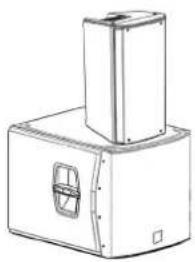
natural_image
Technical line drawing of a mechanical device with a top component and a side panel (no text or symbols)INSTALLAZIONE SU SUBWOOFER CON PALO
natural_image
Technical line drawing of a mechanical device with a vertical support and base housing (no text or symbols)OPERA UNICA 12 - OPERA UNICA 15 Cod. 420120269 REV. 1.0
UTILIZZO WEDGE (MONITORING)
natural_image
Simple line drawing of a rectangular box under a truss structure (no text or symbols)natural_image
Line drawing of a tripod-mounted scientific instrument with a stand (no text or symbols)SSB2 (COPPIA DI TREPPIEDI)
natural_image
Line drawing of a tripod-mounted scientific instrument with adjustable arms (no text or symbols)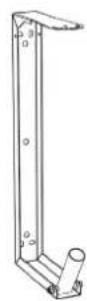
OP-WB (STAFFE A MURO)
natural_image
Simple line drawing of a rectangular frame with a folded top (no text or symbols)RC-M1 (RAIN COVER)

ATTENZIONE!
MECHANICAL AND ACOUSTICAL FEATURES....22
DIMENSIONS....22
SOUND COVERAGE 22
FEATURES OF THE AMPLIFIER AND CONTROL SECTIONS....23
INPUT, OUTPUT, RDNET AND CONTROL SECTION....24
POWER SUPPLY UNIT SECTION....25
2. FIRST POWER-UP 26
PACKAGE CONTENTS......26
USE 26
INPUT CONNECTIONS 26
POWER SUPPLY CONNECTION....27
CONNECTING THE OUTPUTS OF MULTIPLE SPEAKERS (audio daisy chain)....27
CONNECTING THE POWER SUPPLY OF MULTIPLE SPEAKERS 27
3. REMOTE CONTROL AND RDNET CONNECTION 28
4. USAGE EXAMPLES....29
INSTALLATION ON STAND 29
INSTALLATION ON SUBWOOFER 29
INSTALLATION ON SUBWOOFER WITH POLE 29
WEDGE (MONITORING) USE 30
WALL-MOUNTING WITH BRACKETS 30
INSTALLATION ON TRUSS WITH BRACKETS AND ALISCAFF COUPLERS 30
INSTALLATION WITH EYEBOLTS....30
5. ACCESSORIES....31
6. TROUBLESHOOTING 32
7. SPECIFICATIONS 33
GENERAL....33
ACOUSTICAL SPECIFICATIONS....33
AMPLIFIER....33
PROCESSOR....34
USER INTERFACE....34
INPUTS & OUTPUTS....34
POWER SUPPLY SPECIFICATIONS (ABSORPTION / INSTALLATION) 34
DIMENSIONS....35
1. GENERAL INFORMATION
WELCOME!
Thanks for purchasing a product designed and developed in Italy by dBTechnologies! This ergonomic and versatile active speaker is the result of a long experience in the sound reinforcement industry, making use of optimized sound, electronic and material research solutions.
PRODUCT OVERVIEW
The new active OPERA UNICA speakers are equipped with a 1" compression driver (coil: 1.75") for the high section. A 12" or 15" transducer (coil: 3") on OPERA UNICA 12 or OPERA UNICA 15, respectively, completes the effective acoustic performance levels on medium-low frequencies. These speakers main features include:
- an ergonomic, compact and versatile project that can be used in monitoring for small live contests
- acoustic asymmetry of the horn for high frequencies, specifically optimised for an effective use in different indoor and outdoor situations
- digital reliable and silent amplifier that does not require active ventilation
• balanced In/LINK input and output audio connections - presets selectable with different equalisations for different types of use, thanks to the DSP with FIR filters
- RDNet onboard board for the professional remote control through the interfaces Control2, Control 8 and the integration on the AURORA NET software
USER REFERENCE
To make the most of your OPERA UNICA speaker, we recommend that you:
- read the quick start user manual included in the package and this user manual thoroughly and keep this manual during the whole life of the product.
- Register your product at http://www.dbtechnologies.com under "SUPPORT".
- keep proof of purchase and WARRANTY (User manual "section 2").
OPERA UNICA 12 - OPERA UNICA 15 Cod. 420120269 REV. 1.0
MECHANICAL AND ACOUSTICAL FEATURES
DIMENSIONS
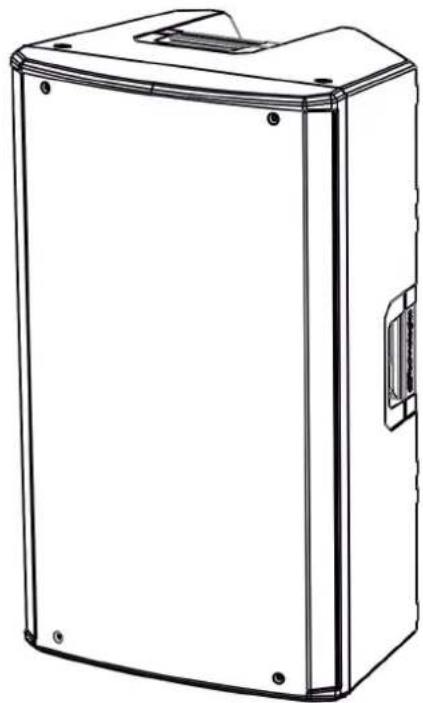
The OPERA UNICA series has been designed with the intent to optimise weight and dimensions.
The cabinet is light but resistant, and features 2 handles, one on the side or one at the top, for easy handling.
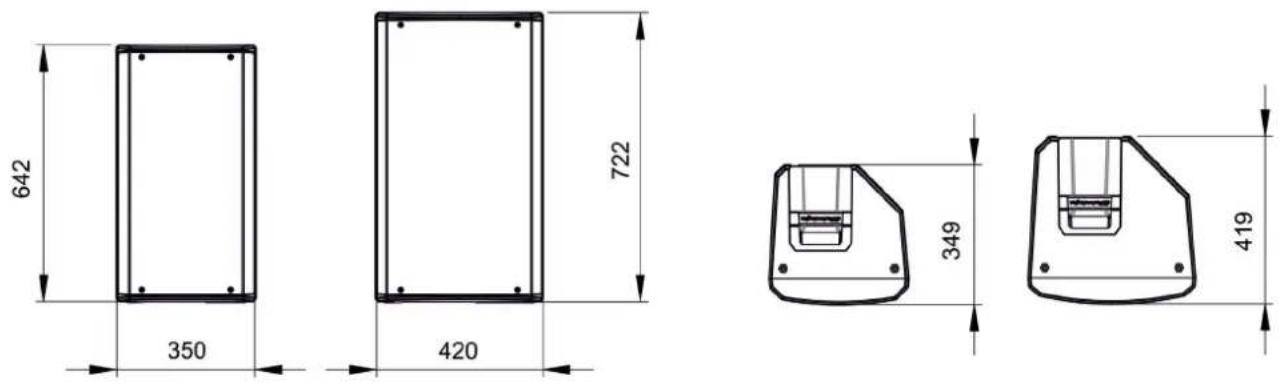
For a quick comparison of the 2 models, the overall dimensions are the following:
OPERA UNICA 12 - 350 mm (L), 642 mm (H), 349 mm (D)
OPERA UNICA 15 - 420 mm (L), 722 mm (H), 419 mm (D)
SOUND COVERAGE
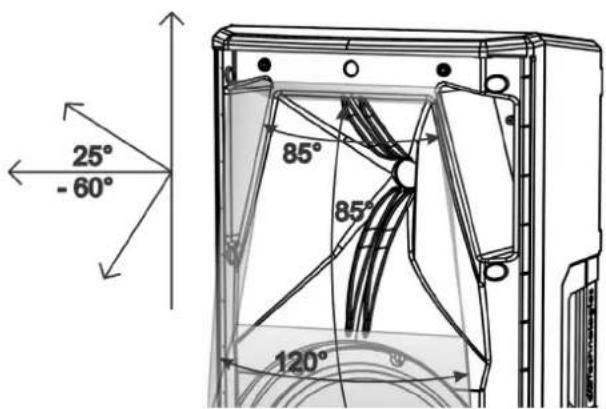
The special design of the horn, shown in the figure, is common for all 2 models.
In horizontal, the coverage is differentiated between the value of 85^ (upper part) and 120^ (lower part).
This is to optimise sound emission, for example during vertical installation in reverberant environments.
The overall vertical opening (85°) is asymmetrical, to increase the horn sound pressure for long distance.
In case of use with monitoring function or in case of horizontal positioning (wall-mounted) of the speaker, take these data into account so as to calculate the correct coverage of the environment.
text_image
25° -60° 85° 85° 120°OPERA UNICA 12 - OPERA UNICA 15 Cod. 420120269 REV. 1.0
FEATURES OF THE AMPLIFIER AND CONTROL SECTIONS
Class D digital amplifier is at the heart of the OPERA UNICA series. The system is silent and does not require a fan cooling. The system is controlled by a dedicated powerful DSP that manages the different parameters. The sound amplification power is 900 W RMS for all models.

WARNING!
- Protect the unit from moisture.
- Never attempt to disassemble the amplifier in any way.
- In the event of a malfunction, remove power supply immediately by disconnecting the unit from the power mains and contact an authorised repair centre.
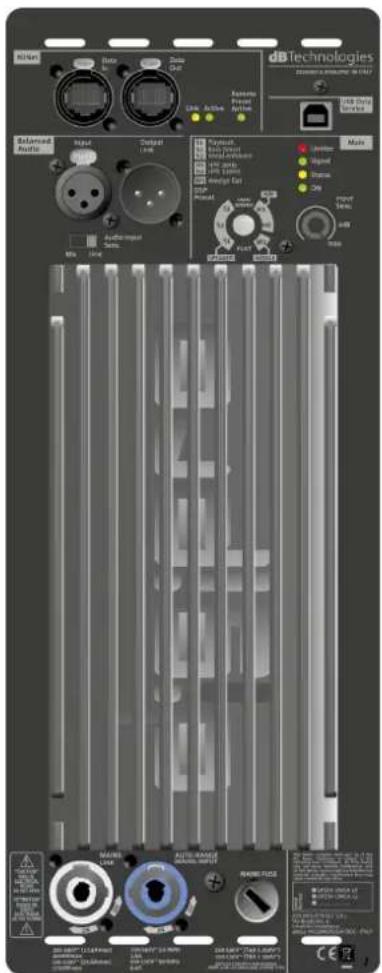
The DIGIPRO G3 panel is made up of:
- Input, Output and Control Section
• Power Supply Unit Section
text_image
dBTechnologies DINSTRUMENTS Control Control Control Control Control Control Control Control Control Control Control Control Control Control Control Control Control Control Control Control Control Control Control Control Control Control Control Control Control Control Control Control Control Control Control Control Control Control Control Control Control Control Control Control Control Control Control Control Control Control Power Supply Control Power Supply Control Power Supply Control Power Supply Control Power Supply Control Power Supply Control Power Supply Control Power Supply Control Power Supply Control Power Supply Control Power Supply Control Power Supply Control Power Supply Control Power Supply Control Power Supply Control Power Supply Control Power Supply Control Power Supply Control Power Supply Control Power Supply Control Power Supply Control Power Supply Control Power Supply Control Power Supply Control Power Supply Control Power Supply Condition
WARNING!
- Never remove the front grille protecting the product. To prevent the danger of electric shock, in case of accidental damage or replacement of the protection grille (to be carried out at the service), disconnect power supply immediately. Never connect mains power supply when the grille is removed.
OPERA UNICA 12 - OPERA UNICA 15 Cod. 420120269 REV. 1.0
INPUT, OUTPUT, RDNET AND CONTROL SECTION
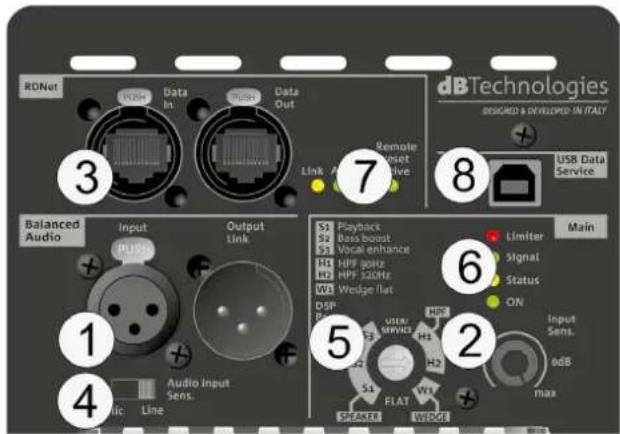
- INPUT AND OUTPUT LINK ("Balanced audio")
Input and output compatible with balanced XLR cables.
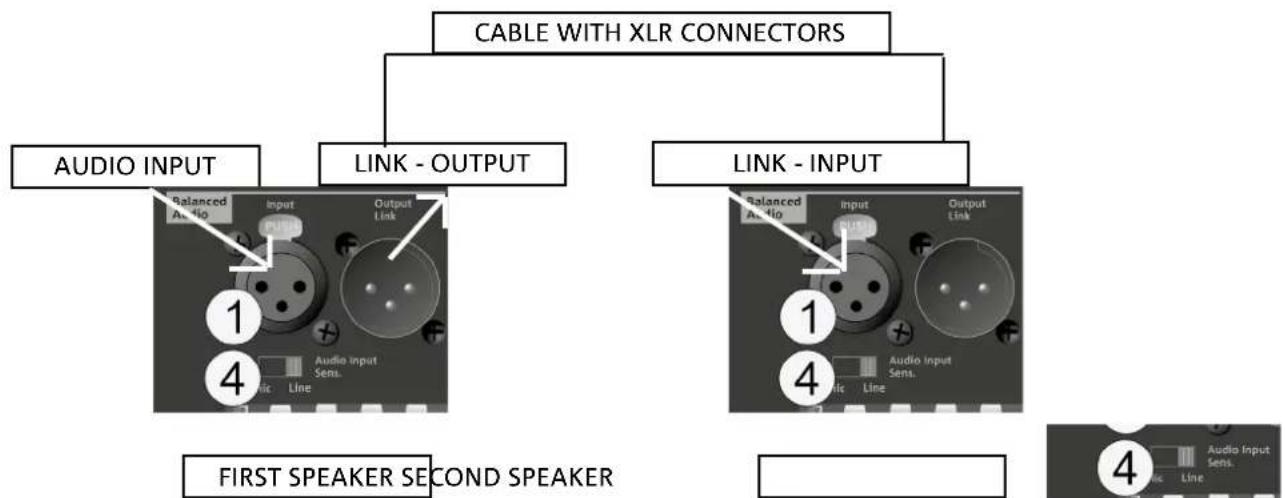
In particular, "Input" is used to connect with the audio signal coming from the mixer or from another loudspeaker, "Output Link" is used to link the signal to other loudspeakers. Daisy-chain configuration.
- INPUT SENSITIVITY
Allows adjusting the attenuation of the speaker using the input volume.
- INPUT AND NETWORK CONNECTION LINK RDNet
Section compatible with network cables with etherCON/RJ45 connectors.
In particular, "Data in" must be connected to devices such as RDNet Control 2 or Control 8; "Data Out" is used to link the network to additional loudspeakers in daisy-chain configuration.
text_image
RDNet Data In Data Out 3 2 dBTechologies DESIGNED A DEVELOPED IN ITALY USB Data Service 7 Remote Reset Live Link 8 Balanced Audio Input Output Link S3 Playback S2 Bass boost S1 Vocal enhance H1 HPF gossz H0 HPF 52GHz W1 Wedge flat DSP P USER SERVICE H2 S4 FLAT W3 Speaker WEDGE Main 6 Limitar Signal Status ON Input Sens. edB max 1 Audio Input Sens. Line 4- INPUT SENSITIVITY "Mic/Line" SWITCH
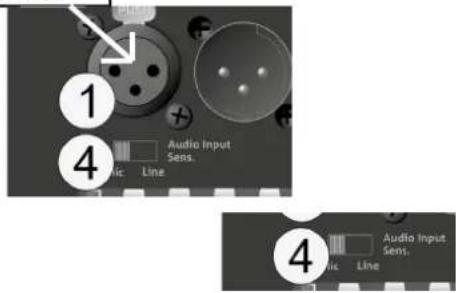
Set the switch to "Mic" in case of microphone input and to "Line" in case of signal coming from a mixer or from another loudspeaker.
- DSP PRESET - ROTARY AND TABLE
The presets selectable through rotary are shown in this table as a reminder.
SPEAKER
S1 - Playback, suitable for a music program playback
S2 - Bass boost, with emphasis on low frequencies
S3 - Vocal enhance, suitable for human voice
HPF
H1 - HPF 90Hz, applies a filters with cut-off frequency at 90 Hz
H2 - HPF 120Hz, applies a filter with a frequency
WEDGE
W1 - WEDGE FLAT,
FLAT
FLAT - It does not equalise the loudspeaker output.
USER/SERVICE - POSITION FOR FIRMWARE UPDATE
- STATUS LEDs
LEDs relating to speaker operation. See explanatory table in the following page.
- CONTROL LEDs
LEDs relating to module network operation (RDNet).
In particular, if "Link" is on the RDNet network is active and has acknowledged the device, if "Active" is flashing there is data traffic, if "Remote Preset Active" is on all local control on the amplifier panel are by-passed by the RDNet remote control.
- SERVICE DATA USB PORT
It is a USB B port to be used only for product firmware update. For further information refer to "FIRMWARE UPDATE".
OPERA UNICA 12 - OPERA UNICA 15 Cod. 420120269 REV. 1.0
POWER SUPPLY UNIT SECTION
text_image
CAUTION ON OF ELECTION ON OF NOT OPEN ATTENTION ON OF CHANGE IN MOUNT 10 MAINS LINK 9 AUTO-RANGE MAINS INPUT 11 MAINS FUSE This device consists with part 21 of the ICC MAX. Operation. It is not to be used in the test setup. The I/O can be used to ensure that the main switch is not under Fanatic wearings, and it is not suitable for any other operation. The main switch is designed using existing workloads that may be used to maintain the main switch's status. 220-340V~ (17.6Amax) 400Wmax 220-340V~ (5.8GHz) 2.5A 220-320V~ (5.6GHz) 4.5A 220-240V~ (TBA L 250V~ 100-320V~ (TBA L 250V) OPERA UNICA 15 OPERA UNICA 22 ABR INDUSTRIAL S.R.L. VEA BHAHL, LGCMA CHIPEZANO 400L VILLIAMCOGRA (BC) - ITALY9. "MAINS INPUT" POWER CONNECTOR
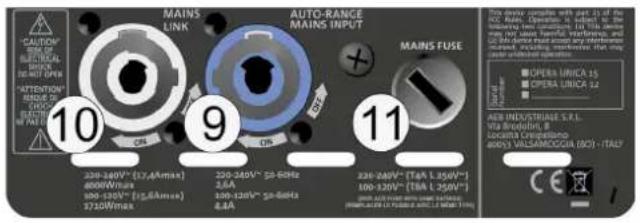
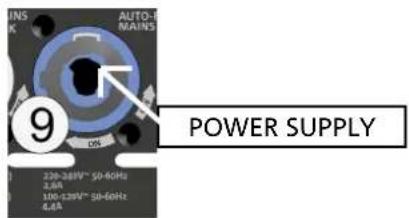
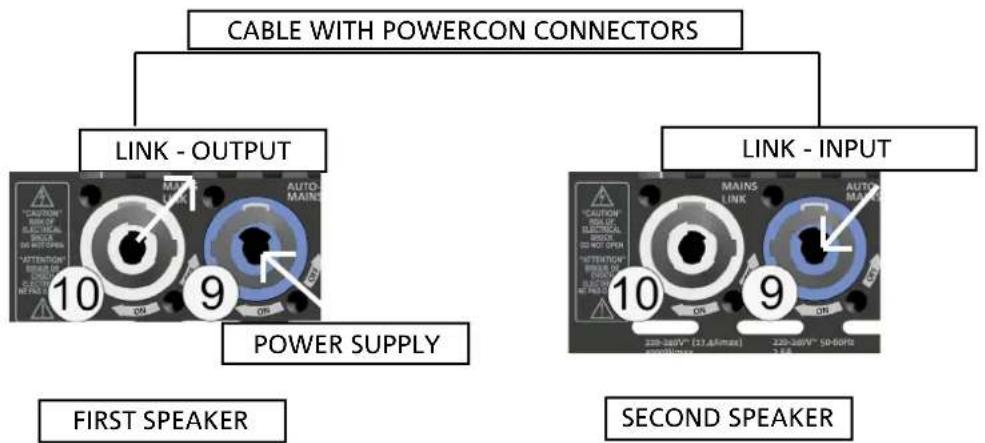
Compatible with powerCON connector, the power supply features an auto-range function. It automatically recognises the voltage within the range [100-120V] or [220-240V] .
10. "MAINS LINK" POWER DAISY CHAIN
Compatible with powerCON connector for power daisy chain to other speakers.
To find the maximum number of modules that can be connected in a re-linked system, see the TECHNICAL SPECIFICATIONS section.
11. NETWORK FUSE
Housing for the network fuse.
STATUS LED TABLE
| OPERA UNICA | Limiter | Signal | Status | ON |
| Switch on | OFF | OFF | SOLID FOR A FEW SEC. | OFF |
| Normal use | ACTIVE | ACTIVE | OFF | SOLID |
| Partial fault | ACTIVE | ACTIVE | CYCLIC BLINK | SOLID |
| Total fault | CYCLIC BLINK | OFF | SOLID ON | OFF |
OPERA UNICA 12 - OPERA UNICA 15 Cod. 420120269 REV. 1.0
2. FIRST POWER-UP
PACKAGE CONTENTS
Check that the package content is complete. The package contains:
• OPERA UNICA speaker
- power cable
- quick start user manual and warranty documents
- 1 fuse
USE
INPUT CONNECTIONS
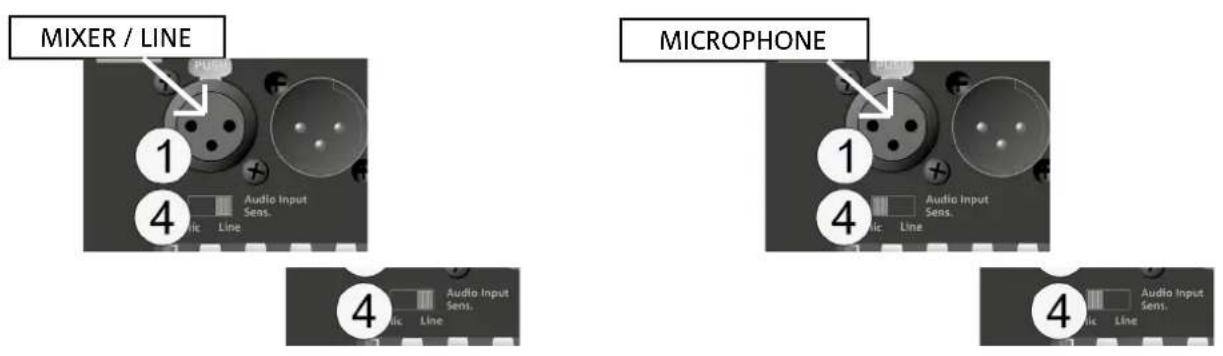
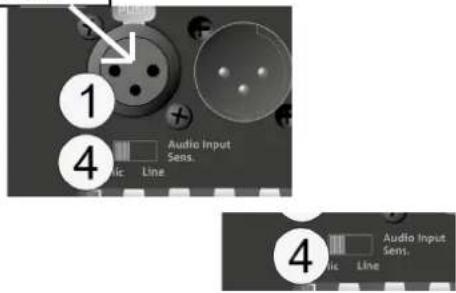
It is possible to connect 1 input in the input and control section at the back of the speaker. In particular, in case of microphone input, set switch 4 to "MIC".
OPERA UNICA 12 - OPERA UNICA 15 Cod. 420120269 REV. 1.0
POWER SUPPLY CONNECTION
text_image
INS K AUTO- MAINS 9 POWER SUPPLY 228-248V~ SD-60Hz 3.6A 100-129V~ SD-60Hz 4.4ACONNECTING THE OUTPUTS OF MULTIPLE SPEAKERS (audio daisy chain)
flowchart
graph TD
    A["CABLE WITH XLR CONNECTORS"] --> B["AUDIO INPUT"]
    A --> C["LINK - OUTPUT"]
    A --> D["LINK - INPUT"]
    B --> E["1: Balanced Audio Input Line"]
    C --> F["4: Audio Input Sens."]
    D --> G["1: Balanced Audio Input Line"]
    D --> H["4: Audio Input Sens."]
    style A fill:#f9f,stroke:#333
    style B fill:#ccf,stroke:#333
    style C fill:#ccf,stroke:#333
    style D fill:#ccf,stroke:#333
    style E fill:#dfd,stroke:#333
    style F fill:#dfd,stroke:#333
    style G fill:#dfd,stroke:#333
    style H fill:#dfd,stroke:#333
It is possible to link an audio signal by connecting the Output Link to the Input of a second OPERA UNICA. In the second speaker, Audio Input Sensitivity must be set to "Line".
CONNECTING THE POWER SUPPLY OF MULTIPLE SPEAKERS
text_image
CABLE WITH POWERCON CONNECTORS LINK - OUTPUT LINK - INPUT POWER SUPPLY FIRST SPEAKER SECOND SPEAKERIt is possible to connect 1 input in the input and control section at the back of the speaker. In particular, in case of microphone input, set switch 4 to "MIC".
OPERA UNICA 12 - OPERA UNICA 15 Cod. 420120269 REV. 1.0
3. REMOTE CONTROL AND RDNET CONNECTION

flowchart
graph LR
    A[" "] --> B["RDNET CONTROL 2/8PC/MAC"]
    B --> C["3"]
    C --> D["NETWORK CABLE"]
    D --> E["3"]
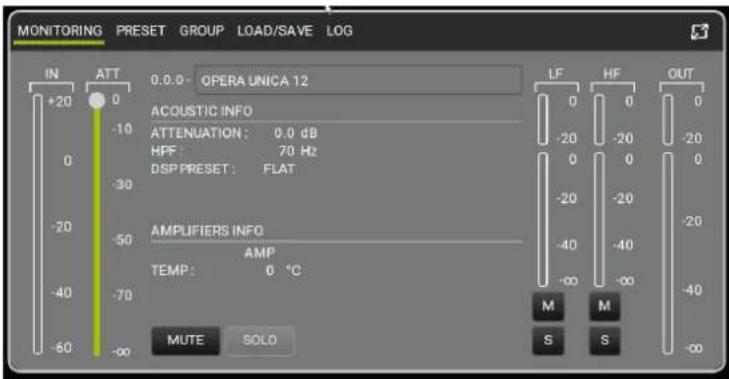
- All speaker parameters can be adjusted with the remote control, once the RDNet connections have been properly made, using the free AURORA NET software (in Beta version at the date of release of this manual). When using the remote control, the local controls on the speaker are by-passed. Using this software, you can control a larger number of parameters (for more information, please refer to the full AURORA NET manual).
AURORA NET, in particular, compared to dBTechnologies Network is a software that:
- multi-platform (Windows /MAC OS X)
- allows a more accurate control of the parameters and their history
- allows a more flexible management even in the case of large fixed/live installations (with advanced group control)
• is optimized for usability and speed of data displaying.
text_image
MONITORING PRESET GROUP LOAD/SAVE LOG IN ATT 0.0.0 OPERA UNICA 12 +20 0 ACOUSTIC INFO ATTENUATION: 0.0 dB HPF: 70 Hz DSP PRESET: FLAT -30 -20 -20 -20 -20 -20 -20 -20 -20 -20 -20 -20 -20 -20 -20 -20 -20 -20 -20 -20 -20 -20 -20 -20 -20 -20 -50 AMPLIFIERS INFO AMP TEMP: 0 °C -40 -70 MUTE SOLO LF HF OUT M M S S -∞OPERA UNICA 12 - OPERA UNICA 15 Cod. 420120269 REV. 1.0
4. USAGE EXAMPLES

- Types of installation other than those here described are not allowed.
- Never use the handles to suspend the speaker
- Always check that the positioning is stable and that the installation does not pose a danger to people, animals or property.
- Perform the installation on a flat, not tilted surface, otherwise an additional safety fastening is mandatory.
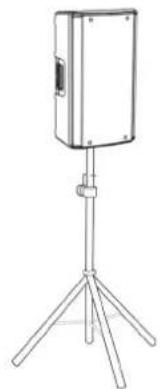
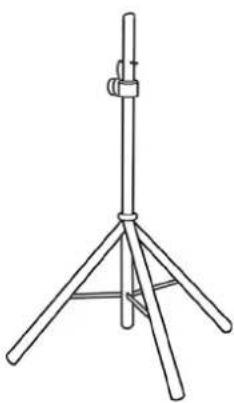
INSTALLATION ON STAND
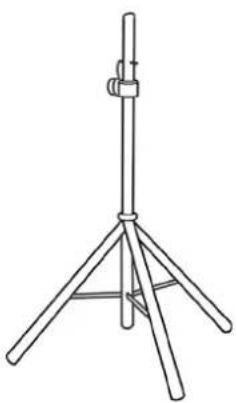
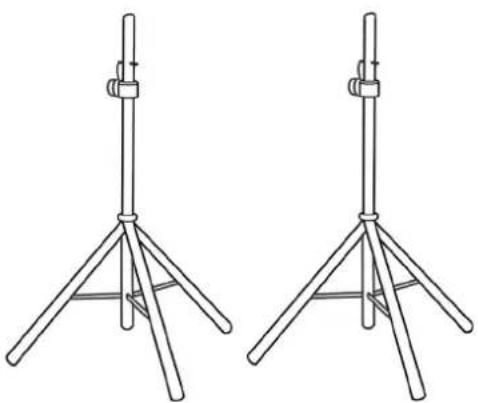
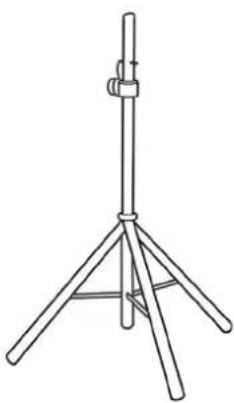
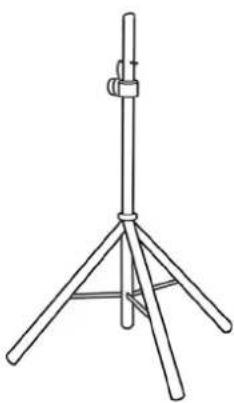
1 OPERA UNICA speaker can be installed on a tripod stand, coming as standard option (accessory SSB2) with a 35 mm diameter pole. The maximum allowed height between the speaker base and the floor is 160 cm.

WARNING!
- Use a suitably sized stand with the central leg pointing forward to provide appropriate stability.
INSTALLATION ON SUBWOOFER
Through the installation with the DS2-S accessory, it is possible to use 1 OPERA UNICA directly on subwoofer provided with M20 flange. For further information, refer to the relevant accessory manual.
natural_image
Line drawing of a portable electronic device mounted on a tripod stand (no text or symbols)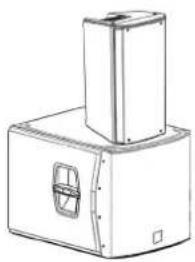
natural_image
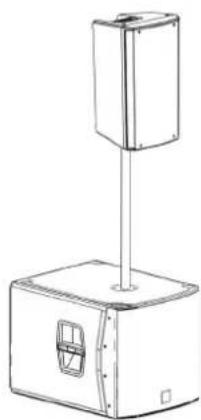
Technical line drawing of a mechanical device with a top component and a side panel (no text or symbols)INSTALLATION ON SUBWOOFER WITH POLE
It is possible to use only one speaker mounted on a 35 mm diameter pole. The maximum allowed height between the speaker base and the floor is 160 cm. In case of DVA S08DP or SUB 28D subwoofer, an additional mechanical fastening or a belt fastening is required to correctly and safely fix the installation.
natural_image
Line drawing of a mechanical device with a vertical support and base housing (no text or symbols)OPERA UNICA 12 - OPERA UNICA 15 Cod. 420120269 REV. 1.0
WEDGE (MONITORING) USE
The OPERA UNICA series speakers can be used as monitors for small live contests. In this case, lay them horizontally on the tilted side. Be reminded of the sound coverage features reported in the relevant section. Use the suitable DSP settings as indicated in the "DSP preset" table in wedge mode (W1 or FLAT).
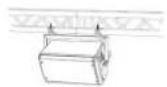
WALL-MOUNTING WITH BRACKETS
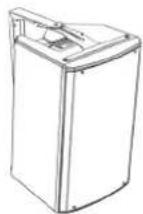
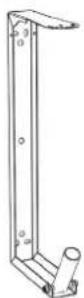
The OPERA UNICA models can be wall-mounted in vertical or horizontal position through the WB-OP12, WB-OP15 accessory, to be used with OPERA UNICA 12 and OPERA UNICA 15, respectively.
For further details refer to the instructions relevant to this accessory.
INSTALLATION ON TRUSS WITH BRACKETS AND ALISCAFF COUPLERS
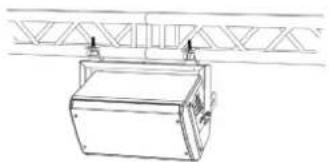
The OPERA UNICA models can be installed on a truss in vertical or horizontal position, through the WB-OP12, WB-OP15 accessory, to be used with OPERA UNICA 12 and OPERA UNICA 15, respectively. This accessory allows the use of aliscaff couplers (not included) for this special configuration.
For further details refer to the instructions relevant to this accessory.
natural_image
Line drawing of a mechanical device with a triangular support structure above (no text or symbols)INSTALLATION WITH EYEBOLTS
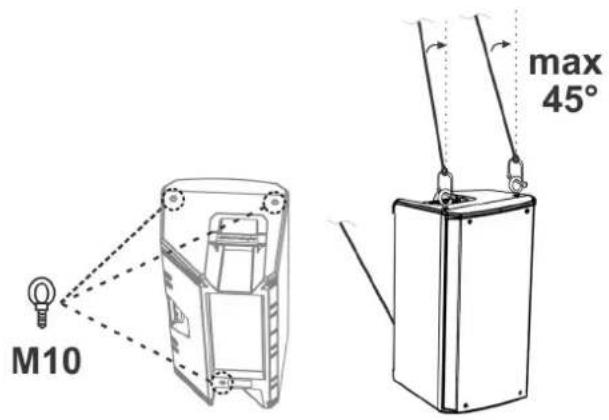
The speaker can also be installed using eyebolts. The positioning is shown in the figure on the side, where the rear eyebolt allows adjusting the final angle (MAX 45°).
text_image
M10 max 45°OPERA UNICA 12 - OPERA UNICA 15 Cod. 420120269 REV. 1.0
5. ACCESSORIES
To completion of the series, the following accessories are provided as options:
- SSB2, set of tripod stands with diameter 35 mm
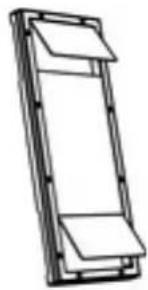
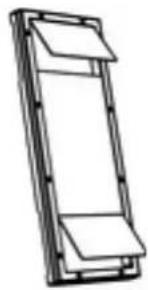
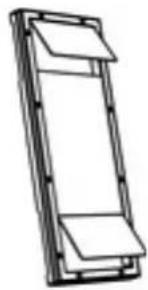
• Wall bracket OP-WB12, OP-WB15 - Rain Cover RC-M1, valid for all models
natural_image
Two identical line drawings of a tripod-mounted scientific instrument with adjustable arms (no text or symbols)SSB2 (PAIR OF TRIPOD STANDS)
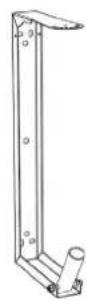
OP-WB (WALL BRACKETS)
natural_image
Simple line drawing of a rectangular frame with a folded top and bottom (no text or symbols)RC-M1 (RAIN COVER)

WARNING!
- Never suspend the speaker from the handles!
Please read the corresponding manuals for more details.
For all updates on accessories, refer to the website www.dbtechnologies.com
OPERA UNICA 12 - OPERA UNICA 15 Cod. 420120269 REV. 1.0
6. TROUBLESHOOTING
The loudspeaker will not turn on:
- Check that power supply is present upstream of the installation.
- Ensure that the power supply cable is properly plugged in.
The speaker turns on but produces no sound:
- Check that the input connection of the audio signal is correctly performed.
- Check the cables for damage.
- Ensure that the mixer or audio source is on and an output signal is present.
- Check that the input level is appropriate.
Speaker sound is distorted or not sufficient:
- Adjust the first source volume, then set the input gain to an adequate level. Check the cables for damage and replace them as required (a damaged cable may lead to signal loss or alteration).
- Check that the selection settings of the input (Mic/Line) are correct with respect to the source
- Check that the "DSP preset" settings are suitable for the use selected.
7. SPECIFICATIONS
GENERAL
| Type: | 2-way active speaker |
ACOUSTICAL SPECIFICATIONS
| Frequency response [-10dB]: | 67 - 20k Hz (OPERA UNICA 12) / 57 - 20k Hz (OPERA UNICA 15) |
| Frequency response [-3dB]: | 73 - 20k Hz (OPERA UNICA 12) / 61- 20k Hz (OPERA UNICA 15) |
| Max SPL: | 132 dB (OPERA UNICA 12) / 133 dB (OPERA UNICA 15) |
| HF voice coil: | 1.75” |
| HF compression driver (output): | 1” |
| LF: | 12” (OPERA UNICA 12) / 15” (OPERA UNICA 15) |
| LF Voice coil: | 3” |
| Crossover frequency (24 dB/oct): | 1600 Hz |
| Directivity: | Asymmetrical vertical - Differentiated horizontal |
| Coverage (HxV): | 85° - 120° x 80° (+25°/-60°) |
AMPLIFIER
| Type: | AMP SMPS |
| Amplification class: | Class D |
| Power supply | PowerCON connector |
OPERA UNICA 12 - OPERA UNICA 15 Cod. 420120269 REV. 1.0
| RMS amplifier power: | 900 W |
| Peak power: | 1800 W |
PROCESSOR
| Internal controller: | 56-bit DSP |
| A/D D/A converter: | 24 bit/48 kHz |
| Limiter: | Peak, RMS, Thermal |
USER INTERFACE
| Controls: | Input switch and level, DSP preset rotary |
INPUTS & OUTPUTS
| Inputs: | 1 balanced audio input (with Line/Mic selection), 1 RDNet input |
| Outputs: | 1x XLR Link OUT, 1 RDNet output |
| Power supply: | powerCON IN/LINK |
POWER SUPPLY SPECIFICATIONS (ABSORPTION / INSTALLATION)
| Absorption at 1/8th of power in medium use conditions (*): | 1.3 A (230 V) - 2.1 A (115 V) |
| Absorption at 1/3rd of power in maximum use conditions (**): | 2.6 A (230 V) - 4.4 A (115 V) |
| Absorption with speaker on in no-signal condition (idle): | 19 W |
| Inrush current: | 46 A |
| Number of linkable speakers: | 6 (1+5) (230 V) / 3 (1+2) (115 V) |
* NOTE FOR INSTALLER: Values refer to 1/8th of power, under average operating conditions (music programme with occasional or no clipping). For any type of configuration we recommend to consider them as minimum sizing values.
** NOTE FOR INSTALLER: Values refer to 1/3rd of power, under heavy operating conditions (music programme with frequent clipping and limiter activation). In case of professional installations and tours we recommend sizing according to these values.
OPERA UNICA 12 - OPERA UNICA 15 Cod. 420120269 REV. 1.0
DIMENSIONS
| Material: | Reinforced PP polypropylene |
| Grille: | NC-machined |
| Provisions for fly bar: | Yes |
| Handles: | 2 (on side, on top) |
| Pole mount: | Yes, 36 mm |
| Width: | 350 mm (OPERA UNICA 12) / 420 mm (OPERA UNICA 15) |
| Height: | 642 mm (OPERA UNICA 12) / 722 mm (OPERA UNICA 15) |
| Depth: | 349 mm (OPERA UNICA 12) / 419 mm (OPERA UNICA 15) |
| Weight: | 15 kg (OPERA UNICA 12) / 18.2 kg (OPERA UNICA 15) |
Product features, specifications and appearance are subject to changes without prior notice. dBTechnologies reserves the right to make changes or improvements in design or manufacture without any obligation to incorporate such changes or improvements in products manufactured before their introduction.

text_image
A BA.E.B. Industriale Srl
Via Brodolini, 8
INSTALLATION AUF EINEM SUBWOOFER 45
INSTALLATION AUF EINEM SUBWOOFER MIT PFOSTEN.... 45
WEDGE-VERWENDUNG (MONITORING) 46
WANDINSTALLATION MIT BEFESTIGUNGSBÜGELN 46
INSTALLATION AN TRAVERSEN MIT BÜGELN UND ALISCAFF-KUPPLUNGEN.... 46
INSTALLATION MIT RINGSCHRAUBEN 46
5. ZUBEHÖR 47
6. PROBLEMABHILFE 48
text_image
dBTechnologies DINSTRUMENTS Control Control Control Control Control Control Control Control Control Control Control Control Control Control Control Control Control Control Control Control Control Control Control Control Control Control Control Control Control Control Control Control Control Control Control Control Control Control Control Control Control Control Control Control Control Control Control Control Control Control Power Supply Control Power Supply Control Power Supply Control Power Supply Control Power Supply Control Power Supply Control Power Supply Control Power Supply Control Power Supply Control Power Supply Control Power Supply Control Power Supply Control Power Supply Control Power Supply Control Power Supply Control Power Supply Control Power Supply Control Power Supply Control Power Supply Control Power Supply Control Power Supply Control Power Supply Control Power Supply Control Power Supply Control Power Supply Control Power Supply control Power supply control Power supply control Power supply control Power supply control Power supply control Power supply control Power supply control Power supply control Power supply control Power supply control Power supply control Power supply control Power supply control Power supply control Power supply control Power supply control Power supply control Power supply control Power supply control Power supply control Power supply control Power supply control Power supply control Power supply control Power supply control Power system control Power system control Power system control Power system control Power system control Power system control Power system control Power system control Power system control Power system control Power system control Power system control Power system control Power system control Power system control Power system control Power system control Power system control Power system control Power system control Power system control Power system control Power system control Power system control Power system control Power systems control Power systems control Power systems control Power systems control Power systems control Power systems control Power systems control Power systems control Power systems control Power systems control Power systems control Power systems control Power systems control Power systems control Power systems control Power systems control Power systems controltext_image
RDNet 3 Data In 4 Data Out Link 7 Remote Reset Active 8 dBTechnologies DESIGNED & DEVELOPED IN ITALY USB Data Service Balanced Audio Input PUSH Output Link 1 Audio Input Sens. Line Main 5 Playback S2 Bass boost S1 Vocal enhance H1 HPF goinz H2 HPF 520Hz W1 Wedge flat DSP P1 User/Service S2 HPE H1 H2 S1 FLAT W1 SLEEK WEDGE 6 Limiter Signal Status ON Input Sens. edB max4. WÄHLSCHALTER INPUT SENSITIVITY "Mic/Line"
text_image
PUSH 1 4 Audio Input Sens. Line Audio Input Sens. Line 4MIKROPHON
text_image
1 4 Audio Input Sens. Line Audio Input Sens. Linenatural_image
Line drawing of a portable electronic device mounted on a tripod stand (no text or symbols)INSTALLATION AUF EINEM SUBWOOFER
natural_image
Technical line drawing of a mechanical device with a top component and a side panel (no text or symbols)INSTALLATION AUF EINEM SUBWOOFER MIT PFOSTEN
natural_image
Line drawing of a mechanical device with a vertical support and base unit (no text or symbols)OPERA UNICA 12 - OPERA UNICA 15 Art.-Nr. 420120269 REV. 1.0
WEDGE-VERWENDUNG (MONITORING)
natural_image
Line drawing of a mechanical device mounted on a truss structure (no text or symbols)INSTALLATION MIT RINGSCHRAUBEN
natural_image
Line drawing of a tripod-mounted scientific instrument with a stand (no text or symbols)SSB2 (PAAR DREIBEINE)
natural_image
Line drawing of a tripod-mounted scientific instrument with adjustable arms (no text or symbols)natural_image
Simple line drawing of a rectangular frame with two horizontal panels, no text or symbols present.RC-M1 (RAIN COVER)

ACHTUNG!
DONNÉES ACOUSTIQUES 65
AMPLIFICATEUR.... 65
PROCESSEUR 66
INTERFACE UTILISATEUR 66
ENTRÉES ET SORTIES.... 66
SPÉCIFICATIONS D'ALIMENTATION (ABSORPTION / INSTALLATION) 66
DIMENSIONS 67
1. GÉNÉRALITÉS
BIENVENUE!
text_image
dBTechnologies DINSTRUMENTS Control Control Control Control Control Control Control Control Control Control Control Control Control Control Control Control Control Control Control Control Control Control Control Control Control Control Control Control Control Control Control Control Control Control Control Control Control Control Control Control Control Control Control Control Control Control Control Control Control Control Power Supply Control Power Supply Control Power Supply Control Power Supply Control Power Supply Control Power Supply Control Power Supply Control Power Supply Control Power Supply Control Power Supply Control Power Supply Control Power Supply Control Power Supply Control Power Supply Control Power Supply Control Power Supply Control Power Supply Control Power Supply Control Power Supply Control Power Supply Control Power Supply Control Power Supply Control Power Supply Control Power Supply Control Power Supply Control Power Supply Condition
ATTENTION!
natural_image
Line drawing of a portable electronic device mounted on a tripod stand (no text or symbols)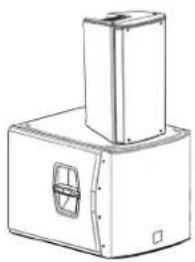
natural_image
Technical line drawing of a mechanical device with a top component and a side panel (no text or symbols)INSTALLATION SUR SUBWOOFER AVEC POTEAU
natural_image
Technical line drawing of a mechanical device with a vertical support and base housing (no text or symbols)OPERA UNICA 12 - OPERA UNICA 15 Code 420120269 RÉV. 1.0
UTILISATION WEDGE (MONITORING)
natural_image
Simple line drawing of a box under a truss structure (no text or symbols)INSTALLATION AVEC CHEVILLES À ŒILLET
natural_image
Line drawing of a tripod-mounted scientific instrument with a stand (no text or symbols)SSB2 (PAIRE DE TRÉPIEDS)
natural_image
Line drawing of a tripod-mounted scientific instrument with adjustable arms (no text or symbols)natural_image
Simple line drawing of a rectangular frame with two horizontal panels, no text or symbols present.RC-M1 (HOUSSE ANTI-PLUIE)

ATTENTION!
text_image
dBTechnologies DINSTRUMENTS Control Control Control Control Control Control Control Control Control Control Control Control Control Control Control Control Control Control Control Control Control Control Control Control Control Control Control Control Control Control Control Control Control Control Control Control Control Control Control Control Control Control Control Control Control Control Control Control Control Control Power Supply Control Power Supply Control Power Supply Control Power Supply Control Power Supply Control Power Supply Control Power Supply Control Power Supply Control Power Supply Control Power Supply Control Power Supply Control Power Supply Control Power Supply Control Power Supply Control Power Supply Control Power Supply Control Power Supply Control Power Supply Control Power Supply Control Power Supply Control Power Supply Control Power Supply Control Power Supply Control Power Supply Control Power Supply Control Power Supply Condition
¡ATENCIÓN!
text_image
1 Audio Input Sens. 4 Line Audio Input Sens. 4 LineMICRÓFONO
text_image
1 4 Audio Input Sens. Line Audio Input Sens. Linenatural_image
Line drawing of a portable electronic device mounted on a tripod stand (no text or symbols)natural_image
Technical line drawing of a mechanical device with a top component and a side panel (no text or symbols)natural_image
Line drawing of a mechanical device with a vertical support and base housing (no text or symbols)OPERA UNICA 12 - OPERA UNICA 15 Cód. 420120269 REV. 1.0
USO WEDGE (MONITORING)
natural_image
Line drawing of a mechanical device suspended above a triangular structure (no text or symbols)natural_image
Line drawing of a tripod-mounted scientific instrument with adjustable arm (no text or symbols)SSB2 (PAR DE TRÍPODES)
natural_image
Line drawing of a tripod-mounted scientific instrument with adjustable arms (no text or symbols)OP-WB (SOSTENES A LA PARED)
natural_image
Simple line drawing of a rectangular frame with a folded top (no text or symbols)RC-M1 (RAIN COVER)