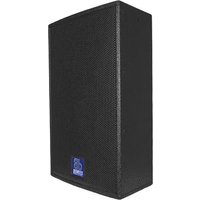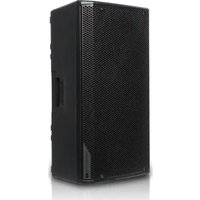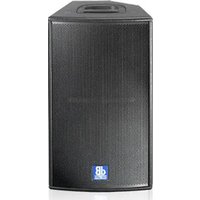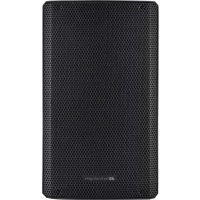
KL 12 - Speaker DB Technologies - Free user manual and instructions
Find the device manual for free KL 12 DB Technologies in PDF.



| Product type | 2-way active speaker |
| Brand | DB Technologies |
| Model | KL 12 |
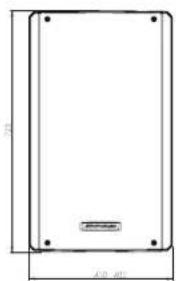
| Dimensions (W x H x D) | 365 x 622.5 x 342 mm |
| Weight | 16.5 kg |
| Power supply | 1 x VDE, 230 V / 115 V (auto-select) |
| Peak power | 800 W |
| Frequency response (-10 dB) | 52 Hz - 18 kHz |
| Max SPL | 127 dB |
| Coverage | 90° x 60° |
| Woofer (LF) | 12" (2.5" voice coil) |
| Tweeter (HF) | 1" compression driver (1.35" voice coil) |
| Crossover frequency | 1800 Hz (24 dB/oct) |
| Amplifier | Class D (LF) + Class AB (HF) |
| Internal processor | DSP 28/56 bit, 48 kHz |
| DSP presets | Playback, Flat, Bass Boost, Wedge |
| Inputs | 1 x Combo XLR/Jack (CH1 with Mic/Line switch), 1 x TRS/XLR (CH2), 1 x Bluetooth® |
| Outputs | 1 x XLR balanced (Link/Mix) |
| Controls | Bluetooth® volume, PAIR, CH1/CH2 volume, Master, Preset, Routing Link/Mix |
| Enclosure material | Reinforced polypropylene PP |
| Grille | CNC machined |
| Handles | 2 (side and top) |
| Pole mount | Yes, 35 mm diameter (max height 150 cm) |
| Pre-equipped for fly-bar | Yes |
| Optional accessories | SSB2 (pair of tripods), DS2-S (subwoofer mount) |
| Maintenance | Protect the module from humidity; use quality cables; do not open the amplifier |
| Safety | Do not use handles for suspension; stable installation on flat surface; contact authorized repairer if malfunction |
| Repairability | Spare parts and repair by authorized service |
Frequently Asked Questions - KL 12 DB Technologies
User questions about KL 12 DB Technologies
0 question about this device. Answer the ones you know or ask your own.
Ask a new question about this device
Download the instructions for your Speaker in PDF format for free! Find your manual KL 12 - DB Technologies and take your electronic device back in hand. On this page are published all the documents necessary for the use of your device. KL 12 by DB Technologies.
USER MANUAL KL 12 DB Technologies
natural_image
Line drawing of a rectangular electronic device with mounting holes and a side panel (no text or symbols)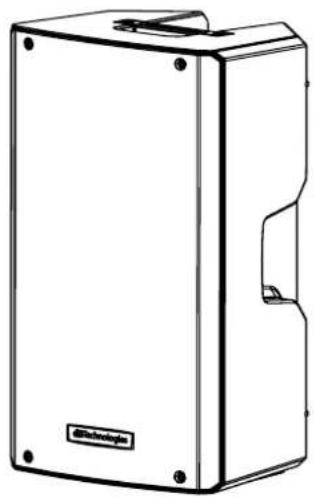
natural_image
Line drawing of a rectangular electronic device with mounting holes and a label 'Technology' on the front panel (no other text or symbols)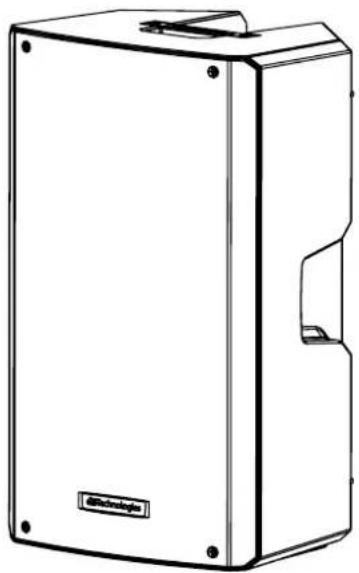
natural_image
Line drawing of a rectangular electronic device with mounting holes and a cut-out slot (no text or symbols)KL10
KL12
KL15
USER MANUAL - Section 1
The warnings contained in this manual as well as the information listed in "USER MANUAL - Section 2" must be complied with.
The full text of the EU declaration of conformity is available at the following internet address: http://www.dbtechnologies.com/en/downloads
EMI CLASSIFICATION
According to the standards EN 55103 this equipment is designed and suitable to KLte in E3 (or lower E2, E1) Electromagnetic environments.
FCC CLASS B STATEMENT ACCORDING TO TITLE 47, CHAPTER I, SUBCHAPTER A, PART 15, SUBPART B
KL10 FCC ID: 2ADDV-TLSYA10 KL12, KL15 FCC ID: 2ADDV-TLSYA12
This equipment has been tested and found to comply with the limits for a Class B digital device, pursuant to part 15 of the FCC Rules. These limits are designed to provide reasonable protection against harmful interference in a residential installation. This equipment generates, uses and can radiate radio frequency energy and, if not installed and used in accordance with the instructions, may cause harmful interference to radio communications. However, there is no guarantee that interference will not occur in a particular installation. If this equipment does cause harmful interference to radio or television reception, which can be determined by turning the equipment off and on, the user is encouraged to try to correct the interference by one or more of the following measures:
—Reorient or relocate the receiving antenna.
—Increase the separation between the equipment and receiver.
—Connect the equipment into an outlet on a circuit different from that to which the receiver is connected.
—Consult the dealer or an experienced radio/TV technician for help.
Changes or modifications not expressly approved by the party responsible for compliance could void the user's authority to KLte the equipment.
WARNING
Make sure that the loudspeaker is securely installed in a stable position to avoid any injuries or damages to persons or properties. For safety reasons di not place one loudspeaker on top of another without proper fastening systems. Before hanging the loudspeaker check all the components for damages, deformations, missing or damaged parts that may compromise safety during installation. If you use the loudspeakers outdoor avoid spots exposed to bad weather conditions.
Contact dBTechnologies for accessories to be used with the speakers. dBTechnologies will not accept any responsibility for damages caused by inappropriate accessories or additional devices.
KL SERIES Cod. 420120347 REV. 1.0
The Bluetooth® word mark and logos are registered trademarks owned by Bluetooth® SIG, Inc. and any use of such marks by AEB Industriale SRL is under license. Other Trademarks and trade names are those of their respective owner.
2. PRIMA ACCENSIONE.... 10
INGRESSI E USCITE 18
natural_image
Technical drawing of a rectangular enclosure with mounting holes and dimension labels (no text or symbols beyond measurement markers)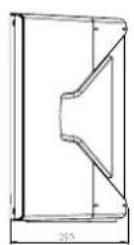
natural_image
Pure technical diagram of a rectangular frame with mounting holes and dimension lines (no text or symbols)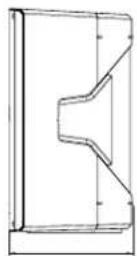
natural_image
Simple line drawing of a rectangular frame with mounting holes and dimension lines (no text or symbols)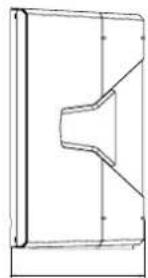
natural_image
Pure technical line drawing of a mechanical part with no text, numbers, or symbolsCOPERTURA ACUSTICA
natural_image
Technical line drawing of a speaker enclosure with visible sound waves and mounting brackets (no text or symbols)MECCANICA
text_image
A B PUSH PUSH 7.5° PUSH PUSH 0°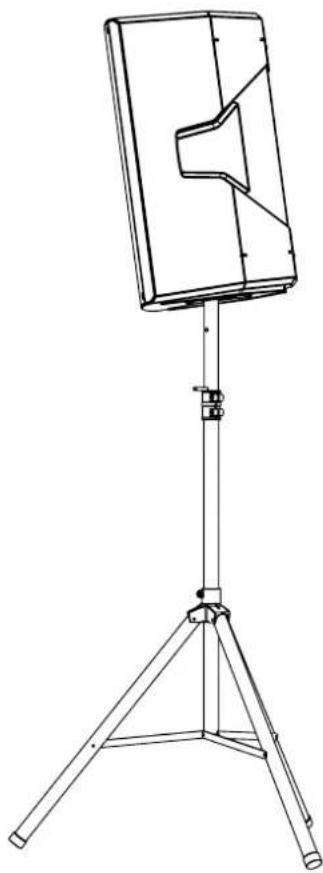
natural_image
Line drawing of a flat-screen TV stand with tripod base (no text or symbols)natural_image
Technical line drawing of a mechanical or electronic device casing with internal components and directional arrows indicating flow or movement (no text or symbols present)text_image
4 6 3 0 MAX Pair Play back Flat Bass Boost Wedge MAX/100 0 MAX Volume 0 MAX Line MIX Volume 0 MAX Link Mix 0 MAX Line Input Line Input Link/Mix Output 1 2 5KL SERIES Cod. 420120347 REV. 1.0
text_image
DO NO TCOVER, KEEP IT CLEAR POWER ON OR MA INS IN P D FUSE 2.29-240 V~ 50-68Hz L/3A [73.15AL @50'00"] E 120 V~ 5-0-6GHz:27 A [76.3AL @50'00"] 8 7text_image
Volume MAX Pair CH3text_image
DO NOT COVER, KEEP IT CLEAR POWER ON OFF MAINS INPUT FUSE ±0-250V~30-60Hz 1.4 A T(3.2)AL 3.0 V+ ±0-120V~30-60Hz 2.7 A T(6)AL 3.0 V+ BEVER OF UE E (WITH TRANS AT NOS) (R BMP+DI/SHR US/ME A SIC) (BM TYPE) 6 7natural_image
Line drawing of a portable electronic device with a tripod base (no text or symbols)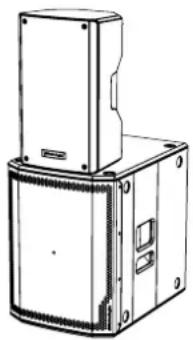
natural_image
Technical line drawing of a mechanical housing or enclosure with mounting holes and a central panel (no text or symbols)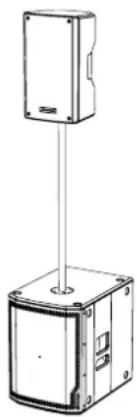
natural_image
Technical line drawing of a mechanical device with a vertical rod and base housing (no text or symbols)KL SERIES Cod. 420120347 REV. 1.0
UTILIZZO WEDGE (MONITORING)
natural_image
Two identical line drawings of a tripod-mounted scientific instrument or stand with no text or symbolsSSB2 (COPPIA DI TREPPIEDI)

ATTENZIONE!
MECHANICAL AND ACOUSTICAL FEATURES.... 24
DIMENSIONS 24
SOUND COVERAGE 24
MECHANICS 25
FEATURES OF THE AMPLIFIER AND CONTROL SECTIONS.... 26
INPUT, OUTPUT AND CONTROL SECTION 27
POWER SUPPLY UNIT SECTION 28
2. FIRST POWER-UP 29
PACKAGE CONTENTS 29
USE 29
INPUT CONNECTIONS.... 29
USING THE BLUETOOTH ^® 30
POWER SUPPLY CONNECTION 31
CONNECTING THE OUTPUTS OF MULTIPLE MODULES (audio daisy chain) 31
3. USAGE EXAMPLES.... 32
INSTALLATION ON STAND 32
INSTALLATION ON SUBWOOFER 32
INSTALLATION ON SUBWOOFER WITH POLE 32
WEDGE (MONITORING) USE 33
4. ACCESSORIES.... 34
5. TROUBLESHOOTING 35
6. SPECIFICATIONS 36
GENERAL INFORMATION 36
ACOUSTICAL SPECIFICATIONS.... 36
AMPLIFIER.... 36
PROCESSOR.... 37
USER INTERFACE 37
INPUTS & OUTPUTS.... 37
POWER SUPPLY SPECIFICATIONS (ABSORPTION / INSTALLATION) 37
DIMENSIONS.... 38
KL SERIES Code 420120347 REV. 1.0
1. GENERAL INFORMATION
WELCOME!
Thanks for purchasing a product designed and developed in Italy by dBTechnologies! This ergonomic and versatile active speaker is the result of a long experience in the sound reinforcement industry, making use of optimized sound, electronic and material research solutions.
PRODUCT OVERVIEW
The new active KL speakers are equipped with a 1" compression driver (coil: or coil 1.35") for the high section. One 10", 12" and 15" transducer (coil: 2" or 2.5") on KL10, KL12, KL15, respectively, completes the effective acoustic performance levels on medium-low frequencies. These speakers main features include:
- an ergonomic, compact and versatile project that can be used in monitoring for small live contests
- extensive input equipment, including Bluetooth® for maximum mobile connectivity
- reliable, silent digital amplifier
- input type versatility, for instance for the amplification of a voice and an instrument at the same time
- output connection versatility, for the audio link of the mixed signal or
- selectable preset links with different equalizations for different types of use
USER REFERENCE
To make the most of your KL amplifier, we recommend that you:
- read the quick start user manual included in the package and this user manual thoroughly and keep this manual during the whole life of the product.
- Register your product at http://www.dbtechnologies.com under "SUPPORT".
- keep proof of purchase and WARRANTY (User manual "section 2").
MECHANICAL AND ACOUSTICAL FEATURES
DIMENSIONS
The KL series has been designed with the intent to optimise weight and dimensions.
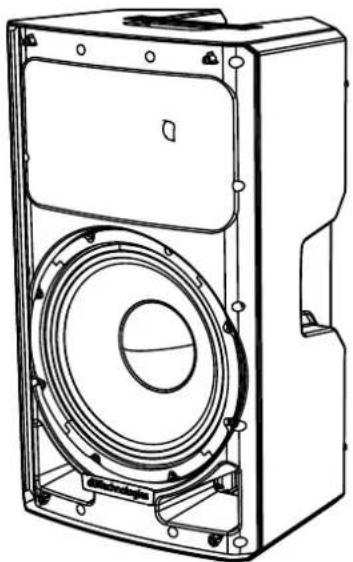
The cabinet is light but resistant, and features 2 handles, one on the side or one at the top, for easy handling.
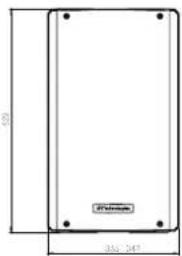
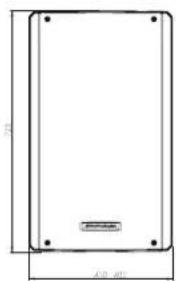
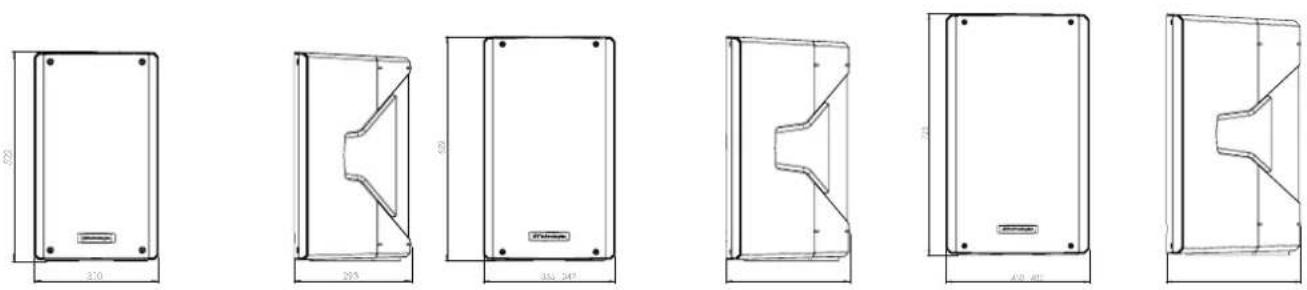
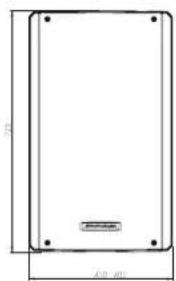
For a quick comparison of the 3 models, the overall dimensions are the following:
Width: 310 mm (KL10) 365 mm (KL12) 430 mm (KL15)
Height: 521 mm (KL10) 622.5 mm (KL12) 722.5 mm (KL15)
Depth: 292.5 mm (KL10) 342 mm (KL12) 402 mm (KL15)
SOUND COVERAGE
The special design of the horn, shown in the figure, is
common for all 3 models. With coverage: 90° x 60°.
Take these data into account, for example, when using the monitoring function.
natural_image
Technical line drawing of a speaker chamber with visible sound waves and mounting brackets (no text or symbols)KL SERIES Code 420120347 REV. 1.0
MECHANICS

text_image
A B PUSH PUSH 7.5° PUSH PUSH 0°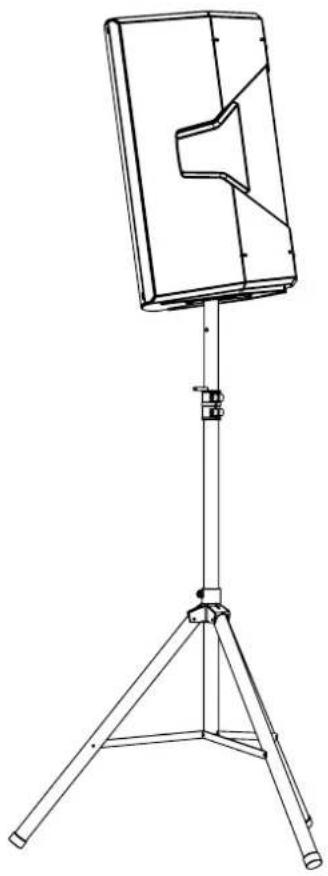
natural_image
Line drawing of a tripod-mounted stand with a rectangular panel and speaker grille (no text or symbols)The mechanical features include:
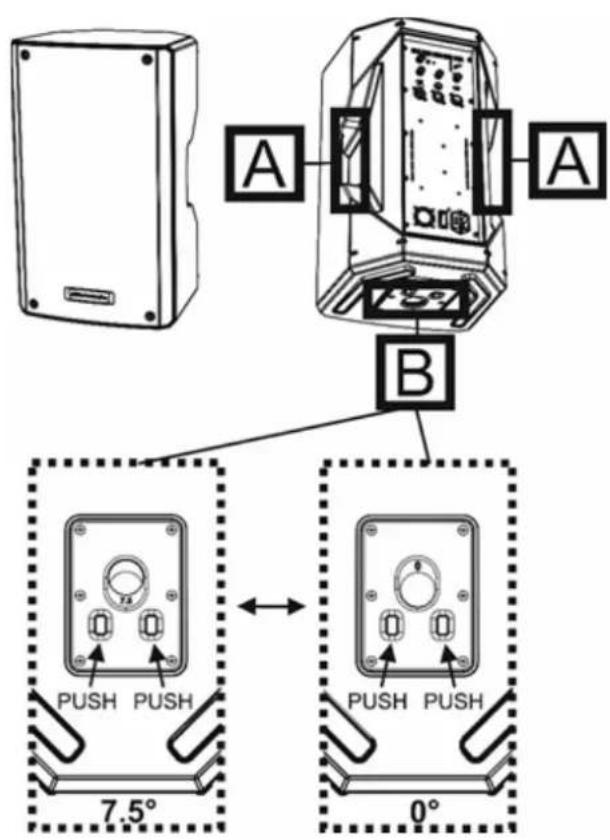
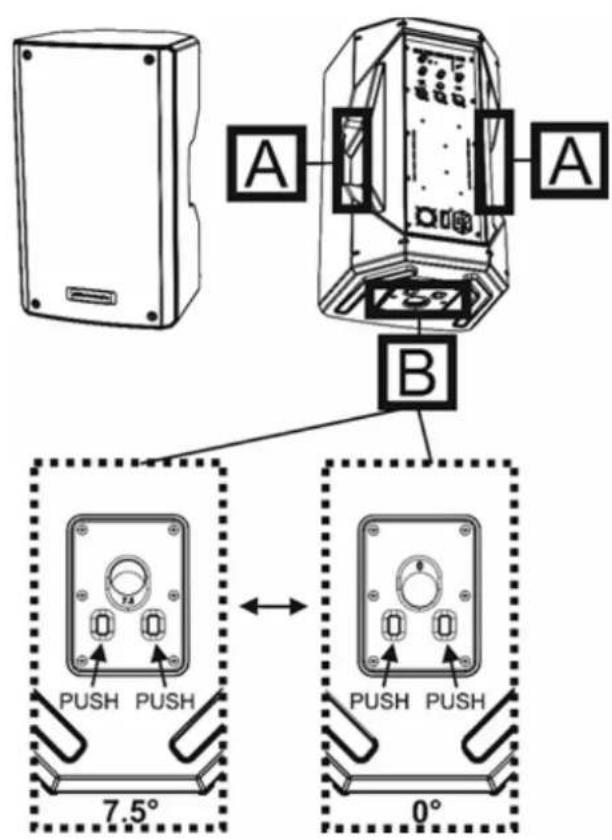
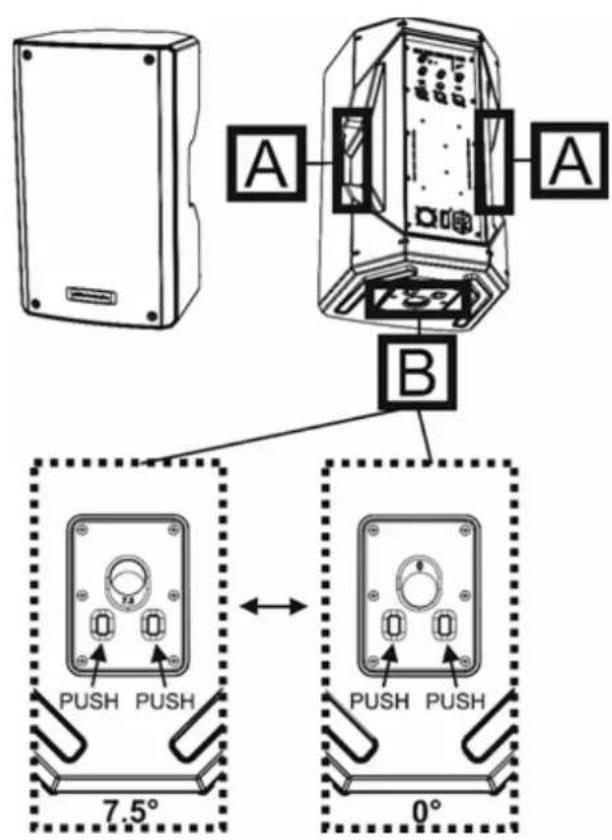
A - Handles
B - Hole with selectable tilting range from 0^ to 7.5^ . To select the tilting angle, press the two indicated holes at the bottom of the speaker.
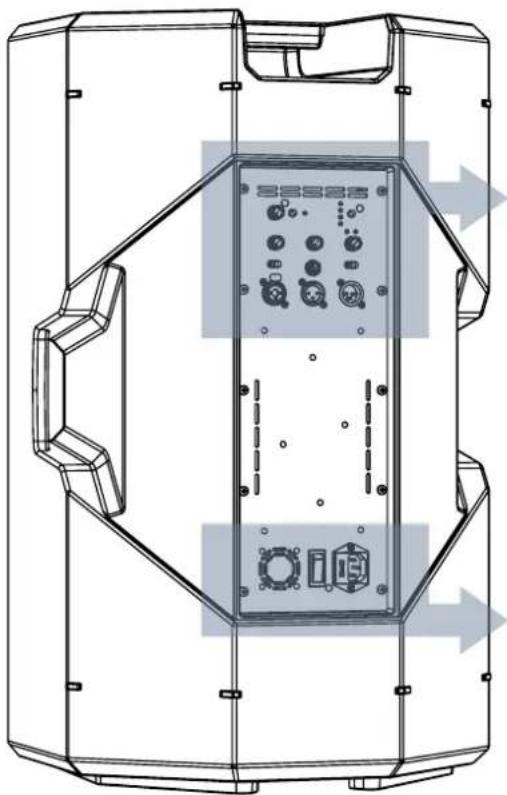
FEATURES OF THE AMPLIFIER AND CONTROL SECTIONS
The amplifier is at the heart of the KL series. The system is controlled by a dedicated powerful DSP that manages the different parameters.
The sound amplification power is 400 W Peak (KL10) and 800 W Peak (KL12-KL15).

WARNING!
- Protect the unit from moisture.
- Never attempt to disassemble the amplifier in any way.
- In the event of a malfunction, remove power supply immediately by disconnecting the unit from the power mains and contact an authorised repair centre.
natural_image
Technical line drawing of a device enclosure with control panel and buttons, no visible text or symbolsPOWER SUPPLY CONTROL
The amplifier panel is made up of:
- Input, Output and Control Section
• Power Supply Unit Section
KL SERIES Code 420120347 REV. 1.0
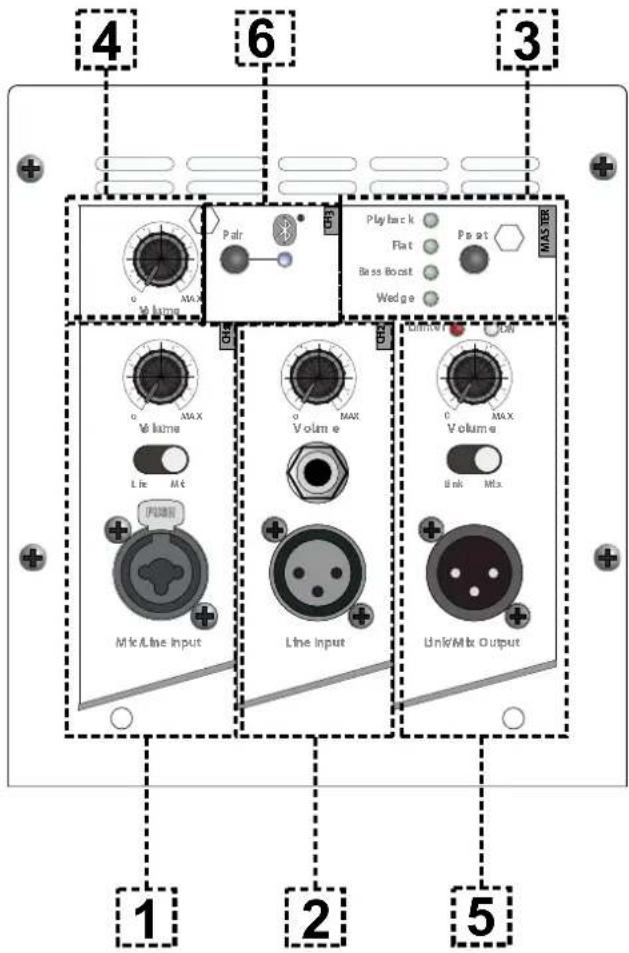
INPUT, OUTPUT AND CONTROL SECTION
1. "CH1" INPUT SECTION
Equipped with a Combo connector to connect cables with both XLR and TRS connectors (balanced and unbalanced), it includes the regulation of the channel level and a switch to adapt the impedance to line level ("Line"), or to microphone level ("Mic").
2. "CH2" INPUT SECTION
Equipped with alternative connector to connect cables with XLR and TRS connectors, it includes the regulation of the line channel level.
3. DSP PRESET
The selectable presets are shown in this table as a reminder.
Playback, suitable for a recorded music program playback Flat, optimised for a response without equalizations or frequency emphasis
Bass boost, with emphasis on low frequencies
Wedge, optimised for use in monitor mode
4. Bluetooth® volume
Bluetooth® channel audio level
5. "Output" SECTION
Equipped with connector for balanced cable (XLR), it includes the Link/Mix Output selector
6. PAIR Bluetooth® key
Bluetooth ^® input synchronisation key.
text_image
4 6 3 0 MAX Pair Play back Flat Bass Boost Wedge MAX/100 0 MAX Volume 0 MAX Line 0 MAX Volume 0 MAX Link 0 Max Line Input Line Input Link/Mix Output 1 2 5POWER SUPPLY UNIT SECTION
text_image
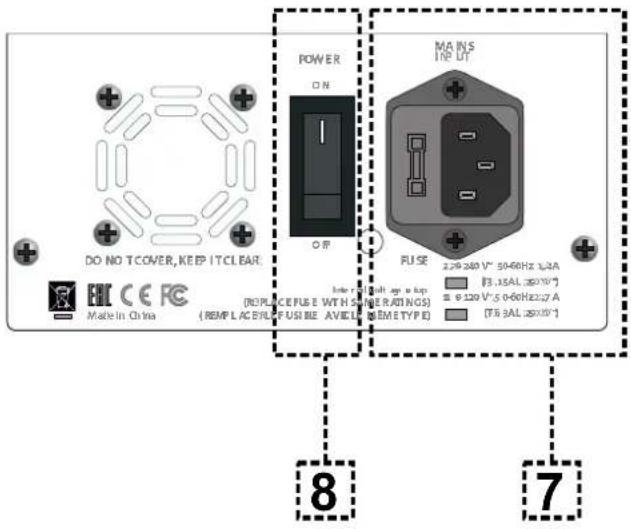
DO NO TCOVER, KEEP IT CLEAR POWER ON OR MA INS IN P D FUSE 2.29-240 V~ 50-68Hz L/3A (73.15AL 250V) E 120 V~ 5-0-6GHz:27 A (76.3AL 250V) 8 77. MAINS INPUT
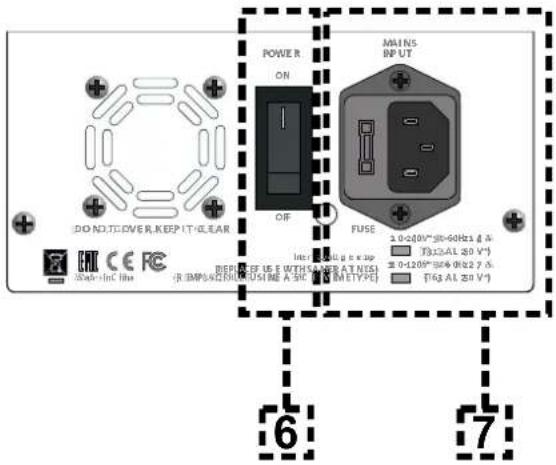
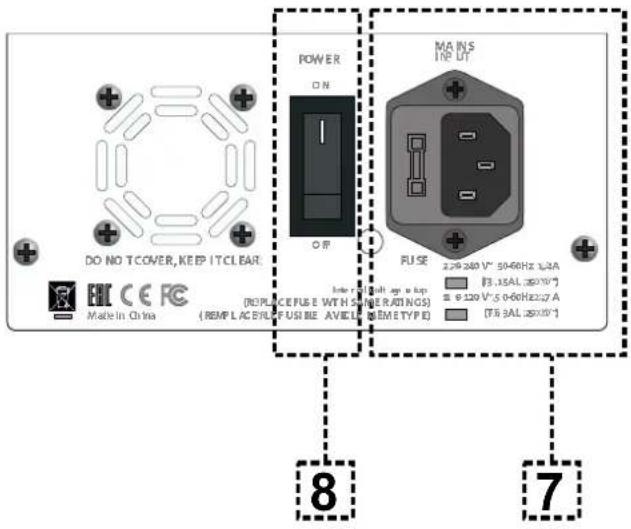
Input for VDE connector for connection to the mains.
8. ON/OFF SWITCH
Switch for turning device ON or OFF.

ATTENTION!
Use only high quality and in good condition cables. The use of poor quality or damaged cables could affect speaker operation.
KL SERIES Code 420120347 REV. 1.0
2. FIRST POWER-UP
PACKAGE CONTENTS
Check that the package content of the KL 10, KL 12 or KL 15 loudspeaker is complete. The package contains:
- KL speaker
• cover
• VDE power cable - quick start user manual and warranty documents
USE
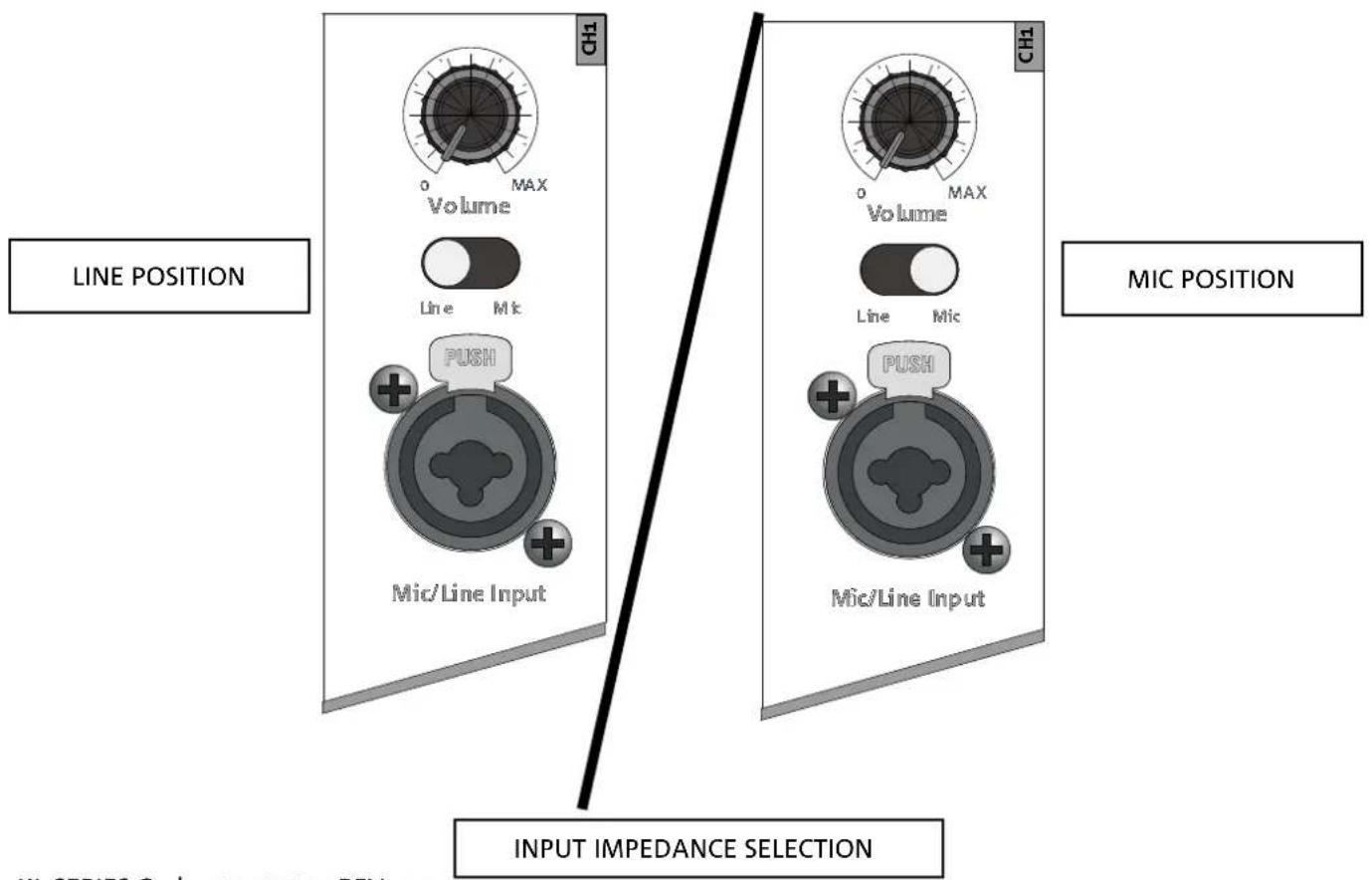
INPUT CONNECTIONS
text_image
LINE POSITION CH1 Volume Line Mic PUSH Mic/Line Input CH1 Volume Line Mic PUSH Mic/Line Input MIC POSITION INPUT IMPEDANCE SELECTION KL SERIES Code: 120120217 REV 1.8KL SERIES Code 420120347 REV. 1.0
It is possible to connect up to 2 wired inputs in the input and control section at the back of the speaker, in addition to the Bluetooth® connection.
The Line/Mic input selection is set to select the impedance to line level or microphone level.
The Out Routing Selector (5) in "Link" position allows providing the output of the second speaker with only the signal coming from the CH1 channel. In the "Mix" position, it allows channel mixing.
Adjust the level of each connected channel.
Once inputs are connected, select the correct DSP preset (3).
USING THE BLUETOOTH®
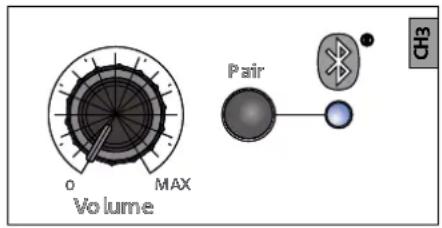
To perform Bluetooth ^® synchronisation, first enable its function on the mobile device to be connected.
Then, on the KL speaker, press the PAIR key; the relevant LED flashes. At this point, the model name will appear on the mobile device: enable the connection, the relevant LED becomes steady.
Now the audio streaming can be played by the speaker.
text_image
Volume MAX Pair CH3KL SERIES Code 420120347 REV. 1.0
POWER SUPPLY CONNECTION
- Connect the power cable to the socket (7), then set the turning on selector (6) to ON.
POWER SUPPLY
text_image
DO NOT COVER, KEEP IT CLEAR POWER ON OFF MAINS INPUT FUSE ±0-200*30-60Hz ± 4A T(12.5) A (20 V*) ±0-120*30-60Hz ± 7A T(6.5) A (20 V*) 6 7CONNECTING THE OUTPUTS OF MULTIPLE MODULES (audio daisy chain)

text_image
1 2 3 4 5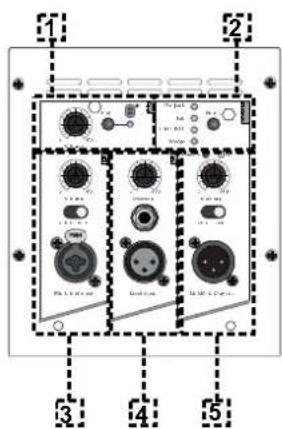
text_image
1 2 3 4 5It is possible to connect the output of an KL speaker to a second speaker using a cable with XLR balanced connector, which connects the output (5) of the first speaker to the input (3) or (4) of the second speaker. If necessary, set the relevant selector to "LINE".
The Out Routing Selector (5) in "Link" position allows providing the output of the second speaker with only the signal coming from the CH1 channel. In the "Mix" position, it allows channel mixing.

ATTENTION!
Use only good quality cables.
Replace any damaged cable to prevent malfunctioning and sound poor quality.
KL SERIES Code 420120347 REV. 1.0
3. USAGE EXAMPLES

- Types of installation other than those here described are not allowed.
- Never use the handles to suspend the speaker
- Always check that the positioning is stable and that the installation does not pose a danger to people, animals or property.
- Perform the installation on a flat, not tilted surface, otherwise an additional safety fastening is mandatory.
INSTALLATION ON STAND
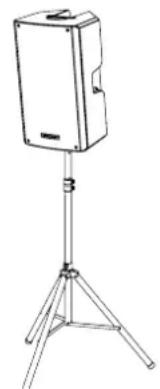
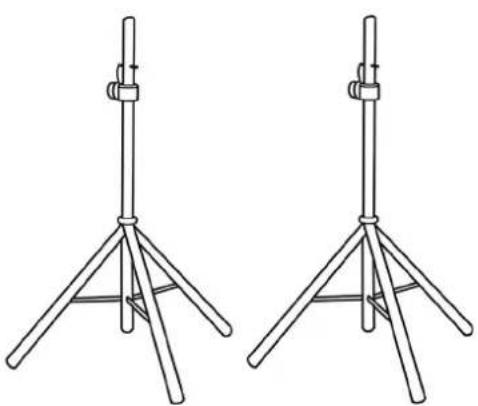
1 KL speaker can be installed on a tripod stand, coming as standard option (accessory SSB2) with a 35 mm diameter pole. The maximum allowed height between the speaker base and the floor is 150 cm for KL10, KL12. KL15.

ATTENTION!
- Use a suitably sized stand with the central leg pointing forward to provide appropriate stability.
INSTALLATION ON SUBWOOFER
Through the installation with the DS2-S accessory, it is possible to use 1 KL directly on subwoofer provided with M20 flange. For further information, refer to the relevant accessory manual.
INSTALLATION ON SUBWOOFER WITH POLE
It is possible to use only one speaker mounted on a 35 mm diameter pole. The maximum allowed height between the speaker base and the floor is 150 cm for KL10, KL12, KL15. In case of DVA S08DP or SUB 28D subwoofer, an additional mechanical fastening or a belt fastening is required to correctly and safely fix the installation.
natural_image
Line drawing of a portable electronic device with a stand and tripod base (no text or symbols)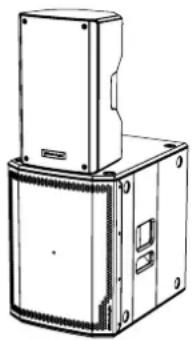
natural_image
Technical line drawing of a mechanical housing or enclosure with mounting brackets and a central panel (no text or symbols)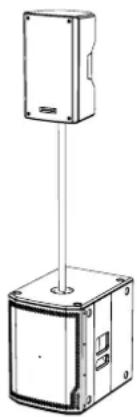
natural_image
Technical line drawing of a mechanical device with a vertical support and base housing (no text or symbols)KL SERIES Code 420120347 REV. 1.0
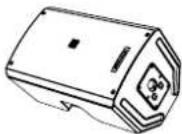
WEDGE (MONITORING) USE
The KL series speakers can be used as monitors for small live contests. In this case, lay them horizontally on the tilted side. Be reminded of the sound coverage features reported in the relevant section. Use the suitable DSP settings as indicated in the "DSP preset" table in wedge mode.
4. ACCESSORIES
To completion of the series, the following accessories are provided as options:
- SSB2, set of tripod stands with diameter 35 mm
natural_image
Two identical line drawings of a tripod-mounted scientific instrument or stand with metal legs and connectors (no text or symbols)SSB2 (PAIR OF TRIPOD STANDS)

WARNING!
- Never suspend the speaker from the handles!
Please read the corresponding manuals for more details.
For all updates on accessories, refer to the website www.dbtechnologies.com
KL SERIES Code 420120347 REV. 1.0
5. TROUBLESHOOTING
The loudspeaker will not turn on:
- Check that power supply is present upstream of the installation.
- Ensure that the power supply cable with VDE connector is properly plugged in.
The speaker turns on but produces no sound:
- Check that the input connections of the audio signal (CH1 and/or CH2) are carried out correctly.
- Check the cables for damage.
- Ensure that the mixer or audio source is on and an output signal is present.
- Check that the input levels (CH1 and/or CH2) are appropriate.
Speaker sound is distorted or not sufficient:
- Adjust the first source volume, then set the input (CH1 and/or CH2) gain to an adequate level. Check the cables for damage and replace them as required (a damaged cable may lead to signal loss or alteration).
- Check that the input selection settings (CH1 -> Mic/Line, CH2 -> Line/Instr) are correct with respect to the source
- Check that the "DSP preset" settings are suitable for the use selected.
A background hum can be heard:
- Disconnect all connected devices and turn power supply off.
- Check that the Ground Lift switch is correctly set.
- Check the connection cables for damage.
- Connect cables again and turn speaker on.
6. SPECIFICATIONS
GENERAL INFORMATION
| Type: | 2-way active speaker |
ACOUSTICAL SPECIFICATIONS
| Frequency response [-10dB]: | 55 Hz - 18 kHz (KL10) / 52 Hz - 18 kHz (KL12) / 48 Hz - 18 kHz (KL15) |
| Frequency response [-6dB]: | 58 Hz - 17 kHz (KL10) / 55 Hz - 17 kHz (KL12) / 52 Hz - 17 kHz (KL15) |
| Max SPL: | 125 dB (KL10) / 127 dB (KL12) / 128 dB (KL15) |
| HF voice coil: | 1” (KL10) / 1.35” (KL12/KL15) |
| HF compression driver (output): | 1” |
| LF: | 10” (KL10) / 12” (KL12) / 15” (KL15) |
| LF Voice coil: | 2” (KL10) / 2.5” (KL12/KL15) |
| Crossover frequency (24 dB/oct): | 2000 Hz (KL10) - 1800 Hz (KL12-KL15) |
| Coverage: | 90° x 60° |
AMPLIFIER
| Type: | Class D(LF)+Class AB(HF) |
| Amplification class: | Class D |
| Power supply | 1 x VDE |
KL SERIES Code 420120347 REV. 1.0
| Peak power: | 400 W (KL10) / 800 W (KL12-KL15) |
PROCESSOR
| Internal controller: | 28-bit/56-bit DSP |
| A/D D/A converter: | 48 kHz |
| Limiter: | Peak, RMS, Limiter |
USER INTERFACE
| Controls: | Bluetooth® Control (level/pair), CH1/CH2 level, Master level, Preset, Link-Mix |
INPUTS & OUTPUTS
| Inputs: | 1 x Combo (XLR/Jack), 1 x (TRS or XLR), 1 x Bluetooth® |
| Outputs: | 1x XLR link OUT |
| Power supply: | 1 x VDE |
POWER SUPPLY SPECIFICATIONS (ABSORPTION / INSTALLATION)
| Absorption at 1/8th of power in medium use conditions (*): | 0.45 A (230 V) - 0.75 A (115 V) [KL10] / |
| Absorption at 1/3rd of power in maximum use conditions (**): | 1.1 A (230 V) - 1.7 A (115 V) [KL10] /1.4 A (230 V) - 2.7 A (115 V) [KL12-KL15] |
| Absorption with speaker on in no-signal condition (idle): | 22.5 W |
| Inrush current: | 14.07 A |
* NOTE FOR INSTALLER: Values refer to 1/8th of power, under average operating conditions (music programme with occasional or no clipping). For any type of configuration we recommend to consider them as minimum sizing values.
** NOTE FOR INSTALLER: Values refer to 1/3rd of power, under heavy operating conditions (music programme with frequent clipping and limiter activation). In case of professional installations and tours we recommend sizing according to these values.
KL SERIES Code 420120347 REV. 1.0
DIMENSIONS
| Material: | Reinforced PP polypropylene |
| Grille: | NC-machined |
| Provisions for fly bar: | Yes |
| Handles: | 2 (on side, on top) |
| Pole mount: | Yes, 36 mm |
| Width: | 310 mm (KL10) 365 mm (KL12) 430 mm (KL15) |
| Height: | 521 mm (KL10) 622.5 mm (KL12) 722.5 mm (KL15) |
| Depth: | 292.5 mm (KL10) 342 mm (KL12) 402 mm (KL15) |
| Weight: | 11.7 kg (KL10) 16.5 kg (KL12) 19.3 kg (KL15) |
Product features, specifications and appearance are subject to changes without prior notice. dBTechnologies reserves the right to make changes or improvements in design or manufacture without any obligation to incorporate such changes or improvements in products manufactured before their introduction.

text_image
AEBA.E.B. Industriale Srl
Via Brodolini, 8
INSTALLATION AUF EINEM SUBWOOFER 49
INSTALLATION AUF EINEM SUBWOOFER MIT PFOSTEN.... 49
WEDGE-VERWENDUNG (MONITORING) 50
4. ZUBEHÖR 51
5. PROBLEMABHILFE 52
natural_image
Simple line drawing of a rectangular frame with dimension labels (no text or symbols)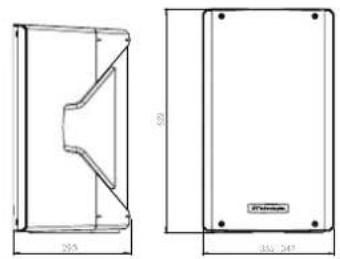
natural_image
Technical drawing of a mechanical part with front and side views, no text or symbols present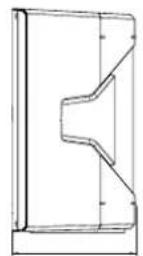
natural_image
Simple line drawing of a rectangular frame with mounting holes and dimension lines (no text or symbols)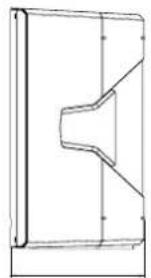
natural_image
Pure technical line drawing of a mechanical part with no text, numbers, or symbolsAKUSTISCHE ABDECKUNG
natural_image
Technical line drawing of a speaker enclosure with visible sound waves and mounting brackets (no text or symbols)natural_image
Line drawing of a flat-screen TV stand with tripod base (no text or symbols)natural_image
Technical line drawing of a mechanical enclosure with internal components and directional arrows indicating motion (no text or symbols)STROMVERSORGUNGBEDIENELEMENTE
text_image
4 6 3 0 MAX Pair Play back Flat Bass Boost Wedge MAX/100 0 MAX Volume 0 MAX Line MIX Volume 0 MAX Link Mix MIX Line Input Line Input Link/Mix Output 1 2 5text_image
DO NO TCOVER, KEEP IT CLEAR POWER ON OR MA INS IN P D FUSE 2.29-240 V~ 50-68Hz L/3A [73.15AL @50V] E 120 V~ 5-0-6GHz:27 A [76.3AL @50V] 8 7text_image
Volume MAX Pair CH3text_image
Diagram showing two labeled electronic device modules with numbered ports and a highlighted yellow component, likely for system or equipment reference.INSTALLATION AUF EINEM SUBWOOFER
INSTALLATION AUF EINEM SUBWOOFER MIT PFOSTEN
natural_image
Line drawing of a portable electronic device with a stand and tripod base (no text or symbols)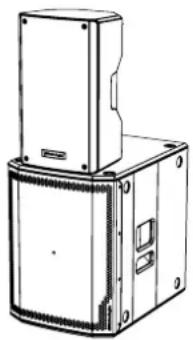
natural_image
Technical line drawing of a mechanical housing or enclosure with mounting brackets and a central cover (no text or symbols)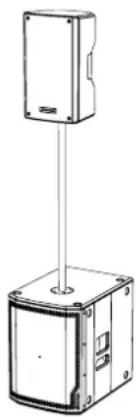
natural_image
Technical line drawing of a mechanical device with a vertical support structure (no text or symbols)WEDGE-VERWENDUNG (MONITORING)
natural_image
Two identical line drawings of a tripod-mounted scientific instrument or stand with metal legs and connectors (no text or symbols)SSB2 (PAAR DREIBEINE)

ACHTUNG!
DONNÉES ACOUSTIQUES 70
AMPLIFICATEUR.... 70
PROCESSEUR....71
INTERFACE UTILISATEUR 71
ENTRÉES ET SORTIES.... 71
SPÉCIFICATIONS D'ALIMENTATION (ABSORPTION / INSTALLATION) 71
DIMENSIONS 72
KL SERIES Code 420120347 RÉV. 1.0
1. INFORMATIONS GÉNÉRALES
BIENVENUS!
natural_image
Simple line drawing of a rectangular frame with dimension labels (no text or symbols)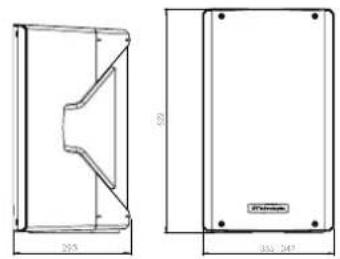
natural_image
Technical drawing of a mechanical component with front and side views, no text or symbols present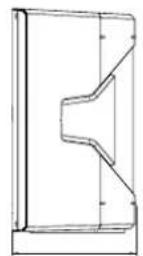
natural_image
Simple line drawing of a rectangular frame with mounting holes and dimension labels (no text or symbols)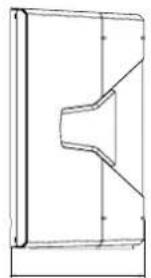
natural_image
Pure technical line drawing of a mechanical part without any text, numbers, or symbolsCOUVERTURE ACOUSTIQUE
natural_image
Technical line drawing of a speaker chamber with visible sound waves and mounting brackets (no text or symbols)KL SERIES Code 420120347 RÉV. 1.0
MÉCANIQUE
text_image
A B PUSH PUSH 7.5° PUSH PUSH 0°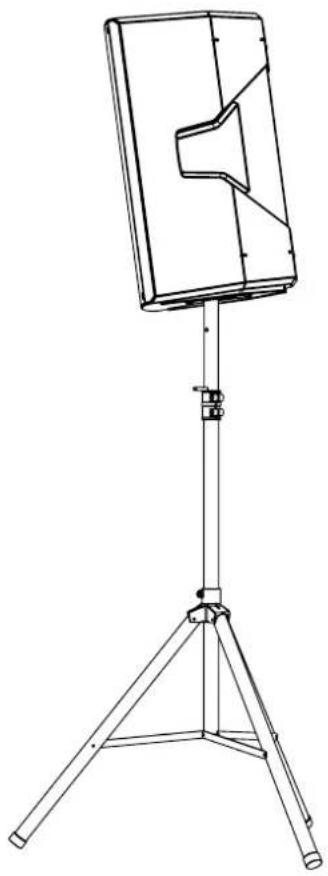
natural_image
Line drawing of a tripod-mounted stand with a rectangular panel and speaker grille (no text or symbols)natural_image
Technical line drawing of a device enclosure with control panel and buttons, no visible text or symbolsALIMENTATIONCONTRÔLE
KL SERIES Code 420120347 RÉV. 1.0
SECTION D'ENTRÉE, DE SORTIE ET DE CONTRÔLE
text_image
4 6 3 0 MAX Pair Play back Flat Bass Boost Wedge MAX/100 0 MAX Volume 0 MAX Line 0 MAX Volume 0 MAX Link 0 Max Line Input Line Input Link/Mix Output 1 2 5SECTION D'ALIMENTATION
text_image
DO NO TCOVER, KEEP IT CLEAR POWER ON OR MA INS IN P D FUSE 2.29-240 V~ 50-68Hz L/3A (73.15AL 250V) E 120 V~ 5-0-6GHz:27 A (76.3AL 250V) 8 7text_image
Volume MAX Pair CH3KL SERIES Code 420120347 RÉV. 1.0
CONNEXION DE L'ALIMENTATION
INSTALLATION SUR SUBWOOFER AVEC POTEAU
natural_image
Line drawing of a portable electronic device with a stand and tripod base (no text or symbols)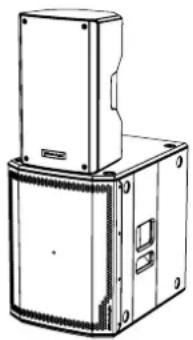
natural_image
Technical line drawing of a mechanical housing or enclosure with mounting brackets and a central panel (no text or symbols)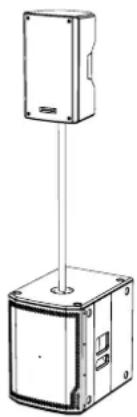
natural_image
Technical line drawing of a mechanical device with a vertical support and base housing (no text or symbols)KL SERIES Code 420120347 RÉV. 1.0
UTILISATION WEDGE (MONITORING)
natural_image
Two identical line drawings of a tripod-mounted scientific instrument or stand with metal legs and connectors (no text or symbols)SSB2 (PAIRE DE TRÉPIEDS)

ATTENTION!
natural_image
Technical line drawing of a speaker enclosure with visible sound waves and mounting brackets (no text or symbols)SERIE KL Cód. 420120347 REV. 1.0
MECÁNICA
text_image
A B PUSH PUSH 7.5° PUSH PUSH 0°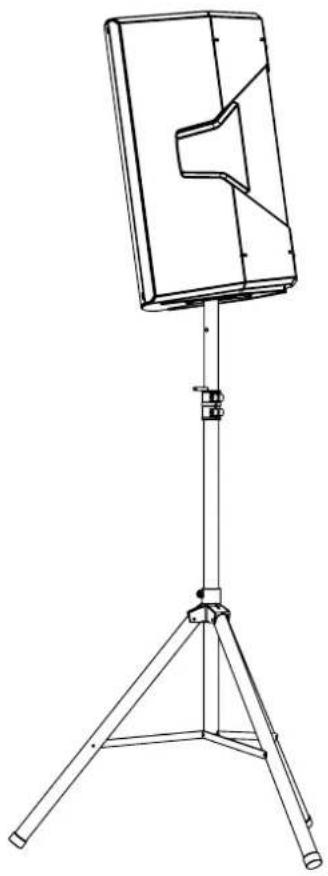
natural_image
Line drawing of a flat-screen TV stand with tripod base (no text or symbols)natural_image
Technical line drawing of a mechanical enclosure with internal components and directional arrows indicating movement (no text or symbols)ALIMENTACIÓNCONTROL
text_image
4 6 3 0 MAX Pair Play back Flat Bass Boost Wedge MAX 0 MAX Volume 0 MAX Line MIX Volume 0 MAX Link Mix 1 2 5SERIE KL Cód. 420120347 REV. 1.0
text_image
DO NO TCOVER, KEEP IT CLEAR POWER ON OR MA INS IN P D FUSE 2.29-240 V~ 50-68Hz L/3A [73.15AL @50V] E 120 V~ 5-0-6GHz:27 A [76.3AL @50V] 8 7text_image
Volume MAX Pair CH3text_image
Diagram showing two labeled electronic device modules with numbered ports and a highlighted yellow component, likely for system or equipment reference.natural_image
Line drawing of a portable electronic device with a stand and tripod base (no text or symbols)
natural_image
Technical line drawing of a mechanical housing or enclosure with mounting brackets and a central cover (no text or symbols)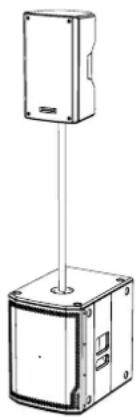
natural_image
Technical line drawing of a mechanical device with a vertical support structure (no text or symbols)SERIE KL Cód. 420120347 REV. 1.0
USO WEDGE (MONITORING)
natural_image
Two identical line drawings of a tripod-mounted stand with metal legs and connectors (no text or symbols)SSB2 (PAR DE TRÍPODES)