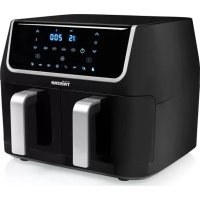
FR6970 - Deep fryer TRISTAR - Free user manual and instructions
Find the device manual for free FR6970 TRISTAR in PDF.



| Product type | Air fryer |
| Brand | TriStar |
| Model | FR6970 |
| Dual basket | Yes, two independent baskets |
| Touch screen | Dual touch screen |
| Programmed cooking modes | 8 modes (fries, fish, seafood, poultry, cake, steak, pork, vegetables) |
| Temperature range | 80°C to 200°C (in 5°C increments) |
| Timer | 1 to 60 minutes |
| Shake function | Yes, with audible reminder at mid-cooking |
| Sync function | Yes, to finish cooking both baskets at the same time |
| Preheat | Yes, adjustable temperature and time |
| Automatic shutdown | Yes, at end of cooking with cooling fan |
| Safety | Micro-switch stops the appliance if baskets are removed |
| Cleaning | Baskets and crisper trays are dishwasher safe (top rack) |
| Non-stick coating | Yes, on the crisper trays |
Frequently Asked Questions - FR6970 TRISTAR
User questions about FR6970 TRISTAR
0 question about this device. Answer the ones you know or ask your own.
Ask a new question about this device
Download the instructions for your Deep fryer in PDF format for free! Find your manual FR6970 - TRISTAR and take your electronic device back in hand. On this page are published all the documents necessary for the use of your device. FR6970 by TRISTAR.
USER MANUAL FR6970 TRISTAR
EN | Instruction manual
natural_image
Black TRECOR air fryer with two side dishes, no visible text or symbols on the main body.FR-6970
\*\*\* TRISTAR
PARTS DESCRIPTION / ONDERDELENBESCHRUVING / DESCRIPTION DES PIÈCES / TEILEBESCHREIBUNG / DESCRIPCIÓN DE LAS PIEZAS / DESCRIÇÃO DOS COMPONENTES / DESCRIZIONE DELLE PARTI / BESKRIVNING AV DELAR / OPIS CZĘŚCI / POPIS SOUĆASTÍ / POPIS SÚĆASTÍ
SAFETY
- By ignoring the safety instructions the manufacturer cannot be held responsible for the damage.
- If the supply cord is damaged, it must be replaced by the manufacturer, its service agent, or similarly qualified persons in order to avoid a hazard.
- Never move the appliance by pulling the cord and make sure the cord cannot become entangled.
• The appliance must be placed on a stable, level surface. - The user must not leave the device unattended while it is connected to the supply.
- This appliance is not intended for use by persons (including children) with reduced physical, sensory or mental capabilities, or lack of experience and knowledge unless they have been given supervision or instruction concerning use of the appliance by a person responsible for their safety.
-
Close supervision is necessary when any appliance is used by or near children.
-
WARNING: Spilled food can cause serious burns. Keep appliances and cords away from children. Never drape the cord over the edge of a counter, never use an outlet below the counter, and never use with an extension cord.
- The use of accessory attachments not recommended by the appliance manufacturer may cause injuries.
- Do not use this appliance outdoors.
- Do not place on or near a hot gas or electric burner, or in a heated oven.
- Do not clean with metal scouring pads. Pieces can break off the pad and touch electrical parts, creating a risk of electric shock.
- Use extreme caution when removing the frying baskets.
- Extreme caution must be used when moving an appliance containing hot oil or other hot liquids.
- CAUTION: To protect against damage or electric shock, do not cook in the base unit. Cook only in the frying baskets provided.
- To disconnect, press the power button, then remove the plug from the wall outlet.
\*\*\* TRISTAR Instruction manual
- Do not use the frying baskets if dented or worn.
- WARNING: Never deep-fry in the Aerofryer, THIS IS DANGEROUS, AND CAN CAUSE A FIRE AND SERIOUS DAMAGE.
• Always ensure the appliance is properly assembled before use. - Never touch any exposed heating elements.
• To protect yourself against an electric shock, do not immerse the cord, plug, or appliance in the water or any other liquid.
• This appliance is intended to be used in household and similar applications such as: - Staff kitchen areas in shops, offices, and other working environments.
- By clients in hotels, motels, and other residential-type environments.
- Bed and breakfast type environments.
- Farmhouses.
• Children shall not play with the appliance.
• To protect yourself against an electric shock, do not immerse the cord, plug or appliance in the water or any other liquid. - Do not heat the food for too long.
-
The heating element surface is subject to residual heat after use.
-
Surface is liable to get hot during use.
- WARNING: If the surface is cracked, switch off the appliance to avoid the possibility of an electric shock.
- The temperature of accessible surfaces may be high when the appliance is operating.
- The appliance is not intended to be operated by means of an external timer or a separate remote-control system.
• The appliance is to be connected to a socket-outlet having an earthed contact (for class I appliances). - In order to prevent disruptions of the airflow do not put anything on top of the appliance and make sure there is always 10 centimeter of free space around the appliance.
- This appliance is only to be used for household purposes and only for the purpose it is made for. In the worst case, the food can catch fire.

This product complies with conformity requirements of the sole European regulations or directives.

The Eurasian Conformity mark (EAC) is a certification mark to te products that conform to all technical regulations of the iian Customs Union.

This symbol is used for marking materials intended to come intact with food in the European Union as defined in regulation to 1935/2004.

The Green Dot is the registered trademark of Der Grüne Duales System Deutschland GmbH and is protected as a dark worldwide. The logo may only be used by customers of mbH holding a valid trademark usage contract or by engaged management companies within the Federal Republic of my. This also applies to reproduction of the logo by third in a dictionary, an encyclopaedia or an electronic database using a reference manual.

The product and packaging materials are recyclable, subjected to the manufacturer responsibility. Dispose it separately, using the illustrated packaging symbols, for better waste content. The Triman logo is valid in France only.

The universal recycling symbol, logo, or icon is an tionally recognized symbol used to designate recyclable als. The recycling symbol is in the public domain and is not a ark.

Waste electrical products should not be disposed of with hold waste. Please recycle where facilities exist. Check with local Authority or local store for recycling advice.
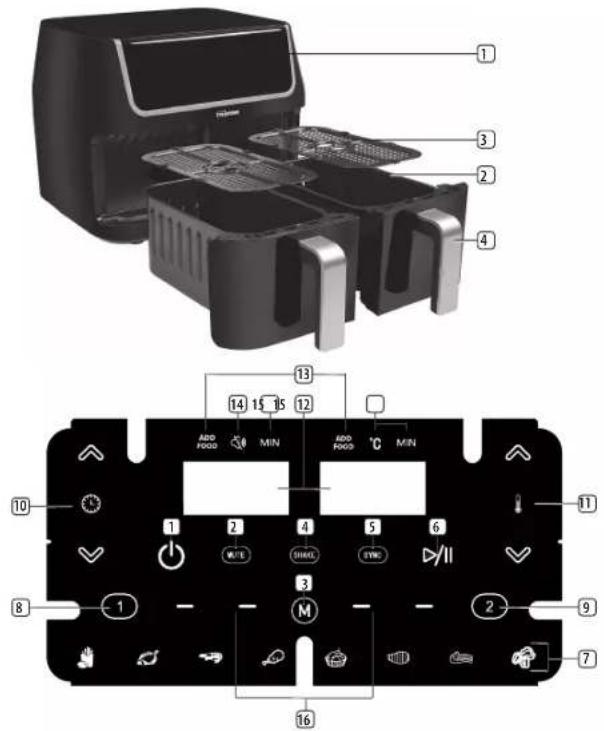
PARTS DESCRIPTION
- Dual Touchscreen Control
- Aero Fryer Baskets
- Non-Stick Crisping Trays
- Basket Handles
Dual Touchscreen Control Panel
- ON/STANDBY icon
- MUTE icon
- MODE icon
- SHAKE FOOD icon
- SYNC icon
- START/PAUSE icon
7.8 Cooking pre-sets - Basket 1 icon

STAR
Instruction manual
- Basket 2 icon
- Time UP/DOWN icons
- Temperature UP/DOWN icons
- Dual Digital TIME/TEMP display
- Dual [ADD FOOD] indicators
- Mute indicator
- Time /Temperature indicators
- Operating indicators
BEFORE THE FIRST USE
- Remove all packaging material.
- Remove any stickers or labels from the appliance.
• Thoroughly clean the parts with hot water, some washing-up liquid, and a non-abrasive sponge. - Wipe the inside and outside of the appliance with a moist cloth.
- Place the appliance on a stable, horizontal, and level surface, do not place the appliance on non-heat-resistant surfaces.
- This is an Aerofryer that works on hot air. Do not fill the pan with oil or frying fat.
• In order to prevent disruptions of the airflow do not put anything on top of the appliance and make sure there is always 10 centimeters of free space around the appliance.
FUNCTIONS OF THE DUAL TOUCHSCREEN PANEL

ON/STANDBY
• To turn the appliance on and activate the dual display.
• To switch the appliance into standby mode.
- To end an operation. The fan will continue to work for 20 seconds to cool down the appliance, OFF will be seen in the display of the active basket(s).

MUTE
- Mute to silence or re-enable all sounds, not including [SYNC] or [SHAKE] alerts.

SHAKE
- Use the [SHAKE] function to be reminded to shake the basket(s) halfway through the cooking time by hearing 5 beeps.

SYNC
- Use the SYNC function to finish cooking foods in both baskets at the same time.

START/PAUSE
• To start or pause an operation.


- To increase or decrease the time by one minute. Touch and hold for rapid increase or decrease.
• The time setting range is 1-60 minutes.


ature Up/Down
- To increase or decrease the temperature in 5-degree increments. Touch and hold for rapid increase or decrease.
• The temperature control range is 80irc C - 200irc C.


1 and 2
- Touch to choose between Basket 1 or Basket 2. While the icon flashes the baskets can be programmed.
- Long press to reset the time to 00 minutes.

MODE
- Touch repeatedly to scroll between 8 pre-set cooking programs.
8 Cooking pre-set programs
| Food Temperature(°C) | Time(min) | Shake advice | |
| Fries 200°C 25 |
| Fish 160°C 25 | √ | ||
| Shellfish 160°C 20 | √ | ||
| Poultry 200°C 25 | √ | ||
| Bake 160°C 30 | ✕ | ||
| Steak 180°C 10 | √ | ||
| Pork 200°C 15 | √ | ||
| Vegetable 140°C 10 | ✕ |
Dual Touchscreen Control Panel Indicators
ADD
FOOD - ADD FOOD
- When using the [SYNC] function the [ADD FOOD] indicator will illuminate when it is time for the food to be added to the second basket.

MUTE
- The MUTE indicator will illuminate when the MUTE function has been activated

41Ntemperature and Time
\*\*\* TRISTAR Instruction manual
• Alternating display of the temperature and the remaining cooking time during operation.
Operating indicators
- Runs successively when in operation and flashes when the operation has been interrupted.
PREPARATION AND USE
Preparation
- Place the appliance on a stable, horizontal, and level surface, do not place the appliance on non-heat-resistant surfaces.
- Plug the appliance in an earthed socket, it will beep once and the ON/STANDBY icon will illuminate.
- Touch the ON/STANDBY icon. The appliance will beep once, the control panel will illuminate and the Basket 1 icon will flash repeatedly.
Pre-heating the appliance
Generally, it is not always necessary to preheat the Aerofryer however if your recipe does require pre-heating follow these steps below.
- If needed, place the crisping trays in the baskets.
- Place the empty baskets in the Aerofryer.
- Manually set the pre-heating time and temperature to 80ircC for 5 minutes by the using the Temperature Up/Down and the Time Up/Down icons.
- Press [START/PAUSE] to start the operation.
- The appliance will start pre-heating. The "In Operation" indicators will run and the temperature and the remaining time will be shown in the display.
- When the operation is complete the appliance will beep 5 times and the ON// STANDBY icon will illuminate and the appliance is ready for use.
USE
- Note: When cooking in both baskets simultaneously, it is advisable to cook similar foods for which the desired heating temperatures would not vary more than 20ircC .
- Remove the empty basket(s) from the Aerofryer.
- If needed, place the crisping trays in the baskets.
- Place the food in either or both of the baskets and slide the baskets back into the Aerofryer.
- Note: Do not overfill. To ensure proper cooking and air circulation, NEVER fill any Aerofryer basket more than 2/3 full.
- Touch the ON/STANDBY icon. The appliance will beep once, the control panel will illuminate and the Basket 1 icon will flash repeatedly.
- Program the Baskets by using a suitable pre-set cooking program or use manual programming of the cooking time and temperature.
Using a pre-set program
- Select Basket 1 by touching the Basket 1 icon.
- Choose 1 of the 8 pre-set programs for Basket 1 by touching the MODE icon repeatedly until the icon of the desired cooking preset flashes.
- If desired, you can adjust the pre-set time and temperature of Basket 1 by using the Time Up/Down and Temperature Up/Down icons.
- Basket 2 will use the same time and temperature settings as Basket 1, however the time for Basket 2 can be manually adjusted to end earlier or later than Basket 1. Only 1 temperature can be set when using both baskets at the same time.
- If desired, touch the Basket 2 icon then use the Time UP/DOWN icons to adjust the time for Basket 2.
- Touch the START/PAUSE icon to start the operation. The "in operation" indicators will run, the temperature and time left will be displayed alternatively in the displays.
- When the operation is complete the appliance will beep 5 times, the ON/ STANDBY icon will illuminate and the fan will continue running for 20 seconds to cool down the appliance.
- Remove the food from the baskets, unplug the appliance and allow it to cool down for 30 minutes before cleaning.
Manual programming of the Time and Temperature
- Program the time and temperature for Basket 1 by using the Time UP/DOWN and Temperature UP/DOWN icons.
-
Basket 2 will use the same time and temperature settings as Basket 1, however the time for Basket 2 can be manually adjusted to end earlier or later than Basket 1. Only 1 temperature can be set when using both baskets at the same time.
-
If desired, touch the Basket 2 icon then use the Time UP/DOWN icons to adjust the time for Basket 2.
- Touch the START/PAUSE icon to start the operation. The "in operation" indicators will flash, the temperature and time left will be displayed alternatively in the displays.
- When the operation is complete the appliance will beep 5 times, the ON/ STANDBY icon will illuminate and the fan will continue running for 20 seconds to cool down the appliance.
- Remove the food from the baskets, unplug the appliance and allow it to cool down for 30 minutes before cleaning.
Using the SHAKE function
When the [SHAKE] function is activated the appliance will beep 5 times halfway through the operation, reminding you to shake the basket(s). Alternatively you can use the START/PAUZE icon pause and resume an operation after shaking or checking the food without being reminded.
Shaking your food allows it to cook more evenly adding crisp and colour to your dish.
- Note: This function cannot be activated when using the presettings for BAKE and VEGETABLES.
- Before starting an operation activate the [SHAKE] function by touching the [SHAKE] icon for the selected basket. The [SKAKE] indicator will be shown in the display of the selected basket(s). Halfway through the operation the appliance will beep 5 times reminding you to shake the basket(s).
- To deactivate the [SHAKE] function, touch the [SHAKE] icon again.
\*\*\* TRISTAR Instruction manual
- When the reminder is heard, the [SHAKE] icon will flash in the display.
- Remove the basket(s) from the Aerofryer, shake them as needed then place them back into the Aerofryer.
• The operation will automatically resume.
Using the SYNC function
With the SYNC function, the food in each basket will start cooking separately and finish cooking at the same time.
- Add the food with the longest cooking time to Basket 1.
- Program Basket 1 manually or by using one of the pre-settings.
- Note: Basket 2 will use the same temperature setting as Basket 1.
- Program the time for Basket 2 manually by selecting Basket 2 then using the Time UP/DOWN icons.
- Touch the [SYNC] icon to activate the [SYNC] function.
• The [SYNC] indicator will show in the display.
- Touch the START/PAUSE icon to start the operation.
- Basket 1 will begin cooking, the time and temperature settings will be displayed alternatively in the display.
- Once the time has come for the food to be added to the 2nd basket the appliance will beep 5 times and the [ADD FOOD] indicator of Basket 2 will flash.
- Add the food to Basket 2 and slide it back into the Aerofryer.
• The operation will automatically resume.
- Note: Once cooking has started the SYNC FINISH function will not be operable.
Aero Frying Pre Packaged Frozen Foods
- As a rule, depending on the food and the amount to be cooked, the suggested cooking times may have to be slightly adjusted.
TIPS
• Always pat dry foods before cooking to avoid excess smoke and encourage browning.
• To ensure even cooking/ browning, ALWAYS open the active basket halfway through the cooking time and check, turn or shake the foods in the fryer baskets and determine the final cooking time and temperature.
- CAUTION: Always use oven mittens when handling the Aero Fryer baskets
- WARNING! This Dual Basket Aerofryer should not be used to boil water.
- WARNING! This Dual Basket Aerofryer should never be used to deep fry foods.
- NEVER operate your appliance with the baskets open.
- When the cooking time has elapsed, cooking will automatically stop and the fan will continue running for 20 seconds to cool down the appliance.
- Let the appliance cool down for approximately 30 minutes before handling, cleaning, or storing.
- The appliance is equipped with an internal microswitch that automatically shuts down the fan and heating element when the baskets are removed during an operation.
CLEANING AND STORAGE
- Before cleaning, unplug the appliance and wait for it to cool down completely.
- Remove the baskets from the Aerofryer. Make sure both fryer baskets and crisping trays have cooled down completely.
- Both fryer baskets and crisping trays are dishwasher-safe. For best results, place in the top rack of your dishwasher.
Note: The removable frying baskets and crisping trays are dishwasher safe, however, we recommend washing them by hand as this will be beneficial for the lifetime of the product. Wash both baskets and crisping trays in hot soapy water. Do not use metal kitchen utensils, abrasive cleansers or cleaning products as this may damage the non-stick coating. Never use harsh chemical detergents, scouring pads or powders on any of the parts or accessories.
- Wipe the exterior of the Aerofryer with a warm, soft and non-abrasive damp cloth.
- Use a small soft brush or cotton swab if necessary to clean hard to reach places.
- Never pour any liquid into the base of the unit.
- Dry each piece thoroughly before reinstalling.
Storing Instructions
- Clean the appliance before storing.
- Store the unit in its original box and in a cool, dry place.
TROUBLESHOOTING
| Problem Possible Cause Solution | ||
| The Aerofryer does not work. The displays on the control panel do not switch on | The mains plug is not inserted correctly in the plug socket | Push the mains plug into the plug socket as far as it will go |
| The plug socket is defective. | Try another plug socket. | |
| The overheating protection has been triggered | Pull the mains plug out of the plug socket and allow the Aerofryer to cool down completely. Then try again. If the Aerofryer still cannot be switched on, contact the customer service department. | |

TRISTAR
Instruction manual
| The food has not been cooked evenly | Different items of food with different cooking times have been prepared at the same time | Place food with a longer cooking time in the Aerofryer first, then add ingredients with a shorter cooking time later |
| Items of food which require different cooking temperatures have been prepared at the same time. | Prepare items of food with different cooking temperatures one after the other. | |
| The set cooking time was too short or the temperature too low | Increase the cooking time or temperature | |
| The items of food are piled on top of one another | Spread the food and mix it | |
| There are too many ingredients in the baskets | Reduce the amount of ingredients | |
| The food is slightly burnt | The selected temperature is too high or the cooking time too long | Reduce the temperature or cooking time |
| Chips made from fresh potatoes are not crispy | The potatoes contain too much water | Cut the potatoes into narrower pieces. Dab the potato pieces dry and then trickle a little cooking oil over them |
| During use, an unpleasant smell is detected | The Aerofryer is dirty F | Follow the instructions for cleaning under the “Cleaning and Maintenance” section of this manual |
| During use, an unpleasant smell is detected | The Air Fryer is being used for the first time. | A smell often develops when new appliances are first used. The smell should disappear once the appliance has been used several times |
| Error Codes E1 - Broken | circuit of the thermal sensor. | Contact the customer service department. |
| E2 - Short circuit of the thermal sensor |
ENVIRONMENT

Instruction manual
This appliance should not be put into the domestic garbage at the end of its durability, but must be offered at a central point for the recycling of electric and electronic domestic appliances. This symbol on the appliance, instruction manual and packaging puts your attention to this important issue. The materials used in this appliance can be recycled. By recycling of used domestic appliances you contribute an important push to the protection of our environment. Ask your local authorities for information regarding the point of recollection.
Support
You can find all available information and spare parts at service.tristar.eu!
EN
ADD FOOD - ADD FOOD (AJOUTER LES ALIMENTS)
ON/STANDBY (ZAP./POHOT. REŽIM)
FOOD – ADD FOOD (PRIDAT POTRAVINU)



- \*\*\* TRISTAR
- SAFETY
- \*\*\* TRISTAR Instruction manual
- PARTS DESCRIPTION
- Dual Touchscreen Control Panel
- BEFORE THE FIRST USE
- FUNCTIONS OF THE DUAL TOUCHSCREEN PANEL
- ON/STANDBY
- MUTE
- SHAKE
- SYNC
- START/PAUSE
- ature Up/Down
- and 2
- MODE
- Dual Touchscreen Control Panel Indicators
- ADD
- FOOD - ADD FOOD
- 41Ntemperature and Time
- Operating indicators
- PREPARATION AND USE
- Preparation
- Pre-heating the appliance
- USE
- Using a pre-set program
- Manual programming of the Time and Temperature
- Using the SHAKE function
- Using the SYNC function
- Aero Frying Pre Packaged Frozen Foods
- TIPS
- CLEANING AND STORAGE
- Storing Instructions
- TROUBLESHOOTING
- TRISTAR
- ENVIRONMENT
- Support
- ADD FOOD - ADD FOOD (AJOUTER LES ALIMENTS)
- ON/STANDBY (ZAP./POHOT. REŽIM)
- FOOD – ADD FOOD (PRIDAT POTRAVINU)
Brand : TRISTAR
Model : FR6970
Category : Deep fryer