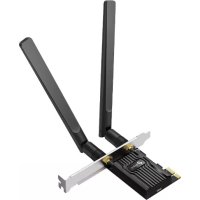
Archer TX20E - Network card / adapter TP-LINK - Free user manual and instructions
Find the device manual for free Archer TX20E TP-LINK in PDF.


| Product Type | Internal WiFi + Bluetooth Network Card |
| Brand | TP-Link |
| Model | Archer TX20E |
| Interface | PCI Express x1 |
| Wi-Fi Standard | Wi-Fi 6 (802.11ax) |
| Frequency Bands | 2.4 GHz and 5 GHz |
| Maximum Data Rate | Up to 2402 Mbps on 5 GHz, 574 Mbps on 2.4 GHz |
| Bluetooth | Bluetooth 5.2 |
| Antennas | 2 detachable external antennas |
| Dimensions (card) | Approximately 120 x 60 x 20 mm |
| Weight | Approximately 50 g |
| Power Supply | Via PCI Express slot |
| Internal USB Connector | Yes, for Bluetooth |
| Supported Operating Systems | Windows 11, 10, 8.1, 8, 7 |
| Wireless Security | WPA, WPA2, WPA3 |
| Operating Temperature | 0 °C to 40 °C |
| Operating Humidity | 10% to 90% non-condensing |
| Package Contents | Adapter card, 2 antennas, USB cable, low-profile bracket, driver CD, installation guide |
| Care | Clean with a soft, dry cloth. Do not use chemical products. |
| Safety | Do not expose to water, fire, or excessive heat. Do not disassemble. |
| Warranty | Consult the TP-Link website for details |
Frequently Asked Questions - Archer TX20E TP-LINK
User questions about Archer TX20E TP-LINK
0 question about this device. Answer the ones you know or ask your own.
Ask a new question about this device
Download the instructions for your Network card / adapter in PDF format for free! Find your manual Archer TX20E - TP-LINK and take your electronic device back in hand. On this page are published all the documents necessary for the use of your device. Archer TX20E by TP-LINK.
USER MANUAL Archer TX20E TP-LINK
Quick Installation Guide
WLAN Bluetooth PCI Express Adapter
For technical support, the user guide and other information, please visit https://www.tp-link.com/support/
© 2023 TP-Link 7106510499 REV1.2.0
Images may differ from actual products.
CONTENTS
01 / Deutsch
04 / English
07 / Español
10 / Ελληνικά
13 / Français
16 / Italiano
19 / Português
22 / Suomi
25 / Nederlands
28 / Svenska
31 / Norsk
34 / Dansk
Bevor Sie anfangen:
natural_image
Isometric line drawing of a desktop computer tower with an attached cable and directional arrow (no text or symbols)natural_image
Diagram of a computer motherboard with connectors and a USB cable (no text or symbols)Deutsch
text_image
Diagram showing a computer tower connected to a wall-mounted device, with an inset magnified view highlighting the device's internal structure.natural_image
Diagram of a computer setup with an attached power outlet and a close-up view showing USB connector (no text or symbols present)natural_image
Line drawing of a desktop computer tower with an attached cable (no text or symbols)3 Treiber installieren
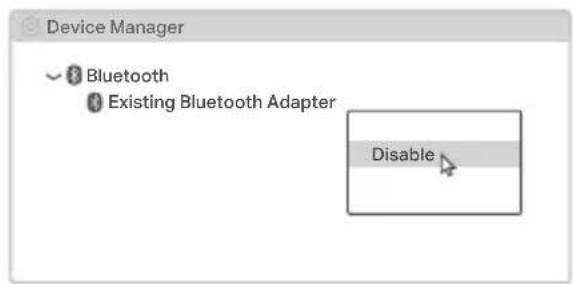
If you plan on using Bluetooth and already have connected Bluetooth devices, proceed with step 1. Otherwise, skip to step 2.
1 Disable Bluetooth
a. Right-click My Computer, select Manage, go to Device Manager.
b. Expand the Bluetooth node to find your existing Bluetooth device.
c. Right-click the existing Bluetooth device and select Disable.
Note:
Make sure you have disabled all existing Bluetooth devices (both built-in and third party).
text_image
Device Manager Bluetooth Existing Bluetooth Adapter Disable2 Connect to a Computer
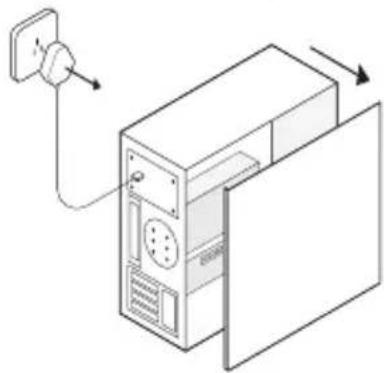
a. Turn off your computer, unplug the power cable then remove the case panel.
natural_image
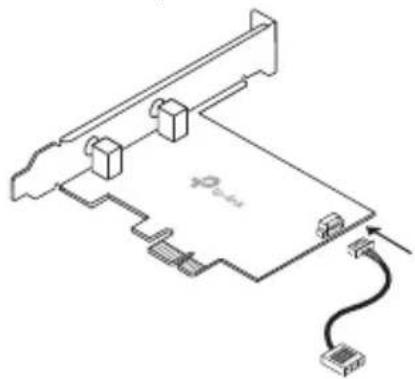
Isometric line drawing of a desktop computer tower with an attached power outlet (no text or symbols)b. Connect the provided USB cable to the adapter.
natural_image
Diagram of a computer motherboard with connectors and a cable, no text or symbols presentc. Locate an available PCIE X1 slot and carefully insert the adapter.
Note:
If the bracket is not suitable for your computer, detach it from the adapter's board and replace it with the low-profile bracket.
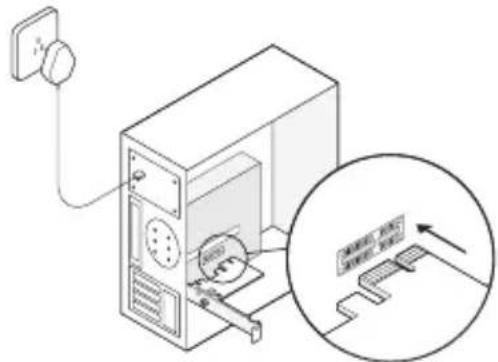
text_image
Diagram showing a computer tower connected to a wall-mounted device, with an inset magnified view highlighting the device's internal structure.d. Locate an available F_USB connector and carefully plug the USB cable into it.

natural_image
Diagram of a computer setup with an attached power outlet and a close-up of an USB connector (no text or symbols present)e. Connect the antenna(s) to the adapter. Note:
To maximize performance, make sure the path between the antenna(s) and your router is clear.
f. Replace the case panel, plug in the power cable and turn on your computer.
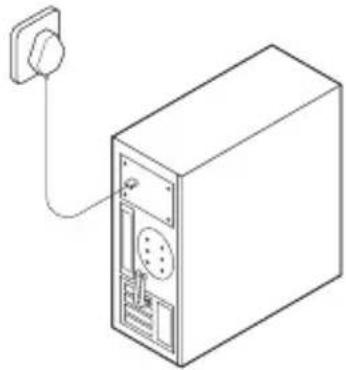
natural_image
Line drawing of a desktop computer tower with an attached cable (no text or symbols)3 Install Drivers
a. Insert the CD and run the Autorun.exe. Note:
You can also check the new release and download the driver at https://www.tp-link.com/support/download/
b. Install the Wi-Fi and Bluetooth drivers.
- Wi-Fi: Click and follow the onscreen instructions to complete the Wi-Fi installation.
- Bluetooth: Click and follow the onscreen instructions to complete the Bluetooth installation.
English
4 Join a Wireless Network
a. Click the network icon (or) on the taskbar.
b. Select your Wi-Fi network, click Connect, and enter the password when prompted.
5 Pair With Bluetooth Devices
a. Right click the Bluetooth) icon on the taskbar. If it's not displayed, turn on Bluetooth in your PC settings first.

b. Select Add a Bluetooth Device or Add a Device to scan for available devices.
c. Select your Bluetooth device from the list and follow the onscreen instructions to complete pairing.
Note:
Make sure your device's Bluetooth is enabled and discoverable.
Antes de empezar:
natural_image
Isometric line drawing of a desktop computer tower with an attached cable and directional arrow (no text or symbols)natural_image
Diagram of a computer motherboard with connectors and a cable, no text or symbols presentEspañol
text_image
Diagram showing a computer tower with a cable and a magnified view of the device's internal structure, including a label 'GARANTIC PAPER'.natural_image
Diagram of a computer setup with an attached power outlet and a close-up view of an USB connector (no text or symbols present)e. Conecte la antena o antenas al adaptador.
Nota:
natural_image
Line drawing of a desktop computer tower with an attached cable (no text or symbols)3 Instalar los drivers
natural_image
Isometric line drawing of a desktop computer tower with an attached power outlet (no text or symbols)natural_image
Pure technical diagram of a computer hardware card with connectors and cable (no text or symbols)natural_image
Diagram of a desktop computer setup with an attached cable and a magnified inset showing internal components (no text or symbols)natural_image
Diagram of a computer setup with an attached power outlet and a close-up of an USB connector (no text or symbols present)natural_image
Line drawing of a desktop computer tower with an attached cable (no text or symbols)natural_image
Isometric line drawing of a desktop computer tower with an attached cable and power outlet (no text or symbols)natural_image
Diagram of a computer motherboard with connectors and a USB cable (no text or symbols)Français
text_image
Diagram showing a computer tower with an attached power outlet and a magnified view of the device's internal structure.natural_image
Diagram of a server rack connected to an AC input via a cable, with an inset showing USB port connection (no text or symbols)natural_image
Isometric line drawing of a server cabinet with an attached power outlet (no text or symbols)natural_image
Isometric line drawing of a desktop computer tower with an attached cable and directional arrow (no text or symbols)natural_image
Pure technical line drawing of a computer motherboard with connectors and a cable, no text or symbols presenttext_image
Diagram showing a desktop computer with an attached cable and a magnified inset illustrating the device's internal structure.natural_image
Diagram of a computer setup with an attached power outlet and an inset showing USB cable connection (no text or symbols present)natural_image
Line drawing of a desktop computer case with an attached power outlet (no text or symbols)https://www.tp-link.com/it/support/download/
natural_image
Isometric line drawing of a desktop computer tower with an attached power outlet (no text or symbols)natural_image
Diagram of a computer motherboard with connectors and a cable, showing no text or symbolsPortuguês
text_image
Diagram showing a desktop computer with a fan connected to a wall-mounted device, and an inset magnified view of the device's internal structure.natural_image
Diagram of a computer setup with an attached power outlet and a close-up view of an USB connector (no text or symbols present)e. Conecte a(s) antena(s) ao adaptador.
Nota:
natural_image
Line drawing of a server cabinet with an attached cable (no text or symbols)3 Instalar os Drivers
natural_image
Isometric line drawing of a desktop computer tower with an attached cable and directional arrow (no text or symbols)natural_image
Technical line drawing of a computer motherboard with connectors and a cable (no text or symbols)text_image
Diagram showing a computer tower connected to a wall-mounted device, with an inset magnified view highlighting the device's internal structure.natural_image
Diagram of a computer setup with an attached power outlet and an inset showing USB cable connection (no text or symbols)natural_image
Line drawing of a server cabinet with an attached cable (no text or symbols)3 Asenna ajurit
natural_image
Line drawing of a desktop computer tower with an attached cable and power outlet (no text or symbols)natural_image
Diagram of a computer motherboard with connectors and a cable, no text or symbols presentNederlands
text_image
Diagram showing a computer tower connected to a wall-mounted device, with an inset magnified view highlighting the device's internal structure.natural_image
Diagram of a computer setup with an attached power outlet and a close-up of an USB connector (no text or symbols present)natural_image
Line drawing of a desktop computer tower with an attached cable (no text or symbols)natural_image
Isometric line drawing of a desktop computer tower with an attached cable and directional arrow (no text or symbols)natural_image
Diagram of a computer motherboard with connectors and a USB cable (no text or labels)natural_image
Line drawing of a desktop computer tower with an attached cable and a magnified inset showing internal components (no text or symbols)text_image
Diagram showing a device setup with an USB cable inserted into a server rack, illustrating the connection to a USB cable.e. Anslut antennen/antennerna till adaptern.
OBS:
natural_image
Line drawing of a desktop computer tower with an attached cable (no text or symbols)3 Installera drivrutinerna
natural_image
Isometric line drawing of a desktop computer tower with an attached power outlet (no text or symbols)natural_image
Diagram of a computer motherboard with connectors and a cable, showing no text or symbolsNorsk
natural_image
Diagram of a computer setup with an attached power outlet and a magnified inset showing a device with a circular component (no text or symbols present)natural_image
Diagram showing a server rack connected to an external power outlet, with an inset view of a USB connector (no text or symbols present)natural_image
Line drawing of a desktop computer tower with an attached cable (no text or symbols)3 Installer drivere
natural_image
Isometric line drawing of a desktop computer tower with an attached cable and directional arrow (no text or symbols)b. Forbind USB-kablet til adapteren.
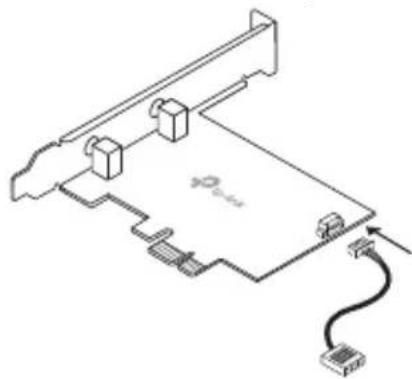
natural_image
Diagram of a computer motherboard with connectors and a cable, no text or symbols presenttext_image
Diagram showing a computer tower connected to a wall-mounted device, with an inset magnified view highlighting the device's internal structure.natural_image
Diagram of an electronic device with a USB connector and wiring, showing internal components without any text or symbols.e. Forbind antennen til adapteren.
Bemaerk!
natural_image
Line drawing of a desktop computer tower with an attached cable (no text or symbols)3 Installer drivere
EU declaration of conformity
English
TP-Link hereby declares that the device is in compliance with the essential requirements and other relevant provisions of directives 2014/53/EU, 2011/65/EU and (EU)2015/863.
The original EU declaration of conformity may be found at https://www.tp-link.com/en/support/ce/.
Deutsch
https://www.tp-link.com/en/support/ce/.
Français
- Keep the device away from water, fire, humidity or hot environments.
- Do not attempt to disassemble, repair, or modify the device. If you need service, please contact us.
- Do not use the device where wireless devices are not allowed.
Please read and follow the above safety information when operating the device. We cannot guarantee that no accidents or damage will occur due to improper use of the device. Please use this product with care and operate at your own risk.
Deutsch
For TP-Link Branded Products Only. For the information about warranty period, policy and procedures, please visit https://www.tp-link.com/en/support THIS WARRANTY GIVES YOU SPECIFIC LEGAL RIGHTS, AND YOU MAY HAVE OTHER RIGHTS THAT VARY FROM STATE TO STATE (OR BY COUNTRY OR PROVINCE). TO THE EXTENT ALLOWED BY LOCAL LAW, THIS WARRANTY AND THE REMEDIES SET FORTH ARE EXCLUSIVE AND IN LIEU OF ALL OTHER WARRANTIES,
REMEDIES AND CONDITIONS.
TP-Link warrants the TP-Link branded hardware product contained in the original packaging against defects in materials and workmanship when used normally in according with TP-Link's guidelines for some period which depends on the local service from the date of original retail purchase by the end-user purchaser.
Español
besøk https://www.tp-link.com/en/support
DENNE GARANTIEN GIR DEG SPESIFISERTE, RETTSLIGE RETTIGHETER, OG I TILLEGG KAN DU HA ANDRE RETTIGHETER SOM VARIERER MED JURISDIKSJON (ETTER LAND).
I DEN UTSTREKNING DET ER TILLATT I HENHOLD TIL LOKAL LOV ER DENNE GARANTIEN OG L∅SNINGENE SOM HER ER FREMSATT ESKKLUSIVE OG ERSTATTER ALLE ANDRE GARANTIER, L∅SNINGER OG BETINGELSER.