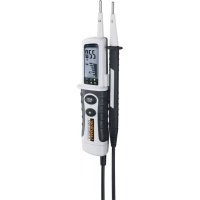
ActiveMaster Digital - Measuring equipment Laserliner - Free user manual and instructions
Find the device manual for free ActiveMaster Digital Laserliner in PDF.

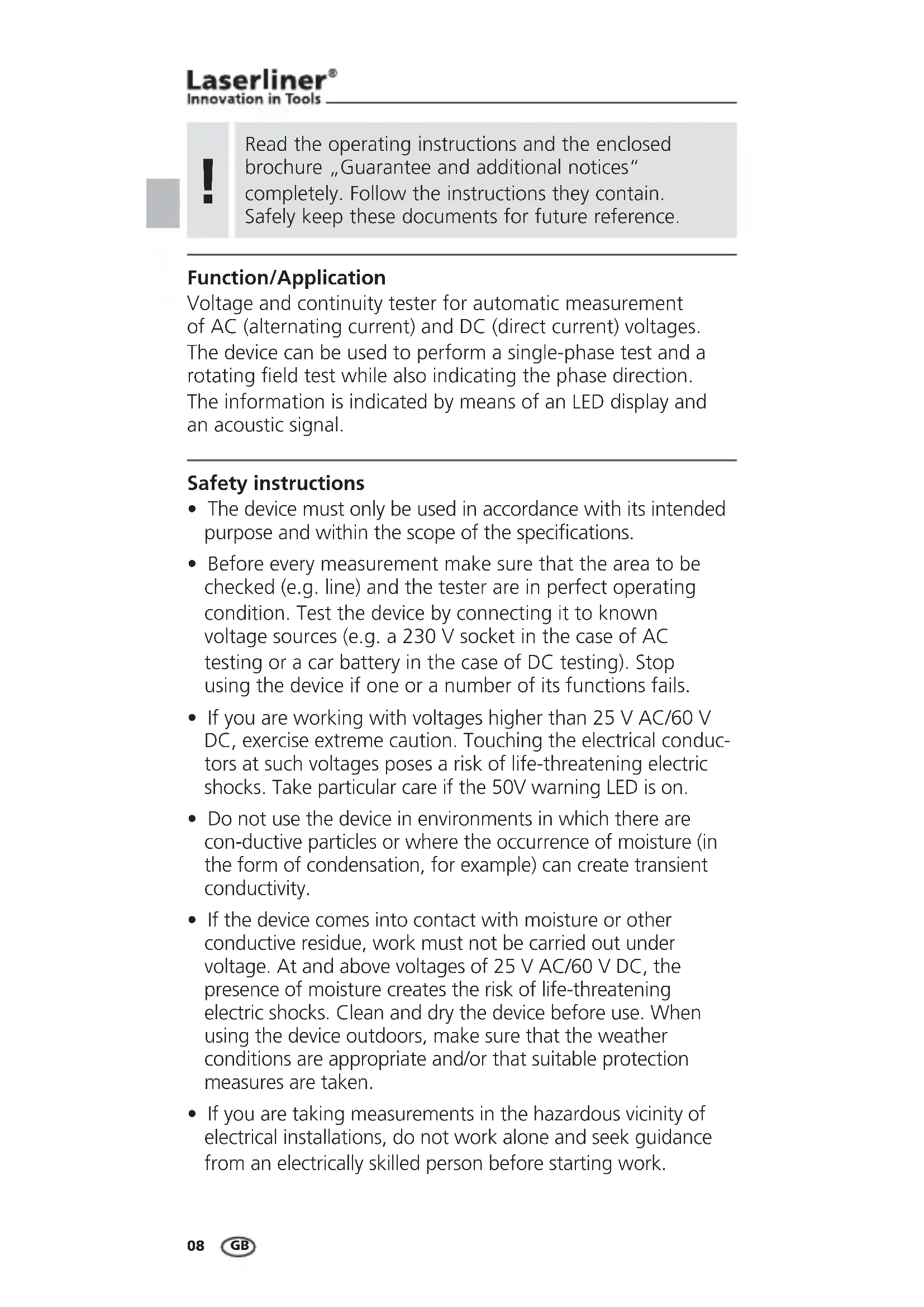


| Product type | Voltage and continuity tester |
| Brand | Laserliner |
| Model | ActiveMaster Digital |
| Voltage range | 12, 24, 36, 50, 120, 230, 400, 690 V AC/DC |
| Display | Digital 3.5 digits, resolution 1 V, LED bar graph |
| Main functions | AC/DC voltage measurement, single-pole phase test, rotating magnetic field direction determination, continuity test, flashlight, self-test |
| Power supply | 2 AAA 1.5 V batteries (LR03, alkaline) |
| Weight | 230 g |
| Operating temperature | -10 °C to 55 °C |
| Humidity | 85% RH max |
| Overvoltage category | CAT II 1000 V; with caps: CAT III 1000 V / CAT IV 600 V |
| Protection type | IP 64 |
| Test standards | EN 61243-3, EN 61326 |
| Maintenance | Clean and dry before use. Avoid moisture and conductive residues. |
| Calibration | Recommended once a year |
| Safety | Do not use if malfunctioning. Test on known sources before use. Disconnect batteries before opening. Observe overvoltage categories. |
| Compliance | WEEE directive, CE marking |
Frequently Asked Questions - ActiveMaster Digital Laserliner
User questions about ActiveMaster Digital Laserliner
0 question about this device. Answer the ones you know or ask your own.
Ask a new question about this device
Download the instructions for your Measuring equipment in PDF format for free! Find your manual ActiveMaster Digital - Laserliner and take your electronic device back in hand. On this page are published all the documents necessary for the use of your device. ActiveMaster Digital by Laserliner.
USER MANUAL ActiveMaster Digital Laserliner
AC-tiveMaster Digital




!
natural_image
Close-up of a syringe injecting liquid into a circular socket (no visible text or symbols)Read the operating instructions and the enclosed brochure „Guarantee and additional notices“ completely. Follow the instructions they contain. Safely keep these documents for future reference.
Function/Application
Voltage and continuity tester for automatic measurement of AC (alternating current) and DC (direct current) voltages. The device can be used to perform a single-phase test and a rotating field test while also indicating the phase direction. The information is indicated by means of an LED display and an acoustic signal.
Safety instructions
- The device must only be used in accordance with its intended purpose and within the scope of the specifications.
- Before every measurement make sure that the area to be checked (e.g. line) and the tester are in perfect operating condition. Test the device by connecting it to known voltage sources (e.g. a 230 V socket in the case of AC testing or a car battery in the case of DC testing). Stop using the device if one or a number of its functions fails.
- If you are working with voltages higher than 25 V AC/60 V DC, exercise extreme caution. Touching the electrical conductors at such voltages poses a risk of life-threatening electric shocks. Take particular care if the 50V warning LED is on.
- Do not use the device in environments in which there are conductive particles or where the occurrence of moisture (in the form of condensation, for example) can create transient conductivity.
- If the device comes into contact with moisture or other conductive residue, work must not be carried out under voltage. At and above voltages of 25 V AC/60 V DC, the presence of moisture creates the risk of life-threatening electric shocks. Clean and dry the device before use. When using the device outdoors, make sure that the weather conditions are appropriate and/or that suitable protection measures are taken.
- If you are taking measurements in the hazardous vicinity of electrical installations, do not work alone and seek guidance from an electrically skilled person before starting work.
AC-tiveMaster Digital
- Isolate the device from all current sources before opening the battery compartment cover.
- The device must not be connected to voltages for longer than 30 seconds.
- Hold the device by the grip sections only. Do not touch the test prods during measurement.
- If possible, do not work alone.
- Use the device only in the correct overvoltage category (without protective cover CAT II 1000 V; with protective cover CAT III 1000 V + CAT IV 600 V)
Symbols
Hazardous electrical voltage warning: Unprotected live components inside the device housing may pose a risk of electric shock.

Danger area warning

Protection class II: The test device has reinforced or double insulation.
CAT II
Overvoltage category II: Single-phase consumers that are connected to standard sockets, e.g. household appliances, portable tools.
CAT III
Overvoltage category III: Equipment in fixed installations and for applications where specific requirements with regard to the reliability and availability of equipment have to be met, e.g. circuit-breakers in fixed installations and devices used in industrial applications which are permanently connected to the fixed installation.
CAT IV
Overvoltage category IV: Devices such as electricity meters, overcurrent circuit breakers and ripple-control units, which are intended for use at or near the infeed into the electrical installation of buildings, and specifically from the main distribution to the supply system.
1 Insertion of batteries
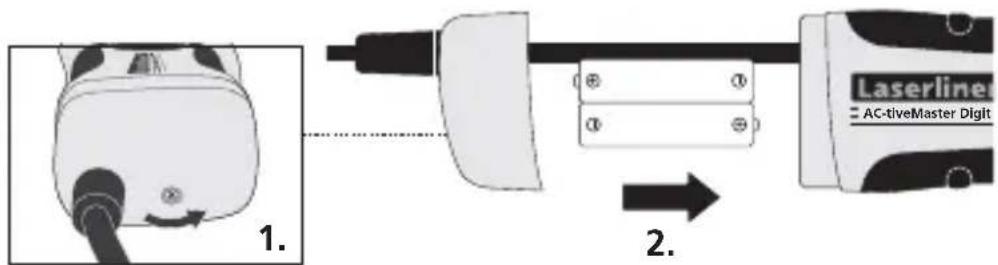

The device is ready for use immediately once the batteries have been inserted. It does not have a separate ON/OFF switch and is therefore always active. As from a measuring voltage of 50 V, the device operates in emergency mode even without batteries.
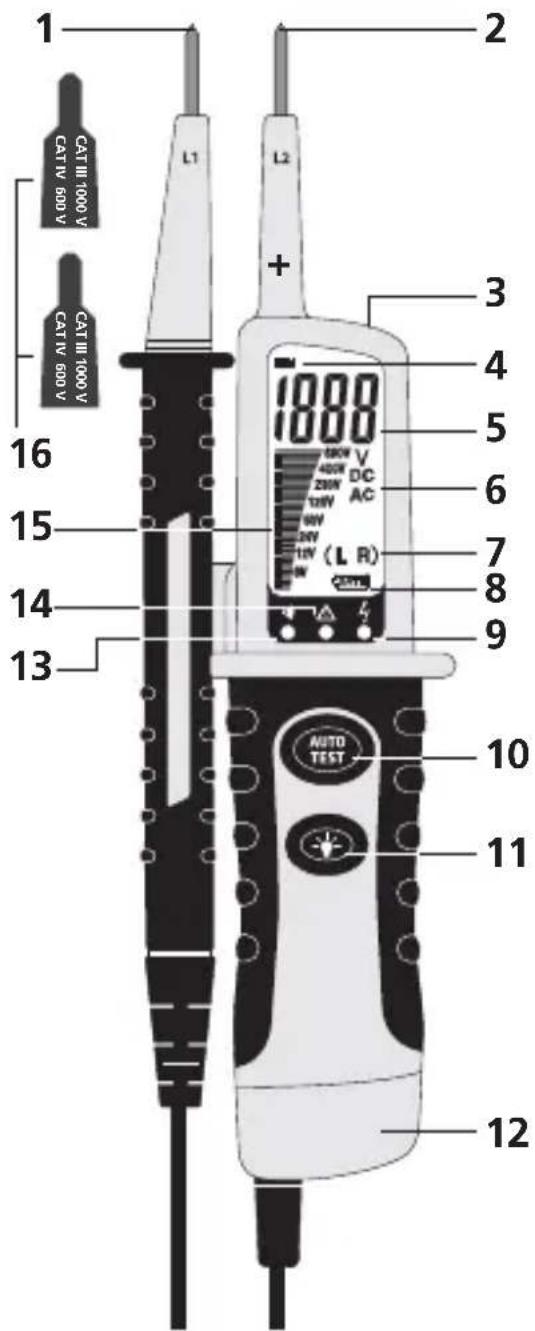
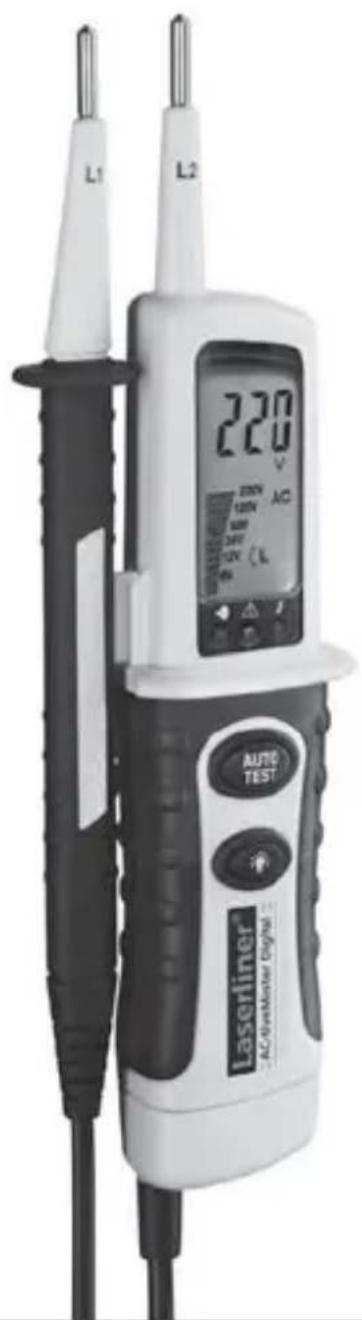
1 Test prod -
2 Test prod +
3 Flashlight
4 Polarity indicator
5 Numerical display
6 Voltage type AC/DC
7 Rotary field
direction left/right
8 Low battery charge
9 LED phase indicator, single-pole voltage test
10 Autotest
11 Flashlight ON/OFF
12 Battery compartment
13 LED continuity test
14 Voltage warning
50 V
15 Bar graph display
16 Protective covers for CAT III - 1000 V / CAT IV - 600 V
2 Functional test/Self-test
- Test the voltage tester by applying it to familiar voltage sources
- Connect test prods (1) and (2). The LED for the continuity test (13) lights up and a signal sounds.
- Press the „AUTOTEST“ button. On successful completion of the test, the LEDs for the continuity test (13) as well as all segments of the bar graph light up and a signal sounds.
3 Voltage test
!
To achieve the protection class CAT III 1000 V and CAT IV 600 V the protective covers must be placed over the test prods.
natural_image
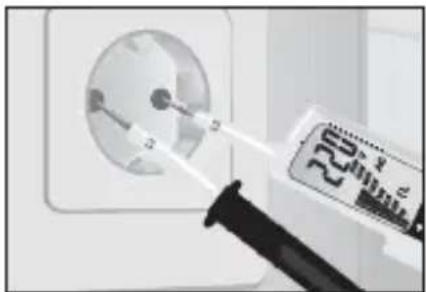
Close-up of a syringe injecting liquid into an electrical outlet (no visible text or symbols)Hold the base device (+) in your right hand and the second test prod (-) in your left hand. Now apply the test prods to the contacts to be tested (line, socket, etc.).
- The voltage tester is automatically active as from a voltage of >4.5 V and shows the measured voltage both numerically and as a bar graph.
4 Single-pole phase test
- Make contact with the conductor to be tested with test prod L2, L1 remains free during the measurement. The LED (9) will light up if an AC voltage is applied on the conductor.
- The single-pole phase test can only be performed with fully charged batteries inserted.
- The single-pole phase test can be carried out as from an AC voltage of approx. 100 V AC.
- When the single-pole phase test is carried out on the outer conductor, the indicator function may be adversely affected under certain conditions (e.g. when insulating personnel protective equipment is used or at insulated locations).
!
The single-pole phase test is not suitable for checking for zero voltage. To do this, you need to carry out a two-pole phase test.
5 Determining the direction of the rotating field
Clockwise rotating fieldAAnticlockwise rotating field
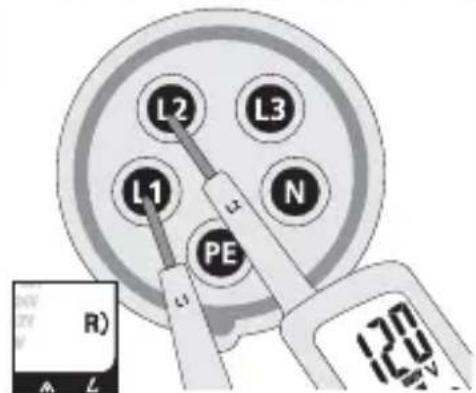
If the symbol R (7) appears in the display, this means that the presumed phase L1 is actually phase L1 and the presumed phase L2 is actually phase L2.
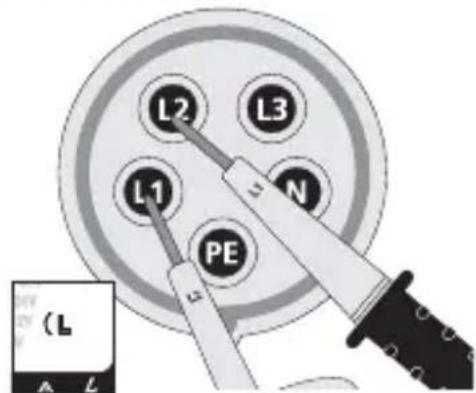
If the symbol L (7) appears in the display, this means that the presumed phase L1 is actually phase L2 and the presumed phase L2 is actually phase L1.
!
When you crosscheck this by switching round the test prods, the opposite symbol should light up instead.
6 Battery lamp
To switch on the battery lamp, press and hold down button 10. The light switches itself off automatically as soon as the button is released.
7 Calibration
The voltage tester needs to be calibrated and tested on a regular basis to ensure it produces accurate measurement results. We recommend carrying out calibration once a year.
EU directives and disposal
This device complies with all necessary standards for the free movement of goods within the EU.
This product is an electric device and must be collected separately for disposal according to the European Directive on waste electrical and electronic equipment.

Further safety and supplementary notices at:
www.laserliner.com/info
Technical data
| Voltage range | 12, 24, 36, 50, 120, 230, 400, 690 V AC/DC |
| LC display / resolution | 3.5 places, 1999 digits / 1 V AC/DC |
| Tolerance -30%...0% of | reading |
| Tolerance, num. display | V DC: +1.0% of reading +3 digits V AC: +1.5% of reading +5 digits |
| Voltage detection Automatic | |
| Polarity detection Entire range | |
| Range detection Automatic | |
| Response time 2-3 seconds | |
| Frequency range 50/60Hz | |
| Peak current (AC/DC) <=(3 mA/2.5 mA) | |
| ON timeAON time = 30 s/10 min. | |
| Single-pole phase test | |
| Voltage range 100 to 690 V AC | |
| Frequency range 50/60 Hz | |
| Continuity test | |
| Resistance range < 300 kΩ | |
| Testing current <5μA | |
| Overvoltage protectionA | 690 V AC/DC |
| Indication of rotating field direction | |
| Voltage range (LEDs) 100 | to 400 V |
| Frequency range 50/60 Hz | |
| Power supply | 2x 1.5 Type AAA, LR03, alkaline |
| Operating temperature | -10°C ... 55°C |
| Humidity | Max. 85% relative air humidity |
| Overvoltage category | CAT II 1000 V with protective cover: CAT III - 1000 V / CAT IV 600 V |
| Pollution degree 2 | |
| Degree of protection | IP64 |
| Weight | 230 g |
| Test standards | EN 61243-3; EN 61326 |
Subject to technical alterations. 12.11.
!
natural_image
Close-up of a medical device with a syringe inserted into a circular socket (no visible text or symbols)natural_image
Close-up of a medical or electrical device with a needle inserted into a circular socket (no visible text or symbols)natural_image
Close-up of a medical device with a needle inserted into a circular socket (no visible text or symbols)natural_image
Close-up of a syringe injecting a wall-mounted device into a socket (no visible text or symbols)natural_image
Close-up of a syringe injecting liquid into a circular white socket (no text or symbols visible)natural_image
Close-up of a syringe injecting a white electrical outlet into a socket (no visible text or symbols)natural_image
Close-up of a wall socket with a syringe inserted, showing electrical wiring (no text or symbols visible)natural_image
Close-up of a medical or electrical device with a pipette inserted into a circular socket (no visible text or symbols)natural_image
Close-up of a syringe injecting liquid into a circular white socket (no text or symbols visible)natural_image
Close-up of a wall socket with a syringe inserted, showing electrical wiring (no text or symbols visible)natural_image
Close-up of a wall socket with a syringe inserted, showing electrical wiring (no text or symbols visible)&¼RSDQFDCD R sembolü (7) &¼RSDQFDCD L sembolü (7) F¼QÂKÂQRD + NKCTET FR@MÚÇRM + NKCTET R E@Y FDQ®DJSDM CD E@Y E@YhCFHQ®DJSDM CD E@Y + + NKCTET R@MÚK@M E@Y NÉQÎEISDM@MÚK@M E@Y faz L2'dir. faz L1'dir.
!
DŒHǔSHQHKLHǔ JNMSQNK T®K@QÚ HKD ®@OQ RDLANKÂM X@ML@RÚ FDQDJLDJSDCHQ
6 El feneri
\$K EDMDQHMH X@JL@J H®HM MTL@Q@KÚ CÂCEI
ÂCELDXH AÚQ@JSÚŒÚMÚYC@ ÚǔÚJ R¼MDBDJSHQ
7 Kalibrasyon
5NKS@I SDRS BHG@YÚMÚM CÂYDMKH NK@Q@J J@KHAJH ¼K®ÂL RNMT®K@QÚMÚM CNŒQTKTET R@CEK@M@AHQ XÚKKÚJ @Q@ HKD J@KHAQD DCHKLDRHCHQ
natural_image
Close-up of a syringe injecting liquid into a white electrical outlet (no visible text or symbols)natural_image
Close-up of a syringe injecting liquid into a white electrical outlet (no visible text or symbols)natural_image
Close-up of a wall socket with a syringe inserted, showing electrical wiring (no text or symbols visible)natural_image
Close-up of a medical or electrical device with a syringe inserted into a white socket (no visible text or symbols)natural_image
Close-up of a syringe injecting into a circular electrical socket (no visible text or symbols)natural_image
Close-up of a medical device with a needle inserted into a circular socket (no visible text or symbols)natural_image
Close-up of a syringe injecting liquid into a white electrical outlet (no visible text or symbols)natural_image
Close-up of a medical device with a syringe inserted into a white electrical socket (no visible text or symbols)natural_image
Close-up of a power plug inserted into an electrical socket, with a magnified inset showing internal components (no text or symbols visible)
- AC-tiveMaster Digital
- !
- Function/Application
- Safety instructions
- Symbols
- CAT II
- CAT III
- CAT IV
- Insertion of batteries
- Functional test/Self-test
- Voltage test
- Single-pole phase test
- Determining the direction of the rotating field
- Battery lamp
- Calibration
- EU directives and disposal
- DŒHǔSHQHKLHǔ JNMSQNK T®K@QÚ HKD ®@OQ RDLANKÂM X@ML@RÚ FDQDJLDJSDCHQ
- El feneri
- ÂCELDXH AÚQ@JSÚŒÚMÚYC@ ÚǔÚJ R¼MDBDJSHQ
- Kalibrasyon
Brand : Laserliner
Model : ActiveMaster Digital
Category : Measuring equipment