Optimate DCDC - Battery charger Tecmate - Free user manual and instructions
Find the device manual for free Optimate DCDC Tecmate in PDF.



| Product type | Automatic battery charger for 12V lead-acid and 12.8V LiFePO4 batteries |
| Brand | Tecmate |
| Model | Optimate DCDC (DC-DC 12V 2A) |
| Input power supply | DC 12-16V (source battery or 15V/3A min. adapter) |
| Charging current | 2 A (max) |
| Charging voltage | 14.2-14.5V (lead-acid), 14.2-14.4V (LiFePO4) |
| Maintenance voltage | 13.6V (lead-acid and LiFePO4) |
| Compatible battery types | Lead-acid (STD, AGM, GEL, AGM cyclic) and lithium LiFePO4 12.8V |
| Main functions | Automatic charging, recovery (deep discharge), retention test, maintenance charging, power supply mode |
| Protections | Reverse polarity, short circuit, overheating, charge time limit (48h) |
| LED indicators | 6 LEDs: low source, reverse polarity, recovery, charging, test/maintenance, fault |
| Supplied connectors | Alligator clips and ring terminals with 15A fuse (permanent connection kit) |
| Dimensions (approx.) | 150 x 80 x 50 mm (estimated) |
| Weight (approx.) | 500 g (estimated) |
| Protection rating | Splash-proof and light rain resistant (not submersible) |
| Operating temperature | 0°C to 40°C (estimated) |
| Warranty | 3 years (manufacturing defects) |
| Maintenance and cleaning | Clean with a dry cloth; do not use solvents; check connections every 15 days |
| Spare parts and repairability | Repair by manufacturer or authorized agent; replaceable fuse (15A) |
| General information | Manufactured by TecMate International SA, Belgium; www.tecmate.com |
Frequently Asked Questions - Optimate DCDC Tecmate
User questions about Optimate DCDC Tecmate
0 question about this device. Answer the ones you know or ask your own.
Ask a new question about this device
Download the instructions for your Battery charger in PDF format for free! Find your manual Optimate DCDC - Tecmate and take your electronic device back in hand. On this page are published all the documents necessary for the use of your device. Optimate DCDC by Tecmate.
USER MANUAL Optimate DCDC Tecmate
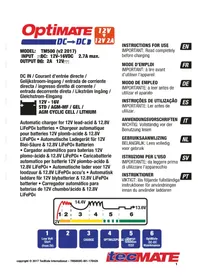
MODEL: TM500 (v2 2017)
INPUT : BC: 12V-16VDC 2.7A max.
OUTPUT DC: 2A 12V—
IMPORTANT: Read completely before charging
MODE D'EMPLOI
1
Low Volt Start (from 2V)
2
3
CHARGE
4
OPTIMIZEPU
5
SE SAVE Charge retention TEST
6
OptiMate DC-DC Maintenance
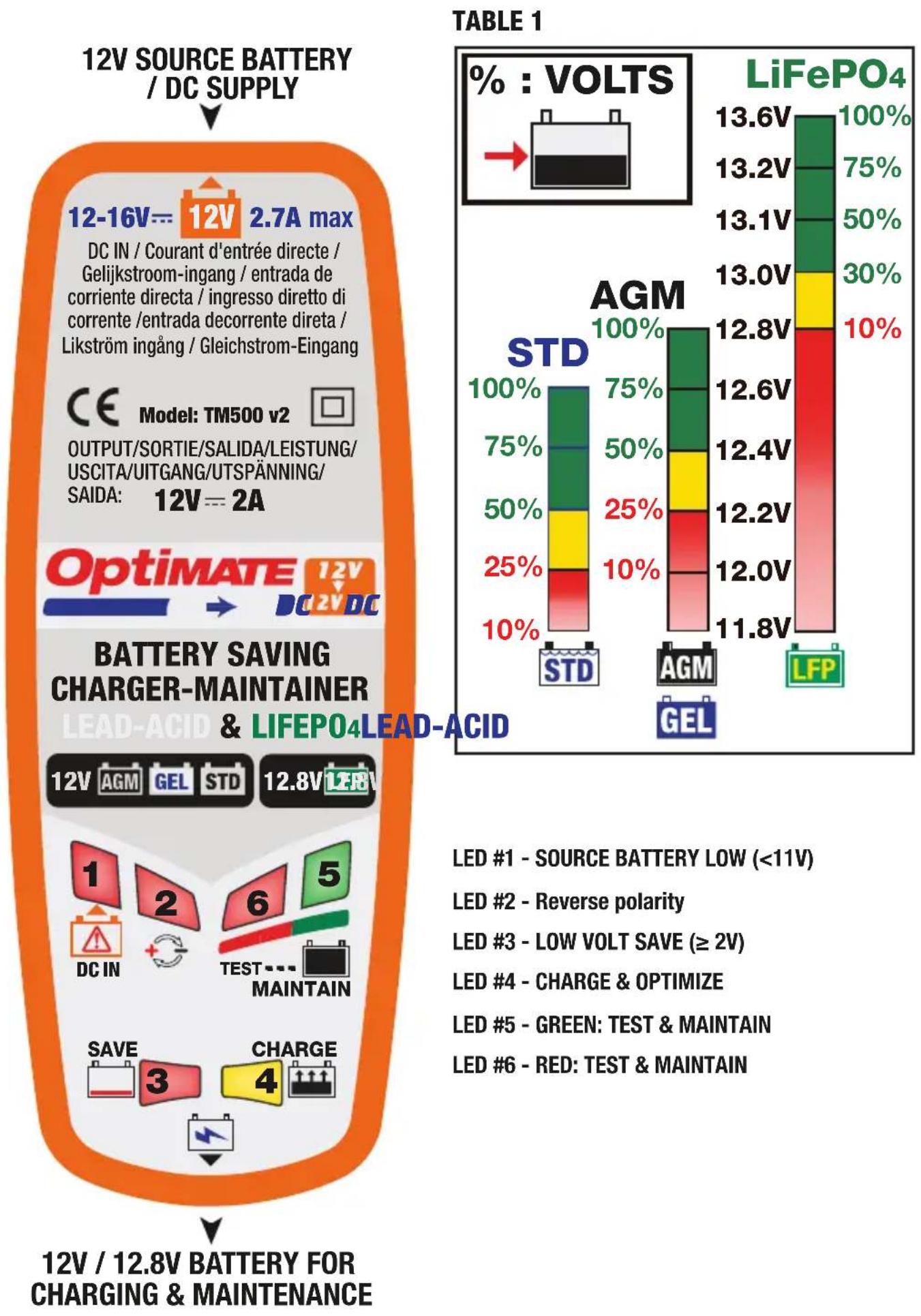
12-16V= 12V 2.7A max
DC IN / Courant d'entrée directe / Gelijkstroom-ingang / entrada de corriente directa / ingresso diretto di corrente /entrada decorrente direta / Likström ingång / Gleichstrom-Eingang
Model: TM500 v2
OUTPUT/SORTIE/SALIDA/LEISTUNG/ USCITA/UITGANG/UTSPÄNNING/ SAIDA: 12V==2A
& LIFEPO4LEAD-ACID
LED #1 - SOURCE BATTERY LOW (<11V)
LED #2 - Reverse polarity
LED #3 - LOW VOLT SAVE (≥ 2V)
LED #4 - CHARGE & OPTIMIZE
LED #5 - GREEN: TEST & MAINTAIN
LED #6 - RED: TEST & MAINTAIN
THIS PORTION OF THE MANUAL CONTAINS IMPORTANT SAFETY INSTRUCTIONS FOR THE OPTIMATE DC-DC 12V 2A BATTERY CHARGER. IT IS OF THE UTMOST IMPORTANCE THAT EACH TIME, BEFORE USING THE CHARGER, YOU READ AND EXACTLY FOLLOW THESE INSTRUCTIONS. SAVE THESE INSTRUCTIONS.
AUTOMATIC CHARGER FOR 12V LEAD-ACID OR 12.8V LIFEPO4 BATTERIES
DO NOT USE FOR NiCd, NiMH, any other Li-Ion OR NON-RECHARGEABLE BATTERIES.
- CAUTION : 12V DC APPLIANCE. DO NOT CONNECT TO AC POWER .
- For indoor use only. Do not expose charger to rain or snow.
- Use of an attachment not recommended or sold by the battery charger manufacturer may result in a risk of fire, electric shock, or injury to persons.
- To reduce risk of damage to electric plug and cord, pull by plug rather than cord when disconnecting charger.
- An extension cord should not be used unless absolutely necessary. Use of improper extension cord could result in a risk of fire and electric shock. If extension cord must be used make sure that :
a) pins on plug of extension cord are the same number, size and shape as those of plug on charger.
b) the extension cord is property wired and in good electrical condition, and
c) the conductor wire size is large enough for the DC ampere rating of the charger as specified in the table below.
| DC INPUT RATING IN AMPERESEqual to or greater than But less than | LENGTH OF CORD, FEET (m) | AWG SIZE OF CORD | |
| 2A 3A 25 (17.6) | 50 (15.2)100 (30.5) | 181614 | |
-
Do not operate charger with damaged cord or plug - replace the cord or plug immediately.
-
Do not operate charger if it has received a sharp blow, been dropped, or otherwise damaged in any way; take it to a qualified serviceman.
-
Do not disassemble charger; take it to a qualified serviceman when service or repair is required.
Incorrect reassembly may result in a risk of electric shock or fire.
- To reduce risk of electric shock, unplug the charger from supply before attempting any maintenance or cleaning.
Turning off controls will not reduce this risk. Clean only with slightly moist, not wet, cloth. Do not use solvents.
- WARNING - RISK OF EXPLOSIVE GASES.
a) WORKING IN VICINITY OF A LEAD-ACID BATTERY IS DANGEROUS. B ATTERIES GENERATE EXPLOSIVE GASES DURING NORMAL BATTERY OPERATION. FOR THIS REASON, IT IS OF UTMOST IMPORTANCE THAT YOU FOLLOW THE INSTRUCTIONS EACH TIME YOU USE THE CHARGER.
b) To reduce risk of battery explosion, follow these instructions and those published by the battery manufacturer and manufacturer of any equipment you intend to use in vicinity of the battery. Review cautionary marking on these products and on engine.
11. PERSONAL PRECAUTIONS.
a) Someone should be within range of your voice OR close enough to come to your aid when you work near a lead-acid battery.
b) Have plenty of fresh water and soap nearby in case battery acid contacts skin, clothing or eyes.
c) Wear complete eye protection and clothing protection. Avoid touching eyes while working near battery.
d) If battery acid contacts or enters eye, flood eye with cold running water for at least 10 minutes and get medical attention immediately. If battery acid contacts skin or clothing, wash immediately with soap & water. If acid enters an eye, immediately flood eye with running cold water for at least 10 minutes & get medical attention immediately.
e) NEVER smoke or allow a spark or flame in vicinity of battery or engine.
f) Be extra cautious to reduce risk of dropping a metal tool onto battery. It might spark or short-circuit battery or other electrical part that may cause explosion.
g) Remove personal metal items such as rings, bracelets, necklaces, and watches when working with a lead-acid battery. A lead-acid battery can produce a short-circuit current high enough to weld a ring or the like to metal, causing a severe burn.
i) NEVER charge a frozen battery.
12. PREPARING TO CHARGE
a) If necessary to remove battery from vehicle to charge, always remove grounded terminal from battery first. Make sure all accessories in the vehicle are off, so as not to cause an arc.
b) Be sure area around battery is well ventilated while battery is being charged. Gas can be forcefully blown away by using a piece of cardboard or other non-metallic material as a fan.
c) Clean battery terminals. Be careful to keep corrosion from coming in contact with eyes.
d) Add distilled water in each cell until battery acid reaches level specified by battery manufacturer. This helps purge excessive gas from cells. Do not overfill. For a battery without cell caps, such as valve regulated lead acid (VRLA) or absorbed glass mat (AGM) batteries, carefully follow manufacturer's recharging instructions.
e) Study all battery manufacturer's specific precautions such as removing or not removing cell caps while charging and recommended rates of charge.
f) Determine voltage of battery by referring to vehicle or other user's manual and BEFORE MAKING THE BATTERY CONNECTIONS, MAKE SURE TH AT THE VOLTAGE OF THE BATTERY YOU ARE GOING TO CHARGE MATCHES THE OUTPUT VOLTAGE OF THE CHARGER.
13. CHARGER LOCATION.
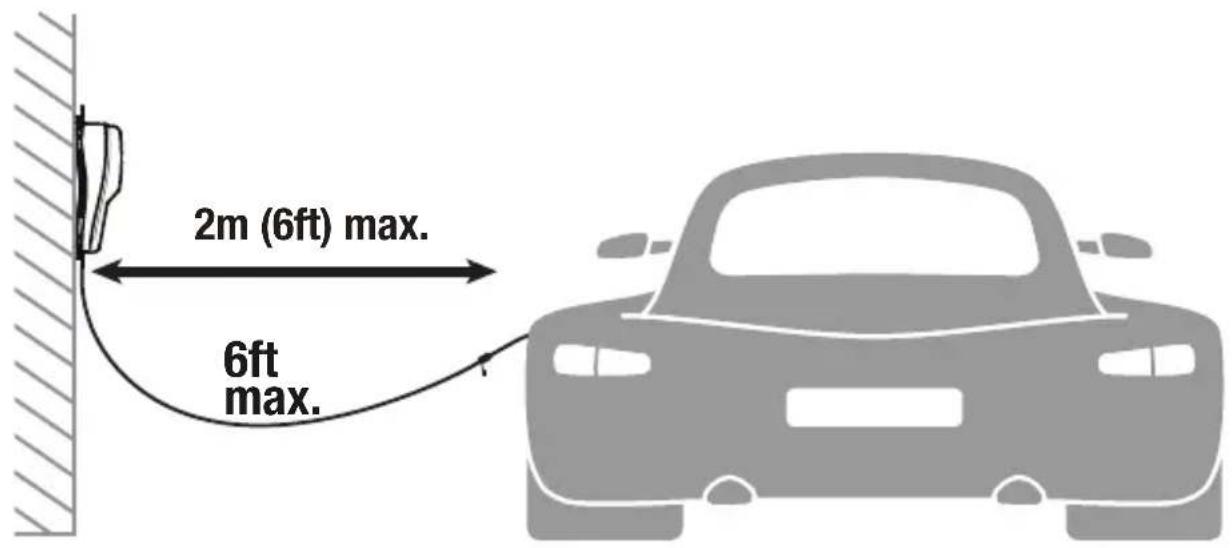
a) Locate charger as far away from battery as DC cables permit.
b) Never place charger directly above battery being charged; gases from battery will corrode and damage the charger. c) Never allow battery acid to drip on charger when reading gravity or filling battery. Do not operate charger in a closed-in area or restrict ventilation in any way.
d) Do not set a battery on top of charger. IMPORTANT : Place charger on a hard flat surface or mount onto a vertical surface. Do not place on plastic, leather or textile surface.
14. DC CONNECTION PRECAUTIONS
a) Connect and disconnect DC output clips only after setting any charger switches to off position and removing DC cord from supply. Never allow clips to touch each other, however should this happen no damage will result to the charger circuit & the automatic charging programme will just reset to «start».
b) Attach clips to battery and chassis as indicated in 15(e), 15(f), and 16(b) through 16(d).
NOTE : This battery charger has an automatic safety feature that will prevent it from operating if the battery has been inversely connected. Set charger switches to off position and/or removeDC cord from the DC supply, disconnect the battery clips, then reconnect correctly according to the instructions below.
15. FOLLOW THESE STEPS WHEN BATTERY IS INSTALLED IN VEHICLE. A SPARK NEAR A BATTERY MAY CAUSE BATTERY EXPLOSION. TO REDUCE RISK OF A SPARK NEAR BATTERY :
a) Position AC and DC cords so as to reduce risk of damage by hood, door or moving engine part.
b) Stay clear of fan -blades, belts,pulleys,and other parts that can cause injury to persons.
c) Check polarity of battery posts. POSITIVE (POS, P, +) battery post usually has larger diameter than NEGATIVE (NEG, N,−) post.
d) Determine which post of battery is grounded (connected) to the chassis. If negative post is grounded to chassis (as in most vehicles), see (e). If positive post is grounded to the chassis, see (f).
e) For negative-grounded vehicle, connect POSITIVE (RED) clip from battery charger to POSITIVE (POS, P, +) ungrounded post of battery. Connect NEGATIVE (BLACK) clip to vehicle chassis or engine block away from battery. Do not connect clip to carburetor, fuel lines, or sheet-metal body parts. Connect to a heavy gage metal part of the frame or engine block.
f) For positive-grounded vehicle, connect NEGATIVE (BLACK) clip from battery charger to NEGATIVE (NEG. N, -) ungrounded post of battery. Connect POSITIVE (RED) clip to vehicle chassis or engine block away from battery. Do not connect clip to carburetor, fuel lines, or sheet-metal body parts. Connect to a heavy gage metal part of the frame or engine block.
g) When disconnecting charger, turn switches to off, disconnect AC cord, remove clip from vehicle chassis, and then remove clip from battery terminal.
h) See operating instructions for length of charge information.
16. FOLLOW THESE STEPS WHEN BATTERY IS OUTSIDE VEHICLE. A SPARK NEAR THE BATTERY MAY CAUSE BATTERY EXPLOSION. TO REDUCE RISK OF A SPARK NEAR BATTERY :
a) Check polarity of battery posts. POSITIVE (POS, P, +) battery post usually has a larger diameter than NEGATIVE (NEG,N, -) post.
b) This battery charger has an automatic safety feature that will prevent it from operating if the battery has been inversely connected. The charger does not allow charge current unless a voltage of at least 1V is sensed.
c) Connect POSITIVE (RED) charger clip to POSITIVE (POS, P, +) post of battery.
d) Connect NEGATIVE (BLACK) charger clip to NEGATIVE (NEG, N, -) battery post of the battery.
e) Do not face battery when making final connection.
f) When disconnecting charger, always do so in reverse sequence of connecting procedure & break first connection while as far away from battery as practical.
g) A marine (boat) battery must be removed & charged on shore. To charge it on board requires equipment specially designed for marine use.
AUTOMATIC CHARGER FOR 12V LEAD-ACID & 12.8V LiFePO4 BATTERIES, AS FOUND IN:

DO NOT USE FOR NiCd, NiMH, Li-Ion OR NON-RECHARGEABLE BATTERIES.
Input: 12 - 16VDC 2.7A max. (charged 12V BATTERY OR stable 15V 3A DC SUPPLY)
Charge rate: approximately 2 Ah / hour, will recharge a 96Ah battery in 48 hours.
IMPORTANT: READ THE FOLLOWING INSTRUCTIONS BEFORE USING THE CHARGER This appliance can be used by children aged from 8 years and above and persons with reduced physical, sensory or mental capabilities or lack of experience and knowledge if they have been given supervision or instruction concerning use of the appliance in a safe way and understand the hazards involved. Children shall not play with the appliance. Cleaning and user maintenance shall not be made by children without supervision.
SAFETY WARNING AND NOTES: Batteries emit EXPLOSIVE GASES - prevent flame or sparks near batteries. Disconnect DC input supply before making or breaking DC/battery connections. Battery acid is highly corrosive. Wear protective clothing and eyewear and avoid contact. In case of accidental contact, wash immediately with soap and water. Check that the battery posts are not loose; if so, have the battery professionally assessed. If the battery posts are corroded, clean with a copper wire brush; if greasy or dirty clean with a rag damped in detergent. Use the charger only if the input and output leads and connectors are in good, undamaged condition. If the input cable is damaged, it is essential to have it replaced without delay by the manufacturer, his authorised service agent or a qualified workshop, to avoid danger. Protect your charger from acid and acid fumes and from damp and humid conditions both during use and in storage. Damage resulting from corrosion, oxidation or internal electrical short-circuiting is not covered by warranty. Distance the charger from the battery during charging to avoid contamination by or exposure to acid or acidic vapours. If using it in the horizontal orientation, place the charger on a hard, flat surface, but NOT on plastic, textile or leather. Use the fixing holes provided in the enclosure base to attach the charger to any convenient, sound vertical surface.
EXPOSURE TO LIQUIDS: This charger is designed to withstand exposure to liquids accidentally spilled or splashed onto the casing from above, or to light rainfall. Prolonged exposure to falling rain is inadvisable and longer service life will be obtained by minimizing such exposure. Failure of the charger due to oxidation resulting from the eventual penetration of liquid into the electronic components, connectors or plugs, is not covered by warranty.
BATTERY CONNECTIONS: INPUT: A set of fused battery clips is supplied. OUTPUT: 2 interchangeable connection sets are available, supplied with the charger is a set of battery clips for charging the battery off-vehicle, the other connection set comes with metal eyelet lugs for permanent connection to the battery posts, and re-sealable weatherproof cap on the connector that connects to the charger output cable. This connection set allows easy and sure connection of the charger to maintain the battery on-vehicle. The resealable weatherproof cap is designed to protect the connector from dirt and damp whenever the charger is not attached. Consult a professional service agent for assistance in attaching the metal eyelets to the battery posts. Secure the connector with weatherproof cap so that it cannot foul any moving part of the vehicle or the cable can be pinched or damaged by sharp edges. The in-line fuse in the eyelets connection set protects the battery against such accidental shorting across positive and negative conductors. Replace any burnt fuse only with a similar new fuse of 15A rating.
CONNECTING THE CHARGER TO THE BATTERY
- Disconnect SOURCE BATTERY before making or breaking DC / battery connections of battery under charge.
- If charging a battery in the vehicle with the battery clips, before making connections, first check that the battery clips can be safely and securely positioned clear from surrounding wiring, metal tubing or the chassis. Make connections in the following order: First connect to the battery terminal not connected to the chassis (normally positive), then connect the other battery clip (normally negative) to the chassis well away from the battery and fuel line. Always disconnect in reverse sequence.
-
When charging a battery out of the vehicle with the battery clips, place it in a well ventilated area. Connect the charger to the battery: RED clamp to POSITIVE (POS, P or +) terminal and BLACK clamp to NEGATIVE (NEG, N or -) terminal. Make sure the connections are firm and secure. Good contact is important.
-
If the battery is deeply discharged (and possibly sulphated), remove from the vehicle and inspect the battery before connecting the charger for a recovery attempt. Visually check the battery for mechanical defects such as a bulging or cracked casing, or signs of electrolyte leakage. If the battery has filler caps and the plates within the cells can be seen from the outside, examine the battery carefully to try to determine if any cells seem different to the others (for example, with white matter between the plates, plates touching). If mechanical defects are apparent do not attempt to charge the battery, have the battery professionally assessed. CHARGING: For safety reasons, the OptiMate output will only activate if a battery retaining at least 1V is connected. A battery left deep-discharged for an extended period may develop permanent damage in one or more cells. Such batteries may heat up excessively during high current charging. Monitor the battery temperature during the first hour, then hourly there-after. Check for unusual signs, such as bubbling or leaking electrolyte, heightened activity in one cell compared to others, or hissing sounds. If at any time the battery is uncomfortably hot to touch or you notice any unusual signs, DISCONNECT THE CHARGER IMMEDIATELY.
- If the battery is new, before connecting the charger read the battery manufacturer's safety and operational instructions carefully. If applicable, carefully and exactly follow acid filling instructions.
USING THE OPTIMATE DC-DC: PROCEEDING TO CHARGE
CONNECTING THE CHARGER TO A DC SUPPLY (DC adapter rated at minimum 15V 3A or a fully charged 12V battery): When the OptiMate DC-DC 12V 2A is connected to a SOURCE BATTERY or DC supply measuring at least 12V (range: 12-16V) LED #3 and 4# will flash twice and then continue to slowly flash for one minute to indicate it is ready for a battery requiring charge & maintenance to be connected. If a battery is not connected the charger shuts off completely. The charger will activate if connected to a recipient battery measuring 10V or more OR to reset the charger: 1) disconnect from source battery, 2) connect to the battery to be charged, 3) re-connect to the SOURCE BATTERY or DC supply.
SOURCE BATTERY: Source battery capacity (in Ah) should ideally be 1.5 times higher than the battery to be charged. E.G. to recharge a flat 10Ah battery, you need a 15Ah source battery. The 12V SOURCE BATTERY should ideally be rated for deep cycle use.
POWER CONSUMPTION FROM SOURCE BATTERY WHEN MAINTAINING A VEHICLE BATTERY: The power consumption depends on the current demand of vehicle / electronic circuitry from the battery to be maintained. As an easy reference: For every 10mA of drain current by vehicle / connected circuitry, assume a drain of 0.30Ah per day (24 hours) from the source battery. E.G. Source battery min. capacity for a 90 day period if current drain from vehicle battery is 10mA : 0.3Ah x 90 = 27Ah.
CHARGING TIME: The time required for the OptiMate DC-DC 12V 2A to complete a charge on a flat but otherwise undamaged battery is roughly equal to 1/2 the battery's Ah rating, so a 10Ah battery should take no more than about 5 hours to progress to Step 4. Deep-discharged batteries may take significantly longer.
The LED indicators referred to below, and the clauses dealing with them, are sequenced as they may come on through the course of the program.
![graph TD A["1: DC IN"] --> B["2: AC"] B --> C["6: TEST MAINTAIN"] C --> D["3: SAVE"] D --> E["4: CHARGE"] E --> F["↓"]](/content/2026/04/622894/images/216d5070692df736b7d49fa5bf999016e9f2f830d16db21e0777174a0c1210b4.jpg)
- LED #1 - Lights to warn the SOURCE BATTERY voltage has reduced below 12V (low charge level). Recharge and reconnect for further maintenance. Once the SOURCE BATTERY voltage reduces below 11V OptiMate DC-DC 12V 2A will shut off to avoid deep discharging the SOURCE BATTERY.
-
LED #2 indicates inverse polarity - wrong output connections. Swap around to activate output.
-
LED #3 SAVE lights If the battery is extremely flat (deep-discharged or sulphated), Time: 4 hours.
3.1 LOW VOLT SAVE (from 2V) to 8.8V (LED #3 steady on): Current is limited to 200mA so that the battery may gently recover to a safe voltage level of 8.8 Volts. Batteries able to accept 0.2A of charge current will advance to PULSE recovery.
3.2 PULSE recovery - LED #3 steady on: Current up to 2A is delivered in pulses to prepare the battery to accept normal charge. This mode is particularly effective for recovery of factory activated / "hi-performance" pure lead or cyclic cell AGM batteries
4. LED #4 Charge and charge verification
4.1 CHARGE: The BULK CHARGE stage delivers a constant current of about 2 Amps into the battery, up to a voltage of 14.2 -14.5V.
4.2 Optimize / Pulsed absorption: Engages when the voltage has reached 14.3V for the first time during CHARGE mode. Current is delivered in pulses, varying between 0.2 and 2A and up to a voltage of 14.2 - 14.4V, to bring the battery to full charge in the shortest possible time. Charge time is usually extended if there is higher than expected current draw by connected circuitry or battery health is less than optimal.
NOTE: For safety reasons there is an overall charge time limit of 48 hours.
5. VOLTAGE RETENTION TEST: LED #5 flashes every 3 seconds
(single flash = good lead-acid battery, double flash = good lithium battery)
Delivery of current to the battery is interrupted for 30 minutes to allow the program to determine the battery's ability to retain charge. For batteries with a good state of health LED #5 (green) should continue to flash for the full 30 minute period (single flash = good lead-acid battery, double flash = good lithium battery). For a battery unable to retain at least 12.4V, LED #6 will light and the program will immediately progress to STEP 6. Read the section NOTES ON TEST RESULTS on reasons for poor test results or how to test a battery that returns a good result but cannot deliver sufficient power once it is returned to service.
6. MAINTENANCE CHARGE: LED #5 / 6
LED #5 or 6 indicates depending on the outcome of the voltage retention test.
The maintenance charge mode is designed to preserve the DC source battery whilst maintaining the battery connected for maintenance at full charge. Intermittent charge is delivered to keep the battery maintained at full charge.
Charge is delivered when voltage of the maintained battery reduces below 13.2V and continues until the voltage reaches 13.6V. LED #5 or 6 indicates continuously during the charge period. After reaching 13.6V charging is interrupted and the voltage is monitored. During battery monitoring mode LED #5 or 6 will flash. The Maintenance Charge (STEP 6) and Voltage retention (STEP 5) alternate and repeat every 30 minutes until either the SOURCE battery (or DC supply) or MAINTAINED battery is disconnected or the SOURCE battery is completely discharged.
NOTE 1: Current demand is determined by the battery and the circuitry connected to the battery. A higher current demand will deplete the source battery faster.
NOTE 2: If during the MAINTENANCE CHARGE a battery voltage drops below 12.4V, possibly due to a high current draw from an external circuit connected to the battery, LED #4 CHARGE lights and a continuous 2A charge will be delivered.
Maintaining a battery for extended periods: The OptiMate will maintain a battery whos basic condition is good, for months at a time. At least once every two weeks, check that the connections between the charger and battery are secure, and, in the case of batteries with filler caps on each cell, disconnect the battery from the charger, check the level of the electrolyte and if necessary, top up the cells (with distilled water, NOT acid), then reconnect. When handling batteries or in their vicinity, always take care to observe the SAFETY WARNINGS above.
Notes on TEST results:
- If the red LED #6 lights a significant problem exists. The red LED means that after being charged the battery's voltage is not being sustained above 12.4V (roughly equal to 50% charge in a sealed AGM battery) or that despite recovery attempts the battery was irrecoverable. This may be due to a defect in the battery itself, such as a short-circuited cell or total sulphation, or, in the case of a battery still connected to the electrical system it supports, the red LED #6 may be signalling a loss of current through deteriorated wiring or a degraded switch or contact, or in-circuit current-consuming accessories. A sudden load such as vehicle headlights being switched on while the charger is connected can also cause the battery voltage to dip significantly.
- GOOD TEST RESULT, but the battery cannot deliver sufficient power: Permanent damage within the battery may be causing excessive self discharge (caused by the battery itself, even a partly damaged battery may initially retain sufficient power, but lose power faster than normal there-after). Disconnect the battery from the OptiMate. After at least 12 hours reconnect and observe if SAVE LED #3 lights, indicating the battery was unable to hold charge. If CHARGE LED #4 lights the battery retained at least 12.4V. Or measure the voltage and compare to table 1 on page 2.
INSTRUCTIONS IMPORTANTES CONCERNANT LA SÉCURITÉ CONSERVER CES INSTRUCTIONS. CE MANUEL CONTIENT DES INSTRUCTIONS IMPORTANTES CONCERNANT LA SÉCURITÉ ET LE FONCTIONNEMENT DU CHARGEUR OPTIMATE DC-DC.
CHARGEUR AUTOMATIQUE POUR BATTERIES 12V PLOMB-ACIDE & 12.8V LiFePO4
NE CONVIENT PAS POUR LES BATTERIES NiCd, NiMH, Li-Ion OU NON RECHARGEABLES.
AVERTISSEMENT :
NE CONVIENT PAS POUR LES BATTERIES NiCd, NiMH, Li-Ion OU NON RECHARGEABLES.
Entrée : 12 - 16 VCC 2,7 A max. (BATTERIE 12 V OU ALIMENTATION CC 15 V 3A)
NO UTILIZAR CON BATERÍAS DE NiCd, NiMH, Li-Ion O BATERÍAS NO RECARGABLES.
NON IDONEO PER BATTERIE NiCd, NiMH, Li-Ion O NON RICARICABILI.
INGRESSO: 12 - 16 V CC 2,7 A MAX. (BATTERIA DA 12 V O ALIMENTAZIONE CC DA 15 V 3 A)
VELOCITÀ DI CARICA: CA. 2 AH/ORA, CARICA UNA BATTERIA DA 96 AH IN 48 ORE
IMPORTANTE: LEGGERE ATTENTAMENTE LE SEGUENTI ISTRUZIONI PRIMA DI UTILIZZARE IL CARICATORE
NIET GEBRUIKEN VOOR NiCd, NiMH, Li-Ion OF NIET-OPLAADBARE DROGE CELBATTERIJEN.
Input: max. 12 - 16 V DC en 2,7 A (ACCU VAN 12 V OF VOEDING VAN 15 V EN 3 A DC)
ANVÄND INTE MED NiCd-, NiMH-, Li-Ion- ELLER EJ UPPLADDNINGSBARA BATTERIER.
Ineffekt: 12–16 V DC 2,7 A max. (12 V-BATTERI ELLER 15 V 3 A LIKSTRÖMSFÖRSÖRJNING)
NÃO UTILIZAR PARA BATERIAS NiCd, NiMH, Li-Ion OU BATERIAS NÃO RECARREGÁVEIS.
TecMate (International) SA, Sint-Truidensesteenweg 252, B-3300 Tienen, Belgium, makes this limited warranty to the original purchaser at retail of this product. This limited warranty is not transferable. TecMate (International) warrants this battery charger for three years from date of purchase at retail against defective material or workmanship. If such should occur the unit will be repaired or replaced at the option of the manufacturer. It is the obligation of the purchaser to forward the unit together with proof of purchase (see NOTE), transportation or mailing costs prepaid, to the manufacturer or its authorized representative. This limited warranty is void if the product is misused, subjected to careless handling, or repaired by anyone other than the factory or its authorized representative. The manufacturer makes no warranty other than this limited warranty and expressly excludes any implied warranty including any warranty for consequential damages.
THIS IS THE ONLY EXPRESS LIMITED WARRANTY AND THE MANUFACTURER NEITHER ASSUMES NOR AUTHORIZES ANYONE TO ASSUME OR MAKE ANY OTHER OBLIGATION TOWARDS THE PRODUCT OTHER THAN THIS EXPRESS LIMITED WARRANTY. YOUR STATUTORY RIGHTS ARE NOT AFFECTED.
NOTE: Details at www.tecmate.com/warranty.
copyright © 2014 TecMate International
OptiMate DC-DC 12V 2A and the names of other battery care products mentioned in these instructions such as BatteryMate, TestMate and TestMate mini, are registered trademarks of TecMate International NV.
WARRANTY in Canada, USA, Central America & South America:
TecMate North America, Oakville, ON, Canada, as a wholly owned subsidiary of TecMate International, assumes the responsibility for product warranty in these regions.
More information on TecMate products can be found at www.tecmate.com.
GARANTIE LIMITÉE
copyright © 2014 TecMate International
copyright © 2014 TecMate International
copyright © 2014 TecMate International
copyright © 2014 TecMate International
NOTITLE: Zie www.tecmate.com/warranty of contacteer warranty@tecmate.com.
copyright © 2014 TecMate International
copyright © 2014 TecMate International
copyright © 2014 TecMate International

Discover our full range of accessories at optimize1.com
- MODE D'EMPLOI
- PERSONAL PRECAUTIONS
- PREPARING TO CHARGE
- DC CONNECTION PRECAUTIONS
- FOLLOW THESE STEPS WHEN BATTERY IS INSTALLED IN VEHICLE. A SPARK NEAR A BATTERY MAY CAUSE BATTERY EXPLOSION. TO REDUCE RISK OF A SPARK NEAR BATTERY
- FOLLOW THESE STEPS WHEN BATTERY IS OUTSIDE VEHICLE. A SPARK NEAR THE BATTERY MAY CAUSE BATTERY EXPLOSION. TO REDUCE RISK OF A SPARK NEAR BATTERY
- AUTOMATIC CHARGER FOR 12V LEAD-ACID & 12.8V LIFEPO4 BATTERIES, AS FOUND IN
- DO NOT USE FOR NICD, NIMH, LI-ION OR NON-RECHARGEABLE BATTERIES
- CONNECTING THE CHARGER TO THE BATTERY
- USING THE OPTIMATE DC-DC: PROCEEDING TO CHARGE
- LED #4 CHARGE AND CHARGE VERIFICATION
- VOLTAGE RETENTION TEST: LED #5 FLASHES EVERY 3 SECONDS
- MAINTENANCE CHARGE: LED #5 / 6
- NOTES ON TEST RESULTS
- INSTRUCTIONS IMPORTANTES CONCERNANT LA SÉCURITÉ CONSERVER CES INSTRUCTIONS. CE MANUEL CONTIENT DES INSTRUCTIONS IMPORTANTES CONCERNANT LA SÉCURITÉ ET LE FONCTIONNEMENT DU CHARGEUR OPTIMATE DC-DC
- CHARGEUR AUTOMATIQUE POUR BATTERIES 12V PLOMB-ACIDE & 12.8V LIFEPO4
- NE CONVIENT PAS POUR LES BATTERIES NICD, NIMH, LI-ION OU NON RECHARGEABLES
- AVERTISSEMENT
- NO UTILIZAR CON BATERÍAS DE NICD, NIMH, LI-ION O BATERÍAS NO RECARGABLES
- NON IDONEO PER BATTERIE NICD, NIMH, LI-ION O NON RICARICABILI
- IMPORTANTE: LEGGERE ATTENTAMENTE LE SEGUENTI ISTRUZIONI PRIMA DI UTILIZZARE IL CARICATORE
- NIET GEBRUIKEN VOOR NICD, NIMH, LI-ION OF NIET-OPLAADBARE DROGE CELBATTERIJEN
- ANVÄND INTE MED NICD-, NIMH-, LI-ION- ELLER EJ UPPLADDNINGSBARA BATTERIER
- NÃO UTILIZAR PARA BATERIAS NICD, NIMH, LI-ION OU BATERIAS NÃO RECARREGÁVEIS
- COPYRIGHT © 2014 TECMATE INTERNATIONAL
- WARRANTY IN CANADA, USA, CENTRAL AMERICA & SOUTH AMERICA
- GARANTIE LIMITÉE
Brand : Tecmate
Model : Optimate DCDC
Category : Battery charger