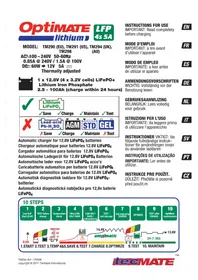
Optimate Lithium - Battery charger Tecmate - Free user manual and instructions
Find the device manual for free Optimate Lithium Tecmate in PDF.


| Product type | Battery charger for LiFePO4 batteries |
| Compatible models | TM290 (EU), TM291 (US), TM294 (UK), TM298 (AU) |
| Input voltage | AC 100-240 V, 50-60 Hz |
| Input current | 0.85 A @ 240 V / 1.5 A @ 100 V |
| Output power | 60 W |
| Nominal output voltage | 12 V (suitable for 12.8 V LiFePO4 batteries) |
| Maximum charge current | 5 A (up to 9.5 A in fast charge mode depending on temperature) |
| Compatible battery type | LiFePO4 12.8 V (4 cells 3.2 V) up to 100 Ah |
| Charge programs | Low voltage start, recovery, main charge, optimization, maintenance |
| Smart functions | safeT° (thermal adaptation), ampmatic™ (automatic current adjustment), voltage retention test |
| Safety protection | Polarity reversal protection, temperature current limiting, automatic stop on defective battery |
| BMS reset | Special pulse to unlock the battery management system |
| Energy saving mode | Consumption < 0.5 W in standby (without battery) |
| Long-term maintenance mode | Automatic charge/rest cycles to maintain 100% |
| Operating temperature | From -20 °C to +45 °C (charge limited outside 0-45 °C) |
| LED indicators | 8 LEDs for status, test, charge and maintenance |
| Wall mounting | Mounting holes in the base for vertical mounting |
| Warranty | 3 years (see conditions) |
| Repairability | Replacement of input cable by a certified professional |
| Maintenance | Protect from humidity, clean terminals if corroded |
Frequently Asked Questions - Optimate Lithium Tecmate
User questions about Optimate Lithium Tecmate
0 question about this device. Answer the ones you know or ask your own.
Ask a new question about this device
Download the instructions for your Battery charger in PDF format for free! Find your manual Optimate Lithium - Tecmate and take your electronic device back in hand. On this page are published all the documents necessary for the use of your device. Optimate Lithium by Tecmate.
USER MANUAL Optimate Lithium Tecmate
Lithium Iron Phosphate
2.5 - 100Ah (charge within 24 hours)
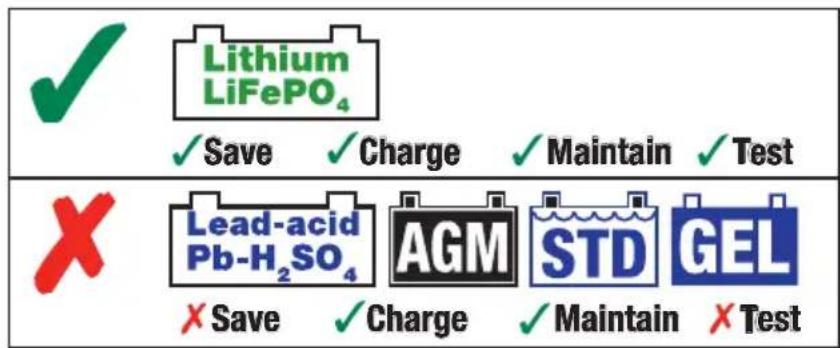
Automatic charger for 12.8V LiFePO 4 batteries Chargeur automatique pour batteries 12.8V LiFePO 4 Cargador automático para baterías 12.8V LiFePO 4 Automatische Ladegerät für 12.8V LiFePO 4 Batterien Automatische lader voor 12.8V LiFePO 4 accu's Caricabatterie automatico per batterie 12.8V LiFePO 4 Carregador automático para baterias de 12.8V LiFePO 4 Automatisk diagnostisk laddare för 12.8V LiFePO 4 -batterier
IMPORTANT: Read completely before charging
MODE D'EMPLOI
LOW VOLT SAVE / cellmonitoring
6
TEST - cell damage
7
Cell-balancing CHARGE
8
OPTIMIZE
9
TEST after CHARGE
10
OptiMate maintenance

- START 2. TEST 3. TEMP 4&5. SAVE 6. TEST 7. CHARGE 8. OPTIMIZE
9.TEST 10. MAINTAIN
LED PANEL
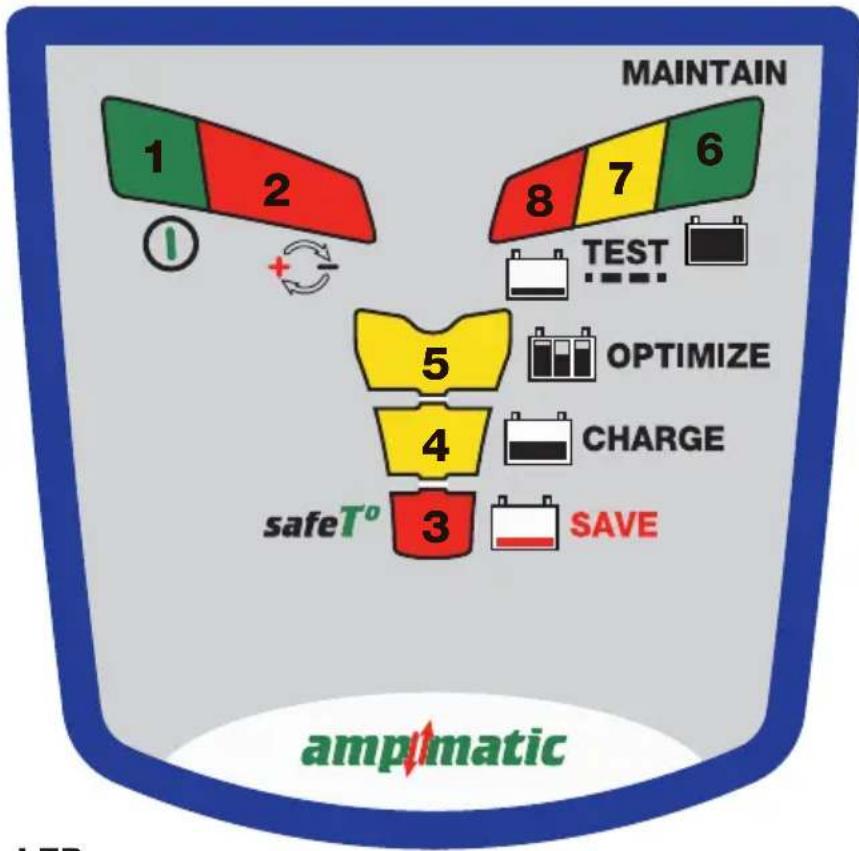
PROGRAM > LEDs
![graph LR A["TEST 10s"] --> B["3"] B --> C["4"] C --> D["5"] D --> E["6"] E --> F["MAINTAIN 365"] subgraph Timeframe G["SAVE 15m - 4h"] --> H["CHARGE 24h max"] I["X"] --> J["TEST 30m - 12h"] end style A fill:#f9f,stroke:#333 style B fill:#ff9,stroke:#333 style C fill:#ffcc,stroke:#333 style D fill:#f…](/content/2026/04/622892/images/6fa33c899daa67d4114c7ff8758030f73728b2963ab825ff8d81d56f14574a83.jpg)
TEST > LEDs

BMS RESET

THIS PORTION OF THE MANUAL CONTAINS IMPORTANT SAFETY INSTRUCTIONS FOR THE OptiMate LITHIUM BATTERY CHARGER. IT IS OF THE UTMOST IMPORTANCE THAT EACH TIME, BEFORE USING THE CHARGER, YOU READ AND EXACTLY FOLLOW THESE INSTRUCTIONS. SAVE THESE INSTRUCTIONS.
AUTOMATIC CHARGER ONLY FOR 12.8V LIFEPO 4 (LITHIUM IRON PHOSPHATE) BATTERIES. A rechargeable LIFEPO 4 battery should comply with IEC62133*.
DO NOT USE FOR NiCd, NiMH, Lead-Acid or any other type of Li-Ion or NON-RECHARGEABLE BATTERIES.
*IEC62133 - Safety requirements for portable sealed secondary cells containing alkaline or other non acid electrolytes and for batteries made from them, for use in portable applications.
- CAUTION : CLASS II APPLIANCE. DO NOT CONNECT TO GROUND.
- For indoor use only. Do not expose charger to rain or snow.
- Use of an attachment not recommended or sold by the battery charger manufacturer may result in a risk of fire, electric shock, or injury to persons.
- To reduce risk of damage to electric plug and cord, pull by plug rather than cord when disconnecting charger.
- An extension cord should not be used unless absolutely necessary. Use of improper extension cord could result in a risk of fire and electric shock. If extension cord must be used make sure that :
a) pins on plug of extension cord are the same number, size and shape as those of plug on charger.
b) the extension cord is property wired and in good electrical condition, and
c) the conductor wire size is large enough for the AC ampere rating of the charger as specified in the table below.
| AC INPUT RATING IN AMPERESEqual to or greater than But less than | LENGTH OF CORD, FEET(m) | AWG SIZE OFCORD | |
| 2A 3A 25 (17.6) | 50 (15.2)100 (30.5) | 181814 | |
-
Do not operate charger with damaged cord or plug - replace the cord or plug immediately.
-
Do not operate charger if it has received a sharp blow, been dropped, or otherwise damaged in any way; take it to a qualified serviceman.
-
Do not disassemble charger; take it to a qualified serviceman when service or repair is required.
Incorrect reassembly may result in a risk of electric shock or fire.
- To reduce risk of electric shock, unplug the charger from outlet before attempting any maintenance or cleaning.
Turning off controls will not reduce this risk. Clean only with slightly moist, not wet, cloth. Do not use solvents.
- WARNING - RISK OF EXPLOSIVE GASES.
a) WORKING IN VICINITY OF A LEAD-ACID BATTERY IS DANGEROUS. B ATTERIES GENERATE EXPLOSIVE GASES DURING NORMAL BATTERY OPERATION. FOR THIS REASON, IT IS OF UTMOST IMPORTANCE THAT YOU FOLLOW THE INSTRUCTIONS EACH TIME YOU USE THE CHARGER.
b) To reduce risk of battery explosion, follow these instructions and those published by the battery manufacturer and manufacturer of any equipment you intend to use in vicinity of the battery. Review cautionary marking on these products and on engine.
11. PERSONAL PRECAUTIONS.
a) Someone should be within range of your voice OR close enough to come to your aid when you work near a battery.
b) Have plenty of fresh water and soap nearby in case battery acid contacts skin, clothing or eyes.
c) Wear complete eye protection and clothing protection. Avoid touching eyes while working near a battery.
d) If battery acid contacts or enters eye, flood eye with cold running water for at least 10 minutes and get medical attention immediately. If battery acid contacts skin or clothing, wash immediately with soap & water. If acid enters an eye, immediately flood eye with running cold water for at least 10 minutes & get medical attention immediately.
e) NEVER smoke or allow a spark or flame in vicinity of battery or engine.
f) Be extra cautious to reduce risk of dropping a metal tool onto battery. It might spark or short-circuit battery or other electrical part that may cause explosion.
g) Remove personal metal items such as rings, bracelets, necklaces, and watches when working with a battery. A battery can produce a short-circuit current high enough to weld a ring or the like to metal, causing a severe burn.
i) NEVER charge a frozen battery.
12. PREPARING TO CHARGE
a) If necessary to remove battery from vehicle to charge, always remove grounded terminal from battery first.
Make sure all accessories in the vehicle are off, so as not to cause an arc.
b) Be sure area around battery is well ventilated while battery is being charged. Gas can be forcefully blown
away by using a piece of cardboard or other non-metallic material as a fan.
c) Clean battery terminals. Be careful to keep corrosion from coming in contact with eyes.
d) Study all battery manufacturer's specific precautions such as removing or not removing cell caps while charging and recommended rates of charge.
e) Determine voltage of battery by referring to vehicle or other user's manual and BEFORE MAKING THE BATTERY CONNECTIONS, MAKE SURE THAT THE VOLTAGE OF THE BATTERY YOU ARE GOING TO CHARGE MATCHES THE OUTPUT VOLTAGE OF THE CHARGER.
13. CHARGER LOCATION.
a) Locate charger as far away from battery as DC cables permit.
b) Never place charger directly above batterv being charged; gases from battery will corrode and damage the charger. c) Never allow battery acid to drip on charger when reading gravity or filling battery. Do not operate charger in a closed-in area or restrict ventilation in any way.
d) Do not set a battery on top of charger. IMPORTANT : Place charger on a hard flat surface or mount onto a vertical surface. Do not place on plastic, leather or textile surface.
14. DC CONNECTION PRECAUTIONS
a) Connect and disconnect DC output clips only after setting any charger switches to off position and removing
AC cord from electric outlet. Never allow clips to touch each other, however should this happen no damage will result to the charger circuit & the automatic charging programme will just reset to «start».
b) Attach clips to battery and chassis as indicated in 15(e), 15(f), and 16(b) through 16(d).
NOTE : This battery charger has an automatic safety feature that will prevent it from operating if the battery has been inversely connected. Set charger switches to off position and/or remove AC cord from electrical outlet, disconnect the battery clips, then reconnect correctly according to the instructions below.
15. FOLLOW THESE STEPS WHEN BATTERY IS INSTALLED IN VEHICLE. A SPARK NEAR A BATTERY MAY CAUSE BATTERY EXPLOSION. TO REDUCE RISK OF A SPARK NEAR BATTERY :
a) Position AC and DC cords so as to reduce risk of damage by hood, door or moving engine part.
b) Stay clear of fan -blades, belts,pulleys,and other parts that can cause injury to persons.
c) Check polarity of battery posts. POSITIVE (POS, P, +) battery post usually has larger diameter than NEGATIVE (NEG, N,−) post.
d) Determine which post of battery is grounded (connected) to the chassis. If negative post is grounded to chassis (as in most vehicles), see (e). If positive post is grounded to the chassis, see (f).
e) For negative-grounded vehicle, connect POSITIVE (RED) clip from battery charger to POSITIVE (POS, P, +) ungrounded post of battery. Connect NEGATIVE (BLACK) clip to vehicle chassis or engine block away from battery. Do not connect clip to carburetor, fuel lines, or sheet-metal body parts. Connect to a heavy gage metal part of the frame or engine block.
f) For positive-grounded vehicle, connect NEGATIVE (BLACK) clip from battery charger to NEGATIVE (NEG. N, -) ungrounded post of battery. Connect POSITIVE (RED) clip to vehicle chassis or engine block away from battery. Do not connect clip to carburetor, fuel lines, or sheet-metal body parts. Connect to a heavy gage metal part of the frame or engine block.
g) When disconnecting charger, turn switches to off, disconnect AC cord, remove clip from vehicle chassis, and then remove clip from battery terminal.
h) See operating instructions for length of charge information.
16. FOLLOW THESE STEPS WHEN BATTERY IS OUTSIDE VEHICLE. A SPARK NEAR THE BATTERY MAY CAUSE BATTERY EXPLOSION. TO REDUCE RISK OF A SPARK NEAR BATTERY :
a) Check polarity of battery posts. POSITIVE (POS, P, +) battery post usually has a larger diameter than NEGATIVE (NEG,N, -) post.
b) This battery charger has an automatic safety feature that will prevent it from operating if the battery has been inversely connected. The charger does allow charge current unless a voltage of at least 0.5V is sensed.
c) Connect POSITIVE (RED) charger clip to POSITIVE (POS, P, +) post of battery.
d) Connect NEGATIVE (BLACK) charger clip to NEGATIVE (NEG, N, -) battery post of the battery.
e) Do not face battery when making final connection.
f) When disconnecting charger, always do so in reverse sequence of connecting procedure & break first connection while as far away from battery as practical.
g) A marine (boat) battery must be removed & charged on shore. To charge it on board requires equipment specially designed for marine use.
AUTOMATIC DIAGNOSTIC CHARGER FOR 12.8V LiFePO4 (LITHIUM IRON PHOSPHATE) BATTERIES UP TO 100AH:
SAFETY WARNING AND NOTES: IF YOU HAVE NOT YET DONE SO, READ THE PRECEDING PAGES LABELLED "IMPORTANT SAFETY INSTRUCTIONS" BEFORE OPERATING THIS CHARGER.
This appliance can be used by children aged from 8 years and above and persons with reduced physical, sensory or mental capabilities or lack of experience and knowledge if they have been given supervision or instruction concerning use of the appliance in a safe way and understand the hazards involved. Children shall not play with the appliance. Cleaning and user maintenance shall not be made by children without supervision.
CORRECT USE: Use the charger only if the input and output leads and connectors are in good, undamaged condition. If the input cable is damaged, it is essential to have it replaced without delay by the manufacturer, his authorised service agent or a qualified workshop, to avoid danger. Protect your charger from damp and humid conditions both during use and in storage. Damage resulting from corrosion, oxidation or internal electrical short-circuiting is not covered by warranty. Distance the charger from the battery during charging to avoid contamination by or exposure to acid or acidic vapours. If using it in the horizontal orientation, place the charger on a hard, flat surface, but NOT on plastic, textile or leather. Use the fixing holes provided in the enclosure base to attach the charger to any convenient, sound vertical surface.
EXPOSURE TO LIQUIDS: This charger is designed to withstand exposure to liquids accidentally spilled or splashed onto the casing from above, or to light rainfall. Prolonged exposure to falling rain is inadvisable and longer service life will be obtained by minimizing such exposure. Failure of the charger due to oxidation resulting from the eventual penetration of liquid into the electronic components, connectors or plugs, is not covered by warranty.
VERY FLAT NEGLECTED BATTERIES: Pay particularly close attention to the following A LiFePO 4 battery left deep-discharged for an extended period may develop permanent damage in one or more cells.
Such batteries may heat up excessively during charging. During the SAVE mode the program limits charge current if the voltage is below nominal (12.8V) and the program should detect obvious cell damage and will automatically suspend charging, but the higher the cell count in parallel the more difficult it is to detect a bad cell e.g. a 5Ah battery typically has 4 series connected sets of 2 parallel cells (4S2P configuration - total 8 cells), a 10Ah battery has 4 series connected sets of 4 parallel cells (4S4P configuration - total 16 cells).
ALWAYS monitor the battery temperature during the first hour, then hourly there-after. If at any time the battery is uncomfortably hot to touch or you notice any unusual signs, DISCONNECT THE CHARGER IMMEDIATELY.
CONNECTING THE CHARGER TO THE BATTERY
-
Disconnect AC power supply before making or breaking DC / battery connections.
-
If charging a battery in the vehicle with the battery clips, before making connections, first check that the battery clips can be safely and securely positioned clear from surrounding wiring, metal tubing or the chassis. Make connections in the following order: First connect to the battery terminal not connected to the chassis (normally positive), then connect the other battery clip (normally negative) to the chassis well away from the battery and fuel line. Always disconnect in reverse sequence.
-
When charging a battery out of the vehicle with the battery clips, place it in a well ventilated area. Connect the charger to the battery: RED clamp to POSITIVE (POS, P or +) terminal and BLACK clamp to NEGATIVE (NEG, N or −) terminal. Make sure the connections are firm and secure. Good contact is important.
PROCEEDING TO CHARGE
CHARGING TIME: Charge time will be affected by ambient temperature. The safeT o program limits charge current if the temperature measured at the OptiMate Lithium is below 0°C / 32°F or above 45°C / 113°F. Within the normal temperature range the ampmatic™ LiFePO4 specific program automatically determines the most efficient rate of charge current for the connected battery, according to its state of charge, state of health, and electrical storage (Ah) capacity. The delivered current may be anywhere from 1.25A to 5A.
Charge time on a flat but otherwise undamaged battery:
For batteries rated from 2.5Ah to 5Ah: 60 to 120 minutes to progress to the voltage retention test.
For batteries rated above 5Ah: approximately 25% of the battery's Ah rating, so a 50Ah battery should take no more than about 5 hours to progress to the voltage retention test.
Deep discharged batteries may take longer.
1
Low Volt Start (0.5V)
2
TEST before charge
3
Temperature check
4
Ultra LOW VOLT SAVE
5
LOW VOLT SAVE / cellmonitoring
6
TEST - cell damage
7
Cell-balancing CHARGE
8
OPTIMIZE
9
TEST after CHARGE
10
OptiMate maintenance
| ProtectionBMS reset | 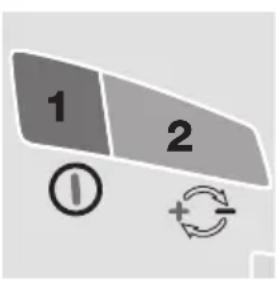 | Charger will not proceed without user interaction.LED #2 REVERSE POLARITY:Lights when the battery connections are incorrect.The charger is electronically protected so no damage will result, and the output will remain disabled until the connections are corrected.BMS RESET:for batteries with a battery management system (BMS) that protects against deep discharge. Disconnect the charger from mains supply. Wait for LED #1a/1b to go out. Reconnect to mains supply. A special BMS reset pulse is delivered for up to 5 seconds. The program should continue to STEP 4. |
| STEP 1Low Volt Start ≥0.5V | 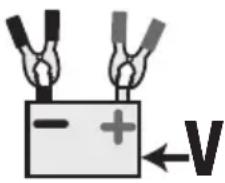 | Battery voltage check - OptiMate Lithium automatically activates if connected battery voltage is at least 0.5 Volt. |
| STEP 2TEST before chargeSTEP 3Temperature check | TEST LEDs6 : GREEN7 : YELLOW8 : RED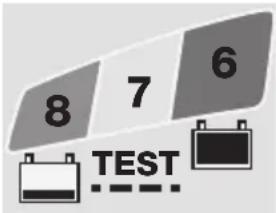 | TEST LEDs #6/7/8 indicate the battery condition prior to charging. Consult the table on page 2 to match TEST LED indication to an estimated state of charge percentage (SOC%).During the test:OPTIMIZE minimum charge time is set according to the test result, varying between 10 minutes for a battery with 80% or higher state of charge to 120 minutes for a battery with 40% or less state of charge.Ambient temperature is measured to determine charge voltage parameters.LOW TEMPERATURE WARNING - LED #8 (red) flashing: The temperature measured at OptiMate Lithium is below -20 degrees Celsius or 4 degrees Fahernheit, below the safe charging AND discharging zone for LiFePO4batteries.Charging commences after 10 seconds. |
| STEP 4ULTRA LOW VOLT SAVESTEP 5LOW VOLT SAVESTEP 6TEST - cell damage | LED #3 : RED | IMPORTANT: If this mode engages read the section VERY FLAT NEGLECTED BATTERIES on the preceding page.This mode engages if the battery was more than 90% discharged / voltage is below 12.8VsafeT®: Charge current is automatically adjusted according to voltage and ambient temperature measured during the test.VERY LOW VOLTAGE SAVE for batteries between 0.6V and 8.8V : Current starts at 125mA and will increase to 325mA depending on charge progress. If the voltage did not rise above 8.8V within 2 hours, charging will be suspended and the TEST LED #8 (red) will flash, indicating the battery may have suffered permanent damage or a professional assessment is required.LOW VOLTAGE SAVE for batteries between 8.9V and 12.8V (16V): Maximum current is set to 1.25A. The battery's charge acceptance is monitored for unusual behaviour.A healthy LiFePO4 battery will progress to CHARGE mode within 4 hours, otherwise charging will be suspended and TEST LED #8 (red) will flash, indicating the battery may have suffered permanent damage or a professional assessment is required. |
| STEP 7CHARGE | LED #4 : YELLOW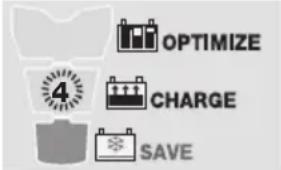 | Thesafet o program limits charge current if the temperature measured at the OptiMate Lithium is below 0°C / 32°F or above 45°C / 113°F. If the temperature was initially below 0°C / 32°F charge current is limited to 325mA only for the first hour after which the battery is expected to have increased it's internal temperature within the normal temperature zone. Within the normal temperature zone theampmatic TM LiFePO4 specific program automatically determines the most efficient rate of charge current for the connected battery, according to its state of charge, state of health, and electrical storage (Ah) capacity. The delivered current may be anywhere from 1.25A to 5A.For batteries with an electrical storage (Ah) capacity less than 5Ah charge current is automatically adjusted lower to an average equal to battery Ah capacity, e.g. a 2.5Ah / 2500mAh battery receive an average of 2.5 Amps.NOTE: For safety reasons there is an overall charge time limit of 24 hours for SAVE and CHARGE modes. |
| STEP 8OPTIMIZE | LED #5 : YELLOW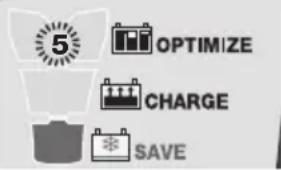 | The OPTIMIZE mode starts when the voltage has reached 14.4V for the first time during bulk CHARGE mode.Theampmatic TM current control program now delivers pulses of current to equalise the individual cells within the battery and optimizes charge level. Charging should complete within the minimum charge time set during STEP 3, but if the battery requires further charging the program will extend OPTIMIZE mode up to a maximum of 2 hours. |
| STEP 9TEST aftercharge | LED #6 FLASHING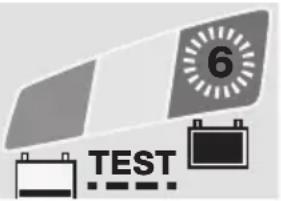 | TEST after charge : Delivery of current to the battery is interrupted for 30 minutes* to allow the program to determine the battery's ability to retain charge.* IF charging started in SAVE mode (LED #3, indicating a deep discharged battery) or the the voltage retention test is extended to 12 hours to confirm battery health.The TEST result (indicated on LED # 6, 7, 8) is adjusted in real time according to the measured battery voltage. Consult the “EARLY WARNING OF BATTERY PROBLEMS” table on page 2 to match TEST LED indication to an estimated state of charge percentage (SOC%).More information is provided in the section “NOTES ON TEST RESULTS”. |
| STEP 10OptiMATESmartMAINTAIN | LED #6 / 7 / 8 ON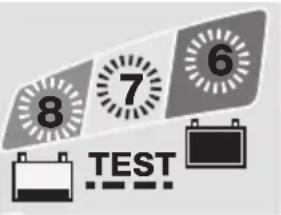 For batteries with a good state of health LED #6 (green) will remain on. For batteries with a good state of health LED #6 (green) will remain on. | MAINTENANCE CHARGE: LED #6 / 7 / 8 steady on according to final voltage measured at termination of STEP 7.The MAINTENANCE CHARGE CYCLE consists of 30 minute charge periods followed by and alternating with a 30 minute ‘rest’ periods, during which there is no charge current.During the 30 minute charge cycles current is delivered only if the battery has lost charge.TheBATTERY REFRESH CYCLEis performed if the charger detects the battery has lost significant charge. The program returns to OPTIMIZE mode (LED #5) and then proceeds to the voltage retention test and maintenance charge cycle.Read section MAINTAINING A LITHIUM BATTERY FOR EXTENDED PERIODS. |
NOTES ON TEST RESULTS:
- For any test result other than green #6, disconnect the battery from the electrical system it supports, and reconnect the OptiMate. If a better test result is now obtained, this suggests that the power losses are partly due to an electrical problem in the electrical system and not in the battery itself.
- If the red LED #8 alone, or the yellow #7 and red LED #8 indicate together (or yellow LED alone for a sealed battery), a significant problem exists. The red / yellow+red LEDs mean that after being charged the battery's voltage is not being sustained or that despite recovery attempts the battery was irrecoverable. This may be due to a defect in the battery itself, such as a short-circuited cell, or, in the case of a battery still connected to the electrical system it supports, it may be signalling a loss of current through deteriorated wiring or a degraded switch or contact, or in-circuit current-consuming accessories.
A sudden load being switched on while the charger is connected can also cause the battery voltage to dip significantly.
- TEST LED #8 (red) flashing - Charging is suspended. During the voltage retention test the voltage reduced below 12.8V within the first 30 minutes, indicating the battery may have suffered permanent damage and a professional assessment is required. More information on OptiMate TEST or MONITOR products can be found at www.optimate1.com.
MAINTAINING A LITHIUM BATTERY FOR EXTENDED PERIODS: A LiFePO 4 battery can be left connected to the OptiMate Lithium for any extended period of time. The OptiMate Lithium maintenance program is fully automatic, it continuously monitors the battery voltage and delivers current only if it sensed the battery has lost charge (possibly through connected vehicle or other circuitry or self discharge). The OptiMate Lithium's maintenance program guarantees the battery will remain at or close to full charge, but never overcharged.
ECO POWER SAVING MODE WHEN THE CHARGER IS CONNECTED TO AC SUPPLY:
The power converter switches to ECO mode when the charger is not connected to a battery resulting in a very low power draw of less than 0.5W, equivalent to power consumption of 0.012 kWh per day. When a battery is connected to the charger power consumption depends on the current demand of the battery and its connected vehicle / electronic circuitry. After the battery has been charged and the charger is in long term maintenance charge mode (to keep the battery at 100% charge) the total power consumption is estimated to be 0.024kWh or less per day.
LIMITED WARRANTY
TecMate (International) SA, B-3300 Tienen, Belgium, offers this limited warranty to the original purchaser at retail of this product. This limited warranty is not transferable. TecMate (International) warrants this battery charger for three years from date of purchase at retail against defective material or workmanship. If such should occur the unit will be repaired or replaced at the option of the manufacturer. It is the obligation of the purchaser to forward the unit together with proof of purchase (see NOTE), transportation or mailing costs prepaid, to the manufacturer or its authorized representative. This limited warranty is void if the product is misused, subjected to careless handling, or repaired by anyone other than the factory or its authorized representative. The manufacturer makes no warranty other than this limited warranty and expressly excludes any implied warranty including any warranty for consequential damages.
THIS IS THE ONLY EXPRESS LIMITED WARRANTY AND THE MANUFACTURER NEITHER ASSUMES NOR AUTHORIZES ANYONE TO ASSUME OR MAKE ANY OTHER OBLIGATION TOWARDS THE PRODUCT OTHER THAN THIS EXPRESS LIMITED WARRANTY. YOUR STATUTORY RIGHTS ARE NOT AFFECTED.
NOTE: Details at www.tecmate.com/warranty.
WARRANTY in Canada, USA, Central America and South America:
TecMate North America, Oakville, ON, Canada, as a wholly owned subsidiary of TecMate International, assumes the responsibility for product warranty in these regions.
More information on TecMate products can be found at www.tecmate.com.
Optimate lithium
INSTRUCTIONS IMPORTANTES CONCERNANT LA SÉCURITÉ CONSERVER CES INSTRUCTIONS. CE MANUEL CONTIENT DES INSTRUCTIONS IMPORTANTES CONCERNANT LA SÉCURITÉ ET LE FONCTIONNEMENT DU CHARGEUR OPTIMATE 7 12.8V LIFEPO 4 .
CHARGEUR AUTOMATIQUE POUR BATTERIES 12.8V LIFEPO4 NE CONVIENT PAS POUR LES BATTERIES NiCd, NiMH, Plomb-Acide OU NON RECHARGEABLES.
AVERTISSEMENT :
NOTITIE: Zie www.tecmate.com/warranty of contacteer warranty@tecmate.com.
- PERSONAL PRECAUTIONS
- PREPARING TO CHARGE
- CHARGER LOCATION
- DC CONNECTION PRECAUTIONS
- FOLLOW THESE STEPS WHEN BATTERY IS INSTALLED IN VEHICLE. A SPARK NEAR A BATTERY MAY CAUSE BATTERY EXPLOSION. TO REDUCE RISK OF A SPARK NEAR BATTERY
- FOLLOW THESE STEPS WHEN BATTERY IS OUTSIDE VEHICLE. A SPARK NEAR THE BATTERY MAY CAUSE BATTERY EXPLOSION. TO REDUCE RISK OF A SPARK NEAR BATTERY
- AUTOMATIC DIAGNOSTIC CHARGER FOR 12.8V LIFEPO4 (LITHIUM IRON PHOSPHATE) BATTERIES UP TO 100AH
- SAFETY WARNING AND NOTES: IF YOU HAVE NOT YET DONE SO, READ THE PRECEDING PAGES LABELLED "IMPORTANT SAFETY INSTRUCTIONS" BEFORE OPERATING THIS CHARGER
- VERY FLAT NEGLECTED BATTERIES: PAY PARTICULARLY CLOSE ATTENTION TO THE FOLLOWING A LIFEPO 4 BATTERY LEFT DEEP-DISCHARGED FOR AN EXTENDED PERIOD MAY DEVELOP PERMANENT DAMAGE IN ONE OR MORE CELLS
- CONNECTING THE CHARGER TO THE BATTERY
- PROCEEDING TO CHARGE
- NOTES ON TEST RESULTS
- ECO POWER SAVING MODE WHEN THE CHARGER IS CONNECTED TO AC SUPPLY
- LIMITED WARRANTY
- WARRANTY IN CANADA, USA, CENTRAL AMERICA AND SOUTH AMERICA
- OPTIMATE LITHIUM
- AVERTISSEMENT
Brand : Tecmate
Model : Optimate Lithium
Category : Battery charger