HmIPFALMOTC12 - Controller Homematic IP - Free user manual and instructions
Find the device manual for free HmIPFALMOTC12 Homematic IP in PDF.



User questions about HmIPFALMOTC12 Homematic IP
0 question about this device. Answer the ones you know or ask your own.
Ask a new question about this device
Download the instructions for your Controller in PDF format for free! Find your manual HmIPFALMOTC12 - Homematic IP and take your electronic device back in hand. On this page are published all the documents necessary for the use of your device. HmIPFALMOTC12 by Homematic IP.
USER MANUAL HmIPFALMOTC12 Homematic IP
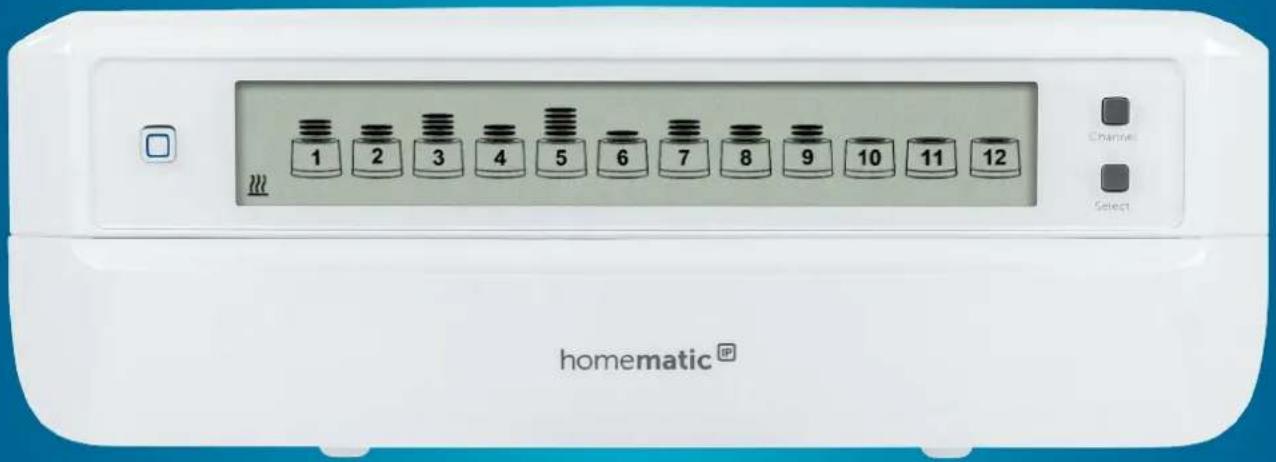
Floor Heating Controller – 12 channels, motorised
HmIP-FALMOT-C12
text_image
1 2 3 4 5 6 7 8 9 10 11 12 Homematic® Chancs SelectEN Installation and operating manual
text_image
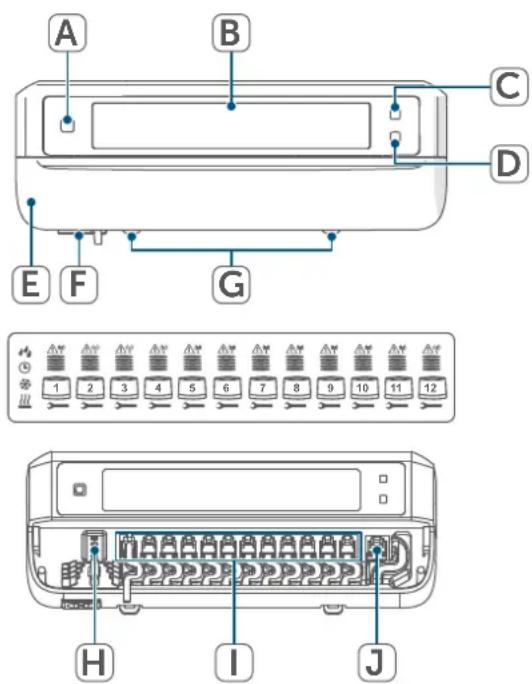
A B C D E F G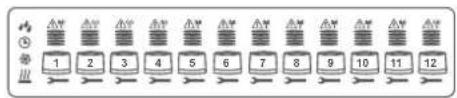
text_image
1 2 3 4 5 6 7 8 9 10 11 12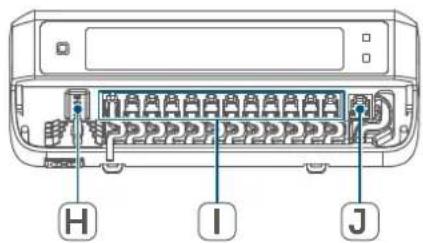
text_image
H I JAbbildung 1
Displayübersicht:
natural_image
Diagram of a computer case with blue arrows indicating rotation or movement (no text or symbols)Abbildung 4
natural_image
Line drawing of a printer front panel with a blue arrow indicating compression or disassembly (no text or symbols)Abbildung 5
natural_image
Line drawing of a hand pressing down on a device panel (no text or symbols)Abbildung 6

natural_image
Line drawing of a hand inserting a device into a rectangular device (no text or symbols)Abbildung 7
natural_image
Line drawing of a hand inserting a device into a rectangular housing (no text or symbols)Abbildung 8

1 Package contents......25
2 Information about this manual....25
3 Hazard information 25
4 Function and device overview.... 26
5 General system information 28
6 Installation....28
6.1 Screw mounting....28
6.2 DIN rail mounting 29
7 Start-up 29
7.1 Installation instructions 29
7.2 Installation....30
7.3 Behaviour after switching on the mains voltage 30
7.4 Pairing 30
7.4.1 Pairing with a Homematic IP Wall Thermostat 31
7.4.2 Pairing with a Homematic IP Multi IO Box 32
7.4.3 Adding another floor heating controller 32
7.4.4 Pairing with the Homematic IP Access Point 32
8 Configuration using the Homematic IP Wall Thermostat 33
9 Manual operation.... 36
10 Delete device connections ....37
11 Troubleshooting....37
11.1 Command not confirmed 37
11.2 Duty cycle 37
11.3 Error codes and flashing sequences 38
11.3.1 LED flashing sequence....38
11.3.2 Error codes on the display 39
12 Restoring factory settings 40
13 Maintenance and cleaning 40
14 General information about radio operation 40
15 Disposal....41
16 Technical specifications.... 42
Documentation © 2019 eQ-3 AG, Germany
All rights reserved. Translation from the original version in German. This manual may not be reproduced in any format, either in whole or in part, nor may it be duplicated or edited by electronic, mechanical or chemical means, without the written consent of the publisher.
Typographical and printing errors cannot be excluded. However, the information contained in this manual is reviewed on a regular basis and any necessary corrections will be implemented in the next edition. We accept no liability for technical or typographical errors or the consequences thereof.
All trademarks and industrial property rights are acknowledged.
Changes may be made without prior notice as a result of technical advances.
157367 (web) | Version 1.4 (07/2024)
1 Package contents
1x Floor heating controller – 12 channels, motorised
2x Screws, 4.0 x 40 mm
2x Wall plugs, 6 mm
1x Power cable
1x Operating manual
2 Information about this manual
Please read this manual carefully before operating your Homematic IP components. Keep the manual so you can refer to it at a later date if you need to. If you hand over the device to other persons for use, please hand over this manual as well.
Symbols used:

Important! This indicates a hazard.

Please note. This section contains important additional information!
3 Hazard information

Do not open the device. It does not contain any parts that need to be maintained by the user. In the event of an error, please have the device checked by an expert.

For safety and licensing reasons (CE), unauthorised change and/or modification of the device is not permitted.

The device may only be operated in a dry and dust-free environment and must be protected from the effects of moisture, vibrations, solar or other methods of heat radiation, cold and mechanical loads.

Do not use the device if there are signs of damage to the housing, control elements or connecting sockets, for example. If you have any doubts, have the device checked by an expert.

The device is not a toy: do not allow children to play with it. Do not leave packaging material lying around. Plastic films/bags, pieces of polystyrene, etc., can be dangerous in the hands of a child.

We accept no liability for damage to property or personal injury caused by improper use or the failure to observe the hazard warnings. In such cases, all warranty claims are void. We accept no liability for any consequential damage.

The device may only be used for fixed installations. The device must be securely attached within a fixed installation.

The actuator is part of the building installation. Observe the relevant national standards and directives during planning and set-up. Only qualified electricians (to VDE 0100) are permitted to carry out work on the 230 V mains. The applicable accident prevention regulations must be observed while such work is being carried
out. To avoid electric shocks from the device, please disconnect the mains voltage (trip the miniature circuit-breaker). Non-compliance with the installation instructions can cause fire or introduce other hazards.

When connecting to the device terminals, observe the cables and cable cross-sections permitted for this purpose.

The floor heating controller must exclusively be operated with motorised drives (HmIP-VDMOT).

The device must only be operated within residential buildings.

Using the device for any purpose other than that described in this operating manual does not fall within the scope of intended use and will invalidate any warranty or liability.
4 Function and device overview
The Homematic IP Floor Heating Controller offers comfortable and demand-based room-by-room control of your floor heating system using the smartphone app or the Homematic IP Wall Thermostat, according to your personal needs. In conjunction with motorised drives (HmIP-VDMOT), the floor heating controller can be used to control a floor heating system with up to 12 heating circuits and can be operated in heating and cooling mode (provided your heating system supports this operating mode). You can flexibly mount the device using the supplied screws or a DIN rail. The required wiring is kept to a minimum thanks to the secure radio communication between the Homematic IP devices.
Device overview:
(A) System button (pairing button and LED)
(B) Display
(C) Channel button (channel button and LED)
(D) Select button (channel button and LED)
(E) Cover
(F) 230 V\~/50 Hz connecting socket
(G) Latching lugs for DIN rail mounting
(H) DC-IN 24 V connecting terminals
(I) Connecting sockets for motorised drives
(J) Connecting socket for extension box (optional)
text_image
A B C D E F G 1 2 3 4 5 6 7 8 9 10 11 12 H I JFigure 1
Display overview:
| Valve position display:Bars 1 – 5 displayed:Valve position > 80%Bars 1 – 4 displayed:Valve position > 60%Bars 1 – 3 displayed:Valve position > 40%Bars 1 – 2 displayed:Valve position > 20%Bar 1 displayed:Valve position > 0%No bars displayed:Valve position = 0% | |
| → | Open-ended wrench |
| ↑↓ | Emergency operation |
| ↓ | Radio transmission |
| ↓↓ | Heat |
| ※ | Cool |
| ◎ | External clock active (config-urable in conjunction with a Homematic IP Multi IO Box) |
| 〃 | Warning about condensation |

For further information regarding the symbols, please refer to section (see „11.3.2 Error codes on the display“ on page 39).
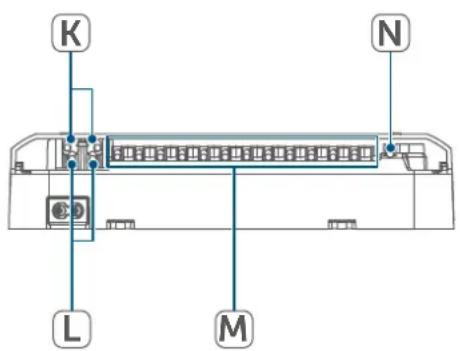
Cable bushings:
(K) Cable bushing for DC-IN
(L) Cable bushing for DC-IN
(M) Cable bushing for motorised drives
(N) Cable bushing for extension box
text_image
K N L MFigure 2

In contrast to conventional, thermal drives, the motorised drive can move to any valve position calculated by the floor heating controller to set the desired room temperature. This achieves even thermal flow and a continuous heat output. In isolated cases, replacing conventional with motorised drives may cause flow noise at the heating manifold if the pump pressure has been set too high and the valves are only slightly open. You can eliminate this by changing the pump settings or adapting the floor heating controller parameters.
5 General system information
This device is part of the Homematic IP Smart Home system and communicates via the Homematic IP wireless protocol. All devices in the Homematic IP system can be configured easily and individually with a smartphone using the Homematic IP app. Alternatively, you have the option of operating Homematic IP devices via the CCU3 or in conjunction with many partner solutions. The available functions provided by the system in combination with other components are described in the Homematic IP User Guide. All current technical documents and updates can be found at www.homematic-ip.com.
6 Installation
You can flexibly mount the floor heating controller on a wall using the supplied screws or to a DIN rail.
6.1 Screw mounting
To mount the floor heating controller using screws, proceed as follows:
- Please select a suitable mounting location close to your heating manifold.

Make sure that no electricity or similar lines run in the wall at this location!
- Use a pen to mark the positions of the two bore holes with a distance of 120 mm on the wall.
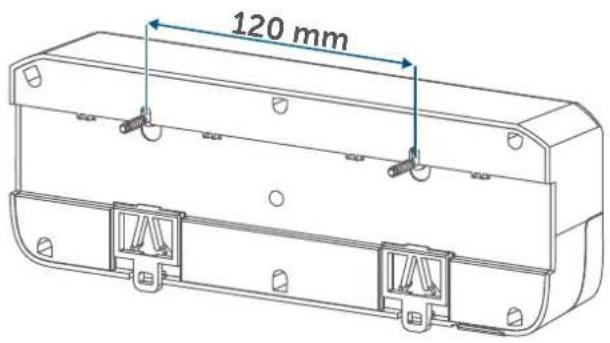
text_image
120 mmFigure 3
- Use an appropriate drill to make the 6 mm holes as illustrated.
- Fasten the screws and plugs supplied to mount the floor heating controller.
6.2 DIN rail mounting
To mount the floor heating controller to a DIN rail, proceed as follows:
- Position the floor heating controller on the DIN rail.
- Press the latching lugs (G) upwards to lock the floor heating controller.
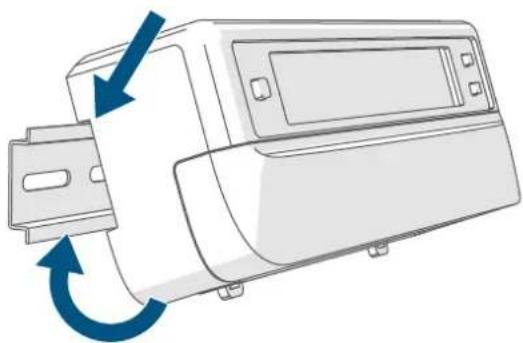
natural_image
Diagram of a computer monitor with blue arrows indicating rotation or movement (no text or symbols)Figure 4
• Make sure that the latching lugs are completely latched and that the device is seated securely on the rail.
7 Start-up
7.1 Installation instructions
i Please read this entire section before starting the pairing procedure.
For installing the floor heating controller into a power distribution panel, it must be installed in accordance with VDE 0603, DIN 43871 (low-voltage sub-distribution board), DIN 18015-x. In this case, installation must take place on a mounting rail (DIN rail) according to EN 50022. Installation and wiring must be performed according to VDE 0100 (VDE 0100-410, VDE 0100-510 etc.). Please consider the technical connection requirements (TCRs) of your energy supplier.
Please observe the hazard information in section (see „3 Hazard information“ on page 25) during installation.
Permitted cable cross-sections for the cable bushings of the floor heating controller are:
| Cable bushings Cable | cross-section [mm2] |
| 1 (K) > 8.0 | |
| 2 (L) > 5.5 | |
| 3 (M) > 3.6 | |
| 4 (N) > 4.4 |
(→see figure)
Permitted cable cross-sections for connecting to the connecting terminals (H) of the floor heating controller:
Rigid cable: 0.12 - 0.50 mm ^4
7.2 Installation

Connect the floor heating controller to a 230 V socket using the enclosed mains cable to supply it with power or use the connecting terminal (H) to connect 24 V DC (SELV).
To install the floor heating controller, proceed as follows:
- Pull the cover (E) downwards to open it.
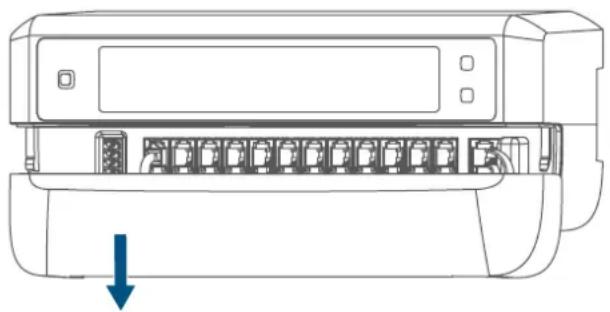
natural_image
Line drawing of a printer front panel with a blue arrow indicating compression or disassembly (no text or symbols present)Figure 5
- (Optionally) connect a 24 V DC connecting cable to the connecting terminal (H). To connect and loosen the individual wires, press the orange clamp using a small screwdriver.
- Connect your heating circuit valve drives' connecting cables to the connecting sockets (I).
- (Optionally) connect your extension box's connecting cable to the connecting socket (J).
- Close the cover again by position-
ing it in the dedicated guide rail and push the cover upwards.
- Connect the (optional) mains cable to a socket.
7.3 Behaviour after switching on the mains voltage

The display (B) is continuously on once the mains voltage is switched on.
If the device has not yet been paired, pairing mode will be enabled on the floor heating controller during the first 3 minutes after the mains voltage has been switched on. You will find further information about connecting your device in the next section.
All connected valve drives are fully opened one after the other. The valve drives will then complete an adjustment run to determine the valve closing position.

Each heating zone will be shown on the display according to the valve position after a successful adjustment run.
7.4 Pairing

Please read this entire section before starting the pairing procedure.

For more information on pairing and setting up the wall thermostat using a CCU3, please refer to the WebUI manual on our homepage at www.homematic-ip.com.
You must initially add the floor heating controller to integrate it into your system and enable it to communicate with other devices.
You can either pair the floor heating controller directly with other
Homematic IP devices (e.g. the wall thermostat or the Multi IO Box) or add it to the Homematic IP Access Point. After pairing, the device is configured at the wall thermostat. After pairing with the Access Point, the device is configured in the Homematic IP app.
7.4.1 Pairing with a Homematic IP Wall Thermostat

Please make sure you maintain a distance of at least 50 cm between the devices during pairing.

You can cancel the pairing procedure by briefly pressing the system button (A) again. This will be indicated by the device LED (A) lighting up red.
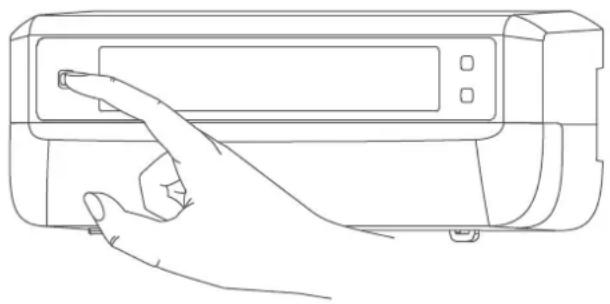
natural_image
Line drawing of a hand pressing a button on a device (no text or symbols)Figure 6

If no pairing operations are performed, pairing mode is exited automatically after 3 minutes.
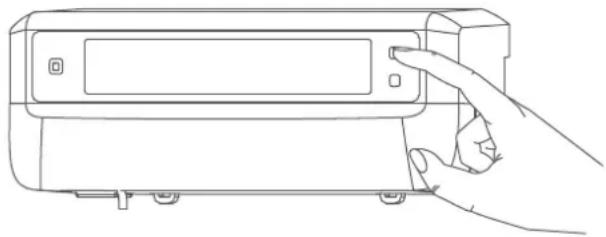
If you would like to pair the floor heating controller with a Homematic IP Wall Thermostat, the pairing mode of both devices has to be enabled first. To do this, proceed as follows:
- Briefly press the channel button (C) to select which channel you would like to pair a device with. Press once for channel 1, twice for channel 2, etc. The respective channel is shown on the display (B).
natural_image
Line drawing of a hand inserting a device into a rectangular device (no text or symbols)Figure 7
- Press and hold the system button (A) for 4 seconds until the LED starts to quickly flash orange. The pairing mode of the selected channel remains enabled for 3 minutes.
- Press and hold the system button of the wall thermostat for at least 4 seconds to enable the pairing mode. The device LED flashes orange.
The device LED (A) lights up green to indicate that pairing has been successful.
If pairing failed, the device LED lights up red. Please try again.
7.4.2 Pairing with a Homematic IP Multi IO Box
If you would like to pair the floor heating controller with a Homematic IP Multi IO Box, the pairing mode of both devices has to be enabled first. To do this, proceed as follows:
- Briefly press the channel button (C) as many times until all channels are shown on the display (B) ( see figure).
- Press and hold the system button (A) for 4 seconds until the LED (A) starts to quickly flash orange ( see figure). The pairing mode is active for 3 minutes.
The device LED (A) lights up green to indicate that pairing has been successful.
If pairing failed, the device LED lights up red. Please try again.
7.4.3 Adding another floor heating controller
To add a new floor heating controller to the system or to the existing devices, proceed as follows:
- First pair the new floor heating controller with the existing floor heating controller. Enable the pairing mode of the existing floor heating controller. For this purpose, press and hold the system button (A) for at least 4 seconds ( see figure).
- Enable the pairing mode of the new floor heating controller. Press and hold the system button (A) for at least 4 seconds.
The device LED (A) lights up green to indicate that pairing has been successful.
If pairing failed, the device LED lights up red. Please try again.
- You can add the new floor heating controller to other Homematic IP devices, such as the wall thermostat or the Multi IO Box. Simply enable the pairing mode of the floor heating controller first before enabling the pairing mode of the device you would like to pair. For further information, please refer to the user manual of the corresponding device.
7.4.4 Pairing with the Homematic IP Access Point

You can connect the device either to the Homematic IP Access Point or the Central Control Unit CCU3. Further information is available in the Homematic IP User Guide (available to download in the Downloads section at www.homematic-ip.com).

First set up your Homematic IP Access Point using the Homematic IP app so that you can use other Homematic IP devices in the system. For further information, please refer to the Access Point operating manual.
To add your floor heating controller to the Access Point, proceed as follows:
- Open the Homematic IP app on your smartphone.
- Select "Add device".
- Briefly press the system button (A) until the LED (A) slowly starts flashing orange. Pairing mode for the selected channel is active for 3 minutes ( see figure).

You can manually start the pairing mode for another 3 minutes by briefly pressing the system button (A) ( see figure).
Your device will automatically appear in the Homematic IP app.
- To confirm, enter the last four digits of the device number (SGTIN) in your app, or scan the QR code. The device number is on the sticker in the package contents or attached to the device.
- Wait until pairing is completed.
- If pairing was successful, the LED lights up green. The device is now ready for use.
- If the LED lights up red, please try again.
- Select the desired solution for your device.
- In the app, give the device a name and allocate it to a room.
8 Configuration using the Homematic IP Wall Thermostat

The Homematic IP Floor Heating Controller can be configured using the Homematic IP Wall Thermostat (HmlP-WTH-2), using the Homematic IP Access Point together with the smartphone app, or using the WebUI of the Homematic Central Control Unit CCU3.
To configure the floor heating controller using the wall thermostat, proceed as follows:
- Press and hold the control wheel of the wall thermostat to open the Configuration menu.
- Select the FAL symbol by turning the control wheel and confirm by pressing the control wheel briefly.
- Use the control wheel to select the desired floor heating controller ("FALx").
- Please define if you would like to configure the device parameters ("UnP1/UnP2") or the channel parameters ("ChAn").

All the settings that are made under "UnP1/UnP2" will be applied to the entire device. All settings that are made under "ChAn" will be applied to the single channels of the device.
- To individually configure decalcifying runs, humidity limits and heating and cooling mode details, etc., please proceed as follows.
Device parameter UnP1:
| Parameter Index Value Meaning | |||
| Day of the week for decalcifying run | P010 0 | 123456 | SundayMondayTuesdayWednesdayThursdayFridaySaturday (default) |
| Decalcifying run time P011 0 | 12...22...4647 | 00:00 am00:30 am01:00 am...11:00 am (default)...11:00 pm11:30 pm | |
| Frost protection temperature P024 3 | 45...16...1920 | Frost protection enabled2.0°C2.5°C...8.0°C (default)...9.5°C10.0°C | |
| Emergency operation in heating mode | P026 0 | 1...25...99100 | 0%1%...25% (default)...99%100% |
| Emergency operation in cooling mode | P032 0 | 1...99100 | 0% (default)1%...99%100% |
Device parameter UnP2:
| Parameter Index Value | Meaning | |
| Duration/length of external pump protection function | P007 128 | 0 minutes |
| 129 | 1 minute | |
| ... | ... | |
| 133 | 5 minutes (default) | |
| ... | ... | |
| 138 | 10 minutes | |
| External pump protection function interval | P051 225 | 1 day |
| 226 | 2 days | |
| ... | ... | |
| 238 | 14 days (default) | |
| ... | ... | |
| 251 | 27 days | |
| 252 | 28 days |
Channel parameter ChAn:
| Parameter Index Value | Meaning | ||
| Minimum floor temperature in connection with a floor temperature sensor | P045 | 10 | 5.0°C |
| 11 | 5.5°C | ||
| ... | ... | ||
| 38 | 19.0°C (default) | ||
| ... | ... | ||
| 59 | 29.5°C | ||
| 60 | 30.0°C | ||
| Humidity limit P050 40 | 40%: humidity limit disabled | ||
| ... | ... | ||
| 80 | 80%: humidity limit disabled | ||
| 168 | 40%: humidity limit enabled | ||
| ... | ... | ||
| 188 | 60%: humidity limit enabled (default) | ||
| ... | ... | ||
| 208 | 80%: humidity limit enabled | ||
| Cooling in cooling mode | P052 | 0 | Cooling in cooling mode disabled |
| 1 | Cooling in cooling mode enabled (default) | ||
| Heating in heating mode | P053 | 0 | Heating in heating mode disabled |
| 1 | Heating in heating mode enabled (default) | ||
| Selection of heating system | P055 | 0 | Standard floor heating (default) |
| 1 | Low energy floor heating |

For further information regarding the configuration, please refer to the User Manual of the wall thermostat (HmIP-WTH-2).
9 Manual operation
You can manually restart adjustment runs at individual heating zones, or open or close individual heating zones for installation and test purposes.
To manually start an adjustment run, proceed as follows:
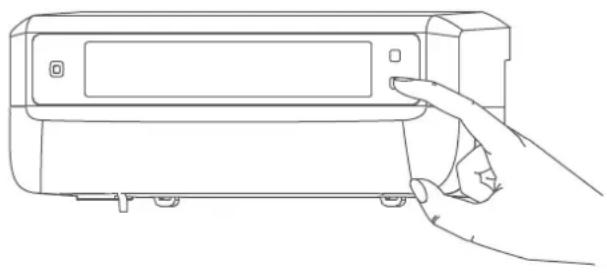
- Use the channel button (C) to select the desired channel ( see figure).
- Press the select button (D) until the display (B) shows the open-ended wrench next to the selected channel.
natural_image
Line drawing of a hand inserting a device into a rectangular housing (no text or symbols)Figure 8

If you would like to restart the adjustment run in all heating zo- nes, you can also select all chan- nels with the channel button (press until all channels appear on the display) and press the select button until the open-ended wrench appears on the display next to heating zone "1".
To manually switch on or switch off a heating zone, proceed as follows:
- Use the channel button (C) to select the desired channel ( see figure).
- Briefly press the select button (D) (→see figure).
The heating zone now opens or closes the heating zone's valve for 15 minutes. Afterwards, normal operation will be continued for the heating zone.

If you would like to simultaneously open or close the valves of all heating zones, select all channels and briefly press the select button (D) ( see figure).
10 Delete device connections
To delete the device connections between the floor heating controller and the wall thermostat, proceed as follows:
- Use the channel button (C) of the floor heating controller to select the channel the wall thermostat has been paired with (→see figure).
- Simultaneously press the system button (A) and the channel button of the floor heating controller until the LED (A) lights up green.
- Restore the factory settings of the wall thermostat (for further information, please refer to the User Manual of the wall thermostat).
11 Troubleshooting
11.1 Command not confirmed
If at least one receiver does not confirm a command, the device LED (A) lights up red at the end of the failed transmission process. The reason for the failed transmission may be radio interference, (see „14 General information about radio operation“ on page 40). This may be caused by the following:
- Receiver cannot be reached.
- Receiver is unable to execute the command (load failure, mechanical blockade, etc.).
- Receiver is faulty.
11.2 Duty cycle
The duty cycle is a legally regulated limit of the transmission time of devices in the 868 MHz range. The aim of this regulation is to safeguard the operation of all devices working in the 868 MHz range.
In the 868 MHz frequency range we use, the maximum transmission time of any device is 1% of an hour (i.e. 36 seconds in an hour). Devices must cease transmission when they reach the 1% limit until this time restriction comes to an end. Homematic IP devices are designed and produced with 100% conformity to this regulation.
During normal operation, the duty cycle is not usually reached. However, repeated and radio-intensive pairing processes mean that it may be reached in isolated instances during start-up or initial installation of a system. If the duty cycle is exceeded, this is indicated by three slow flashes of the device LED, and may manifest itself in the device temporarily working incorrectly. The device starts working correctly again after a short period (max. 1 hour).
11.3 Error codes and flashing sequences
11.3.1 LED flashing sequence
| Flashing code Meaning Solution | ||
| Short orange flashes | Radio transmission/at-tempting to transmit/data transmission | Wait until the transmis-sion is completed. |
| 1x long green flash Transmission confirmed | You can continue opera-tion. | |
| 1x long red flash | Transmission failed or duty cycle limit is reached | Please try again (see „11.1 Command not confirmed" on page 37) or (see „11.2 Duty cycle" on page 37). |
| Short orange flashes (every 10 s) | Pairing mode active | Enter the last four digits of the device serial number to confirm (see „7.4 Pair-ing" on page 30). |
| 6x long red flashes Device defective | Please see your app for error message or contact your retailer. | |
| 1x orange and 1 x green lighting | Test display | You can continue once the test display has stopped. |
11.3.2 Error codes on the display
| Flashing code Meaning Solution | ||
 Open-ended wrench flashing at a frequency of 0.5 seconds Open-ended wrench flashing at a frequency of 0.5 seconds | Unable to carry out adjustment run in the heating zone. | Check whether the drive has been correctly installed on the valve and whether the connecting plug has been connected to the corresponding connecting socket. |
| [4D08]Exclamation mark flashing at a frequency of 0.5 seconds | Heating zone in emergency operation. | Carry out radio test, if applicable, reposition wall thermostat, change wall thermostat batteries or replace faulty wall thermostat. |
| [K2H3]Antenna flashing at a frequency of 0.5 seconds | Radio connection to wall thermostat faulty | Reposition wall thermostat or add a repeater (see „11.1 Command not confirmed" on page 37). |
 Exclamation mark and antenna appear on display Exclamation mark and antenna appear on display | Adjustment run completed (no wall thermostat paired with this heating zone) | Pair wall thermostat with heating zone (see „7.4.1 Pairing with a Homematic IP Wall Thermostat" on page 31) or (see „7.4.4 Pairing with the Homematic IP Access Point" on page 32). |
| [HTTC] | Activation of Multi IO Box humidity input | Air the room and switch from cooling to heating mode, if required. |
12 Restoring factory settings

The factory settings of the device can be restored. If you do this, you will lose all your settings.
To restore the factory settings of the floor heating controller, proceed as follows:
- Press and hold the system button (A) for 4 seconds until the LED (A) starts to quickly flash orange ( see figure).
- Release the system button.
- Press and hold the system button again for 4 seconds, until the LED lights up green.
- Release the system button to conclude the procedure.
The device will perform a restart.
13 Maintenance and cleaning

The device does not require you to carry out any maintenance other than replacing the battery when necessary. Leave any maintenance or repair to a specialist.
Clean the device using a soft, clean, dry and lint-free cloth. You may dampen the cloth a little with lukewarm water to remove more stubborn marks. Do not use any detergents containing solvents, as they could corrode the plastic housing and label.
14 General information about radio operation
Radio transmission is performed on a non-exclusive transmission path, which means that there is a possibility of interference occurring. Interference can also be caused by switching operations, electrical motors or defective electrical devices.

The transmission range within buildings can differ significantly from that available in open space. Besides the transmitting power and the reception characteristics of the receiver, environmental factors such as humidity in the vicinity play an important role, as do on-site structural/screening conditions.
eQ-3 AG, Maiburger Strasse 29, 26789 Leer, Germany, hereby declares that the radio equipment type Homematic IP HmlP-FALMOT-C12 is compliant with Directive 2014/53/EU. The full text of the EU declaration of conformity is available at the following internet address: www.homematic-ip.com
15 Disposal
Instructions for disposal

This symbol means that the device must not be disposed of as household waste, general waste, or in a yellow bin or a yellow bag.
For the protection of health and the environment, you must take the product and all electronic parts included in the scope of delivery to a municipal collection point for old electrical and electronic equipment to ensure their correct disposal. Distributors of electrical and electronic equipment must also take back obsolete equipment free of charge.
By disposing of it separately, you are making a valuable contribution to the reuse, recycling and other methods of recovery of old devices.
Please also remember that you, the end user, are responsible for deleting personal data on any old electrical and electronic equipment before disposing of it.
Information about conformity

The CE mark is a free trademark that is intended exclusively for the authorities and does not imply any assurance of properties.

For technical support, please contact your retailer.
16 Technical specifications
Device short description: HmIP-FALMOT-C12
Construction of the
regulation and control device: independently mounted electronic
regulation and control device, surface mount
Number of heating zones: 12
Supply voltage
Connecting socket (F): 230 V/50 Hz
Connecting socket (H): 24 VDC/SELV
Current consumption
Connecting socket (F): 0.500 A max.
Connecting socket (H): 0.375 A max.
Cable type and cross-section
Connecting socket (H): Rigid and flexible cable, 0.12 – 0.5 mm ^4
Terminal connection cable cross-section (K): > 8.0 mm
Terminal connection cable cross-section (L): > 5.5 mm
Terminal connection cable cross-section (M): > 3.6 mm
Terminal connection cable cross-section (N): > 4.4 mm
Protection rating: IP20
Protection class: II @ 230 V / III @ 24 V
Ambient temperature: 0 to 50°C
Method of operation: Type 1
Withstand voltage: 2,500 V
Pollution degree: 2
Temperature glow wire test: 850°C
Temperature ball pressure test: 125°C
PTI value of housing: IIIb with 100 < CTI < 175
Dimensions (W x H x D): 242 x 85 x 52 mm
Weight: 440 g
Radio frequency band: 868.0 - 868.60 MHz
869.4 - 869.65 MHz
Max. radio transmission power: 10 dBm
Receiver category: SRD category 2
Typical range in open space: 320 m
Software class: Class A
Subject to modifications.
Table des matières
natural_image
Diagram of a device with blue arrows indicating rotation or movement, no text or symbols presentFigure 4
natural_image
Line drawing of a printer front panel with a blue arrow indicating compression or disassembly (no text or symbols)Figure 5
natural_image
Line drawing of a hand pressing down on a device panel (no text or symbols)Figure 6

natural_image
Line drawing of a hand inserting a device into a rectangular device (no text or symbols)Figure 7
natural_image
Line drawing of a hand inserting a device into a rectangular housing (no text or symbols)Figure 8

natural_image
Diagram of a device with blue arrows indicating rotation or movement, no text or symbols presentFigura 4
natural_image
Line drawing of a printer front panel with a blue arrow indicating compression or disassembly (no text or symbols present)Figura 5
natural_image
Line drawing of a hand pressing down on a device panel (no text or symbols)Figura 6

natural_image
Line drawing of a hand inserting a device into a rectangular device (no text or symbols)Figura 7
natural_image
Line drawing of a hand inserting a device into a rectangular device (no text or symbols)Figura 8

text_image
A B C D E F G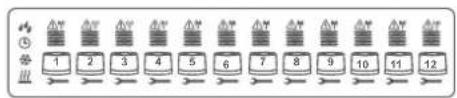
text_image
1 2 3 4 5 6 7 8 9 10 11 12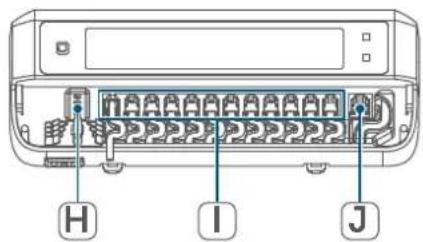
text_image
H I JFigura 1
Vista d'insieme del display:
natural_image
Diagram of a device with blue arrows indicating rotation or movement, no text or symbols presentFigura 4
natural_image
Line drawing of a printer front panel with a blue arrow indicating compression or disassembly (no text or symbols present)Figura 5
natural_image
Line drawing of a hand pressing down on a device panel (no text or symbols)Figura 6

natural_image
Line drawing of a hand inserting a device into a rectangular device (no text or symbols)Figura 7
natural_image
Line drawing of a hand holding a device with a button, no text or symbols presentFigura 8

natural_image
Diagram of a device with blue arrows indicating rotation or movement, no text or symbols presentAfbeelding 4
natural_image
Line drawing of a printer front panel with a blue arrow pointing to the bottom panel (no text or symbols present)Afbeelding 5
natural_image
Line drawing of a hand pressing down on a device panel (no text or symbols)Afbeelding 6

natural_image
Line drawing of a hand inserting a device into a device casing (no text or symbols)Afbeelding 7
natural_image
Line drawing of a hand inserting a device into a housing (no text or symbols)Afbeelding 8

Free download of the Homematic IPapp!

text_image
Blue QR code image, scannable for digital content retrieval
Download on the
App Store

text_image
Blue QR code image, scannable for digital content retrieval
GET IT ON
Google Play
Bevollmächtigter des Herstellers: Manufacturer's authorised representative

eQ-3 AG
Maiburger Straße 29
26789 Leer / GERMANY
www.eQ-3.de